
Your AI Agent Already Knows What It Is Doing. Streaming Is How You Let the User Watch.
A non-streaming agent's silent pause is a UX failure, not a quirk. Streaming output is a three-check pattern that turns the wait into live narration, and streaming input is a one-time architectural decision you make before you ship.
A non-streaming agent has one deeply awkward moment: the wait. Turning the Claude Agent SDK's silent pause into a live, narrated terminal UI takes about thirty lines, once you know which events to listen for.
In this article: You will learn how to make a Claude Agent SDK agent feel alive instead of frozen. We cover the two very different things "streaming" means, the one option that switches on streaming output, the exact event sequence a turn produces, a thirty-line terminal UI that narrates an agent live, the two settings that silently kill streaming, and the one-time architectural choice between single-message and streaming input mode. By the end, the silent pause is gone.
A non-streaming agent has one deeply awkward moment: the wait. You send the prompt, the agent loop churns through reading files and running tests, and your user stares at a still cursor for fifteen seconds wondering if anything is happening at all. Did it crash? Is it stuck? Should they kill it and try again?
Here is the frustrating part. The agent knows exactly what it is doing the whole time. It is reading auth.py, it is running pytest, it is forming a hypothesis about the bug. It just is not telling anyone. All of that work happens behind a closed door, and your user is standing outside it, guessing.
If you have been reading complete messages after each turn finishes, that approach is fine for a script that nobody watches. It is a bad experience for a person. This article flips the model from "wait for the whole result" to "show the work as it happens," using streaming output in the Claude Agent SDK. Then it covers the other half of real-time interaction, streaming input, where you keep a session open and feed the agent messages over time instead of firing one prompt and walking away. By the end you will have a small terminal UI that narrates an agent live: text as Claude generates it, and a status line every time a tool fires.
Two different streams, do not confuse them
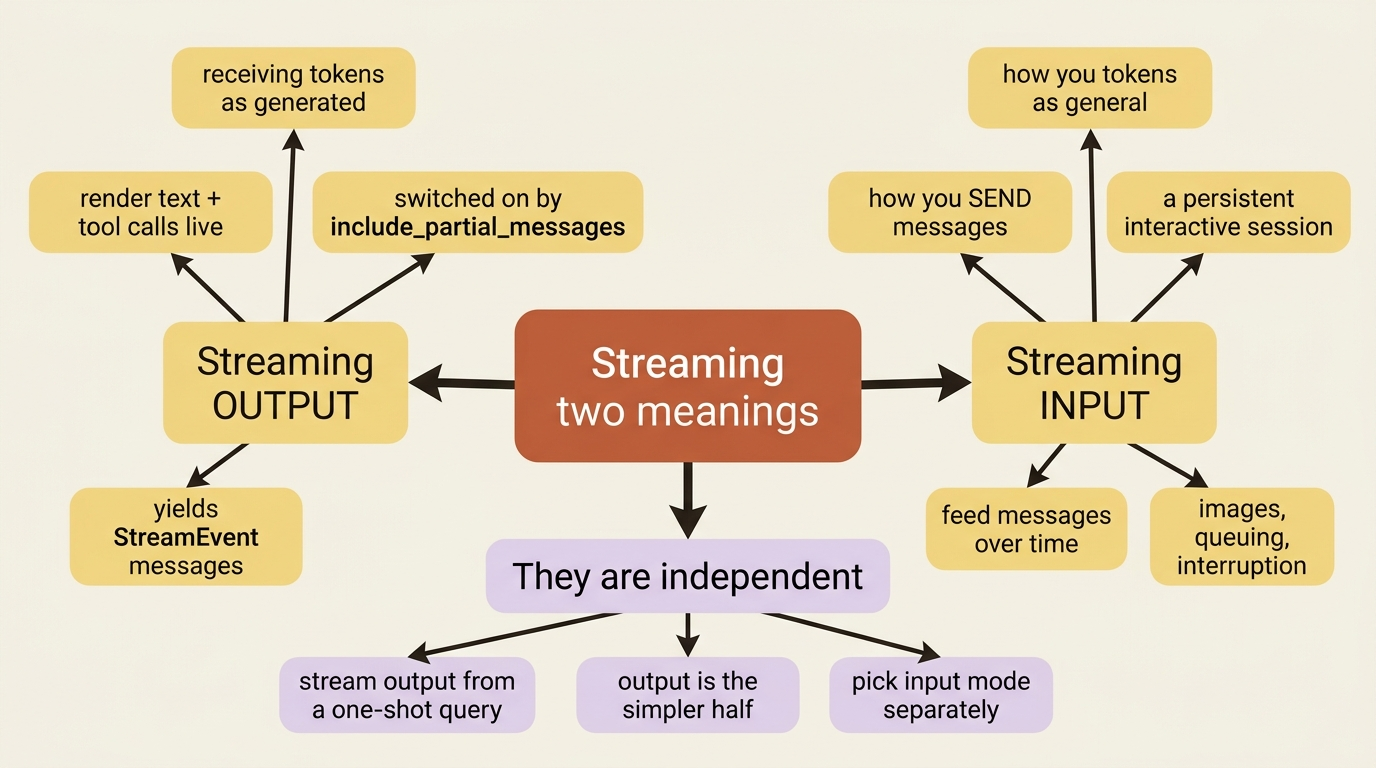
The word "streaming" gets overloaded the moment you open the SDK docs, so pin the two meanings down before any code touches the page.
Streaming output is about receiving tokens as they are generated. Instead of waiting for a turn to complete and handing you a finished block of text, the SDK gives you the text in fragments as Claude produces it, so you can render Claude's reasoning and tool calls in real time.
Streaming input is about how you send messages. Instead of firing one prompt and reading one result, you keep a persistent, interactive session alive and feed it new messages, images, or interruptions over time.
The two are independent. You can stream output from a one-shot query without ever touching streaming input, and this article does exactly that first, because it is the simpler half. Get output streaming working, then decide separately whether your application needs a persistent session.
Turning on streaming output
By default the SDK hands you a complete AssistantMessage once Claude finishes generating each response. One option changes that. Set include_partial_messages in Python, or includePartialMessages in TypeScript, and the SDK starts additionally yielding StreamEvent messages that carry raw API events as they arrive, alongside the usual complete messages.
That word "raw" is the catch, and it is worth slowing down on. A StreamEvent does not hand you tidy, pre-accumulated text. It wraps a raw Claude API streaming event, and the work of picking out the pieces you care about is yours. So before you write a line of UI code, you need the shape of what is coming down the wire.
The event sequence, in order
When streaming is on, a single turn does not arrive as one message. It arrives as a sequence of fine-grained events. Roughly, you see a message_start, then for each chunk of content a content_block_start, a run of content_block_delta events, and a content_block_stop, then a message_delta and a message_stop. After all of that, you still get the complete AssistantMessage you would have gotten without streaming, then the tool executes, then the next turn's events begin, and finally the ResultMessage closes the run.
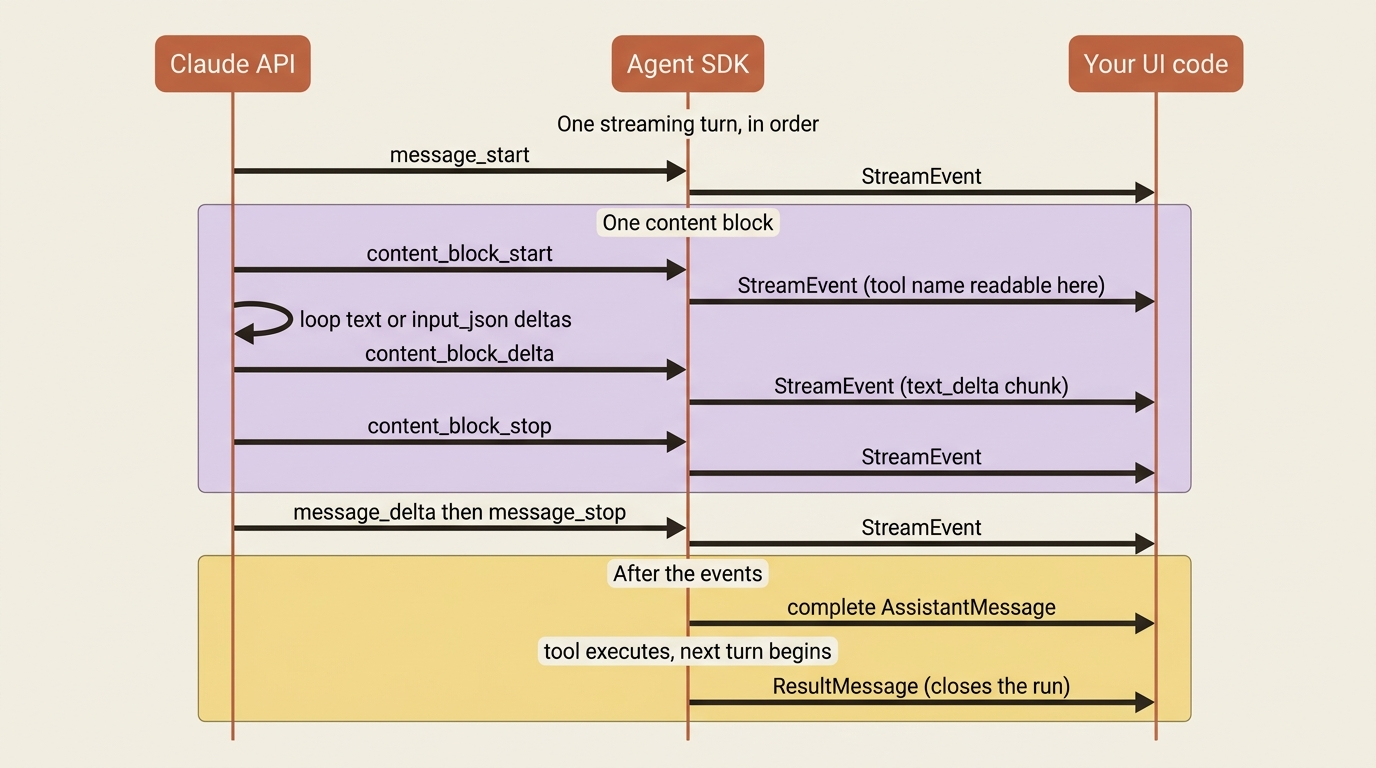
That looks like a lot of event types, but you only reach for two of them when you build a UI:
content_block_start: a new block began. If its block is atool_use, this is your cue that a tool is about to run, and you can read the tool's name right here.content_block_delta: an incremental update. When itsdelta.typeistext_delta, the delta carries a chunk of Claude's text. When it isinput_json_delta, it carries a chunk of a tool's input arguments streaming in piece by piece.
Everything else, including message_start, the stops, and message_delta, is scaffolding you can usually ignore. Knowing the full sequence still helps when you debug, but for a working UI, two event types do the job.
Streaming text, the minimal version
Start with the smallest thing that proves the concept: print Claude's text as it is typed. The pattern is three nested checks. Is this message a StreamEvent? Is its event a content_block_delta? Is the delta a text_delta? If yes to all three, print the chunk.
from claude_agent_sdk import query, ClaudeAgentOptions
from claude_agent_sdk.types import StreamEvent
import asyncio


async def stream_response():
    options = ClaudeAgentOptions(
        include_partial_messages=True,
        allowed_tools=["Bash", "Read"],
    )

    async for message in query(prompt="List the files in buggy-shop", options=options):
        if isinstance(message, StreamEvent):
            event = message.event
            if event.get("type") == "content_block_delta":
                delta = event.get("delta", {})
                if delta.get("type") == "text_delta":
                    print(delta.get("text", ""), end="", flush=True)


asyncio.run(stream_response())
import { query } from "@anthropic-ai/claude-agent-sdk";

for await (const message of query({
  prompt: "List the files in buggy-shop",
  options: {
    includePartialMessages: true,
    allowedTools: ["Bash", "Read"],
  },
})) {
  if (message.type === "stream_event") {
    const event = message.event;
    if (event.type === "content_block_delta") {
      if (event.delta.type === "text_delta") {
        process.stdout.write(event.delta.text);
      }
    }
  }
}
One detail carries the whole effect. The end="", flush=True in Python and process.stdout.write in TypeScript both write without a trailing newline and push to the terminal immediately. Without flush, the runtime buffers your output and dumps it all at once when the buffer fills, which defeats the entire point. With it, the text appears character by character. That is the whole illusion of "live."
Building a real terminal UI
Printing raw text is the demo. A usable interface has to do one more thing: tell the user when the agent stops talking and starts doing. A ten-second Bash run that prints nothing looks exactly like a hang. If your UI goes quiet during tool calls, you have rebuilt the silent pause in miniature.
So track one piece of state, whether you are currently inside a tool call, and use the block events to switch between two modes: "narrate text" and "show a tool status line."
The logic is small. When a content_block_start announces a tool_use block, print a status indicator like [Using Read...] and flip an in_tool flag on. While that flag is on, suppress text deltas, because the only deltas arriving belong to the tool's input arguments, not to anything the user needs to read. When content_block_stop fires and you were in a tool, print "done" and flip the flag back off. Text streams normally whenever you are not in a tool.
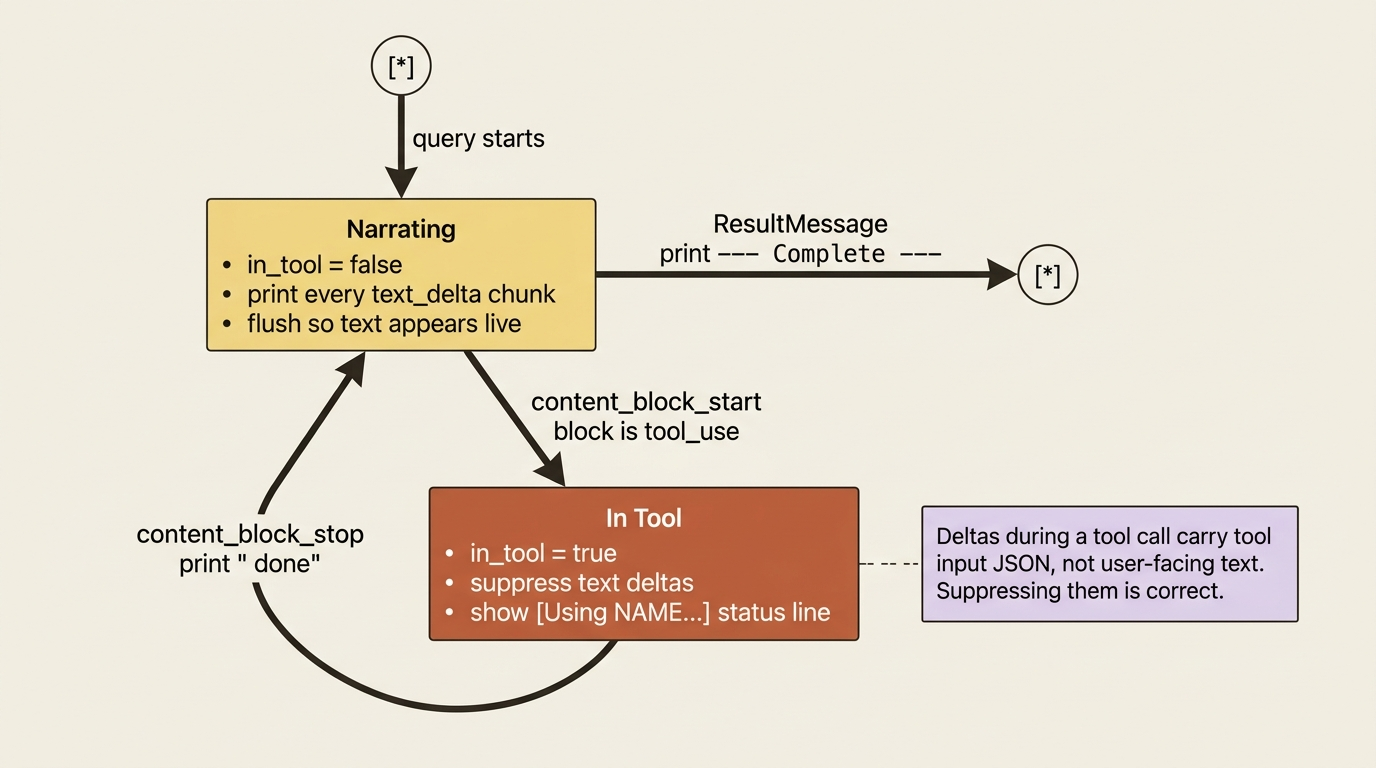
Here is the whole thing in both languages.
from claude_agent_sdk import query, ClaudeAgentOptions, ResultMessage
from claude_agent_sdk.types import StreamEvent
import asyncio
import sys


async def streaming_ui():
    options = ClaudeAgentOptions(
        include_partial_messages=True,
        allowed_tools=["Read", "Bash", "Grep"],
    )

    in_tool = False  # are we currently inside a tool call?

    async for message in query(
        prompt="Find the failing test in buggy-shop and explain the bug.",
        options=options,
    ):
        if isinstance(message, StreamEvent):
            event = message.event
            event_type = event.get("type")

            if event_type == "content_block_start":
                block = event.get("content_block", {})
                if block.get("type") == "tool_use":
                    print(f"\n[Using {block.get('name')}...]", end="", flush=True)
                    in_tool = True

            elif event_type == "content_block_delta":
                delta = event.get("delta", {})
                if delta.get("type") == "text_delta" and not in_tool:
                    sys.stdout.write(delta.get("text", ""))
                    sys.stdout.flush()

            elif event_type == "content_block_stop":
                if in_tool:
                    print(" done", flush=True)
                    in_tool = False

        elif isinstance(message, ResultMessage):
            print("\n\n--- Complete ---")


asyncio.run(streaming_ui())
import { query } from "@anthropic-ai/claude-agent-sdk";

let inTool = false; // are we currently inside a tool call?

for await (const message of query({
  prompt: "Find the failing test in buggy-shop and explain the bug.",
  options: {
    includePartialMessages: true,
    allowedTools: ["Read", "Bash", "Grep"],
  },
})) {
  if (message.type === "stream_event") {
    const event = message.event;

    if (event.type === "content_block_start") {
      if (event.content_block.type === "tool_use") {
        process.stdout.write(`\n[Using ${event.content_block.name}...]`);
        inTool = true;
      }
    } else if (event.type === "content_block_delta") {
      if (event.delta.type === "text_delta" && !inTool) {
        process.stdout.write(event.delta.text);
      }
    } else if (event.type === "content_block_stop") {
      if (inTool) {
        console.log(" done");
        inTool = false;
      }
    }
  } else if (message.type === "result") {
    console.log("\n\n--- Complete ---");
  }
}
Run that against buggy-shop and you get a live narration. Claude's reasoning streams as text. Each tool call announces itself with [Using Bash...] and closes with done. The run ends on a clean --- Complete --- marker. Thirty-odd lines turned the silent pause into a progress feed, and the only state you had to manage was a single boolean.
Why thinking is off, and what will not stream
Two limitations are worth knowing before you ship a streaming UI, because both produce the same confusing symptom: streaming silently stops working, and nothing in your code looks wrong.
Extended thinking is the first. When you explicitly enable thinking, the SDK stops emitting StreamEvent messages, and you only get complete messages after each turn. The saving grace is that thinking is off by default, so streaming works out of the box. You only lose it if you deliberately turn thinking on.
Note that max_thinking_tokens in Python and maxThinkingTokens in TypeScript are the legacy way to enable thinking. The current SDK prefers a structured thinking config, for example thinking={"type": "enabled", "budget_tokens": N}. Either way, turning thinking on disables streaming.
Structured output is the second. When you ask for a typed JSON result, that JSON does not arrive as streaming deltas. It lands only at the end, in ResultMessage.structured_output. This is sensible once you think about it: half-formed JSON streaming in mid-generation is not useful to parse, so the SDK waits for the whole, valid object before handing it to you.
Gotcha: if you enabled thinking somewhere in your options and then noticed "streaming broke," you did not hit a bug. Setting the thinking-token option disables partial messages by design. Drop the thinking option, or accept per-turn complete messages for that run. The two features do not coexist, and the SDK will not warn you.
The other stream: keeping a session open
Everything above streamed output from a one-shot query. Now consider the input side, because the SDK has two input modes, and the distinction quietly shapes what kind of application you can build.
Single message input is the one-shot query() call. You hand it a prompt, it runs the agent loop, you read the result. It is perfect for stateless environments like a Lambda function or a CI job, and it is the simplest thing that works. But it deliberately does not support direct image attachments, queuing messages dynamically, real-time interruption, or hook integration.
Streaming input mode is the persistent, interactive session, and it is the SDK's recommended default for rich applications. Instead of one prompt, you provide an async generator that yields messages over time. The agent runs as a long-lived process: it takes input, handles interruptions, surfaces permission requests, and keeps file-system and conversation state alive across messages. This is the mode that unlocks attaching an image to a follow-up, queuing several messages that process in sequence, and interrupting a run mid-flight.
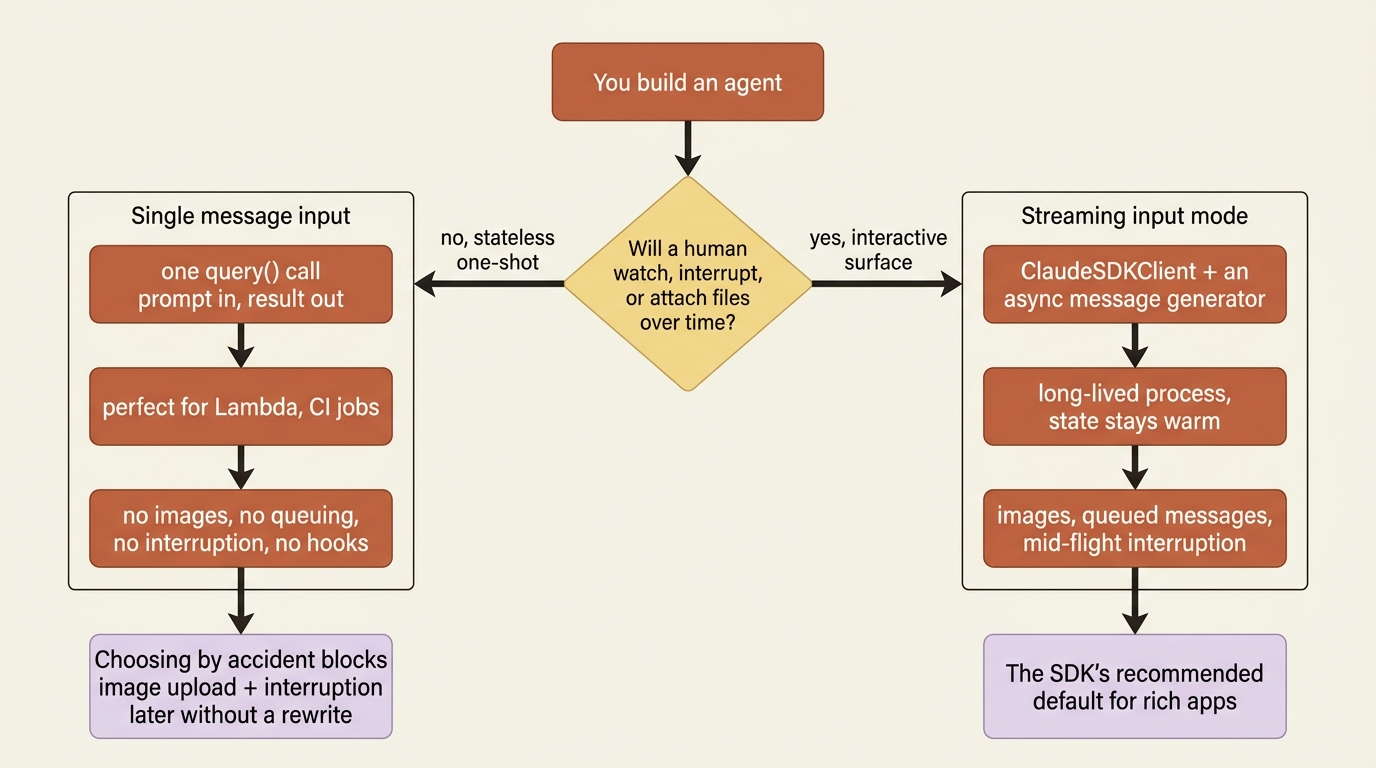
In Python you reach for ClaudeSDKClient and pass it your message generator. The shape looks like this:
from claude_agent_sdk import ClaudeSDKClient, ClaudeAgentOptions, AssistantMessage, TextBlock
import asyncio


async def interactive_session():
    async def message_generator():
        # First message: kick off the work
        yield {
            "type": "user",
            "message": {"role": "user", "content": "Audit buggy-shop for crash bugs."},
        }
        # Later messages can depend on timing, user input, or earlier results
        await asyncio.sleep(2)
        yield {
            "type": "user",
            "message": {"role": "user", "content": "Now fix the first one you found."},
        }

    options = ClaudeAgentOptions(max_turns=10, allowed_tools=["Read", "Edit", "Grep"])

    async with ClaudeSDKClient(options) as client:
        await client.query(message_generator())
        async for message in client.receive_response():
            if isinstance(message, AssistantMessage):
                for block in message.content:
                    if isinstance(block, TextBlock):
                        print(block.text)


asyncio.run(interactive_session())
This example is shown in Python only. The TypeScript shape is the same idea, an async generator passed as the prompt, and showing it twice would add length without adding understanding. The structure is the thing to take away: a generator that yields user messages whenever you decide to, and a session that stays warm between them. That warmth is what lets the second message say "now fix the first one you found" and have it mean something, because the agent still remembers what it found.
In production: streaming input mode is the right default for any interactive surface, such as a chat UI, a REPL, or an agent a human supervises. Reserve single-message mode for genuinely stateless, one-shot jobs. Choosing input mode by accident is how teams end up unable to add image upload or interruption later without a rewrite. It is a one-time decision, so make it on purpose.
Do this today
- Add
include_partial_messagesto your simplest agent and printtext_deltachunks withflush=True. Three nested checks turn a frozen cursor into live text. - Add the
in_toolboolean and announce every tool call with a[Using <name>...]status line so a silentBashrun never looks like a hang. - Audit your options for a thinking-token setting. If
max_thinking_tokensormaxThinkingTokensis set and streaming is not working, that is the cause, not a bug. - Decide your input mode deliberately. If a human will ever watch, interrupt, or attach an image, choose streaming input mode now, before the architecture hardens around a one-shot
query().
The takeaway
Streaming is the difference between an agent that feels like a black box and one that feels like a colleague working out loud. Output streaming is cheap: three nested type checks and one boolean of state, and the nerve-wracking silent pause becomes a live narration. Input streaming is not a feature you toggle, it is an architectural choice. Pick the persistent session when a human is in the loop, and the one-shot call when nobody is.
The agent always knew what it was doing. It was reading files, running tests, and forming a plan the entire time the cursor sat still. Streaming does not make the agent smarter. It just opens the door so the person waiting outside can finally see the work.
This is Part 3 of "Building with the Claude Agent SDK," a 14-part guide to building production-ready AI agents.