
Six Frontiers of Advanced Claude Code: Where Daily Use Stops Being the Edge
Beyond daily use: six frontiers that turn Claude Code from a tool you use into infrastructure you deploy.
You have learned the routine. Now learn what happens when you stop using Claude Code and start deploying it.
In this article: Most developers learn Claude Code as an interactive chat box and stop there. That covers the daily-use surface completely, and for most people, most days, it is enough. But there is a frontier past it: headless mode for pipelines, structured outputs that other code can trust, the Agent SDK for embedding the engine in your own software, agent teams, plugin distribution, and the away-from-terminal stack. This article is a map of all six, so you know the names and reach for the right one when the work demands it.
There is a moment in learning any powerful tool when the tutorial runs out. You have internalized the daily routine: you plan before you build, you scope permissions, you verify the output. Claude Code feels less like a novelty and more like a part of how you work. And then a problem arrives that the chat box cannot answer, and you realize the tutorial showed you the room, not the building.
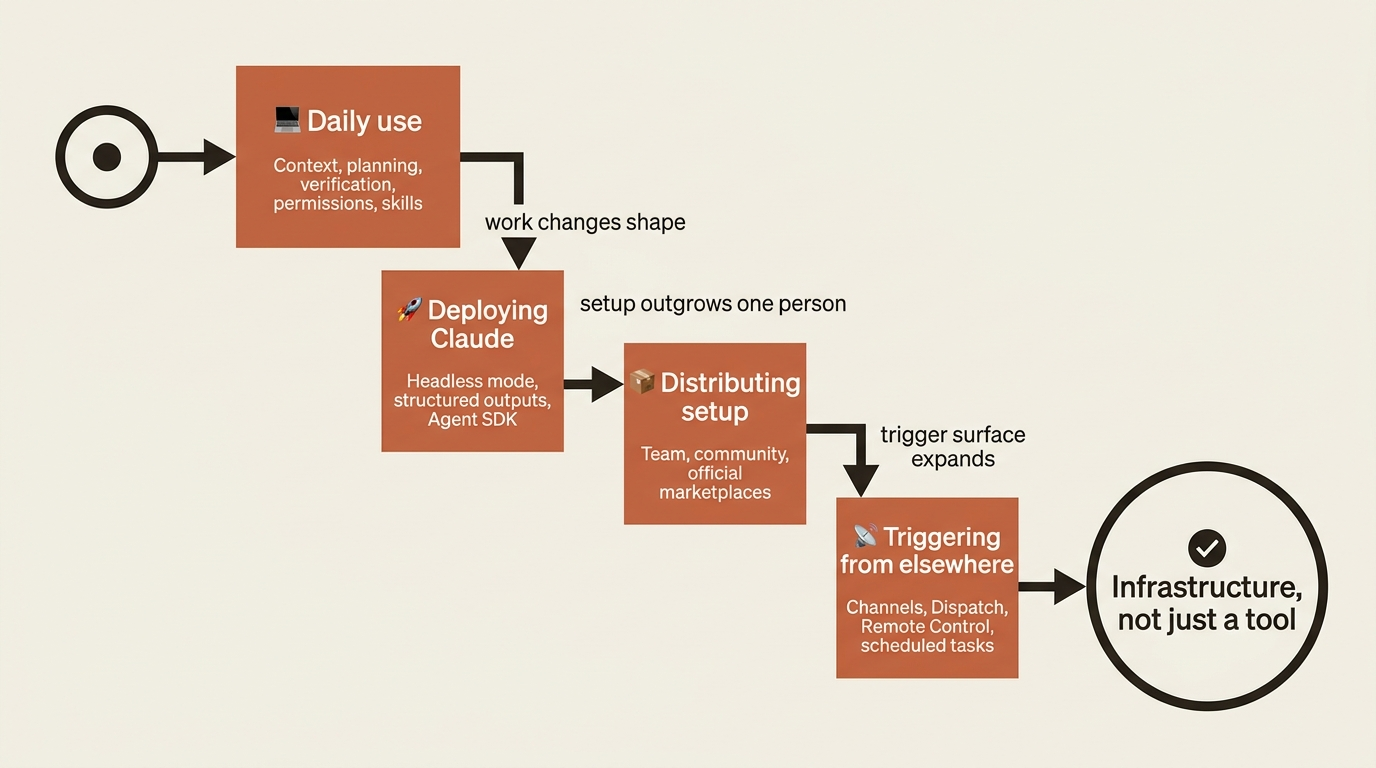
That building is what advanced Claude Code looks like. It is not about working harder inside the interactive session. It is about the six places the work changes shape entirely, where you stop talking to Claude and start wiring it into your stack, your team, and your life away from the keyboard. None of these is a checklist. Most engineers will reach for one or two and never touch the rest. The point is to know the names, because names are what let you search the right docs and recognize the right tool when the moment comes.
What "daily use" actually covers, and where it ends
Before the frontier, the baseline. Daily use of Claude Code rests on a stack of ideas the rest of this series builds carefully: the three-phase agentic loop of gather context, take action, verify; the principle that context is the operating system of an agent; the seven pillars of memory, skills, hooks, MCP, planning, permissions, and verification. Master those and you are an effective daily user. You can plan a feature, scope what Claude is allowed to touch, run it, and check the result.
That is the operating system for a developer who uses Claude Code. The six topics below are about something different. They are about the day you stop being only a user of that operating system and start treating Claude Code as a component you deploy, distribute, and trigger. Here is the shape of that shift.
Frontier 1: Headless mode turns Claude into a Unix tool
The single most important flag in advanced Claude Code is -p.
claude -p "summarize what changed in the last 10 commits"
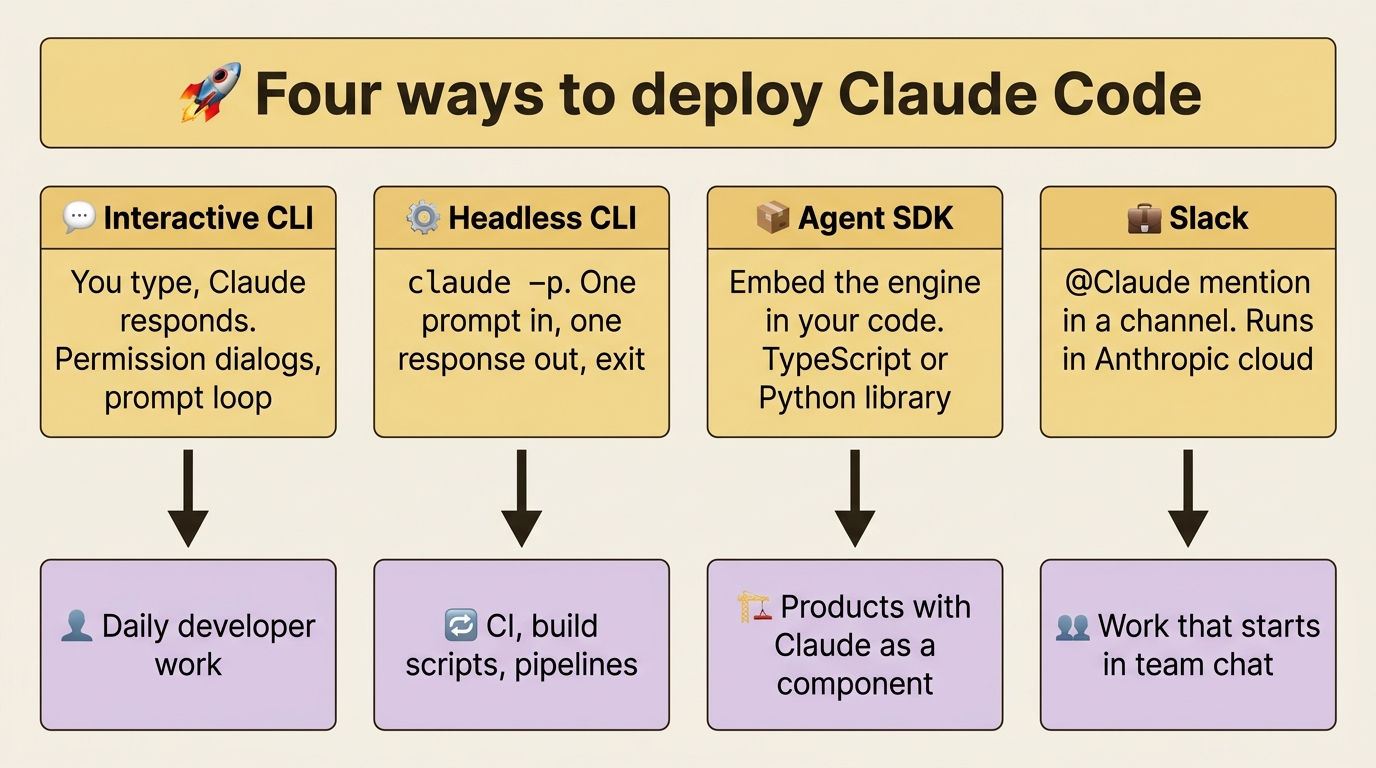
The -p flag runs Claude non-interactively in what is called print mode: one prompt in, one response out, then exit. No session, no permission dialog, no prompt loop. That sounds like a small thing. It is not. It is the difference between a chat box you talk to and a program your other programs can call.
Headless mode is how Claude becomes part of real automation. You can run it inside a GitHub Actions or GitLab CI job that reviews pull requests and generates release notes, wrap it in a package.json script, or build it into a pre-commit hook that lints your commit message before it lands. And because it reads from stdin and writes to stdout, it composes with everything else in your shell:
git diff | claude -p "explain this in plain English" | tee CHANGES.md
The documentation itself illustrates the idea with a "Claude as project linter" pattern. Drop this into package.json and npm run lint:claude becomes part of your build:
{
  "scripts": {
    "lint:claude": "git diff main | claude -p \"you are a typo linter. for each typo in this diff, report filename:line on one line and the issue on the next.\""
  }
}
Two facts matter once you put this in production. First, piped stdin has a 10MB cap as of v2.1.128. Exceed it and Claude Code exits with a clear error, so for larger inputs you write to a file and reference the path in your prompt. Second, and this one bites people, permissions still apply. A headless invocation runs with the same permission rules as your interactive session. If your config says "ask": ["Bash"], the script will hang forever waiting for an approval no human will ever click. The fix is to pre-approve the operations you need in .claude/settings.json, or pass --permission-mode auto (or bypassPermissions for trusted CI environments) on the command line.
Headless mode is the lowest-friction on-ramp to everything else here. Most production uses of Claude Code end up running through claude -p.
Frontier 2: Structured outputs make Claude's answers trustworthy
Headless mode gets Claude into your pipeline. Structured outputs make what comes back something other code can actually rely on.
By default, Claude returns free-form text. A human reads that fine. A program does not. Parsing free-form text means writing fragile string-extraction code that breaks the next time Claude phrases its answer a little differently. The pairing of --output-format json and --json-schema removes that fragility.
--output-format json wraps Claude's response in structured JSON with the result, a session ID, token usage, and metadata. The text lives in the .result field, and jq -r '.result' pulls it out. But the real unlock is --json-schema. You pass a JSON Schema describing the exact shape of data you want, and Claude validates its output against that schema before returning, re-prompting itself when the output does not match.
claude -p "Extract the main function names from auth.py" \
  --output-format json \
  --json-schema '{
    "type":"object",
    "properties":{
      "functions":{"type":"array","items":{"type":"string"}}
    },
    "required":["functions"]
  }'
The validated data arrives in a structured_output field:
{
  "session_id": "...",
  "result": "Found 4 functions",
  "structured_output": {
    "functions": ["login", "logout", "refresh_token", "verify_session"]
  },
  "usage": { ... }
}
Now jq '.structured_output.functions[]' is reliable parsing. No string extraction, no edge cases, no "what if Claude phrases it differently next time." The schema is the contract.
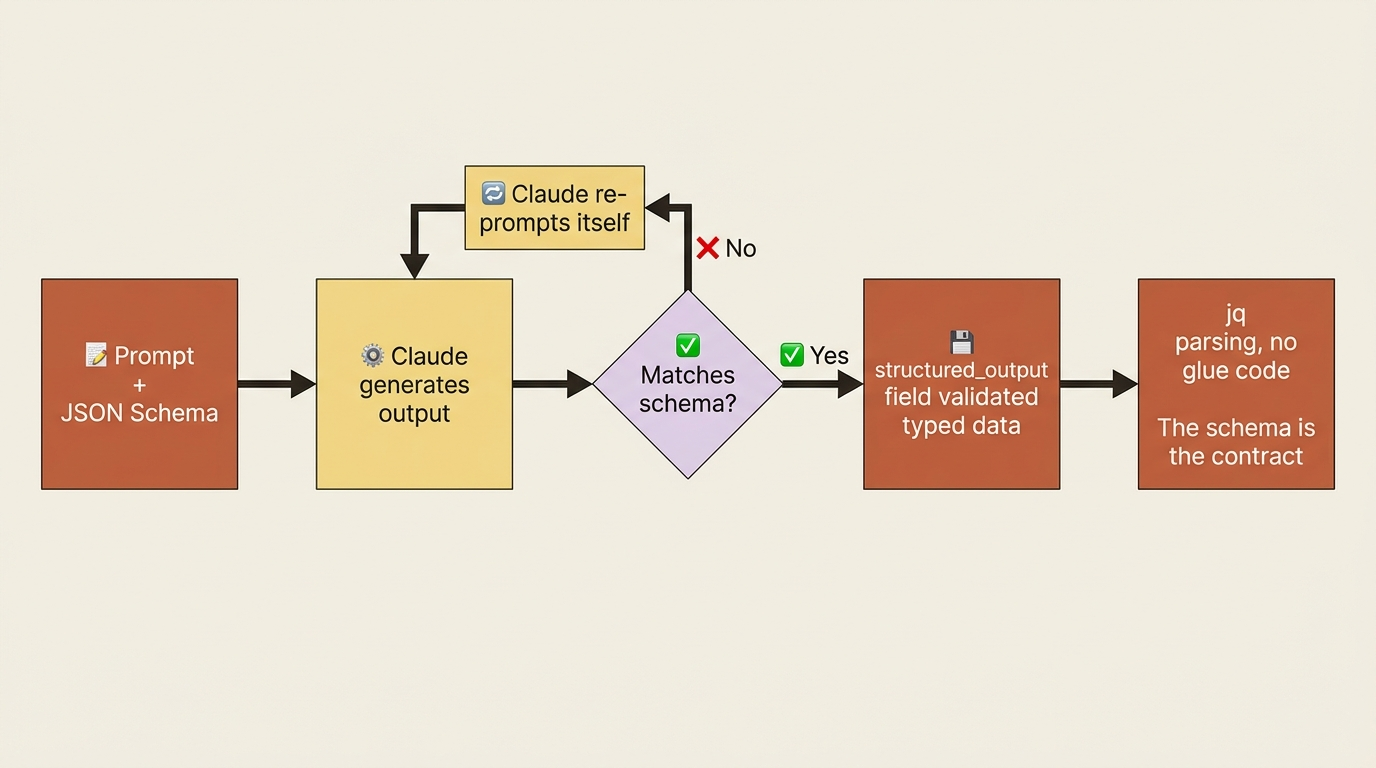
This is the feature that promotes Claude from a helper you talk to into a genuine part of your pipeline. Extract API endpoints from a route file and feed them to OpenAPI doc generation. Categorize support tickets against an enum of allowed labels and pipe the result into a triage system. The pattern is always the same: schema in, validated JSON out, no glue code in between.
Frontier 3: Agent teams for genuinely concurrent work
Some problems are not one task with steps. They are several tasks that benefit from running at once: a code review examined through multiple lenses, a bug chased down by competing hypotheses, a feature that spans several layers of the stack.
Agent teams are the experimental feature for that. Multiple Claude sessions share a single task list and message each other, with one session acting as team lead. You turn it on with an environment variable, CLAUDE_CODE_EXPERIMENTAL_AGENT_TEAMS=1, and it requires Claude Code v2.1.32 or later.
The discipline here matters more than the mechanics. Agent teams are the right move when the problem is genuinely parallel, not when you are simply curious. Reach for them when the shape of the work is concurrent, and not before.
Frontier 4: The Agent SDK embeds the engine in your software
Headless mode and structured outputs let you call Claude Code as a CLI. The Agent SDK lets you embed Claude Code's engine inside your own software.
The SDK is the exact same engine that powers Claude Code, packaged as a library for TypeScript and Python. The tools, the agent loop, the permission system, the hooks, the skills, the MCP support: all of it is programmable. You do not even need the Claude Code CLI installed, because the SDK is self-contained.
A working bug-fixing agent in TypeScript is about fifteen lines:
import { query } from "@anthropic-ai/claude-agent-sdk";

for await (const message of query({
  prompt: "Find and fix the bug in auth.ts",
  options: { allowedTools: ["Read", "Edit", "Bash"] }
})) {
  console.log(message);
}
The Python version is just as short:
import asyncio
from claude_agent_sdk import query, ClaudeAgentOptions

async def main():
    async for message in query(
        prompt="Find and fix the bug in auth.py",
        options=ClaudeAgentOptions(allowed_tools=["Read", "Edit", "Bash"]),
    ):
        print(message)

asyncio.run(main())
What the SDK adds over the CLI is programmatic control. You can implement your own tools alongside the built-ins (Read, Write, Edit, Bash, Glob, Grep, WebSearch, WebFetch, and more). You can intercept permission requests with callbacks and decide tool by tool what is allowed. You can define the same lifecycle hooks as the CLI, but as code instead of shell commands. You can produce type-safe structured outputs with Zod in TypeScript or Pydantic in Python, set budget caps so an agent stops at a spending limit, connect MCP servers, spawn subagents and agent teams, and either reuse the project's .claude/ configuration or override it programmatically.
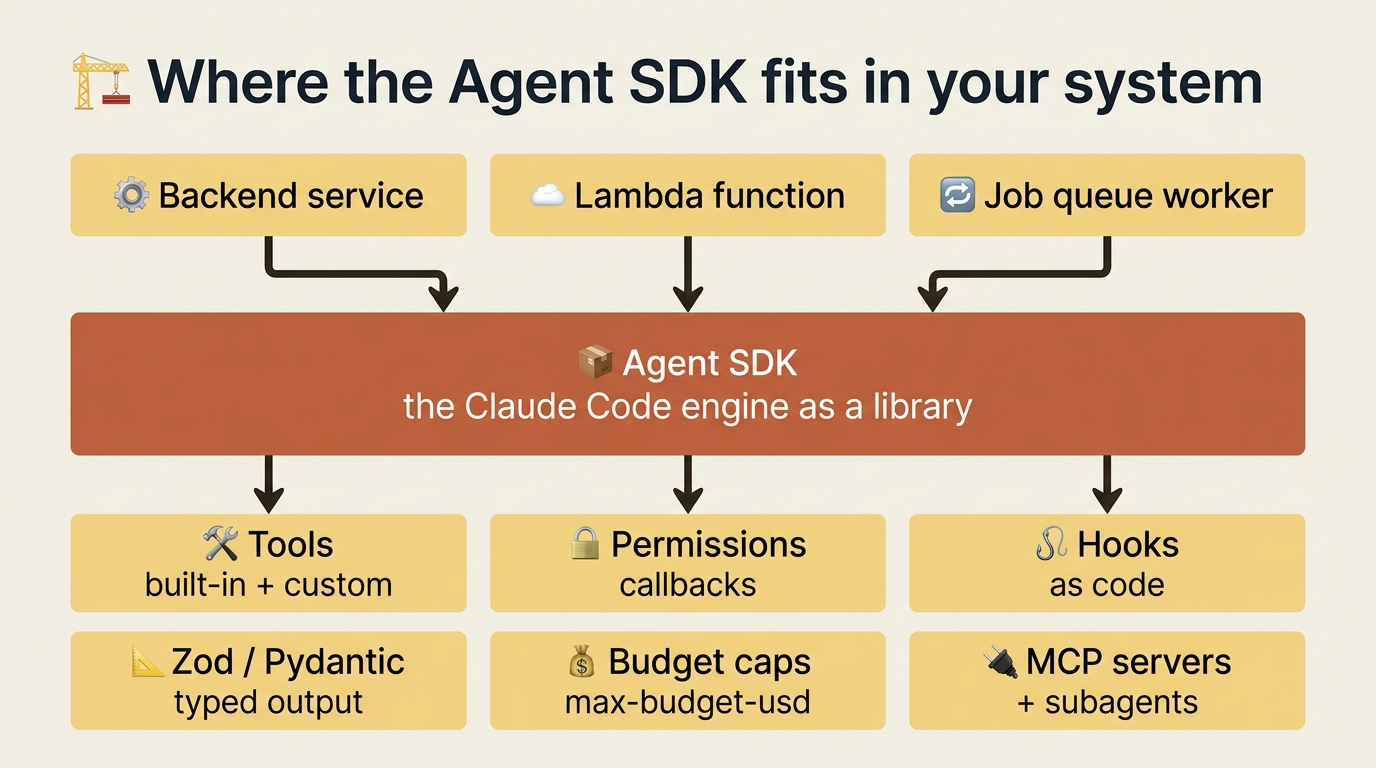
So when do you reach for the SDK instead of the CLI? Three signals. You are building a product that uses Claude as a component, like a customer-support agent or a code-review service inside a SaaS app. You need orchestration that goes beyond what slash commands and skills can express, like branching on tool results or runtime decisions about which subagents to spawn. Or you are integrating with a non-CLI environment, like a backend service, a Lambda function, or a job queue worker.
And when is the CLI enough? When you are a developer using Claude as a tool rather than building a product around it, the CLI plus skills covers everything. When you want a CI integration, headless mode gets you most of the way without the SDK at all.
One footnote worth knowing for production planning: starting June 15, 2026, SDK and claude -p usage on subscription plans draws from a new monthly Agent SDK credit, separate from your interactive usage limits. To start, run npm install @anthropic-ai/claude-agent-sdk or pip install claude-agent-sdk and follow the Agent SDK quickstart.
This is the right place to step back and compare the deployment modes side by side, because they are not competitors so much as different doors into the same engine.
Frontier 5: Distributing your setup across teams
There is a moment when a Claude Code setup stops being a personal configuration and becomes something other people depend on. You build a project-setup plugin that works for your team. Then a second team wants it. Then a third. That is the signal for distribution.
There are three escalating options. A team marketplace hosts a marketplace.json in a separate repository. Teams point at it with /plugin marketplace add company-org/claude-marketplace, and everyone gets the same curated, version-tracked set of plugins. A community marketplace submission is for genuinely shareable work: you submit your plugin to anthropics/claude-plugins-community through the in-app form, Anthropic's automated review handles validation and safety screening, and approved plugins appear in the community catalog. Official marketplace inclusion is curated separately by Anthropic with no application process; if they list your plugin, your CLI can prompt Claude Code users to install it through the plugin hints feature, which is the path for SDK and library authors who want discoverability from inside their own tool.
Most readers will not reach this frontier for a year of serious use, and some never will, because an elite individual setup is plenty. But when you find yourself helping a fourth team configure the same skills and agents you already built, packaging it formally pays back fast.
Frontier 6: The away-from-terminal stack
The last frontier is the most underrated. Everything so far assumed you were sitting in front of a terminal. The away-from-terminal stack is about working when you are not.
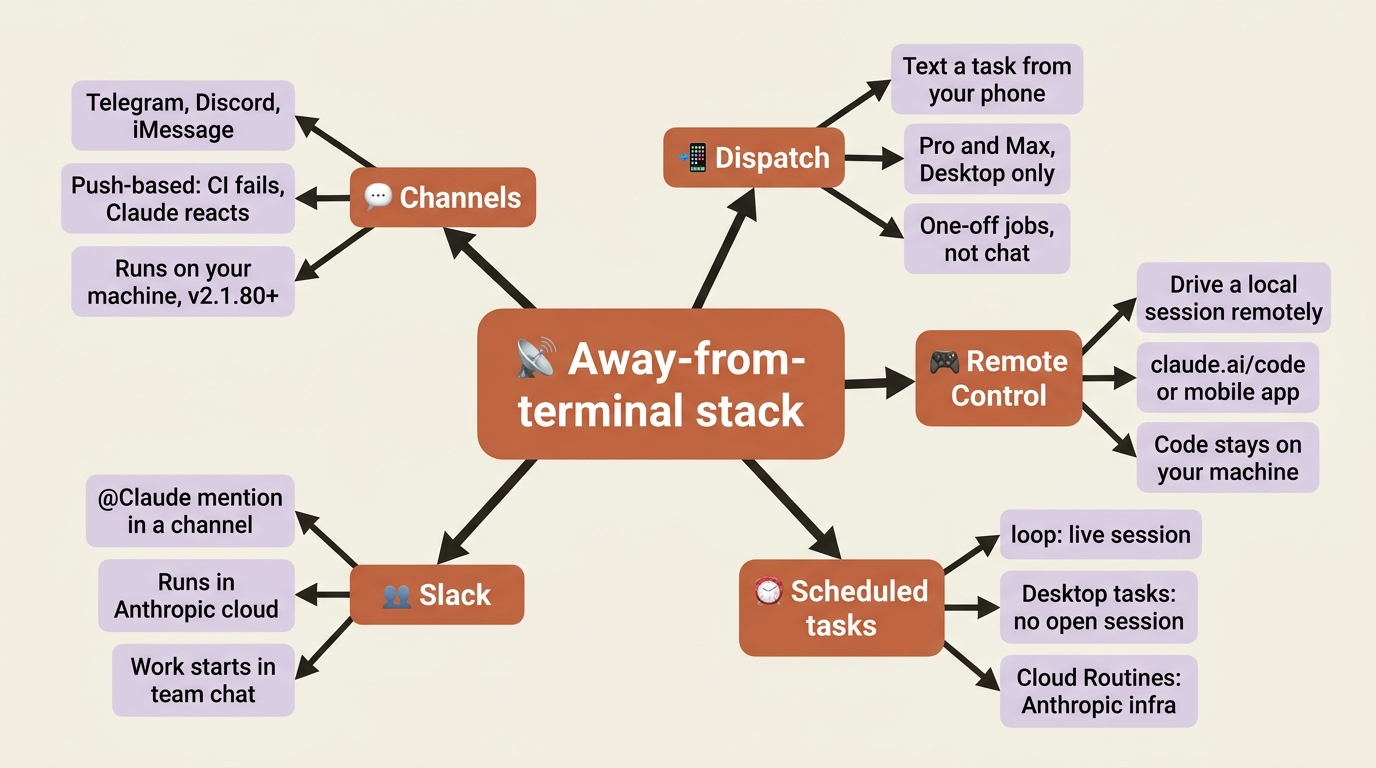
Channels push events from chat apps (Telegram, Discord, iMessage) or your own webhook servers into a running Claude Code session. It is a research preview and requires v2.1.80 or later. The use case is reaction: CI fails and the channel pushes the failure to your session so Claude debugs it; a bug report lands in iMessage and Claude opens a pull request. The work still happens in your local session against your real files.
Dispatch (Pro and Max plans, Desktop only) is the same idea, simpler. You text a task description from your phone, Dispatch spawns a Desktop session on your machine and runs it, and the mobile app shows the result. It suits one-off tasks rather than continuous chat.
Remote Control drives a local session from claude.ai/code or the Claude mobile app. The code never leaves your machine; only the UI is remote. Run claude remote-control once to set it up, then steer an in-progress session from the couch or the train.
Scheduled tasks run Claude on a recurring schedule, with three levels of independence: /loop runs in a live session and needs your terminal open, Desktop scheduled tasks run on your machine without an open session, and Cloud Routines run entirely on Anthropic's infrastructure with no machine of yours involved.
Slack lets your team mention @Claude in a channel; it spawns a web session in Anthropic's cloud and posts the result back, which is the right tool when the work originates in team conversation.
Most readers need exactly one of these. Pick by your real workflow. Want to steer ongoing work from your phone? Remote Control. Want to kick off jobs from chat? Channels for personal use, Slack for the team. Want to send tasks from your phone and have them just happen? Dispatch. Want Claude to do things on a schedule with no one triggering it? Cloud Routines, or /loop for a session-bound version.
Do this today
You do not need all six frontiers. You need to feel one of them and bookmark the rest.
First, run claude -p once inside a real shell pipeline. Pick something small: git log --oneline -10 | claude -p "give me a one-paragraph summary of what happened in these commits". Feel what it is like to use Claude as a Unix tool, because that sensation is the on-ramp to everything else here.
Second, bookmark the Agent SDK quickstart. Even if you never write a line against it, knowing it exists changes how you think about Claude Code. The CLI is the consumer of an engine; the SDK lets you embed that engine. When a use case arrives that does not fit the CLI, you will remember the door is there.
Third, pick exactly one item from this article to investigate properly when the right problem appears. Do not try to learn all six at once. Note which one matched something you have quietly been wishing for, and remember it for the day that wish turns urgent.
The map is the point
Advanced Claude Code is not a harder version of daily use. It is a different relationship with the same tool. Daily use is the operating system: context, planning, verification, permissions, skills, hooks, MCP. The six frontiers are what happens when the work itself changes shape. You stop just using Claude and start deploying it through headless mode, structured outputs, and the Agent SDK. You stop configuring for yourself and start distributing setup to others through plugin marketplaces. You stop sitting in front of Claude and start triggering it from elsewhere through Channels, Dispatch, Remote Control, and scheduled tasks.
Each frontier is a new dimension of leverage, and none is mandatory. You can be a genuinely productive engineer and never leave the interactive session. But these are the moves that turn Claude Code into part of your team's infrastructure, your product's runtime, and your work-from-anywhere setup.
This article gave you the names. Names are what let you search for the right docs, ask the right question, and recognize the right tool when someone else mentions it. The depth comes later, when you need it. For now, knowing the frontier is there is the whole point: you cannot reach for a tool you do not know exists.
This is Part 18 of "Claude Code, Day-to-Day," a 19-part guide to mastering Claude Code for working engineers.