
Claude Is Not Getting Tired. Its Context Window Is Getting Crowded.
Three /context readings on a tiny project prove that Claude's context window fills with every prompt and never empties by itself, and once you can see the window, every Claude Code technique turns out to be a way to manage it.

One command, /context, shows you exactly what Claude can see. Three readings on a small project explain why long sessions go wrong and what every Claude Code technique is really for.
Claude starts ignoring instructions late in the afternoon, and you blame the model. The real cause is something you can read in thirty seconds.
In this article: Day 6 of a day-by-day guide to Claude Code. Start here: read Claude's working memory with
/context, watch one prompt add about 7,000 tokens to it, and empty it again with/clear. Going deeper: the three-phase agentic loop, what loads before you type, and context hygiene as the idea behind almost every Claude Code feature.
Tested on Claude Code 2.1.326.
Yesterday you ran /memory to see which instruction files load, added a rule to Ticket Triage's CLAUDE.md, and checked that Claude followed it.
Start here
At the end of today, you can read Claude's working memory with /context, watch one prompt add to it, and empty it again with /clear.
Starting fresh or fell behind? Run git switch -C main claude-code/day-05. This replaces your main with the end of Day 5; to keep your own work, run git branch my-backup first.
You have used Claude Code for five days. You have watched it read files, edit code, and run tests. Today you look at the one thing that decides how well all of that works: the context window. The context window is Claude's working memory for one session. Your prompts, the files Claude reads, the command output it sees, CLAUDE.md, and Claude's own replies all go into it. Claude sees only what is in the window.
Read the window of a fresh session
Check the starting state, then start a new session in Ticket Triage:
cd ~/code/ticket-triage
git status
npm test
claude
Git prints nothing to commit, working tree clean. The tests show ℹ fail 0 and the pass count you wrote down on Day 5, such as ℹ pass 16. Manual mode: no prompts. Today's steps only read files.
Before you type a prompt, run:
/context
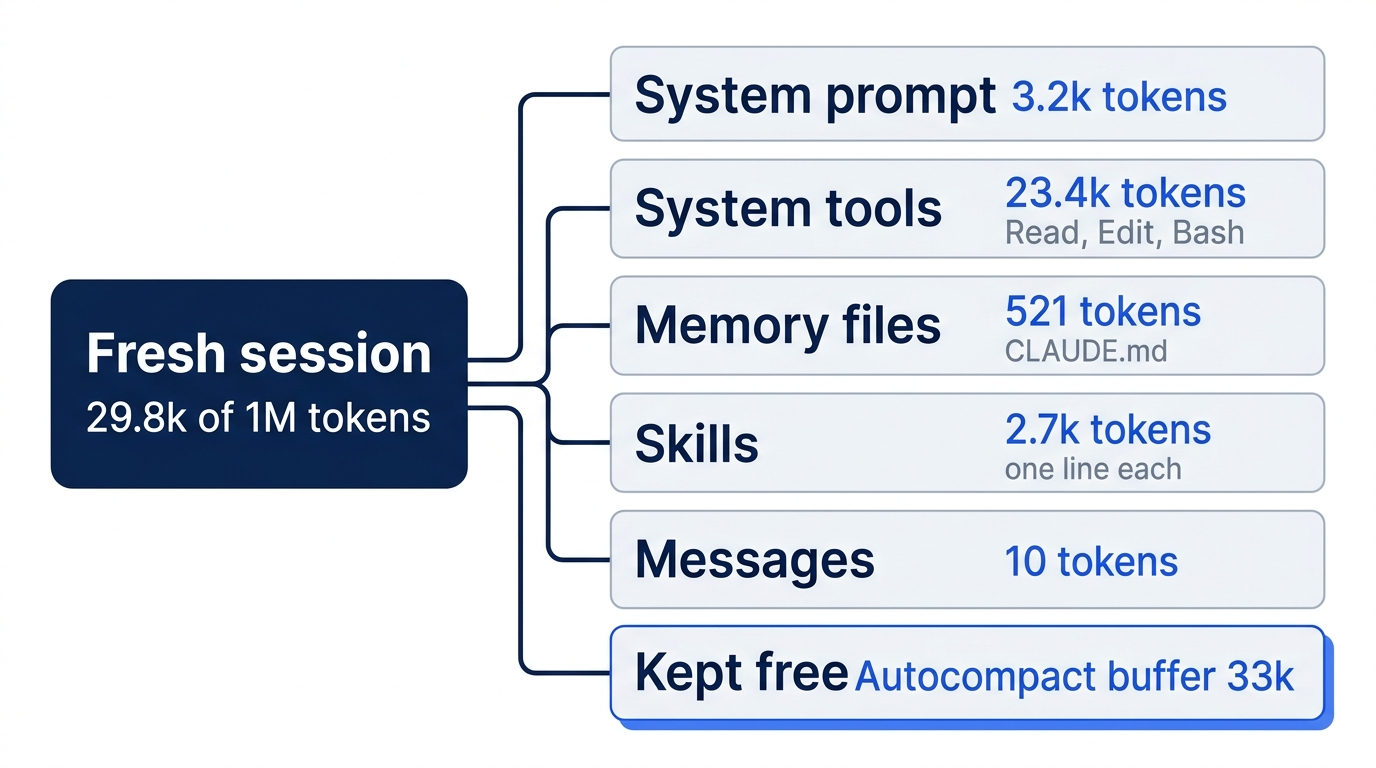
Claude Code draws a grid of small squares, one square for each part of the window, and lists the categories beside it. On a fresh Ticket Triage session, with nothing added to Claude Code since Day 1, Claude Code 2.1.326 showed these lines:
29.8k/1m tokens (3%)
⛁ System prompt: 3.2k tokens (0.3%)
⛁ System tools: 23.4k tokens (2.3%)
⛁ MCP server instructions: 39 tokens (0.0%)
⛁ Memory files: 521 tokens (0.1%)
⛁ Skills: 2.7k tokens (0.3%)
⛁ Messages: 10 tokens (0.0%)
⛶ Free space: 937.2k (93.7%)
⛝ Autocompact buffer: 33k tokens (3.3%)
The counts are in tokens, the unit of text from Day 1, about three quarters of an English word. Read the list from the top:
- 29.8k/1m tokens. The session uses about 29,800 tokens of a window of 1 million. Your numbers will differ, because your Claude Code version, your files, and your personal setup differ. A much higher total is fine. Today's check is the Messages line.
- System prompt is Anthropic's standing instructions to Claude. You never see it.
- System tools are the descriptions of the tools Claude can call, such as Read, Edit, and Bash.
- MCP server instructions is a small built-in entry. MCP (Model Context Protocol) is a standard way to connect Claude Code to other programs. You have not connected any, so ignore this line today.
- Memory files are the instruction files that
/memorylisted yesterday. For Ticket Triage, that is CLAUDE.md. Claude Code loads them at the start of every session. - Skills are reusable instructions that Claude can load for a kind of task. Claude Code includes some. Only a one-line description of each loads now.
- Messages is the conversation: your prompts, Claude's replies, and every tool result. In a fresh session it is almost empty.
- Free space is what is left.
- Autocompact buffer is space that Claude Code keeps free. When the conversation grows into it, Claude Code summarizes older messages to make room.
Write down two numbers: the total (29.8k here) and Messages (10 here).
Watch one prompt fill the window
Now give Claude a task that reads files:
Read src/classify.js and test/classify.test.js. In three sentences, explain
how classify() picks a category.
Claude reads both files and answers. Your terminal shows only a short line about the reads, such as "Read 1 file (ctrl+o to expand)". The count in that line can be lower than the number of files Claude read. The (ctrl+o to expand) hint means that ctrl+o shows each read. Claude received every line of the files.
Run /context again:
/context
On the tested session, Messages and the total grew, and Free space shrank by the same amount:
37.7k/1m tokens (4%)
⛁ Messages: 7.2k tokens (0.7%)
⛶ Free space: 929.3k (92.9%)
One small prompt added about 7,000 tokens. Almost all of it is the two files and Claude's work with them, not your prompt. Ticket Triage is tiny, and a real project has much bigger files.
Empty the window
Everything in Messages stays there until you remove it. Type:
/clear
/clear starts a fresh conversation in the same folder. CLAUDE.md and skills load again, and the conversation is gone. Run /context a third time. Messages is back near zero, and the total is back near the first reading. On the tested session, Messages was 130 tokens and the total was 29.9k.
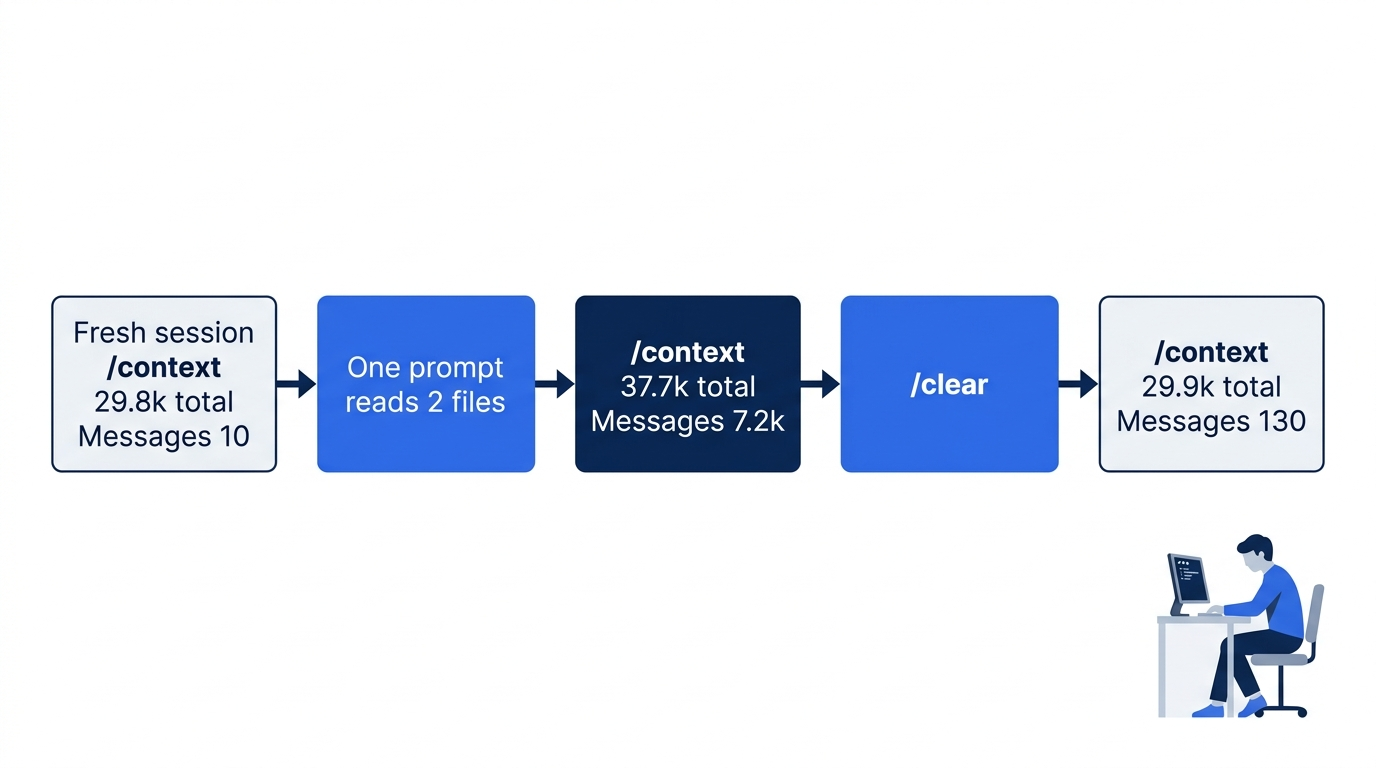
The whole lesson fits in three numbers: about 29.8k at the start, about 37.7k after one prompt, and about 29.9k after /clear. A second run, in a session that started in Manual mode, gave 29.9k, 38k, and 30.1k. The window fills with every prompt, and it does not empty by itself.
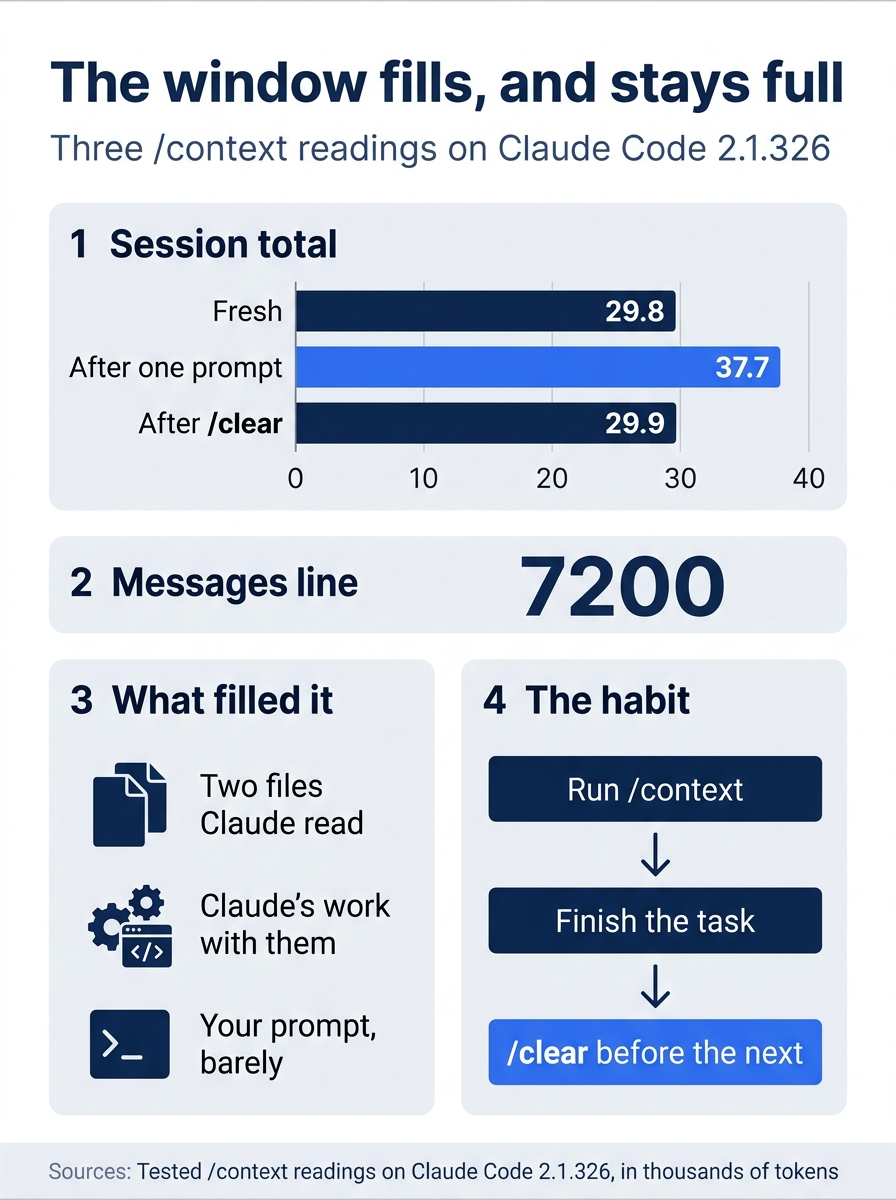
One file-reading prompt raised the total from 29.8k to 37.7k, almost all of it file contents and Claude's work, and only /clear brought it back to 29.9k.
Why it matters
Claude works best when the window holds what today's task needs and little else. A session that runs all afternoon fills Messages with files that no longer matter, searches for ideas you dropped, and errors you already fixed. None of it is wrong. It is in the way. Claude gives the important instructions less attention as the window fills. This crowding is the reason for the rule in today's title: context is the operating system. When Claude starts to ignore an instruction or repeat a mistake, run /context first.
Two habits follow from today:
- Start each new task with
/clear. Finish one task, then clear before the next. - Run
/contextwhen something feels wrong. The list shows the cause more often than not: a huge file, a long conversation, or a CLAUDE.md that grew too long.
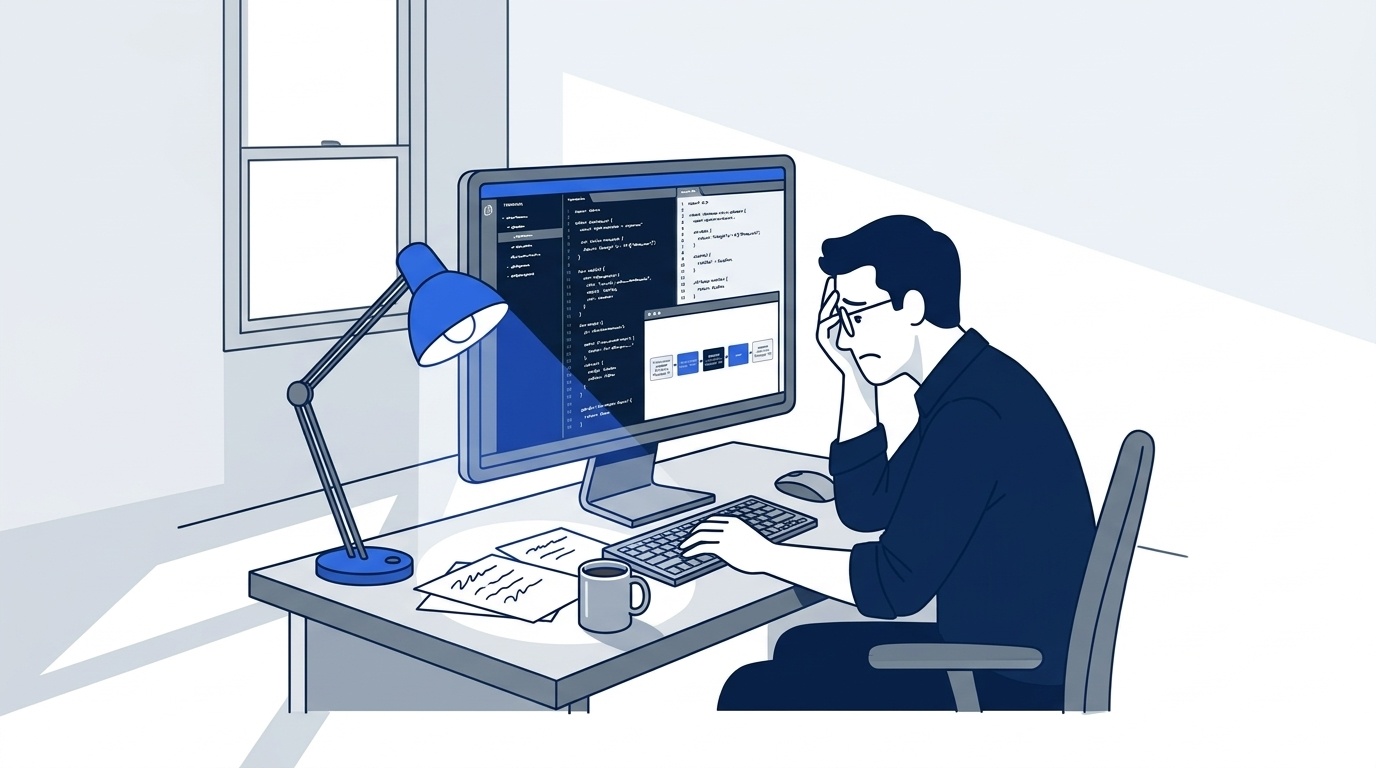
The scene is the moment the habit pays off. Instead of rewording the prompt or blaming the model, the developer reads the window, and the three readings on the monitor show why the answer is usually /clear.
You read Claude's working memory three times and saw one prompt fill it and /clear empty it.
You can stop here. Going deeper explains why this works and where it breaks.
Going deeper
This section is for readers who want the model behind today's numbers: what Claude Code is, the loop it runs, and every technique in this guide seen as context management. It assumes you finished Start here in Parts 1 to 6.
What Claude Code actually is
Start by dropping two wrong pictures.
It is not "smarter autocomplete." Autocomplete suggests the next token. Claude Code reasons about your codebase, decides on a plan, and carries it out across many files with a real terminal. It is a different kind of tool, not a better autocomplete.
It is not "a chat interface with tools." A chat interface is a loop of questions and answers. Claude Code answers too, but between answers it acts. It runs commands, reads files, edits code, and runs tests. The chat picture makes you treat Claude as a search engine that gives advice. The real picture is closer to an engineer next to you who keeps reaching for tools and reporting what they find.
Anthropic calls Claude Code an agentic harness. The model, Claude, does the reasoning. The harness, Claude Code, is everything around it: the tools, the file access, the context management, the place commands run, and the permission checks. The model can think, and the harness lets it act. Together they form an agent: a system that perceives, decides, and acts in a loop.
The agentic loop
The loop has three phases, repeated until the task is done:
- Gather context. Read files, run searches, check git status, fetch documentation, or call an MCP server (a program that gives Claude extra tools, such as a database or a browser): whatever Claude needs to understand the problem.
- Take action. Edit files, run commands, create files.
- Verify results. Run tests, check the output, read the diff, and confirm that the change did what you wanted.
The phases blend. A bug fix can cycle through all three half a dozen times. A quick question may never leave phase one. A refactor can spend most of its time in phase three, running the tests until they pass. Claude decides each step from what the last step showed.
You are in the loop too. Press Esc to stop Claude. Press Esc twice with an empty prompt box to open the rewind menu. Type a new prompt to change direction. Claude works on its own, but you can take the wheel back at any time.
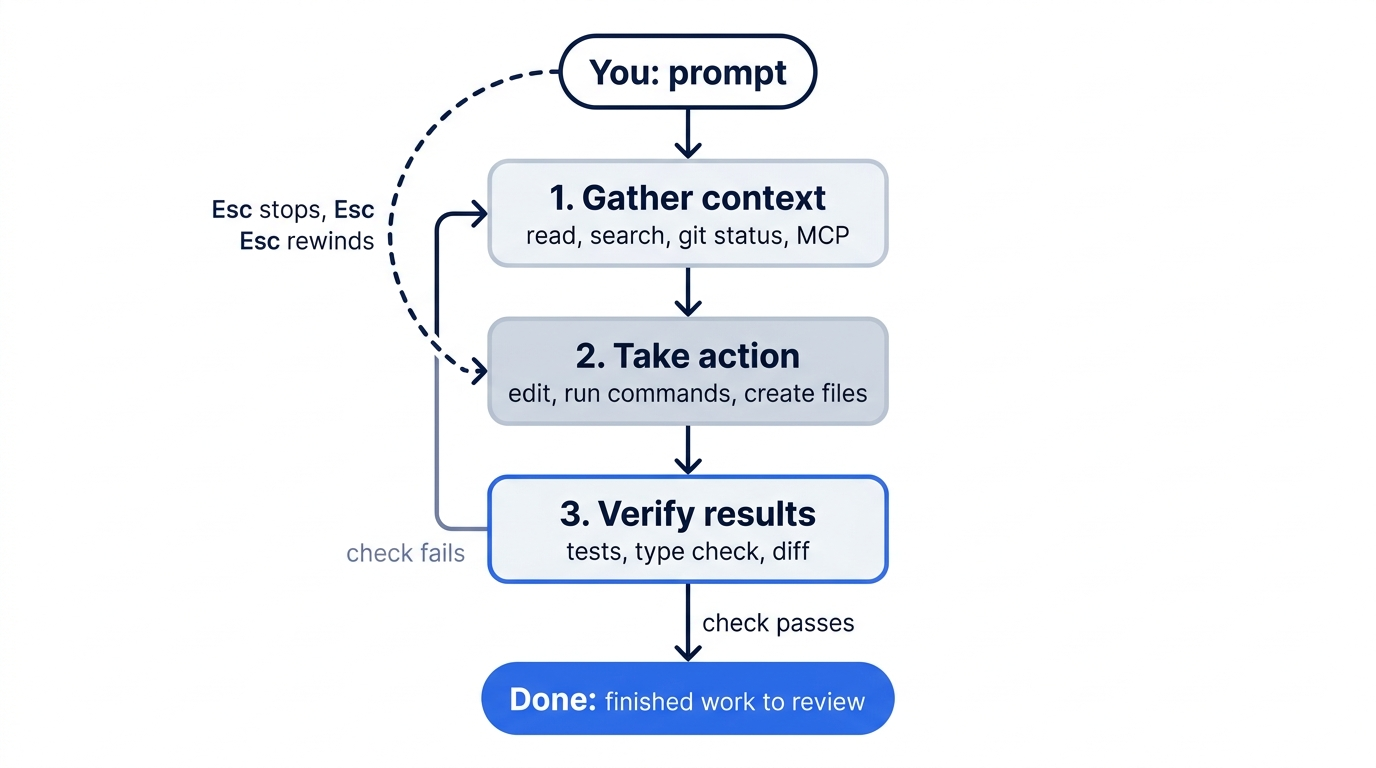
Two things power the loop: models that reason (Opus, Sonnet, Haiku, or Fable) and tools that act. The tools are Read, Edit, Write, Bash, Glob, Grep, WebFetch, and the task-list tools, which are off by default on Opus 5.5. You can add more through MCP servers, skills, and plugins, which are installable bundles of skills, hooks, and MCP servers. The model decides which tool to call. The harness runs it. The result goes into the context window for the next decision.
The third phase matters most
Most people focus on the first two phases. The third decides whether the work is any good.
Without a check, the loop is a gamble. Claude reads files, writes code, and says it is done. You have to read the diff and hope. Sometimes the work is right. Often it only looks right.
With a check, the loop closes on itself. Claude writes code, runs the test, reads the failure, fixes the code, and runs the test again. You review finished work instead of catching every mistake. Anthropic's own teams say it plainly: giving Claude a way to verify its work is the single highest-leverage thing you can do. For this reason, Day 1 taught you to end each change prompt with "then run the tests and tell me if anything broke."
A check can be anything that returns a signal Claude can read:
- Unit tests first. They are the cheapest and most universal check. A handful of tests for the function you change is enough. The bar is "does the change break what used to work," not full coverage.
- A type checker and a linter next:
tsc --noEmit,mypy --strict,ruff,eslint. They catch different mistakes than tests do. Later days wire them into a skill and a hook, so they run on every change. A hook is a command that Claude Code runs on its own at a set point, such as after every edit. - For UI work, a browser MCP server. The Playwright MCP gives Claude a browser it can drive and take screenshots in.
- For data work, a database MCP server, so Claude can run the query that proves a migration worked.
- For services, access to logs, so Claude can confirm the service behaved as intended.
The pattern: Claude needs a tool that returns truth, not opinion. A test passes or fails. A type check succeeds or fails. "Looks good to me" leaves the loop open.
The same check is what makes unattended runs possible. A script can rerun Claude until the check passes. Day 25 builds that loop, and the lesson there is that the retry must show Claude the exact thing the check graded.
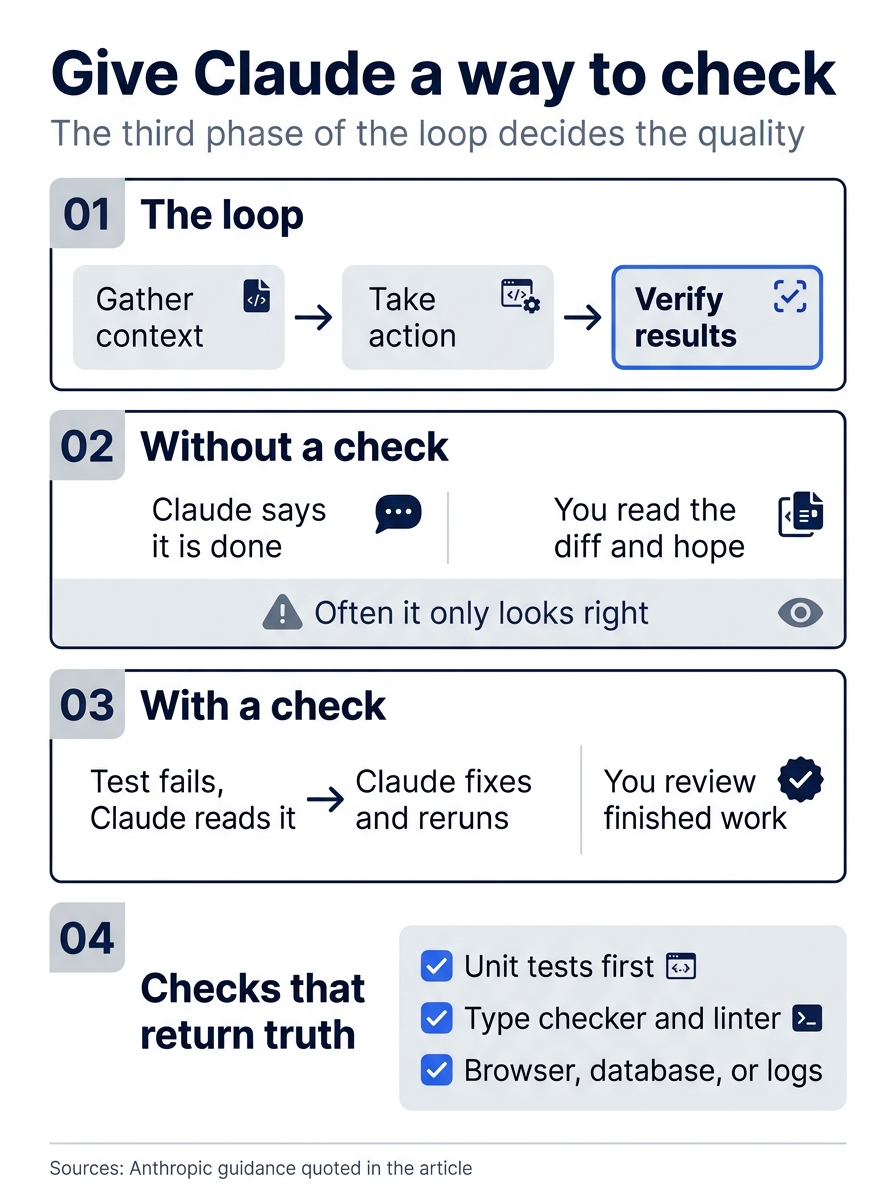
Without a check, "done" means only that Claude stopped; with one, Claude keeps going until a test, type checker, or log says the work is right.
What loads before you type
Your fresh-session list shows what Claude Code loads before the first prompt. The list below comes from Claude Code 2.1.326, in an interactive session started with claude --strict-mcp-config --setting-sources project,local --no-chrome. The three options turn off MCP servers from your config, your personal settings and memory files, and the browser tools, so the reading matches a new user's. The list was:
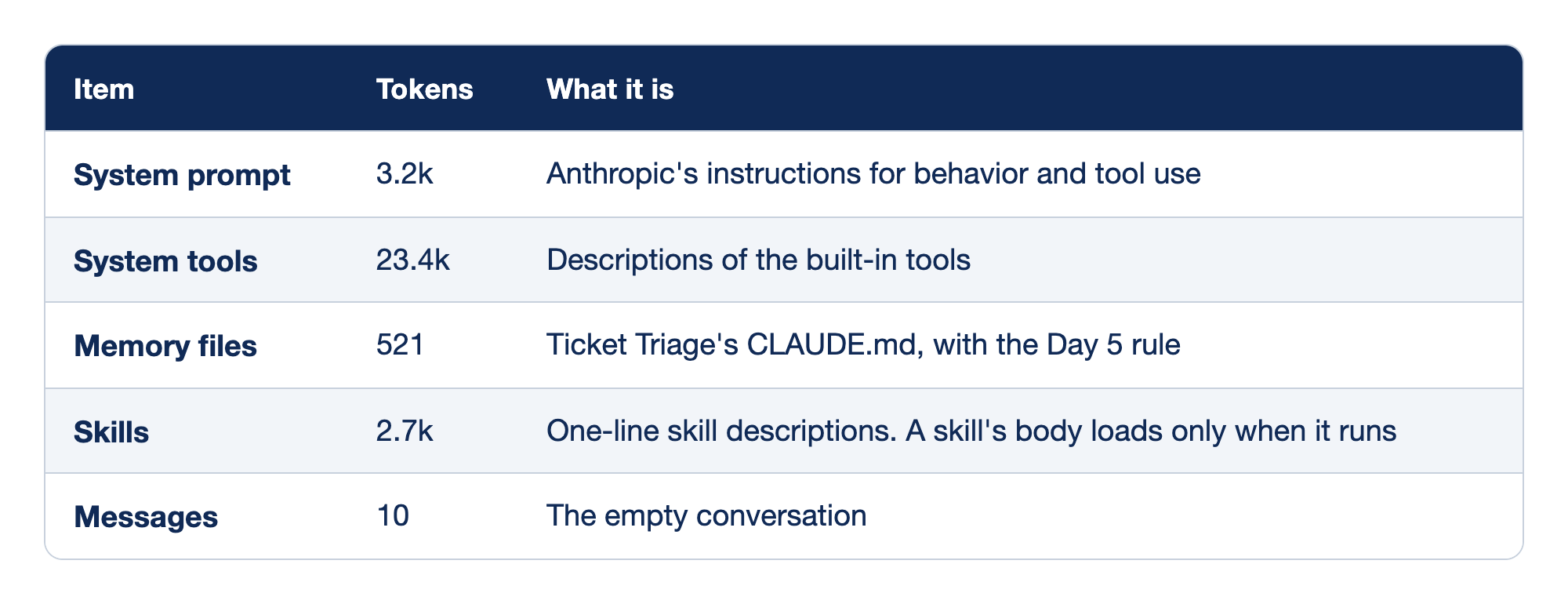
Each startup item in a fresh Ticket Triage session has a token cost and a purpose. The Item column names the /context category, the Tokens column gives its measured size on Claude Code 2.1.326, and the What it is column says what fills that category.
- System prompt costs 3.2k tokens and holds Anthropic's instructions for how Claude behaves and uses tools.
- System tools costs 23.4k tokens, the largest item, and holds the descriptions of the built-in tools.
- Memory files costs 521 tokens and is Ticket Triage's CLAUDE.md, with the Day 5 rule.
- Skills costs 2.7k tokens for one-line skill descriptions. A skill's full body loads only when that skill runs.
- Messages costs 10 tokens because the conversation is still empty.
A headless run (claude -p "/context") loads less. On 2.1.325 it showed a 2.7k system prompt and 8.3k of system tools. It also listed another 14.1k of deferred tools, which load by name only and do not count toward the total. Compare readings from the same kind of session.
Your own setup adds more: MCP servers, plugins, and custom agents (subagents you define). Later days add each of them. On the author's machine, with many of each installed, a fresh session in the same folder started at 51.6k tokens: 11.5k of MCP tool descriptions, 18.7k of custom agent descriptions, and 9.8k of skill descriptions. Plugins and MCP servers are useful, and each one has a cost in every session. Run /context after you install one.
Other things that load at startup, when they exist:
- Auto memory: the first 200 lines or 25 KB of
MEMORY.mdfrom~/.claude/projects/<project>/memory/, notes that Claude keeps for itself across sessions. - Your personal
~/.claude/CLAUDE.md, loaded in every project. - Environment information: the folder, platform, shell, and git status.
How big is the window?
Opus 5.5, Sonnet 5.5, Haiku 5.5, and the Fable models run with a 1 million token window by default, on every plan. Older models differ. Opus 4.6 and Sonnet 4.6 reach 1 million only through their [1m] aliases, and access depends on your plan. On Bedrock, Vertex, and Foundry, the aliases can point to older models with smaller windows. The second line of /context always shows your real window. See model configuration.
A million tokens sounds like enough for anything. It mostly is, until it is not. On a real project, one prompt can read twenty files and add tens of thousands of tokens. A medium source file is about 2,000 tokens. A long search result is 3,000. A search across a service folder can be 10,000. A session that reads fifteen files has used 30,000 tokens before the first edit. A bigger window also invites bigger tasks, so a session that reads fifteen files often goes on to read a hundred and fifty. Claude's performance drops long before the window is full.
What one turn adds on a real project
Ticket Triage added 7.2k tokens for two small files. The list below shows a representative turn on a larger project, when you ask Claude to fix an auth bug. These are illustrative sizes, not measurements:
- Your prompt (about 45 tokens): "Fix the auth bug where users get 401 after token refresh."
- Read
src/api/auth.ts(about 2,400 tokens). You see "Read auth.ts". Claude gets the whole file. - Read
src/lib/tokens.ts(about 1,100 tokens), following imports. - A path rule loads (about 380 tokens): a rule file in
.claude/rules/that applies only tosrc/api/, loaded when Claude reads a file there. - Read
middleware.ts(about 1,800 tokens) andauth.test.ts(about 1,600 tokens). - A hook runs Prettier on the edited file (about 100 tokens of output).
npm testoutput (about 1,200 tokens). You see the pass count. Claude gets every line.- Claude's summary (about 400 tokens).
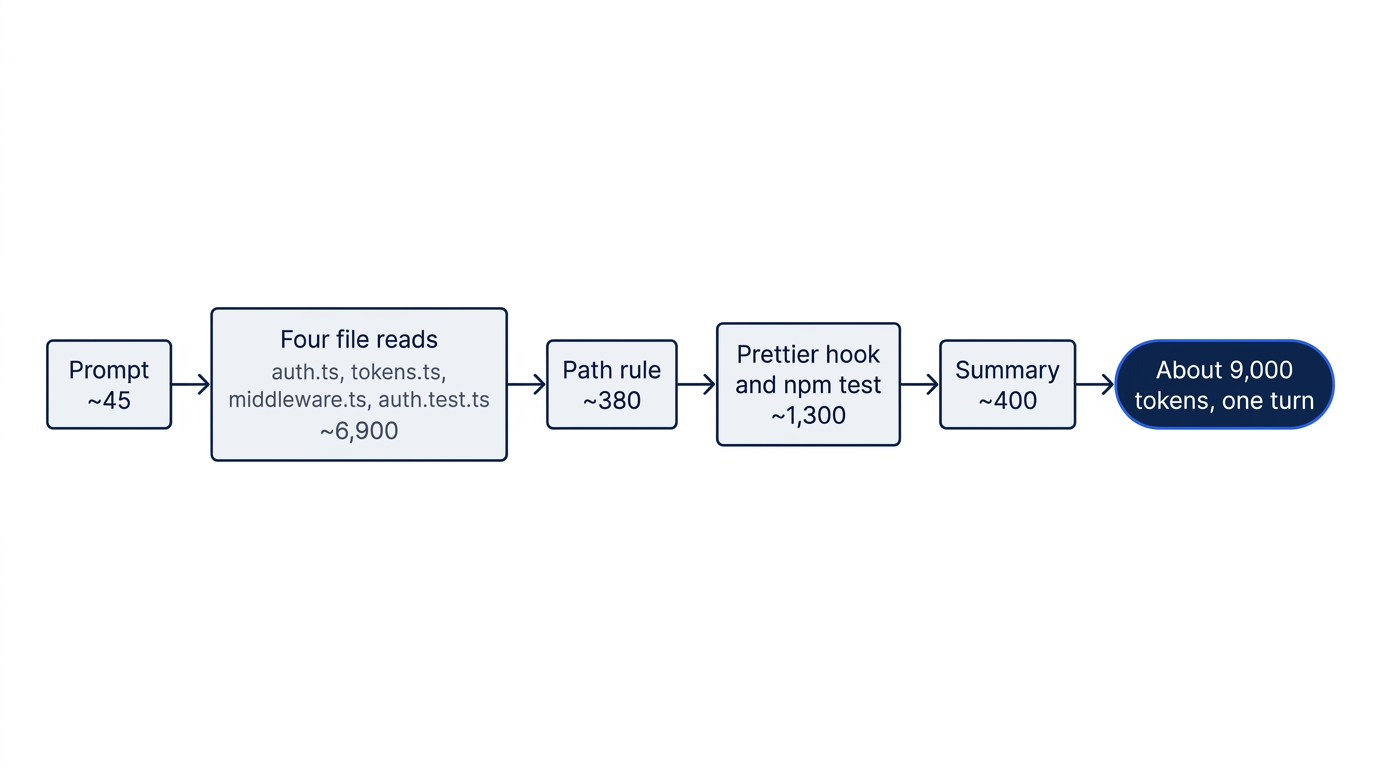
Total: about 9,000 tokens for one turn, and most of it is invisible in your terminal. Over an afternoon, fifty turns like this add up fast.
Where context gets expensive
- Large files. A 3,000-line file is 30,000 tokens or more, and big files come in clusters: read one and you read the three it imports.
- Long search results. A search with 200 matches can be 5,000 to 10,000 tokens, mostly noise.
- Verbose test output. A runner that prints every test name spends many tokens to say "everything passed."
- MCP tool results. A
SELECT *on a real table or a full web page is one call and a lot of context. - Long conversations. A two-hour session pays for every word of every detour.
Look at these first when a session feels slow or Claude forgets earlier instructions.
The diagnostic pair: /context and /memory
/context shows what is in the window. /memory lists the CLAUDE.md files, the rules without paths:, and the auto-memory switch. A path-scoped rule shows as a Loaded line in the conversation instead, as Day 5 described. Together they answer most "why is Claude doing this?" questions. The first time you run /context on a long session, something will surprise you: a hook that prints huge output every turn, a CLAUDE.md that grew to 400 lines, or one early file read that holds 20 percent of the window.
For a visual version of this section, the interactive context-window walkthrough animates the same load order.
Context hygiene is the hidden multiplier
People say long sessions get "tired" or "confused." This picture suggests the wrong fix: wait, restart, or reword the prompt. The real cause is more useful.
The model is not tired. The transcript is crowded. Every file read, command, tool result, and detour stays in context until you remove it. Important instructions from early in the session get less attention. Recent corrections get more weight than the design decision from twenty minutes ago. Conflicts between early and late guidance resolve in ways you cannot predict. The model works as designed on noisy input.
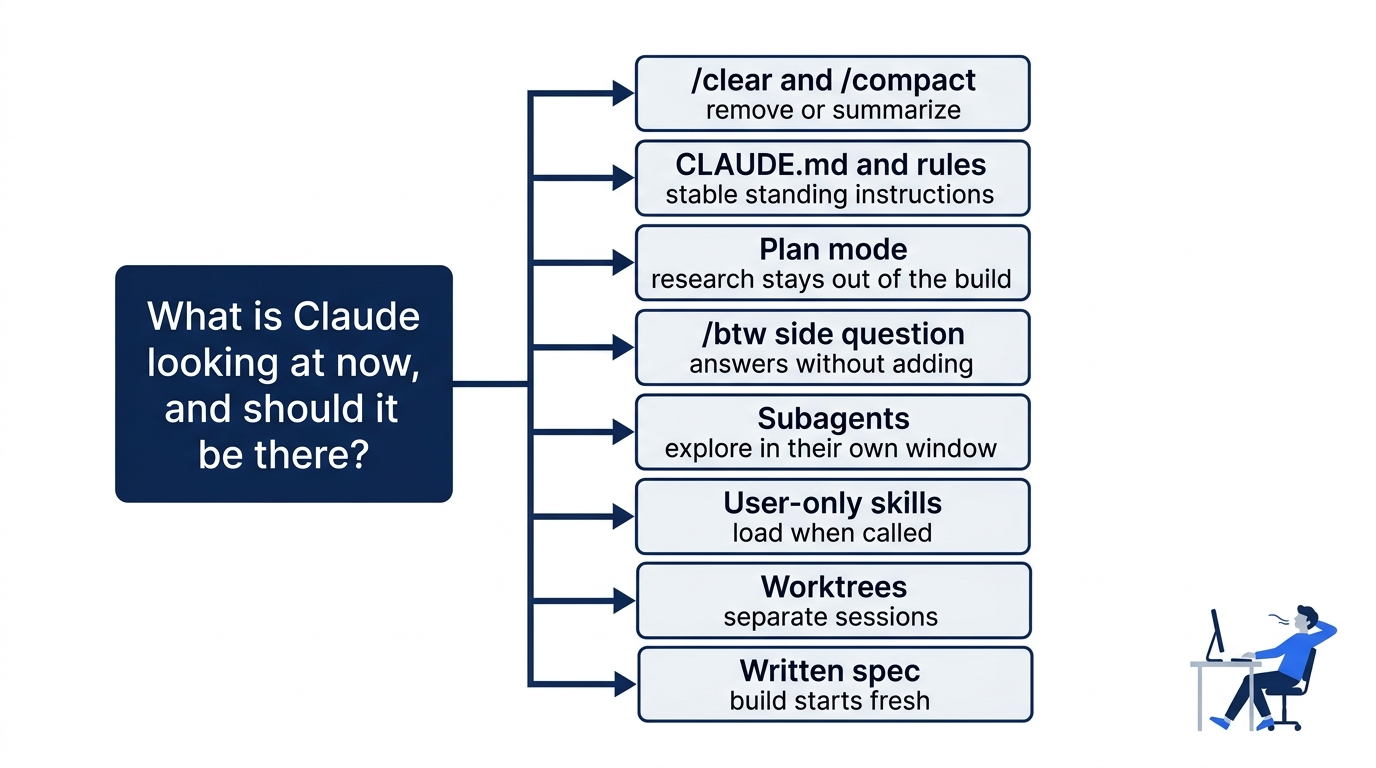
The fix is context hygiene, and almost every technique in this guide is context hygiene under another name:
/clearand/compactmake room by removing or summarizing old content.- CLAUDE.md and rules keep standing instructions in one stable place. Path-scoped rules load only when Claude works in the matching folder.
- Plan mode does research and produces a written plan, so the research does not crowd the session that builds.
- The
/btwside question answers from the current context without adding to it. - Subagents do exploration in their own context window and return a short summary.
- Skills that only you can invoke stay out of context until you call them.
- Worktrees give parallel tasks separate sessions instead of one crowded one.
- A written spec turns a long planning conversation into a file, so the build starts in a fresh session.
These are not eight unrelated features. They are eight answers to one question: what is Claude looking at right now, and is it what should be there? After a while you start to think in that vocabulary. "This prompt will read half the repo: that is a subagent." "This rule applies everywhere: that is CLAUDE.md." "This rule only applies to Python: that is a path-scoped rule." "This must happen on every commit: that is a hook, not a CLAUDE.md line."
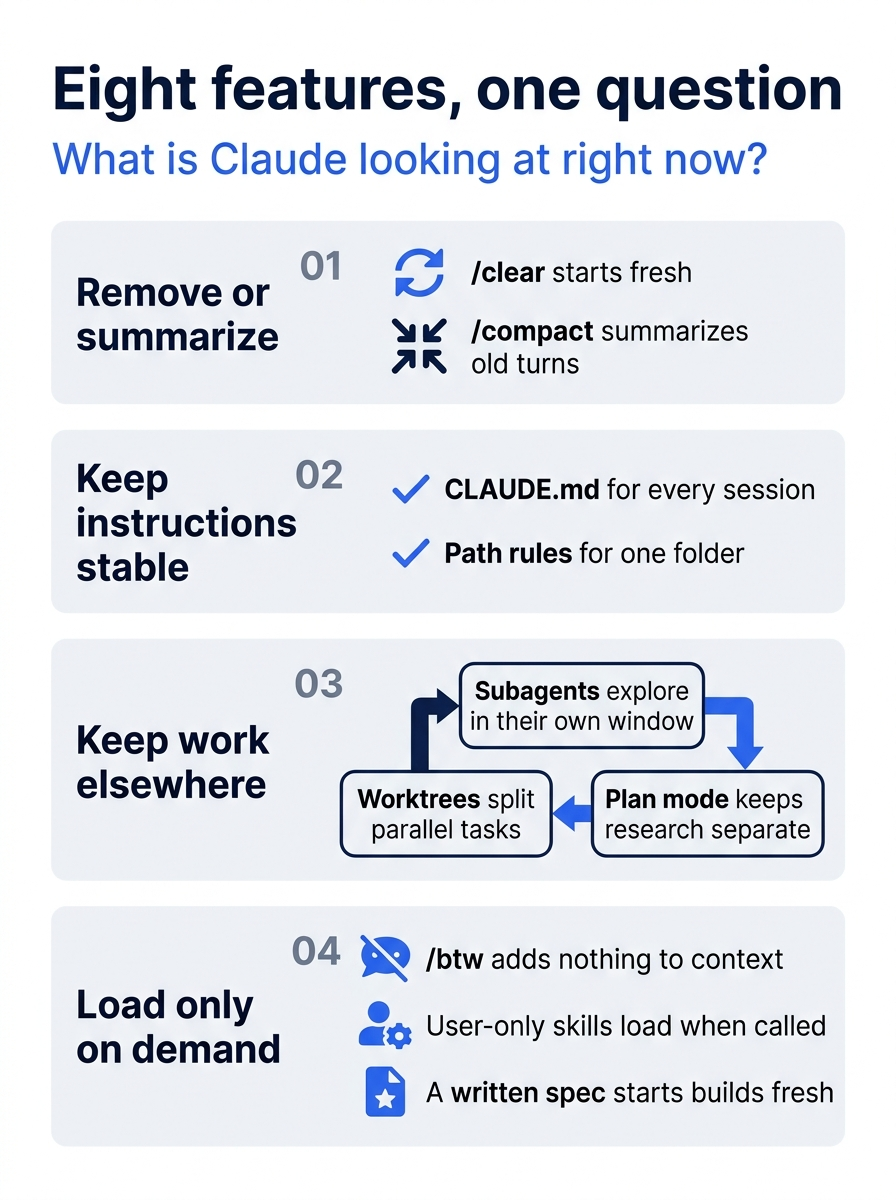
The eight features fall into groups by what they do to the window: remove content, keep instructions stable, move work into another window, or load only on demand.
Go further: Your AI Coding Agent Forgets Things on Purpose. Here Is How to Use That. covers the same mental model with more worked examples of context hygiene.
Do this today
Everyone
- Run
/contextthree times in Ticket Triage: fresh, after the file-reading prompt, and after/clear. Check the win: the Messages line grows after the prompt and drops back after/clear. - Habit: type
/clearbefore every new task.
If you read Going deeper
- Run
/contextin a real project of yours, in your normal setup. Check: you can name the largest category other than Free space and Autocompact buffer, and its token count. Reset: nothing changed. - Open the context-window walkthrough. Check: you can name the item in it that loads before your first prompt and costs the most tokens. Reset: nothing changed.
The desk was just buried in paper
Claude does not get tired over a long afternoon. Its window gets crowded with files, searches, and detours that were useful once and are now in the way. Three readings on a tiny project show it plainly: 29.8k, then 37.7k after one prompt, then 29.9k after /clear.
Once you can see the window, the rest of Claude Code stops looking like a list of commands. Plan mode, subagents, rules, hooks, and worktrees are all ways to decide what Claude looks at. Run /context first, and clear before the next task. The model was never the problem; the window was.
This is Part 6 of "Claude Code, Day-to-Day (second edition)," a day-by-day guide to Claude Code in which each day takes 20 to 40 minutes. Part 6 is Day 6. All 28 days are out now.