
Chat Tells You What to Do. Cowork Does It.
The gap between getting great advice from Claude and getting finished work done, and the product that closes it.
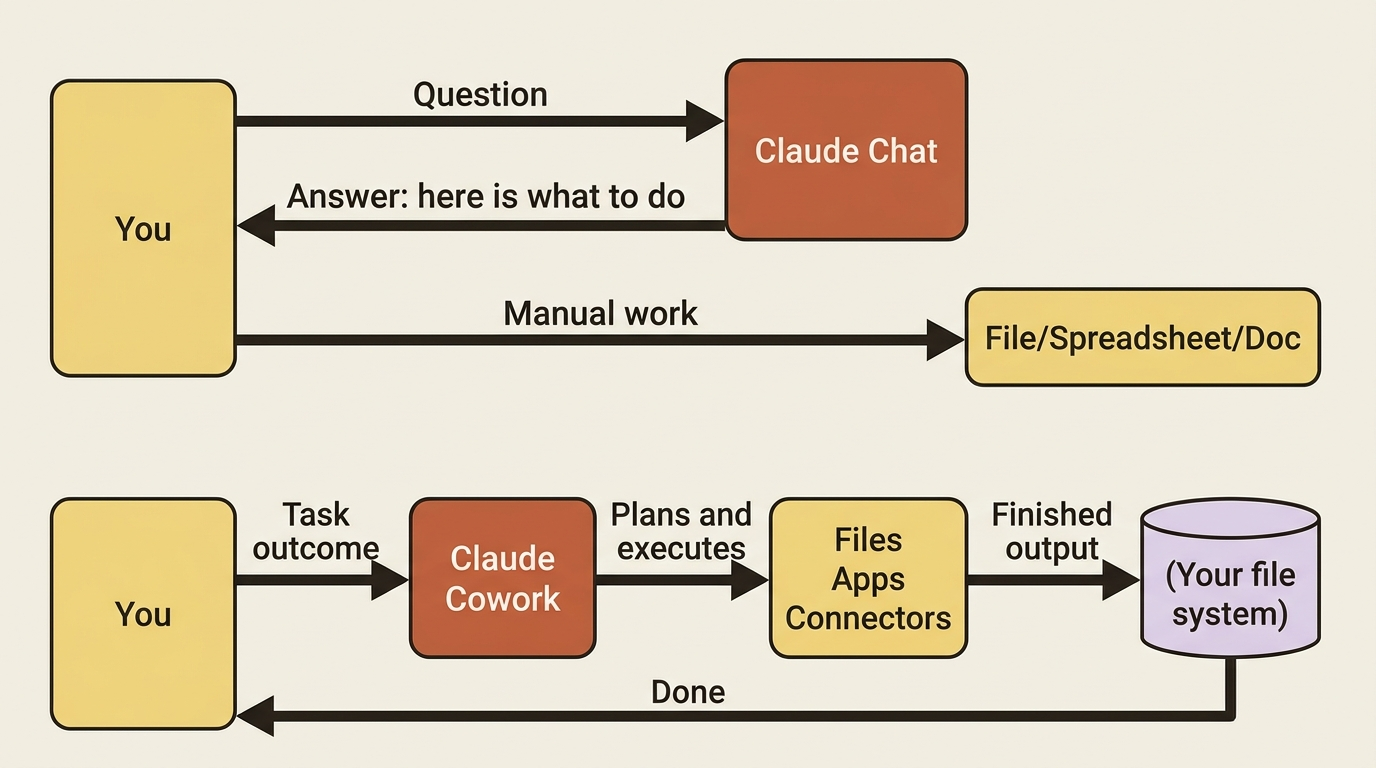
You have had great AI conversations that ended with you opening a spreadsheet by hand. Claude Cowork closes that last mile.
In this article: You will learn what Claude Cowork actually is, why it is fundamentally different from chat, and what happens when you hand it a real multi-step task. We cover the three things Cowork can do that chat simply cannot, the short list of requirements, and how to run your first task in under ten minutes.
You have had this moment. You ask Claude to help with something real, such as a competitive analysis, a cleaned-up expense report, or a deck from a pile of notes, and Claude gives you a genuinely good answer. A great outline. A solid structure. A list of exactly what to do.
And then you do it. You open the spreadsheet, copy the numbers across, reformat the cells, save the file. Claude told you how. You still did the what.
That gap is the whole reason Claude Cowork exists. Chat is a brilliant thinking partner that cannot reach your files, cannot run for twenty minutes, and cannot hand you a finished document. Cowork can do all three. This first article is about understanding that difference clearly, then running one real task end to end so you feel it rather than just read about it.
What Claude Cowork actually is
Here is the one-line version: Cowork brings Claude's agentic engine to Claude Desktop, so Claude can take on complex, multi-step work and deliver finished output without you opening a terminal.
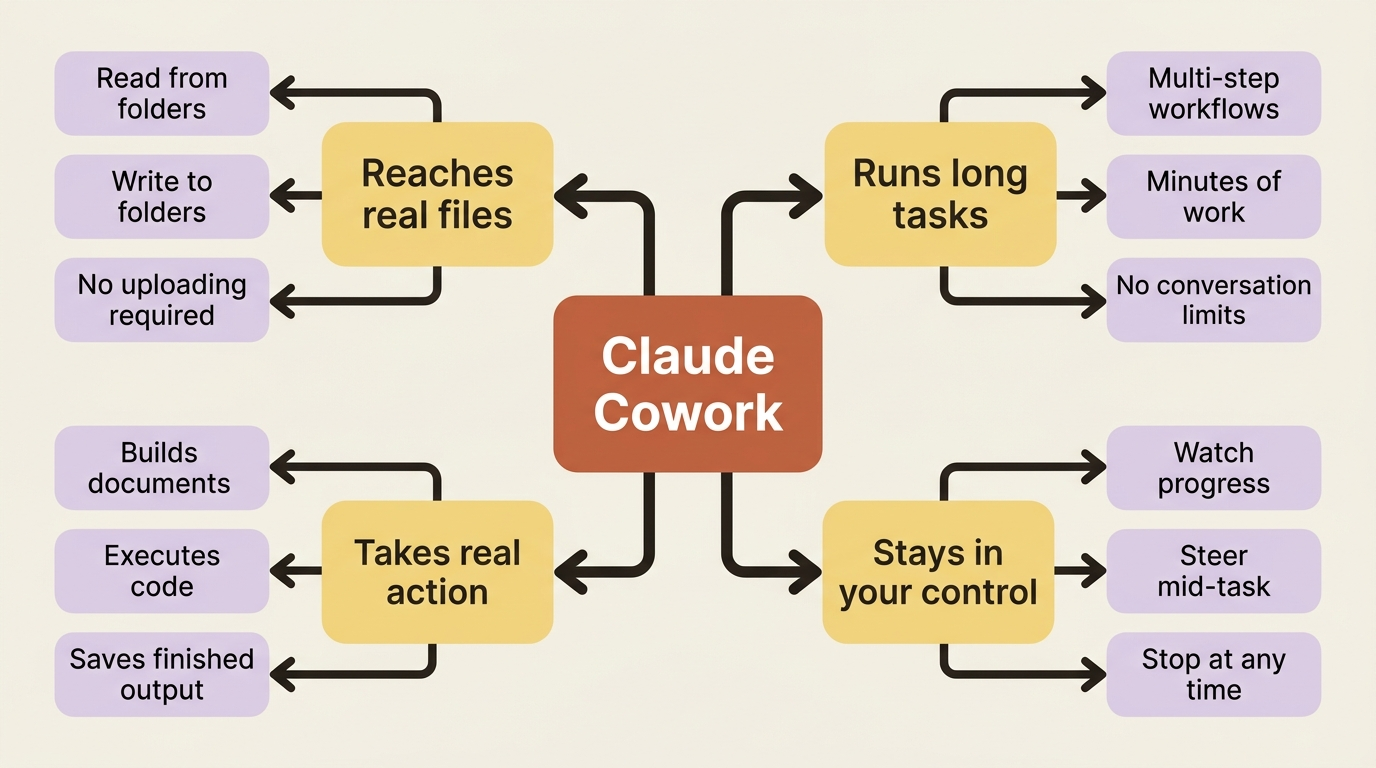
The practical difference between chat and Cowork comes down to three things that chat simply cannot do.
First, Cowork reaches your real files. It reads from and writes to the folders you choose to share, with no uploading and downloading in between. The output lands on your actual file system.
Second, Cowork runs long. A complex task can run for many minutes across multiple steps without hitting the conversation limits that cut a long chat short. You describe an outcome, step away, and come back to finished work.
Third, Cowork takes real action. It does not just describe the spreadsheet. It builds the spreadsheet, formula by formula, and saves it where you asked.
How a task moves through Cowork
When you hand Cowork a task, Claude works through a clear sequence: analyzes your request and creates a plan, breaks complex work into smaller subtasks when needed, runs code and shell commands inside an isolated virtual machine on your computer, coordinates several workstreams in parallel when that is faster, and delivers the finished output straight to your file system.
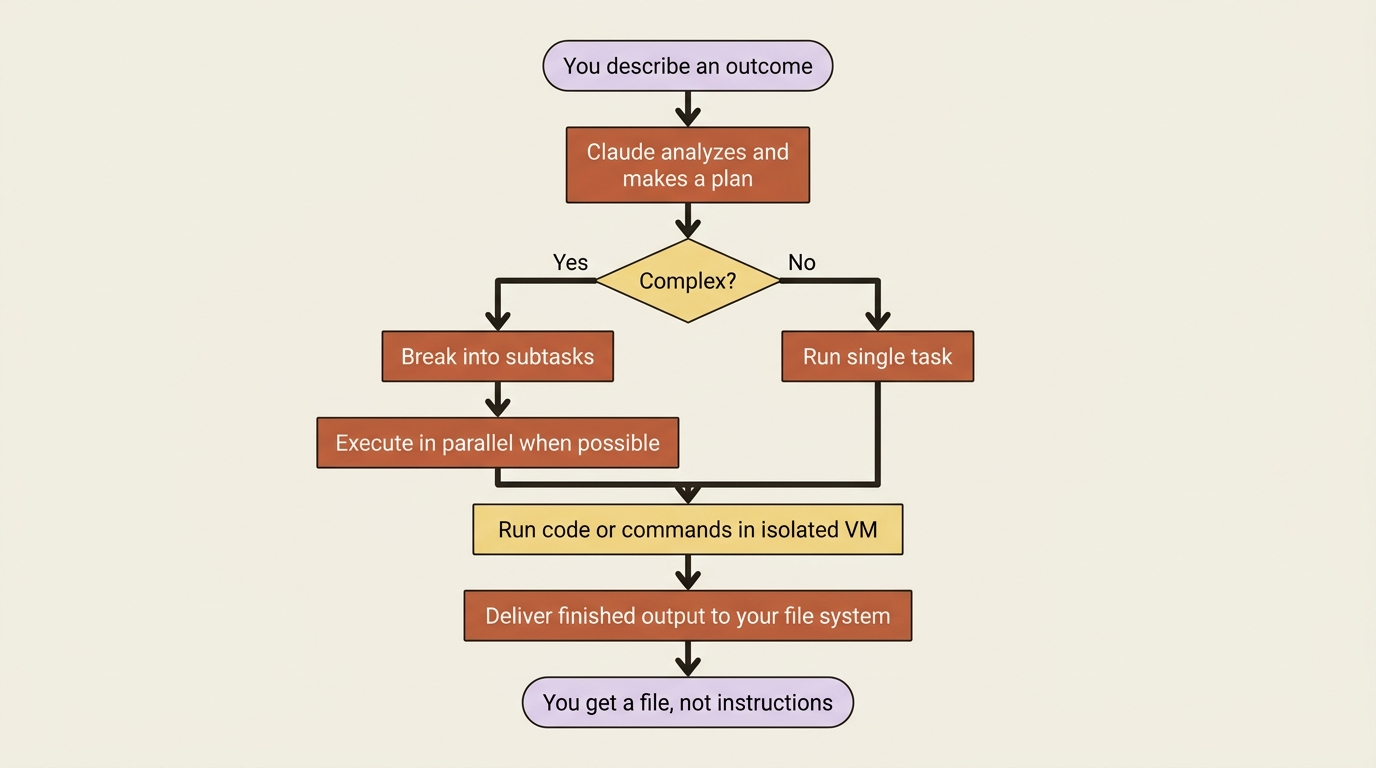
The isolated virtual machine is worth one sentence of attention: any code Claude writes runs in a sandboxed space separate from your main operating system, so the execution is contained even though the results land in your real files. Throughout the run, you can watch what Claude is planning and doing, and step in to steer when it matters.
The capabilities Cowork adds
Before you start: the requirements
Cowork has a short list of hard requirements.
- A paid Claude plan. Cowork is available on Pro, Max, Team, and Enterprise. It is not on the free tier.
- The Claude Desktop app, on macOS or Windows. Cowork does not run in a browser, and the desktop app must stay open while Claude works.
- An active internet connection throughout the session.
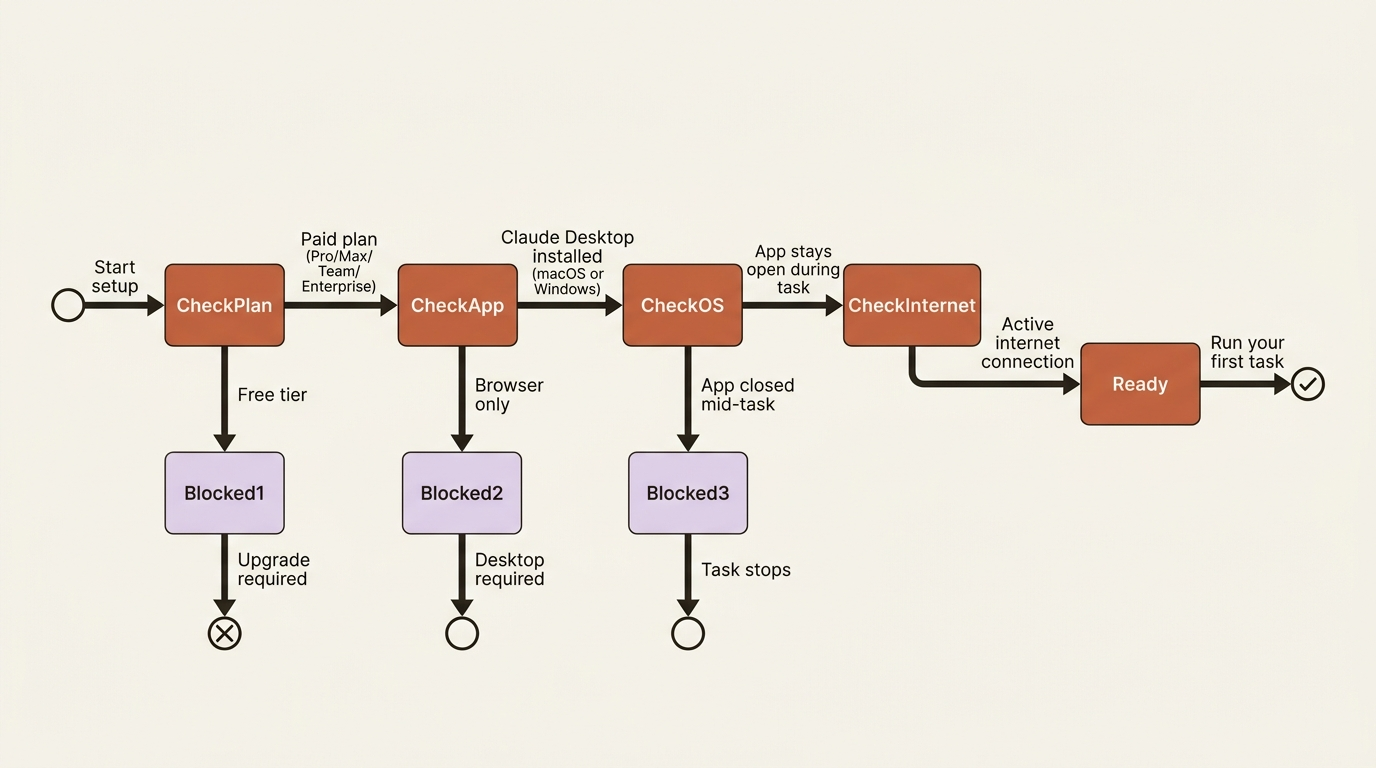
One quiet gotcha lives in that second requirement: the desktop app must stay open and your computer must stay awake for the whole task. If you close the app or your machine goes to sleep mid-run, the session stops. This trips up almost everyone once, usually the first time they confidently walk away and shut the lid.
You can check whether your machine is up to the job with Anthropic's readiness-check program:
Finding Cowork
Once the desktop app is installed and updated, Cowork is easy to reach: open Claude Desktop, find the mode selector near the top, click Cowork to switch into Tasks mode, type the task you want done, read Claude's plan, then let it run. No setup wizard, no configuration file, no terminal.
Your first task
Every article in this series builds one workflow: competitive intelligence. It is a perfect fit for Cowork, because it is exactly the kind of multi-source, repeats-forever, nobody-enjoys-the-assembly work that an agent should own.
Open a new task in the Cowork tab and give it this:
Research my top three competitors and write me a one-page brief on each. For each company, cover what they do, their pricing if it is public, anything they have shipped or announced in the last 90 days, and one thing they seem to be betting on. Save the three briefs as a single formatted document in my Documents folder. My competitors are [name three real companies you actually compete with].
Notice what that prompt does: it names a concrete outcome (three briefs, one document), it specifies what each brief should contain, and it says where the finished file should land. Cowork rewards specificity the same way a good brief to a smart colleague does.
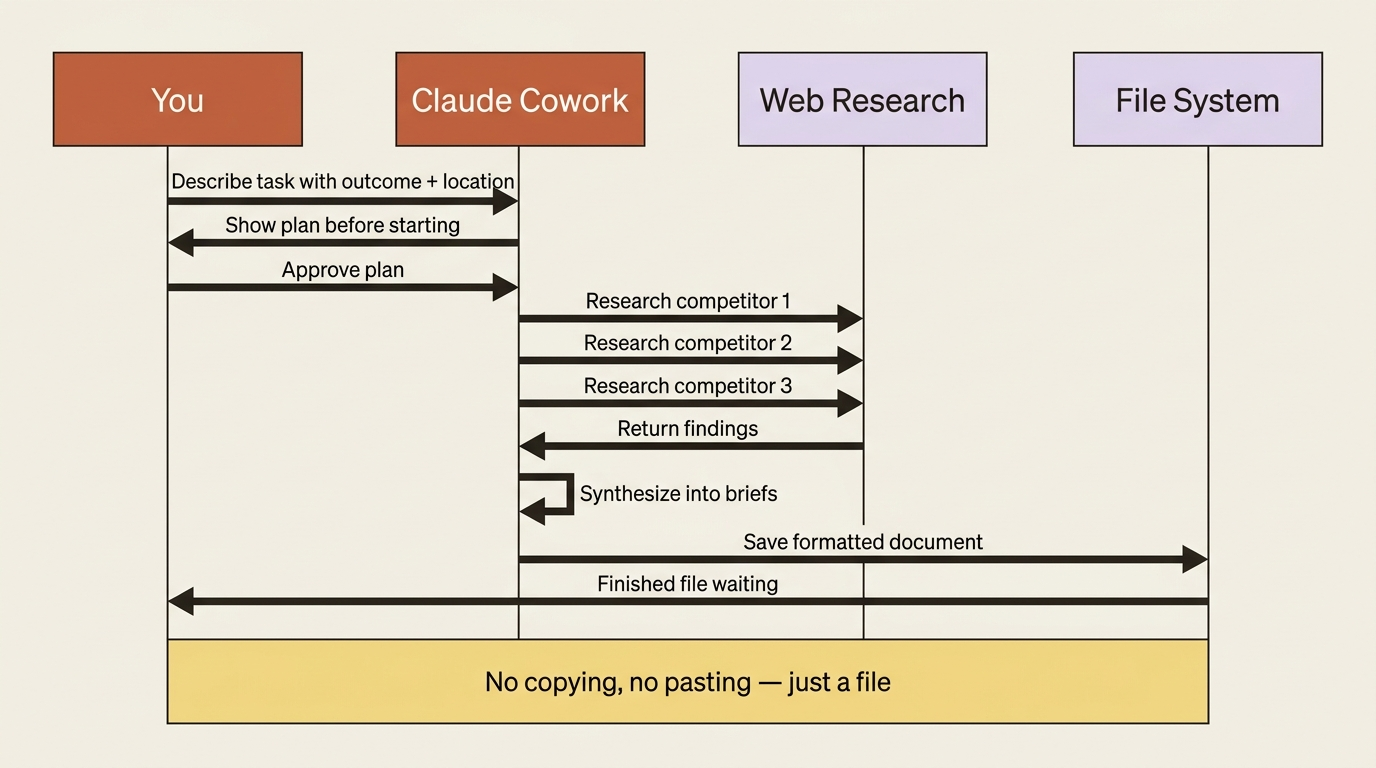
When you submit it, Claude will lay out a plan, then go to work: running web research, synthesizing findings, formatting the briefs, and writing the document to your Documents folder. When it finishes, you do not get a wall of text to copy somewhere. You get a file.
A note on usage: Cowork burns through your usage allowance faster than chat, because multi-step tasks do far more work under the hood. That is expected, not a malfunction. Keep quick questions in chat and save Cowork for the multi-step work that actually benefits from file access and a long runway.
Do this today
- Run the readiness check to confirm your machine supports Cowork before investing setup time.
- Open Claude Desktop, switch to the Cowork tab, and spend two minutes reading the interface before running anything.
- Write and submit the competitor brief task above, substituting three real companies you actually track. Read the plan Claude produces before approving it.
- Notice the difference between the finished file you receive and what you would have gotten from chat: a document, not instructions.
- Identify your best second candidate: the most tedious multi-step task in your week that you keep doing by hand. That is your next Cowork task.
Chat answers. Cowork acts.
The shift this article describes is not subtle. Chat and Cowork are different categories of tool. Chat is a thinking partner. Cowork is a capable colleague who opens the spreadsheet, runs the research, builds the document, and puts it on your desk. Once you feel that difference, once a finished file appears in your Documents folder after you described an outcome and walked away, the categories become obvious.
Everything else in this series is about making that pattern more powerful: connecting Cowork to your real tools, keeping it safely scoped, teaching it your preferences once so you never repeat them, and eventually having it run that competitor brief automatically every Monday morning before you sit down. But the foundational shift is the one you just felt.
This is Part 1 of "Getting Real Work Done with Claude Cowork," a 12-part guide to using Claude Cowork for real knowledge work.