
Set the Cap Before You Need It: What a Day of Cursor Actually Costs
A Cursor bill is not a mystery if you know three things: your plan's included pool covers Cursor models, third-party models and an empty pool spend prepaid credit at per-token rates, and a monthly additional usage limit is the one setting that stops a surprise, so set it before you need it.

Name your plan from the CLI, read your usage with /usage, learn which requests spend outside the pool, and find the one setting that stops a surprise bill.
You picked a stronger model for one hard task, worked the rest of the week, and had no idea whether that choice came out of your plan or out of your own money.
In this article: Day 8 of an 18-day guide. Start here names your plan with
cursor-agent about, opens the/usagepanel to read the plan name and reset date, explains what the weekly pool covers and what spends prepaid credit outside it, and shows where to set a monthly additional usage limit on the web. Going deeper lists the plans and their prices, the per-token rates of the Cursor models, the arithmetic for one request, what happens when the pool runs out, your own API key, the Teams token rate, the requests that bill as third-party without your choice, and how legacy plans differ.
A coding agent makes spending invisible. You type a question, the answer streams back, and nothing on the screen says whether it came out of the plan you already pay for or out of credit you bought. A week later you cannot tell which choice cost what, because one agent task can send many requests and the Cursor CLI does not print a per-request cost.
Cursor pricing is not hard to read once you know where the lines are. Your plan includes a pool of usage for Cursor models. Third-party models such as Claude, GPT, and Gemini never draw from it; they spend prepaid credit from the first request. A Cursor model spends credit too, once the pool is empty. One setting, the monthly additional usage limit, puts a ceiling on all of that, and the right time to set it is before you buy any credit at all.
Tested on Cursor CLI 2026.11.13-eacade1. Editor steps: written from the docs, not yet run. The X Subscription steps: written from the docs; the test account is a legacy plan.
Yesterday you asked one question on three models and checked every answer against the code.
Start here
By the end of today you can name your plan, read your usage from the CLI, say which requests cost money outside your plan, and know where to set a monthly spending cap.
Starting fresh or fell behind? Run git switch -C main cursor/day-07. This replaces your main with the end of Day 7; to keep your own work, run git branch my-backup first.
Check where you are
Start in Ticket Triage. Today changes no file, and the model should still be Auto from yesterday's reset.
cd ~/code/ticket-triage
git status --short
git log --oneline -1
npm test
cursor-agent about | grep Model
git status --short prints nothing. git log --oneline -1 prints a short hash and Add dented to the damaged keywords. npm test prints pass 7 and fail 0, and the last command prints Model Auto. If it prints another model, run cursor-agent, type /model auto, press Enter, and type /quit.
Name your plan
cursor-agent about | grep Tier
Subscription Tier <your plan>
The line shows your plan's name. Cursor sells two families of plans, and they bill differently (Legacy Cursor plans):
- The X Subscription: one subscription for Grok, Cursor, and X, with the plans Free, Plus, Premium, Super, and Ultra. New customers start here. You manage billing at grok.com/dashboard.
- Legacy Cursor plans: the plans Cursor sold before, such as Hobby, Pro, Pro+, and Ultra. They keep working for existing customers. You manage billing at cursor.com/dashboard.
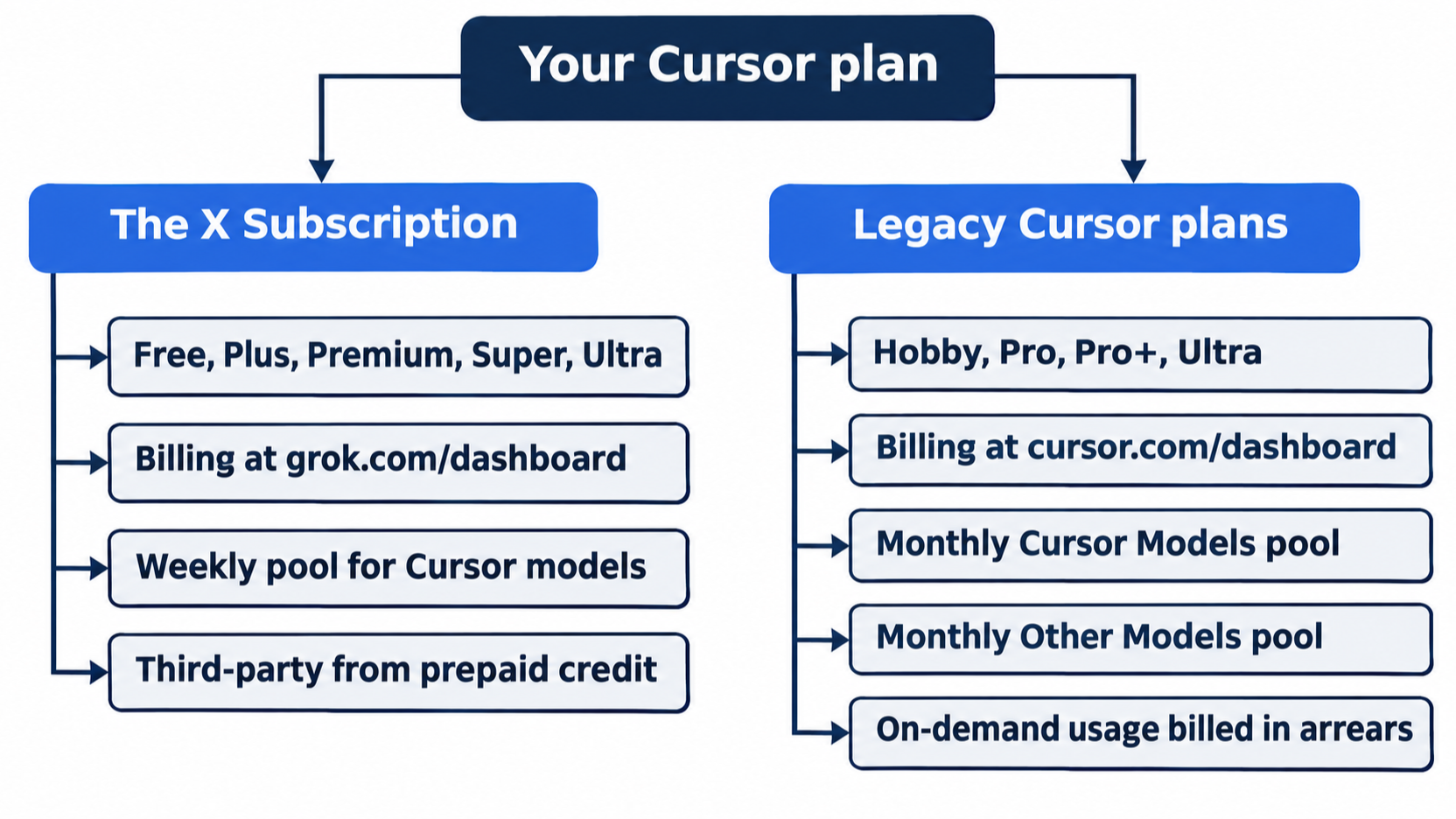
Ultra exists in both families, so the name alone does not always tell you which one you have. Where your billing lives does. This guide assumes Premium on The X Subscription, so the rest of Start here follows The X Subscription and says where a legacy plan differs.
What your plan covers
Each paid plan on The X Subscription includes a weekly pool: an amount of usage for Cursor models that refreshes every week. The pool covers Grok 4.7, Grok 4.6, Grok 4.5, and Composer 2.5, and Auto draws from it on individual plans. Grok's own apps share the same pool. Unused usage does not roll over (Usage and limits).
Every Start here run in Parts 1 to 7 picked Auto or a Cursor model.
What spends outside it
Claude, GPT, and Gemini are third-party models: models from companies other than Cursor. On The X Subscription they are never part of the weekly pool, on any plan. On Premium and above, every request to one bills at that model's API list price, the per-token price that the model's own company charges, from the first request. The money comes from prepaid credit, which is money you add to your account ahead of time. Free and Plus cannot use third-party models at all (Models & Pricing).
Cursor models also spend credit once the weekly pool runs out, at the per-model rates on Models & Pricing.
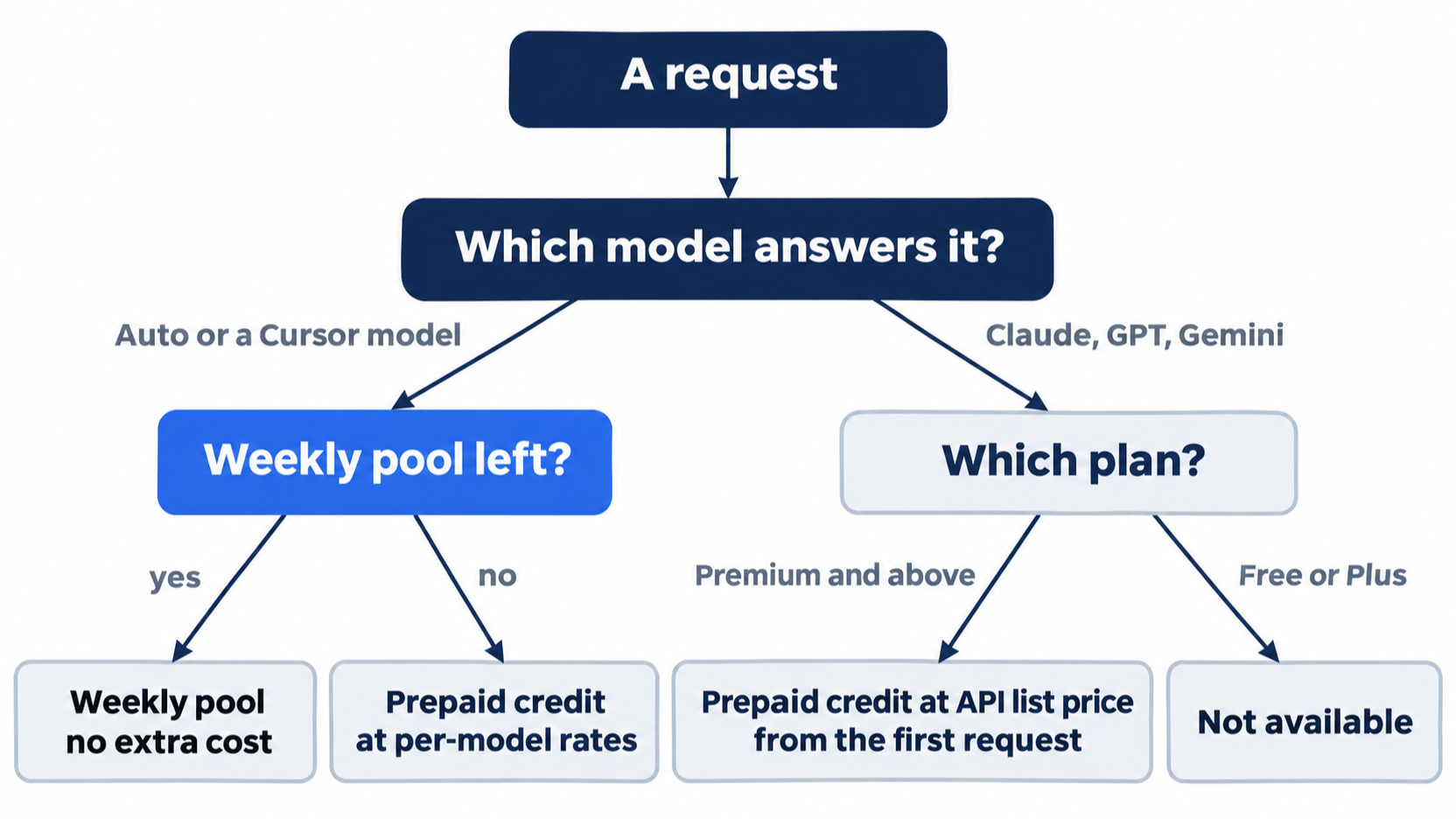
Legacy plans differ: Pro, Pro+, Ultra, and legacy team plans include a second monthly pool, Other Models, that covers third-party models (Usage and limits).
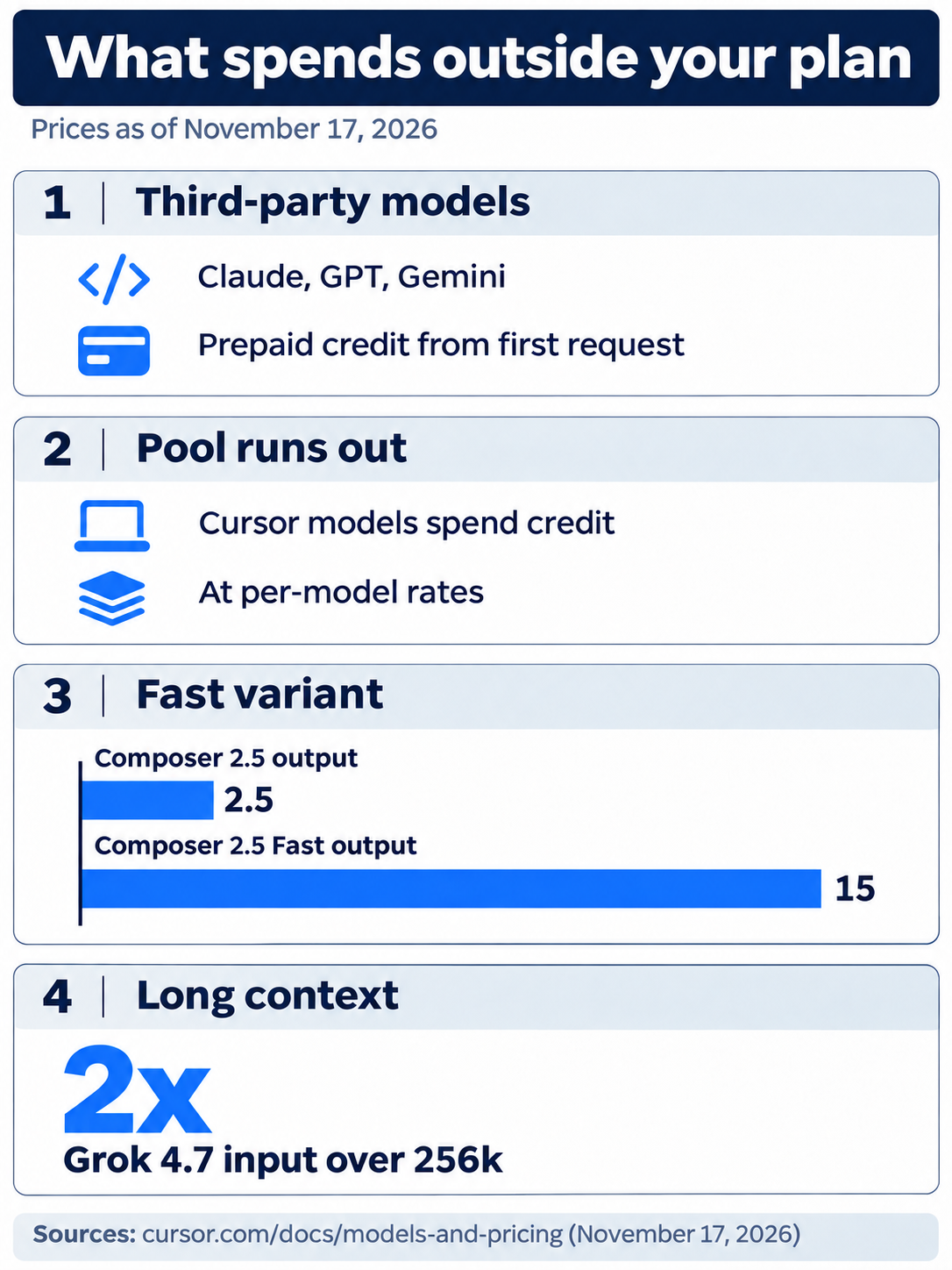
A day of work leaves the pool in four ways. Claude, GPT, and Gemini spend prepaid credit from the first request. Cursor models spend credit once the weekly pool is empty. Beyond the pool, Composer 2.5 Fast costs six times standard Composer 2.5 per token. Grok 4.7 bills input over 256k tokens at 2x, up to 500k.
Read your usage in the CLI
Start a session and open the usage panel.
cursor-agent
/usage
/usage opens a panel with your plan name, your included-usage meters, your extra spend against the monthly spending cap that you set below, and the reset date (CLI changelog). Find two things: the plan name in the title, and the reset date. On a legacy plan, the test account's panel looked like this, with the bars shortened:
Usage • Ultra                                        Resets Dec 12
Monthly plan and on-demand usage
Category        Current             Usage
Included        1% used             █░░░░░░░░░
  Auto          1% used             █░░░░░░░░░
  API           1% used             █░░░░░░░░░
On-Demand       Disabled            ──────────
On-demand usage is off
View in dashboard: cursor.com/dashboard?tab=usage
The title says Usage • Ultra, and the right side says Resets Dec 12. The rows below are the meters. What the panel shows on a Premium account is written from the docs; the test account is a legacy plan, so check only the plan name and the reset date. Press Esc, then type /quit.
The same steps in the editor and on the web
Step 1 is an editor step that waits for a manual check. Steps 2 and 3 are on The X Subscription and are written from the docs; the test account is a legacy plan.
- (written from the docs, not yet run) In the editor, open Cursor Settings > Plan & Usage. It shows your plan by name and your usage reset date. On Plus, Premium, Super, and Ultra it also has a Credits section with your prepaid balance and buttons to add credit (release notes, 3.23).
- (written from the docs; the test account is a legacy plan) On the web, open Usage at grok.com/dashboard. It shows how much of your weekly pool you used, the next reset date, and your prepaid credit (Usage and limits).
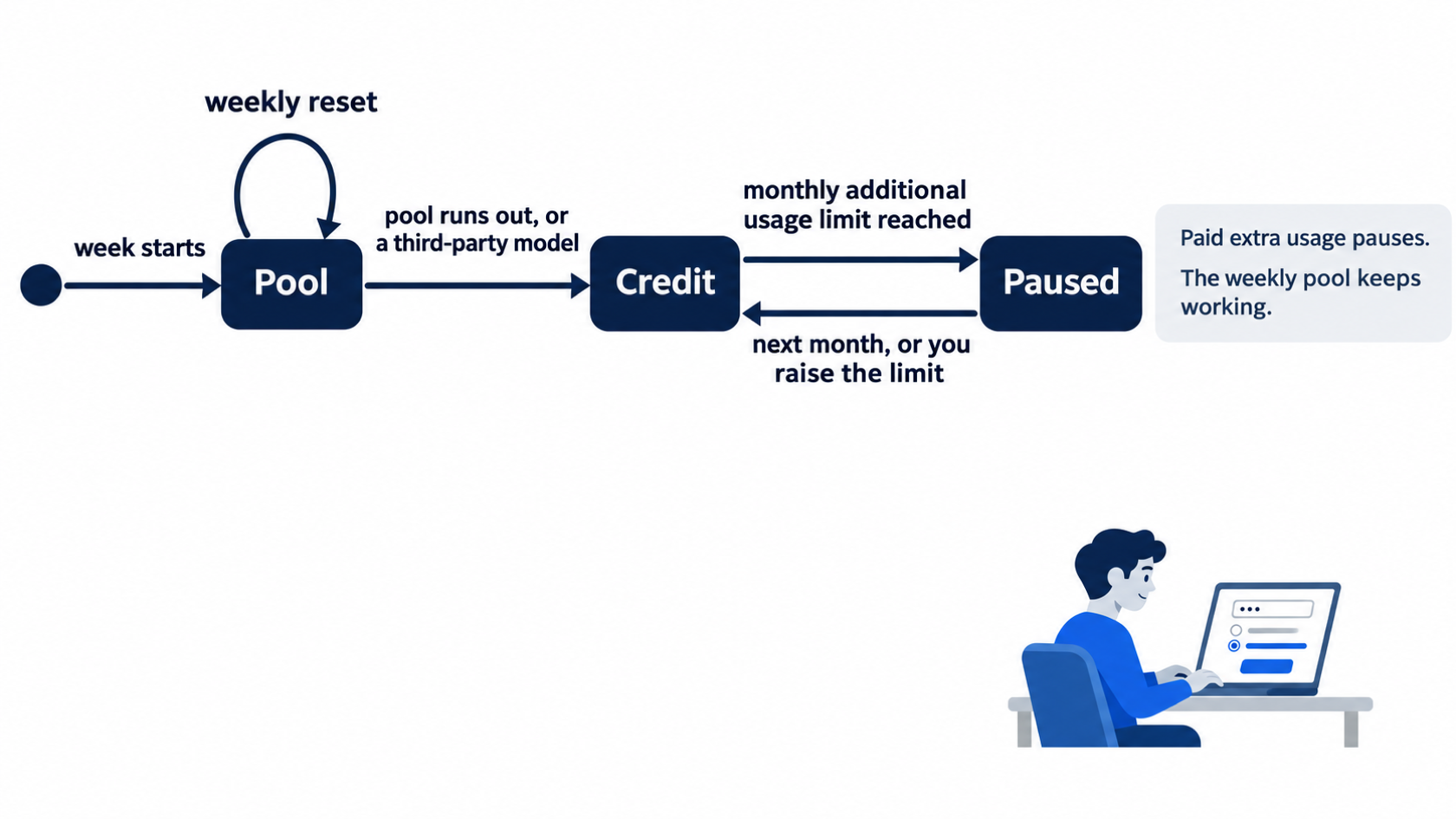
- (written from the docs; the test account is a legacy plan) Set a cap before you buy credit. Go to grok.com/dashboard/billing. Under Additional usage credits, find Monthly additional usage limit, click Edit, enter an amount, and save (Spend limits). Start small, such as $10; you can raise it when you need more. When you reach the limit, paid extra usage pauses until next month or until you raise it, and your weekly pool keeps working.
On a legacy plan, the cap lives on the Spending tab at cursor.com/dashboard/spending, where extra usage is on-demand usage, billed at the end of the month. Turn on-demand usage on, then set the cap, on the same tab.
Today's win
Run the check now.
cursor-agent about | grep Tier
cursor-agent
Type /usage. The panel opens, its title names your plan, and the right side shows a reset date. On the test account, the title and the Subscription Tier line both said Ultra. Press Esc and type /quit. Then confirm that nothing changed:
git status --short
npm test
cursor-agent about | grep Model
git status --short prints nothing, npm test prints pass 7 and fail 0, and the last line is Model Auto.
Allowlist: no approval prompts today; no step runs a tool. Auto-review: the same results with no prompts.
You can stop here. Going deeper explains why this works and where it breaks.
Going deeper
This section is for readers who want the price list, the arithmetic for one request, and the edge cases of each plan. It assumes you finished Start here in this part and in Parts 1 to 7. Prices change; every price here is a link to the page it came from, as of November 17, 2026.
The plans
From Models & Pricing and cursor.com/pricing:
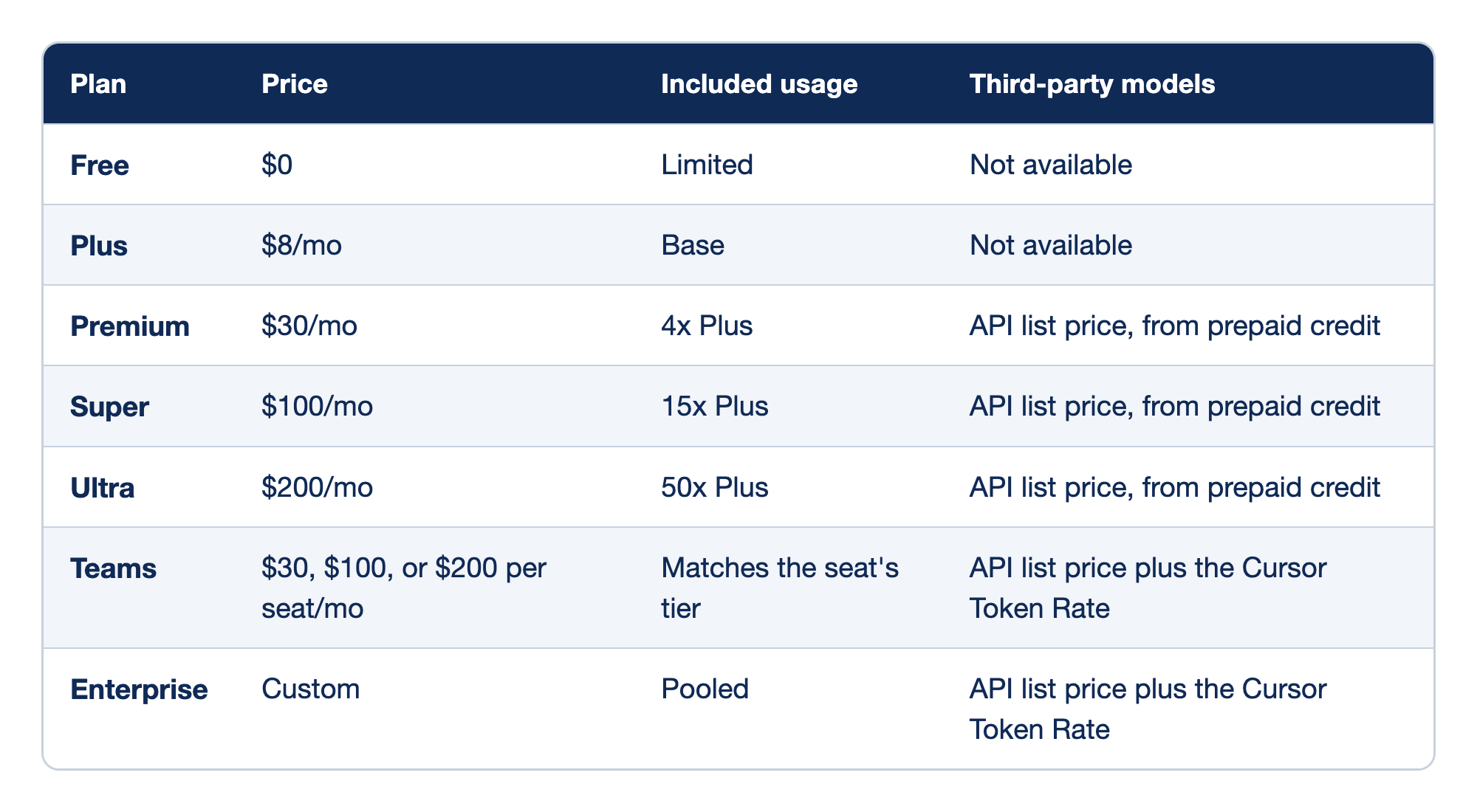
Each Cursor plan has a price, an amount of included usage, and a rule for third-party models, as of November 17, 2026. The Plan column names the plan, the Price column gives its monthly price, the Included usage column gives the size of its pool measured against Plus, and the Third-party models column says whether the plan can use Claude, GPT, and Gemini and how it pays for them.
- Free: $0, limited usage, no third-party models.
- Plus: $8 a month, the base pool, no third-party models.
- Premium: $30 a month, 4 times the Plus pool, third-party models at API list price from prepaid credit.
- Super: $100 a month, 15 times the Plus pool, third-party models the same way.
- Ultra: $200 a month, 50 times the Plus pool, third-party models the same way.
- Teams: $30, $100, or $200 per seat, matching the individual tiers, plus the Cursor Token Rate on eligible third-party models.
- Enterprise: custom pricing, pooled usage, plus the Cursor Token Rate.
Annual billing costs $80 a year for Plus, $300 for Premium, $1,000 for Super, and $2,000 for Ultra. Prices exclude tax.
Check your plan: Plus runs Cursor models only, at fixed settings, and has no Auto, Cloud Agents, Automations, Bugbot, Origin, third-party models, or your own API keys. Premium adds all of those. For this reason, this guide's floor is Premium.
Different models draw at different rates
The pool is not a count of requests. Models & Pricing says different models draw from it at different rates, and lists a per-token rate for each Cursor model. The same rates apply when you buy more usage beyond the pool. Prices are per million tokens:
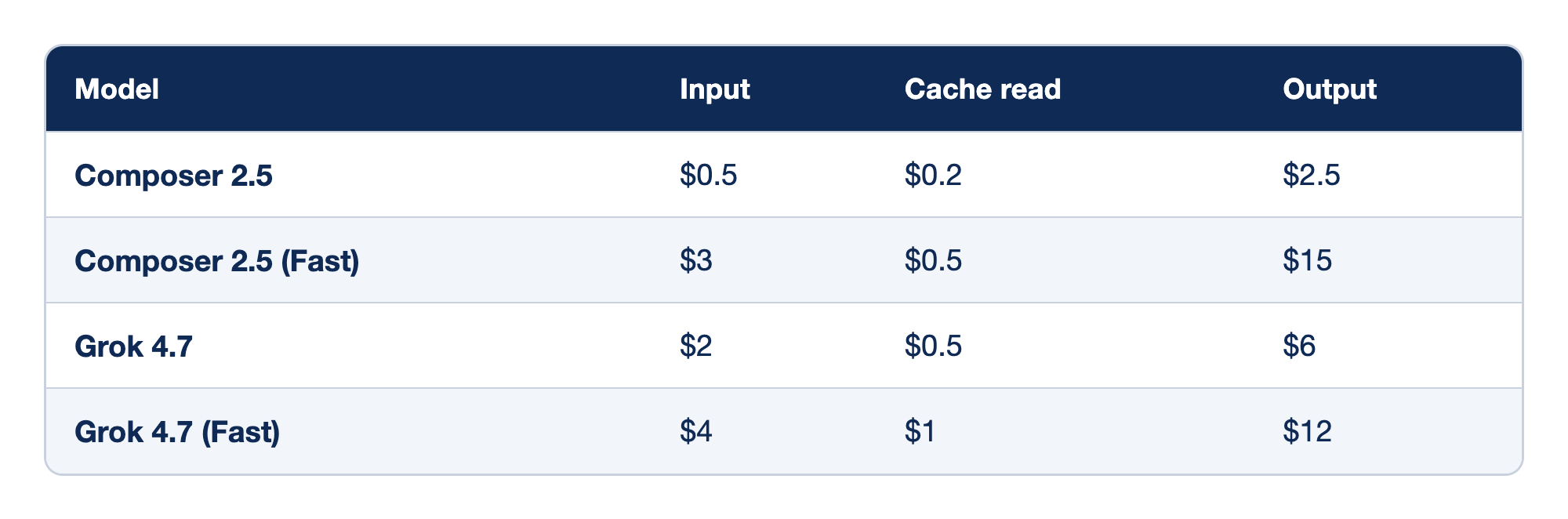
Two Cursor models each have a standard and a Fast rate, in dollars per million tokens, as of November 17, 2026. The Model column names the model and variant, the Input column gives the price of tokens you send, the Cache read column gives the lower price for input the provider already saw in an earlier request, and the Output column gives the price of tokens the model writes back. A token is a short piece of text.
- Composer 2.5: $0.50 per million input tokens, $0.20 cache read, $2.50 output.
- Composer 2.5 (Fast): $3 input, $0.50 cache read, $15 output.
- Grok 4.7: $2 input, $0.50 cache read, $6 output.
- Grok 4.7 (Fast): $4 input, $1 cache read, $12 output.
Two things follow. First, beyond the pool, Composer 2.5 Fast costs six times standard Composer on both input and output. The page does not say how much faster Fast drains the pool, and Fast is the default in the product (Composer 2.5). Second, long context costs more: Grok 4.7 bills input over 256k tokens at 2x, up to 500k.
Price one request
The arithmetic is the same for every model: tokens divided by one million, times the price. Take one request that sends 20,000 input tokens and gets 1,000 output tokens back, on two third-party models from the model pricing table:
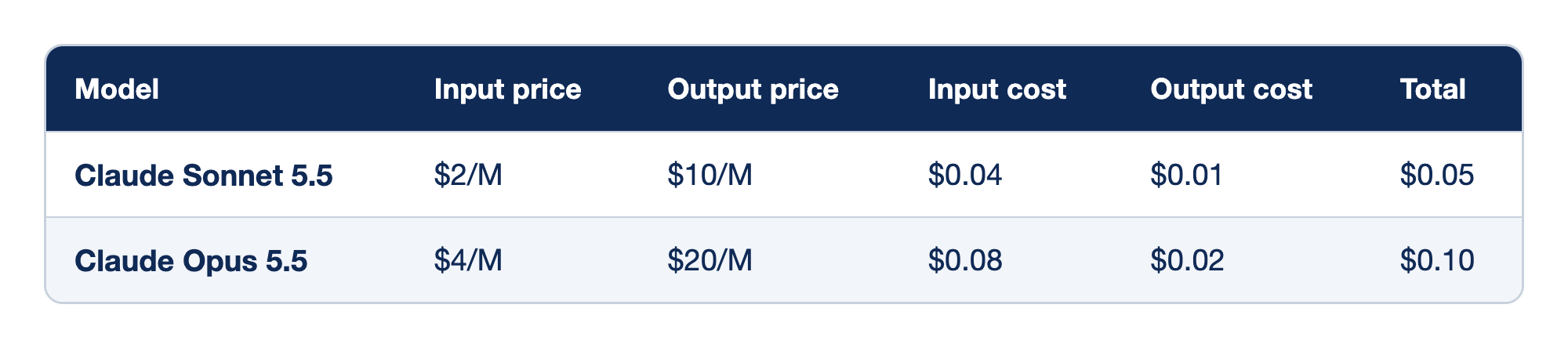
One example request of 20,000 input tokens and 1,000 output tokens costs a different amount on each of two third-party models, at prices as of November 17, 2026. The Model column names the model, the Input price and Output price columns give its list price per million tokens, the Input cost and Output cost columns give what this request's tokens cost at those prices, and the Total column adds the two. Both costs come from prepaid credit from the first request. The same request on a Cursor model costs nothing extra until your pool runs out.
- Claude Sonnet 5.5: 20,000 input tokens at $2 per million cost $0.04, and 1,000 output tokens at $10 per million cost $0.01, so the request costs $0.05.
- Claude Opus 5.5: 20,000 input tokens at $4 per million cost $0.08, and 1,000 output tokens at $20 per million cost $0.02, so the request costs $0.10.
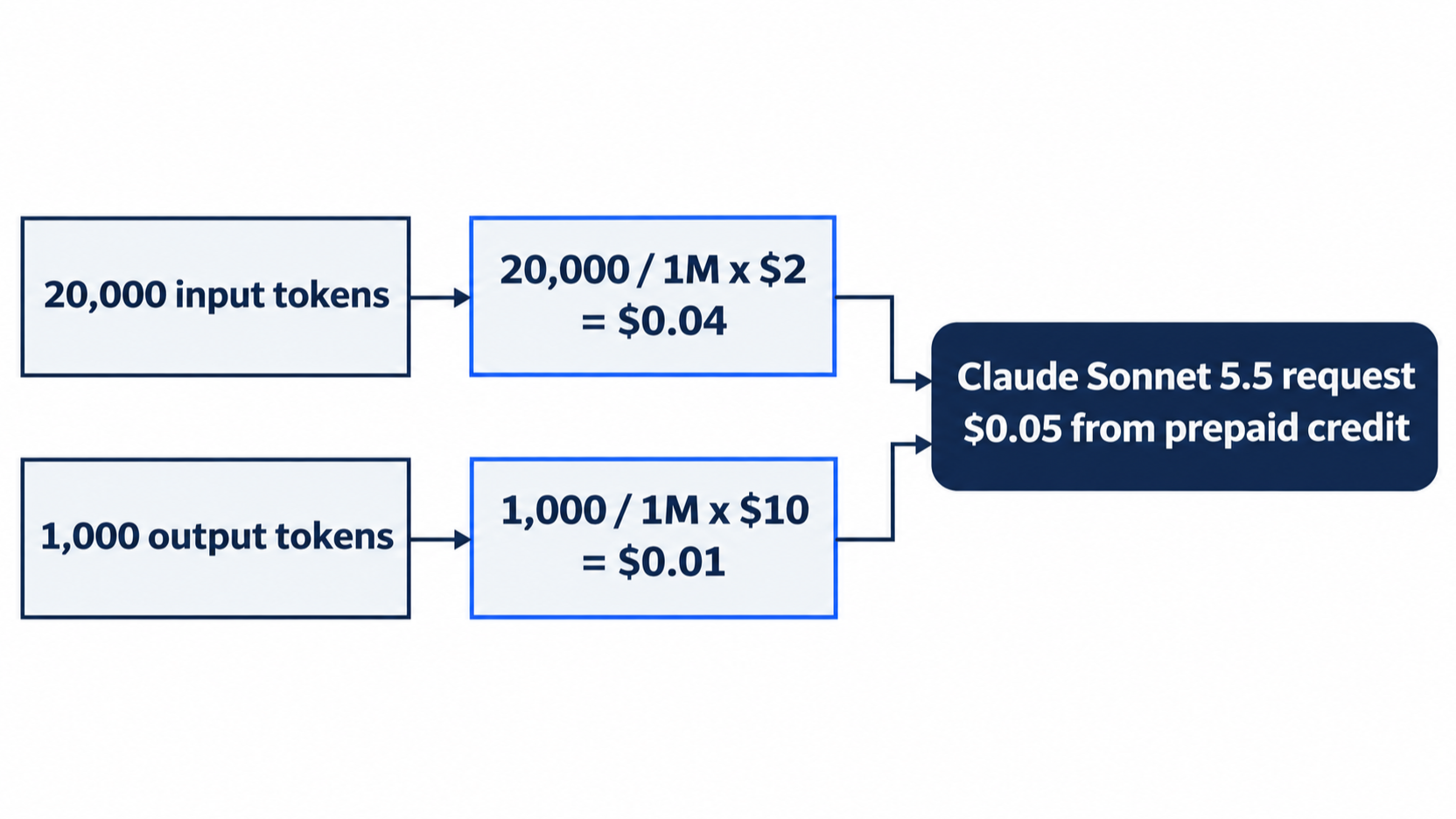
This guide made up the example numbers for the arithmetic. One agent task can send many requests, and the CLI does not print a per-request cost. Usage and limits points to the usage dashboard for request-level cost details.
When the pool runs out
You can wait for the weekly reset, keep working on prepaid credit at the same per-model rates, or move to a higher plan. "Requests are never downgraded in quality or speed" (Models & Pricing). The editor shows a notification when you hit the limit. This guide's test account is not on The X Subscription, so it describes no limit behavior from its own tests.
Prepaid credit and the cap
- Top-ups add prepaid credit. Auto Top-up refills credit when the balance drops below a threshold you set (Models & Pricing).
- Each top-up expires 365 days after purchase (Usage and limits).
- The monthly additional usage limit counts the paid usage you consume, not the credit you buy. Buying more credit does not raise it (Spend limits).
- Enforcement is not instant, so usage can briefly pass the limit before it stops.
- On The X Subscription, spend alerts, which are emails sent at a threshold, are for Teams admins only. Individual plans use the cap instead (Spend alerts).
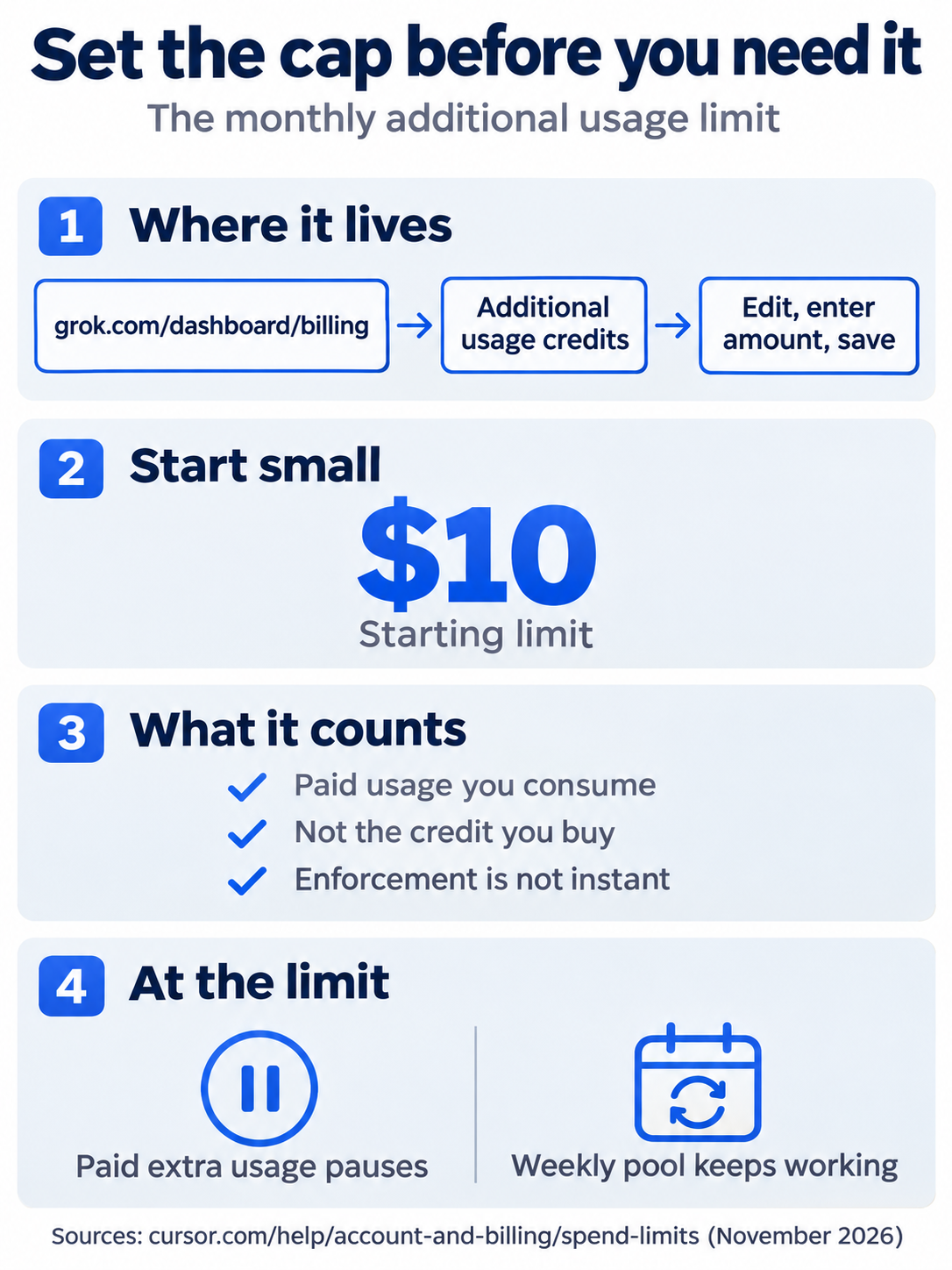
The monthly additional usage limit lives on the billing page at grok.com/dashboard/billing. Start small, such as $10. The limit counts paid usage you consume, not credit you buy, and enforcement is not instant. When you reach it, paid extra usage pauses while the weekly pool keeps working.
Your own API key
On Premium, Super, and Ultra, and on the legacy Pro, Pro+, and Ultra plans, you can add your own key for OpenAI, Anthropic, Google, Azure OpenAI, or AWS Bedrock in Cursor Settings > Models. The provider then bills you directly, and those requests draw from neither the pool nor your credit. Custom keys work only with chat models; Tab completion keeps using Cursor's models (Bring your own API key).
Teams pay a Cursor Token Rate
On Teams and Enterprise, eligible third-party requests add a Cursor Token Rate of $0.25 per million tokens on input, output, and cached tokens, including requests on your own key. Individual plans do not pay it. Cursor models and Auto's Cost mode are exempt, and so is any third-party model whose cache-read price is below $0.10 per million tokens on every tier (Cursor Token Rate).
Requests that bill as third-party without your choice
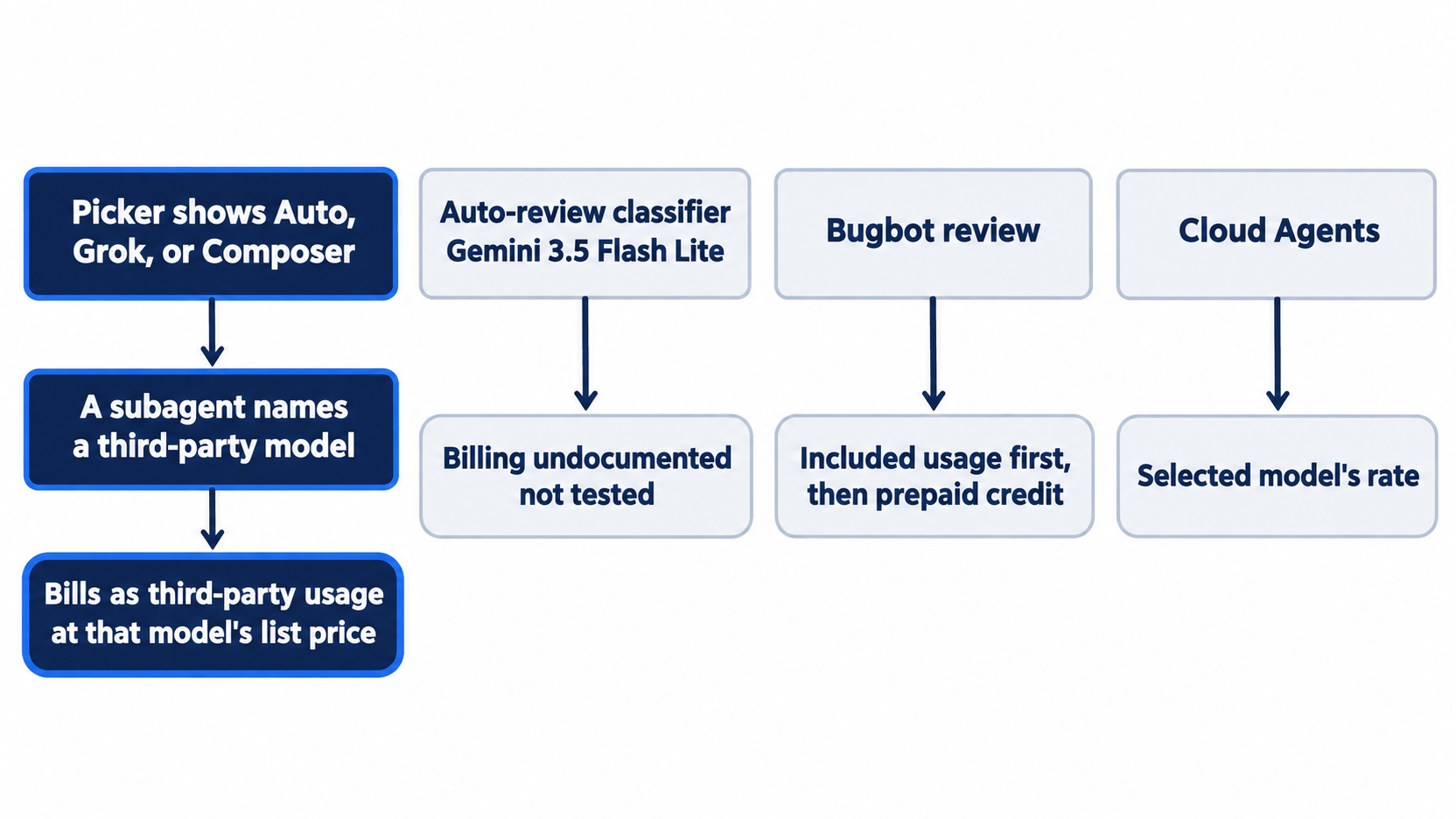
A subagent can run a named third-party model while your picker still shows Auto, Grok, or Composer, and those requests bill as third-party usage at that model's list price (Usage and limits).
The Auto-review classifier runs on Gemini 3.5 Flash Lite, which the pricing table lists with a price and marks "Used only for the Auto-review classifier" (Model pricing). No page says how classifier calls bill, and this guide did not test it.
Legacy plans
Legacy plans have two monthly pools, Cursor Models and Other Models, and the Other Models pool covers third-party models on Pro, Pro+, Ultra, and Teams. Extra usage is on-demand, billed in arrears, with an on-demand spend limit. Switching to The X Subscription is optional and permanent; Support cannot undo it (Legacy Cursor plans, What is The X Subscription?). Max Mode exists only on legacy request-based plans and bills at the model's API rate plus 20% (Max Mode).
The /usage panel in Start here came from this guide's test account, which is a legacy Ultra plan. Its header, "Monthly plan and on-demand usage", and its On-Demand row match the legacy billing above. Its Auto and API rows appear to match the two legacy pools, but no page says so; the CLI changelog says only that /usage shows "Auto and API breakdowns".
Other features that spend
- Bugbot, the pull-request reviewer, is usage-based and bills included usage first, then prepaid credit (Bugbot pricing). An average run costs $1.00 to $1.50, depending on the pull request's size (Bugbot usage-based billing).
- Cloud Agents bill like other agent work, at the selected model's rate (Cloud Agents).

The scene shows the moment this part is about: a developer who opens /usage at the start of the week and sets a small cap before the first third-party request, so a stronger model is a decision with a ceiling, not an open tab.
If you already use Claude Code: a Claude model inside Cursor is a third-party model. Cursor bills it per token from your Cursor prepaid credit, or you add your own Anthropic API key and Anthropic bills you directly (Bring your own API key). Neither path draws from Cursor's weekly pool.
Do this today
Everyone
- Read your usage. Run
cursor-agent about | grep Tier, then startcursor-agentand type/usage. Check: the panel's title names the same plan as theSubscription Tierline. Reset:Esc, then/quit;git status --shortprints nothing. - Start one habit: open
/usageat the start of each week. Check: you can say your plan name and the next reset date from the panel. Before you pick Claude, GPT, or Gemini for the first time, also set the monthly cap (Start here, web step 3, not yet run). Check: the billing page shows the amount under Monthly additional usage limit (not yet run).
If you read Going deeper
- Price one request. On the model pricing table, find Claude Sonnet 5.5 and work out a request with 20,000 input tokens and 1,000 output tokens. Check: you get $0.05 (as of November 17, 2026). Reset: none needed; nothing ran.
- Compare Fast. In the Cursor models table on the same page, find Composer 2.5 and Composer 2.5 (Fast). Check: Fast costs six times as much on input ($3 against $0.5) and on output ($15 against $2.5). Reset: none needed.
- Confirm the tree. Check:
git status --shortprints nothing,npm testprintspass 7, andcursor-agent about | grep ModelprintsModel Auto.
A ceiling, not a guess
The opening problem was a bill you could not read: a stronger model for one task, a week of work, and no idea which part came from the plan and which came from your own money. The answer turns out to be three lines. Auto and the Cursor models draw from the pool your plan pays for. Third-party models, and Cursor models after the pool runs out, spend prepaid credit at per-token rates. The monthly additional usage limit is the ceiling on that credit.
None of this needs a spreadsheet. cursor-agent about | grep Tier names your plan, /usage shows the meters and the reset date, and one small number on the billing page means the worst week costs what you decided in advance.
Set the cap on a calm day, before the day you need it.
This is Part 8 of "Cursor, Day-to-Day," an 18-part guide to using Cursor's agent every day, from the CLI and the editor.