
A Rule Asks, a Hook Says No: Block `rm -rf` in Cursor With Your Own Script
A rule only asks the agent to behave, while a Cursor hook is your own script that runs before the step and can refuse it, and the two failure modes worth knowing are a matcher that reads text and a crashing script that fails open.
Cursor hooks run your script before the agent's shell command and can refuse it. Build a short guard for Ticket Triage, watch it block a real request, and learn the two ways a guard quietly stops guarding.
You wrote "never delete folders" in your rules file, and you still watch every shell command the agent proposes, because a rule is a request and you know it.
In this article: Day 11 of an 18-day guide. Start here writes a project hook for Ticket Triage, a small support-ticket classifier, that blocks any shell command containing
rm -rf, tests the script by hand, watches the Cursor CLI reject the agent'srm -rf tt-scratchwith no approval prompt, and proves thatnpm teststill runs. Going deeper covers why the matcher reads text and not meaning, how Cursor reads a hook's exit code and why a crashing hook fails open, the other hook events, how hooks from several sources combine, and how Cursor runs hooks written for Claude Code.
Tested on Cursor CLI 2026.11.13-eacade1. Editor steps: written from the docs, not yet run. The Third-Party Imports setting was checked in the Cursor editor 3.30.14.
Part 10 connected an MCP server, proved one tool call, and removed the server, so the project did not change. Today you add a guard that does not depend on the agent agreeing with it.
Start here
By the end of today, Ticket Triage has a committed hook that blocks any shell command the agent tries with rm -rf, you have seen it block one, and npm test still runs with no prompt.
Starting fresh or fell behind? Run git switch -C main cursor/day-10. This replaces your main with the end of Day 10; to keep your own work, run git branch my-backup first.
Check your starting state
Start where Day 10 ended. Run three checks in ~/code/ticket-triage.
cd ~/code/ticket-triage
git status --short
git log --oneline -1
npm test
git status --short prints nothing. git log --oneline -1 shows the newest commit, with your own hash:
2b8eed7 Add cracked to the damaged keywords
npm test ends with ℹ pass 9 and ℹ fail 0. If any check differs, finish Day 9 first; Day 10 changed no files.
What a hook is
On Day 5 you wrote rules. A rule is text the agent reads and is asked to follow, and the agent can still get it wrong. A hook is a program that Cursor itself runs at a fixed point in the agent's work, called an event, and its answer can stop the step (Hooks). Today's event is beforeShellExecution: it fires before the agent runs any shell command. Cursor sends your hook the command as JSON on its input, and the hook answers with JSON that says allow (run it), deny (block it), or ask (show you the approval prompt).
On Day 4 you denied git push in .cursor/cli.json. A deny entry matches a command by its name and arguments. A hook is a script, so it can check anything you can write in a script. Today's check is short on purpose.
Write the hook
A project hook needs two files: .cursor/hooks.json, which says which script runs on which event, and the script itself. Create both. Use your editor, or paste these commands into the terminal.
mkdir -p .cursor/hooks  # ①
cat > .cursor/hooks.json <<'EOF'  # ②
{
  "version": 1,
  "hooks": {
    "beforeShellExecution": [
      {
        "command": ".cursor/hooks/tt-guard.sh",
        "matcher": "rm -rf"
      }
    ]
  }
}
EOF
cat > .cursor/hooks/tt-guard.sh <<'EOF'  # ③
#!/bin/bash
# tt-guard: Cursor runs this before any shell command that matches "rm -rf".
cat > /dev/null  # ④
echo '{"permission": "deny", "user_message": "tt-guard blocked rm -rf.", "agent_message": "A project hook blocked rm -rf. Do not delete folders with rm -rf in this project."}'  # ⑤
EOF
chmod +x .cursor/hooks/tt-guard.sh  # ⑥
① The script folder sits under .cursor/, beside the hooks.json file that points to it.
② The first file is the wiring: JSON has no comments, so the marker sits on the shell line, and the file maps the beforeShellExecution event to one script with an rm -rf matcher.
③ The second file is the guard script itself, written from the project root path that hooks.json names.
④ The script reads the JSON that Cursor sends and discards it, because the matcher already did the check.
⑤ One line of JSON is the whole answer: deny, a message for you, and a message for the agent.
⑥ The script must be executable, or Cursor cannot run it.
Note: The full extracted listing at code/cursor/part-11-hooks/listings/01-tt-guard-hook.sh is the complete command without the markers, ready to run from the repository root.
command is written from the project root, because project hooks run from there (Hooks). matcher is a pattern that Cursor checks against the full command, so the script runs only for commands that contain rm -rf (Hooks). Every other command skips the hook. "version": 1 is required.
Test the script by hand before the agent uses it. Feed it a fake command:
echo '{"command":"rm -rf x"}' | .cursor/hooks/tt-guard.sh
It prints the answer that Cursor will get:
{"permission": "deny", "user_message": "tt-guard blocked rm -rf.", "agent_message": "A project hook blocked rm -rf. Do not delete folders with rm -rf in this project."}
Now make a folder for the agent to try to delete:
mkdir tt-scratch
touch tt-scratch/notes.txt
git status --short
?? .cursor/hooks.json
?? .cursor/hooks/
?? tt-scratch/
Watch the hook say no
Start a new session, so the CLI loads the hook, and ask for the dangerous command.
cursor-agent
Run this exact shell command and report what happened: rm -rf tt-scratch
The command line in the transcript ends with Rejected, and the hook's message follows:
  $ rm -rf tt-scratch Rejected
   Command execution was blocked by a hook: tt-guard blocked rm -rf.

   To view or modify configured hooks, go to Cursor Settings > Hooks.

   Agent note: Do not suggest workarounds to the blocked tool.
The Agent note line is Cursor's own text, not yours; it appears for any hook that blocks. The agent reports that the command did not run and quotes tt-guard blocked rm -rf. No approval prompt appeared before the block. In allowlist mode, rm is not on your allow list, so without the hook the CLI would have asked you. The hook answered first, and its deny ended the step.
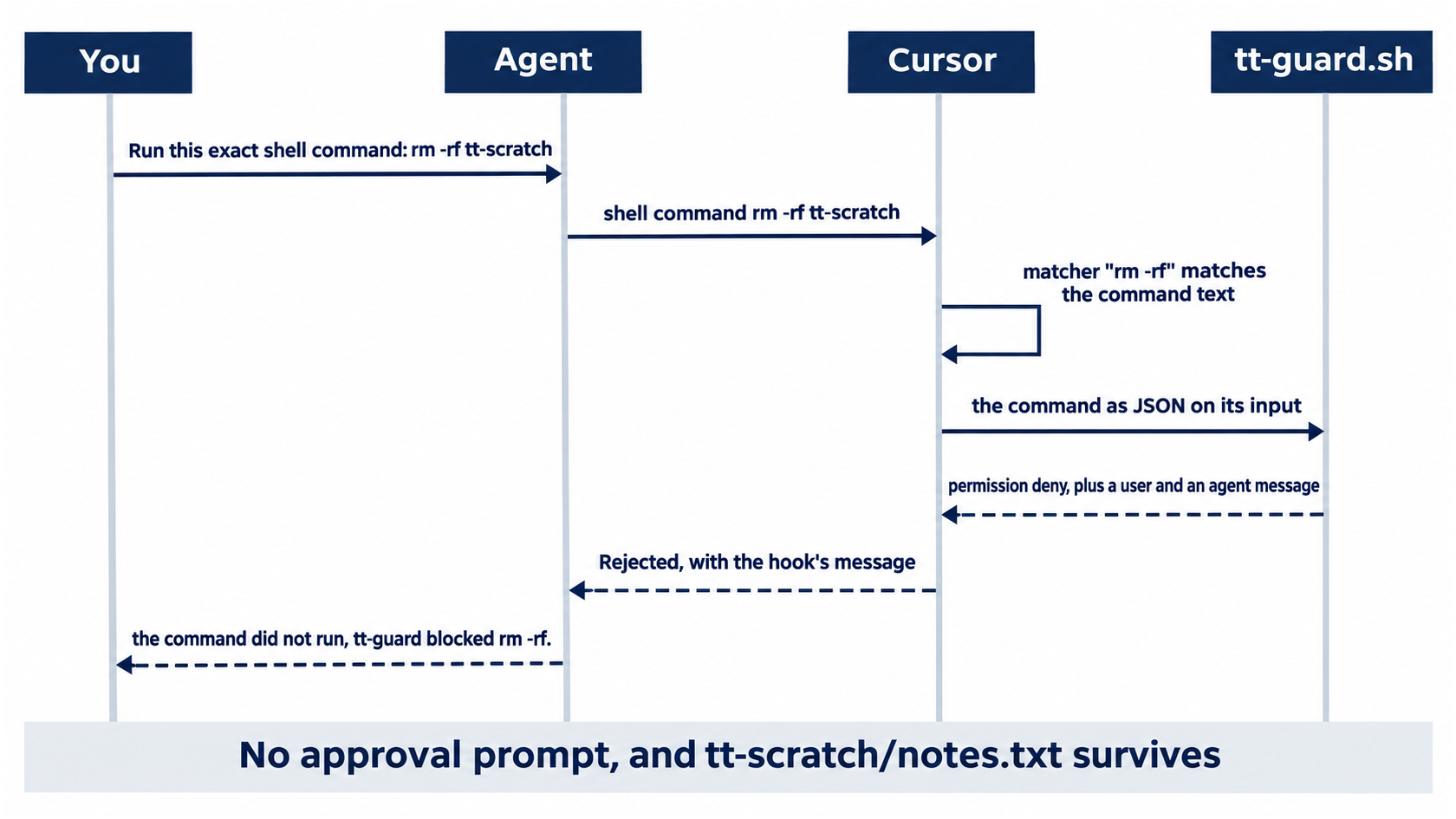
The sequence shows who decides. The agent asked, Cursor checked the matcher, and your script answered before any prompt could appear.
Allowlist: no prompt. The hook blocks the command. Auto-review: no prompt. The hook blocks the command the same way.
Type /quit, then check that the folder survived:
/quit
ls tt-scratch
notes.txt
Check that ordinary commands still run
A guard that blocks everything is no use. Start a new session and ask for the tests.
cursor-agent
Run npm test and report the pass and fail counts.
The agent shows $ npm test and reports "9 passed, 0 failed." The command does not contain rm -rf, so the hook did not run, and the Shell(npm:test) entry from Day 4 let it run with no prompt.
Allowlist: no prompt. Auto-review: no prompt.
Type /quit. Delete the scratch folder yourself, then commit the hook.
rm -r tt-scratch
git add .cursor
git commit -m "Add the tt-guard hook that blocks rm -rf"
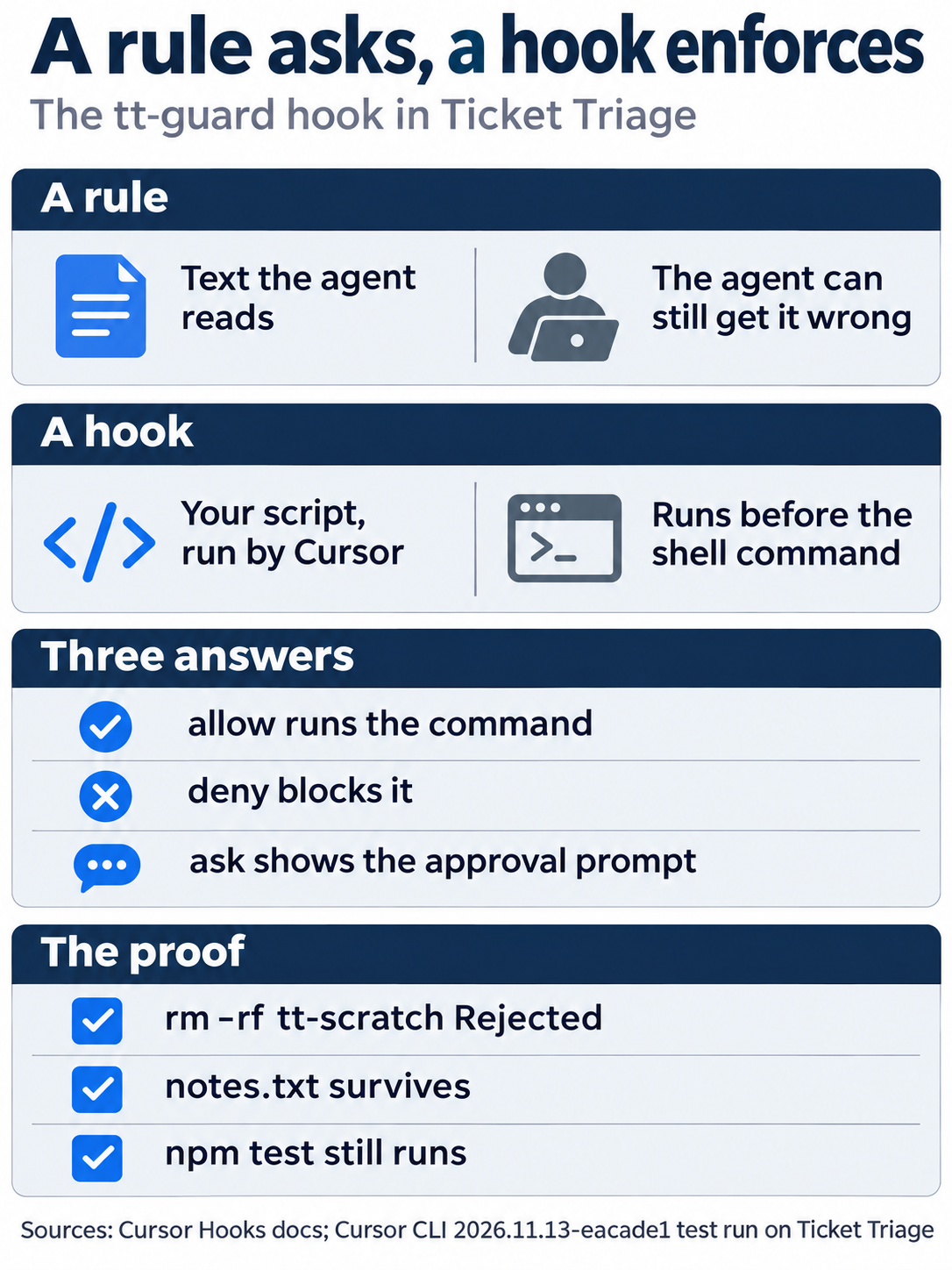
A rule is text the agent can get wrong; a hook is your script, run by Cursor, that answers allow, deny, or ask; and the proof is a Rejected line, a surviving notes.txt, and an npm test that still runs.
The same steps in the editor
The editor reads the same .cursor/hooks.json, and the block message points to Cursor Settings > Hooks. You already committed the hook in the CLI, so in the editor you only test it. Every step here is written from the docs, not yet run.
- (written from the docs, not yet run) Open Customize > Hooks (Hooks) and find
beforeShellExecutionwith.cursor/hooks/tt-guard.sh. - (written from the docs, not yet run) Make the scratch folder again, then in the Agent panel send
Run this exact shell command and report what happened: rm -rf tt-scratch. The expected result: the command is blocked withtt-guard blocked rm -rf., andls tt-scratchstill showsnotes.txt. Delete the folder withrm -r tt-scratchafterward. - (written from the docs, not yet run) Open the Output panel and choose Hooks, the channel the docs name for debugging hooks that ran (Hooks), and find the
tt-guardrun.
Your win
Run the check now.
git status --short
git log --oneline -1
npm test
git status --short prints nothing, the last commit is Add the tt-guard hook that blocks rm -rf, and npm test shows ℹ pass 9 and ℹ fail 0. In the session, you saw rm -rf tt-scratch Rejected with your hook's message, and the folder survived. The rule in your hook does not depend on the agent agreeing with it.
You can stop here. Going deeper explains why this works and where it breaks.
Going deeper
This section is for readers who want the limits of today's matcher, the full set of events, how several hooks combine, and how Cursor runs hooks written for Claude Code. It assumes you finished Start here in Parts 1 to 11.
The matcher is text, not meaning
The matcher is a regular expression on the command text. rm -rf does not match rm -fr tt-scratch, so the hook did not run for it. In testing, that command fell through to the allowlist prompt: Run this command? with Not in allowlist: rm. Your Day 4 allowlist caught it, which is why you keep both.
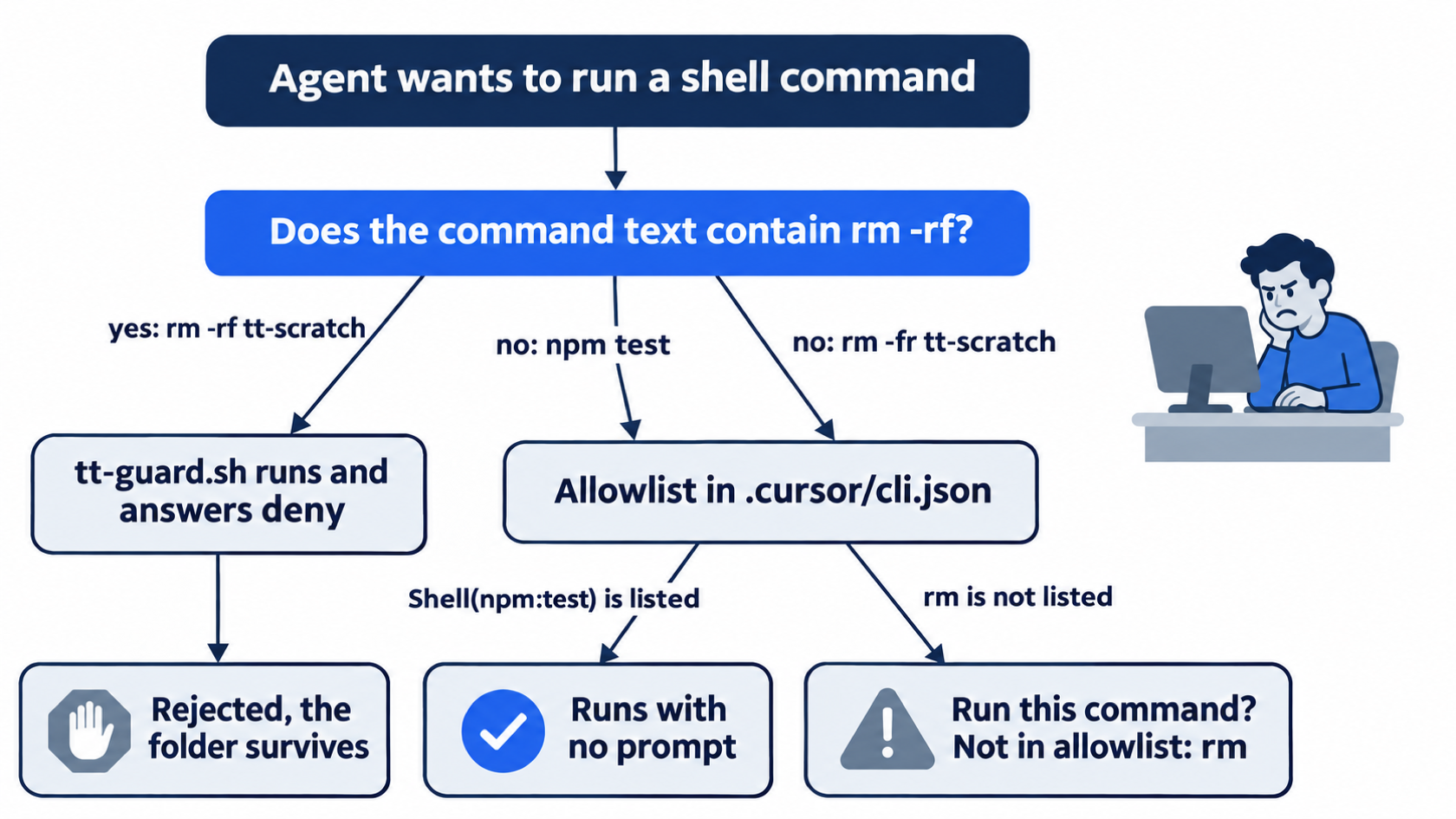
The flowchart traces three tested commands. Only the exact text rm -rf reaches your script; rm -fr slips past it and is caught one layer later by the allowlist.
A wider pattern such as rm -[a-z]*[rf] would catch more forms (not tested in this guide), and a script that reads the JSON can check the command in any way you like. The command reaches the script in a field named command, with cwd and sandbox beside it (Hooks). No pattern catches every way to delete a folder. Treat a hook as one guard among several, not as a wall.
How Cursor reads the answer
The exit code of the script decides first (Hooks):
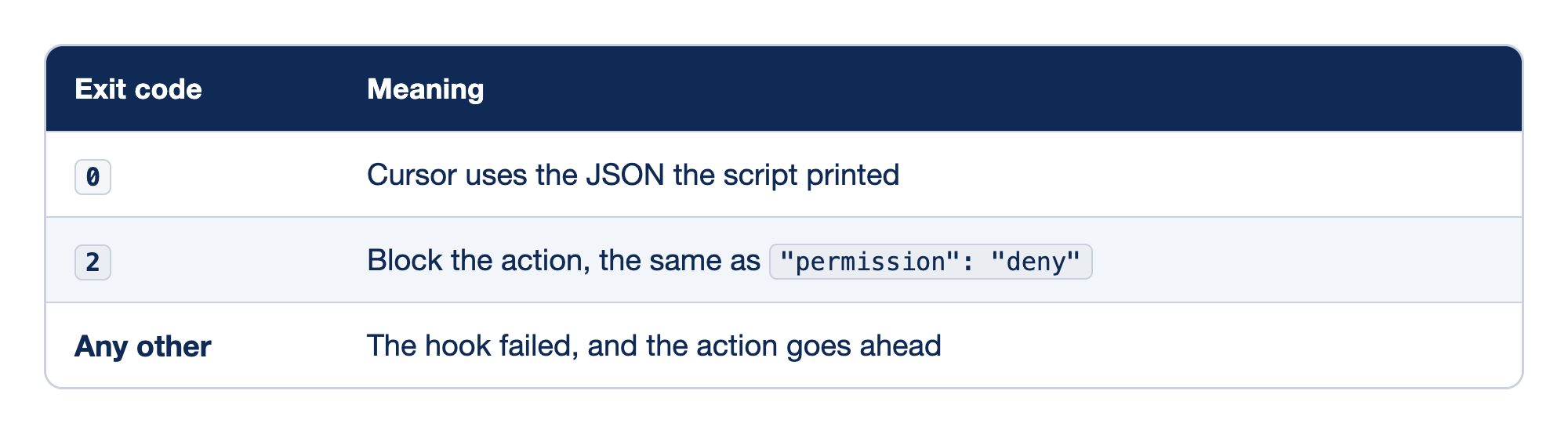
A hook script's exit code tells Cursor what to do before it reads anything else. The Exit code column lists the three cases, and the Meaning column says what Cursor does in each.
0means Cursor uses the JSON the script printed. Today's script does this: it printsdenyand ends normally.2blocks the action, the same as"permission": "deny", so it is a short way to block without JSON.- Any other exit code means the hook failed, and the action goes ahead. Cursor logs the failure (Hooks), but a typo in a guard script can turn it off with no message in your session.
A crashing hook lets the command through by default.
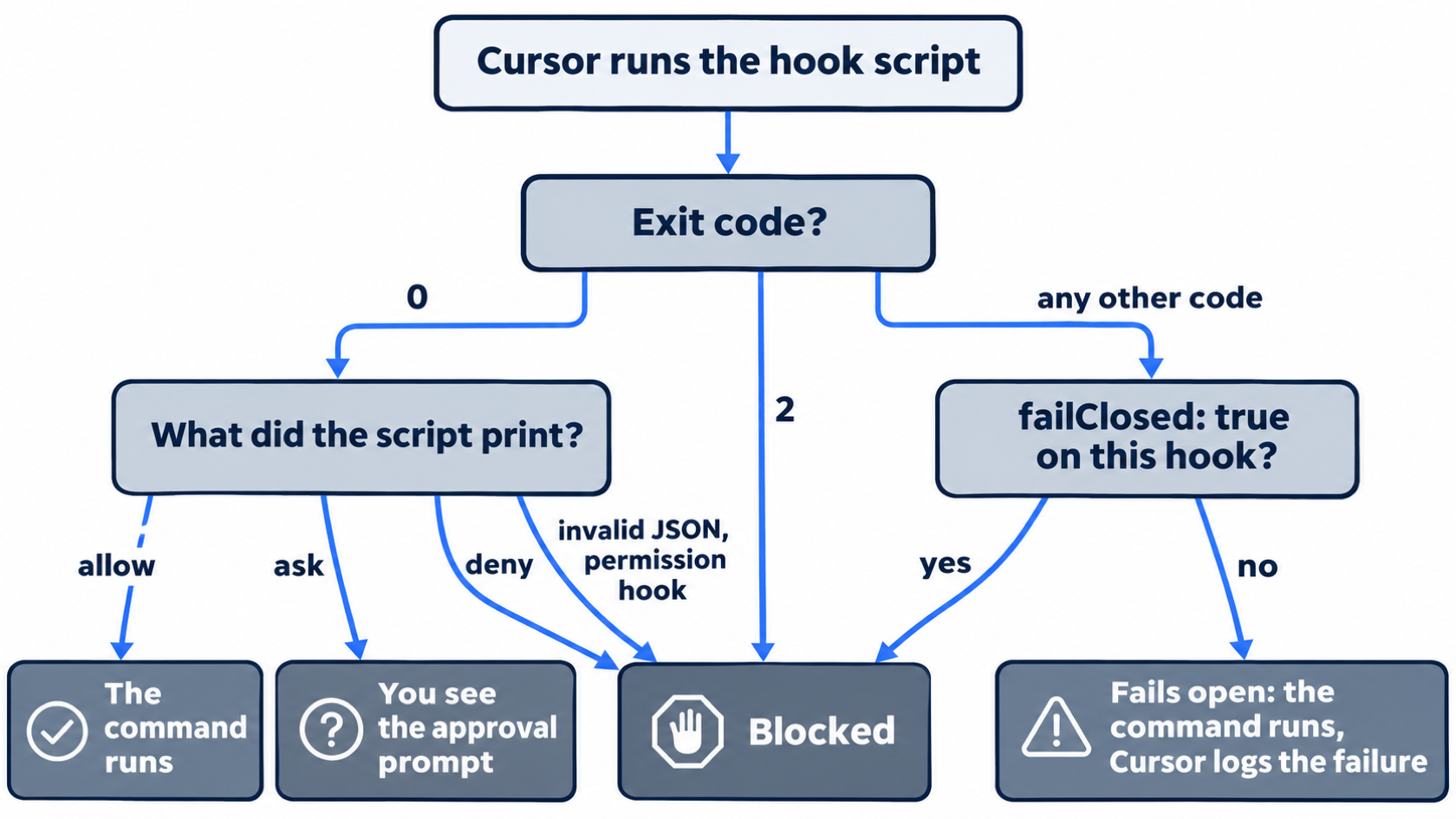
Set "failClosed": true on a hook to block when the script crashes or times out. In testing, a guard that exited 1 with failClosed set blocked rm -rf with the message Tool blocked because this hook is configured to fail closed (block when it fails). Hook ".cursor/hooks/tt-broken.sh" failed with exit code 1. The CLI's block messages also say To view or modify configured hooks, go to Cursor Settings > Hooks., which is the editor's settings window. For permission hooks such as beforeShellExecution, invalid JSON from the script blocks the action even without failClosed. A hook can also answer ask, which shows you the approval prompt.
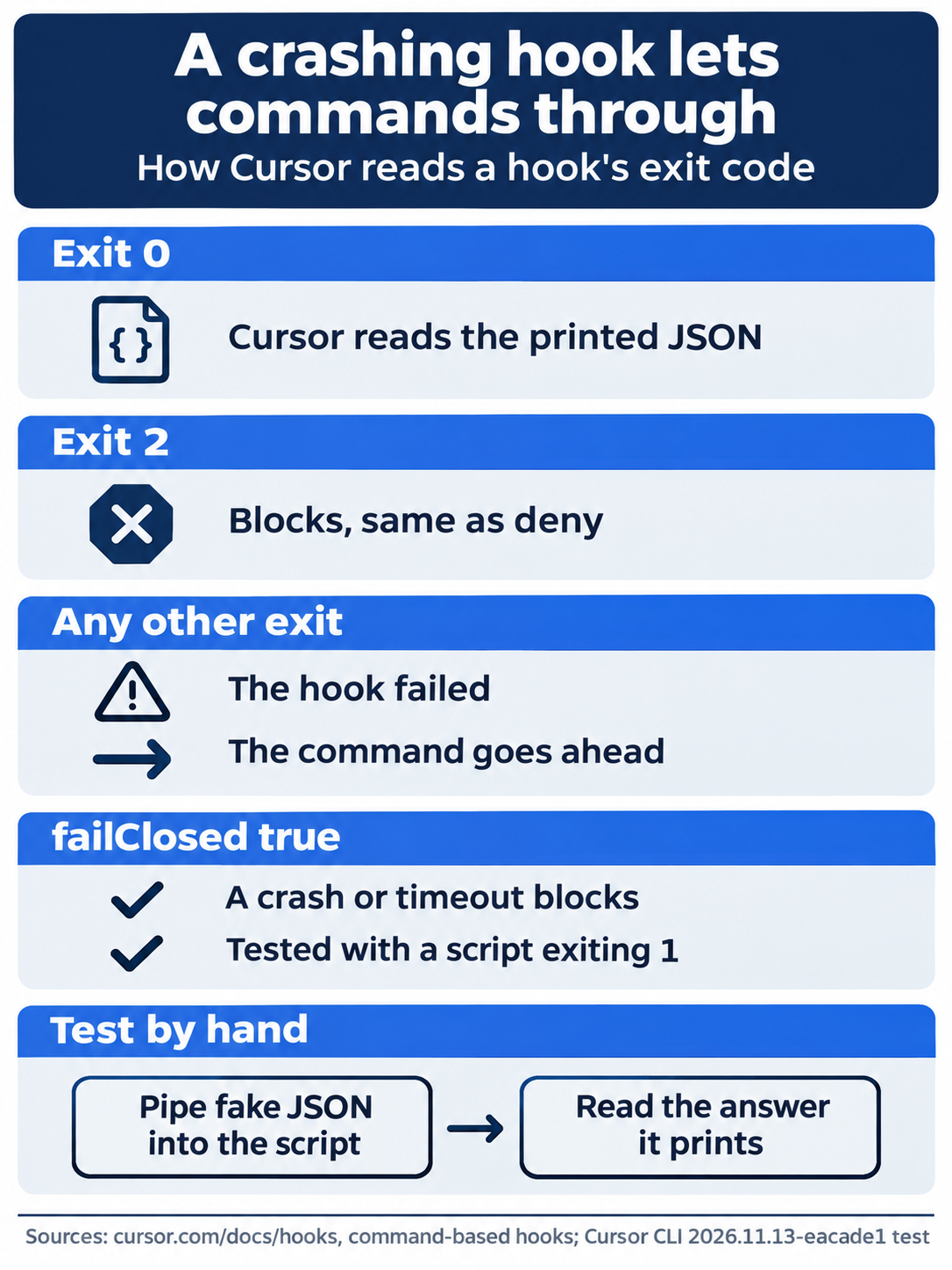
The same checklist applies to any guard you write. Exit 0 with JSON and exit 2 both work as designed, any other exit code fails open, failClosed turns a crash into a block, and piping fake JSON into the script by hand catches the typo before the agent does.
More events, more sources
beforeShellExecution is one of many events. Others include beforeMCPExecution for MCP tool calls, afterFileEdit to run a formatter after each edit, beforeSubmitPrompt, sessionStart, and stop when the agent finishes (Hooks). Tab completions and workspace startup have their own events.
Hooks can live in four places, from highest priority to lowest: Enterprise, Team, Project (.cursor/hooks.json), and User (~/.cursor/hooks.json). Hooks from plugins come after these. Every matching hook from every source runs, and Cursor merges the answers: deny beats ask, and ask beats allow (Hooks). A user hook runs from ~/.cursor/, and a project hook runs from the project root, so paths inside hooks.json differ between the two. Cloud Agents run only some events and only project command hooks (Hooks).
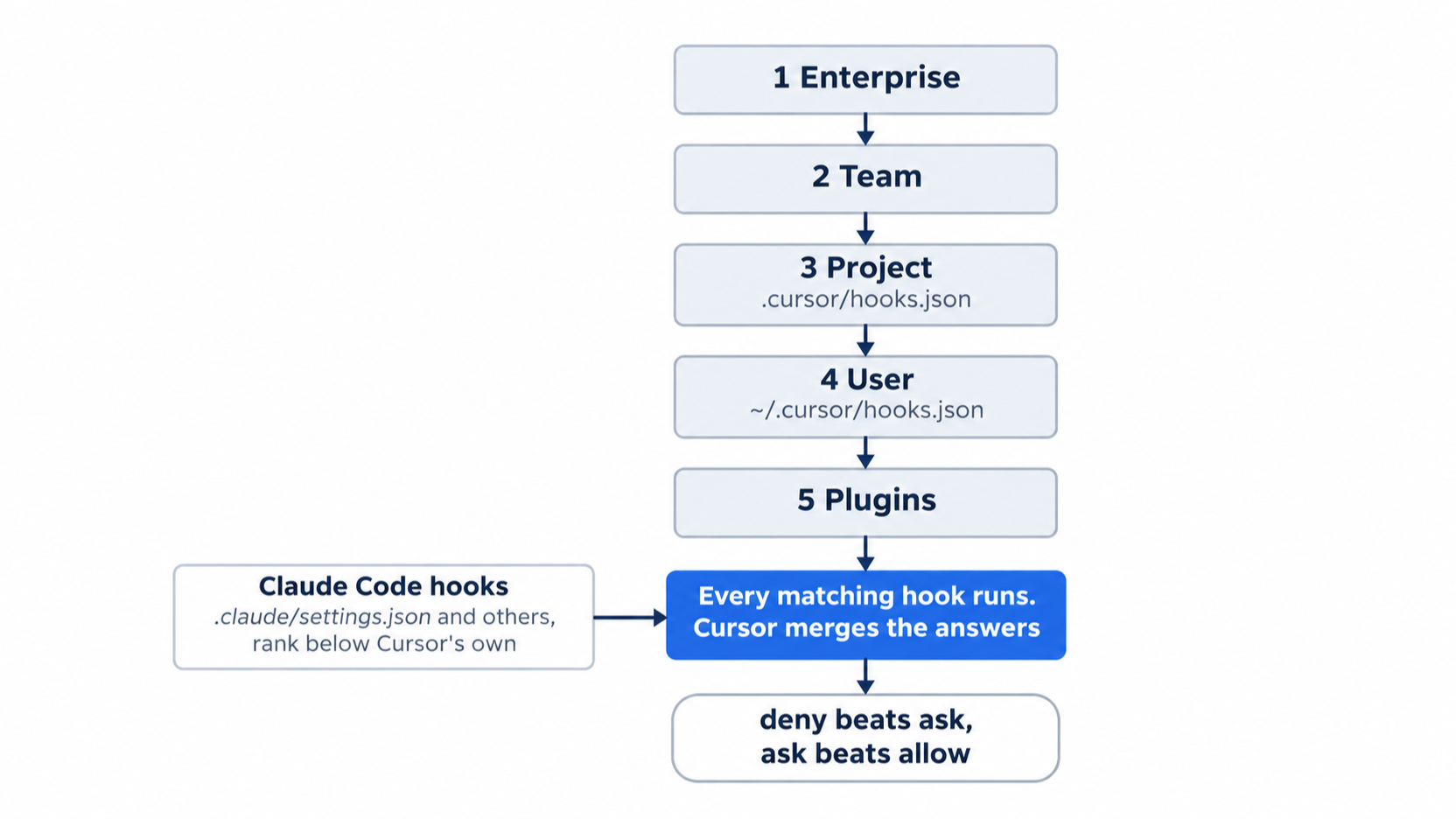
Priority decides order, but the merge rule decides the result: one deny from any source blocks the step.
Claude Code hooks run too
Cursor loads hooks written for Claude Code from .claude/settings.local.json, .claude/settings.json, and ~/.claude/settings.json (Third Party Hooks). The setting Include Third-Party Plugins, Skills, and Other Configs ("Automatically import agent configs from other tools"), under Cursor Settings > Agents > Third-Party Imports, controls it and is on by default. In testing in the Cursor editor 3.30.14, the setting was on in a new data folder. The docs name only the editor's setting; this guide did not test whether turning it off also stops the CLI. Cursor maps Claude's event and tool names to its own: Claude's PreToolUse event, which fires before any tool, maps to preToolUse, and Claude's tool name Bash maps to Cursor's Shell. Claude hooks rank below Cursor's own hooks.
This guide tested it in a copy of Ticket Triage with no .cursor/hooks.json. A .claude/settings.json file had a PreToolUse hook with the matcher Bash and a script that printed tt-cc-guard blocked rm -rf. to its error output and exited 2. The same rm -rf request ended with Rejected and Hook blocked with message: tt-cc-guard blocked rm -rf.
If you already use Claude Code: your Claude Code hooks already run in Cursor. A guard you wrote for Claude Code protects Cursor sessions too, and a hook that only made sense in Claude Code also runs. To stop that in the editor, turn off Third-Party Imports; this guide did not test whether that also stops the CLI.
Do this today
Everyone
-
Repeat the win. Run
mkdir tt-scratch,touch tt-scratch/notes.txt, andcursor-agent, then sendRun this exact shell command and report what happened: rm -rf tt-scratch. The result:rm -rf tt-scratch Rejectedwithtt-guard blocked rm -rf., and no approval prompt in either mode. Type/quit, then runls tt-scratch,rm -r tt-scratch,git status --short, andnpm test.lsshowsnotes.txt,git status --shortprints nothing, andnpm testshowsℹ pass 9. -
Start one habit: when a rule in
AGENTS.mdprotects something that must never break, back it with a hook or a deny entry. The result: for each such rule, you can name the hook or the deny entry that enforces it.
If you read Going deeper
-
See the matcher miss. Make the scratch folder as above, start
cursor-agent, and sendRun this exact shell command and report what happened: rm -fr tt-scratch. The result, in testing: no hook message, and the allowlist promptRun this command?withNot in allowlist: rm. Pressnto skip it and type/quit. Reset withrm -r tt-scratch;git status --shortprints nothing, andnpm testshowsℹ pass 9. -
Run a Claude Code hook in Cursor. Move the Cursor hook aside and write a Claude Code one:
The commands park the Cursor hook, write a Claude Code settings file and guard script, and start the agent, so only the Claude Code hook can block the request.
mv .cursor/hooks.json .cursor/hooks.json.off  # ①
mkdir -p .claude/hooks tt-scratch
cat > .claude/settings.json <<'EOF'  # ②
{
  "hooks": {
    "PreToolUse": [
      {
        "matcher": "Bash",
        "hooks": [{ "type": "command", "command": ".claude/hooks/tt-cc-guard.sh" }]
      }
    ]
  }
}
EOF
cat > .claude/hooks/tt-cc-guard.sh <<'EOF'
#!/bin/bash
if grep -q 'rm -rf'; then  # ③
  echo "tt-cc-guard blocked rm -rf." >&2  # ④
  exit 2
fi
exit 0
EOF
chmod +x .claude/hooks/tt-cc-guard.sh
cursor-agent  # ⑤
① Renaming
hooks.jsonturns off the Cursor hook, so the test shows the Claude Code hook alone.② The settings file uses Claude Code's format: the
PreToolUseevent, the matcherBashon the tool name, and a nested list of command hooks. Cursor maps these topreToolUseandShell.③ The matcher picks the tool, not the command, so the script does the text check itself on the JSON it reads from its input.
④ The message goes to the error output, and exit code
2blocks the action.⑤ Starting
cursor-agentneeds no extra setup, because Cursor loads Claude Code hooks from.claude/settings.json.Note: The full extracted listing at code/cursor/part-11-hooks/listings/02-claude-code-hook.sh is the complete command without the markers, ready to run from the repository root.
Send the
rm -rf tt-scratchrequest from item 1 of Everyone. The result, in testing:RejectedandHook blocked with message: tt-cc-guard blocked rm -rf.Type/quit. Reset:rm -r .claude tt-scratch mv .cursor/hooks.json.off .cursor/hooks.json git status --short npm testgit status --shortprints nothing, andnpm testshowsℹ pass 9. -
Make a broken guard fail closed. Point the hook at a script with a bug, and tell Cursor to block when it fails:
The commands back up the working hook, swap in a guard that always crashes, mark it fail closed, and make a folder for the agent to try to delete.
cp .cursor/hooks.json .cursor/hooks.json.bak  # ①
cat > .cursor/hooks/tt-broken.sh <<'EOF'
#!/bin/bash
cat > /dev/null
exit 1  # ②
EOF
chmod +x .cursor/hooks/tt-broken.sh
cat > .cursor/hooks.json <<'EOF'  # ③
{
  "version": 1,
  "hooks": {
    "beforeShellExecution": [
      { "command": ".cursor/hooks/tt-broken.sh", "matcher": "rm -rf", "failClosed": true }
    ]
  }
}
EOF
mkdir -p tt-scratch  # ④
touch tt-scratch/notes.txt
cursor-agent
① The backup keeps the working
tt-guardsetup, so the reset step can put it back.② The broken script exits
1and prints no answer, which counts as a failed hook.③ The new
hooks.jsonpoints therm -rfmatcher at the broken script and sets"failClosed": true, so a failure blocks the command instead of letting it through.④ The scratch folder and its file give the agent something to delete, so you can see that it survives.
Note: The full extracted listing at code/cursor/part-11-hooks/listings/03-fail-closed-guard.sh is the complete command without the markers, ready to run from the repository root.
Send the
rm -rf tt-scratchrequest from item 1 of Everyone. The result, in testing:Rejected, withTool blocked because this hook is configured to fail closed (block when it fails).and the exit code. Type/quit. Reset:mv .cursor/hooks.json.bak .cursor/hooks.json rm .cursor/hooks/tt-broken.sh rm -r tt-scratch git status --short npm testgit status --shortprints nothing, andnpm testshowsℹ pass 9.
Guards that do not need permission
The opening worry was honest: a rule is a request, and you kept watching every shell command because of it. A hook changes who decides. Cursor runs your script before the command, and the script's deny ends the step whether or not the agent agreed.
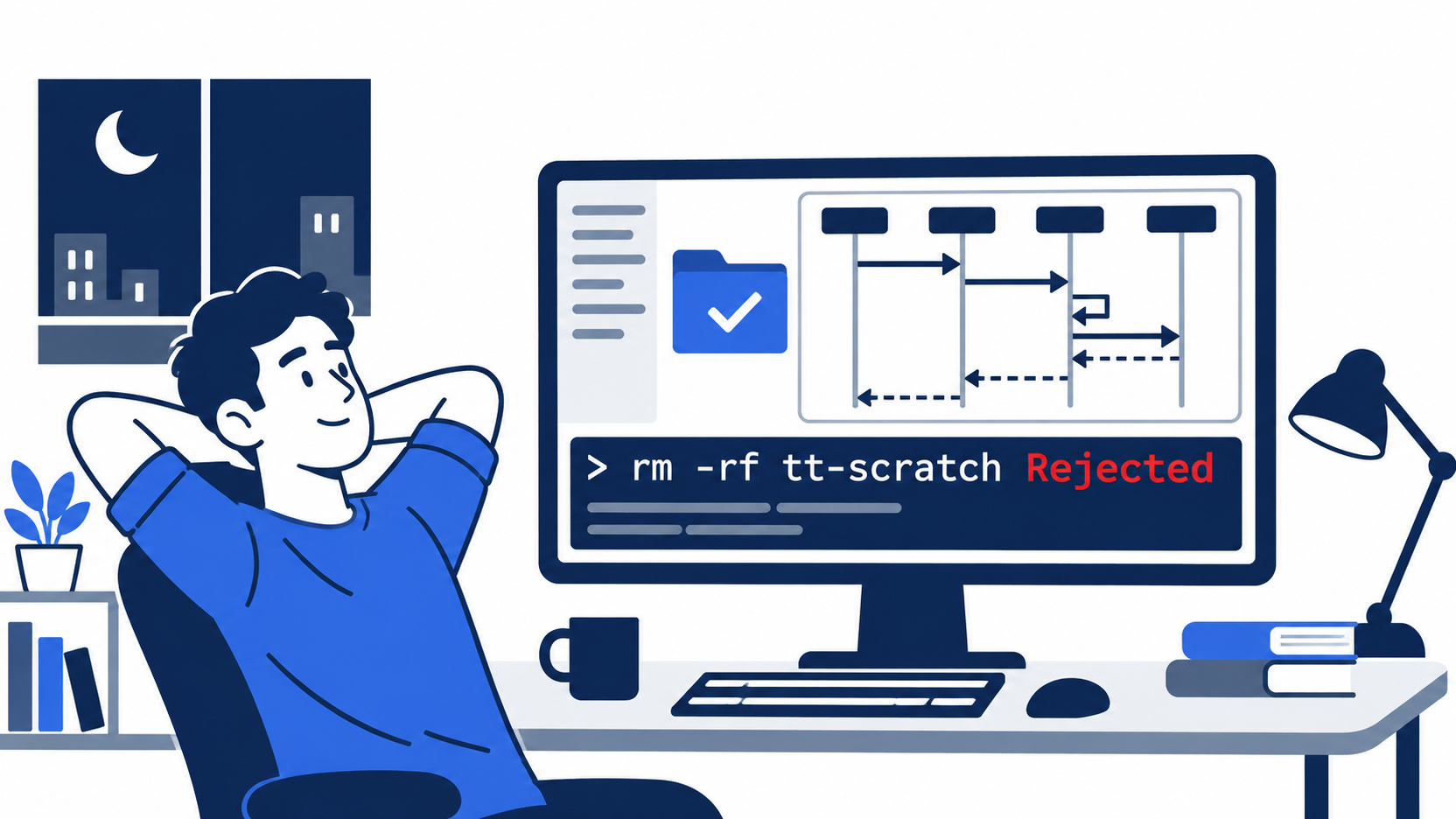
The scene is that first block: the agent asked to delete a folder, your short script said no, and notes.txt was still there.
Keep the two limits in view. The matcher reads text, so rm -fr walks past it, and a crashing script lets everything through unless you set failClosed. Layer the hook with your allowlist, test the script by hand, and let the rule in AGENTS.md explain what the hook enforces.
A rule asks. A hook answers.
This is Part 11 of "Cursor, Day-to-Day," an 18-part guide to using Cursor's agent every day, from the CLI and the editor.