
One Folder, One Flag: Package Your Cursor Skill and Subagent as a Plugin
A skill in one folder and a reviewer in another is setup you copy by hand; a Cursor Plugin moves both into one folder with a small manifest that loads with one flag, and the open Agent Plugins format lets part of that kit travel to other agent tools.
Move a skill and a read-only reviewer into a Cursor Plugin, load it with --plugin-dir, add a keyword with ten tests passing, and see how the open Agent Plugins format loads in Cursor.
Your best skill and your reviewer live in two different folders, you keep copying them between projects, and one day the skills list shows the same name twice and you cannot tell which one will run.
In this article: Day 13 of an 18-day guide. Start here builds
tt-triage-kit, a Cursor Plugin with a three-field manifest, moves an existing skill and subagent into it withgit mv, loads it withcursor-agent --plugin-dir, and runs its skill to add the keywordshattereduntil ten tests pass. Going deeper covers the reviewer inside the plugin, why a copy becomes a duplicate, the four ways this guide tried to load a plugin in every session, what else a plugin can hold, a tested Agent Plugins package in Cursor, and how marketplaces bring plugins to a team.
Tested on Cursor CLI 2026.11.13-eacade1. Key editor steps tested in the Cursor editor 3.30.14; other editor steps are written from the docs.
Yesterday you committed a read-only reviewer, tt-reviewer, and it passed the cracked commit.
Start here
At the end of today, the tt-add-keyword skill and the tt-reviewer subagent live in one plugin, tt-triage-kit. The CLI lists it in /plugin, its skill adds the keyword shattered with a test, and ten tests pass.
Starting fresh or fell behind? Run git switch -C main cursor/day-12. This replaces your main with the end of Day 12; to keep your own work, run git branch my-backup first.
Check your starting state
Start where Day 12 ended. Run three checks in ~/code/ticket-triage.
cd ~/code/ticket-triage
git status --short
git log --oneline -1
npm test
git status --short prints nothing. git log --oneline -1 shows the newest commit, with your own hash:
ef84708 Add the read-only tt-reviewer subagent
npm test ends with ℹ pass 9 and ℹ fail 0. If any check differs, finish Day 12 first.
What a plugin is
On Day 9 you met plugins as add-on packages that bring their own skills. A plugin is a folder with a manifest, a small JSON file that names the package, plus the parts it bundles in fixed subfolders (Plugins reference). Cursor's own format, a Cursor Plugin, keeps the manifest at .cursor-plugin/plugin.json and can bundle skills, subagents, rules, hooks, and MCP servers, all of which you have met. Today's plugin bundles two things you already have: the skill from Day 9 and the reviewer from Day 12.
A plugin keeps your setup in one place. Instead of a skill file in one folder and a subagent file in another, you point the CLI at one plugin folder.
Build the plugin
Make the folder and its manifest. The only required field is name (Plugins reference).
mkdir -p plugins/tt-triage-kit/.cursor-plugin plugins/tt-triage-kit/skills plugins/tt-triage-kit/agents
cat > plugins/tt-triage-kit/.cursor-plugin/plugin.json <<'EOF'
{
  "name": "tt-triage-kit",
  "version": "0.1.0",
  "description": "Ticket Triage helpers: the tt-add-keyword skill and the tt-reviewer subagent."
}
EOF
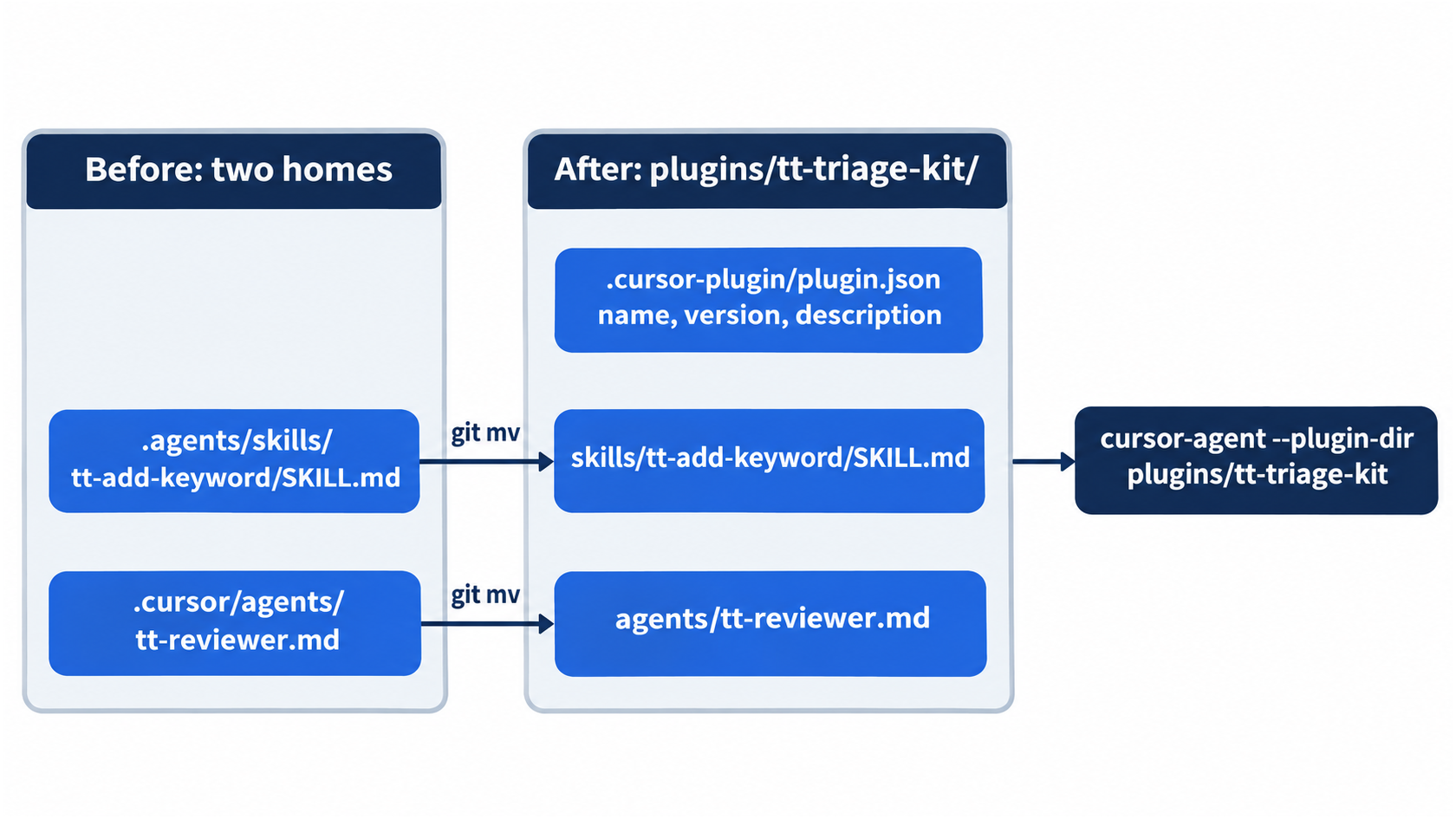
Now move the skill and the reviewer into the plugin. Cursor finds a plugin's skills in its skills/ folder and its subagents in agents/ (Plugins reference).
git mv .agents/skills/tt-add-keyword plugins/tt-triage-kit/skills/
git mv .cursor/agents/tt-reviewer.md plugins/tt-triage-kit/agents/
rmdir .agents/skills .agents .cursor/agents
git status --short
R  .cursor/agents/tt-reviewer.md -> plugins/tt-triage-kit/agents/tt-reviewer.md
R  .agents/skills/tt-add-keyword/SKILL.md -> plugins/tt-triage-kit/skills/tt-add-keyword/SKILL.md
?? plugins/tt-triage-kit/.cursor-plugin/
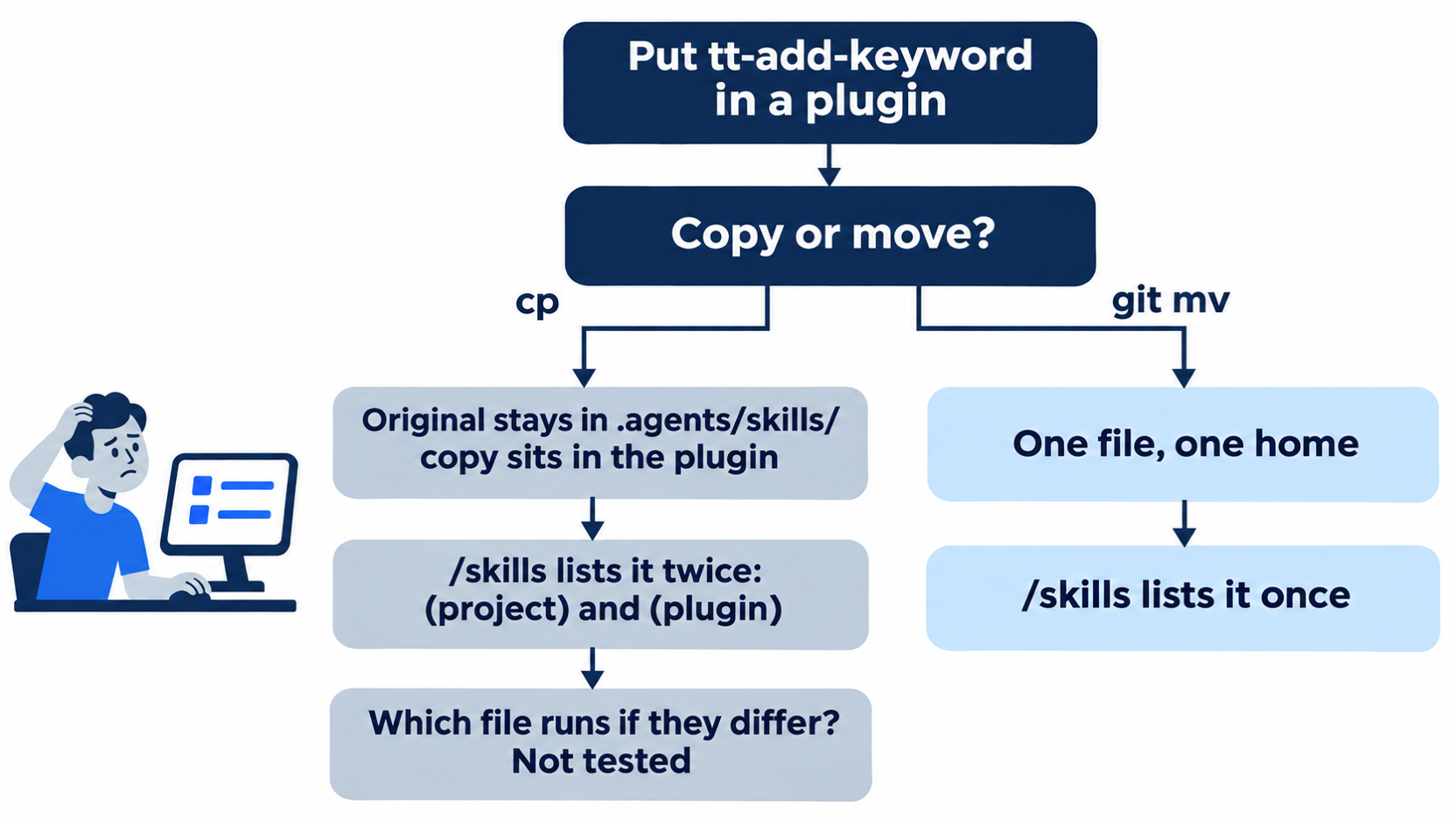
git mv moves a file and tells git it is the same file, so the R lines show a rename, not a delete and an add. You move the files instead of copying them, so each name has one home. A copy left behind would make /skills list tt-add-keyword twice, once as (project) and once as (plugin).
Load the plugin
Start the CLI with --plugin-dir, which loads a plugin from a folder (CLI parameters).
cursor-agent --plugin-dir plugins/tt-triage-kit
Open the plugin list.
/plugin
The list has three tabs, Plugins, Installed, and Marketplace, and a search box. Under the User heading, your plugin shows as:
tt-triage-kit (extension)
(extension) marks a plugin loaded from a folder. On a new account it is the only row. On the test account, the list showed eight plugins installed on the account above it, marked (cursor-public). Move to tt-triage-kit and press Enter:
 Plugin details / tt-triage-kit

 Ticket Triage helpers: the tt-add-keyword skill and the tt-reviewer subagent.

 Skills: 1 (tt-add-keyword)
 Agents: 1 (tt-reviewer)
Press Esc twice to close the list.
Allowlist: no prompts. Auto-review: no prompts.
Run the plugin's skill
Run the skill the same way as on Day 9. Type /tt-add, press Enter on /tt-add-keyword, finish the message, and press Enter:
/tt-add-keyword shattered as damaged
The agent edits both files, adds a test named shattered, runs npm test, and reports the result. In testing, it reported "10 passed, 0 failed." Your wording will differ; your own npm test below is the proof.
Allowlist: no prompts. Auto-review: no prompts.
Leave the session, check, and commit.
/quit
grep -n shattered test/classify.test.js
npm test
git add -A
git commit -m "Move the skill and reviewer into the tt-triage-kit plugin, add shattered"
grep prints the new test with its line number. In testing, it printed:
27:test("shattered", () =>
28:  assert.equal(classify("The glass arrived shattered"), "damaged"))
Your line numbers and ticket text can differ. npm test ends with ℹ pass 10 and ℹ fail 0.
Without the flag, the plugin is not loaded
The plugin loads only when you ask for it. Start cursor-agent with no flag and open the skills list:
cursor-agent
/skills
Press ↓ until the list stops. tt-add-keyword is not in it. Press Esc and type /quit. From today on, start sessions with --plugin-dir plugins/tt-triage-kit when you want the skill or the reviewer. Going deeper shows how to load a plugin in every session instead.
The same steps in the editor
The editor loads local plugins from a folder in your home directory, ~/.cursor/plugins/local (Plugins). The plugin is committed, so in the editor you only load and check it. Every step here was tested in the Cursor editor 3.30.14.
- (tested in the Cursor editor 3.30.14) Copy the plugin:
mkdir -p ~/.cursor/plugins/local && cp -R plugins/tt-triage-kit ~/.cursor/plugins/local/. The docs say that a symlink there loads only if its target is inside that folder, so copy it. - (tested in the Cursor editor 3.30.14) Open the Command Palette (
Cmd+Shift+Pon macOS,Ctrl+Shift+Pon Windows and Linux), run Developer: Reload Window, open Customize, and pick Plugins. In testing, the list showed Tt Triage Kit with a Local badge. - (tested in the Cursor editor 3.30.14) In the Agent panel, type
/tt-add. In testing, the menu showed one row,/tt-add-keyword. Remove the copy afterward withrm -r ~/.cursor/plugins/local/tt-triage-kit.
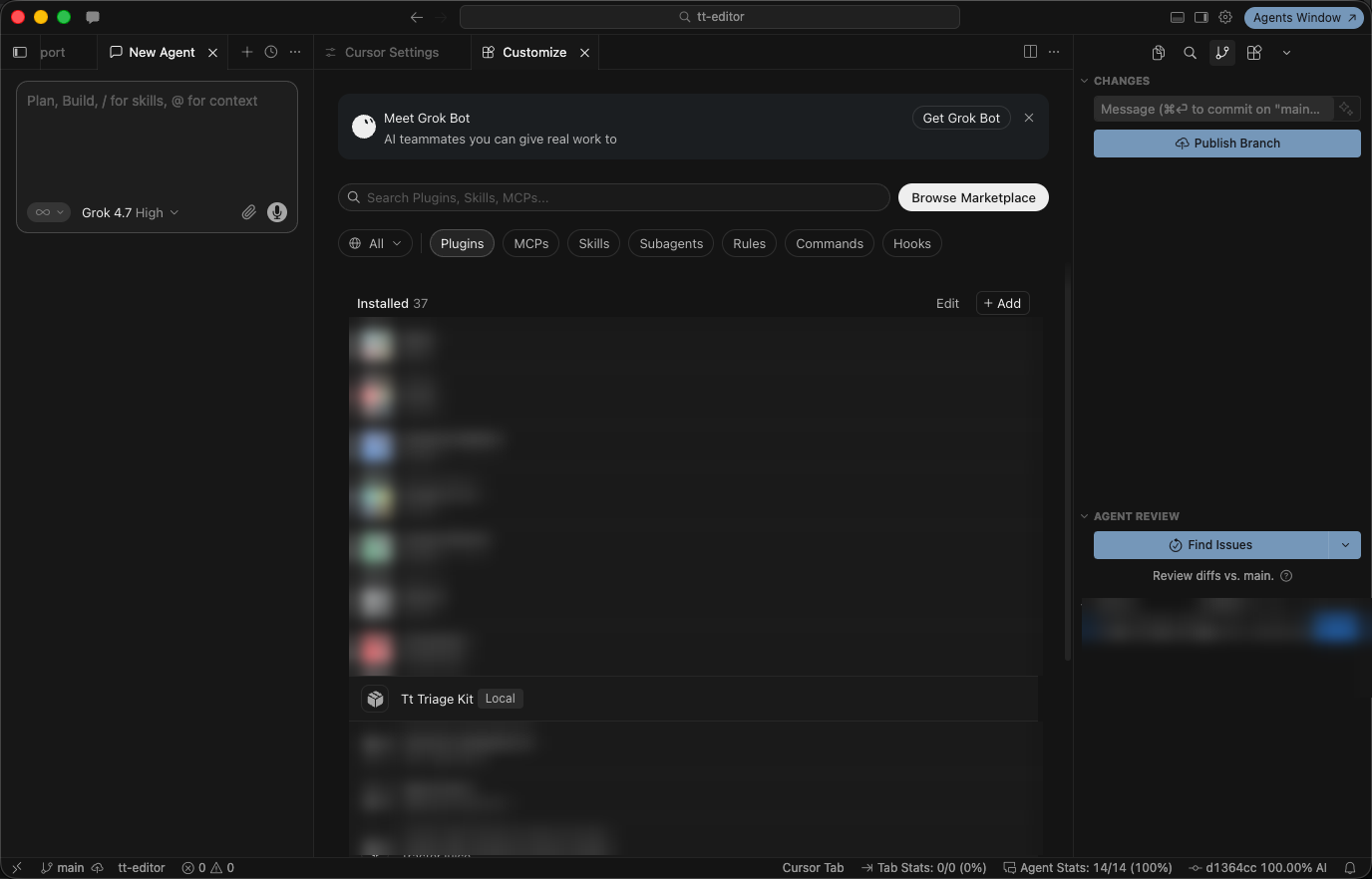
After Developer: Reload Window, Customize > Plugins lists Tt Triage Kit with a Local badge, in the Cursor editor 3.30.14 (other installed plugins blurred for privacy).
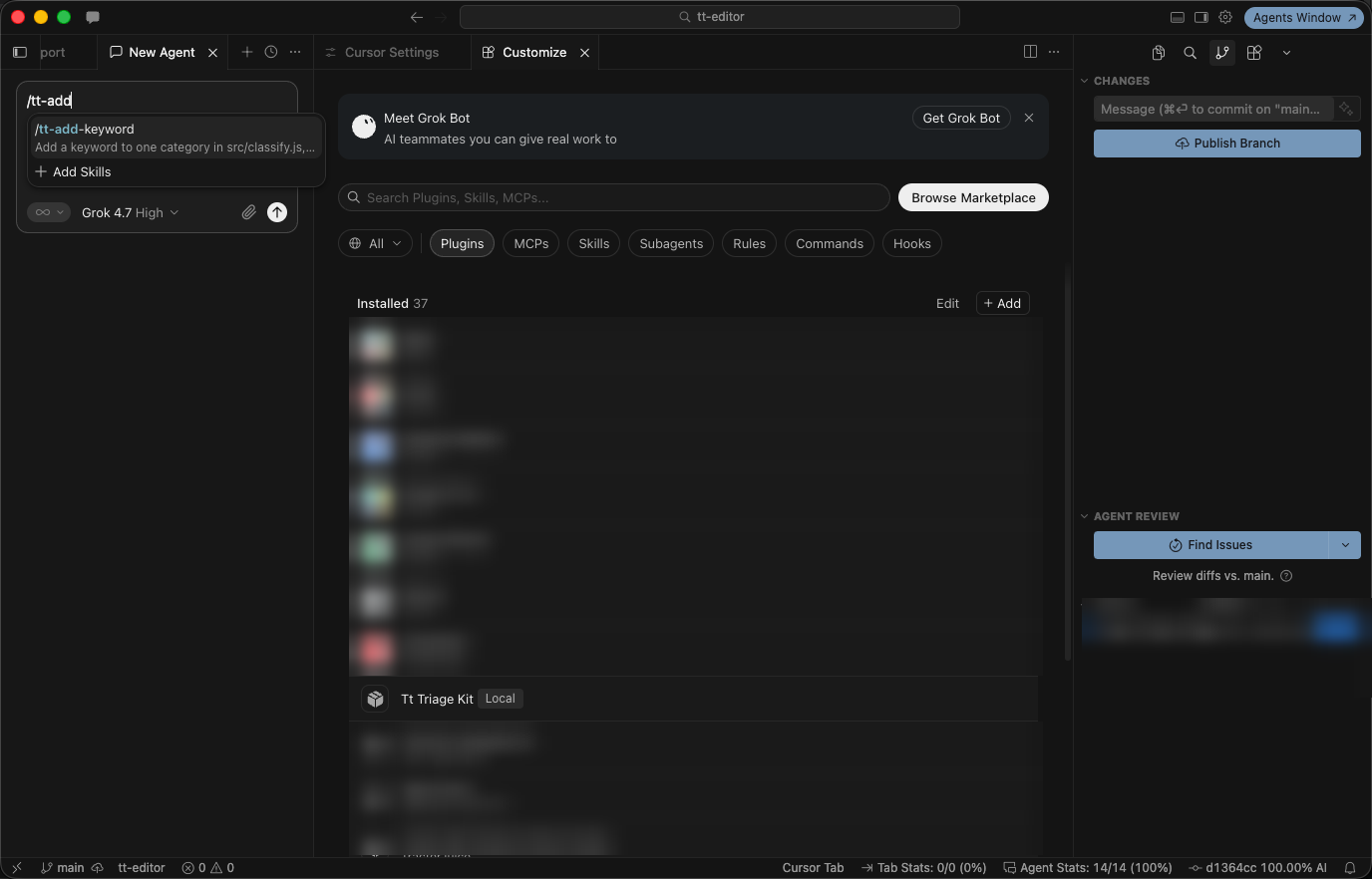
With the plugin copy loaded, typing /tt-add shows one /tt-add-keyword row, in the Cursor editor 3.30.14.
Your win
Run the check now.
cursor-agent --plugin-dir plugins/tt-triage-kit
/plugin
Find tt-triage-kit (extension), press Esc, and type /quit. Then run:
git status --short
git log --oneline -1
npm test
git status --short prints nothing, the last commit is Move the skill and reviewer into the tt-triage-kit plugin, add shattered, and npm test shows ℹ pass 10 and ℹ fail 0. Your skill and your reviewer are now one folder that loads with one flag.
You can stop here. Going deeper explains why this works and where it breaks.
Going deeper
This section is for readers who want to load the plugin in every session, run its reviewer, see the open Agent Plugins format in Cursor, and know how plugins reach a team. It assumes you finished Start here in Parts 1 to 13.
A copy in the plugin is a duplicate
The tempting first version of a plugin is a copy. You already have a working skill and a working reviewer, so you copy both into a new folder and leave the originals where they are. Nothing breaks, and that is the trouble.
Before the move, this guide tried exactly that: a plugin that held copies of the skill and reviewer while the originals stayed in .agents/skills/ and .cursor/agents/. /skills listed tt-add-keyword (project) and tt-add-keyword (plugin), 39 rows in all on the test account. The / menu still showed one /tt-add-keyword and one /subagent-tt-reviewer. This guide did not test which copy runs when the two files differ. Day 9 found that two different files with one name can run differently depending on how the skill starts, which is why Start here moves the files.
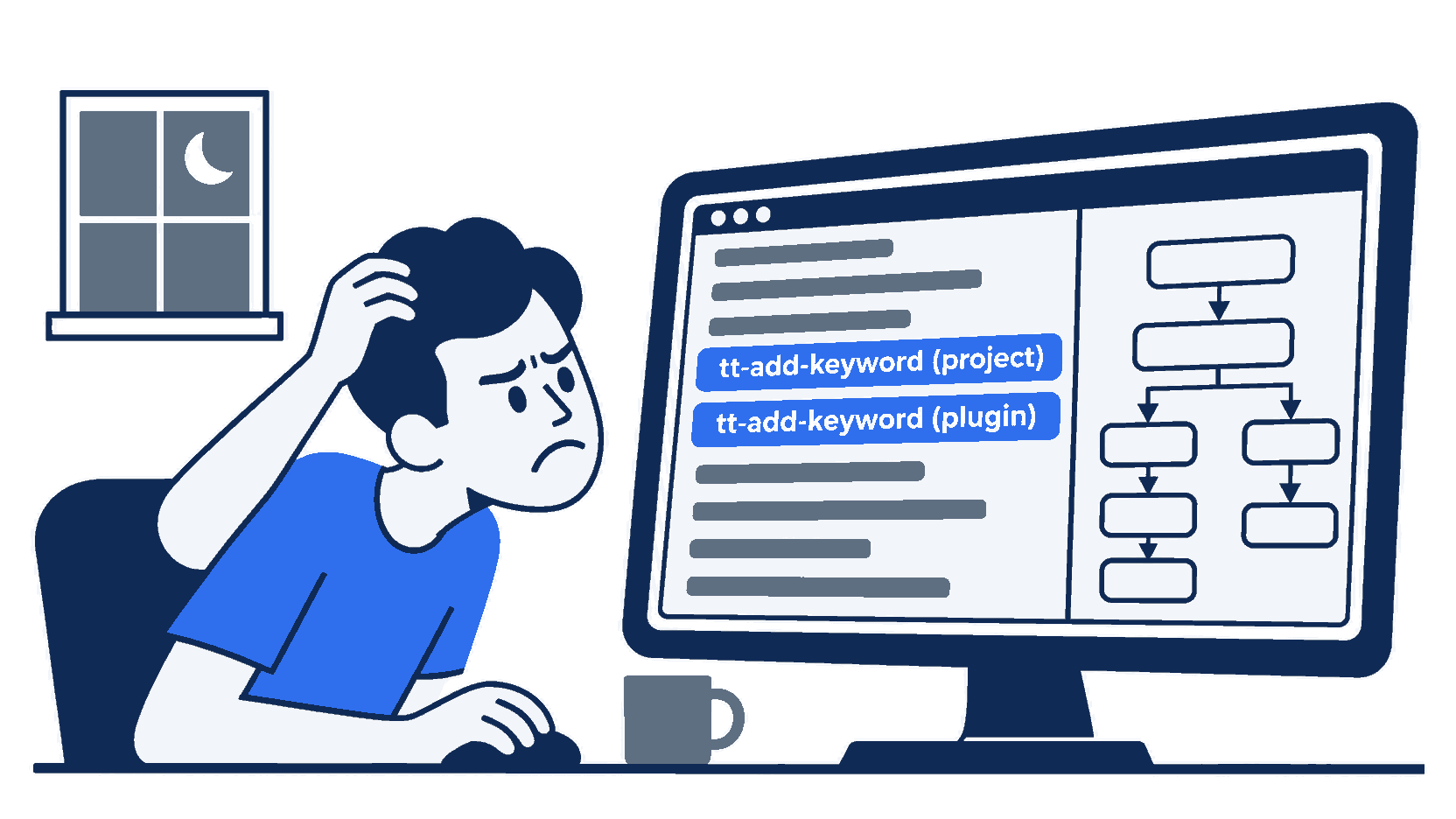
The scene is the moment the copy shortcut catches up with you: one skill name, two rows, and no way to tell from the list which file a slash command will run.
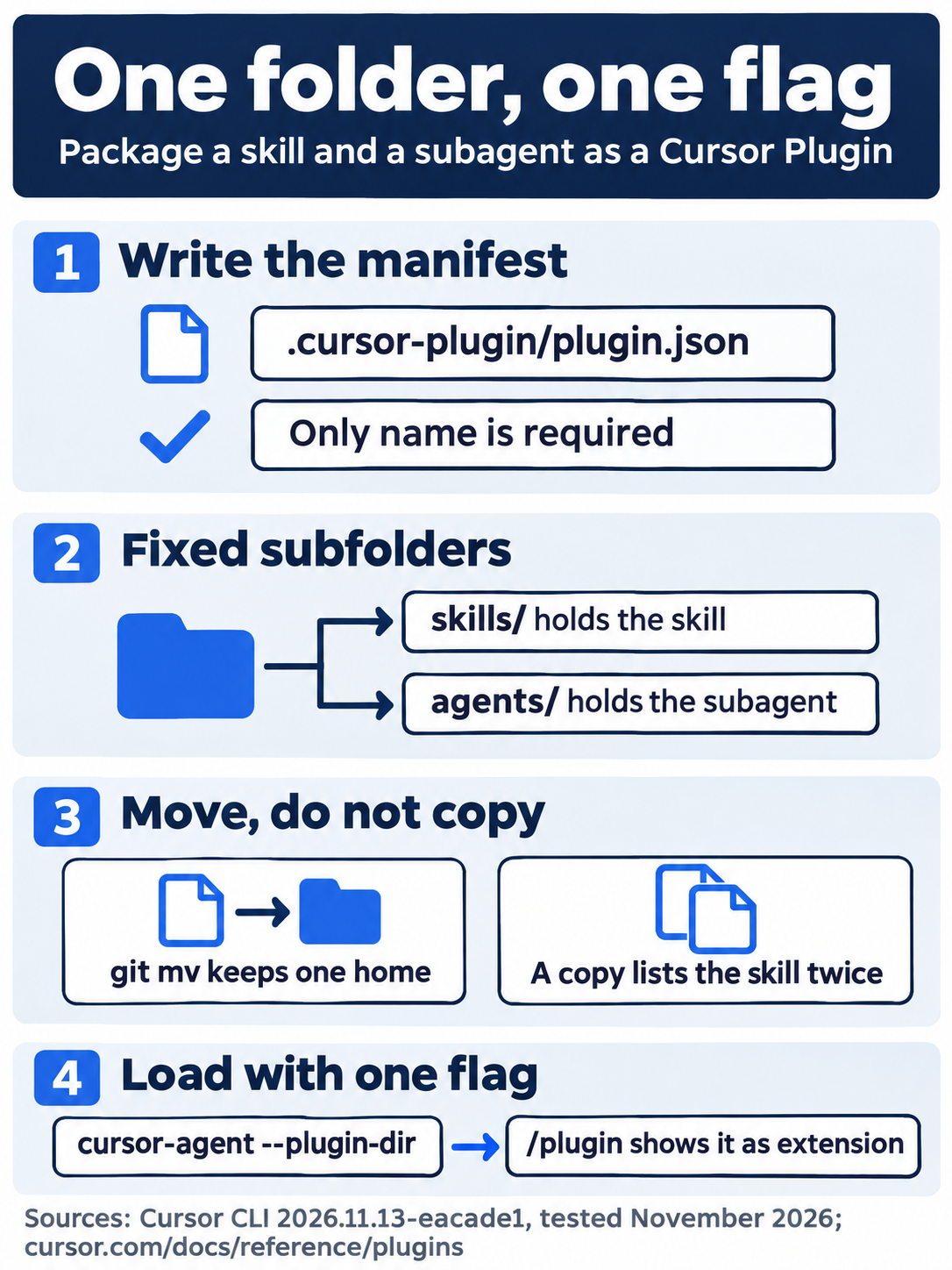
The build comes down to a manifest at .cursor-plugin/plugin.json that needs only name, the skill in skills/ and the subagent in agents/, moved with git mv so each name has one home, and one --plugin-dir flag to load the whole kit.
The reviewer in the plugin
The reviewer moved with the skill. With --plugin-dir plugins/tt-triage-kit, /subagent-tt-reviewer, finished with review HEAD, reviewed the shattered commit and answered with PASS for d38d7d5. In this run, the reviewer itself asked twice for approval, in allowlist mode, to run git show and git log commands (Approval 1 of 2). On Day 12 it asked for nothing, because it chose different commands. Choose Run (once) for a read-only git command like these.
Load the plugin in every session
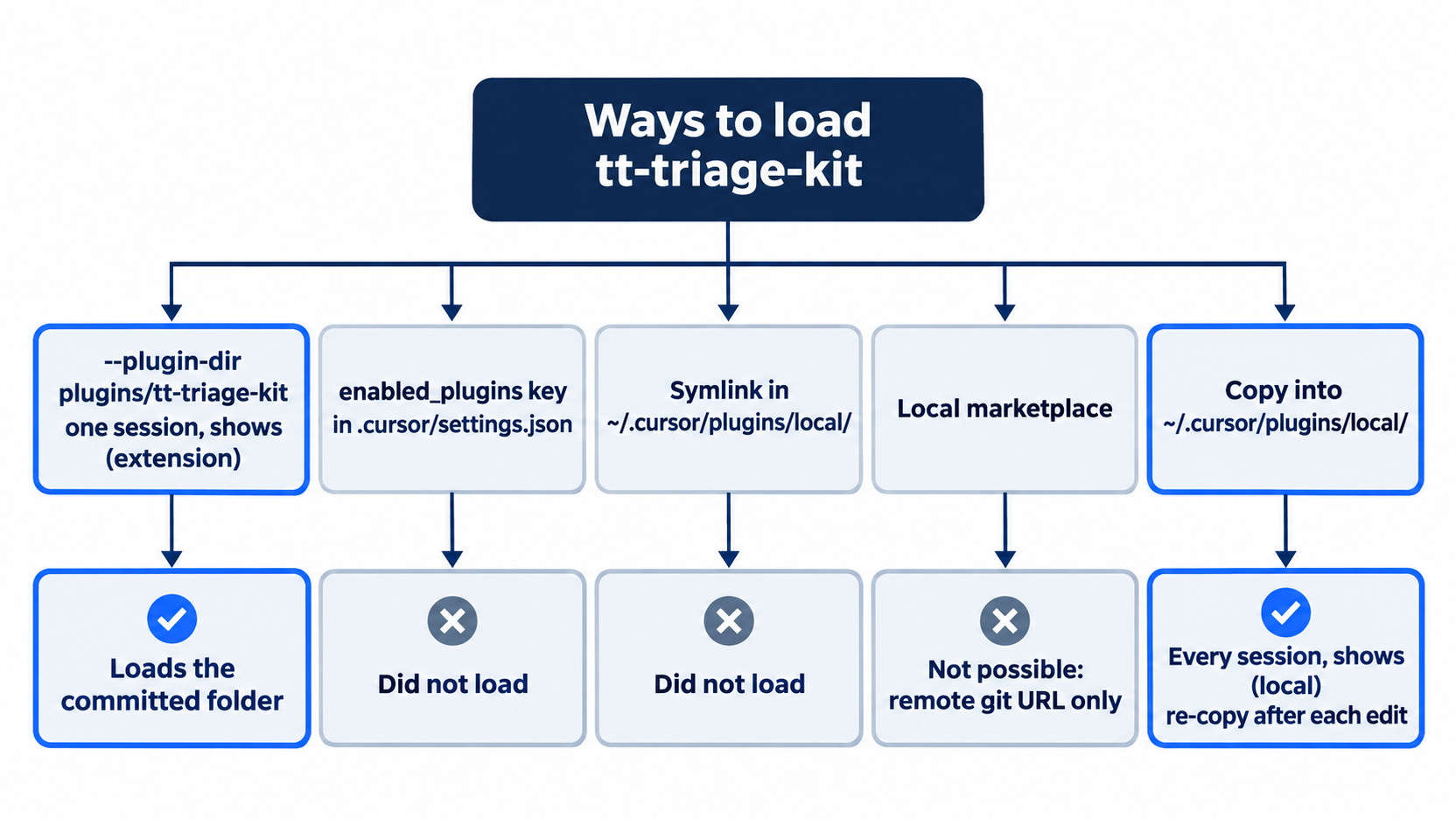
This guide looked for a way to load the plugin in every session without the flag, and tested four. Two did not load it. The first was an enabled_plugins key, which the CLI changelog mentions, in the project's .cursor/settings.json and in ~/.cursor/settings.json. The second was a symlink in ~/.cursor/plugins/local/. A local marketplace was not possible: cursor-agent plugin marketplace add accepts only a remote git URL, and Cursor adds a marketplace to your Cursor account, not to the project. The fourth way, a copy, works, with the limits below. This guide keeps --plugin-dir on every command, because it loads the committed folder itself.
--plugin-dir works for one session. For every session, copy the plugin into ~/.cursor/plugins/local/. In testing, a copy at ~/.cursor/plugins/local/tt-triage-kit loaded in a session with no flag, and /plugin marked it (local). The copy does not follow later edits to the repository's folder, so copy it again after each change. A symlink is not a shortcut here: the docs say that Cursor skips a symlink in that folder whose target is outside it (Plugins). On Enterprise, local plugins are off unless an admin turns on Allow Local Plugin Imports.
What else a Cursor Plugin can hold
The manifest's optional fields include description, version, author, license, keywords, and logo, and fields that point to custom folders for rules, agents, skills, commands, hooks, and mcpServers (Plugins reference). Without those fields, Cursor looks in the default folders: skills/, agents/, rules/, commands/, hooks/hooks.json, and mcp.json at the plugin root. A field that names a folder replaces the default; Cursor does not also scan the default.
A plugin's MCP servers show with a plugin- prefix, the plugin name, and the server name. A plugin's hooks run after all other hooks (Hooks). Inside the plugin's files, ${CURSOR_PLUGIN_ROOT} stands for the plugin's install folder, and Cursor also accepts Claude Code's ${CLAUDE_PLUGIN_ROOT} (Plugins reference).
The Agent Plugins standard in Cursor
Agent Plugins is an open format for plugins that several agent tools read (Agent Plugins). Its manifest is plugin.json at the plugin root, not in a hidden folder. It needs two fields, $schema and name (Agent Plugins manifest, checked November 17, 2026). It bundles skills and MCP servers only. The Cursor docs say "A plugin that conforms to the Agent Plugins specification loads in Cursor" (Plugins reference, checked November 17, 2026).
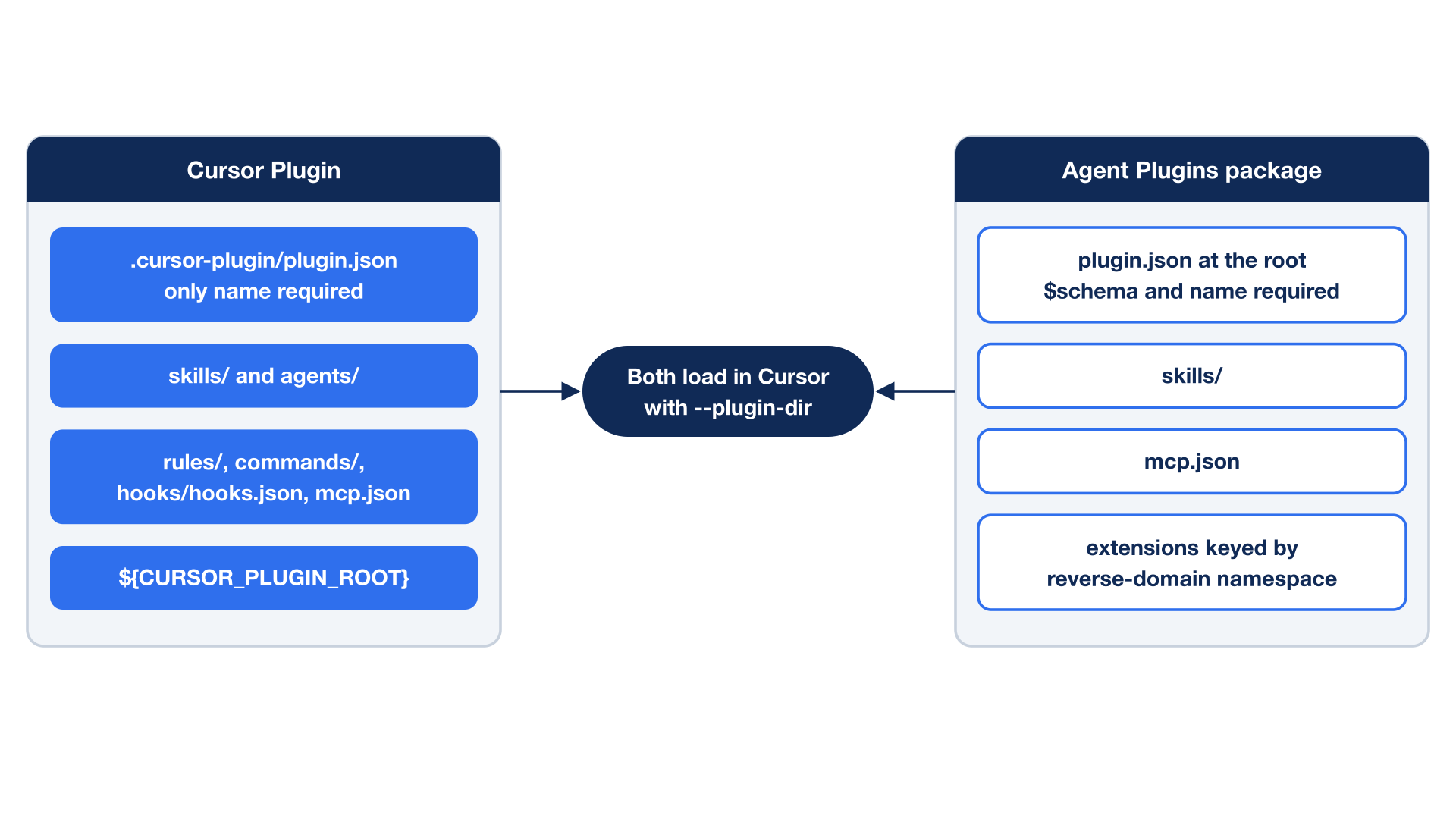
This guide tested that claim. A scratch package, plugins/tt-triage-ap/, held:
plugins/tt-triage-ap/
├── plugin.json
├── mcp.json
└── skills/
    └── tt-ap-hello/
        └── SKILL.md
plugin.json had "$schema": "https://agent-plugins.org/schemas/1.0.0/plugin.schema.json" and "name": "tt-triage-ap". mcp.json had the standard's $schema and the Day 10 tt-everything server. Loaded with --plugin-dir plugins/tt-triage-ap:
/pluginlistedtt-triage-ap (extension), withSkills: 1 (tt-ap-hello)./tt-ap-helloran the skill and repliedFROM-AGENT-PLUGIN./mcp listshowedTt-everything (plugin) - enabled, with nocursor-agent mcp enablestep.- A
get-sumcall askedRun this MCP tool?forplugin-tt-triage-ap-tt-everythingand returned "The sum of 17 and 25 is 42."
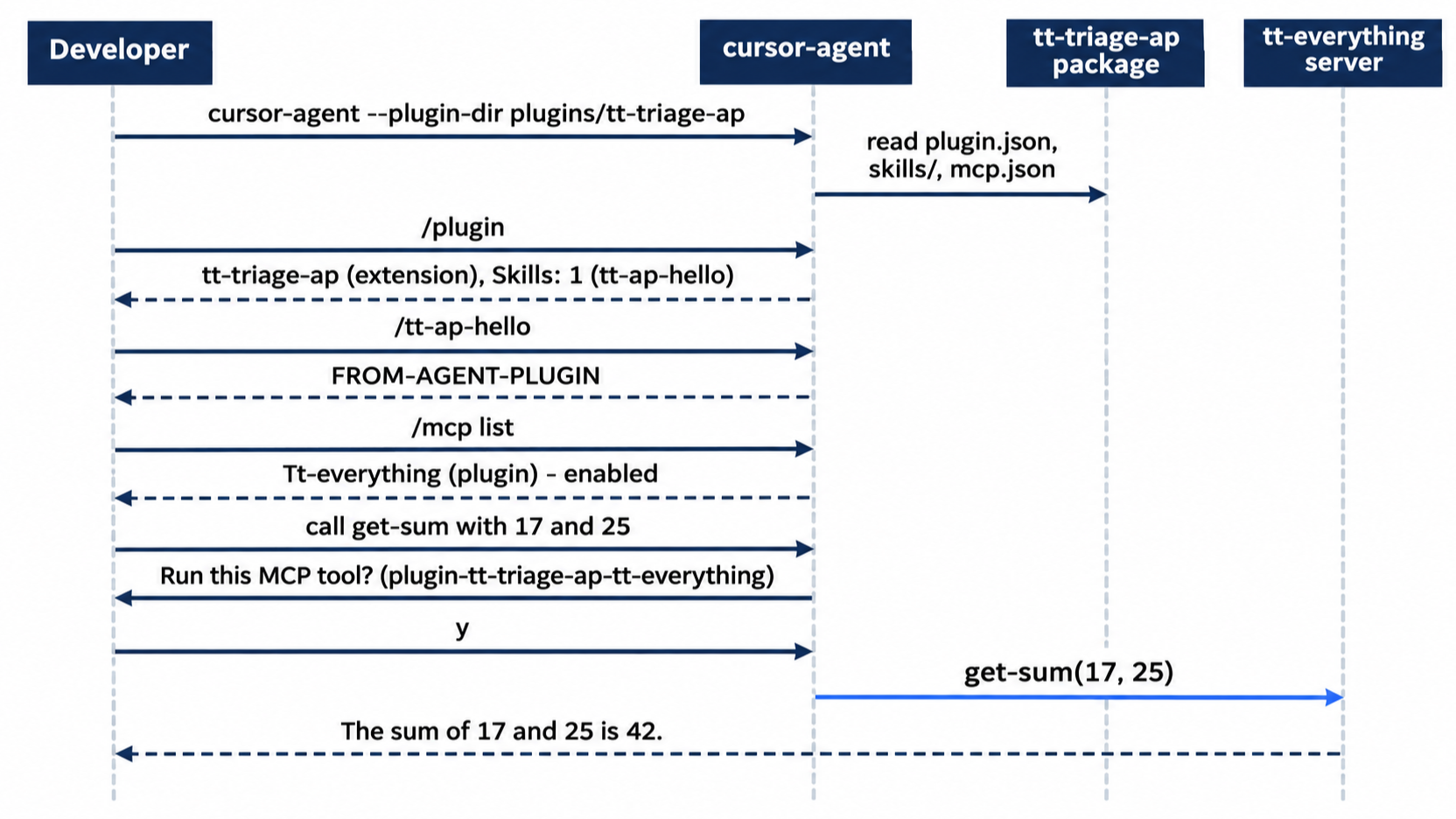
The docs note one gap (Plugins reference): Cursor does not expand the standard's ${PLUGIN_ROOT} and ${PLUGIN_DATA} variables in mcp.json. Use ${CURSOR_PLUGIN_ROOT} instead, which ties that file to Cursor.
Vendor extensions. The Agent Plugins manifest keeps tool-specific data in an extensions field, "keyed by reverse-domain namespace" (Agent Plugins manifest, checked November 17, 2026). No Cursor docs page names a namespace for Cursor (checked November 17, 2026). Cursor's own additions, such as subagents and hooks, live in the Cursor Plugin format instead.
Portability. The tt-add-keyword skill loaded from two homes with no change to its text: .agents/skills/ on Day 9 and a Cursor Plugin today. An Agent Plugins package uses the same skills/ layout, but this guide loaded only a test skill, tt-ap-hello, from one. It did not test loading tt-add-keyword from an Agent Plugins package. Part 9's "Cursor beside other agent tools" table now shows the tested Cursor row. To share the kit with other agent tools, ship it as an Agent Plugins package with the skill and MCP server, and keep the reviewer and hooks in a Cursor Plugin beside it.
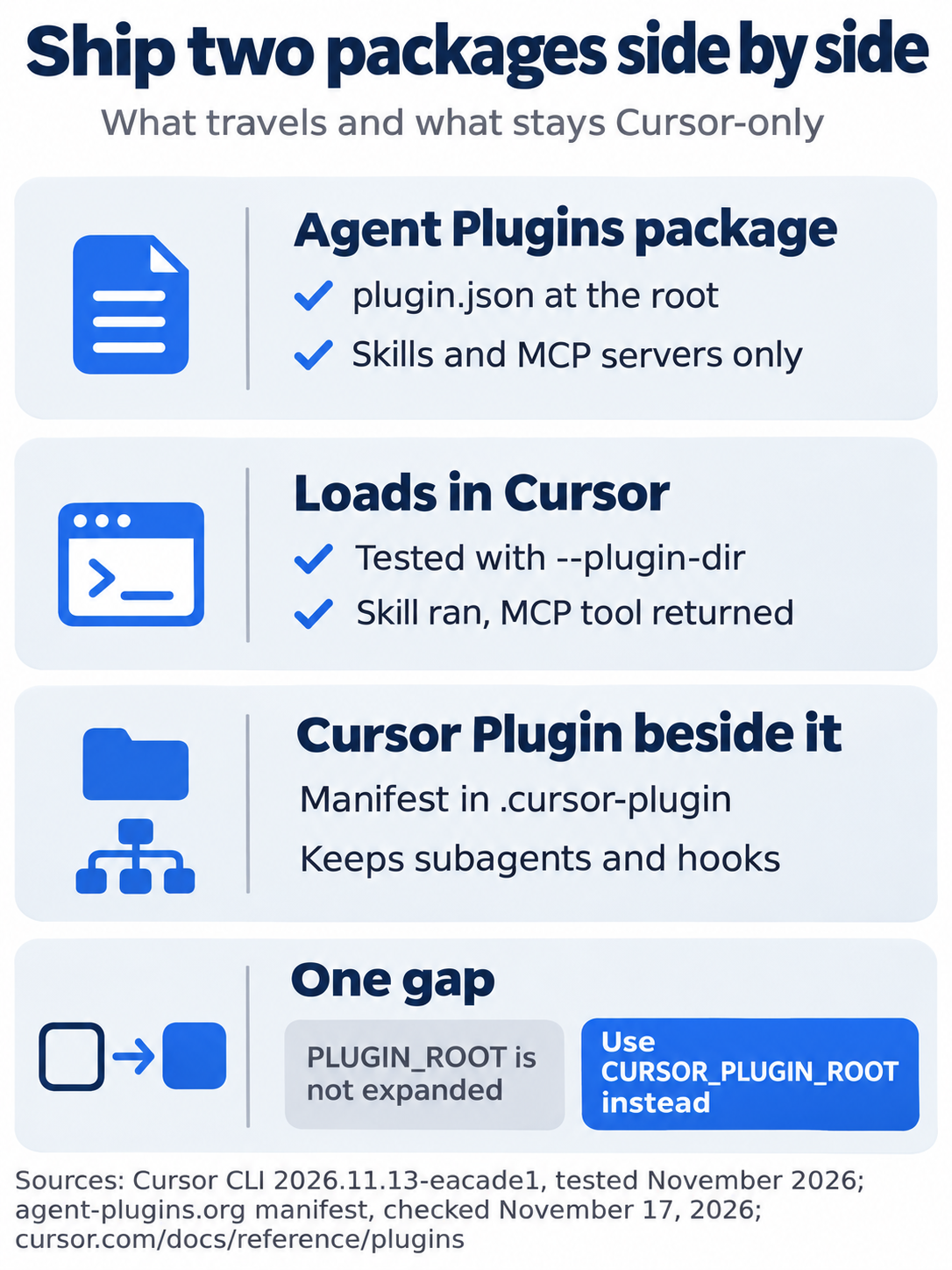
For sharing, the rule is that the open format travels but holds only skills and MCP servers, so the reviewer subagent and any hooks stay in a Cursor Plugin, and the two packages ship side by side.
Marketplaces and teams
Plugins usually come from a marketplace, a catalog you browse and install from in Customize or in /plugin (Plugins). The CLI adds marketplaces with cursor-agent plugin marketplace add and lists, updates, and removes them with matching commands (CLI changelog). The plugin command is missing from the CLI parameters table. Teams and Enterprise can run a team marketplace (Plugins, checked November 17, 2026). A repository with several plugins describes them in .cursor-plugin/marketplace.json (Plugins reference). This guide did not install a marketplace plugin.
If you already use Claude Code: Claude Code plugins you already installed show up in Cursor's plugin list beside the Cursor ones (CLI changelog); this guide did not test that. Cursor also accepts ${CLAUDE_PLUGIN_ROOT} in their files. A Claude Code plugin's layout, with skills/ and agents/ folders, is close to a Cursor Plugin's, but the manifest lives in .claude-plugin/ for Claude Code and .cursor-plugin/ for Cursor.
Do this today
Everyone
-
Repeat the win. Load the plugin and open its details:
cursor-agent --plugin-dir plugins/tt-triage-kit/pluginPress
Enterontt-triage-kit. The result:Skills: 1 (tt-add-keyword)andAgents: 1 (tt-reviewer). PressEsctwice and type/quit. Then rungit status --short, which prints nothing, andnpm test, which showsℹ pass 10. -
Start one habit: when a skill or subagent proves useful in two projects, move it into a plugin instead of copying the file. The result: each of your shared skills has one home, and
/skillslists it once.
If you read Going deeper
-
Load the plugin without the flag. Copy it into the local folder and start a plain session:
mkdir -p ~/.cursor/plugins/local
cp -R plugins/tt-triage-kit ~/.cursor/plugins/local/
cursor-agent
Type
/plugin. The result, in testing:tt-triage-kit (local). PressEscand type/quit. Reset:rm -r ~/.cursor/plugins/local/tt-triage-kit git status --short npm testgit status --shortprints nothing, andnpm testshowsℹ pass 10. -
Load an Agent Plugins package. Build the scratch package:
mkdir -p plugins/tt-triage-ap/skills/tt-ap-hello
cat > plugins/tt-triage-ap/plugin.json <<'EOF'
{
  "$schema": "https://agent-plugins.org/schemas/1.0.0/plugin.schema.json",
  "name": "tt-triage-ap",
  "description": "Ticket Triage helpers as an Agent Plugins 1.0 package."
}
EOF
cat > plugins/tt-triage-ap/skills/tt-ap-hello/SKILL.md <<'EOF'
---
name: tt-ap-hello
description: Test skill from the tt-triage-ap Agent Plugins package. Use only when the user types /tt-ap-hello.
---

Reply with exactly one line: FROM-AGENT-PLUGIN
EOF
cursor-agent --plugin-dir plugins/tt-triage-ap
Type
/tt-ap-hello. The result, in testing:FROM-AGENT-PLUGIN, and/pluginliststt-triage-ap (extension). Type/quit. Reset:rm -r plugins/tt-triage-ap git status --short npm testgit status --shortprints nothing, andnpm testshowsℹ pass 10. -
Run the plugin's reviewer. Start
cursor-agent --plugin-dir plugins/tt-triage-kit, type/subagent-tt, pressEnteron/subagent-tt-reviewer, and finish the line:Use the Task tool with subagent_type="tt-reviewer" to: review HEADIn testing, allowlist mode showed
Approval 1 of 2forgit show; chooseRun (once)each time. The result: a report on theshatteredcommit that saysPASS. Type/quit. Reset: the review only reads, sogit status --shortprints nothing andnpm testshowsℹ pass 10.
Setup you can hand to someone
A skill in one folder and a reviewer in another works fine until you need it somewhere else. Then you copy files, and copies drift, and one day a list shows the same name twice.
A plugin is the fix with the least ceremony: a manifest whose only required field is name, two subfolders Cursor already knows, and one flag to load it. When you want the kit to reach tools beyond Cursor, the open Agent Plugins format carries the skill and the MCP server, and the Cursor Plugin keeps the rest.
Move it once, load it with one flag, and give every name exactly one home.
This is Part 13 of "Cursor, Day-to-Day," an 18-part guide to using Cursor's agent every day, from the CLI and the editor.