
Your OpenCode Install Worked. Your Model Still Can't See the Key.
Installing OpenCode V2 is one command; the two failures that ruin the first session are installing V1 by mistake and exporting a key the background server never sees, and both are fixed by proving what you have instead of trusting the screen.
How to install OpenCode V2 by a route you can maintain, prove the version, and connect a model the background server can actually see.
You did everything the docs said, exported the key, started a session, and the model is not there. Nothing is misspelled; the program you installed or the process holding the key is not the one you think it is.
In this article: Day 1 of a 17-day guide. Start here takes you from nothing to a working setup: the Ticket Triage repository, OpenCode V2 installed by a route you can maintain, one model connected through a saved key, and a read-only first session that changes nothing. Going deeper covers why the first
npm installresult installs V1, the three install routes, why a key exported in a new terminal tab never reaches OpenCode's shared background server, the four ways a credential reaches the server, the checks that replace a missingopencode doctor, and/initfor a firstAGENTS.md.
This is Day 1 of a 17-day guide to OpenCode. Each day is one part, and each part opens with a Start here section of 20 to 40 minutes that ends in a result you can check. A Going deeper section follows for the details, the measurements, and the edge cases, and you can skip it until you want it.
The roadmap, one part per day:
- Install OpenCode, connect one model, and run a read-only first session.
- Use the daily loop: steer, queue, attach lines, run tests, undo.
- Ask for a plan and get a plan, not a diff.
- Make the agent ask before risky actions.
- Write a short
AGENTS.mdwhose rules load every time. - Understand why the agent forgets.
- Put rules where they survive a long session.
- Add a second model.
- Choose a cheaper model for simple work.
- Hand a review to a subagent.
- Turn a repeated prompt into a command or skill.
- Check the agent's claims: tests, diffs, a second reviewer.
- Add one MCP server and prove it was called.
- Add a guard plugin.
- Reach one OpenCode server from several terminals.
- Run an unattended job safely.
- Put it together into one working day.
It is easy to get stuck using OpenCode the way you first learned it. OpenCode keeps adding features, and some of them are a big step up in productivity. This guide keeps you current, in bite-sized daily chunks, so you pick up a few new techniques every day, do not get left behind, and use OpenCode the way it is meant to be used.
Start here
By the end of today you have the Ticket Triage repository on disk, OpenCode installed, one model connected, and a first OpenCode session that read your code and changed nothing.
Ticket Triage and the crushed-mug ticket
One repository carries all seventeen parts. Ticket Triage is a small Node.js support-ticket service at ~/code/ticket-triage that classifies a ticket as refund, shipping, or other. It is plain JavaScript with ES modules and the built-in test runner, so npm test needs no install. You need Node.js 22 or later and git.
Create the folder and start a git repository in it, so you can always see what changed. The -b main flag names the first branch main, the name this guide uses for it; without the flag, some git installs name it master.
mkdir -p ~/code/ticket-triage/src ~/code/ticket-triage/test
cd ~/code/ticket-triage
git init -b main
Three files matter at the start:
package.jsondeclares"type": "module"and one script,"test": "node --test".src/classify.jsholdsclassify(), a handful of keyword checks that return the category.test/classify.test.jsholds three tests, one per category, written withnode:testandnode:assert/strict.
Create package.json. It declares ES modules and points npm test at the built-in runner.
{
  "name": "ticket-triage",
  "version": "0.1.0",
  "type": "module",
  "scripts": { "test": "node --test" }
}
The classifier fits on one screen, and every later part changes it. Save it as src/classify.js.
// src/classify.js
// Classifies a support ticket as refund, shipping, or other.
export function classify(text) {
  const t = text.toLowerCase()
  if (t.includes("refund") || t.includes("money back")) return "refund"
  if (t.includes("shipping") || t.includes("delivery") || t.includes("package")) return "shipping"
  return "other"
}
The refund check runs first, then the shipping check, and anything else falls through to other. Order already matters: a ticket that mentions both a package and a refund lands in refund, because that check returns first.
Each test calls classify() with one sentence and asserts the category. Save it as test/classify.test.js.
// test/classify.test.js
import { test } from "node:test"
import assert from "node:assert/strict"
import { classify } from "../src/classify.js"

test("refund", () => assert.equal(classify("I want my money back"), "refund"))
test("shipping", () => assert.equal(classify("Where is my package?"), "shipping"))
test("other", () => assert.equal(classify("Hello"), "other"))
With the three files in place, run the only check the repository has.
npm test
The runner finds the test file on its own and prints one line per test, then a summary. In a terminal, Node.js uses its spec reporter; Node.js 22 switches to TAP, a plain-text test format, only when the output is piped. The summary at the end is the part to compare.
ℹ tests 3
ℹ suites 0
ℹ pass 3
ℹ fail 0
Three tests pass on a clean checkout. In this series, "done" means a command like this one actually ran and printed this kind of result, not that a model said it would.
Now reproduce the bug by hand. The ticket that runs through the series is one sentence long.
The box showed up crushed and the mug inside is in pieces.
Call classify() on it directly with a one-line module script, so you see the real output and not a description of it. node --input-type=module -e runs the quoted JavaScript as an ES module.
node --input-type=module -e "import { classify } from './src/classify.js'; console.log(classify('The box showed up crushed and the mug inside is in pieces'))"
The script prints other. None of the shipping keywords appear: the customer said "box," not "package," and nothing in the sentence says "delivery" or "shipping." This is the crushed-mug ticket, and the next few days fix it. Commit the starting point.
git add -A
git commit -m "Start Ticket Triage"
Install OpenCode V2
Two different programs answer to the command opencode: OpenCode 1 and OpenCode 2. V1 and V2 both use the opencode command, and this series uses V2. Check what you already have before you install anything.
command -v opencode
opencode --version
If the first command prints nothing, you have no OpenCode on your PATH, and you can install. If the second prints a 1.x version, you have V1. Remove it with the tool that installed it (for the npm package, npm uninstall -g opencode-ai) and check again.
The curl installer works on any macOS, Linux, or WSL machine without a package manager in between. Note the /v2/ in the path.
curl -fsSL https://opencode.ai/v2/install | bash
The installer puts opencode in ~/.opencode/bin and adds that folder to your PATH in your shell's config file, such as ~/.zshrc. Open a new terminal tab so the change takes effect, then check the version.
opencode --version
On a correct V2 install, the version check prints exactly one line.
opencode v2.3.0
A later 2.x release is fine. Native Windows and the other install routes are in Going deeper.
OpenCode is a server with clients
OpenCode is an open-source coding agent from Anomaly. It is a server with clients rather than one program. By default, the first opencode command you run starts one shared background server for your user account, and that server makes the requests to the model. Every opencode command you type is a client of that server.
The consequence for today: the server is the process that needs your model credentials, not your terminal. The next step saves the credential where the server reads it.
Connect one model
A provider is a company or service that runs models, and an API key is the secret that lets the server use your account there. This guide's tested runs use Google's Gemini models, so the recommended first provider is Google with a Gemini API key, and the recommended model is Gemini 4 Hydrogen, one of the two models Google's models page recommends for new projects as of November 16, 2026. Every provider follows the same steps; Going deeper shows Anthropic.
opencode auth login google --method key
auth login saves a credential for one provider, and --method key chooses API-key entry, so OpenCode asks for the key instead of offering a browser sign-in. Paste the key at the prompt. OpenCode prints "Connected to Google" and saves the key as an account in its own database, so it works no matter which terminal started the server. Check the result in two ways.
opencode auth list
opencode models
auth list shows a Google entry marked stored. opencode models lists the models you can now use, one per line, in the form provider/model. The list should include google/gemini-4-hydrogen, the model this guide uses (tested on OpenCode 2.3.0 on November 16, 2026). Model names change often, so check the current Google names before you pick one:
opencode models | grep '^google/'
Get Ticket Triage
Ticket Triage, the Node.js ticket classifier you built above, with no dependencies and tests on Node's built-in test runner, lives in the ticket-triage-day-by-day repository on the opencode branch, with one tag per day from opencode/day-00 to opencode/day-17. A tag is a fixed name for one commit, and each later day's catch-up line names one. Building by hand is the recommended route on a first read.
If you built Ticket Triage by hand above, run these once in ~/code/ticket-triage, so the catch-up lines on later days work. They add a remote, git's name for another copy of the repository.
git remote add upstream https://github.com/SpillwaveSolutions/ticket-triage-day-by-day.git
git fetch upstream --tags
If you are restarting the guide on a new machine and skipped the build, run this prompt from ~/code, because the repository does not exist yet. opencode run sends one prompt and prints the answer, and -m names the model as provider/model. git switch -C main opencode/day-00 makes your main branch point at the Day 0 tag's code, replacing what main held, and git branch --unset-upstream main stops your main from following the Spillwave copy. The prompt also renames origin, the remote you cloned from, to upstream, so later steps can add their own origin. On a fresh install, OpenCode asks no approval question for these commands.
mkdir -p ~/code && cd ~/code
opencode run -m google/gemini-4-hydrogen "Clone https://github.com/SpillwaveSolutions/ticket-triage-day-by-day.git into ./ticket-triage. In that folder, check out the opencode branch, run git switch -C main opencode/day-00 and git branch --unset-upstream main, rename the remote origin to upstream, then run npm test and show the summary."
(written from the docs, not yet run)
Check the result yourself, not only the model's summary.
cd ~/code/ticket-triage
npm test
git status -sb
Expect ℹ pass 3 and ℹ fail 0, then ## main with nothing after it, not ## main...upstream/main. Then run the reproduction in "Now reproduce the bug by hand" above, without its commit, because the starter is already committed, and continue at "Run a first read-only session".
Run a first read-only session
A session is one conversation with the agent. opencode run sends one prompt to the server and prints the answer, without the full-screen interface. The -m flag picks the model by its provider/model name. With a model connected, run the first real session in the repository you will use all series. Run it from the project folder, because that folder is the project OpenCode works in.
cd ~/code/ticket-triage
opencode run -m google/gemini-4-hydrogen "Read package.json, src/classify.js, and test/classify.test.js. Explain how classify() picks a category, which test covers each branch, and why \"The box showed up crushed and the mug inside is in pieces\" returns other. Do not edit any file."
The output starts with > build · gemini-4-hydrogen, which names the agent and the model. build is OpenCode's default agent, the one that edits files and runs commands. A tool is an action the agent can take, such as reading a file or running a command, and each use of one is a tool call. Watch the tool calls as they appear. You should see the agent read the three files, shown as three → Read lines, then answer. A good answer says the refund check runs first and matches "refund" or "money back," the shipping check runs second and matches "shipping," "delivery," or "package," everything else falls through to other, and the crushed-mug sentence matches none of those words. If the answer claims a keyword the code does not contain, the model is guessing, and you have learned something about it before it edits anything.
"Do not edit any file" is a request, not a rule, so check it.
git status --short
The command prints nothing: the tree should still be clean. Today's win is this empty result. If it lists a file instead, the agent changed something: git diff shows the change, and git restore . puts every tracked file back to the last commit. OpenCode is installed, the server can reach a model, and its first session read Ticket Triage without changing it. The crushed-mug ticket still lands in other, which is correct, because nobody has asked for a fix yet.
You can stop here. Going deeper explains why this works and where it breaks.
Going deeper
This section is for readers who want the install routes, the server design, the other ways to connect a model, and the first-day failures. It assumes you finished Start here.
Why the obvious install goes wrong
You search for "install OpenCode" and paste the first command the results offer: npm install -g opencode-ai. The install succeeds and opencode starts. You open the V2 docs beside it to connect a provider, and within ten minutes nothing lines up. The package you installed is OpenCode V1. At the time of writing, npm reports version 1.19.5 for opencode-ai, while the docs and the @opencode/ packages describe V2. Both programs answer to the same command name, so nothing on screen warns you.
The second failure waits behind the first. You fix the install, export ANTHROPIC_API_KEY in a fresh terminal tab, and start a session. The key is in your shell, but OpenCode's background server started earlier from a different shell and never saw it. The model is missing, and the cause is a process boundary, not a typo.
Start here closed both traps: the curl installer is V2, and a saved account does not depend on any shell's environment. The rest of this section explains each choice.
Two programs answer to opencode
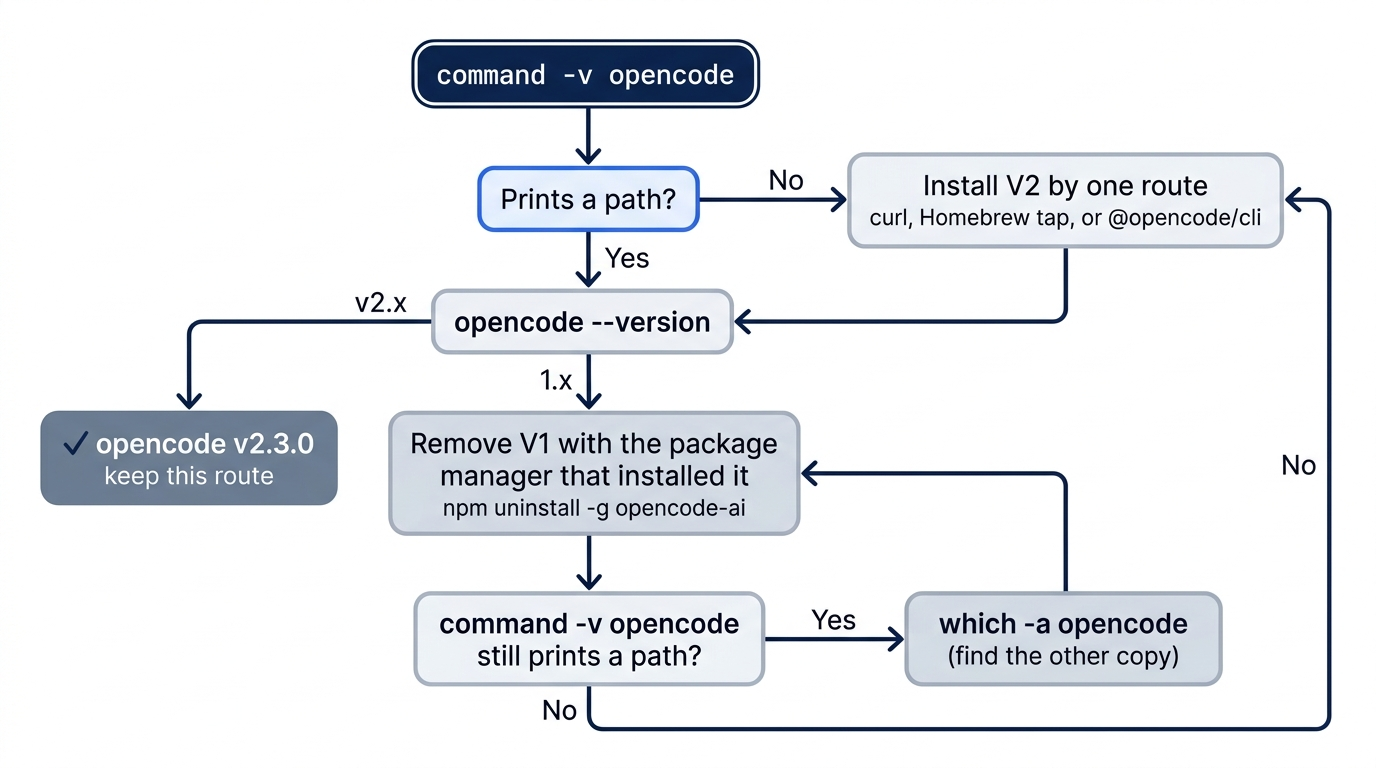
OpenCode 1 and OpenCode 2 both install a command named opencode, and the migration guide says they are no longer installed side by side by default. Check what you have before you install anything.
command -v opencode
opencode --version
If the first command prints nothing, OpenCode is not on your PATH. A 1.x version means V1. A correct V2 install prints exactly one line: opencode v2.3.0.
When you find V1, remove it with the package manager that installed it, then install V2. The migration guide asks for that order; only the V2 curl installer replaces a V1 binary on its own.
npm uninstall -g opencode-ai
command -v opencode
The second command should now print nothing. If it still prints a path, another route installed a second copy, and which -a opencode lists every one on your PATH.
Removing the V1 binary leaves your V1 configuration alone. V2 reads the same locations and normalizes supported V1 fields in memory, so an old opencode.json keeps loading, which is kind to your setup and confusing for your learning.
If you learned V1: opencode-ai and the @opencode-ai/ scope are V1. The V2 command-line package is @opencode/cli, and the rest of V2 lives under @opencode/. A tutorial that installs opencode-ai is teaching V1.
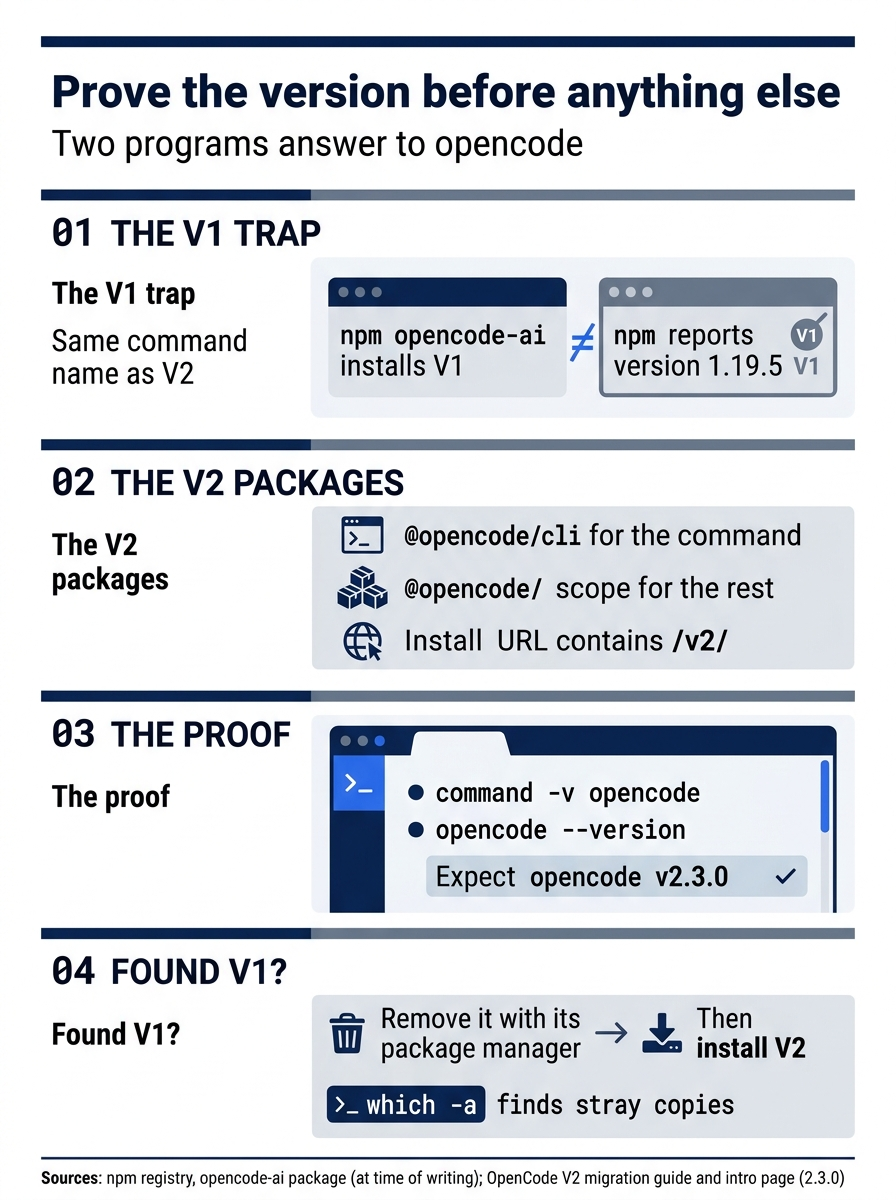
Prove the version before anything else. opencode-ai is V1 (npm reported 1.19.5 at the time of writing), V2 lives in @opencode/cli behind an install URL containing /v2/, and the proof is two commands ending in opencode v2.3.0. If V1 turns up, remove it before installing V2.
Three doors into V2
V2 has three primary install routes on the docs intro page. Pick the one that matches how you already manage tools and stay with it, because updates and removal follow the route.
# Any macOS, Linux, or WSL machine. Note the /v2/ in the path.
curl -fsSL https://opencode.ai/v2/install | bash

# Homebrew, from Anomaly's tap. The formula name ends in -v2.
brew install anomalyco/tap/opencode-v2

# npm, the V2 command-line package.
npm install -g @opencode/cli
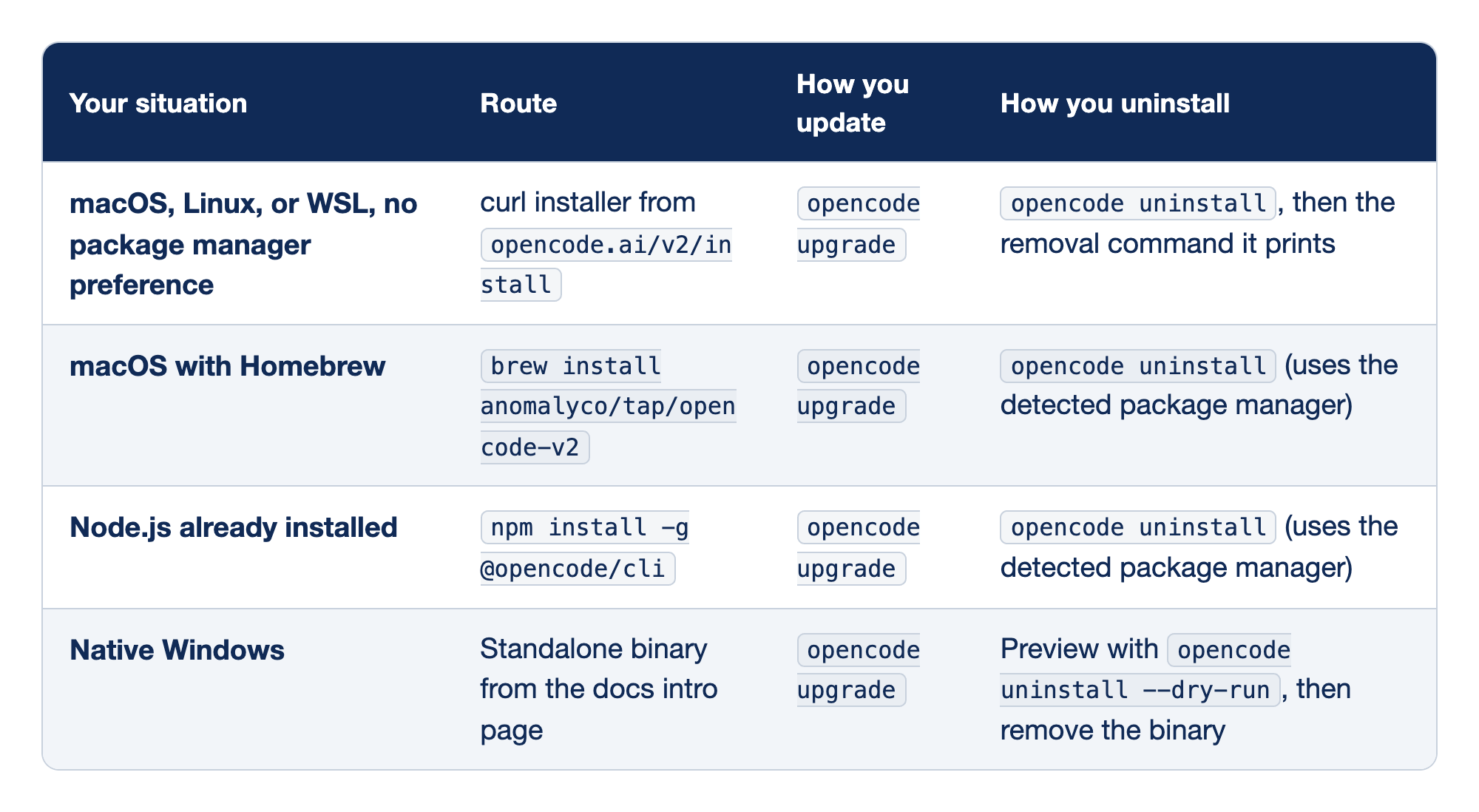
Each install route is matched to the machine it suits and to what living with it looks like. "Your situation" describes the machine, "Route" is the one-time install, and the last two columns are the commands you run for months. Every route updates with the same opencode upgrade.
- macOS, Linux, or WSL with no preference uses the curl installer, the docs default, which also replaces a V1 binary. No package manager tracks it, so
opencode uninstallprints the last removal command for you to run. - macOS with Homebrew uses the
anomalyco/tap/opencode-v2formula, since a different formula name may not be V2, and uninstall removes it through Homebrew. - Node.js already installed uses
@opencode/cli, neveropencode-ai, and uninstall removes it through npm. - Native Windows has no supported package manager, so you download the ARM64, x64, or x64 baseline binary from the intro page, put it on your
PATH, and remove it yourself after a dry-run preview.
Mixing routes on one machine is how two copies end up on your PATH.
Gotcha: the npm package uses a postinstall script to select the native binary for your platform. With --ignore-scripts set, that selection never runs, so the native binary for your platform is never chosen. If your company's .npmrc disables scripts, use the curl installer. If you use mise, mise use -g opencode installs V2 only on mise 2026.10.9 or later.
After the install, rerun the two checks: command -v opencode should point where your route installs, and opencode --version should read opencode v2.3.0. Then ask OpenCode where it keeps things.
opencode debug paths
The command prints every local path with a label, without starting a server or opening the database. The npm package also installs a second binary, opencode2, which the docs do not describe; use opencode everywhere. Pass a selector such as db, config, or log to print one path for a script. The db path matters shortly, because your credentials will live there.
The server you did not start
OpenCode is an open-source coding agent from Anomaly, developed in the anomalyco/opencode repository, and it is a server with clients. The server makes the model requests, so the server is the process that needs your credentials.
By default, the first opencode command discovers or starts one shared background server for your user account, and every later local client connects to it.
opencode service status
opencode api get /api/info
The first command shows the server's information, and the second checks that its API is healthy (and starts the service if none is). Two flags change which server a client talks to: --standalone runs a private server for one command, and --server connects to a URL you name.
opencode --standalone
opencode --server http://localhost:4096
The consequence for credentials is simple to state and easy to forget. A shared server that started at 9 a.m. has the environment it started with. Exporting a variable in a new tab at 10 a.m. changes that tab, not the server.
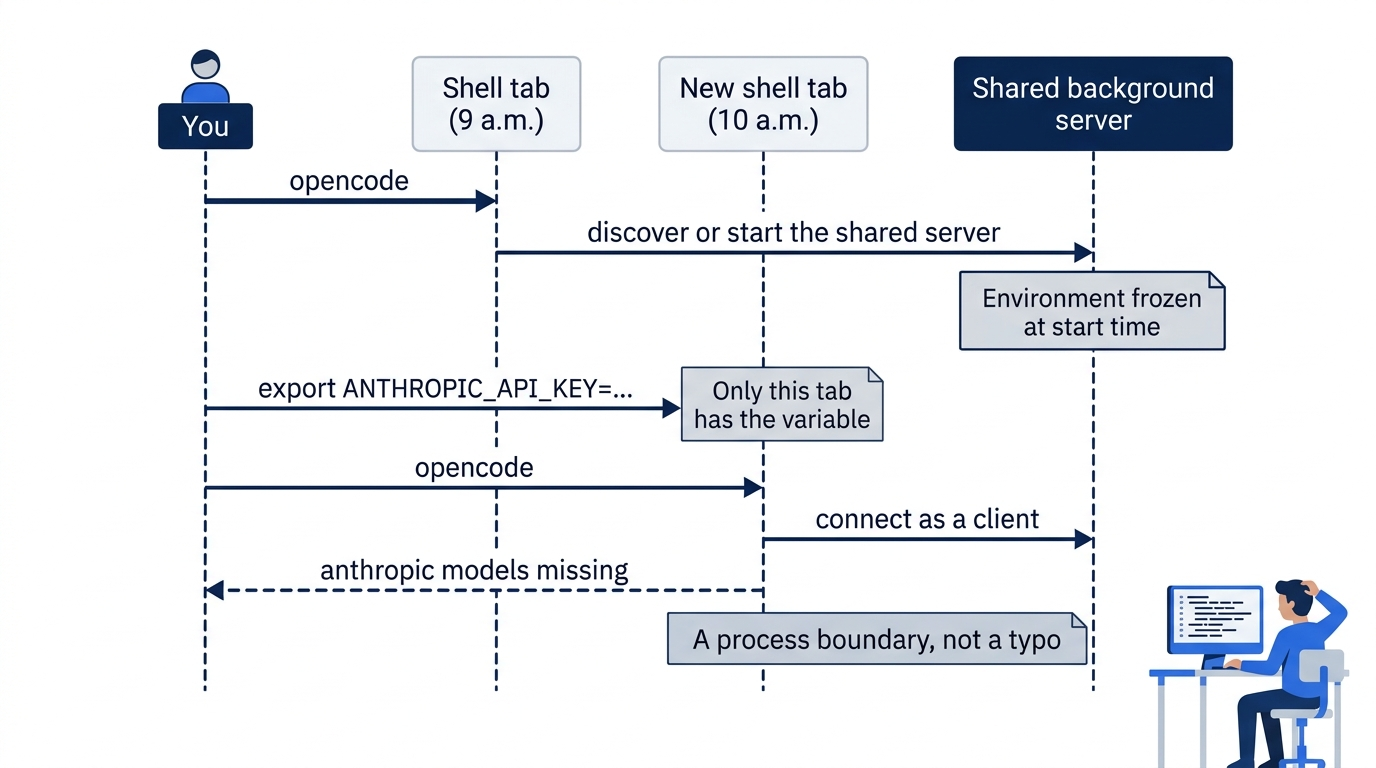

The scene is the opening moment: a developer who did everything right in the wrong shell, staring at a model list with no Anthropic in it. The sequence on the monitor is the reason, a server whose environment was fixed before the key existed.
Connect a model the server can see
A provider connection is a credential the server stores or reads, plus a model from that provider's catalog. Start here connected Google with a saved key; the providers page uses Anthropic with an API key, and every provider follows the same steps. This series has not recorded a /connect run on 2.3.0. In the TUI, started from the project folder, run /connect and then /models. From the shell, which helps on a remote machine, the auth commands do the same work.
opencode auth login anthropic --method key
opencode auth list
Naming the provider skips the interactive picker, and --method key selects API-key entry, which needs an interactive terminal. Method IDs differ by provider; run opencode auth login openai without --method to see what one offers. auth list should show the account you just saved.
Both flows end in one of four integration methods, and the difference between them is the shell-versus-server question.
- API key. OpenCode prompts for the secret once and saves it as an account in its database. Anthropic's provider takes an API key only.
- OAuth. A browser URL or device code, used by providers such as GitHub Copilot. OpenCode saves the tokens and refreshes them when the provider supports it.
- Command. OpenCode runs a provider-supplied authentication command and saves its output as the key.
- Environment. OpenCode reads a variable such as
ANTHROPIC_API_KEYfrom the server process and never saves it. It shows inauth listwith typeenvironment, andauth logoutcannot remove it.
The first three work no matter which shell started the server. Only the fourth depends on the server's environment, and it is the one that failed in the opening scene. The newest saved account is active; opencode auth switch anthropic work activates a second one by label.
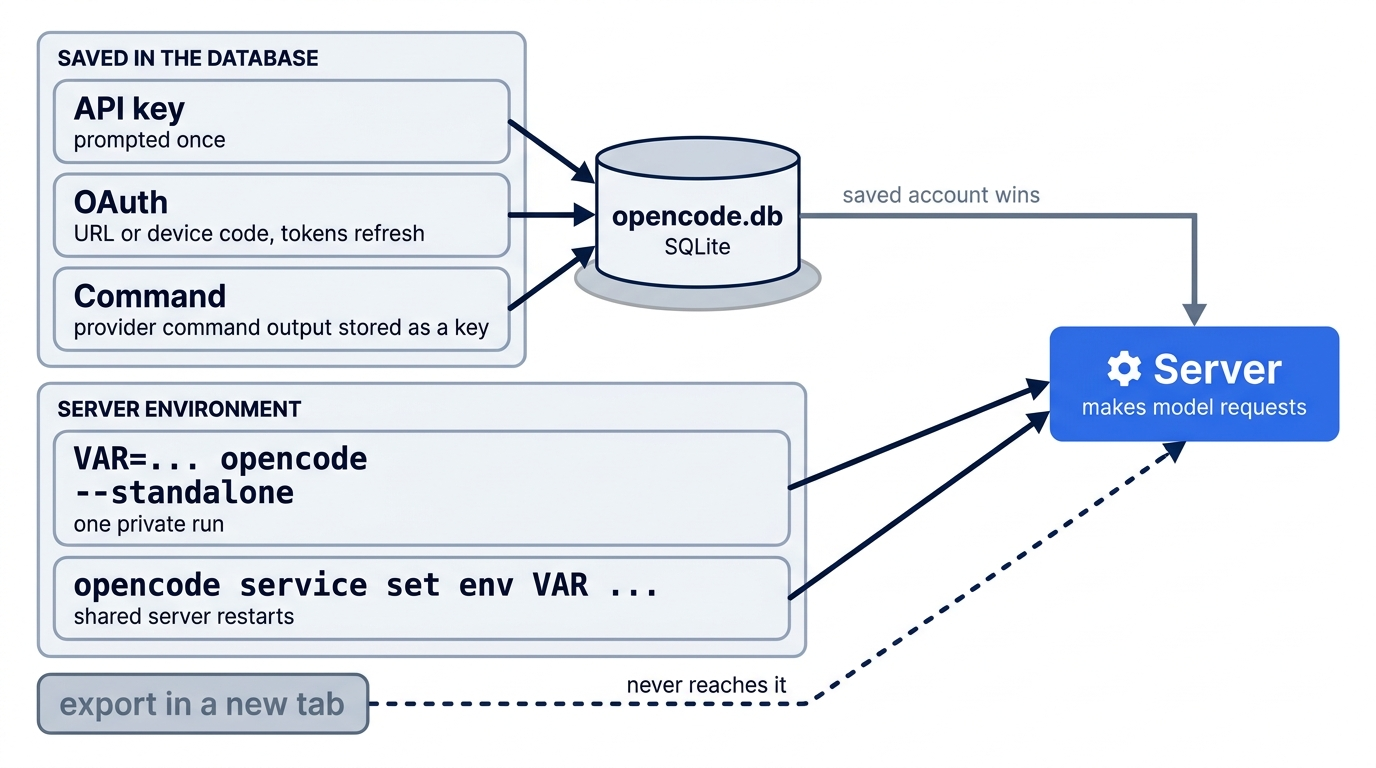
When the key lives in an environment variable
Teams that keep keys in variables, and most CI jobs, have two ways to put the variable on the process that runs model requests.
# One private server, for this run only
ANTHROPIC_API_KEY=sk-ant-... opencode --standalone

# The shared server: stops it, and the next command restarts it with the value
opencode service set env ANTHROPIC_API_KEY sk-ant-...
opencode auth list
auth list should then show anthropic with type environment. To disconnect, run opencode service unset env ANTHROPIC_API_KEY. A saved account outranks an environment connection for the same integration, which is usually what you want and occasionally why a rotated key seems ignored.
Gotcha: opencode models lists models for any provider whose key is already in the server's environment, with no /connect step. On the tested 2.3.0 install, a Google key in the environment exposed every google/* model. Run opencode models after any credential change and read the provider prefixes.
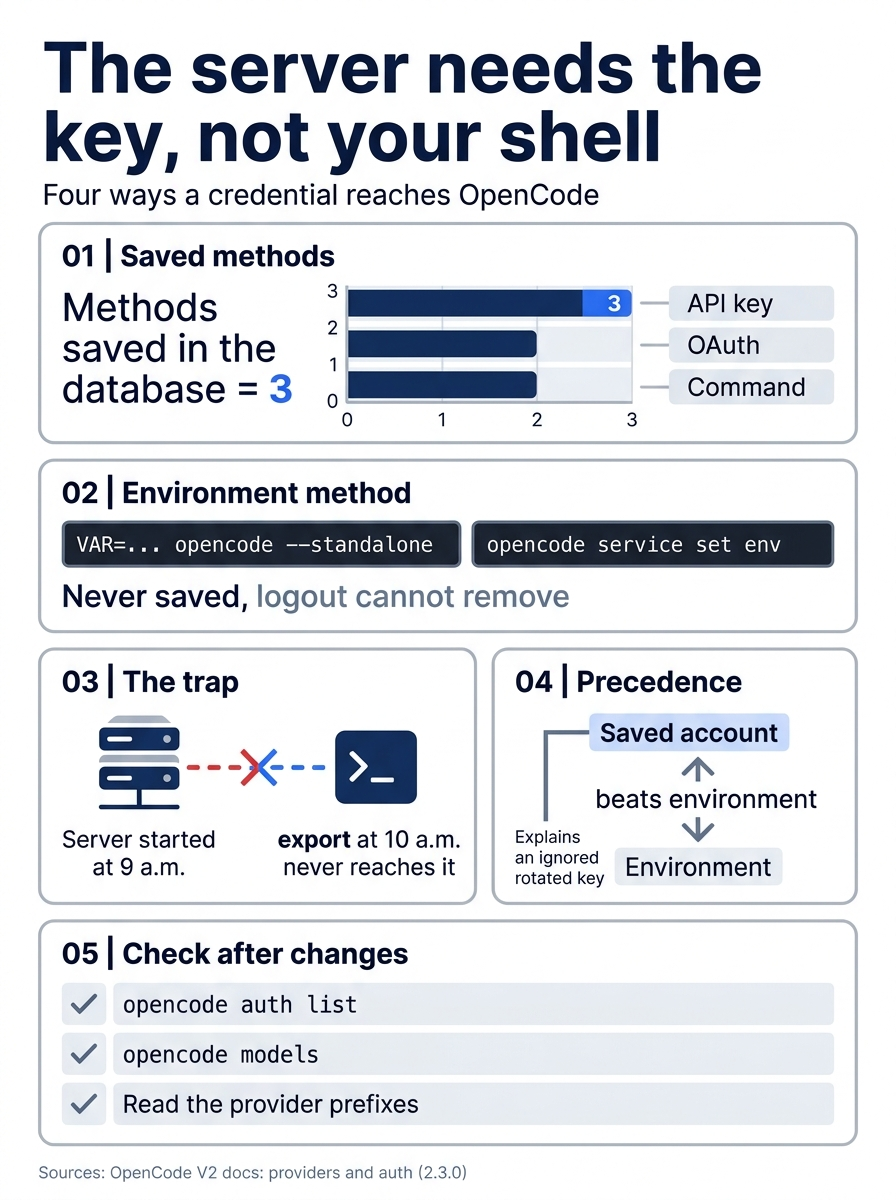
Credentials come down to one rule: give the key to the server, not your shell. Three of the four methods save an account in the database; the environment method works only through --standalone or opencode service set env; a saved account outranks it; and opencode auth list plus opencode models prove what the server sees.
Saved keys and tokens live in the server's SQLite database, usually ~/.local/share/opencode/opencode.db, but print it with opencode debug paths db rather than guessing. The docs are blunt: do not edit or delete the database to manage credentials. V2 imports V1's auth.json once during migration and never writes back to it.
There is no opencode doctor
opencode doctor does not exist in 2.3.0: the commands page does not list it. The checks are spread across a few commands, each answering one question, and the troubleshooting page starts by asking whether the problem is in a client, the shared server, or one project.
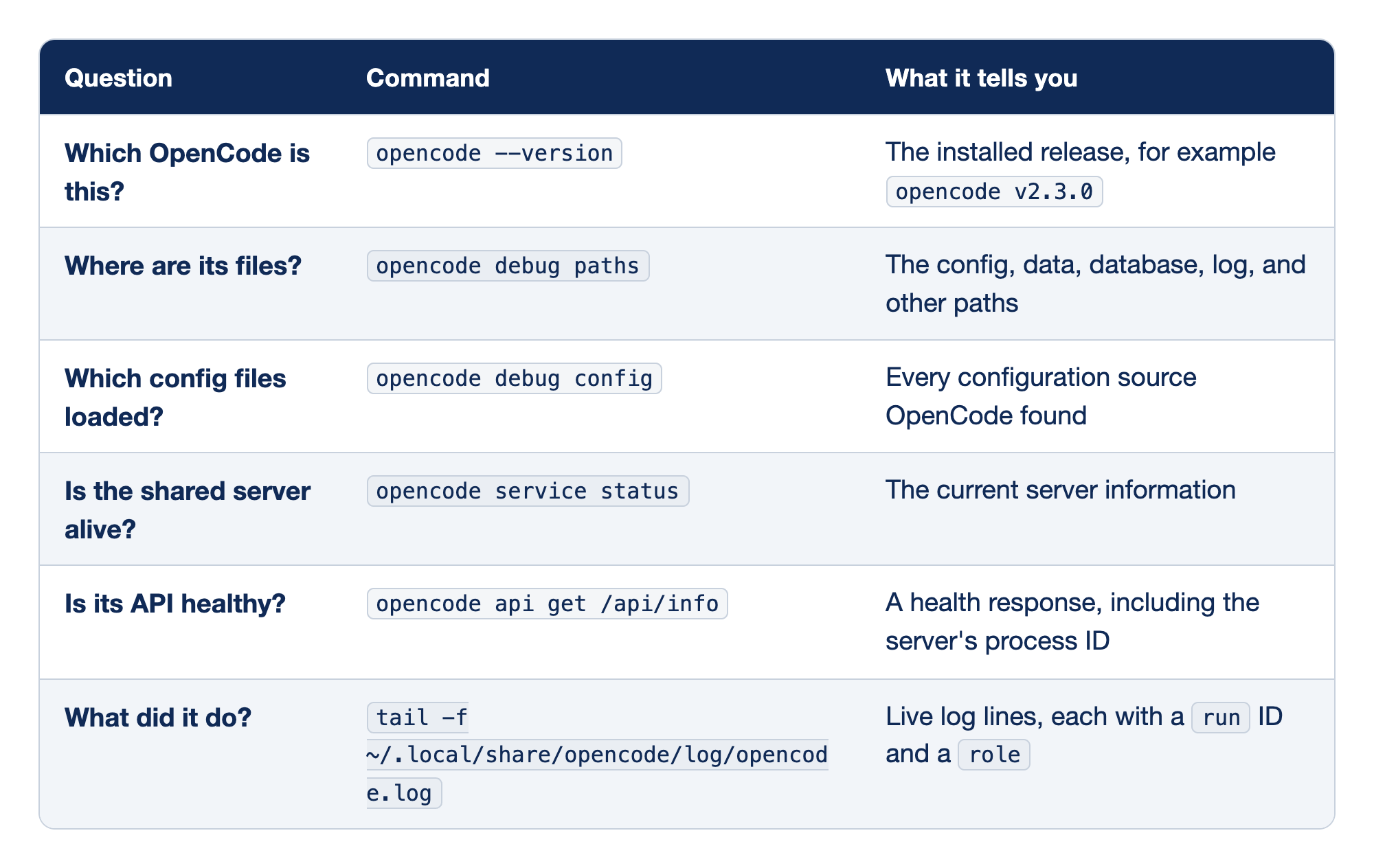
OpenCode troubleshooting is six questions, each answered by one command. "Question" is what you want to learn, "Command" is what you type, and "What it tells you" is the output to read. Run them top to bottom; most first-day problems surface in the first four.
- Which OpenCode is this?
opencode --versionprints the release, the first line of any bug report and the fastest way to catch V1. - Where are its files?
opencode debug pathsprints every path without starting a server, so it is safe anytime. - Which config files loaded?
opencode debug configlists the sources it found; on the tested install with no config files, it listed only the global config directory. - Is the shared server alive?
opencode service statusreports the server, andopencode service restartrestarts a stuck one. - Is its API healthy?
opencode api get /api/inforeturns a health response with the server's process ID. - What did it do? The log shows live lines tagged with a
runID and arole; filter withgrep 'role=server', and strip keys and prompts before sharing.
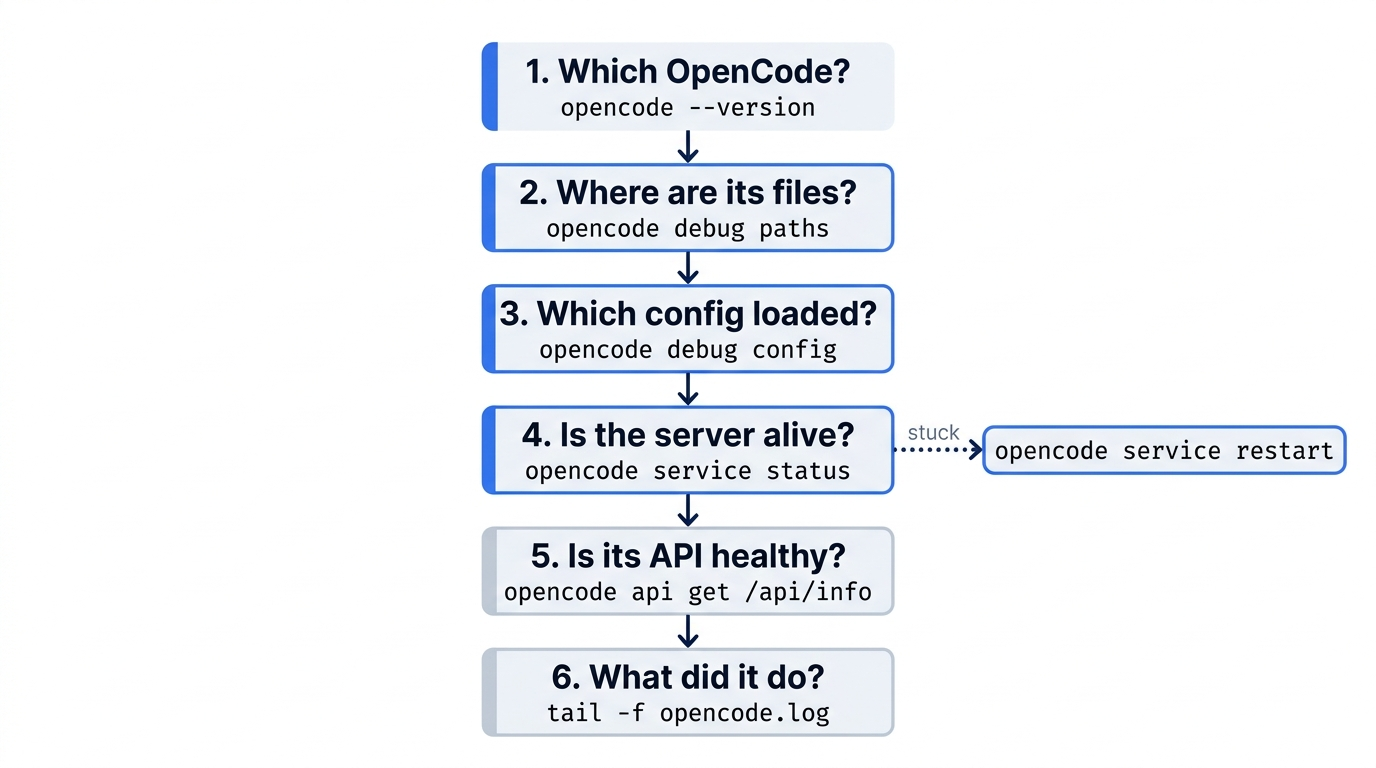
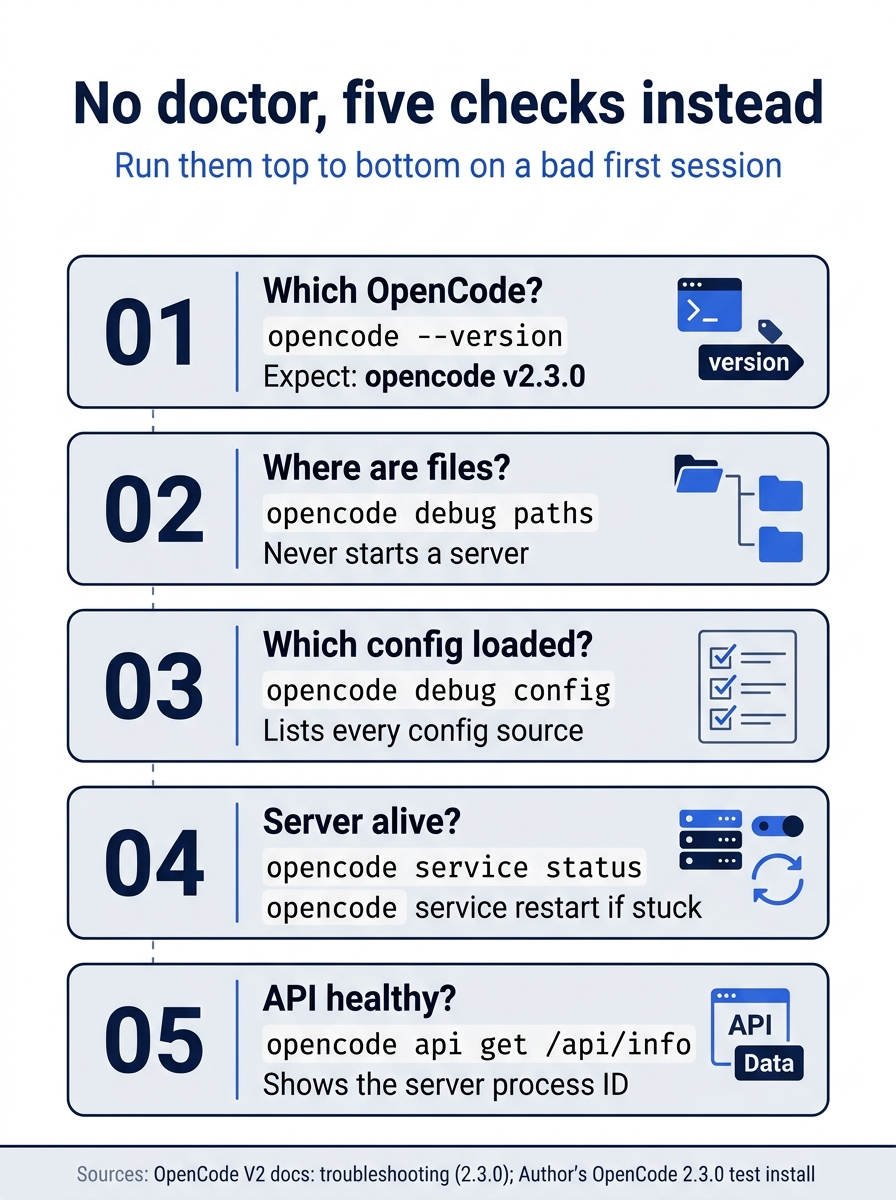
The first five checks are version (expect 2.3.0), paths, loaded config, server status, and API health. The log is the sixth step, for when those five look fine and something still misbehaves.
The same first session in the TUI
Start here ran the first session with opencode run, the form this series tested. Most days you work in the TUI, which Part 2 teaches. Start the TUI session in the project folder, which OpenCode uses for configuration, instruction discovery, and tool paths. Never start from your home directory: the shipped permissions allow reading outside the project, and a home directory shows the agent far more than it needs. Confirm the model with /models, then send the same read-only prompt.
Read package.json, src/classify.js, and test/classify.test.js. Explain how classify() picks a category, which test covers each branch, and why "The box showed up crushed and the mug inside is in pieces" returns other. Do not edit any file.
A good answer makes four points: the refund check runs first, the shipping check runs second and matches "shipping," "delivery," or "package," everything else falls through to other, and the crushed-mug sentence matches none of those words. If the answer claims a keyword the code does not contain, the model is guessing, and you learned that before it edited anything.
"Do not edit any file" is a request, not a rule. On a fresh install, the build agent edits files and runs shell commands without asking; it asks only before reading .env files. In a recorded test, a run with this prompt also ran npm test on its own. Confirm with git status from a second terminal that the tree is still clean.
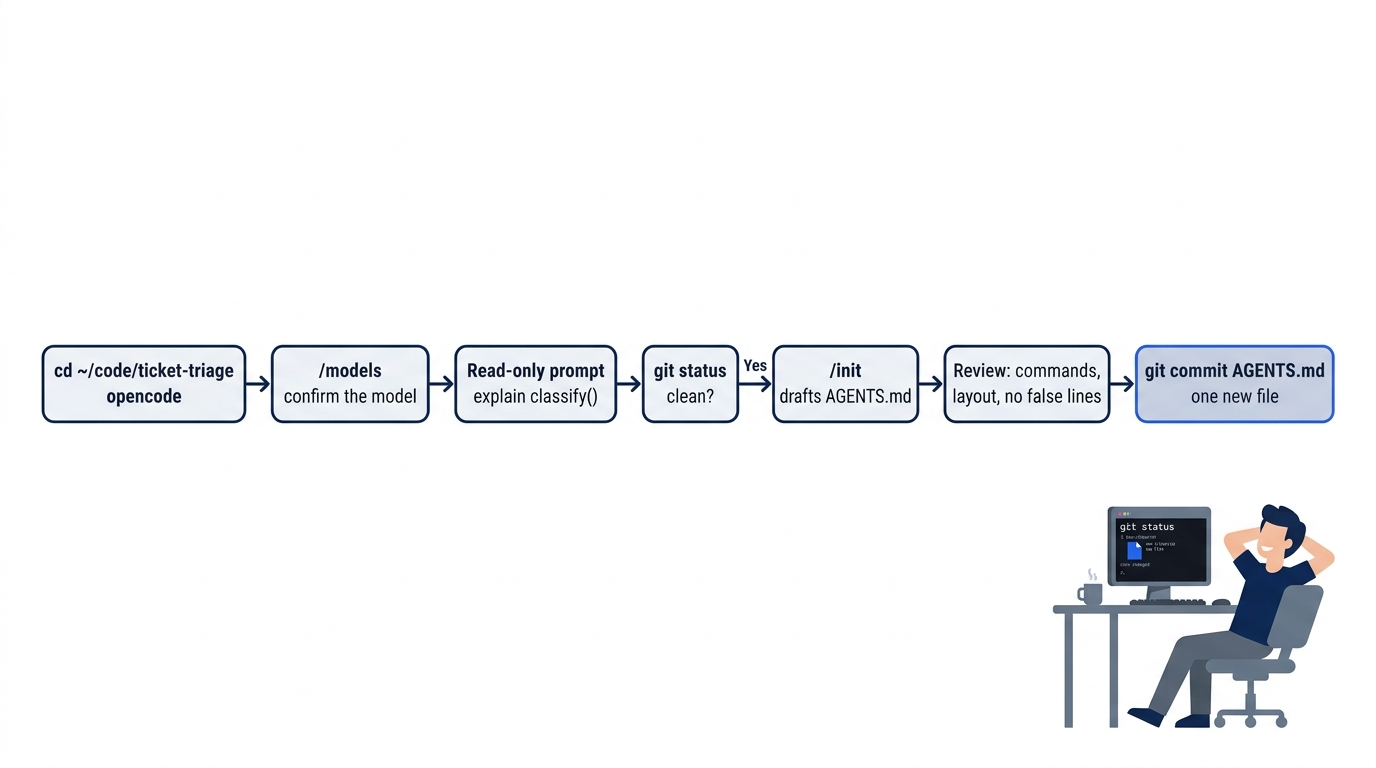
/init drafts the first AGENTS.md
OpenCode V2 reads project guidance from AGENTS.md only; it does not fall back to CLAUDE.md. Part 5 is the day for AGENTS.md; this is the shortcut for readers who want a draft now. The built-in /init command drafts one. The V2 docs do not cover it yet; the 2.3.0 source calls it "guided AGENTS.md setup," and its prompt reads the project's manifests, CI files, and existing instruction files, including CLAUDE.md, .cursorrules, and .github/copilot-instructions.md. A model-backed run on 2.3.0 has not been recorded for this series, so type / in the TUI and filter for init to confirm your release has it.
Run /init, follow its prompts until the agent writes AGENTS.md at the project root, and read the result with git status and cat AGENTS.md. Check three things.
- The commands are real. For Ticket Triage, the only check is
npm test. An invented lint or typecheck step is wrong, not cautious. - The layout is right. Source in
src/, tests intest/, ES modules declared inpackage.json. - Nothing belongs to a different project. A plausible convention the repository does not follow is worse than none.
Delete any false line, then commit, so the draft is a shared starting point rather than a file on your laptop. Every line rides along on every request, so it will need trimming later.
git add AGENTS.md
git commit -m "Add first AGENTS.md draft from /init"
Updating and uninstalling without losing anything
opencode upgrade (alias update) updates in place and takes a version number to pin a release; after an update, the TUI shows the release highlights once. opencode uninstall --dry-run previews removal; the real command stops background services, removes the shared cache, and removes the installation through the detected package manager, or prints the final command for a curl install.
What uninstall leaves behind matters more: session data, configuration, and state are never removed. Saved credentials survive an uninstall and a reinstall, which is convenient when you switch routes and means uninstall is no way to wipe a key. Run opencode auth logout for that first.
If you already use Claude Code: your sign-in does not carry over. Claude Code accepts a Pro, Max, Team, Enterprise, or Console account, but OpenCode's anthropic provider takes an API key; the providers page describes no Claude Pro or Max sign-in for it. claude doctor has no twin; use opencode debug paths, opencode debug config, and opencode service status. And a repository's CLAUDE.md does not load in OpenCode V2, with no warning, while Claude Code's /init writes CLAUDE.md.
Do this today
Everyone
- Install V2 by one route and prove the version. Remove any V1 copy first, then confirm
opencode --versionprintsopencode v2.3.0or a later 2.x release. - Connect one provider the server can see. Run
opencode auth login google --method key, thenopencode auth listandopencode models, and findgoogle/gemini-4-hydrogenin the list. - Run the read-only session again. In the Ticket Triage folder, send the Start here prompt with
opencode run, then confirmgit status --shortprints nothing. - Start one habit. Run
git status --shortbefore and after every session, so you always know the starting point and what changed.
If you read Going deeper
- Record your paths. Write down the output of
opencode debug paths dbandopencode debug config; Part 8 needs them. - Try
/initin the TUI. Delete every false line in the draft and commit the one new file. The step is untested on 2.3.0, so compare what you see with the description above. - Preview an uninstall.
opencode uninstall --dry-runlists what a real uninstall removes and confirms your sessions and config stay.
Prove it, then trust it
The opening failures had nothing to do with skill. A command name hid which program was installed, and a process boundary hid which environment held the key. Neither showed up as an error; both showed up as confusion, the more expensive kind of failure.
The fix was the same habit both times: prove what you have instead of trusting the screen. opencode --version settles which program runs. opencode auth list and opencode models settle what the server sees. git status settles whether the agent changed anything. Install OpenCode V2 this way, and the first session ends with a clean tree and a setup you can update, inspect, and remove on purpose.
Install once, then verify everything the screen does not tell you.
This is Part 1 of "OpenCode, Day-to-Day," a 17-part guide to using OpenCode V2 as a daily, provider-neutral coding agent.