
Your Coding Agent Is Down. Your Session Is Not.
A rate limit on your only provider takes the agent down, but in OpenCode the model is a setting on the session, so the fix is a second provider connected before you need it, a local model as the backstop, and one global policy that keeps the model list exactly what you chose.
How OpenCode V2 treats the model as a setting, so a rate limit becomes a /connect instead of a migration, and how to add a hosted backup, a local model, and a fence around every provider key.
Halfway through an answer, your only model provider starts rate-limiting your key, and the agent you rely on is simply down. Your session is fine; you just never connected a second reader.
In this article: Day 8 of a 17-day guide. Start here asks one checkable question on Gemini 4 Hydrogen, then hands the same OpenCode session to Gemini 3.5 Flash-Lite with
--continue, and proves the conversation survived the change of model. Going deeper adds a second hosted provider and a local model through Ollama, theprovidersblock, a global file that reads a key from disk and allow-lists providers, every provider the V2 docs describe, OpenCode's own paid models, and the open question around the Claude Agent provider.
Part 7 showed that a rule you only said in chat can vanish when a long session compacts, while a rule in AGENTS.md survives. Today you give the same session a second reader.
Start here
By the end of today you can run one question on two models, check both answers against the code, and hand a live conversation from one model to the other without losing it.
Starting fresh or fell behind? Run git switch -C main opencode/day-07. This replaces your main with the end of Day 7; to keep your own work, run git branch my-backup first.
The model is a setting
Since Part 1, every session in this guide has used one model, google/gemini-4-hydrogen (tested on OpenCode 2.3.0 on November 16, 2026). The name has two halves. Before the slash is the provider, the service that runs the model and holds your account. After the slash is the model, one of the models that provider offers. OpenCode calls the whole string a model reference, and -m takes one.
The model is not part of the session. The server keeps the session: the conversation, the files the agent read, and the rules in AGENTS.md and opencode.jsonc. The model is a setting the server applies to each request. Change it for one run, and the next request in the same session goes to a different model, which reads the same conversation.
This matters on a bad day. Every hosted provider has limits on how many requests an account may send, and a model can also be slow, unavailable, or simply wrong about your code. When the model you rely on fails, you do not need a new agent or a new session. You need a second model, and the habit of checking its answer.
Pick a second model
The Google key you saved in Part 1 already gives the server every Gemini model your account can use. List them from the project folder.
cd ~/code/ticket-triage
opencode models | grep '^google/'
The list is long, and it changes as Google adds and retires models. Look for this line:
google/gemini-3.5-flash-lite
Gemini 3.5 Flash-Lite is the second model this guide uses. Google's models page names it beside Gemini 4 Hydrogen as the two models to use for new projects, as of November 16, 2026. If the line is missing, pick another google/gemini- model from your list and use its name in the commands below.
Ask the first model a question you can check
The damage check from Part 3 has one risk: the word "broken" sends a ticket to shipping, and "the link in your email is broken" has nothing to do with a parcel. Ask the first model where that ticket lands. The question only needs the read tool, which your rules from Part 4 allow, so nothing stops to ask you for permission.
opencode run -m google/gemini-4-hydrogen "Read src/classify.js. List its rules in the order they run, then say which category the ticket 'the link in your email is broken' gets, and which rule decides it. Do not edit any file."
The output starts with > build · gemini-4-hydrogen and one → Read src/classify.js line, then the answer. In the test, the model listed four rules by line number and ended like this.
For the ticket 'the link in your email is broken':
- Category: "shipping"
- Deciding rule: Rule 2 (line 5), because the lowercased text includes "broken".
Do not take the answer on trust. Open src/classify.js and read the four lines that decide a category, in order:
- The refund check: "refund" or "money back" returns
refund. - The damage check from Part 3: "crushed," "broken," or "in pieces" returns
shipping. - The shipping check: "shipping," "delivery," "package," or "tracking," the keyword Part 7 added, returns
shipping. - Anything else returns
other.
The ticket has no refund words and does contain "broken," so the damage check returns shipping. The model was right, and you know it because you read the code, not because it sounded sure.
Hand the conversation to the second model
Now ask a follow-up, and send it to the second model. --continue, from Part 6, sends the prompt into the most recent session, and -m picks the model for this one run. Run it right after the first command, with no other OpenCode prompt in between, because --continue picks whichever session ran last.
opencode run --continue -m google/gemini-3.5-flash-lite "Without using any tool, answer from this conversation only: which rule decided that ticket, and which category would 'My parcel arrived broken and I want a refund' get? Answer in two short lines."
The output starts with > build · gemini-3.5-flash-lite, so a different model answered, and it shows no → Read line, because the prompt said not to use a tool. In the test, the answer was two lines.
Rule 2 (line 5), which checks for "broken".
Category: "refund" (matched by Rule 1 on "refund").
The second model never read the file itself. It knew which rule decided the first ticket because OpenCode sent it the whole conversation, the first model's file read included. Check the new ticket against your list: the refund check runs first and the ticket says "refund," so it lands in refund even though it also says "broken." Your model may word the lines differently; the rule and the category are the check.
Last, confirm that neither model changed anything.
git status --short
The command prints nothing.
What you just proved
Today's win is three checks in a row: the first model said shipping, decided by the damage check; the second model, in the same session, named the same rule and said refund for the new ticket; and git status --short printed nothing.
The conversation survived a change of model because it belongs to the server, not to the model. When a model fails in the middle of your work, send the next prompt with --continue and -m set to another model, and the work carries on where it stopped. Check the new model's answer the same way you checked these, against the code.
Use a second model from the provider you already have as your first backup. It does not help when the provider itself stops answering, because both models use the same account. Going deeper connects a second provider and a model that runs on your own machine.
You can stop here. Going deeper explains why this works and where it breaks.
Going deeper
This section is for readers who want a second provider, a local model, the providers block, a provider allow-list, and every provider and price the docs list. It assumes you finished Start here in this part and in Parts 1 to 7.
When the only provider stops answering
You are halfway through a question about a small support-ticket service. The classifier sends any ticket containing "broken" to shipping, and you want to know where "the link in your email is broken" lands before deciding whether that false positive deserves a fix. The agent starts walking through the rules, and then the requests start failing. Google is rate-limiting your key.
This is a scenario, not a recorded run, but every hosted provider has limits. The first time you hit one with a single provider connected, the agent is simply down. Your session, your permission rules, and your half-read answer are all on OpenCode's server, waiting for a model that will not respond.
The fix takes a minute, because OpenCode treats the model as a setting on the session rather than the product you installed. The rest of this section sets up OpenCode providers so that minute never becomes an afternoon, and so keys stay out of your repositories and stray providers stay out of your model list.
Switching the reader, not the session
OpenCode runs as a server with clients, and the server owns sessions, configuration, and permissions. A model is chosen per session: per the models page, a session's selected model takes precedence over the configured default, and switching it does not rewrite the config file.
When the rate limit hits, the recovery inside the terminal interface is short.
/connect
/models
/connect adds a provider, and /models picks one of its models for the current session. Then you send the question again. The conversation, the attached files, and your permission rules stay where they were, because the server never went down; only the provider behind it did. Since v2.2.5, reasoning from the earlier model is no longer flattened into text when you switch. This series has not recorded the TUI form; Start here's --continue run is the tested version of the same move.
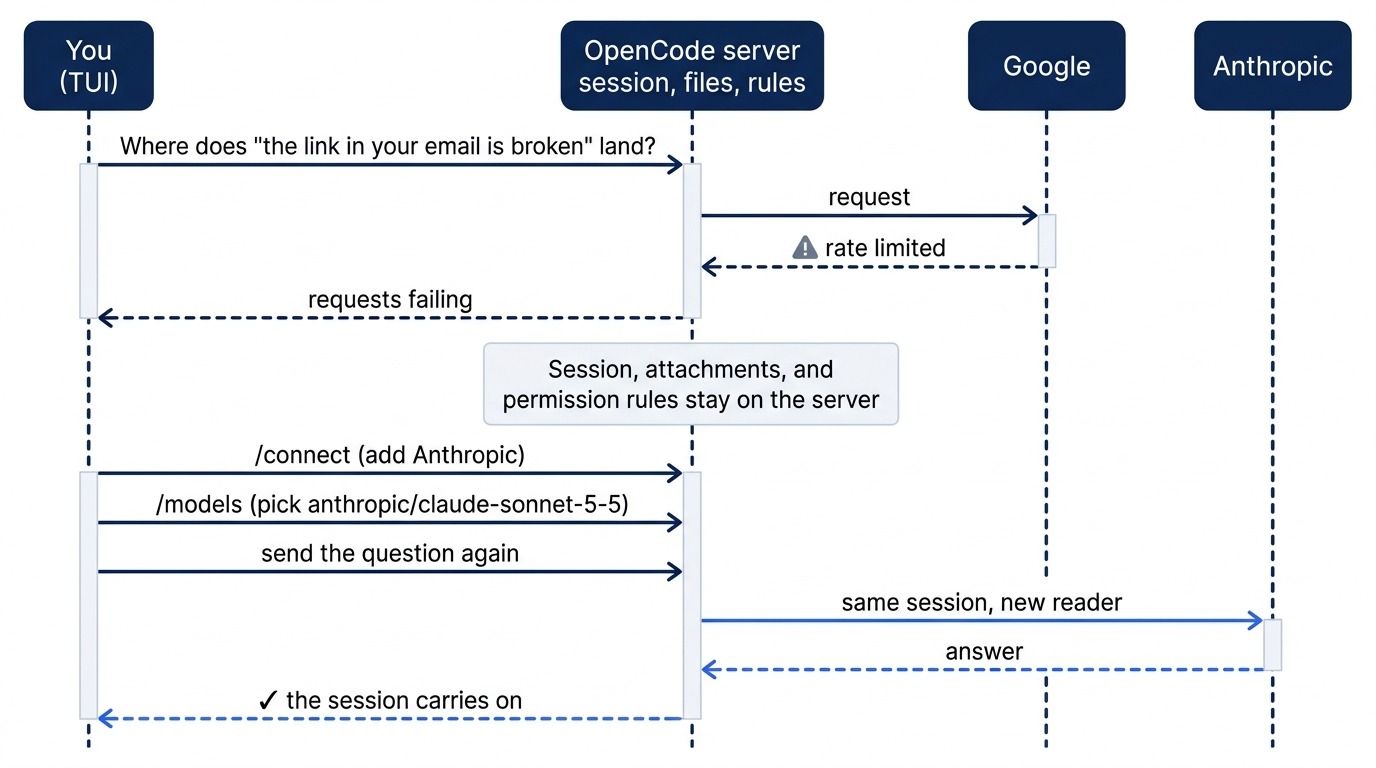

The scene is the opening moment: a half-finished answer turning into error lines, with the recovery sequence on the monitor. Nothing in the session is lost; the only thing missing is a second provider, and the rest of this section sets one up before you need it.
Connect a second hosted provider
Exporting a key in your shell works for one run against a private server. For daily use, save the key as an account, so the shared background server has it no matter which terminal started it. Part 1 saved the Google key that way, and a second provider follows the same steps.
opencode auth login
opencode auth list
auth login opens the provider picker; choose Anthropic and paste the key. API-key entry needs an interactive terminal. auth list should now show your Google account beside a new Anthropic one. A key in your shell reaches only a server started from that shell, but a saved account lives in the server's SQLite database, so every client on your machine sees it. This series ran its tests on Google, so the Anthropic steps here are documented, not observed.
Now ask the question headlessly, with no key on the command line.
cd ~/code/ticket-triage
opencode run --model anthropic/claude-sonnet-5-5 "Read src/classify.js. List its rules in the order they run, then say which category the ticket 'the link in your email is broken' gets, and which rule decides it."
claude-sonnet-5-5 is the direct Anthropic ID for Claude Sonnet 5.5 on Anthropic's models overview. The question only needs the read tool, so nothing waits for approval, and you can check the answer yourself. classify() runs the refund check, then the damage check, then the shipping check. The ticket contains neither "refund" nor "money back," and it does contain "broken," so the damage check returns shipping. A model that says other misread the rule order.
Connect a model on your own machine
A local model has no rate limit, no bill, and no network dependency, but a smaller brain and a context window you set yourself. OpenCode discovers Ollama with no account: per the providers page, it probes http://127.0.0.1:11434 and adds every model whose Ollama metadata reports the completion capability. Embedding-only models never appear.
Start Ollama with a larger context, then pull a model.
OLLAMA_CONTEXT_LENGTH=64000 ollama serve
ollama pull qwen3:8b
The first command keeps running in its own terminal. Per Ollama's documentation, its default context is 4K on machines with less than 24 GiB of VRAM, and its OpenCode guidance says coding agents need at least 64,000 tokens. The default depends on memory: the same page lists 256K at 48 GiB of VRAM or more, and Ollama caps the context at the model's trained length, which fits the author's own 2.3.0 test, where Ollama 0.31.1 loaded llama3.2 at its trained 131,072 tokens with no variable set. The trap is subtle: OpenCode reads the model's trained context length, not the length the server serves (ollama.ts, lines 86 and 87, at v2.3.0), so a 4K server can look like a large model. qwen3:8b comes from the providers page's own example; it is a fair first test, not a recommendation.
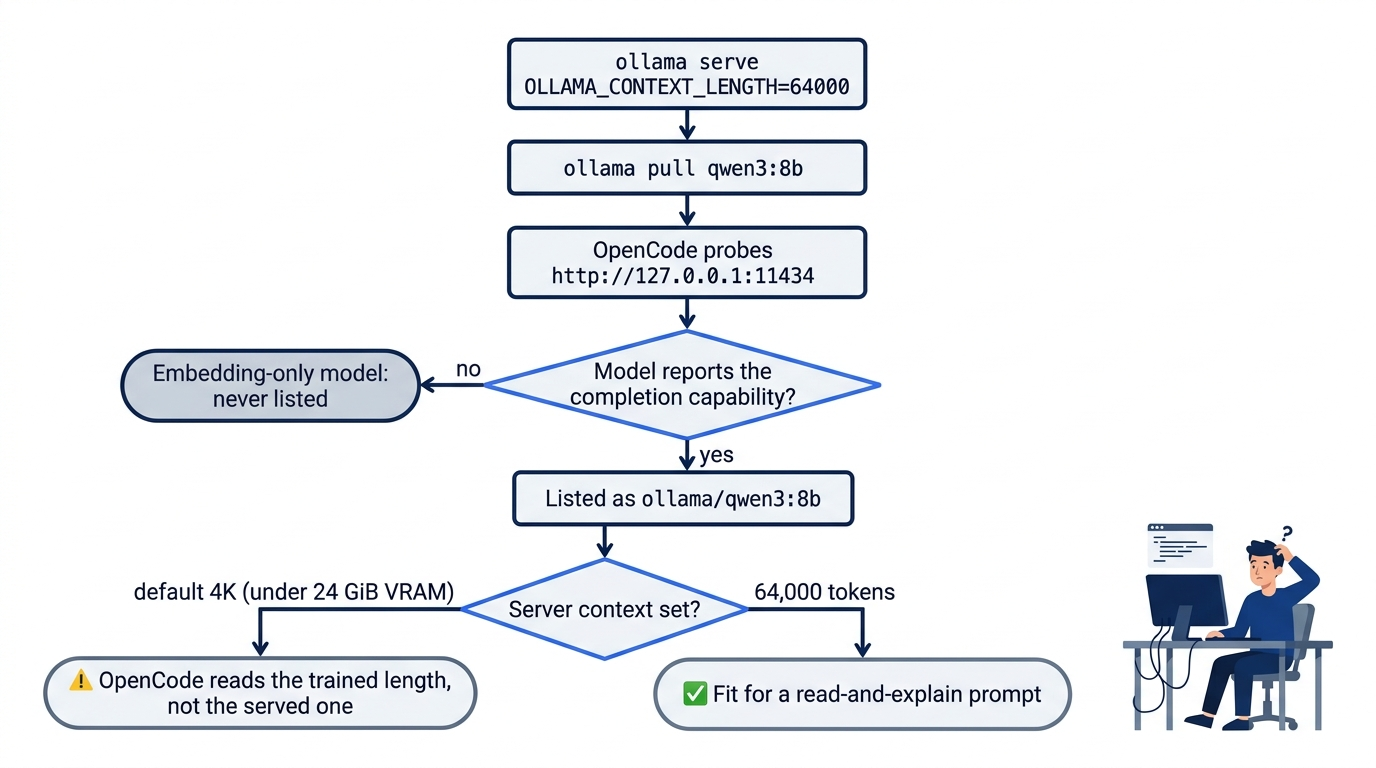
If Ollama runs on another machine, set its /v1 URL in providers.ollama.settings.baseURL. Then ask the local model the same question.
opencode run --model ollama/qwen3:8b "Read src/classify.js. List its rules in the order they run, then say which category the ticket 'the link in your email is broken' gets, and which rule decides it."
Expect a slower run, and grade it against the same check. In the author's own 2.3.0 test, the 3B llama3.2 ran one npm test correctly as build, then failed an open-ended search as a subagent: it wrote a call to a tool that does not exist as plain text, and its session still reported success. Public reports in OpenCode's issue tracker describe the same kind of failure with small local models: tool calls returned as text with a false success (#21181) and calls to a tool that does not exist (#21354). A read-and-explain prompt is the right first job for a local model; a five-file refactor is not.
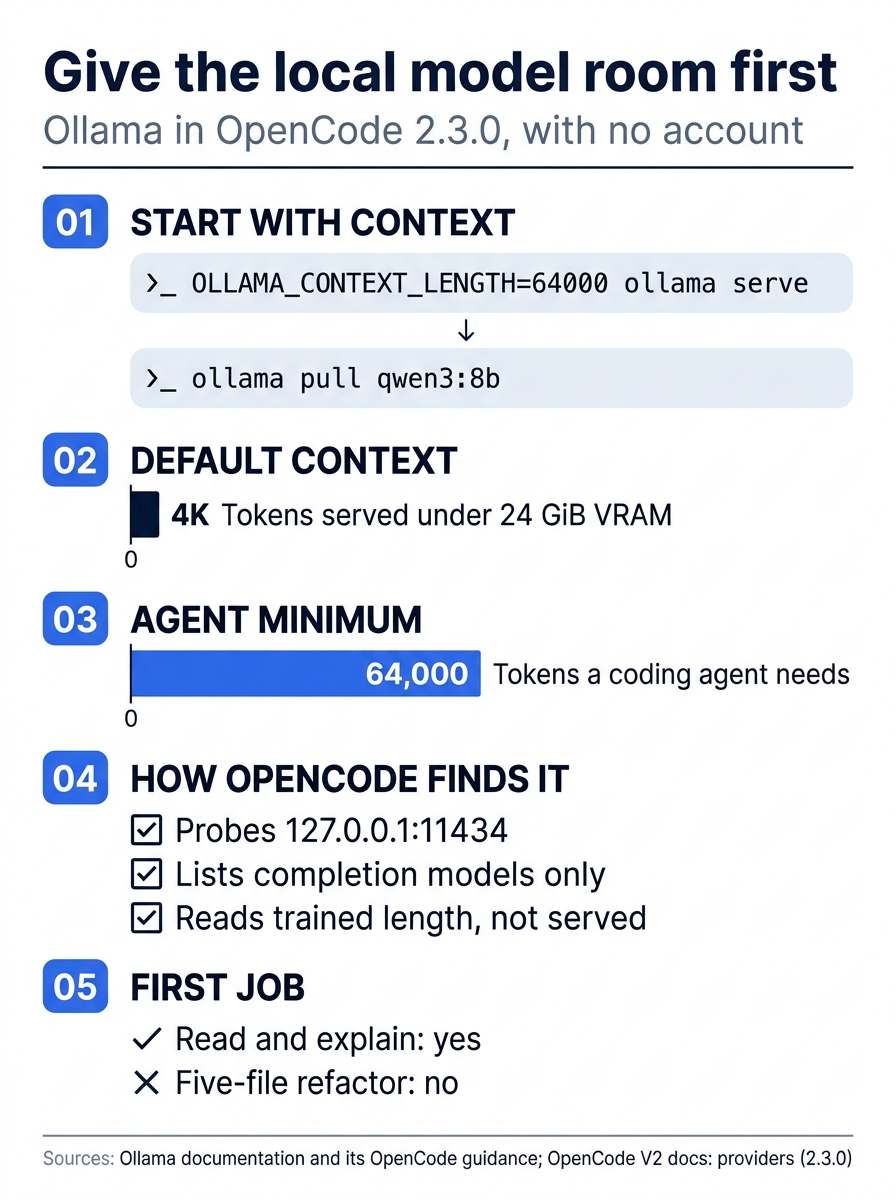
Local setup comes down to one rule: set the server's context first. Ollama's default can be 4K against the 64,000 tokens its guidance asks for, OpenCode cannot see the difference, and a small local model fits a read-and-explain job, not a refactor.
LM Studio and vLLM are discovered the same way, at http://127.0.0.1:1234/v1 and http://127.0.0.1:8000/v1, with the IDs lmstudio and vllm. vLLM's discovery cannot see the flags that turn on tool calling, so its models start with tools disabled. Any other OpenAI-compatible server, llama.cpp's llama-server included, uses the custom-provider recipe below.
Prove it with one command
The check is a single command.
opencode models
It lists every model the server can use right now. Read the prefixes: you should see anthropic/, google/, and ollama/ entries. The command has no provider filter, so use grep for a long list.
opencode models | grep "ollama/"
Missing ollama/ lines mean Ollama is not on its default port or the pull has not finished; missing anthropic/ lines mean the account did not save. Discovery also runs in the background: in the author's 2.3.0 test, a one-shot --standalone run failed with "Model unavailable" because the private server exited before discovery finished. The opposite failure matters too: providers whose keys merely sit in the server's environment also appear, with no /connect step. On the author's tested 2.3.0 install, a Google key in the environment exposed every google/* model. With three providers connected on purpose, you now have a reason to make the list exact, and a policy does it.
The providers block, and where it belongs
Some settings have no place in /connect: a gateway URL, extra headers, an uncataloged model, or a key kept in a file. They go in the providers block of an opencode.jsonc, keyed by provider ID. The providers page builds a custom OpenAI-compatible provider in one block.
{
  "$schema": "https://opencode.ai/config.json",
  "providers": {
    "acme": {  // ①
      "name": "Acme",
      "env": ["ACME_API_KEY"],  // ②
      "package": "@opencode/ai/providers/openai-compatible",  // ③
      "settings": {
        "baseURL": "https://llm.acme.example/v1",  // ④
      },
      "models": {
        "qwen3-coder": {  // ⑤
          "name": "Qwen 3 Coder",
        },
      },
    },
  },
}
① The key is the provider ID, and it becomes the prefix of every model reference, so this provider's models are selected as acme/....
② The credential comes from an environment variable on the server, so the key never appears in the file.
③ The package is the runtime that speaks the API; the OpenAI-compatible package covers any endpoint that uses the OpenAI request format.
④ The settings object holds the typed controls, and baseURL points the package at the endpoint.
⑤ Each model key is the OpenCode model ID, which completes the reference acme/qwen3-coder.
Note: The full extracted listing at code/opencode/part-8-any-model/listings/01-custom-provider.jsonc is the complete file, ready to copy.
With this file loaded and ACME_API_KEY on the server, /models offers acme/qwen3-coder. The object also takes headers and body, merged into every request for a gateway that wants a tenant header, and settings are package-specific, so a field only works when the package supports it.
Two string forms keep secrets out of the file. {env:NAME} inserts an environment variable, and {file:path} inserts a file's contents, where the path can be relative to the config file, absolute, or start with ~/. The config page shows both.
{
  "providers": {
    "anthropic": { "settings": { "apiKey": "{env:ANTHROPIC_API_KEY}" } },
    "openai": { "settings": { "apiKey": "{file:~/.secrets/openai-key}" } },
  },
}
Gotcha: a missing variable or file becomes an empty string, and the provider has no key. Check the name or path before you blame the provider, and remember that an {env:} value must be in the server's environment.
Where the block lives decides who sees it. The global file is ~/.config/opencode/opencode.jsonc. Project files merge from the farthest directory to the closest, any .opencode/ config overrides a direct opencode.jsonc, and the system directory (/etc/opencode on Linux) overrides them all.
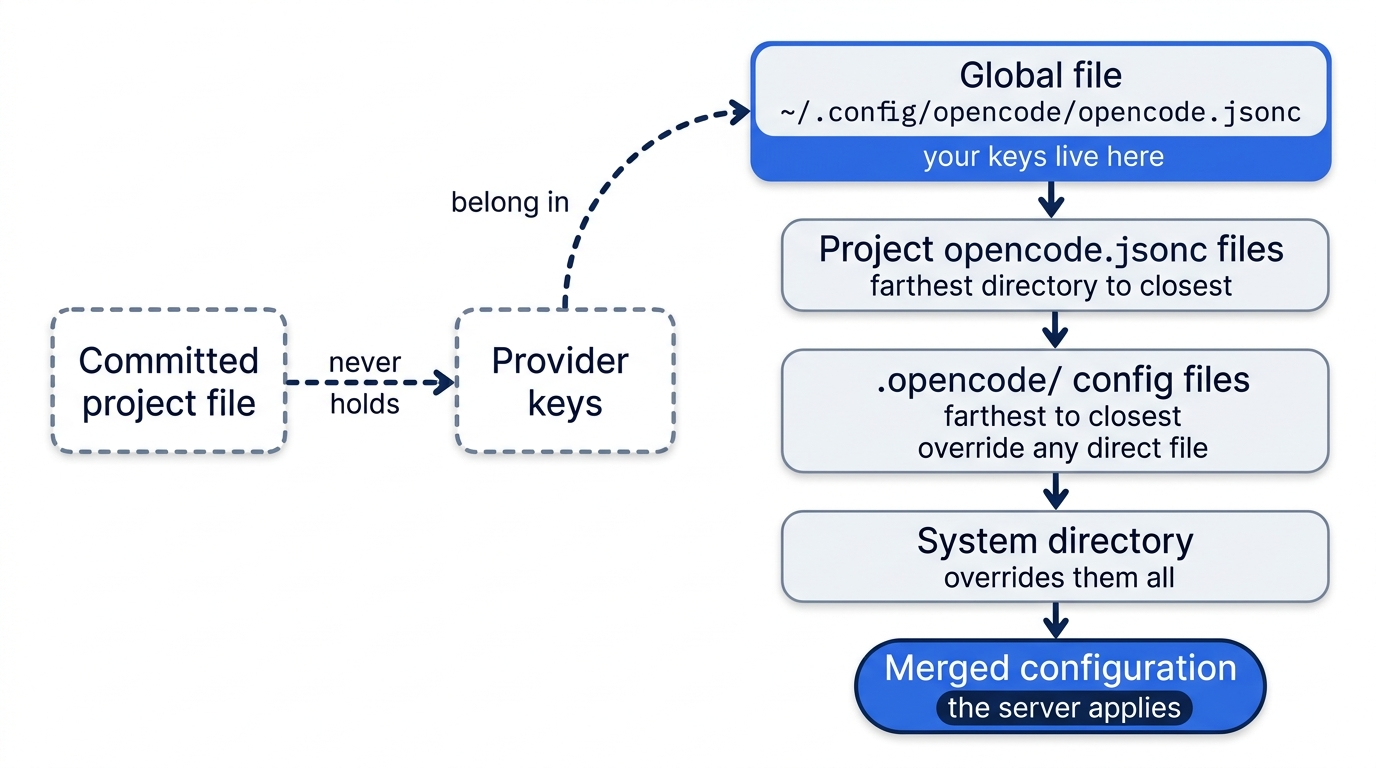
Credentials are yours, and the project file is committed, so provider keys belong in the global file and never in a repository's opencode.jsonc.
If you learned V1: the provider map became providers, npm became package (an AI SDK package takes an aisdk: prefix), api became settings.baseURL, and options split into settings, headers, and body. V2 still reads the V1 shape without a warning, per the migration guide, and third-party guides, Ollama's own OpenCode page among them, still show it.
A global file that reads the key and fences the list
Start with the key. Put it in a file that only your user account can read. The printf form keeps a trailing newline out of the file.
mkdir -p ~/.secrets
chmod 700 ~/.secrets
printf '%s' 'sk-ant-...' > ~/.secrets/anthropic-key
chmod 600 ~/.secrets/anthropic-key
Replace sk-ant-... with your key, and run the printf line with a leading space or clear it from history afterward if your shell records commands.
The file mode keeps other accounts out, not OpenCode. The agent runs as your user, and the default policy allows external_directory, so build can read the key with no prompt. The global file therefore also denies reads of the directory.
The global file now does two jobs: a providers block supplies the Anthropic key from a file, and the policies list fences in what every project on the machine may do. Read the policies in three groups: Part 4's rules, the key file, and the provider allow-list.
// ~/.config/opencode/opencode.jsonc
{
  "$schema": "https://opencode.ai/config.json",
  "providers": {
    "anthropic": {
      "settings": { "apiKey": "{file:~/.secrets/anthropic-key}" },  // ①
    },
  },
  "policies": [  // ②
    // From Part 4: no repository can undo these.
    { "action": "tool.use", "resource": "shell:git push *", "effect": "deny" },  // ③
    { "action": "tool.use", "resource": "read:*/.ssh/*", "effect": "deny" },

    // The provider key file: no project can read it with the read tool.
    { "action": "tool.use", "resource": "read:*/.secrets/*", "effect": "deny" },  // ④

    // Only these providers are usable, whatever keys sit in the environment.
    { "action": "provider.use", "resource": "*", "effect": "deny" },  // ⑤
    { "action": "provider.use", "resource": "anthropic", "effect": "allow" },  // ⑥
    { "action": "provider.use", "resource": "google", "effect": "allow" },
    { "action": "provider.use", "resource": "ollama", "effect": "allow" },
  ],
}
① The {file:} form reads the key from the file you just locked down, so the config file itself holds no secret.
② Policies only tighten what permissions allow, and the global file outranks any project file, so no repository can loosen these statements.
③ The two Part 4 statements carry over unchanged: no push, and no reads of SSH material.
④ The new statement denies the read tool on the key file's directory, using the same shape as the .ssh pattern.
⑤ A blanket provider.use deny removes every provider from the catalog, whatever keys sit in the environment.
⑥ The three allows that follow re-admit only the providers you connected on purpose, because the last matching statement wins and, inside the policy layer, an allow lifts a broader deny.
Note: The full extracted listing at code/opencode/part-8-any-model/listings/02-global-providers-and-policies.jsonc is the complete file, ready to copy.
Per the policies page, a denied provider "disappears from the catalog and model selection even when it has valid credentials," so a stray key for a fourth provider can no longer add models to your list. The read:*/.secrets/* statement covers the read tool only; in a project that allows shell commands freely, a command can still print the key.
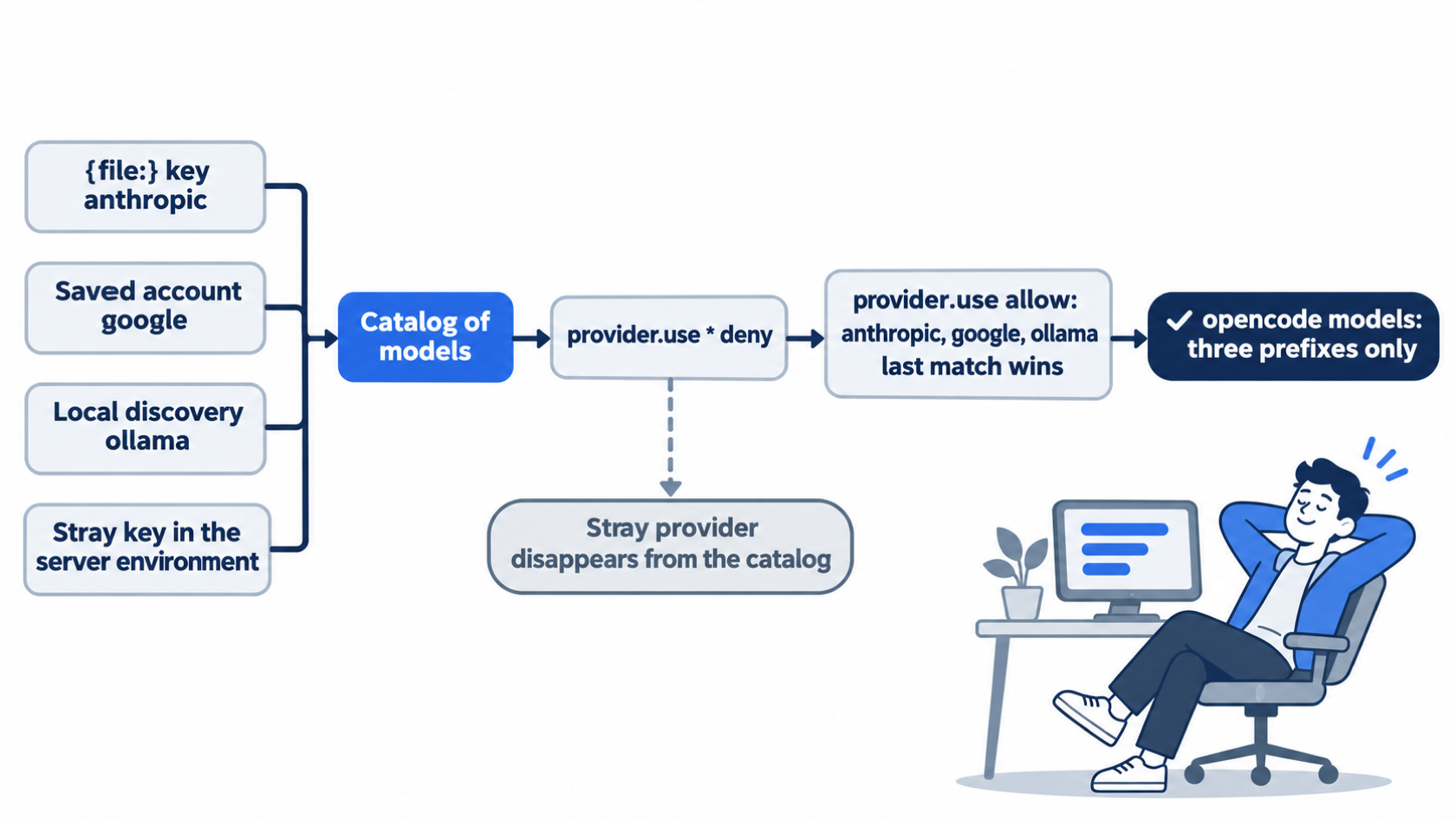
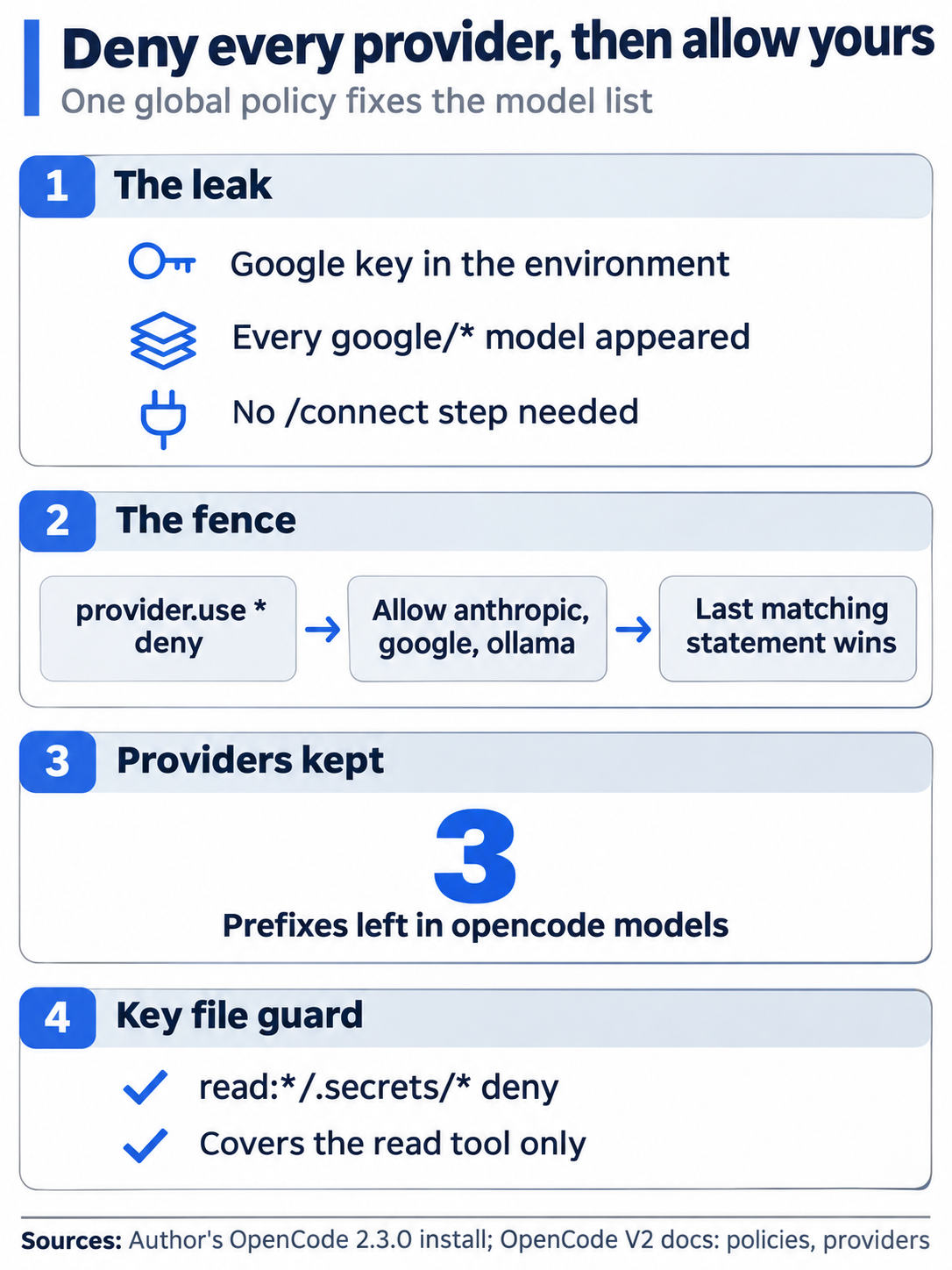
An environment key added every google/* model on a real 2.3.0 install, and one blanket deny plus three allows brings the list back to three prefixes.
The docs do not say which wins when a provider has both a saved account and an apiKey, so keep one source. Remove the saved Anthropic account you added above.
opencode auth logout anthropic
opencode reload
opencode models | grep "anthropic/"
opencode reload applies the configuration without restarting the server. If the anthropic/ lines are gone, check the file path and its contents first, then confirm that opencode models shows only three prefixes.
The three providers now keep their credentials in three different places, and each has its own removal step.
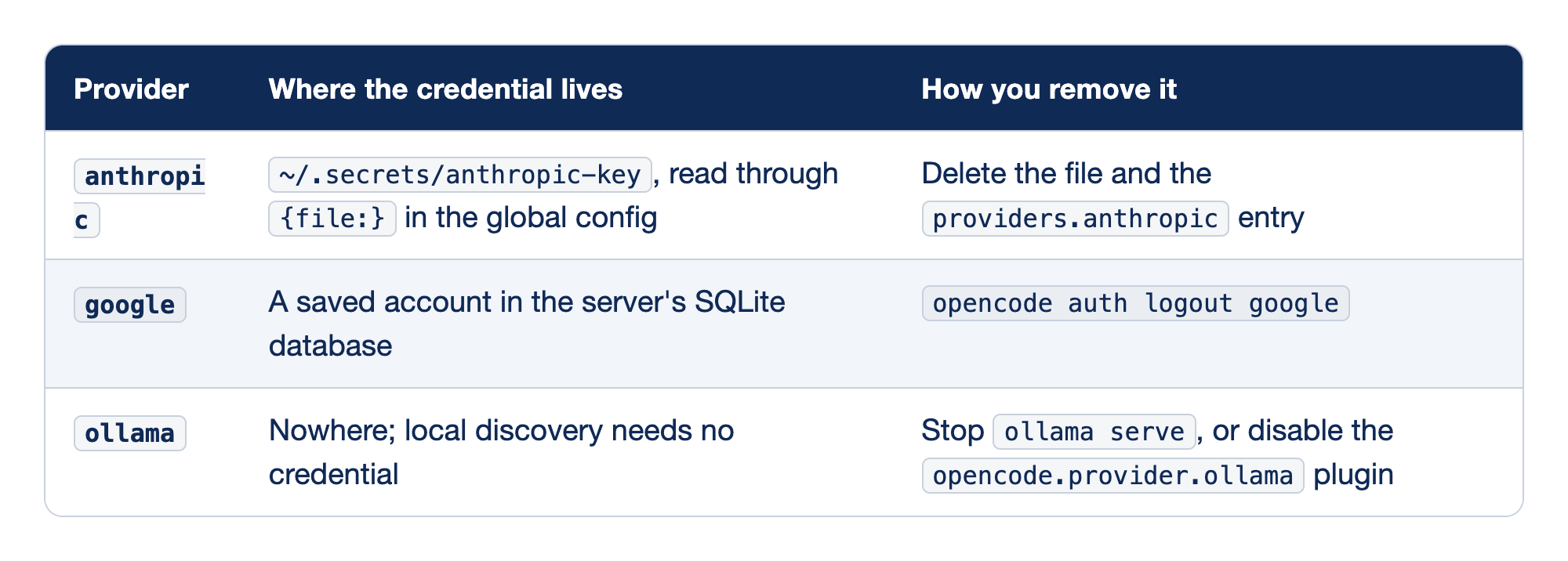
Each provider stores its credential somewhere different. The Provider column names the ID, "Where the credential lives" names what holds the secret, and "How you remove it" names the step that revokes access, the map you want the day a key leaks.
- anthropic keeps its key in
~/.secrets/anthropic-key, read through{file:}, and you remove it by deleting the file and theproviders.anthropicentry. You own the file and its rotation, but a missing file silently becomes an empty string. - google keeps its key as a saved account in the server's SQLite database, and
opencode auth logout googleremoves it. It is the most convenient method; manage it only through theauthcommands. - ollama keeps no credential at all, and you remove it by stopping
ollama serveor adding"-opencode.provider.ollama"toplugins. No secret is the strongest protection there is.
Every provider, one row each
The catalog behind /models comes from models.dev, an open-source database of models, merged with provider integrations and your config.
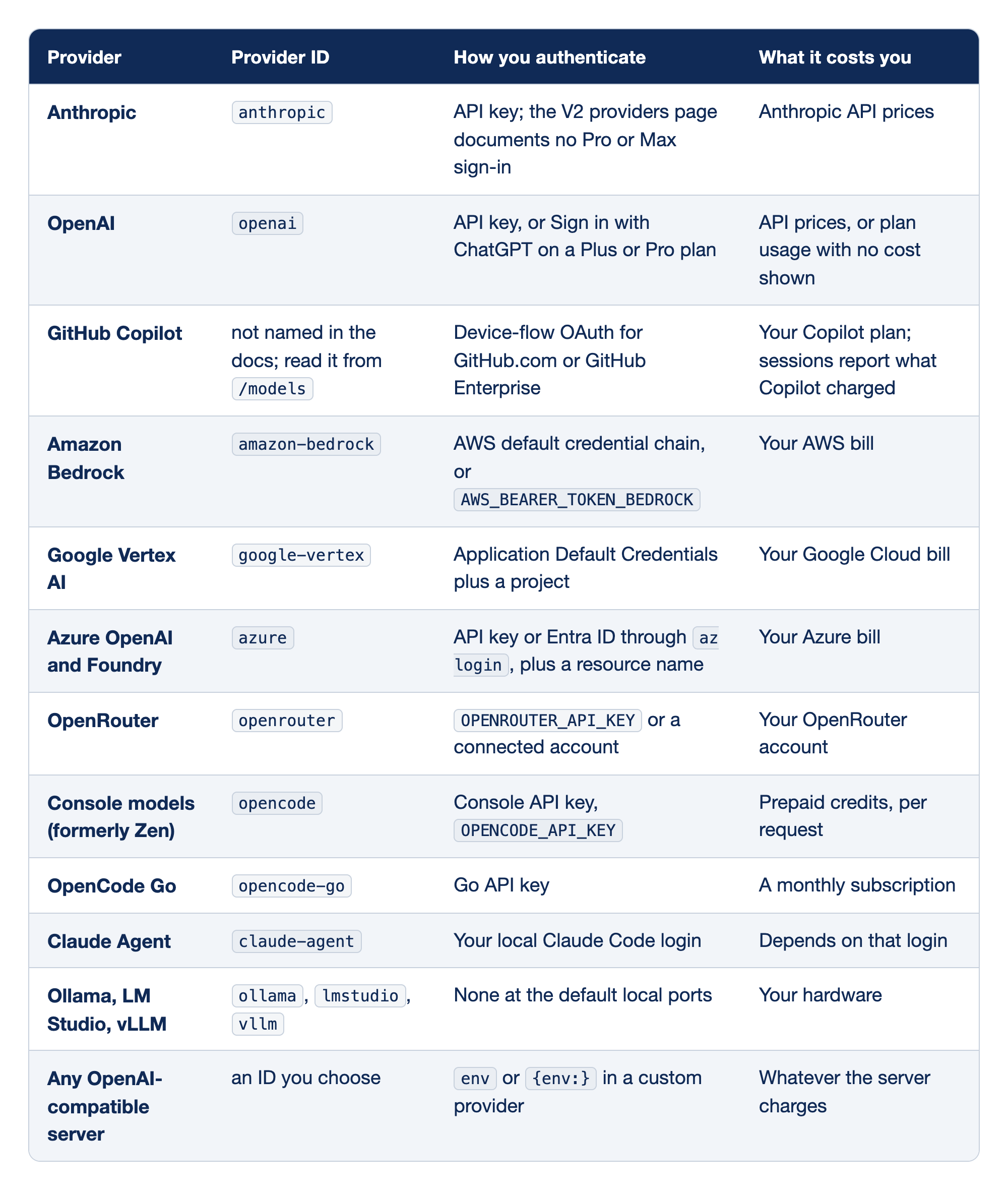
Every provider the V2 docs describe has a connect step and a bill. The Provider column names the service, "Provider ID" is the prefix in every model reference, "How you authenticate" is the connect step, and "What it costs you" is where the charge lands. For most readers, the authentication column holds the surprises.
- Anthropic (
anthropic) takes an API key and bills at API prices; the V2 providers page documents no Pro or Max sign-in. The V1 docs said it outright: "There are plugins that allow you to use your Claude Pro/Max models with OpenCode. Anthropic explicitly prohibits this." The V1 providers page, at the v1.19.5 tag, still carries that note. - OpenAI (
openai) takes an API key or a ChatGPT Plus or Pro sign-in. The sign-in caps context at 500,000 input tokens for GPT-6.1 Sol and newer and 272,000 for older models, to match Codex. GPT-6.1 Sol is a current model on OpenAI's models page as of November 16, 2026. - GitHub Copilot has no documented ID, so read it from
/models; it signs in with device-flow OAuth, bills your Copilot plan, and needs Copilot Chat access. Since v2.2.7, an Auto entry in the picker lets Copilot route each session when the account has an Auto pool. - Amazon Bedrock (
amazon-bedrock) uses the AWS credential chain orAWS_BEARER_TOKEN_BEDROCKand bills AWS. A region alone does not activate it. - Google Vertex AI (
google-vertex) needs Application Default Credentials plus a project insettings.projectorGOOGLE_CLOUD_PROJECT, or it never appears; it bills Google Cloud. - Azure OpenAI and Foundry (
azure) takes an API key or Entra ID plus a resource name, bills Azure, and lists your deployments, so IDs look likeazure/gpt-production. - OpenRouter (
openrouter) takesOPENROUTER_API_KEYand bills your OpenRouter account; use its full ID after the prefix, as inopenrouter/anthropic/claude-sonnet-5.5. - Console models (formerly Zen) (
opencode) take a Console API key and bill prepaid credits per request; some free models retain or train on your data. - OpenCode Go (
opencode-go) takes a Go API key and costs a monthly subscription, limited per model in dollars rather than requests. - Claude Agent (
claude-agent) runs your local Claude Code login and costs whatever that login costs; it carries an open policy question, covered below. - Ollama, LM Studio, vLLM need no credential at their default local ports and cost only your hardware; vLLM models start with tools off.
- Any OpenAI-compatible server uses an ID you choose and
envor{env:}for the key. Uncataloged models get guessed limits (a 200,000-token context and 32,000 output), so declare realcapabilitiesandlimitper model.
The cloud rows each need one account detail their credential cannot supply, such as an AWS profile and region, a Google Cloud project, or an Azure resource name, under settings in the global file.
Console models and OpenCode Go
OpenCode sells model access two ways, and both pages call it "completely optional."
Console models is the pay-as-you-go catalog that older posts call OpenCode Zen, a curated list of models the OpenCode team says it tested for coding agents, billed per request from prepaid credits. The V2 docs never use that name, and https://opencode.ai/docs/zen redirects to the Console models page. You add credits in the Console, copy an API key, and run /connect. Model IDs look like opencode/gpt-6.1-sol, and a credit purchase carries a processing fee of 4.6% plus $0.31.
A few rows from the Console price table show the spread, per million tokens, as of November 15, 2026. The live page still listed the same prices on November 16.
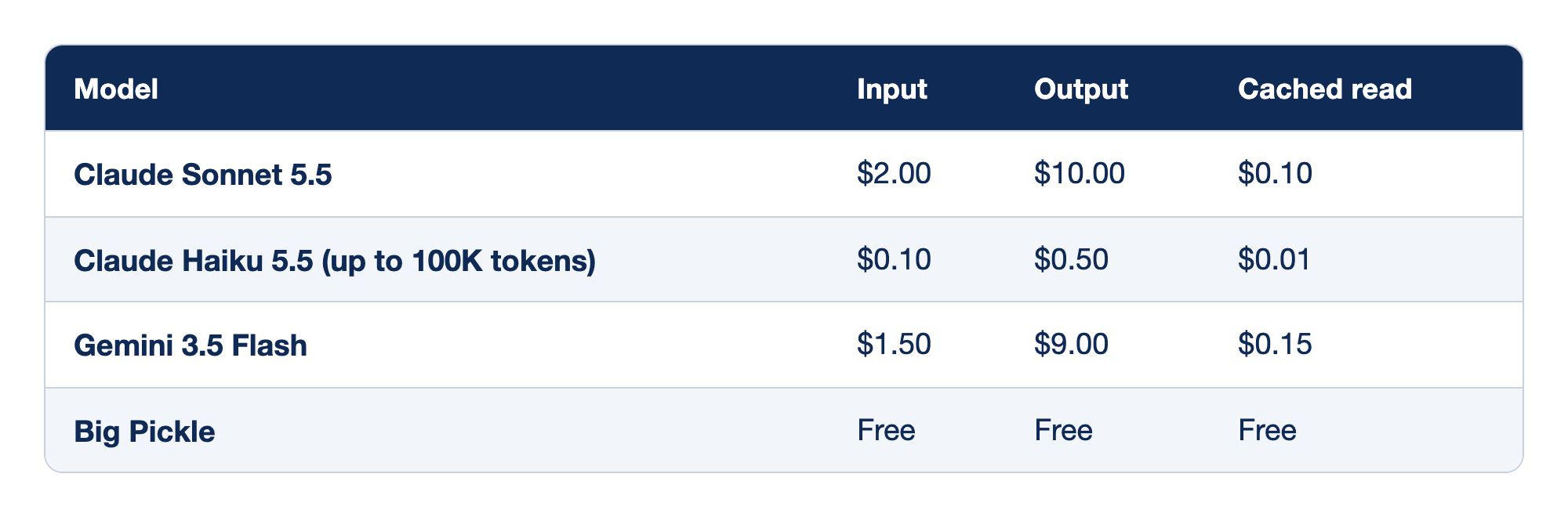
Four Console models span the price range. The Model column names each one, and the Input, Output, and Cached read columns give the price per million tokens for fresh input, generated output, and input read back from the prompt cache.
- Claude Sonnet 5.5 costs $2.00 for input, $10.00 for output, and $0.10 for a cached read; the cached read is one-twentieth of input, which is why caching dominates a long session's cost.
- Claude Haiku 5.5 (up to 100K tokens) costs $0.10 for input, $0.50 for output, and $0.01 for a cached read, twenty times cheaper than Sonnet on input; OpenCode uses low-cost models like it for session titles.
- Gemini 3.5 Flash costs $1.50 for input, $9.00 for output, and $0.15 for a cached read at the Console's price. It is the model behind this series' measured runs before November 16, and Google's models page no longer lists it for new projects.
- Big Pickle is free across all three columns; it is a rotating stealth model, and data from its free period may be used to improve it.
Prices change often, and two Gemini discounts on the page end November 30 and December 31, 2026, so check before you budget. Console models are hosted in the US and EU under a zero-retention policy with listed exceptions: several free models retain data or train on it. To hide every free model, set the variable on the server, not in your shell.
opencode service set env OPENCODE_DISABLE_FREE_MODELS 1
Hidden models leave the catalog, and selecting one explicitly fails with Model unavailable.
OpenCode Go is the subscription. As of November 15, 2026, Go costs $10 per month, Go Plus $40 per month, and Go Teams $20 per member per month, per the Go page, which still listed the same prices on November 16; Go and Go Plus are for single-member workspaces. The model list is mostly open coding models, and the page says it "may change." Limits are dollar amounts of token usage per model: each model has a monthly limit, and you may spend 20% of it in any 5-hour window and 50% in any week. Every response reports what it counted as opencode.allowance.
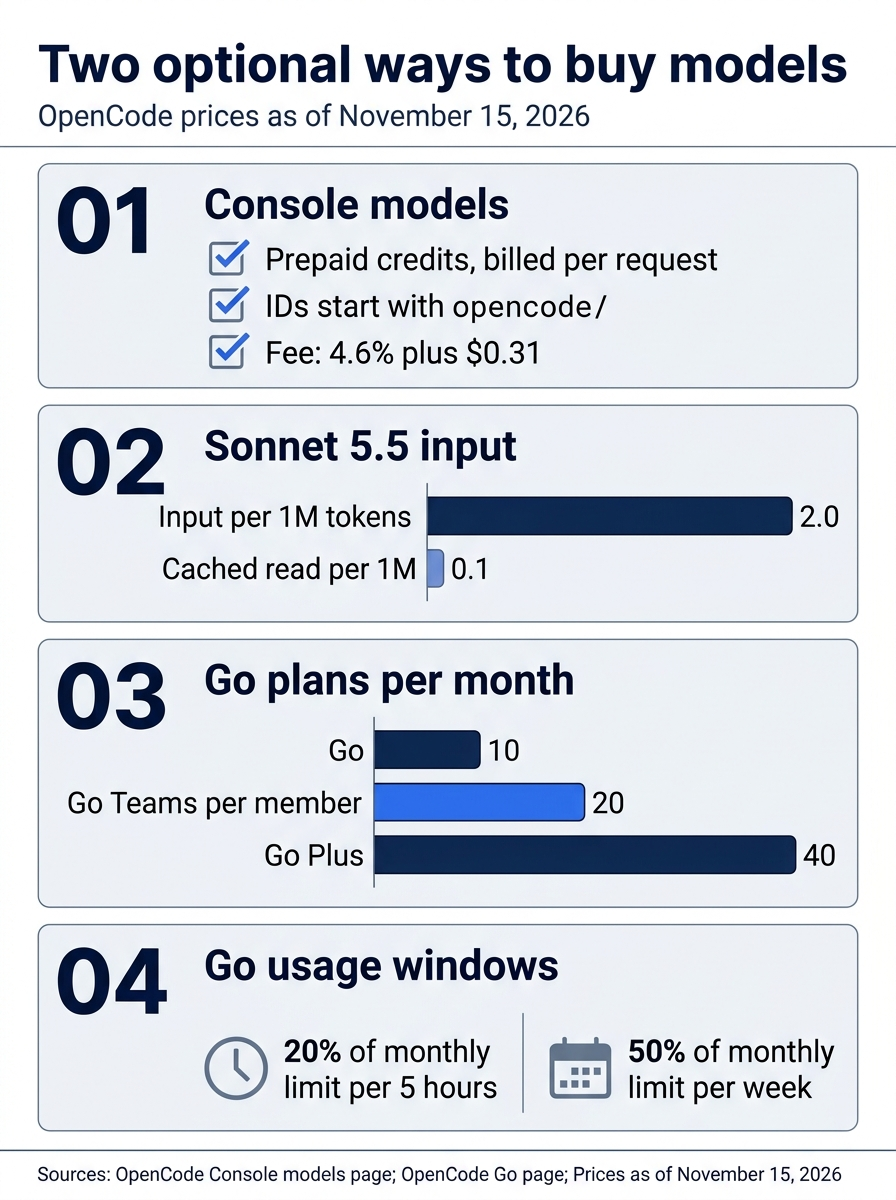
The two ways to buy differ in how they bill: Console credits bill per request, with a cached read far cheaper than input, while Go is a flat monthly price capped by dollar windows per model.
The Claude Agent provider, and its open question
The one V2 route from OpenCode to a Claude plan is the claude-agent provider, added in v2.2.3 by PR #58782. It runs your installed Claude Code as the model caller, while OpenCode supplies the tools, permissions, compaction, and subagents. Its docs page is marked noindex, so these details come from that page and the changelog.
claude update
claude auth login
opencode auth login claude-agent
Claude Code must be 2.1.248 or later, a constant in the provider's source, MINIMUM_VERSION = "2.1.248" at v2.3.0. OpenCode finds claude on your PATH, and effort levels are variants, so a reference looks like claude-agent/opus#high.
Four limits matter for daily work.
- Your Claude Code setup stays behind. Its
CLAUDE.md, hooks, MCP servers, skills, and memory are not loaded. - Same machine only. No remote workspaces.
- Fewer controls. No temperature or stop sequences, no plugin
http.requesthooks, and no/usage,/loop, auto mode, or agent teams. - Cost depends on the login. A Claude subscription shows no cost; an API key shows Anthropic prices.
The caveat decides whether you should use it at all. Anthropic's Agent SDK documentation says: "Unless previously approved, Anthropic does not allow third party developers to offer claude.ai login or rate limits for their products, including agents built on the Claude Agent SDK. Use the API key authentication methods described in the Quickstart instead." OpenCode's own design spec lists Anthropic's approval as an open question, and no public approval was found as of November 15, 2026; Anthropic's support article on the Agent SDK and Claude plans names no approved apps. Anthropic's legal and compliance page states the same ban, and adds that the ban does not prevent "an end user from signing in to the unmodified Claude Code binary" with their own Claude subscription. Read Anthropic's current terms first, and prefer an API key on the anthropic provider for anything you would not want interrupted.
OpenCode is also a gateway
The Console also serves other agents: Claude Code, Codex, Pi, Hermes, and Raycast can call Console models through compatible endpoints, billed to one workspace. For Claude Code, two environment variables do it.
export ANTHROPIC_BASE_URL="https://opencode.ai/inference/anthropic"
export ANTHROPIC_AUTH_TOKEN="oc_sk_..."
claude --model claude-sonnet-5-5
The token is a Console personal API key, and the Console translates requests for models that do not speak the Anthropic API, so claude --model gpt-6.1-sol works too. The Claude Code harness page says to use ANTHROPIC_AUTH_TOKEN, not ANTHROPIC_API_KEY, and to run /logout in Claude Code first so a Claude login is not sent to the Console. Go subscribers use https://opencode.ai/inference/go/anthropic instead. Free-tier chat models work only inside OpenCode; other harnesses get HTTP 403.
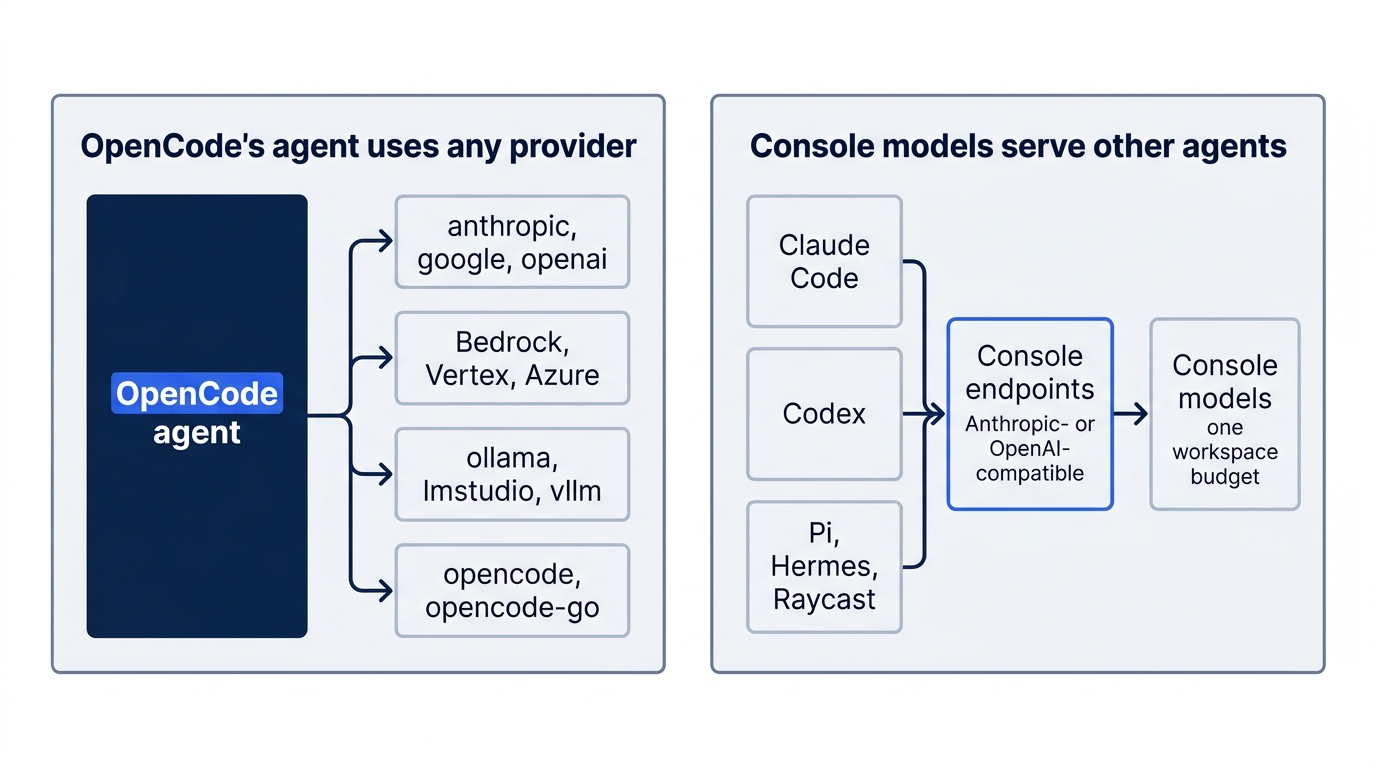
OpenCode separates the agent from the model in both directions: its agent can use almost any provider, and its paid models can serve almost any agent.
If you already use Claude Code: Claude Code reaches Anthropic's models through your Claude account, an API key, or a cloud provider such as Bedrock, Google Cloud's Agent Platform (formerly Vertex AI), or Foundry, per its authentication page. OpenCode treats Anthropic as one provider among a dozen, and your Pro or Max sign-in does not carry over to its anthropic provider. The claude-agent provider is the bridge, with the policy caveat; in the other direction, a team can share one Console budget across both agents.
Do this today
Everyone
- Repeat the model switch. In Ticket Triage, run the Start here question on the first model, then the follow-up with
--continueon the second, with no other OpenCode prompt in between. Check the two answers againstsrc/classify.js:shippingby the damage check, thenrefundfor the parcel ticket. Then confirmgit status --shortprints nothing. - Start one habit: check a new model's first answer against the code. Whenever you switch models, ask one question you can verify by reading a file before you let the new model edit anything.
If you read Going deeper
Each step takes a few minutes, plus the time Ollama needs to download a model.
-
Connect a second provider as a saved account, so the shared server sees it, then confirm both are listed.
opencode auth login opencode auth list -
Start a local model in a second terminal with a 64K context, then pull one model.
OLLAMA_CONTEXT_LENGTH=64000 ollama serveollama pull qwen3:8b -
Prove all three providers with one command, and make sure nothing appears from a provider you did not mean to connect.
opencode models -
Ask the same checkable question twice, once on a hosted model and once on the local one.
opencode run --model google/gemini-4-hydrogen "Read src/classify.js and list its rules in the order they run." opencode run --model ollama/qwen3:8b "Read src/classify.js and list its rules in the order they run." -
Move one key into a file and fence the provider list. Write the key to
~/.secrets/, reference it with{file:}in~/.config/opencode/opencode.jsonc, add aread:*/.secrets/*deny andprovider.usestatements for the providers you connected, then log out the saved account and reload.opencode auth logout anthropic opencode reload opencode models
The outage you already planned for
The rate limit in the opening was never a reason to change agents. The session, the attached file, and the rules were safe on the server the whole time; the only thing missing was a second reader. With a second model one -m away, a hosted backup saved as an account, and a local model listening on its default port, the recovery is one command and a resend.
The setup also buys control you did not have before. Keys live in one global file or one database, never in a committed repository. A single deny-then-allow policy decides which OpenCode providers exist on your machine, whatever keys drift into the server's environment. And opencode models tells you, in one line per model, exactly who can answer.
Connect the second provider today, while the first one still works.
This is Part 8 of "OpenCode, Day-to-Day," a 17-part guide to using OpenCode V2 as a daily, provider-neutral coding agent.