
One Broken Link, One Ordinary Day: The OpenCode Workflow From Casual to Elite
A finished OpenCode setup is judged by an ordinary day, not a demo: one misrouted ticket fixed with plan, tests first, review, and a gate you run yourself, one overnight run read from its events, and a machine that mostly sits still because its decisions already live in files.
Every layer you built into OpenCode serves a single working day. Follow one misrouted ticket from the first git status to an overnight worktree run, then keep the maps and the cheat sheet that make the habits stick.
You built every layer a coding agent can have, and on Monday morning three customers still waited two days because of a risk you had already written down. The question is not whether you have the machinery; it is whether you can use it on an ordinary day without a guide telling you which layer comes next.
In this article: Day 17 of a 17-day guide. Start here runs one ordinary Ticket Triage day with commands from earlier parts: check what changed, ask a read-only question, hand one small fix to an unattended run in its own worktree, and merge it only after its events prove the test failed first and then passed. Going deeper follows one real bug through every layer of the OpenCode workflow, from a plan and a failing test committed first to a review on a second vendor's model and an overnight worktree run, compares the casual, pro, and elite setups and how each one fails, and ends with the lookups: the V1-to-V2 map, the Claude Code map, what changed in 2.3.0, a cheat sheet, and a glossary.
Part 16 left a fix running with nobody watching and merged it only after its events proved that the new test failed first and then passed. Today puts that habit into one ordinary working day.
Start here
By the end of today you can run one ordinary Ticket Triage day with commands you already know: check what changed, ask the agent a read-only question, hand one small fix to an unattended run, and merge the fix only after its records prove it.
Starting fresh or fell behind? Run git switch -C main opencode/day-16. This replaces your main with the end of Day 16; to keep your own work, run git branch my-backup first.
An ordinary day uses few commands
After sixteen parts, Ticket Triage carries a lot: permission rules, a model per agent, subagents, a skill, and a guard plugin. Most days you touch very little of it. Every command below comes from the Start here of an earlier part, most of them from Part 1 or Part 16, and each one either changes nothing or ends in a check you run yourself. The model is google/gemini-4-hydrogen (tested on OpenCode 2.3.0 on November 16, 2026). Going deeper sorts the whole series into three levels of practice, casual, pro, and elite, and replays a longer day that uses more of the machinery. You need none of that to finish today.
Morning: start from what changed
The day starts in the terminal, not in OpenCode, because the first question is what happened while you were away.
cd ~/code/ticket-triage
git switch main
git status --short
git log --oneline -3
npm test; echo "exit $?"
git switch main prints Already on 'main', because Part 16 merged its fix there. git status --short prints nothing. The log shows Part 16's work on top: the fix commit, the test commit under it, and the deny you added to opencode.jsonc. The hashes on your machine will differ.
06c30e6 Route smashed items to shipping
7e33c16 Add failing test: a smashed item goes to shipping
5f914ca Deny agent edits to the global OpenCode config
npm test prints its summary with fail 0, and the last line is exit 0. You start from code you reviewed, not code a run described.
Ask before you change anything
Support forwarded one ticket overnight: "The jar arrived chipped." Before you ask for a fix, ask where the ticket lands today and why. A read-only question, in the form Part 1 taught, costs one prompt and changes no file.
opencode run -m google/gemini-4-hydrogen "Read src/classify.js and test/classify.test.js. Where does the ticket \"The jar arrived chipped\" land, and why? Do not edit any file."
git status --short
In my test the agent read the two files and answered that the ticket lands in other, because chipped is in neither the damage keywords nor the shipping keywords. Your model will word it differently; the check is the category and the reason. git status --short still prints nothing. "Do not edit any file" limits edits, not every action, so the empty git status is the proof, not the instruction.
The answer also tells you the size of the fix: one keyword and one test. Part 16 handed exactly this size of job to a run with nobody watching.
Hand the fix to an unattended run
The protections from earlier days are all committed. Part 4's rules deny a git push and every .env file, Part 14's guard refuses edits to its locked files, and Part 16's rule denies edits to the global config, so --auto still stops at each of them. Start the run, then get on with your day.
mkdir -p ~/triage-runs
opencode run --worktree=chipped --standalone --auto -m google/gemini-4-hydrogen --format json --archived "Tests first. Add one test to test/classify.test.js: 'The jar arrived chipped' expects shipping. Run npm test and confirm the new test fails. Then add 'chipped' to the damage check in src/classify.js. Do not change or remove any existing test. Run npm test again. You are done when that run reports 0 failures." > ~/triage-runs/chipped.jsonl 2> ~/triage-runs/chipped.log
Every flag is one Part 16 taught. --worktree=chipped gives the run its own worktree named chipped, --standalone gives it a private server that reads your saved key, --auto approves every ask that no deny blocks, --format json records each step and tool call as an event, and --archived keeps the session out of your way. In my test the run finished in under a minute. While it runs, your own checkout stays free. You can read the next ticket or review a teammate's change, because the run edits files only in its worktree.
Read the evidence, then merge
When the run is done, read its records before you read its reply. The log holds the worktree's path, and the events hold the two failure counts.
cat ~/triage-runs/chipped.log
cd ~/triage-runs
jq -r 'select(.type=="tool_use") | .part.tool + ": " + .part.state.status' chipped.jsonl
jq -r 'select(.type=="tool_use" and .part.tool=="shell") | .part.state.output' chipped.jsonl | grep '^# fail'
The log line starts with worktree and ends in /chipped. The tool list shows two shell calls, each completed, and the last command prints the two TAP counts:
# fail 1
# fail 0
# fail 1 proves the new test failed against the old code, and # fail 0 proves the fix made it pass. If the last command prints nothing, Part 16's two cases apply: no shell line means the run never ran npm test, and a shell line with no # fail count means your test runner does not print TAP.
Then check the work in the worktree, with the path from the log, and merge it the way Part 16 did.
cd /Users/you/.local/share/opencode/worktree/4e7a1c/chipped
git diff --stat
git diff test/ | grep '^-[^-]'
npm test; echo "exit $?"
git switch -c fix-chipped
git add test/classify.test.js
git commit -m "Add failing test: a chipped item goes to shipping"
git add src/classify.js
git commit -m "Route chipped items to shipping"
cd ~/code/ticket-triage
git merge fix-chipped
npm test; echo "exit $?"
git worktree remove /Users/you/.local/share/opencode/worktree/4e7a1c/chipped
git diff --stat names src/classify.js and test/classify.test.js, the removed-line grep prints nothing, and both suite runs end in exit 0. The run could not stop to let you commit the red test on its own, so the # fail 1 event is your record that the test came first, and the two commits keep that order in the history.
The new test in the worktree is one line like this one, which is the version on the opencode/day-17 tag; your agent may name it differently.
test("chipped jar", () => assert.equal(classify("The jar arrived chipped"), "shipping"))
End of the day
Close the day with the same three commands you opened it with.
git status --short
git log --oneline -2
git worktree list
Today's win is three results. git status --short prints nothing, git log --oneline -2 shows Route chipped items to shipping above Add failing test: a chipped item goes to shipping, and git worktree list shows your checkout alone.
Most of what Ticket Triage carries never came up today. The rules, the agents, and the guard sat still, because they already decide, in files, what every session sees and may do. A finished setup is quiet, so the day can be about the tickets.
You can stop here. Going deeper explains why this works and where it breaks.
Going deeper
This section is for readers who want a longer day that uses every layer the series built, the three levels of practice, the V1-to-V2 and Claude Code maps, the release notes, the cheat sheet, and a glossary. It assumes you finished Start here in this part and in Parts 1 to 16.
The broken-link Monday
Monday, 9 a.m. The support lead forwards three tickets that sat in the shipping queue all weekend. Each one says a version of "The link in your email is broken." Nobody on the shipping team can fix an email link, so three customers waited two days for an answer that a different team could have sent in five minutes.
You know the cause before you open a file. Ticket Triage, the small Node.js service that routes support tickets to refund, shipping, or other, checks for damage words before it checks for shipping words. "Broken" is a damage word. The plan that added the damage rule named this exact risk and ruled it out of scope, and it has sat in docs/plans/damage-rule.md ever since. Today it costs something.
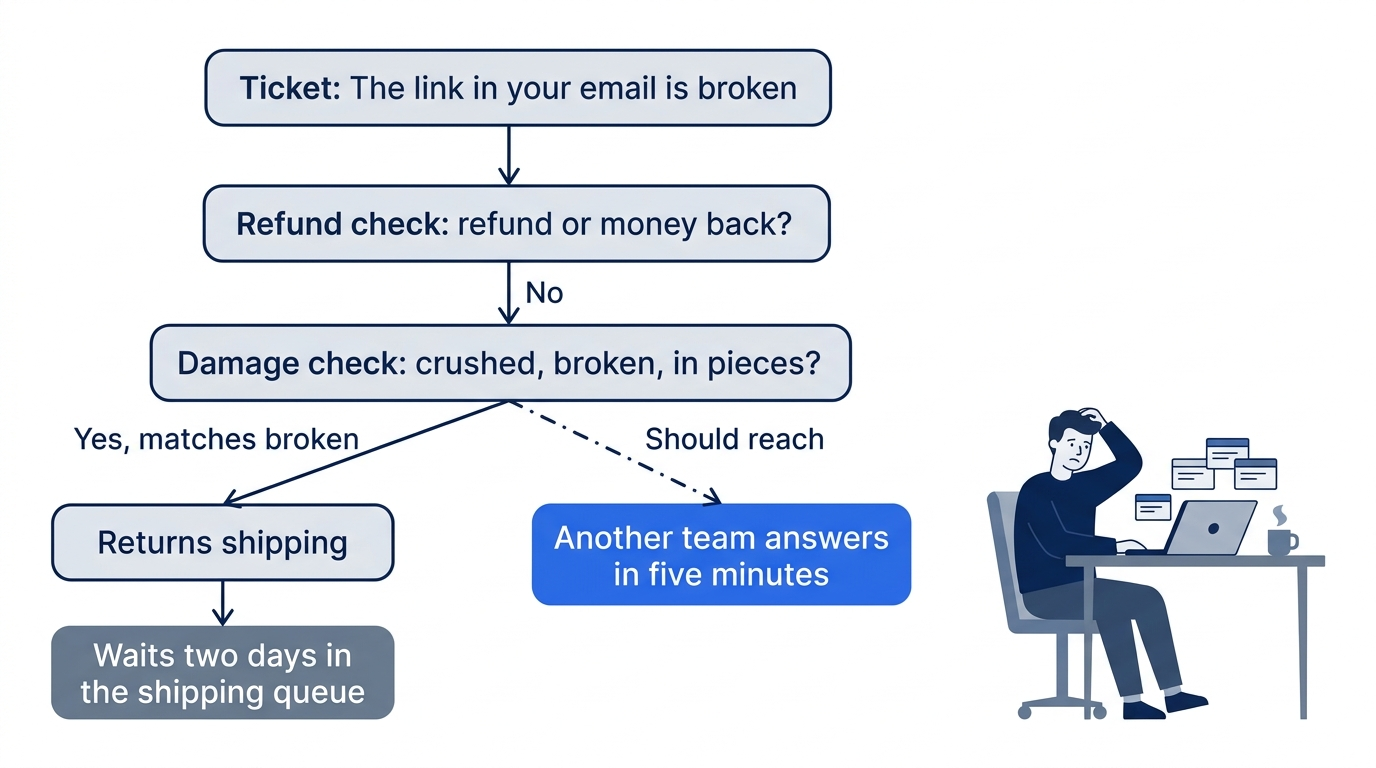
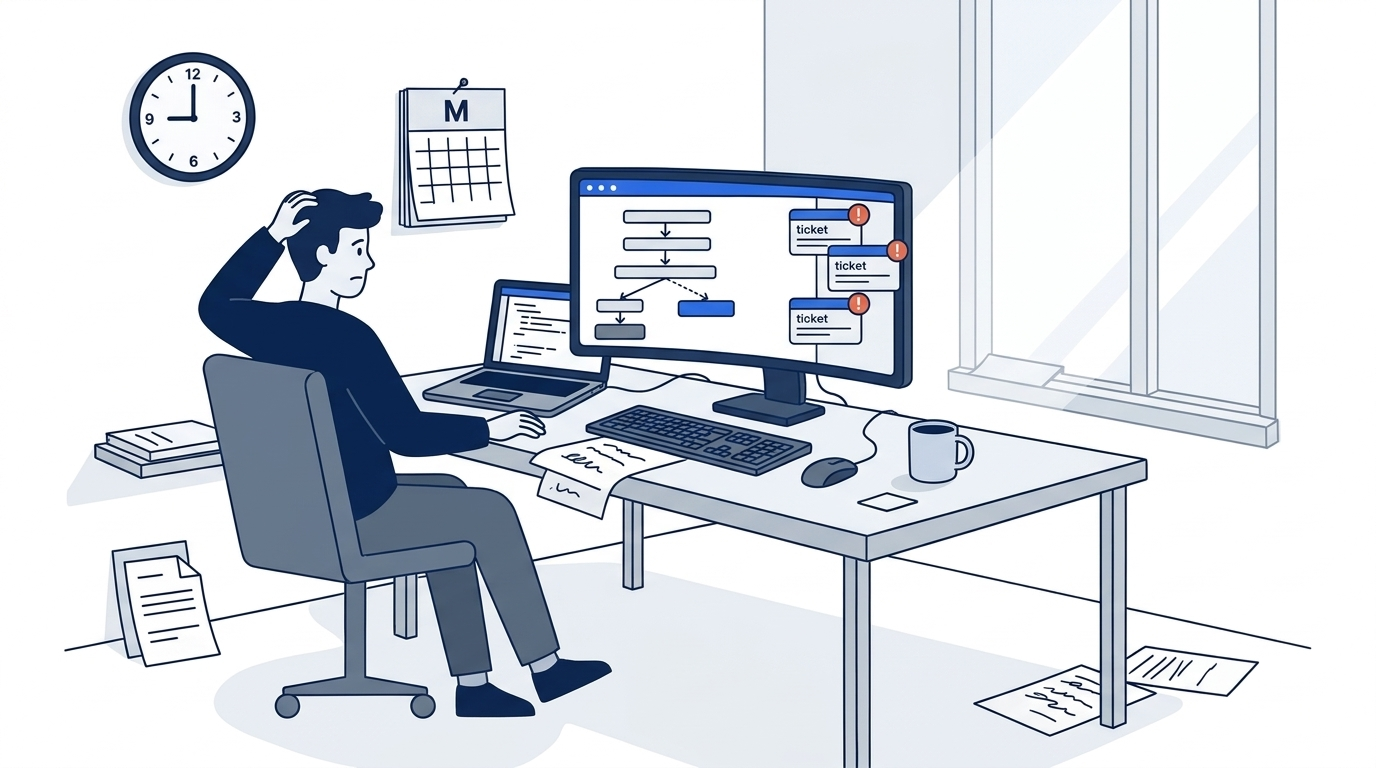
The scene is the moment the article starts from: a known risk, written down and set aside, finally reaching a customer. What is new is that you fix it with every layer of a mature OpenCode setup, in one day, with no guide telling you which layer comes next.
By now Ticket Triage carries a lot: ordered permission rules, a model per agent, a tester, a reviewer on a second vendor's model, review commands, a skill, an MCP server, a guard plugin, and a CI review job. Most days you touch very little of it.
Three ways to work: casual, pro, and elite
The Claude Code guide in this family of guides sorts readers into three personas, casual, pro, and elite, and the names carry over because the ladder does. They are levels of practice, not ranks. Each level adds machinery that makes one habit automatic, and each level fails in its own way.
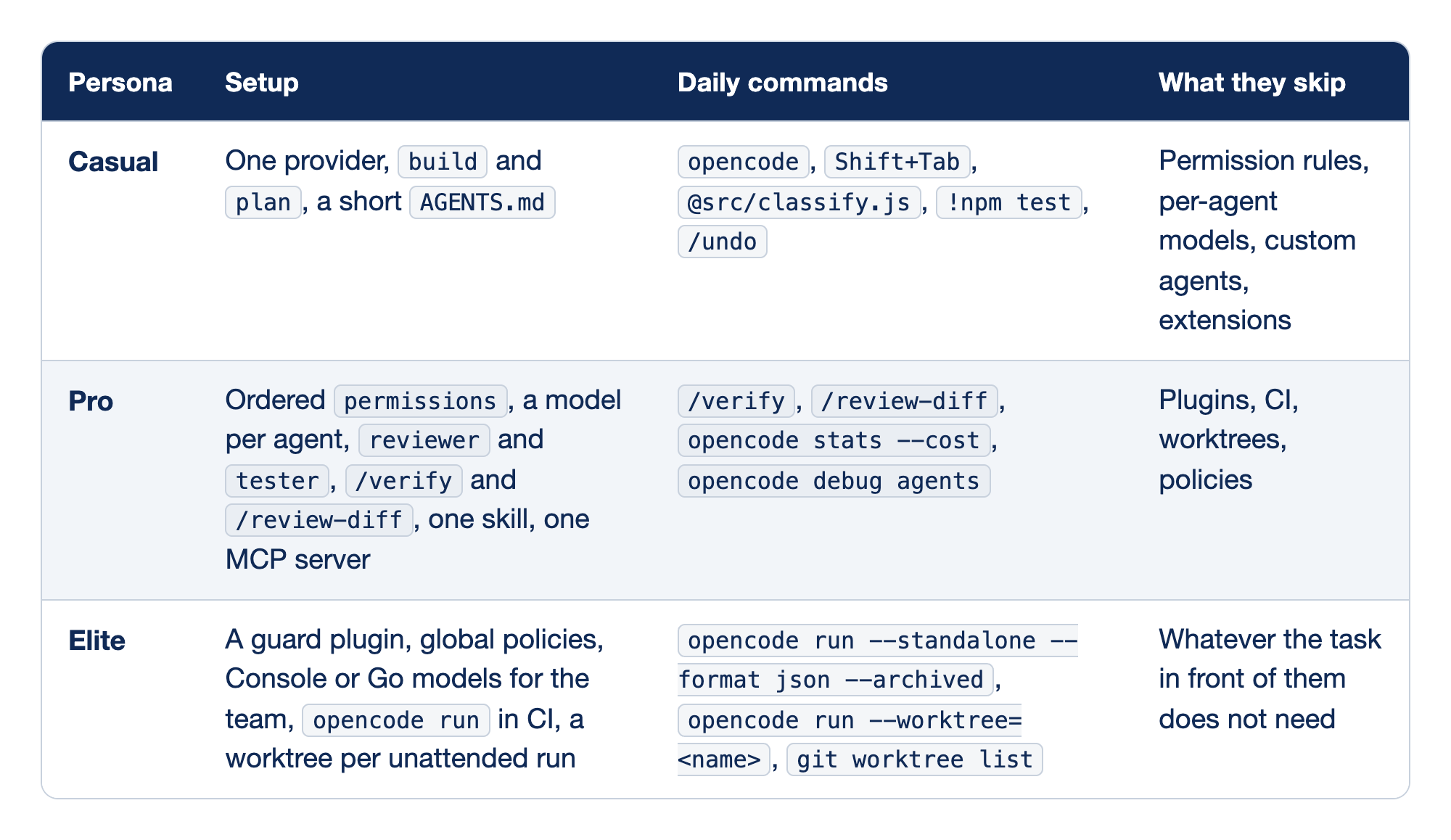
Each OpenCode persona is described by four columns. The Persona column names the level. The Setup column holds what lives in the repository or your global config. The Daily commands column holds what you type on an ordinary day, and the What they skip column holds the layers that level leaves out on purpose, because skipping a layer you do not need is a discipline, not a gap.
- Casual runs one provider with the built-in
buildandplanagents and a shortAGENTS.md. The daily kit isopencode,Shift+Tabto switch agents, an@file attachment,!npm testto run the check yourself, and/undoto throw a bad attempt away. It skips permission rules, per-agent models, custom agents, and extensions, which suits a side project or a repository you are reading for the first time. - Pro turns habits into files that a teammate gets from a clone: ordered
permissions, a model per agent, areviewerand atester, two review commands, one skill, and one MCP server. Daily commands are/verify,/review-diff,opencode stats --cost, andopencode debug agents, and the level skips plugins, CI, worktrees, and policies. Pro is the level to aim for on any shared repository. - Elite adds code and runs nobody watches: a guard plugin, global policies, Console or Go models billed to the team,
opencode runin CI, and one worktree per unattended run. Its commands are the headlessopencode runforms andgit worktree list, and it skips whatever the task in front of it does not need. Elite is the level for the person who maintains the team's setup, not a requirement for everyone who uses it.
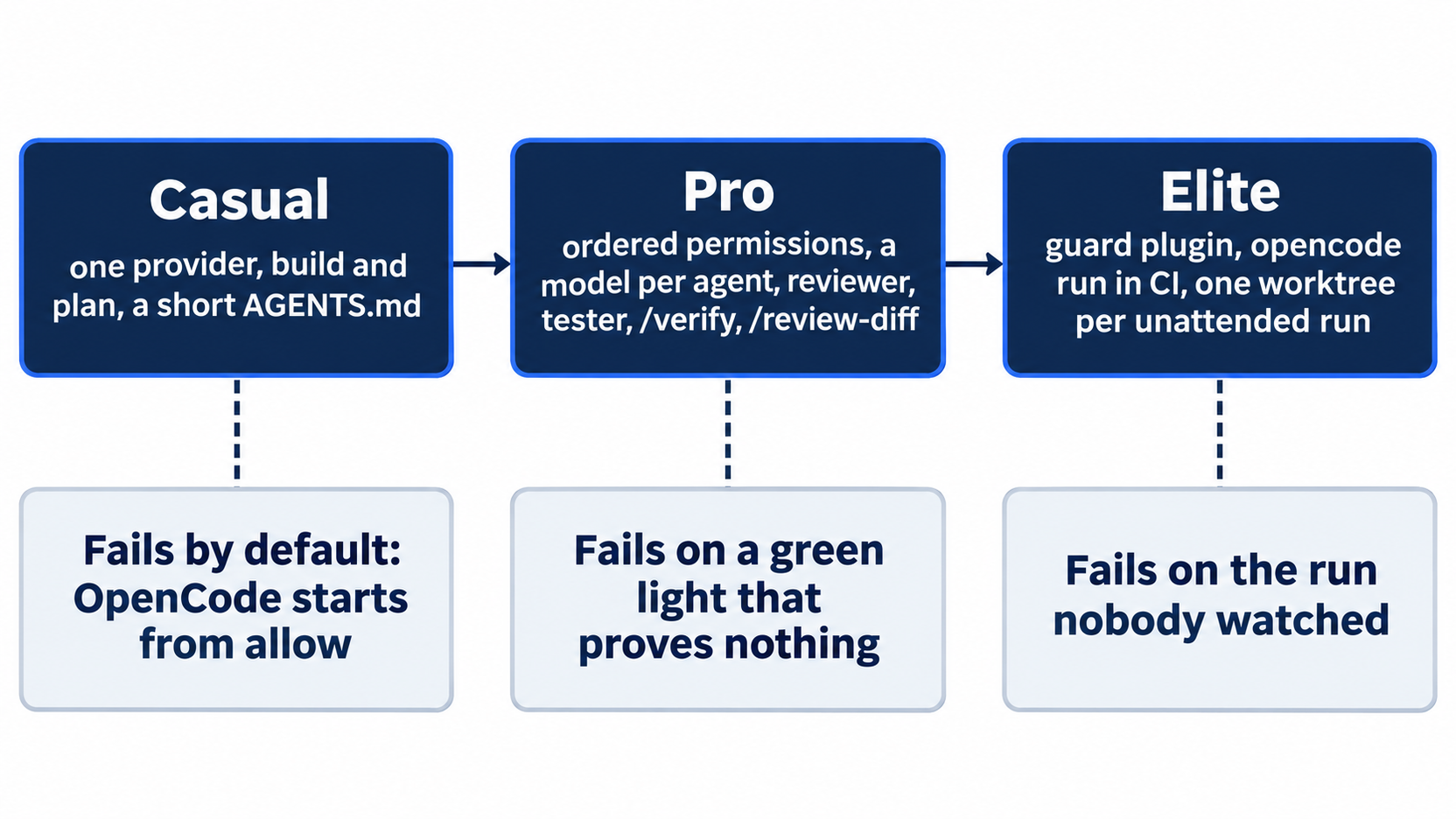
The casual failure is the default. OpenCode starts from allow. On a casual setup, build edits files, runs any shell command, and reads outside the project without asking; it asks only before reading .env files. /undo restores the files an assistant step changed, but not a commit, a push, or a running process, because its snapshots stop at the edge of the working tree. The fix is a short list of ordered permission rules, about twenty minutes of work and the first rung of pro.
The pro failure is a green light that proves nothing. Every pro layer has a status that looks like success: an "Allow always" nobody reviewed, an MCP server listed as connected that was never called, a reviewer that says "No findings" after ten steps, a summary that kept a rule the next turn only half obeyed. In the author's escalation tests, each deny pushed the model to another tool, until a node -e command that no pattern could match printed the secret. The answer is a proof for every claim and the command that produces it.
The elite failure is the run nobody watched. In an unattended run every ask becomes a reject, and with --auto every ask becomes a yes. The reject comes from the author's 2.3.0 tests; the docs say only that non-interactive clients must decide. The author's 2.3.0 test sent /goal through opencode run and got a plain sentence instead of a loop, because run does not expand slash commands. A plugin in a cloned repository's .opencode/plugins/ loads with your authority and no prompt. The elite answer is evidence you set up before you leave: denies in config, JSON events, one worktree per run, and a CI job whose checks the agent cannot skip.
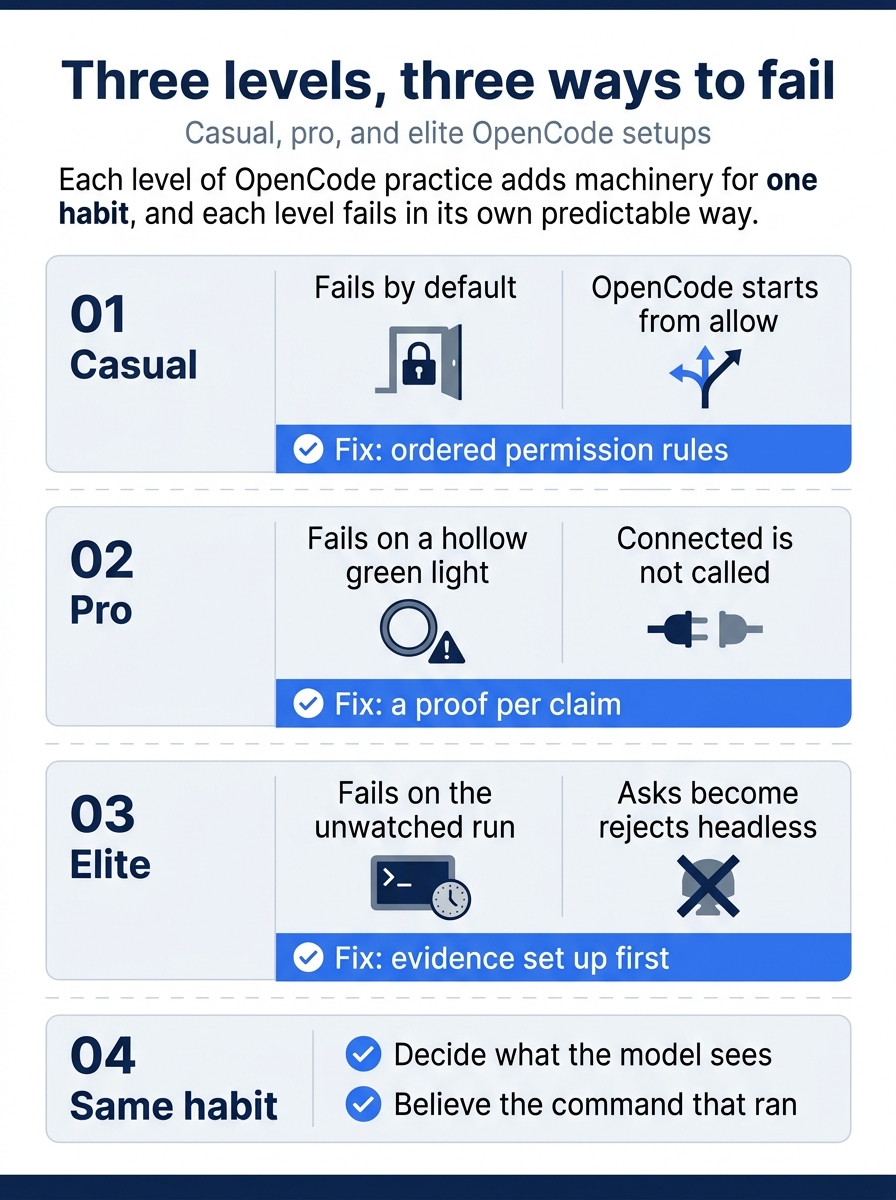
Each level has its own failure and its own fix. Casual fails because OpenCode starts from allow, and ordered permission rules fix it. Pro fails because "connected" is not "called," and a proof per claim fixes it. Elite fails because asks become rejects when nobody is present, and evidence set up in advance fixes it. Underneath all three sits the same habit: decide what the model sees, and believe the command that ran.
The morning: start from what changed
The day starts in the terminal, not in OpenCode, because the first question is what happened while you were away.
cd ~/code/ticket-triage
git switch main
git status --short
git log --oneline -5
git status --short should print nothing, and the log should show the work you merged last time. You start from code you reviewed, not code a run described.
Then the bill, scoped to this project.
opencode stats --cost --models --days 1 --project .
The MODELS block prints one row per model and variant that did work, because 2.3.0 prints each model ID with its variant suffix. Expect Sonnet for build, Sonnet #high if you planned, Haiku for explore and titles, and Gemini for the reviewer. A model you did not expect is the first thing to chase, because it ran somewhere you did not plan. A cost line far above a normal day usually means a child or a run wandered, and opencode session list is where you look for it.
Now pick a session. opencode --continue resumes the last session, which is right when yesterday's task is unfinished. The broken-link bug is a new task, and a new session is the cleanest window you can get; the files on disk do not change.
opencode
Before the first prompt, check the two dials with /models and /agents. A new session starts in build, because Ticket Triage never set default_agent. The model picker should show anthropic/claude-sonnet-5-5. One look costs nothing; a plan written on the wrong model costs the morning.
The working loop: plan, hand off, check
The bug is a rule-order decision, and rule-order decisions belong in plan. Press Shift+Tab until plan is selected, then press Ctrl+T until the high variant shows. The agents page says that selecting a primary agent does not change the session's model, so in the TUI you pick the variant yourself.
The prompt asks for decisions, not code, and names the cases that make the decision hard.
@src/classify.js @test/classify.test.js
Plan a fix for tickets like "The link in your email is broken", which route to shipping because "broken" is a damage keyword. Do not implement it.
Decide the rule order, and say where "The mug arrived broken" and "The tracking link is broken" should land.
Check the policies reference for how support wants link problems routed. If it is silent, ask me.
Write a numbered plan with files and one new test per step, and say whether each test fails today.
Write the plan to ~/.opencode/plan/ticket-triage-broken-link.md.
Expect two questions before the plan arrives. Reading the support policies folder reaches outside the project, and so does writing to ~/.opencode/plan/, so the external_directory ask fires for each. Approve each one once. If the policies do not settle the tracking-link case, the question tool pauses the turn and asks you, which is the right outcome: a routing rule for a real queue is your decision, not the model's guess.
Read the plan from a second terminal, confirm the tree is untouched, and copy the plan into the repository so a reviewer can see it.
cat ~/.opencode/plan/ticket-triage-broken-link.md
git status --short
cp ~/.opencode/plan/ticket-triage-broken-link.md docs/plans/broken-link.md
git switch -c fix-broken-link
Read the plan for three things: the rule order as a sentence, the files each step touches, and each test's state today. The email-link test should fail today. "The mug arrived broken" should pass today and keep passing, because it pins the damage rule against a fix that goes too far.
Now the hand-off, tests first. Press Shift+Tab back to build, check /models once more, and attach the plan you reviewed.
Implement @docs/plans/broken-link.md, tests first. Add the tests only, run npm test, and stop.
The agent should run npm test on its own, because the first line of AGENTS.md asks for it and an npm test * allow rule runs it with no prompt. Run it yourself as well, with !npm test. The summary should show the new email-link test failing and everything else passing. The counts likely come out as TAP lines, such as # fail 1, as they did when the agent's shell tool ran the suite, but the TUI's shell mode was not tested. If you see ℹ fail 1 instead, the spec reporter ran; read it the same way.
Commit the red test alone, from your second terminal.
git add test/classify.test.js
git commit -m "Add failing test: a broken email link is not a shipping ticket"
Then ask for the fix and watch the first few tool calls. If the agent announces a rewrite of classify() into a table of rules, press Enter on a one-line correction while it works, which steers the running turn instead of starting a second one.
Keep the existing if-chain. Change only what the plan's first step names.
Read the change with /diff. If the attempt is wrong in a way a correction will not fix, throw it away. The documented /undo stages a rollback of the last message, restores the files its assistant steps changed, and puts your prompt back in the composer; /redo cancels it, and sending a new prompt commits it. The snapshot is a convenience, not a backup, so confirm the result with git diff --stat.
When the attempt looks right, hand it to the two review commands instead of asking the writer whether it is done. /verify runs npm test while the command expands and gives the output to tester in a background child. /review-diff hands git status --short and git diff to reviewer, which reads on google/gemini-3.5-flash, so the second opinion comes from a different vendor than the writer.
/verify
/review-diff Check the rule order: "The mug arrived broken" must still be shipping, and a damaged item with a money-back request must still be refund.
The parent stays free while the children work, and the commands page says OpenCode sends each child's result back when it finishes. The TUI docs also describe /btw for a side question whose answer never enters the session; the author's 2.3.0 tests did not exercise it.
The reports are claims. The gate is three commands you run yourself.
git diff --stat test/
npm test; echo "exit $?"
git diff --stat
The first command should print nothing, because the test was committed before the fix. The second should end in exit 0. The third should list src/classify.js and nothing else. Commit the fix, then push the branch yourself; the agent cannot, because git push * is denied.
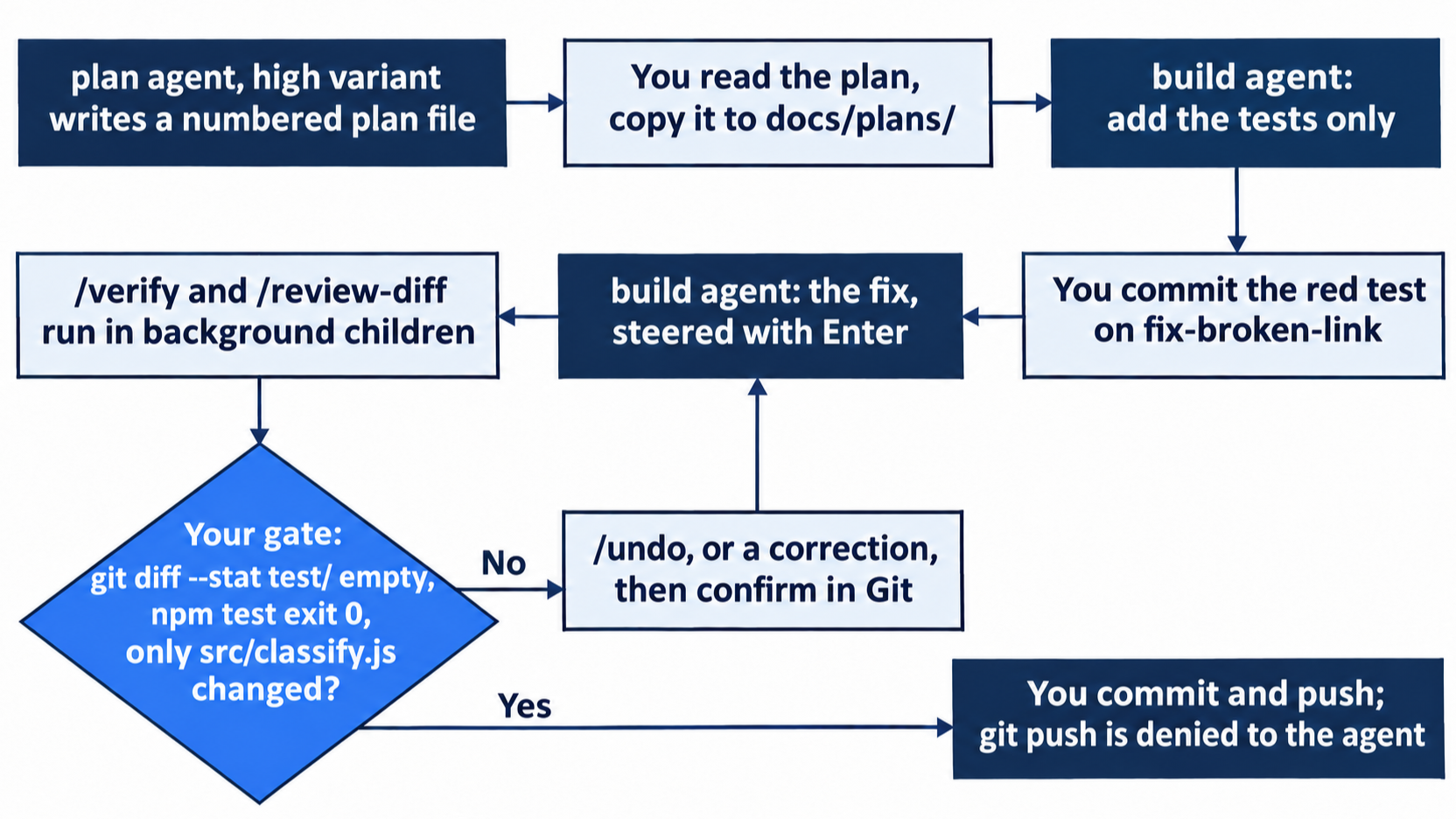
Open the pull request the way your team does. Once the workflow that adds the CI review job has merged to main, that job runs npm test, a standalone review, and git diff --exit-code on every pull request, so the merge decision rests on two commands and a review you can read in the job log. The workflow has never run on GitHub Actions, though, so treat the first pull request it sees as its test.
The long afternoon: let compaction happen
The afternoon is three small tasks in the same session: a question about a ticket the support lead flagged, a test name that reads badly, and one more keyword. Each turn adds tool output to the window. Ticket Triage's compaction block sets buffer to "20%", the share of the window kept free, so the docs place the summary at about 80 percent full. keep.tokens at 20000 keeps the last stretch word for word beside it. The automatic path is documented; the author's tests compacted by hand, so watch for it rather than assume its timing.
You do not need to watch closely, because the rules that matter do not live in the conversation. The keyword-test rule is a line in AGENTS.md, and the docs say that "after compaction, the current versions of your instruction files become the session's baseline." The morning's rule-order decision is in docs/plans/broken-link.md, committed. The only casualties of a summary are the things you said in chat and never wrote down.
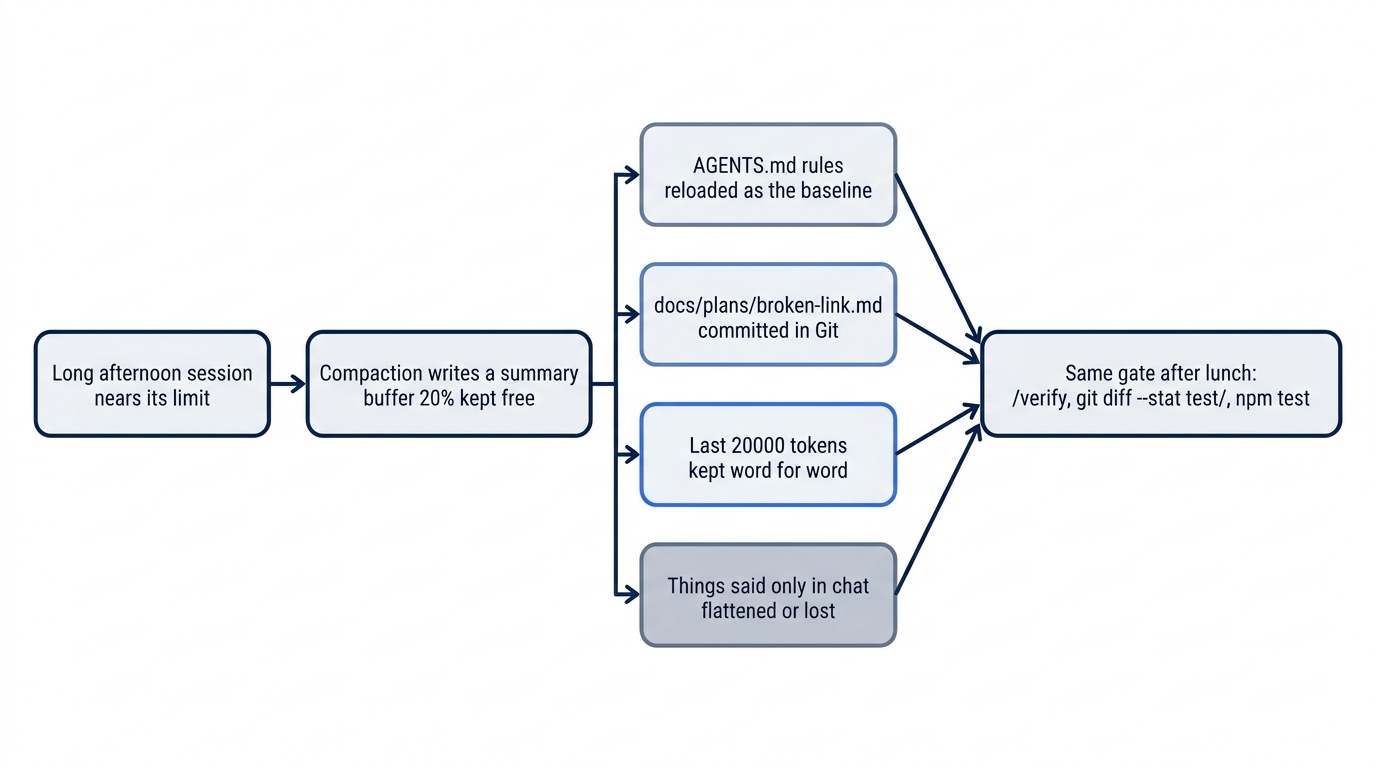
The author's compaction test is the reason the checks do not change after lunch. Its summary kept a chat rule almost word for word, and the next turn still applied it only in part and rewrote a failing test to pass. A kept rule is not an obeyed rule, so the afternoon's last keyword goes through the same gate as the morning's fix: /verify, then git diff --stat test/ and npm test in your own terminal.
If you would rather choose the moment, run /compact right after a commit, when the detail you lose is detail you are done with. Starting a new session after a commit is the other clean boundary, and for an unrelated task it is usually the better one.
Walking away at six: one worktree, one run
One more ticket lands as you pack up: "The bottle arrived cracked" sits in other. One keyword and one test is exactly the size of job worth running without anyone watching. Start from a clean main, with the provider key in this shell, because a --standalone run starts its own private server from it.
cd ~/code/ticket-triage
git switch main
git status --short
mkdir -p ~/triage-runs
opencode run --worktree=cracked --standalone --format json --archived "Tests first. Add one test to test/classify.test.js: 'The bottle arrived cracked' expects shipping. Run npm test and confirm the new test fails. Then add 'cracked' to the damage check in src/classify.js. Do not change or remove any existing test. Run npm test again. You are done when that run reports 0 failures." > ~/triage-runs/cracked.jsonl 2> ~/triage-runs/cracked.log
The worktree name goes after =. On 2.3.0 the flag's value is optional, so -w cracked with a space generates a name and sends cracked to the model as the first word of the prompt. --worktree=cracked gives the run its own worktree named cracked. --standalone gives it a server that sees this shell's key, --format json records every tool call as an event, and --archived keeps the session out of your inbox.
Two things are missing on purpose. There is no --auto, because Ticket Triage's rules already allow the edit and npm test, and every ask a headless run rejects is something you did not want done unattended. There is no /goal, because run would send it to the model as a word; the done condition is in the prompt. Start here took the other route, --auto after the denies, because that is the only worktree path tested on 2.3.0.
One gap was never tested. The only tested worktree run used --auto. The worktree lives under OpenCode's data directory, outside your checkout, and Ticket Triage asks on external_directory, so a run without --auto could have its edits or its npm test auto-rejected. The morning check below is built to catch it.
The next morning: read the evidence, not the reply
Find the worktree first, from the log and from Git.
grep worktree ~/triage-runs/cracked.log
git worktree list
git worktree list should show your checkout on main and one worktree under OpenCode's data directory named cracked, in detached HEAD with no branch. Still confirm the path against the log, because OpenCode chooses the directory between its data folder and the name.
Then read the events.
cd ~/triage-runs
grep tool_use cracked.jsonl | grep 'npm test' | grep -o '# fail [0-9]*'
grep auto-rejecting cracked.log
A run that followed its prompt and met no rejection prints # fail 1, then # fail 0, and the second command prints nothing. On 2.3.0 the first command prints each count twice, because each event carries the shell output in two fields; Start here's jq form prints it once. If it prints nothing at all, the run never ran npm test, or your test runner does not print TAP, and the tool list from Start here tells the two apart. If the second command prints a line that names external_directory or the data directory, the worktree path tripped the ask, so read the rejection before you read the counts. Every JSON line has a type and a part, a tool call produces one tool_use event when it finishes, and its input and output sit under part.state. When grep is too blunt, ask jq.
jq 'select(.type=="tool_use") | .part.tool, .part.state.output' cracked.jsonl
Now check the work itself, inside the worktree, with the path from the log. It is the worktree line in ~/triage-runs/cracked.log, and the first column of the cracked line in git worktree list. Only a worktree that passes every check gets a branch.
cd ~/.local/share/opencode/worktree/<id>/cracked
git diff --stat
git diff test/ | grep '^-[^-]'
npm test; echo "exit $?"
git switch -c fix-cracked
git add test/classify.test.js
git commit -m "Add failing test: a cracked item goes to shipping"
git add src/classify.js
git commit -m "Route cracked items to shipping"
git diff --stat should name the two files, the grep for removed test lines should print nothing, and the suite should end in exit 0. These commits differ from the working loop's on purpose. In the loop you committed the red test before the fix existed, so an empty git diff --stat test/ after the fix proved the fix session never touched it. An unattended run cannot pause between its two npm test calls for you to commit, so it writes the test and the fix together; the # fail 1 event is the record that the test was red first, and the two commits you make here, test then fix, keep that order in the history. The branch is visible from your main checkout at once, because a worktree shares the repository. Merge it, run npm test once more, and remove the worktree with git worktree remove.
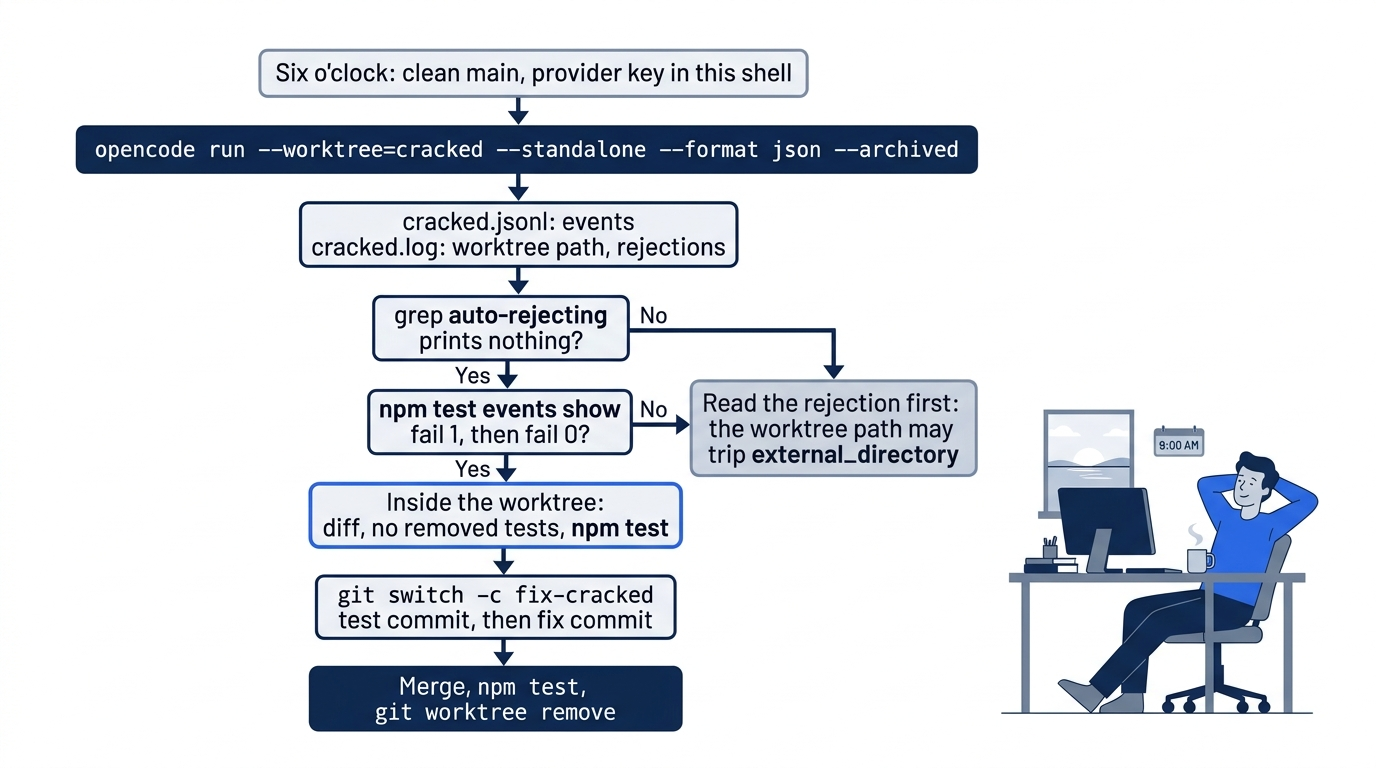
Count what the day did not touch. opencode.jsonc, the guard plugin, the release skill, and the MCP server never came up, and nothing under .opencode/ changed. The machinery mostly sat still, which is what a finished setup does: it decides once, in files, what every session sees and may do, so the day can be about the tickets.
Three Claude Code habits that misfire
The maps below are lookups. These three entries come first because they fire from muscle memory before you think, and each one fails quietly.
Gotcha: Shift+Tab cycles agents in OpenCode, not permission modes. In Claude Code the same key walks through modes such as default, acceptEdits, and plan. In OpenCode it moves between primary agents. Pressing it to "accept edits" changes who answers, not what is allowed; permissions live in the ordered permissions list, and the shipped default is already allow.
Gotcha: CLAUDE.md does not load. OpenCode V2 recognizes AGENTS.md only, with no fallback and no warning. For a repository that serves both tools, make CLAUDE.md a one-line @AGENTS.md import, or list "CLAUDE.md" in OpenCode's instructions array. Both are now options rather than the only fix. Claude Code reads AGENTS.md natively when no CLAUDE.md is on the path, since 2.1.277, and on Amazon Bedrock, Google Vertex AI, and Microsoft Foundry since 2.1.281, so AGENTS.md alone serves both tools. The import still suits Claude-only rules on top of the shared ones, or a Claude Code older than 2.1.277. Skills are the exception; OpenCode reads .claude/skills in place.
Gotcha: /compact exists, but it is not the habit. The 2.3.0 TUI registers it as "Compact session," and no documented form takes focus text the way Claude Code's /compact [focus] does. Among the docs, only the ACP page lists /compact, for editor clients. OpenCode compacts on its own when the conversation fills the window up to the buffer it keeps free, so you steer before the summary is written: durable rules in AGENTS.md, recent detail in keep.tokens, and a capable agents.compaction.model.
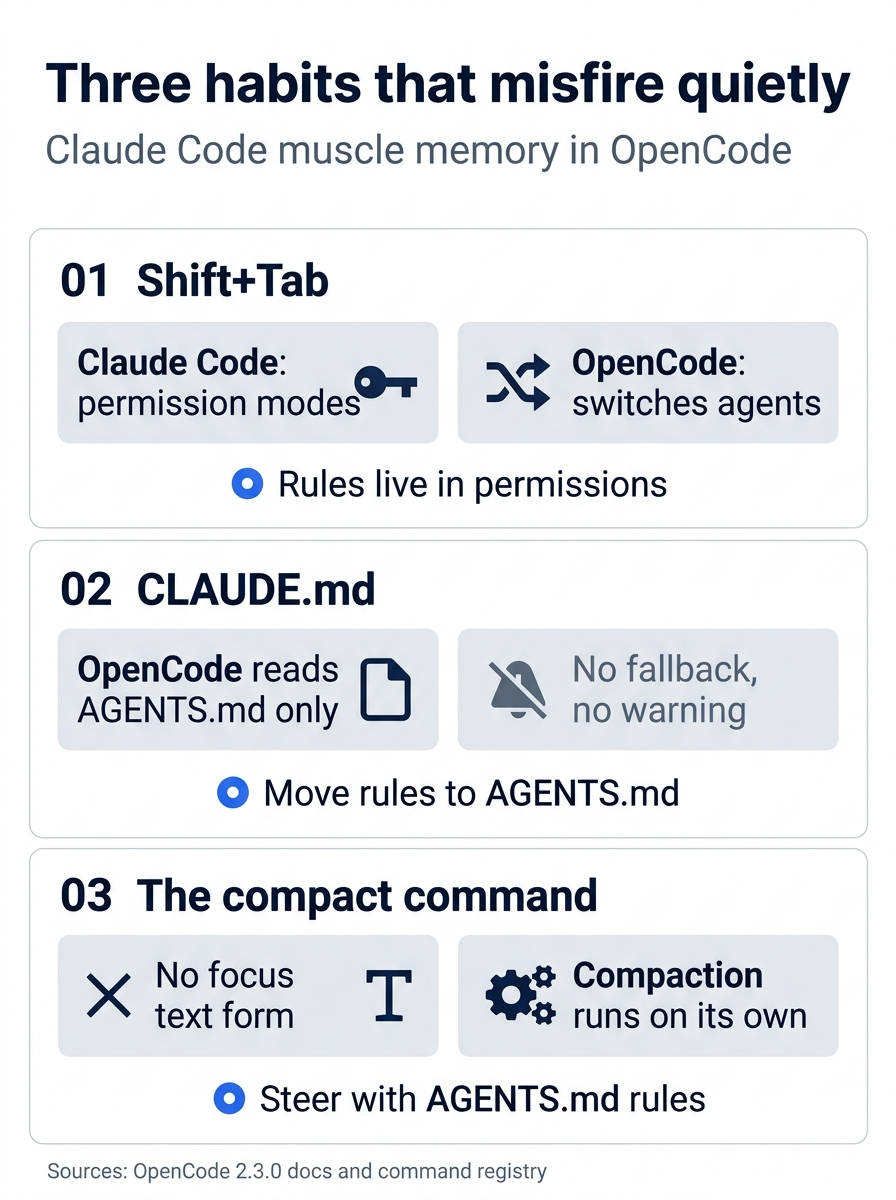
Three habits misfire quietly, and each has a fix. Shift+Tab switches agents, so rules go in permissions. CLAUDE.md is ignored without a warning, so move its rules to AGENTS.md, which Claude Code also reads when no CLAUDE.md exists, or list the file in instructions. /compact has no focus text and compaction runs on its own, so steer it with rules in AGENTS.md.
The V1-to-V2 map
V2 reads most V1 configuration from the same locations and normalizes it in memory without rewriting the file. The kindness has a cost: a V1 shape copied from an old blog post usually loads without an error, so the failure shows up as confusion rather than a message.
Before the configuration keys, the things you install and the places you look changed too:
- The npm package.
opencode-aistill installs V1; V2 is@opencode/cli, which needs its postinstall script, so never pass--ignore-scripts. auth.json. V2 imports credentials from it once into the server's database and never writes back. Use/connectand theauthcommands.tui.json. Keys and themes live in one global~/.config/opencode/cli.json.- Plugins. V1 plugin code does not run in V2; the new package is
@opencode/plugin. - LSP. V2 runs no language servers. Use the project's own check.
- Server auth.
OPENCODE_SERVER_USERNAMEis gone; the username is alwaysopencode, andOPENCODE_PASSWORDsets the password. CLAUDE.md. V2 has noCLAUDE.mdfallback; the instructions page says it readsAGENTS.mdonly.
The configuration you write changed in seven places.
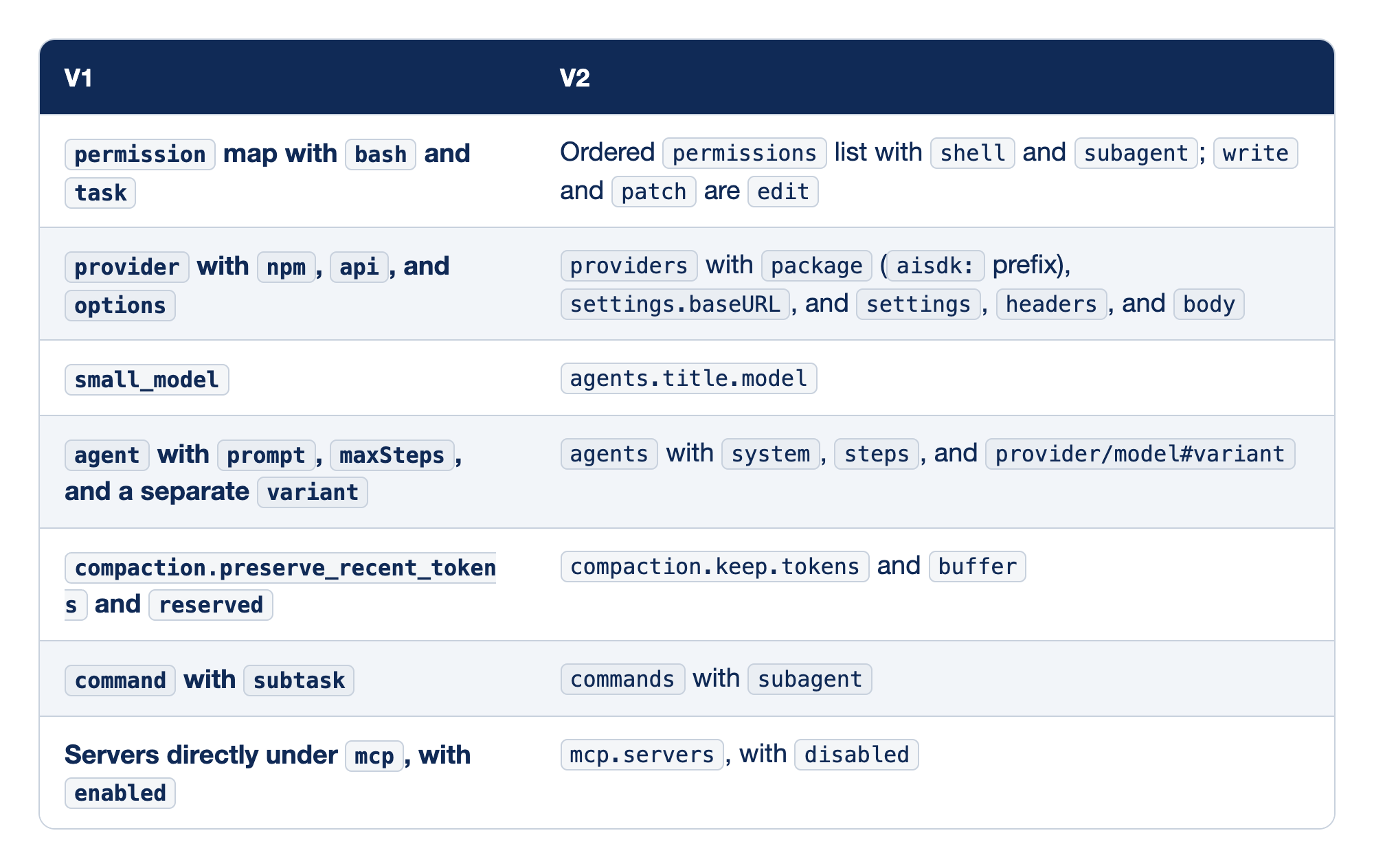
Each V1 configuration key has a V2 name. The V1 column holds the key an old config or blog post uses, and the V2 column holds the name to write from now on, even where V2 would still accept the old one. The migration guide asks you to keep each agent, provider, command, and model entry entirely in one format, and it is the source for every row below.
permissionmap withbashandtaskbecomes an orderedpermissionslist withshellandsubagent. This is the biggest change in meaning: one list, read top to bottom, where the last match wins and no match meansask.providerwithnpm,api, andoptionsbecomesproviderswithpackage,settings.baseURL, and separatesettings,headers, andbody. AI SDK packages carry anaisdk:prefix.small_modelbecomesagents.title.model, because titles belong to a hiddentitleagent. V2 readssmall_modelwithout a warning, which is why old configs seem to work.agentwithprompt,maxSteps, and a separatevariantbecomesagentswithsystem,steps, and a variant joined to the model after#.compaction.preserve_recent_tokensandreservedbecomecompaction.keep.tokensandbuffer. Token counts carry over as they are, andbufferalso accepts a percentage.commandwithsubtaskbecomescommandswithsubagent.subtaskis still accepted, and delegated commands run in the background.- Servers directly under
mcp, withenabledmove undermcp.servers, anddisabledreplaces the inverseenabled.
The Claude Code map
Most habits survive the move from Claude Code; the names change, and a few behaviors change with them.
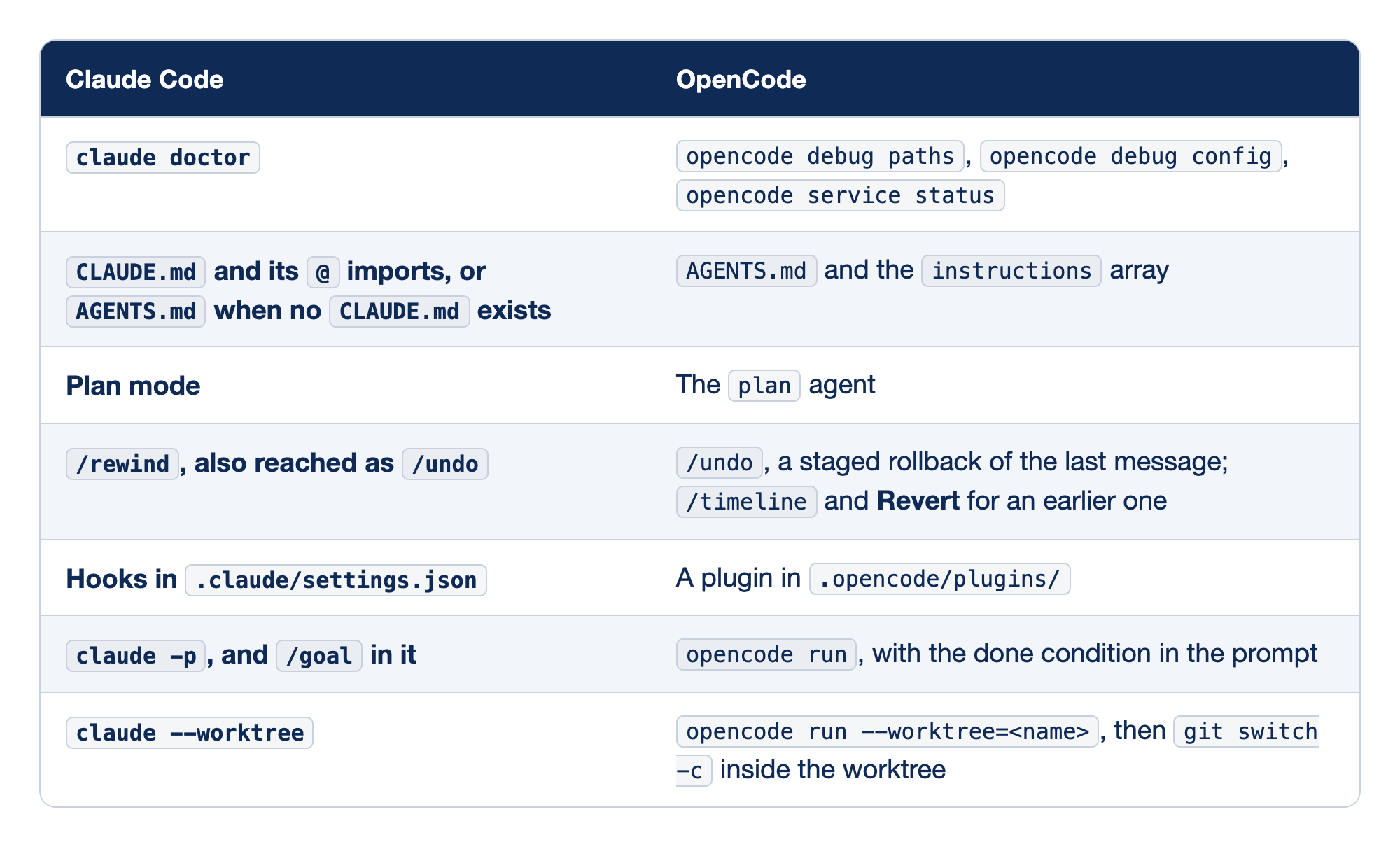
Each Claude Code feature has an OpenCode counterpart. The Claude Code column holds the command or file you know, and the OpenCode column holds what does the same job. Model choice also moves: OpenCode can put each agent on a different vendor, which is how Ticket Triage's reviewer reads on Gemini while build writes on Sonnet.
claude doctorhas no single replacement;opencode debug paths,opencode debug config, andopencode service statuseach answer one question.CLAUDE.mdand its@imports becomeAGENTS.mdand theinstructionsarray, and the docs say nothing about expanding imports inside those files.- Plan mode is a permission mode with an approve step in Claude Code; in OpenCode it is the
planagent with its own rule list, and you switch tobuildyourself. /rewindmaps to OpenCode's/undo, which takes back only the latest message, stages it, and commits only when you send the next prompt;/timelineand Revert reach an earlier one.- Hooks in
.claude/settings.jsonbecome a TypeScript plugin in.opencode/plugins/that setseffectandmessageinside the server. claude -pbecomesopencode run, which does not expand slash commands, so/goaland/verifyarrive as plain words and the done condition goes in the prompt.claude --worktreebecomesopencode run --worktree=<name>. The worktree lands under OpenCode's data directory in detached HEAD, with a generated name unless you pass one, so you branch inside it withgit switch -c.
The instructions row changed on the Claude Code side. Claude Code expands @ imports up to four hops deep, and since 2.1.277 it reads AGENTS.md itself when no CLAUDE.md exists, so the row now holds both files. Three more rows round out the map: Claude Code's /model, /compact, and /btw become /models, automatic compaction, and the same /btw; its subagents in .claude/agents/ become .opencode/agents/ with an ordered permissions list; and claude mcp add becomes opencode mcp add, which writes the committed project config, the opposite default from Claude Code's private local scope.
Two more rows matter if you pay for Claude. Claude Code's commands in .claude/commands/ move by hand, because OpenCode lists no such source, while .claude/skills is read in place. And the anthropic provider takes an API key only, where Claude Code accepts a Claude Pro, Max, or Ultra sign-in. The claude-agent provider runs your local Claude Code 2.1.248 or later as the model caller, without your CLAUDE.md, hooks, MCP servers, skills, or memory, and its policy status is unresolved: Anthropic's Agent SDK terms bar third-party claude.ai login "unless previously approved," and no public approval was found as of November 15, 2026.
What changed in V2 and 2.3.0
This series is anchored to OpenCode 2.3.0, released November 13, 2026, under the changelog title "Background Subagents by Default." The docs pages state no version, so the release facts are worth collecting in one place. Each bullet below links its primary source, and the GitHub release for 2.3.0 carries the same date.
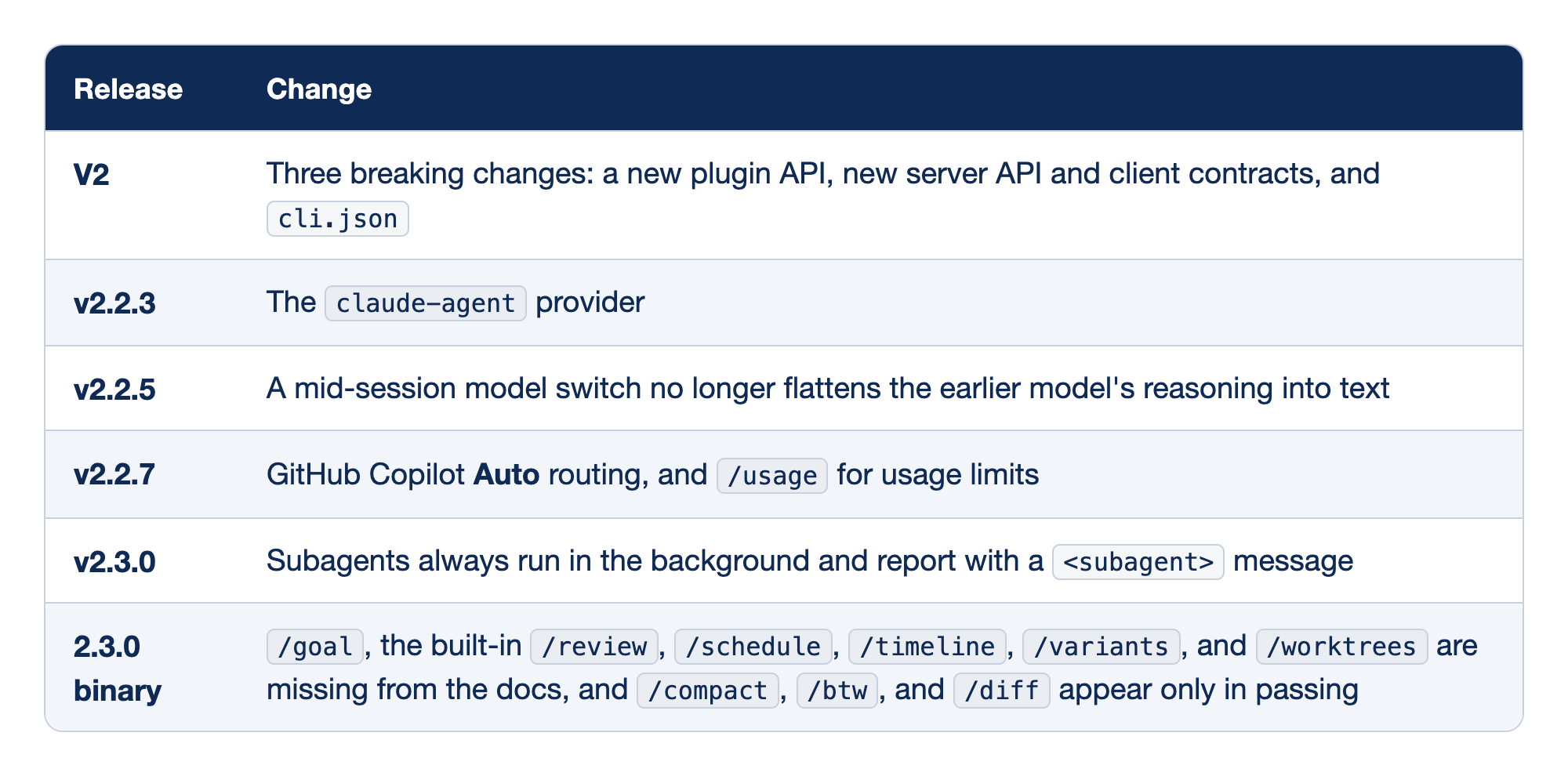
Each release row names the release and the change that affected daily work. After every opencode upgrade, recheck the rows that changed how you work, starting from the newest.
- V2 brought three breaking changes: the plugin API, the server API and client contracts, and
cli.json. Everything else is meant to stay compatible with V1, so a V1 behavior that stops working is a compatibility bug to report. - v2.2.3 added the
claude-agentprovider (changelog, PR #58782), the bridge to a Claude plan, with the policy caveat that travels with it every time. - v2.2.5 stopped flattening the earlier model's reasoning into text on a mid-session model switch, so switching the reader to dodge a rate limit keeps more of the earlier reasoning intact.
- v2.2.7 added GitHub Copilot Auto routing and moved usage limits to their own
/usagecommand. - v2.3.0 is the headline: subagents always run in the background and report back with a
<subagent>message, as the tools page describes. Several children can run at once, each billed on its own model. - 2.3.0 binary commands: the binary registers commands the docs omit or barely cover. The docs mention
/btwon the TUI page,/diffon the CLI settings page, and/compactonly on the ACP page. The author's test confirmed that/compactexists and thatrundoes not expand/goal;/goal,/btw,/undo, and/redoin the TUI remain untested, so check them with/on your release.
After an update, the TUI shows the release's highlights once on its home screen, and /highlights shows them again.
The OpenCode cheat sheet
The habits of all seventeen parts come down to a short list of things you type, sorted by where you type them. The Part column says where in the series each one was taught.
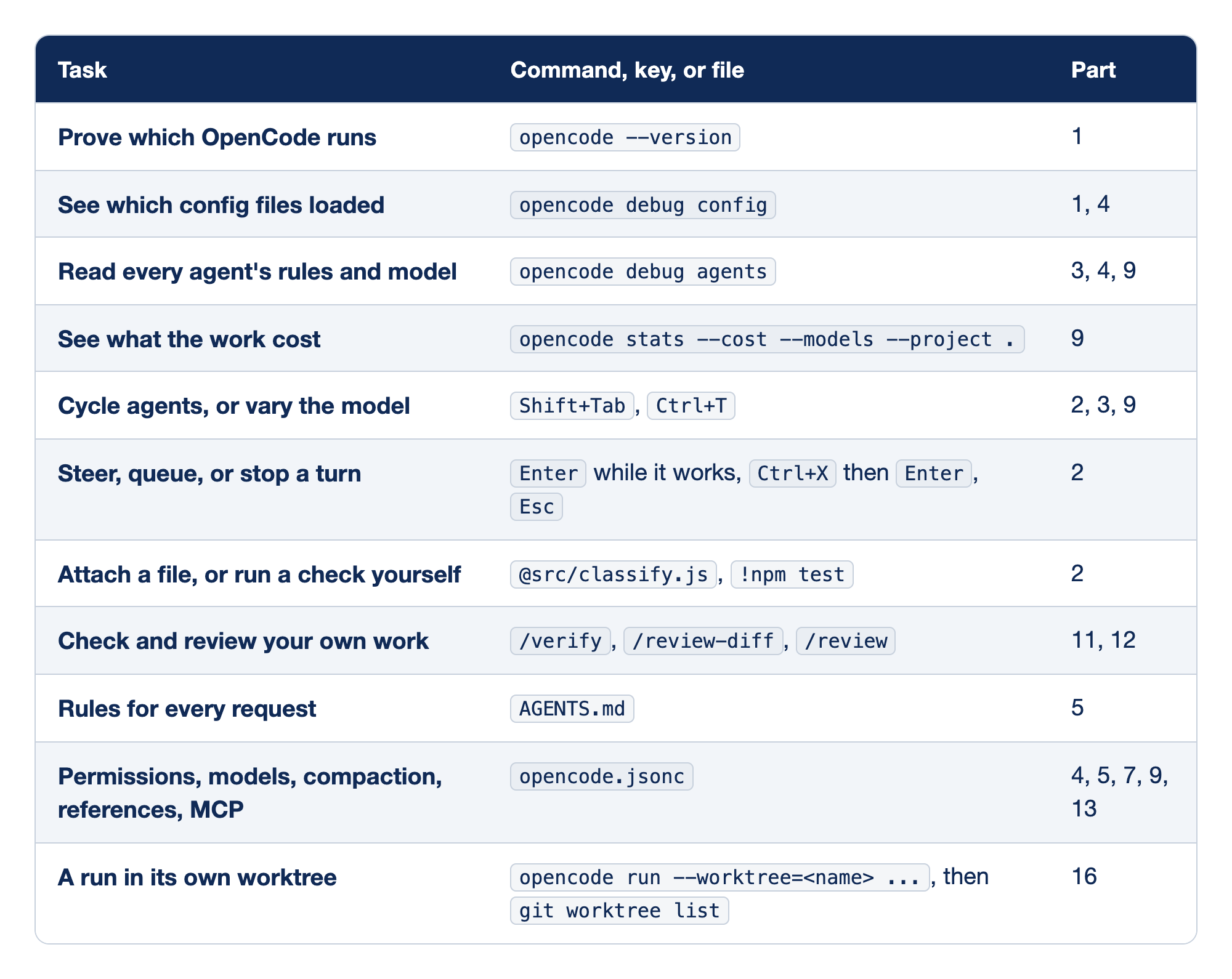
Each cheat-sheet row pairs a task with what you type. The Task column says what you want done, the "Command, key, or file" column holds the exact input, and the Part column names where the series taught it.
- Prove which OpenCode runs with
opencode --version, taught in Part 1. It is the first line of any bug report and the fastest way to catch V1 on yourPATH. - See which config files loaded with
opencode debug config, from Parts 1 and 4. It answers "why did my setting not take effect?" - Read every agent's rules and model with
opencode debug agents, from Parts 3, 4, and 9. It shows the base rules, each agent's additions, and each configured model. - See what the work cost with
opencode stats --cost --models --project ., from Part 9. Add--days Nfor a window and--toolsfor tool reliability. - Cycle agents, or vary the model with
Shift+TabandCtrl+T, from Parts 2, 3, and 9.Ctrl+Tis howplangets its higher variant in the TUI. - Steer, queue, or stop a turn with
Enterwhile it works,Ctrl+XthenEnter, orEsc, all from Part 2. Steering is the cheapest correction, because the turn keeps its useful work. - Attach a file, or run a check yourself with
@src/classify.jsand!npm test, from Part 2. The@puts known-relevant text in the prompt; the!keeps your own check's output in the session. - Check and review your own work with
/verify,/review-diff, and the built-in/review, from Parts 11 and 12. Your own command must not shadow/review. - Rules for every request live in
AGENTS.md, from Part 5: a few lines you would otherwise repeat in every session, each with a trigger. - Permissions, models, compaction, references, MCP live in
opencode.jsonc, from Parts 4, 5, 7, 9, and 13. Position decides inpermissions. - A run in its own worktree is
opencode run --worktree=<name>, thengit worktree list, from Part 16. Use the=form, and branch inside the worktree withgit switch -cbefore you merge.
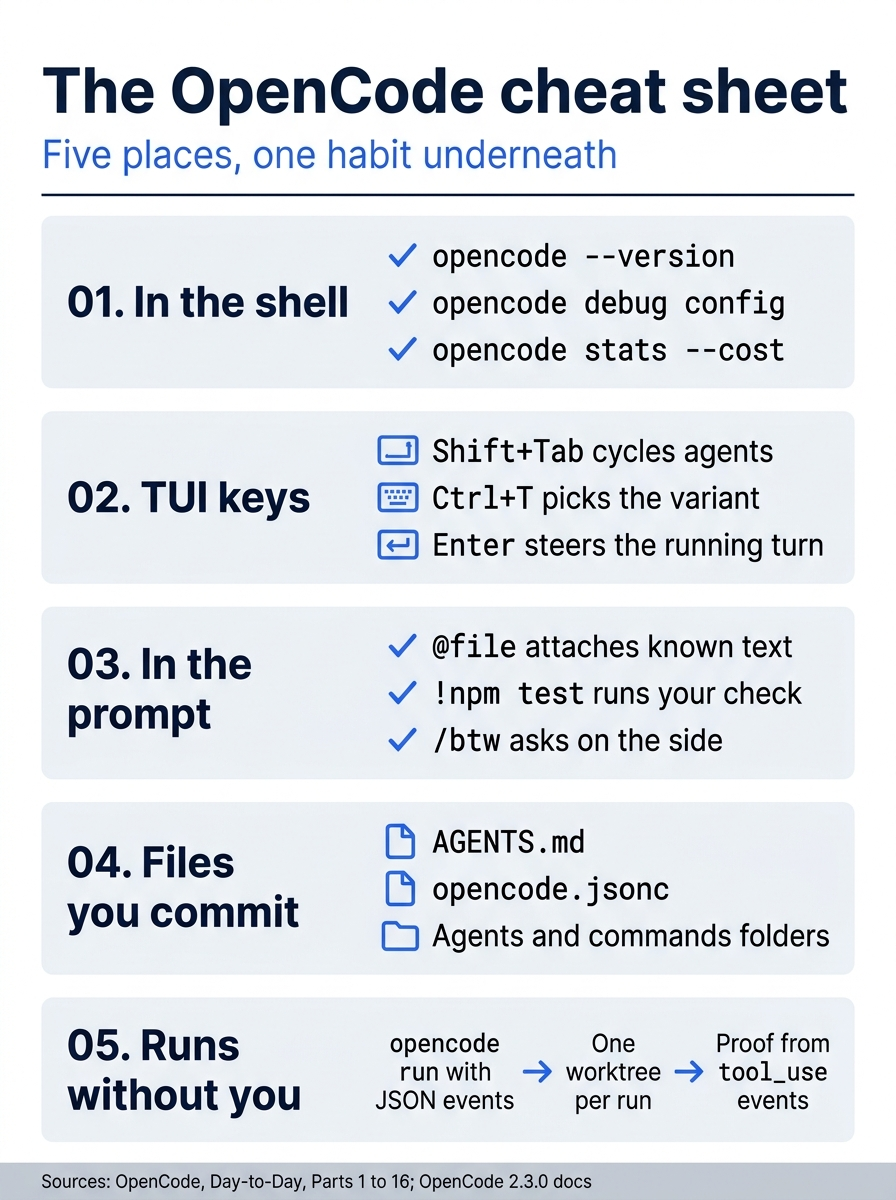
The whole workflow sorts by where you type: shell commands, TUI keys, prompt inputs such as @ files and /btw, the files you commit, and runs without you, where the proof is a tool_use event.
If you already use Claude Code: almost every habit in this workflow survives the move: plan before complex work, keep the window clean, put rules in a file, and verify with a command. What changes is the starting point and the names. OpenCode starts from allow rather than ask, reads AGENTS.md rather than CLAUDE.md, and treats the model as a setting per agent, so the second opinion that Claude Code gets from another Claude model comes from another vendor here, in one line of frontmatter. Two of those differences have narrowed. Since 2.1.283, interactive Claude Code sessions start in auto mode, where a classifier reviews each action, while claude -p still starts in Manual and asks. And Claude Code reads AGENTS.md when a project has no CLAUDE.md, so one AGENTS.md can serve both tools.
Glossary
Every OpenCode flag, command, and term that a Start here section in this guide leans on, with the part whose Start here teaches it. Git and shell commands are not listed, and the last four entries are Going deeper terms, marked as such.
Each entry below gives the term as you type or read it, a one-line definition, and the part whose Start here teaches it.
- provider: a company or service that runs models and holds your account, such as Google; Part 1.
opencode auth login: saves a credential for one provider;--method keyasks for an API key instead of offering a browser sign-in; Part 1.opencode models: lists the models you can use, one per line, in the formprovider/model; Part 1.provider/model: a model's full name, such asgoogle/gemini-4-hydrogen: the provider before the slash, the model after it; Parts 1 and 8.- session: one conversation with the agent, with its own history; the server stores it; Part 1.
opencode run: sends one prompt to the server and prints the answer, without the full-screen interface; Part 1.-m: picks the model for one run by itsprovider/modelname; Part 1.- TAP: Test Anything Protocol, a plain-text format for test results; Node's test runner prints it when its output is captured, so counts read
# fail 0; Parts 1 and 16. - TUI: the full-screen terminal interface that the bare
opencodecommand opens; Part 2. /models: opens the model picker, then the variant picker; a command that starts with/is a slash command, which the TUI runs instead of sending it to the model; Part 2.- variant: a preset of one model's settings, such as
loworhigh; this guide usesDefault; Part 2. @: attaches a file to the prompt, so its text goes to the model and the agent does not search for it; Part 2.- steer: type a correction and press
Enterwhile a turn runs; the correction joins that turn; Part 2. <leader>: the leader key,Ctrl+Xby default; a binding written<leader>umeansCtrl+X, thenu; Part 2.- queue:
Ctrl+X, thenEnter: the prompt waits until the current turn ends; Part 2. Esc: pressed twice, stops the running turn; pressed once, leaves shell mode or closes a dialog; Part 2./diff: opens the diff viewer beside the transcript, with each changed file's added and removed lines;qcloses it; Part 2.!: typed at the start of an empty composer, switches to shell mode, so the next line runs in your own shell instead of going to the model; Part 2./btw: asks a side question; the question and the answer are not added to the conversation; Part 2./undo: takes back the latest message; Part 2./timeline: lists your messages, newest first, so you can jump to one, revert to it, copy it, or fork from it; Part 2./exit: leaves the TUI and prints the command that reopens the session; Part 3.-s,--session: opens a session by its ID, which starts withses_; Part 3.--continue,-c: sends the prompt into the most recently updated session instead of starting a new one; Parts 3 and 6.opencode session list: lists sessions with their IDs and titles; Part 3.- agent: a named set of standing instructions, permission rules, and an optional model; Parts 3 and 10.
build,plan: the two primary agents OpenCode ships:buildedits files and runs commands, andplan's rules deny edits to project files; Part 3.Shift+Tab: switches the TUI between primary agents; the footer names the one selected; Part 3.opencode.jsonc: the project's config file at the repository root, in JSONC, which is JSON that also allows comments and trailing commas; Part 4.- permission rule: an
action, aresource, and aneffect; OpenCode checks the whole list and uses the last rule that matches; Part 4. allow,ask,deny: the three effects: continue without prompting, wait for a decision from you, or block the call; Part 4.- Allow once, Always allow: two answers to an
ask: once approves this call only, and always saves an approval for this project in OpenCode's database, not inopencode.jsonc; Part 4. external_directory: the permission action for a tool call that reaches a path outside the project; Part 4.opencode debug config: lists the configuration sources OpenCode loaded; Part 4.AGENTS.md: the project's instruction file; OpenCode reads it from disk and sends it with every request; Part 5.- context window: the most text one request to the model can hold; Part 6.
/new: starts a new session in the TUI; Part 6.- compaction: replacing older conversation with a summary when a session nears its context window's limit; Part 7.
model,agents.<name>.model: inopencode.jsonc, the rootmodelsets the default model, andagents.<name>.modelsets one agent's model, such asexploreortitle; Part 9.opencode debug agents: prints every agent with its settings, rules, and model, as JSON; Part 9.opencode stats: reports tokens, steps, and cost; a step is one request to the model,--modelsadds a row per model, and--project .limits the report to this project; Part 9.#default: the variant nameopencode statsprints for a model used without a chosen variant; Part 9.explore: the built-in subagent that reads and searches files; Parts 9 and 10.- subagent: an agent that works in its own child session, with a fresh context, and sends the parent a report; Part 10.
- frontmatter: the block between the two
---lines at the top of an agent or skill file, which holds its settings; Part 10. mode: subagent,steps: agent frontmatter:mode: subagentlets another agent start it, andstepscaps its model steps; Part 10.$EDITOR: the shell variable that names your editor; if it is empty, typenanoorcodein its place; Parts 10 and 14.- skill: a folder in
.opencode/skills/with aSKILL.md; the model sees its description on every step and loads the body with theskilltool only when a request matches; Part 11. --format json: prints a run as JSON events, one per line, instead of text; Part 11.--archived: creates the session already archived, out of the session lists you work in;opencode session liststill shows it, and you can open it by ID; Part 11.#variant: the optional suffix on a model reference,provider/model#variant, that picks a variant such as#high; Part 12.opencode session export: prints one session as JSON, including its agent, its model, and its parent session; Part 12.jq: a command-line tool that filters JSON, used to read--format jsonevents; Parts 12 and 16.- MCP server: a program that offers the agent extra tools through the Model Context Protocol, an open standard; a local server is a command OpenCode starts, and a remote server is a URL; Part 13.
opencode mcp add: writes a server into the project config; everything after--is the command that starts it; Part 13.opencode mcp list: shows the servers OpenCode knows about and whether each one is connected; a health check, not proof of a call; Part 13.- Code Mode,
execute: OpenCode's default for MCP: a server's tools sit in a catalog behind one built-in tool,execute, which runs a short JavaScript program that calls them; Part 13. tool_use: the JSON event written once for each tool call, with the tool's name, its input, and its output; Parts 13 and 16.- plugin: a TypeScript file that OpenCode loads into its server; files under
.opencode/plugins/load automatically; Part 14. - hook: a function a plugin registers, which OpenCode calls at one moment in its work, such as a permission check or a shell command; Part 14.
--standalone: runs a private server for one command, which reads the same saved key as the shared server; the server exits with the command; Parts 14 and 16.--auto: approves every permission that is not explicitly denied, so everyaskbecomes a yes and only adenystops the agent; Parts 14 and 16.- server, client: the server holds your sessions and runs the agent; a client, such as the TUI,
opencode run, a browser, or an editor, talks to it; Part 15. opencode serve: runs a server in the foreground of one terminal until you pressCtrl+C;--portfixes its port; Part 15.127.0.0.1: the address a server listens on when only this machine may reach it; Part 15.OPENCODE_PASSWORD: the environment variable that sets a server's password, and that a client sends to it; Part 15.--server <url>: tells a client to use the server at that address instead of the shared one; Part 15.--max-count: limitsopencode session listto that many of the newest sessions; Part 15.- global config:
~/.config/opencode/opencode.jsonc, the config file in your home folder, outside every project; Part 16. - worktree: a second working directory that shares the repository's history; Part 16.
--worktree=<name>: starts the run in a new worktree with that name; write the name after=; Part 16.opencode reload: applies configuration changes without restarting the server; Part 8 (Going deeper).buffer: the share of the context window that compaction keeps free; compaction starts when the conversation fills the rest; Part 7 (Going deeper).keep.tokens: how many of the most recent tokens compaction keeps word for word beside its summary; Part 7 (Going deeper).opencode mcp logout: removes the stored sign-in for an MCP server, so you can authenticate again as someone else; Part 13 (Going deeper).
Do this today
Everyone
-
Run the Start here day on Ticket Triage. Check what changed, ask the read-only question, hand the
chippedfix to an unattended run, read its two failure counts, then check, branch, and merge the worktree. Close the day with the same check.git status --short git log --oneline -2 git worktree listgit status --shortprints nothing, the log shows thechippedfix above its test, andgit worktree listshows your checkout alone. -
Start one habit: open and close every day with
git status --shortandgit log. The tree tells you what changed while you were away, and the log tells you what you accepted.
If you read Going deeper
Today is your first full day on your own repository with the whole loop. Substitute your own names for Ticket Triage's.
-
Start from what changed. Check the tree, read yesterday's cost, and open a new session for today's task.
git status --short opencode stats --cost --models --days 1 --project . opencode -
Plan one real change in
plan, then hand it tobuild, tests first. PressShift+Tabintoplan, set the variant withCtrl+T, and ask for a numbered plan file with one new test per step. Then switch back tobuildand ask for the tests only. -
Commit the failing test before the fix. Run the suite yourself and commit the red test alone, so
git diff --stat test/comes back empty after the fix. -
Check the fix with commands, not with the session. Run
/verifyand/review-diffin the TUI, thengit diff --stat test/andnpm test; echo "exit $?"in your own terminal. -
Leave one bounded job running, and read its events in the morning. This form has no
--auto, the untested path from the evening section; add--autoonce your denies are committed, as Start here did.opencode run --worktree=next --standalone --format json --archived "<one small change, with its done condition>" > ~/triage-runs/next.jsonl 2> ~/triage-runs/next.log grep tool_use ~/triage-runs/next.jsonl | grep 'npm test' | grep -o '# fail [0-9]*' grep auto-rejecting ~/triage-runs/next.log git worktree list
The machinery should sit still
Monday's three tickets did not need a new feature. They needed a risk that had been written down to finally get a plan, a red test, a fix, a second opinion, and a gate. By evening, the same habits ran without you in a worktree, and the next morning you trusted a tool_use event, not a closing paragraph.
The casual, pro, and elite levels are not a ladder you must climb to the top. They are a menu. Take the layer that makes the habit automatic on the repository in front of you, and skip the rest without guilt. A finished OpenCode setup is quiet: it decides once, in files, what every session sees and may do, so your day can be about the work.
Seventeen parts, one repository, and one habit underneath all of them: decide what the model sees, and believe the command that ran.
This is Part 17 of "OpenCode, Day-to-Day," a 17-part guide to using OpenCode V2 as a daily, provider-neutral coding agent. It is the final part of the series.