
The Least Powerful File That Does the Job
Most agent customization goes wrong by reaching for code first; Pi gives you a four-rung ladder (a rule, a prompt template, a skill, an extension), and the daily discipline is to stop at the least powerful file that does the job, which for a review habit is a template and for a check procedure is a skill.
How the Pi coding agent grows through rules, prompt templates, and skills, and why the right customization is almost never the one you reach for first
You spend forty minutes writing a TypeScript extension to make your coding agent run the tests before it says done, then notice the one-line rule you wrote yesterday already does it.
In this article: Day 8 of a day-by-day guide to Pi. Start here: write a
/reviewprompt template for your staged changes and ashipskill that runs Ticket Triage's checks when you or the model call it. Going deeper: Pi's four-rung customization ladder and what each rung costs the context window, the trust prompt in full, and where a skill travels between Pi, OpenCode, GitHub Copilot CLI, and Claude Code.
Tested on Pi 1.5.2.
Part 7 ended with Ticket Triage's rules in a three-line AGENTS.md, five commits, five passing tests, and crushed-mug-table compacted once.
Start here
By the end of today, a /review command reviews your staged change, and a ship skill runs Ticket Triage's checks when you or the model call it.
Starting fresh or fell behind? Run git switch -C main pi/day-07. This replaces your main with the end of Day 7; to keep your own work, run git branch my-backup first.
Check where you start
Start in the project folder with a clean tree.
cd ~/code/ticket-triage
git status --short
npm test
git log --oneline -1
git status --short prints nothing, npm test ends with pass 5 and fail 0, and the last commit is rules: three-line AGENTS.md for Pi and Claude Code.
Write a /review template
A prompt template is the prompt you keep retyping, saved as a Markdown file whose name becomes the command. When you type the command, Pi puts the file's text into your message and sends it. Personal templates live in ~/.pi/agent/prompts/ (prompt templates). You review every classifier diff the same way before you commit: look at the staged changes, focus on one concern, and list problems with file and line. Save this as ~/.pi/agent/prompts/review.md. The cat command below creates the file, after mkdir creates the folder.
mkdir -p ~/.pi/agent/prompts
cat > ~/.pi/agent/prompts/review.md <<'EOF'
---
description: Review staged git changes
argument-hint: "[focus]"
---

Review the staged changes. Focus on ${1:-correctness, security, and error handling}.
List each problem with its file and line.
EOF
The filename makes the command /review. description is what command completion shows, and argument-hint shows that the command takes one optional word or phrase. ${1:-...} takes the first argument, or the text after :- when you pass none.
Make a change to review
Open the work session. Part 7's compaction wrote to it last, so pi --continue opens it.
pi --continue
The footer ends with • crushed-mug-table. Type /rev in the editor and look at the completion list. It shows one line for the template:
→ review [focus] — [u] Review staged git changes
Press Ctrl+C to clear the editor.
Now give the template a diff. The word table from Part 5 makes a new damage phrase one row, so add one.
Add "smashed" to DAMAGE_WORDS in src/classify.js. Add one test to test/classify.test.js: "The lamp arrived smashed" returns shipping. Do not change the other tests. Then run npm test.
The model adds one line to the end of test/classify.test.js:
test("smashed is shipping", () => assert.equal(classify("The lamp arrived smashed"), "shipping"))
The transcript then shows pass 6 and fail 0. When the run ends, stage the two files with !! so the command stays out of the window, and then review with a focus. !! runs the command without sending it or its output to the model.
!!git add src/classify.js test/classify.test.js
/review "error handling"
The model receives an ordinary message, with error handling in place of ${1:-...}. It reads the staged diff with its own tools and lists any problem with its file and line. In this guide's test run, the !!git add never reached the model, so it opened with "I need to see whether anything is staged" and ran git diff --staged. It found no error-handling problem in the staged lines, but it named one in unchanged code: src/classify.js:6 calls toLowerCase() without checking that the input is a string. Quote a focus that has a space in it, because each word is a separate argument, and $1 is only the first one. Leave the changes staged; the ship skill checks them next. Type /quit to leave Pi.
Write a ship skill
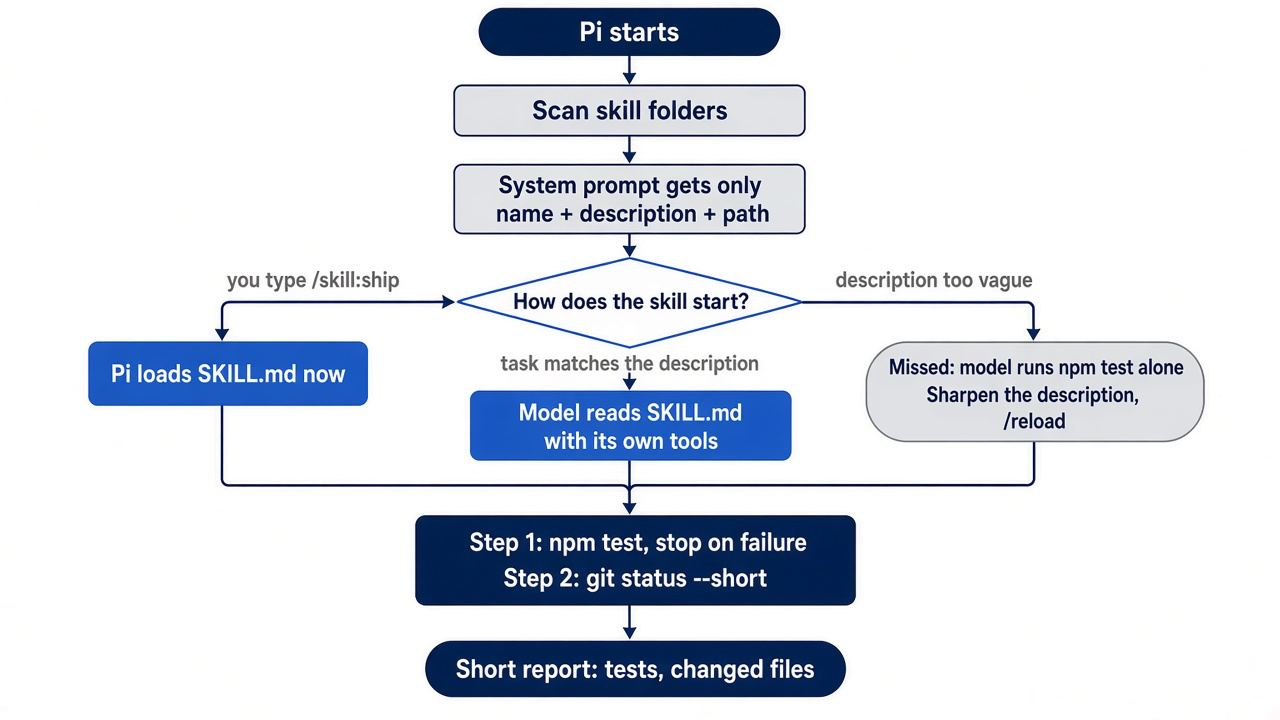
A skill is a folder with a SKILL.md file. At startup Pi adds only each skill's name, description, and path to the system prompt. When a task matches the description, the model reads SKILL.md and follows it. The /skill:<name> command makes Pi load it immediately (skills). Ticket Triage's check is npm test, and a change is ready when the tests pass and you know which files changed. The procedure belongs in a skill. Pi finds project skills in .agents/skills/, so create the folder at the repository root. Save this as .agents/skills/ship/SKILL.md, again with cat.
mkdir -p .agents/skills/ship
cat > .agents/skills/ship/SKILL.md <<'EOF'
---
name: ship
description: Run the tests and check the working tree, and stop at the first failure. Use when asked to ship, verify, or finish a change.
---

# Ship

1. Run npm test. Stop if it fails.
2. Run git status --short and list every changed file.

If a step fails, report which step and the lines of output that explain it.
EOF
The description says what the skill does and when it applies, because the model routes on it. The folder name and the name field match, which keeps the skill portable to other tools.
Answer the trust prompt
A project .agents/skills folder is a trust-protected resource. Part 2 explained the rule: Pi asks before it loads files from a folder that can change what Pi does. Quit and continue the session, because the trust check happens when Pi starts.
pi --continue
The trust prompt appears before the session loads, naming the Ticket Triage folder.
 Trust project folder?
 /Users/you/code/ticket-triage
 This allows pi to load .pi settings and resources, install missing project packages, and execute project extensions.
 → Trust
   Trust parent folder (/Users/you/code)
   Trust (this session only)
   Do not trust
   Do not trust (this session only)
 ↑↓ navigate  enter select  escape/ctrl+c cancel
Decide on purpose, because the answer covers the whole folder, not one file. You wrote the skill, and nothing else in the folder is protected, so press Enter on Trust. Pi saves the decision in ~/.pi/agent/trust.json, and later starts in Ticket Triage do not ask. The session opens. In a long session such as this one, the startup header scrolls out of view, so the Do this today section reads it in a session that saves nothing.
Run the skill
Test the skill both ways, starting by forcing it. Going deeper tests the second way, routing.
/skill:ship
The skill's instructions arrive as your message, and the model runs the two checks against the staged smashed change. Expect one or two bash calls and a short report. In this guide's test run, its report said that all 6 tests passed, listed the two staged files, and named the new .agents/ folder as not yet tracked by Git. When the checks pass, commit the change and the skill together, with the output kept out of the window.
!!git add -A && git commit -q -m "Add smashed to the damage words; add the ship skill" && git log --oneline -1
The commit line ends with Add smashed to the damage words; add the ship skill. Type /quit, and git status --short prints nothing. Your win for today is a /review command that reviews whatever you stage, and a ship skill that ran Ticket Triage's checks.
You can stop here. Going deeper explains why this works and where it breaks.
Going deeper
This section is for readers who want the whole ladder of Pi customizations, the template and skill rules, the trust decision in full, and where a skill travels between tools. It assumes that you finished Start here in this part and in Parts 1 to 7.
The extension you did not need
Part 7 ended with Ticket Triage in good order. The word table passes every test, the session is compacted, and a three-line AGENTS.md sits at the repository root. Suppose that the next morning you decide that Pi should never again claim that a change is done before the tests have run. You open ~/.pi/agent/extensions/tests-first.ts in your editor and start reading about agent events. Forty minutes and forty lines later, you are deciding which event means "the model is about to say done," and whether a regular expression over the reply can catch the word.
Then you run cat AGENTS.md and read the first line: "Run npm test before you say a change is done." You wrote it yesterday. It already reaches the model on every request, it survives every compaction, and it cost three minutes.
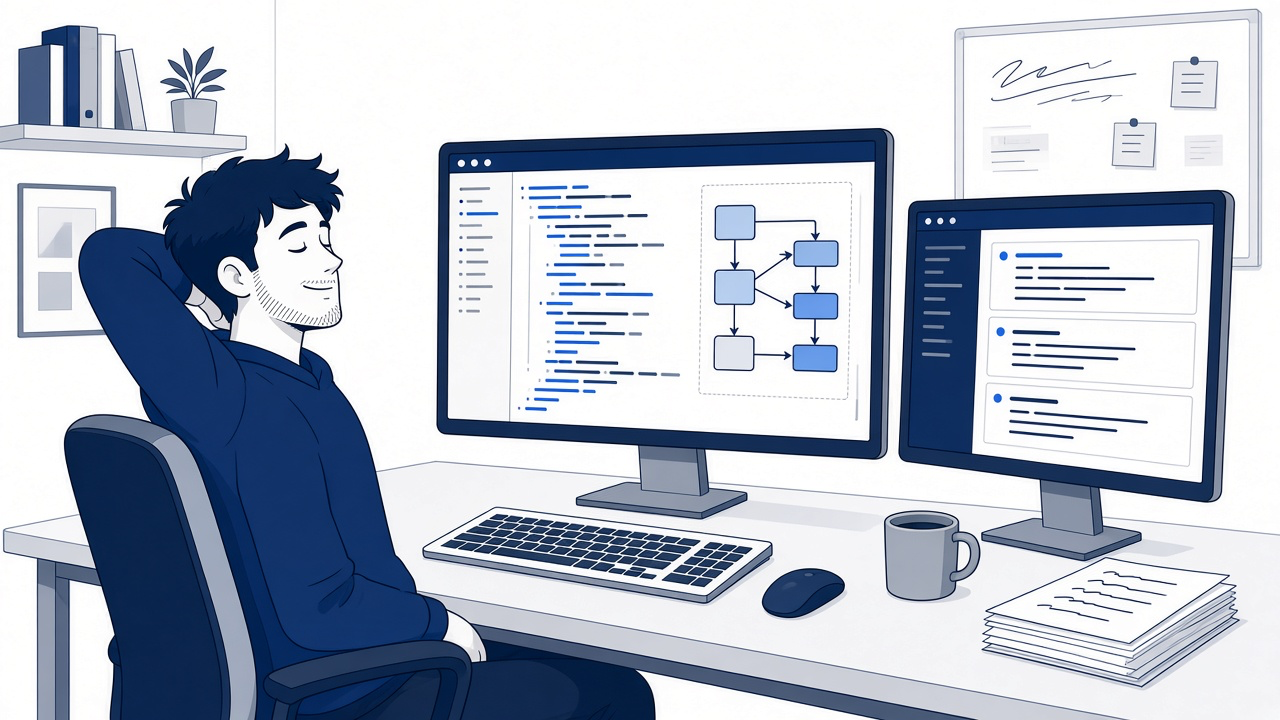
The scene is the whole lesson in one picture: forty lines of code on one screen, and on the other the three-line file that made them unnecessary.
The extension was not wrong because TypeScript is hard. It was wrong because it was the fourth rung of a ladder whose first rung already held. Pi's quickstart gives the ladder in one line: start with the least powerful mechanism that meets your need. This part climbs it on Ticket Triage. The rule stays where Part 7 put it. A /review prompt template checks the next classifier diff. A ship skill runs the checks, and it is the file that finally makes Part 2's trust prompt appear. Part 9 adds the fourth rung, a guard.ts extension that asks before any rm -rf.
Four rungs, and the one you skipped to
Pi's quickstart ends with a chooser for customization, and its first four rows are the ladder.
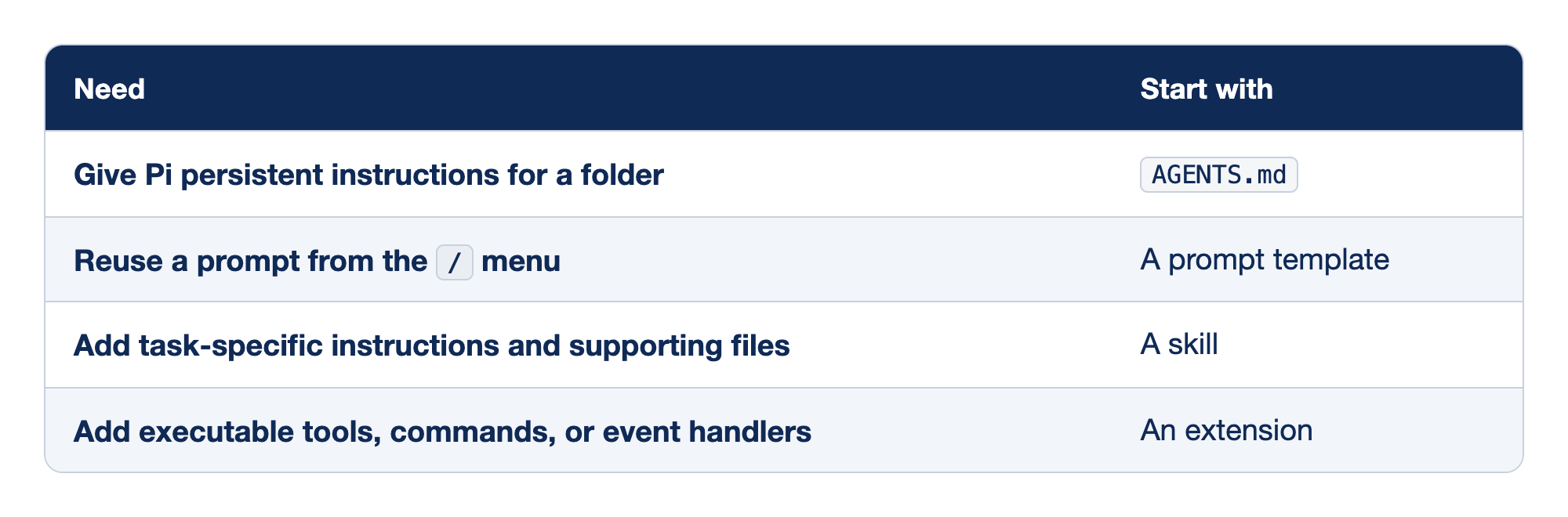
The chooser pairs a need with the first Pi mechanism to try. The Need column states what you want Pi to do, and the Start with column names the file type that meets that need at the lowest cost.
- Persistent instructions for a folder start with
AGENTS.md. - A prompt you reuse from the
/menu starts with a prompt template. - Task-specific instructions with supporting files start with a skill.
- Executable tools, commands, or event handlers start with an extension.
Read the table from the top and stop at the first row that describes what you need. Each row down adds power, and each adds something you have to maintain, review, or trust.
- Persistent instructions. A context file is text the model reads on every request. It cannot run anything, and it is the home for whatever is true in every session.
- A reusable prompt. A prompt template is text you send on purpose, with arguments. It adds a slash command and nothing else.
- Task instructions with files. A skill is a folder of instructions, and optionally scripts and references, that the model loads only when the task matches.
- Executable behavior. An extension is TypeScript that runs inside the Pi process. It can register tools and commands, react to events, and block a tool call.
The chooser's last three rows are a custom terminal UI, a custom provider for an unsupported model service, and a Pi package for distributing resources. Ticket Triage needs only the package idea, which Part 9 covers.
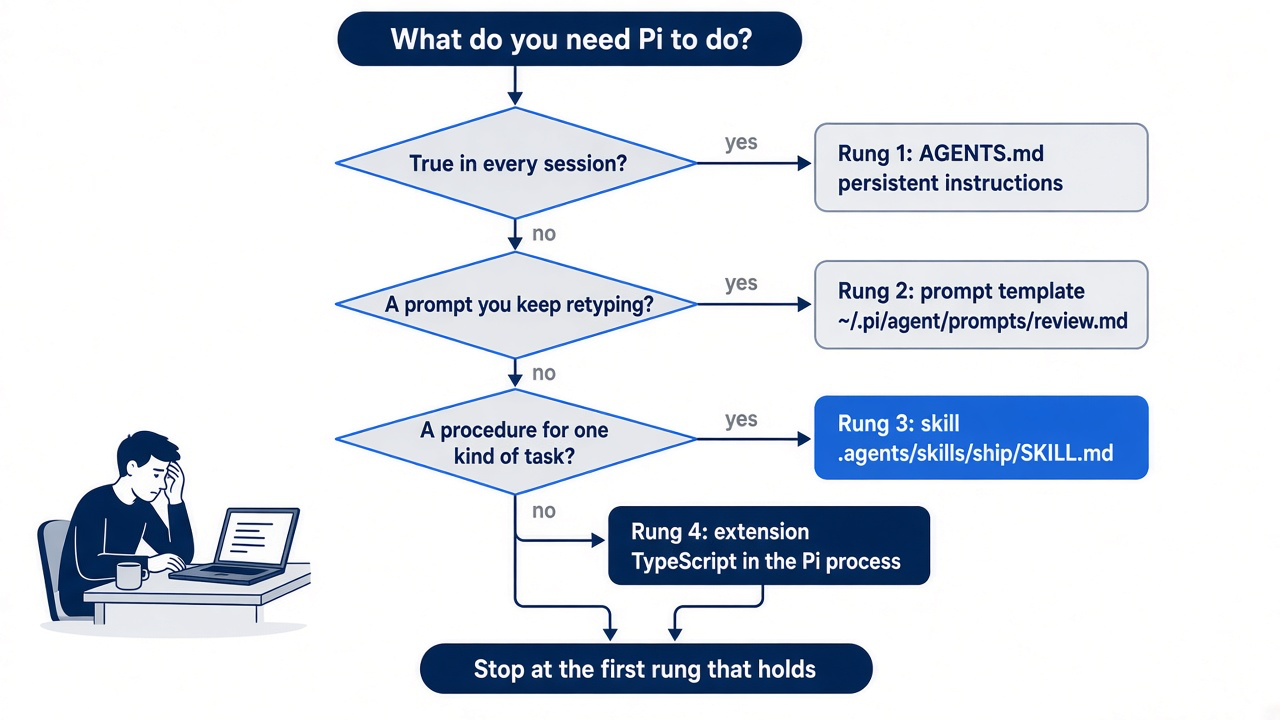
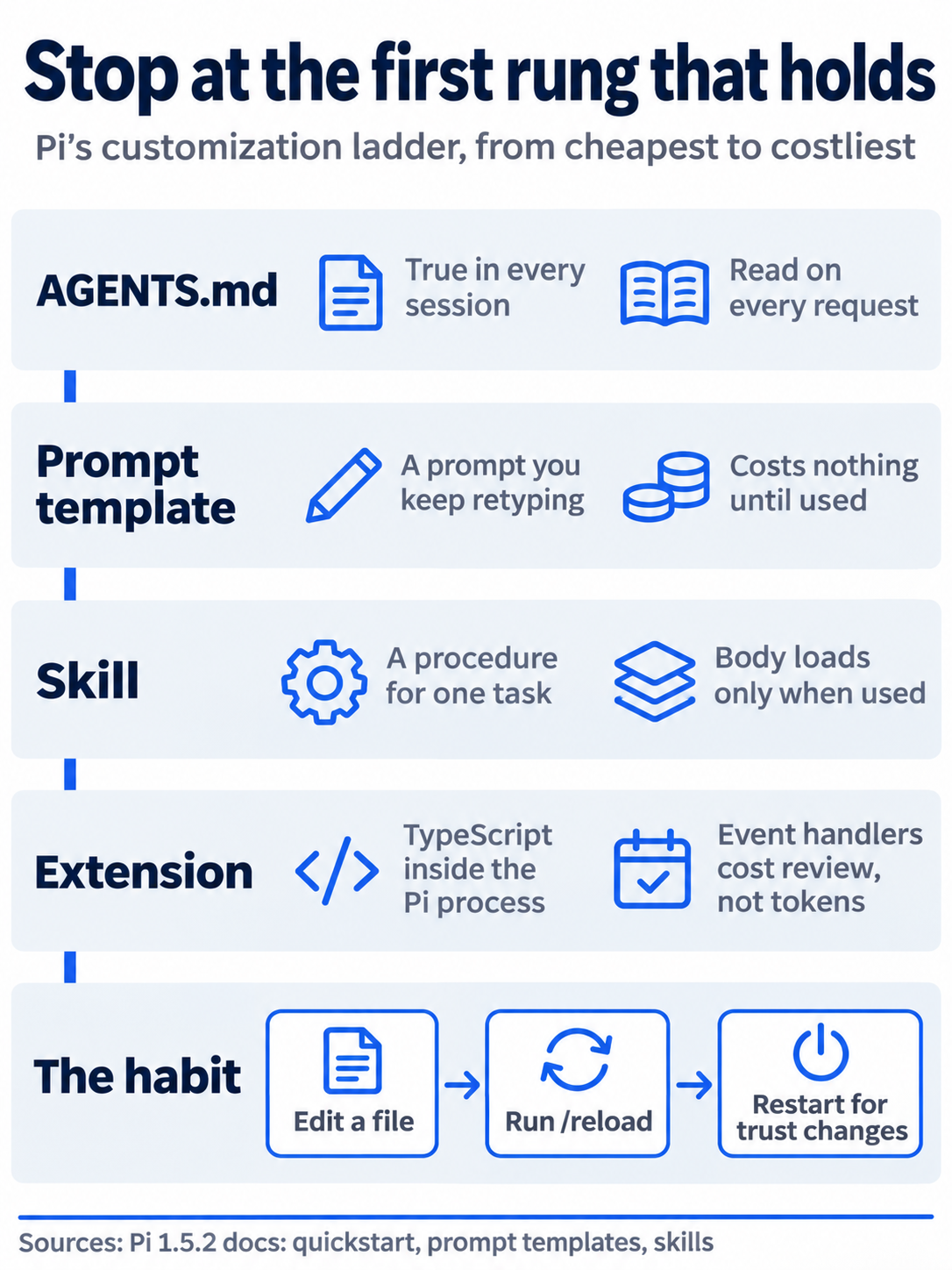
The poster restates the ladder as four panels, cheapest first, and adds the habit that goes with it: after you edit any of these files in a running session, run /reload, and restart when the change involves trust.
The habit that goes with the ladder is one command. After you add or change any of these files in a running session, reload.
/reload
/reload reloads keybindings, extensions, skills, templates, themes, and context files. Part 7 showed that Pi draws the startup header only when it starts, and Pi's docs place the trust check at startup too. The skill step in Start here therefore needed a restart instead.
If you already use Claude Code: the rungs map almost one to one. CLAUDE.md becomes AGENTS.md, a slash command in .claude/commands/ becomes a prompt template, a skill stays a skill, and a hook becomes an extension event. The difference is the last rung. A Claude Code hook is JSON configuration that usually calls a shell command; a Pi extension is TypeScript loaded into the agent's own process.
What each rung costs the window
Every rung has a context price, and each pays it at a different time.
Part 6 made the window the operating system for this series, so the first question about any new file is what it adds to each request.
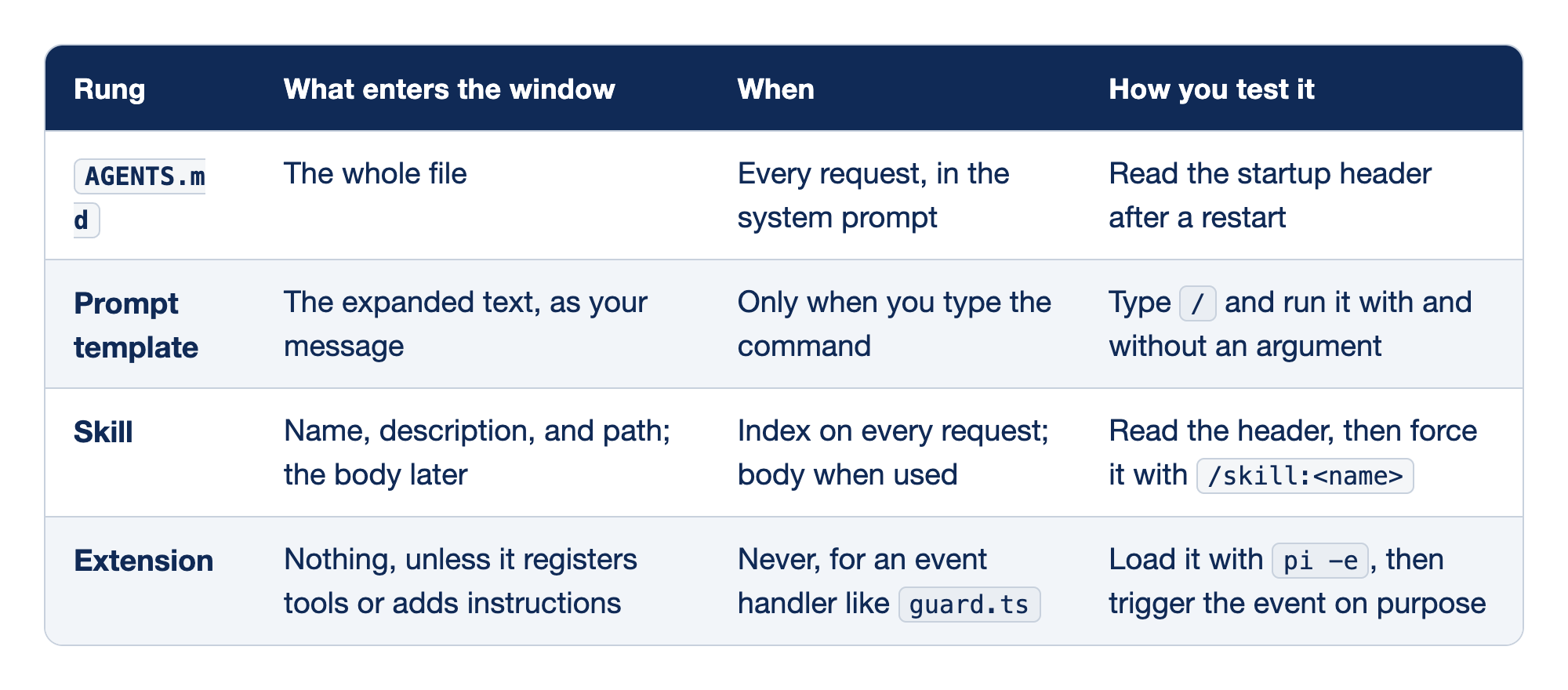
The comparison lines up the four rungs against their context cost. The Rung column names the file type, the What enters the window column says which text the model receives, the When column says how often it pays, and the How you test it column gives the quickest check that the file loaded.
AGENTS.mdputs the whole file in the system prompt on every request, and a restart shows it in the startup header.- A prompt template adds its expanded text as your message only when you type the command, and you test it by running it with and without an argument.
- A skill adds its name, description, and path to every request and its body only when used, and you test it by reading the header and forcing it with
/skill:<name>. - An extension adds nothing for an event handler like
guard.tsunless it registers tools or adds instructions, and you test it by loading it withpi -eand triggering the event on purpose.
Cost moves down the table from the window to your attention. The bottom rows cost the model almost nothing and cost you review.
AGENTS.md. Every line rides along on every request in every session, which is why Part 7 kept the file to three lines.- Prompt template. It costs nothing until you use it. Once expanded, it is an ordinary user message, and compaction can summarize it like anything else you typed.
- Skill. A short index costs a little on every request. The body enters the window only when the model reads
SKILL.mdor you force it, and then it stays until compaction. - Extension. Pi's request carries tool definitions, so a registered tool adds its definition to every request, and extensions can also add instructions. A handler that only watches tool calls adds nothing. Its cost is that it runs as code with your permissions.
Rung one: the rule you already have
The first rung is already built, and testing it takes one restart.
Ticket Triage's AGENTS.md from Part 7 holds three lines.
- Run `npm test` before you say a change is done.
- Never change an existing test to make it pass.
- Categories are exactly `refund`, `shipping`, and `other`.
The opening extension was trying to enforce the first line with code. A context file cannot enforce anything, and that is the honest limit of this rung: the model reads the rule and usually follows it. Part 11 turns "done means the tests ran" into a habit you check yourself. For now, the test is that the rule loads. Start Pi in Ticket Triage and continue the Part 7 session.
cd ~/code/ticket-triage
pi --continue
The resource listing in the header should name AGENTS.md. In a long session the header scrolls out of view, and pi --no-session shows it at the top. In the opening story, delete the half-written tests-first.ts, because anything in ~/.pi/agent/extensions/ loads in every project whether or not it works.
rm ~/.pi/agent/extensions/tests-first.ts
The story's extension was never written for this guide, so this guide's test did not run the rm command.
Rung two: the /review template in detail
A prompt template is the prompt you keep retyping, saved as a Markdown file whose name becomes the command.
You review every classifier diff the same way before you commit: look at the staged changes, focus on one concern, and list problems with file and line. Personal templates live in ~/.pi/agent/prompts/, where Start here saved review.md.
The filename makes the command /review. description is what command completion shows; without it, Pi uses the first non-empty line. argument-hint is optional, and its brackets carry meaning: <angle brackets> mark a required argument and [square brackets] an optional one. ${1:-...} takes the first argument, or the text after :- when you pass none. After you save or change a template in a running session, reload, then type / and look for /review with its description and hint.
/reload
Start here gave the template a diff: the word table from Part 5 made a new damage word one row, so you added smashed. Pi expands the template before the text reaches the model, so the model receives an ordinary message.
Review the staged changes. Focus on error handling.
List each problem with its file and line.
The model inspects the staged diff with its own tools and answers.
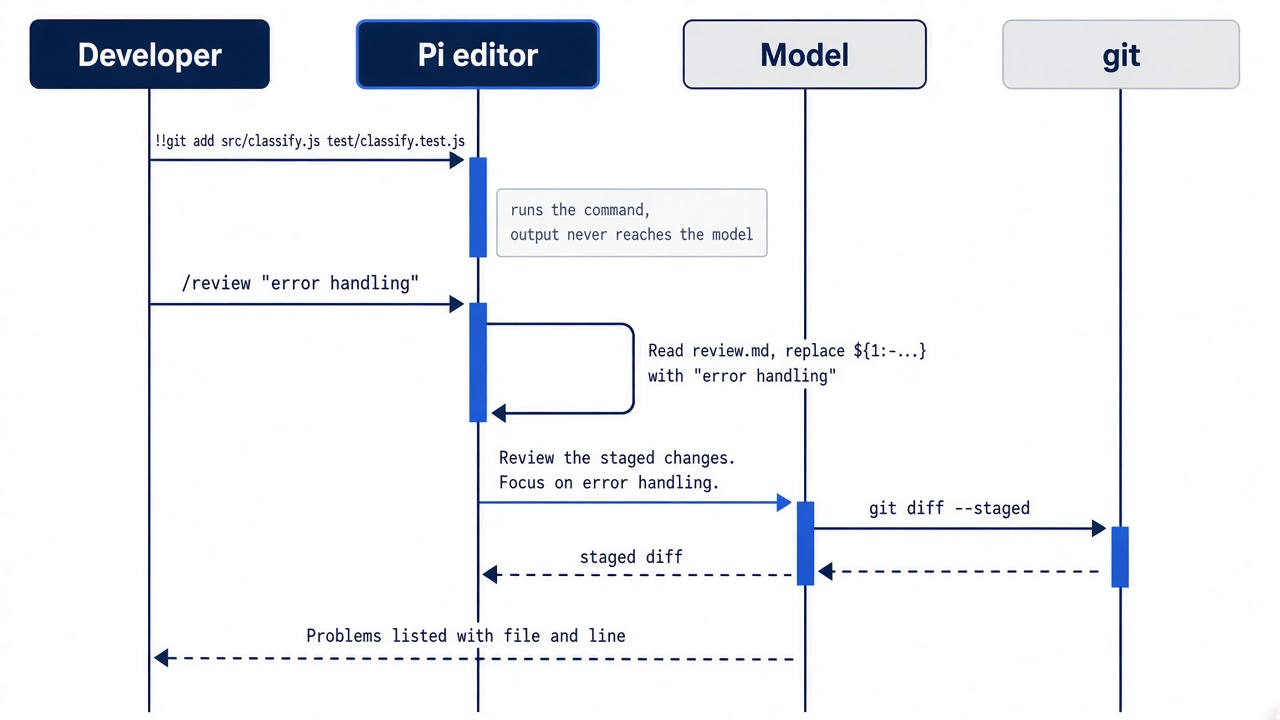
Gotcha: quote a focus that has a space in it. Template arguments follow shell-like quoting, and $1 is one argument. /review error handling makes $1 the single word error, and the message says "Focus on error." The quotes make the two words one argument. In this guide's test, the transcript showed Focus on error. for the unquoted form.
Templates also load from a project's .pi/prompts/, which would let a team share /review through Git. The folder is a trust-protected resource, so project templates appear only after you grant trust. Keep /review in your user folder; it is how you review, not how Ticket Triage works.
If you already use Claude Code: a Pi template is a Claude Code command file without the extras. There is no shell injection and no supporting folder. If a prompt needs files beside it, or should run when the model decides it fits, it has outgrown this rung.
The substitutions, and a quoting trap
Six forms cover every way to place arguments in a template.
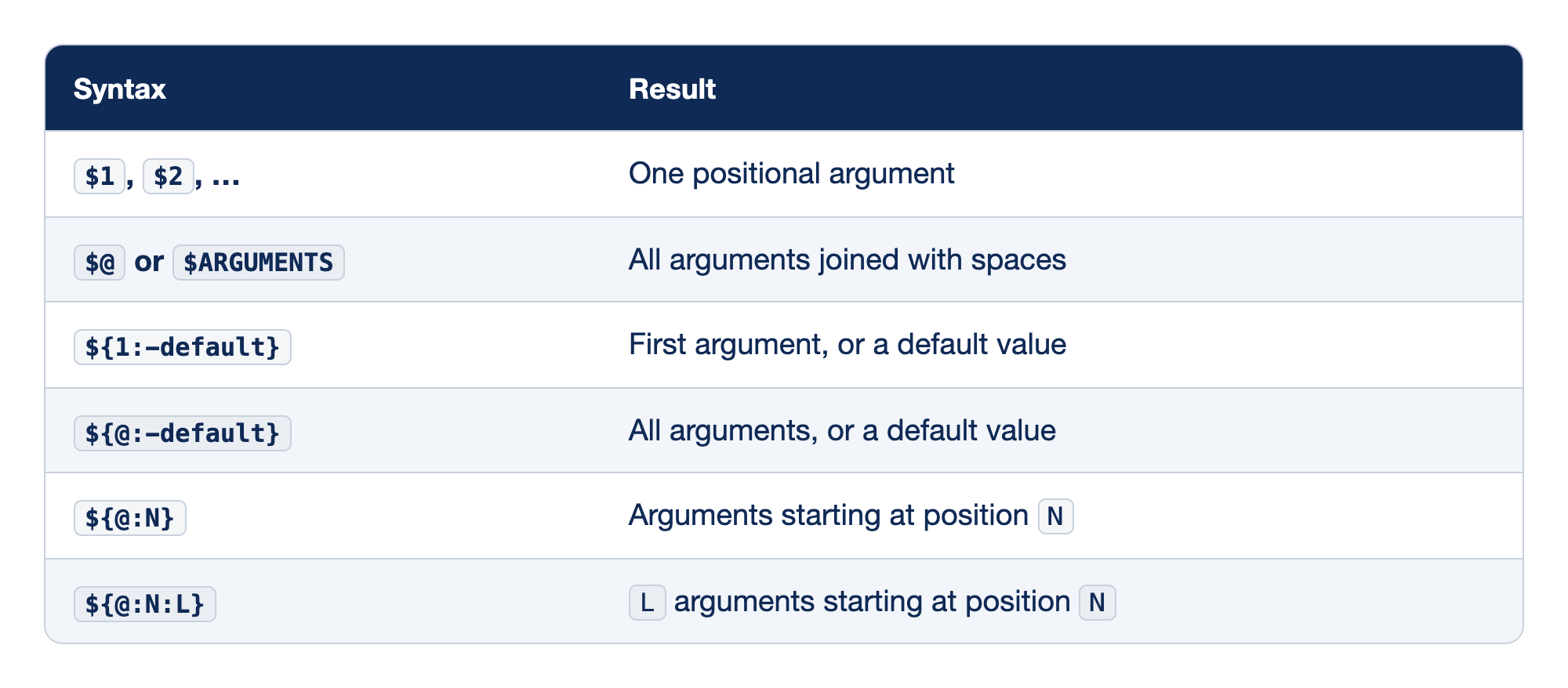
Each template substitution form places arguments in a different way. The Syntax column shows what you type in the template, and the Result column says which arguments Pi puts in its place.
$1,$2, and the forms after them each insert one positional argument.- `$@` or `$ARGUMENTS` inserts all arguments joined with spaces.
${1:-default}inserts the first argument, or a default value when you pass none.- `${@:-default}` inserts all arguments, or a default value when you pass none.
- `${@:N}` inserts the arguments from position `N` on.
- `${@:N:L}` inserts `L` arguments starting at position `N`.
The forms split into single arguments and runs of arguments, each with or without a fallback. Pick the one that matches how you will type the command.
$1,$2. Use these when each argument has a fixed role, such as a file and then a focus.$@or$ARGUMENTS. Everything after the command, joined with spaces, so/review error handlingwould work with no quotes.${1:-default}. The/reviewform. It keeps the template useful with no argument at all.${@:-default}. The same fallback for the whole list. Swap it intoreview.mdif you would rather never type quotes.${@:N}. Skips the firstN - 1arguments, for a template whose first argument is a name and whose rest is free text.${@:N:L}. A fixed window ofLarguments starting at positionN.
Two more quoting rules matter. A quote only starts quoting at the beginning of an argument, so the apostrophe in doesn't stays as text. Inside a quoted argument, a backslash before the same quote keeps it as text, so /review "the \"fast\" path" supplies the "fast" path. This guide's tests ran only ${1:-default}, with a quoted argument, an unquoted one, and none; the other rows come from the prompt templates page.
Rung three: the ship skill in detail
A skill is a folder with a SKILL.md file, and only three facts about it reach the model until the task calls for the rest.
Claude Code users know this as progressive disclosure, and Pi's docs describe it without the name. At startup, Pi scans its skill locations and adds each skill's name, description, and path to the system prompt, and nothing more. When a task matches a description, the model reads SKILL.md and follows it. A model can also miss a relevant skill, so /skill:<name> forces it. Pi appends any words after the command to the loaded instructions as your request.
The description does the routing, so it must say what the skill does and when it applies. "Helps with shipping" names a topic and gives the model nothing to match. "Run the tests and check the working tree, and stop at the first failure. Use when asked to ship, verify, or finish a change" names the action and the requests that should trigger it. A description such as "Run tests, lint, and build. Use when asked to ship, verify, or finish a change" does the same for a larger project.
Ticket Triage's check is npm test, and the second step is a look at the tree, stopping at the first failure. The order, the stopping point, and the report are a procedure for one kind of task, which is what a skill holds. Many projects run npm test, npm run lint, and npm run build, in that order, and stop at the first failure. Each check is one more numbered step.
The folder name and the name field match. Pi does not require that, but other Agent Skills implementations may, so matching names keep the skill portable. A skill can also carry scripts/, references/, and assets/ folders beside SKILL.md; ship needs none. Three frontmatter fields matter for daily work.
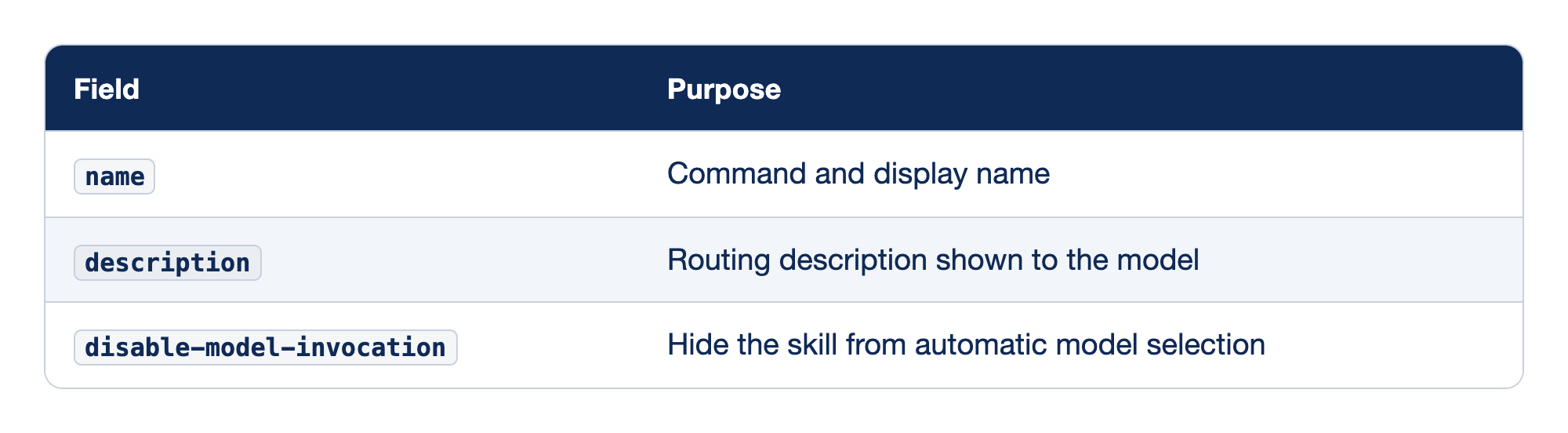
Each frontmatter field controls one part of how a skill is found and started. The Field column gives the key as you type it in SKILL.md, and the Purpose column says what Pi does with its value.
namesets the command and display name.descriptionis the routing text shown to the model.disable-model-invocationhides the skill from automatic model selection.
The first two are required in practice, and the third decides who may start the skill.
name. Lowercase letters, numbers, and hyphens, at most 64 characters, with no leading, trailing, or doubled hyphens. When two skills share a name, Pi keeps the first one it found and warns.description. At most 1,024 characters. Pi does not load a skill without one, and it does not load a malformedSKILL.md.disable-model-invocation. Set it totruewhen a skill should run only because you typed its command, such as one that deploys.shiponly runs checks, so the model may pick it.
Start here forced the skill. Now test the routing, the half that fails silently. Start pi --no-session, so the check saves nothing, and ask.
Is the classifier change ready to ship?
A routed skill shows in the transcript as a read of .agents/skills/ship/SKILL.md before the first check runs. If the model runs npm test alone and stops, it followed AGENTS.md and missed the skill; sharpen the description, /reload, and ask again. In this guide's test, in a pi --no-session session with the change already committed, the model read .agents/skills/ship/SKILL.md, ran both steps, and answered that the change was committed and ready.
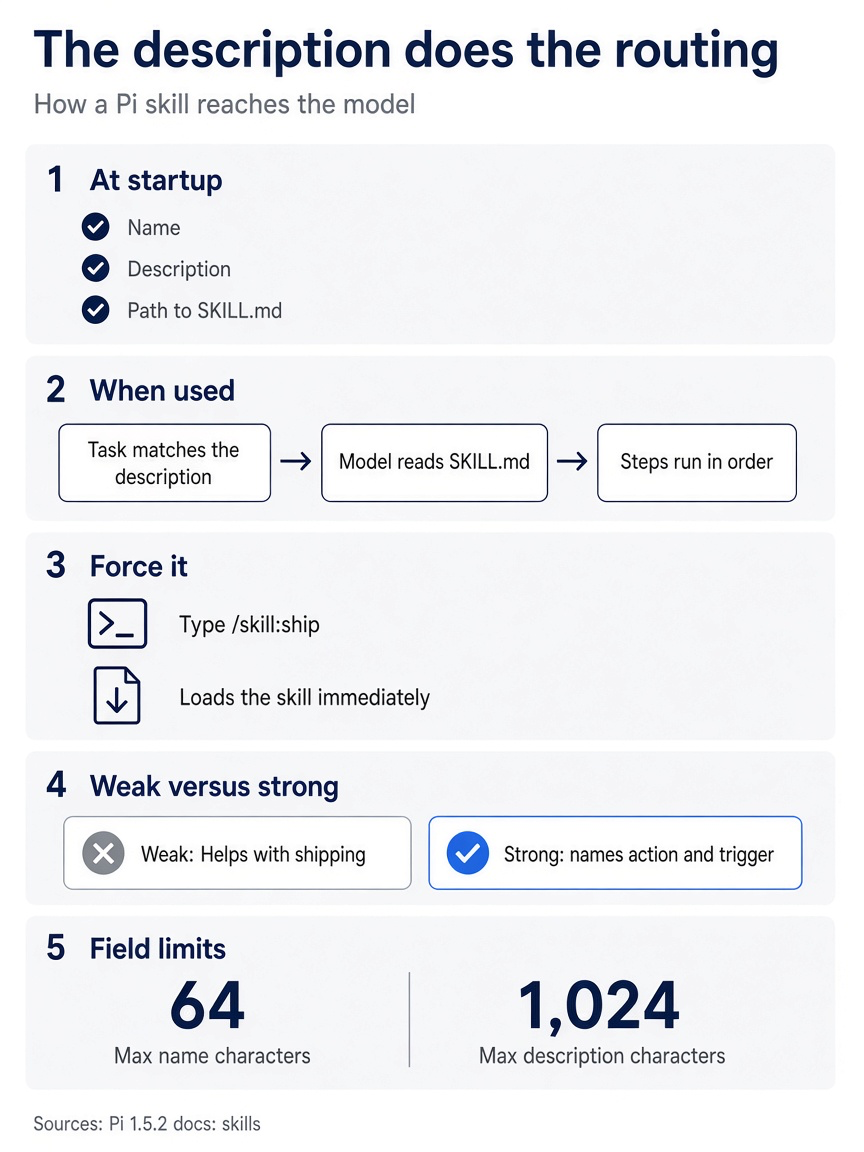
The poster sums up the routing rule: only the name, description, and path ride on every request, so the description is the only text that can pull the model toward the rest. It also shows the two field limits, 64 characters for a name and 1,024 for a description, from Pi's skills page.
The trust prompt, in full
A project .agents/skills folder is a trust-protected resource, so the Start here restart is where Pi asked.
Part 2 explained why Ticket Triage's first launch was quiet: the repository had no trust-protected resources, and context files never need trust. The new folder changes that, and the trust check happens when Pi starts. Decide on purpose, because the answer covers more than one file. Pi's skills page warns that project skills can instruct the model to run scripts or modify files, and ship tells the model to run two commands. Granting trust also covers every other protected resource the repository holds or later gains, such as .pi/settings.json, .pi/mcp.json, and .pi/extensions/. Trust is a decision about the folder, not about one skill.
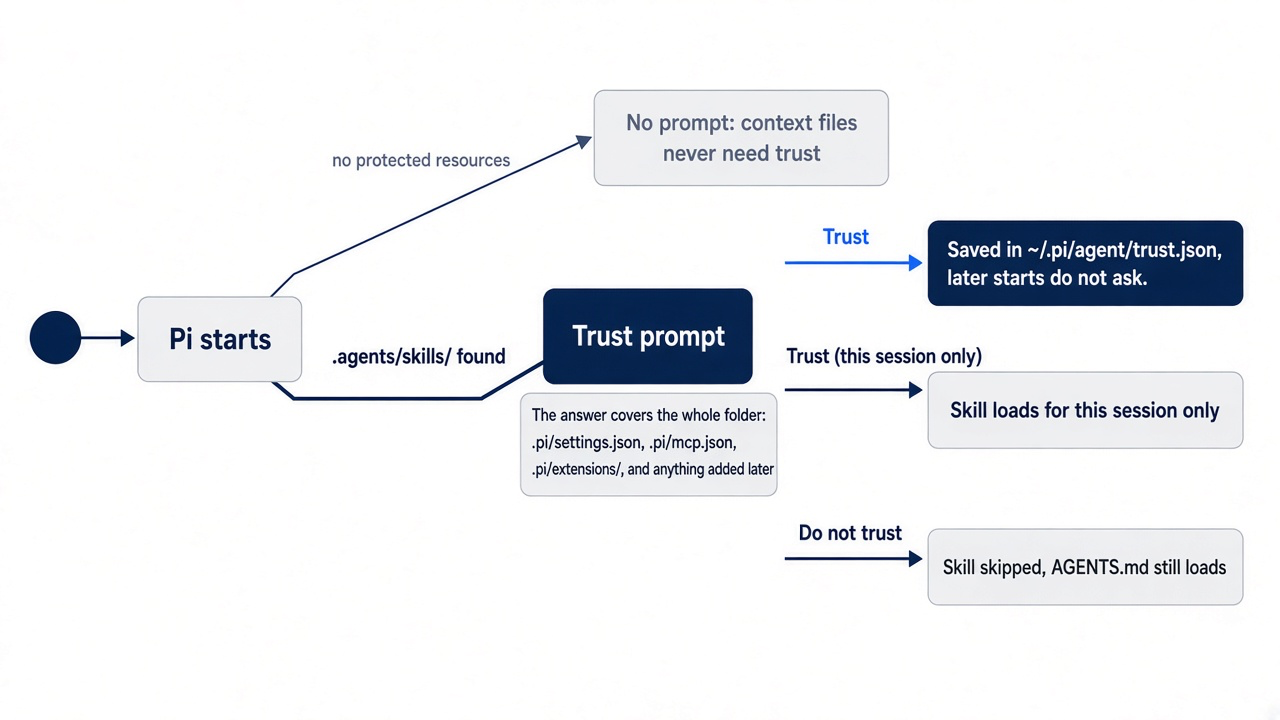
You wrote the skill and nothing else is protected, so Start here chose Trust, in the wording Part 2 showed. The header should now list AGENTS.md and the ship skill, at the top of a session that saves nothing. Pi saves the decision in ~/.pi/agent/trust.json, and later starts in Ticket Triage do not ask. Trust (this session only) lets you look around first. Do not trust skips the skill and still loads AGENTS.md.
Part 2 said scripted runs should name their trust decision, and Ticket Triage now has something to skip. Print mode cannot show the prompt, so a saved decision applies, or a flag decides for one run.
pi --no-session --no-approve -p "List the skills you can see."
With --no-approve, the ship skill does not load for that run, and AGENTS.md still does. In this guide's test, the model answered that the skill was not in its startup context, then found .agents/skills/ship/SKILL.md by looking through the project's folders with its own tools. --no-approve keeps a skill out of the system prompt; it does not hide the file.
Gotcha: a teammate who clones Ticket Triage now sees the trust prompt, and a "Trust" saved on a parent folder such as ~/code covers this repository too. Review .agents/ and .pi/ in every diff you pull, because those files decide what Pi loads.
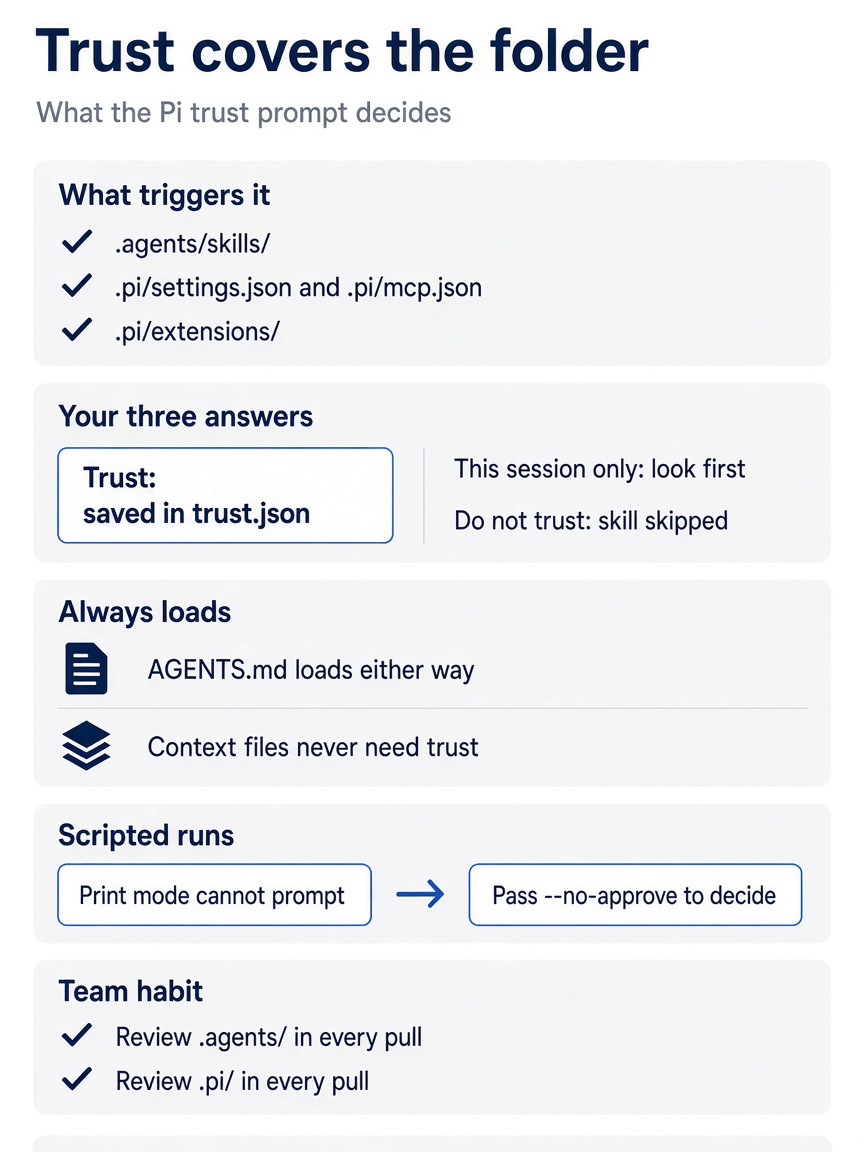
The poster lists what triggers the prompt, the three outcomes of your answer, the fact that AGENTS.md loads either way, the --no-approve flag for scripted runs, and the review habit for .agents/ and .pi/.
Not every skill belongs to a repository. A skill in ~/.agents/skills/ loads in every folder with no trust prompt, because it is your own configuration. Put ship there if you want the same checks in every Node.js project; keep it in Ticket Triage if the steps are this repository's steps. Pi also reads ~/.pi/agent/skills/ and a project .pi/skills/, and it finds project .agents/skills/ folders by walking up from the working folder to the repository root.
If you already use Claude Code: the Claude Code guide's Part 8 builds a ship skill of the same shape at .claude/skills/ship/SKILL.md. Pi's documented skill locations do not include .claude/skills/, but the skills setting in ~/.pi/agent/settings.json takes extra skill folders, with ~ supported. Claude Code documents disable-model-invocation as also removing a skill's description from context; Pi's skills page says only that it hides the skill from automatic selection.
Open standards: where a skill travels
A skill is the one Pi customization that other coding agents can read, because Pi implements the Agent Skills standard.
Agent Skills defines a skill as a folder with a SKILL.md that the agent loads on demand. Pi's skills page states that Pi implements the Agent Skills specification, and that most invalid fields produce warnings rather than stopping startup. The same ship folder therefore works in other agents that read the same folder. Two questions decide whether it does: which folders each tool reads, and what each tool does when two folders hold a skill with the same name.
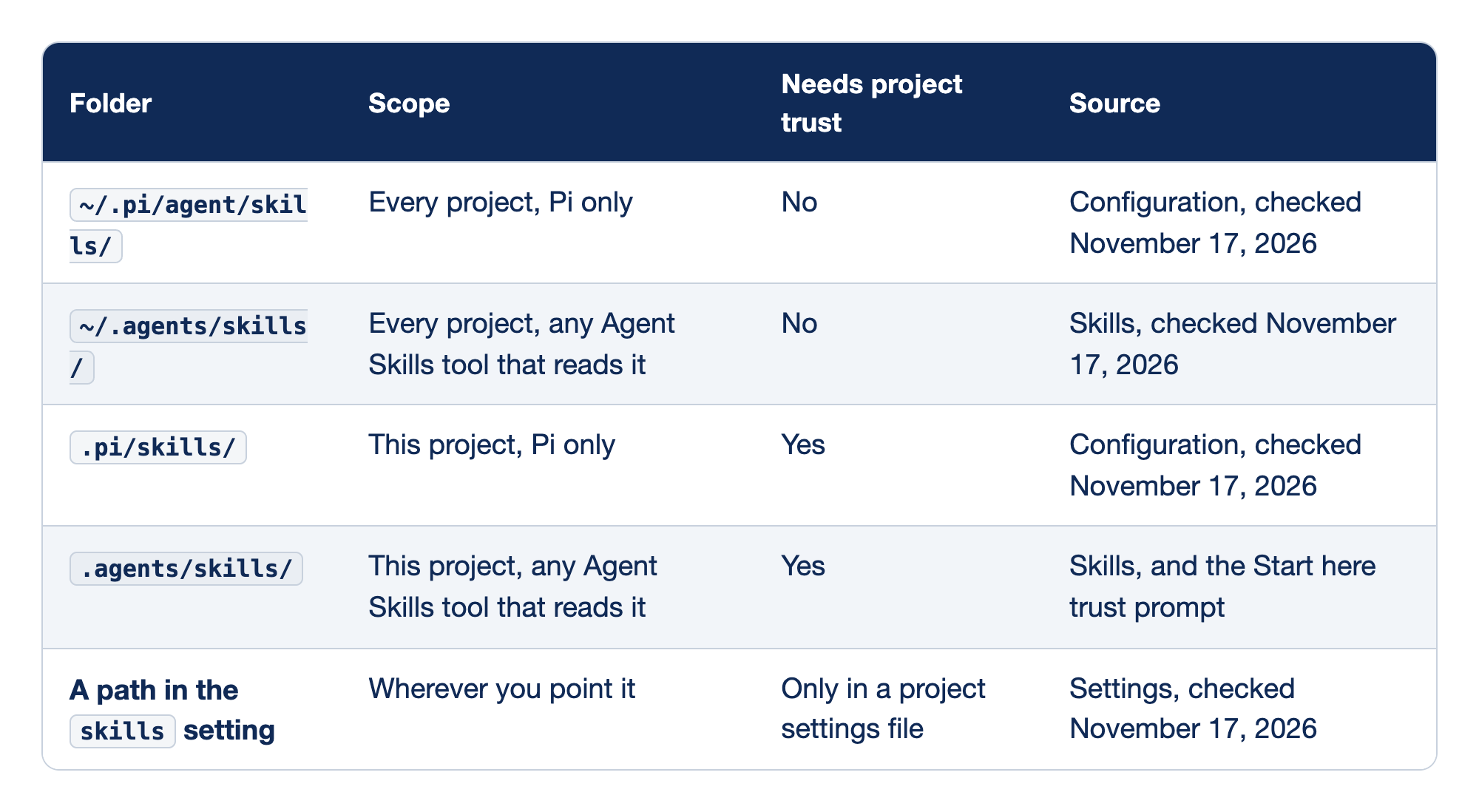
Pi reads skills from five kinds of locations, and they differ in reach, in trust, and in the page that documents them. The Folder column gives the path, the Scope column says which projects and tools see a skill there, the Needs project trust column says whether Pi asks first, and the Source column names the Pi docs page behind the row.
~/.pi/agent/skills/serves every project for Pi only, needs no trust, and comes from the configuration page.~/.agents/skills/serves every project for any Agent Skills tool that reads it, needs no trust, and comes from the skills page..pi/skills/serves this project for Pi only, needs trust, and comes from the configuration page..agents/skills/serves this project for any Agent Skills tool that reads it, needs trust, and comes from the skills page and the Start here trust prompt.- A path in the
skillssetting reaches wherever you point it, needs trust only in a project settings file, and comes from the settings page.
Docs pages: Configuration, Settings, Skills.
The .agents rows are the shared ones. The .pi rows and the setting are Pi's own.
~/.pi/agent/skills/. Your personal Pi skills. Other tools do not read this folder.~/.agents/skills/. Your personal skills for every tool that reads the shared user folder. Pi showed no trust prompt for it in the Part 2 install tests..pi/skills/. A project folder that only Pi reads. Use it for a skill that depends on Pi, such as one that names Pi commands..agents/skills/. The project folder that Pi, GitHub Copilot CLI, and OpenCode all read. Pi finds it from the working folder up to the repository root.shiplives here.- The
skillssetting. Extra files or folders, such as a.claude/skillsfolder you already have. A project's.pi/settings.jsonis itself trust-protected.
The duplicate rule. Pi's skills page says that name collisions keep the first discovered skill and produce a warning, and it does not give the discovery order. This guide's test answered it for three folders. A second ship skill in ~/.agents/skills/ship/ and a third in the project's .pi/skills/ship/, each with a different description, made Pi print a warning block in the startup header.
[Skill warnings]
  "ship" collision:
    ✓ auto (project) ~/code/ticket-triage/.pi/skills/ship/SKILL.md
    ✗ ~/code/ticket-triage/.agents/skills/ship/SKILL.md (skipped)
    ✗ ~/.agents/skills/ship/SKILL.md (skipped)
The project's .pi/skills came first, then the project's .agents/skills, then ~/.agents/skills. With only the user copy added, the project's .agents/skills copy won the same way. Other tools resolve duplicates in other directions, so the safe habit is one name in one folder. Remove the test copies afterward.
rm -rf ~/.agents/skills/ship .pi/skills/ship
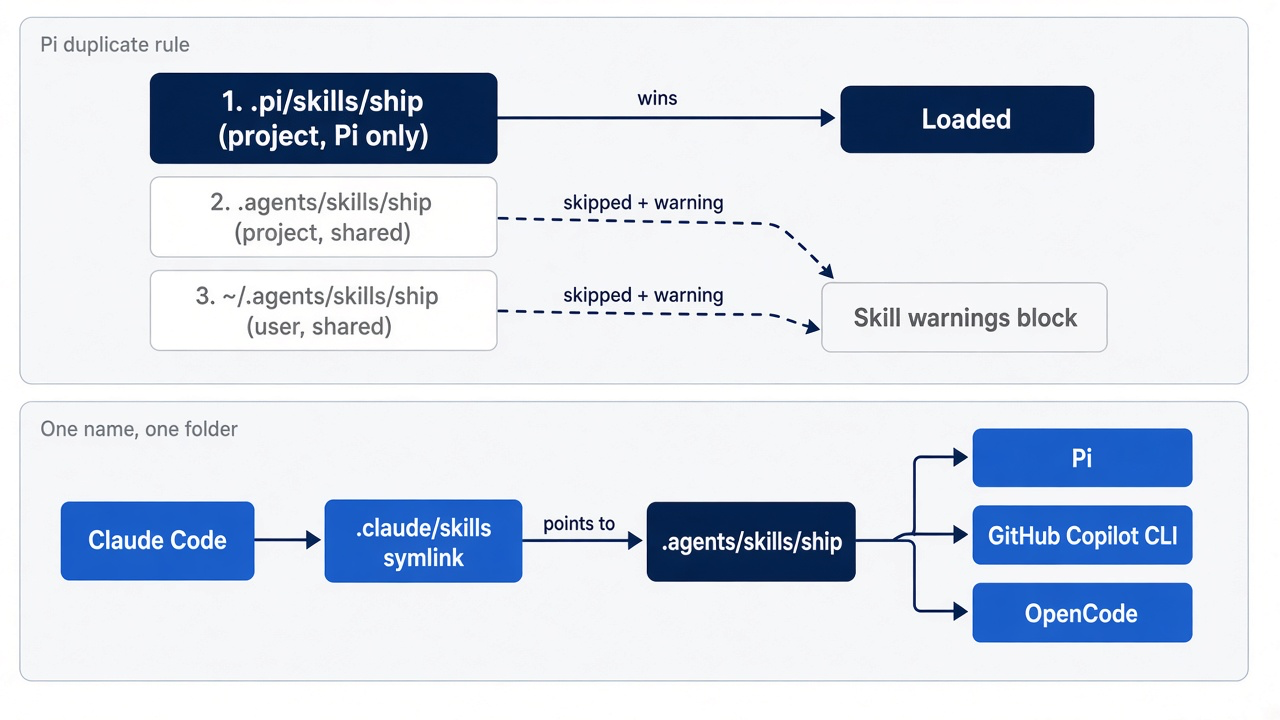
The shared setup. Keep shared skills in .agents/skills, which Pi, GitHub Copilot CLI, and OpenCode read. Claude Code reads only .claude/skills, so give it a symlink instead of a copy.
mkdir -p .claude
ln -s ../.agents/skills .claude/skills
In this guide's test, Claude Code 2.1.326 listed ship as a project skill in /skills through the symlink. Pi's header still listed one ship with no [Skill warnings] block, because Pi does not read .claude/skills. A copy instead of a link would drift the first time you edit one of them, the same problem that Part 7 found with two context files. Commit the link if your team uses both tools. For Ticket Triage, the test removed it again, so later parts start from the Start here tree.
rm .claude/skills
rmdir .claude
Part 9 places these folders beside the other tools' folders and duplicate rules in a cross-tool table, together with the plugin standard.
Do this today
Everyone
-
Run the template with no argument. Run
pi --continueand type/reviewwith nothing after it. The model receives the default focus,correctness, security, and error handling. With nothing staged, it reports that there are no staged changes to review. Type/quit./review -
See the skill in the header without saving a session. Start
pi --no-session. The header listsAGENTS.mdunder[Context],shipunder[Skills], and/reviewunder[Prompts], and no trust prompt appears, because Start here saved the decision. Type/quit.pi --no-session -
Find the saved decision. The file maps the full path of the Ticket Triage folder to
true.cat ~/.pi/agent/trust.json -
Check the tree. The first command prints nothing, and
npm testends withpass 6.git status --short npm test
If you read Going deeper
-
Write one template of your own. Turn the review prompt you type most into a file, then reload and run it with a quoted focus. The expanded message in the transcript holds your focus.
mkdir -p ~/.pi/agent/prompts/reload /review "error handling" -
Write one skill in a project. Put your check sequence in
.agents/skills/ship/SKILL.mdwith a description that says what and when, then restart and answer the trust prompt on purpose. The header lists the skill.mkdir -p .agents/skills/ship pi --continue -
Test the skill both ways. Force it, then ask a question that should route to it, and look for the read of
SKILL.mdin the transcript./skill:ship Is this change ready to ship? -
Share it with Claude Code. Add the
.claude/skillssymlink, start Claude Code, and confirm it lists the skill.ls -l .claude/skillsshows the link to../.agents/skills.mkdir -p .claude ln -s ../.agents/skills .claude/skills ls -l .claude/skillsThese four steps use your own repository, so this guide did not run them as written; the Going deeper sections record the Ticket Triage runs of the same commands.
Climb only as far as you must
The forty-line extension and the three-line rule were trying to do the same thing. One cost an hour and a permanent review burden; the other cost three minutes and a few tokens per request. Most customization mistakes look like that: the developer reaches for the most powerful tool because it feels like real engineering.
Pi's ladder makes the cheaper choice visible. A rule is for what is always true. A template is for the prompt you keep retyping. A skill is for a procedure the model should run when the task calls for it, and its description is the only part that has to earn its place on every request. Trust is the price of the third rung, and it covers the folder, not the file.
Before you write the next line of TypeScript, read your AGENTS.md first. The rung you need may already be holding.
This is Part 8 of "Pi, Day to Day," a 12-part guide to using the Pi coding agent as a daily, context-aware terminal agent for developers who already ship with Claude Code.