
Three Claude Code Habits That Misfire in Pi, and the Map for Everything Else
Most Claude Code habits carry into Pi under a new name, but three of them land on a command with a different job, and the cheapest way to retrain them is to fire each one once, on purpose, while nothing depends on it, then keep a topic-by-topic map for everything else.
Most of your Claude Code muscle memory survives the move to the Pi coding agent under a new name. Three habits land on the wrong command. Fire each one once on purpose, then keep the map.
You spent Monday in Claude Code, and on Tuesday your fingers press Shift+Tab for plan mode in Pi, type /fork to copy the conversation, and read a silent start as a clean bill of health, and each one does something you did not ask for.
In this article: Day 12 of a day-by-day guide to Pi. Start here: you fire
/fork,Shift+Tab, and the trust prompt once each, on purpose, and write down in three lines what each one did. Going deeper: the full Claude Code to Pi map with one table per topic, the habits that have no Pi name, and a glossary of every term from the series.
Tested on Pi 1.5.2.
Part 11 ended with a commit that added dented to the damage words, seven passing tests, a clean tree, and the work session crushed-mug-table.
Start here
By the end of today, you have fired the three Claude Code habits that misfire most often in Pi, once each and on purpose, and written down in three lines what each one did.
Starting fresh or fell behind? Run git switch -C main pi/day-11. This replaces your main with the end of Day 11; to keep your own work, run git branch my-backup first.
Most Claude Code commands have a Pi twin with the same job. Three do not. /fork exists in both tools with different jobs. Shift+Tab exists in both with different jobs. Pi's trust prompt looks like Claude Code's trust dialog, but it guards less. Each one fires before your head catches up, so you try each one today while nothing depends on it. Going deeper holds the full map, one table per topic, and a glossary of every term that Start here used in this series.
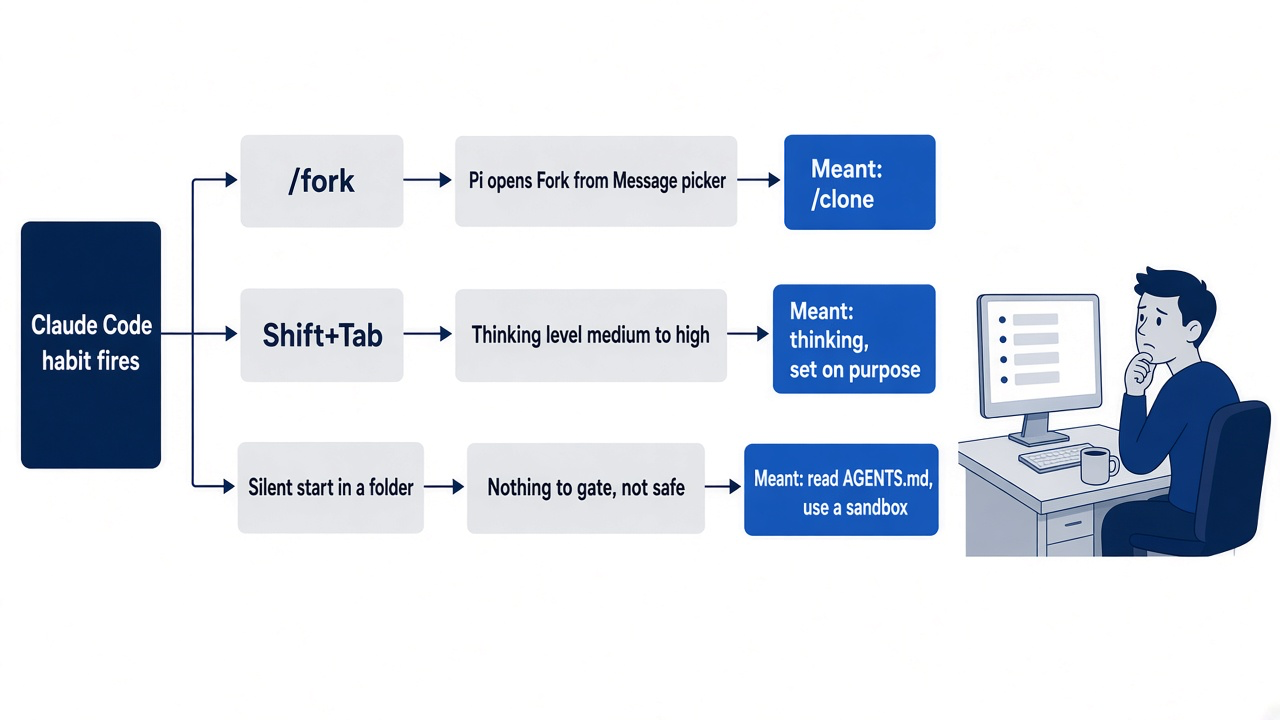
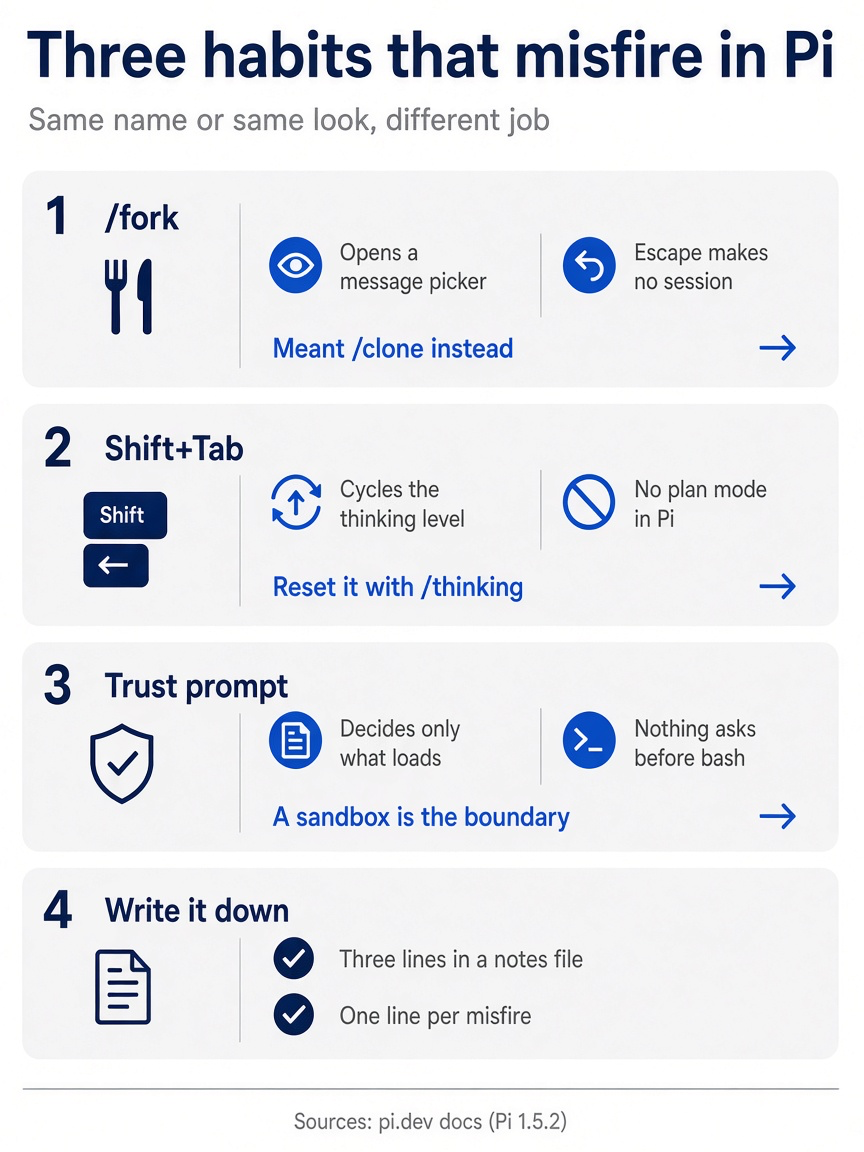
Each of the three misfires has two halves: what Pi actually does and what you should have typed. The habit that makes the lesson stick is one line per misfire in a notes file.
Check where you start
Start in the project folder with a clean tree.
cd ~/code/ticket-triage
git status --short
npm test
git log --oneline -1
git status --short prints nothing, npm test ends with pass 7 and fail 0, and the last commit is Add dented to the damage words. Open the work session.
pi --continue
The footer shows crushed-mug-table and the thinking level, medium, at the right.
Fire /fork, then type the command you meant
In Claude Code, /fork copies the conversation into a background session, and you keep working in the original. In Pi, /fork does a different job. Type it and press Enter.
/fork
Pi opens a picker titled Fork from Message, with the line Select a user message to copy the active path up to that point into a new session, and a list of your earlier messages, such as the dented prompt from Part 11. Pi's /fork starts a new session from an earlier message. You did not mean that, so press Escape. The picker closes, and Pi makes no new session. If you had pressed Enter on a message instead, Pi would start a new session whose history stops before that message, and the work after it would not be in the new session. The original session would stay as it was, but you would be working in the wrong place without a warning.
Pi has no background sessions, so Claude Code's /fork has no Pi twin. The Pi command that copies the conversation where it stands, and switches you into the copy, is /clone, from Part 5. It is Claude Code's /branch under a new name. Run it, and name the copy.
/clone
/name crushed-mug-copy
Pi prints Cloned to new session. The footer still shows the old name until /name runs, and then it shows crushed-mug-copy. Check that the copy is a new session.
/session
/session shows Name: crushed-mug-copy and an ID that differs from the work session's. The copy is now the newest session in this folder, so tomorrow pi --continue opens it. To return to the work session, use pi --resume and pick crushed-mug-table, as in Part 6.
Press Shift+Tab once, and put it back
In Claude Code, Shift+Tab cycles permission modes, plan mode included. Press it once in Pi.
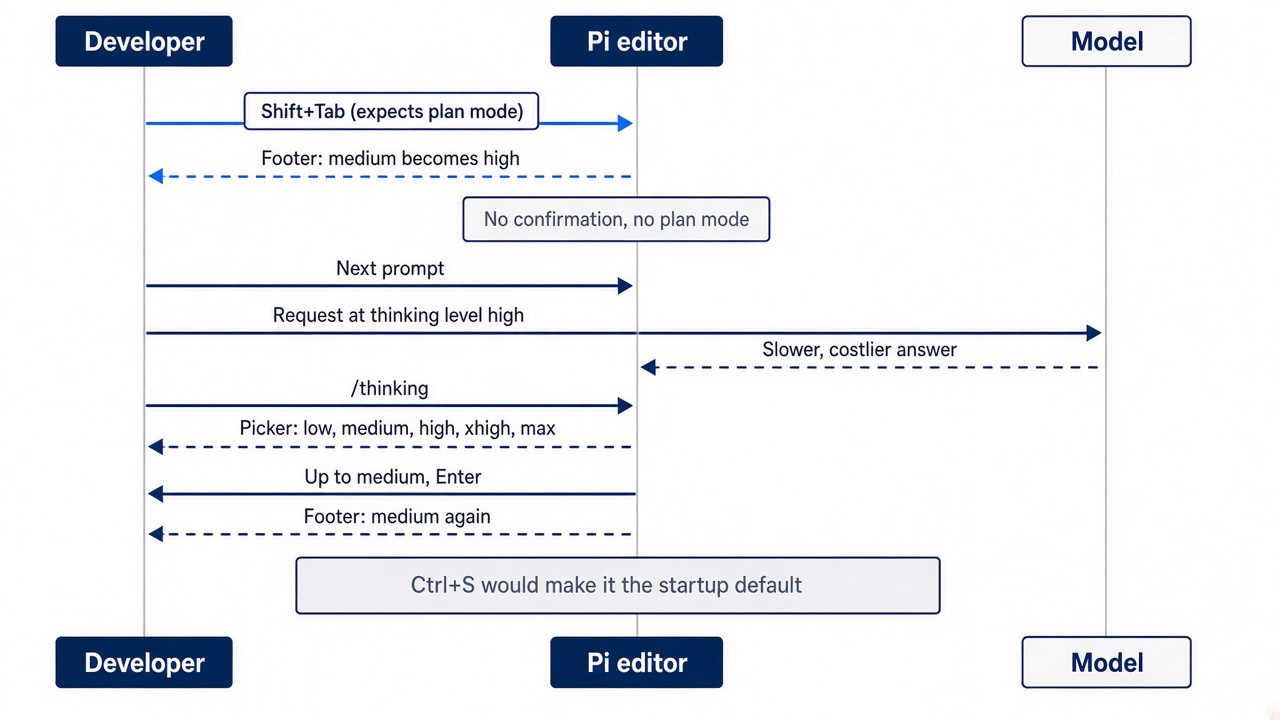
The footer's last word changes from medium to high, and the transcript shows Thinking level: high. In Pi, Shift+Tab cycles the thinking level: how much the model reasons before it answers, and what each request costs. Pi has no permission modes and no built-in plan mode, so the key had a free job. The change is quiet. Pi does not ask you to confirm it, and every later request in the session uses the new level until you change it. A higher level can make each answer slower and more expensive. Set the level back on purpose.
/thinking
The picker lists low, medium, high, xhigh, and max, marks medium as the default, and puts a check mark beside high. Press Up to reach medium, and press Enter. The footer shows medium again. Do not press Ctrl+S in the picker, because Ctrl+S makes the selected level the startup default.
Ask for a shell command in a trusted folder
In Claude Code, the trust dialog leads into a session where permission modes still decide what needs approval. Look at what Pi's trust decision for Ticket Triage holds.
!!cat ~/.pi/agent/trust.json
The file maps your Ticket Triage path to true, the Trust you chose in Part 8. Now ask for a shell command.
Run git status --short and tell me what it printed, in one sentence.
The transcript shows $ git status --short and (no output), and the model answers that the tree is clean. Nothing asked you before the command ran. Pi's trust prompt decides only which project resources load at startup, such as the ship skill, project settings in .pi/, and project extensions. AGENTS.md loads with or without trust. After Pi starts, no prompt stands between the model and bash. The boundary for that is the sandbox from Part 10.
Write down what each one did
Type /quit. Write your three lines in a notes file outside the repository, in your own words. These are the lines from this guide's test.
cat > ~/pi-lab/renames.txt <<'EOF'
/fork: a list of my earlier messages. Escape made no new session. /clone made the copy.
Shift+Tab: thinking went from medium to high. /thinking put it back.
Trust: Pi ran git status with no question. Trust decides only what loads.
EOF
cat ~/pi-lab/renames.txt
git status --short
cat prints your three lines, and git status --short prints nothing, because nothing today changed a file in Ticket Triage. Your win for today is three Claude Code habits that you have now seen misfire, on purpose, with a note that tells you which Pi command each one should have been.
You can stop here. Going deeper explains why this works and where it breaks.
Going deeper
This section is for readers who want the whole map. It gives every command the series taught, one table per topic, with the Claude Code habit it replaces and the part that taught it. It then lists the habits with no Pi name and closes with a glossary of every term from the Start here sections. It assumes you finished Start here in this part and in Parts 1 to 11.
The Tuesday after a Claude Code Monday
The story below shows how the three renames misfire on a real day. It is an example, and it has no steps to run.
Part 11 left Ticket Triage with a three-line AGENTS.md, a ship skill, and a sandbox for unattended work. Then you spend Monday in Claude Code on another repository, and on Tuesday you start Pi in ~/code/ticket-triage to tidy the damage word list. Your fingers remember Monday.
You press Shift+Tab twice to reach plan mode and ask for a plan. Pi starts editing src/classify.js, because there is no plan mode to be in, and the editor border now shows a different thinking level. You press Escape, run git checkout -- src/classify.js, and type /fork to copy the conversation before you try again. Pi shows you a list of your earlier messages instead. In the afternoon, a teammate asks you to look at their experimental copy of Ticket Triage. Pi starts in it without a trust prompt, and you read the silence as a clean bill of health while their AGENTS.md loads into every request.
The scene is the morning this map exists to prevent: a Claude Code habit fires in Pi, and the agent does something you did not ask for before your head catches up.
None of those is a bug. Each is a Claude Code name that fires before your head catches up. This last part is the lookup: every command the series taught on Ticket Triage, mapped back to the Claude Code habit it replaces, with the part that taught it. The three renames that misfire come first, because they cost the most.
Three renames that misfire
Each of these looks familiar enough to type without thinking, which is exactly why it misfires.
Gotcha: /fork. In Claude Code, /fork copies the conversation into a background session, and /branch copies it and switches you into the copy. In Pi the /branch job belongs to /clone, which copies the active branch into a new session. Claude Code's /fork has no Pi twin; a second terminal with its own pi session is the closest match. Pi's /fork creates a new session from an earlier user message, so typing it out of habit opens a message picker. /tree never leaves the current session file. Part 5 taught /clone and /tree, and Start here fired /fork. When you mean "duplicate this conversation," type this.
/clone
/name crushed-mug-cleanup
The first line copies the session at its current position; the second names the copy so tomorrow's picker finds it.
Gotcha: Shift+Tab. In Claude Code it cycles permission modes, plan mode included. In Pi it cycles the thinking level, which changes how much the model reasons, and what it costs, on every later request. Pi has no built-in plan mode, and nothing tells you so; the border just shows a new level. Start here pressed the key. To set the level on purpose, open the picker.
/thinking
Pick the level you meant, and press Ctrl+S in the picker if it should also be the startup level. The plan-mode/ example extension from Part 9 is the nearest thing to the mode you were reaching for.
Gotcha: trust. Claude Code's trust dialog leads into a session where permission modes still decide what needs approval. Pi's trust prompt appears only when a folder holds trust-protected resources, such as .pi/settings.json, .pi/extensions, or a project .agents/skills, and it decides only what loads at startup. AGENTS.md and CLAUDE.md load without trust, and once Pi starts, nothing asks before bash. A silent start means the folder had nothing to gate, not that it is safe. Parts 2, 8, and 10 taught this. Before you start Pi in a folder you did not write, look for yourself.
cat AGENTS.md CLAUDE.md 2>/dev/null
ls -a .pi .agents 2>/dev/null
The first command prints what the model is about to read. The second shows whether a trust prompt is coming at all.
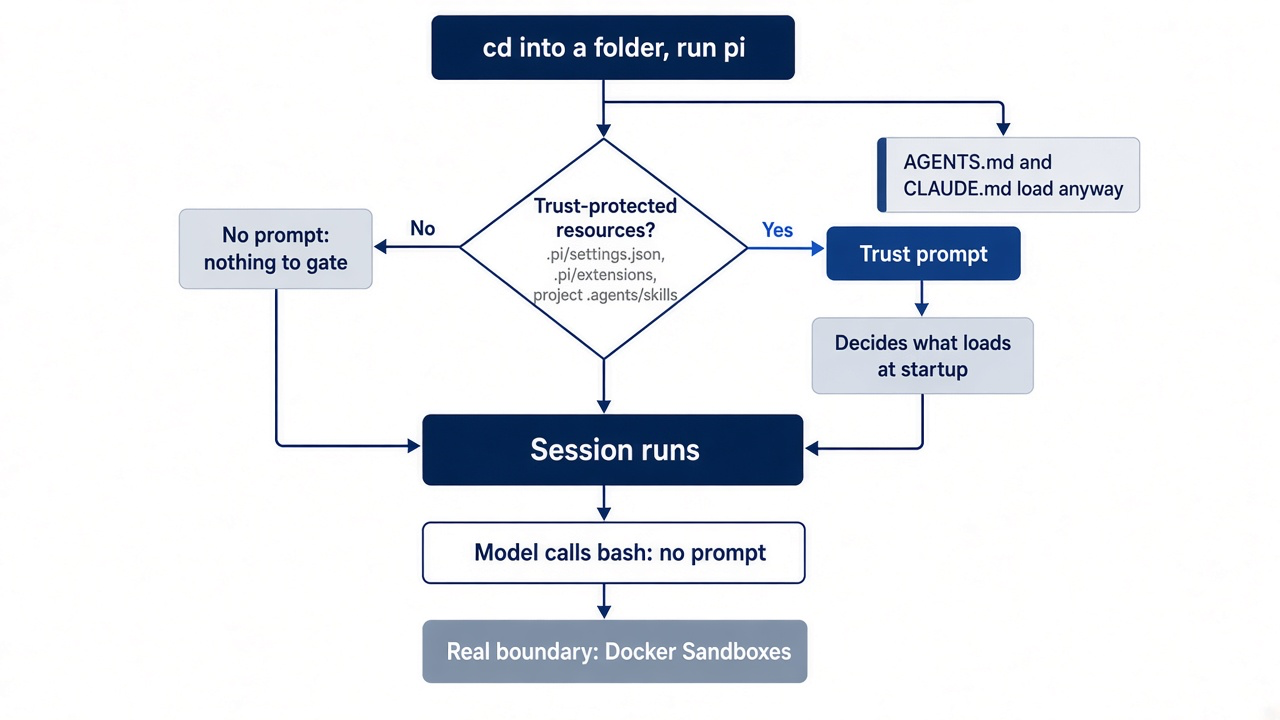
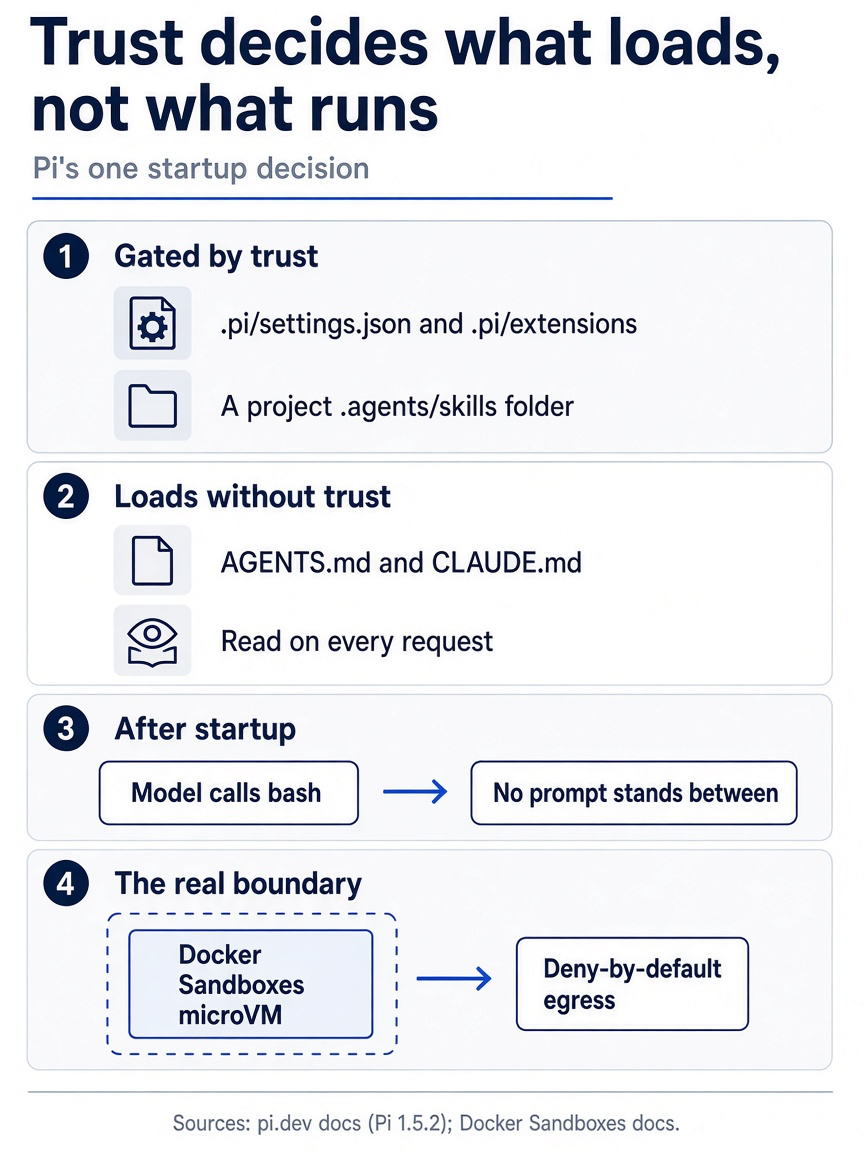
Trust decides what loads, not what runs. A folder splits into what trust gates, what loads without it, and what happens after startup, when tool calls get no prompt. The one real boundary for tool calls is a Docker Sandboxes microVM with deny-by-default egress.
Install and update
One installer, one update command, and one check that proves which copy runs.
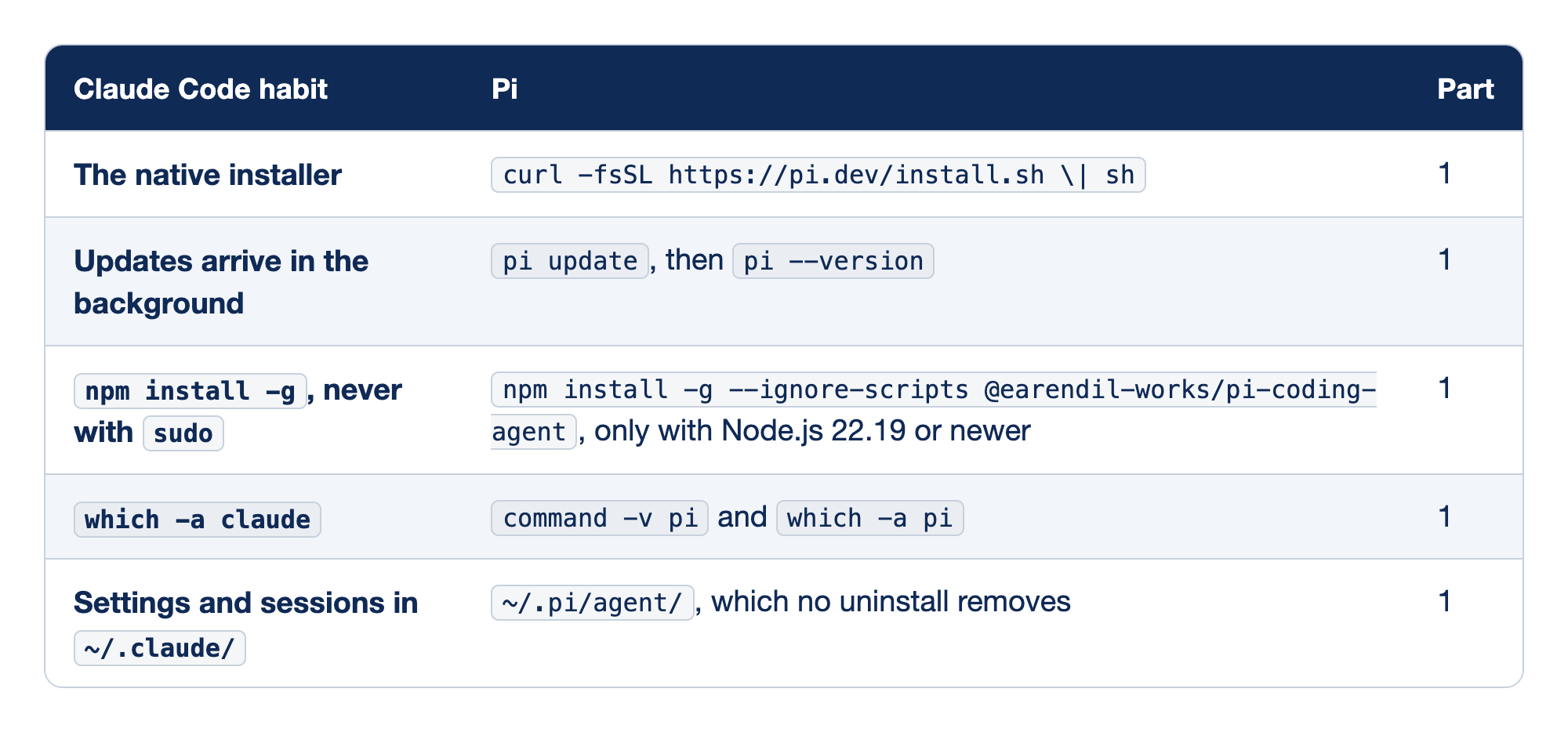
Each row pairs a Claude Code install or update habit with the Pi command for the same job, and the last column names the part that taught it.
Read the table as one decision. The installer is the default on a MacBook Pro and on Linux. The npm route is for readers who already manage Node.js, and it replaces the installer rather than joining it, because two routes give you two copies of Pi.
- The installer. It pins every dependency, and it is the route this series assumes. Claude Code's native installer becomes
curl -fsSL https://pi.dev/install.sh | sh. Native Windows usespowershell -c "irm https://pi.dev/install.ps1 | iex"instead, and WSL runs the Linux script inside the distribution. - Updating. Claude Code updates itself; Pi waits for you. Background updates become
pi update, followed bypi --version.pi update --alladds installed packages, and the version check proves the update landed on the copy your shell runs. - npm. Use it only if Node.js already belongs to you and
node --versionreports 22.19 or newer.npm install -gbecomesnpm install -g --ignore-scripts @earendil-works/pi-coding-agent, and only with Node.js 22.19 or newer.--ignore-scriptsskips lifecycle scripts that Pi does not need. The npm route does not pin transitive dependencies, which is why it is not the default. - Which copy. One line from
which -a piis the goal.which -a claudebecomescommand -v piandwhich -a pi. Two lines mean two copies, and an update that lands on the second one is Part 1's opening failure. - Pi's home. Pi never touches
~/.claude/. Settings and sessions move from~/.claude/to~/.pi/agent/, which no uninstall removes. The installer's uninstall, which you reach by running it again and choosing Uninstall Pi, leaves~/.pi/agent/in place with your settings, sessions, andauth.json.
Start, resume, and print mode
The folder you launch from is configuration in Pi, so every row starts with cd.
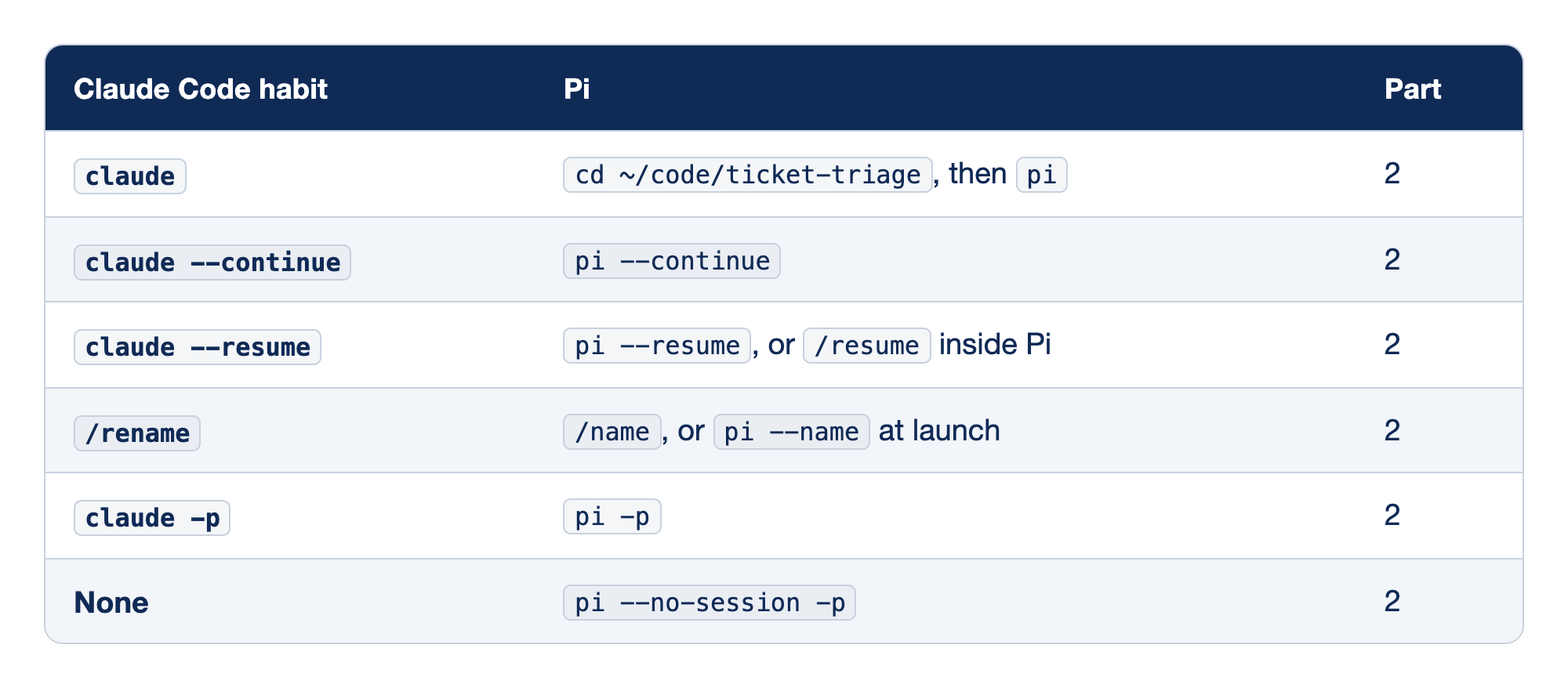
Each row pairs a Claude Code launch habit with its Pi form, and every Pi form runs from the project folder.
The commands carry over almost letter for letter. What changes is how much the working folder decides. Pi uses it to find context files, to check project trust, to resolve @ paths, and to group sessions. Each session records its folder once and never changes it.
pi. Read the startup header before the first prompt; it lists the context files and resources Pi loaded.claudebecomescd ~/code/ticket-triage, thenpi.--continue. Opens the most recent session for the current directory.claude --continuebecomespi --continue. From the wrong folder it finds the wrong session or none.--resume. Opens the picker; pressTabin it to include other directories.claude --resumebecomespi --resume, or/resumeinside Pi. A session you pick runs in its own working directory, not the one you launched from./name. The same habit under a new word./renamebecomes/name, orpi --nameat launch. Part 11's Going deeper namedcrushed-mug-waterat launch withpi --name.-p. Runs the prompt, writes the final answer to standard output, and exits.claude -pbecomespi -p. Part 2's path check and Part 11's unattended run both depend on it.--no-session. An ephemeral run that never reaches the picker, for checks and side questions that are not worth resuming. Claude Code has no twin forpi --no-session -p.
Part 2's path check is the print-mode line worth keeping.
cd ~/code/ticket-triage
pi --no-session -p "In one sentence, name this folder and the test command in package.json."
An answer that names ticket-triage and npm test proves the install, the credential, and the network in one run.
Trust and permissions
Pi has one startup decision and no per-call approval, so this table maps a two-layer habit onto a one-layer tool.
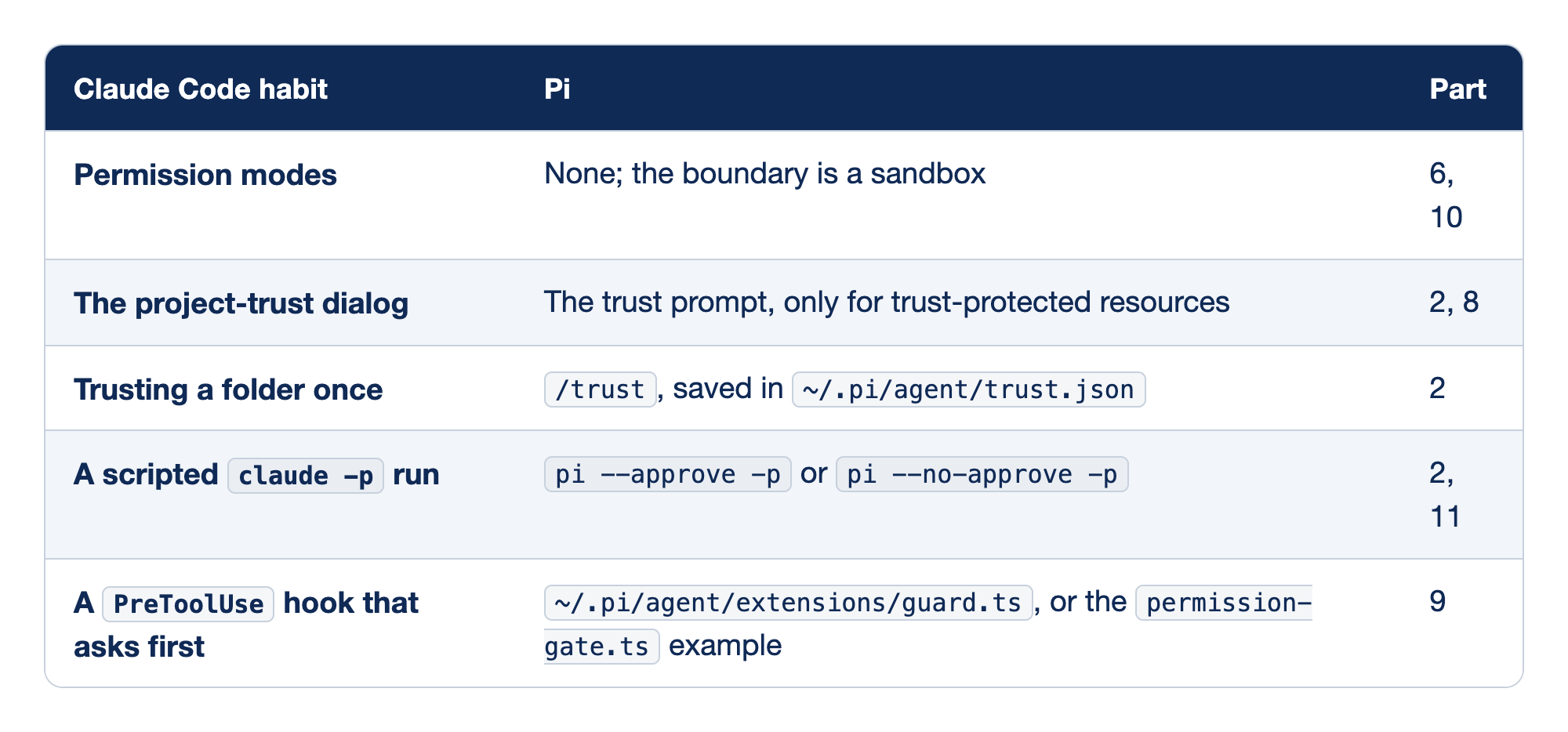
Each row pairs a Claude Code safety habit with what Pi offers in its place, and the last column names the parts that taught it.
Read the first row before the rest. Pi runs with the permissions of the account that started it and does not ask before a tool call. Every other row decides what loads at startup or what one extension blocks, and none of them limits what a tool call can reach.
- Permission modes. Pi has none, which is why
Shift+Tabis free for another job. Claude Code's permission modes have no Pi twin, and a sandbox is the boundary instead. Part 10 moved Pi into Docker Sandboxes for anything unattended or untrusted. - The trust prompt. Ticket Triage started silently until Part 8 added
.agents/skills/ship/. Claude Code's project-trust dialog becomes Pi's trust prompt, which appears only for trust-protected resources. This is the third misfire above. /trust. Saves a decision for future Pi processes. Trusting a folder once becomes/trust, saved in~/.pi/agent/trust.json. The closest saved decision to the working directory wins, so a "Trust" saved on~/codecovers every repository under it.- Scripted runs. Print, JSON, and RPC modes cannot show the prompt. A scripted
claude -prun becomespi --approve -porpi --no-approve -p.--approveloads theshipskill for Part 11's unattended run;--no-approveskips it for one run and still loadsAGENTS.md. - A hook that asks.
guard.tsasks withctx.ui.confirmand returns{ block: true, reason }when you decline. APreToolUsehook that asks first becomes~/.pi/agent/extensions/guard.ts, or thepermission-gate.tsexample. It is a string match, not a boundary, and it cannot ask in print mode. Thepermission-gate.tsexample covers more patterns thanrm -rf.
Keys
Most keys keep their meaning, two change it, and one new key fills a gap Claude Code never had.
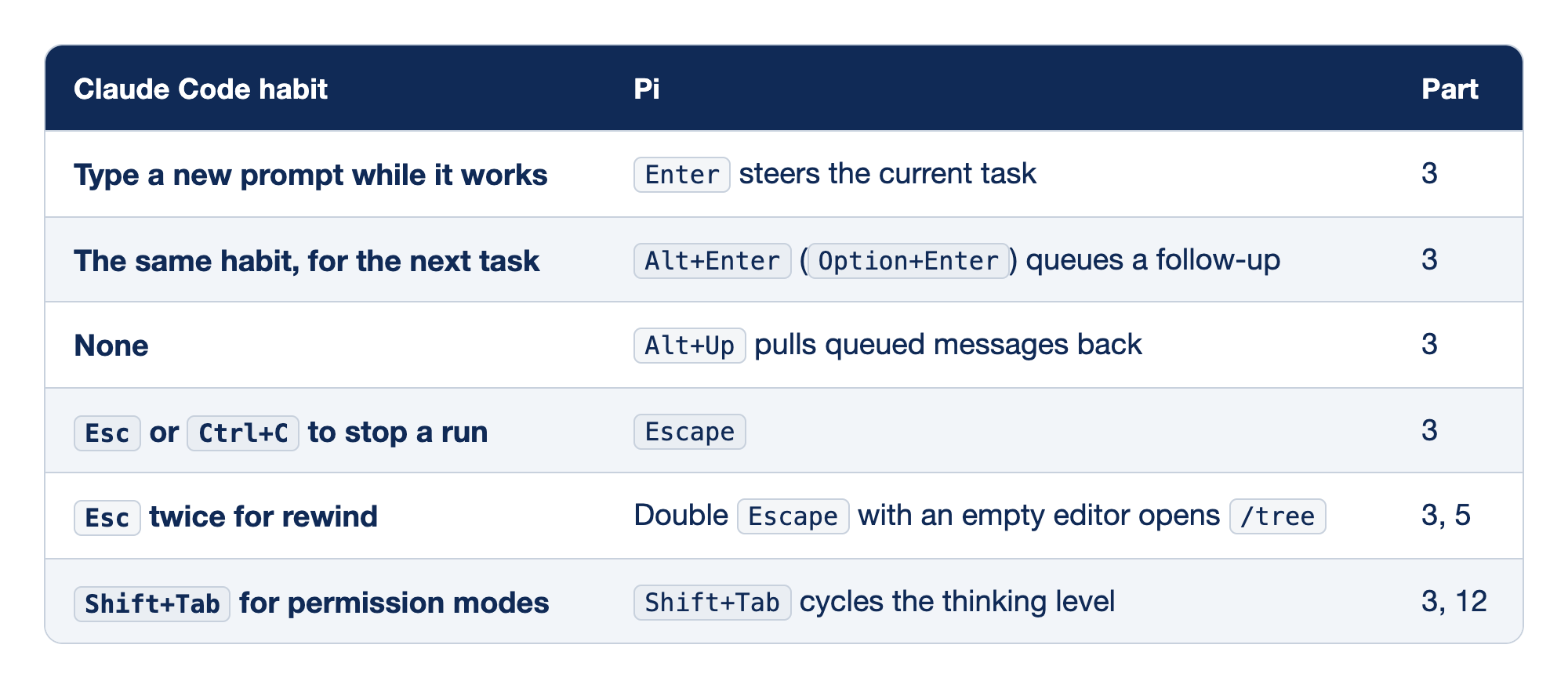
Each row pairs what your fingers do in Claude Code with the Pi key for the same intent, or with the key that now sits where the old one was.
Every key here follows from Pi's loop, where your words land only at the gap between turns. Only Escape stops work already in motion.
Enter. While Pi works, the message waits for the current response and all of its tool calls, then guides the next response. Typing a new prompt while Claude Code works becomesEnter, which steers the current task in Pi. When Pi is idle, it submits a prompt.Alt+Enter. The message waits until the whole task finishes, which is how Part 3 queued the test update behind the classifier change. The same habit for the next task becomesAlt+Enter, orOption+Enter, which queues a follow-up.Alt+Up. Returns queued text to the editor without stopping the run. Claude Code has no twin forAlt+Up, which pulls queued messages back.Escape. Stops the run and returns queued messages to the editor. Claude Code'sEscorCtrl+Cto stop a run becomesEscape. It does not undo an edit that already landed, so checkgit status --short.Ctrl+Cclears the editor in Pi, and a second press exits.- Double
Escape. It runs thedoubleEscapeActionsetting, which defaults to"tree". PressingEsctwice for rewind becomes a doubleEscapewith an empty editor, which opens/tree. It looks like Claude Code's rewind, but it restores no files. Shift+Tab. The second misfire above.Shift+Tabfor permission modes becomesShift+Tabfor the thinking level. Glance at the editor border for the level, or set it with/thinking.
On Linux and WSL: Linux keeps the macOS keys. WSL and native Windows queue a follow-up with Ctrl+Q and restore queued messages with Alt+Q, because Windows Terminal binds Alt+Enter to fullscreen. When a key seems to do nothing, run /hotkeys to see what Pi actually receives.
Context and shell
Pi gives you gauges instead of a breakdown, and a second shell prefix Claude Code does not have.
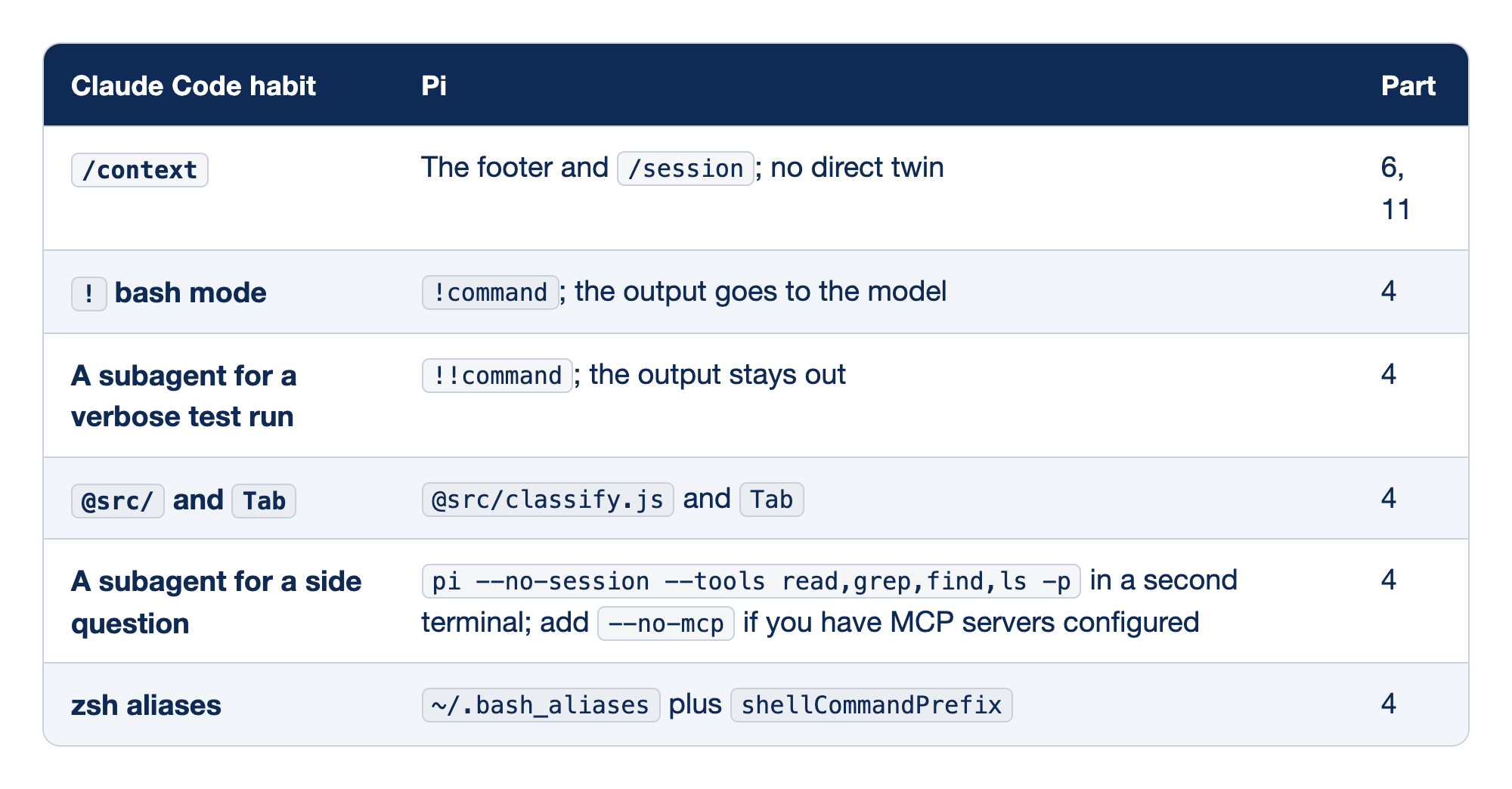
Each row pairs a Claude Code context or shell habit with the Pi move that does the same job.
The table serves one question you ask before you press Enter: does the model need to read this output? Usually it does not, and !! is the right prefix.
/context. Pi has no category grid. Claude Code's/contexthas no direct Pi twin, and the footer and/sessiondo its job. The footer shows context usage live, and/sessionshows the session file, message count, tokens, and cost.!. The same move as Claude Code's bash mode: the output joins your next prompt. Claude Code's!bash mode becomes!command, and the output goes to the model. Use it for the one failure the model must read, such as!npm test.!!. Runs the command and keeps the output out of the model's context, though not out of the session file. A subagent for a verbose test run becomes!!command, and the output stays out.!!npm testis the default for a green check.@path. Puts exactly one file into your message, resolved from the working folder.@src/andTabbecome@src/classify.jsandTab.- The side question. Pipe a long log into a throwaway Pi with read-only tools, and paste back only the answer. A subagent for a side question becomes
pi --no-session --tools read,grep,find,ls -pin a second terminal. A plain--toolsallowlist keeps MCP tools, so add--no-mcpif you have MCP servers configured. Pi has no built-in subagents;subagent/exists as an example extension. - Aliases. Pi runs each command in non-interactive Bash, never zsh. Your zsh aliases become
~/.bash_aliasesplusshellCommandPrefix. Copy the aliases you need into~/.bash_aliases, setshellCommandPrefixin~/.pi/agent/settings.json, and run/reload.!and!!stay on Bash even when native Windows hands the modelpowershell.
Part 4's form of the side question is worth keeping.
npm test 2>&1 | pi --no-session --tools read,grep,find,ls -p "Summarize any failing tests in two sentences."
The log fills a throwaway window, and your main session pays only for what you paste back. A plain --tools allowlist keeps MCP tools, so add --no-mcp if you have MCP servers configured.
Sessions and branching
This is the table to pin, because its first row is the most expensive misfire in the series.
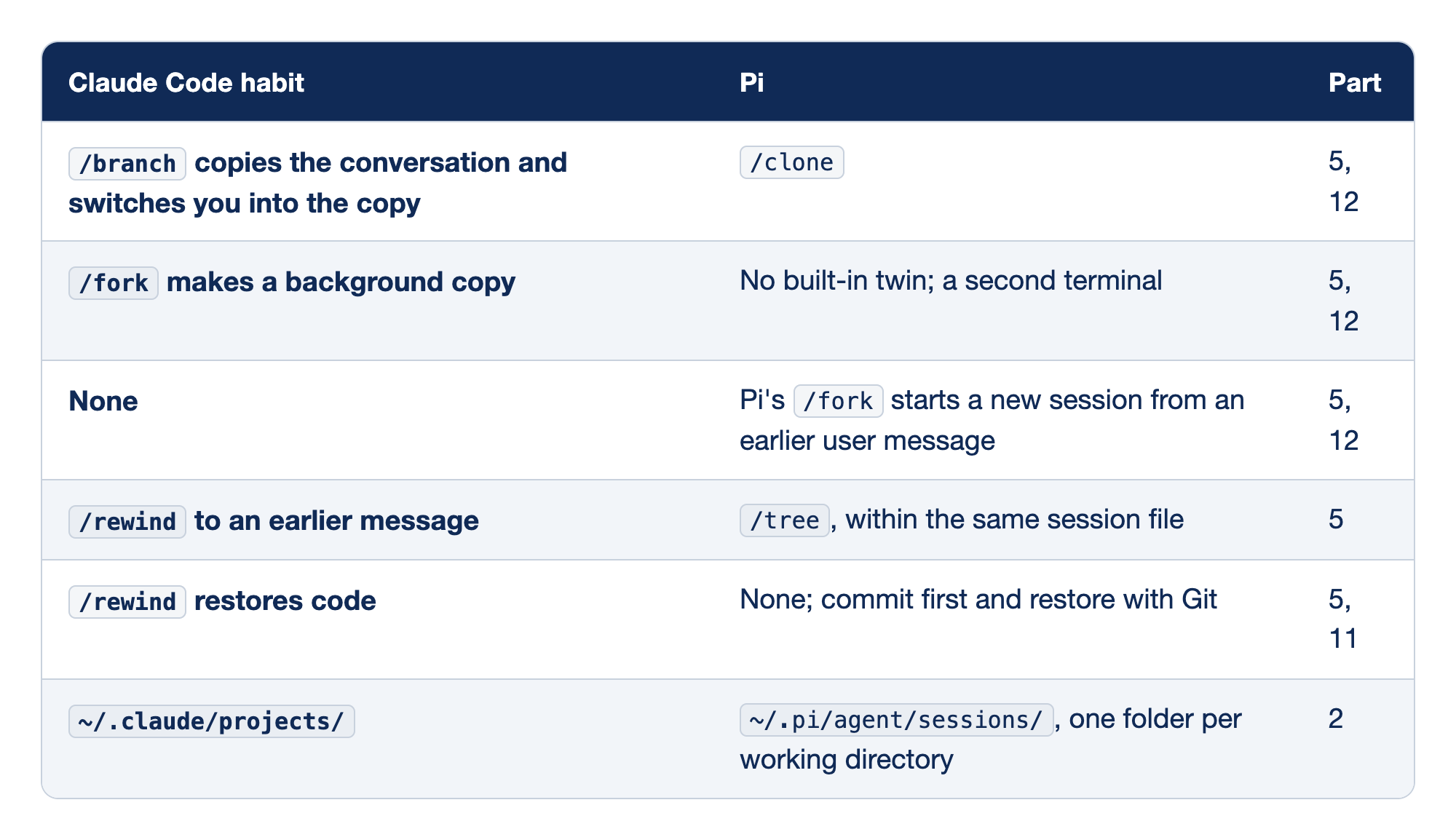
Each row pairs a Claude Code branching, rewind, or storage habit with the Pi command or folder that does the same job.
A Pi session is a tree of entries in one JSONL file, and only the active branch goes to the model. Before you branch, ask two questions: do you want a new file, and where in the history should the new work start?
/clone. Copies the active branch at its current position into a new session, the job Claude Code's/branchdoes. Part 5 cloned the word-table winner intocrushed-mug-table.- Claude Code's
/fork. Current Claude Code treats/branchand/forkas separate commands. Its/forkcopies the conversation into a background session while you keep working in the original. Pi has no background session, so a second terminal with its ownpisession is the closest match. - Pi's
/fork. A new session whose history stops before the user message you pick, with the original left alone.pi --fork <id>copies a whole saved session into a new session in the current directory at launch, socdinto the project first. Use/forkinside Pi to pick an earlier message. /tree. Select a user message, edit it, and submit, and you have a sibling branch in the same file./rewindto an earlier message becomes/tree, within the same session file. Part 5 kept thekeyword-listandword-tableattempts side by side this way and labeled each withShift+L.- File restore.
/treemoves the conversation and never the files. Claude Code's/rewindfor code has no Pi twin, so you commit first and restore with Git. Commit with!!git add -A && git commit -m "..."before you branch, and usegit stashbetween attempts. - Where sessions live. One folder per working directory.
~/.claude/projects/becomes~/.pi/agent/sessions/. Deleting a session in the picker deletes conversation, not code.
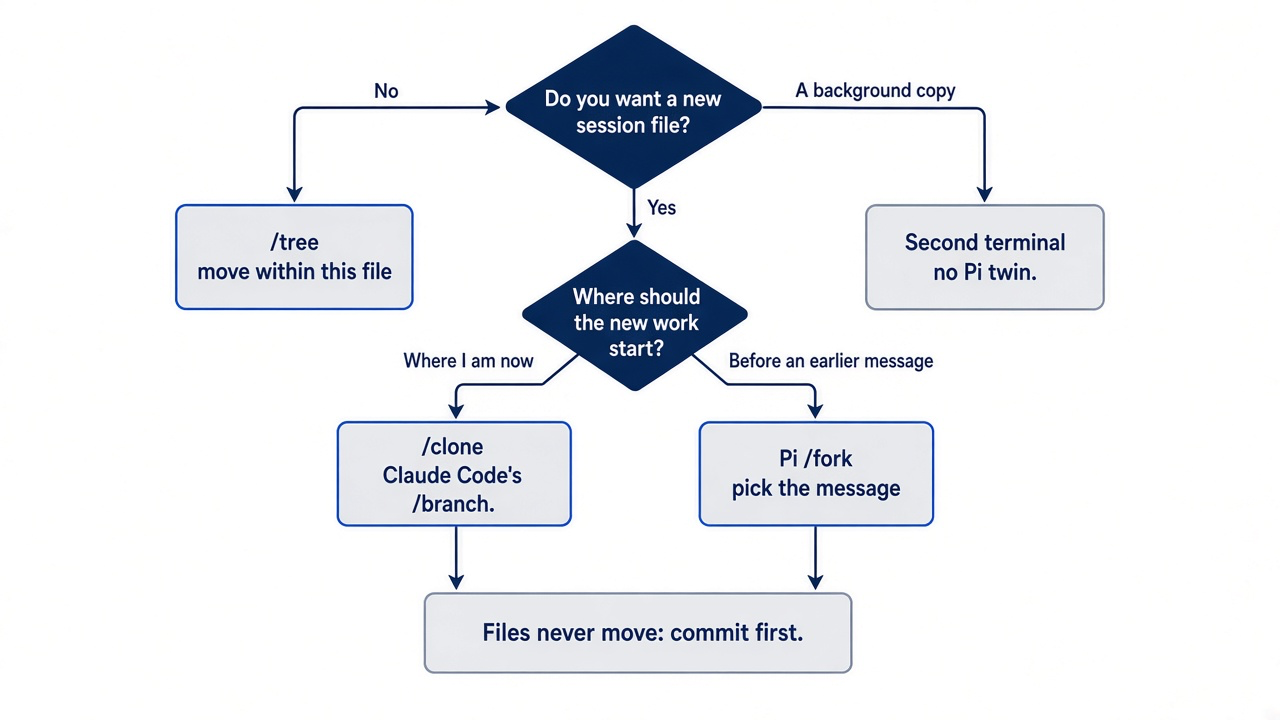
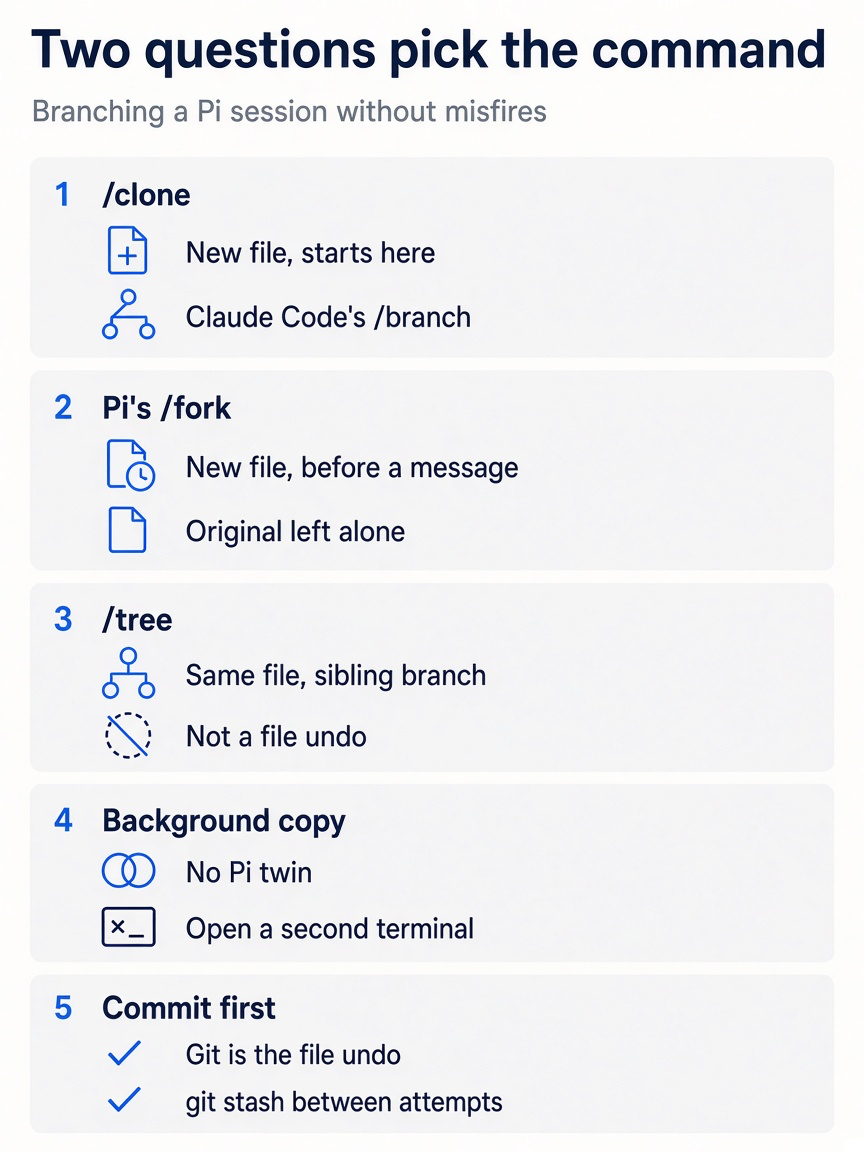
The four branching moves differ in the file each produces and where its history starts, and one rule covers all of them: Git is the file undo, so commit before you branch.
Memory and rules
Your CLAUDE.md already works in Pi; what changes is where personal rules live and how you confirm a file loaded.
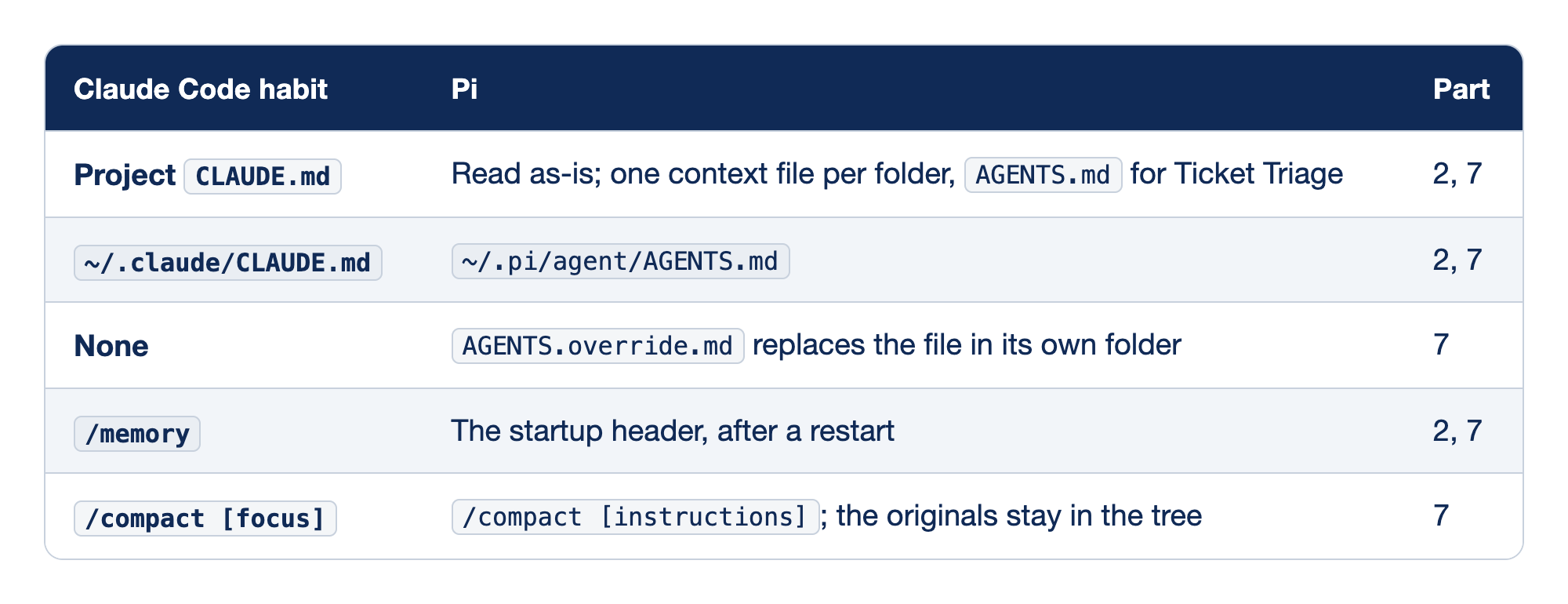
Each row pairs a Claude Code memory habit with the Pi file or command that replaces it.
Part 7 gave the test for every row: would this instruction be correct in a session about something else entirely? If so, it goes in a context file, which arrives intact on every request. If not, it goes in your /compact instructions.
- Project rules. Pi loads
AGENTS.mdorCLAUDE.mdfrom the working folder and every parent, without trust. A projectCLAUDE.mdis read as-is, with one context file per folder, and Ticket Triage usesAGENTS.md. Part 7 renamed Ticket Triage's file withgit mv CLAUDE.md AGENTS.mdand cut it to three lines, and Part 11's Going deeper added a fourth. The docs do not say which file wins when both sit in one folder, so keep one. Claude Code v2.1.277 and later readsAGENTS.mditself. For an older Claude Code, import it with a.claude/CLAUDE.mdthat holds one line,@../AGENTS.md. The import path is relative to.claude/. - Personal rules. Pi never reads
~/.claude/CLAUDE.md.~/.claude/CLAUDE.mdbecomes~/.pi/agent/AGENTS.md. Rules you want in every project go in~/.pi/agent/AGENTS.md. - Overrides.
AGENTS.override.mdreplacesAGENTS.mdorCLAUDE.mdin its own folder only; files from other folders still load. Claude Code has no twin forAGENTS.override.md. - Confirming. Pi has no
/memory./memorybecomes the startup header, read after a restart./reloadmakes the next request carry an edited file, and the header, drawn at startup, shows which file loaded. - Compaction. The same idea, with instructions.
/compact [focus]becomes/compact [instructions], and the originals stay in the tree. Pi compacts on its own when free context drops belowreserveTokens(16384 by default) and keeps aboutkeepRecentTokens(20000) of recent history. Name the decision and the failing test yourself before it chooses for you.
Extending
Pi replaces four separate Claude Code features with one ladder, and you climb only as far as the job needs.
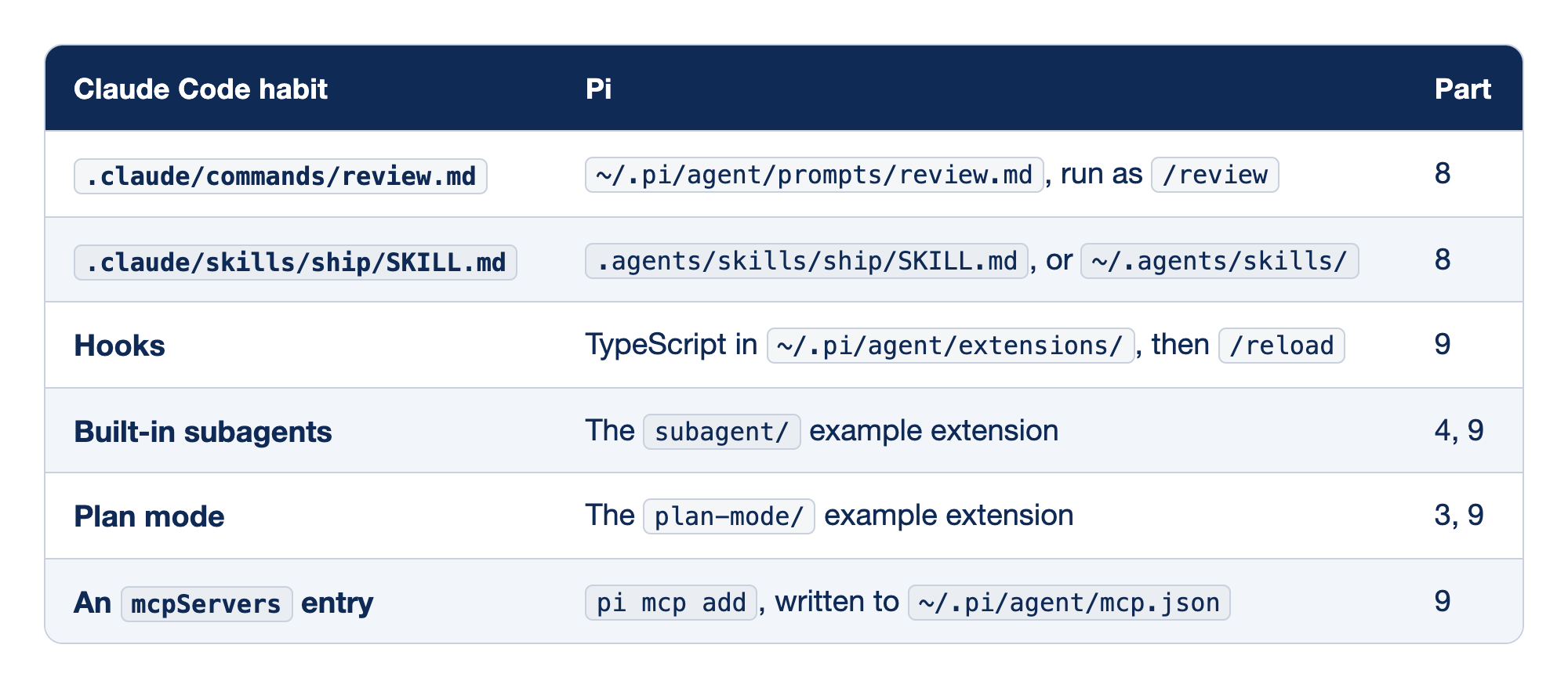
Each row pairs a Claude Code extension feature with the rung of Pi's ladder that does the same job.
Pi's quickstart states the rule: start with the least powerful mechanism that meets the need. A rule comes first, then a template, a skill, and an extension, and each step adds power and something to review.
- Templates. The filename is the command.
.claude/commands/review.mdbecomes~/.pi/agent/prompts/review.md, run as/review.${1:-default}gives/reviewa fallback, and a focus with a space needs quotes, as in/review "error handling". Project templates in.pi/prompts/need trust. - Skills. Only the name, description, and path enter the system prompt until the model reads
SKILL.md, so the description must say what and when..claude/skills/ship/SKILL.mdbecomes.agents/skills/ship/SKILL.md, or a skill under~/.agents/skills/./skill:shipforces it. A project.agents/skillsis what made Ticket Triage's trust prompt appear, while~/.agents/skills/loads everywhere without one. Pi's documented locations do not include.claude/skills/. - Hooks.
PreToolUsebecomes thetool_callevent andPostToolUsebecomestool_result. Hooks become TypeScript in~/.pi/agent/extensions/, followed by/reload. Extensions run inside the Pi process with your permissions, so trial one withpi -ebefore it goes into the auto-discovery folder. - Subagents. Not built in. Built-in subagents become the
subagent/example extension. The example delegates tasks to subagents with isolated context windows, and Part 4's!!andpi -pcover the small cases. - Plan mode. Not built in. Plan mode becomes the
plan-mode/example extension. The example adds a read-only/plancommand with step tracking. - MCP. Pi's
mcp.jsonuses the samemcpServersformat, so an existing entry pastes straight in. AnmcpServersentry goes in withpi mcp add, which writes to~/.pi/agent/mcp.json.--localwrites the trust-gated.pi/mcp.json, and/mcpmanages servers in a session.
The sandbox entry point
One command stands where the permission prompt used to be, and one rule keeps it honest.
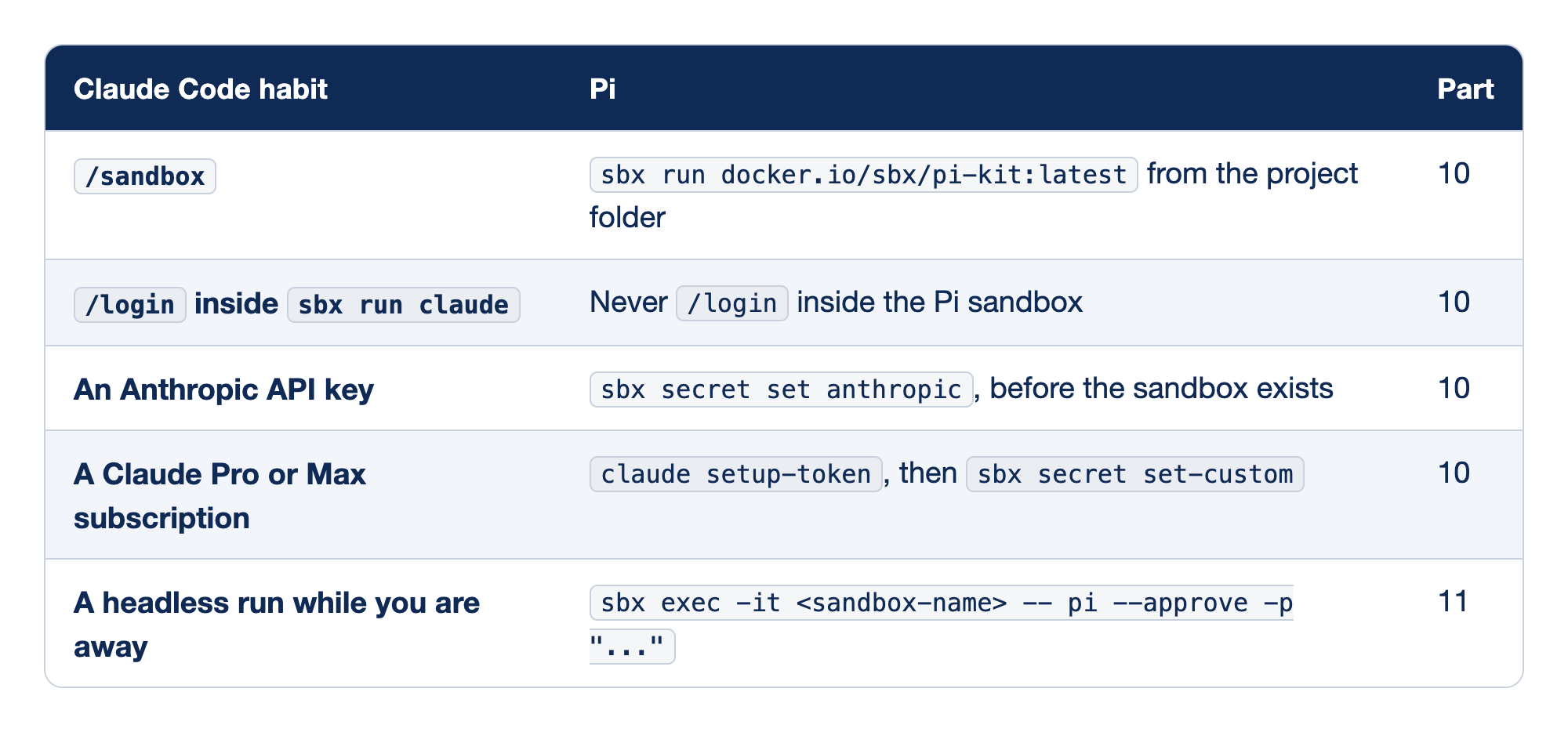
Each row pairs a Claude Code sandbox habit with the Pi and sbx command that replaces it.
Every row keeps the real credential on the Mac and the agent inside a microVM with deny-by-default egress. On a Mac, Docker Sandboxes needs macOS Sonoma 14 or later on Apple silicon, and it does not need Docker Desktop. Docker Sandboxes also supports Windows 11 and Ubuntu 24.04 or later.
- Launch. With no path argument,
sbx runmounts the current folder at its Mac path, so!pwdprints/Users/you/code/ticket-triage./sandboxbecomessbx run docker.io/sbx/pi-kit:latest, run from the project folder. Both launch forms from Part 10 start the sandbox onsbxv0.54.0. The--kitform prints a deprecation warning, so use the positional form. If a later release rejects one, checksbx run --helprather than guessing. /login. Claude Code's sandboxed agent signs in through a flow that keeps the token on the host. Using/logininsidesbx run claudehas no Pi version, because you never run/logininside the Pi sandbox. Pi's/loginwrites a real token into the VM's~/.pi/agent/auth.json, where the agent can read it.- API key. Path A from Part 10: paste the key at the prompt, never on the command line. An Anthropic API key goes in with
sbx secret set anthropic, before the sandbox exists. Credentials bind at create time, so the safe rule after any credential change is tosbx rmthe sandbox and create it again. - Subscription. Path B: a subscription token is not an API key, so it goes in as a custom secret, after you remove any
anthropicservice secret. A Claude Pro or Max subscription goes in withclaude setup-token, thensbx secret set-custom. Skipping the removal sends two auth headers and earnsAPI key is invalid. - Unattended.
--approvemakes the trust decision explicit for print mode. A headless run while you are away becomessbx exec -it <sandbox-name> -- pi --approve -p "...". Check the credential first, and review withgit status,git diff, andls -la .git/hooks/when the run returns.
Path B is the one sequence in this chapter worth copying exactly, from Part 10. This guide did not run it.
claude setup-token
sbx secret ls
sbx secret rm anthropic
sbx secret set-custom \
  --host api.anthropic.com \
  --env ANTHROPIC_OAUTH_TOKEN \
  --placeholder 'sk-ant-oat01-{rand}'
Run the rm line only if sbx secret ls shows an anthropic row, and paste the token when set-custom asks. Then create the sandbox and check it from a second terminal.
sbx exec -it <sandbox-name> -- pi -p "reply with the word ok"
You want ok. Keep -it; on v0.54.0, pi -p through sbx exec without it printed nothing and never ended. Inside the kit, pi auth check prints ready even with no credential. On an Intel Mac or older macOS, plain Docker exposes the key that you pass in. Gondolin needs Node.js 23.6 or newer and QEMU, and it is not a credential boundary.
What has no Pi name
Some Claude Code habits have no Pi command at all, and an honest map says so instead of inventing a twin.
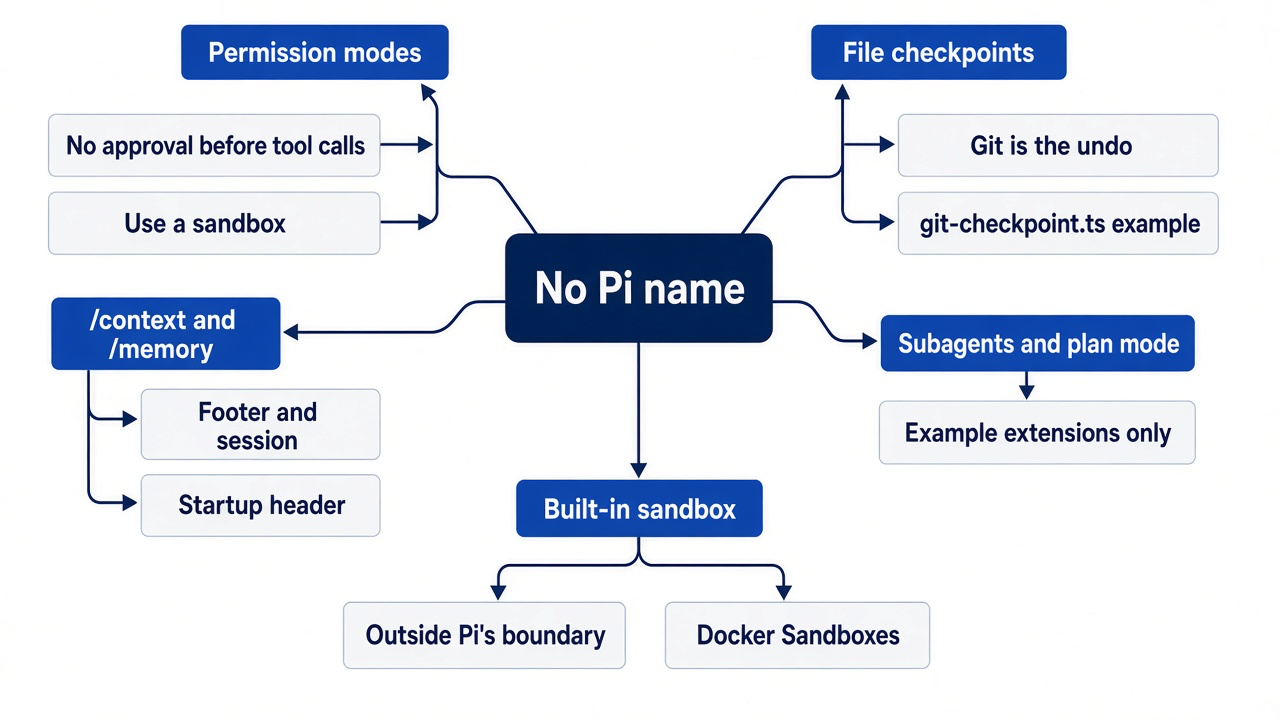
- Permission modes. Pi does not ask before a tool call. The replacement is the sandbox above.
- File checkpoints. No Pi command restores files. Git is the undo. The
git-checkpoint.tsexample extension creates stash checkpoints at each turn for code restoration on/fork, if you want that automated. /contextand/memory. Neither appears in Pi's built-in command list. The footer,/session, and the startup header do their jobs in pieces.- Built-in subagents and plan mode. Both exist only as example extensions you load yourself.
- A built-in sandbox. Pi's security policy lists the lack of one as generally outside its security boundary, so
/sandboxhas no Pi twin.
If a later Pi release adds any of these, the / command menu is the exact reference for your session.
Glossary
The glossary lists every command, flag, key, file, and term that a Start here section used, in the order of the part that introduced it. The part number is the day.
Shell commands and flags
pi(Part 1). Starts Pi in the current folder, with a new session.curl -fsSL https://pi.dev/install.sh | sh(Part 1). Downloads and runs Pi's installer.pi --version(Part 1). Prints the installed Pi version.pi auth login anthropic --api-key(Part 1). Saves an API key for one provider in~/.pi/agent/auth.json, then exits.pi auth check --provider anthropic(Part 1). Printsreadywhen a key is saved for that provider; it does not prove that the key works.pi auth logout anthropic(Part 1). Removes the stored credential for that provider.-p(Part 1). Print mode: Pi runs one prompt, prints the final answer, and exits.--tools read,grep,find,ls(Part 1). Limits the model to the listed tools for one run.npm test(Part 1). Runs Ticket Triage's tests.git init,git add,git commit(Part 1). Start a repository, stage changes, and record them.pi --continue(Part 2). Opens the most recent session for the current folder.--no-session(Part 2). Runs Pi without saving a session, for checks and side questions.git status --short(Part 2). Lists changed files, one per line; no output means a clean tree.git diff,git diff --stat(Part 3). Show the changes in the working tree, in full or as a summary.git checkout -- src test(Part 3). Throws away uncommitted changes in those folders.git log --oneline -1(Part 4). Prints the last commit on one line.-q(Part 4). Ongit commit, keeps Git's own summary out of the output.perl -pi -e(Part 4). Edits a file in place with one substitution.pi --resume(Part 6). Opens a picker of saved sessions.git mv(Part 7). Renames a file and keeps its Git history.git diff --staged(Part 8). Shows only the changes staged withgit add.-e,--extension(Part 9). Loads one extension file for one run.brew trust docker/tap,brew install docker/tap/sbx(Part 10). Let Homebrew accept Docker's tap, and install thesbxcommand line.sbx version,sbx login(Part 10). Print thesbxversion, and sign in to Docker.sbx secret set anthropic,sbx secret ls(Part 10). Store the API key on the Mac, and list stored credentials without their values.sbx run docker.io/sbx/pi-kit:latest(Part 10). Creates a sandbox for the current folder from the Pi kit and starts Pi in it.sbx ls,sbx stop(Part 10). List sandboxes and their status, and stop one.sbx exec -it <name> -- <command>(Part 10). Runs a command inside a sandbox, with your terminal attached.
Commands inside Pi
/quit(Part 1). Ends Pi./session(Part 2). Shows the session's name, file, ID, message count, tokens, and cost./name(Part 2). Names the current session./hotkeys(Part 3). Lists the keys Pi receives.!command(Part 4). Runs a shell command and sends its output to the model.!!command(Part 4). Runs a shell command and keeps its output out of the model's context.@path(Part 4). Puts one file into your message./tree(Part 5). Opens the session tree, to move to an earlier message in the same session file./clone(Part 5). Copies the active branch into a new session./compact(Part 7). Summarizes older messages, with optional instructions about what to keep./reload(Part 7). Reads settings, context files, and resources again without a restart./review(Part 8). Your prompt template from~/.pi/agent/prompts/review.md./skill:ship(Part 8). Makes the model read and follow theshipskill now./fork(Part 12). Starts a new session from an earlier user message that you pick./thinking(Part 12). Opens the thinking level picker.
Keys
Enter(Part 1). Sends a prompt; while Pi works, it steers the current task (Part 3).Alt+Enter,Option+Enter(Part 3). Queues a message until the whole task finishes.Alt+Up,Option+Up(Part 3). Pulls queued messages back into the editor.Ctrl+Q,Alt+Q(Part 3). The queue and restore keys on WSL and native Windows.Escape(Part 3). Stops the current run.Ctrl+C(Part 3). Clears the editor; a second press exits.Tab(Part 4). Completes a path after@.Ctrl+O(Part 7). Expands or collapses a collapsed entry, such as a compaction summary or tool output.Up,Down(Part 9). Move the selection in a picker or a dialog, such as the guard'sYesandNo.Shift+Tab(Part 12). Cycles the thinking level.Ctrl+S(Part 12). In the/thinkingpicker, makes the selected level the startup default.
Files, folders, and labels
~/.pi/agent/auth.json(Part 1). Pi's stored credentials.AGENTS.md,CLAUDE.md(Part 2). Context files: project rules that Pi sends with every request.[Context](Part 2). The header line that lists the context files Pi loaded..pi/settings.json(Part 2). Project settings; a file like this makes Pi show the trust prompt.~/.pi/agent/settings.json(Part 7). Pi's user settings, such ascompaction.keepRecentTokens.[compaction](Part 7). The transcript entry that holds a compaction summary.~/.pi/agent/prompts/(Part 8). The folder for your prompt templates..agents/skills/(Part 8). The project skill folder that Pi and other tools read.~/.pi/agent/trust.json(Part 8). Your saved trust decisions, one per folder.~/.pi/agent/extensions/(Part 9). The auto-discovery folder; Pi loads every extension in it in every project.~/pi-lab/(Part 9). This series' scratch folder, outside any repository.[Extensions](Part 9). The header line that lists loaded extensions.guard.ts(Part 9). This series' extension that asks before anybashcommand that containsrm -rf.tool_call(Part 9). The extension event that fires before Pi runs a tool, early enough to block it.ctx.ui.confirm(Part 9). The extension call that shows a Yes or No dialog and waits for your answer.[Skills](Part 10). The header line that lists loaded skills.~/.config/sbx/credentials.yaml(Part 10). Your approvals for a kit's use of stored credentials; it holds no key.[Prompts](Part 11). The header line that lists loaded prompt templates.
Terms
- Session (Part 1). One conversation with Pi, saved as a file.
- Tool call (Part 1). One use of a tool, such as
readorbash, by the model. - Token (Part 1). The unit in which models count text and price requests.
- Header (Part 2). The block Pi prints at startup with the files and resources it loaded.
- Footer (Part 2). The lines under the editor with the folder, branch, session name, tokens, cost, context use, model, and thinking level.
- Context file (Part 2). A file such as
AGENTS.mdthat Pi puts into every request. - Editor (Part 2). Pi's input box.
- Transcript (Part 2). The visible record of the session above the editor.
- Steer (Part 3). A message sent while Pi works, which guides the next response.
- Queue (Part 3). A message that waits until the whole task finishes.
- Session tree (Part 5). The branches of one session file; only the active branch goes to the model.
- Context window (Part 6). The most text the model can read in one request.
- System prompt (Part 7). The text Pi sends at the start of every request: Pi's instructions plus your context files.
- Compaction (Part 7). Replacing older messages with a summary, while keeping recent ones word for word.
- Trust prompt (Part 8). Pi's question about loading a folder's protected resources; it is not a permission mode.
- Prompt template (Part 8). A Markdown file that becomes a slash command.
- Skill (Part 8). A folder with a
SKILL.mdthat the model reads when its description matches the task. - Extension (Part 9). TypeScript code that runs inside Pi and can react to events, such as a tool call.
- Docker Sandboxes,
sbx(Part 10). Docker's product that runs an agent inside a microVM, and its command line. - MicroVM (Part 10). A small virtual machine with its own Linux kernel.
- Kit (Part 10). A package that tells
sbxwhich agent to run and which hosts it needs. - Sentinel (Part 10). The stand-in value,
proxy-managed, that the sandbox sees in place of your key. - Thinking level (Part 12). How much the model reasons before it answers.
Do this today
Everyone
-
Confirm the copy. The footer shows
crushed-mug-copy, the newest session. Type/quit.pi --continue -
Read your three lines. The command prints them.
cat ~/pi-lab/renames.txt -
Check the tree. The first command prints nothing, and
npm testends withpass 7.git status --short npm test
If you read Going deeper
These steps use your own repository and keyboard, so this guide did not run them as written. Start here ran /fork, /clone, /session, Shift+Tab, and /thinking on Ticket Triage.
-
Pin the sessions table. Copy its first three rows onto a card beside your keyboard, in the words you will actually read.
/clone copy this session where it stands /fork new session from an earlier message /tree move within this session file -
Fire
/forkon purpose. In a Pi session on your own repository, type it, look at the message list, and pressEscape. Then run the command you meant and confirm the new file./fork /clone /session -
Press
Shift+Tabonce and put it back. Watch the editor border change, then set the level you want directly./thinking -
Predict a trust prompt, then script one. In a repository you did not write, read the context files and look for protected resources, then make the decision explicit for one print-mode run.
cat AGENTS.md CLAUDE.md 2>/dev/null
ls -a .pi .agents 2>/dev/null
pi --no-approve --no-session --tools read,grep,find,ls -p "List the skills you can see."
--tools read,grep,find,lskeeps the model to read-only tools, because--no-approvestill loads the repository'sAGENTS.md. Pi does not load the repository's project skills for this run. The model can still find a skill file with its read-only tools, as Part 8 showed, so read its answer for how it found each skill. -
Prove one copy, then update it. Run the Part 1 check that keeps every row of this map pointing at the Pi you think you are running.
which -a pi
pi update
pi --version
A map is a boundary for your habits
Most of what you know from Claude Code carries into Pi intact. The context window is still the operating system, ! still sends output to the model, and your CLAUDE.md still loads. The danger is not the habits that changed their names; it is the three that kept their names, or their look, and changed their jobs. /fork puts you in the wrong session. Shift+Tab changes what every request costs. A silent start tells you nothing about safety.
Fire each one once, on purpose, while nothing depends on it, and write down what it did. Then keep the map for the rest. Decide what the agent sees, and put a boundary around what it can reach.
This is Part 12 of "Pi, Day to Day," a twelve-part guide to running the Pi coding agent with the same daily discipline you bring to Claude Code.