Activating Agent Skills at the Right Time with Agent RuleZ
Why skill activation should be event-driven, not manual; and how a policy engine becomes a skill switchboard. Mastering Context Engineering and Harness Engineering.
Originally published on Medium.
Why skill activation should be event-driven, not manual; and how a policy engine becomes a skill switchboard. Mastering Context Engineering and Harness Engineering.
If Your Agent Needs You to Remember Which Skill to Run, You Have Already Lost
Skills are powerful. You install them. You configure them. You forget they exist. Three weeks later you are writing a CDK construct by hand because you forgot your /cdk-construct skill was sitting right there. The agent did not remind you. Why would it? It does not know what you are about to do until you tell it.
This is not a configuration problem. It is a timing problem.
The difference between "knowing a skill exists" and "being reminded at the right moment" is the difference between a reference manual and a co-pilot. Reference manuals sit on shelves. Co-pilots tap your shoulder.
Most developers who use AI coding agents have experienced the skill gap firsthand. You install a skill for React components, another for database migrations, a third for CDK infrastructure. You list them in CLAUDE.md/AGENTS.md or your agent's configuration file. For the first few hours, everything works. The agent knows about the skills. It references them. It uses them.
Then the context window compacts, and the skills vanish.
By hour three of a long coding session, the static skill references you listed at the top of your configuration file have been summarized away. The agent does not know they exist anymore. You are back to doing the work manually, or worse, doing it in a way that contradicts the patterns your skills were supposed to enforce.
If you want the full architecture deep dive on Agent RuleZ (matchers, actions, event types, audit trails), read the anchor article: "Agent RuleZ: A Deterministic Policy Engine for AI Coding Agents." This article assumes nothing in particular, but if you want more information on the architecture design and implementation, read the first article -- it's the anchor for this series. The first article has details on all events, all matcher, etc.
Agent Skill Activation is a well known problem
Challenges with Skill Activation in AI Coding Agents
The Vercel Evaluation: 100% Reliability at a Scale Cost
In January 2026, Vercel published a study on how AI agents handle specialized knowledge, specifically Next.js 16 APIs. Their findings confirmed the "Skill Gap" is real: without explicit instructions, agentic skills were frequently overlooked. Even with explicit prompting, skill activation topped out at a 79% success rate.
Vercel's solution was to remove the decision point entirely. They embedded an 8KB compressed documentation index directly into AGENTS.md. This "passive context" approach achieved a 100% success rate.
It works because it bypasses the agent's need to "remember" to use a tool -- the information is already there. However, this creates an always-on overhead layer that competes with the actual work for prompt budget. For a single framework, an 8KB index is a reasonable tax. But in my current environment -- where I manage 88 distinct agentic skills -- loading even a fraction of those into a static file results in prompt-budget saturation.
Vercel's results show why passive context is reliable: it removes the decision point. But RuleZ provides a scalable alternative. It offers that same deterministic reliability by acting as a Governor, injecting the relevant context only at the moment it is needed, rather than forcing the agent to carry the weight of 80+ skills through every turn of the conversation.
This transition marks a fundamental shift from prompt engineering, the art of finding the "magic words" to coax a model into a specific behavior, to context engineering, and to provide event-driven guardrails for governance and context injection is harness engineering. In a high-scale environment with 80+ skills, you can no longer rely on a single, static prompt to carry the burden of your entire architectural standards. Instead, we are building a deterministic control plane that manages the agent's working memory in real-time. By placing programmatic guardrails around tool use and injecting precise context exactly when it's needed, we move away from hoping the model "chooses" the right path and toward a system where the right path is the only one available. This isn't just about making agents smarter; it's about engineering the environment so they cannot help but be accurate. When we shift to harness engineering and context engineering, we move beyond plain GenAI into building true agentic systems that ReAct to their environment with tactical precision.
Why Static Skill References Fail
Before we fix the problem, we need to understand why it exists. Static skill references fail for four compounding reasons, and understanding each one explains why event-driven activation is the only durable solution.
Context window compaction. Skills listed in CLAUDE.md or AGENTS.md can help. Also the agent skills system can get compacted away during long sessions, and getting the right triggering keyword phrases seems error prone at best based on the Vercel study and personal experience.
The agent prioritizes recent context over a static list loaded at session start. By the time you need the skill, the agent has forgotten it exists. This is not a bug in the agent; it is a fundamental constraint of how context windows work. Older information gets summarized or dropped to make room for newer, more immediately relevant content. Getting the exact phrasing to trigger an agentic skill is error prone at best.
Irrelevant noise. Listing 15 skills in CLAUDE.md /AGENTS.md when only 2 are relevant to the current task creates noise that degrades agent performance. The agent must process all 15 skill descriptions to determine which are relevant, consuming tokens and attention that would be better spent on the actual task. It is the equivalent of handing someone a 200-page employee handbook when they asked how to file an expense report. Personally, I use agent skills a lot.
Cognitive load on the human. The developer must remember which skill exists, when to invoke it, and the exact slash-command syntax or at least close enough description for the coding agent to make match. This defeats the purpose of having an agent. If the human has to be the memory and the trigger, the agent is just a faster typist.
No contextual relevance. A static list cannot know you are about to edit a CDK construct. It lists all skills equally, regardless of what you are doing right now. The React component skill and the Kubernetes deployment skill sit side by side with equal prominence, even though you are three directories deep in your database migration code.
Event-driven activation solves all four problems in one move. Skills are injected at the moment they are relevant, so they survive compaction. Only the matching skill is injected, so there is no noise. The developer does not need to remember anything. And context is determined by what the agent is actually doing: which file it is editing, which directory it is in, which tool it is using, what the developer just typed. And it is not dependent on if the coding agent decides to read the CLAUDE.md or AGENTS.md file in that subdirectory, it is forces in by a agent ruler, Agent RuleZ.
Static skill lists are the TODO comments of agent configuration: well-intentioned and universally ignored. It can and does improve usage but not as exact as a ruler that governs it.
Skill Activation vs. Skill Invocation
There is an important distinction that frames the rest of this article. Skill invocation is manual: the developer types /react-component or mentions the skill by name. Skill activation is automatic: a system detects the relevant context and injects the skill content without being asked.
Both can coexist. A developer can still manually invoke /react-component at any time. But with activation rules in place, they do not have to remember to do so. The manual path remains available for edge cases and exploration. The automatic path handles the common case where the right skill should just appear.
When RuleZ fires an inject action pointing to a SKILL.md file, the entire content of that file becomes part of the agent's context for the current operation. This is functionally equivalent to the developer copy-pasting the skill instructions into their prompt. The difference is that it happens automatically, consistently, and at exactly the right moment.
Agent RuleZ as a Skill Switchboard
Some people think of RuleZ as a policy engine, something that blocks bad behavior. That is true, but it undersells the tool.
The same matcher-action architecture that blocks git push --force can inject a React component skill the moment you create a .tsx file in components/. The same prompt_match that catches dangerous prompts can detect when a developer says "add a database migration" and surface the migration skill automatically. The same operations matcher that logs session starts can preserve skill context before the context window compacts.
RuleZ is not just a guardrail. It is a switchboard.
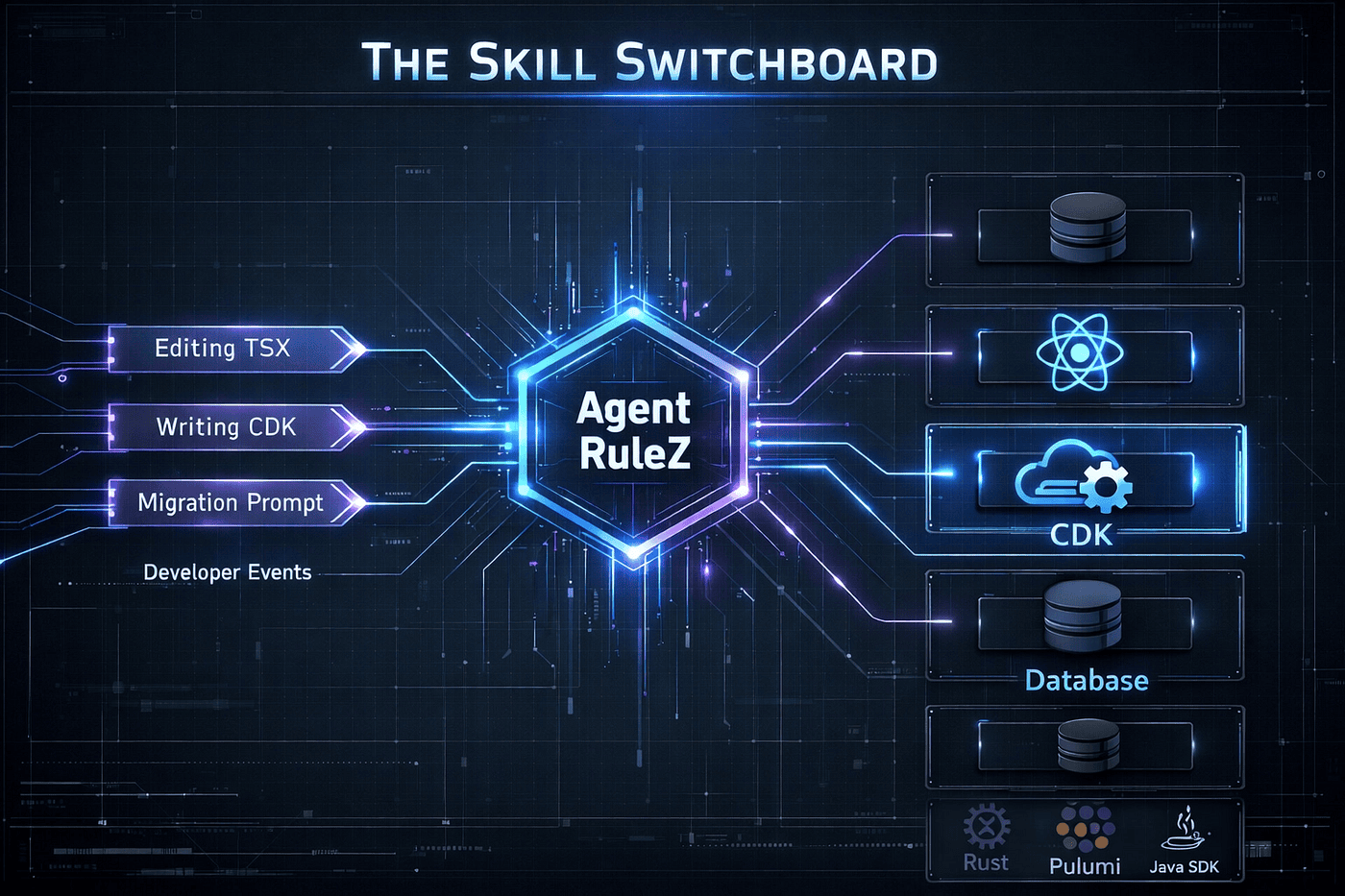 Agent RuleZ is a Switchboard Operator that loads the right Agentic Skill at the right time
The key insight: RuleZ has three injection action types that are purpose-built for surfacing skill content to an agent at the right moment.
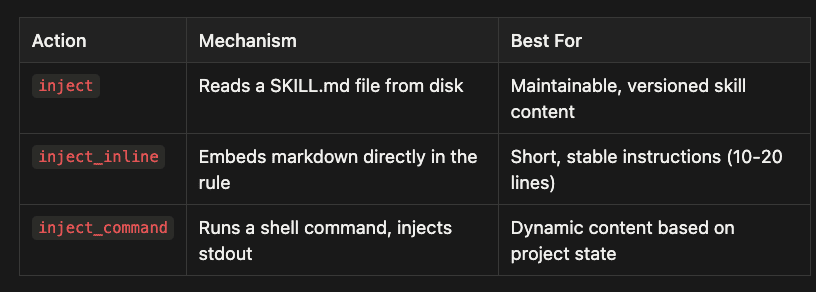
- inject: Reads a SKILL.md file from disk -- best for maintainable, versioned skill content
- inject_inline: Embeds markdown directly in the rule -- best for short, stable instructions (10-20 lines)
- inject_command: Runs a shell command, injects stdout -- best for dynamic content based on project state
When a rule matches, Agent RuleZ injects skill content into the agent's context for that specific operation. The agent sees the skill instructions as part of its working context and follows them. No manual invocation. No memorization. The skill appears because the conditions warranted it.
Because Agent RuleZ has native adapters for Claude Code, Gemini CLI, and OpenCode, the same skill activation rules work identically across all three platforms. A rule written for Claude Code works on Gemini CLI without modification. Write once, activate everywhere. (Note Claude Code has the most amount of testing at the moment and the others are working at some level but are still a work in progress).
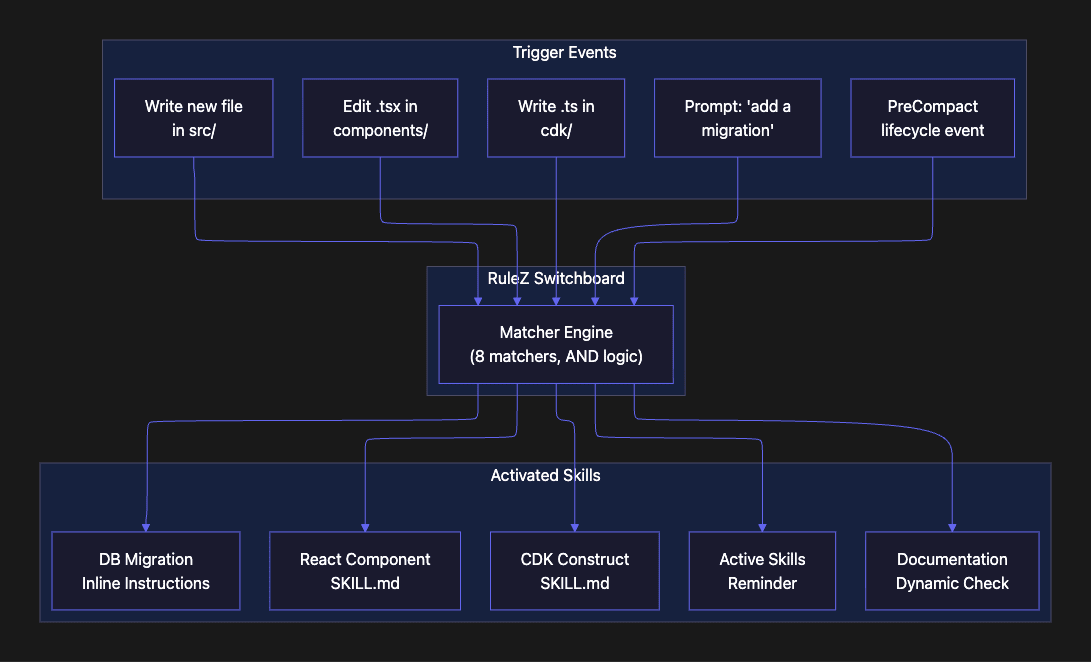
How Skill Activation Works
When your AI coding agent takes an action, it emits a hook event. Agent RuleZ intercepts that event, evaluates your rules against it, and returns a response. For skill activation, that response includes injected content: the skill instructions the agent should follow for this particular operation.
The evaluation pipeline has five steps:
- The agent emits an event (editing a file, running a command, submitting a prompt).
- RuleZ loads your hooks.yaml configuration.
- For each rule, sorted by priority, RuleZ checks whether the rule is enabled, then runs up to 8 matchers using AND logic.
- If all active matchers pass, RuleZ executes the rule's actions.
- Injections from all matching rules accumulate into a single response.
That last point is critical. Injections accumulate. If three rules match the same event, all three inject their skill content. Editing a .tsx file in src/components/auth/ could trigger a React component skill, a testing reminder, and a security review checklist simultaneously. The agent receives all three sets of instructions in its context.
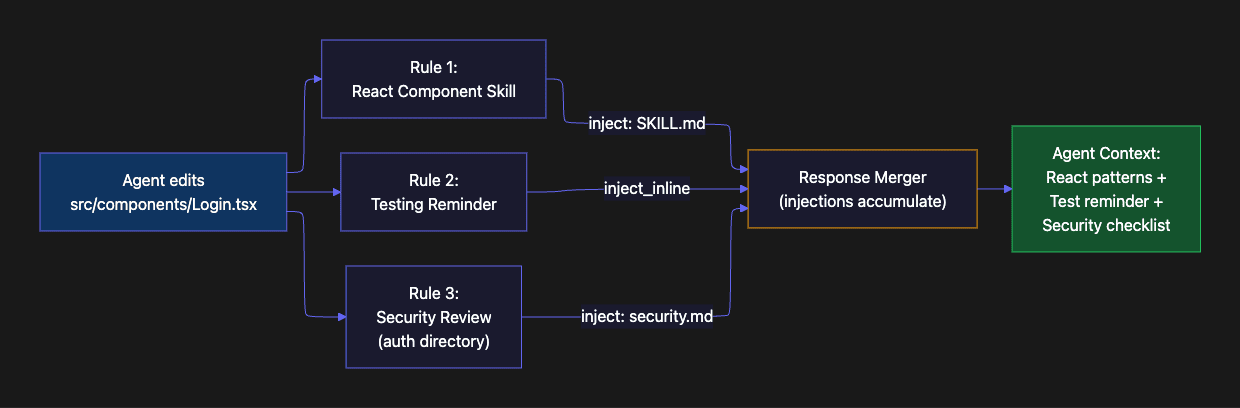
The injection precedence order matters when you care about what appears first in the agent's context:
- inject_inline (fastest; no I/O, pure string embedding)
- inject_command (dynamic; runs a shell command, injects stdout)
- inject (most maintainable; reads a separate SKILL.md file from disk)
For skill activation, the matcher types you will use most often are:
- extensions + directories: File-based activation. The agent edits a .tsx file in components/, and the React skill appears.
- prompt_match: Intent-based activation. The developer mentions "migration" or "schema change," and the migration skill appears. This is putting the activation in the language and idioms you use instead of relying on the activations in the agentic skill.
- operations: Lifecycle-based activation. The session starts, and a greeting appears. The context is about to compact, and a skill reminder appears.
- tools: Tool-based activation. The agent uses Bash, and command-specific guidance appears.
All matchers in a rule are AND-ed together. Unspecified matchers are treated as wildcards. This means you control precision by adding more matchers: a rule with just extensions: [".tsx"] fires for every TypeScript React file in the project, while a rule with extensions: [".tsx"] plus directories: ["src/components/**"] fires only for component files in the right directory.
Five Activation Patterns
Each of the following patterns represents a different trigger type. Together they cover the full range of situations where a skill should activate automatically.
Pattern 1: File-Based Activation
File-based activation is the most common pattern. The agent touches a file with a specific extension in a specific directory, and the relevant skill appears. This is the bread and butter of skill activation because most coding work is file-oriented.
What this rule does: It matches any Edit or Write operation targeting .tsx or .jsx files inside component directories, then injects the contents of a React component SKILL.md file into the agent's context.
Why it works this way: Three matchers (tools, extensions, directories) create precise targeting. Without the directories matcher, the rule would fire for every .tsx file in the project, including pages, utilities, and test helpers. Without the tools filter, it could match non-file operations that happen to reference the path. The AND logic across all three matchers ensures the skill only appears when the agent is genuinely working on a React component.
When to use it: Any time a skill maps cleanly to a file type and location in your codebase. React components in components/, CDK constructs in cdk/, Terraform modules in infrastructure/, Rust crates in src/.
- name: activate-react-component-skill
  description: "Surface React patterns when editing TSX in components/"
  matchers:
    tools: ["Edit", "Write"]
    extensions: [".tsx", ".jsx"]
    directories: ["src/components/**", "components/**"]
  actions:
    inject: ".claude/skills/react-component/SKILL.md"
  governance:
    created_by: "[email protected]"
    confidence: high
    tags: ["react", "components"]
When a developer creates src/components/UserProfile.tsx, the agent's Edit tool fires a PreToolUse event. Agent RuleZ matches the .tsx extension, the components/ directory, and the Edit tool. All three matchers pass, so RuleZ injects the React component SKILL.md into the agent's context. The agent now knows the team's component conventions: naming patterns, prop interfaces, hooks usage, testing expectations.
This forces the SKILL.md file to be used, but it doesn't hook into the skill invocation mechanism itself; your results may vary. If you want to force agent skill activation rather than treat a skill like a context file, you can do this:
- name: react-skill-injection
  description: "Inject React best practices when creating React components"
  matchers:
    tools: ["Write"]
    extensions: [".tsx", ".jsx"]
    directories: ["src/components/**"]
  actions:
    inject_inline: |
      ## React Component Standards
      Use the `/react-component` skill for creating new components.

      Requirements:
      - Functional components with TypeScript
      - Props interface defined and exported
      - Use React.memo() for pure components
      - Custom hooks extracted to `hooks/` directory
      - Tests co-located in `__tests__/` directory
  governance:
    author: "frontend-team"
    created_by: "[email protected]"
    reason: "Ensure React component consistency"
    confidence: high
    tags: ["react", "frontend", "components"]
In both cases, the developer never has to ask for the skill to be considered, it just is. The agent never needed to be told. The file path was the trigger. The ruler, Agent RuleZ, governed the agentic skill to be invoked. Governance is predictable and deterministic.
The same pattern scales across any technology stack:
- name: activate-cdk-construct-skill
  description: "Inject CDK best practices for infrastructure code"
  matchers:
    tools: ["Edit", "Write"]
    directories: ["cdk/**", "infrastructure/**"]
    extensions: [".ts"]
  actions:
    inject: ".claude/skills/cdk-construct/SKILL.md"
  governance:
    created_by: "[email protected]"
    tags: ["aws", "cdk", "infrastructure"]
File-based activation is deterministic and predictable. If the file path matches, the skill activates. Every time. Regardless of session length, context window state, or how many other things the developer has been working on.
A useful companion to any file-based skill activation rule is a testing reminder. When the agent modifies source code, it should know to run relevant tests:
- name: activate-test-runner-skill
  description: "Remind agent to run tests after source modifications"
  matchers:
    tools: ["Edit", "Write"]
    extensions: [".ts", ".tsx", ".py", ".rs"]
    directories: ["src/**", "lib/**"]
  actions:
    inject_inline: |
      ## Testing Reminder
      Source code was just modified. Before completing this task:
      1. Run the relevant test suite
      2. Check for existing tests in the parallel test directory
      3. If no tests exist for this code, create them
  governance:
    created_by: "[email protected]"
    tags: ["testing", "quality"]
This rule fires on any source file modification across multiple languages. The inject_inline action keeps the reminder concise and fast (no file read, no subprocess). Because injections accumulate, the testing reminder stacks naturally with technology-specific skills: editing a React component triggers both the React skill and the testing reminder in the same response. This could also activate a agent skill which specifies your exact patterns you use for testing. Governance is deterministic consideration of your agent skills.
Pattern 2: Intent-Based Activation
File-based activation works when the trigger is a file operation. But some skills should activate based on what the developer is trying to do, not which file they are editing. This is where prompt_match enters the picture.
What this rule does: It listens for UserPromptSubmit events (the moment a developer sends a message to the agent) and checks the prompt text against a set of patterns related to database migrations. If any pattern matches, it injects migration conventions and a pointer to the /db-migrate skill.
Why it uses prompt_match instead of file matchers: Migration work starts with intent, not with a file. The developer has not opened a migration file yet; they are describing what they want. By intercepting the prompt, the skill instructions become part of the agent's planning context, shaping its approach from the start rather than correcting it after the fact.
When to use it: Any workflow that begins with a natural language request rather than a file operation. Deployment procedures, migration generation, release management, and architecture decisions are all strong candidates.
- name: activate-migration-skill
  description: "Detect migration intent and surface migration skill"
  matchers:
    operations: ["UserPromptSubmit"]
    prompt_match:
      patterns:
        - "contains_word:migration"
        - "contains_word:migrate"
        - "schema.*change"
        - "add.*column"
        - "alter.*table"
      mode: any
      case_insensitive: true
  actions:
    inject_inline: |
      ## Database Migration Skill Available
      It looks like you are working on a database schema change.
      Use `/db-migrate` for a properly versioned migration file.

      Key conventions:
      - Migrations go in `db/migrations/` with timestamp prefix
      - Always include both up and down migrations
      - Test against a local database before committing
  governance:
    created_by: "[email protected]"
    tags: ["database", "migrations"]
A developer types "I need to add a verified_at column to the users table." The prompt_match detects "add.*column" and injects migration instructions before the agent starts planning. The agent now knows about /db-migrate and the project's migration conventions. It did not have to be told. The intent was the trigger.
The prompt_match matcher has several features that make intent detection practical. The contains_word:migrate shorthand expands to \\bmigrate\\b, matching the word "migrate" with word boundaries so it does not accidentally match inside unrelated words. The mode: any setting means any single pattern match is sufficient; you do not need all patterns to match. The case_insensitive: true flag ensures the rule catches "Add a column" and "add a column" equally. This allows you to fine tune the agent skill activation to your use cases.
Imagine you have a deploy environment called pre-prod-tenant-1, and there were specific skills that you need when you deploy to this environment, here you go. Now, you can get very specific about activation to your use cases.
Pattern 3: Lifecycle-Based Activation
Some skill activations are not about files or intent. They are about session lifecycle events. The most valuable lifecycle trigger is PreCompact: the moment before the context window compacts.
What this rule does: It matches the PreCompact operation (fired by the agent just before it summarizes and truncates its context window) and injects a summary of available project skills.
Why this matters: Context compaction is one of the most dangerous moments in a long coding session. The agent may forget which branch it is on, what files it has modified, and critically, what skills are available. This rule acts as a safety net, ensuring skill awareness survives the compression.
When to use it: Every project with more than two or three skills should have a PreCompact skill reminder. It is cheap insurance against the compaction problem that causes skill amnesia.
- name: preserve-skill-context-on-compact
  description: "Re-inject active skill context before compaction"
  matchers:
    operations: ["PreCompact"]
  actions:
    inject_inline: |
      ## Active Skills Reminder
      The following skills are available for this project:
      - `/react-component`: React component patterns (components/)
      - `/cdk-construct`: CDK infrastructure patterns (cdk/)
      - `/test-runner`: Test execution and creation
      - `/db-migrate`: Database migration generation
      Re-activate the relevant skill when resuming work.
  governance:
    created_by: "[email protected]"
    tags: ["meta", "compaction", "skill-preservation"]
This rule solves the compaction problem directly. Before the agent compresses its context window, RuleZ injects a summary of available skills. Even after compaction discards the detailed conversation history, the agent retains awareness of what skills exist and when to use them. You could also add something similar to a SessionStart event. Note Agent Rulez uses a super set of events from Claude Code in order to create a set that works with Gemini CLI, Copilot, and OpenCode which are the top coding agents that support agentic hooks.
You can pair this with a SessionStart rule for initial skill orientation:
- name: session-skill-orientation
  description: "Orient the agent on available skills at session start"
  matchers:
    operations: ["SessionStart"]
  actions:
    inject_command: |
      echo "## Project Skills"
      echo "Branch: $(git branch --show-current 2>/dev/null || echo 'unknown')"
      for skill_dir in .claude/skills/*/; do
        if [ -f "${skill_dir}SKILL.md" ]; then
          skill_name=$(basename "$skill_dir")
          echo "- /${skill_name}: $(head -1 ${skill_dir}SKILL.md)"
        fi
      done
This inject_command variant dynamically discovers skills at session start by scanning the .claude/skills/ directory. If a team member adds a new skill, the session greeting picks it up automatically without anyone updating the rule. The shell script loops through skill directories, checks for the presence of a SKILL.md file, and outputs each skill name alongside the first line of its description.
Defeating "Skill Amnesia" via Lifecycle Events
The most common point of failure in a long coding session is Context Compaction. This is when the agent summarizes its history to free up tokens. Because skills are often defined or invoked early in a session, they are frequently the first things to be "summarized away," leading to sudden skill amnesia.
Agent RuleZ treats this as a state management problem. Using the native lifecycle hooks in tools like Claude Code, it implements a "Preserve and Restore" pattern:
- PreCompact Preserves: When a compaction event is triggered, RuleZ captures the current state (for example, writing a list of active skills to a temporary active-skills.json).
- SessionStart (source: compact) Restores: As the agent resumes with a fresh, summarized context, RuleZ detects the compact source and re-injects a concise "Active Skills" header.
"PreCompact preserves; SessionStart(compact) restores."
In practice, this turns your agent into a state machine. Instead of hoping the agent remembers it was in the middle of a complex CDK refactor, RuleZ ensures the relevant instructions are re-anchored at the top of the new context window. This makes your skills immune to compaction drift -- a necessity when you're navigating a library of 88 skills across a multi-hour session.
Pattern 4: Dynamic Activation
Sometimes a skill should only activate if certain conditions hold in the project state. The documentation skill is the classic example: you want to remind the agent about documentation conventions when it creates a new module that lacks documentation, not when it edits an existing well-documented module.
What this rule does: It matches Write operations for source files in src/ or lib/, then runs a shell command that checks whether the target directory already contains a README.md. If it does not, the script outputs documentation skill instructions. If it does, the script outputs nothing, and no content is injected.
Why inject_command instead of inject or inject_inline: The decision to inject depends on project state (whether a README exists), which matchers alone cannot express. inject_command bridges the gap by letting a shell script inspect the filesystem before deciding what to inject. This is conditional skill activation: the matchers determine relevance, and the command determines necessity.
When to use it: Any time the injection decision depends on something beyond the event itself. File existence checks, git branch state, environment variables, dependency versions, and API health checks are all valid conditions for dynamic activation.
- name: activate-documentation-skill
  description: "Prompt for documentation when new modules lack it"
  matchers:
    tools: ["Write"]
    directories: ["src/**", "lib/**"]
    extensions: [".ts", ".py", ".rs"]
  actions:
    inject_command: |
      if [ ! -f "$(dirname $RULEZ_FILE_PATH)/README.md" ]; then
        echo "## Documentation Reminder"
        echo "This appears to be a new module without documentation."
        echo "Use /doc-gen to generate module documentation including:"
        echo "- Purpose and responsibilities"
        echo "- Public API surface"
        echo "- Usage examples"
      fi
  governance:
    created_by: "[email protected]"
    tags: ["documentation"]
The inject_command action is the most flexible injection type because it can inspect anything accessible from the shell. The trade-off is a small performance cost (subprocess execution) compared to inject_inline (which is pure string embedding) or inject (which is a single file read). For most skill activation scenarios, the few milliseconds of overhead are invisible.
Pattern 5: Priority-Based Activation
When multiple skills can activate on the same event, priority determines evaluation order. For most skill activation rules, order does not matter because injections accumulate. But for security-critical skills, you want to ensure they evaluate first and that their content appears prominently in the agent's context.
What this rule does: It injects a security review checklist whenever the agent edits files in authentication, cryptography, or security directories. The priority: 100 ensures this rule evaluates before any other skill activation rule. The detailed governance metadata creates an auditable paper trail for compliance.
Why priority matters here: When the agent edits src/auth/session.ts, it might trigger three rules: a TypeScript standards skill, a testing reminder, and this security review skill. Priority 100 ensures the security checklist is evaluated first and appears at the top of the injected context. The agent processes instructions in order, so the most critical guidance gets the most attention.
When to use it: Any skill that represents a mandatory organizational requirement, not just a helpful suggestion. Security reviews, compliance checklists, and regulatory constraints all warrant high-priority rules with detailed governance metadata.
- name: activate-security-review-skill
  description: "Surface security checklist for auth and crypto files"
  matchers:
    tools: ["Edit", "Write"]
    directories: ["src/auth/**", "src/crypto/**", "src/security/**"]
  actions:
    inject: ".claude/skills/security-review/SKILL.md"
  mode: enforce
  priority: 100
  governance:
    author: "security-team"
    created_by: "[email protected]"
    reason: "All auth/crypto changes must follow security review checklist"
    confidence: high
    last_reviewed: "2025-12-01"
    ticket: "SEC-2847"
    tags: ["security", "auth", "mandatory"]
The governance metadata is more detailed than in the other examples, and deliberately so. The author field identifies the responsible team. The ticket field links to the security initiative that required this rule. The last_reviewed date establishes a review cadence. When an auditor asks why the agent was given security instructions for a particular file, the answer is in the rule metadata and the audit log.
Governance and Observability
Skill activation rules are only as valuable as your ability to observe and manage them. RuleZ provides three mechanisms for this: policy modes for graduated rollout, governance metadata for traceability, and audit logging for pattern analysis.
Graduated Rollout with Policy Modes
Every new skill activation rule should follow the same rollout path:
- Audit mode (mode: audit): The rule evaluates and logs matches, but injects nothing. Use this to confirm the rule triggers on the right events. Run it for a few days and review the logs. A false positive at this stage is just a log entry; at enforce stage, it is an irrelevant injection cluttering the agent's context.
- Warn mode (mode: warn): The rule injects a warning instead of the full skill content. Developers see the warning and can provide feedback on whether the activation is helpful or noisy.
- Enforce mode (mode: enforce): The rule injects the full skill content. This is the production state.
The rollout pattern is not bureaucratic overhead. It is how you avoid the failure mode where a well-intentioned skill activation rule injects irrelevant content into every third operation, degrading agent performance for the whole team.
Tracking Skill-Rule Relationships
The created_by governance field is specifically designed for skill-managed rules. When a skill generates its own activation rules, created_by records the provenance:
governance:
  created_by: "[email protected]"
This enables three important workflows. Auditing lets you trace a misfiring rule back to the responsible skill. Bulk updates let you find and regenerate all rules when a skill updates from version 2.1.0 to 2.2.0 by searching for the created_by value. Conflict resolution helps you identify overlap when two skills target the same files and decide which should take precedence.
Audit Trail Analysis
Every skill activation is logged to ~/.claude/logs/rulez.log in JSON Lines format. Each entry includes the timestamp, the matched rule name, the event that triggered it, and the governance metadata from the rule.
You can query the audit trail to understand activation patterns:
# How often does the React skill activate?
grep "activate-react-component-skill" ~/.claude/logs/rulez.log | wc -l

# Which skills activated in the last hour?
grep "inject" ~/.claude/logs/rulez.log | tail -20
The audit trail answers a question that is otherwise impossible to answer: are your skills actually being used? If a skill activation rule has zero matches in two weeks, either the rule's matchers are too narrow, or the team does not work in that area of the codebase. Either way, you have data to act on instead of assumptions.
The Compound Effect
Individual skill activation rules are simple. Each one is a few lines of YAML with a matcher and an injection action. The value is not in any single rule. It is in the compound effect of eight or ten rules working together.
Consider a project with this set of activation rules:
- React component skill (fires on components/**/*.tsx)
- CDK construct skill (fires on cdk/**/*.ts)
- Database migration skill (fires on prompt intent)
- Testing reminder (fires on source code edits)
- Security review skill (fires on auth/, crypto/)
- Documentation skill (fires on new modules without README)
- API design skill (fires on src/api/**)
- Pre-compact skill reminder (fires before context compaction)
With these eight rules, the agent always has the right context for whatever it is doing. It creates a React component and gets the component conventions. It edits infrastructure code and gets CDK best practices. A developer mentions a migration and the agent knows the project's migration patterns. The context window compacts and the agent retains skill awareness.
No developer on the team had to remember anything. No CLAUDE.md/AGENTS.md had to be maintained. No skills were forgotten.
Walk through a concrete scenario. A new developer joins the team and starts working on a login component. They open Claude Code and type "create a login form component with email and password fields." The SessionStart rule injects a skills overview. When the agent creates src/components/LoginForm.tsx, the React component skill activates with the team's naming conventions, prop patterns, and hooks rules. The testing reminder fires alongside it. If the component touches src/auth/, the security review skill adds its checklist. The developer did not configure anything. They did not read a wiki page about project conventions. The conventions found them.
That is the compound effect. Each rule is trivial. The combination is transformational.
New team members get the same skill activations as veterans. The developer who joined yesterday and the one who has been on the project for two years both get the same React conventions injected when they touch component files. Skills become team knowledge, not individual memory. The activation rules encode what the team knows and surface it at the moment it is needed.
Your agent does not need a better memory. It needs better timing.
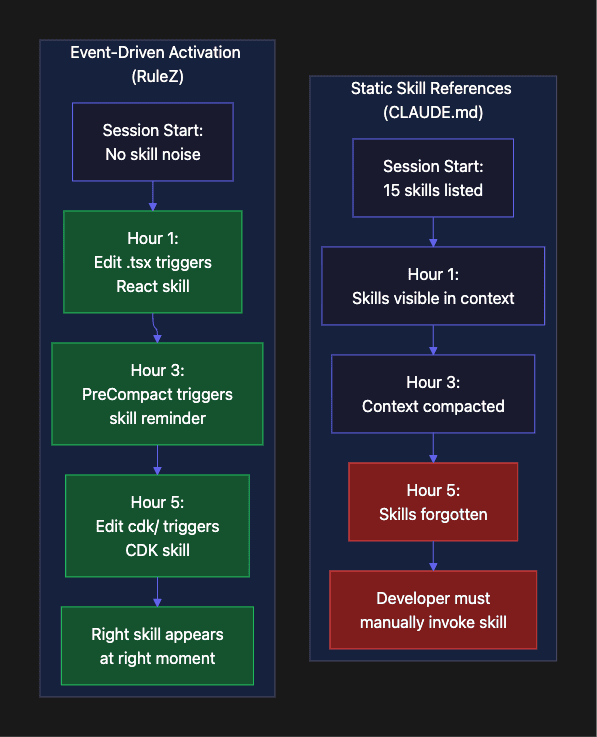
The Compound Effect: From Manual Triggers to Team Knowledge
The individual rules we've discussed are simple; often just ten lines of YAML. But the value isn't in any single rule; it's in the compound effect of an entire library of activations working in concert.
When you scale to 88 skills, you are no longer just "using an AI tool"; you are deploying a codified version of your team's collective expertise. A new developer joining the project doesn't need to spend their first week reading a "Getting Started" wiki or memorizing slash-commands. They simply start coding. When they touch a React component, the standards find them. When they initiate a migration, the guardrails appear. When the context window compacts, their progress is preserved.
By moving the burden of memory from the human to the RuleZ Switchboard, we achieve a rare trifecta in software development: we increase speed, reduce cognitive load, and enforce higher quality simultaneously. Your agent doesn't need a better memory or a longer context window. It needs better timing.
The best skill activation is the one the developer never had to remember.
Getting Started
Start small. Do not try to write activation rules for every skill on day one.
Step 1: Pick your most-used skill. Which skill do you invoke manually most often? That is your first activation rule. If you find yourself typing /react-component every time you create a component file, that is a ten-second rule to write.
Step 2: Start in audit mode. Deploy the rule with mode: audit and watch the logs for a few days. Confirm it matches the right events. Check for false positives, meaning matches on events you did not intend to target.
version: "1.0"
rules:
  - name: activate-react-component-skill
    mode: audit
    matchers:
      tools: ["Edit", "Write"]
      extensions: [".tsx"]
      directories: ["src/components/**"]
    actions:
      inject: ".claude/skills/react-component/SKILL.md"
Step 3: Graduate to enforce. Once you are confident in the matching, change mode: audit to mode: enforce. The skill now activates automatically.
Step 4: Add intent-based activation. After file-based activation is working, try a prompt_match rule for your most common workflow request. Migration skills and deployment skills are good candidates because developers express these intents in natural language.
Step 5: Add governance metadata. As your rule set grows, add created_by to track which skill owns which rule. Add tags for filtering. Add reason so future you (or your teammates) understand why the rule exists.
For the full RuleZ setup, including installation, agent wiring, and configuration options, see the anchor article: "RuleZ: A Deterministic Policy Engine for AI Coding Agents."
The Mental Upgrade
Stop thinking of skills as things you invoke. Start thinking of them as things that activate.
The shift is subtle but transformational. In the invocation model, the developer is the memory and the trigger. They must know which skills exist, remember when to use them, and type the right command at the right moment or the remember the right phrase. The agent is passive, waiting to be told.
In the activation model, the developer writes code. The agent acts. Agent RuleZ watches the actions and injects the right skill at the right moment. RuleZ governs the usage of the agent skills. It forces it like a ruler. The developer's expertise is encoded in the rules, not held in their head. The agent becomes proactive, responding to context rather than waiting for instructions.
Every skill your agent forgets is a skill you paid for but never used. Every skill that activates automatically is a skill that compounds across every session, every developer, every project that uses it.
The best skill activation is the one the developer never had to remember.
Configuring skill activation is not about the YAML. It is about encoding your team's expertise into moments of relevance. It is about mastering harness engineering and context engineering.
About the Author
Rick Hightower is a technology executive and data engineer who led ML/AI development at a Fortune 100 financial services company. He created skilz, the universal agent skill installer, supporting 30+ coding agents including Claude Code, Gemini, Copilot, and Cursor, and co-founded the world's largest agentic skill marketplace. Connect with Rick Hightower on LinkedIn or Medium. Rick has been doing active agent development, GenAI, agents, and agentic workflows for quite a while. He is the author of many agentic frameworks and tools. He brings core deep knowledge to teams who want to adopt AI.