Agent Brain: A Code-First RAG System for AI Coding Assistants
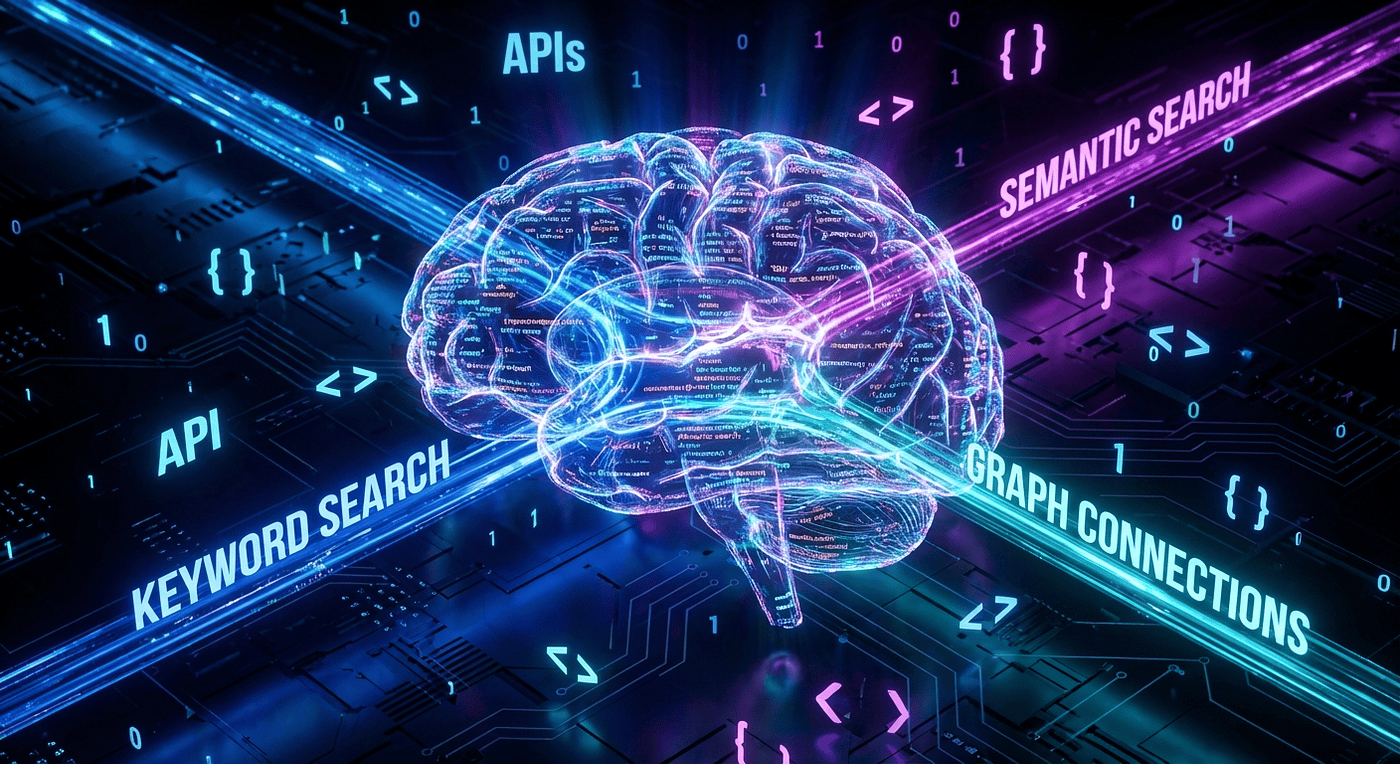 Agent Brain architecture showing three-index RAG system with BM25, vector, and graph search pathways
Learn how Agent Brain's three-index RAG architecture and AST-aware code chunking deliver superior code search for AI coding assistants. Includes Claude Code plugin integration. Works with Gemini, Codex, Copilot, and OpenCode as well.
Why Generic RAG Fails for Code Search
Picture this: you're debugging an authentication issue at 2 AM. You ask your AI assistant, "Show me the login flow." It returns documentation about HTTP methods and a random config file. The actual authentication code? Buried in chunk 47 because the RAG system split your authenticate() function across three fragments.
This isn't a quirk. It's a fundamental design flaw.
Retrieval-Augmented Generation (RAG) has transformed how AI systems access knowledge. By retrieving relevant documents before generating responses, RAG enables assistants to work with up-to-date, domain-specific information that wasn't in their training data. Most RAG systems treat all content as text, using the same chunking strategy for documentation, blog posts, and source code.
This approach works fine for prose. It fails spectacularly on codebases.
Consider what happens when a generic RAG system processes a Python file:
def authenticate(user, password):
    """Verify user credentials against the database."""
    if not user:
        return None
    hashed = hash_password(password)
    return verify_credentials(user, hashed)

def hash_password(password):
    """Hash password using bcrypt."""
    return bcrypt.hash(password)
A text-based chunker might split this at line 4, right in the middle of the authenticate function. The result? Two chunks that make no sense individually. The function signature sits in one chunk. The return statement sits in another. When you search for "authentication logic," neither chunk provides the complete picture.
Understanding the Root Cause
What the Problem Is: Generic RAG systems use fixed-boundary chunking (character counts or token limits) that ignores code structure. A 500-token limit might split a function, class, or conditional block at arbitrary points.
Why This Happens: Text-based chunkers were designed for natural language, where sentence and paragraph boundaries align with semantic meaning. Code has different semantic units: functions, classes, methods, and modules. These boundaries are syntactic, not lexical.
When This Breaks: The failure mode appears most dramatically when:
- Functions span multiple chunks (partial logic retrieval)
- Class definitions fragment (missing methods or inheritance)
- Context gets lost (imports separated from usage)
Trade-offs of Text Chunking:
- Pro: Simple to implement, works for any content type
- Pro: Predictable chunk sizes for embedding models
- Con: Destroys semantic meaning in structured content
- Con: Produces incomplete, misleading code snippets
Generic RAG systems have three fundamental problems with code:
- Broken semantic boundaries: Functions split mid-body lose their meaning
- No structural awareness: Import relationships, class hierarchies, and call graphs are invisible
- Single search mode: Either keyword matching OR semantic search, not both
Agent Brain solves all three.
Agent Brain RAG Architecture Overview
Agent Brain is a RAG system built specifically for AI coding assistants. It combines a Claude Code plugin, a FastAPI server, and three specialized indexes into a unified search platform.
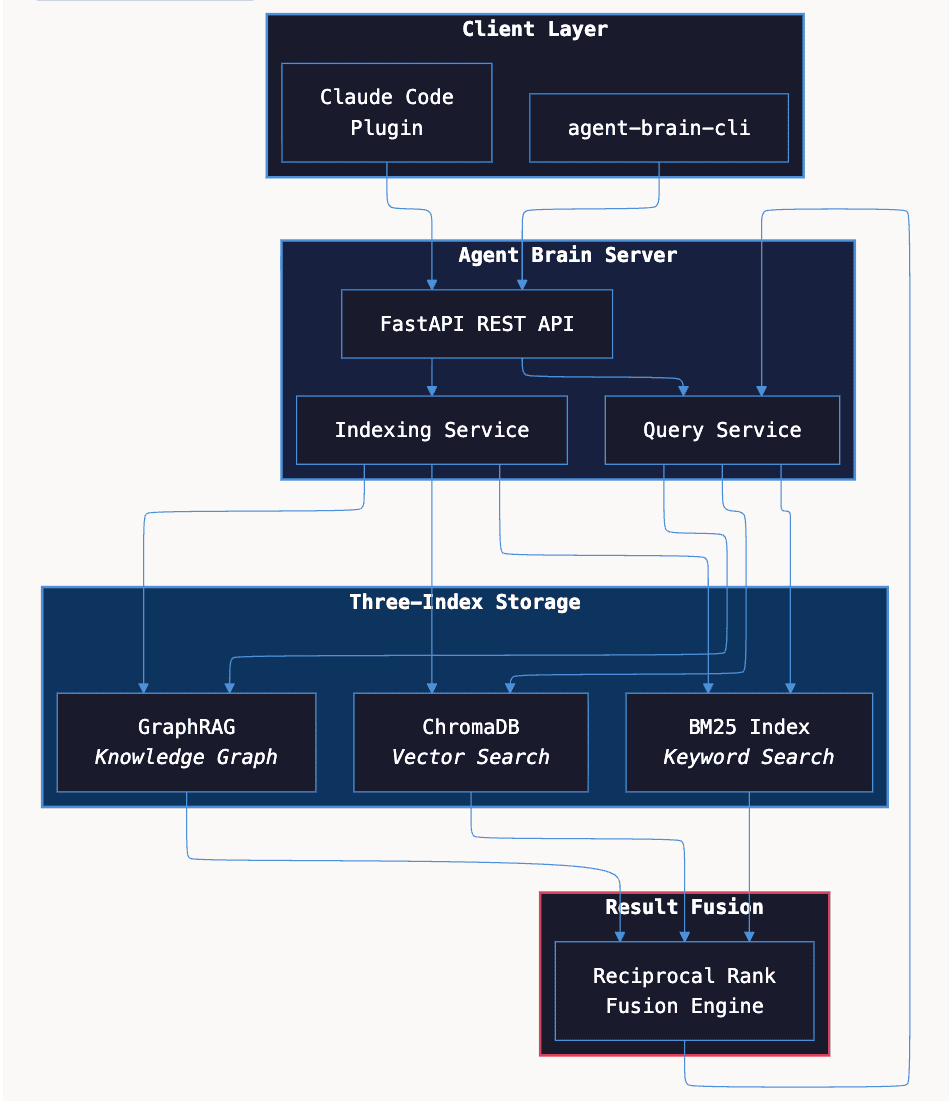
The system consists of four main components:
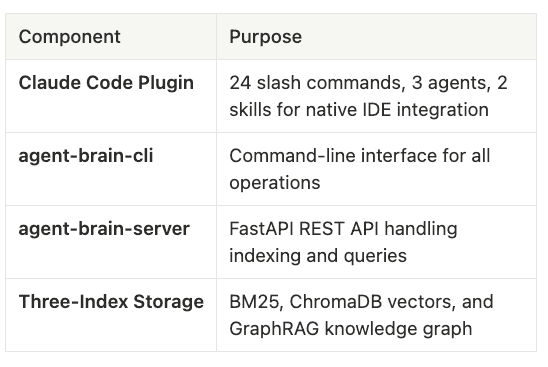
The Multi-Index Strategy Explained
What It Does: Agent Brain maintains three separate search indexes (keyword, semantic, and graph) and queries them in parallel. Results are combined using a ranking algorithm that favors documents appearing in multiple result sets.
Why This Approach: Different query types need different search strategies. "Find getUserById" needs exact matching. "Explain authentication flow" needs semantic understanding. "What calls this function?" needs relationship traversal. Rather than forcing one strategy, Agent Brain uses all three.
When to Use Multiple Indexes:
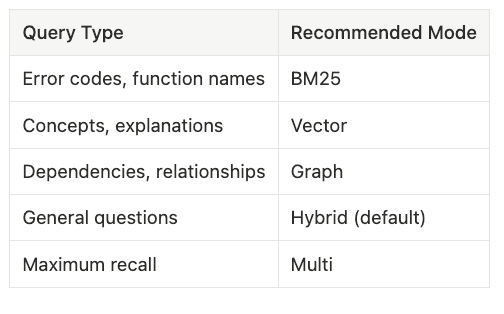
- Use BM25 alone for exact symbol searches (function names, error codes)
- Use vector search alone for conceptual questions
- Use hybrid mode (default) when the query type is unclear
- Use multi-mode for comprehensive research
Trade-offs:
- Pro: Maximum recall across different query types
- Pro: Self-balancing through fusion scoring
- Con: Higher storage requirements (3x index size)
- Con: Slightly slower queries (parallelized but still 3x operations)
What makes this architecture unique is the fusion layer. Rather than choosing one search strategy, Agent Brain queries multiple indexes in parallel and combines results using Reciprocal Rank Fusion (RRF). This delivers the precision of keyword matching with the understanding of semantic search.
Three-Index Search: BM25, Vector, and GraphRAG
Agent Brain maintains three separate indexes, each optimized for different query types. This multi-pronged approach ensures that no matter how you phrase your question, at least one index will surface relevant results.
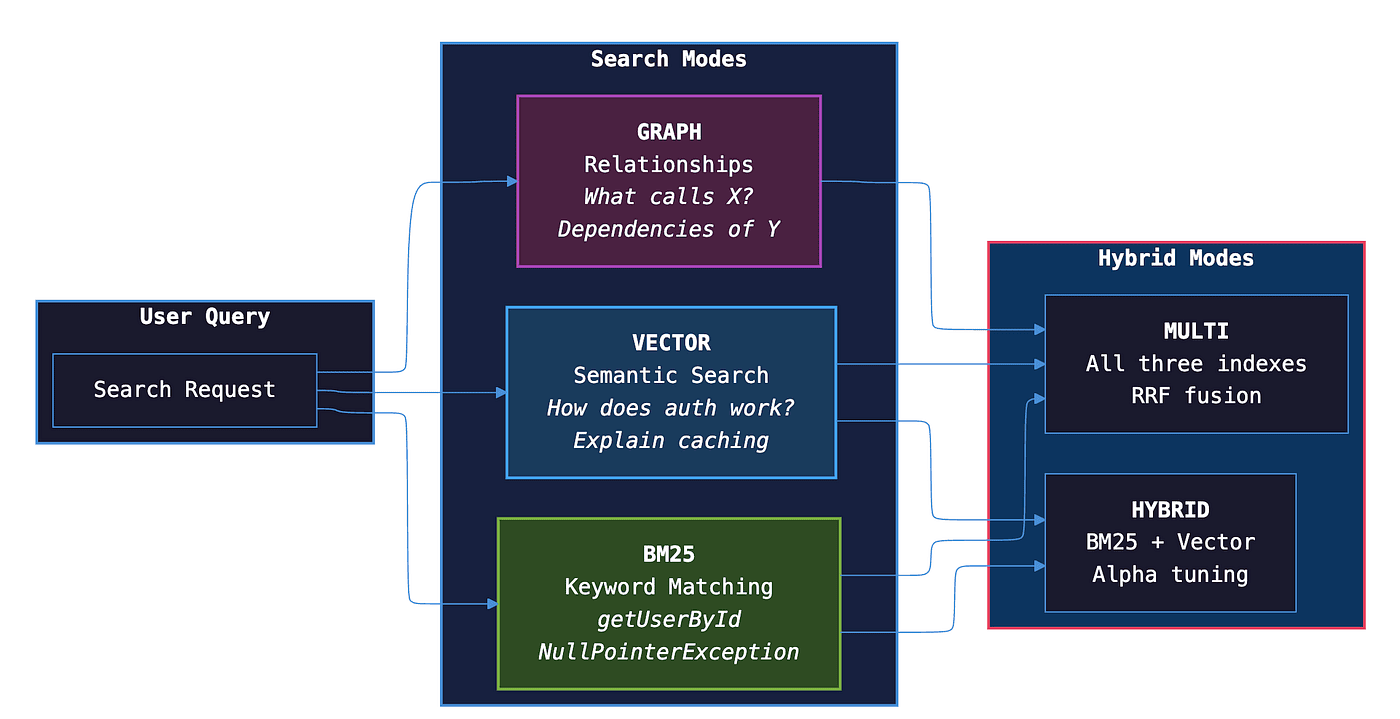
Note: We also added a reranker to squeeze out another 5% improvement on the fusion queues and we do this out of band to the code agent to save precious token usage.
# CLI example
agent-brain query "NullPointerException" --mode bm25

# Plugin example
/agent-brain-keyword "getUserById"
Note: I show the plugin and the command line, but truth be told, if you are using the agent skills with Agent Brain, you can always just use natural language and the code agent will pick the best sort of query.
Vector Index: Semantic Understanding
The vector index uses OpenAI's text-embedding-3-large model (3072 dimensions) stored in ChromaDB. It captures semantic meaning, finding relevant results even when the exact terms differ.
What Vector Search Does: Converts text into high-dimensional numerical vectors where semantically similar content clusters together. "Authentication," "login," "credentials," and "verify user" all occupy nearby positions in vector space.
# CLI example
agent-brain query "explain caching strategy" --mode vector

# Plugin example
/agent-brain-semantic "how does the build system work"
GraphRAG: Structural Relationships
GraphRAG builds a knowledge graph of entities and relationships. It answers questions that require understanding code structure.
What GraphRAG Does: Extracts entities (functions, classes, modules) and relationships (calls, imports, extends, contains) from code, then stores them in a graph database.
# CLI example
agent-brain query "what calls authenticate" --mode graph

# Plugin example
/agent-brain-graph "dependencies of payment module"
Fusion: Combining Results with RRF
The default search mode is hybrid, which combines BM25 and vector results using Reciprocal Rank Fusion:
Score = sum(1 / (k + rank))
Where k is a smoothing constant (typically 60). Documents that appear in multiple result sets get higher scores.
# Tune hybrid search
agent-brain query "authentication" --mode hybrid --alpha 0.7

# Maximum recall with all three indexes
/agent-brain-multi "security vulnerabilities"
Note: you can just use natural language and with the Agentic Skill for Agent Brain, it will pick the right way to query based on your question. Also note we recently added a reranker to improve and filter the answers. We will cover this in a future article as it came out after this article was written.
How tree-sitter AST Chunking Preserves Code Semantics
The foundation of Agent Brain's code understanding is AST-aware chunking using tree-sitter.
Why Text Splitting Fails
Text-based chunkers split content at fixed character or token boundaries. This works for prose but destroys code semantics.
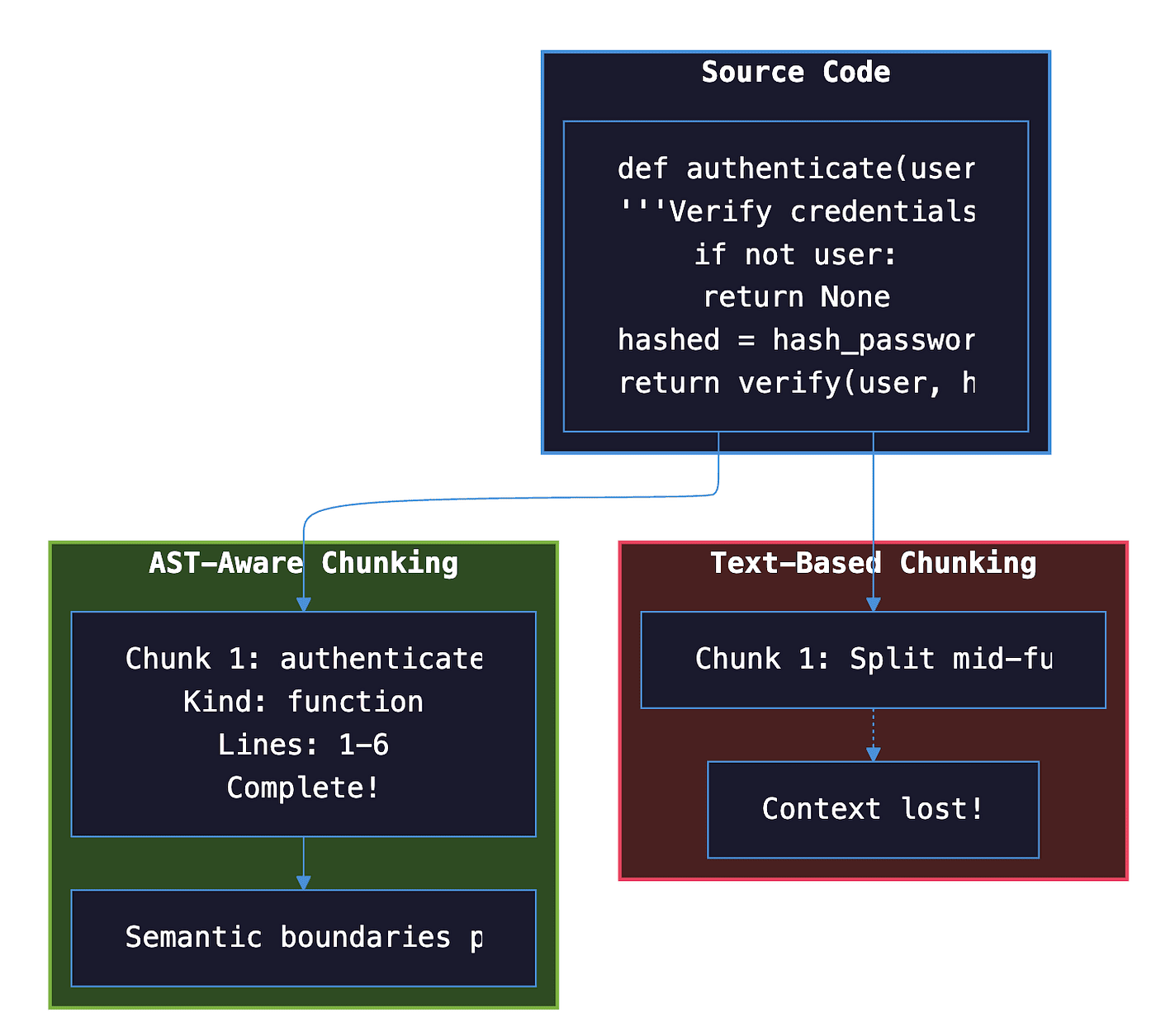
How tree-sitter Solves It
tree-sitter parses source code into a hierarchical tree structure where each node represents a syntactic element. Agent Brain walks this tree to identify semantic boundaries.
When indexing code, Agent Brain:
- Parses the file with tree-sitter
- Identifies top-level symbols (functions, classes)
- Extracts each symbol as a complete chunk
- Attaches rich metadata: symbol name, kind, line numbers, docstring
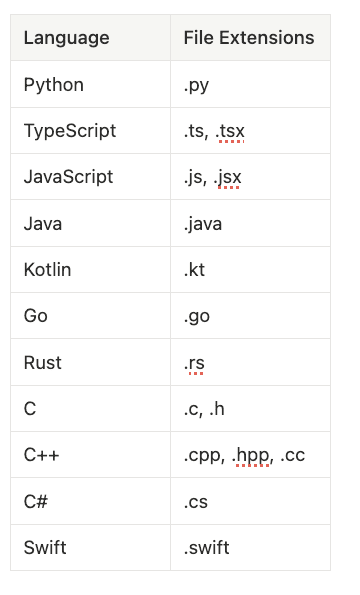
Language Support
Agent Brain supports 11 programming languages through tree-sitter:
Per-Project RAG: Preventing Context Pollution
Agent Brain runs as a per-project service, not a shared instance. Each project gets its own server, indexes, and configuration.
Note: it also works with word documents, PDFs, and markdown. I often use Agent Skills that pull down a bunch of Confluence docs, and Notion docs, then search them. I also use a Github Plugin to pull down wikis and code bases. I use Agent Brain to ingest them all and then answer questions.
Why Isolation Matters
Shared RAG instances mix context from different projects. When working on a payment system, you don't want results from your personal blog's authentication code.
your-project/
└── .claude/
    └── agent-brain/
        ├── config.yaml       # Project configuration
        ├── runtime.json      # Running server info
        ├── chroma/           # Vector store
        ├── bm25/             # Keyword index
        └── graph/            # Knowledge graph
It is easy to start up a new Agent Brain for a new project or new set of related projects.
# Work on multiple projects simultaneously
cd project-a && agent-brain start --daemon
cd project-b && agent-brain start --daemon

# Each project has its own server
agent-brain list
# project-a: http://127.0.0.1:8100 (3,450 documents)
# project-b: http://127.0.0.1:8101 (1,230 documents)
Note: Again we are showing you the command line but it does ship with agent skills and you can just use natural language and slash commands to control it from Codex, Claude, OpenCode, etc.
Native Claude Code Plugin Integration
Agent Brain integrates natively with Claude Code through a plugin architecture.
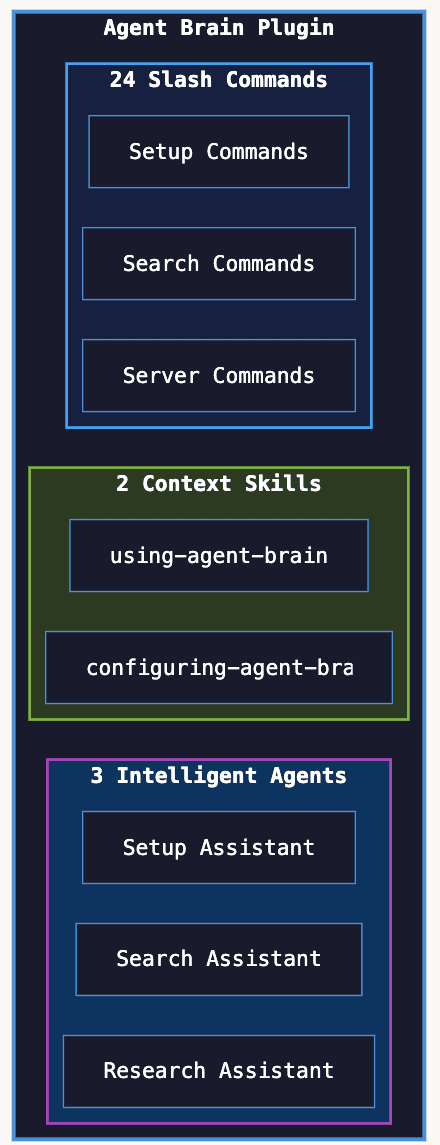
The bulk of the agentic magic is in the Agent Skills using-agent-brain which helps with querying and managing the Agent Brain. Then there is configuring-agent-brain which helps with setting up the Agent Brain. This article on Agent Brain has step by step examples on how to use the plugin to install Agent Brain.
Search Mode Selection
Embedding and LLM Provider Options
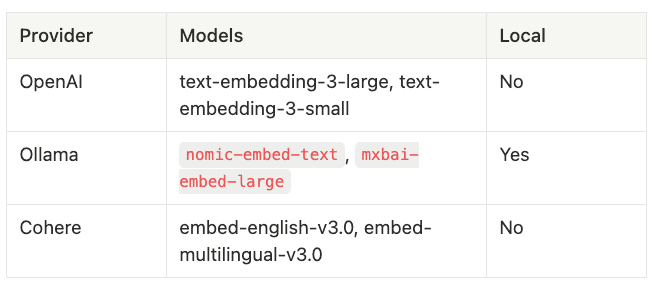
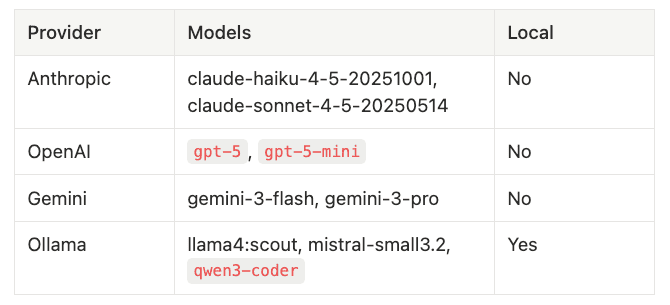
Agent Brain supports multiple providers for embeddings and summarization.
Embedding Providers
Summarization Providers
Fully Local Mode
For complete privacy, run entirely with Ollama:
/agent-brain-providers
# Select Ollama for embeddings: nomic-embed-text
# Select Ollama for summarization: llama4:scout
No data leaves your machine.
Quick Start
Plugin Installation (Recommended)
# Install the plugin
claude plugins install github:SpillwaveSolutions/agent-brain

# In Claude Code, run install
/agent-brain-install


# In Claude Code, run setup
/agent-brain-setup

# Search your codebase
/agent-brain-search "how does authentication work"
CLI Installation
# Install packages
pip install agent-brain-rag agent-brain-cli

# Initialize and start
agent-brain init
agent-brain start --daemon

# Index your project
agent-brain index . --include-code

# Search
agent-brain query "authentication" --mode hybrid
All you really have to do is set up the plugin and then just use /agent-brain-install, then it will install the whole thing for you. If you don't have Claude but are using OpenCode, Gemini, or Codex. Just install the skills from agent brain, and do a normal CLI install.
Comparison with Alternatives
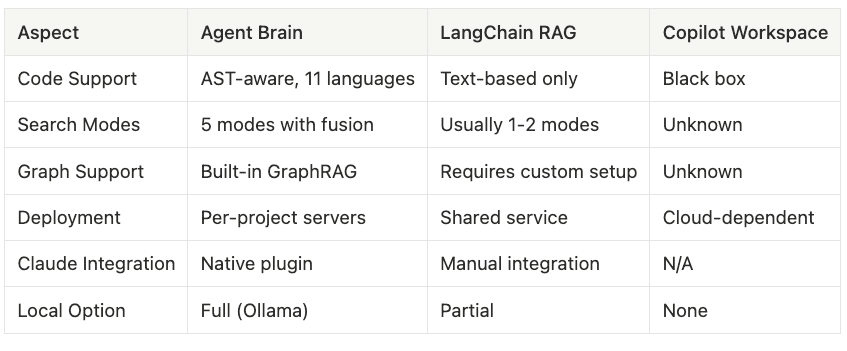
Agent Brain uses LlamaIndex, which is an AI agent framework that specializes in RAG support.
Conclusion
Agent Brain represents a new approach to code search: treating code as a first-class citizen rather than generic text. By combining AST-aware chunking with three-index fusion and native Claude Code integration, it delivers search results that understand your codebase.
Key differentiators:
- tree-sitter parsing preserves code semantics
- Three-index fusion combines keyword precision with semantic understanding
- GraphRAG answers structural questions about dependencies and relationships
- Per-project isolation prevents context pollution
- Native Claude Code plugin eliminates friction
Getting started:
claude plugins install github:SpillwaveSolutions/agent-brain
/agent-brain-setup
The future of code search is semantic, structural, and intelligent. Agent Brain delivers all three.
Agent Brain is open source and available at github.com/SpillwaveSolutions/agent-brain.
About the Author
Rick Hightower is a technology executive and data engineer who led ML/AI development at a Fortune 100 financial services company. He created skilz, the universal agent skill installer, supporting 30+ coding agents including Claude Code, Gemini, Copilot, and Cursor, and co-founded the world's largest agentic skill marketplace. Connect with Rick Hightower on LinkedIn or Medium.
The Claude Code community has developed powerful extensions that enhance its capabilities. Here are some valuable resources from Spillwave Solutions (Spillwave Solutions Home Page):
Integration Skills
- Notion Uploader/Downloader Agent Skill: Seamlessly upload and download Markdown content and images to Notion for documentation workflows. I use this one with Agent Brain.
- Confluence Agent Skill: Upload and download Markdown content and images to Confluence for enterprise documentation. Use a confluence search to get a bunch of related documents to your project and then search them with Agent Brain. Talk about context engineering on steroids!
- JIRA Integration Agent Skill: Create and read JIRA tickets, including handling special required fields. Pull down that whole epic and search through all the related tickets. Agent Brain and context engineering for the win!
Related Articles
- Agent Brain: Giving AI Coding Agents a Full Understanding of Your Entire Enterprise - Feb 5th 2026
- Build Agent Skills Faster with Claude Code 2.1 Release - Feb 4th 2026
- Build Your First Agent Skill in 10 Minutes Using the Context7 Wizard (and Save Hours) - Feb 1st 2026
- Supercharge Your React Performance with Vercel's Best Practices Agent Skill - Jan 29th
- Agent Skills: The Universal Standard Transforming How AI Agents Work - Jan 28th
- Agent-Browser: AI-First Browser Automation That Saves 93% of Your Context Window - Jan 27th
- Claude Code: Todos to Tasks - Jan 26th
- LangExtract: Multi-Provider NLP Extraction with Gemini, OpenAI, Claude, and Local Models - Jan 20th
- Empowering AI Coding Agents with Private Knowledge: The Doc-Serve Agent Skill - Jan 20th
- Give Your Claude Code, OpenCode, and Codex Full RAG Over Docs and Code Repos - Jan 18th