Agent Brain: Giving AI Coding Agents a Full Understanding of Your Entire Enterprise
An agent plugin and agent skill set that gives Claude Code, Codex, OpenCode, and other AI coding tools knowledge of your entire ecosystem
Originally published on Medium.
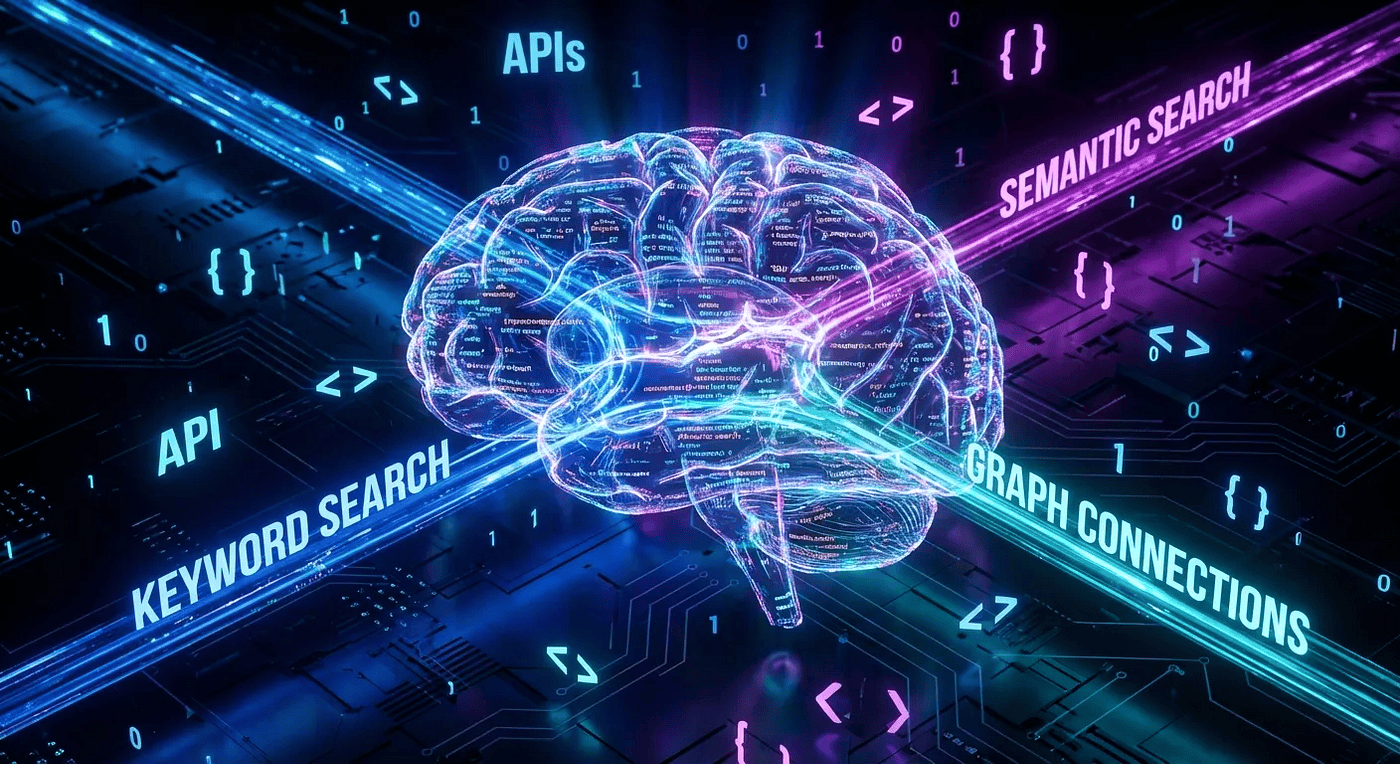
Imagine an AI that not only understands your code but also navigates your entire ecosystem
An agent plugin and agent skill set that gives Claude Code, Codex, OpenCode, and other AI coding tools knowledge of your entire ecosystem
Agent Brain is a plugin that enhances AI coding tools by providing comprehensive knowledge of an enterprise ecosystem, addressing the challenge of scattered information across multiple repositories and documentation. It offers various search modes, including BM25 for exact matches, vector search for semantic understanding, and GraphRAG for structural relationships, enabling efficient integration and context-aware assistance. The system indexes code, documentation, and configurations, allowing AI assistants to access relevant information seamlessly, thus transforming search into intelligent understanding within coding workflows.
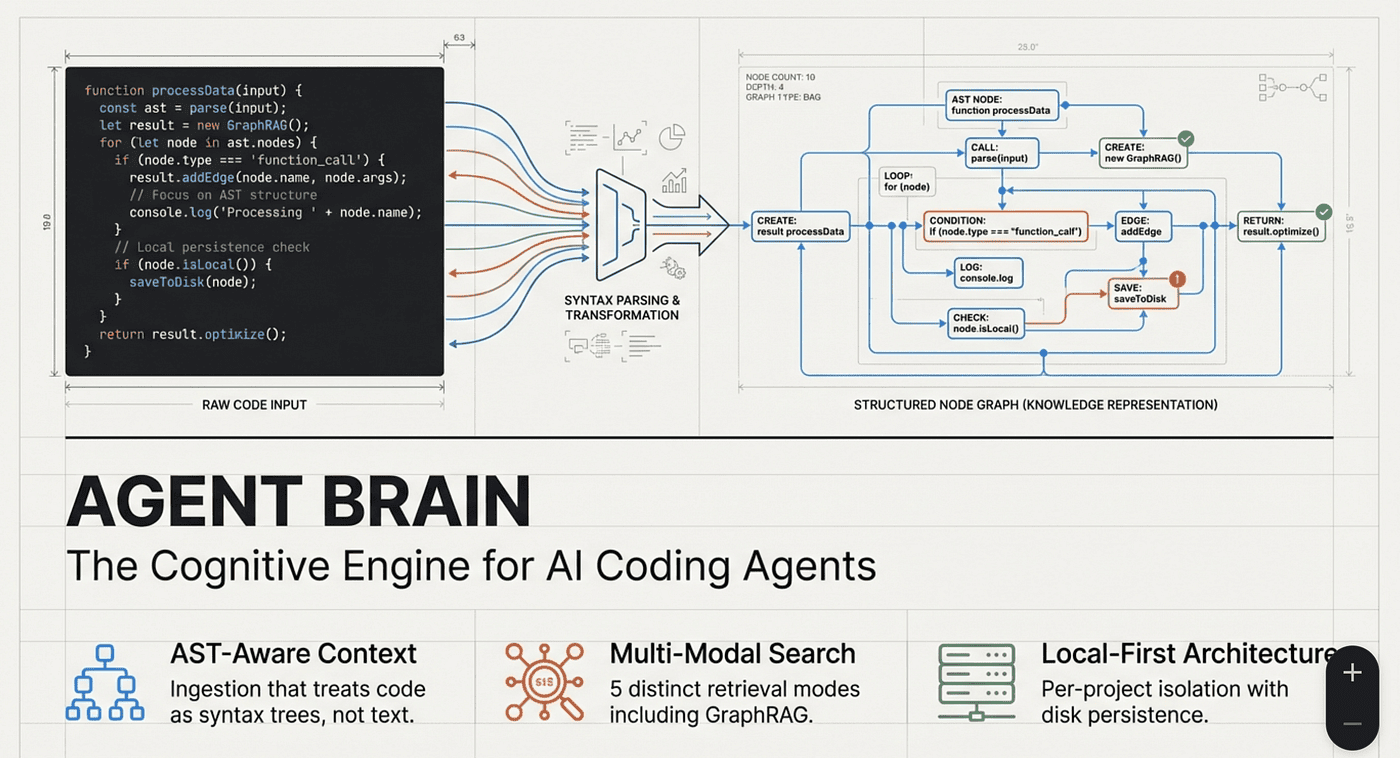
Agent Brain is an agent plugin with agent skills that enhances AI coding tools by providing comprehensive knowledge of an enterprise ecosystem, addressing the challenge of scattered information across multiple repositories and documentation.
A plugin and skill set that gives Claude Code, OpenCode, and other AI coding tools knowledge of your entire ecosystem
The Enterprise Knowledge Problem
You're building a microservice. It listens on port 8080, writes to a Kafka topic, transforms data into three different formats, and integrates with six external APIs. Your service is Project A, but it needs to talk to Projects B, C, D, E, and F. Each project has its own repository, its own documentation, its own quirks.
And that's just the code.
The deployment rules live in Confluence. The API contracts are scattered across repos in Swagger files. Environment-specific configurations differ between Customer A's tenant, Customer B's tenant, the staging environment, and production. Key facts lie buried in Jira epics from two years ago. Tribal knowledge exists only in Slack threads.
When you ask your AI coding assistant for help, it sees only the current file. Maybe it can search the current repo. But the answer you need? It's in a Confluence page describing how Customer B's environment handles authentication differently. Or in Project D's README explaining the message format your service needs to produce.
This is the enterprise knowledge problem. Your codebase is just one piece of a much larger puzzle.
Beyond Single-Repo Search
Traditional code search tools focus on one repository at a time. They're designed for the simple case: you have a codebase, you search it. But enterprise development rarely works that way.
Consider what you actually need to know when working on integration software:
Code Knowledge:
- How does Project A's API work?
- What format does Project C expect for incoming messages?
- What authentication does Project F require?
Operational Knowledge:
- How do we deploy to the staging environment?
- What are the differences between Customer A and Customer B's tenants?
- Which cloud account hosts the production database?
Historical Knowledge:
- Why was this decision made?
- What were the requirements from the original epic?
- What issues did we encounter last time?
This knowledge is scattered across:
- Multiple GitHub repositories
- Confluence documentation
- Jira tickets and epics
- Internal wikis
- README files
- Code comments
- Slack threads (if you're lucky enough to find them)
No single search tool covers all of this. Until now.
Agent Brain: Agentic Skills for Your Code Agent
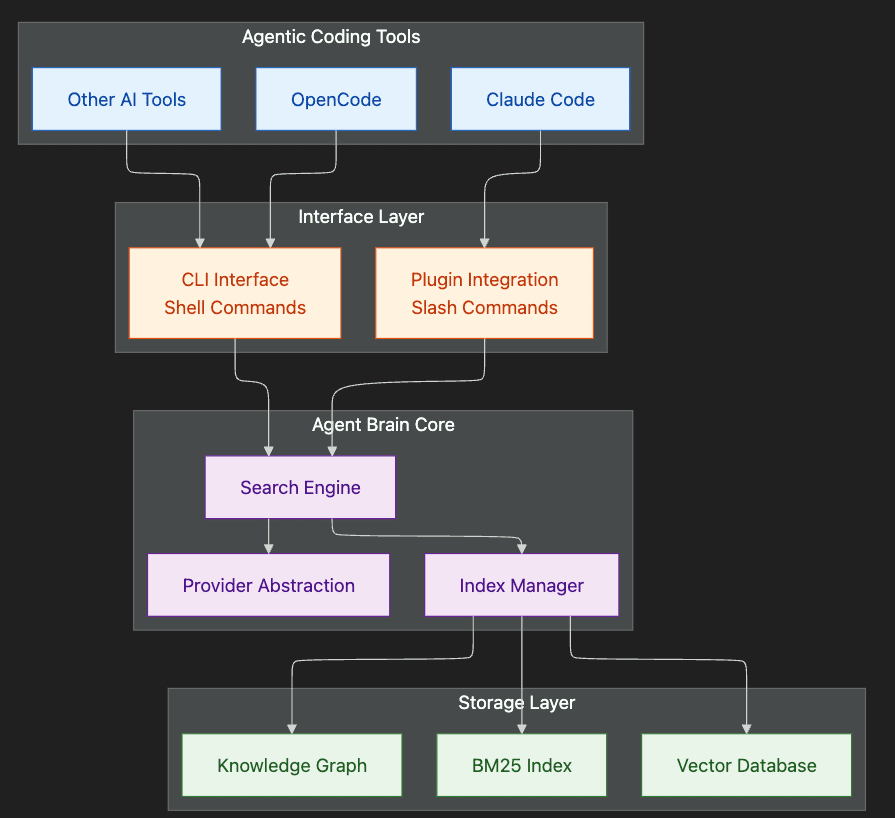
Agent Brain is a set of agentic skills, commands, and a plugin designed for AI coding tools like Claude Code, OpenCode, Codex, Gemini CLI, GitHub Copilot, and similar agentic coding environments. It's a context engineering toolkit that gives your AI coding assistant knowledge of your entire ecosystem.
Think of it as a search engine specifically designed for code agents, one that understands not just code, but documentation, configuration, and the relationships between them. But more than that, it's a skill-based system that integrates directly into your agentic workflow.
What Are Agentic Skills?
Unlike simple CLI commands, agentic skills are intelligent operations that:
- Understand context: They know about your environment, project structure, and workflow state
- Make decisions: They choose the right approach based on your situation
- Guide interactions: They provide step-by-step assistance for complex operations
- Integrate seamlessly: They work within your AI coding tool's natural workflow
When you invoke /agent-brain-search, you're not just running a search command. You're activating a skill that understands your query intent, selects the optimal search mode, and formats results for your code agent to consume effectively.
What Agent Brain Provides:
- 24 slash commands for direct interaction (/agent-brain-search, /agent-brain-index, etc.)
- 3 intelligent agents (Search Assistant, Research Assistant, Setup Assistant)
- 2 context skills that automatically enrich your agent's understanding
- A Skill Agent centric architecture that works with Claude Code, OpenCode, Codex, Github Copilot, and other compatible tools
The core insight is simple: if you want your AI assistant to help with enterprise integration work, you need to feed it enterprise-scale context.
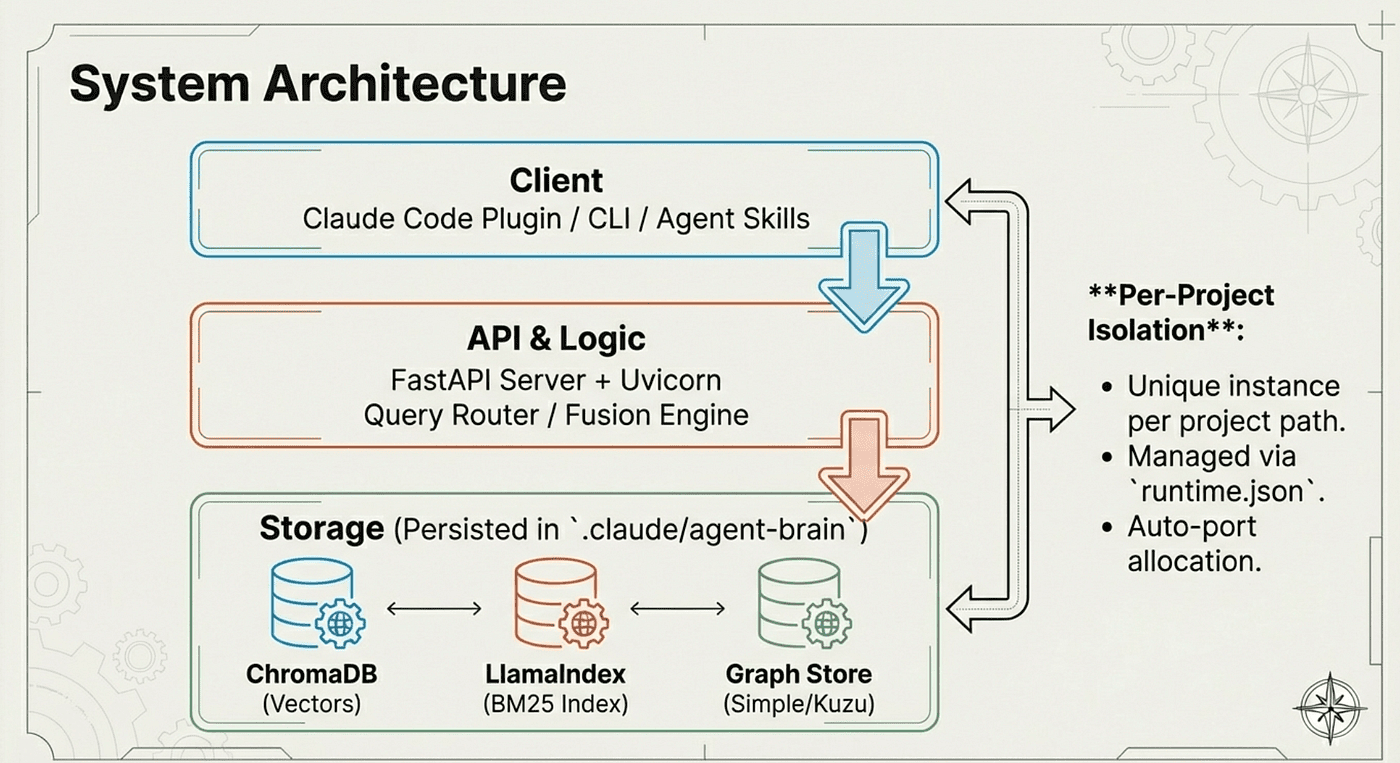
Agent Brain indexes everything your coding agent might need and makes it searchable through natural language queries. And because it's agent skill-based, the knowledge becomes available like any other agent skill; it enriches context for your coding agent without any extra work.
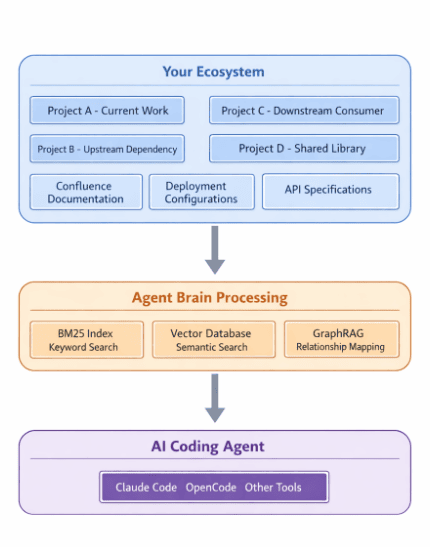
Agent Brain knowledge enriches every interaction of your coding agent.
The Right Tool for the Right Search
Not all searches are created equal. Agent Brain provides five distinct search modes because different questions require different approaches.
BM25: The Surgical Scalpel
You know the exact function name. You have a specific error code. You need precision, not interpretation.
BM25 is the scalpel. It finds exactly what you typed, scoring documents based on term frequency and rarity. No philosophical guessing about what you "might have meant." Just surgical precision.
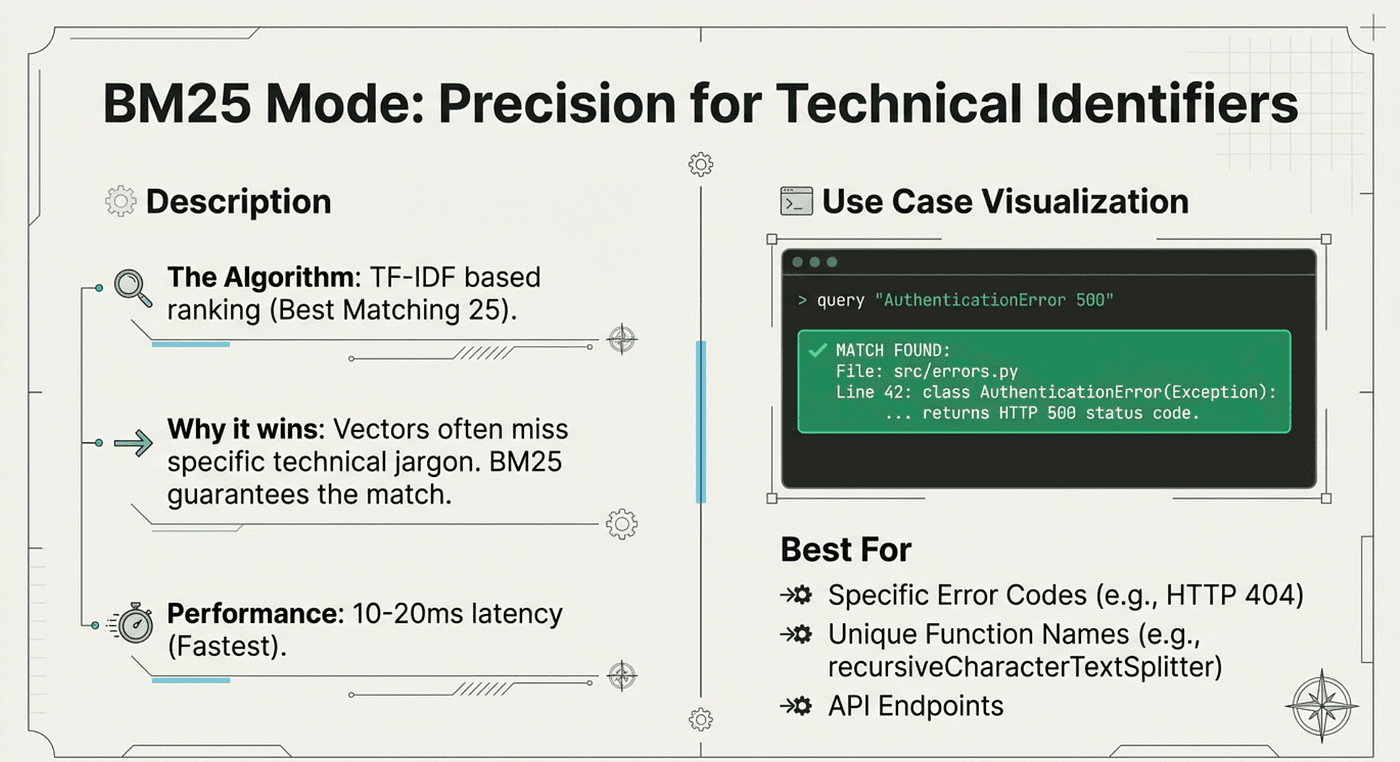
BM25 is the scalpel. It finds exactly what you typed.
How BM25 Works:
BM25 (Best Matching 25) uses a probabilistic relevance framework. For each term in your query, it calculates:
- Term frequency: How often does this term appear in the document?
- Inverse document frequency: How rare is this term across all documents?
- Document length normalization: Avoid bias toward longer documents
The formula balances these factors to score relevance. Rare terms that appear frequently in a document score highest.
Response times: 10-20 milliseconds. Blazing fast.
Best for:
- Function names: getUserById, ProcessPaymentHandler
- Error codes: HTTP 404, NullPointerException, KAFKA_TIMEOUT_ERROR
- Configuration keys: CUSTOMER_A_API_ENDPOINT
- Exact string matches
# Find that exact error code
/agent-brain-keyword "KAFKA_TIMEOUT_ERROR"

# Locate a specific function
/agent-brain-keyword "ProcessPaymentHandler"
When you search for ProcessPaymentHandler, you don't want results about "how to process payments" or "handling payment flows." You want that exact function. BM25 delivers.
Trade-offs:
- Pro: Extremely fast (10-20ms)
- Pro: Deterministic results
- Pro: Perfect for exact matches
- Con: No semantic understanding
- Con: Struggles with synonyms
- Con: Query terms must match document terms
When to Use BM25 Instead of Vector Search:
Use BM25 when you have exact technical terminology and need speed. Use vector search when you have conceptual queries or natural language questions.
Vector Search: The Concept Finder
Sometimes you don't know the exact terms. You have a concept in mind, and you need to find code or documentation that addresses it.
Vector search converts your query into a high-dimensional numerical representation (typically 768-1536 dimensions), then finds content that clusters nearby in that semantic space. "Authentication," "login," "credentials," and "verify user" all occupy similar positions in vector space, even though they share no common words.
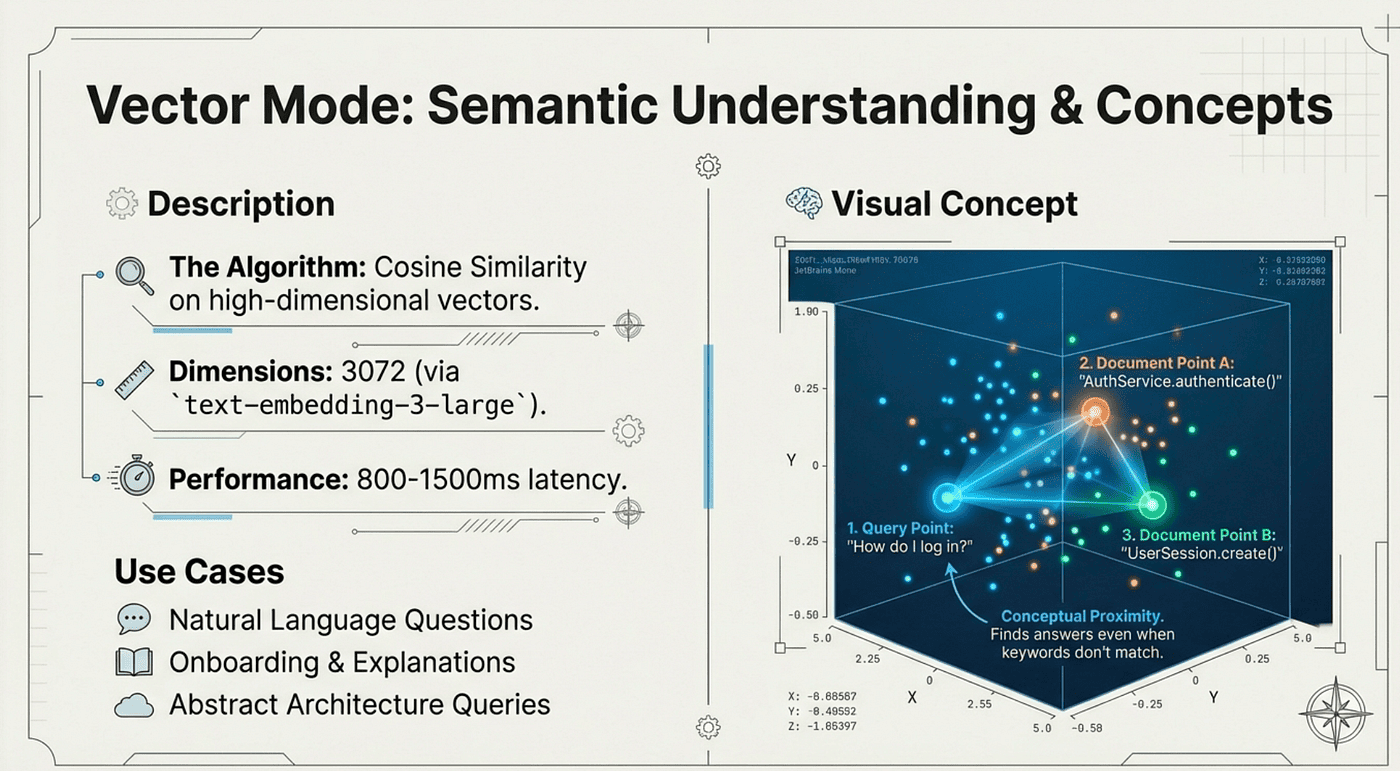
The idea and concept index. Exact match not needed. Idea and concept match!
How Vector Search Works:
- Embedding Generation: Your query is passed to an embedding model (like OpenAI's text-embedding-3-large or Ollama's nomic-embed-text)
- Vector Representation: The model returns a vector: an array of numbers representing semantic meaning
- Similarity Calculation: The system computes cosine similarity between your query vector and all document vectors
- Ranked Results: Documents with highest similarity scores are returned
Example vector space (simplified to 2D):
"login" -------- "authenticate"
   \              /
    \            /
     "credentials"
         |
    "verify user"
In reality, these relationships exist in hundreds of dimensions, capturing subtle semantic nuances.
Best for:
- Conceptual questions: "How does caching work in this system?"
- Exploratory research: "What's our approach to error handling?"
- Natural language queries from non-technical stakeholders
# Find documentation about a concept
/agent-brain-semantic "how do we handle tenant isolation"

# Explore architectural decisions
/agent-brain-semantic "what's our message queue strategy"
Vector search understands that when you ask about "tenant isolation," you probably want results mentioning "multi-tenancy," "customer separation," or "environment partitioning," even if those exact words aren't in your query.
Trade-offs:
- Pro: Understands semantic meaning
- Pro: Handles synonyms and related concepts
- Pro: Great for natural language queries
- Con: Slower than BM25 (100-200ms)
- Con: Requires embedding model
- Con: Less precise for exact matches
GraphRAG: The Connection Detective
Code is relational. Functions call other functions. Classes extend other classes. Modules import other modules. When you need to understand these relationships, you need a different kind of search.
GraphRAG builds a knowledge graph of your codebase. It extracts entities (functions, classes, modules) and maps all the relationships between them (calls, imports, extends, contains). Then it answers structural questions by walking this web of connections.
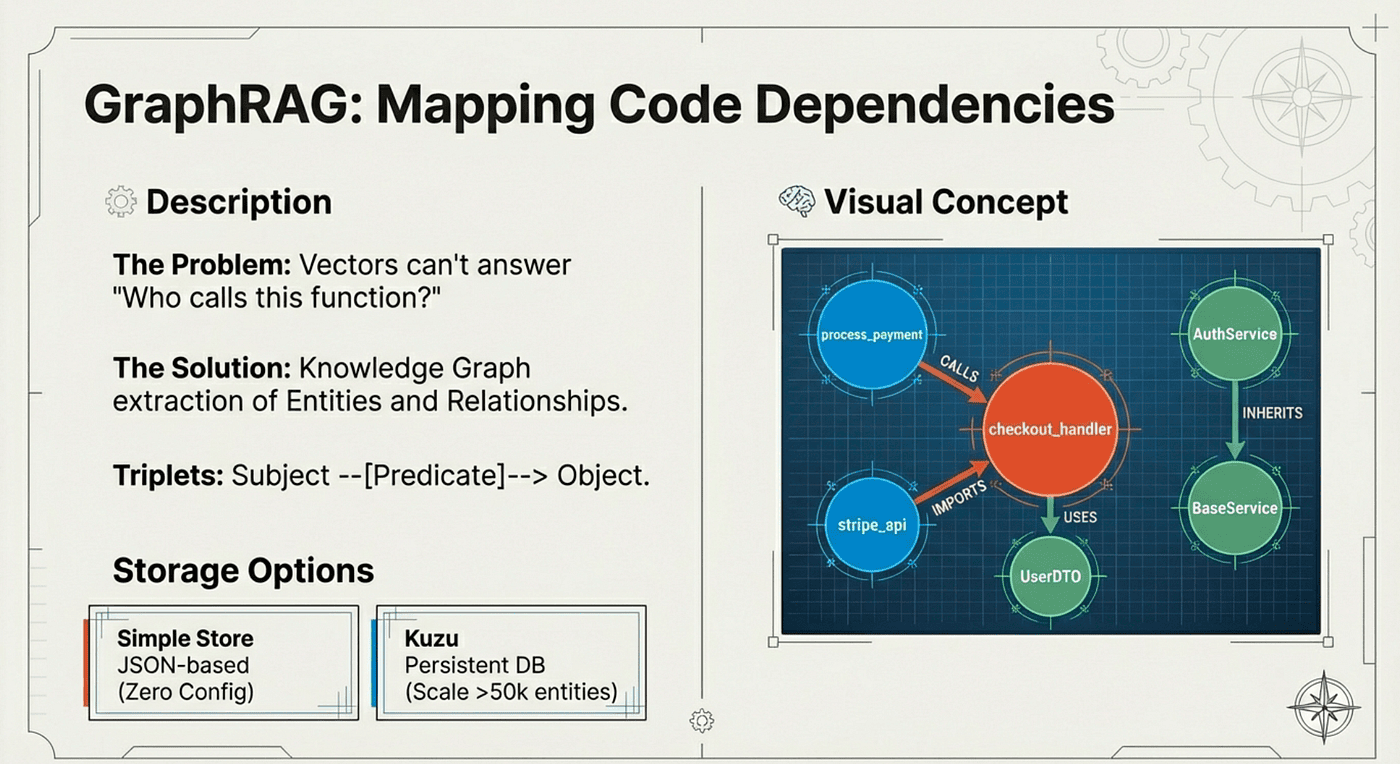
GraphRAG builds a knowledge graph of your codebase. It knows how things are connected.
How GraphRAG Works:
- Entity Extraction: Parse code to identify functions, classes, variables, modules
- Relationship Mapping: Identify connections (calls, imports, inherits, uses)
- Graph Construction: Build a directed graph of entities and edges
- Query Processing: Traverse the graph to answer structural questions
Example graph structure:
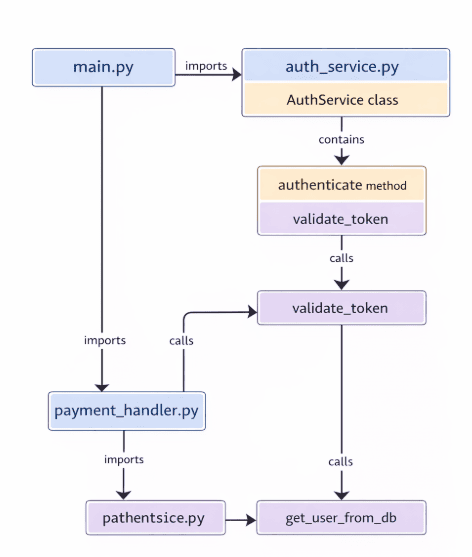
Best for:
- Dependency analysis: "What modules depend on AuthService?"
- Impact assessment: "What calls this function?"
- Architectural understanding: "What's the call chain from main() to save_user()?"
# Find what uses a specific service
/agent-brain-graph "what calls PaymentProcessor"

# Understand dependencies
/agent-brain-graph "what imports the config module"
This is fundamentally different from text search. Vector search might find documents about authentication. Graph search finds the actual code that calls the authentication function. It's the difference between conceptual relevance and structural reality.
Trade-offs:
- Pro: Reveals structural relationships
- Pro: Perfect for impact analysis
- Pro: Answers "what depends on X" questions
- Con: Requires AST parsing
- Con: More complex to set up
- Con: Limited to structured code
When to Use GraphRAG Instead of Text Search:
Use GraphRAG when you need to understand code structure and dependencies. Use text search when you need to find documentation or conceptual explanations.
Hybrid Search: The Swiss Army Knife
Most real questions are messy. They contain both specific technical terms and broader concepts. "How do I implement OAuth2 with JWT tokens?" has precise keywords (OAuth2, JWT) and conceptual intent (implementation approach).
Hybrid search combines BM25 and vector search, then intelligently fuses the results. You can tune the balance with an alpha parameter: slide toward BM25 for keyword-heavy queries, toward vector for conceptual ones.
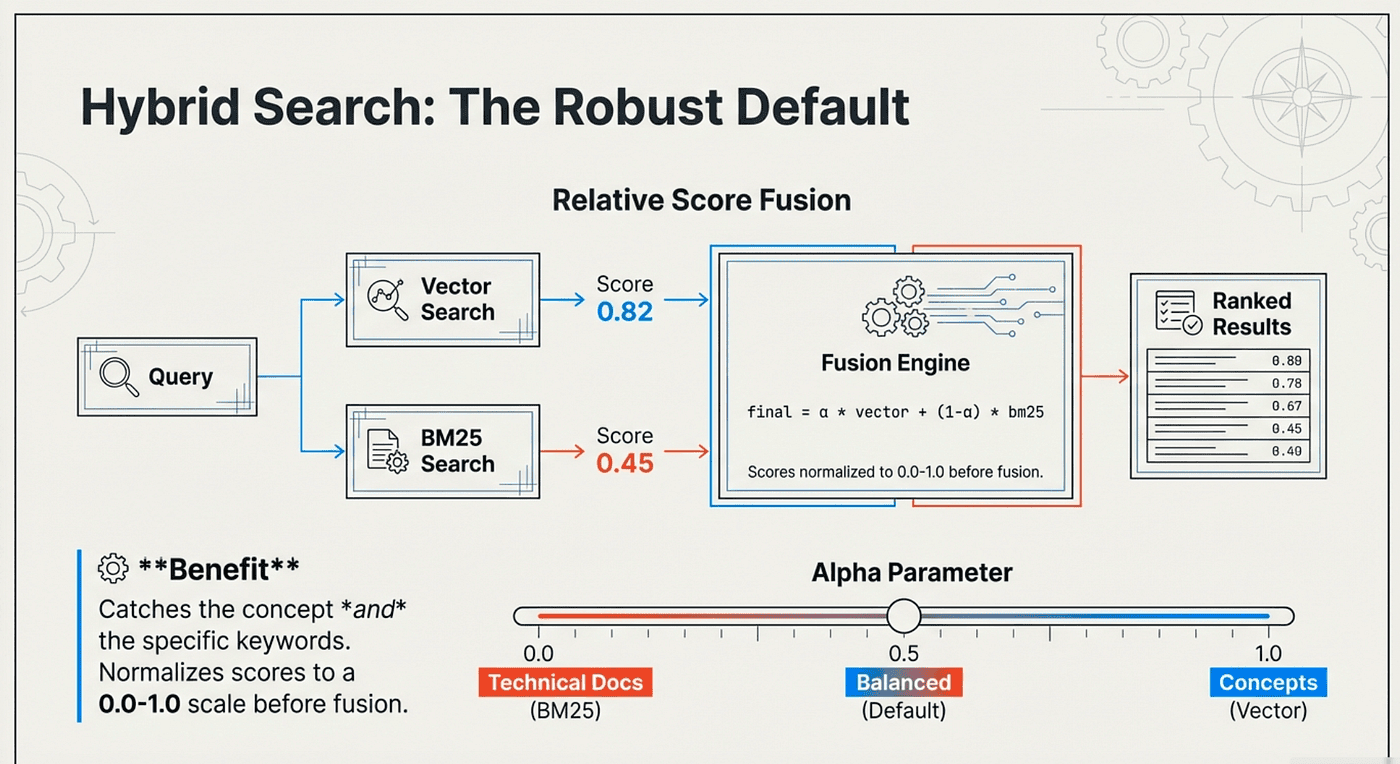
Hybrid search combines BM25 and vector search, then intelligently fuses the results
How Hybrid Search Works:
- Parallel Execution: Run BM25 and vector search simultaneously
- Score Normalization: Convert both result sets to comparable scales (0-1)
- Weighted Fusion: Combine scores using alpha parameter
- final_score = (alpha x vector_score) + ((1 - alpha) x bm25_score)
- Ranked Output: Sort by final score
Example with alpha=0.7 (70% semantic, 30% keyword):
Document A:
- BM25 score: 0.8
- Vector score: 0.6
- Final: (0.7 x 0.6) + (0.3 x 0.8) = 0.42 + 0.24 = 0.66

Document B:
- BM25 score: 0.5
- Vector score: 0.9
- Final: (0.7 x 0.9) + (0.3 x 0.5) = 0.63 + 0.15 = 0.78

Result: Document B ranks higher (better semantic match)
# Mixed query with both concepts and specifics
/agent-brain-search "how to configure Kafka consumer for Customer B tenant"

# Tune the balance (0.7 = 70% semantic, 30% keyword)
agent-brain query "authentication flow" --mode hybrid --alpha 0.7
Note: you don't have to use the /commands, you can just use natural language and the agent brain will pick the right combination of tools to use for your use case. We are just showing the /commands as examples.
Hybrid is the default mode because it handles the widest range of queries effectively.
Trade-offs:
- Pro: Balances precision and recall
- Pro: Handles mixed queries well
- Pro: Tunable with alpha parameter
- Con: Slightly slower than single mode
- Con: Requires both indexes
Multi-Mode: The Master Key
When you need the ultimate answer, one that understands concepts, finds exact keywords, AND maps structural relationships, you run all three searches simultaneously.
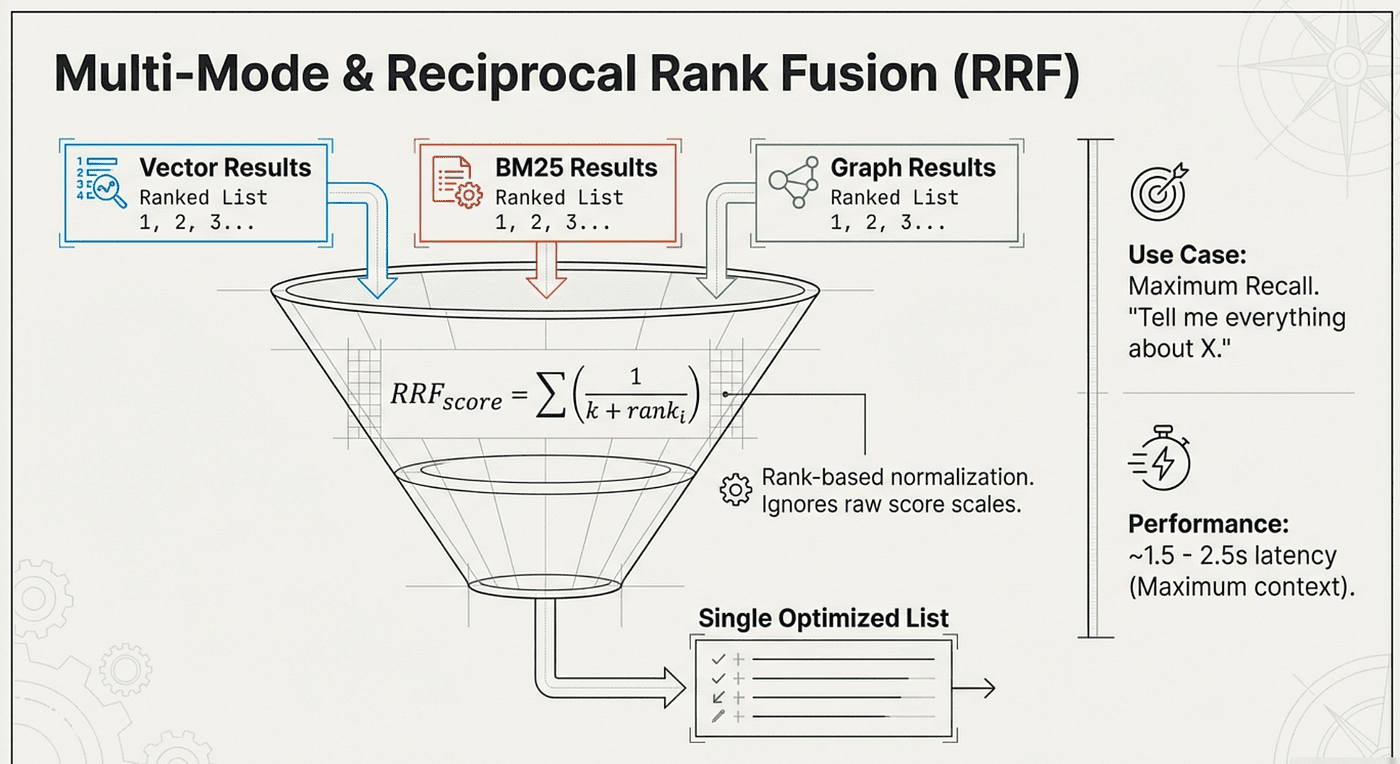
Multi-mode queries BM25, vector, and graph indexes in parallel. Then it uses Reciprocal Rank Fusion (RRF) to combine the results. Documents that rank highly across multiple search methods get boosted to the top.
How Reciprocal Rank Fusion (RRF) Works:
RRF combines multiple ranked lists by considering rank position rather than raw scores:
RRF_score = S (1 / (k + rank_i))
Where:
- k is a constant (typically 60)
- rank_i is the rank position in search method i
Example:
Document A ranks:
- BM25: #1
- Vector: #5
- Graph: #2

RRF_score = 1/(60+1) + 1/(60+5) + 1/(60+2)
          = 0.0164 + 0.0154 + 0.0161
          = 0.0479

Document B ranks:
- BM25: #3
- Vector: #1
- Graph: Not found

RRF_score = 1/(60+3) + 1/(60+1) + 0
          = 0.0159 + 0.0164
          = 0.0323

Result: Document A ranks higher (consensus across methods)
# Maximum recall for deep investigation
/agent-brain-multi "security vulnerabilities in payment processing"
The magic of RRF is consensus. If a document ranks #1 in graph search (structurally important) AND #2 in vector search (conceptually relevant), it's probably exactly what you need. RRF recognizes this agreement and promotes it.
Trade-offs:
- Pro: Maximum recall
- Pro: Consensus-based ranking
- Pro: Catches results missed by single modes
- Con: Slowest option (all modes run)
- Con: Can return more noise
Choosing the Right Mode
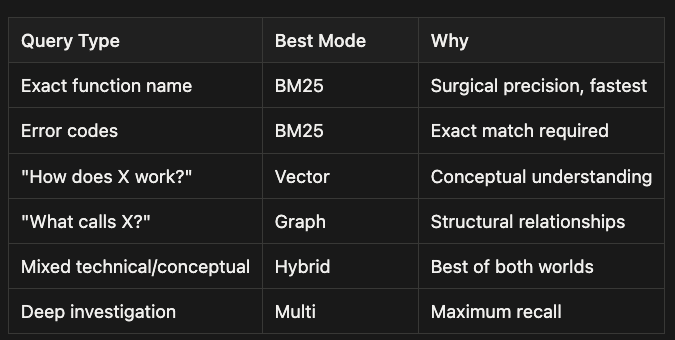
Quick Reference: Choosing Your Search Mode
- Exact function name -> Use BM25 for surgical precision and fastest results
- Error codes -> Use BM25 when exact match is required
- "How does X work?" -> Use Vector for conceptual understanding
- "What calls X?" -> Use Graph to explore structural relationships
- Mixed technical/conceptual queries -> Use Hybrid for the best of both worlds
- Deep investigation -> Use Multi mode for maximum recall
The key insight: modern search isn't one-size-fits-all. It's about having a toolkit and knowing which tool fits the job. And remember, you can just use natural language and let the Agent Brain's agent skill pick the right search method for you!
Indexing Your Ecosystem
Agent Brain can index far more than just your current repository.
Code Repositories
Index multiple repositories to give your agent visibility across the ecosystem:
# Index your main project
agent-brain index ./project-a --include-code

# Index dependent projects
agent-brain index ../project-b --include-code
agent-brain index ../project-c --include-code
# Index shared libraries
agent-brain index ../shared-utils --include-code
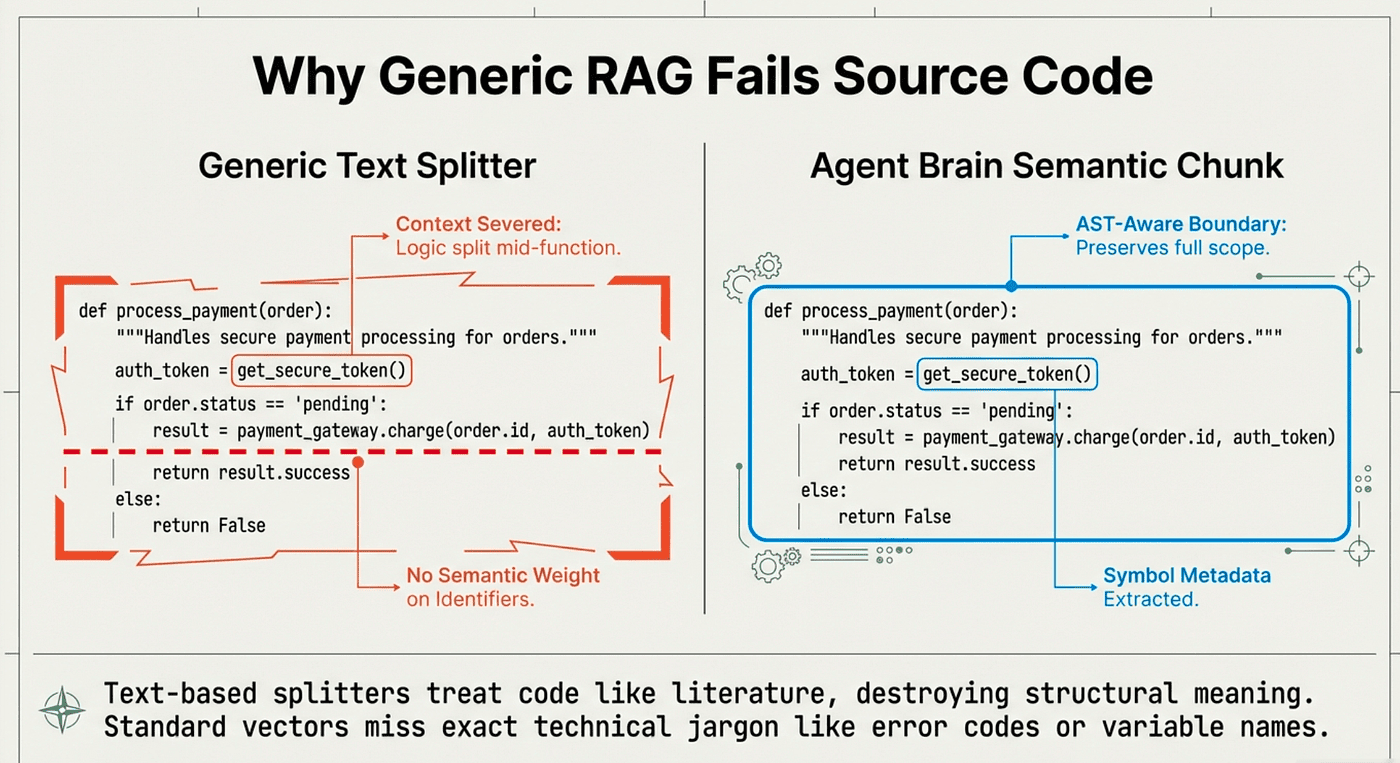
The AST-aware chunking preserves code semantics. Functions stay intact. Classes don't fragment. Metadata like symbol names, line numbers, and docstrings are extracted and indexed.
Why AST-Aware Chunking Matters:
Traditional chunking splits documents at fixed character or line boundaries. This breaks code structures:
# Bad: Traditional chunking might split here
def calculate_payment(amount, tax_rate):
    """Calculate total payment with tax."""
    subtotal = amount
    tax = amount * tax_rate
# --- CHUNK BOUNDARY ---
    total = subtotal + tax
    return total
AST-aware chunking respects code structure:
# Good: AST chunking keeps function intact
def calculate_payment(amount, tax_rate):
    """Calculate total payment with tax."""
    subtotal = amount
    tax = amount * tax_rate
    total = subtotal + tax
    return total
# Function ends naturally here
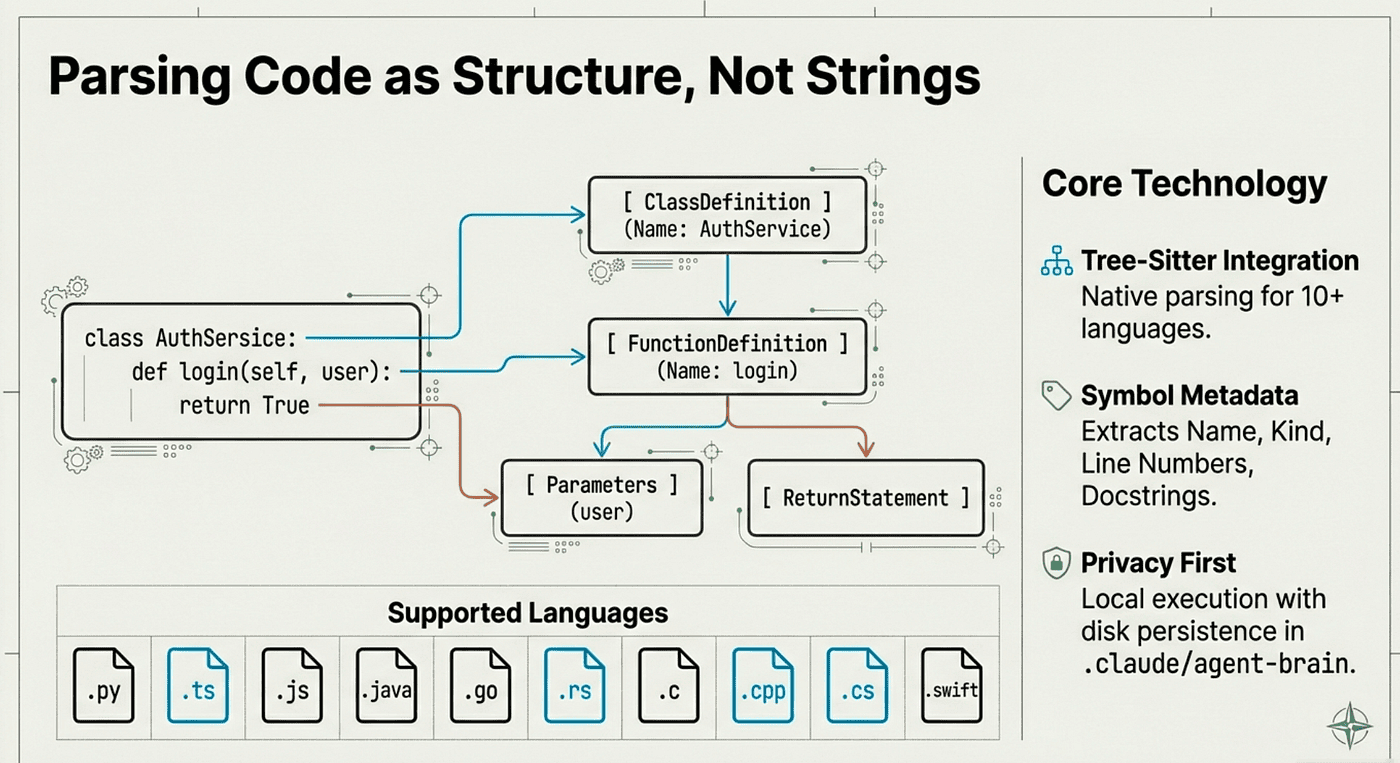
The AST-aware chunking preserves code semantics
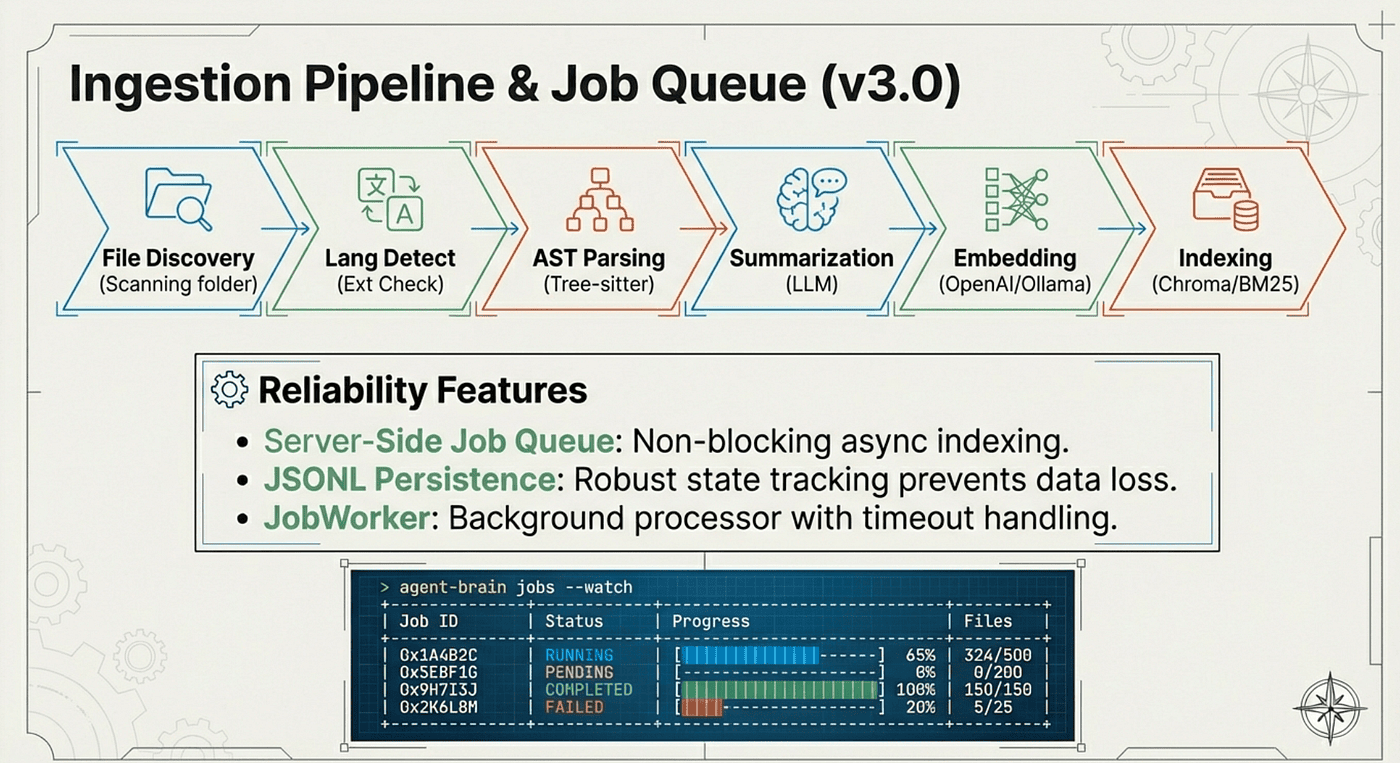
Full ingestion pipeline when you add a directory to be indexed
Documentation
Import Confluence pages, internal wikis, and markdown documentation:
# Index exported Confluence docs
agent-brain index ./docs/confluence-export/

# Index architectural decision records
agent-brain index ./docs/adr/
# Index API specifications
agent-brain index ./docs/api-specs/
There are skills and tools to export Confluence pages to markdown, making it easy to pull in enterprise documentation.
Configuration and Environment Specs
Index deployment configurations and environment documentation:
# Index environment configs
agent-brain index ./infra/environments/

# Index deployment docs
agent-brain index ./docs/deployment/
Now when you ask "How does Customer B's environment differ from staging?" the agent can actually find the answer. You can also call the Agent Brain's plugin command /agent-brain-index ./docs/deployment , and becuse it is AI, you can just use natural language to describe the files that you want to index, and it just works. I show an example at the end of the article.
Agentic Skills Make Setup Easy
If setting up a BM25 + Vector + Graph RAG system for every codebase sounds daunting, that's exactly why Agent Brain is built as a set of agentic skills. The hard work is abstracted into intelligent commands that know how to get things done.
The Plugin Architecture
Agent Brain is distributed as a plugin that installs into Claude Code, OpenCode, and other compatible agentic coding tools:
# For Claude Code
claude plugins install github:SpillwaveSolutions/agent-brain

# Or install the CLI directly for other tools
pip install agent-brain-rag agent-brain-cli
Once installed, you get immediate access to all the agentic skills, commands, and agents. At the end of the article, I actually show you step by step how to set up the whole thing. There are agent skills and agent commands that actually effortlessly walk you through the whole process. You can even just install the plugin and then just use the /agent-brain-install , and you just follow the prompts and it will set up the whole thing for you. Takes about 5 minutes. We live in the future.
What Happens During Plugin Installation:
- Package Resolution: Claude Code fetches the plugin from GitHub
- Dependency Installation: Required Python packages are installed (agent-brain-rag, agent-brain-cli)
- Skill Registration: Commands, skills, and agents are registered in the tool
- Configuration Setup: Default configuration files are created
- Verification: The plugin runs health checks to ensure proper installation
Skills That Know How to Help
Unlike simple CLI tools, Agent Brain's skills are agentic: they understand context, make decisions, and guide you through complex operations.
/agent-brain-install
This skill doesn't just run pip install. It detects your environment, chooses the right package manager (pip, uv, pipx), handles dependencies, and verifies the installation succeeded.
What the Install Skill Does:
- Environment Detection: Checks for Python version, virtual environment, package managers
- Package Manager Selection: Chooses pip, uv, or pipx based on availability
- Dependency Resolution: Installs agent-brain-rag and agent-brain-cli with correct versions
- Verification: Tests that installed packages are importable and functional
- Error Handling: If something fails, provides diagnostic information and suggestions
/agent-brain-init
This skill initializes your local project, creating the .claude/agent-brain/ directory structure, configuration files, and runtime setup.
What the Init Skill Does:
- Directory Creation: Sets up .claude/agent-brain/ with proper structure
- Configuration Generation: Creates default config.yaml with sensible defaults
- Index Preparation: Initializes BM25, vector, and graph index directories
- Provider Setup: Detects available providers (Ollama, OpenAI, Anthropic)
- State Management: Creates state files for tracking indexed content
/agent-brain-setup
The full setup wizard walks you through everything interactively:
- Installs required packages
- Configures your providers (OpenAI, Anthropic, or Ollama)
- Initializes the project
- Starts the server
- Guides you through initial indexing
Example Setup Interaction:
> /agent-brain-setup

[Agent Brain Setup Wizard]
Step 1: Installing packages...
  Python 3.11 detected
  Installing agent-brain-rag...
  Installing agent-brain-cli...
Step 2: Configuring providers...
Available providers:
1. Ollama (local, no API key required)
2. OpenAI (requires API key)
3. Anthropic (requires API key)
Select provider [1-3]: 1
  Ollama detected at http://localhost:11434
  nomic-embed-text model available
Step 3: Initializing project...
  Created .claude/agent-brain/
  Generated config.yaml
  Initialized indexes
Step 4: Starting server...
  Server running on http://localhost:8888
Step 5: Ready to index!
What would you like to index first?
1. Current repository
2. Multiple repositories
3. Documentation directory
Select option [1-3]: 1
Indexing ./
  Indexed 342 code files
  Generated 1,247 chunks
  Created graph relationships
Setup complete! Try: /agent-brain-search "your query"
There are a lot of options and the agentic plugin command agent-brain-setup, helps you set things up quickly!
Skill-Based Command Reference
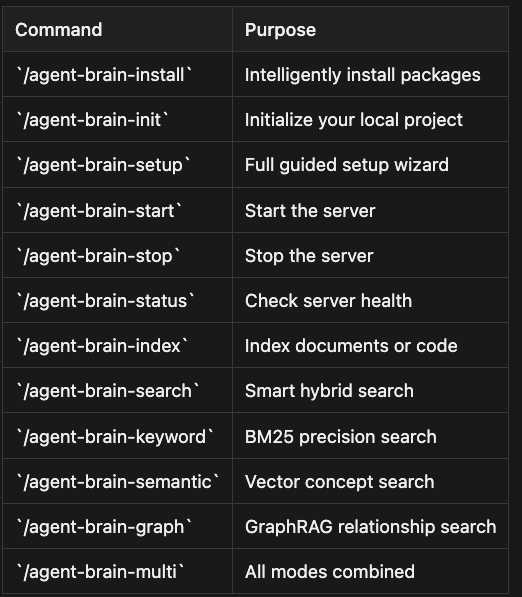
- /agent-brain-install - Intelligently install packages
- /agent-brain-init - Initialize your local project
- /agent-brain-setup - Full guided setup wizard
- /agent-brain-start - Start the server
- /agent-brain-stop - Stop the server
- /agent-brain-status - Check server health
- /agent-brain-index - Index documents or code
- /agent-brain-search - Smart hybrid search
- /agent-brain-keyword - BM25 precision search
- /agent-brain-semantic - Vector concept search
- /agent-brain-graph - GraphRAG relationship search
- /agent-brain-multi - All modes combined
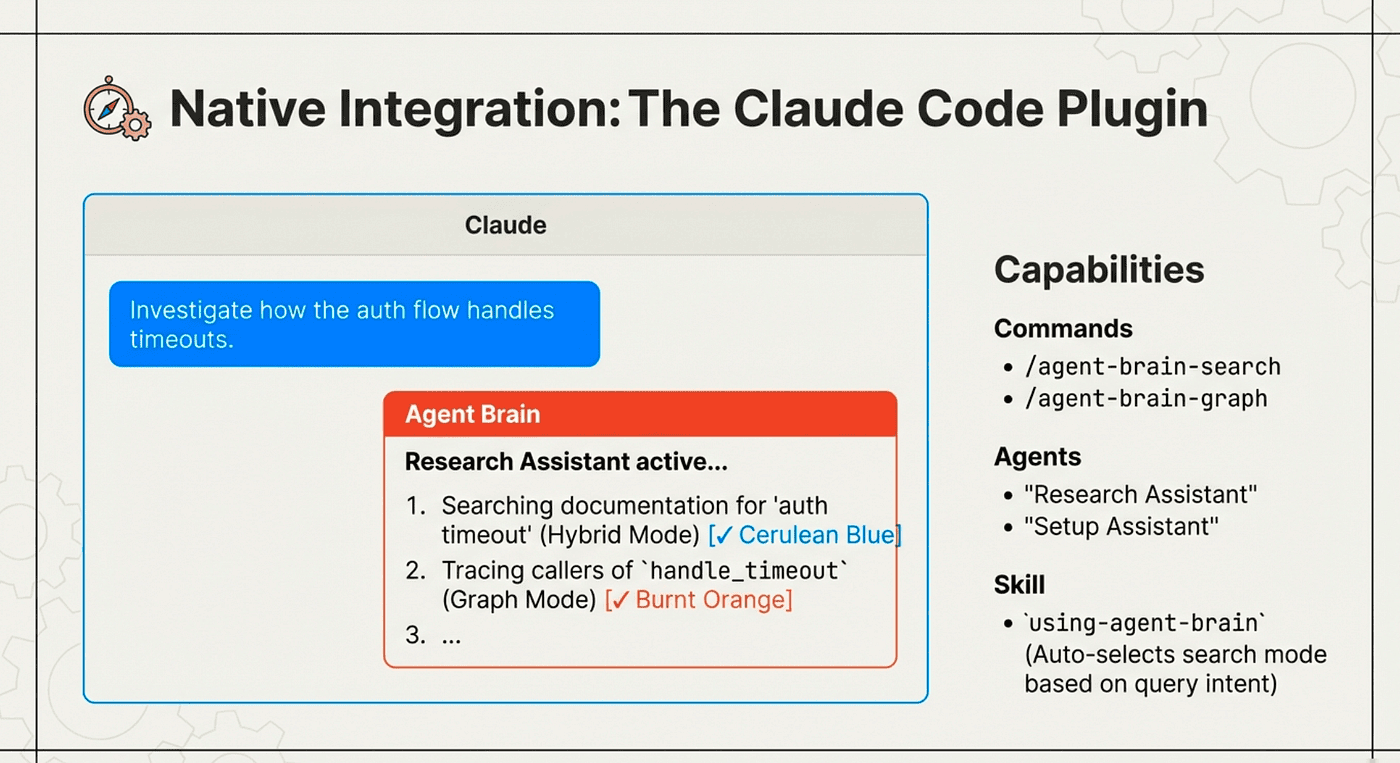
Use Natural language, or commands or agents that in turn use the agent-brain agent skills
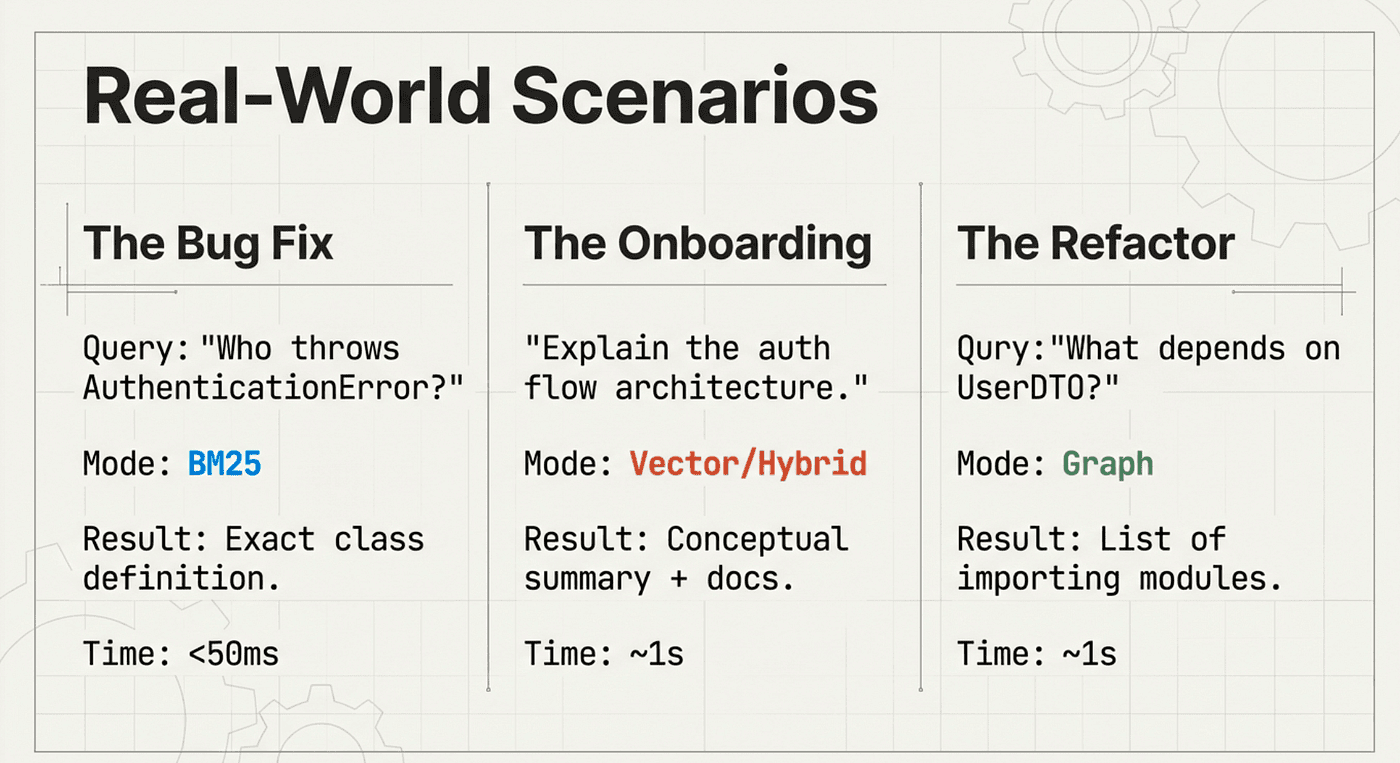
A better man would have fixed the Qury typo, comment if you saw it! :)
Intelligent Agents
Beyond commands, Agent Brain includes three intelligent agents:
Search Assistant: Handles multi-step search operations, combining results from different modes and synthesizing answers.
Example interaction:
You: Find all the places where we handle authentication

[Search Assistant activates]

Running hybrid search for "authentication handling"...
Found 23 results.

Following up with graph search for structural relationships...
Identified 5 key files with authentication logic.

Analyzing imports and dependencies...
PaymentService, UserService, and AdminService all depend on AuthService.

Summary:
- Core authentication: auth_service.py (AuthService class)
- Token validation: jwt_handler.py (validate_token, refresh_token)
- Database queries: user_repository.py (get_user_by_credentials)
- Integration points: 3 services call AuthService
Research Assistant: Deep exploration with follow-up queries. Ask it to "investigate the authentication architecture" and it will search across modes, follow relationship chains, and compile findings.
Example interaction:
You: Investigate the authentication architecture

[Research Assistant activates]

Phase 1: Discovering authentication components...
- Found AuthService, JWTHandler, UserRepository, SessionManager

Phase 2: Mapping relationships...
- AuthService uses JWTHandler for token operations
- AuthService uses UserRepository for credential validation
- SessionManager depends on AuthService

Phase 3: Analyzing documentation...
- Found ADR-005: Decision to use JWT tokens
- Found Confluence page: Multi-tenant authentication strategy

Phase 4: Identifying patterns...
- Token-based authentication with refresh flow
- Tenant isolation enforced at AuthService level
- Rate limiting applied to authentication endpoints

Compiled findings into research report...
Setup Assistant: Guided installation and troubleshooting. If something goes wrong, this agent can diagnose issues and walk you through fixes.
Example interaction:
You: The indexing failed with an error

[Setup Assistant activates]

Analyzing error logs...

Error: EmbeddingProvider connection timeout
Cause: Ollama server not responding

Diagnostic steps:
1. Checking Ollama status...
   Ollama not running

2. Attempting to start Ollama...
   > ollama serve
   Ollama started

3. Verifying model availability...
   > ollama list
   nomic-embed-text not found

4. Pulling required model...
   > ollama pull nomic-embed-text
   Model downloaded

5. Retrying indexing...
   Indexing successful

Issue resolved! Your environment is now configured correctly.
Automatic Context Enrichment
The real power is in the context skills. Once Agent Brain is running, two skills automatically enrich every interaction:
- using-agent-brain: Helps your code agent choose the right search mode and optimize queries
- configuring-agent-brain: Provides knowledge about setup, providers, and troubleshooting
This means the knowledge you've indexed becomes available like any other skill. When you're researching, planning, or implementing, your agent has access to all indexed content without any extra prompting from you.
How Context Skills Work:
Context skills inject knowledge into your agent's working memory. When you interact with your code agent:
- Query Analysis: The agent analyzes your question
- Skill Activation: Relevant context skills are activated automatically
- Context Injection: Indexed knowledge is retrieved and added to the agent's context
- Response Generation: The agent responds with full ecosystem awareness
Example without Agent Brain:
You: How do we handle Customer B authentication?

Agent: I don't see authentication code in the current file.
Let me search the current repository...
No results found. Could you provide more context?
Example with Agent Brain (context skills active):
You: How do we handle Customer B authentication?
Agent: [using-agent-brain skill activated]
I found the answer across multiple sources:
From confluence-export/auth-strategy.md:
"Customer B uses OAuth2 with custom tenant headers..."
From project-b/auth_service.py:
The TenantAuthenticator class handles customer-specific auth:

class TenantAuthenticator:
    def authenticate_customer_b(self, request):
        tenant_header = request.headers.get('X-Tenant-ID')
        if tenant_header == 'customer-b': return self.oauth2_flow(request)

From docs/deployment/customer-b.md:
Environment variables:
- CUSTOMER_B_OAUTH_CLIENT_ID
- CUSTOMER_B_OAUTH_REDIRECT_URI

Would you like me to show you how this integrates with the payment service?
Works With Your Agentic Coding Tool
Agent Brain is designed to work with multiple agentic coding environments:
Claude Code: Native plugin integration with slash commands, agents, and skills. Full feature support.
OpenCode: Skill-based integration through the CLI. All search and indexing capabilities available.
Other Agentic Tools: Any tool that can execute shell commands can leverage the agent-brain CLI for search and indexing, if they support agent skills then they can get an even richer set of support.
The skill-based architecture means Agent Brain adapts to your workflow. Whether you're using Claude Code's slash commands or invoking the CLI from another tool, the same indexed knowledge is available.
# From Claude Code
/agent-brain-search "authentication flow"

# From OpenCode or CLI
agent-brain query "authentication flow" --mode hybrid
# Same index, same results, different interface
Integration Architecture:
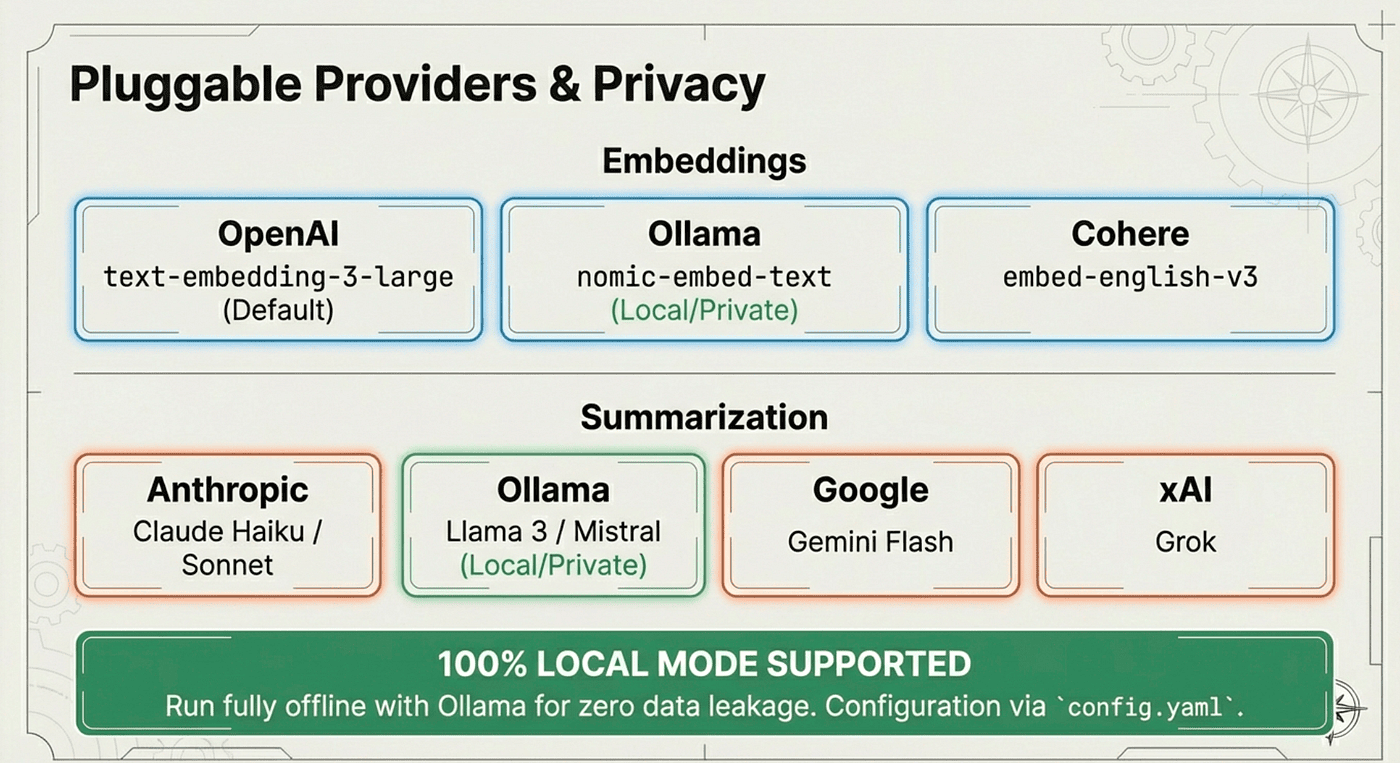
Provider Flexibility
Agent Brain supports multiple providers for embeddings and summarization:
Cloud Providers:
- OpenAI (text-embedding-3-large)
- Anthropic (Claude for summarization)
- Cohere (multilingual embeddings)
Local Providers:
- Ollama (nomic-embed-text, llama4)
If you already have Ollama installed, you can be up and running in minutes with zero API costs. If you prefer cloud providers, just add your API key.
# Configure providers
/agent-brain-providers

# Select Ollama for fully local operation
# Or use OpenAI/Anthropic for cloud-based
Provider Comparison:
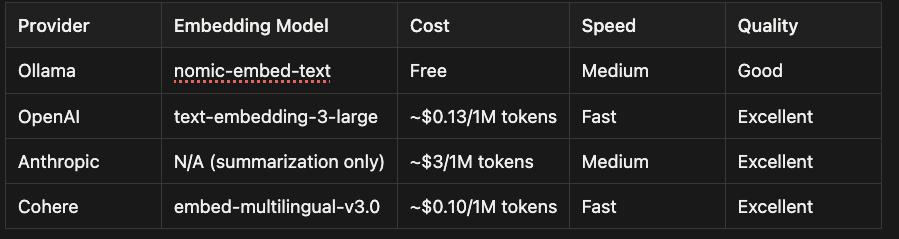
When to Use Each Provider:
- Ollama: Privacy-sensitive projects, unlimited usage, offline work
- OpenAI: Best quality embeddings, fast API, reasonable cost
- Anthropic: Best summarization quality for contextual RAG
- Cohere: Multilingual projects, good balance of cost and quality
Contextual RAG: Smarter Chunking
Agent Brain implements ideas from Anthropic's contextual RAG research. Rather than just chunking documents and hoping for the best, it:
- Generates summaries for code chunks using an LLM, improving semantic search relevance
- Injects context so chunks know about surrounding chunks in the same file
- Preserves relationships through the graph index
This means a function chunk isn't orphaned. It knows what file it's in, what class it belongs to, and what it calls. This context travels with the chunk, making retrieval more accurate.
Traditional RAG vs Contextual RAG:
Traditional RAG:
Chunk 1: [function authenticate(...)]
Chunk 2: [function validate_token(...)]
Chunk 3: [function refresh_token(...)]
Problem: No connection between chunks
Search for "authentication flow" returns isolated functions
Contextual RAG:
Chunk 1:
  Content: [function authenticate(...)]
  Context: Part of AuthService class in auth_service.py
          Calls validate_token() and get_user_from_db()
          Used by PaymentService and UserService

Chunk 2:
  Content: [function validate_token(...)]
  Context: Part of AuthService class in auth_service.py
          Called by authenticate()
          Uses jwt library for token verification
Chunk 3:
  Content: [function refresh_token(...)]
  Context: Part of AuthService class in auth_service.py
          Called by SessionManager
          Generates new JWT tokens
Benefit: Chunks understand their context and relationships
Search for "authentication flow" returns connected components
Why This Matters:
When you search for "how does authentication work," contextual RAG can find:
- The authenticate() function (direct match)
- Related functions it calls (graph relationships)
- Documentation explaining the flow (semantic understanding)
- Configuration files it depends on (file-level context)
Traditional RAG would only find the authenticate() function.
Real-World Workflow
Here's how Agent Brain fits into enterprise development:
Morning standup: You pick up a ticket to add a new field to the payment message format.
Research phase:
/agent-brain-search "payment message format"
/agent-brain-graph "what consumes PaymentMessage"
You discover that three downstream services consume this message. The documentation in Confluence explains the schema versioning strategy.
Results:
[Hybrid Search Results]

1. payment_schema.py (Project A)
   class PaymentMessage:
       amount: Decimal
       currency: str
       customer_id: str
       # Current schema version 1.2
2. confluence-export/schemas/payment-versioning.md
   Schema Versioning Strategy:
   - Always maintain backwards compatibility
   - Add new fields as optional
   - Increment minor version for additions
3. project-c/payment_consumer.py (Downstream Service)
   def process_payment(message: PaymentMessage):
       # Consumes PaymentMessage schema v1.2
[Graph Search Results]
Consumers of PaymentMessage:
- project-c/payment_consumer.py (ProcessPaymentHandler)
- project-d/billing_service.py (BillingCalculator)
- project-f/reporting_service.py (PaymentReporter)
All three services import from payment_schema.py
Planning phase:
/agent-brain-search "schema versioning for message formats"
/agent-brain-semantic "backwards compatible changes"
You find the ADR that established the versioning pattern and the example from last quarter's similar change.
Results:
[Semantic Search Results]

1. docs/adr/adr-012-schema-evolution.md
   Decision: All message schema changes must be backwards compatible
   Pattern:
   - Add new fields with default values
   - Never remove existing fields
   - Use optional types for new fields
   - Increment schema version (major.minor)

2. docs/examples/add-transaction-id-field.md
   Example from Q3 2023:
   ```python
   # Before (v1.2)
   class PaymentMessage:
       amount: Decimal
       currency: str
   # After (v1.3)
   class PaymentMessage:
       amount: Decimal
       currency: str
       transaction_id: Optional[str] = None  # New optional field
Consumers automatically handled the change because: Field is optional with default Existing messages still valid New messages include transaction_id
## Implementation Phase
/agent-brain-keyword "PaymentMessage class" /agent-brain-graph "what validates PaymentMessage"
You locate the exact class to modify and discover a validation layer that also needs updating.

### Results:
[Keyword Search Results]
- project-a/models/payment_schema.py:23 class PaymentMessage(BaseModel): """Payment message schema v1.2""" amount: Decimal currency: str customer_id: str class Config: schema_version = "1.2"
[Graph Search Results] Validators of PaymentMessage:
project-a/validators/payment_validator.py -> validate_payment_message() -> check_currency_code() -> verify_amount_range()
project-a/serializers/payment_serializer.py -> serialize_to_kafka() -> validate_schema_version()
Both files need updates when schema changes.
Complete implementation
payment_schema.py
class PaymentMessage(BaseModel): """Payment message schema v1.3""" amount: Decimal currency: str customer_id: str transaction_ref: Optional[str] = None # New field class Config: schema_version = "1.3"
payment_validator.py
def validate_payment_message(message: PaymentMessage): """Validate payment message including new fields.""" check_currency_code(message.currency) verify_amount_range(message.amount) # New validation for optional field if message.transaction_ref is not None: verify_transaction_ref_format(message.transaction_ref)
Throughout this workflow, the agent has access to all the context: the code in three repos, the Confluence documentation, the ADRs, the Jira context. No context switching. No searching through browser tabs. Everything unified in one search interface.

## From Search to Understanding

The future of code search isn't just finding text. It's understanding structure, context, and relationships. As our tools get smarter, the questions we can ask change.

Yesterday: "Where is the authenticate function?" Today: "What's the authentication flow from login to token validation?" Tomorrow: "If I change this authentication library, what's the blast radius across all services?"

Agent Brain moves us toward that future. By combining keyword precision, semantic understanding, and structural awareness, it transforms scattered enterprise knowledge into unified, searchable context.

And because it's built as a set of agentic skills and a plugin, the barrier to entry is low. You don't need to understand RAG internals, vector databases, or graph algorithms. It helps. You install the plugin, run the setup wizard, and your AI coding assistant gets immediate access to your ecosystem's knowledge.

## Key Takeaways

Agentic Skills Transform Search into Intelligence: Agent Brain isn't just a search tool. It's a context engineering system that integrates directly into your AI coding workflow. The skills understand your environment, make decisions, and guide you through complex operations.

Multiple Search Modes for Different Needs:

- BM25 for exact matches (10-20ms)
- Vector search for semantic understanding (100-200ms)
- GraphRAG for structural relationships
- Hybrid for balanced queries
- Multi-mode for comprehensive investigation

Enterprise-Scale Context: Index code across multiple repositories, documentation from Confluence, configuration files, and API specifications. Your AI assistant sees the full picture, not just the current file.

Works With Your Tools: Claude Code, OpenCode, or any agentic coding environment. Native plugin integration or CLI access. The same indexed knowledge, accessible through your preferred interface.

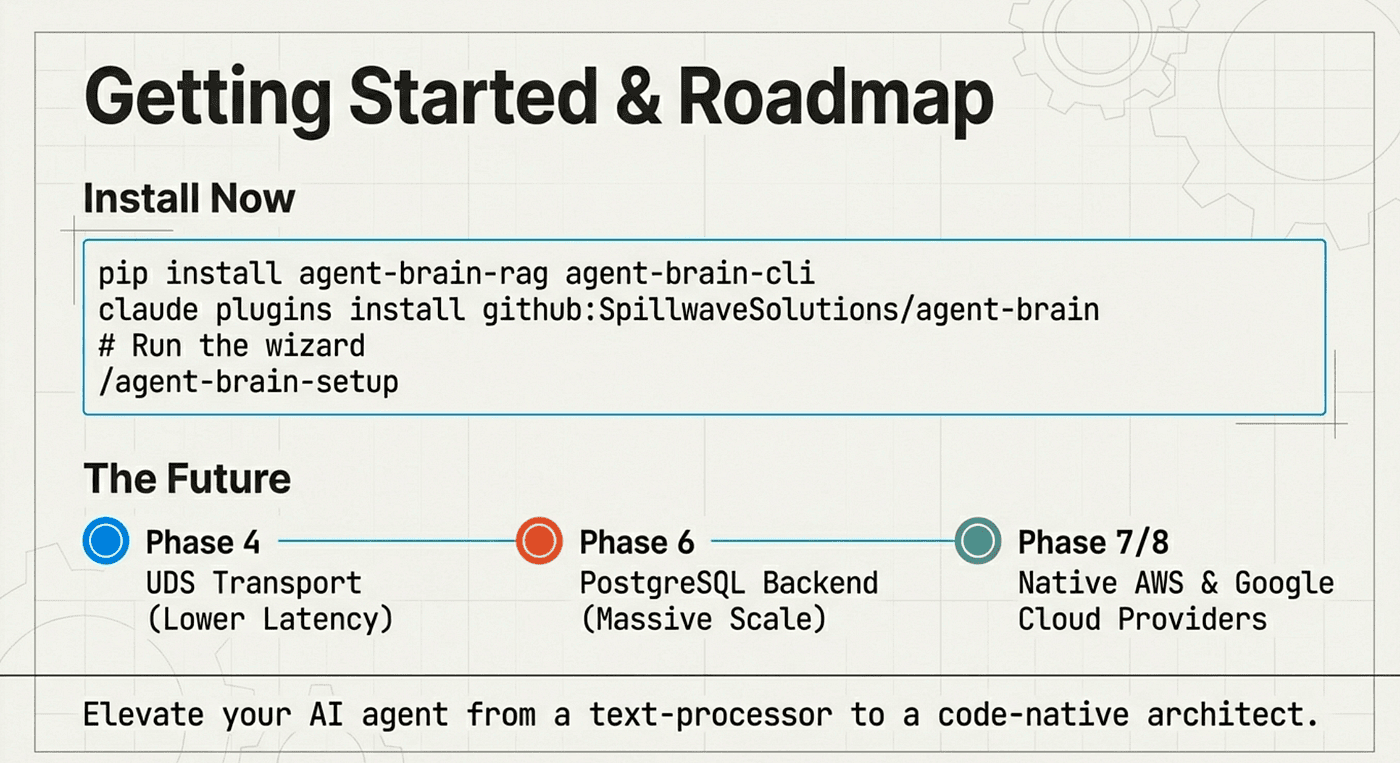
Getting started:
For Claude Code
claude plugins install github:SpillwaveSolutions/agent-brain /agent-brain-setup
For OpenCode or CLI usage (and install the agent skills)
pip install agent-brain-rag agent-brain-cli agent-brain init && agent-brain setup
Your AI coding assistant just got a lot smarter about your ecosystem.
## Agent Brain Install Guide for Claude Code
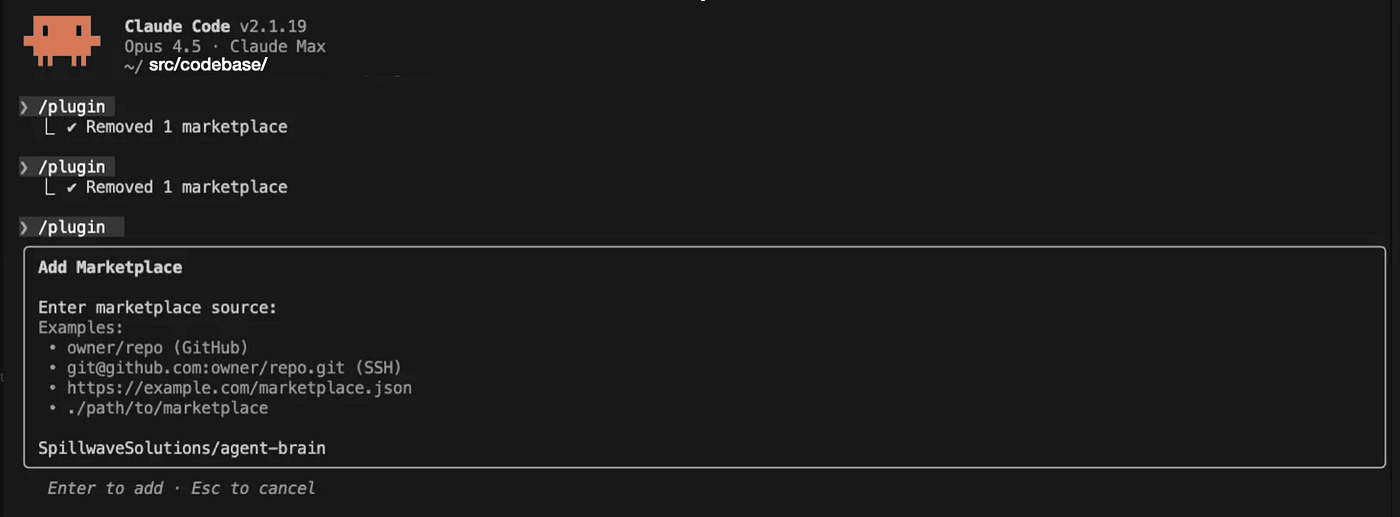
Open up Claude Code and use /plugin , this will open the plugin TUI dialog, go to the marketplace, select add Market Place and then type SpillwaveSolutions/agent-brain. This will install the plugin.
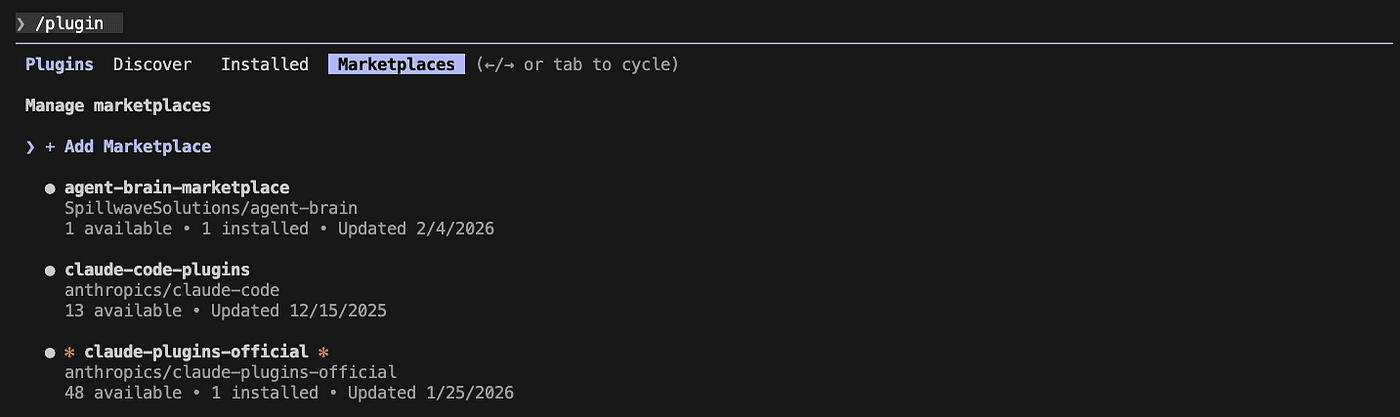
*You will see the agent brain listed under installed plugins*
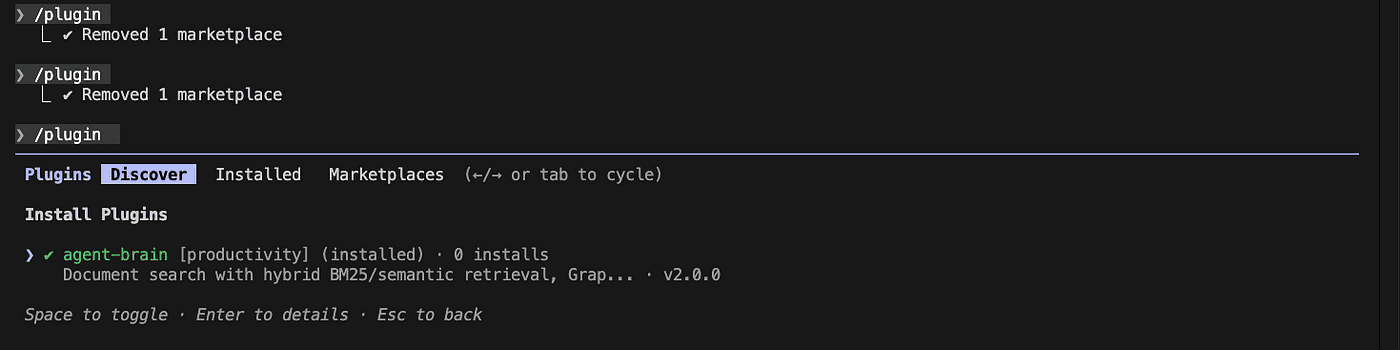
*You will see the agent brain listed under installed plugins*
### Use the Plugin to Install Agent Brain using /agent-brain-install
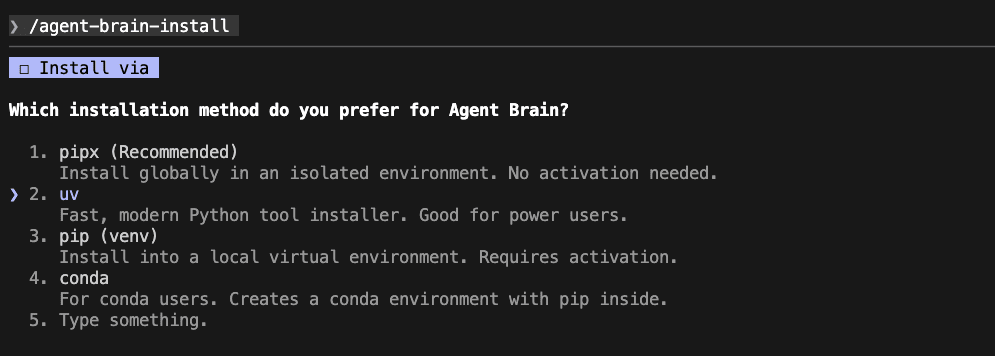
*gives you several options, pipx the most compatible, uv the fastest, then pip just in case*
The install walks you through the install process, gives you several options for install, pipx the most compatible, uv the fastest, then pip just in case.
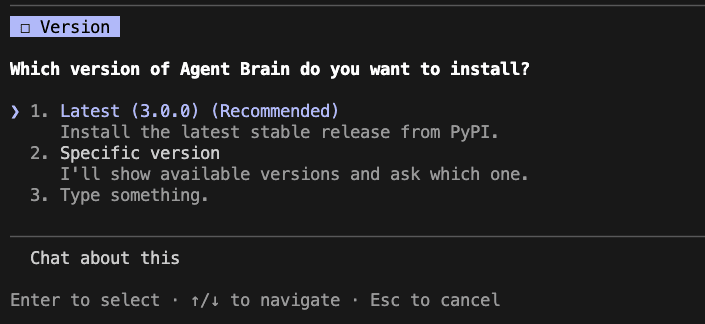
*Gives you older versions to install*
You can install an older version, but I don't recommend it. I added this for the future when someone must use an older version.
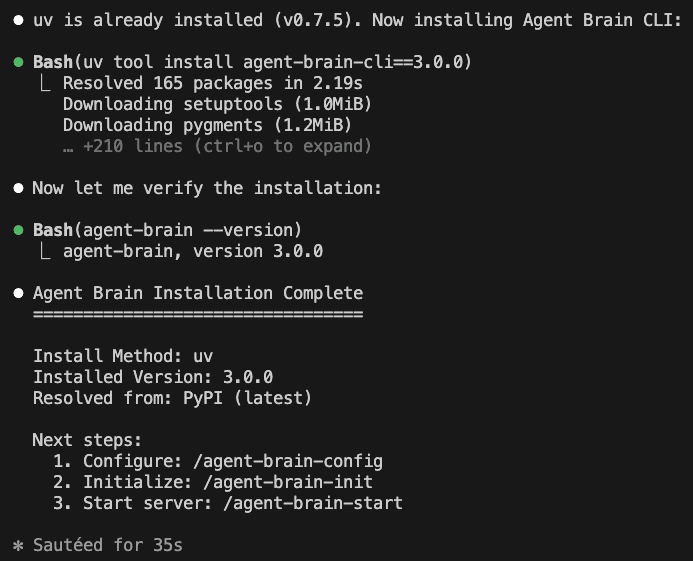
Notice that it prompts you for the next steps.
Next steps:
1. Configure: /agent-brain-config
2. Initialize: /agent-brain-init
3. Start server: /agent-brain-start
Each step will give you hints about what to run next. It is like a wizard install but since it is agentic you can go off script a lot and it still all works.
## Configuring Agent Brain with /agent-brain-config
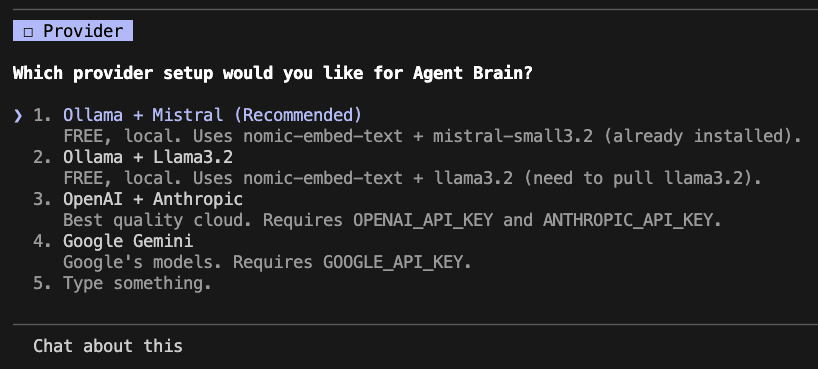
We picked Ollama so now our documents all work locally.
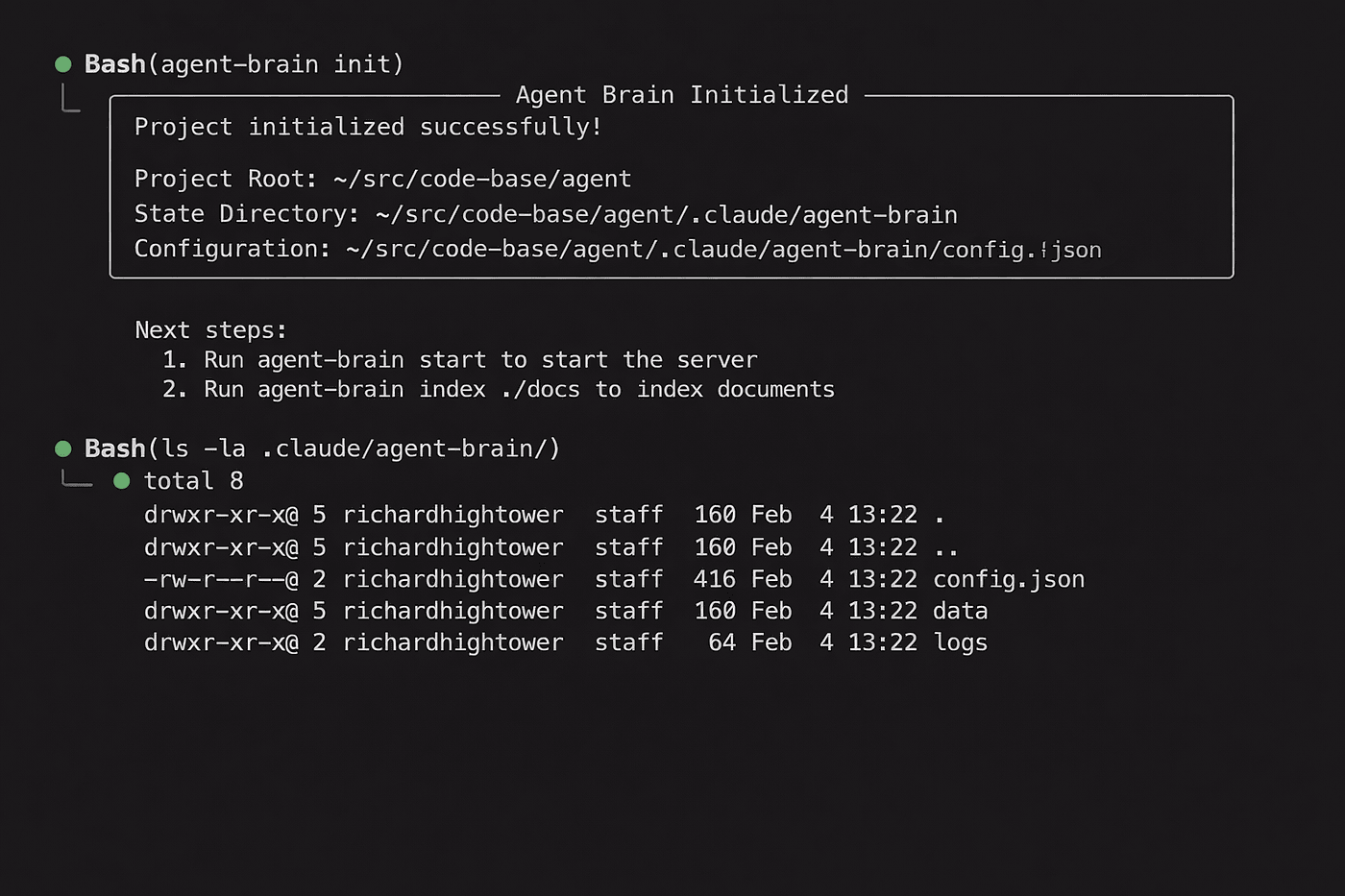
### Run /agent-brain-init to initialize local project settings
/agent-brain-init

### Run Agent Brain Start to start the server /agent-brain-start
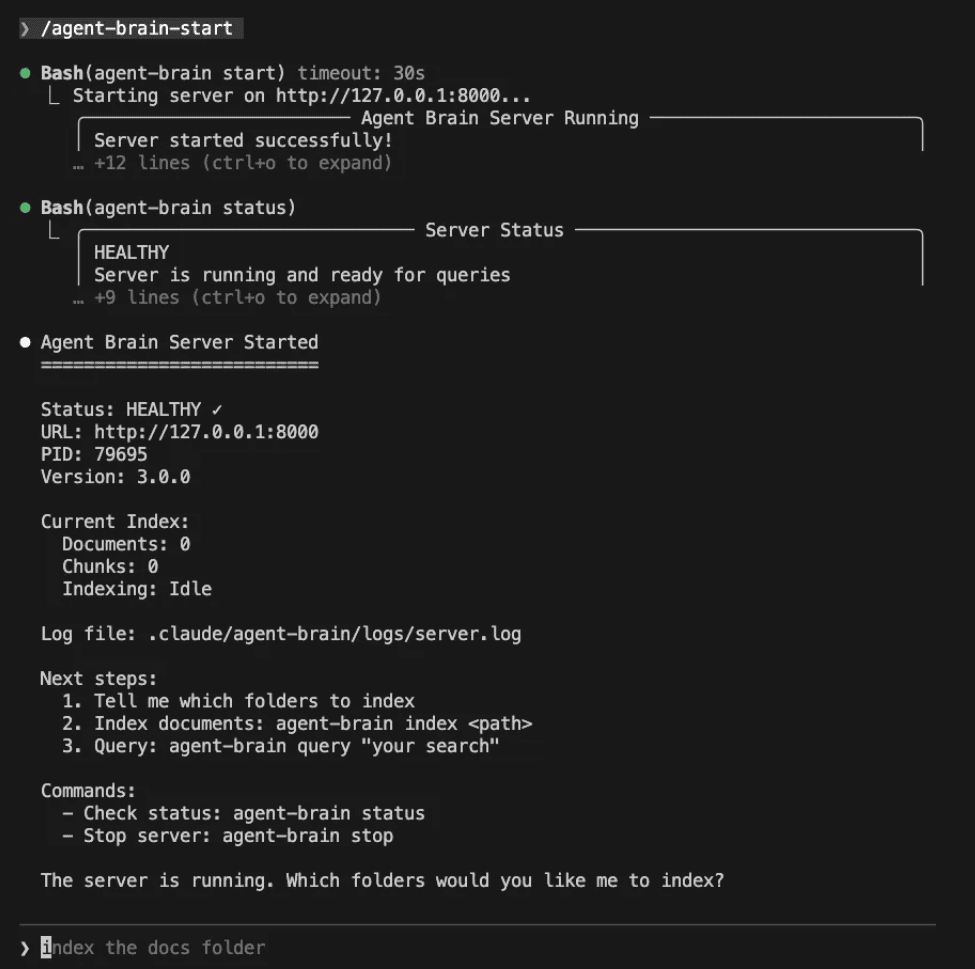
*agent-brain-start starts the server*
Notice how Claude Code gives you hints about what to run. We live in the future.
Agent Brain Server Started
Status: HEALTHY URL: http://127.0.0.1:8000 PID: 79695 Version: 3.0.0
Current Index: Documents: 0 Chunks: 0 Indexing: Idle
Log file: .claude/agent-brain/logs/server.log
Next steps:
- Tell me which folders to index
- Index documents: agent-brain index
- Query: agent-brain query "your search"
Commands:
- Check status: agent-brain status
- Stop server: agent-brain stop
The server is running. Which folders would you like me to index?
After the server is running then you can tell it what files directories to index.

You can do this one at a time, or just describe the files you want indexed as follows.

### Now we index
/agent-brain-index index ./confluence and coding-agents/skillzwave.ai/cdk with code and coding-agents/skillzwave.ai/docs as docs and coding-agents/skilz-cli/docs as docs and coding-agents/skillzwave.ai/ata-pipeline/cdc-consumer/src/cdc_consumer with code and coding-agents/skillzwave.ai/data-pipeline/e2e-kafka-consumer/src/e2e_kafka_consumer with code all with code if there is /src/ in the path
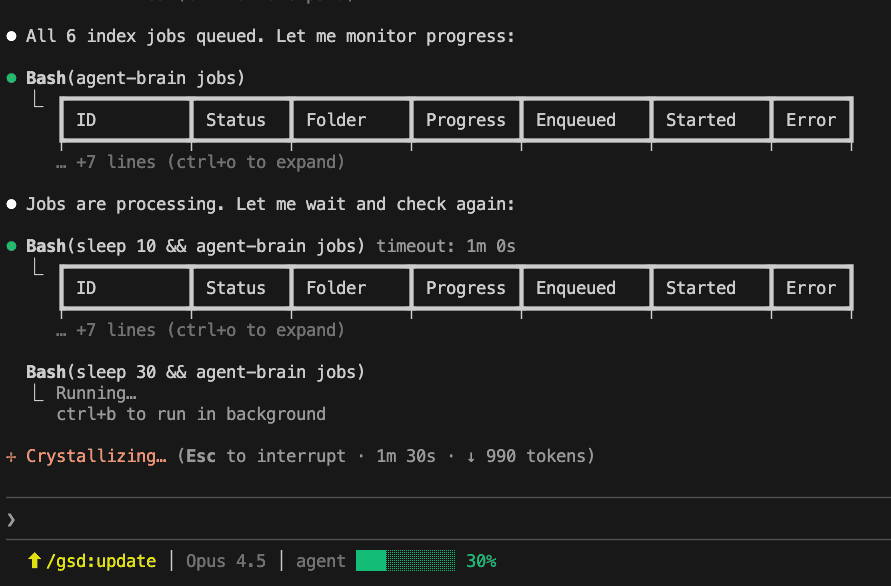
Every time you add a directory to the index, it enqueue a job and the agent brain server will then index the file using bm25, vector and graph database.
The server is running. Which folders would you like me to index?
/agent-brain-index index ./confluence and coding-agents/skillzwave.ai/cdk with code and coding-agents/skillzwave.ai/docs as docs and coding-agents/skilz-cli/docs as docs and coding-agents/skillzwave.ai/data-pipeline/cdc-consumer/src/cdc_consumer and coding-agents/skillzwave.ai/data-pipeline/e2e-kafka-consumer/src/e2e_kafka_consumer all with code if there is /src/ in the path
Let me index the specified directories. Based on your request:
- ./confluence - as documents
- coding-agents/skillzwave.ai/cdk - with code
- coding-agents/skillzwave.ai/docs - as documents
- coding-agents/skilz-cli/docs - as documents
- coding-agents/skillzwave.ai/data-pipeline/cdc-consumer/src/cdc_consumer - with code
- coding-agents/skillzwave.ai/data-pipeline/e2e-kafka-consumer/src/e2e_kafka_consumer - with code
You can hit ctrl-O to see all of the details.
Claude Code v2.1.19 Opus 4.5 - Claude Max
Jobs are processing. Let me wait and check again:
Bash(sleep 10 && agent-brain jobs) timeout: 1m 0s ID | Status | Folder | Progress | Enqueued | Started | Error job_3973a | pending | ...kafka | 0.0% | 2026-02-0 | - | - job_ec02e | pending | ...data | 0.0% | 2026-02-0 | - | - job_52441 | pending | ...serv | 0.0% | 2026-02-0 | - | - job_345bf | running | ...pul | 50.0% | 2026-02-0 | 2026-02- | - job_cea19 | done | ...docs | 100.0% | 2026-02-0 | 2026-02- | - job_4b206 | done | ...conf | 100.0% | 2026-02-0 | 2026-02- | -
Bash(sleep 30 && agent-brain jobs) ID | Status | Folder | Progress | Enqueued | Started | Error job_3973a | done | ...kafka | 100.0% | 2026-02-0 | 2026-02- | - job_ec02e | done | ...data | 100.0% | 2026-02-0 | 2026-02- | - job_52441 | done | ...serv | 100.0% | 2026-02-0 | 2026-02- | - job_345bf | done | ...pul | 100.0% | 2026-02-0 | 2026-02- | - job_cea19 | done | ...docs | 100.0% | 2026-02-0 | 2026-02- | - job_4b206 | done | ...conf | 100.0% | 2026-02-0 | 2026-02- | -
All jobs completed. Let me check the final status:
Bash(agent-brain status) Server Status: HEALTHY Server is running and ready for queries
Metric | Value Server Version | 3.0.0 Total Documents | 0 Total Chunks | 1624 Indexing | Idle Indexed Folders | ~/src/code-base/skillzwave.ai/confluence | ~/src/code-base/skillzwave.ai/coding-agents/skillzwave.ai/docs | ~/src/code-base/skillzwave.ai/coding-agents/skillzwave.ai/cdk | ~/src/code-base/skillzwave.ai/coding-agents/skilz-cli/docs | ~/src/code-base/skillzwave.ai/coding-agents/skillzwave.ai/data-pipeline/cdc-consumer/src/cdc_consumer | ~/src/code-base/skillzwave.ai/coding-agents/skillzwave.ai/data-pipeline/e2e-kafka-consumer/src/e2e_kafka_consumer Last Indexed | 2026-02-04T19:39:12.023999Z
Indexing Complete!
All 6 jobs finished successfully.
Status: HEALTHY Total Chunks: 1,624
Indexed Directories: ./confluence (docs) coding-agents/skillzwave.ai/docs (docs) coding-agents/skillzwave.ai/cdk (code) coding-agents/skilz-cli/docs (docs) coding-agents/skillzwave.ai/data-pipeline/cdc-consumer/src/cdc_consumer (code) coding-agents/skillzwave.ai/data-pipeline/e2e-kafka-consumer/src/e2e_kafka_consumer (code)
Ready for queries: agent-brain query "your search term" agent-brain query "your search" --mode hybrid
So how do you query the Agent Brain? Honestly, any way you like. It is now a set of skills that are installed that your coding agent can just use. Here is a query that I used recently to produce some very detailed on-boarding documentation.
Agent Brain Research & Document Generation
Background
We want to generate a comprehensive technical document using Agent Brain skill that synthesizes information from:
- Our internal documentation
- Multiple codebases
- Cloud infrastructure (GCP)
- GitHub repositories
- Confluence knowledge base
The goal is to produce a single, high-quality document that answers a set of open technical and architectural questions about our platform.
This document will be used for:
- Architecture review
- Onboarding
- Internal knowledge sharing
- Future automation planning
Objective
Use Agent Brain to:
-
Search and reason over:
- Documentation
- Source code
- Infrastructure configs
-
Pull in fresh data where needed.
-
Produce a structured, accurate, and up-to-date technical report.
Required Skills
You may use the following agent skills as needed:
-
AWS GCloud CLI Skill
- To inspect cloud resources, configurations, and deployments.
-
GitHub Skill
- To search repositories, issues, PRs, and code.
-
Confluence Skill
- To pull the latest documentation and design specs.
The exact skills usage, project names, confluence space names are defined and configured in:
AGENTS.mdCLAUDE.md
Environment Notes
We maintain a set of platform-specific integration skills that connect to our internal environments, for example:
platform-gcp-ops
platform-context
platform-github-ops
platform-kubernetes-ops
platform-database-ops
platform-kafka-avro-ops
These are installed under:
~/.claude/skills
They allow secure access to:
- GCP accounts
- GitHub orgs
- Kubernetes clusters
- Internal Confluence spaces
Task
You are given a large set of technical questions and requirements (see pasted content in this channel).
Your job is to:
-
Come up with a plan to answer all of these questions.
-
Identify:
- Which questions require doc search
- Which require code inspection
- Which require live cloud queries
-
Determine if any documentation is stale.
- If so, pull fresh copies from Confluence.
-
Re-index all relevant sources using Agent Brain.
-
Generate a final document that:
- Answers all questions
- References sources (docs/code/cloud)
- Highlights any assumptions or unknowns
Constraints & Expectations
-
Prefer ground truth from:
- Code
- Live GCP state
- Current Confluence docs
-
Do not rely on outdated cached knowledge.
-
You may need to:
- Re-run indexing jobs
- Fetch new docs from confluence
- Fetch related repos from Github and index them
- Traverse multiple repos
-
The final output should be:
- Technically rigorous
- Architecturally coherent
- Suitable for senior engineers and leadership
Deliverables
-
A step-by-step execution plan.
-
A list of data sources used.
-
A generated technical document.
-
A summary of:
- Gaps
- Risks
- Areas needing follow-up.
Meta-Goal (Implicit)
Demonstrate that Agent Brain + Skills can function as a:
Cross-system enterprise research agent spanning docs, code, and cloud.
This is as much a capability validation as it is a document generation task.
Refer to the guide because you can query with much simpler means for sure, there are even a couple of agents we ship with to help you do research.
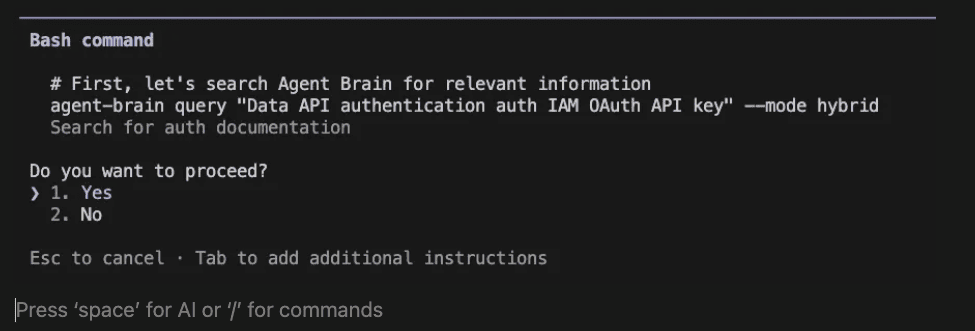
Right after I ran the prompt above, Claude Code started using the agent to look up relevant documentation.
## Debugging
If you're not getting command completion for Agent Brain commands and skills, make sure it's enabled.
You can enable the agent brain plugin in your user home directory
~/.claude/settings.json
"enabledPlugins": { "rust-analyzer-lsp@claude-plugins-official": true, "agent-brain@agent-brain-marketplace": true }
Or in your project's .claude/settings.json or settings.local.json -- use the former for project-wide settings or the latter for personal settings within the project.

I would have made this article shorter but I ran out of time.

BTW, this project was called doc-serve, which is a much more humble name. It was not available when I tried to register the project with PyPi, so I went with Agent Brain. There is another project that I am working on called Agent Memory which is similar to Agent Brain but is a temporal based index with decaying strong indexes and salience and episode detection. I have another one called agent memory that should come out shortly (working on in my non existent free time). It is conversational agent memory and uses a time based relevancy model. And graph, and vector and bm25 too, but all done in rust so it is WICKED fast. Think streaming conversational state that agents can share and collaborate with. Sub-second conversational collaboration in a distributed multi-agent ecosystem.

Agent Brain is an open-source set of agentic skills, commands, and a plugin for AI coding tools. Available at [github.com/SpillwaveSolutions/agent-brain](https://github.com/SpillwaveSolutions/agent-brain).

## About the Author

Rick Hightower is a technology executive and data engineer who led ML/AI development at a Fortune 100 financial services company. He created skilz, the [universal agent skill installer](https://skillzwave.ai/docs/), supporting 30+ coding agents including Claude Code, Gemini, Copilot, and Cursor, and co-founded the world's largest agentic skill marketplace. Connect with Rick Hightower on [LinkedIn](https://www.linkedin.com/in/rickhigh/) or [Medium](https://medium.com/@richardhightower).

The Claude Code community has developed powerful extensions that enhance its capabilities. Here are some valuable resources from [Spillwave Solutions](https://skillzwave.ai/owner/SpillwaveSolutions/) ([Spillwave Solutions Home Page](https://spillwave.com/)):

## Integration Skills

- [Notion Uploader/Downloader Agent Skill](https://github.com/SpillwaveSolutions/notion_uploader_downloader): Seamlessly upload and download Markdown content and images to Notion for documentation workflows. I use this one with Agent Brain.
- [Confluence Agent Skill](https://github.com/SpillwaveSolutions/confluence-skill): Upload and download Markdown content and images to Confluence for enterprise documentation. Use a confluence search to get a bunch of related documents to your project and then search them with Agent Brain. Talk about context engineering on steroids!
- [JIRA Integration](https://github.com/SpillwaveSolutions/jira) Agent Skill: Create and read JIRA tickets, including handling special required fields. Pull down that whole epic and search through all the related tickets. Agent Brain and context engineering for the win!

If you like this article, check out these other articles by this author (me):

- [Agent Brain: Giving AI Coding Agents a Full Understanding of Your Entire Enterprise](https://medium.com/@richardhightower/agent-brain-agentic-skills-for-enterprise-context-engineering-b5f61d8f57f0) -- Feb 5th 2026
- [Build Agent Skills Faster with Claude Code 2.1 Release -- Feb 4th](https://medium.com/@richardhightower/build-agent-skills-faster-with-claude-code-2-1-release-6d821d5b8179)
- [Build Your First Agent Skill in 10 Minutes Using the Context7 Wizard (and Save Hours)](https://medium.com/@richardhightower/build-your-first-agent-skill-in-10-minutes-using-the-context7-wizard-and-save-hours-2e5ab0319297) -- Feb 1st 2026
- [Supercharge Your React Performance with Vercel's Best Practices Agent Skill](https://medium.com/@richardhightower/supercharge-your-react-performance-with-vercels-best-practices-agent-skill-for-claude-code-codex-212d6d2c0d8e) -- Jan 29th
- [Agent Skills: The Universal Standard Transforming How AI Agents Work -- Jan 28](https://medium.com/@richardhightower/agent-skills-the-universal-standard-transforming-how-ai-agents-work-fc7397406e2e)
- [Agent-Browser: AI-First Browser Automation That Saves 93% of Your Context Window -- Jan 27](https://medium.com/@richardhightower/agent-browser-ai-first-browser-automation-that-saves-93-of-your-context-window-7a2c52562f8c)
- [Claude Code: Todos to Tasks -- Jan 26](https://medium.com/spillwave-solutions/claude-code-todos-to-tasks-5a1b0e351a1c)
- [LangExtract: Multi-Provider NLP Extraction with Gemini, OpenAI, Claude, and Local Models -- Jan 20](https://medium.com/@richardhightower/langextract-multi-provider-nlp-extraction-with-gemini-openai-claude-and-local-models-c5d890709bfc)
- [Empowering AI Coding Agents with Private Knowledge: The Doc-Serve Agent Skill -- Jan 20](https://medium.com/@richardhightower/empowering-ai-coding-agents-with-private-knowledge-the-doc-serve-agent-skill-8d9683534758)
- [Give Your Claude Code, OpenCode, and Codex Full RAG Over Docs and Code Repos -- Jan 18](https://medium.com/@richardhightower/give-your-claude-code-opencode-and-codex-full-rag-over-docs-and-code-repos-edcf654407e)