Agent RuleZ: A Deterministic Policy Engine for AI Coding Agents
Originally published on Medium.
Agent Rulez
Human-readable YAML rules that block unsafe actions, inject context, solve the agent skill not getting triggered, and create an audit trail, all in under 10ms.
Your AI Agent Just Force-Pushed to Main. Again.
It started innocently enough. You asked your AI coding agent to clean up a feature branch. Somewhere between “rebase onto main” and “push the changes,” the agent decided that --force was the most efficient path forward. Three developers lost their morning to a git reflog rescue mission.
This is not a hypothetical. It happened on a real team. The agent did not misbehave; it simply optimized for the task at hand without knowing that your organization treats force pushes as a fireable offense. The CLAUDE.md file said nothing about it. There was no enforcement mechanism, only the honor system.
AI coding agents are powerful, productive, and increasingly autonomous. They write code, run commands, manage files, and interact with external services. But they operate in a policy vacuum. The permission prompts that Claude Code shows you are reactive, not proactive. The guidelines you write in CLAUDE.md are suggestions that the agent interprets, not rules that a system enforces.
What if you could define deterministic, machine-enforced policies for your AI agent? What if every git push --force was blocked before it executed, every Python file got consistent coding standards injected, and every action was logged to an audit trail? What if governance was automatic rather than aspirational?
That is what RuleZ does.
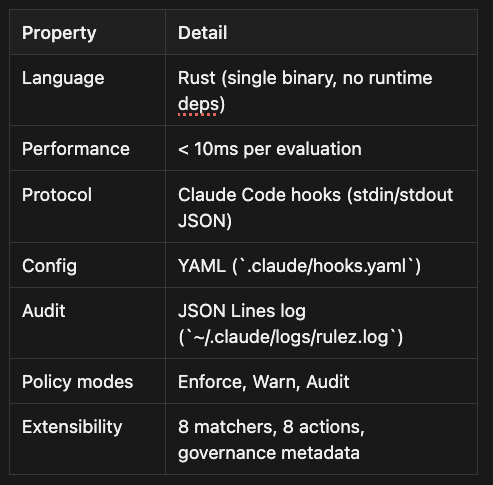
RuleZ is a deterministic policy engine for AI coding agents. You write rules in human-readable YAML. RuleZ evaluates them in under 10 milliseconds. No LLM in the loop. No probabilistic compliance. Just rules, matchers, actions, and an audit trail.
Agent RuleZ solves the problem of agent skills not triggering at the right time, blocks commands you don’t want executed, and provides governance with full provenance and auditing. Agent RuleZ allows you to master context engineering for your coding agent.
What Is Agent RuleZ?
At its core, Agent RuleZ is a single Rust binary that sits between your AI coding agent and the actions it takes. It works through the Claude Code hooks protocol: when Claude Code is about to use a tool (like Bash, Write, or Edit), it emits a hook event as JSON on stdin. RuleZ reads the event, evaluates your rules against it, and returns a response on stdout.
The response is simple:
- Exit code 0: Allow the operation (optionally injecting context into the agent’s prompt)
- Exit code 2: Block the operation (with an error message explaining why)
Think of it as a bouncer at the door of every tool call your agent makes. The bouncer checks ID (evaluates your rules), either waves you through or turns you away (exit 0 or 2), and logs every decision in the guest book (the audit log). The whole check takes under 10 milliseconds, so neither you nor your agent notices any slowdown.
Agent Rulez currently supports just Claude Code, but the goal is for it work with Gemini CLI, Github Copilot CLI, and OpenCode as well as the Claude Agent SDK.
If you’ve worked with Kubernetes admission controllers, this pattern will feel familiar. Kubernetes intercepts API requests and runs them through validating and mutating webhooks. RuleZ does the same for AI agent actions: it intercepts tool use before execution and applies your policy.
Unlike OPA (Open Policy Agent), which uses the Rego DSL, RuleZ uses plain YAML. No new language to learn. The trade-off is intentional: Rego offers more expressiveness for complex policy decisions, but YAML is approachable -- any developer can author and review rules without specialized training. A security engineer can write a meaningful RuleZ rule in five minutes. And Agent Rulez ships with a set of Agentic Skills to make rule writing even easier.
Use Cases: Where Agent RuleZ Shines
Agent RuleZ excels in three main scenarios: activating skills and context at the right moment, blocking dangerous operations before they execute, and maintaining governance and provenance for compliance teams. Each use case leverages Agent RuleZ’s deterministic evaluation and sub-10ms performance to solve real problems that AI coding agents face today.
Use Case 1: Just-in-Time Skill and Context Activation
One of the biggest challenges with agentic skills is when they get activated. Drop a dozen skill files into your project’s .claude/skills/ directory and you face a dilemma: should the agent load all of them at session start (bloating context and wasting tokens), or should you manually reference them in your prompts (breaking the autonomous flow)?
Agent RuleZ solves this with targeted content injection. You define rules that watch for specific signals -- file extensions, directories, command patterns, or keywords in the user prompt -- and inject the relevant skill or context only when it matters.
Example: Python Coding Standards
You have a python_standards.md skill that enforces your team's Python conventions: Black formatting, type hints for public functions, docstrings for classes, and pytest over unittest. You do not want this injected when the agent is working on TypeScript files or shell scripts. You want it injected precisely when the agent touches a Python file.
- name: inject-python-standards
  description: Load Python coding standards when working with .py files
  priority: 50
  enabled_when:
    operations: ["PreToolUse"]
  matchers:
    tools: ["Write", "Edit"]
    extensions: [".py"]
  actions:
    inject: ".claude/skills/python_standards.md"
  governance:
    author: "platform-team"
    reason: "Ensure consistent Python code quality across all agent-written files"
    tags: ["standards", "python"]
Now when the agent attempts to write or edit a Python file, RuleZ injects the standards document into the agent’s context. The agent sees the guidelines and follows them. No manual prompting required. No wasted tokens on TypeScript tasks.
Example: Architecture Context for API Changes
Your team maintains an api_architecture.md document that describes the REST API's authentication flow, rate limiting strategy, and versioning policy. You want the agent to see this context only when working on API-related code, not when fixing a typo in the README.
- name: inject-api-architecture
  description: Load API architecture context when working in src/api/
  priority: 40
  enabled_when:
    operations: ["PreToolUse"]
  matchers:
    directories: ["src/api/**"]
    tools: ["Write", "Edit"]
  actions:
    inject: ".claude/skills/api_architecture.md"
  governance:
    author: "backend-team"
    reason: "Ensure agent understands API design principles when modifying endpoints"
    tags: ["architecture", "api"]
The Precision Principle: True Context Engineering
True context engineering is not about flooding the agent with every possible document and hoping it finds what it needs. It is about delivering the right context at the right time. The more surgical your context injection, the better the agent’s results.
Think of it like a surgeon selecting instruments during an operation. You do not hand the surgeon the entire toolkit at once. You hand them the scalpel when they need to cut, the sutures when they need to close. Each tool arrives precisely when it is relevant. The same principle applies to agent context.
Loading a lot of context at session start causes context pollution (the agent can’t identify what matters), token waste (you pay for irrelevant content), and decision paralysis (conflicting guidelines). The agent becomes less effective.
Agent RuleZ’s targeted injection solves this. Python standards appear only when editing Python files. API architecture loads only when working in the API directory. Deployment checklists activate only when the user mentions “deploy” or “production.” Each injection is precise, triggered by matchers watching for specific signals.
The result: the agent operates with a lean, focused context window, seeing exactly what it needs and nothing more. This improves accuracy, reduces token costs, and accelerates response times. Precision beats volume.
The directories matcher ensures this rule fires only when the agent works inside src/api/. If the agent is editing src/ui/Button.tsx, the API architecture document stays out of context.
Example: Deployment Checklist on Production Keywords
You have a deployment_checklist.md skill that reminds the agent to run tests, check environment variables, and verify database migrations before deploying. You want this injected whenever the user mentions "deploy" or "production" in their prompt.
- name: inject-deployment-checklist
  description: Load deployment checklist when user mentions deploy/production
  priority: 60
  enabled_when:
    operations: ["UserPromptSubmit"]
  matchers:
    prompt_match: ["deploy", "production", "release"]
  actions:
    inject: ".claude/skills/deployment_checklist.md"
  governance:
    author: "devops-team"
    reason: "Prevent incomplete deployments by reminding agent of required steps"
    tags: ["deployment", "safety"]
The prompt_match matcher watches for keywords in the user's input. When detected, the checklist is injected before the agent plans its actions. This ensures the agent considers all deployment steps from the start rather than discovering missing tasks midway through.
Why This Matters
Just-in-time activation transforms skills from static documents into dynamic guardrails. The agent gets the right information at the right time without context pollution. Your token budget stays lean. Your agent stays focused. And your team’s knowledge base becomes an active participant in the development workflow rather than a passive reference manual.
Use Case 2: Blocking Dangerous Operations
AI agents are optimizers. They find the shortest path to the goal you specify. Sometimes that path includes rm -rf, git push --force, or DROP TABLE users. The agent is not malicious; it simply lacks the organizational context that certain actions are forbidden.
Agent RuleZ provides deterministic enforcement. You define what is dangerous, RuleZ blocks it, and the agent receives a clear error message explaining why. No probabilistic compliance. No hoping the agent “understands” your guidelines. Just enforcement.
Example: Block Force Pushes to Protected Branches
This is the rule from the opening story. A simple regex match on git push commands prevents force pushes before they execute.
- name: block-force-push
  description: Prevent force pushes to any branch
  priority: 100
  mode: enforce
  enabled_when:
    operations: ["PreToolUse"]
  matchers:
    tools: ["Bash"]
    command_match: "git\\s+push.*--force"
  actions:
    block:
      message: "Force pushes are prohibited. Use 'git push' without --force, or coordinate with the team if a force push is absolutely necessary."
  governance:
    author: "security-team"
    reason: "Force pushes can overwrite team members' work and are a common source of repository corruption"
    confidence: high
    tags: ["security", "git"]
The priority: 100 ensures this rule evaluates before other rules that might inject context or run validators. The mode: enforce guarantees that a block decision stops execution immediately. The governance metadata documents why the rule exists and who authored it, creating an audit trail that compliance teams can review.
Example: Prevent Recursive Deletion in Production Directories
The agent decides that cleaning up temporary files means running rm -rf tmp/. Unfortunately, your project structure includes tmp/ inside production/assets/, and the agent just deleted production assets.
- name: block-recursive-delete-in-production
  description: Block rm -rf commands in production directories
  priority: 100
  mode: enforce
  enabled_when:
    operations: ["PreToolUse"]
  matchers:
    tools: ["Bash"]
    command_match: "rm\\s+-[rf]{1,2}\\s+"
    directories: ["production/**", "deploy/**"]
  actions:
    block:
      message: "Recursive deletion is not allowed in production directories. If cleanup is necessary, specify exact file paths or coordinate with the DevOps team."
  governance:
    author: "devops-team"
    reason: "Prevent accidental deletion of production assets"
    confidence: high
    tags: ["safety", "production"]
The directories matcher limits the rule's scope to sensitive paths. The agent can still run rm -rf in tmp/ at the project root; it just cannot do so inside production directories.
Example: Block Direct Database Modification Commands
Your agent is helping debug a data issue. It decides the fastest solution is to run psql and execute DELETE FROM users WHERE active = false. This is not debugging; this is data loss.
- name: block-direct-database-commands
  description: Block direct database modification commands
  priority: 100
  mode: enforce
  enabled_when:
    operations: ["PreToolUse"]
  matchers:
    tools: ["Bash"]
    command_match: "(psql|mysql|mongo).*\\s+(DELETE|DROP|TRUNCATE|ALTER)\\s+"
  actions:
    block:
      message: "Direct database modification commands are prohibited.
Use migration scripts or coordinate with the database team for schema changes."
  governance:
    author: "database-team"
    reason: "Prevent unintended data loss and schema corruption"
    confidence: high
    tags: ["database", "safety"]
The regex matches common database CLI tools (psql, mysql, mongo) combined with destructive SQL keywords. The agent can still run SELECT queries for debugging, but it cannot modify data directly.
Why This Matters
Blocking dangerous operations is the minimum viable governance for AI agents. Without enforcement, you rely on the agent’s interpretation of your guidelines and your own vigilance in reviewing permission prompts. With RuleZ, you codify the “never do this” rules and let the system enforce them. The agent learns the boundaries through clear feedback, and your team avoids catastrophic mistakes.
Use Case 3: Governance, Provenance, and Compliance
In regulated industries -- finance, healthcare, defense -- every action must be auditable. Who authorized the change? Why was it allowed? What policy was applied? Agent RuleZ provides governance metadata and audit logging that answer these questions.
Every rule in RuleZ can include governance fields: author, reason, confidence, and tags. These fields do not affect rule evaluation; they exist purely for compliance and auditability. When a rule matches, its governance metadata is included in the log entry at ~/.claude/logs/rulez.log.
Governance Metadata Schema
governance:
  author: "security-team"           # Who wrote this rule?
  reason: "SOC 2 compliance requirement"  # Why does this rule exist?
  confidence: high                  # How confident are we in this rule's correctness?
  tags: ["compliance", "security"]  # What categories does this rule fall into?
The confidence field is particularly useful for rules under development. Set confidence: low for experimental rules and confidence: high for production-hardened policies. Compliance dashboards can filter on confidence level to show only battle-tested rules.
Example: Audit Log Entry
When the block-force-push rule fires, RuleZ writes a JSON log entry that includes the governance metadata:
{
  "timestamp": "2026-02-19T21:15:42.123456Z",
  "event_type": "PreToolUse",
  "tool": "Bash",
  "decision": "Blocked",
  "matched_rules": ["block-force-push"],
  "governance": {
    "author": "security-team",
    "reason": "Force pushes can overwrite team members' work and are a common source of repository corruption",
    "confidence": "high",
    "tags": ["security", "git"]
  },
  "duration_ms": 3.2,
  "blocked_message": "Force pushes are prohibited. Use 'git push' without --force, or coordinate with the team if a force push is absolutely necessary."
}
This log entry is immutable, timestamped, and contains all the information a compliance auditor needs: who wrote the rule, why it exists, what decision was made, and how long the evaluation took.
Example: Compliance Dashboard Integration
The JSON Lines log format (rulez.log) is designed for ingestion into observability platforms. You can pipe rulez.log into Elasticsearch, Splunk, or Datadog and build dashboards that answer questions like:
- How many force push attempts were blocked this month?
- Which rules are firing most frequently?
- What is the average evaluation time for security rules?
- Which agents are triggering the most compliance violations?
The governance metadata makes it possible to group and filter logs by policy category. A query like tags:security AND decision:Blocked shows all security rule violations. A query like author:database-team AND confidence:high shows production-ready database policies.
Example: Policy Review Workflow
Your security team reviews all RuleZ policies quarterly. They extract the governance metadata from hooks.yaml and generate a report:
rulez governance-report .claude/hooks.yaml --format markdown > policy_review.md
The report includes each rule’s name, description, author, reason, confidence, and tags. The team reviews the report, updates outdated rules, and promotes low-confidence rules to high-confidence after validation. This creates a living policy system that evolves with the organization.
Why This Matters
Governance and provenance turn RuleZ from a developer tool into an enterprise-grade compliance platform. The audit log provides an immutable record of every policy decision. The governance metadata documents the “why” behind each rule. And the JSON format ensures that compliance teams can integrate RuleZ into their existing observability and audit workflows. In regulated industries, this is not a nice-to-have; it is a requirement.
Architecture Deep Dive
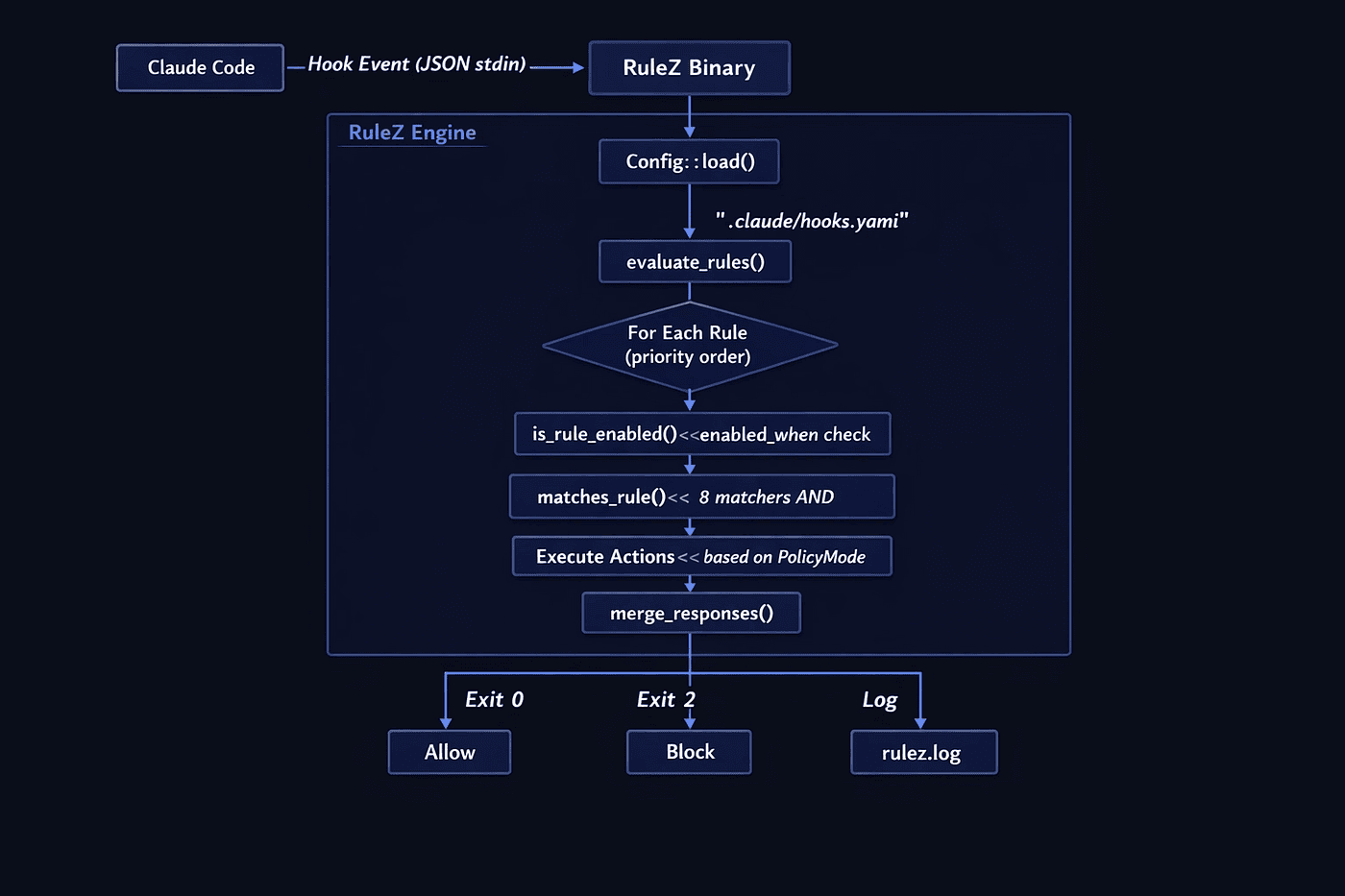
Understanding how Agent RuleZ processes events internally helps you write better rules and debug them when they misbehave. The evaluation pipeline is deterministic: given the same event and the same config, RuleZ always produces the same result.
The RuleZ evaluation pipeline processes every hook event through a deterministic sequence of steps. No randomness, no LLM interpretation, no network calls (unless your rules explicitly invoke external scripts).
The Pipeline Step by Step
-
Config Loading (
config.rs): RuleZ looks for.claude/hooks.yamlin the project directory first, then falls back to~/.claude/hooks.yamlfor user-global rules. If neither exists, it uses an empty config (allowing everything). On load, the config is validated: version format, rule name uniqueness, regex pattern compilation, expression syntax, and field path validation all happen before any rule evaluates. Validation errors fail loudly at startup rather than silently at runtime. -
Rule Sorting: Rules are sorted by priority (higher numbers run first). This lets you ensure that a security rule blocking
rm -rfalways evaluates before a standards-injection rule that adds coding guidelines. Think of priority as the triage system: critical security rules get evaluated first. -
Rule Evaluation (
hooks.rs): For each enabled rule, RuleZ checksenabled_whenconditions (if present), then runs the 8 matchers. All active matchers must pass (AND logic). If the rule matches, its actions execute according to the rule's policy mode. -
Response Merging: Multiple rules can match the same event. Block decisions take precedence over allow decisions. Injected context accumulates (all matching inject actions contribute their content). The merged response becomes the final answer. This means a security rule can block and a standards rule can inject context; both apply to the same event.
-
Logging (
logging.rs): Every evaluation produces a log entry in JSON Lines format at~/.claude/logs/rulez.log. The entry includes timestamps (UTC, microsecond precision), matched rules, the decision (Allowed/Blocked/Warned/Audited), timing data, and governance metadata from the primary matched rule. Log rotation kicks in at 10MB with up to 5 rotated files, so your audit trail does not grow unbounded.
Performance: Regex Caching
Agent RuleZ uses an LRU cache (capacity: 100 entries) for compiled regular expressions. Rules that use command_match or prompt_match patterns compile the regex once and reuse it across subsequent evaluations. The cache key includes the pattern string and case-sensitivity flag, so "git push.*--force" with case-sensitive matching is cached separately from the same pattern with case-insensitive matching.
For teams with dozens of rules running against every tool use, this caching keeps the sub-10ms guarantee intact even under heavy load.
Rule Anatomy
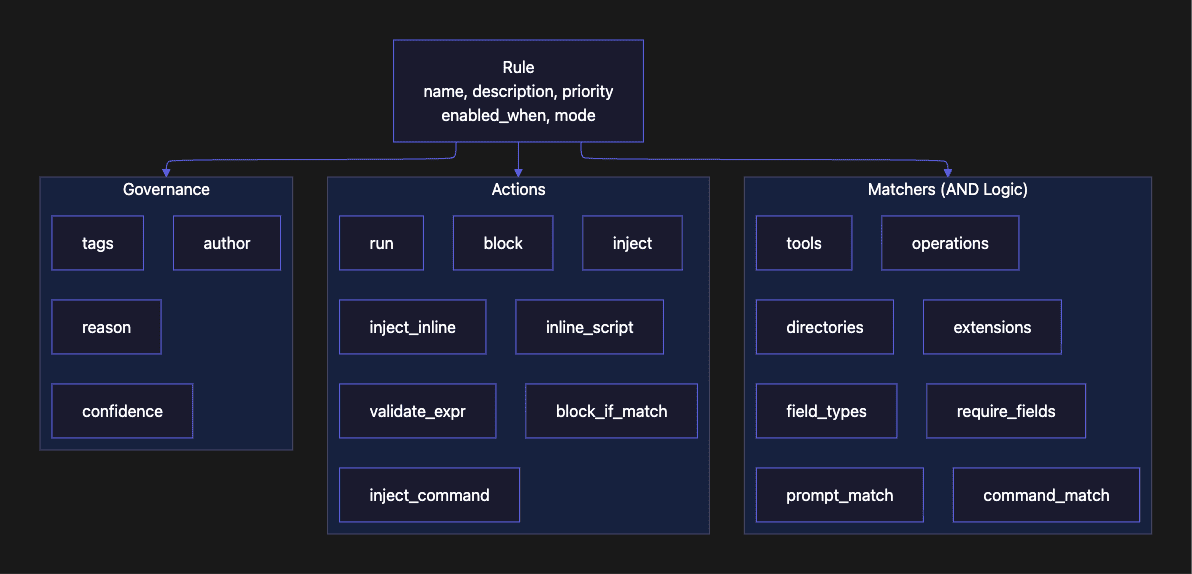
Every RuleZ rule has three main components: matchers that determine when the rule fires, actions that determine what happens, and optional governance metadata for compliance tracking. Understanding this three-part structure is the key to writing rules that are both precise and maintainable.
The 8 Matchers
Matchers use AND logic. If you specify tools: ["Bash"] and command_match: "git push.*--force", both conditions must be true for the rule to fire. This prevents false positives: a rule targeting force pushes will not accidentally match a grep command that contains the word "force" in its output.
The more matchers you combine, the more precisely your rule targets the exact situation you care about. A rule with only tools: ["Bash"] fires on every shell command. A rule with tools: ["Bash"], command_match: "git push.*--force", and directories: ["src/**"] fires only when a force push is attempted from within the src/ directory.
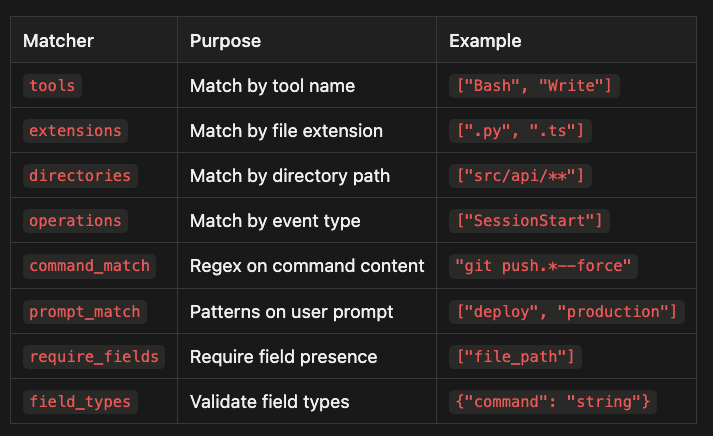
All 8 matchers:
- tools - Match by tool name - Example: ["Bash", "Write"]
- extensions - Match by file extension - Example: [".py", ".ts"]
- directories - Match by directory path - Example: ["src/api/**"]
- operations - Match by event type - Example: ["SessionStart"]
- command_match - Regex on command content - Example: "git push.*--force"
- prompt_match - Patterns on user prompt - Example: ["deploy", "production"]
- require_fields - Require field presence - Example: ["file_path"]
- field_types - Validate field types - Example: {"command": "string"}
The 8 Actions
Actions fall into three categories: blocking (stop the operation), injection (add context to the agent’s prompt), and validation (run custom logic).
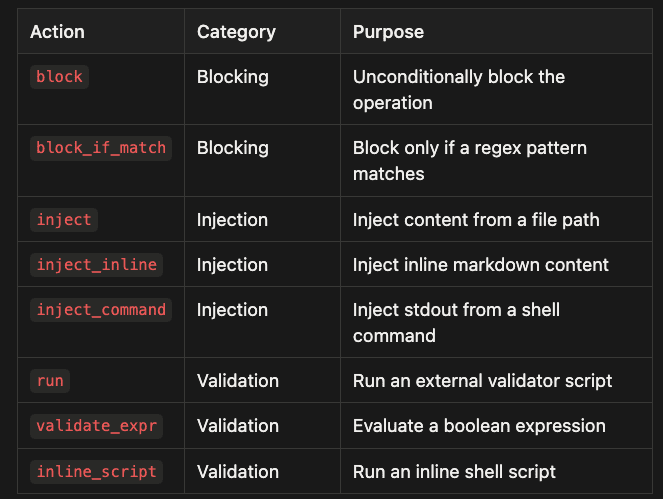
All 8 actions:
- block - Blocking - Unconditionally block the operation
- block_if_match - Blocking - Block only if a regex pattern matches
- inject - Injection - Inject content from a file path
- inject_inline - Injection - Inject inline markdown content
- inject_command - Injection - Inject stdout from a shell command
- run - Validation - Run an external validator script
- validate_expr - Validation - Evaluate a boolean expression
- inline_script - Validation - Run an inline shell script
Injection actions are the “killer feature” of Agent RuleZ. Instead of just blocking things, you can shape agent behavior by injecting coding standards, architecture guidelines, or project context at the right moment. The agent sees the injected content as part of its context and follows it. This transforms RuleZ from a simple gatekeeper into an active collaborator in your development workflow.
Event Types
Agent RuleZ supports 16 event types covering the full lifecycle of an AI coding agent session. Each event type corresponds to a specific moment in the agent’s workflow. Choosing the right event type is often the difference between a rule that fires precisely and one that fires on everything or nothing at all.
The sequence diagram above shows the two most important hook points:
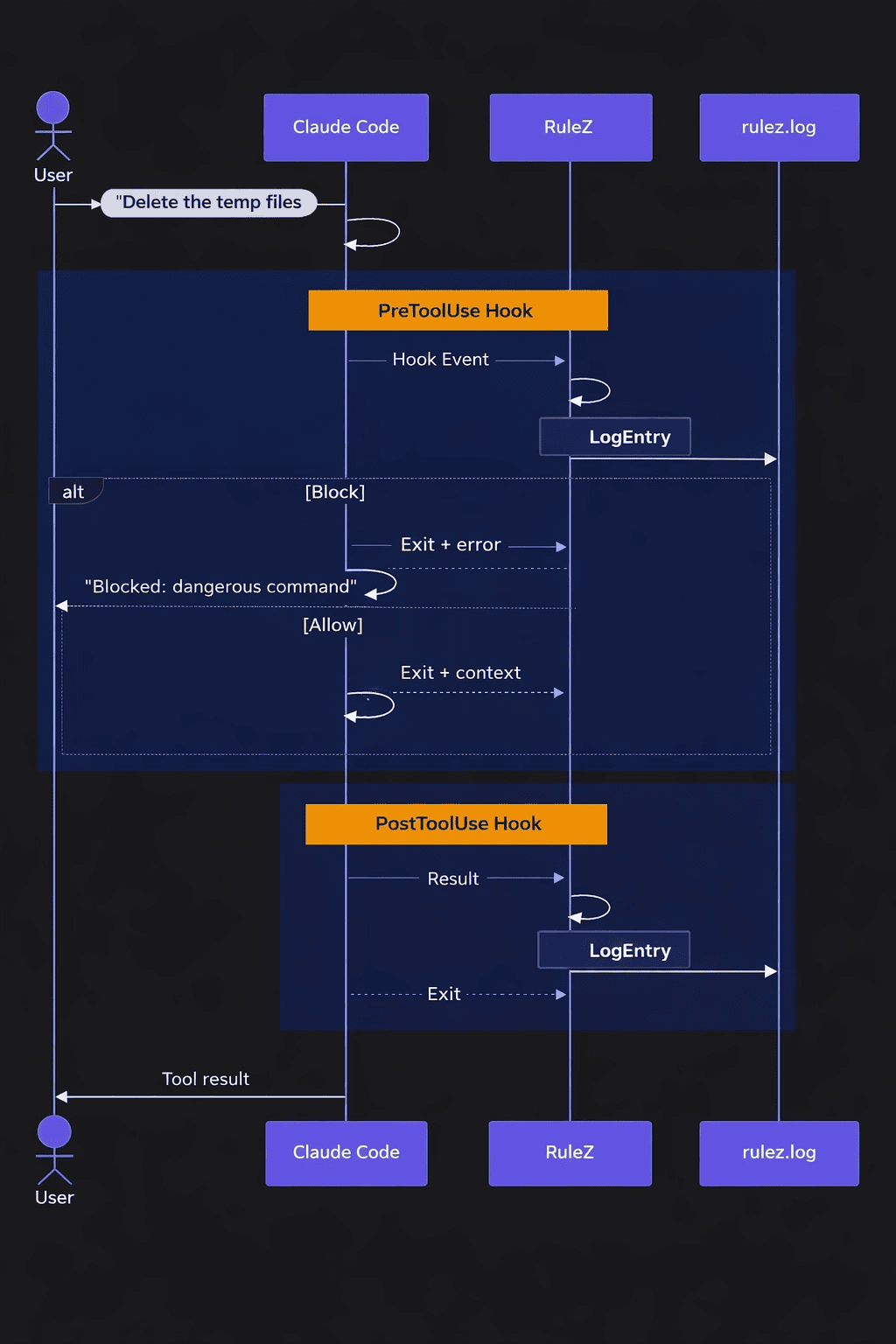
-
PreToolUse -- (where blocking happens) and
-
PostToolUse -- (where audit logging happens)
Notice that PostToolUse never blocks; by that point, the tool has already run.
Event Type Reference
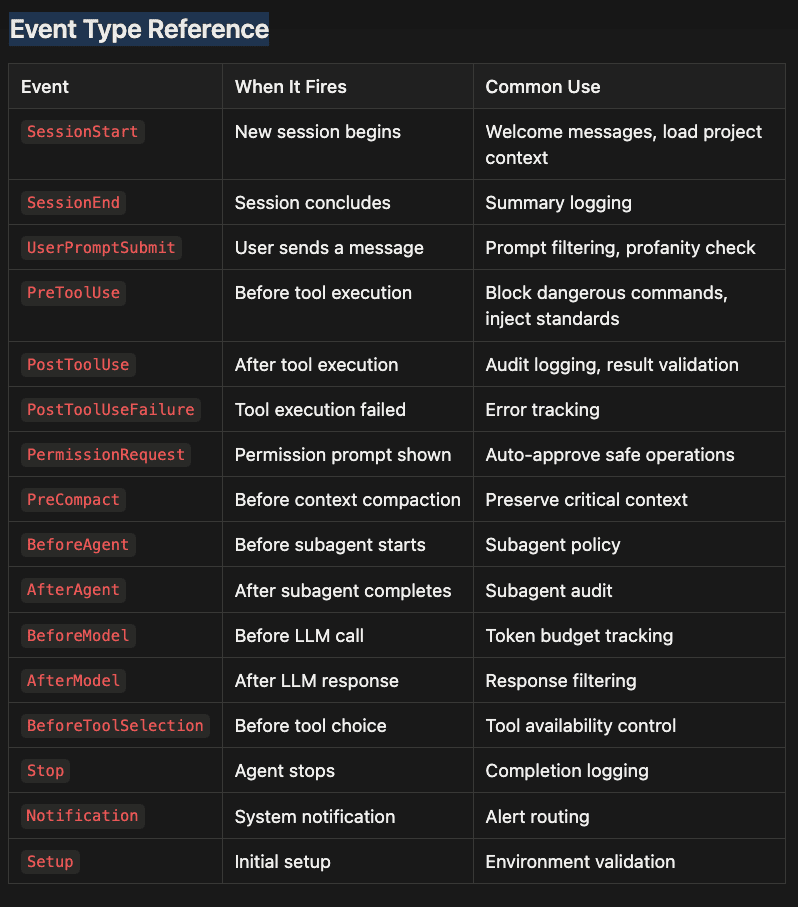
All Events:
- SessionStart - New session begins - Welcome messages, load project context
- SessionEnd - Session concludes - Summary logging
- UserPromptSubmit - User sends a message - Prompt filtering, profanity check
- PreToolUse - Before tool execution - Block dangerous commands, inject standards
- PostToolUse - After tool execution - Audit logging, result validation
- PostToolUseFailure - Tool execution failed - Error tracking
- PermissionRequest - Permission prompt shown - Auto-approve safe operations
- PreCompact - Before context compaction - Preserve critical context
- BeforeAgent - Before subagent starts - Subagent policy
- AfterAgent - After subagent completes - Subagent audit
- BeforeModel - Before LLM call - Token budget tracking
- AfterModel - After LLM response - Response filtering
- BeforeToolSelection - Before tool choice - Tool availability control
- Stop - Agent stops - Completion logging
- Notification - System notification - Alert routing
- Setup - Initial setup - Environment validation
Which event should you use? For most rules, PreToolUse is the right choice. It fires before the tool executes, giving you the chance to block or inject context. Use the operations matcher for lifecycle events like SessionStart or PreCompact. Use UserPromptSubmit only when you need to act on the raw user input before the agent processes it. Use BeforeAgent and AfterAgent when you want policies that wrap subagent execution in a multi-agent workflow.
Note that the above list of events is a superset of what comes from Claude Code because we are actively working on make this system work with Gemini CLI, OpenCode and Copilot. It should work well with any system that has pre tool usage hooks at a minimum.
Use Cases: Basic
These examples demonstrate single-rule patterns that solve common problems. Each rule uses one primary matcher and one action type. Start here if you are new to Agent RuleZ. The goal with basic rules is precision through simplicity: one problem, one rule, one action.
Block Force Push
The simplest and most valuable RuleZ rule: prevent force pushes to any branch.
- name: block-force-push
  description: "Prevent force pushes to any branch"
  matchers:
    tools: ["Bash"]
    command_match: "git push.*--force"
  actions:
    block: true
  governance:
    author: "security-team"
    reason: "Force pushes can destroy team history"
    confidence: high
    tags: ["security", "git"]
What it does: Matches any Bash command containing git push followed by --force (including --force-with-lease). When matched, the operation is blocked with exit code 2. The agent receives an error message explaining the block and can find an alternative approach.
Why two matchers? The tools: ["Bash"] matcher ensures this rule only evaluates for Bash commands, not for Write or Edit operations that might coincidentally contain the string "git push" in their content. The command_match regex does the actual pattern detection. Both must pass (AND logic). Using tools as a pre-filter is a performance optimization: the regex engine only runs against Bash events, not every event.
When to use block: true: Choose block: true when the operation is categorically wrong, not just risky. Force pushes fit this category. Other good candidates include rm -rf /, writes to /etc/, and commands that reach out to external APIs without review.
Trade-offs:
- Pro: Simple, fast, no false negatives for the targeted pattern
- Pro: Covers both --force and --force-with-lease with one regex
- Con: Does not distinguish between protected and unprotected branches; a more targeted rule would add a directories matcher or a validate_expr check
Secret Scanner
Block writes to files with sensitive extensions, but only in local development (not CI).
- name: secret-scanner
  description: "Block commits containing potential secrets"
  enabled_when: 'env_CI != "true"'
  matchers:
    tools: ["Write", "Edit"]
    extensions: [".env", ".pem", ".key", ".secret"]
  actions:
    block: true
    inject_inline: |
      **BLOCKED: Potential secret file detected.**
      Files with sensitive extensions (.env, .pem, .key, .secret) cannot be written directly.
      Use environment variables or a secrets manager instead.
  governance:
    author: "security-team"
    reason: "Prevent accidental secret exposure in codebase"
    confidence: high
    tags: ["security", "secrets"]
What it does: When a Write or Edit targets a file with a sensitive extension, the operation is blocked and an explanatory message is injected. The enabled_when condition disables this rule in CI environments (where the CI environment variable is typically set to "true"), since CI pipelines may legitimately need to write credential files during deployment.
The enabled_when expression is evaluated using the evalexpr library. Available variables include env_* (all environment variables with an env_ prefix), tool_name, event_type, and prompt. The expression env_CI != "true" reads as: "this rule is only active when the CI environment variable is not set to true." If the expression fails to evaluate, the rule is disabled; this is the fail-safe behavior.
When to combine block and inject: Notice this rule uses both block: true and inject_inline. The block stops the operation; the inject explains why and tells the agent what to do instead. This combination is best practice for rules that developers encounter regularly. A block without explanation frustrates both agents and humans.
Trade-offs:
- Pro: enabled_when prevents CI pipeline breakage from the same rule set
- Pro: The injected explanation guides the agent toward the correct alternative
- Con: Extension-based matching is broad; a legitimate .env.example file would also be blocked
Session Greeting
Display a custom greeting and project context when a new session starts.
- name: session-greeting
  description: "Display custom greeting and load project context on session start"
  matchers:
    operations: ["SessionStart"]
  actions:
    inject_command: "echo '## Welcome to Project X\n\nRemember: Always run tests before committing.'"
  governance:
    author: "team-lead"
    reason: "Ensure consistent onboarding for all sessions"
What it does: When a new Claude Code session starts, the inject_command action runs the shell command and injects its stdout into the agent's context. The agent sees the welcome message and project reminders as part of its initial context, every single session, without anyone having to remember to include it in the prompt.
Why inject_command instead of inject_inline?
inject_inline embeds static content directly in the YAML file. inject_command runs a shell command and uses its output, which means the content can be dynamic. Consider this more powerful version:
actions:
  inject_command: |
    echo "## Project Status"
    echo "Branch: $(git branch --show-current)"
    echo "Recent commits:"
    git log --oneline -3
    echo "Open issues:"
    cat .claude/current-sprint.md 2>/dev/null || echo "No sprint file found"
Every session starts with the current branch name, recent commit history, and sprint context. For static content, inject_inline is simpler and faster (no subprocess). For content that should reflect current state, inject_command is the better choice.
Trade-offs:
- Pro: Dynamic content stays fresh without updating the YAML config
- Con: Shell commands add latency (subprocess overhead) compared to inject_inline
- Con: Complex shell scripts in YAML become hard to read; consider using run for longer scripts
Use Cases: Intermediate
These examples demonstrate context injection patterns that shape agent behavior without blocking. This is where RuleZ moves beyond simple guardrails into active workflow enhancement. The pattern shifts from “preventing bad things” to “ensuring good things happen automatically.”
Python Standards Injection
Inject coding standards whenever the agent writes or edits Python files.
- name: python-standards
  description: "Inject Python coding standards for Python file operations"
  matchers:
    tools: ["Write", "Edit"]
    extensions: [".py"]
  actions:
    inject_inline: |
      ## Python Coding Standards
      - Use type hints on all function signatures
      - Follow PEP 8 naming conventions
      - Add docstrings to all public functions
      - Use `pathlib.Path` instead of `os.path`
      - Prefer f-strings over `.format()` or `%`
  governance:
    author: "python-guild"
    reason: "Maintain consistent Python code quality"
    tags: ["standards", "python"]
What it does: Every time the agent creates or modifies a Python file, it sees your team’s coding standards in its context. The agent treats this injected content as instructions and follows them. No more “please remember to add type hints.” The standards appear automatically at the exact moment they are needed.
Why this approach beats CLAUDE.md for standards: CLAUDE.md is loaded once at session start and competes with everything else in the context window. By the time the agent is writing its fifth Python file of the session, the CLAUDE.md standards may have been compacted away or simply deprioritized. RuleZ injection fires every time, making the standards impossible to miss.
When to use inject_inline vs. inject (file reference):
Use inject_inline for short, stable standards (10-20 lines) that you want visible in the YAML config. Use inject with a file path for longer documents that multiple rules might reference, or that non-engineers might need to edit separately:
actions:
  inject: ".claude/context/python-standards.md"
The file-based approach is easier to maintain when standards evolve, and it allows your Python guild to own the standards file without touching the hooks YAML.
Trade-offs:
- Pro: Standards appear at the precise moment of relevance, not buried in session context
- Pro: Multiple matchers can reference the same standards file with the inject action
- Con: Injected content adds tokens to every Python file operation; keep standards concise
API Context (Directory-Scoped)
Inject API design guidelines only when working in API-related directories.
- name: api-context
  description: "Inject API design guidelines when working in API directories"
  matchers:
    tools: ["Write", "Edit"]
    directories: ["src/api/**", "src/routes/**"]
  actions:
    inject: ".claude/context/api-guidelines.md"
  governance:
    author: "api-team"
    reason: "Ensure API consistency across endpoints"
    tags: ["api", "standards"]
What it does: When the agent writes or edits files in src/api/ or src/routes/, RuleZ injects the contents of .claude/context/api-guidelines.md into the agent's context. Files outside those directories do not trigger this rule. An agent editing a React component will not see API guidelines; an agent creating a new endpoint will see them automatically.
The inject action reads a file from disk and includes its content. This is ideal for longer documents like style guides, architecture decisions, or API conventions that would be unwieldy as inline YAML. The file path is relative to the project root. Keep the injected file focused: an API guidelines document should cover versioning, error response format, authentication headers, and pagination conventions, not generic REST theory.
The directories matcher supports glob patterns. src/api/** matches any file at any depth under src/api/. You can scope rules to specific parts of your codebase with precision. This scoping is what keeps injection rules from becoming noise: only relevant context appears at relevant moments.
When to use directory-scoped rules: Any time you have domain-specific conventions that apply to a subsystem but not the whole codebase. Infrastructure code, frontend components, database migrations, and test fixtures all benefit from their own injected context.
Trade-offs:
- Pro: Zero noise outside the targeted directory tree
- Pro: The guidelines file can be owned and versioned independently
- Con: Directory matching is path-based; renaming directories requires updating the rule
Pre-Compact Reminder
Inject critical context before Claude Code compacts (summarizes) the conversation to fit within its context window.
What it does: When Claude Code is about to compact its context (dropping older messages to stay within the token limit), this rule injects a reminder to preserve critical state. The agent reads this before compaction and takes steps to retain important information.
Why this matters: Context compaction is one of the most dangerous moments in a long coding session. The agent may forget which branch it is on, what files it has modified, or what task it was working on. Without a reminder, the agent compacts the context and resumes work with gaps in its understanding. This rule acts as a safety net, prompting the agent to check its state before information is lost.
A more robust version uses inject_command to capture actual state at compaction time:
actions:
  inject_command: |
    echo "## State Snapshot Before Compaction"
    echo "Branch: $(git branch --show-current)"
    echo "Modified files: $(git status --short | head -10)"
    echo "Recent activity: $(git log --oneline -3)"
Trade-offs:
- Pro: Catches a failure mode that no other safety mechanism addresses
- Pro: The inject_command variant captures real state rather than just reminders
- Con: The reminder cannot force the agent to act; a distracted agent may still compact without fully preserving state
Use Cases: Advanced
These examples demonstrate multi-rule composition, external validators, and expression-based validation. These patterns suit teams with established governance requirements and developers comfortable with the basics. The advanced patterns add precision, reusability, and the ability to enforce invariants that simple pattern matching cannot express.
React Skill Injection
Inject React component standards and trigger a skill when creating components.
- name: react-skill-injection
  description: "Inject React best practices when creating React components"
  matchers:
    tools: ["Write"]
    extensions: [".tsx", ".jsx"]
    directories: ["src/components/**"]
  actions:
    inject_inline: |
      ## React Component Standards
      Use the `/react-component` skill for creating new components.

      Requirements:
      - Functional components with TypeScript
      - Props interface defined and exported
      - Use React.memo() for pure components
      - Custom hooks extracted to `hooks/` directory
      - Tests co-located in `__tests__/` directory
  governance:
    author: "frontend-team"
    created_by: "[email protected]"
    reason: "Ensure React component consistency"
    confidence: high
    tags: ["react", "frontend", "components"]
What it does: When the agent creates a .tsx or .jsx file in src/components/, it receives React-specific standards and a reference to the /react-component skill. Three matchers (tools, extensions, directories) work together to precisely target component creation. The rule fires only for new file creation (Write), not edits, because standards guidance is most valuable when starting fresh.
The created_by governance field tracks which tool or skill generated this rule. This is valuable when rules are auto-generated by tooling: you can trace a rule back to the skill version that created it. When the skill updates to version 2.2.0, you know to review and regenerate the corresponding rules.
Why three matchers work better than two: Using all three matchers (tools, extensions, directories) means this rule fires only for new React component files in the components directory. Without the directories matcher, it would fire for any .tsx file, including page-level components, utility functions, and test helpers. Without the tools: ["Write"] filter, it would also fire when editing existing components, adding noise to routine edits.
Trade-offs:
- Pro: Precise targeting reduces notification fatigue
- Pro: The skill reference points the agent to standardized scaffolding, reducing inconsistency
- Con: Three matchers require all three to be accurate; if your team uses a different directory structure, the rule needs updating
CDK Skill + Construct Guard (Two Coordinated Rules)
Use two rules together: one injects CDK standards, the other validates that construct files are not empty.
- name: cdk-skill-injection
  description: "Inject CDK best practices for infrastructure code"
  matchers:
    tools: ["Write", "Edit"]
    directories: ["infra/**", "cdk/**"]
    extensions: [".ts"]
  actions:
    inject_inline: |
      ## CDK Infrastructure Standards
      Use the `/cdk-construct` skill for new constructs.

      Requirements:
      - L2 constructs preferred over L1
      - All constructs must have removal policies
      - Tags must be applied via `cdk.Tags.of()`
      - Use `cdk.Duration` instead of raw numbers
  governance:
    author: "platform-team"
    reason: "Enforce CDK best practices"
    tags: ["cdk", "infrastructure", "aws"]

- name: cdk-construct-guard
  description: "Validate CDK constructs have required properties"
  matchers:
    tools: ["Write"]
    directories: ["infra/**", "cdk/**"]
    extensions: [".ts"]
  actions:
    validate_expr: 'has_field("content") && get_field("content") != ""'
  governance:
    author: "platform-team"
    reason: "Prevent empty construct files"
    tags: ["cdk", "validation"]
What it does: The first rule injects CDK standards whenever TypeScript files in infrastructure directories are modified. The second rule validates that Write operations include non-empty content, preventing the agent from creating blank construct files.
The validate_expr action uses the evalexpr expression evaluator with two custom functions: has_field(path) checks whether a field exists in the tool_input JSON, and get_field(path) retrieves its value. Both accept dot-notation paths (e.g., "nested.field.name"). If the expression evaluates to false, the operation is blocked.
Rule composition: why two rules beat one: These two rules work independently but complement each other. The injection rule has no blocking behavior; the guard rule has no injection. This separation of concerns is deliberate and important:
- Each rule can be set to a different policy mode. You might want cdk-skill-injection in warn mode while rolling it out, while cdk-construct-guard stays in enforce mode from day one.
- Each rule can be disabled independently. If the inject rule is causing token bloat, you can turn it off without losing the validation.
- Each rule is independently testable. You can verify the guard catches empty files without needing the injection rule to be active.
Trade-offs:
- Pro: Separation of concerns makes each rule simpler to reason about
- Pro: Independent policy modes allow graduated rollout of each concern
- Con: Two rules are slightly more YAML to maintain than one combined rule
- Con: validate_expr catches empty content but cannot validate TypeScript syntax or CDK-specific correctness
Commit Message Validator
Use an external Python script to validate that commit messages follow conventional commits format.
- name: commit-message-validator
  description: "Validate commit messages follow conventional commits format"
  matchers:
    tools: ["Bash"]
    command_match: "^git commit"
  actions:
    run: ".claude/validators/commit-validator.py"
  governance:
    author: "quality-team"
    reason: "Enforce conventional commit messages"
    confidence: high
    tags: ["git", "quality", "commits"]
The validator script (.claude/validators/commit-validator.py):
#!/usr/bin/env python3
"""Commit message validator for RuleZ run action."""
import json
import re
import sys

CONVENTIONAL_PATTERN = (
    r'^(feat|fix|docs|style|refactor|perf|test|chore|ci|build|revert)'
    r'(\(.+\))?: .{1,72}$'
)

def validate():
    event = json.load(sys.stdin)
    tool_input = event.get("tool_input", {})
    command = tool_input.get("command", "")

    # Extract commit message from -m flag
    match = re.search(r'-m\s+["\'](.+?)["\']', command)
    if not match:
        sys.exit(0)  # No -m flag; might use editor, allow

    message = match.group(1)
    first_line = message.split('\n')[0]

    if re.match(CONVENTIONAL_PATTERN, first_line):
        sys.exit(0)  # Valid
    else:
        print(json.dumps({
            "error": f"Invalid commit message: '{first_line}'",
            "hint": "Format: type(scope): description"
        }))
        sys.exit(1)  # Block

if __name__ == "__main__":
    validate()
What it does: When the agent runs a git commit command, RuleZ calls the validator script with the full hook event as JSON on stdin. The script extracts the commit message from the -m flag, validates it against the conventional commits pattern, and either exits 0 (allow) or exits 1 (block with explanation).
How the run action works: RuleZ executes the specified script as a subprocess, piping the full hook event JSON to its stdin. The script reads the event, performs its validation, and exits:
- Exit 0: Validation passed, operation allowed
- Non-zero exit: Validation failed, operation blocked
The script’s stdout (if any) is included in the block message. This lets validators provide helpful error messages explaining why the operation was rejected and what format is expected.
When to choose run over validate_expr or inline_script: The run action is best when your validation logic is complex enough to benefit from a standalone file that you can test with a unit test framework. The commit-validator.py script above can be tested with pytest independently of RuleZ. This is the key advantage over inline approaches.
Trust levels: The run action supports a trust level annotation for future use:
run:
  script: ".claude/validators/commit-validator.py"
  trust: local  # local | verified | untrusted
The local trust level (default) indicates the script exists in the project repository. Future versions will support cryptographic verification of scripts.
Trade-offs:
- Pro: External script is independently testable and reusable across projects
- Pro: Complex validation logic (multi-step, stateful) fits naturally in a script
- Con: Subprocess overhead adds a few milliseconds compared to validate_expr
- Con: The script must handle its own error cases; a crash in the validator blocks the operation
When to Use Each Validation Action
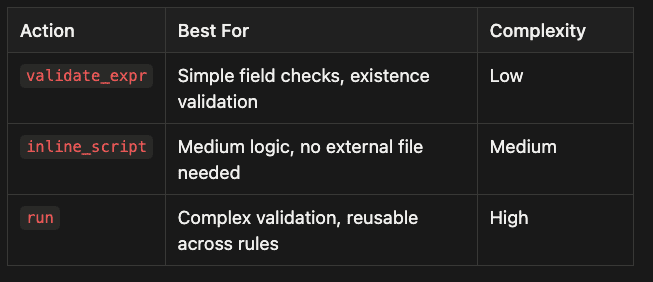
When to use Validation Actions:
- validate_expr: Simple field checks, existence validation - Low complexity
- inline_script: Medium logic, no external file needed - Medium complexity
- run: Complex validation, reusable across rules - High complexity
The validate_expr is the fastest (no subprocess, pure expression evaluation). inline_script creates a temporary file and executes it (useful for logic that needs shell access but is not complex enough for a standalone script). run invokes an external script (best for complex validators you want to test and version independently).
Policy Modes and Governance
RuleZ supports three policy modes that control how matched rules affect operations. This graduated enforcement model lets you roll out new rules safely, collecting real-world data before committing to enforcement.
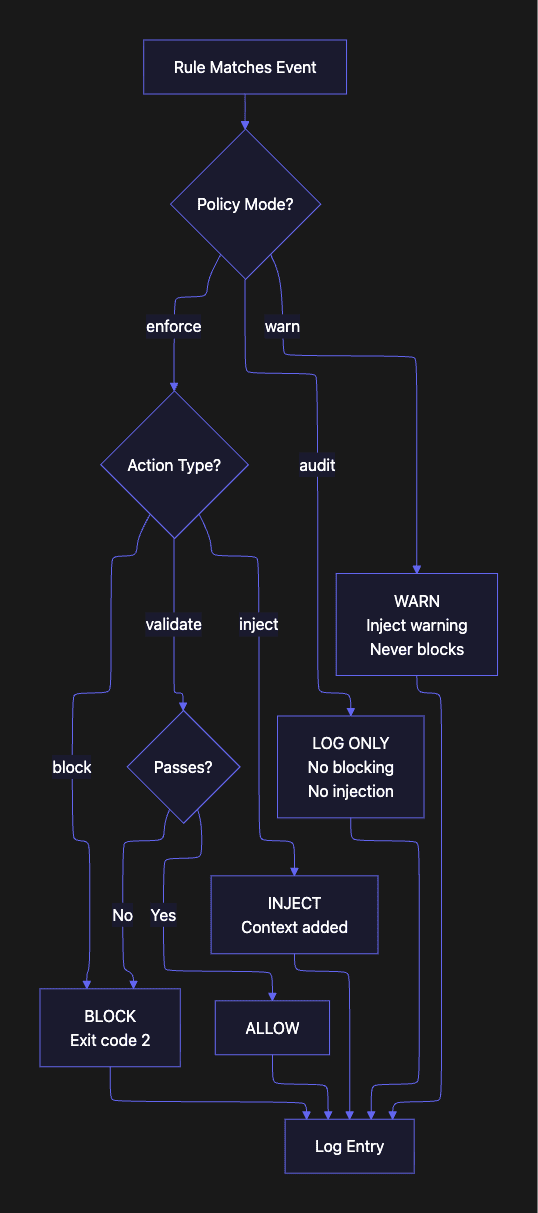
Enforce Mode (Default)
In enforce mode, rules behave exactly as their actions specify. block: true blocks the operation. inject_inline injects content. Validators that fail cause blocking. This is the mode you use in production once you are confident in your rules. Every new rule should earn its way into enforce mode by proving itself in audit and warn phases first.
Warn Mode
Warn mode never blocks operations. If a rule would normally block, it instead injects a warning message into the agent’s context. The agent sees the warning and can choose to adjust its behavior, but the operation proceeds. This is ideal for rolling out new rules: you can see what would be blocked without disrupting anyone’s workflow. Think of warn mode as the “training wheels” phase: you confirm the rule works before it has teeth.
Audit Mode
Audit mode is invisible to the agent. Rules still evaluate and matches are recorded in the log, but no blocking or injection occurs. Use audit mode to understand patterns before writing enforcement rules, or to maintain a compliance audit trail without affecting operations. Audit mode is also useful for rules that you want to observe over time without committing to action: “how often does the agent attempt force pushes?” is a question audit mode can answer.
The Rollout Pattern
The safe path from idea to enforced rule:
- Start in audit mode: Deploy your rule with mode: audit. Monitor rulez.log for matches. Are the right events being caught? Are there false positives? A false positive at this stage is just a log entry. At enforce stage, it is a blocked operation and a frustrated developer.
- Graduate to warn mode: Change to mode: warn. Developers see warnings but are not blocked. Collect feedback on whether the rule is helpful or needs refinement. Run in warn mode for at least one sprint before enforcing.
- Enforce when confident: Change to mode: enforce. The rule now actively blocks or injects. You have data from audit and warn phases to confirm the rule works correctly.
This pattern mirrors how chaos engineering teams test failure scenarios: simulate before you enforce.
Governance Metadata
Every rule can carry governance metadata that documents its provenance, purpose, and review status:
governance:
  author: "security-team"
  created_by: "[email protected]"
  reason: "Prevent accidental force pushes to protected branches"
  confidence: high
  last_reviewed: "2025-01-15"
  ticket: "SEC-1234"
  tags: ["security", "git", "production"]
This metadata flows through to the audit log. When you review rulez.log, you can see not just what was blocked, but who authored the rule, why it exists, when it was last reviewed, and what ticket tracks it.
For teams with compliance requirements (SOC 2, ISO 27001, HIPAA), this metadata provides the documentation chain that auditors expect. When an auditor asks “why was this AI agent blocked from writing to this file?”, your answer is in the log: the rule name, the author, the reason, the ticket, and the exact timestamp. That is a much stronger audit response than “we told the agent not to.”
Complete Configuration Example
The following example shows a complete hooks.yaml with all three policy modes and a representative set of rules. This is a reasonable starting point for a new project.
version: "1.0"

settings:
  log_level: "info"
  max_context_size: 1048576
  script_timeout: 5
  fail_open: true
  debug_logs: false

rules:
  - name: block-force-push
    description: "Prevent force pushes"
    priority: 100
    mode: enforce
    matchers:
      tools: ["Bash"]
      command_match: "git push.*--force"
    actions:
      block: true
    governance:
      author: "security-team"
      reason: "Protect branch history"
      confidence: high
      tags: ["security"]

  - name: python-standards
    description: "Python coding standards"
    priority: 50
    mode: enforce
    matchers:
      tools: ["Write", "Edit"]
      extensions: [".py"]
    actions:
      inject_inline: |
        Use type hints, PEP 8, docstrings, pathlib.
    governance:
      author: "python-guild"
      tags: ["standards"]

  - name: audit-all-bash
    description: "Audit all bash commands"
    priority: 10
    mode: audit
    matchers:
      tools: ["Bash"]
    actions:
      block: false
    governance:
      author: "compliance"
      reason: "Compliance audit trail"
      tags: ["audit", "compliance"]
Notice the priority ordering: security rules at 100, standards rules at 50, compliance audit at 10. Higher-priority rules evaluate first, so your security rules always run before anything else.
💡 RuleZ vs. Policy Islands
💡 RuleZ and Policy Islands are complementary approaches to AI agent governance: -- RuleZ (external): Deterministic YAML rules evaluated by a Rust binary. Hard enforcement via exit codes. Cross-cutting policies that apply to all sessions. -- Policy Islands (internal): Natural language instructions in CLAUDE.md, agents, and skills. Soft guidance interpreted by the agent. Per-command or per-agent scope.
💡 Use Policy Islands to define agent-level behavior and context. Use RuleZ to enforce organization-wide guardrails that no agent can bypass. Think of Policy Islands as “guidelines” and RuleZ as “law.”
Multi-Agent Adapter Architecture
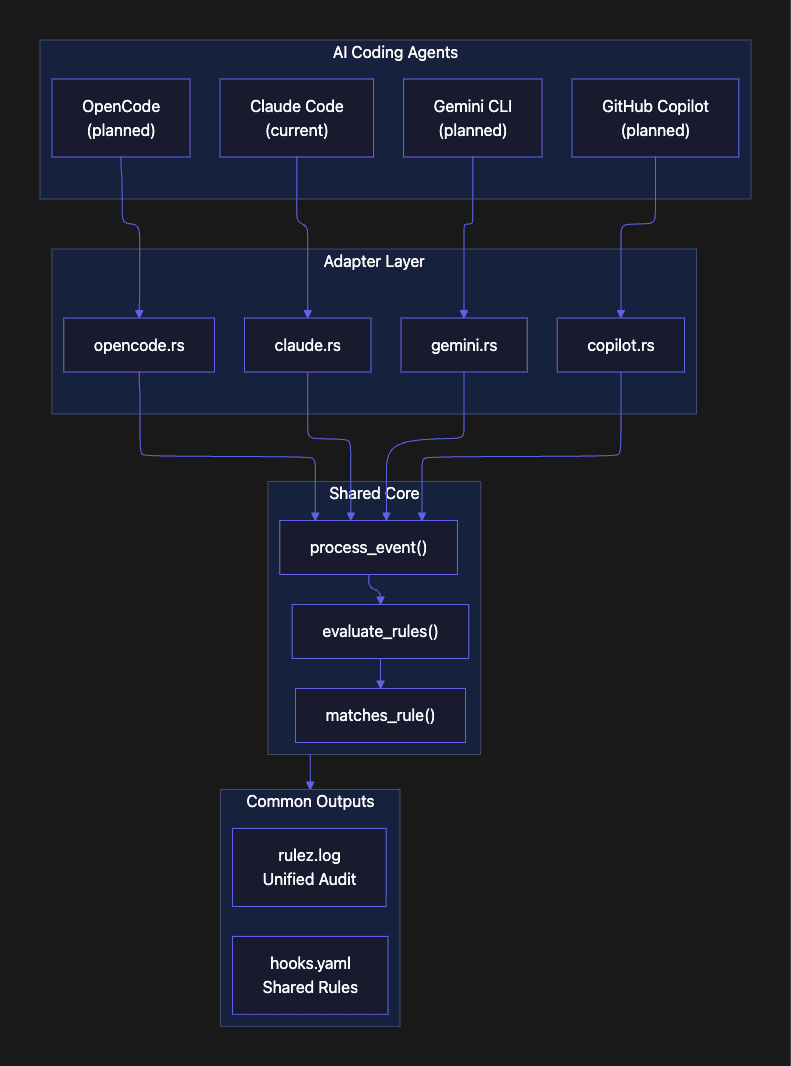
Today, RuleZ supports Claude Code through the hooks protocol. But the architecture is designed for a multi-agent future. Development teams that are serious about AI-assisted development are not using just one tool; they need governance that travels with them across all the tools they use.
Why Multi-Agent Matters
Development teams increasingly use multiple AI coding tools. A team might use Claude Code for complex refactoring, GitHub Copilot for inline completions, and Gemini CLI for quick queries. Without a shared policy layer, each tool operates under its own governance model (or none at all). Your --force-push block only protects you from Claude Code; Gemini CLI could still push freely. Support for other coding agents is a work in progress.
The adapter architecture solves this by letting each AI tool integrate with RuleZ through its native extension mechanism:
- Claude Code: hooks protocol (stdin/stdout JSON)
- Gemini CLI: planned adapter using Gemini’s extension points
- GitHub Copilot: planned adapter using Copilot’s content exclusion and custom instructions APIs
- OpenCode: planned adapter using OpenCode’s hook system
Each adapter translates the agent’s native event format into RuleZ’s internal event model, then calls the shared core (process_event() in hooks.rs). The result is one set of rules, one audit log, and one governance model across all your AI coding tools. A rule you write today for Claude Code will apply to Gemini CLI when that adapter ships, without any changes to hooks.yaml.
Shared Core
The adapter pattern keeps the core engine clean. Regardless of which AI tool triggered the event, the evaluation path is identical:
- models.rs defines all data types (Rule, Matchers, Actions, EventType)
- config.rs loads and validates the shared hooks.yaml
- hooks.rs runs rule evaluation
- logging.rs writes to the shared audit log
New adapters only need to implement event translation; the policy logic is shared. This is the standard adapter pattern applied at the governance layer: swap the interface, keep the core.
Getting Started
Getting RuleZ running takes about five minutes. The recommended path is to start with a single audit-mode rule, verify events are flowing through the log, then add more rules incrementally.
Step 1: Install RuleZ
# Clone and build from source
git clone https://github.com/anthropics/rulez.git
cd rulez
cargo build --release

# Copy the binary to your PATH
cp target/release/rulez /usr/local/bin/
Or you can install the skills or the marketplace plugin and ask Rulez to install itself. The github repo has agentic skills and Claude Code plugins which automate the setup as well as let you define agent rules with natural language.
Step 2: Create Your First Rule
Create .claude/hooks.yaml in your project:
version: "1.0"

settings:
  log_level: "info"
  fail_open: true

rules:
  - name: block-force-push
    description: "Prevent force pushes"
    mode: audit  # Start with audit mode!
    matchers:
      tools: ["Bash"]
      command_match: "git push.*--force"
    actions:
      block: true
    governance:
      author: "your-name"
      reason: "Protect branch history"
Notice the mode: audit. Start by observing what the rule catches before enforcing it. You want to confirm the rule matches what you expect (and only what you expect) before giving it the power to block.
Step 3: Wire into Claude Code
Add the hook to your Claude Code settings (.claude/settings.json or ~/.claude/settings.json):
{
  "hooks": {
    "PreToolUse": [
      {
        "matcher": "*",
        "hooks": [
          {
            "type": "command",
            "command": "rulez",
            "timeout": 5
          }
        ]
      }
    ],
    "PostToolUse": [
      {
        "matcher": "*",
        "hooks": [
          {
            "type": "command",
            "command": "rulez",
            "timeout": 5
          }
        ]
      }
    ],
    "PostToolUseFailure": [
      {
        "matcher": "*",
        "hooks": [
          {
            "type": "command",
            "command": "rulez",
            "timeout": 5
          }
        ]
      }
    ],
    "Notification": [
      {
        "matcher": "*",
        "hooks": [
          {
            "type": "command",
            "command": "rulez",
            "timeout": 5
          }
        ]
      }
    ],
    "Stop": [
      {
        "matcher": "*",
        "hooks": [
          {
            "type": "command",
            "command": "rulez",
            "timeout": 5
          }
        ]
      }
    ],
    "SubagentStart": [
      {
        "matcher": "*",
        "hooks": [
          {
            "type": "command",
            "command": "rulez",
            "timeout": 5
          }
        ]
      }
    ],
    "SubagentStop": [
      {
        "matcher": "*",
        "hooks": [
          {
            "type": "command",
            "command": "rulez",
            "timeout": 5
          }
        ]
      }
    ],
    "SessionStart": [
      {
        "matcher": "*",
        "hooks": [
          {
            "type": "command",
            "command": "rulez",
            "timeout": 5
          }
        ]
      }
    ],
    "SessionEnd": [
      {
        "matcher": "*",
        "hooks": [
          {
            "type": "command",
            "command": "rulez",
            "timeout": 5
          }
        ]
      }
    ],
    "UserPromptSubmit": [
      {
        "matcher": "*",
        "hooks": [
          {
            "type": "command",
            "command": "rulez",
            "timeout": 5
          }
        ]
      }
    ],
    "PermissionRequest": [
      {
        "matcher": "*",
        "hooks": [
          {
            "type": "command",
            "command": "rulez",
            "timeout": 5
          }
        ]
      }
    ],
    "Setup": [
      {
        "matcher": "*",
        "hooks": [
          {
            "type": "command",
            "command": "rulez",
            "timeout": 5
          }
        ]
      }
    ],
    "TeammateIdle": [
      {
        "matcher": "*",
        "hooks": [
          {
            "type": "command",
            "command": "rulez",
            "timeout": 5
          }
        ]
      }
    ],
    "TaskCompleted": [
      {
        "matcher": "*",
        "hooks": [
          {
            "type": "command",
            "command": "rulez",
            "timeout": 5
          }
        ]
      }
    ],
    "PreCompact": [
      {
        "matcher": "*",
        "hooks": [
          {
            "type": "command",
            "command": "rulez",
            "timeout": 5
          }
        ]
      }
    ]
  }
}
The empty matcher: "" means the hook fires for all tools. RuleZ handles tool-specific matching internally through its own matchers, which gives you finer control than Claude Code's built-in matcher patterns. This "intercept everything, filter in RuleZ" approach also means you only need to update hooks.yaml when adding new rules; you never need to touch the Claude Code settings again.
Note, the agentic plugins that ships with Agent RuleZ automates the installation of this hook and it also allows you to use natural language to define your agent rules which get converted in the YAML file. There is also a UI and a CLI to test rules are valid.
Step 4: Verify
Start a new Claude Code session and check the log:
# Check the audit log
tail -f ~/.claude/logs/rulez.log | python3 -m json.tool

# You should see SessionStart events logged
Once you see events flowing, change your rule from mode: audit to mode: enforce to activate blocking. If the log shows unexpected matches or misses, use debug_logs: true in settings to see per-matcher results for every rule evaluation.
Best Practices
Start with audit mode. Deploy every new rule in audit mode first. Review the logs to confirm the rule matches the right events. Graduate to warn, then enforce. This cadence is not optional for production teams; it is how you avoid disrupting your workflow with overzealous rules.
Use governance metadata from day one. Even for personal rules, add author and reason. Six months from now, you will not remember why you wrote a rule. The metadata is your documentation, and it surfaces in the audit log alongside every match.
Group rules by concern. Organize your hooks.yaml with security rules (high priority), standards rules (medium priority), and workflow rules (low priority). Use priority numbers to control evaluation order: security rules at 100+, standards at 50-99, workflow at 1-49.
Test with debug mode. Set debug_logs: true in settings to see per-matcher results for every rule evaluation. This shows you exactly which matchers passed or failed, making it easy to debug rules that are not matching as expected.
Keep injected content focused. The max_context_size setting defaults to 1MB, but more is not better. Injected content competes with the agent's other context. Keep inject rules targeted and concise: a 10-line coding standard is more effective than a 500-line style guide.
Separate blocking from injection. Use two rules instead of one rule that both blocks and injects. This makes each rule easier to test, easier to set to different policy modes, and easier to maintain independently. The CDK example in this article demonstrates the pattern well.
Version your hooks.yaml. Commit .claude/hooks.yaml to version control. Review rule changes in pull requests the same way you review code changes. The governance metadata (ticket, last_reviewed) supports this workflow. A rule that blocks developers should go through the same review process as code that affects developers.
Conclusion
AI coding agents are too valuable to restrict and too powerful to leave ungoverned. The gap between “ask permission for everything” and “run without guardrails” is where most teams operate today, relying on probabilistic compliance: hoping the agent follows CLAUDE.md instructions, hoping developers catch mistakes in review, hoping nothing catastrophic happens, hoping your coding agent does not ignore you agent skills.
RuleZ fills that gap with deterministic policy enforcement. Your rules are YAML, not prayers. Your enforcement is exit codes, not suggestions. Your audit trail is structured JSON, not conversation history.
The transition from probabilistic to deterministic governance is not just a technical upgrade. It is an organizational one. When you can point to a rule with an author, a reason, a ticket, and a log of every time it fired, you have changed the conversation about AI agents from “we hope they behave” to “we know they behave.”
Start with one rule in audit mode. Watch the logs. Graduate to enforcement. Add governance metadata. Share your hooks.yaml with your team. And the next time your AI agent considers a force push to main, RuleZ will be there first: fast, deterministic, and unambiguous.
No means no. In under 10 milliseconds. Context engineering enablement is a must. Trigger Agentic Skills at the right moment is solved.
Check out Agent RuleZ at: https://github.com/SpillwaveSolutions/agent_rulez
About the Author
Rick Hightower is a technology executive and data engineer who led ML/AI development at a Fortune 100 financial services company. He created skilz, the universal agent skill installer, supporting 30+ coding agents including Claude Code, Gemini, Copilot, and Cursor, and co-founded the world’s largest agentic skill marketplace. Connect with Rick Hightower on LinkedIn or Medium.
The Claude Code community has developed powerful extensions that enhance its capabilities. Here are some valuable resources from Spillwave Solutions (Spillwave Solutions Home Page):
Integration Skills
- Notion Uploader/Downloader Agent Skill: Seamlessly upload and download Markdown content and images to Notion for documentation workflows. I use this one with Agent Brain.
- Confluence Agent Skill: Upload and download Markdown content and images to Confluence for enterprise documentation. Use a confluence search to get a bunch of related documents to your project and then search them with Agent Brain. Talk about context engineering on steroids!
- JIRA Integration Agent Skill: Create and read JIRA tickets, including handling special required fields. Pull down that whole epic and search through all the related tickets. Agent Brain and context engineering for the win!
If you like this article, check out these other articles by this author (me):
- Agent Brain: Giving AI Coding Agents a Full Understanding of Your Entire Enterprise -- Feb 5th 2026
- Build Agent Skills Faster with Claude Code 2.1 Release -- Feb 4th 2026
- Build Your First Agent Skill in 10 Minutes Using the Context7 Wizard (and Save Hours) -- Feb 1st 2026
- Supercharge Your React Performance with Vercel’s Best Practices Agent Skill -- Jan 29th
- Agent Skills: The Universal Standard Transforming How AI Agents Work -- Jan 28
- Agent-Browser: AI-First Browser Automation That Saves 93% of Your Context Window -- Jan 27
- Claude Code: Todos to Tasks -- Jan 26
- LangExtract: Multi-Provider NLP Extraction with Gemini, OpenAI, Claude, and Local Models -- Jan 20
- Empowering AI Coding Agents with Private Knowledge: The Doc-Serve Agent Skill -- Jan 20
- Give Your Claude Code, OpenCode, and Codex Full RAG Over Docs and Code Repos -- Jan 18
Questions from Users:
What is the difference between Agent RuleZ and the hooks already supported in Claude Code? Claude Code also has rules that somewhat resemble this.
What is the difference between Agent RuleZ and the hooks already supported in Claude Code? Claude Code also has rules that somewhat resemble this.
Hey there -- thanks for the comment and for checking out the article! I get why it might seem similar at first glance, especially if you’re skimming. Let me break down the differences clearly, based on what Claude Code actually supports (hooks, not “rules” in the way you might be thinking). I’ll also address a potential mix-up with another tool and give a concrete example to compare.
Quick Clarification: Claude Code Doesn’t Have Built-in “Rules”
From what I can tell (and after double-checking Anthropic’s docs and related resources), Claude Code doesn’t have a feature explicitly called “rules.” It does have:
- Hooks: These are customizable points in the workflow where you can run shell commands or scripts on events like “before a tool runs” (e.g., PreToolUse). You configure them in a settings.json file, and they get JSON input about the event, then decide to allow/block via exit codes (0 for allow, 2 for block) and optional output.
- CLAUDE.md and .claude/rules/: This is more like a memory/knowledge base. It’s a markdown file (or directory of files) loaded into Claude’s context at session start, providing guidelines (e.g., “use type hints in Python”). But these are probabilistic -- Claude interprets them as suggestions, not enforced rules. No blocking or automatic injection; it’s up to the AI to follow them.
If “Claude code rules” sounds familiar, you might be thinking of Cursor AI’s Rules feature. Cursor (another AI coding tool) has explicit “rules” in a .cursor/rules directory, which are system prompts/scripts that guide the AI’s behavior globally or per-project. They’re similar in spirit to CLAUDE.md but more structured. Easy mix-up, since both tools are in the AI coding space!
There’s also a Claude Code plugin called Hookify, which simplifies creating hooks by letting you define them via natural language or markdown (e.g., “/hookify Warn about rm -rf”). It generates the underlying hook scripts for you, making it easier than manual JSON config. But it’s still fundamentally hooks -- low-level and tied to Claude Code.
How Agent RuleZ Differs (and Builds On) Claude Code Hooks
Agent RuleZ is designed to sit on top of Claude Code’s hooks protocol (it reads the JSON events from stdin and responds on stdout, just like a custom hook script would). But it goes way beyond native hooks or Hookify by providing a deterministic policy engine in human-readable YAML. No need to write scripts or deal with JSON parsing -- RuleZ handles the evaluation in Rust for speed (<10ms) and reliability.
Key differences:
- Readability and Simplicity: Native hooks require scripting (bash/Python) to parse events, match conditions, and act. Hookify helps generate them but can still result in opaque code. RuleZ uses plain YAML with built-in “matchers” (e.g., file extensions, directories, regex on commands) and “actions” (block, inject context, validate). Any dev can read/write/review without coding.
- Advanced Features:
- Governance and Audit Trail: Each rule includes metadata (author, reason, tags) for compliance. Every decision logs to a JSON audit file -- great for regulated teams. Native hooks don’t have this built-in.
- Policy Modes: Roll out rules safely with “audit” (log only), “warn” (inject warnings without blocking), or “enforce” (full blocking/injection). Hooks are all-or-nothing.
- Just-in-Time Context Injection: Easily inject skills/docs only when relevant (e.g., based on file type/dir), solving “context pollution” in long sessions. Hooks can do this with custom scripts, but it’s more work.
- Multi-Agent Support: RuleZ is built for the future -- adapters planned for Gemini CLI, GitHub Copilot CLI, OpenCode, and Claude Agent SDK. One YAML config works across tools. Claude hooks (and Hookify) are Claude-only.
- No LLM in the Loop: RuleZ is deterministic (no probabilistic AI decisions). CLAUDE.md/.claude/rules/ rely on Claude following instructions, which isn’t always perfect.
The project started as a way to easily inject agentic skills (e.g., coding standards) when editing files in specific subdirs -- like the CDK example in the article. It generalized from there to full governance, inspired by tools like Kubernetes admission controllers, but kept simple with YAML (vs. something more complex like Rego’s DSL).
Example Comparison: CDK Skill Injection
Let’s take the CDK (AWS Cloud Development Kit) example from the article. The goal: When editing TypeScript files in /infra/ or /cdk/ dirs…
- Inject CDK best practices into Claude’s context.
- Validate that new files aren’t empty (to prevent blank constructs).
As a Native Claude Code Hook (or Hookify-Generated): You’d edit settings.json to add a PreToolUse hook that runs a custom script (e.g., cdk_guard.sh). The script would:
- Parse the JSON event from stdin.
- Check if tool is Write/Edit, extension is .ts, dir matches infra/** or cdk/**.
- For injection: Echo the standards as output JSON to inject into context.
- For validation: Check if content is empty; exit 2 to block if so, with error message.
Example script snippet (simplified bash):
Bash
#!/bin/bash
json=$(cat)  # Read event JSON
tool=$(echo "$json" | jq -r '.tool')
file=$(echo "$json" | jq -r '.tool_input.file_path')
content=$(echo "$json" | jq -r '.tool_input.content')

if [[ "$tool" != "Write" && "$tool" != "Edit" ]] || [[ ! "$file" =~ \.ts$ ]] || [[ ! "$file" =~ ^(infra|cdk)/ ]]; then
  exit 0  # No match, allow
fi
# Inject standards
echo '{"injected_content": "## CDK Standards: Use L2 constructs..."}'
# Validate non-empty for Write
if [[ "$tool" == "Write" && -z "$content" ]]; then
  echo "Error: Empty CDK construct" >&2
  exit 2  # Block
fi
exit 0
This works, but: You maintain scripts, handle JSON/jq, no built-in audit/governance, and it’s Claude-only. Hookify might generate something like this from “/hookify Inject CDK standards for infra TS files and block empty writes,” but you’d still debug the output script.
As Agent RuleZ YAML (from the article):
YAML
- name: cdk-skill-injection
  matchers:
    tools: ["Write", "Edit"]
    directories: ["infra/**", "cdk/**"]
    extensions: [".ts"]
  actions:
    inject_inline: |
      ## CDK Infrastructure Standards
      Use the `/cdk-construct` skill for new constructs.
      Requirements: L2 constructs preferred...

- name: cdk-construct-guard
  matchers:
    tools: ["Write"]
    directories: ["infra/**", "cdk/**"]
    extensions: [".ts"]
  actions:
    validate_expr: 'has_field("content") && get_field("content") != ""'
  governance:
    author: "platform-team"
    reason: "Prevent empty construct files"
RuleZ handles parsing/matching/logging. Add modes like “warn” for testing. Governance metadata auto-logs for audits. And it works the same for other agents once adapters land.
If this doesn’t quite answer your question or if you’re thinking of something specific in Claude Code/Cursor, feel free to clarify -- I’d love to hear more! The repo is at https://github.com/SpillwaveSolutions/agent_rulez if you want to try it out. 😊
About the Author
Rick Hightower is a technology executive and data engineer who led ML/AI development at a Fortune 100 financial services company. He created skilz, the universal agent skill installer, supporting 30+ coding agents including Claude Code, Gemini, Copilot, and Cursor, and co-founded the world’s largest agentic skill marketplace. Connect with Rick Hightower on LinkedIn or Medium. Rick has been doing active agent development, GenAI, agents, and agentic workflows for quite a while. He is the author of many agentic frameworks and tools. He brings core deep knowledge to teams who want to adopt AI.