Agent Skills: The Universal Standard Transforming How AI Agents Work
A comprehensive guide to the open standard for AI agent capabilities, now supported by 25+ platforms
Originally published on Medium.
The Promise of AI Agents, and the Problem
A comprehensive guide to the open standard for AI agent capabilities, now supported by 25+ platforms
The Promise of AI Agents, and the Problem
Imagine spending weeks building perfect workflows in Claude Code: code review checklists, deployment runbooks, API design guidelines. Then your company standardizes on Gemini CLI. All that work? Gone.
AI coding assistants have transformed how developers work. Tools like Claude Code, Gemini CLI, Cursor, and GitHub Copilot have become essential. But they've created a new problem: your expertise is trapped in whichever tool you're using today.
If you've built workflows in Claude Code, they don't carry over to the Gemini CLI. If you've trained your team on Cursor's conventions, those don't transfer to VS Code with Copilot. Every tool switch means starting over.
Agent Skills solves this problem by providing a universal standard for packaging and sharing AI agent capabilities. Write your workflows once, and they work everywhere.
For a deep dive into how Agent Skills have evolved beyond coding tools into legal, financial, and healthcare applications, see the companion article on real-world enterprise deployments.
What Are Agent Skills?
Agent Skills are lightweight folders that bundle instructions, scripts, and resources that teach AI agents how to perform specific tasks. Think of them as plugins for AI agents, except they work across every major AI platform.
The structure is deliberately simple:
my-skill/
├── SKILL.md          # Required: instructions + metadata
├── scripts/          # Optional: executable helpers
│   └── process.py
└── resources/        # Optional: reference files
    └── templates/
What this structure accomplishes:
- SKILL.md: The intelligence layer. Contains both metadata (what this skill does) and instructions (how to do it).
- scripts/: Executable files the agent can run when following the skill's instructions.
- resources/: Reference materials, templates, and data the skill needs.
Why this approach works:
This simple folder structure makes skills easy to create, version control, and share. There's no compilation step, no complex configuration, no vendor-specific format. It's just files.
Understanding SKILL.md: The Heart of Every Skill
The SKILL.md file uses a two-part structure that balances discoverability with depth:
---
name: pdf-processing
description: Extract text and tables from PDF documents, handle forms,
  merge files, and convert to other formats. Supports password-protected
  PDFs.
---


## When to use this skill
Use when working with PDF files...
Understanding the components:
-
YAML Frontmatter (lines 1–4): Contains metadata for discovery
name: Unique identifier for the skilldescription: What this skill does (used by agents during discovery phase)
-
Markdown Instructions (everything after line 5): The detailed how-to
- Step-by-step procedures
- Decision trees
- Examples and edge cases
- Links to scripts and resources
Why this matters:
The two-part structure enables progressive disclosure (explained in the next section). The YAML section is tiny (under 100 tokens), making it cheap to scan. The Markdown section can be extensive without slowing down agents that don't need this skill right now.
Real-World Example: Legal Contract Review
Here's how a law firm might encode their contract review process:
---
name: contract-review-saas
description: Review SaaS contracts for standard clauses, liability caps,
  data privacy terms, IP ownership, and renewal conditions. Flags
  non-standard terms for attorney review.
---

# SaaS Contract Review Skill

## When to use this skill
Use when reviewing any SaaS vendor contract or subscription agreement.

## Review Checklist

### Liability and Indemnification
- [ ] Check liability cap (standard: 12 months of fees)
- [ ] Review mutual indemnification clauses
- [ ] Identify carve-outs for IP infringement and data breaches

### Data Privacy
- [ ] Confirm GDPR/CCPA compliance language
- [ ] Check data retention and deletion terms
- [ ] Review data portability rights
- [ ] Identify subprocessor disclosure requirements
What makes this effective:
- Domain expertise encoded: Years of legal experience distilled into a checklist any AI agent can follow.
- Consistent application: Every contract gets the same thorough review, regardless of which AI assistant is being used.
- Auditable process: The skill itself documents how reviews are conducted.
- Transferable: Works with Claude Code, Gemini CLI, or any other supported agent.
This isn't just about code. Agent Skills can encode any domain expertise: legal workflows, financial analysis, customer service protocols, research methodologies.
Progressive Disclosure: The Key Innovation
Progressive disclosure is the architectural pattern that keeps Agent Skills fast and scalable. Without it, loading 50 skills at startup would consume hundreds of thousands of tokens before you'd typed a single prompt.
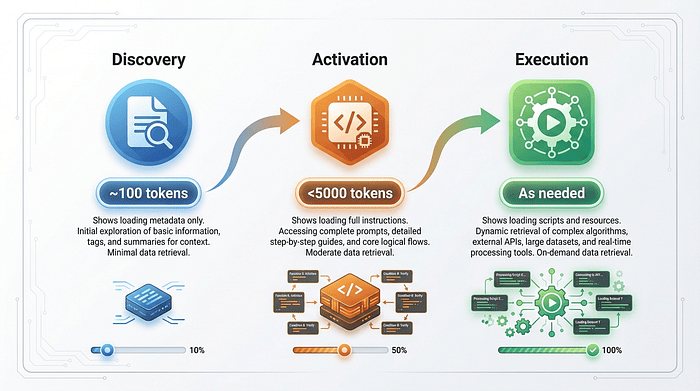
Progressive disclosure loads information in three phases, each consuming only what's needed for that stage.
Understanding the Three-Phase Architecture
Phase 1: Discovery (approximately 100 tokens per skill)
At startup, agents scan available skills and load only the name and description from each SKILL.md. This gives the agent a complete map of available capabilities at minimal cost.
Real-world example:
---
name: pdf-processing
description: Extract text and tables from PDF documents...
---
The agent reads these two lines (about 20 words, or 30 tokens) and now knows this skill exists and what it does.
Why this matters: The agent can answer "what can you help me with?" without loading the full instructions for 50 different skills.
Phase 2: Activation (under 5,000 tokens recommended)
When a user asks "extract the tables from this quarterly report PDF," the agent recognizes this matches the pdf-processing skill and loads the full SKILL.md.
What gets loaded:
- Full instructions from the Markdown section
- Decision trees and edge cases
- Examples and expected outputs
Why this matters: The agent gets deep expertise exactly when needed, not before.
Phase 3: Execution (as needed)
As the agent follows the skill's instructions, it may need supporting resources:
- Load scripts from the scripts/ folder when ready to execute
- Load resource files when referenced in the instructions
Real-world scenario:
User: "Extract tables from quarterly_report.pdf"
│
├─> Phase 1: Agent already knows pdf-processing skill exists
│
├─> Phase 2: User request triggers activation
│   Agent loads full SKILL.md instructions (~2,000 tokens)
│
└─> Phase 3: Agent executes extraction
    Loads scripts/extract_tables.py when ready to run it
    (~500 tokens, only when needed)
The Efficiency Advantage
Here's the token math:
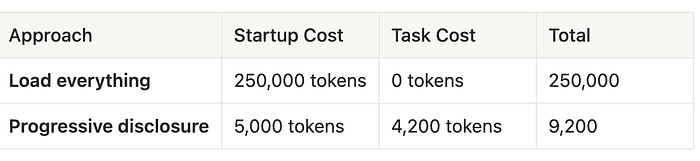
Progressive disclosure uses 96% fewer tokens for the same capabilities. This translates to:
- Faster agent startup
- Lower API costs
- Support for hundreds of skills without performance degradation
- More context window available for actual work
Trade-offs to consider:
Pros:
- Dramatically reduced token usage for agents with many skills
- Scales to hundreds of skills without performance degradation
- More context available for actual work
Cons:
- Requires agents to implement the discovery/activation pattern
- Slight latency on first activation (loading full instructions)
When progressive disclosure excels:
- Agents with 10+ skills (the efficiency gains are substantial)
- Systems with large context windows that still benefit from preservation
- Production deployments where API costs matter
Alternatives:
- Load all skills: Simpler but impractical beyond 5–10 skills
- Load on demand only: No discovery phase, but agents can't answer "what can you do?"
The specification chose progressive disclosure because it scales to hundreds of skills while keeping startup costs predictable.
Why Agent Skills Matter
1. Domain Expertise Beyond Code
The real power of Agent Skills emerges when you realize they're not limited to programming tasks.
Real-world examples across industries:
Legal workflows: A law firm might create a contract-review-saas skill encoding their standard SaaS agreement review process. Junior associates use it to ensure consistent, thorough reviews. Partners use it to maintain quality across the team.
Financial analysis: A hedge fund creates an earnings-report-analysis skill that encodes their specific methodology for evaluating quarterly reports. Every analyst follows the same rigorous process.
Healthcare compliance: A hospital encodes HIPAA compliance checks as a phi-data-handler skill. Every AI interaction involving patient data gets automatic compliance review.
Operations runbooks: A DevOps team creates skills for incident response: incident-triage, rollback-procedure, post-mortem-template. New team members get expert-level guidance immediately.
What makes this valuable:
Skills preserve and scale expertise that traditionally lived only in senior team members' heads. When an expert creates a skill, their knowledge becomes:
- Searchable: Other team members can discover it
- Auditable: You can review exactly what guidance it provides
- Improvable: Skills evolve through the same review process as code
- Scalable: Everyone benefits, not just people who've worked directly with the expert
2. Write Once, Deploy Everywhere
The same skill folder works across Claude Code, Gemini CLI, OpenCode, Cursor, GitHub Copilot, and 20+ other platforms.
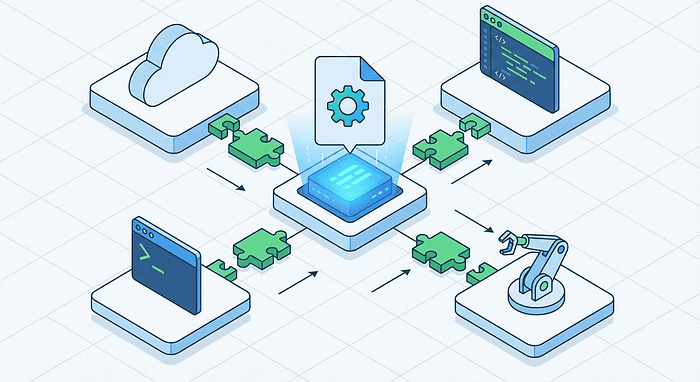
What this enables:
No vendor lock-in: Your company standardizes on Cursor, but a team member prefers VS Code with GitHub Copilot. The same skills work for both. When the company switches tools next year, your skill library transfers completely.
Real scenario: A consulting firm builds skills for their standard deliverables (architecture reviews, security audits, performance analyses). When a client engagement requires using the client's preferred AI tool, all the firm's skills immediately work in that environment.
Team consistency: When your code review skill checks for proper error handling, logging, and test coverage, it does so the same way across every developer's tool.
Real scenario: A distributed team across three continents uses different AI coding assistants based on regional availability and preference. Their shared skill repository ensures consistent code quality despite tool differences.
Knowledge preservation: Your team's accumulated expertise lives in version-controlled skill files, not in someone's tool-specific configuration that disappears when they leave.
Real scenario: A startup's first principal engineer creates skills encoding their preferred patterns and standards. When they eventually move on, those skills remain, continuing to guide the team.
Trade-offs of the universal approach:
Pros:
- True portability across 25+ agents and counting
- No vendor lock-in for your expertise investments
- Team consistency regardless of tool preferences
Cons:
- Skills can't leverage agent-specific features or APIs
- Some agents implement the standard slightly differently
- Lowest-common-denominator approach may miss powerful tool-specific features
When universal skills excel:
- Teams with mixed tool preferences
- Organizations concerned about vendor lock-in
- High-value expertise worth preserving regardless of future tool choices
Alternatives:
- Tool-specific plugins: More powerful for single tools, but not portable
- Documentation: Human-readable but agents can't directly use it
The specification chose universal compatibility over tool-specific optimization because portability compounds over time. Every skill you create becomes more valuable as more platforms adopt the standard.
3. Portable and Version-Controlled
Skills are just files. This simple fact unlocks powerful workflows that feel natural to developers but don't exist in any current AI tool.
What you can do with skills:
Version control with Git:
git clone [email protected]:yourcompany/skills.git
cd skills
ls
# contract-review/  earnings-analysis/  code-review/  api-design/
Your team's skills live in a repository just like your code. Every change is tracked, every contributor is credited, every version is recoverable.
Review through pull requests:
Pull Request #127: Enhance security-audit skill with OAuth 2.0 checks
Reviewers: @security-lead, @senior-engineer
Files changed: security-audit/SKILL.md (+47 lines)
Skills improve through the same code review process your team already uses. Security leads review security skills. Legal reviews compliance skills. Domain experts maintain quality.
Semantic versioning:
git tag -a legal-review-v2.0.0 -m "Add GDPR compliance checks"
git push origin legal-review-v2.0.0
Teams can pin to specific skill versions for stability or upgrade to get new capabilities. Just like npm packages, but for AI expertise.
Cross-team sharing:
# Finance team shares their analysis skills
git push origin main
# Engineering team pulls them
git pull upstream main
The same skill repository can serve multiple teams. Finance develops analysis skills, engineering develops code review skills, operations develops runbook skills. Everyone benefits from everyone else's expertise.
Publishing to marketplaces:
Upload to SkillzWave Marketplace to share with the broader community:
- Open source your best practices
- Discover skills others have created
- Build on existing expertise rather than starting from scratch
Real-world scenario:
A fintech company maintains a skill repository with:
- pci-compliance-check: Ensures payment handling follows PCI DSS requirements
- fraud-pattern-review: Encodes fraud detection methodologies
- regulatory-filing-prep: Guides preparation of required financial filings
When regulators ask "how do you ensure consistent compliance?", the company points to version-controlled, reviewed, auditable skill files.
Why this matters:
Traditional AI workflows live in isolated configurations, tool settings, or undocumented practices. Agent Skills make AI expertise tangible, auditable, and manageable -- the same properties that made version control transformative for code.
The Ecosystem: Coordinated Standards
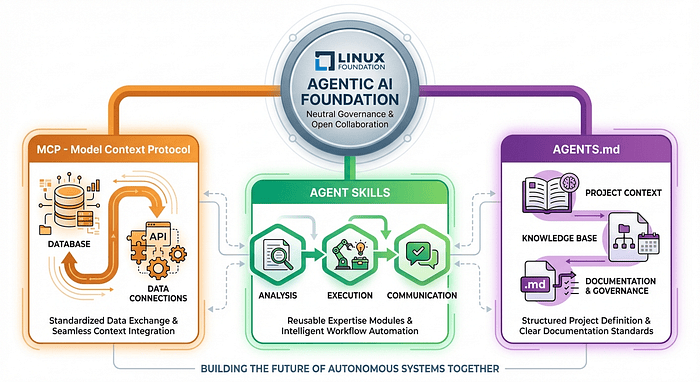
Agent Skills don't exist in isolation. They're part of a coordinated ecosystem of standards managed by the Agentic AI Foundation (AAIF).
Understanding the Standard Relationships
Think of these standards as layers in a stack:
Model Context Protocol (MCP): The Data Access Layer
MCP answers: "What data sources and tools can this agent access?"
Released by Anthropic in November 2024, MCP is an open protocol for connecting AI models to databases, APIs, file systems, and external services. It standardizes how agents discover and access data.
Real example: An MCP server exposes your company's Postgres database, Jira API, and Slack workspace to AI agents. Any MCP-compatible agent can use these connections.
Agent Skills: The Expertise Layer
Skills answer: "How should this agent perform specific tasks?"
While MCP gives agents access to tools, skills teach them how to use those tools effectively. A skill might instruct an agent to "query the customer database (via MCP) using these specific patterns, then analyze results using this methodology."
Real example: A customer-health-analysis skill uses MCP to access your CRM and support system, but the skill itself encodes the specific analysis methodology your customer success team has developed.
AGENTS.md: The Project Context Layer
AGENTS.md answers: "What are the conventions and structure of this specific project?"
Launched in August 2025, AGENTS.md provides project-specific context. Over 60,000 open-source projects have adopted the format.
Real example: Your project's AGENTS.md specifies that you use React for frontend, Postgres for database, follow specific naming conventions, and require tests for all business logic. Agents use this to give project-appropriate advice.
How the Standards Work Together
Here's a concrete scenario showing all three standards in action:
Developer: "Analyze why customers from the enterprise plan are churning"
│
├─> MCP: Access CRM data, support tickets, usage logs
│   (infrastructure layer: what data is available)
│
├─> Agent Skills: Load customer-health-analysis skill
│   (expertise layer: how to analyze churn)
│   "Use these 7 signals. Weight recent support tickets heavily.
│    Cross-reference with feature adoption..."
│
└─> AGENTS.md: Understand that this company uses Segment for analytics
    and has specific customer tier definitions
    (context layer: project-specific conventions)
Why this coordination matters:
Each standard focuses on its domain, avoiding overlap and redundancy:
- MCP handles the infrastructure layer (connectivity)
- Skills handle the expertise layer (methodology)
- AGENTS.md handles the context layer (project specifics)
An agent using all three can access your data (MCP), follow your company's analysis methodology (Skills), and apply your project's specific context (AGENTS.md). This is significantly more powerful than any single standard alone.
Platform Adoption
As of January 2026, 25+ major platforms support Agent Skills across the AI landscape:
Coding Assistants:
- Claude Code, Cursor, VS Code, GitHub Copilot
- Gemini CLI, OpenCode, Windsurf, Roo Code
AI Platforms:
- OpenAI Codex, Mistral AI Vibe, Qwen Code
Infrastructure & Data:
- Databricks, Spring AI, Factory
Why this adoption rate matters:
When 25+ platforms support the same standard, it creates network effects. Skills shared on GitHub or SkillzWave work for your entire developer community, not just users of one tool. This is how standards become infrastructure.
The Agentic AI Foundation
In December 2025, the Linux Foundation announced the formation of the Agentic AI Foundation (AAIF). This is significant because it moves Agent Skills (and related standards) into neutral governance -- the same governance model that has made Linux, Kubernetes, and Node.js into infrastructure rather than products.
Founding platinum members:
- Amazon Web Services
- Anthropic
- Microsoft
- OpenAI
- Meta
- IBM
- Hugging Face
What neutral governance provides:
No single vendor control: Standards evolve based on community needs, not one company's product roadmap. If Amazon, Google, Microsoft, and OpenAI all have equal input, no single vendor can hijack the standard for competitive advantage.
Long-term stability: The Linux Foundation has governed open source projects for decades. Skills you create today will continue to work as the standard evolves.
Transparent evolution: Changes to standards go through open review processes. Anyone can propose improvements, and changes are evaluated based on merit rather than vendor preference.
Cross-vendor compatibility: When all major AI providers participate in governance, they're committed to maintaining compatibility. This is why standards under the Linux Foundation tend to stick.
Real-world impact:
Without neutral governance, we'd likely see fragmentation: "Claude Skills" that only work with Claude, "Copilot Extensions" that only work with GitHub Copilot, etc. The AAIF prevents this.
This coordination ensures the standards work together and remain vendor-neutral, protecting your investment in skill development.
Skilz CLI: Universal Skill Installation
While Agent Skills provide a universal format, each agent has its own installation location. Claude Code looks in ~/.claude/skills/. Gemini CLI looks somewhere else. OpenCode has its own path. Managing this manually gets complicated.
This is where Skilz CLI comes in. Think of it as "npm install for AI skills": one command that installs a skill to the right location for whichever agents you have installed.
Installation
pip install skilz
What this installs: A Python command-line tool that knows where every major AI agent stores skills. It detects which agents are installed on your system and handles the routing automatically.
Basic Usage
Automatic agent detection:
skilz install anthropics/skills/algorithmic-art
What happens here:
- Skilz scans your system for installed AI agents (Claude Code, Gemini, OpenCode, etc.)
- Finds all compatible agents
- Installs the skill to the correct location for each detected agent
- Confirms installation
Why this is better than manual installation: You don't need to remember that Claude uses ~/.claude/skills/ while Gemini uses a different path. Skilz handles the routing.
Installing to a specific agent:
skilz install anthropics/skills/brand-guidelines --agent opencode
When to use this: If you want to install a skill for OpenCode but you're currently using Claude, specifying --agent opencode ensures it goes to the right place.
Project-level installation:
skilz install anthropics/skills/pdf-reader --agent gemini --project
What this does:
- Installs to .skilz/skills/ in your current directory instead of your user-level skills folder
- Skill is available only when working in this project
- Can be committed to your project repository
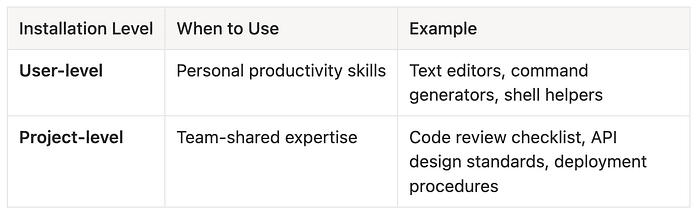
When to use project-level vs user-level:
Skill Management
View installed skills:
skilz list
Output:
Installed skills for claude:
  - algorithmic-art (v1.2.0)
  - pdf-processing (v2.0.1)
  - code-review-basics (v1.0.0)
Installed skills for gemini (project):
  - api-design-standards (v1.3.0)
Find skills on GitHub:
skilz search excel
What this searches: Scans GitHub repositories with the agent-skill topic for skills matching "excel". Returns ranked results with descriptions and download counts.
Update all skills:
skilz update
What happens:
- Checks each installed skill against its source repository
- Reports available updates
- Installs updates after confirmation
- Falls back gracefully if a skill source is unavailable
Remove a skill:
skilz uninstall theme-factory
Why you might uninstall:
- Skill no longer needed for current work
- Replacing with a more specific skill
- Freeing up space in your context window
Understanding the Three-Tier Support System
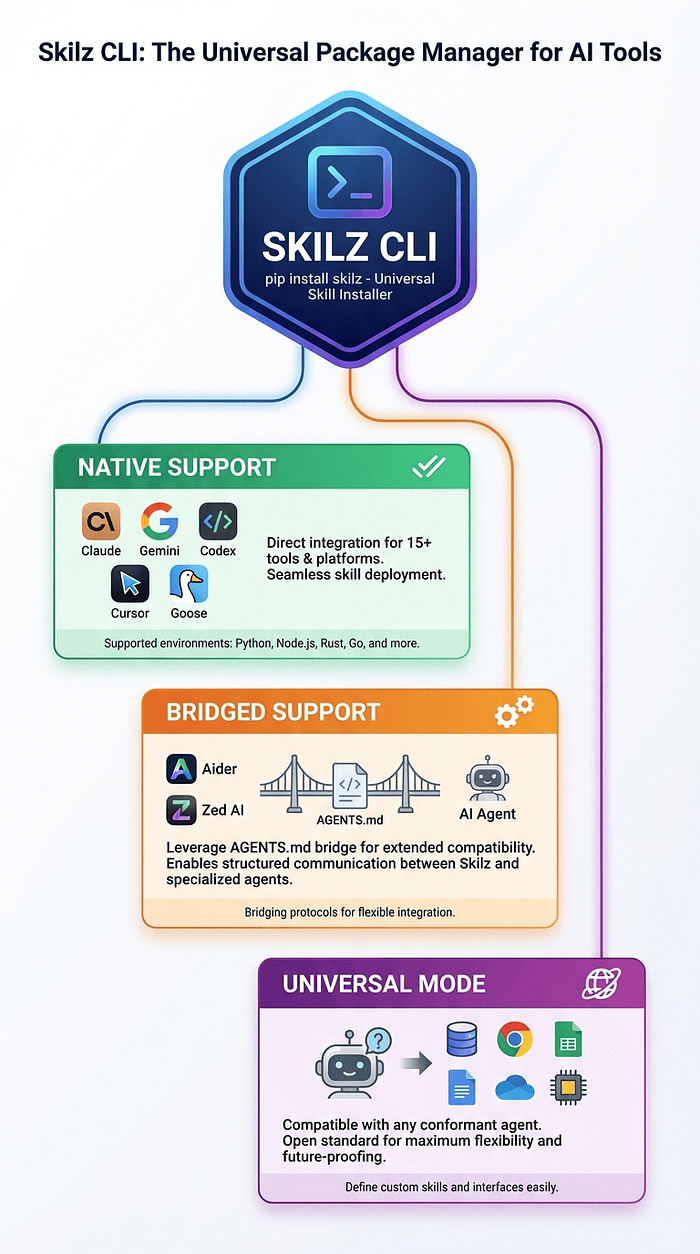
Skilz supports 30+ agents through a clever three-tier architecture. Understanding which tier your agent falls into helps you set the right expectations.
Tier 1: Full Native Support (15+ agents)
These agents have dedicated skill directories at both user and project levels. Skilz knows exactly where to install and how to verify the installation.
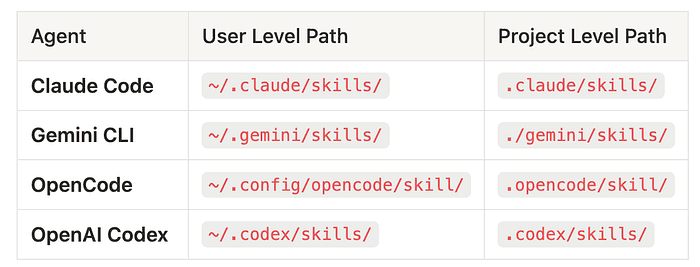
Plus: Cline, Goose, Roo Code, Kilo Code, Trae, Windsurf, Qwen Code, and more.
When to use Tier 1 agents: If your preferred agent is in Tier 1, everything just works. Use skilz install and forget about path management.
Tier 2: Bridged Support (8 agents)
These agents don't have native skill support yet, but Skilz provides a bridge that makes skills available:
- Aider
- Continue.dev
- Cody (Sourcegraph)
- Tabnine
- Amazon Q Developer
- JetBrains AI Assistant
- GitLab Duo
- Replit Ghostwriter
How the bridge works:
- Skilz installs skills to a universal location
- Creates configuration that points the agent to this location
- Handles any format conversion needed for the specific agent
When to use Tier 2 agents: If you're using Aider or another bridged agent, skills work but with slightly more setup. Use --verbose to see exactly what Skilz is doing.
With the latest update of Skilz, we support 30 plus agents.
Trade-offs of bridged support:
- Pro: Get skill benefits even without native support
- Pro: Skilz handles the complexity of different formats
- Con: Some agent-specific features may not be available
- Con: Bridge updates required when agents change their configuration format
Tier 3: Universal Mode (any AGENTS.md-compatible agent)
Any agent that reads AGENTS.md files can use skills through universal mode:
skilz install my-skill --agent universal --project
How this works:
- Installs skill to .skilz/skills/ in your project
- Generates AGENTS.md entries that reference the skill
- Any AGENTS.md-compatible agent sees the skill instructions
When to use universal mode:
- Working with newer agents that aren't yet widely known
- Building skills for a custom or internal agent
- Maximum portability across future agents
Choosing the right tier:
Do you need skills for Claude, Gemini, or another Tier 1 agent?
├─ Yes → Use standard skilz install (full native support)
└─ No: Is your agent in the Tier 2 bridged list?
   ├─ Yes → Use skilz install with --verbose to verify the bridge
   └─ No → Use --agent universal --project for AGENTS.md integration
Cross-Agent Workflows
One powerful Skilz feature is sharing skills between agents using local path installation:
# Copy a skill from Claude to Gemini
skilz install -f ~/.claude/skills/my-custom-skill --agent gemini
Real-world scenario:
You've developed an excellent api-security-review skill while using Claude Code. Your team lead uses Gemini CLI. With one command, you share the exact same skill. No format conversion, no manual copying.
Why this matters:
- Skills can evolve in one agent and propagate to others
- Teams with different tool preferences share expertise instantly
- No proprietary formats to convert
Understanding Installation Modes
Skilz offers two installation modes with different trade-offs:
Copy Mode (default):
skilz install anthropics/skills/pdf-reader
# Copies skill files to agent's skill directory
How it works:
- Downloads skill from source
- Copies files to agent's skill directory
- Each agent has its own independent copy
When to use copy mode:
- Working with sandboxed or containerized agents
- Need skill to work without network access
- Running skills in CI/CD environments
Trade-offs:
- Pro: Works with all agents, including sandboxed environments
- Pro: No dependencies on external storage
- Con: Updates require reinstallation
- Con: Multiple copies if using several agents
Symlink Mode:
skilz install anthropics/skills/pdf-reader --symlink
# Creates symlink in agent's directory → ~/.skilz/skills/pdf-reader
How it works:
- Downloads skill to ~/.skilz/skills/ (universal location)
- Creates symlinks in each agent's skill directory
- All agents share the same file
When to use symlink mode:
- Managing many skills across multiple agents
- Want updates to propagate automatically
- Primary development machine (not sandboxed)
Trade-offs:
- Pro: Saves disk space (single copy, multiple links)
- Pro: Update once, all agents get the change
- Pro: Easier to manage large skill collections
- Con: Doesn't work in sandboxed environments
- Con: Deleting source breaks all linked agents
Choosing the right mode:
Is your agent workspace-sandboxed?
├─ Yes → Use copy mode (symlinks won't work across sandbox boundaries)
└─ No: Are you managing skills across multiple agents?
   ├─ Yes → Symlink mode saves space and simplifies updates
   └─ No → Either mode works; copy mode is simpler
Example decision tree:
- Claude Code on macOS: Not sandboxed; symlink mode works great
- GitHub Copilot in VS Code: Generally not sandboxed; either mode works
- Agent in Docker container: Use copy mode; symlinks can't cross container boundaries
- CI/CD pipeline: Copy mode; fresh environments need self-contained skills
Getting Started
Ready to start using Agent Skills? Here's the practical path from zero to productive.
1. Explore Example Skills
Before creating your own skills, see what's already available:
GitHub Skill Repository:
- URL: https://github.com/anthropics/skills
- Browse real-world skills across domains
- Study how experts structure their skills
Why start here: See how experienced developers structure skills, write instructions, and organize resources. Learning from examples is faster than starting from scratch.
SkillzWave Marketplace:
- URL: https://skillzwave.ai/
- Curated skill marketplace with ratings and reviews
- Category browsing by industry and use case
- Preview skills before downloading
Why explore here: Discover specialized skills for your industry. If someone has already solved your problem, use their skill as a starting point.
2. Install Your First Skill
Let's install a practical skill that demonstrates immediate value:
# Install Skilz CLI
pip install skilz

# Install a PDF processing skill (works across all your installed agents)
skilz install anthropics/skills/pdf-reader
What this skill does: Extracts text from PDFs, handles tables, processes forms, and merges documents. Immediately useful for common documentation tasks.
You (to Claude/Gemini/etc.): "Extract the tables from quarterly_report.pdf"
Agent: [Recognizes pdf-reader skill applies]
       [Loads full instructions]
       [Processes the PDF using the skill's methodology]
       [Returns structured table data]
Why this skill is a good first choice:
- Immediately useful for common tasks
- Demonstrates the capability without requiring skill creation
- Shows how activation works in practice
3. Create Your Own Skill
Once you've seen how skills work, create one for your own domain. Start simple:
# Create a skill directory
mkdir -p my-first-skill
cd my-first-skill

# Create SKILL.md using the standard template
cat > SKILL.md << 'EOF'
---
name: [your-skill-name]
description: [One sentence, under 30 words, explaining what this skill does]
---

# [Skill Name]

## When to use this skill
[Describe the trigger conditions]

## Instructions
[Step-by-step guidance]

## Examples
[Show what good output looks like]
EOF
Both Codex and Claude ship with a skill creator skill. Just describe your skill and they will help you create it.
Understanding the template:
-
YAML frontmatter: Name and description for discovery
- Keep description under 30 words
- Focus on what it does, not how it works
-
When to use this skill: Helps the agent decide if this skill applies
- List trigger phrases: "when the user asks to...", "when working on..."
- Be specific enough to avoid false activations
-
Instructions: The step-by-step guidance
- Write for an intelligent but inexperienced assistant
- Use numbered steps for sequential tasks
- Use checklists for parallel tasks
-
Examples: Concrete demonstrations
- Show input/output pairs
- Include edge cases
Real-world first skill example:
Let's create a skill for code review that checks for common issues:
---
name: code-review-basics
description: Review code for common issues: error handling, logging,
  input validation, and test coverage. Works with any language.
---

# Code Review Skill

## When to use this skill
Use when asked to review code, check a pull request, or audit code quality.

## Review Checklist

### Error Handling
- [ ] All exceptions are caught or explicitly allowed to propagate
- [ ] Error messages include context (what failed, not just that it failed)
- [ ] Resources (files, connections) are properly closed in error cases

### Input Validation
- [ ] User inputs are validated before use
- [ ] Validation errors give clear feedback
- [ ] Edge cases (empty, null, extremely large) are handled

### Logging
- [ ] Key operations are logged at appropriate levels
- [ ] Sensitive data (passwords, tokens) is not logged
- [ ] Log messages include enough context to debug without source

### Test Coverage
- [ ] Happy path is tested
- [ ] Error cases are tested
- [ ] Edge cases are tested
Why is this skill effective?
- Clear criteria: Specific items to check, not vague "code quality" guidance
- Consistent application: Every review uses the same checklist
- Language-agnostic: The principles apply regardless of tech stack
- Actionable: Each item is a concrete thing to verify, not a judgment call
Install your skill:
# Install to your current agents
skilz install -f ./my-first-skill
4. Learn More
Official specification:
- URL: https://agentskills.io/specification
- Complete technical reference
Integration guide:
- URL: https://agentskills.io/integrate-skills
- How to add skill support to your own agent
Reference library:
- URL: https://github.com/agentskills/agentskills
- Reference implementations in multiple languages
The Future of AI Workflows
Agent Skills represent a fundamental shift in how we think about AI agent capabilities. Instead of building workflows that are trapped in a single tool, you're building portable expertise that works across the entire AI ecosystem.
Why This Matters Long-Term
The knowledge portability problem is solved.
Your investment in teaching an AI assistant is no longer tied to a specific tool. When Claude Code releases a breakthrough feature, you can try it without abandoning your carefully developed workflows. When a new agent appears that's perfect for specific tasks, you can use it without starting over.
For the first time, the expertise you encode for AI agents is a durable asset, not a temporary configuration.
Organizational knowledge becomes tangible.
The senior engineer's debugging methodology, the legal team's contract review framework, the data scientist's analysis workflow -- these can now be captured, versioned, and shared as skills.
When a team member leaves, their expertise doesn't walk out the door. When a new hire joins, they have immediate access to accumulated organizational knowledge. When a process needs to be audited, the skill files document exactly what guidance agents are following.
Standards create network effects.
The convergence under the Agentic AI Foundation means these standards will continue to evolve with input from all major AI providers. Your skills won't become obsolete when one company changes its product direction.
The marketplace of skills will grow, best practices will emerge, and the quality of available expertise will compound over time.
The Convergence of Standards
Agent Skills work alongside Model Context Protocol (for data access) and AGENTS.md (for project context) to create a complete picture of what an agent knows and can do:
- MCP tells agents what they can access
- Skills tell agents how to work effectively
- AGENTS.md tells agents about the specific project
An agent equipped with all three can access your company's data, follow your company's methodologies, and understand your project's specific context. This combination enables genuinely sophisticated assistance that wasn't previously possible.
What's Next
The write-once, deploy-everywhere promise of software development is finally coming to AI agents. When you create a skill, it works for you today with Claude Code, for your team tomorrow in Cursor, and for your organization next year in whatever tool has emerged by then.
Start small: install a skill, try it out, see how it feels. Then create a skill encoding something you've taught an AI assistant multiple times. You'll immediately see the value of having that expertise formalized and portable.
The future of AI workflows is portable, shareable, and standards-based. Agent Skills are how we get there.
Key Takeaways
- Agent Skills are portable: Write once, deploy across 25+ AI agents without modification
- Progressive disclosure scales to hundreds of skills: Efficient three-phase loading keeps agents fast regardless of skill count
- Version control your AI expertise: Skills are just files -- use Git, pull requests, and semantic versioning
- Domain expertise beyond code: Skills encode any workflow, from legal review to financial analysis to healthcare compliance
- Part of a coordinated ecosystem: Works alongside MCP and AGENTS.md under Agentic AI Foundation governance
- Skilz CLI simplifies management: One command to install, update, and manage skills across all your agents
Next Steps
- Try it now:
pip install skilz && skilz install anthropics/skills/pdf-reader - Explore example skills: https://github.com/anthropics/skills
- Browse the marketplace: https://skillzwave.ai/
- Create your first skill: Follow the template in the "Getting Started" section
- Share with your team: Commit skills to a shared repository
Resources:
- Agent Skills Specification
- Skilz CLI Documentation
- GitHub Skill Repository
- SkillzWave Marketplace
- Agentic AI Foundation
About the Author
Rick Hightower is a technology executive and data engineer who led ML/AI development at a Fortune 100 company. He writes about AI agents, practical ML, and the future of developer tools.
The Claude Code community has developed powerful extensions that enhance its capabilities. Here are some notable skills:
Integration Skills
- Notion Uploader/Downloader Agent Skill: Seamlessly upload and download content from Notion
- GitHub Integration Skill: Connect and interact with GitHub repositories
- Slack Notification Skill: Send notifications and updates to Slack channels