AI Agents Last Mile — AG-UI: The Protocol That Solves the Last Mile Problem for AI Agents
How the Agent-User Interaction Protocol standardizes real-time streaming between agent backends and user interfaces
Originally published on Medium.
How the Agent-User Interaction Protocol standardizes real-time streaming between agent backends and user interfaces
You spent three months building a brilliant AI agent. Now nobody can use it. The 'last mile' problem is the gap between agent backends that work and user interfaces that ship; AG-UI is the open protocol that finally closes it.
Summary: AG-UI is the open event-based protocol that connects AI agent backends to user-facing frontends in real time. Learn the event types, integration patterns, and why it matters.
You Built a Brilliant Agent. Nobody Can Use It.
Picture this: your team spent three months building an agent to handle customer support tickets. It reasons over context, calls tools, updates databases, and routes complex issues to humans. The backend is solid. LangGraph orchestrates the workflow. MCP connects the tools. Everything works perfectly in your terminal.
Then someone asks: "So how do users actually interact with this thing?"
That is where it all falls apart.
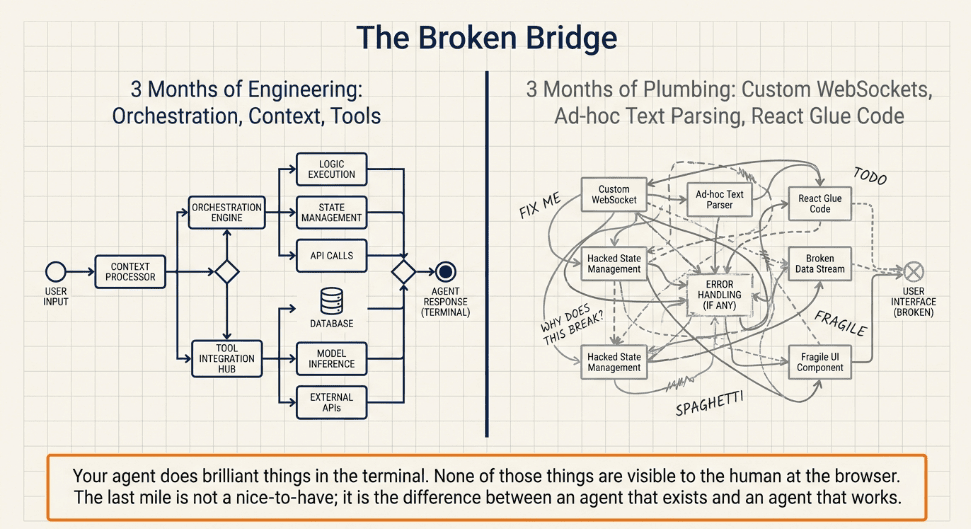
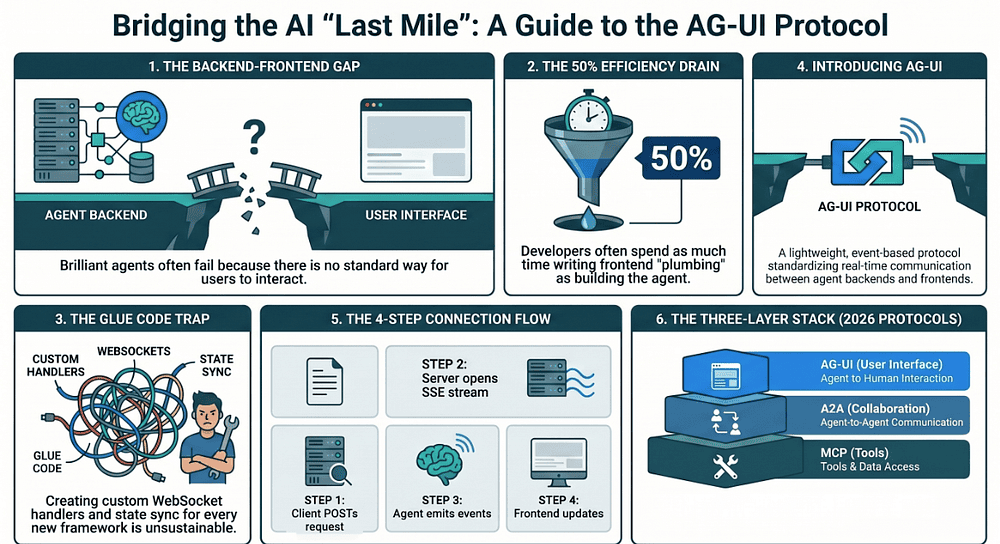
You start wiring up a React frontend. You parse streaming text. You build custom WebSocket handlers. You hack together state synchronization between the agent's internal state and the UI. Every framework does it differently. LangGraph streams one way. CrewAI streams another. Your custom agent does something else entirely.
Here is the part that stings: you end up writing more glue code for the frontend integration than you wrote for the agent itself. Three months of agent work. Then three more months of plumbing.
This is the "last mile" problem. Your agent does brilliant things. None of those things are visible to the human sitting at a browser. The last mile is not a nice-to-have. It is the difference between an agent that exists and an agent that works.
AG-UI (Agent-User Interaction Protocol) was built to solve exactly this problem. It is the open protocol that finally gives AI Agents a standard way to talk to the humans using them.
What Is AG-UI?
AG-UI is an open, lightweight, event-based protocol that standardizes how AI agent backends communicate with user-facing frontends. [1] Think of it as the missing connector between your agent and your user interface: the piece every team kept hand-rolling from scratch.
CopilotKit created it in partnership with frameworks like LangGraph and CrewAI, and AG-UI emerged from production experience rather than theoretical design. [2] The team kept building the same frontend plumbing over and over for different agent frameworks, so they extracted a protocol that any backend can implement and any frontend can consume.
The protocol uses familiar web technologies (HTTP, Server-Sent Events, and WebSockets) to stream structured events from agents to UIs in real time. [1] It handles text streaming, tool call lifecycles, state synchronization, and user interactions through a single, framework-agnostic abstraction layer. The full event catalogue covers streaming chat tokens, multimodal attachments (files, images, audio), generative UI components, state synchronization events, tool execution and output rendering, and human-in-the-loop interrupts. [1]
As of March 2026, AG-UI has significant adoption. [3] The repository had crossed 9,000 GitHub stars by that point (and continued climbing past 13,000 in the weeks after), making it one of the fastest-growing open-source protocol projects in the space. Amazon Bedrock AgentCore Runtime announced native AG-UI support on March 13, 2026, handling authentication, session isolation, and scaling for AG-UI servers across 14 AWS regions. [3] Microsoft's Agent Framework also integrates AG-UI. [4] The protocol is open source at github.com/ag-ui-protocol/ag-ui.
Why the AI Agents Ecosystem Needs the AG-UI Protocol
If you are building with AI Agents in 2026, you already know about MCP (Model Context Protocol) for connecting agents to tools and data sources. You probably know about A2A (Agent-to-Agent) for agent-to-agent communication. So why do we need AG-UI?
Because neither MCP nor A2A addresses the frontend.
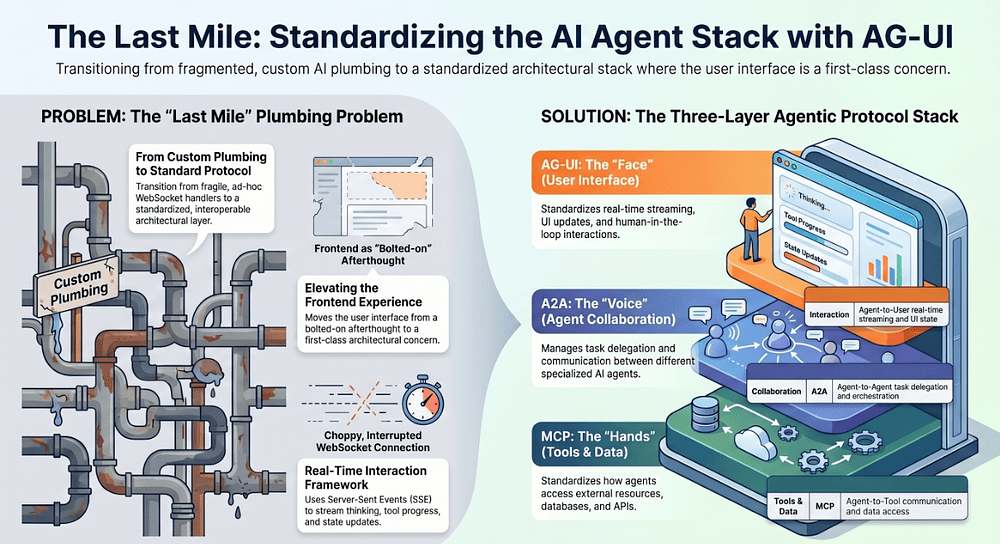
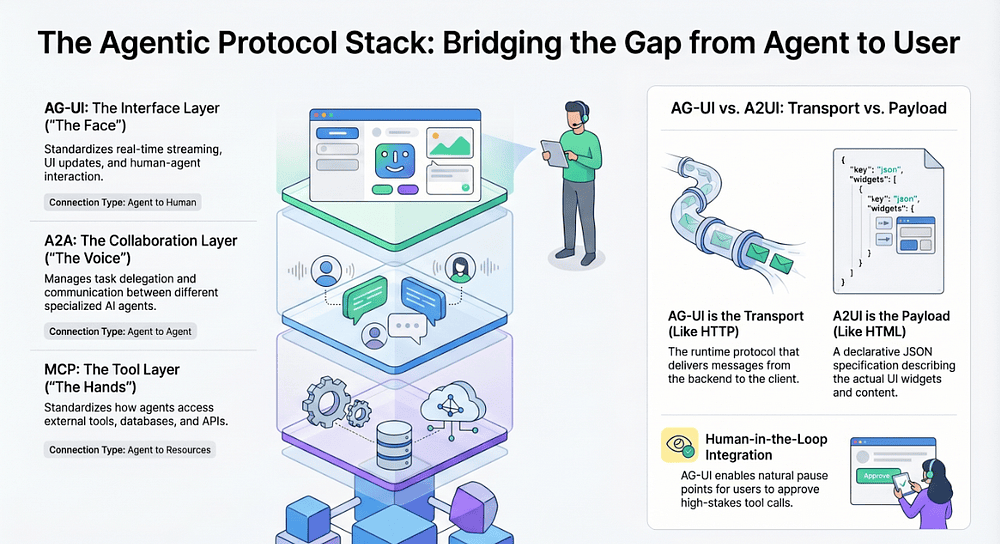
MCP standardizes how agents access tools and external resources. [5] It answers: "How does my agent call a database, search the web, or read a file?"
A2A standardizes how agents talk to each other. [6] It answers: "How does my planning agent delegate a subtask to a research agent?"
AG-UI standardizes how agents communicate with users through interfaces. It answers: "How does my agent stream its thinking, report tool progress, update the UI state, and accept user input in real time?"
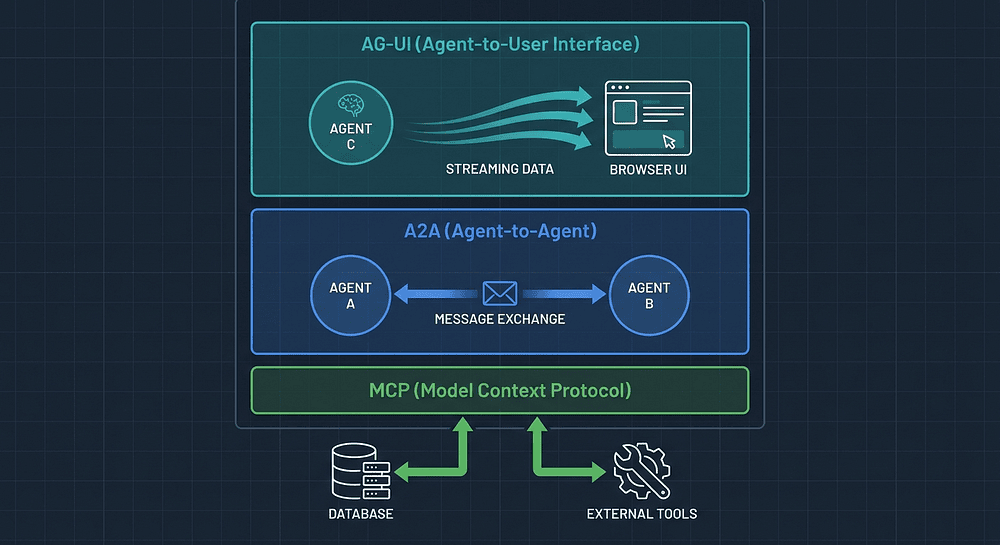
These three protocols form a complete stack. Each one covers a distinct layer of communication that the others do not touch.
Three layers, three distinct responsibilities:
- Tools & Data (MCP): Agent to Tools: access external resources, databases, and APIs
- Agent Collaboration (A2A): Agent to Agent; task delegation and multi-agent orchestration
- User Interface (AG-UI): Agent to User: real-time streaming, UI updates, and interaction
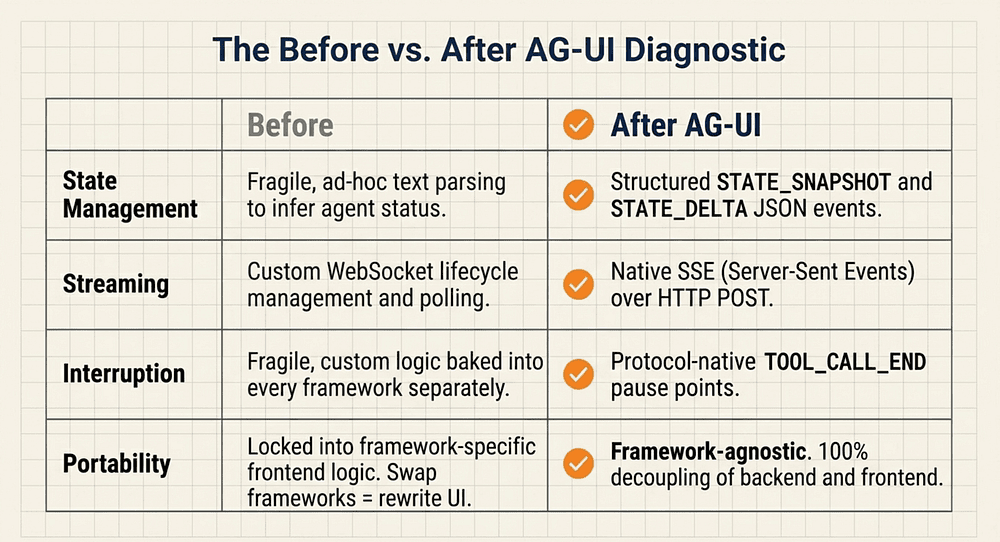
Before AG-UI, every team rolled their own frontend integration. That meant custom WebSocket handlers, ad-hoc text parsing, framework-specific state management, and zero portability. Swap your agent framework? Rewrite the frontend. Add a mobile client? Build it from scratch. Add a second agent framework to your stack? Now you have two custom integrations to maintain forever.
AG-UI eliminates that entire class of problems.
Why Protocol Standardization Changes Everything
Consider what happened with the web itself. Before HTTP became universal, every server had its own protocol for talking to clients. Building a browser meant supporting dozens of incompatible formats. HTTP standardized the exchange, and the result was explosive growth in both servers and clients because developers could build them independently.
AG-UI applies that same logic to the agent-to-UI layer. When both sides speak the same protocol, the frontend team does not need to know which agent framework you used. The agent team does not need to know which frontend framework you chose. The protocol handles the translation.
This is what protocol layers do at their best: they create clean boundaries so teams can move fast without colliding.
The Core Architecture: How the AG-UI Agent Streaming Protocol Works
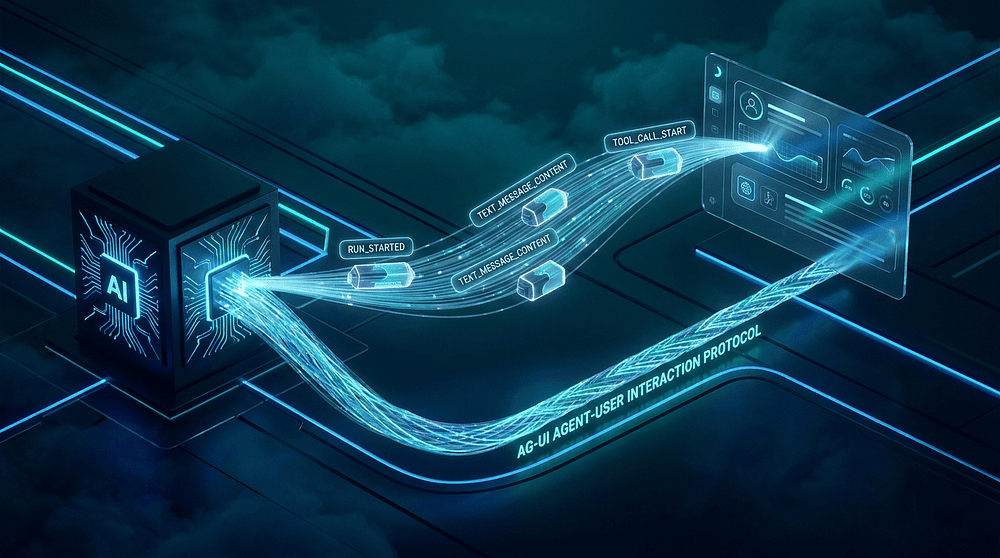
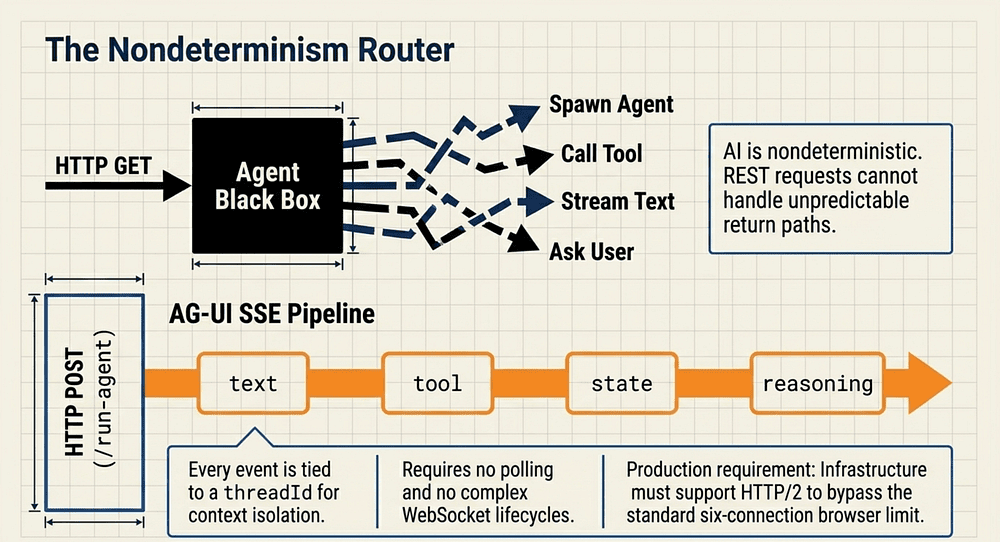
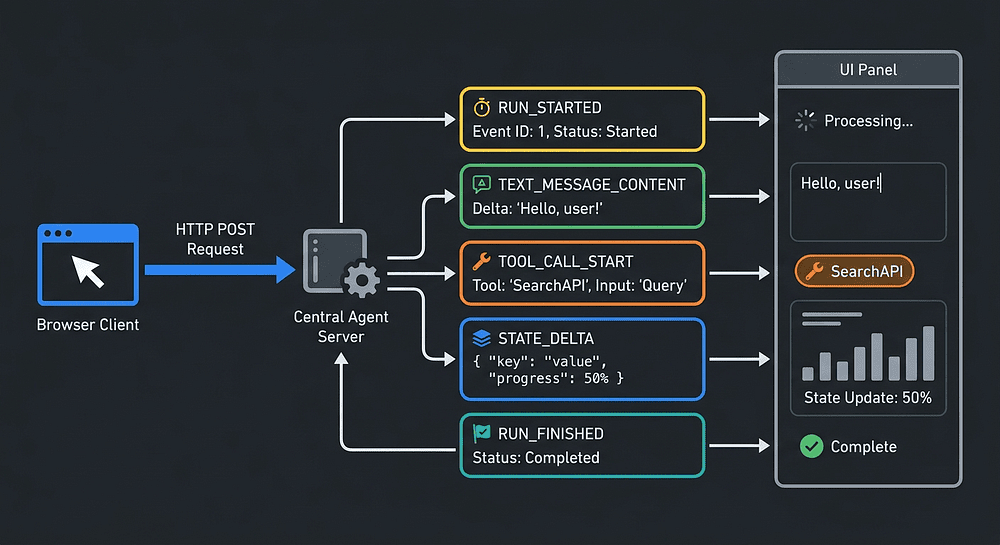
AG-UI is fundamentally an event-driven protocol. The agent emits a stream of structured JSON events, and the frontend consumes them in real time. This design reflects a key insight about AI Agents: they are nondeterministic. You do not know ahead of time whether the agent will call a tool, ask the user a question, generate text, or spawn a sub-agent.
An event-based architecture handles this nondeterminism naturally. The frontend simply listens for events and reacts to whatever arrives. It does not need to know the agent's internal state machine or predict what comes next.
The AG-UI Connection Flow
- Client sends a request via HTTP POST to the agent's endpoint (typically
/run-agent) - Server opens an SSE stream and begins emitting events
- Agent processes the request, emitting events as things happen (text tokens, tool calls, state changes)
- Frontend consumes events in real time, updating the UI as each event arrives
- User can interact by sending actions back through the bidirectional channel
The request body follows a structure like this:
type RunAgentInput = {
  threadId: string;       // Conversation context identifier
  runId: string;          // Execution tracking ID (required)
  parentRunId?: string;   // ID of spawning run (if applicable)
  state: any;             // Current agent state
  messages: Message[];    // Conversation history and user input
  tools: Tool[];          // Available tools
  context: Context[];     // Context objects provided to the agent
  forwardedProps: any;    // Additional properties forwarded from frontend
}
The response is not a single JSON blob. It is a stream of Server-Sent Events (SSE), each containing a typed JSON payload.
How the Request Structure Actually Works
The threadId ties all messages to a single conversation context. Every event the agent emits references this thread, so your frontend can associate them with the right conversation when multiple conversations are open simultaneously.
SSE (Server-Sent Events) is the natural choice for agent output because it is one-directional, persistent, and supported natively by every modern browser without special libraries. The agent pushes events as they happen. The client receives them in order. No polling. No complex WebSocket lifecycle management.
When should you use WebSockets instead? Almost never for agents. WebSockets make sense when you need true bidirectional real-time communication; think multiplayer games. Agent interactions are mostly one-directional streams with occasional user inputs. SSE over HTTP POST fits that pattern cleanly.
One practical note: without HTTP/2, most browsers conventionally cap simultaneous connections at six per origin under HTTP/1.1. HTTP/2 eliminates this constraint by multiplexing streams over a single connection. For production AG-UI deployments, make sure your infrastructure supports HTTP/2.
This is what makes AG-UI feel alive in the UI. Users see tokens appearing, tools executing, and progress updating in real time.
Agent Event Types: The Complete AG-UI Reference
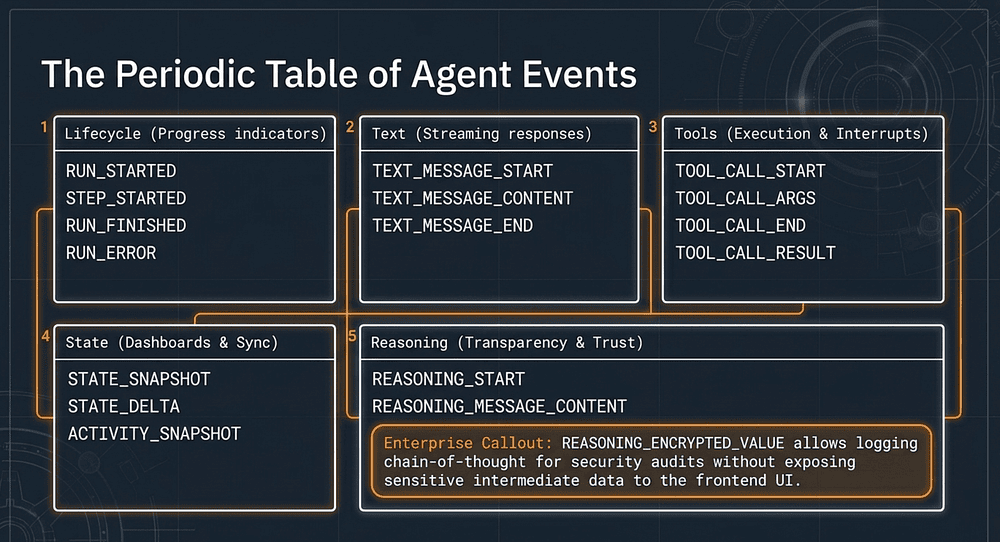
AG-UI defines approximately 19 core event types organized into clear categories, with the SDK EventType enum extending to 28 entries once reasoning, chunk, and variant events are included. [7] Every event shares base properties: a type field, a timestamp, and an optional rawEvent for debugging. Let's walk through each category.
Lifecycle Events
Five events bracket every agent run and the individual steps within it:
RUN_STARTED; agent begins processing the requestRUN_FINISHED; agent completes successfullyRUN_ERROR; agent encounters an errorSTEP_STARTED; a discrete step begins (useful for multi-step workflows)STEP_FINISHED; a discrete step completes
Lifecycle events let your frontend show loading indicators, progress bars, and error states without any custom logic. When RUN_STARTED arrives, show a spinner. When STEP_STARTED fires with a step name like "Searching knowledge base," update the progress bar with that label. When RUN_ERROR hits, display the error message. Users trust AI Agents more when they can see what is happening.
The key insight here is that these events carry meaning, not just signals. A STEP_STARTED event with stepName: "Analyzing billing history" gives your UI something to actually show the user. No custom parsing required.
Text Message Events: Streaming Agent Responses
Three events handle the streaming text that users see being "typed" in real time:
TEXT_MESSAGE_START; a new text message beginsTEXT_MESSAGE_CONTENT; a chunk of text content (delta)TEXT_MESSAGE_END; the text message is complete
The TEXT_MESSAGE_CONTENT event carries a delta field with the incremental text. [8] Your frontend appends each delta to build up the complete message, creating that familiar "typing" effect. This is the same pattern that OpenAI's Chat Completions API and Anthropic's Messages API use for streaming responses; just standardized into a protocol that any agent can implement. [9]
Notice the explicit start and end events. They are not accidents. TEXT_MESSAGE_START tells the frontend to open a new message container. TEXT_MESSAGE_END tells the frontend the message is complete, so it can enable copy buttons, trigger analytics, or finalize rendering. These bracketing events eliminate the timing ambiguity that plagues ad-hoc streaming implementations.
Tool Call Events: Natural Pause Points for Human Approval
Four events track the full lifecycle of each tool invocation:
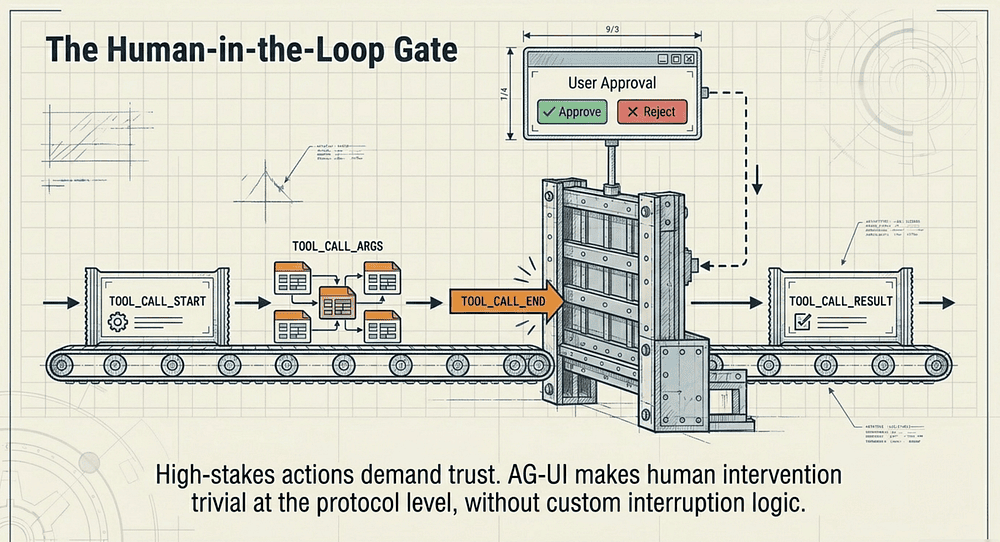
TOOL_CALL_START; a tool invocation begins (includes tool name)TOOL_CALL_ARGS; streaming tool arguments (partial JSON)TOOL_CALL_END; tool invocation parameters are completeTOOL_CALL_RESULT; tool returns its result
This is where AG-UI really shines compared to ad-hoc approaches. With these events, your frontend can show exactly what tool the agent is calling, stream the arguments as they are constructed, and display the results when they arrive.
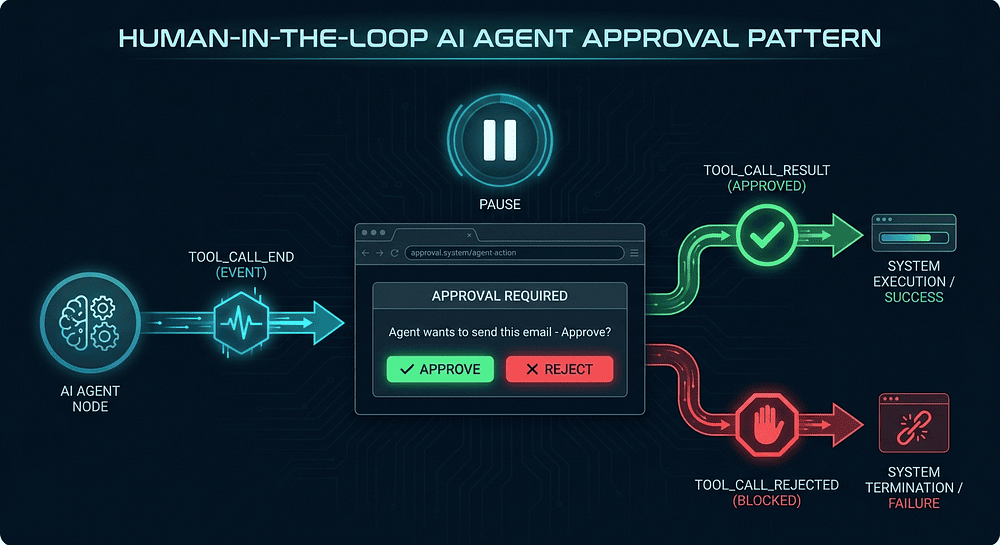
More importantly, you can implement human-in-the-loop approval at the protocol level. When TOOL_CALL_END fires, pause the stream and ask the user: "The agent wants to send this email. Approve?" Only proceed when the user confirms. This pattern is trivial to implement with AG-UI because the events give you natural pause points. Without a protocol, you would need to build custom interruption logic into every agent implementation separately.
State Synchronization Events: Driving Dashboards from Agent State
Five events handle synchronization between the agent's internal state and the UI:
STATE_SNAPSHOT; full state synchronizationSTATE_DELTA; incremental state updateMESSAGES_SNAPSHOT; full conversation history syncACTIVITY_SNAPSHOT; full activity logACTIVITY_DELTA; incremental activity update
State management is critical for Agentic AI systems that maintain complex internal state. A customer support agent might track ticket status, customer history, suggested actions, and confidence scores. Your UI should reflect that state without requiring the user to read text and infer it.
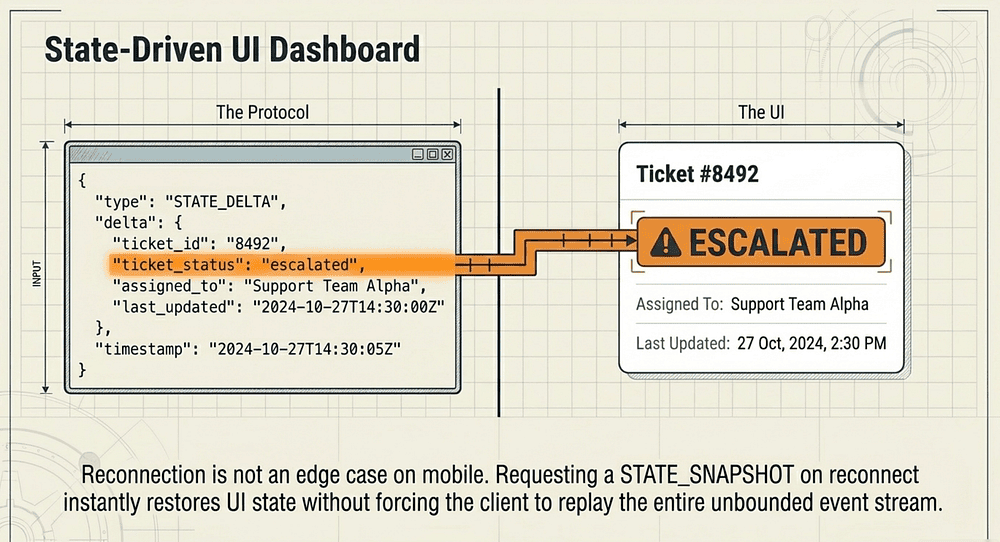
STATE_SNAPSHOT sends the full state object. This is useful on reconnection: when a client comes back after a network interruption, request a snapshot to restore the UI without replaying the entire event stream. STATE_DELTA sends only what changed, keeping the ongoing update stream efficient.
Reasoning Events: Agent Transparency
One of the more interesting additions to AG-UI is the reasoning event category. These events let agents expose their internal reasoning process to the UI, giving users transparency into how the agent thinks.
Five events cover the reasoning lifecycle:
REASONING_START; agent begins a reasoning phaseREASONING_MESSAGE_START; a reasoning message beginsREASONING_MESSAGE_CONTENT; a chunk of reasoning textREASONING_MESSAGE_END; a reasoning message completesREASONING_END; agent finishes the reasoning phase
This matters more than you might think. One of the biggest barriers to agent adoption is trust. Users do not trust black boxes. Industry research consistently identifies trust as a primary adoption barrier for agentic AI, with analysts and surveys of enterprise practitioners ranking explainability and observability as the capabilities most likely to accelerate deployment.
When an agent shows its reasoning ("I am checking the billing database for charges in the last 30 days… I found three charges… The $49.99 charge matches a subscription renewal…"), users can follow the logic and catch errors before they become problems.
Reasoning events are distinct from text message events. Text messages are the agent's response to the user. Reasoning events are the agent's internal thinking process. Your frontend can choose to show reasoning in a collapsible panel, a sidebar, or behind a "Show thinking" toggle. The separation gives you UI flexibility that you would not have if reasoning and responses were mixed into a single text stream.
The REASONING_ENCRYPTED_VALUE event is worth calling out for enterprise deployments. [7] It allows agents to include encrypted reasoning steps that can be logged and audited without exposing sensitive intermediate data to the frontend. The event carries a subtype ("message" or "tool-call"), an entityId referencing the associated message or tool call, and an encryptedValue string containing the encrypted chain-of-thought payload. [7] Security teams get full traceability. End users see only what they need. Both requirements are satisfied without custom engineering.
Special Events: Your Escape Hatch
Two events handle cases outside the standard type system:
CUSTOM; application-specific events for domain data that does not fit standard typesRAW; unprocessed events from the underlying system for debugging
The CUSTOM event type is your escape hatch. Need to send domain-specific data that does not fit the standard types? Use CUSTOM with whatever payload your application needs. This is how AG-UI stays extensible without requiring spec updates for every use case.
Building an AG-UI Server: A Practical Tutorial
Let's build it. Here is a minimal AG-UI server implementation in Python using FastAPI. It shows the core pattern: accept a request, stream events via SSE, and emit the right event types at the right time.
import json
import uuid
from fastapi import FastAPI, Request
from fastapi.responses import StreamingResponse

app = FastAPI()

def emit_event(event_type: str, **kwargs) -> str:
    """Format an AG-UI event as an SSE message."""
    payload = {"type": event_type, **kwargs}
    return f"data: {json.dumps(payload)}\n\n"

async def agent_stream(thread_id: str):
    run_id = str(uuid.uuid4())

    # 1. Signal run start
    yield emit_event("RUN_STARTED", threadId=thread_id, runId=run_id)

    # 2. Stream a text response
    yield emit_event("TEXT_MESSAGE_START", messageId="msg-1", role="assistant")
    response_text = "I found three open tickets for this customer."
    for word in response_text.split(" "):
        yield emit_event("TEXT_MESSAGE_CONTENT", messageId="msg-1", delta=word + " ")
    yield emit_event("TEXT_MESSAGE_END", messageId="msg-1")

    # 3. Execute a tool call
    yield emit_event("TOOL_CALL_START", toolCallId="tc-1", toolName="search_tickets")
    yield emit_event("TOOL_CALL_ARGS", toolCallId="tc-1", delta='{"customer_id": "cust-42", "status": "open"}')
    yield emit_event("TOOL_CALL_END", toolCallId="tc-1")
    yield emit_event("TOOL_CALL_RESULT", toolCallId="tc-1", result='[{"id": "T-101"}, {"id": "T-102"}, {"id": "T-103"}]')

    # 4. Update shared state
    yield emit_event("STATE_DELTA", delta={"ticketCount": 3, "status": "resolved"})

    # 5. Signal run complete
    yield emit_event("RUN_FINISHED", threadId=thread_id, runId=run_id)

@app.post("/chat")
async def chat(request: Request):
    body = await request.json()
    thread_id = body.get("threadId", str(uuid.uuid4()))
    return StreamingResponse(
        agent_stream(thread_id),
        media_type="text/event-stream",
        headers={"Cache-Control": "no-cache", "Connection": "keep-alive"}
    )
Understanding the emit_event Helper
The emit_event function formats any keyword arguments into a JSON payload and wraps it in the SSE data: prefix with a double newline terminator. That double newline is the SSE spec's event separator; it tells the client where one event ends and the next begins.
Keeping emit_event as a pure formatter with no side effects makes the code easy to test. You can call it directly in a unit test and assert on the returned string without needing a live HTTP connection. Production AG-UI implementations follow this same pattern.
Trade-offs to know:
- Pro: Simple, zero-dependency, readable
- Pro: Consistent event format across all event types
- Con: No schema validation at emit time (type errors surface at parse time on the client)
- Con: Raw string formatting; a typed SDK would catch field name mistakes at compile time
In production, use the official AG-UI Python SDK instead of hand-rolling emit_event. [10] The SDK provides typed event classes that catch field errors before they reach the client. The ag-ui-protocol package (v0.1.15 was released April 1, 2026; check PyPI for the current release) is available on PyPI and provides strongly-typed data structures built on Pydantic, the full AG-UI event type system (28 entries in the SDK enum), and efficient event encoding for Server-Sent Events. [10]
Notice the sequence in agent_stream: RUN_STARTED before anything else, TEXT_MESSAGE events properly bracketed with START and END, tool call events following their full four-event lifecycle, then RUN_FINISHED last. This ordering is not arbitrary. The frontend relies on it to manage UI state correctly.
Connecting LangGraph to AG-UI
One of the most common AG-UI integration patterns is wrapping a LangGraph agent with an AG-UI-compatible endpoint. The mapping is straightforward because LangGraph already streams events internally; you just need to translate them.
from langgraph.graph import StateGraph
from langgraph.prebuilt import ToolNode

async def langgraph_ag_ui_stream(graph, user_input, thread_id):
    run_id = str(uuid.uuid4())
    yield emit_event("RUN_STARTED", threadId=thread_id, runId=run_id)

    config = {"configurable": {"thread_id": thread_id}}
    async for event in graph.astream_events(
        {"messages": [{"role": "user", "content": user_input}]},
        config=config,
        version="v2"
    ):
        kind = event["event"]
        if kind == "on_chat_model_stream":
            # LLM token -> TEXT_MESSAGE_CONTENT
            chunk = event["data"]["chunk"]
            if chunk.content:
                yield emit_event("TEXT_MESSAGE_CONTENT", messageId=event["run_id"], delta=chunk.content)
        elif kind == "on_tool_start":
            # Tool invocation -> TOOL_CALL_START
            yield emit_event("TOOL_CALL_START", toolCallId=event["run_id"], toolName=event["name"])
        elif kind == "on_tool_end":
            # Tool result -> TOOL_CALL_RESULT
            yield emit_event("TOOL_CALL_RESULT", toolCallId=event["run_id"], result=str(event["data"]["output"]))

    yield emit_event("RUN_FINISHED", threadId=thread_id, runId=run_id)
The LangGraph Translation Layer
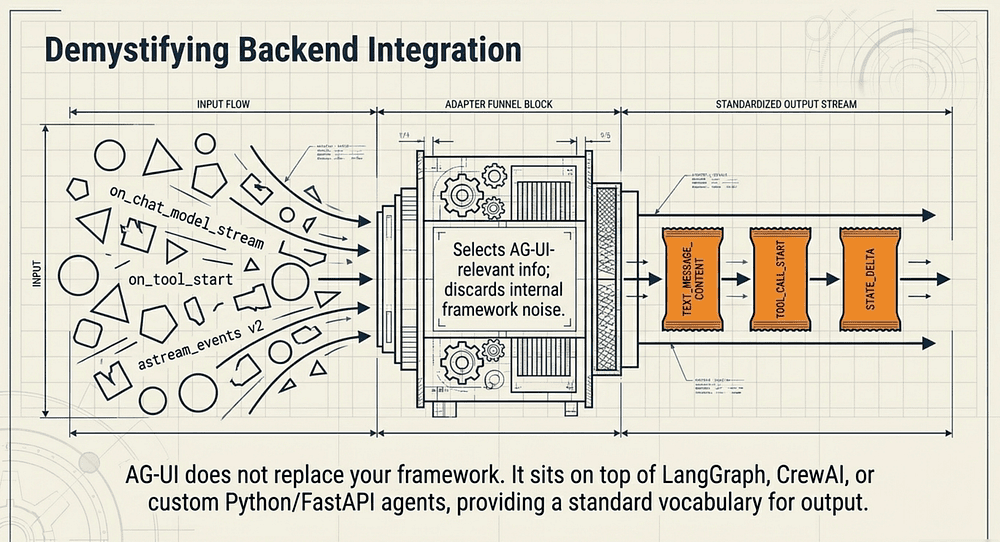
This function acts as an adapter between LangGraph's internal event vocabulary and AG-UI's standard event vocabulary. LangGraph emits events like on_chat_model_stream and on_tool_start. AG-UI expects TEXT_MESSAGE_CONTENT and TOOL_CALL_START. The translation layer maps one to the other.
Passing version="v2" to astream_events enables the v2 event schema, which adds parent_ids support and surfaces custom events not available in v1. [11] Event names follow the pattern on_[runnable_type]_(start|stream|end), with chat model streaming events named on_chat_model_stream and tool lifecycle events named on_tool_start and on_tool_end. [12]
LangGraph's events are rich and detailed, tuned for debugging and observability. AG-UI's events are tuned for frontend consumption. The translation layer selects the AG-UI-relevant information and discards framework internals that the UI does not need. Simple idea, but it keeps your frontend clean.
This same pattern applies to any framework you want to wrap: LangGraph, CrewAI, AutoGen, or a custom agent. The AG-UI translation layer always looks like this: listen for framework events, map them to AG-UI events, emit over SSE.
AG-UI does not replace your agent framework. It sits on top of it as a standard communication layer. Your framework keeps doing what it does. AG-UI standardizes how that work gets communicated to the user.
Frontend Integration: TypeScript SSE Client
We have talked a lot about what the server emits. Let's look at the client side. Consuming an AG-UI stream in a frontend application follows a straightforward pattern.
// Minimal AG-UI client in TypeScript
async function connectToAgent(threadId: string, userMessage: string) {
  const response = await fetch('/chat', {
    method: 'POST',
    headers: { 'Content-Type': 'application/json' },
    body: JSON.stringify({
      threadId,
      messages: [{ role: 'user', content: userMessage }]
    })
  });

  const reader = response.body!.getReader();
  const decoder = new TextDecoder();
  let buffer = '';

  while (true) {
    const { done, value } = await reader.read();
    if (done) break;

    buffer += decoder.decode(value, { stream: true });
    const lines = buffer.split('\n\n');
    buffer = lines.pop() || '';

    for (const line of lines) {
      if (line.startsWith('data: ')) {
        const event = JSON.parse(line.slice(6));
        handleEvent(event);
      }
    }
  }
}

function handleEvent(event: any) {
  switch (event.type) {
    case 'RUN_STARTED':        showLoadingIndicator(); break;
    case 'TEXT_MESSAGE_CONTENT': appendToMessage(event.delta); break;
    case 'TOOL_CALL_START':    showToolExecution(event.toolName); break;
    case 'STATE_DELTA':        updateAppState(event.delta); break;
    case 'RUN_FINISHED':       hideLoadingIndicator(); break;
    case 'RUN_ERROR':          showError(event.error); break;
  }
}
Understanding the SSE Buffer Pattern
The buffer accumulates raw bytes from the SSE stream and splits on double newlines (the SSE event separator). Events that arrive mid-chunk accumulate in buffer until the next read completes them. The lines.pop() call preserves any incomplete event at the end of the current chunk.
Why the buffer? Network packets rarely align with logical event boundaries. A single read() call might return half an event, or two and a half events. The buffer pattern handles all cases correctly without dropping events or corrupting partial ones.
One important caveat: this is manual SSE parsing. The browser's native EventSource API handles this automatically, but EventSource does not support POST requests, which AG-UI requires. [13] The EventSource constructor accepts only a URL and an optional withCredentials flag: there is no parameter for HTTP method, request headers, or a request body. [13] For that reason, AG-UI clients use the fetch API with manual SSE parsing, as shown here.
If you want a library to wrap this pattern, @microsoft/fetch-event-source exposes the full fetch() API surface while handling SSE framing automatically. [14] Note that the package has not seen a new release in several years; verify its maintenance status on npm before adopting it in a new project. For new projects, the native fetch + ReadableStream approach shown above works fine with no external dependency.
Notice that handleEvent uses a plain switch statement. Keep your event handler simple and side-effect focused. Complex logic belongs in the functions it calls (appendToMessage, updateAppState), not in the dispatch layer.
AG-UI does not require any special client library. If your platform can consume Server-Sent Events (and every modern platform can), it can consume AG-UI. React, Vue, Svelte, vanilla JavaScript: the protocol works with all of them. CopilotKit provides higher-level React components that abstract this away (the @copilotkit/react-ui package includes production-ready chat interfaces and generative UI primitives) [15], but the underlying protocol is simple enough to consume directly.
AG-UI and the Agentic Protocol Stack
Let's zoom out and look at how AG-UI fits into the bigger picture. In 2026, three open agent protocols have emerged as the foundation for building production Agentic AI systems: MCP, A2A, and AG-UI. Understanding how they relate to each other is as important as understanding any one of them individually.
MCP: The Tool Layer
Model Context Protocol (MCP), created by Anthropic in late 2024, standardizes how agents access external tools and data. [5] When your agent needs to query a database, search the web, or read a file, it uses MCP. Think of MCP as the "hands" of the agent: the part that lets it reach out and touch the world.
A2A: The Agent Collaboration Layer
Agent-to-Agent (A2A), originally launched by Google in April 2025 and later donated to the Linux Foundation in June 2025 (with IBM's Agent Communication Protocol joining forces in August 2025), standardizes how AI Agents communicate with each other. [16] When your planning agent needs to delegate research to a specialized research agent, A2A handles that conversation. A2A is the "voice" of agents speaking to each other.
AG-UI: The Agent Interface Layer
AG-UI standardizes how AI Agents communicate with humans through user interfaces. When your agent needs to show its thinking, stream results, request approval, or update a dashboard, it uses AG-UI. AG-UI is the "face" of the agent: the part humans actually see and interact with.
Together, these three protocols give you a complete Agentic AI system design:
User <--AG-UI--> Agent <--A2A--> Other Agents
                    |
                    +--MCP--> Tools & Data Sources
The beauty of this layered approach is that each protocol handles one concern well. You can swap any layer independently. Replace your agent framework? AG-UI still works. Change your tool infrastructure? MCP handles it. Add new collaborating agents? A2A manages the coordination. This is the same composability principle that made the TCP/IP stack so durable.
The Three-Protocol Stack in Practice
Consider a customer support agent built on this full stack. The agent receives a user message via AG-UI and immediately emits RUN_STARTED and STEP_STARTED events so the UI can show a progress indicator. It then calls an MCP tool to query the support ticket database. When it needs specialized analysis, it delegates to a research sub-agent via A2A. Throughout this orchestration, AG-UI keeps the user informed: tool calls appear as TOOL_CALL_START and TOOL_CALL_RESULT events, state updates flow through STATE_DELTA, and the final answer streams as TEXT_MESSAGE_CONTENT tokens.
The protocols do not interfere with each other because they operate at different architectural layers. MCP never touches the frontend. A2A never talks to the user. AG-UI never coordinates agents or accesses tools directly. Clean separation of concerns at every level.
AG-UI vs. A2UI: Transport vs. Payload
Here is a distinction worth understanding: AG-UI and A2UI (Agent-to-User Interface) are not the same thing, and they are not competing.
A2UI is a Google-led open project introduced in December 2025. [17] It is a declarative JSON specification for agent-generated UI widgets and content. [17] AG-UI is the runtime transport protocol that carries A2UI messages. [18] If you want an analogy: A2UI is like HTML (describing what to show) and AG-UI is like HTTP (how to deliver it). Complementary, not competing.
When an agent wants to render a structured card, a data table, or an interactive form in the frontend, it can use A2UI to declare that widget. AG-UI delivers the A2UI payload to the client. Neither protocol needs to know the other's internals. You can adopt one without adopting the other, but they work best together.
What AG-UI Does Not Do
Knowing the boundaries matters. AG-UI is specifically the transport protocol between agent backends and user frontends. It does not:
- Define UI components (that is A2UI's job)
- Manage agent orchestration (use LangGraph, CrewAI, or your own framework)
- Handle tool access (that is MCP's domain)
- Coordinate multiple agents (that is A2A's responsibility)
- Persist conversation history (that is your database's job)
AG-UI does one thing well: it standardizes the real-time communication channel between AI Agents and user interfaces. This focused scope is a feature, not a limitation. Focused protocols compose. Sprawling protocols create coupling.
Every feature that AG-UI excludes is a feature that adds no complexity, creates no vendor lock-in, and requires no additional learning. Each boundary also signals where something else handles the problem better.
When you understand what AG-UI does not do, you understand why it integrates cleanly with everything else in the stack. It is a protocol that knows its place, and that restraint is exactly what makes it composable.
AG-UI Production Patterns
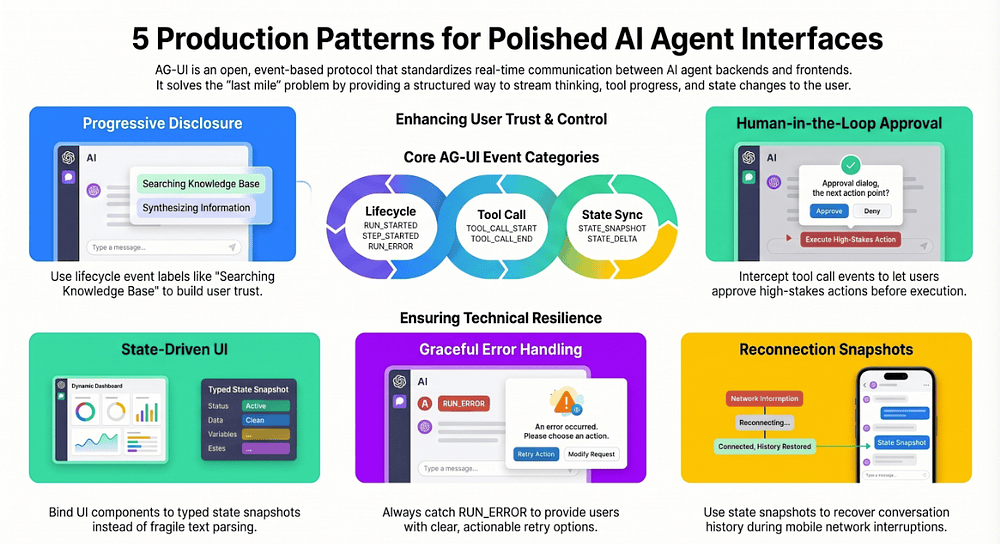
Here are five AG-UI patterns that work well in practice. These five cover the scenarios that separate polished agent frontends from fragile ones.
Pattern 1: Progressive Disclosure
Use lifecycle events to show users exactly where the agent is in its process. When STEP_STARTED fires with a step name like "Searching knowledge base," show that label in the UI. When TOOL_CALL_START fires, show which tool is being invoked.
The key implementation detail: read the step name or tool name directly from the event payload. No parsing required. The event carries the human-readable label. Your frontend just displays it. Users trust AI Agents more when they can see what is happening; and this costs almost nothing to implement.
Pattern 2: Human-in-the-Loop Approval
For high-stakes tool calls (sending emails, making purchases, modifying data), intercept the TOOL_CALL_END event and pause the stream. Present the tool name and arguments to the user for approval. Only resume after the user confirms.
The TOOL_CALL_ARGS stream lets you show the user exactly what arguments the agent is about to send. This is not just a safety check. It is a transparency mechanism. Users who can see "The agent is about to search your calendar for events with 'budget' in the title" understand and trust the action far more than users who receive a final answer with no visibility into how it was produced.
Pattern 3: State-Driven UI
Use STATE_SNAPSHOT and STATE_DELTA to drive your UI rather than parsing text responses. If your agent tracks structured data (ticket status, order details, research findings), push that data through state events. Your frontend can bind UI components directly to the state, creating dashboards that update in real time as the agent works.
Text parsing is fragile. A small change to how the agent phrases a response breaks your parser. State events are typed, structured, and stable. When the agent updates a field, the event contains exactly that field with its new value. Your frontend does not need to infer meaning from prose.
Pattern 4: Graceful Error Handling
Always handle RUN_ERROR. In production, agents fail. Tools time out. LLMs hallucinate. Rate limits hit. When RUN_ERROR arrives, show a meaningful error message and offer retry options. Do not let the stream die silently.
Silent failures are the fastest way to lose user trust. A user who sees "The search tool timed out. Try again, or narrow your search?" has a path forward. A user who sees a spinner that never resolves has nothing.
Pattern 5: Reconnection with State Snapshots
If a client disconnects and reconnects, request a STATE_SNAPSHOT to restore the UI to its current state without replaying the entire event stream. This is particularly important for mobile clients where network connectivity is unreliable. The snapshot pattern also protects against memory leaks: you do not accumulate an unbounded event history on the client.
Reconnection is not an edge case on mobile. It is a normal operating condition. Design for it from the start. The STATE_SNAPSHOT event makes reconnection a first-class concern in the protocol, not an afterthought.
Real-World Adoption
AG-UI has moved well beyond its CopilotKit origins. Here is where things stand.
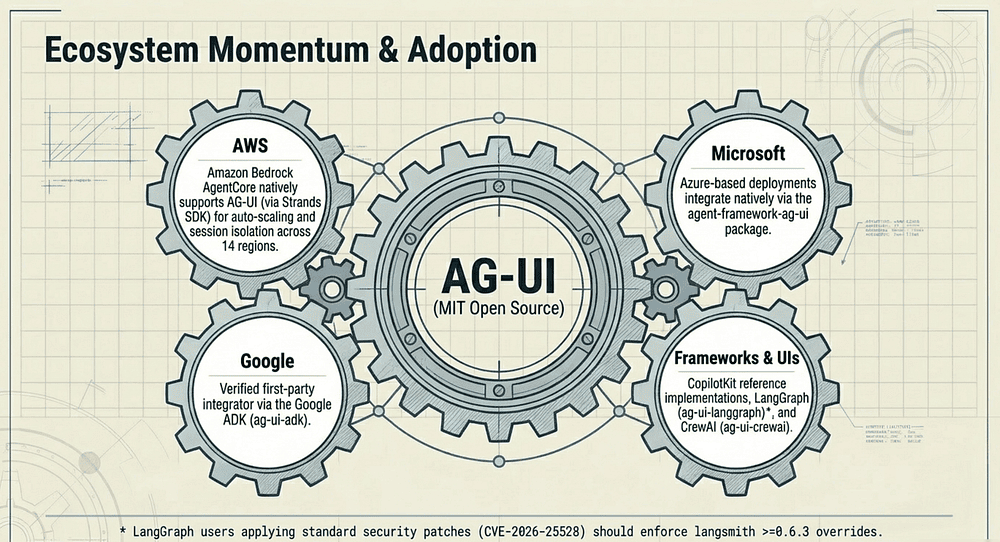
Amazon Bedrock AgentCore Runtime added AG-UI protocol support on March 13, 2026, providing managed infrastructure for AG-UI servers with authentication, session isolation, and auto-scaling across 14 AWS regions. [3] AgentCore Runtime itself went generally available in October 2025; the March announcement specifically added AG-UI as a supported protocol. [19] If you are running agents on AWS, you get AG-UI support via the AWS Strands SDK. [20]
Microsoft's Agent Framework includes an AG-UI integration package (agent-framework-ag-ui on PyPI) with integration guides and getting-started documentation, enabling Azure-based agent deployments to use the protocol natively. [4] The package ships an event bridge that converts Agent Framework events to AG-UI protocol events. [21] As of April 2026, the package is in active pre-release; check PyPI for the current build version. Treat it as beta for production use.
CopilotKit continues to be the reference implementation, using AG-UI as its runtime layer for generative UI patterns, tool lifecycles, and real-time coordination.
LangGraph and CrewAI were early AG-UI partners; AG-UI grew out of CopilotKit's initial collaboration with these two frameworks. [2] Both maintain dedicated compatibility packages (ag-ui-langgraph and ag-ui-crewai on PyPI), so agents built with either framework can expose AG-UI endpoints with minimal wrapper code. [22]
One security note for LangGraph users: a pending dependency fix in @ag-ui/langgraph (GitHub issue #1485) tracks CVE-2026-25528. [23] Until the upstream peer range is updated, apply a package-manager override to force langsmith >=0.6.3 (Python) or >=0.4.6 (JavaScript). [24]
Google ADK is a verified first-party integrator listed on the official AG-UI integrations page. The integration ships as the ag-ui-adk PyPI package and is documented at adk.dev/integrations/ag-ui/.
The ecosystem is broad enough now that choosing AG-UI for your agent frontend is not a bet on a single vendor. AG-UI is open-source (MIT licensed) with implementations across AWS, Azure, and Google Cloud. It has not been submitted to a formal standards body as of April 2026, but its multi-vendor adoption and open governance make it the de facto open protocol for agent-to-frontend communication.
Getting Started with AG-UI
The fastest path to trying AG-UI today:
- Install the SDK: AG-UI provides both JavaScript/TypeScript (
@ag-ui/corevia npm) and Python (ag-ui-protocolvia PyPI) SDKs - Build a minimal server: Use the FastAPI example above as your starting point
- Connect a frontend: Use CopilotKit's React components, or build your own SSE consumer
- Map your agent's events: Translate your framework's internal events to AG-UI event types
The protocol is intentionally simple. If you have built a WebSocket-based chat application or consumed an SSE stream, you already understand the mechanics. AG-UI just gives you a standard vocabulary for the events flowing through that stream.
The Last Mile Finally Has a Bridge
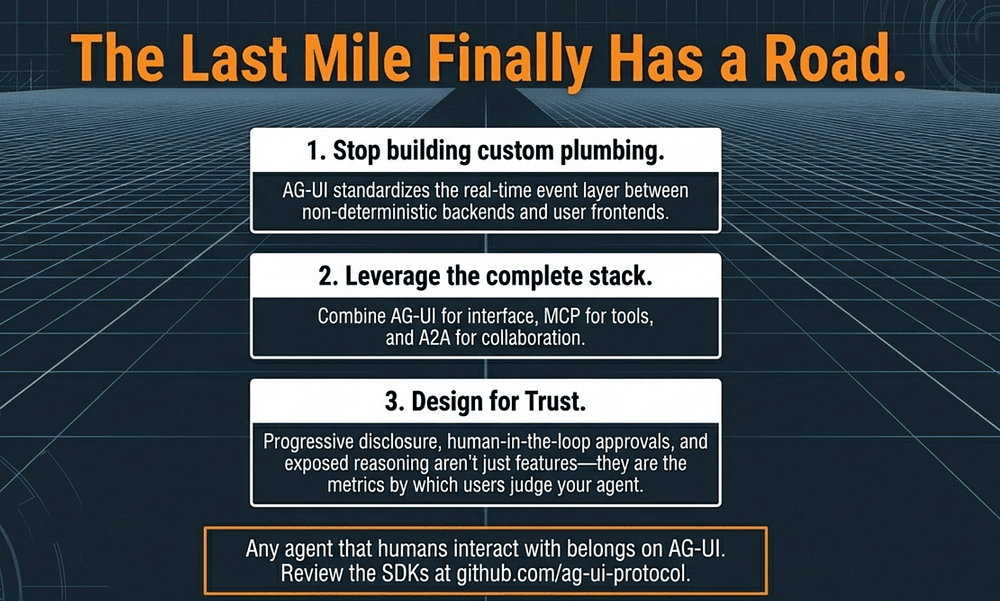
The emergence of AG-UI alongside MCP and A2A marks a maturing of the AI agent ecosystem. We are moving from a world where every team builds custom plumbing to one where standardized protocols handle the communication layers. That shift lets teams focus on what actually matters: building AI Agents that solve real problems for real users.
AG-UI specifically addresses what has been the most overlooked challenge in agent development. Teams pour enormous effort into agent reasoning, tool integration, and orchestration. Then they treat the user interface as an afterthought, bolting on a chat window and calling it done. That afterthought is what users actually experience. It is the only part of your brilliant agent system that they directly see and judge.
AG-UI makes the user experience a first-class concern by giving it a proper protocol. The last mile finally has a road.
If you are building agents that humans need to interact with (which is almost all agents), AG-UI deserves a spot in your architecture.
Discussion Questions
- Your team just finished building a LangGraph agent and needs to ship a user interface in two weeks. How would you decide between using CopilotKit's higher-level React components versus implementing the raw AG-UI SSE protocol yourself? What factors tip the decision each way?
- The human-in-the-loop approval pattern (intercepting
TOOL_CALL_ENDto request user confirmation) adds friction to every high-stakes action. Where do you draw the line between safety and usability? What criteria would you use to decide which tool calls require human approval? - AG-UI's reasoning events let agents expose their internal thinking process. Some users find this transparency reassuring. Others find it overwhelming. How would you design a UI that surfaces agent reasoning effectively without burying the actual response?
Key Takeaways
- AG-UI is the event-based protocol that connects AI agent backends to user frontends in real time
- It covers the layer that MCP and A2A deliberately leave open: the human-facing interface
- The event type system handles text streaming, tool lifecycles, state synchronization, and reasoning transparency
- The SSE transport requires no special client libraries; any platform that can read an HTTP response body can consume AG-UI
- The LangGraph adapter pattern (translate framework events to AG-UI events) applies to any agent framework
- Human-in-the-loop approval, progressive disclosure, and state-driven UI are the three agent UI design patterns that deliver the most user trust per implementation hour
Next Steps
- Read the AG-UI documentation to see the full event type definitions
- Clone the AG-UI GitHub repository and run the examples
- Review the Amazon Bedrock AgentCore AG-UI integration if you are deploying on AWS
- Explore CopilotKit's React components for a higher-level abstraction over the raw protocol
References
- AG-UI Protocol: "AG-UI Overview (Introduction)" (2026)
- Nathan Tarbert / CopilotKit: "AG-UI Protocol: Bridging Agents to Any Front End" (2025)
- Amazon Web Services: "Amazon Bedrock AgentCore Runtime now supports the AG-UI protocol" (2026)
- Microsoft Learn: "AG-UI Integration with Agent Framework" (2026)
- Anthropic: "Introducing the Model Context Protocol" (2024)
- a2aproject (Linux Foundation): "Agent2Agent (A2A) Protocol Repository"
- AG-UI Protocol: "Events (SDK / JS / Core)" (2026)
- AG-UI Protocol: "Events (Concepts)" (2026)
- Sirsh Amarteifio / Percolation Labs: "Comparing the streaming response structure for different LLM APIs" (2025)
- CopilotKit (PyPI): "ag-ui-protocol: Python SDK for the Agent-User Interaction (AG-UI) Protocol" (2026)
- LangChain: "Runnable.astream_events (langchain-core reference)" (2026)
- LangChain: "LangGraph Streaming" (2026)
- MDN Web Docs (Mozilla): "EventSource (Web APIs)"
- Microsoft (npm): "@microsoft/fetch-event-source"
- CopilotKit (npm): "@copilotkit/react-ui"
- The Linux Foundation: "Linux Foundation Launches the Agent2Agent Protocol Project" (2025)
- Google Developers Blog: "Introducing A2UI: An open project for agent-driven interfaces" (2025)
- Nathan Tarbert / CopilotKit: "AG-UI and A2UI Explained: How the Emerging Agentic Stack Fits Together" (2025)
- Amazon Web Services: "Amazon Bedrock AgentCore is now generally available" (2025)
- Strands Agents SDK (AWS): "Build chat experiences with AG-UI and CopilotKit" (2026)
- Microsoft (PyPI): "agent-framework-ag-ui: AG-UI protocol integration for Agent Framework" (2026)
- CopilotKit (PyPI): "ag-ui-langgraph: Implementation of the AG-UI protocol for LangGraph" (2026)
- ag-ui-protocol GitHub Issue #1485: "@ag-ui/langgraph: upgrade @langchain/core from ^0.3.80 to ^1.x (CVE-2026-25528)" (2026)
- GitHub Advisory Database: "LangSmith Client SDK Affected by SSRF via Tracing Header Injection (GHSA-v34v-rq6j-cj6p / CVE-2026-25528)" (2026)
- AG-UI Protocol: "Integrations Page"
- AG-UI Protocol: "GitHub Repository (ag-ui-protocol/ag-ui)"
- Amazon Web Services: "Deploy AG-UI Servers on Amazon Bedrock AgentCore (Developer Guide)"
- Google ADK: "AG-UI Integration"
- Google Developers Blog: "Delight users by combining ADK agents with fancy frontends using AG-UI"
- CopilotKit: "The Developer's Guide to Generative UI in 2026"
- CopilotKit: "AWS Strands Agents Now Compatible with AG-UI"
- NVD: "CVE-2026-25528"
- npm: "@ag-ui/langgraph"
- PyPI: "ag-ui-crewai"
- PyPI: "ag-ui-adk"
- AG-UI Protocol: "JS/TS SDK Overview"
About the Author
Rick Hightower is a former Senior Distinguished Engineer at a fortune 100 focusing on delivering ML / AI insights to front line applications, and practitioner building multi-agent production systems. Follow him on Medium for more hands-on agent engineering content. You can also book him to speak and train your team: Check out Rick Hightower's SpeakerHub.
He created skilz, the universal agent skill installer, supporting 30+ coding agents including Claude Code, Gemini, Copilot, and Cursor, and co-founded the world's largest agentic skill marketplace. Connect with Rick Hightower on LinkedIn or Medium. Check out SpillWave, your source for AI expertise.
Rick has been actively developing generative AI systems, agents, and agentic workflows for years. He is the author of numerous agentic frameworks and developer tools and brings deep practical expertise to teams looking to adopt AI.
Rick also wrote a Claude Certified Architect (CCA) series of articles that have a lot of useful information on writing agentic AI systems. If you want to improve your ability to create well-behaved AI agents, studying for the CCA Exam is a good place to start.
CCA Exam Prep on Agentic Development
- Claude Certified Architect: The Complete Guide to Passing the CCA Foundations Exam
- CCA Exam Prep: Mastering the Code Generation with Claude Code Scenario
- CCA Exam Prep: Mastering the Multi-Agent Research System Scenario
- CCA Exam Prep: Structured Data Extraction
- CCA: Master the Developer Productivity Scenario
- Claude Certified Architect: Master the CI/CD Scenario
- CCA Exam Prep: Mastering the Customer Support Resolution Agent Scenario
Harness Engineering Articles
- The $9 Disaster: What Anthropic's Harness Design Paper Teaches Us About Building Autonomous AI
- Harness Engineering vs Context Engineering: The Model is the CPU, the Harness is the OS
- LangChain Deep Agents: Harness and Context Engineering: Memory, Skills, and Security
- Beyond the AI Coding Hangover: How Harness Engineering Prevents the Next Outage
- LangChain's Harness Engineering: From Top 30 to Top 5 on Terminal Bench 2.0
- Anthropic's Harness Engineering: Two Agents, One Feature List, Zero Context Overflow
- OpenAI's Harness Engineering Experiment: Zero Manually-Written Code