Beyond Language: Transformers for Vision, Audio, and Multimodal AI
Executive Summary (2 minutes)
Originally published on Medium.
Executive Summary (2 minutes)

-
Vision: ViT, DeiT, Swin Transformer
-
Audio: Whisper, Wav2Vec 2.0
-
Multimodal: CLIP, BLIP-2
-
Generation: Stable Diffusion XL
-
Development: 1–2 weeks for POC
-
Infrastructure: GPU with 8–16GB VRAM
-
Scaling: $500–2000/month for production
-
Build image classification systems using vision transformers.
-
Create audio transcription and classification tools.
-
Implement cross-modal search connecting text and images.
-
Deploy production-ready multimodal pipelines.
- Image Patching: Divide a 224×224 image into 16×16 patches (196 total)
- Patch Embedding: Convert each patch to a vector representation
- Position Encoding: Add spatial information to maintain patch locations
- Transformer Processing: Apply self-attention across all patches
- DeiT: Trains efficiently with less data using knowledge distillation.
- Swin: Handles large images through hierarchical processing.
- MaxViT: Combines local and global attention for balanced performance.
from transformers import AutoImageProcessor, AutoModelForImageClassification
from PIL import Image
import requests
# Load image
url =
"https://huggingface.co/datasets/huggingface/documentation-images/resolve/main/transformers/tasks/image_classification_parrots.png"
image = Image.open(requests.get(url, stream=True).raw)
# Load model and processor
model_id =
"google/vit-base-patch16-224"

# Can swap: facebook/deit-base-patch16-224
processor = AutoImageProcessor.from_pretrained(model_id)
model = AutoModelForImageClassification.from_pretrained(model_id)
# Process and predict
inputs = processor(images=image, return_tensors=
"pt"
)
outputs = model(**inputs)
# Get result
predicted_class = outputs.logits.argmax(-1).item()
print(
"Predicted class:"
, model.config.id2label[predicted_class])
- Downloads a sample image
- Loads a pre-trained model with its processor
- Converts the image to model-ready tensors
- Runs inference and decodes the result
import
 time
import
 torch
from
 transformers
import
 AutoImageProcessor, AutoModelForImageClassification
MODELS = {

"vit"
:
"google/vit-base-patch16-224"
,

"deit"
:
"facebook/deit-base-patch16-224"
,

"swin"
:
"microsoft/swin-tiny-patch4-window7-224"
}
def

benchmark_models
(
image_path
):
    device =
"cuda"

if
 torch.cuda.is_available()
else

"cpu"
    image = Image.
open
(image_path)
    results = {}

for
 name, model_id
in
 MODELS.items():
        start = time.time()
        processor = AutoImageProcessor.from_pretrained(model_id)
        model = AutoModelForImageClassification.from_pretrained(model_id)

if
 device ==
"cuda"
:
            model = model.to(device)
        inputs = processor(images=image, return_tensors=
"pt"
)

if
 device ==
"cuda"
:
            inputs = {k: v.to(device)
for
 k, v
in
 inputs.items()}

with
 torch.no_grad():
            outputs = model(**inputs)
        inference_time = time.time() - start

# Get top prediction
        probs = torch.nn.functional.softmax(outputs.logits, dim=-
1
)
        top_prob, top_idx = torch.
max
(probs[
0
],
0
)
        results[name] = {

"time"
: inference_time,

"prediction"
: model.config.id2label[top_idx.item()],

"confidence"
: top_prob.item()
        }

return
 results
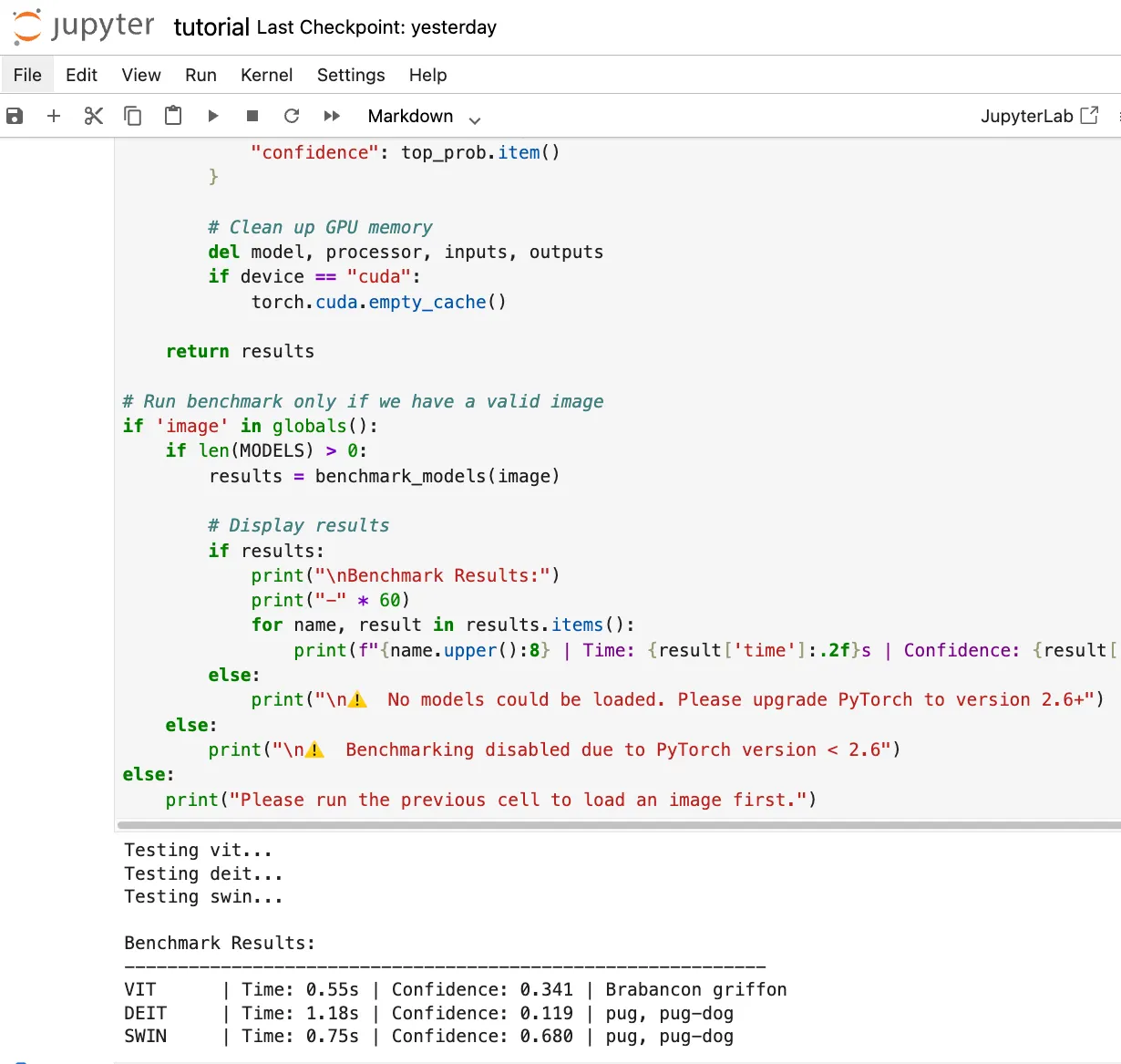
from
 transformers
import
 pipeline
# Create transcription pipeline
transcriber = pipeline(
"automatic-speech-recognition"
, model=
"openai/whisper-base"
)
# Transcribe audio
result = transcriber(
"meeting_audio.wav"
)
print
(
"Transcription:"
, result[
"text"
])
- 99 languages with automatic detection
- Background noise and accents
- Long-form audio through chunking
- Timestamps for subtitles
from
 transformers
import
 pipeline
def

classify_audio
(
audio_path, model=
"superb/wav2vec2-base-superb-ks"
):

# Create classifier
    classifier = pipeline(

"audio-classification"
,
        model=model,
        device=
0

if
 torch.cuda.is_available()
else
 -
1
    )

# Classify audio
    results = classifier(audio_path)

# Show top predictions

for
 result
in
 results[:
3
]:

print
(
f"
{result[
'label'
]}
:
{result[
'score'
]:
.3
f}
"
)

return
 results
# Example usage
classify_audio(
"alarm_sound.wav"
)
- Security systems detecting glass breaking or alarms
- Industrial monitoring for equipment failures
- Healthcare devices identifying coughs or breathing patterns
- Smart home automation responding to specific sounds
- Image Encoder: Converts images to vectors
- Text Encoder: Converts text to vectors
from
 transformers
import
 AutoModel, AutoProcessor
import
 torch
from
 PIL
import
 Image
# Load CLIP
model = AutoModel.from_pretrained(
"openai/clip-vit-base-patch16"
)
processor = AutoProcessor.from_pretrained(
"openai/clip-vit-base-patch16"
)
# Prepare images and texts
images = [Image.
open
(
"cat.jpg"
), Image.
open
(
"dog.jpg"
)]
texts = [
"a photo of a cat"
,
"a photo of a dog"
]
# Process inputs
inputs = processor(text=texts, images=images, return_tensors=
"pt"
, padding=
True
)
# Compute similarities
with
 torch.no_grad():
    outputs = model(**inputs)
    logits_per_image = outputs.logits_per_image
    probs = logits_per_image.softmax(dim=
1
)
print
(
"Image-text similarity scores:"
)
print
(probs)
from transformers import BlipProcessor, BlipForConditionalGeneration
# Image captioning
def
generate_caption
(image_path):
    processor = BlipProcessor.
from_pretrained
(
"Salesforce/blip-image-captioning-base"
)
    model = BlipForConditionalGeneration.
from_pretrained
(
"Salesforce/blip-image-captioning-base"
)
    image = Image.
open
(image_path)
    inputs =
processor
(image, return_tensors=
"pt"
)
    out = model.
generate
(**inputs, max_length=
50
)
    caption = processor.
decode
(out[
0
], skip_special_tokens=True)
    return caption
# Visual question answering
def
answer_question
(image_path, question):
    processor = BlipProcessor.
from_pretrained
(
"Salesforce/blip-vqa-base"
)
    model = BlipForConditionalGeneration.
from_pretrained
(
"Salesforce/blip-vqa-base"
)
    image = Image.
open
(image_path)
    inputs =
processor
(image, question, return_tensors=
"pt"
)
    out = model.
generate
(**inputs, max_length=
30
)
    answer = processor.
decode
(out[
0
], skip_special_tokens=True)
    return answer
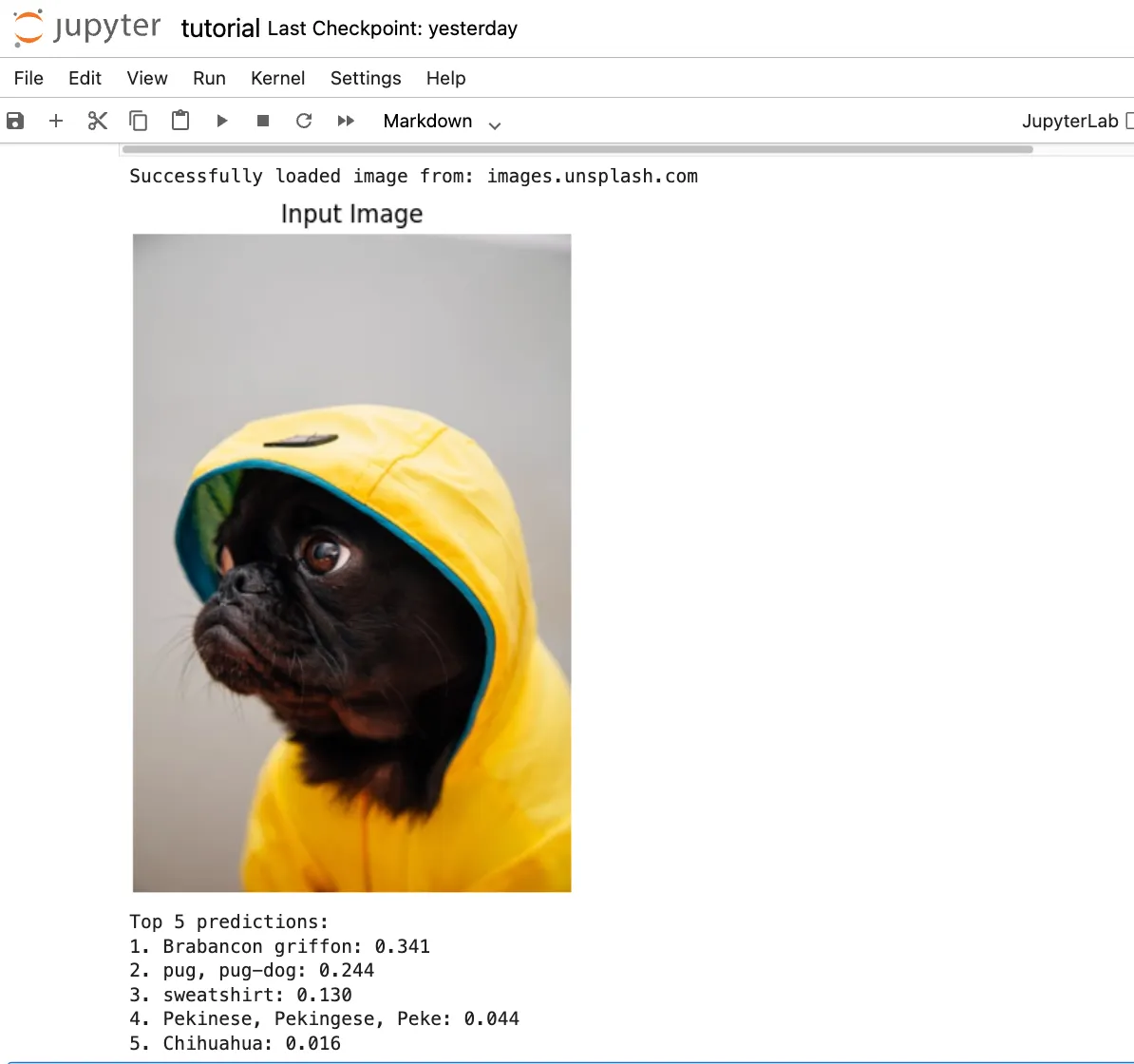
class

MultimodalSearch
:

def

__init__
(
self, model_name=
"openai/clip-vit-base-patch16"
):
        self.device =
"cuda"

if
 torch.cuda.is_available()
else

"cpu"
        self.model = AutoModel.from_pretrained(model_name)
        self.processor = AutoProcessor.from_pretrained(model_name)
        self.model.
eval
()

if
 self.device ==
"cuda"
:
            self.model = self.model.to(self.device)
        self.image_features =
None
        self.image_files = []

def

index_images
(
self, image_folder
):

"""Index all images in a folder."""

from
 pathlib
import
 Path

# Find all images
        image_paths = []

for
 ext
in
 [
'*.jpg'
,
'*.jpeg'
,
'*.png'
]:
            image_paths.extend(Path(image_folder).glob(ext))

# Process in batches
        batch_size =
8
        all_features = []

for
 i
in

range
(
0
,
len
(image_paths), batch_size):
            batch_paths = image_paths[i:i + batch_size]
            images = [Image.
open
(p).convert(
"RGB"
)
for
 p
in
 batch_paths]
            inputs = self.processor(images=images, return_tensors=
"pt"
, padding=
True
)

if
 self.device ==
"cuda"
:
                inputs = {k: v.to(self.device)
for
 k, v
in
 inputs.items()}

with
 torch.no_grad():
                features = self.model.get_image_features(**inputs)
                features /= features.norm(dim=-
1
, keepdim=
True
)
                all_features.append(features.cpu())
        self.image_features = torch.cat(all_features, dim=
0
)
        self.image_files = [
str
(p)
for
 p
in
 image_paths]

def

search
(
self, query, top_k=
5
):

"""Search images using text query."""

# Encode text
        inputs = self.processor(text=[query], return_tensors=
"pt"
, padding=
True
)

if
 self.device ==
"cuda"
:
            inputs = {k: v.to(self.device)
for
 k, v
in
 inputs.items()}

with
 torch.no_grad():
            text_features = self.model.get_text_features(**inputs)
            text_features /= text_features.norm(dim=-
1
, keepdim=
True
)
            text_features = text_features.cpu()

# Compute similarities
        similarities = (self.image_features @ text_features.T).squeeze(
1
)
        values, indices = similarities.topk(
min
(top_k,
len
(self.image_files)))
        results = [(self.image_files[idx], score.item())

for
 idx, score
in

zip
(indices, values)]

return
 results
- Use vector databases (FAISS, Milvus, Pinecone) for millions of images
- Cache embeddings to avoid recomputation
- Build REST APIs for search operations
- Monitor query latency and relevance
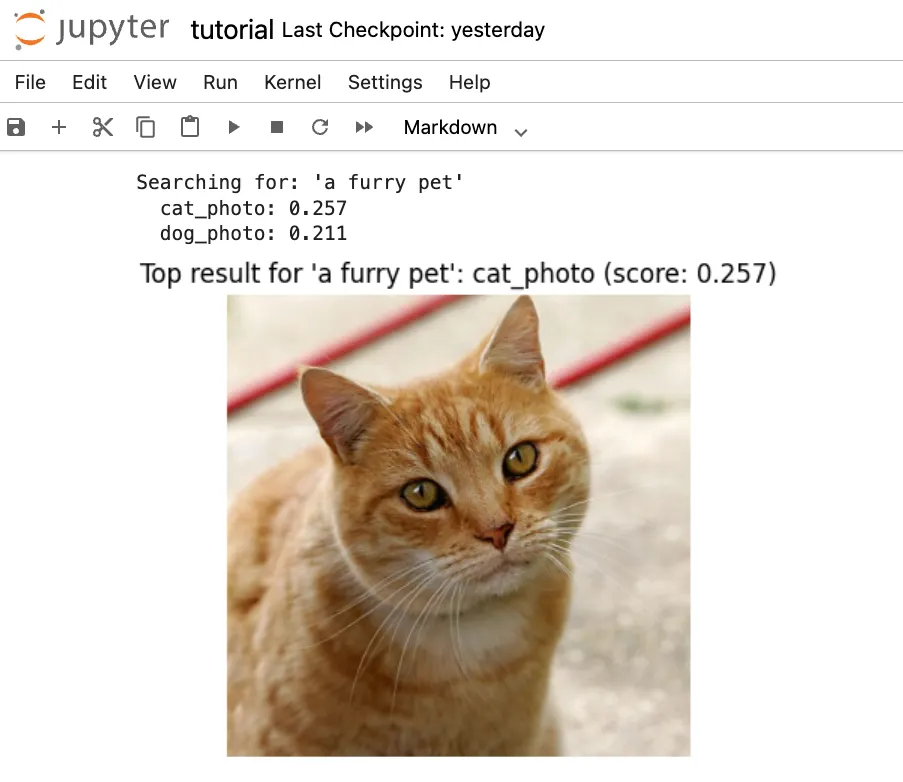
from diffusers import StableDiffusionXLPipeline
import torch
# Load pipeline
pipe = StableDiffusionXLPipeline.from_pretrained(

"stabilityai/stable-diffusion-xl-base-1.0"
,
    torch_dtype=torch.float16
)
# Use GPU if available
if torch.cuda.is_available():
    pipe = pipe.to(
"cuda"
)
    pipe.enable_model_cpu_offload()
# Generate image
prompt =
"A serene mountain landscape at sunset, photorealistic"
negative_prompt =
"blurry, low quality, oversaturated"
image = pipe(
    prompt=prompt,
    negative_prompt=negative_prompt,
    num_inference_steps=30,
    guidance_scale=7.5
).images[0]
image.save(
"generated_landscape.png"
)
num_inference_steps: Quality vs speed tradeoff (20-50 typical)guidance_scale: How closely to follow prompt (7-12 typical)negative_prompt: What to avoid in generation
import
 sglang
as
 sgl
@sgl.function
def

classify_screenshot
(
s, image
):
    s += sgl.image(image)
    s +=
"Classify this support issue as: bug, feature_request, or question.\\n"
    s +=
"Category: "
 + sgl.gen(
"category"
, max_tokens=
10
)
@sgl.function
def

transcribe_message
(
s, audio
):
    s +=
"Transcribing customer audio message..."

# In production, integrate with Whisper
    s +=
"Transcription: Customer reports login error 403"
@sgl.function
def

generate_ticket
(
s, category, transcription
):
    s +=
f"Category:
{category}
\\n"
    s +=
f"Description:
{transcription}
\\n"
    s +=
"Generate support ticket summary:\\n"
    s += sgl.gen(
"summary"
, max_tokens=
100
)
@sgl.function
def

support_pipeline
(
s, screenshot, audio
):

# Process inputs
    s_img = classify_screenshot.run(image=screenshot)
    s_audio = transcribe_message.run(audio=audio)

# Generate ticket
    s = generate_ticket(s,
                       s_img[
"category"
],
                       s_audio[
"transcription"
])

return
 s
# Deploy with quantization for efficiency
runtime = sgl.Runtime(
    model_path=
"meta-llama/Llama-2-7b-chat-hf"
,
    quantization=
"awq"
,
# 4x memory reduction
    tp_size=
1
)
- Quantization: AWQ/GPTQ reduces memory 4x
- Speculative Decoding: 2–3x faster inference
- Multi-LoRA: Serve multiple model variants
- Auto-scaling: Handle variable load
import
 gradio
as
 gr
def

create_demo
():

with
 gr.Blocks(title=
"Multimodal AI Demo"
)
as
 demo:

with
 gr.Tab(
"Image Classification"
):
            image_input = gr.Image(
type
=
"pil"
)
            model_dropdown = gr.Dropdown(
                choices=[
"vit"
,
"deit"
,
"swin"
],
                value=
"vit"
,
                label=
"Model"
            )
            classify_btn = gr.Button(
"Classify"
)
            output = gr.Textbox(label=
"Result"
)

def

classify
(
img, model_choice
):

# Your classification logic

return

f"Predicted: [result] with
{model_choice}
"
            classify_btn.click(
                classify,
                inputs=[image_input, model_dropdown],
                outputs=output
            )

with
 gr.Tab(
"Text-to-Image Search"
):
            query = gr.Textbox(label=
"Search query"
)
            search_btn = gr.Button(
"Search"
)
            results = gr.Gallery(label=
"Results"
)

# Add search logic

return
 demo
# Launch
demo = create_demo()
demo.launch(share=
True
)
- Vision Transformers process images as sequences of patches, enabling powerful visual understanding
- Audio Transformers handle speech and sound end-to-end without complex preprocessing
- Multimodal Models connect different data types, enabling cross-modal search and generation
- Hugging Face provides consistent APIs across all modalities
- Production deployment requires optimization (quantization, caching) and proper infrastructure
- Start Small: Implement image classification or audio transcription
- Experiment: Try different models and architectures
- Optimize: Use quantization and efficient serving
- Scale: Deploy with proper monitoring and infrastructure
- Iterate: Fine-tune models for your specific domain
-
Vision Transformers (ViT, DeiT, Swin) for image classification and analysis
-
Audio processing with Wav2Vec 2.0 and Whisper for speech recognition
-
Generative AI with Stable Diffusion XL for text-to-image generation
-
Multimodal models like CLIP and BLIP for cross-modal search and understanding
-
Building multimodal search engines and applications
-
Production deployment with SGLang
-
Python 3.12 (managed via pyenv).
-
Poetry for dependency management.
-
Go Task for build automation.
-
GPU recommended (but CPU mode supported)
-
(Optional) Hugging Face account for accessing gated models
- Clone this repository
git
clone
 [email protected]:RichardHightower/art_hug_07.git
task setup
task download-samples
.
├── src/
│   ├── __init__.py
│   ├── config.py
# Configuration and utilities
│   ├── main.py
# Entry point with all examples
│   ├── vision_transformers.py
# ViT, DeiT, Swin implementations
│   ├── audio_processing.py
# Wav2Vec2, Whisper examples
│   ├── diffusion_models.py
# Stable Diffusion XL generation
│   ├── multimodal_models.py
# CLIP, BLIP cross-modal search
│   ├── multimodal_search.py
# Building search applications
│   ├── sglang_deployment.py
# Production deployment examples
│   └── gradio_app.py
# Interactive web interface
├── tests/
│   └── test_multimodal.py
# Unit tests
├── notebooks/
│   ├── vision_exploration.ipynb
# Interactive vision examples
│   └── multimodal_search.ipynb
# Search engine tutorial
├── data/
│   ├── images/
# Sample images
│   └── audio/
# Sample audio files
├── outputs/
# Generated images and results
├── .env.example
# Environment template
├── Taskfile.yml
# Task automation
└── pyproject.toml
# Poetry configuration
task run
task run-vision
# Vision transformer examples
task run-audio
# Audio processing examples
task run-diffusion
# Image generation with SDXL
task run-multimodal
# CLIP/BLIP multimodal examples
task run-search
# Multimodal search engine
task run-sglang
# SGLang deployment demo
task gradio
-
Vision Transformers: How ViT, DeiT, and Swin process images as patches
-
Audio Transformers: End-to-end speech recognition with Whisper
-
Diffusion Models: Generate images from text with SDXL
-
Cross-Modal Understanding: CLIP and BLIP for connecting text and images
-
Production Deployment: Using SGLang for scalable multimodal pipelines
-
Image Classification: Classify images using state-of-the-art vision transformers
-
Speech-to-Text: Transcribe audio in multiple languages
-
Text-to-Image: Generate creative images from prompts
-
Multimodal Search: Find images using natural language queries
-
Production Pipeline: Deploy chained models with SGLang
-
Vision: ViT, DeiT, Swin Transformer
-
Audio: Wav2Vec 2.0, Whisper
-
Generation: Stable Diffusion XL
-
Multimodal: CLIP, BLIP, BLIP-2, LLaVA
-
task setup- Set up Python environment and install dependencies -
task run- Run all examples -
task test- Run unit tests -
task format- Format code with Black and Ruff -
task clean- Clean up generated files and outputs -
task download-samples- Download sample images and audio -
task gradio- Launch interactive web interface -
task notebook- Launch Jupyter notebook server -
CUDA GPU: Fastest performance
-
MPS (Apple Silicon): Good performance on Mac
-
CPU: Slower but functional
-
Out of Memory: Try smaller models or enable CPU offloading
-
Slow Generation: Use GPU or reduce image resolution
-
Model Download: First run downloads several GB of models
-
Audio Issues: Ensure audio files are 16kHz mono WAV
- Hugging Faces Transformers and the AI Revolution (Article 1)
- Hugging Faces: Why Language is Hard for AI? How Transformers Changed that (Article 2)
- Hands-On with Hugging Face: Building Your AI Workspace (Article 3)
- Inside the Transformer: Architecture and Attention Demystified (Article 4)
- Tokenization: The Gateway to Transformer Understanding (Article 5)
- Prompt Engineering (Article 6)