Build Your First Agent Skill in 10 Minutes Using the Context7 Wizard, and Save Hours
Context7 Skills: Generate Agent Skills From Live Documentation
Originally published on Medium.

Context7 Skills: Generate Agent Skills From Live Documentation
Want to unlock the power of AI in just 10 minutes? Discover how to build your first agent skill using the Context7 Wizard! Say goodbye to tedious documentation searches and hello to instant productivity. Dive in now and save hours of work!
Context7's CLI allows users to generate AI agent skills from library documentation, transforming a tedious process into an interactive workflow. With access to over 24,000 libraries, users can search, generate, and install skills using simple commands. The process includes authentication, skill generation, and installation, enabling rapid creation of reusable skills while ensuring accuracy through version-specific documentation. This tool enhances team standardization, onboarding, and knowledge sharing, making skill creation efficient and accessible.
From Documentation Retrieval to Skill Generation
Context7 started as an MCP server for injecting current documentation into your LLM's context window. It solved the knowledge cutoff problem by fetching version-specific docs on demand.
Now it does more. The ctx7 CLI (v0.2.0) introduces AI-powered skill generation, letting you create Agent Skills directly from library documentation. With access to 24,000+ libraries, you can search, generate, and install skills with simple commands.
This represents a significant evolution. What began as documentation retrieval has become a skill authoring pipeline that understands the Agent Skills standard.
If you like this article, check out these other articles by this author (me):
- Agent Brain: Giving AI Coding Agents a Full Understanding of Your Entire Enterprise -- Feb 5th 2026
- Build Agent Skills Faster with Claude Code 2.1 Release -- Feb 4th 2026
- Build Your First Agent Skill in 10 Minutes Using the Context7 Wizard (and Save Hours) -- Feb 1st 2026
- Claude Code: Todos to Tasks -- Jan 26
- Empowering AI Coding Agents with Private Knowledge: The Doc-Serve Agent Skill -- Jan 20
- Give Your Claude Code, OpenCode, and Codex Full RAG Over Docs and Code Repos -- Jan 18
What ctx7 Skills Adds
The ctx7 CLI sits alongside the existing MCP server. While the MCP server pipes documentation into AI tools, the CLI gives you commands for discovering and generating reusable skills.
You can:
- Search 24,000+ skills from indexed libraries
- Generate custom skills from any library's documentation
- Install skills with a single command
- List detected skill directories across your IDEs
The core idea: use Context7's documentation index to mine high-value patterns, then emit them as portable Agent Skills instead of one-off prompts.
The ctx7 Skills Commands
Installation
# Install ctx7 globally
npm install -g ctx7

# Or run directly with npx
npx ctx7 --help
Requires Node.js v18.0.0 or higher.
Authentication
ctx7 uses OAuth 2.0 for authenticated access:
# Login to Context7
npx ctx7 login

# Check current user
npx ctx7 whoami

# Logout
npx ctx7 logout
Authentication unlocks higher rate limits and tracks your weekly skill generation quota.
Core Commands
npx skills generate- AI-powered skill generation with interactive promptsskills generate- AI-powered skill generation with interactive promptsskills list- Show detected IDE skill directoriesskills search- Search the 24,000+ skill libraryskills install- Install a skill with one command
Sample session using skills generate
% npm install -g ctx7
added 57 packages in 3s
31 packages are looking for funding
  run `npm fund` for details

richardhightower@MacBook-Pro-3 src % npx ctx7 login
Opening browser to log in...
If the browser didn't open, visit this URL:
https://context7.com/api/oauth/authorize?client_id=....

Login successful!
You can now use authenticated Context7 features.

% npx ctx7 whoami
Logged in
Name: Richard Hightower
Email: [email protected]

src % npx ctx7 skills generate
 What should your agent become an expert at?

Skills teach agents best practices, design patterns, and domain expertise.

Examples:
 "React component optimization and performance best practices"
 "Responsive web design with Tailwind CSS"
 "Writing effective landing page copy"
 "Deploying Next.js apps to Vercel"
 "OAuth authentication with NextAuth.js"

 Describe the expertise: tokio cron lib for rust
 Found 5 relevant libraries
 Select libraries: Tokio (websites/rs_tokio_tokio)
 Questions prepared
 [1/3] Which cron scheduling approach do you prefer with Tokio? all three
 [2/3] What type of cron jobs will you be running? all three
 [3/3] How do you need to manage job lifecycle and errors? all three
 Queried documentation
 Generated skill for "tokio-cron-scheduling"

Generated Skill: tokio-cron-scheduling

---
name: tokio-cron-scheduling
description: Tokio cron scheduling with intervals, timeouts, and task
  management. Use when implementing periodic tasks, job scheduling,
  graceful shutdown, or managing long-running background processes in
  async Rust applications.
---

# Tokio Cron Scheduling

Periodic task execution using Tokio's time utilities and task management.

## When to Apply
- Implementing periodic background jobs (cleanup, health checks, data sync)
- Building cron-like schedulers with custom intervals
- Managing task lifecycle with graceful shutdown and error handling
- Coordinating multiple scheduled tasks with different frequencies

## Critical Rules
**Pin Sleep Futures in Select**: Must pin `Sleep` futures when using
with `tokio::select!` for reuse
... 222 more lines

? What would you like to do?
> Install skill
  View full skill
  Request changes
  Cancel

 What would you like to do? Install skill
 Install to detected location(s)?
/Users/richardhightower/clients/spillwave/src/.claude/skills Yes
 Created skill in 1 location(s)
Skill saved successfully
/Users/richardhightower/clients/spillwave/src/.claude/skills/tokio-cron-scheduling
It took no time at all to generate a new skill.
I have a tool to grade how good a skill is at following PDA and the best practices from Claude Code team.
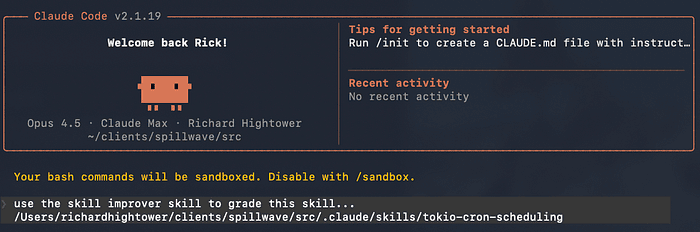
It did ok.
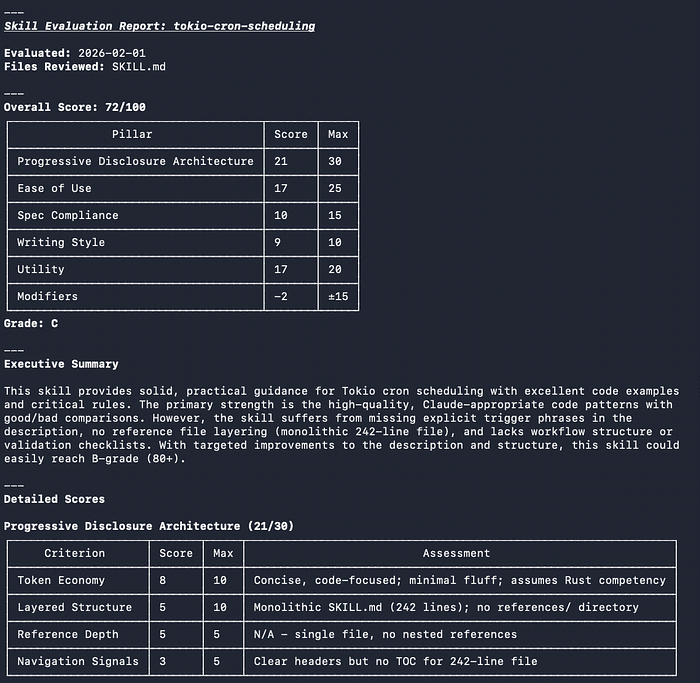
I could easily take the grade and list of improvements from the grader and get it up to 95%. I have written tools to create skills and they never run that fast, but they all start out with a lower score until I run it through a few improvement cycles. This is a great tool. This is a tool that I plan on using quite a bit.
Using Skills List
% npx ctx7 skills list
 Claude Code
   .claude/skills
     tokio-cron-scheduling
I have a lot more skills install than this. I noticed it installed it at the project level by default.
% ls .claude/skills/tokio-cron-scheduling
SKILL.md

% mv .claude/skills/tokio-cron-scheduling ~/.claude/skills
Now instead of generating a skill, let's see what ctx7 has in its skill library for this task.
Searching for an agentic skill
% npx ctx7 skills search tokio cron tasks
 Found 21 skill(s)

? Select skills to install: installs
> 1. rust-async-patterns              31
  2. trigger-dev-tasks                 5
  3. turborepo                         4
  4. Convex Cron Jobs                  9
  5. things-mac                        5
  6. gemini                            5
  7. ordercli                          2
  8. manager                           1
  9. laravel:task-scheduling            1
  10. convex-cron                       1
  11. reusable-workflows                1
  12. convex-actions-scheduling
  13. cloudflare-cron-triggers
  14. parallel-jobs-gha
  15. transaction-script

Skill: rust-async-patterns
Repo: /wshobson/agents
Description:
Master Rust async programming with Tokio, async traits, error handling,
and concurrent patterns. Use when building async Rust applications,
implementing concurrent systems, or debugging async code.
...

 Found 21 skill(s)
 Select skills to install: installs rust-async-patterns
 Install to detected location(s)?
/Users/richardhightower/clients/spillwave/src/.claude/skills Yes
 Installed 1 skill(s)
Claude Code: /Users/richardhightower/clients/spillwave/src/.claude/skills
  + rust-async-patterns

% mv mv .claude/skills/rust-async-patterns/ ~/.claude/skills
Using the Skills we generated and searched for / installed
Now we created one and we looked up a skill and downloaded it, let's use them in a project.
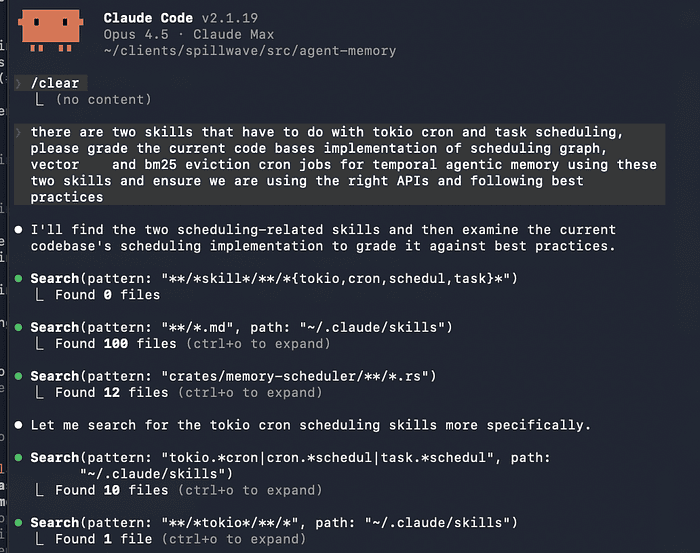
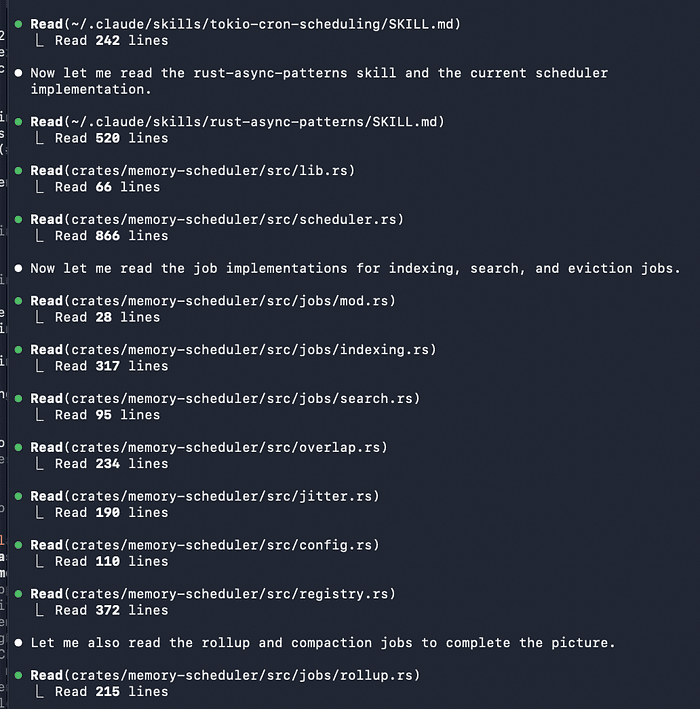
It found the skill and started using them. This took just a few minutes or less. A lot less if I was not writing about it.
It looks like my Tokio usage was not so bad.
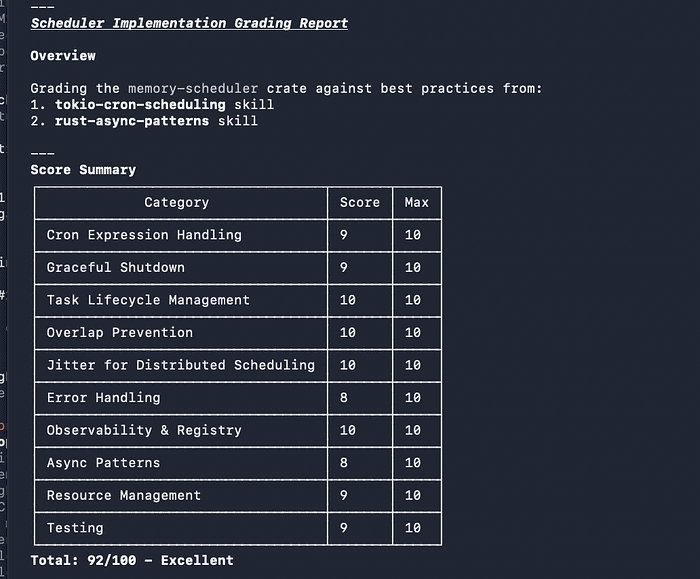
We went from no Rust Tokio Agent skills to having two Rust Tokio skills to use in a mere matter of minutes. And right away, we are getting concrete advice on how to improve our code base.
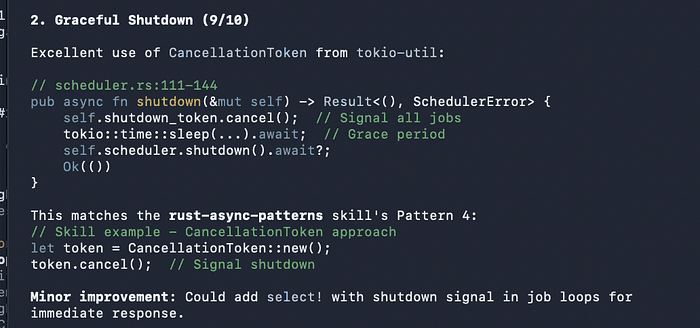
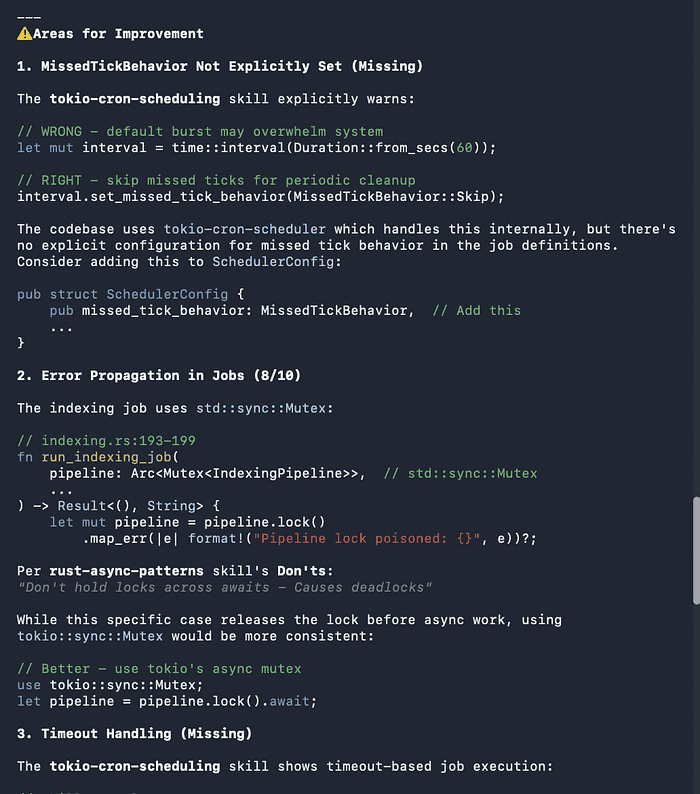
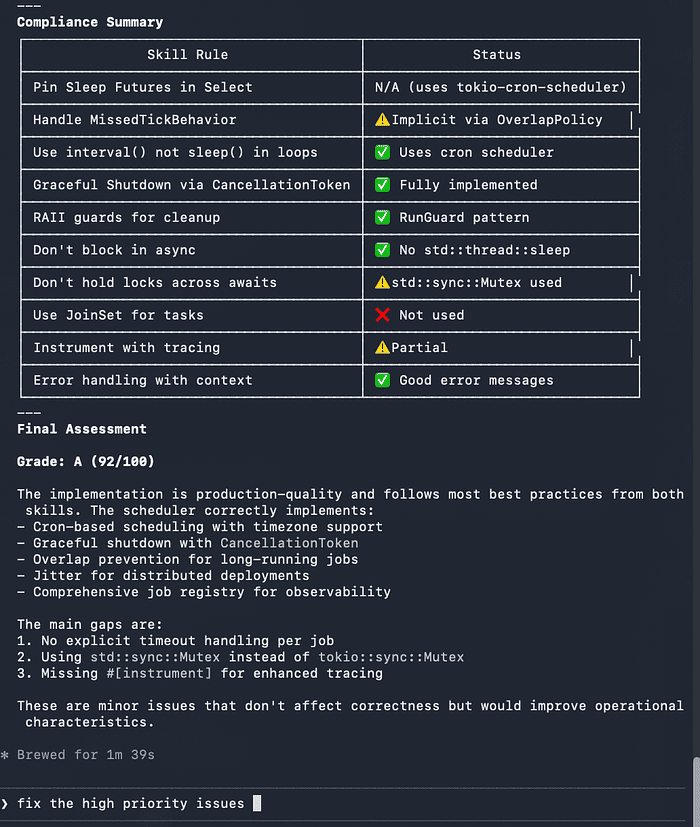
Now we can quickly adopt these best practices.
Generating Skills From Documentation
The skills generate command is the core of ctx7's skill creation workflow. It queries Context7's documentation index and uses AI to transform relevant sections into structured Agent Skills.
Understanding the Generation Process
When you run skills generate, ctx7 performs several steps behind the scenes:
What It Does: The command combines semantic search across library documentation with LLM-powered content generation. It identifies relevant documentation sections, extracts patterns, and formats them into the Agent Skills standard structure.
Why This Approach: Manual skill authoring is tedious and error-prone. I know, I have written quite a few. By leveraging Context7's indexed documentation, you get skills that are accurate, version-specific, and based on official sources rather than LLM training data.
When to Use: Generate skills when you need to capture library-specific patterns, best practices, or workflows that you'll use repeatedly. This is ideal for team standards, framework conventions, or complex API patterns.
Trade-offs:
- Pro: Fast skill creation from authoritative sources
- Pro: Version-specific documentation ensures accuracy
- Pro: Interactive refinement through clarifying questions
- Con: Requires quota management for generation limits
- Con: Generated skills may need manual refinement for your specific context
How It Works
npx ctx7 skills generate
The command walks you through an interactive process:
- Library Search: Specify which library you want to create a skill for
- Clarifying Questions: The AI asks about your skill's purpose and scope
- Real-time Progress: Watch as it queries documentation and generates content
- Feedback Loop: Review the output and refine if needed
Example Session: Creating a LangChain Error Handling Skill
Let's walk through a real example. You're building production LangChain applications and want to standardize error handling across your team.
$ npx ctx7 skills generate

? Which library do you want to create a skill for? langchain
? What should this skill help with? error handling and retry patterns
? Any specific focus areas? rate limits, fallback chains, exponential backoff

Searching documentation...
Found 12 relevant sections
Generating skill content...

Skill generated: langchain-error-handling
Output saved to: .claude/skills/langchain-error-handling/SKILL.md
The clarifying questions help ctx7 narrow down which documentation sections to use. By specifying "rate limits, fallback chains, exponential backoff," you guide the AI toward specific patterns rather than general error handling.
Generated Output
The command produces a SKILL.md file compatible with the Agent Skills standard:
---
name: langchain-error-handling
description: Production-grade error handling patterns for LangChain applications
triggers:
  - error handling
  - exception management
  - retry logic
---
# LangChain Error Handling Patterns

Use this skill when building robust LangChain applications that need
proper error handling, retry logic, and graceful degradation.

## When to Use
- Implementing production-grade LangChain chains
- Adding retry logic to LLM calls
- Handling rate limits and API errors

## Instructions

### Retry Configuration
Always configure retries with exponential backoff:

```python
from langchain.callbacks import RetryCallbackHandler
from langchain.schema import RetryConfig
This generated skill gives your AI coding assistant complete, production-ready patterns. When you ask "Help me implement error handling for LangChain," the agent loads this skill and applies these exact patterns to your code.

## Searching and Installing Skills

### Search the Skill Library

With 24,000+ indexed libraries, you can search for existing skills before generating new ones:

```bash
# Search for skills
npx ctx7 skills search "fastapi authentication"

# Results show available skills with descriptions
Found 8 skills matching "fastapi authentication":
1. fastapi-jwt-auth        Production JWT authentication patterns for FastAPI
2. fastapi-oauth2-flow     OAuth2 password and authorization code flows
3. fastapi-api-key-auth    API key authentication middleware patterns
The search uses semantic similarity, so you don't need exact keyword matches. Searching for "fastapi auth" will find "authentication," "authorization," and "security" related skills.
Install Skills
Found a skill you want? Install it directly:
# Install a skill
npx ctx7 skills install fastapi-auth-patterns

Installing fastapi-auth-patterns...
Installed to: ~/.claude/skills/fastapi-auth-patterns/
Skill ready to use with Claude Code!
The install command detects your environment and places skills in the correct directory for your AI coding assistant.
List Skill Directories
See where skills are installed across your IDEs:
npx ctx7 skills list

# Output:
Detected skill directories:
- /Users/you/.claude/skills/ (3 skills)
- /Users/you/.cursor/skills/ (1 skill)
- /Users/you/.opencode/skills/ (0 skills)
This helps you verify that skills are in the right place for your tools to discover them.
Integration With the MCP Server
The ctx7 CLI works alongside Context7's MCP server. While the CLI generates skills, the MCP server provides real-time documentation during coding sessions.
Understanding the Division of Labor
CLI Skills Generation: Use this when you have a pattern you'll use repeatedly. The skill becomes part of your agent's permanent knowledge base. It's ideal for team standards, framework conventions, or complex workflows.
MCP Server Queries: Use this for one-off questions or exploratory work. The MCP server fetches docs on demand but doesn't persist them as reusable skills.
Example Scenario: You're building a FastAPI application with OAuth2 authentication. You generate a skill for your team's OAuth2 patterns (CLI), but query the MCP server for specific FastAPI middleware configuration questions.
Setting Up Both
# 1. Install ctx7 CLI for skill generation
npm install -g ctx7

# 2. Add Context7 MCP to Claude Code
claude mcp add context7 -- npx -y @upstash/context7-mcp

# 3. Or add to Cursor's mcp.json
Cursor/VS Code configuration:
Add this to your ~/.cursor/mcp.json or VS Code settings:
{
  "mcpServers": {
    "context7": {
      "command": "npx",
      "args": ["-y", "@upstash/context7-mcp@latest"]
    }
  }
}
Using Both Together
Here's a practical workflow combining both tools:
- Generate skills with ctx7 CLI for patterns you use repeatedly
- Query live docs with the MCP server for one-off questions
- Skills reduce context: Pre-built patterns don't need fresh doc fetches
Real-world example:
# Generate a skill for your team's FastAPI patterns
npx ctx7 skills generate
# Library: fastapi
# Purpose: OAuth2 password flow with JWT tokens
# Focus: Production security, token refresh, user sessions

# Now in your editor with Claude Code:
# "Implement OAuth2 authentication using our FastAPI patterns"
# -> Agent loads the skill, no need to fetch docs

# But for a one-off question:
# "What's the syntax for FastAPI WebSocket reconnection?"
# -> Agent queries MCP server for latest WebSocket docs
The context7 is an MCP that I use almost everyday.
Compatibility With Agent Skills Standard
Skills generated by ctx7 follow the Agent Skills standard, making them portable across platforms:
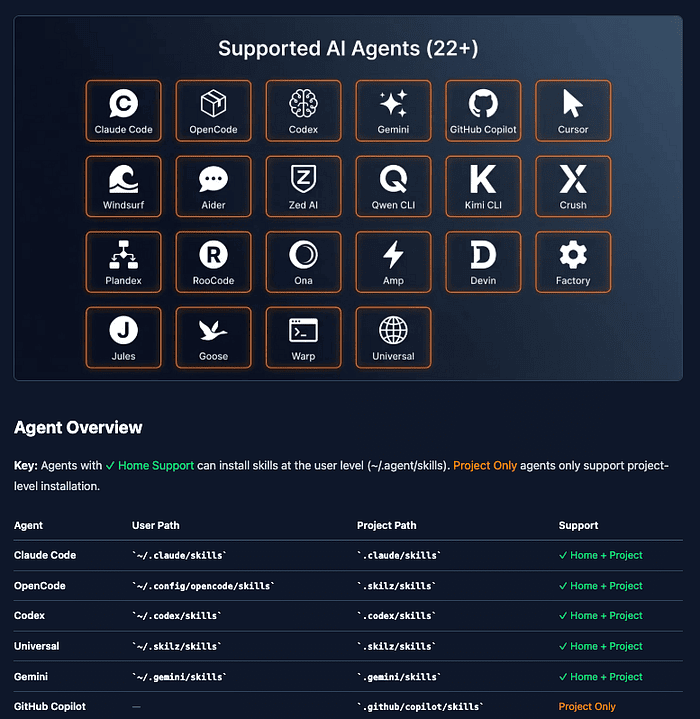 Image from https://skillzwave.ai/docs/manual/agents/
The same SKILL.md file works everywhere these platforms look for skills.
What This Means for You
Write once, use everywhere. A skill you generate for Claude Code works in Cursor, VS Code Copilot, and any other Agent Skills-compatible tool. This portability means you can:
- Share skills across teams using different editors
- Move between tools without rewriting skills
- Build a personal skill library that follows you
- Contribute skills to open-source projects in a standard format
Distribution With Skilz CLI
Once you've generated skills, distribute them using the Skilz CLI:
# Clone and install Skilz CLI
git clone https://github.com/SpillwaveSolutions/skilz-cli
cd skilz-cli
npm install -g .

# Install a skill to Claude Code
skilz install your-org/your-skill --agent claude

# Install to OpenCode
skilz install your-org/your-skill --agent opencode

# List installed skills
skilz list
Skilz handles getting skills to the right location for each agent.
Practical Workflow: From Generation to Distribution
Here's a complete workflow for creating and distributing skills:
# 1. Login to Context7
npx ctx7 login

# 2. Generate a skill from documentation
npx ctx7 skills generate
# Follow the interactive prompts

# 3. Check where it was saved
npx ctx7 skills list

# 4. Test with your agent
claude "Help me implement error handling for LangChain"
# The agent should discover and use your new skill

# 5. Share via GitHub
cd ~/.claude/skills/my-new-skill
git init && git add . && git commit -m "Initial skill"
gh repo create my-org/my-new-skill --public --push

# 6. Others can install it
skilz install my-org/my-new-skill --agent claude
Building a Skills Library
Rather than one massive skill, create focused skills for different concerns:
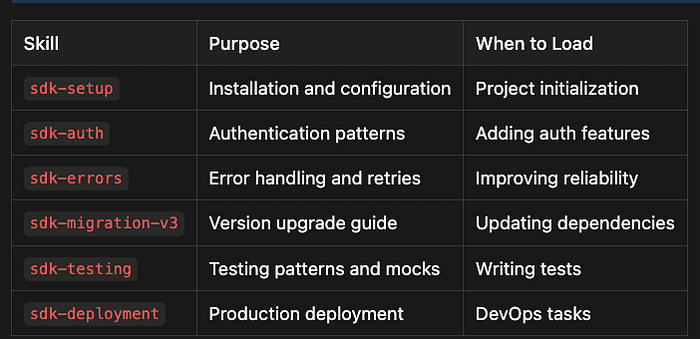
This modularity lets agents load only what's relevant to the current task. A modular approach has several benefits:
- Performance: Smaller skills load faster and consume less context window
- Maintenance: Easier to update individual skills as libraries evolve
- Clarity: Each skill has a single, well-defined purpose
- Reusability: Mix and match skills for different scenarios
Example: Modular FastAPI Skills
Instead of a single "fastapi-everything" skill, create:
# Generate focused skills
npx ctx7 skills generate
# -> fastapi-startup-configuration

npx ctx7 skills generate
# -> fastapi-dependency-injection

npx ctx7 skills generate
# -> fastapi-background-tasks

npx ctx7 skills generate
# -> fastapi-testing-patterns
Now when you ask your agent to "add a background task," it loads only the fastapi-background-tasks skill rather than parsing a 1000-line mega-skill.
Weekly Quota and Limits
The skills generate command uses AI to transform documentation, which consumes quota:
- Free tier: Limited generations per week
- Authenticated users: Higher limits with API key
- Quota resets: Weekly
Check your quota status:
npx ctx7 whoami

# Output:
Logged in as: [email protected]
Quota: 8/25 skills generated this week
Resets: in 3 days
Get an API key at context7.com/dashboard for increased limits.
Managing Quota Strategically
When quota is limited, prioritize:
- High-value patterns: Complex workflows used frequently
- Team standards: Shared patterns across multiple developers
- Error-prone areas: Patterns that are easy to get wrong
Use skills search before skills generate to see if someone already created what you need.
Other Docs-to-Skills Tools
ctx7 isn't the only option for generating skills from documentation:
- agent-skills-generator: Go CLI that crawls doc websites and generates SKILL.md files. Best for static documentation sites.
- intellectronica/agent-skills: Uses markitdown to convert PDF, Word, HTML to skills. Best for converting existing docs.
- Cursor /migrate-to-skills: Built-in command to convert rules to skills (v2.4+). Best for migrating Cursor rules.
Anthropic also has a skill creator skill and a plugin that creates skills, agents, command, and more.
ctx7 is unique in leveraging Context7's 24,000+ library index for semantic search and relevance ranking. This means ctx7 can understand "I need FastAPI OAuth2 patterns" and find the relevant sections across multiple documentation pages, rather than just converting a single doc file.
When to use which tool:
- ctx7: When you need skills from popular libraries in the 24,000+ index
- agent-skills-generator: When working with custom or internal documentation
- intellectronica/agent-skills: When converting existing documentation to skills
- Cursor migrate: When you have existing Cursor rules to standardize
Why This Matters
For developers thinking in terms of skills, AGENTS.md, and CLAUDE.md, ctx7 is a knowledge-to-skill compiler.
Before ctx7
Creating Agent Skills manually involved:
- Reading through extensive documentation
- Identifying key patterns and best practices
- Extracting relevant code examples
- Formatting everything into SKILL.md structure
- Testing and iterating on the skill
- Keeping skills updated as docs change
This process could take hours for a complex library. Teams often skipped it, leading to inconsistent patterns and repeated questions.
After ctx7
npx ctx7 skills generate
# Answer a few questions
# Get a ready-to-use SKILL.md
The interactive workflow with clarifying questions ensures the generated skill matches your actual needs. What took hours now takes minutes.
The Broader Impact
This shift from manual to automated skill creation enables:
- Team standardization: Quickly create skills for your team's conventions
- Faster onboarding: New developers get skills for your stack on day one
- Version tracking: Generate new skills when libraries update
- Knowledge sharing: Distribute skills as easily as npm packages
Getting Started
Quick Start
# 1. Run the skills generator
npx ctx7 skills generate

# 2. Follow the prompts to create your first skill

# 3. Test it with your AI coding assistant
Full Setup
# Install globally for repeated use
npm install -g ctx7

# Login for higher quotas
npx ctx7 login

# Add MCP server to your editor for live docs
claude mcp add context7 -- npx -y @upstash/context7-mcp

# Generate skills as needed
npx ctx7 skills generate
Your First Skill: Step by Step
Let's create your first skill right now. Pick a library you use regularly and follow along:
# 1. Start the generator
npx ctx7 skills generate

# 2. When prompted for library, choose something you know:
# -> "react" or "fastapi" or "langchain"

# 3. For purpose, describe a common task:
# -> "component testing patterns"
# -> "authentication middleware"
# -> "prompt templates"

# 4. For focus areas, be specific:
# -> "testing hooks with React Testing Library"
# -> "JWT token validation and refresh"
# -> "few-shot examples with variable substitution"

# 5. Review the generated skill:
# -> Check code examples for accuracy
# -> Verify best practices match your team standards
# -> Test with your AI assistant

# 6. Refine if needed:
# -> Run generate again with more specific prompts
# -> Manually edit the SKILL.md to add team-specific details
Resources
Context7 Resources
- Context7 GitHub -- Source code and releases
- Context7 Dashboard -- API keys and quota management
- ctx7 v0.2.0 Release Notes -- Skills feature announcement
Agent Skills Resources
- Agent Skills Standard -- The open specification
- Microsoft Agent Skills -- 127 modular skills
- Skilz CLI -- Universal skill installer
- VS Code Agent Skills Docs -- VS Code documentation
- OpenAI Codex Skills -- Codex skills
ctx7's skill generation transforms the tedious process of skill authoring into an interactive, documentation-backed workflow. Point it at a library, answer a few questions, and get production-ready skills in minutes.
Full Grade of Generated Skill
--- Skill Evaluation Report: tokio-cron-scheduling
Evaluated: 2026-02-01
Files Reviewed: SKILL.md
---
Overall Score: 72/100

| Pillar                              | Score | Max |
|-------------------------------------|-------|-----|
| Progressive Disclosure Architecture | 21    | 30  |
| Ease of Use                         | 17    | 25  |
| Spec Compliance                     | 10    | 15  |
| Writing Style                       | 9     | 10  |
| Utility                             | 17    | 20  |
| Modifiers                           | -2    | +15 |

Grade: C
Executive Summary: This skill provides solid, practical guidance for Tokio cron scheduling with excellent code examples and critical rules. The primary strength is the high-quality, Claude-appropriate code patterns with good/bad comparisons. However, the skill suffers from missing explicit trigger phrases in the description, no reference file layering (monolithic 242-line file), and lacks workflow structure or validation checklists. With targeted improvements to the description and structure, this skill could easily reach B-grade (80+).
Score Improvement Roadmap:
| If You Address... | Estimated Score |
|---|---|
| Issue 1 (triggers) | 77/100 |
| Issues 1-3 | 83/100 |
| All 5 issues | 89/100 (Grade B) |
About the Author
Rick Hightower is a technology executive and data engineer who led ML/AI development at a Fortune 100 financial services company. He created skilz, the universal agent skill installer, supporting 30+ coding agents including Claude Code, Gemini, Copilot, and Cursor, and co-founded the world's largest agentic skill marketplace. Connect with Rick Hightower on LinkedIn or Medium.
Integration Skills from Spillwave Solutions
- Notion Uploader/Downloader Agent Skill: Seamlessly upload and download Markdown content and images to Notion for documentation workflows
- Confluence Agent Skill: Upload and download Markdown content and images to Confluence for enterprise documentation
- JIRA Integration Agent Skill: Create and read JIRA tickets, including handling special required fields