CCA Exam Prep: Mastering the Code Generation with Claude Code Scenario
Claude Certified Architect: Mastering Context Management and Code Quality in Large Codebases
Originally published on Medium.
CCA exam prep code generation with Claude Code — attention heatmap and CLAUDE.md hierarchy in dark IDE theme
Claude Certified Architect: Mastering Context Management and Code Quality in Large Codebases
🚀 Ready to ace the CCA Exam? Discover how to master code generation with Claude Code! Uncover the secrets of context degradation, efficient codebase navigation, and why bigger isn’t always better. Dive into the essential strategies that will elevate your exam prep! #CCAExam #ClaudeCode #AIEngineering
Summary: The CCA exam focuses on understanding architectural decisions in code generation with Claude Code, emphasizing that longer context windows do not guarantee better output due to context degradation. Key strategies include managing attention through focused per-file passes, utilizing the ***CLAUDE.md ***hierarchy for team standards, and integrating Claude Code into CI/CD pipelines using the ***-p ***flag for non-interactive mode. Custom agent skills are recommended for repeatable workflows, and attention dilution is a critical concept to address in large codebases.
Master the CCA Code Generation scenario: context degradation explained, CLAUDE.md hierarchy, CI/CD -p flag, and custom agent skills. Exam tips covering 35% of exam weight.
Anthropic Claude Certification Exam: Mastering the Code Generation Scenario
The Scenario Most Developers Get Wrong
Here is the thing about the Code Generation with Claude Code scenario on the CCA exam: it feels familiar. If you use Claude Code daily, you already know how to generate code, run tests, and refactor files. That familiarity is exactly what makes this scenario dangerous.
The exam is not testing whether you can use Claude Code. It is testing whether you understand why certain architectural decisions produce better results than others. And the biggest trap? Experienced developers assume that longer context windows automatically produce better output. They do not. Not even close.
This article breaks down every testable concept in the Code Generation scenario. We will cover context degradation (the core CCA exam prep concept that trips people up), the CLAUDE.md hierarchy (a heavily tested topic), custom skills, CI/CD integration with the -p flag, and the anti-patterns the exam loves to test. By the end, you will know exactly what the exam is looking for and why the "obvious" answers are often wrong.
Let’s get into it.
💡 Series note: This is Article 3 of 8 in the CCA Scenario Deep Dive series.
If you have not read Article 2(Customer Support Resolution Agent), the escalation design and agentic loop concepts covered there complement the context management patterns here. The coordinator pattern introduced at the end of this article connects directly to hub-and-spoke design in Article 4.
The Scenario Setup
The Code Generation scenario typically presents you with a development team using Claude Code on a large, multi-service codebase. Think microservices, shared libraries, and dozens of configuration files. The kind of project where no single person holds the full architecture in their head.
The tasks vary: feature implementation across multiple files, refactoring a service layer, generating tests for a module, automating code review. What stays constant is the scale. The codebase is large enough that you cannot fit the whole thing into a single Claude Code session.
The exam focuses on specific decision points:
- How do you structure Claude Code sessions for a large codebase?
- How do you manage context so that code quality stays high across multiple files?
- How do you enforce team standards consistently?
- How do you integrate Claude Code into CI/CD pipelines?
Every question in this scenario maps back to one of these four decisions. Keep them in mind as we go through the concepts.
Context Degradation: The Core CCA Exam Concept
What Context Degradation Actually Is
This is the single most important concept in the Code Generation scenario. Read this carefully, because the CCA exam will try to trick you with a plausible-sounding wrong answer.
Context degradation is an attention problem. Not a capacity problem.
These are two completely different things. Capacity is how many tokens the model can technically hold in its window. Attention is how much cognitive focus the model applies to each part of that window. They do not move together. You can have enormous capacity and terrible attention distribution. That is exactly what happens when you stuff a long session with every file in your codebase.
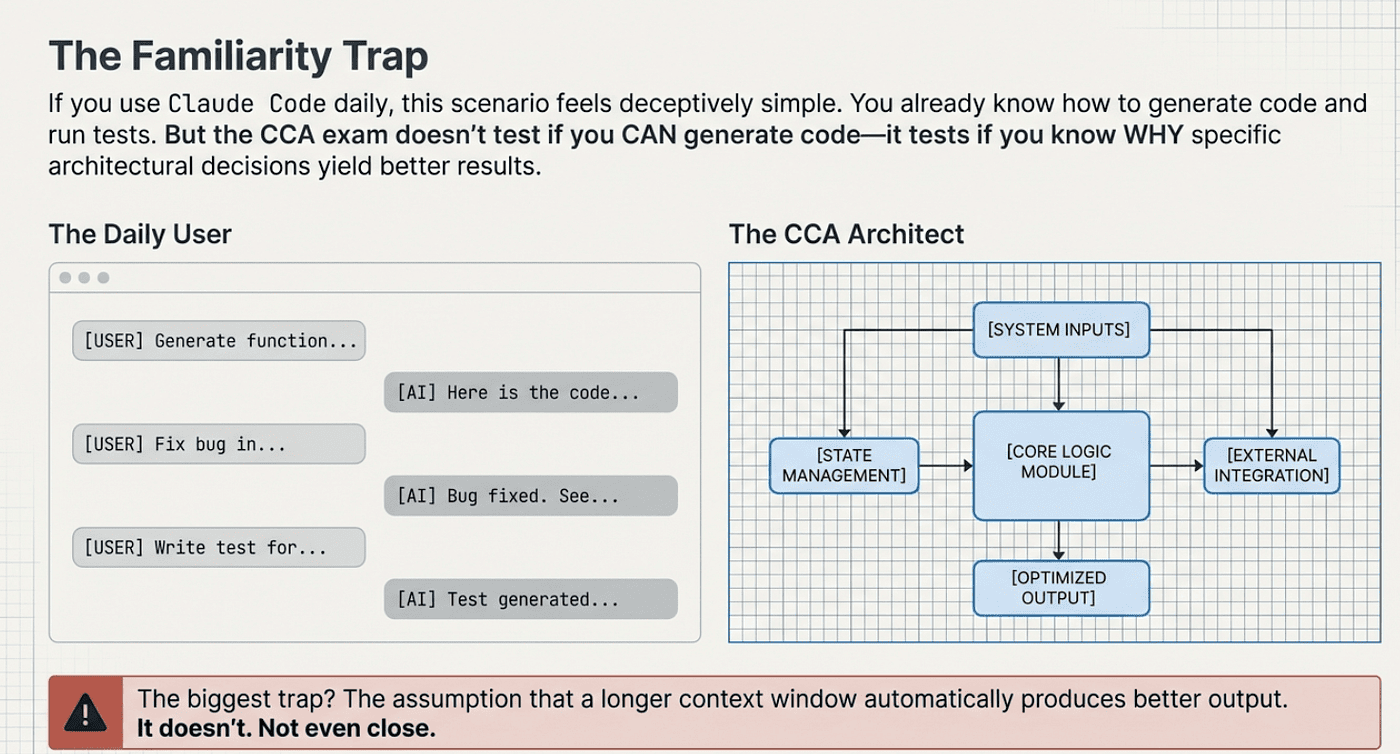
CCA: Bigger is not always better. More precise context is better.
Here is what happens mechanically. When Claude processes a context window, it distributes attention across all the tokens present. The total attention available is fixed, regardless of context size. As the context grows, that fixed attention gets divided across more and more tokens. Each individual token gets a thinner slice. Information in the middle of a long context gets the thinnest slices of all.
Researchers call this the “lost in the middle” effect. It has been documented across large language models. The model pays strong attention to content near the beginning of its context and near the end. The middle is where quality goes to die.
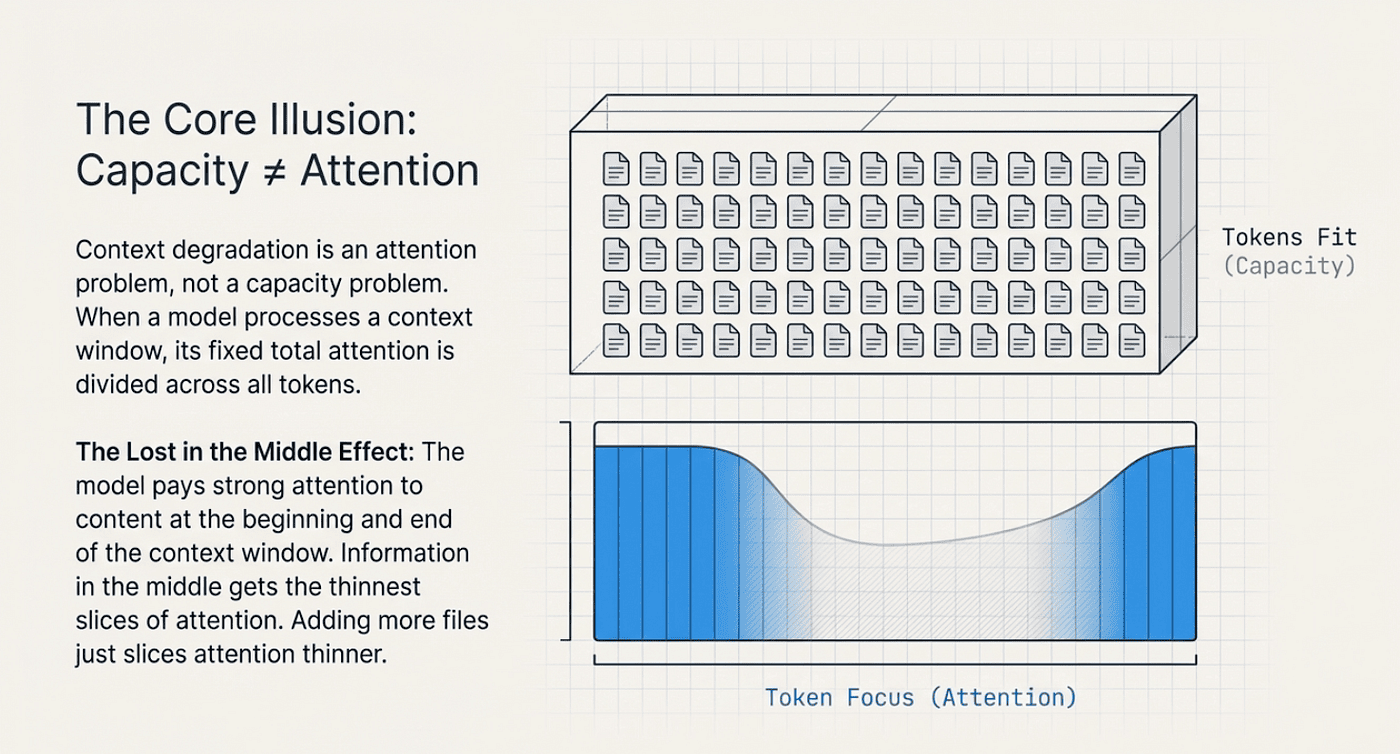
CCA: Lost in the Middle effect
Picture it this way. You have one hour to review code. If you review ten files, each file gets six minutes of focused attention. If you review sixty files, each file gets one minute. The hour is the same. The attention per file is not. Stuffing more files into the hour does not make you a faster reviewer. It makes you a worse one.
That is context degradation. The session has the capacity for all 60 files. The attention quality per file drops off a cliff.
💡 Exam Tip:
When you see a CCA exam question describing declining code quality in longer sessions, the answer is never “increase the context window.”
That is the trap. More capacity does not fix an attention distribution problem. It makes it worse by spreading attention even thinner across more tokens.
The “Bigger Context Window” Anti-Pattern
This is the anti-pattern the exam loves most in this scenario:
💡 “Our Claude Code sessions are producing lower-quality code as they get longer. We need a bigger context window.”
The logic sounds airtight. Quality drops as sessions get longer. More room means the session can hold everything without running out of space. Problem solved, right?
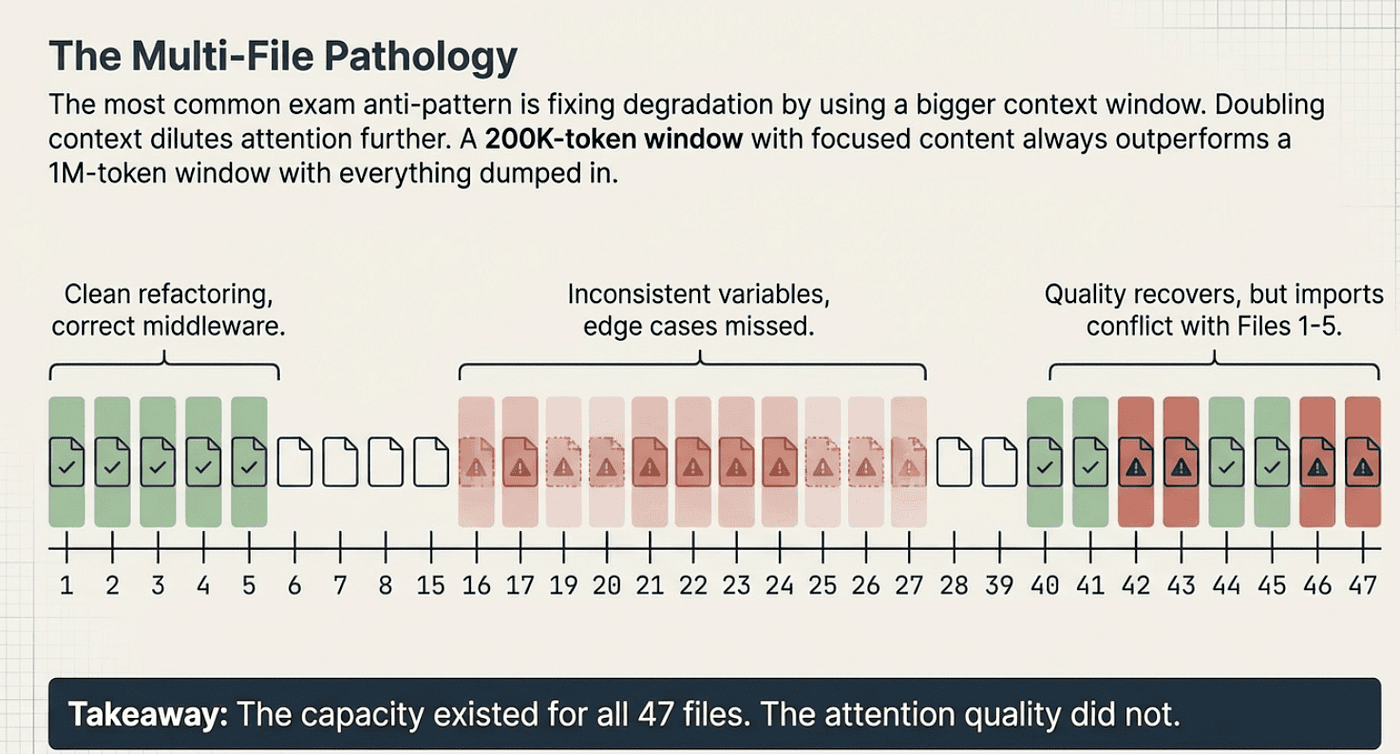
Wrong. Doubling the context window does not double attention quality. It dilutes it. Every additional token added to the context takes a slice of attention away from the tokens already there. A 200K-token context window with focused, relevant content outperforms a 1M-token context window with everything dumped in. Not because of some arbitrary preference for smaller windows, but because attention is a finite resource and you cannot manufacture more of it by expanding capacity.
Here is the failure cascade in a real scenario. A team loads 47 service files into a single session (380K tokens) and asks Claude Code to refactor all of them to use new authentication middleware. Here is what actually happens:
- Files 1 through 5: clean, thorough refactoring, correct middleware integration
- Files 15 through 30: inconsistent variable naming, some middleware calls formatted differently than others, a few edge cases missed
- Files 40 through 47: quality improves again (the end-of-context attention bump), but import patterns conflict with what was established in the first batch
The context window had the capacity for all 47 files the entire time. The attention quality degraded and recovered based on position in the context, not based on code complexity.
When you see an exam question describing this pattern, eliminate any answer that mentions context window size. The root cause is attention dilution and the correct answer always points to restructuring sessions.
Anthropic Claude Architect Exam: Multi-File Pathology
Correct Pattern: Focused Per-File Passes
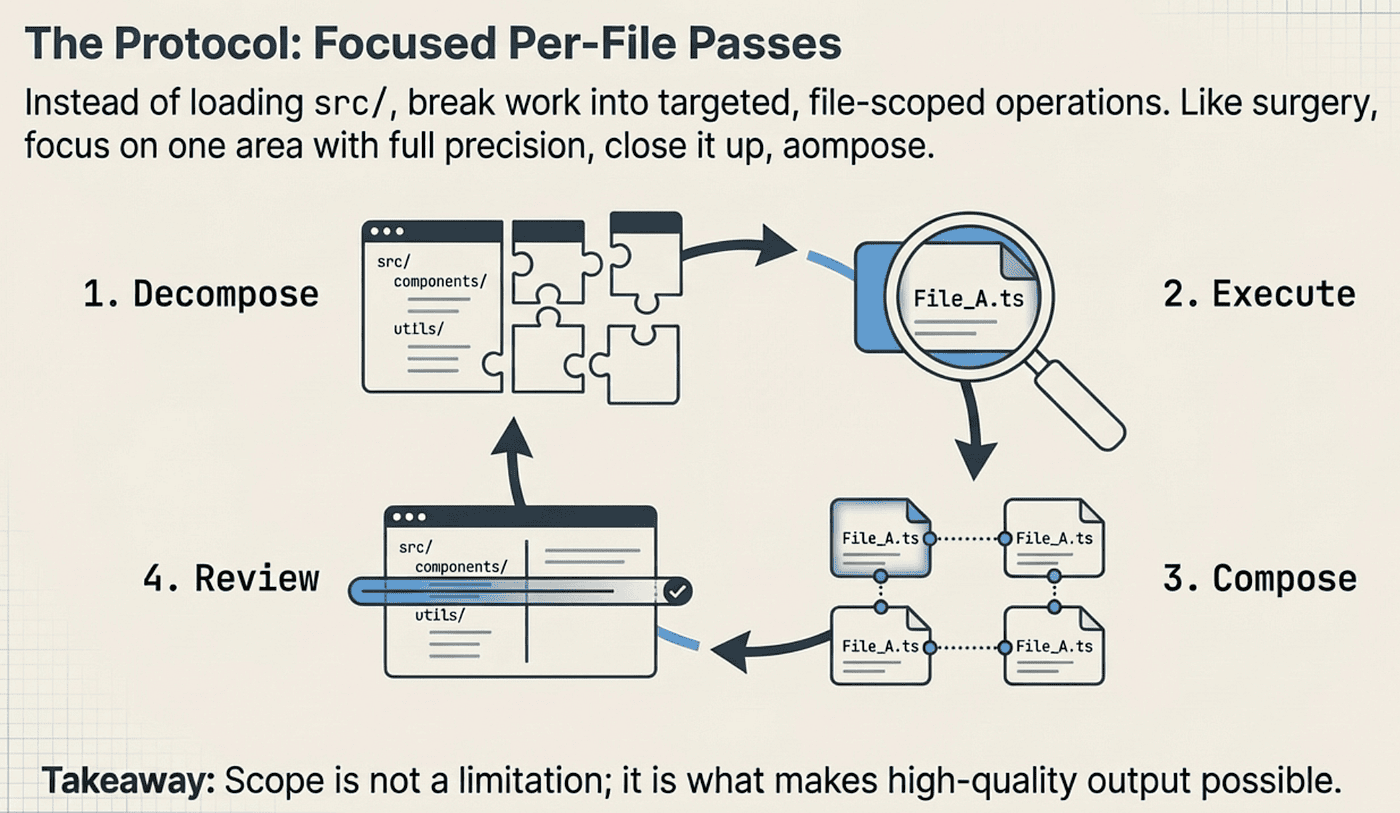
The right approach to large codebase tasks is decomposition. Instead of loading all of src/ and asking Claude to refactor everything, you break the work into targeted, file-scoped operations.
CCA: Focused Per-File Passes
Each pass focuses Claude’s full attention on a specific file or module. You get the best possible output for that unit. Then you compose results across passes and review for cross-file consistency.
Think of it like surgery. A surgeon does not operate on every organ simultaneously. They focus on one area, do the work with full attention and precision, close it up, and move to the next. The same principle applies to Claude Code sessions. Scope is not a limitation. Scope is what makes quality possible.
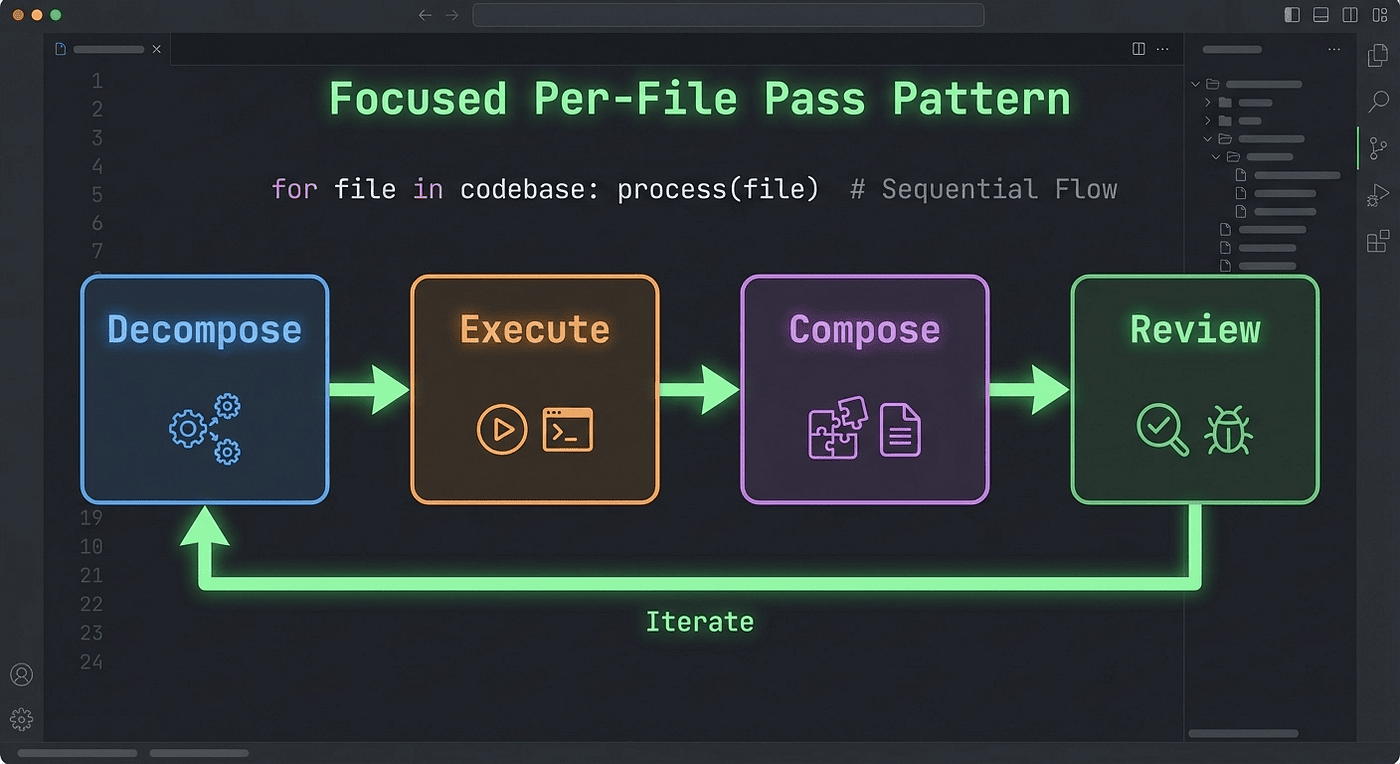
Here is what the workflow looks like:
- Decompose the large task into per-file or per-module units
- Execute each unit in a focused session with only the relevant context
- Compose the results, stitching changes together
- Review for cross-file consistency (naming, imports, interface contracts)
This pattern directly addresses the attention dilution problem. Each pass gets Claude’s full attention on a manageable scope. The output quality stays high across the entire refactor.
💡 Exam Tip:
If a CCA exam question asks for the correct approach to large-codebase refactoring and gives you “load the entire codebase” as an option, that is always wrong. The correct answer involves decomposition into focused per-file or per-module passes.
CCA: Focused per-file pass workflow: Decompose, Execute, Compose, Review steps for large codebase refactoring in Claude Code
CLAUDE.md Hierarchy: The Project Rules Engine
CLAUDE.md Configuration (Heavily Tested on CCA Exam)
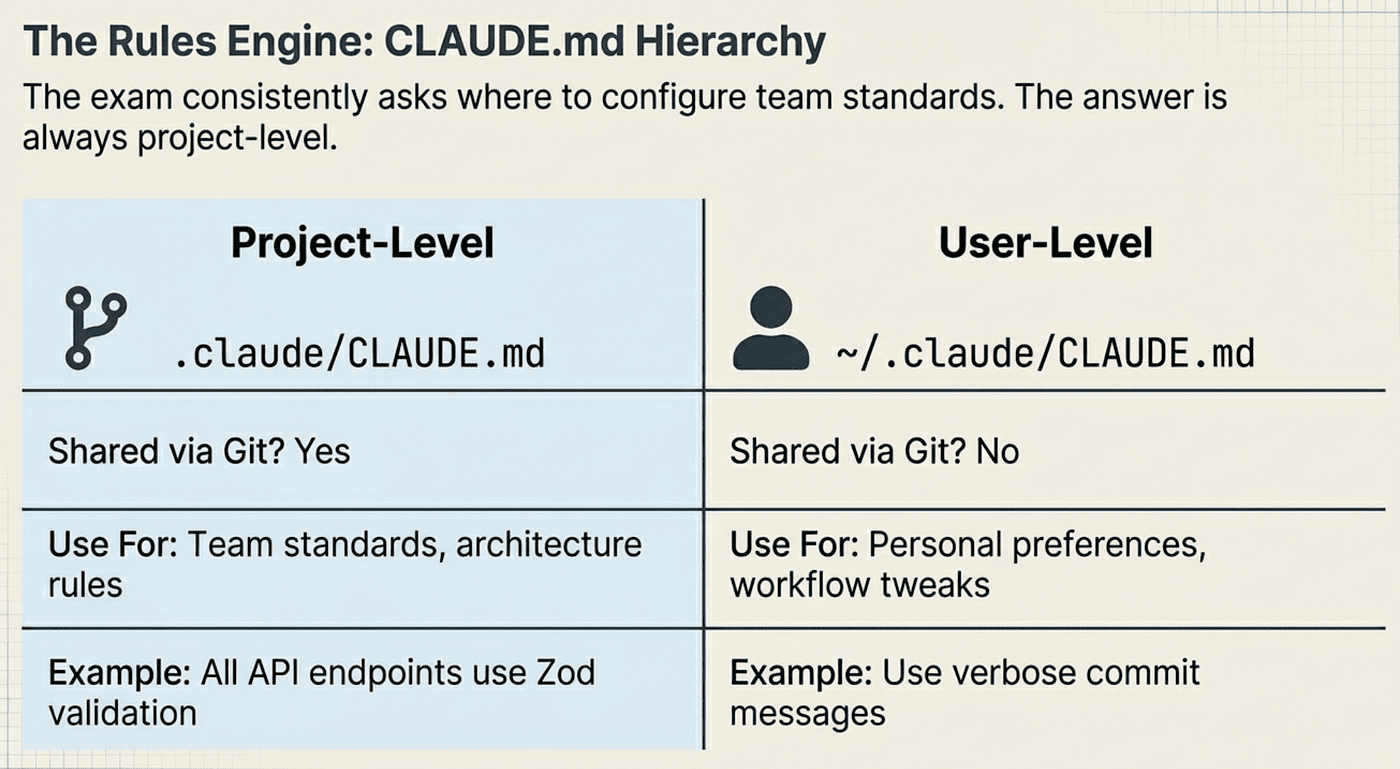
The **CLAUDE.md **hierarchy is one of the most frequently tested topics in the Code Generation scenario. There are two levels, and the CCA exam wants you to know exactly when each one applies.
Project-level: .claude/CLAUDE.md
- Checked into Git, shared with the entire team via version control
- Contains team-wide standards, architecture rules, and coding conventions
- Every team member’s Claude Code sessions pick up these rules automatically
- This is the programmatic approach the exam consistently favors
User-level: ~/.claude/CLAUDE.md
- Personal to the developer, stored in their home directory
- Not checked into version control, not shared
- Contains personal preferences, shortcuts, and workflow tweaks
The exam question pattern looks like this: “Where should team coding standards be configured?” The answer is always project-level, never user-level. Team standards belong in version control so everyone gets them automatically, with zero manual setup required.
CCA: CLAUDE.md Project Level vs User Level
💡 Exam Tip:
The **CLAUDE.md **hierarchy question is straightforward if you remember one rule: anything a whole team needs belongs in project-level CLAUDE.md committed to Git.
Anything that is personal preference stays in user-level. The exam loves to offer user-level as a plausible answer because developers are used to personal config files. Do not fall for it.
Here is the reference table:
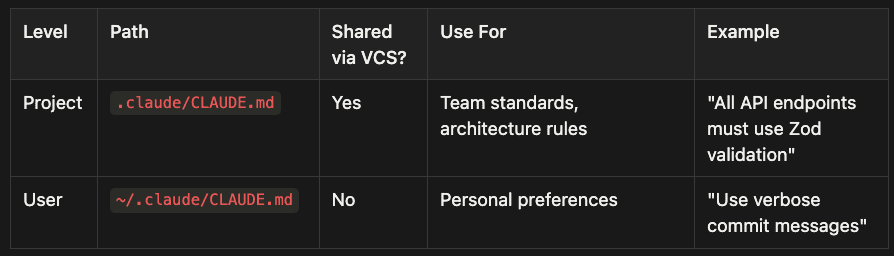
- Project Level: Path is .claude/CLAUDE.md, shared via VCS (Yes), used for team standards and architecture rules. Example: "All API endpoints must use Zod validation"
- User Level: Path is ~/.claude/CLAUDE.md, not shared via VCS (No), used for personal preferences. Example: "Use verbose commit messages"
💡 Exam Tip:
🚩 Questions about onboarding new developers where team members manually copy rules signal the wrong answer.
✅ The correct pattern is project-level CLAUDE.md so onboarding automatically includes all team standards.
What Belongs in CLAUDE.md
CLAUDE.md is where you encode the rules that a tech lead would enforce in code review. Think of it as a tech lead who is always present in every Claude Code session, never forgets a rule, and never skips a review:
- Coding standards: Naming conventions, formatting rules, import ordering
- Architecture rules: “All API endpoints must validate input with Zod schemas”
- File organization: “Controllers go in src/controllers/, services in src/services/"
- Test requirements: “Every new public function needs a unit test”
- Forbidden patterns: “Never use any in TypeScript," "No raw SQL outside the data layer"
CLAUDE.md as Context Engineering
Here is the deeper insight the exam is testing: **CLAUDE.md **content is injected into every Claude Code session automatically. You do not need to repeat your project rules in every prompt. You write them once in CLAUDE.md, and they are always there.
This connects to a broader CCA mental model: programmatic enforcement beats prompt-based guidance. Putting rules in CLAUDE.md is programmatic. Typing “remember to follow our coding standards” in every prompt is prompt-based. The exam consistently favors the programmatic approach.
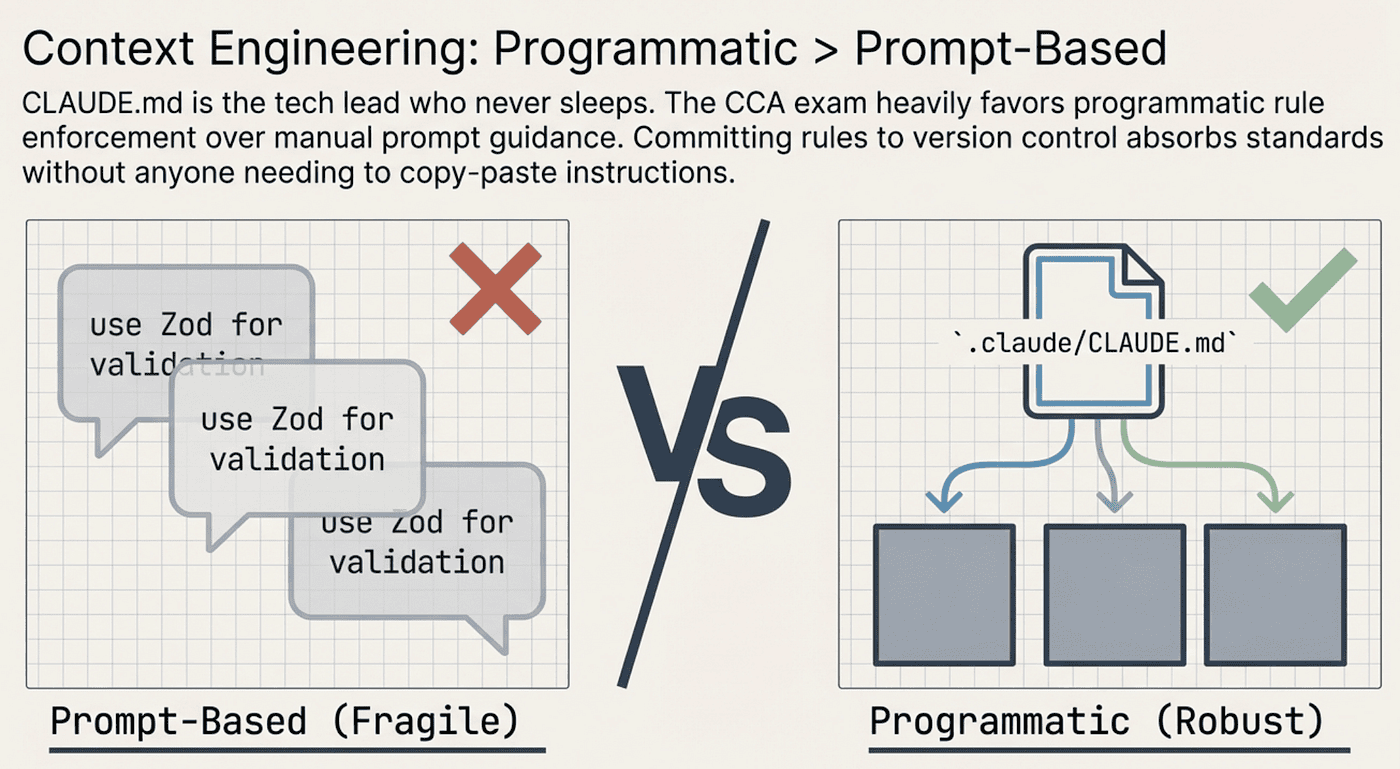
CCA: Don’t leave it up to developer memory, programmatic is more robust
When you commit .claude/CLAUDE.md to your repo, every developer on the team gets those rules in every session, automatically. No one forgets. No one has to copy-paste standards into their prompt. That is the power of the pattern.
💡 Exam Tip:
🚩 Any question describing a problem where ***“some developers follow the standards and others do not” ***is signaling a user-level versus project-level confusion.
✅ The fix is always to move team rules to project-level **CLAUDE.md **in version control. Prompt reminders and individual setup requirements are both wrong.
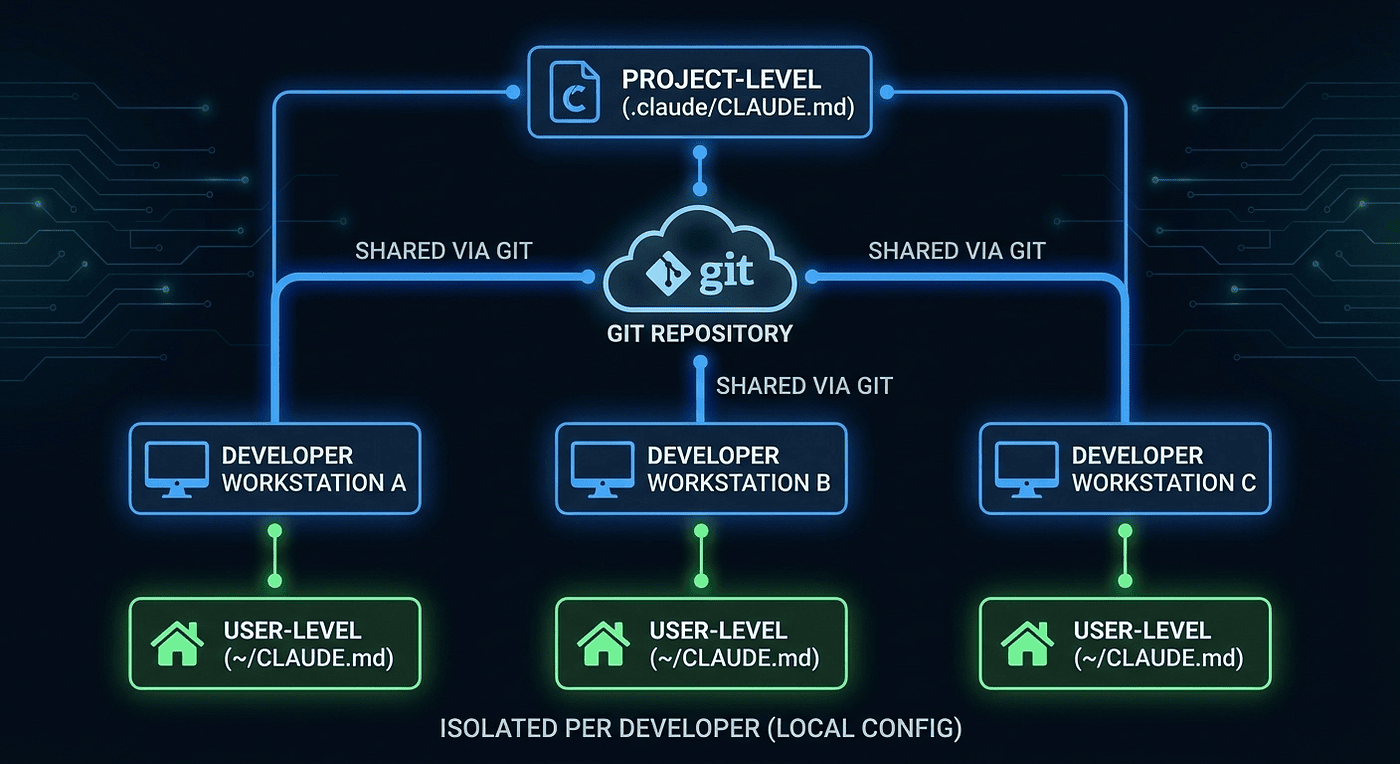
CLAUDE.md project-level vs user-level hierarchy: team standards shared via Git vs personal developer preferences
Custom Skills and Slash Commands
Skills for Repeatable Workflows
Custom skills let you encode complex, multi-step workflows into reusable commands. Instead of writing a detailed prompt every time you need to scaffold a new API endpoint, you create a skill like /generate-api-endpoint that handles the entire sequence: route definition, handler, input validation, error handling, and tests.
Skills solve two problems at once:
- Consistency: Every team member gets the same scaffold, following the same patterns
- Efficiency: Complex workflows become one-command operations
The exam tests whether you understand when to create a custom skill versus when to use ad-hoc prompting. The rule of thumb: if a workflow has more than three steps and gets repeated more than twice, it should be a skill.
Skill Design Principles
Good skills follow a few principles the exam expects you to know:
- Focused purpose: Each skill does one thing well. A skill that scaffolds an endpoint should not also run the test suite and deploy to staging.
- Reference CLAUDE.md, do not duplicate it: If your coding standards say “use Zod for validation,” the skill should reference that rule, not restate it. Otherwise you end up maintaining the same rule in two places.
- Frontmatter for metadata: Skills use markdown frontmatter to declare their configuration (name, description, parameters).
- Markdown body for instructions: The skill body is plain markdown that Claude Code follows as instructions.
Skills and **CLAUDE.md **work together. CLAUDE.md sets the rules. Skills encode the workflows that follow those rules.
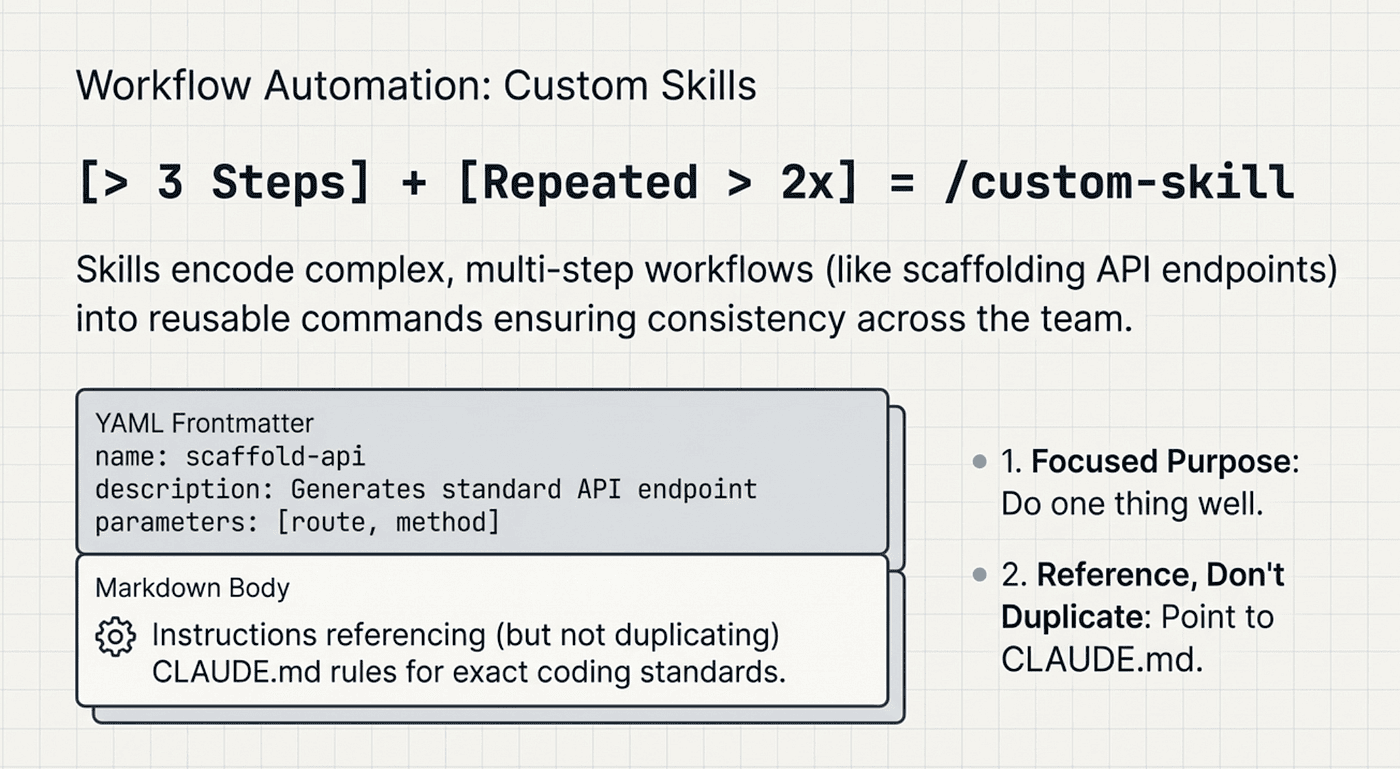
CCA: Use skills when you have to repeat a workflow again and again
💡 Exam Tip:
✅ When a team creates a new API endpoint ten times monthly and developers must recall complex steps each time, the answer is a custom skill.
🚩 Ad-hoc prompting relies on individual memory and produces inconsistent results.
Claude Code CI/CD Integration: The -p Flag
The Critical -p Flag for Non-Interactive Mode
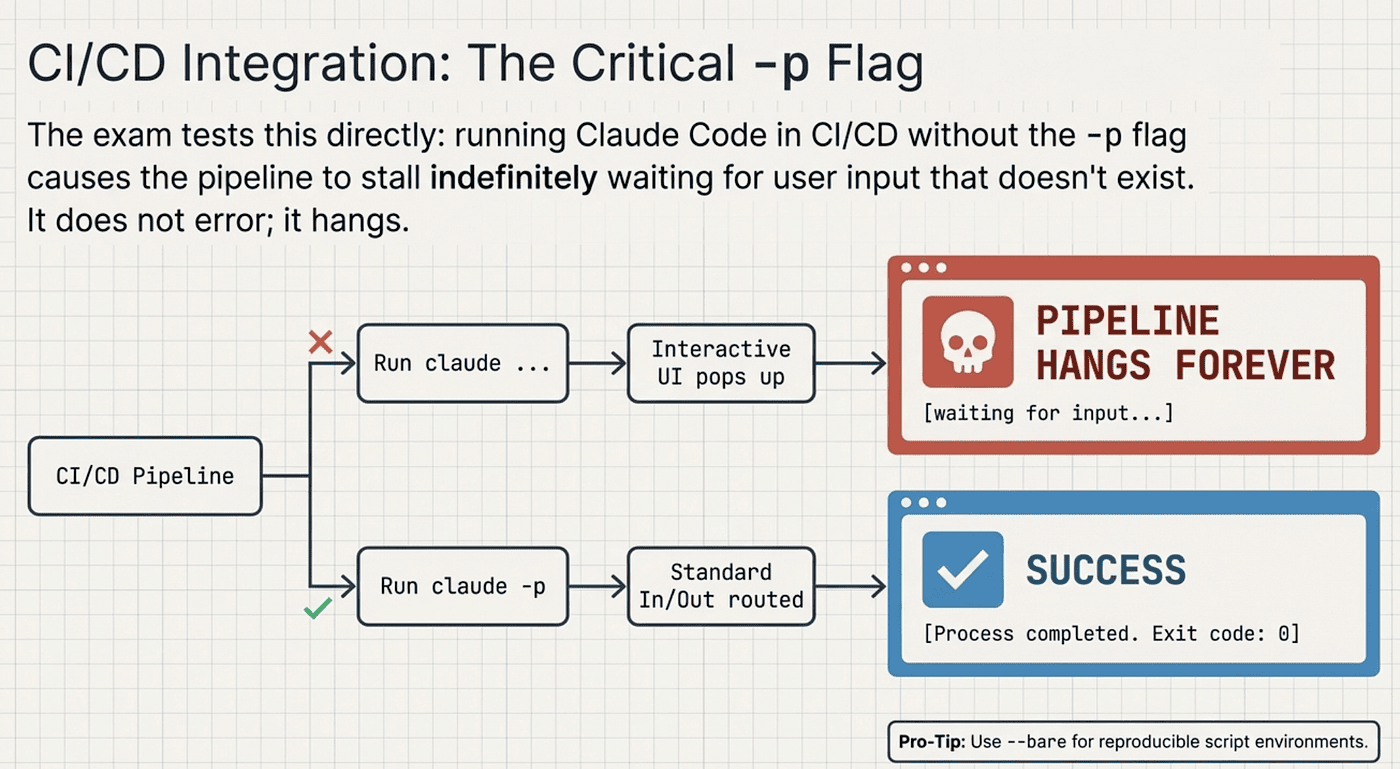
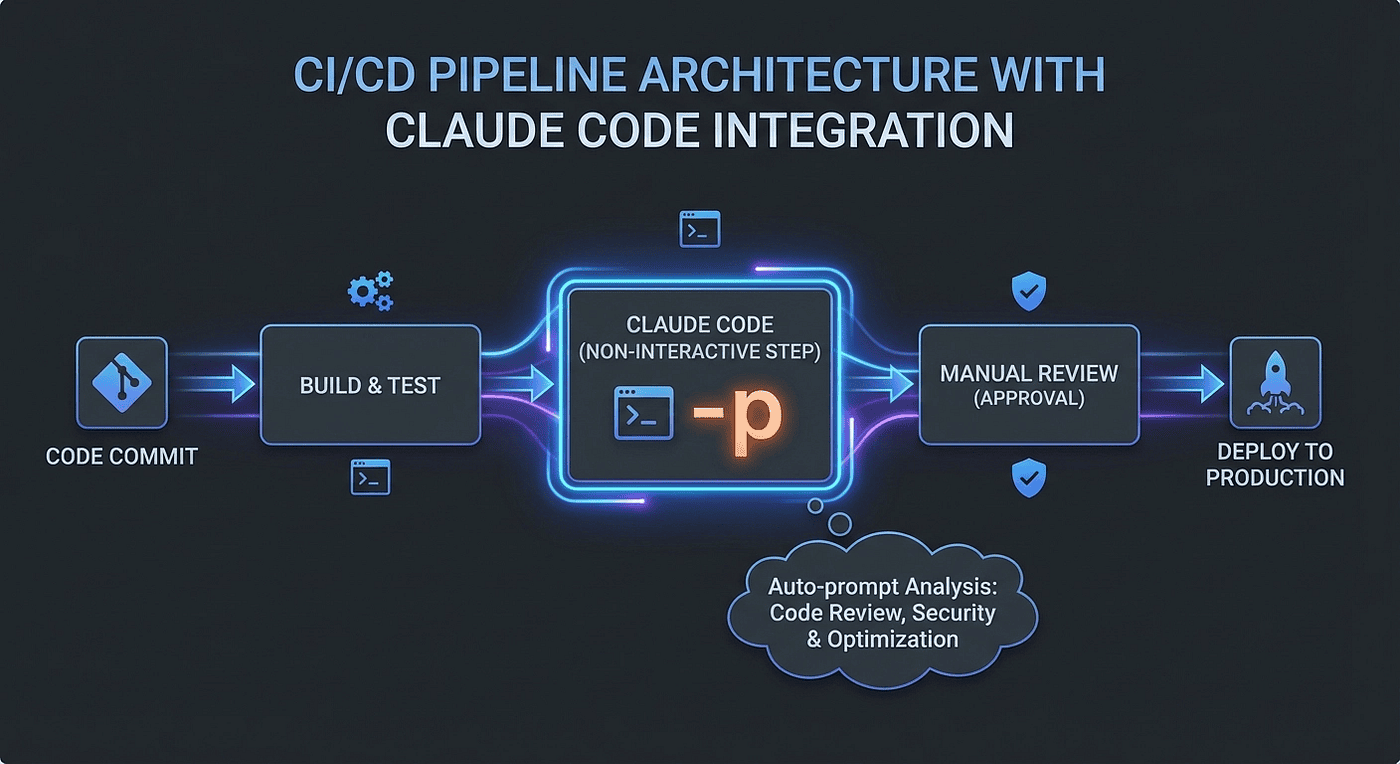
This is one of those details the CCA exam tests directly, and it is straightforward: if you run Claude Code in a CI/CD pipeline without the -p flag, the pipeline hangs.
CCA: Don’t leave your pipeline hanging
Without -p, Claude Code launches its interactive terminal UI and waits for user input. In a CI/CD environment, there is no user. The pipeline stalls indefinitely. Not slowly, not with an error. It just sits there, waiting for input that will never arrive.
The -p (short for --print) flag enables non-interactive mode:
- Standard input serves as the prompt
- Standard output captures the response
- No terminal UI
- No interactive prompts
Here is the basic pattern:
claude -p "Review this pull request for security issues" --bare
The --bare flag is also worth knowing. It skips auto-discovery behavior and produces reproducible results in scripted environments. Anthropic recommends --bare as a best practice for CI/CD usage.
💡 What --bare Actually Does
The --bare flag enables minimal headless mode for scripted -p calls. It skips hooks, LSP, plugin sync, and skill directory walks. It also requires ANTHROPIC_API_KEY or an apiKeyHelper via --settings,OAuth and keychain auth are disabled, and auto-memory is fully disabled.
Breaking down what --bare strips out:
- Hooks: No pre/post tool-use side effects
- LSP: No language server startup
- Plugin sync: No skill/plugin loading overhead
- Skill directory walks: No .claude/skills/ or ~/.claude/skills/ scanning
- Auto-memory: No memory read/write
- OAuth/keychain auth: Must use ANTHROPIC_API_KEY explicitly
The practical effect: faster startup, deterministic behavior, no environment-specific side effects. The same --bare call with identical API key and input produces the same execution path across environments.
Why it matters for CI/CD: In pipelines like GitHub Actions, --bare prevents hooks from triggering shell commands, skills from auto-loading, and memory from previous sessions bleeding in, ensuring clean, reproducible invocations.
Structured Output
For structured output in automation pipelines, combine flags:
claude -p "Analyze this code" --output-format json
The --output-format json flag returns structured JSON with result, session_id, and metadata fields. For even more control, you can add --json-schema to constrain the output to a specific schema.
💡 Exam Tip:
The Claude Code CI/CD question is one of the most predictable on the exam. The scenario describes a pipeline that hangs indefinitely on the Claude Code step.
✅ The answer is always the missing -p flag.
🚩 Trick option distractors usually include:
- "network access" — would produce an error, not a hang — WRONG!
- "context window too small" — would error out, not a hang — WRONG!
CI/CD Patterns with Claude Code
Claude Code fits naturally into several CI/CD workflows:
- Automated code review: Run on every pull request to flag issues
- Test generation: Generate tests for new or changed code
- Documentation updates: Update API docs when endpoints change
- Style enforcement: Check code against team standards (via CLAUDE.md rules)
Batch vs Real-Time API in CI/CD
CCA: When to use Real-Time vs Batch
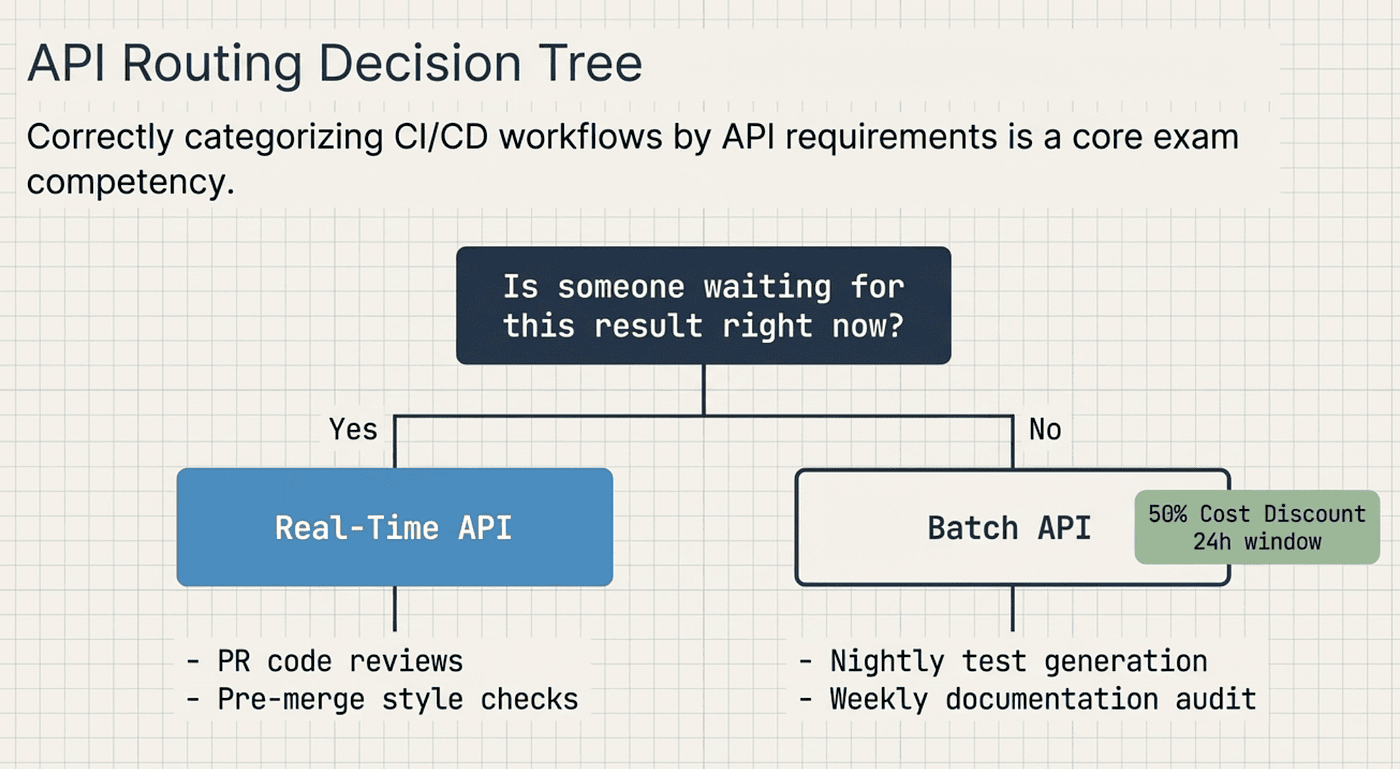
The CCA exam also tests whether you can correctly categorize CI/CD workflows by their API requirements. The key question: is someone waiting for this result right now?
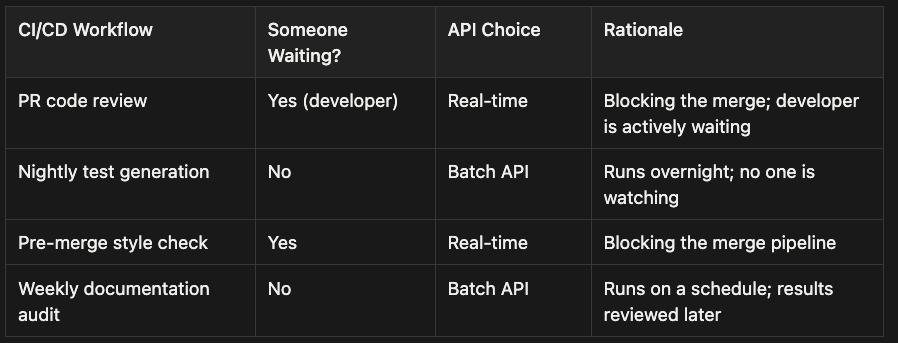
- PR code review: Yes (developer waiting) → Real-time API. Rationale: Blocking the merge; developer is actively waiting
- Nightly test generation: No one waiting → Batch API. Rationale: Runs overnight; no one is watching
- Pre-merge style check: Yes (developer waiting) → Real-time API. Rationale: Blocking the merge pipeline
- Weekly documentation audit: No one waiting → Batch API. Rationale: Runs on a schedule; results reviewed later
The Batch API offers a 50% cost discount with a 24-hour processing window (most batches complete within an hour). Use it for anything where latency does not matter. Use the Real-time API for anything that blocks a developer or a pipeline.
💡 Exam Tip:
The Batch vs Real-time question always has a timing component.
“Developer waiting for merge” always means real-time.
“Nightly,” “weekly,” or “scheduled” always means Batch API.
The cost discount is the reward for accepting latency.
If the question does not mention anyone waiting, lean toward Batch API.
Claude Code CI/CD pipeline integration with the -p flag for non-interactive mode and automated code review
Attention Dilution in Practice
The Multi-File Trap
Here is a scenario the CCA exam loves to present:
💡 “A developer loads the entire src/ directory (47 files, 380K tokens) and asks Claude Code to refactor all services to use the new authentication middleware."
Walk through what actually happens, file by file.
Files 1 through 5 sit at the beginning of the context where attention is strongest. The refactoring is clean. The middleware is integrated correctly. Error handling is thorough. This matches what the developer hoped for, and they feel confident.
By files 15 through 30, the middle-of-context penalty hits hard. Variable names start drifting from the pattern established in the first batch. Some middleware calls use the pattern from file 3. Others use a slightly different variant. A few edge cases get missed. The developer reviewing this output might not notice the inconsistency immediately, because each individual file looks mostly fine. The problem is cross-file coherence.
Files 40 through 47 get the end-of-context attention boost, so quality improves again. But the import patterns now conflict with the earlier files, because each position in the context was essentially working from a slightly different implicit understanding of the task.
The context window had the capacity for all 47 files throughout. Capacity was never the constraint. Attention was. This is context degradation, not a capacity problem.
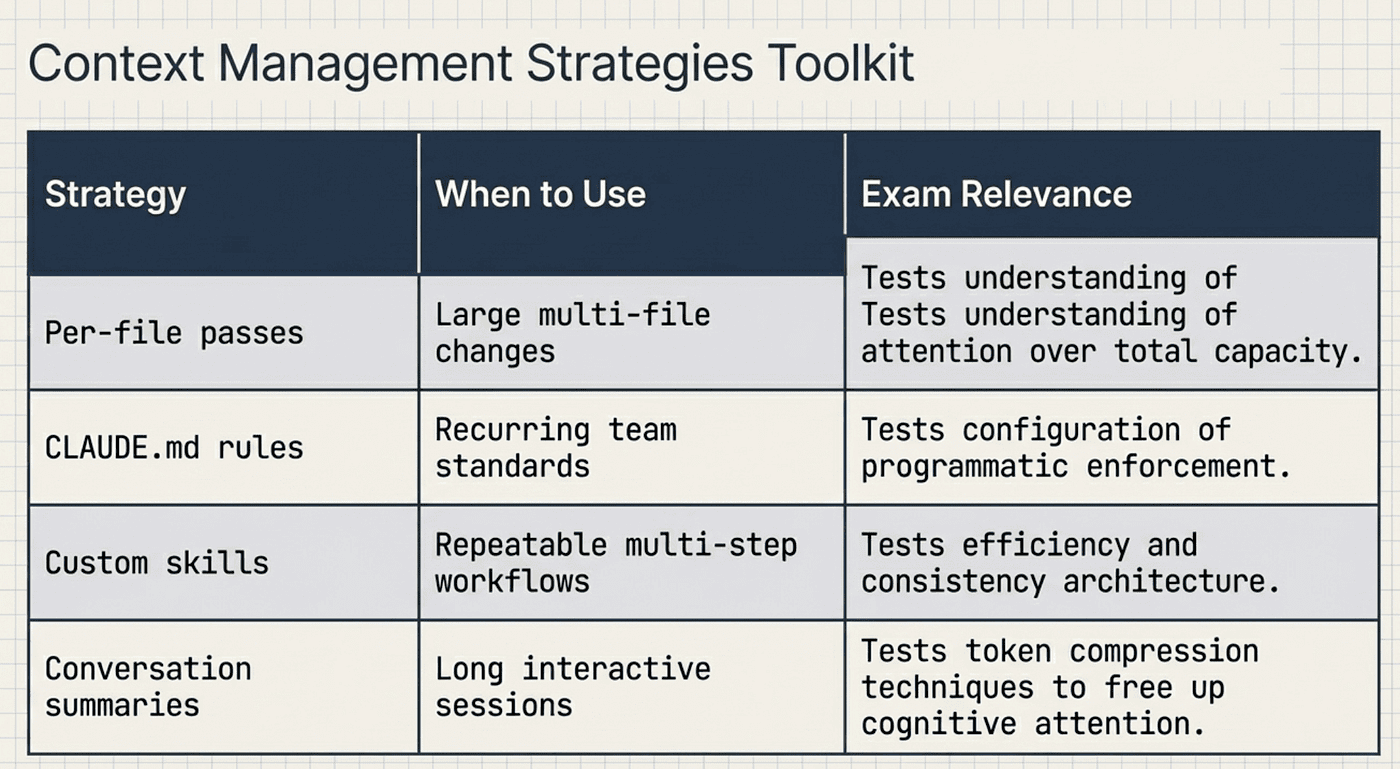
CCA: Context Strategies
Correct Architecture for Large Codebases
The correct approach combines several patterns we have covered:
- Decompose into focused units: Break the refactor into per-file or per-module tasks
- Use CLAUDE.md for consistency: The auth middleware pattern, naming conventions, and import rules go in CLAUDE.md so every pass applies the same standards
- Leverage custom skills: Create a /refactor-auth-middleware skill that encodes the specific refactoring pattern, so every file gets the same treatment
- Review composed results: After all passes complete, do a cross-file review for consistency
Coordinator Pattern
There is a fifth pattern worth knowing for the exam: the coordinator pattern. This comes from the Agentic Architecture domain (27% of the exam). One orchestrating session plans the decomposition, spawns focused sub-tasks, and then reviews the composed results. Think of it as a project manager who breaks work into tickets, assigns them, and then reviews the deliverables.
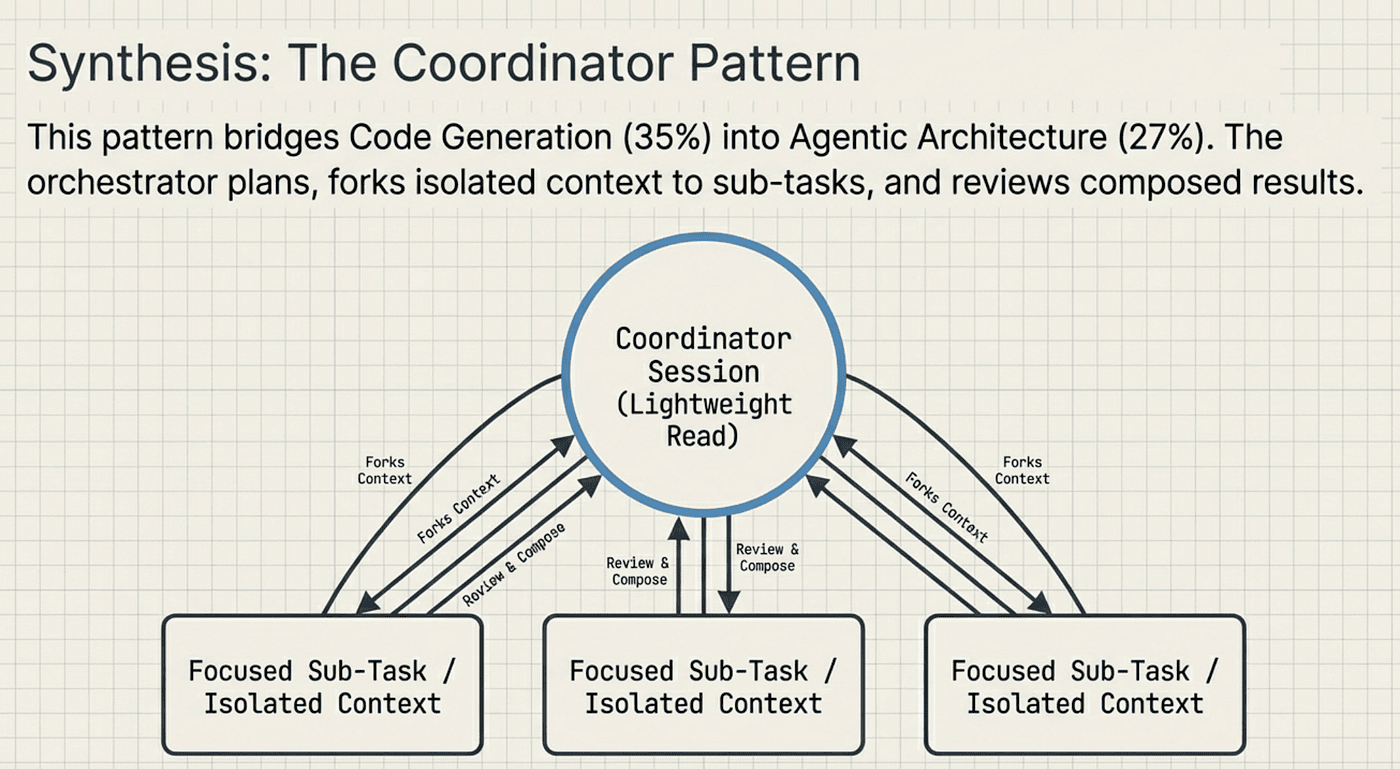
CCA: Coordinator Pattern: Each Sub-task gets its own context
The coordinator pattern applied to code generation:
- Coordinator session analyzes the full codebase structure (lightweight read, not full content load)
- Coordinator creates a task plan: which files need changes, in what order, with what dependencies
- Each file gets its own focused session with only the context it needs
- Coordinator reviews all results for cross-file consistency
This is context forking in action. The coordinator forks a subset of its context to each sub-task. Each sub-task gets only what it needs, keeping attention focused. This connects directly to the hub-and-spoke architecture and context isolation concepts covered in Article 4.
Context Management Strategies
Beyond the per-file pass pattern, the CCA exam tests several context management strategies that apply to the Code Generation scenario.
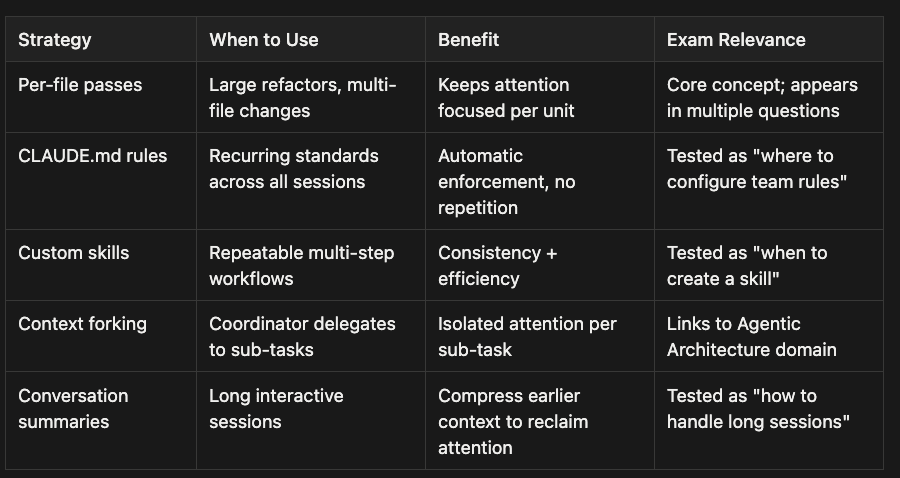
The conversation summary pattern is worth a quick note. In a long interactive session where you have gone back and forth with Claude Code many times, the earlier messages still consume tokens in the context window. Summarizing earlier conversation into a compact reference frees up attention for the current task. This is another form of keeping context focused, not expanding it.
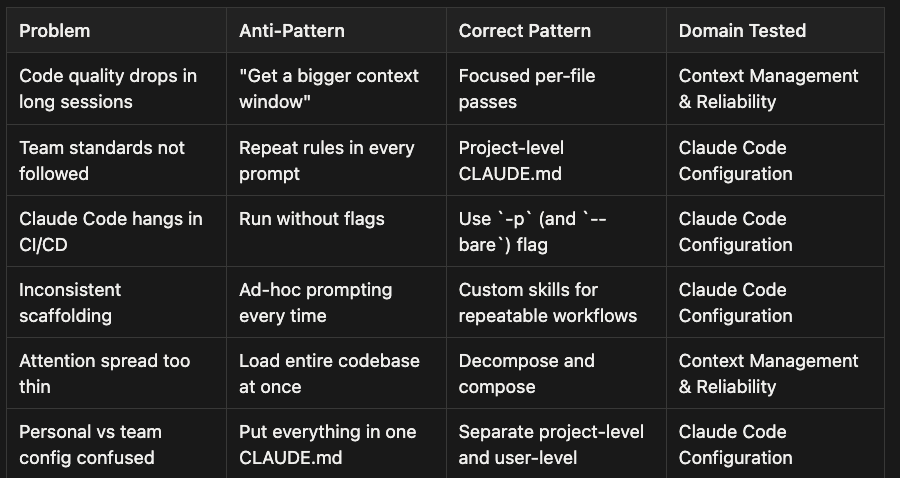
Anti-Pattern vs Correct Pattern Summary
Here is the complete reference table for this scenario. If you memorize one thing from this article, make it this table.
Question 1: Code Quality Degradation
❓
A development team reports that Claude Code produces high-quality refactoring for the first few files in a session, but quality noticeably drops for files processed later. What is the most likely root cause?
A.) The model’s context window is too small for the codebase
B.) The team is using an outdated model version
C. ) Attention distribution degrades as context grows (context degradation)
D.) The files later in the session have more complex code
✅ Answer: C. This is the textbook context degradation question. The root cause is attention dilution, not capacity.
Option A is the main distractor because it sounds plausible. Here is why it is wrong: increasing the context window would actually make the problem worse by spreading attention even thinner across more tokens.
Option D is tempting but the question specifies the pattern holds consistently (first files good, later files worse), which points to context position, not code complexity. If complexity were the cause, you would see quality correlated with complexity, not with file order.
Question 2: Team Standards Configuration
❓
A team of 8 developers uses Claude Code. They want to ensure all generated code follows their TypeScript coding standards, including strict null checks and Zod validation on all API inputs. Where should these rules be configured?
A.) In each developer’s ~/.claude/CLAUDE.md
B.) In the project's .claude/CLAUDE.md, committed to version control
C.) In a pinned message at the start of each Claude Code session
D.) In the CI/CD pipeline configuration
✅ Answer: B. Team standards belong in the project-level CLAUDE.md, committed to version control.
Option A puts rules in user-level config, which is not shared. All 8 developers would need identical manual setup, and any new hire starts unprotected until they remember to configure it.
Option C works but is prompt-based rather than programmatic, and someone will forget.
Option D catches violations after the fact but does not guide generation in the session where the code is written.
Question 3: CI/CD Pipeline Failure
❓
A team adds Claude Code to their CI/CD pipeline for automated code review on pull requests. The pipeline hangs indefinitely on the Claude Code step. What is the most likely cause?”
A.) The CI/CD environment does not have network access to the Claude API
B.) The code review prompt is too large for the context window
C.) Claude Code was not run with the -p flag for non-interactive mode
D.) The Batch API is being used for a blocking workflow
✅** Answer: C.** Without -p, Claude Code launches its interactive terminal UI and waits for user input that will never come. A hang is the diagnostic clue here.
A network access failure (A) would produce a connection error, not a hang.
A context window problem (B) would produce an error response.
Using Batch API for a blocking workflow (D) would produce a slow response, not a hang. Only "waiting for interactive input" produces an indefinite hang.
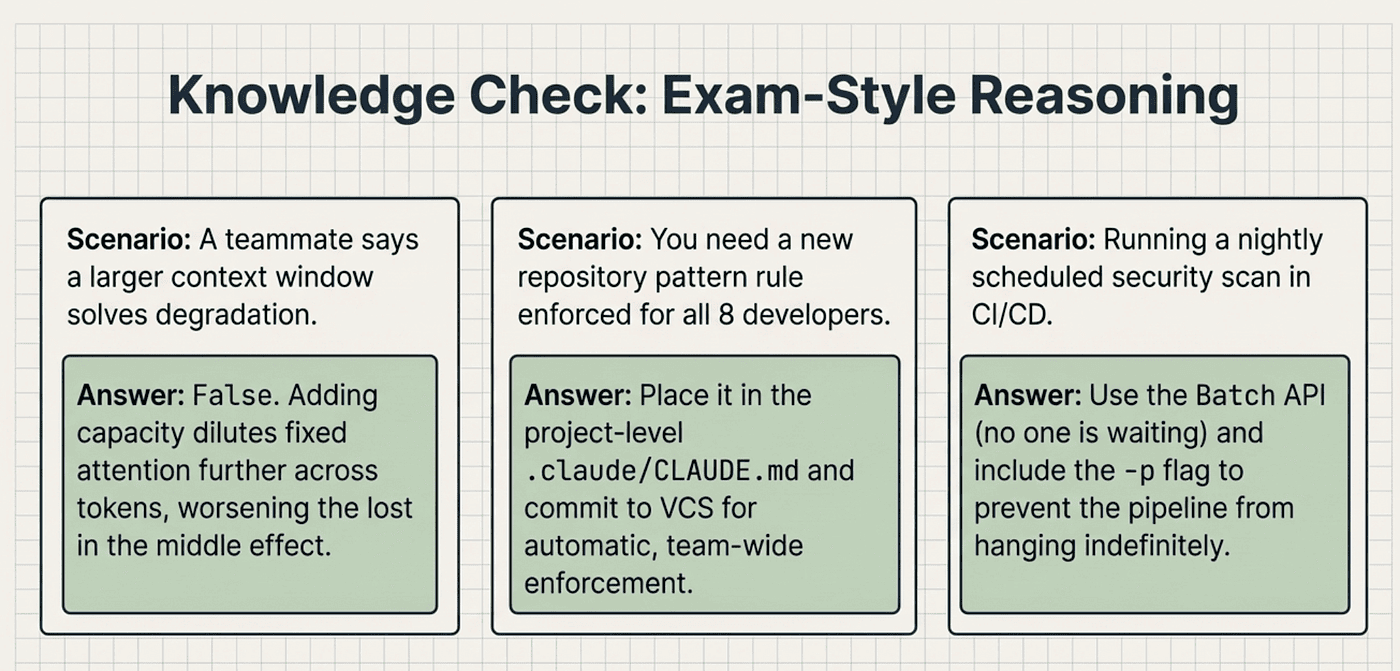
CCA: Knowledge Check
Study Checklist
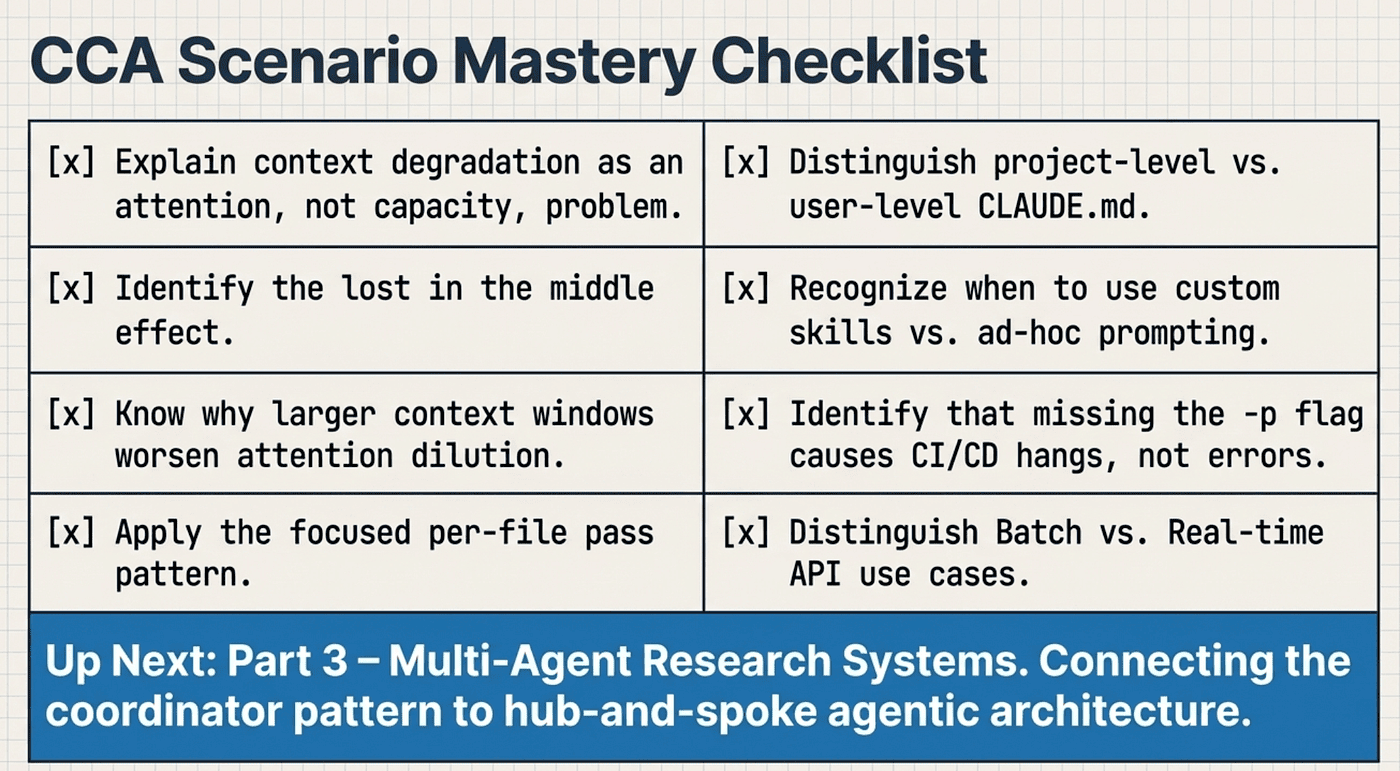
Before you move on, make sure you can confidently answer yes to each of these:
- I can explain context degradation as an attention problem, not a capacity problem
- I know the “lost in the middle” effect and how it impacts code generation quality
- I can explain why a bigger context window makes attention dilution worse, not better
- I know the focused per-file pass pattern and when to use it
- I can state the CLAUDE.md hierarchy: project-level vs user-level
- I know which CLAUDE.md level is shared via version control
- I know which CLAUDE.md level is correct for team standards (project-level)
- I understand when to create a custom skill vs use ad-hoc prompting
- I know the -p flag is required for CI/CD (non-interactive mode)
- I know --bare is recommended for scripted/CI/CD usage
- I can explain why a pipeline hangs (not errors) without -p
- I can distinguish Batch API vs Real-time API use cases in CI/CD
- I can explain the coordinator pattern for large codebase tasks
- I understand context forking and how it relates to focused sessions
CCA: Master the basics
Discussion Questions
These questions are worth thinking through before your exam. They push you past recall and into the reasoning the CCA tests.
- A teammate argues that the solution to context degradation is to use a model with a larger context window. How would you explain why this reasoning is backwards, and what architectural change actually solves the problem?
- Your team has both a project-level .claude/CLAUDE.md and every developer has their own ~/.claude/CLAUDE.md. A new rule needs to be enforced: all database queries must go through the repository pattern. Which file should you put it in, and why does the other location fail for this use case?
- You are setting up a CI/CD pipeline that runs three Claude Code tasks: a PR code review (blocks merge), a nightly security scan (scheduled), and a weekly API documentation update (scheduled). Which should use the Real-time API and which should use the Batch API, and what flag must all three include to avoid the pipeline hanging?
Series Navigation
This article is part of a 3-article CCA Scenario Deep Dive series:
- Article 1: Claude Certified Architect: The Complete Guide to Passing the CCA Foundations Exam
- Article 2: Customer Support Resolution Agent — Agentic loops, escalation design, confidence calibration
- Article 3: Code Generation with Claude Code (you are here) — Context degradation, CLAUDE.md hierarchy, CI/CD integration
- Article 4: Multi-Agent Research System: Hub-and-spoke design, context isolation, tool scoping
The Code Generation scenario draws heavily from two exam domains: Claude Code Configuration & Workflows (20%) and Context Management & Reliability (15%). Together, that is 35% of the exam. Master these concepts and you have a solid foundation for more than a third of the questions you will face.
Up next in Article 4, we tackle the Multi-Agent Research System: the scenario that pulls from the heaviest exam domain (Agentic Architecture at 27%) and tests everything from hub-and-spoke design to silent subagent failure handling. The coordinator pattern introduced at the end of this article is the bridge: understanding how a session decomposes work and forks context is exactly what you need to understand how a multi-agent system coordinates its subagents.
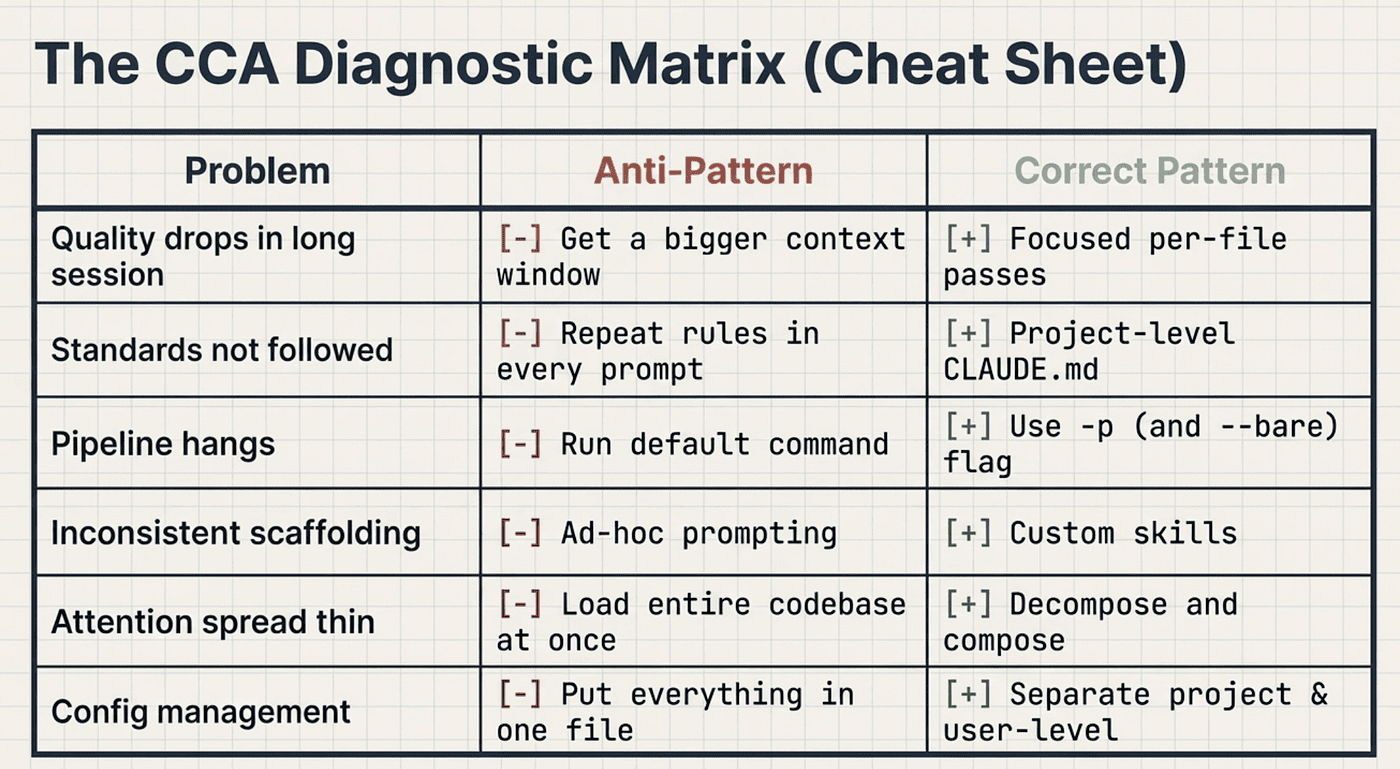
CCA: Review Anti-Patterns
CCAExam #ClaudeCode #AnthropicCertification #AIEngineering #ContextManagement #DeveloperTools #ExamPrep #LLMEngineering
About the Author
Rick Hightower is a technology executive and data engineer who led ML/AI development at a Fortune 100 financial services company. He created skilz, the universal agent skill installer, supporting 30+ coding agents including Claude Code, Gemini, Copilot, and Cursor, and co-founded the world’s largest agentic skill marketplace. Connect with Rick Hightower on LinkedIn or Medium. Check out SpillWave, your source for AI expertise.
Rick has been actively developing generative AI systems, agents, and agentic workflows for years. He is the author of numerous agentic frameworks and developer tools and brings deep practical expertise to teams looking to adopt AI.