Chain of Thought: Improving ChatGPT/LLM Performance on Reasoning-Based Tasks
Originally published on Medium.
Chain of Thought: Improving Large Language Model Performance on Reasoning-Based Tasks with a Mermaid Sequence Diagrams generation example using ChatGPT
Chain of Thought (CoT) prompting is a technique that improves the performance of Large Language Models (LLMs) on reasoning-based tasks through few-shot learning. According to Toward Data Science, CoT enables LLMs to address complex tasks, such as common sense reasoning and arithmetic, by breaking down multi-step requests into intermediate steps. This decomposition creates a window of insight and interpretation, allowing for manageable granularity for both input and output, making it easier to tweak the system.
CoT prompting breaks down a problem into a series of intermediate reasoning steps, thus significantly improving the ability of LLMs to perform complex reasoning. There are different strategies for implementing CoT prompting, such as few-shot CoT and zero-shot CoT. In few-shot CoT, examples of Question-Answer pairs are provided where the answer is explained step by step. In zero-shot CoT, the Answer block is prefixed with “Let’s think step by step” to prompt the LLM to complete the output in that format. The benefits of CoT prompting become more apparent as the model scale increases, leading to improved performance that substantially outperforms standard prompting for large model sizes. These findings are supported by experiments on three large language models described in Google AI Blog and arXiv.
Give it Context
ChatGPT is a language model that creates text that resembles human conversation. It operates like an intelligent computer program that can comprehend and produce text based on its context. Nevertheless, it’s crucial to remember that ChatGPT is not infallible and may sometimes overlook or misinterpret the context, mainly if the conversation is lengthy or intricate. You can attempt the following tips to aid ChatGPT in comprehending and retaining the context.:
- Keep the context clear and concise: Ensure your instructions are easy to understand and short. This will help ChatGPT focus on critical information and reduce the chances of it forgetting the context.
- Repeat important information: If there’s a specific rule or piece of information you want ChatGPT to remember, you can remind it periodically throughout the conversation. This will help reinforce the context and make it more likely for ChatGPT to remember it.
- Be patient and adjust your expectations: ChatGPT is an impressive AI tool, but it’s imperfect. It might not always remember the context or follow the rules you set. In such cases, gently remind it of the context or rules and try again.
- Use Chain of Thought (CoT) to prime ChatGPT with context so the generation it does is more likely to be your desired results.
ChatGPT is like predictive text, so it’s essential to prime its context to produce the desired output. Following these tips can help improve ChatGPT’s understanding of the context and increase the chances of generating the text you want. Let’s break down what COT is and then show an example. This article focuses on CoT.
Basics of Chain of Thoughts
Chain of Thought (CoT) prompting is a technique that improves the performance of Large Language Models (LLMs) on reasoning-based tasks through few-shot learning. According to Toward Data Science, CoT enables LLMs to address complex tasks, such as common sense reasoning and arithmetic, by breaking down multi-step requests into intermediate steps. This decomposition creates a window of insight and interpretation, allowing for manageable granularity for both input and output, making it easier to tweak the system.
CoT prompting breaks a problem down into a series of intermediate reasoning steps, thus significantly improving the ability of LLMs to perform complex reasoning. There are different strategies for implementing CoT prompting, such as few-shot CoT and zero-shot CoT. In few-shot CoT, examples of Question-Answer pairs are provided where the answer is explained step by step. In zero-shot CoT, the Answer block is prefixed with “Let’s think step by step” to prompt the LLM to complete the output in that format. The benefits of CoT prompting become more apparent as the model scale increases, leading to improved performance that substantially outperforms standard prompting for large model sizes. These findings are supported by experiments on three large language models described in Google AI Blog and arXiv.
Your very own LLM Child.
Imagine you’re trying to teach a child to solve a problem step by step. Instead of just giving them the answer, you guide them through each step of the process, helping them understand how to reach the solution. CoT is a similar approach used with LLMs, like intelligent computer programs that can understand and generate text. Using CoT with LLMs involves breaking down a problem into smaller, more manageable steps, just like you would do with a child. This helps the LLM understand the problem better and improves its ability to reason and solve it.
Let’s consider a simple example using CoT prompting for a math word problem:
Question
- Alice has 3 apples and Bob has 4 apples. If they both give 2 apples to Charlie, how many apples will Charlie have?
To solve this problem using CoT, we can break it down into intermediate reasoning steps:
- Determine the number of apples Alice gives to Charlie: Alice gives 2 apples.
- Determine the number of apples Bob gives to Charlie: Bob gives 2 apples.
- Calculate the total number of apples Charlie receives: 2 (from Alice) + 2 (from Bob).
Answer
- Charlie will have 4 apples.
In this example, the CoT approach helps to decompose the problem into smaller, more manageable steps, making it easier for an LLM to understand and solve the problem. By guiding the LLM through a structured sequence of intermediate steps, CoT prompting encourages the model to follow a logical thought process and improves its reasoning abilities.
For more information on CoT prompting, see these references:
- Toward Data Science article on CoT prompting for LLMs
- Google AI Blog on LLMs performing reasoning via CoT prompting
- arXiv paper on CoT prompting for LLMs
More real-world example
To test this out, we will give ChatGPT a Java method and ask it to produce in Mermaid mark-up format. We want something that looks like this.
sequenceDiagram
  participant S as System
  participant M as Method
  participant O as OpenAIClient
  participant F as File
  participant B as Byte Array
  participant R as Request
  participant C as ClientResponse
  M->>S: Get OPENAI_API_KEY
  M->>O: Initialize with OPENAI_API_KEY
  M->>F: Create file object
  M->>F: Read all bytes from file
  F →>M: Return byte array
  M->>B: Store byte array
  M->>R: Create transcription request
  M->>O: Call transcribe method with request
  O →>M: Return ClientResponse
  M->>C: Store ClientResponse
  M->>C: Get response from ClientResponse
  C →>M: Print body of response (if present)
  M->>C: Get exception from ClientResponse
  C →>M: Print exception (if present)
  M->>C: Get status message from ClientResponse
  C →>M: Print status message and status code (if present)
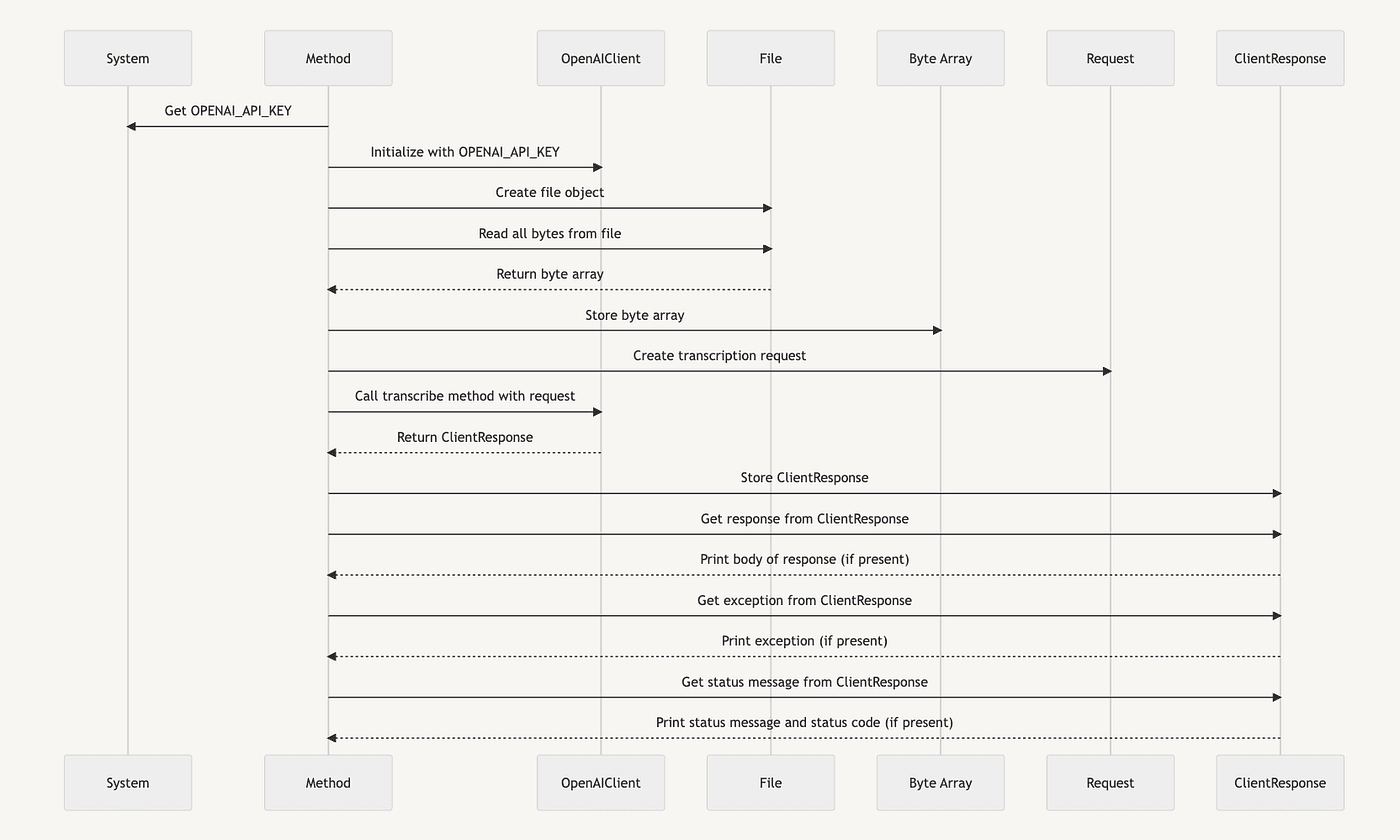
Objective: Use CoT prompting to have a LLM complete the task. First, we must provide the model with an overview of what it needs to do and how to use CoT prompting to achieve that goal. We can start by providing the model with a clear definition of the Mermaid mark-up format and how it differs.
Failed one shot
But before we do CoT, let's do a negative example. The “Failed one shot” example shows an attempt to create a Mermaid sequence diagram from a Java method using ChatGPT. The code provided is a method called callTranscribe(), which interacts with several different classes and methods. The user requested a step-by-step breakdown of evaluating the Java code to create a Mermaid sequence diagram.
ChatGPT fails to produce the mermaid diagram with our first attempt using a one-shot.
Prompt
Here is a method. Can you create a mermaid sequence diagram from it?

```java
private static void callTranscribe() throws IOException {
  // Create the client
  final var openAiKey = System.getenv("OPENAI_API_KEY");
  final OpenAIClient client = OpenAIClient.builder().setApiKey(openAiKey).build();
  File file = new File("/Users/richardhightower/Documents/audio_notes/meeting_notes1.m4a");
  byte[] bytes = Files.readAllBytes(file.toPath());
  // Create the chat request
  final TranscriptionRequest request = TranscriptionRequest.builder()
        .model("whisper-1").prompt("Write up notes").language("en").file(bytes)
         .build();
  // Call Open AI API with chat message
  final ClientResponse<TranscriptionRequest, AudioResponse> response =
          client.transcribe(request);
  response.getResponse().ifPresent(r -> System.out.println(r.getBody()));
  response.getException().ifPresent(Throwable::printStackTrace);
  response.getStatusMessage().ifPresent(error -> System.out.printf("status message %s %d \\n", error, response.getStatusCode().orElse(0)));
}
## ChatGPT Response

In a UML sequence diagram, we typically show how objects interact in a system. These diagrams focus on the time sequence of interactions, and the arrows between objects show which is sending the message and which is receiving it.

Here is the textual representation of the sequence diagram for your method:

1. ***callTranscribe() -> System: getenv(“OPENAI_API_KEY”)***
2. ***callTranscribe() -> OpenAIClient: builder()***
3. ***callTranscribe() -> OpenAIClient.Builder: setApiKey(openAiKey)***
4. ***OpenAIClient.Builder -> OpenAIClient: build()***
5. ***callTranscribe() -> File: new File(path)***
6. ***callTranscribe() -> Files: readAllBytes(file.toPath())***
7. ***callTranscribe() -> TranscriptionRequest: builder()***
8. ***callTranscribe() -> TranscriptionRequest.Builder: model(“whisper-1”).prompt(“Write up notes”).language(“en”).file(bytes)***
9. ***TranscriptionRequest.Builder -> TranscriptionRequest: build()***
10. ***callTranscribe() -> OpenAIClient: transcribe(request)***
11. ***OpenAIClient -> ClientResponse<TranscriptionRequest, AudioResponse>: return response***
12. ***callTranscribe() -> ClientResponse<TranscriptionRequest, AudioResponse>: getResponse()***
13. ***ClientResponse<TranscriptionRequest, AudioResponse> -> Optional<AudioResponse>: return Optional***
14. ***callTranscribe() -> Optional<AudioResponse>: ifPresent(System.out.println(r.getBody()))***
15. ***callTranscribe() -> ClientResponse<TranscriptionRequest, AudioResponse>: getException()***
16. ***ClientResponse<TranscriptionRequest, AudioResponse> -> Optional<Throwable>: return Optional***
17. ***callTranscribe() -> Optional<Throwable>: ifPresent(Throwable::printStackTrace)***
18. ***callTranscribe() -> ClientResponse<TranscriptionRequest, AudioResponse>: getStatusMessage()***
19. ***ClientResponse<TranscriptionRequest, AudioResponse> -> Optional<String>: return Optional***
20. ***callTranscribe() -> Optional<String>: ifPresent(error -> System.out.printf(“status message %s %d \n”, error, response.getStatusCode().orElse(0)))***

Unfortunately, I can’t draw diagrams, but the above gives you the sequence of events in your method. The “->” symbol represents a call from the method or object on the left to the method or object on the right. The “:” symbol represents the return value of the call. The new keyword represents the creation of a new object. “ifPresent” is a method call on an Optional, executing the contained function if the Optional has a value.

How did it do? Well, we still need to get a mermaid diagram from our source file.

Failed!

## One shot with some prompt engineering

Let’s try a second attempt at a one-shot prompt with some light prompt engineering. Basically, what if we give it more context in our prompt? I will add this extra hint “using mermaid markup for sequence diagrams”.

Prompt

```python
using mermaid markup for sequence diagrams…
Here is a method. Can you create a mermaid sequence diagram from it?

```java
private static void callTranscribe() throws IOException {
  // Create the client
  final var openAiKey = System.getenv("OPENAI_API_KEY");
  final OpenAIClient client = OpenAIClient.builder().setApiKey(openAiKey).build();
  File file = new File("/Users/richardhightower/Documents/audio_notes/meeting_notes1.m4a");
  byte[] bytes = Files.readAllBytes(file.toPath());
  // Create the chat request
  final TranscriptionRequest request = TranscriptionRequest.builder()
        .model("whisper-1").prompt("Write up notes").language("en").file(bytes)
         .build();
  // Call Open AI API with chat message
  final ClientResponse<TranscriptionRequest, AudioResponse> response =
          client.transcribe(request);
  response.getResponse().ifPresent(r -> System.out.println(r.getBody()));
  response.getException().ifPresent(Throwable::printStackTrace);
  response.getStatusMessage().ifPresent(error -> System.out.printf("status message %s %d \\n", error, response.getStatusCode().orElse(0)));
}
## ChatGPT Response

Mermaid markup language can be used to generate sequence diagrams. Here’s a sequence diagram representing the callTranscribe() method flow:

```python
sequenceDiagram
  participant SysEnv as System Environment
  participant U as User
  participant C as callTranscribe Method
  participant OAC as OpenAIClient
  participant F as File
  participant FS as File System
  participant TR as TranscriptionRequest
  participant CR as ClientResponse
  U->>C: callTranscribe()
  C->>SysEnv: get OPENAI_API_KEY
  SysEnv →>C: return OPENAI_API_KEY
  C->>OAC: create OpenAIClient
  C->>F: create File object
  F->>FS: locate the file
  FS →>F: return the file's path
  C->>F: readAllBytes from file
  F →>C: return bytes
  C->>TR: create TranscriptionRequest
  C->>OAC: transcribe(request)
  OAC →>C: return ClientResponse
  C->>CR: getResponse
  CR →>C: return AudioResponse or null
  C->>CR: getException
  CR →>C: return exception or null
  C->>CR: getStatusMessage
  CR →>C: return status message or null
  C->>U: end of callTranscribe()
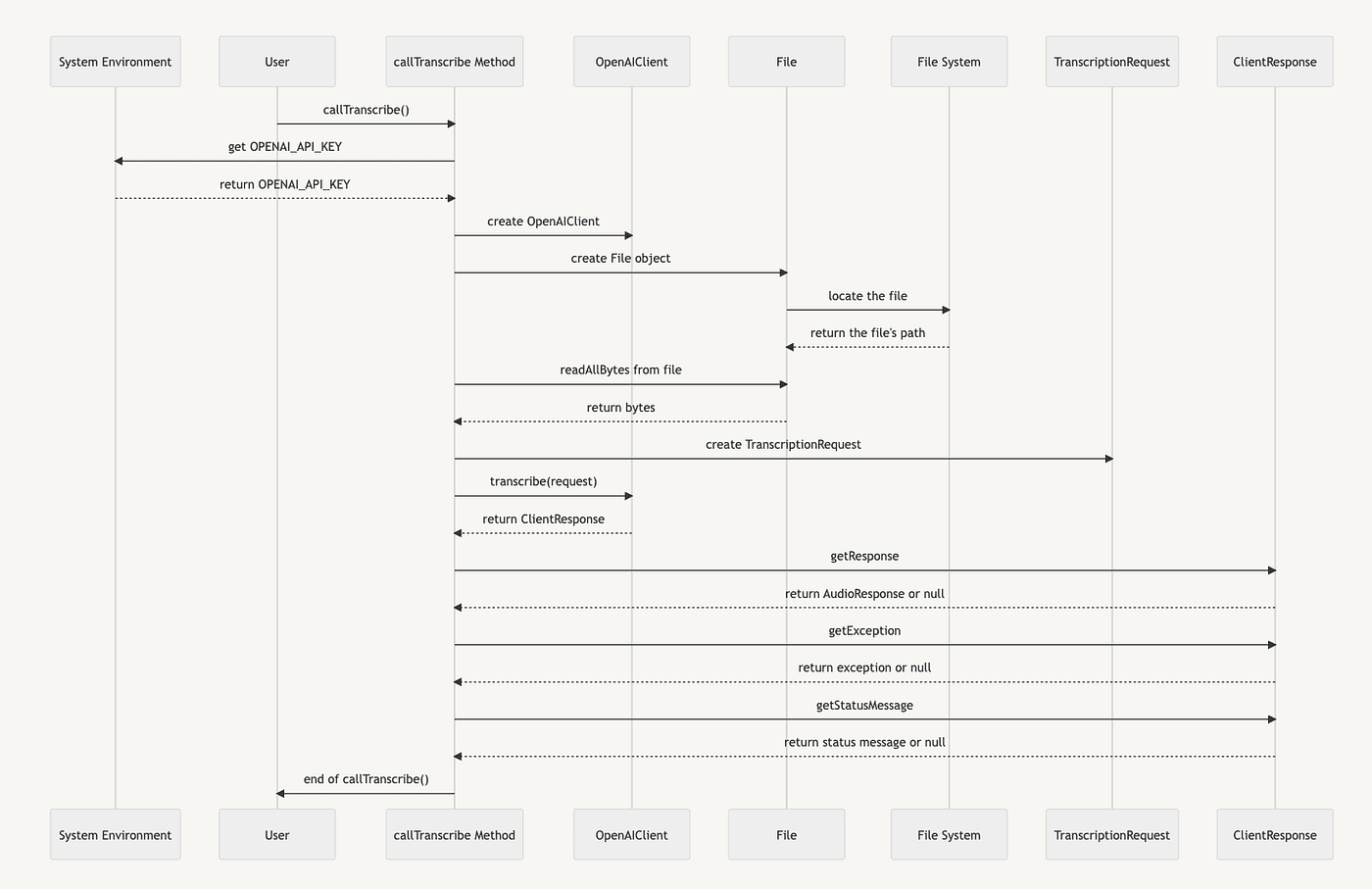
How did it do? I call this a pass because it is a valid Mermaid sequence diagram, but I give it a D. Why? It uses code for the descriptions. It is verbose. Thus it passed, but I wanted something else. For descriptions, it is putting Java code. This breaks when the Java code is too long (like a stream.filter().filter().map().map().Collects.collect(…), and I want something human-readable for a sequence diagram.
First attempt at the chain of thought
We got mixed results with one-shot prompts. Let’s try out our chain of thought approach. First, make ChatGPT think about the problem.
Prompt
how do you go about generating a mermaid sequence diagram from code
from a java method?
ChatGPT Response
Mermaid.js is a powerful tool that lets you create diagrams and flowcharts, but it doesn’t have built-in functionality for automatically generating sequence diagrams from Java code. However, you can create a Mermaid sequence diagram based on the logic in your Java method.
Here’s an example of a sequence diagram in Mermaid:
sequenceDiagram
  participant Alice
  participant Bob
  Alice->>Bob: Hello Bob, how are you?
  Bob →>Alice: Not bad, thank you!
However, if you’re looking to generate a sequence diagram automatically from Java code, you might need to use a tool specifically designed for that purpose, such as PlantUML, UMLet, or ObjectAid.
Then, if you still want to use Mermaid.js for your diagrams, you’d need to manually convert the output from these UML tools into the format used by Mermaid.js. This might involve writing a script or tool to automate the process, depending on the complexity and size of your codebase.
To summarize, the general process might look like this:
- Use a tool like PlantUML, UMLet, or ObjectAid to generate a UML sequence diagram from your Java code.
- Manually or programmatically convert the UML diagram into Mermaid.js syntax.
- Use Mermaid.js to render the sequence diagram based on the converted syntax.
Remember that automatic generation might not always capture the logic perfectly, especially for complex code, and manual adjustments may be necessary. It’s also worth noting that generating diagrams from code is a form of reverse engineering, and its usefulness can depend on the complexity of your code and your specific needs.
Prompt
Break down step by step how you would evaluate the Java code
This prompt forces it to think about what steps are involved and we prime the context.
ChatGPT Response
Generating a Mermaid sequence diagram manually from Java code involves understanding the logic of the code and then translating that logic into a sequence diagram. Below is an example process.
Let’s assume we have the following simple Java code snippet:
class Main {
    public static void main(String[] args) {
        System.out.println("Hello, world!");

        Foo foo = new Foo();
        foo.bar();
    }
}

class Foo {
    void bar() {
        System.out.println("Hello from bar!");
    }
}
Here is the step-by-step process to convert this to a Mermaid sequence diagram:
- Identify the objects (or “participants” in sequence diagram terms) involved in the code. In this case, we have Main and Foo.
- Identify the method calls and the flow of interaction between the objects. In this case, Main calls Foo’s bar method.
- Using the Mermaid syntax, we will create a sequence diagram. The general syntax of a sequence diagram is:
sequenceDiagram
    participant Object1
    participant Object2
    Object1->>Object2: MethodCall
- Now let’s apply our objects and method calls from step 2:
sequenceDiagram
    participant Main
    participant Foo
    Main->>Foo: bar()
In this diagram, we see that Main calls the bar method on Foo.
Remember that real-world applications often involve more complex interactions and may include multiple method calls, branches (like if-else conditions), loops, etc. These can all be represented in a sequence diagram, but will require a more complex syntax. Make sure to refer to the Mermaid documentation for the full syntax options.
Now it has had time to think about the problem, and we have primed the context of the chat; remember, ChatGPT is like predictive text, so if we don’t prime its context, it will be less likely to produce what we want.
Prompt
here is a method, can you create a mermaind sequence diagram from it?
private static void callTranscribe() throws IOException {
        // Create the client

        final var openAiKey = System.getenv("OPENAI_API_KEY");
        final OpenAIClient client = OpenAIClient.builder().setApiKey(openAiKey).build();

        File file =
        new File("/Users/me/Documents/audio_notes/meeting_notes1.m4a");

        byte[] bytes = Files.readAllBytes(file.toPath());
        // Create the chat request
        final TranscriptionRequest request = TranscriptionRequest.builder()
                .model("whisper-1").prompt("Write up notes").language("en")
                 .file(bytes)
                .build();


        // Call Open AI API with chat message
        final ClientResponse<TranscriptionRequest, AudioResponse> response =
           client.transcribe(request);

        response.getResponse().ifPresent(r -> System.out.println(r.getBody()));

        response.getException().ifPresent(Throwable::printStackTrace);

        response.getStatusMessage().ifPresent(error -> System.out.printf("status message %s %d \n", error, response.getStatusCode().orElse(0)));

    }
ChatGPT Response
Here is the corresponding Mermaid sequence diagram based on the provided Java code:
sequenceDiagram
    participant callTranscribe as callTranscribe
    participant System as System
    participant OpenAIClient as OpenAIClient
    participant File as File
    participant Files as Files
    participant TranscriptionRequest as TranscriptionRequest
    participant ClientResponse as ClientResponse
    participant Optional as Optional
    participant System.out as System.out
    participant Throwable as Throwable
    participant StatusCode as StatusCode

    callTranscribe->>System: getenv("OPENAI_API_KEY")
    note over callTranscribe: Create OpenAIClient using the retrieved API key
    callTranscribe->>OpenAIClient: builder().setApiKey(openAiKey).build()
    note over callTranscribe: Create a File object with specified path
    callTranscribe->>File: new File(path)
    callTranscribe->>Files: readAllBytes(file.toPath())
    note over callTranscribe: Create TranscriptionRequest using builder pattern
    callTranscribe->>TranscriptionRequest: builder().model().prompt().language().file().build()
    note over callTranscribe: Call OpenAI API with chat message
    callTranscribe->>OpenAIClient: transcribe(request)
    callTranscribe->>ClientResponse: response
    callTranscribe->>Optional: getResponse()
    Optional->>System.out: println(r.getBody())
    callTranscribe->>Optional: getException()
    Optional->>Throwable: printStackTrace()
    callTranscribe->>Optional: getStatusMessage()
    Optional->>System.out: printf("status message %s %d \n", error, StatusCode)
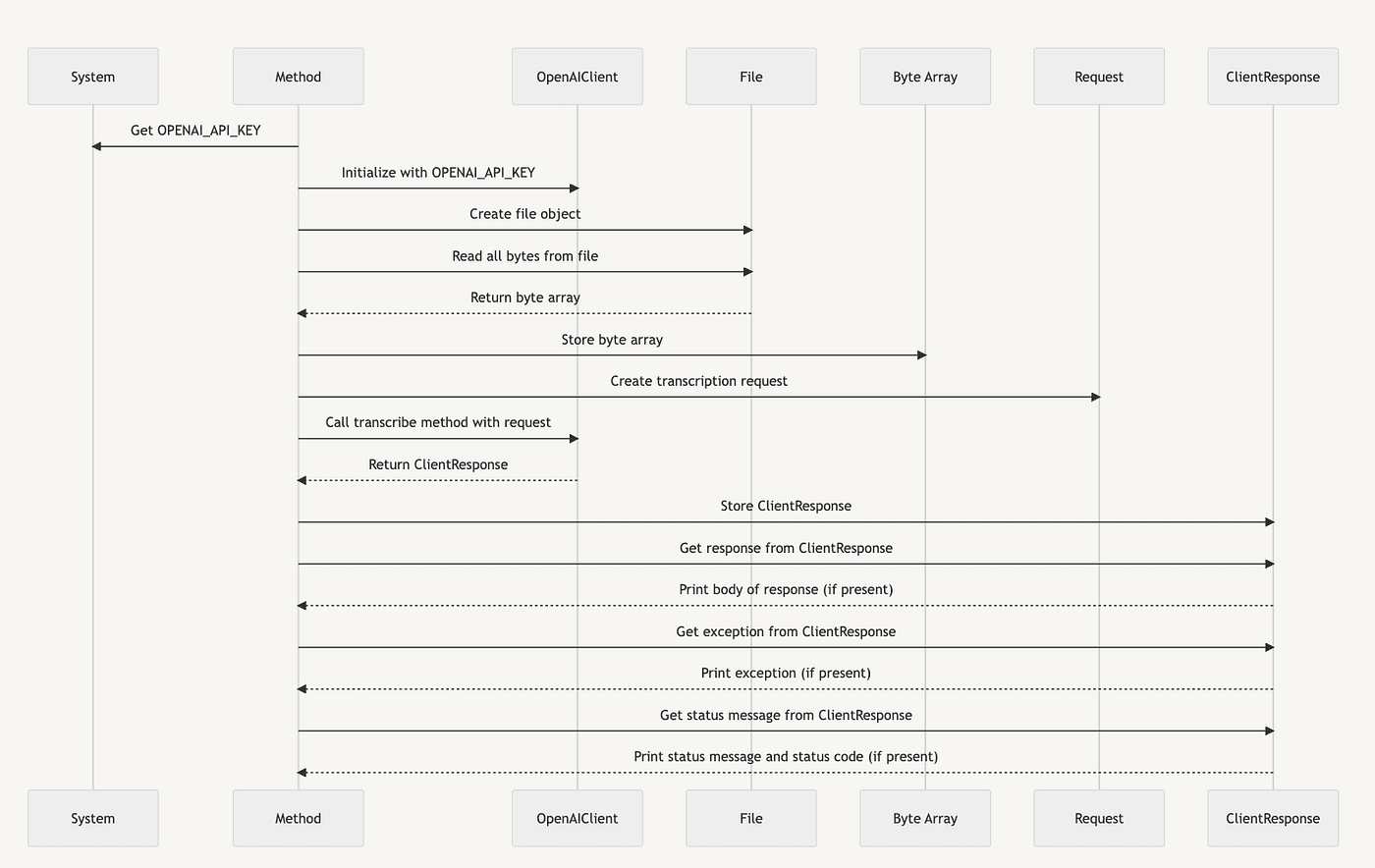
Note: Sequence diagrams are typically used to visualize interactions between different objects or classes, and using it to represent the flow within a single method might be an overkill or not particularly useful. Nevertheless, the diagram above represents how the callTranscribe method interacts with different classes and their methods within its body.
This works, but I wanted something else. We gave it more context, and it gave us good results. This is progress. But, it is verbose; the message description is all in code instead of actual human readable. We can do better. Let’s try again. It is worse than the one with some light prompt engineering. It even has an extra dangling participant. Ok. It seems like it needs to think more. If the last one was a D, this is a D-. We got it to think more, but perhaps not about the right things.
Second attempt of Chain of Thought
This time we break down the syntax more and have it think about the elements it is failing at. This one does better.
Let’s prime it with what is a mermaid sequence diagram and what are the principal elements and components of it.
Prompt
describe all of the main elements in a mermaid markup sequence diagram
ChatGPT Response
Mermaid is a popular open-source tool used to generate diagrams and flowcharts from text in a similar manner as Markdown. This is especially handy when working on software documentation, as it allows for easy updates and version control.
Here are the main elements in a Mermaid sequence diagram:
Participants: These are the main actors interacting in the system, and are typically represented by labelled vertical lines. They can be users, systems, or subsystems. In Mermaid, you declare them like this:
participant Alice
participant Bob
Messages: These are the interactions between participants. They are represented by horizontal arrows between the participants’ lines. You can denote messages in Mermaid like this:
mermaidCopy code
Alice->>Bob: Hello Bob, how are you?
Response Messages: The recipient of a message can also send a message back, which is represented by an arrow pointing in the other direction:
Bob-->>Alice: Not bad, thank you!
Activation Bars / Lifelines: These bars show the period during which an actor is performing an action. They are represented as rectangles on the participant’s line. In Mermaid, the activation bars will appear automatically as you define the messages.
Notes: These can be added to provide additional information about parts of the sequence diagram. They can be attached to the diagram in different ways:
Note right of Alice: Alice thinks about it
Note left of Bob: Bob responds
Loops: A loop can be used when a specific sequence of messages is repeated.
loop Every Minute
    Alice->>Bob: Ping
    Bob-->>Alice: Pong
end
Conditions/Alternative paths: These are used to represent a decision in the flow of interaction:
alt successful case
    Alice->>Bob: Nice to meet you
else unsuccessful case
    Alice-xBob: I am sad
end
Parallel Paths: If two or more processes are happening at the same time, you can use parallel paths:
par
    Alice->>Bob: Hello Bob
    Bob->>Charlie: Hello Charlie
end
This is not an exhaustive list, but these are the main elements you’ll likely use when constructing a Mermaid sequence diagram. To combine these elements in your sequence diagram, ensure you structure them within a sequenceDiagram code block like so:
sequenceDiagram
    participant Alice
    participant Bob
    Alice->>Bob: Hello Bob, how are you?
    Bob-->>Alice: Not bad, thank you!
    Note right of Alice: Alice thinks about it
Please ensure that you’re using a version of Mermaid that supports the features you’re using, as the library is regularly updated and extended with new features.
Ok. Now the model is primed, let’s ask again for it to do what we want. All of the above was so that it could think about Mermaid and how to create diagrams.
Prompt
here is a method, can you create a mermaind sequence diagram from it?
```java
private static void callTranscribe() throws IOException {
        // Create the client

        final var openAiKey = System.getenv("OPENAI_API_KEY");
        final OpenAIClient client = OpenAIClient.builder().setApiKey(openAiKey).build();

        File file = new File("/Users/richardhightower/Documents/audio_notes_patents/meeting_notes1.m4a");

        byte[] bytes = Files.readAllBytes(file.toPath());
        // Create the chat request
        final TranscriptionRequest request = TranscriptionRequest.builder()
                .model("whisper-1").prompt("Write up notes").language("en").file(bytes)
                .build();


        // Call Open AI API with chat message
        final ClientResponse<TranscriptionRequest, AudioResponse> response = client.transcribe(request);

        response.getResponse().ifPresent(r -> System.out.println(r.getBody()));

        response.getException().ifPresent(Throwable::printStackTrace);

        response.getStatusMessage().ifPresent(error -> System.out.printf("status message %s %d \n", error, response.getStatusCode().orElse(0)));

    }
## ChatGPT Response

Certainly! Below is the sequence diagram for the method callTranscribe(). It illustrates how the method creates an OpenAIClient instance, transcribes an audio file and handles the response.

```python

sequenceDiagram
    participant Environment as Env
    participant OpenAIClient as Client
    participant File
    participant TranscriptionRequest as Request
    participant ClientResponse as Response

    activate Client
    Env->>Client: Get OPENAI_API_KEY
    Client->>Client: Build with OPENAI_API_KEY
    deactivate Client

    activate File
    File->>File: Read bytes from meeting_notes1.m4a
    deactivate File

    activate Request
    Client->>Request: Build with "whisper-1", "Write up notes", "en", file bytes
    deactivate Request

    activate Response
    Client->>Response: Transcribe Request
    Response->>Response: Get response body
    note over Response: Print the response body if it exists
    Response->>Response: Get exception
    note over Response: Print the exception stack trace if it exists
    Response->>Response: Get status message
    note over Response: Print the status message if it exists
    deactivate Response
This diagram simplifies the process into primary actions and interactions. You can modify it to suit your needs. For instance, it does not illustrate conditional flows (using the alt or opt blocks) for response.getResponse(), response.getException(), and response.getStatusMessage() because it’s not explicitly indicated in the method whether these are alternative paths. If these calls are exclusive alternatives in your actual use case, you might want to represent them using alt blocks.
FAIL!
Remember, be patient. Sometimes you have to explain things in different ways so a child can understand. Think of LLM as that child.
It looks great except for a tiny part, it fails at Mermaid syntax, and when generating Mermaid files, I often see this same failure in a tool that I am working on. But, if it didn’t mess up the syntax of the participants, it would be perfect. So close!
It just has to change this:
participant Environment as Env
to be this:
participant Env as Environment
Again, it looked good but did not work as a Mermaid file. It may need to consider participant work a bit more. (I even manually switched it, and it worked well. So, after the switch, it would have been an A, but since it failed, it gets an F).
Let’s improve this by asking for more details on the participants, and let’s lockdown on what we want on messages by asking it to reason on the components of a message in mermaid sequence diagrams to ensure we keep getting what we want.
Chain of thought with prompt engineering and more thought
So now we will give it more time to think about participants, messages, and message descriptions to ensure we get better results.
Prompt
Pretend you are a world class software architect well versed in UML and
Mermaid. Describe all of the main elements in a mermaid markup sequence
 diagram.
ChatGPT Response
Sure, Mermaid is a simple markdown-like language that allows developers to generate diagrams and flowcharts from text in a similar manner as Markdown. It’s often used for documenting software architectures, data flows, etc., because of its simplicity and the ability to keep documentation alongside the code.
Now, for a sequence diagram in Mermaid, there are several key elements:
Participants: They represent the different entities in your diagram. They could be classes, systems, subsystems, or actors interacting in the system. They’re declared by the keyword ‘participant’, followed by an alias and a descriptor.
Example:
sequenceDiagram
    participant A as Alice
    participant B as Bob
Messages: These are shown as arrows between participants. The arrow’s direction indicates the sender and receiver of the message. Solid lines represent synchronous calls, while dashed lines represent asynchronous ones.
Example:
Alice->>Bob: Hello Bob, how are you?
Note right of Bob: Bob thinks
Bob-->>Alice: I'm good thanks!
Here, Alice->>Bob: Hello Bob, how are you? represents a synchronous message from Alice to Bob, while Bob →>Alice: I’m good thanks! represents an asynchronous message from Bob to Alice.
Activations: To display that a participant is active, you can use the activate and deactivate keywords.
Example:
Alice->>Bob: Hello Bob, how are you?
activate Bob
Note right of Bob: Bob thinks
Bob-->>Alice: I'm good thanks!
deactivate Bob
Notes: Notes can add comments or explanations to your diagram. They can be placed to the right or left of a participant.
Example:
Note right of Bob: Bob thinks
Loops: Loops are used to indicate repeating interactions. They’re defined with the loop keyword, an end keyword, and a descriptor of what is being looped over.
Example:
loop Every Minute
    Alice->>Bob: Ping
    Bob-->>Alice: Pong
end
Conditions: Conditional interactions can be defined using the opt keyword (which stands for “Optional”). It is used like loop, with a descriptor and an end keyword.
Example:
opt Successful Login
    Alice->>Bob: Login
    Bob-->>Alice: Success
end
Groups: These are used to visually group interactions together.
Example:
group My Group
    Alice->>Bob: Message within group
end
Parallel Interactions: You can define interactions that happen simultaneously with the par and and keywords.
par
    Alice->>Bob: Message 1
and
    Alice->>Bob: Message 2
end
Remember, in Mermaid, the syntax is highly sensitive, and missing or misplacing a single character might cause an error in the diagram.
Now we break it down further and ask it to reason on participants.
Prompt
Great, please go into detail about how participants work and the \
different options for participants.
ChatGPT Response
Participants in a Mermaid sequence diagram are the entities that interact with each other over the course of the diagram. They represent the “actors” in the sequence, which can be individuals, systems, components, objects, or even another sequence.
The declaration of a participant begins with the keyword participant, followed by a user-defined alias, and then a descriptor. The alias is used as a shorthand to represent the participant in the rest of the diagram.
Here’s an example:
sequenceDiagram
    participant A as Alice
    participant B as Bob
In this case, ‘A’ and ‘B’ are aliases representing ‘Alice’ and ‘Bob’. All the messages that ‘Alice’ and ‘Bob’ send or receive are referenced using these aliases.
It’s important to note that the order of declaration of participants defines their order from left to right in the diagram. So, in the above example, ‘Alice’ will be shown on the left and ‘Bob’ on the right.
However, Mermaid also provides flexibility for changing the order in which participants are displayed without changing their order of declaration. This can be done using the participant keyword with an index.
For instance:
sequenceDiagram
    participant B as Bob
    participant A as Alice
    participant C as Charlie index 2
In this case, even though ‘Charlie’ is declared last, they will be displayed second in the diagram due to the index provided.
If you don’t provide a descriptor for the participant, then the alias is displayed in the diagram:
sequenceDiagram
    participant A
In this case, ‘A’ is both the alias and the descriptor, so ‘A’ will be displayed in the diagram.
That’s about it for participants in Mermaid sequence diagrams. They are a powerful feature, enabling clear and concise depiction of the interactions between different entities in your diagrams. Remember to choose meaningful aliases and descriptors to make your diagrams easier to understand.
Now let’s lock in our gains on message generation and have it reason on how messages work in Mermaid.
Prompt
Please go into detail about how messages work
ChatGPT Response
Sure, messages are a core component of sequence diagrams in Mermaid. They are used to show interactions between participants. In a sequence diagram, a message is represented as an arrowed line and can be of two types, synchronous and asynchronous.
- Synchronous Messages: These are shown with a solid line and solid arrow between the participants. Synchronous messages are blocking in nature, meaning the sender waits for the receiver to process the message and respond before moving on.
Syntax:
Alice->>Bob: Message
This represents a synchronous message from Alice to Bob. The message can be any text that describes the interaction.
- Asynchronous Messages: These are shown with a dotted line and an open arrow between the participants. Asynchronous messages are non-blocking, meaning the sender does not wait for the receiver to process the message and can move on to other tasks.
Syntax:
Alice →>Bob: Message
This represents an asynchronous message from Alice to Bob.
A single participant can also send a message to itself. This is typically used to denote internal processing or a state change.
Syntax:
Alice->>Alice: Self Message
Message Responses: Mermaid sequence diagrams also support the drawing of a response to a message. Responses are depicted as dashed arrows pointing in the opposite direction of the original message. The sender and receiver are reversed.
Syntax:
Alice->>Bob: Request
Bob →>Alice: Response
In this case, Alice sends a request to Bob, who then sends a response back to Alice.
That’s it for messages in Mermaid. The simplicity and expressiveness of the Mermaid syntax allow complex interactions to be quickly and clearly visualized in a diagram, making it an excellent tool for documenting software systems and designs.
To be pedantic, let’s make sure it knows and reasons precisely what a message description should be.
Prompt
What is the purpose of the part of the message after the :
ChatGPT Response
The text after the : (colon) in a Mermaid message declaration is used to describe the nature of the message or interaction that is happening between the participants. It provides context to the arrowed line that connects the participants.
For example, consider the following message syntax:
Alice->>Bob: Hello Bob, how are you?
Here, “Hello Bob, how are you?” is the description of the message that Alice is sending to Bob. It’s a brief way to represent what that interaction or message is about.
In the context of software architecture, it could be the name of the method being called, the event being sent, or some other kind of interaction. For instance:
Client->>Server: GET /api/v1/users
Here, “GET /api/v1/users” describes an HTTP GET request being sent from a client to a server. This description helps provide context and make the sequence diagram more understandable.
In summary, the part after the colon : in the message is used to give meaningful context to the interactions happening between the participants in the sequence diagram.
Ok, we primed the pump; let’s ask our question and see if it generates the valid Mermaid markup we want.
Prompt
here is a method, can you create a mermaind sequence diagram from it?

```java
private static void callTranscribe() throws IOException {
        // Create the client

        final var openAiKey = System.getenv("OPENAI_API_KEY");
        final OpenAIClient client = OpenAIClient.builder().setApiKey(openAiKey).build();

        File file = new File("/Users/me/Documents/audionotes/notes1.m4a");

        byte[] bytes = Files.readAllBytes(file.toPath());
        // Create the chat request
        final TranscriptionRequest request = TranscriptionRequest.builder()
                .model("whisper-1").prompt("Write up notes").language("en").file(bytes)
                .build();


        // Call Open AI API with chat message
        final ClientResponse<TranscriptionRequest, AudioResponse> response = client.transcribe(request);

        response.getResponse().ifPresent(r -> System.out.println(r.getBody()));

        response.getException().ifPresent(Throwable::printStackTrace);

        response.getStatusMessage().ifPresent(error -> System.out.printf("status message %s %d \n", error, response.getStatusCode().orElse(0)));

    }
## ChatGPT Response

Sure, here’s a Mermaid sequence diagram based on the given Java method:

```python

sequenceDiagram
    participant S as System
    participant M as Method
    participant O as OpenAIClient
    participant F as File
    participant B as Byte Array
    participant R as Request
    participant C as ClientResponse

    M->>S: Get OPENAI_API_KEY
    M->>O: Initialize with OPENAI_API_KEY
    M->>F: Create file object
    M->>F: Read all bytes from file
    F-->>M: Return byte array
    M->>B: Store byte array
    M->>R: Create transcription request
    M->>O: Call transcribe method with request
    O-->>M: Return ClientResponse
    M->>C: Store ClientResponse
    M->>C: Get response from ClientResponse
    C-->>M: Print body of response (if present)
    M->>C: Get exception from ClientResponse
    C-->>M: Print exception (if present)
    M->>C: Get status message from ClientResponse
    C-->>M: Print status message and status code (if present)
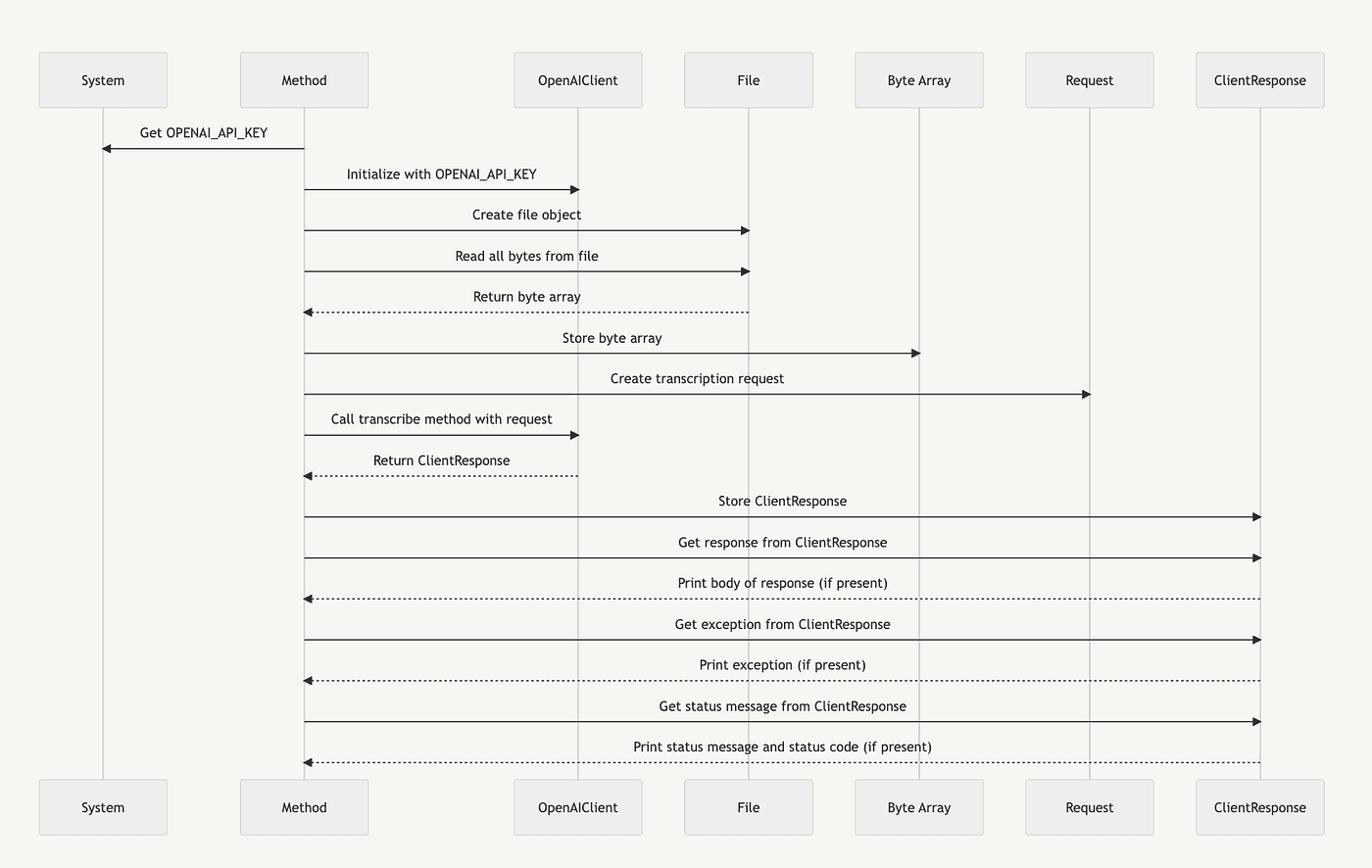
This diagram visually represents the flow of control and data in the callTranscribe method, showing interactions with the system environment, the OpenAI client, a file, a byte array, a transcription request, and a client response object.
Note that this is a high-level representation. Depending on the level of detail needed, you might include more or less detail in the diagram. This was my desired end state.
We did it. We used Chain of Thought to improve a one-shot that did not work to make Chat GPT into a mermaid-generating machine!
We have a follow-up article in the works where we use Synthetic prompts and improve zero-shot CoT prompts for even better results.
Conclusion
In this article, we cover the basics of Chain of Thought (CoT) and how letting ChatGPT think about a problem can improve context and help ChatGPT produce better results by allowing it to explore the generation of Mermaid sequence diagrams for Java source code with ChatGPT. We also discuss how to improve the generation by using a CoT approach. We show how a one-shot chat can fail because it needs more context and how simple prompt engineering gets better results, but not what we wanted. We provide some examples of CoT that did not work because they did not provide the proper context. Finally, we show an example that worked well using CoT by focusing on the context we needed for the Mermaid sequence diagram generation.
We show an existing Mermaid diagram as the end state and then explore the various ways to produce this diagram by making ChatGPT think about the task. We do this by asking ChatGPT questions to help it refine its understanding of Mermaid diagrams, giving it more context to produce better results. Including the role of participants, messages, and message descriptions helps ChatGPT to produce the right results.
Finally, we tested our knowledge by asking ChatGPT to generate a Mermaid sequence diagram from a Java method. Using this approach, we can get ChatGPT to understand Mermaid sequence diagrams comprehensively and how to generate them with ChatGPT just by loading the proper context to make the predicted text work better.
Key Concepts and Review
- Chain of Thought: a method of iteratively prompting an AI language model with questions to refine its understanding of a topic or problem
- Prompt Engineering: the process of carefully crafting prompts to provide the necessary context for an AI language model to generate accurate and relevant responses
- Chain of Thought (CoT) prompting is a technique that improves the performance of Large Language Models (LLMs) on reasoning-based tasks through few-shot learning.
- CoT enables LLMs to address complex tasks by breaking them down into intermediate steps, allowing for manageable granularity for both input and output.
- CoT prompting breaks a problem down into a series of intermediate reasoning steps, improving the ability of LLMs to perform complex reasoning.
- There are different strategies for implementing CoT prompting, such as few-shot CoT and zero-shot CoT.
- Few-shot CoT involves providing examples of Question-Answer pairs where the answer is explained step by step.
- Zero-shot CoT involves prefixing the Answer block with “Let’s think step by step” to prompt the LLM to complete the output in that format.
- The benefits of CoT prompting become more apparent as the model scale increases, leading to improved performance that substantially outperforms standard prompting for large model sizes.
- CoT is a similar approach used with LLMs as teaching a child to solve a problem step by step.
- CoT helps to decompose the problem into smaller, more manageable steps, making it easier for an LLM to understand and solve the problem.
- CoT prompting encourages the model to follow a logical thought process and improves its reasoning abilities.
- Remember that ChatGPT is like predictive text, so it’s essential to prime its context to produce the desired output.
- Keep the context clear and concise.
- Use Chain of Thought (CoT) to prime ChatGPT with context so the generation it does is more likely to be your desired results.
- Repeat vital information to reinforce the context.
- Be patient and adjust your expectations.
- For more information on CoT prompting, see these references:
- Toward Data Science article on CoT prompting for LLMs
- Google AI Blog on LLMs performing reasoning via CoT prompting
- arXiv paper on CoT prompting for LLMs
- It is important to keep the context clear and concise.
- Mermaid: a simple markdown-like language used to generate diagrams and flowcharts from text
- Mermaid Sequence Diagram: a type of diagram used to visualize interactions between different entities in a system
- Participants: the different entities in a Mermaid sequence diagram
- Messages: the interactions between participants in a Mermaid sequence diagram
- Synchronous Messages: a type of message in a Mermaid sequence diagram represented by a solid line and solid arrow between participants
- Asynchronous Messages: a type of message in a Mermaid sequence diagram represented by a dotted line and open arrow between participants
- Message Descriptions: the text following the colon in a Mermaid message declaration, used to describe the nature of the interaction or message between participants
Here are some review questions for this article:
- What is Chain of Thought (CoT), and how does it improve the performance of Large Language Models (LLMs) on reasoning-based tasks?
- What are some strategies for implementing CoT prompting?
- How can CoT prompting improve the ability of LLMs to perform complex reasoning?
- What is the importance of clear and concise context when prompting an AI language model?
- What are some tips for using CoT prompting with an AI language model?
- What is Mermaid, and how is it used?
- What are the critical elements of a Mermaid sequence diagram?
- What are participants in a Mermaid sequence diagram, and how are they declared?
- What is the purpose of messages in a Mermaid sequence diagram, and what are the two types of messages?
- What is the purpose of the text following the colon in a Mermaid message declaration?
Follow up links
- Java Open AI Client
- Using ChatGpt embeddings and Hyde to improve search results
- Anthropics Claude Chatbot Gets Upgrade
- Elon Musks XAi’s new frontier for artificial intelligence
- Using Mockito to test JAI Java Open AI Client
- Fine-tuning journey with Open AI API
- Using Open AI to create callback functions, the basis for plugins
- Using Java Open AI Client Async
- Fastest Java JSON Parser
- Java Open AI API Client on Github
- Medium: Introducing Java Open AI Client
- Medium: Using ChatGPT, Embeddings, and HyDE to Improve Search Results
- #AI #ChainOfThought #Mermaid #SequenceDiagrams #Java #ChatGPT #LLMs