Claude Agent SDK Agent Loop: The Agent Loop Is Just a While Loop You Did Not Have to Write
Part 2: Watch an AI agent run and it looks like magic. Take the lid off and it is an ordinary system: one you can name, reason about, and put on call.
Originally published on Medium.
Part 2: Watch an AI agent run and it looks like magic. Take the lid off and it is an ordinary system: one you can name, reason about, and put on call.
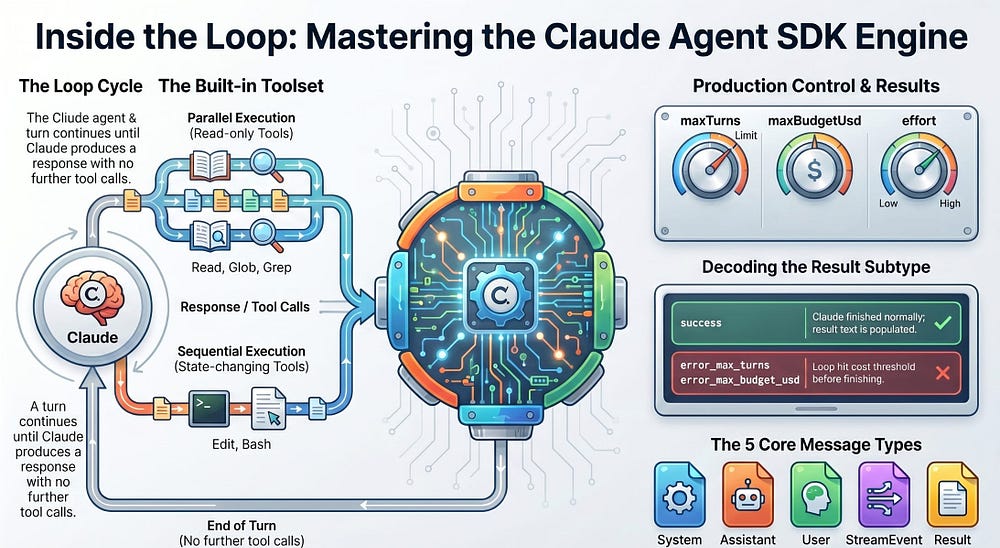
When your agent does something surprising at 2 a.m., 'it just works' is not a debugging strategy. You need to know exactly what the loop did. The agent loop looks like magic when you watch the streaming output, but it is a plain while loop the SDK runs for you. Once you can name every turn, message, and stopping condition, an AI agent becomes an ordinary system you can debug.
In this article: You will learn what actually happens inside the Claude Agent SDK's agent loop. We cover what a turn is and the one condition that ends the loop, the five message types the SDK emits, why some tools run in parallel and others in sequence, the three dials that keep a runaway loop from draining your budget, and how to read the result subtype to know exactly why a run stopped. By the end, an AI agent is no longer a black box. It is a while loop you can debug.
Part 2 of "Building with the Claude Agent SDK," a 14-part guide to building production-ready AI agents.
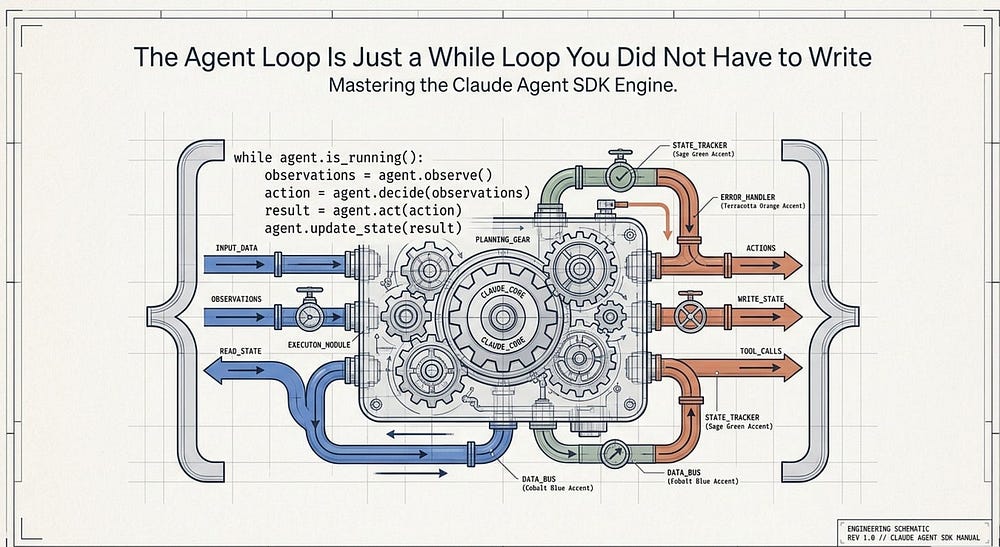
The first time you run an AI agent, it works. You hand it a task, a stream of messages flies past, and the thing you asked for gets done. That is satisfying and slightly unnerving at once, because "it just works" is a terrible foundation for production code.
When that agent does something surprising at 2 a.m., whether it burns through your API budget, stops two-thirds of the way through a task, or quietly refuses a request, "it just works" is not a debugging strategy. You need to know what the loop did and why.
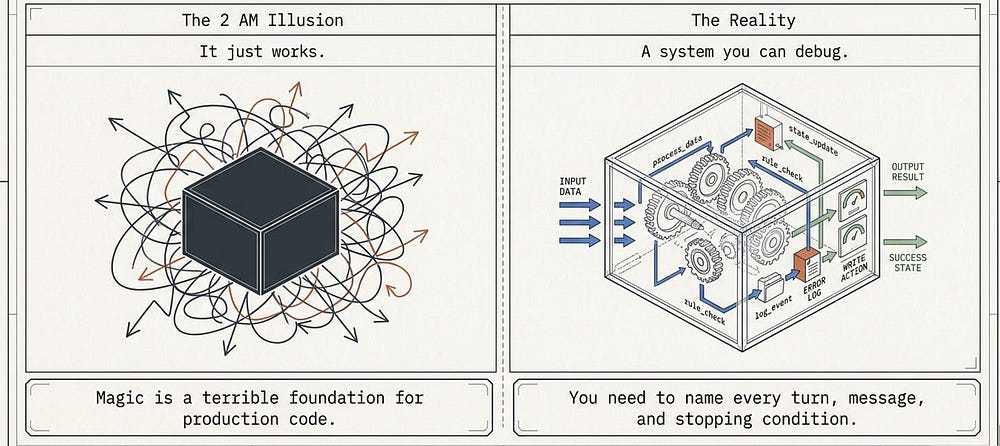
So let us take the lid off. The agent loop is the engine the Claude Agent SDK runs on your behalf, and it is far less mysterious than the streaming output makes it look. This article gives you three concrete skills: name every stage of a turn, identify every message type the loop emits, and explain exactly why and how a run stopped. That last one separates a demo from something you would put on call. The running example throughout is a code-maintenance agent working on a repo we will call buggy-shop.
What a turn actually is
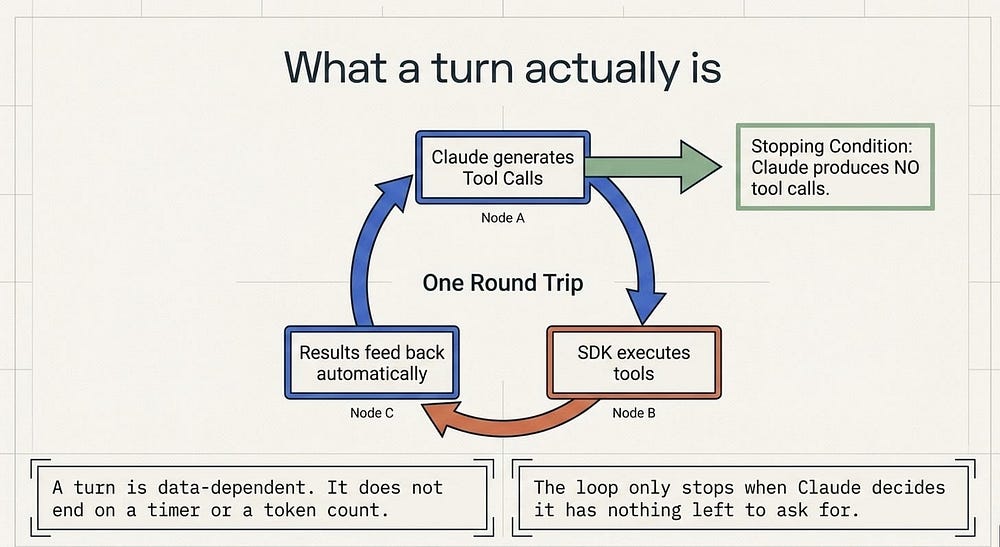
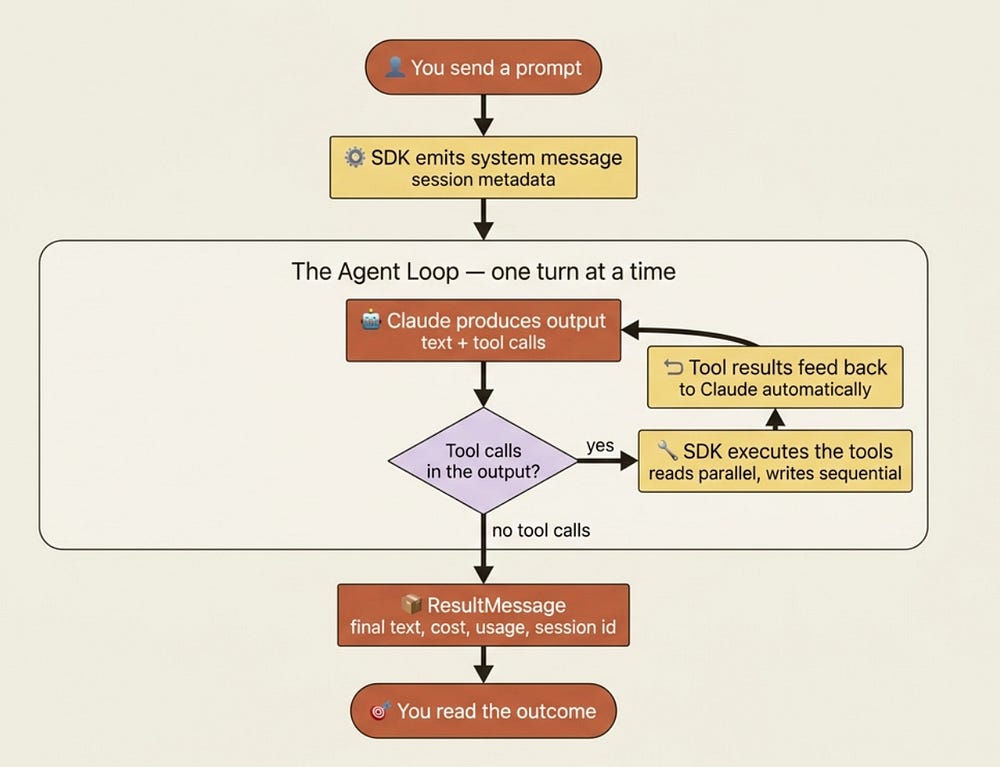
Here is the one definition that anchors everything else. A turn is one round trip inside the loop: Claude produces output that includes tool calls, the SDK executes those tools, and the results feed back to Claude automatically. That feedback happens without handing control back to your code. Turns keep going until Claude produces output with no tool calls; that is when the loop ends and you get the final result.
Read that again, because it is the entire stopping condition. The loop does not end on a timer or a token count. It ends when Claude decides it has nothing left to ask for. Everything else in this article is either a stage inside a turn or a way to override that natural stopping point.
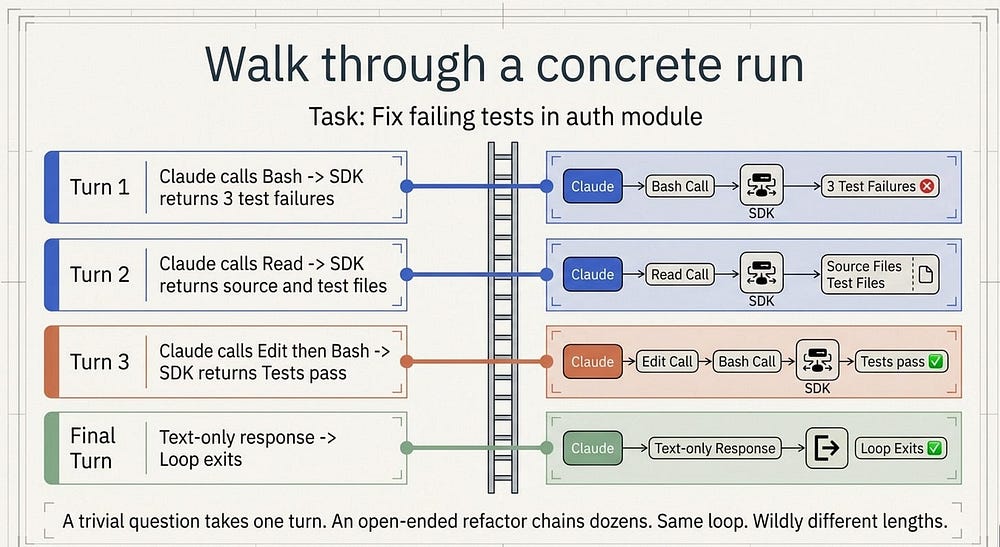
Walk through a concrete run. You give the agent the prompt "Fix the failing tests in the auth module." The SDK sends your prompt to Claude and emits a system message with the session metadata, then the loop begins.
Walk through a concrete run
On turn one, Claude calls Bash to run the test suite. The SDK emits an assistant message carrying that tool call, runs the command, then emits a user message with the output: three failures. On turn two, Claude calls Read on the source file and the test file, and the SDK returns their contents. On turn three, Claude calls Edit to patch the source, then Bash again to re-run the tests, and all three pass. On the final turn, Claude produces a text-only response with no tool calls: "Fixed the auth bug, all three tests pass now." The SDK emits that final assistant message, then a result message with the same text plus cost and usage.
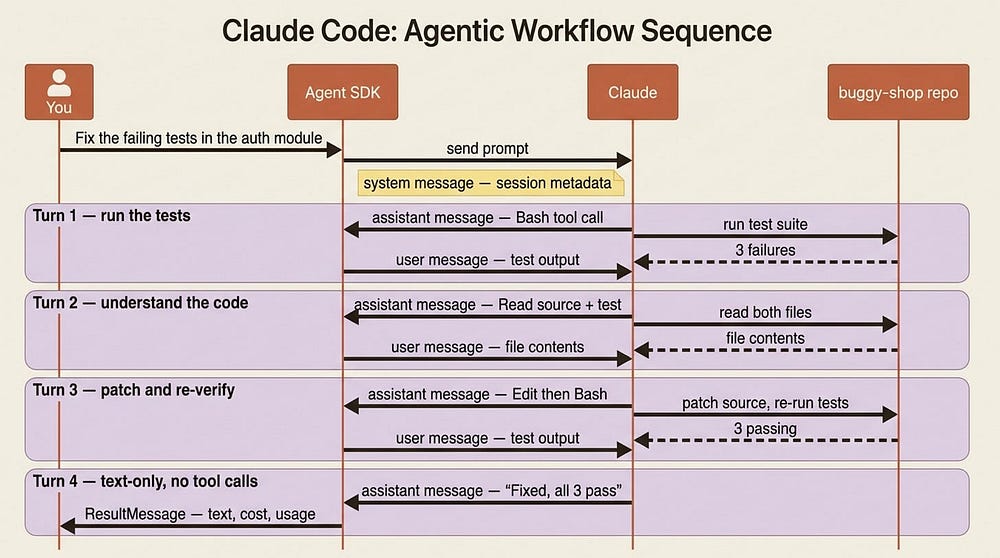
That was four turns: three with tool calls and one final text-only response. A trivial question like "what files are here?" might take a single turn of Glob; an open-ended task like "refactor the auth module and update the tests" can chain dozens of turns. Same loop, wildly different lengths, and the length is data dependent, not something you set in advance.
The built-in tools you get for free
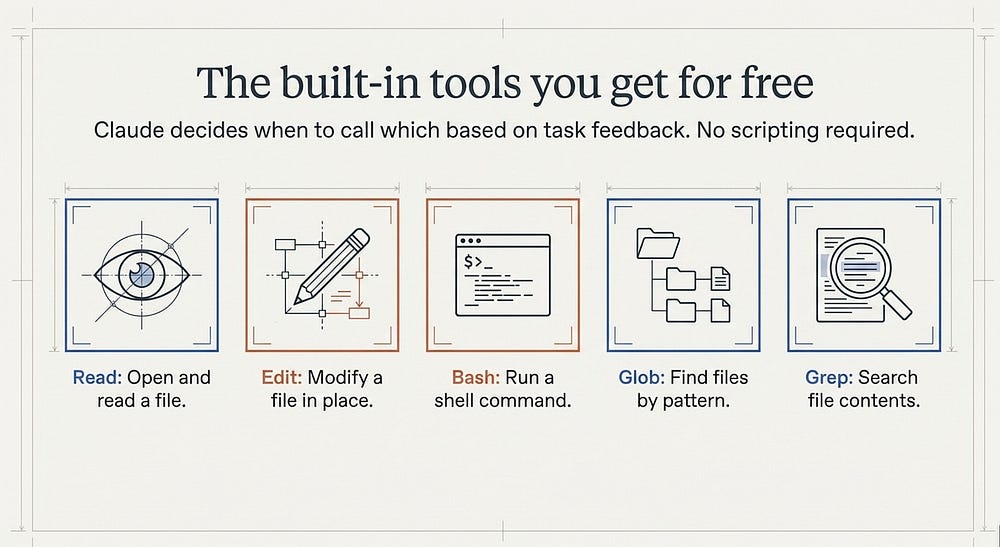
The reason the loop can do real work out of the box is that the SDK ships with built-in tools. Here is the working set for a code agent:
Read: open and read a fileEdit: modify a file in placeBash: run a shell commandGlob: find files by patternGrep: search file contents
You enable them by listing them in your options, and Claude decides when to call which. Notice the shape of the buggy-shop run above: Bash to see the failures, Read to understand the code, Edit to fix it, Bash to confirm. You did not script that sequence. Claude chose it, turn by turn, based on what each tool returned.
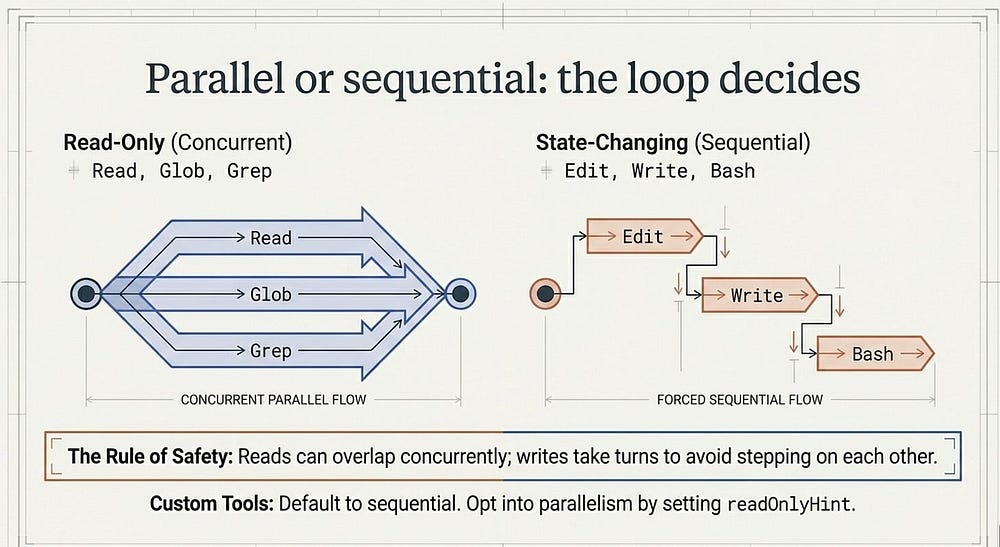
Parallel or sequential: the loop decides
When Claude requests several tool calls in a single turn, the SDK does not always run them one at a time. The rule is about safety, and it explains some timing you will see in your logs.
Read-only tools can run concurrently, because reading the same repo from three calls at once changes nothing: Read, Glob, Grep, and any MCP tool marked read-only fall here. Tools that change state run sequentially to avoid stepping on each other: Edit, Write, and Bash. So if Claude asks to read five files at once, they fan out in parallel; if it asks to edit three files, they go in order.
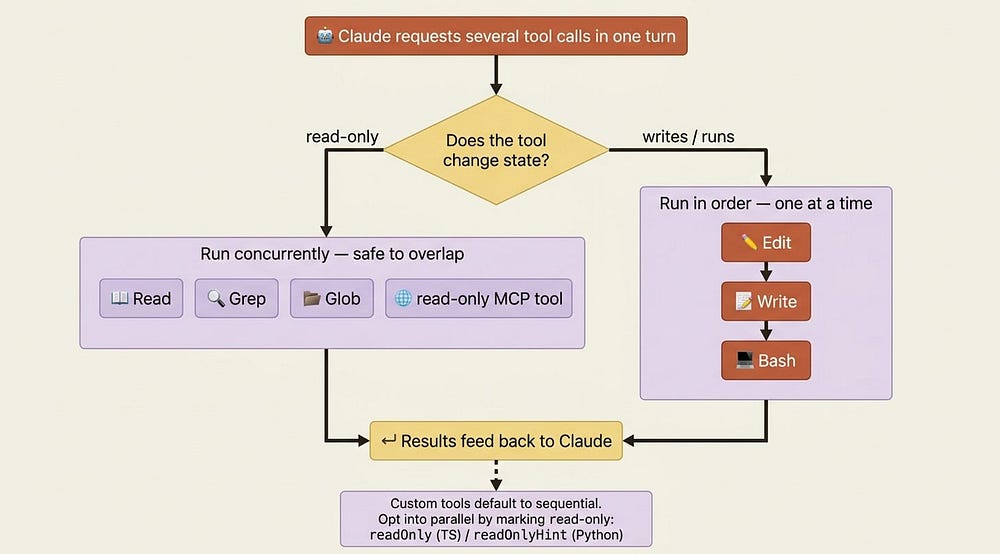
This matters once you start writing your own tools. Custom tools default to sequential, and you opt into parallelism by marking a tool read-only with readOnlyHint, the same field name in both TypeScript and Python. Hold the principle: reads can overlap, writes take turns.
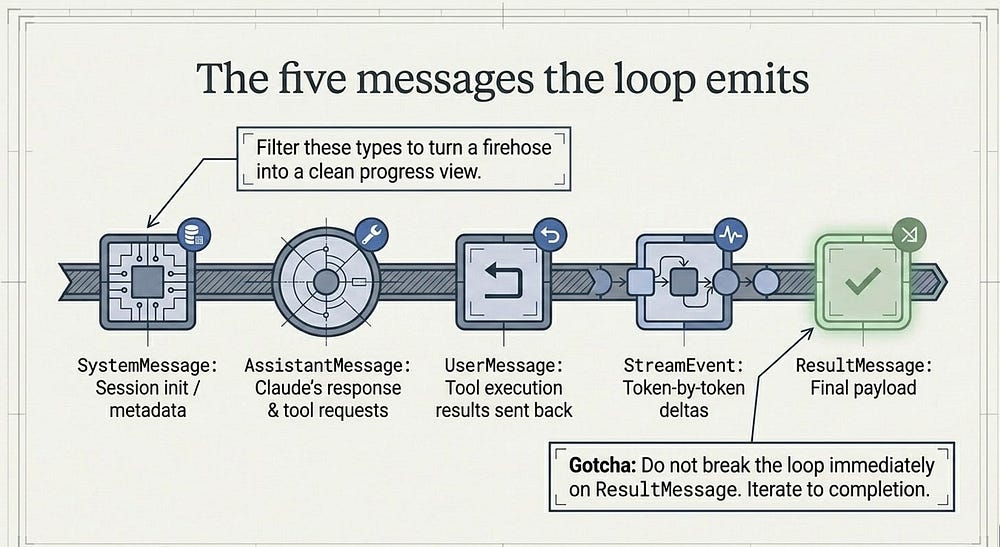
The five messages the loop emits
As the loop runs, the SDK yields a stream of messages, and each one carries a type telling you which stage it came from. Five core types cover the entire lifecycle in both SDKs.
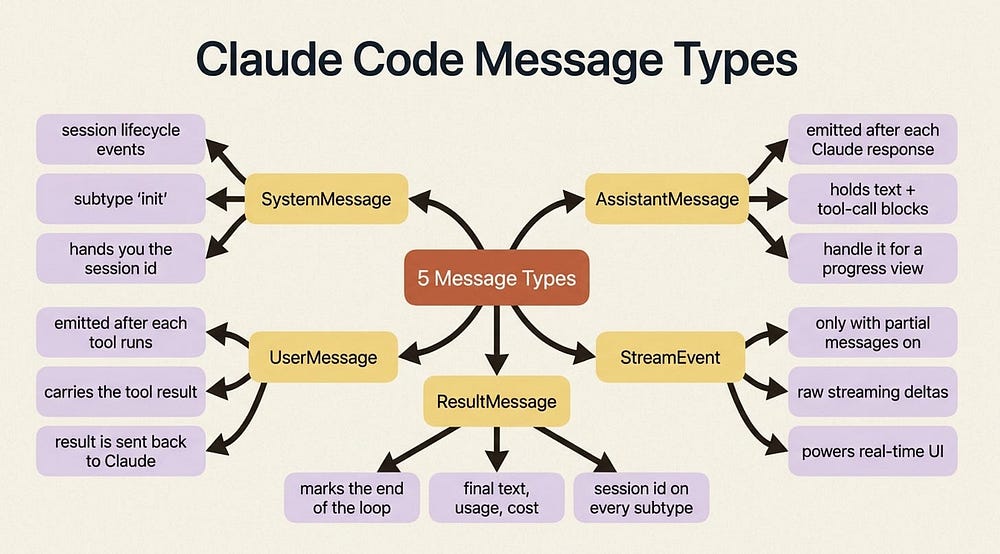
SystemMessage carries session lifecycle events; the first one, subtype "init", hands you the session metadata, including the session ID you need later to resume a run. AssistantMessage is emitted after each Claude response, including the final text-only one, and holds the text and tool-call blocks from that turn. UserMessage is emitted after each tool execution, carrying the tool result sent back to Claude. StreamEvent shows up only when you enable partial messages, carrying raw streaming deltas: the raw material for a live, token-by-token UI. And ResultMessage marks the end of the loop, with the final text, token usage, cost, and session ID.
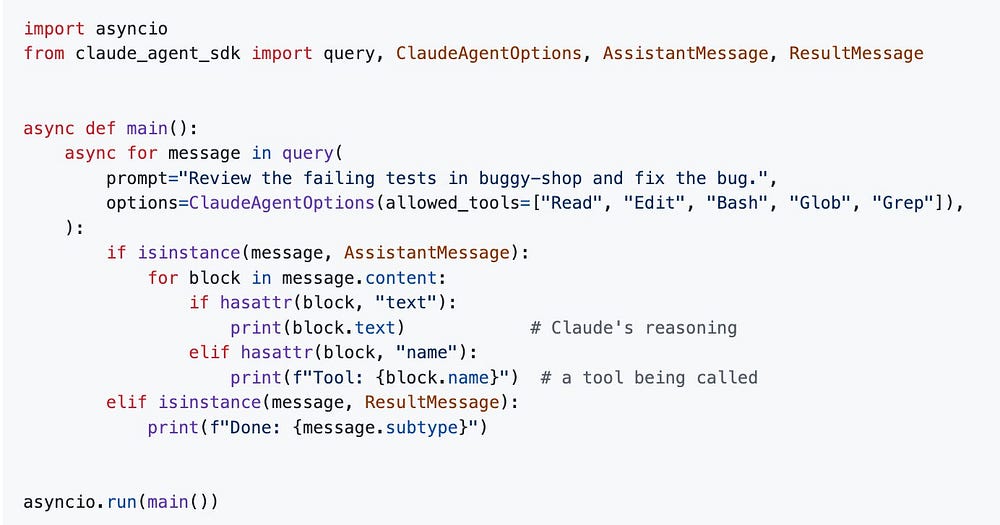
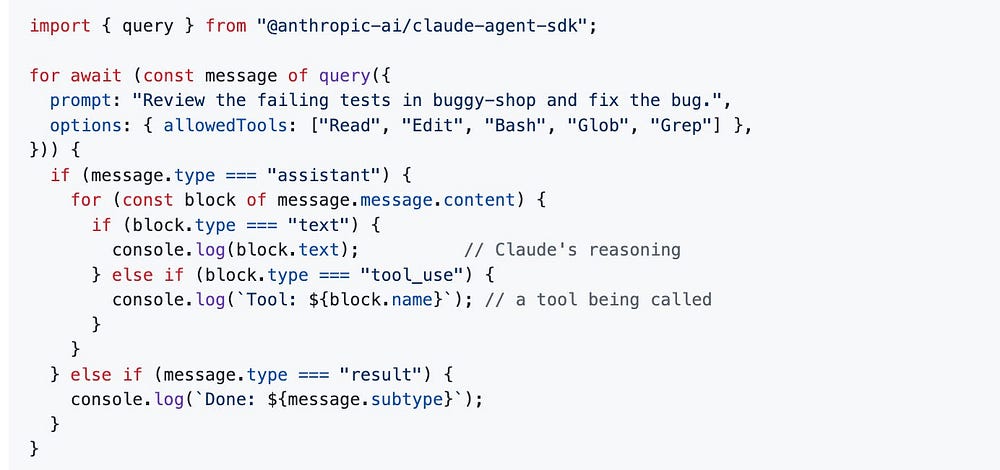
Which ones you handle depends on what you are building. If you only care about the outcome, watch for ResultMessage. If you want a progress view, handle AssistantMessage to see each tool call as it happens. Here is the progress-view shape in both languages:
Python:
TypeScript:
import asyncio
from claude_agent_sdk import query, ClaudeAgentOptions, AssistantMessage, ResultMessage

async def main():
    async for message in query(
        prompt="Review the failing tests in buggy-shop and fix the bug.",
        options=ClaudeAgentOptions(allowed_tools=["Read", "Edit", "Bash", "Glob", "Grep"]),
    ):
        if isinstance(message, AssistantMessage):
            for block in message.content:
                if hasattr(block, "text"):
                    print(block.text)            # Claude's reasoning
                elif hasattr(block, "name"):
                    print(f"Tool: {block.name}")  # a tool being called
        elif isinstance(message, ResultMessage):
            print(f"Done: {message.subtype}")

asyncio.run(main())
//TypeScript
import { query } from "@anthropic-ai/claude-agent-sdk";

for await (const message of query({
  prompt: "Review the failing tests in buggy-shop and fix the bug.",
  options: { allowedTools: ["Read", "Edit", "Bash", "Glob", "Grep"] },
})) {
  if (message.type === "assistant") {
    for (const block of message.message.content) {
      if (block.type === "text") {
        console.log(block.text);          // Claude's reasoning
      } else if (block.type === "tool_use") {
        console.log(`Tool: ${block.name}`); // a tool being called
      }
    }
  } else if (message.type === "result") {
    console.log(`Done: ${message.subtype}`);
  }
}
That is roughly ten lines of code. Instead of dumping every raw message, you sort them by type and print something a human would actually want to read. The firehose became a progress log.
Gotcha: do not break out of the loop the moment you see the result message. Trailing system events, such as a prompt suggestion, can arrive after it, so iterate the stream to completion. Breaking early can leave the transport in a weird state and truncate cleanup.
Controlling the loop: turns, budget, and effort
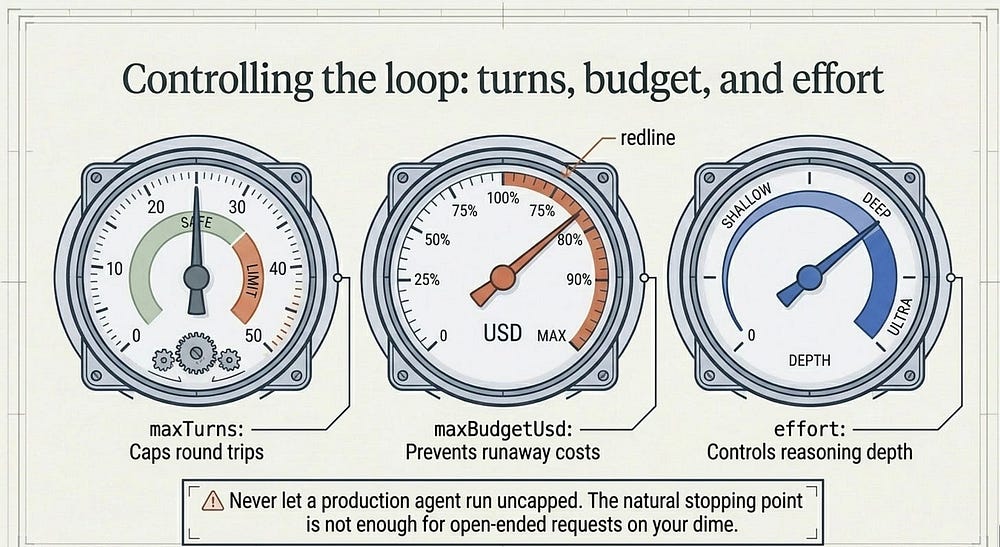
The loop's natural stopping point, where Claude runs out of things to ask for, is fine for well-scoped tasks. It is not fine for "improve this codebase" at three in the morning on your dime. You get three dials.
maxTurns caps the number of tool-use round trips. maxBudgetUsd stops the loop once the running cost estimate crosses a threshold. And effort controls how hard Claude reasons per turn: lower effort spends fewer tokens and less money, higher effort reasons more thoroughly for genuinely hard debugging. Turns and budget default to no limit, the single most important thing to change before anything you write leaves your laptop.
In production: set a budget by default. A turn cap protects you from a loop that keeps trying; a budget cap protects you from a loop that keeps trying expensively. Different failure modes, and you want both.
How to tell why it stopped
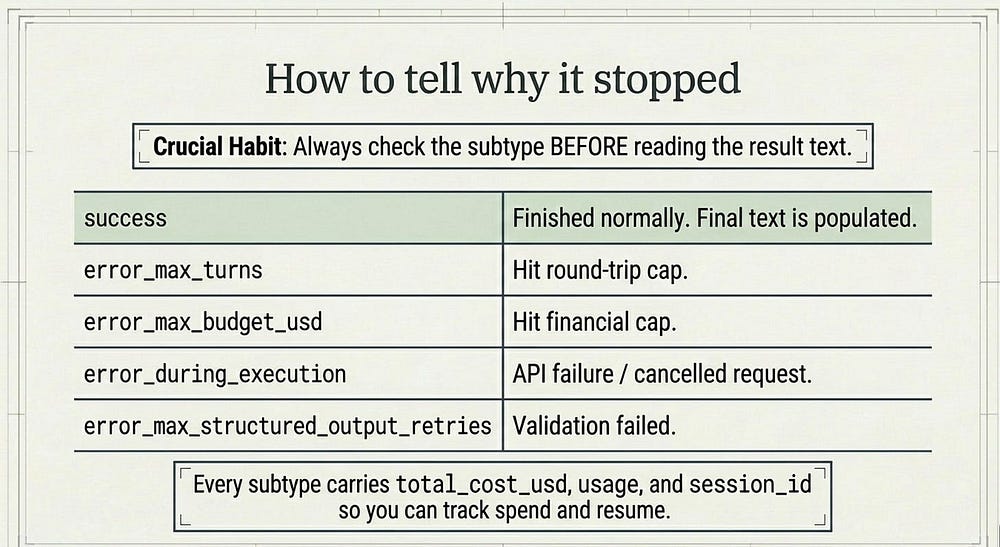
This is the payoff of the whole article. When the loop ends, the ResultMessage tells you what happened through its subtype field, and reading that field correctly is the difference between "the agent failed" and "the agent hit the turn limit with two of three tests fixed, so resume it."
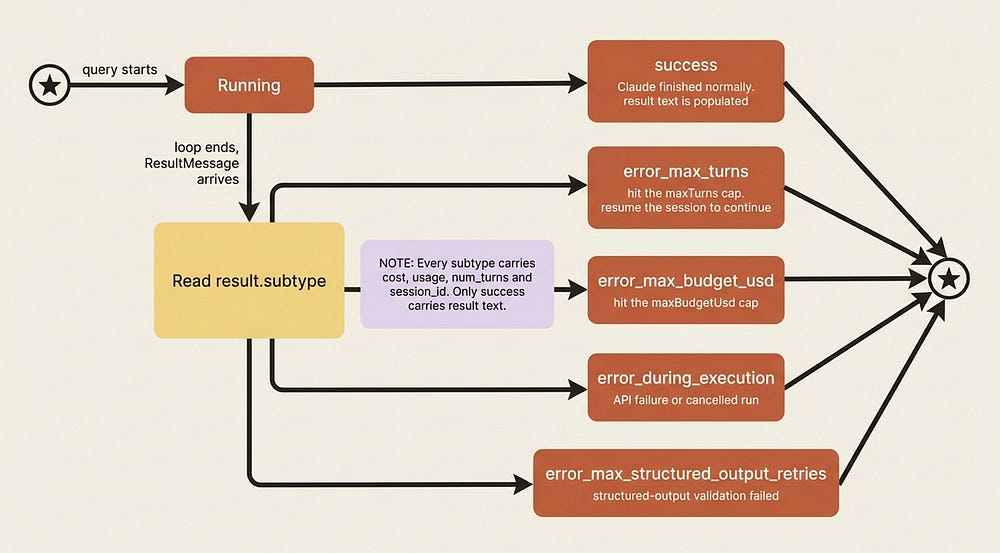
Here are the subtypes. success means Claude finished normally, and it is the only subtype where the final result text is populated. error_max_turns means the loop hit your maxTurns cap before finishing. error_max_budget_usd means it hit your budget cap. error_during_execution means something interrupted the loop, such as an API failure or a cancelled request. And error_max_structured_output_retries means structured-output validation failed past its retry limit.
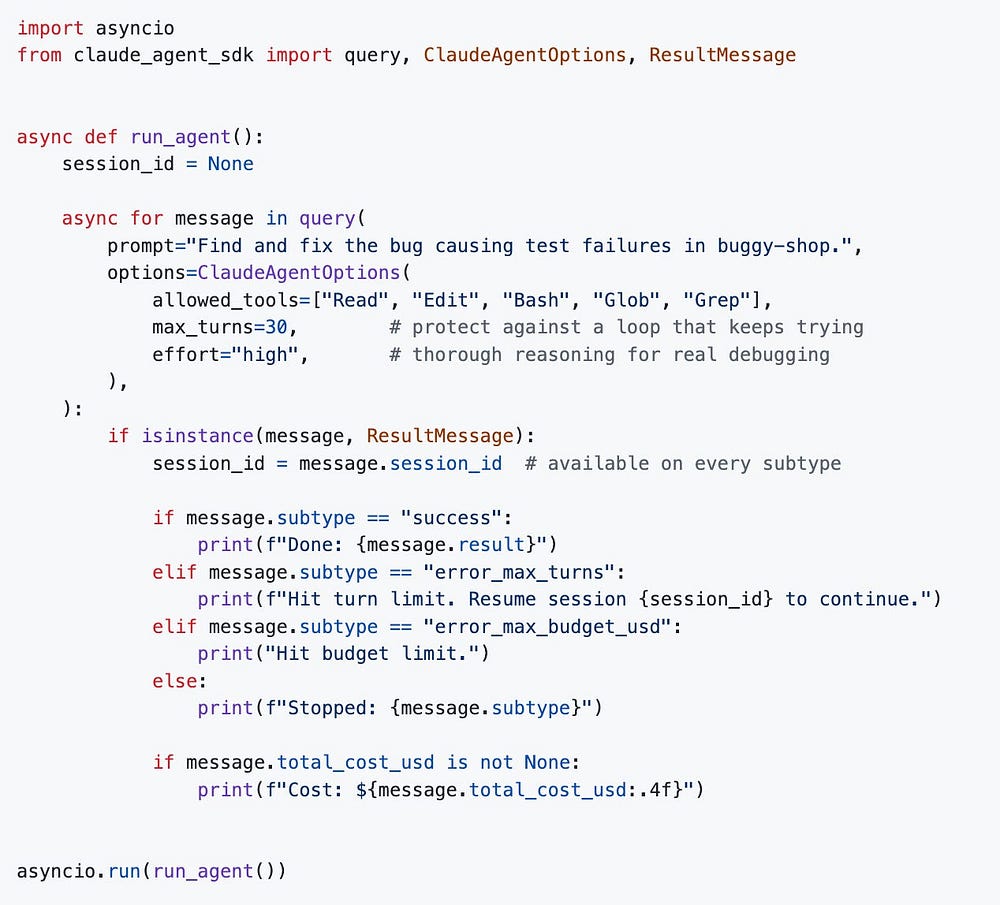
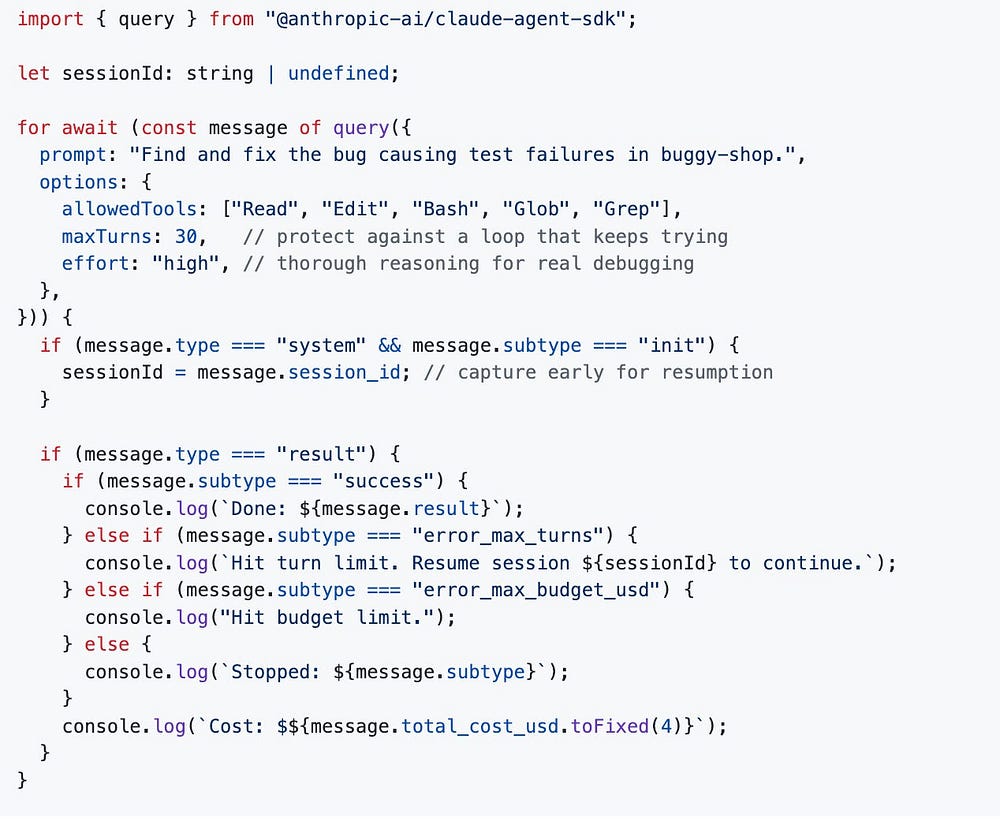
The crucial habit: check the subtype before reading result, because result only exists on success. Every subtype, errors included, still carries total_cost_usd, usage, num_turns, and session_id, so you can always track what you spent and resume where you stopped, even after a failure.
Python:
TypeScript:
# Python
import asyncio
from claude_agent_sdk import query, ClaudeAgentOptions, ResultMessage

async def run_agent():
    session_id = None
    async for message in query(
        prompt="Find and fix the bug causing test failures in buggy-shop.",
        options=ClaudeAgentOptions(
            allowed_tools=["Read", "Edit", "Bash", "Glob", "Grep"],
            max_turns=30,        # protect against a loop that keeps trying
            effort="high",       # thorough reasoning for real debugging
        ),
    ):
        if isinstance(message, ResultMessage):
            session_id = message.session_id  # available on every subtype
            if message.subtype == "success":
                print(f"Done: {message.result}")
            elif message.subtype == "error_max_turns":
                print(f"Hit turn limit. Resume session {session_id} to continue.")
            elif message.subtype == "error_max_budget_usd":
                print("Hit budget limit.")
            else:
                print(f"Stopped: {message.subtype}")
            if message.total_cost_usd is not None:
                print(f"Cost: ${message.total_cost_usd:.4f}")

asyncio.run(run_agent())
//TypeScript
import { query } from "@anthropic-ai/claude-agent-sdk";

let sessionId: string | undefined;

for await (const message of query({
  prompt: "Find and fix the bug causing test failures in buggy-shop.",
  options: {
    allowedTools: ["Read", "Edit", "Bash", "Glob", "Grep"],
    maxTurns: 30,   // protect against a loop that keeps trying
    effort: "high", // thorough reasoning for real debugging
  },
})) {
  if (message.type === "system" && message.subtype === "init") {
    sessionId = message.session_id; // capture early for resumption
  }

  if (message.type === "result") {
    if (message.subtype === "success") {
      console.log(`Done: ${message.result}`);
    } else if (message.subtype === "error_max_turns") {
      console.log(`Hit turn limit. Resume session ${sessionId} to continue.`);
    } else if (message.subtype === "error_max_budget_usd") {
      console.log("Hit budget limit.");
    } else {
      console.log(`Stopped: ${message.subtype}`);
    }
    console.log(`Cost: $${message.total_cost_usd.toFixed(4)}`);
  }
}
One more field worth knowing now. The result also carries stop_reason, which reports why the model stopped generating on its final turn. The value you most want to catch is refusal: it means Claude declined the request, which is a different situation from hitting a limit and deserves different handling in your code. Check it with stop_reason == "refusal" in Python or stop_reason === "refusal" in TypeScript.
Gotcha: in Python, total_cost_usd and usage are typed as optional and can be None on some error paths. Guard before you format them, or a failed run will throw a second, more confusing error right on top of the first.
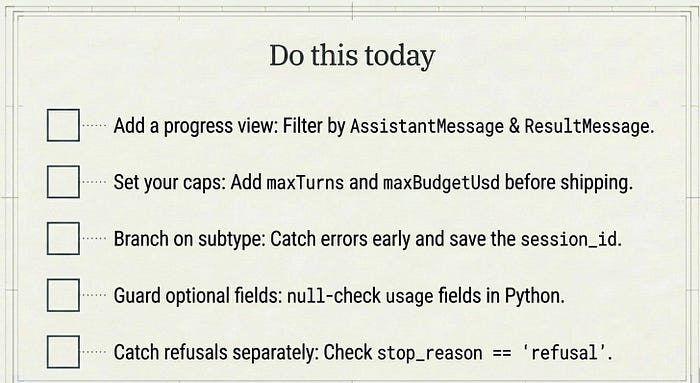
Do this today
- Add a progress view. Take your simplest working agent and replace the raw message dump with a loop that handles
AssistantMessageandResultMessageby type. Ten lines turns a firehose into a readable log. - Set both caps before anything ships. Add
max_turnsandmaxBudgetUsdto your options. Turn caps and budget caps guard against different failure modes, so use both, and never let a production agent run uncapped. - Branch on the result subtype. Before reading
result, checksubtype. Handleerror_max_turnsanderror_max_budget_usdexplicitly, and capturesession_idso you can resume a run that stopped short. - Guard the optional fields. In Python, null-check
total_cost_usdandusagebefore formatting them, so an error path does not throw a second, confusing exception. - Catch refusals separately. Check
stop_reasonforrefusaland handle a declined request differently from a hit limit. They are not the same problem.
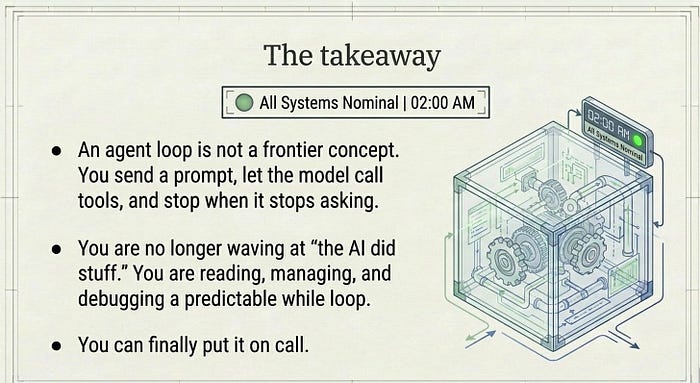
The takeaway
An agent loop sounds like a frontier concept and is, mechanically, almost boring once you see it: send a prompt, let the model call tools turn after turn, stop when it stops asking, read the result subtype to learn how it ended. That is it.
The SDK's value is not that the loop is clever. It is that you never have to write or maintain it, and you still get to inspect every stage when something goes sideways. You can now describe a run in precise terms, naming the turn, the message, and the stopping condition, instead of waving at "the AI did stuff."
That precision is what makes an agent something you can put on call. When it surprises you at 2 a.m., you will not be staring at magic. You will be reading a while loop.
This is Part 2 of "Building with the Claude Agent SDK," a 14-part guide to building production-ready AI agents.
About the Author — Claude Certified Architect
Rick Hightower is a former Senior Distinguished Engineer at a Fortune 100 company, focusing on delivering ML / AI insights to front-line applications, and a practitioner building multi-agent production systems. Follow him on SubStack and Medium for more hands-on agent engineering content. You can also book him to speak and train your team: Check out Rick Hightower's SpeakerHub.

Rick Hightower helps companies become AI-first through practical mentoring, executive and team training, and custom AI solution development. He is a former Senior Distinguished Engineer at a Fortune 100 company, where he focused on bringing ML and AI insights into real front-line business applications.
Subscribe to Rick's newsletter to see videos and guides.
Rick is a Claude Certified Architect, AI systems practitioner, and builder of production multi-agent systems. He is currently working on authoring a book on Harness Engineering with Manning publishing. He created Skilz, a universal agent skill installer supporting 30+ coding agents including Claude Code, Gemini, Copilot, and Cursor, and co-founded one of the largest agentic skill marketplaces.
Today, Rick and the Spillwave team works with leaders and teams who want to move beyond AI experiments and build real AI capability inside their companies. He helps organizations adopt AI safely, train their people, redesign workflows, and build practical AI systems that create measurable business value.
Ready to make your company AI-first? Connect with Rick on LinkedIn, Substack or Medium, book him to speak or train your team, or visit Spillwave to explore mentoring, training, and custom AI solutions for your organization.
Originally published at https://rickhigh.substack.com.