Claude Agent SDK Checkpointing: Your Agent Hit Its Turn Limit Halfway Through. Do Not Start Over. Resume It.
Part 5: Sessions remember the conversation. Checkpointing remembers the files. Learn the difference, and your Claude agent can recover from a limit, branch to try two approaches, and undo a refactor.
Originally published on Medium.
Part 5: Sessions remember the conversation. Checkpointing remembers the files. Learn the difference, and your Claude agent can recover from a limit, branch to try two approaches, and undo a refactor.
Your agent stopped halfway. Re-running it from scratch wastes money and time on context the agent never lost. Sessions and checkpointing are two completely different kinds of agent state, and conflating them is the costly first mistake. Master both and your agent can recover from a turn limit, branch to try two fixes, and undo a bad refactor without re-paying for context.
Sessions remember the conversation. Checkpointing remembers the files. Learn the difference, and your Claude agent can recover from a limit, branch to try two approaches, and undo a bad refactor without losing its train of thought.
In this article: You will learn the two kinds of state in the Claude Agent SDK and why mixing them up is the most expensive beginner mistake. We cover how to capture a session ID, resume a stalled agent with full context, fork a session to explore two fixes in parallel, and turn on file checkpointing so you can rewind a refactor you do not like. By the end, your agent can survive across runs and undo its own mistakes.
A long agent run ends with error_max_turns. The agent burned through thirty turns and stopped two-thirds of the way through fixing a buggy repository. The naive reaction is to bump the turn limit and run the whole thing again from scratch.
That instinct costs you twice. You pay again for every file the agent already read, and you pay again for every step it already reasoned through. Worse, the second run is not guaranteed to retrace the first one, so you might not even get the same starting point back.
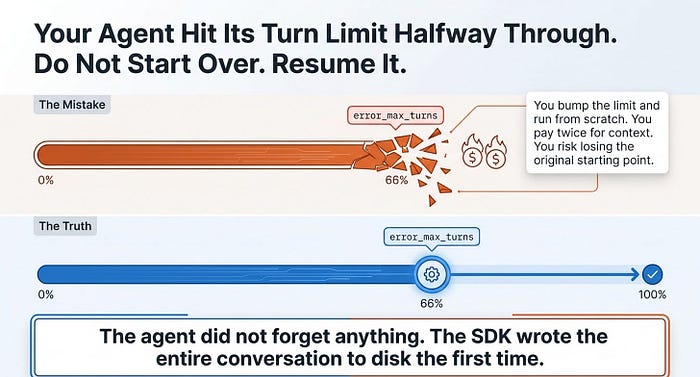
Here is the part most people miss: the agent did not forget anything. The SDK wrote the entire conversation to disk the first time. You do not need a fresh run. You need to pick the old one back up.
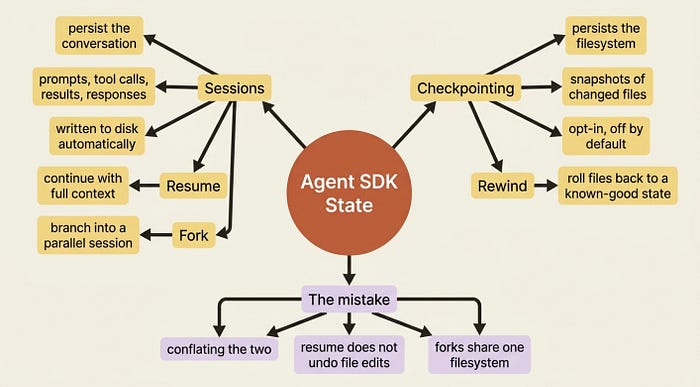
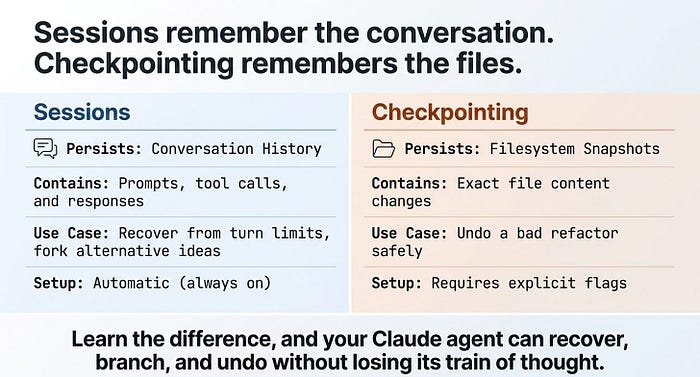
This article is about state in the Claude Agent SDK, and there are two completely different kinds of it. Sessions persist the conversation: your prompts, every tool call, every result, and every response. Checkpointing persists the filesystem: snapshots of the files the agent changed, so you can roll them back. They sound similar. They are not. Conflating them is the first mistake people make, and it is the one this article is built to prevent.
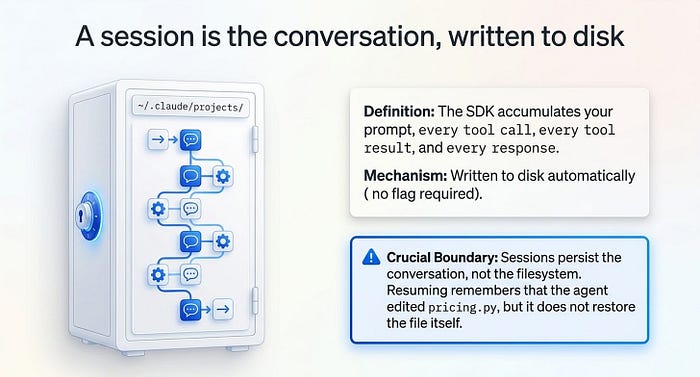
A session is the conversation, written to disk
Start with the precise definition, because every distinction below depends on it. A session is the conversation history the SDK accumulates while the agent works. It contains your prompt, every tool call, every tool result, and every response. The SDK writes it to disk automatically, with no flag to set.
Returning to a session means the agent has full context from before: the files it already read, the analysis it already did, and the decisions it already made.
Here is the line to underline: sessions persist the conversation, not the filesystem. If you resume a session, the agent remembers that it edited pricing.py, but the session machinery itself does not undo or restore that edit. Reverting files is checkpointing's job, which is the second half of this article. Hold that boundary in your head, and the rest is straightforward.
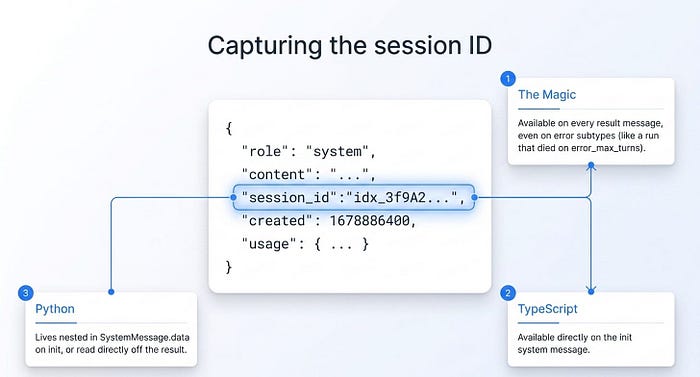
Capturing the session ID
Everything that resumes or forks a session needs a session ID. You get it from the result message, which carries session_id on every result, whether the run succeeded or errored.
That last detail is what makes recovery possible. Even a run that died on error_max_turns hands you the ID you need to continue it.
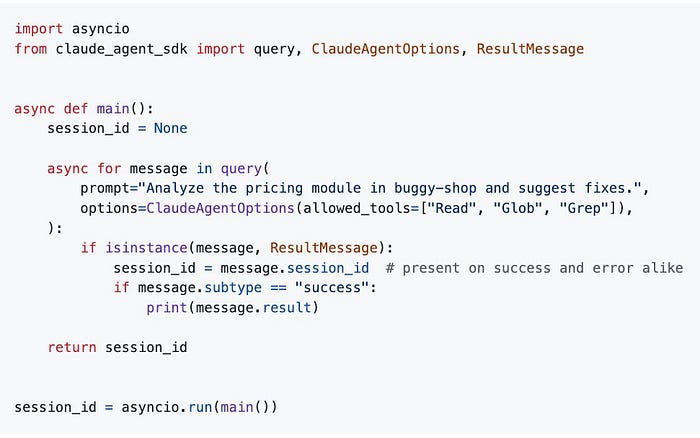
Python version:
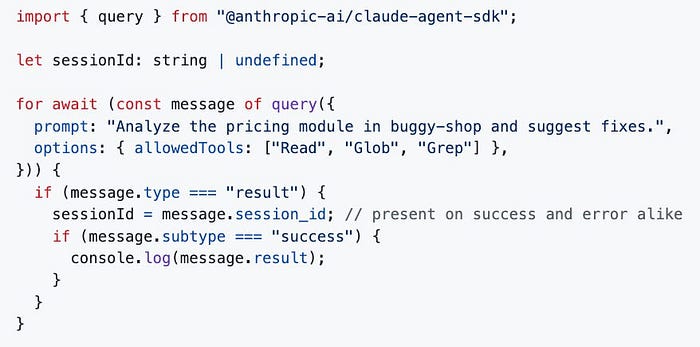
TypeScript version:
import asyncio
from claude_agent_sdk import query, ClaudeAgentOptions, ResultMessage

async def main():
    session_id = None
    async for message in query(
        prompt="Analyze the pricing module in buggy-shop and suggest fixes.",
        options=ClaudeAgentOptions(allowed_tools=["Read", "Glob", "Grep"]),
    ):
        if isinstance(message, ResultMessage):
            session_id = message.session_id  # present on success and error alike
            if message.subtype == "success":
                print(message.result)
    return session_id

session_id = asyncio.run(main())
import { query } from "@anthropic-ai/claude-agent-sdk";

let sessionId: string | undefined;
for await (const message of query({
  prompt: "Analyze the pricing module in buggy-shop and suggest fixes.",
  options: { allowedTools: ["Read", "Glob", "Grep"] },
})) {
  if (message.type === "result") {
    sessionId = message.session_id;  // present on success and error alike
    if (message.subtype === "success") {
      console.log(message.result);
    }
  }
}
In TypeScript the ID is also available earlier, as a direct field on the init system message. That is handy when you want to record it before the run finishes. In Python it lives nested in SystemMessage.data on init, or you can just read it off the result as shown.
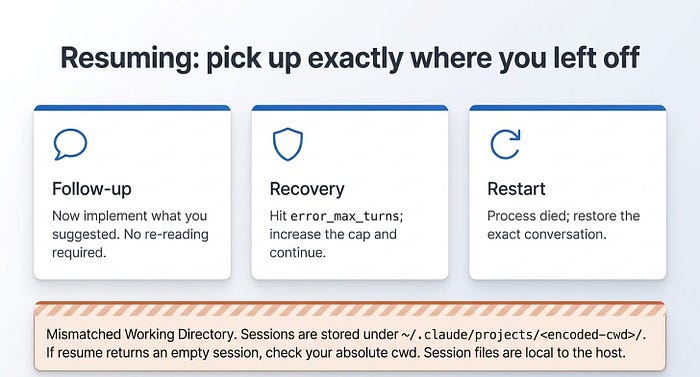
Resuming: pick up exactly where you left off
To return to a session, pass its ID to resume. The agent continues with full context, and no re-reading is required.
There are three situations where you will reach for resume constantly:
- Follow-up on a finished task. "Now implement what you suggested," without making the agent re-analyze a thing.
- Recovery from a limit. The run hit
error_max_turns, and you want to continue it with a higher cap. - Restoring after a restart. Your process died, and you want the conversation back.
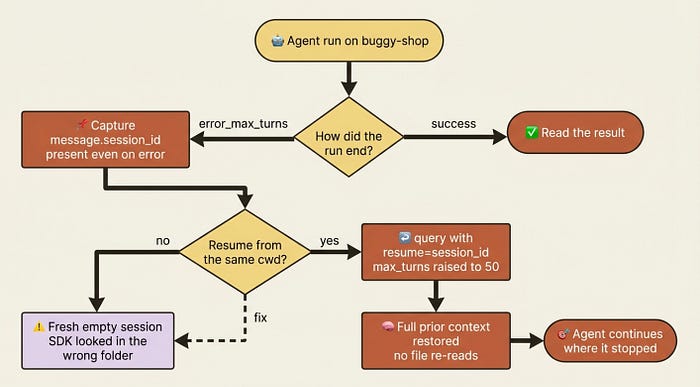
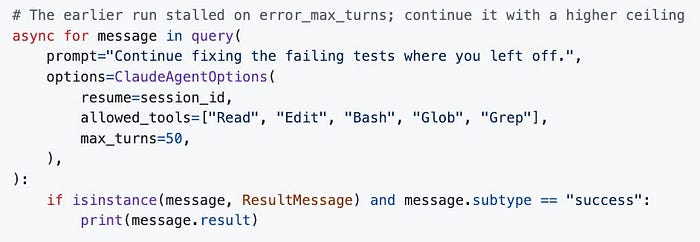
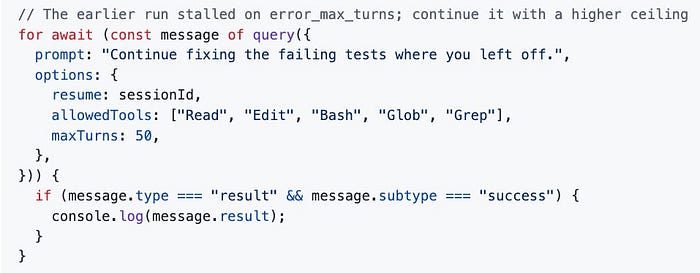
The recovery case is the one that pays for this whole article. The agent stopped on error_max_turns. You captured its session_id. Resuming continues the exact thread, with every file it read still in context.
Python version:
TypeScript version:
# The earlier run stalled on error_max_turns; continue it with a higher ceiling
async for message in query(
    prompt="Continue fixing the failing tests where you left off.",
    options=ClaudeAgentOptions(
        resume=session_id,
        allowed_tools=["Read", "Edit", "Bash", "Glob", "Grep"],
        max_turns=50,
    ),
):
    if isinstance(message, ResultMessage) and message.subtype == "success":
        print(message.result)
// The earlier run stalled on error_max_turns; continue it with a higher ceiling
for await (const message of query({
  prompt: "Continue fixing the failing tests where you left off.",
  options: {
    resume: sessionId,
    allowedTools: ["Read", "Edit", "Bash", "Glob", "Grep"],
    maxTurns: 50,
  },
})) {
  if (message.type === "result" && message.subtype === "success") {
    console.log(message.result);
  }
}
Gotcha: if a resume call comes back with a fresh, empty session instead of your history, the usual culprit is a mismatched working directory. Sessions are stored under ~/.claude/projects/<encoded-cwd>/, where the encoded path is your absolute cwd with non-alphanumeric characters swapped for dashes. Resume from a different directory, and the SDK looks in the wrong folder and finds nothing. Run your resume from the same cwd, and make sure the session file exists on that machine, because session files are local to the host that created them.
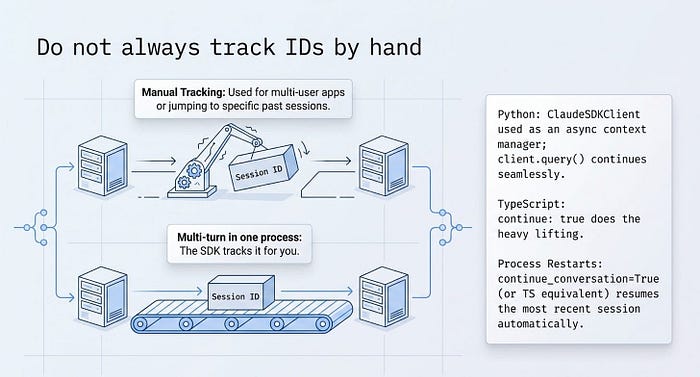
Do not always track IDs by hand
Manually capturing and passing IDs is the right tool when you have many sessions to juggle, such as one per user in a multi-user app, or when you want to return to a specific older session. But for the common case of a multi-turn conversation inside one process, the SDK can track the session for you.
In Python, ClaudeSDKClient used as an async context manager handles the ID internally. Each client.query() continues the same session, with no IDs in your code. In TypeScript, continue: true does the equivalent.
And continue_conversation=True in Python, or continue: true in TypeScript, resumes the most recent session in the directory after a process restart, without you tracking anything at all. Reach for explicit resume only when "the most recent one" is not specific enough.
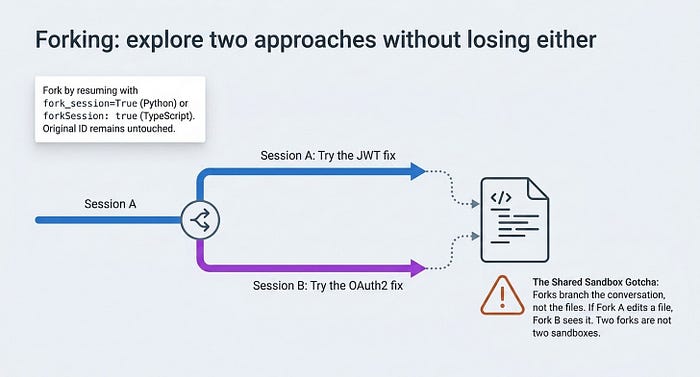
Forking: explore two approaches without losing either
Sometimes you do not want to continue a session. You want to branch it.
Forking creates a new session seeded with a copy of the original's history, then diverges. The fork gets its own ID. The original's ID and history are untouched. You end up with two independent sessions you can resume separately, which is perfect for "try the JWT fix and the OAuth2 fix and compare."
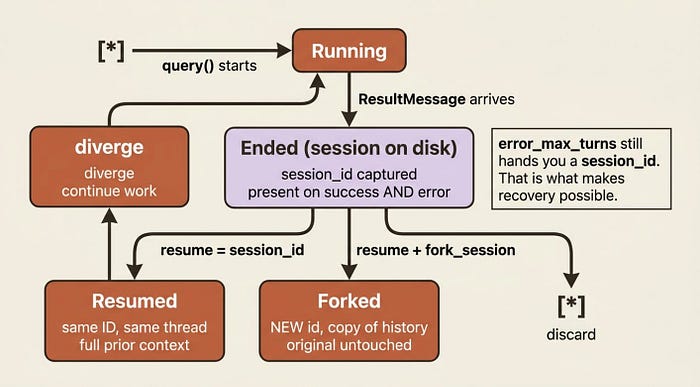
You fork by resuming with fork_session=True, or forkSession: true in TypeScript. The TypeScript shape is identical apart from the field name, so this shows it in Python only:
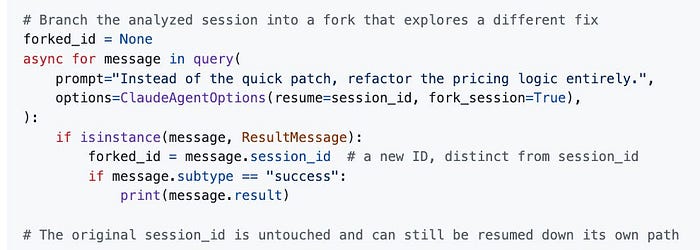
# Branch the analyzed session into a fork that explores a different fix
forked_id = None
async for message in query(
    prompt="Instead of the quick patch, refactor the pricing logic entirely.",
    options=ClaudeAgentOptions(resume=session_id, fork_session=True),
):
    if isinstance(message, ResultMessage):
        forked_id = message.session_id  # a new ID, distinct from session_id
        if message.subtype == "success":
            print(message.result)

# The original session_id is untouched and can still be resumed down its own path
Gotcha: forking branches the conversation, not the filesystem. If the forked agent edits files, those edits are real and visible to any session working in the same directory, including the original. Two forks are not two sandboxes. To branch and be able to revert file changes, you need checkpointing.
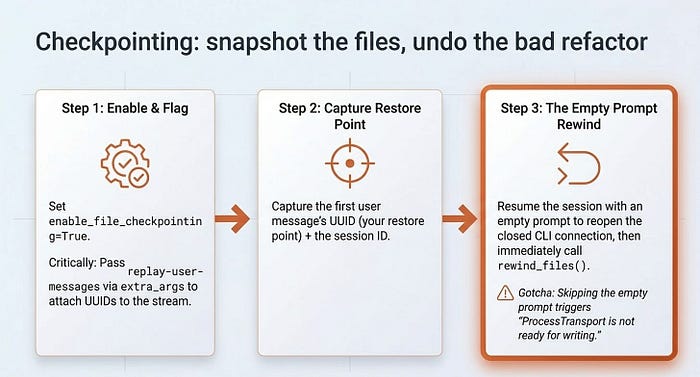
Checkpointing: snapshot the files, undo the bad refactor
Resuming and forking handle the conversation. Checkpointing handles the files. Turn it on, and the SDK snapshots file changes as the agent works, so you can roll them back to a known-good state. This is the safety net for "let the agent try a risky refactor, and if I hate it, undo it cleanly."
Two options switch it on:
enable_file_checkpointing=True, orenableFileCheckpointing: true, tracks the changes.- The
replay-user-messagesflag, set throughextra_argsorextraArgs, makes the SDK attach UUIDs to the user messages in the stream. Those UUIDs are your restore points. Without the flag, your user messages have no UUIDs, and you have nothing to rewind to.
The flow has three beats. First, enable checkpointing and run the work. Second, capture the first user message's UUID as your restore point, along with the session ID for later. Third, resume and call rewind_files(), or rewindFiles().
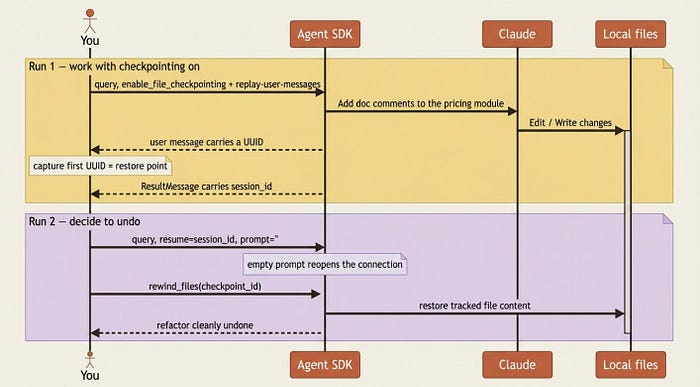
Here is the full shape in both languages.
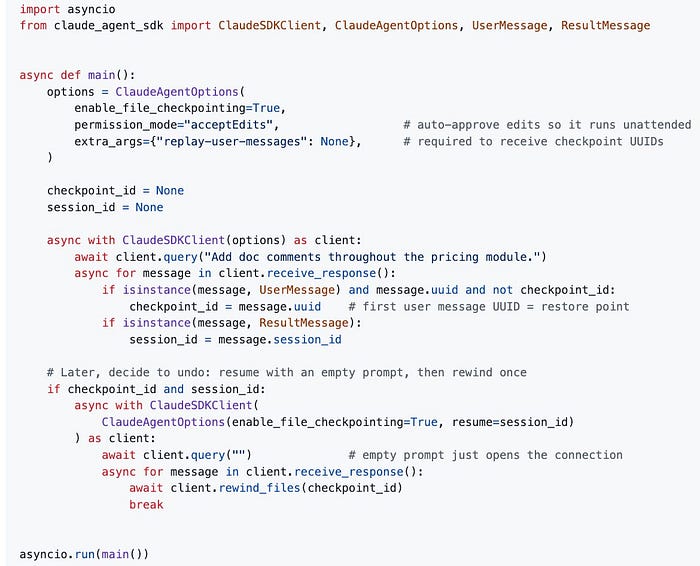
Python version:
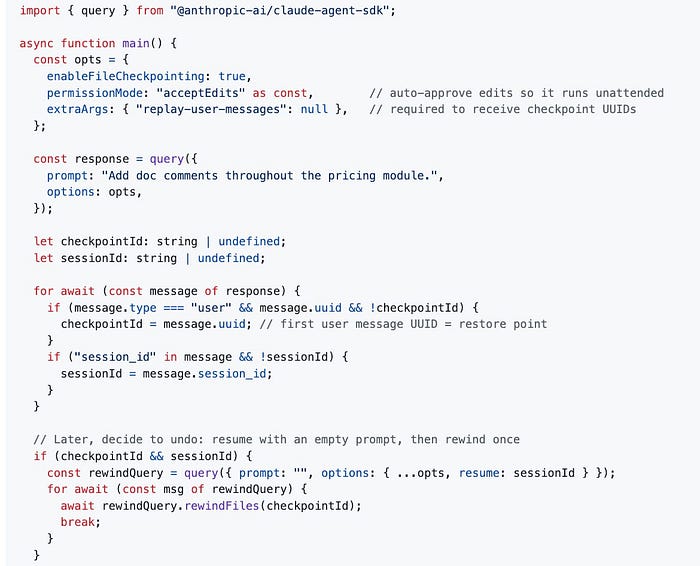
TypeScript version:
import asyncio
from claude_agent_sdk import ClaudeSDKClient, ClaudeAgentOptions, UserMessage, ResultMessage

async def main():
    options = ClaudeAgentOptions(
        enable_file_checkpointing=True,
        permission_mode="acceptEdits",  # auto-approve edits so it runs unattended
        extra_args={"replay-user-messages": None},  # required to receive checkpoint UUIDs
    )

    checkpoint_id = None
    session_id = None

    async with ClaudeSDKClient(options) as client:
        await client.query("Add doc comments throughout the pricing module.")
        async for message in client.receive_response():
            if isinstance(message, UserMessage) and message.uuid and not checkpoint_id:
                checkpoint_id = message.uuid  # first user message UUID = restore point
            if isinstance(message, ResultMessage):
                session_id = message.session_id

    # Later, decide to undo: resume with an empty prompt, then rewind once
    if checkpoint_id and session_id:
        async with ClaudeSDKClient(
            ClaudeAgentOptions(enable_file_checkpointing=True, resume=session_id)
        ) as client:
            await client.query("")  # empty prompt just opens the connection
            async for message in client.receive_response():
                await client.rewind_files(checkpoint_id)
                break

asyncio.run(main())
import { query } from "@anthropic-ai/claude-agent-sdk";

async function main() {
  const opts = {
    enableFileCheckpointing: true,
    permissionMode: "acceptEdits" as const,  // auto-approve edits so it runs unattended
    extraArgs: { "replay-user-messages": null },  // required to receive checkpoint UUIDs
  };

  const response = query({
    prompt: "Add doc comments throughout the pricing module.",
    options: opts,
  });

  let checkpointId: string | undefined;
  let sessionId: string | undefined;

  for await (const message of response) {
    if (message.type === "user" && message.uuid && !checkpointId) {
      checkpointId = message.uuid;  // first user message UUID = restore point
    }
    if ("session_id" in message && !sessionId) {
      sessionId = message.session_id;
    }
  }

  // Later, decide to undo: resume with an empty prompt, then rewind once
  if (checkpointId && sessionId) {
    const rewindQuery = query({
      prompt: "",
      options: { ...opts, resume: sessionId }
    });
    for await (const msg of rewindQuery) {
      await rewindQuery.rewindFiles(checkpointId);
      break;
    }
  }
}

main();
That empty-prompt resume in step three is not a quirk you can skip. It is the fix for the single most common checkpointing error.
Gotcha: if you call rewind_files() after your message loop has finished, you will hit "ProcessTransport is not ready for writing." The connection to the CLI process closes when the loop completes, so there is nothing left to write to. The cure is exactly what the example does: resume the session with an empty prompt to reopen the connection, then call rewind on that fresh query and break. You can also rewind mid-stream while still iterating, in which case you do not even need to capture the session ID.
Gotcha: if message.uuid is missing, you forgot the replay-user-messages flag, and you will have no checkpoints to rewind to. And if you get "No file checkpoint found for message," checkpointing was not enabled on the original session. Both errors trace back to options you set, or did not set, before the run, not to the rewind call itself.
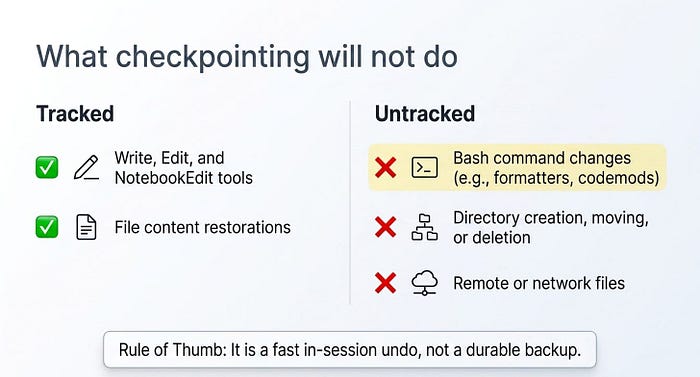
What checkpointing will not do
Set expectations before you lean on it. Checkpointing is narrower than it first looks.
- It tracks changes made through the
Write,Edit, andNotebookEdittools only. Files that aBashcommand rewrote are not tracked. - Checkpoints are tied to the session that created them.
- Rewinding restores file content. It does not undo creating, moving, or deleting directories.
- It covers local files, not remote or network ones.
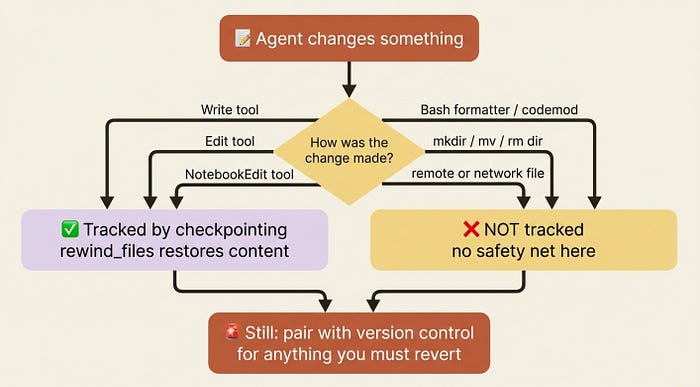
In production: that "Bash changes are not tracked" limitation is the sharp edge. If your agent fixes bugs by running a formatter or a codemod through Bash, checkpointing will not capture those edits, and you may believe you have a safety net you do not. Pair checkpointing with version control for anything you genuinely need to be able to revert. Treat it as a fast in-session undo, not a durable backup.
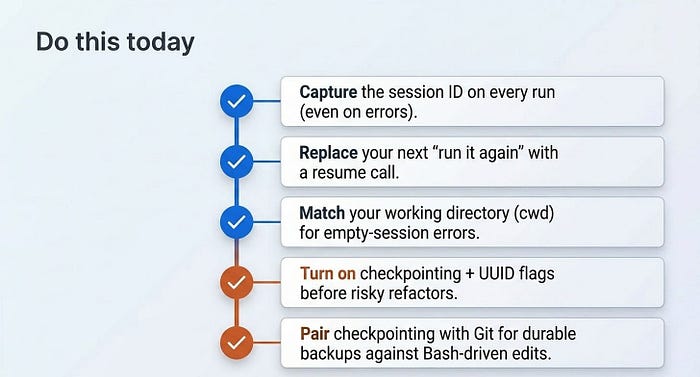
Do this today
- Capture the session ID on every run. Read
session_idoff theResultMessage, even on error subtypes. Store it before you decide what to do next. - Replace your next "run it again" with a resume. The moment a run ends on
error_max_turns, resume the session with a highermax_turnsinstead of starting from scratch. - Run resume from the same working directory. If a resume returns an empty session, check your
cwdfirst. That mismatch causes most "my history vanished" reports. - Turn on checkpointing before a risky refactor. Set
enable_file_checkpointing=Trueand thereplay-user-messagesflag, capture the first user message UUID, and you have a one-call undo. - Pair checkpointing with git. For anything you must be able to revert, commit first. Checkpointing does not cover
Bash-driven edits or directory changes.
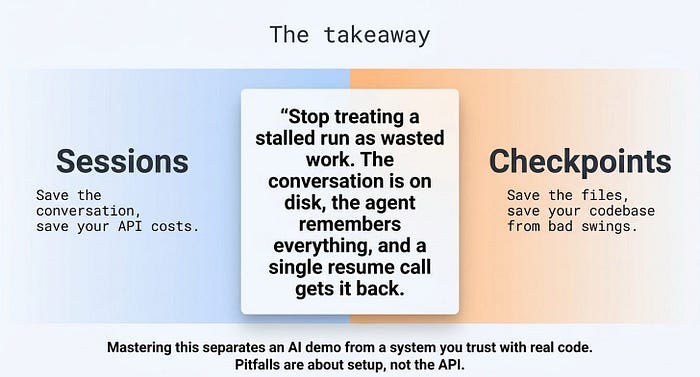
The takeaway
State in the Agent SDK comes in two flavors that are easy to confuse and important to keep separate. Sessions remember the conversation, so you can resume a stalled agent, recover from a limit, or fork to explore alternatives, all without re-paying for context the agent already has. Checkpointing remembers file content, so you can let the agent take a risky swing and roll it back if you do not like the result.
The pitfalls are almost all about setup, not about the API calls themselves. The right cwd for resume. The replay-user-messages flag for UUIDs. The empty-prompt resume before a post-stream rewind. Get those three right and the rest follows.
Stop treating a stalled run as wasted work. The conversation is on disk, the agent remembers everything, and a single resume call gets it back. Your agent can now survive across runs and undo its own mistakes. That is the difference between a demo and something you would trust with real code.
This is Part 5 of "Building with the Claude Agent SDK," a 14-part guide to building production-ready AI agents.
Join Rick Hightower's subscriber chat
Thanks for reading Hightower's AI Harness Engineering! This post is public so feel free to share it.
Hightower's AI Harness Engineering is a reader-supported publication. To receive new posts and support my work, consider becoming a free or paid subscriber.