Claude Agent SDK Project Context: Stop Pasting Your Coding Standards Into Every Prompt. Put Them on Disk.
Mastering Claude Agent SDK project context
Originally published on Medium.
Mastering Claude Agent SDK project context
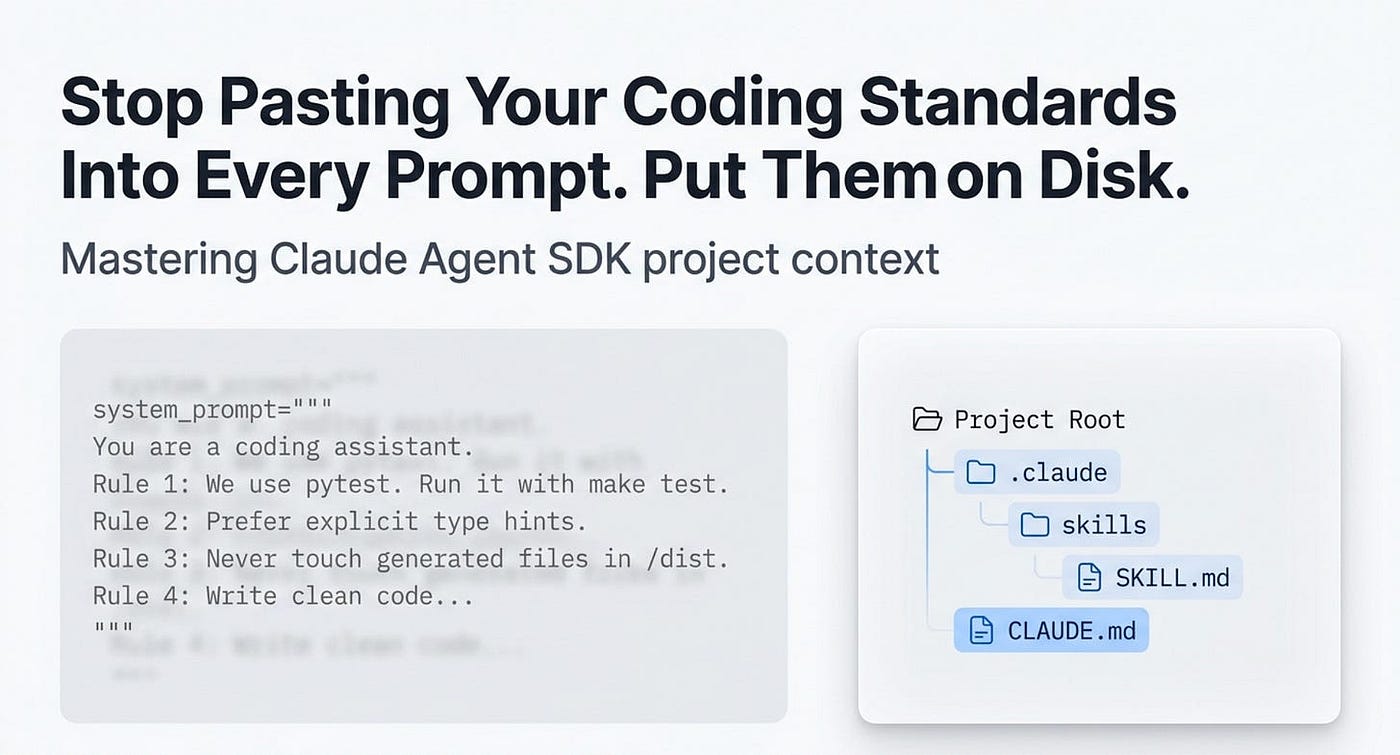
Part 6: How setting
Sources,CLAUDE.md, and skills let your Claude agent pick up your project's conventions, commands, and workflows automatically, without a word of it in your code.
In this article: You will learn how to move durable project knowledge out of your prompts and into files the Claude Agent SDK loads on its own. We cover why the SDK's default system prompt is deliberately bare, the one option (settingSources) that controls every on-disk source, how to write a CLAUDE.md that the agent treats as persistent memory, and how skills give the agent load-on-demand workflows. By the end, your agent reads its own project the way a new teammate reads the onboarding docs.
Part 6 of "Building with the Claude Agent SDK," a 14-part guide to building production-ready AI agents.
Hightower's AI Harness Engineering is a reader-supported publication. To receive new posts and support my work, consider becoming a free or paid subscriber.
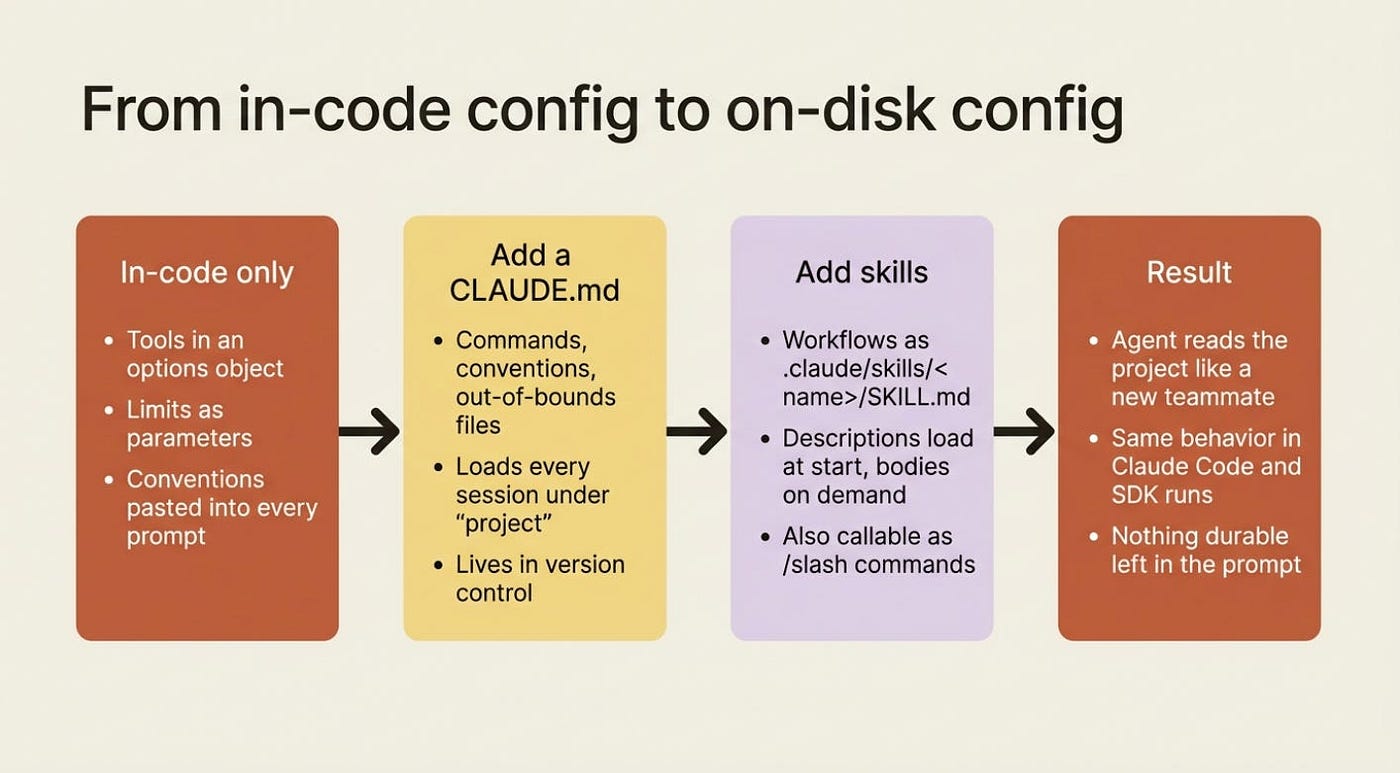
If you have built an agent with the Claude Agent SDK, you have probably configured it entirely in code: tools in an options object, limits as parameters, permissions as rules. That works. It also has a tiring side effect.
Every time you want the agent to know something durable about your project, something like "we use pytest, run it with make test, never touch the generated files," you either bake it into the prompt or pass it through options. Then you do it again on the next run. And the next. And every run after that. You are re-explaining your own project to a system that will forget the moment the process exits.
There is a better model, and it is the one Claude Code itself uses: configure the agent on disk. Drop a CLAUDE.md into your project, add a skill or two under .claude/, and the SDK loads them automatically at session start. The agent follows your conventions without you repeating them. Because the files live in your repository, your whole team, and your CI, get the identical behavior. This article is about that shift from in-code to on-disk Claude Agent SDK project context, and the single option that controls all of it.
The default prompt is deliberately bare
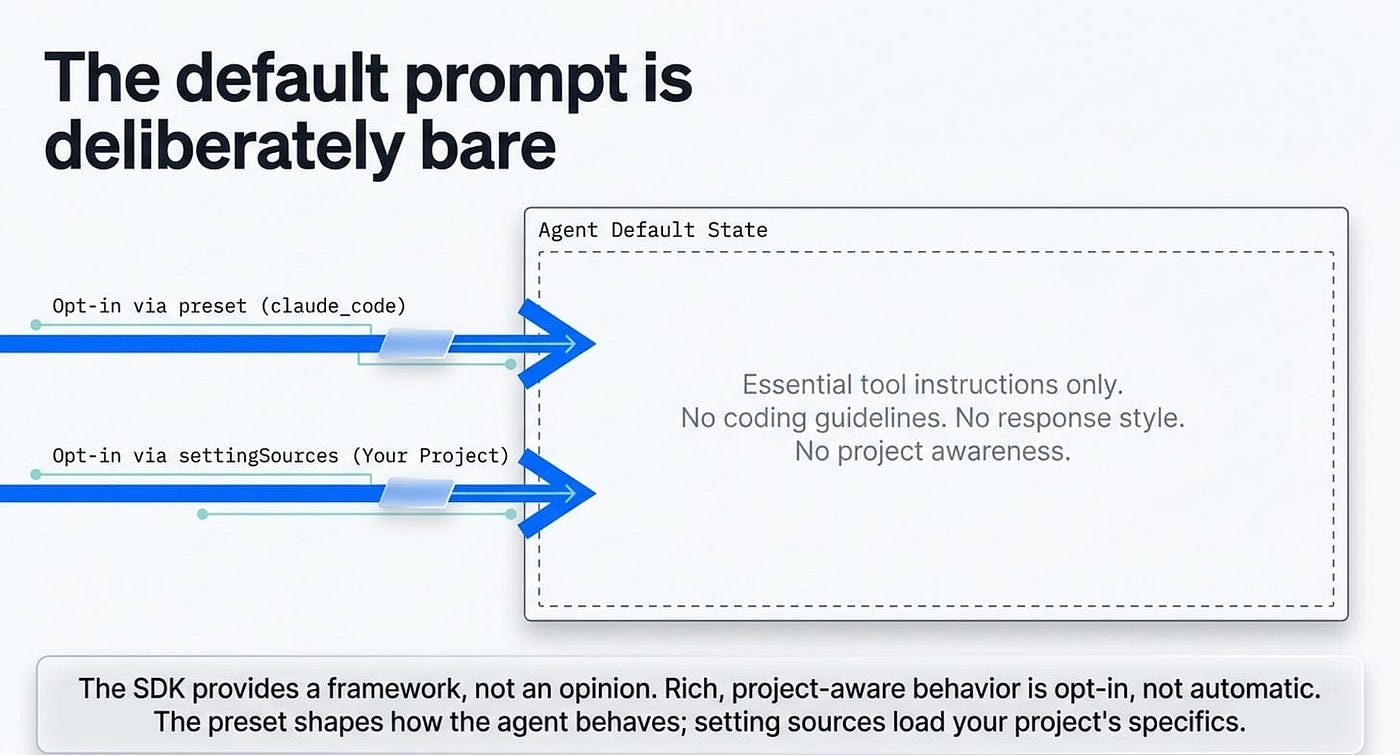
Start with a fact that surprises people. The Agent SDK uses a minimal system prompt by default. It contains the essential tool instructions and not much else: none of Claude Code's coding guidelines, none of its response style, none of its project awareness.
That is a sensible default for a library. You do not want a framework injecting opinions you did not ask for. But it means the rich, project-aware behavior you might expect from Claude Code is opt-in, not automatic.
You opt in two ways, and they are independent of each other. To get Claude Code's full system prompt, pass the preset explicitly: system_prompt={"type": "preset", "preset": "claude_code"} in Python, or the camelCase equivalent in TypeScript. To load your on-disk project files, you use settingSources, which is the real subject of this article. The preset shapes how the agent behaves in general. Setting sources load your project's specifics. You will often want both.
settingSources is the on-disk switch
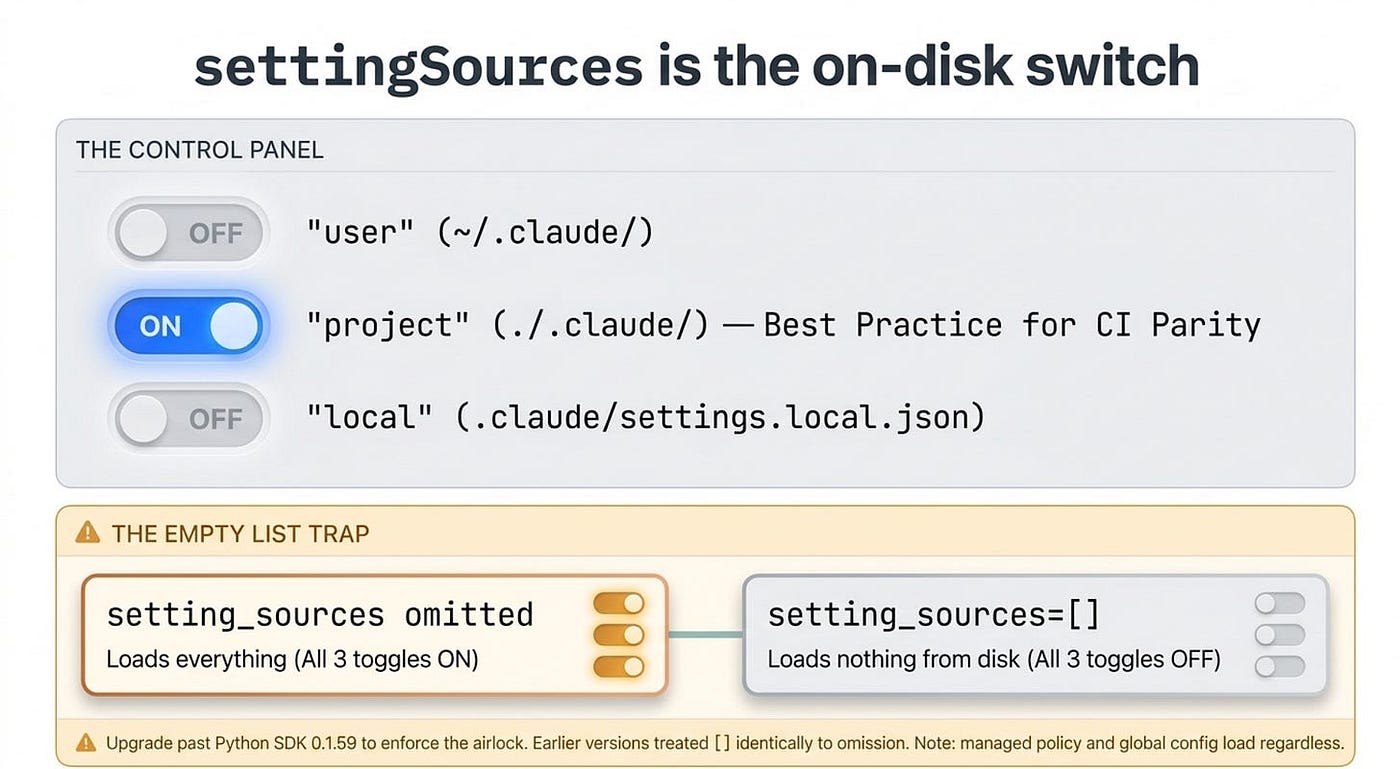
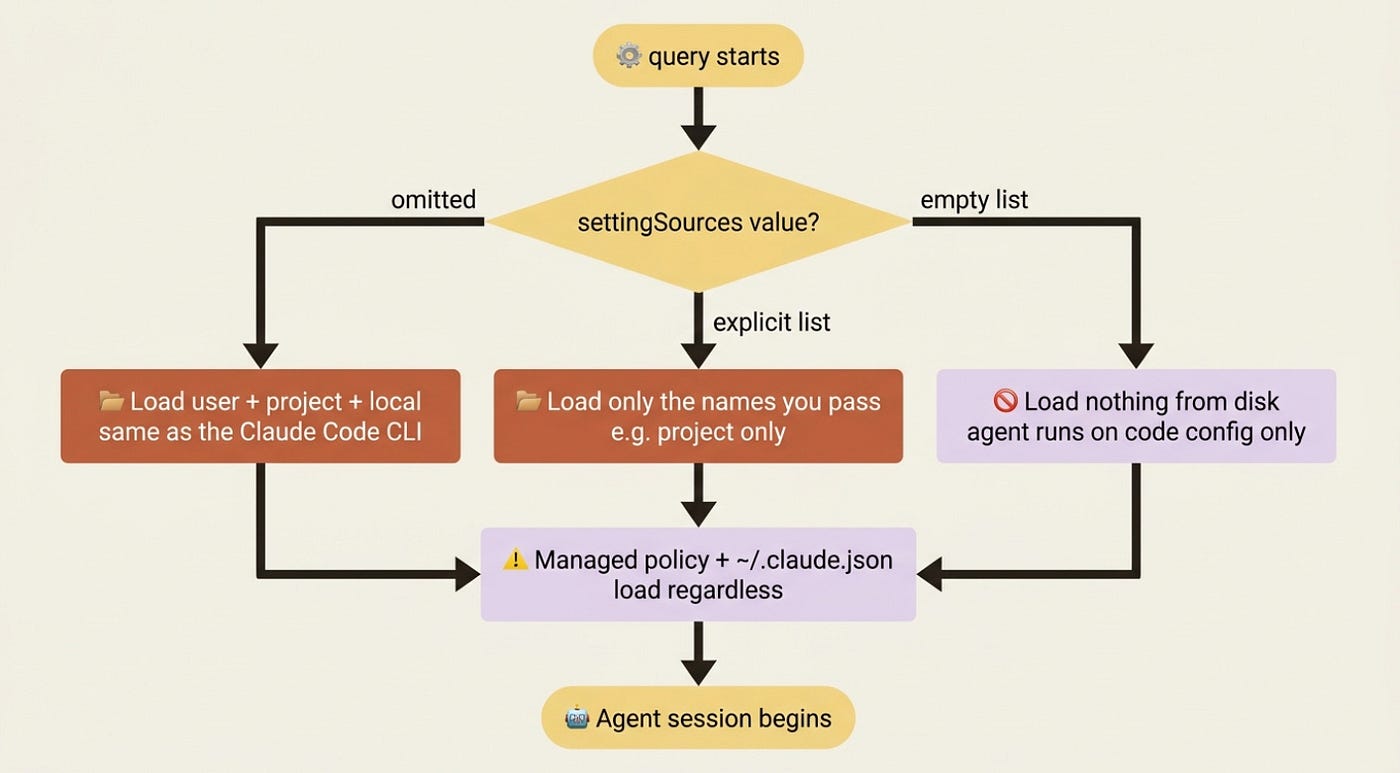
The setting sources option, setting_sources in Python and settingSources in TypeScript, takes a list of strings. There are three valid values:
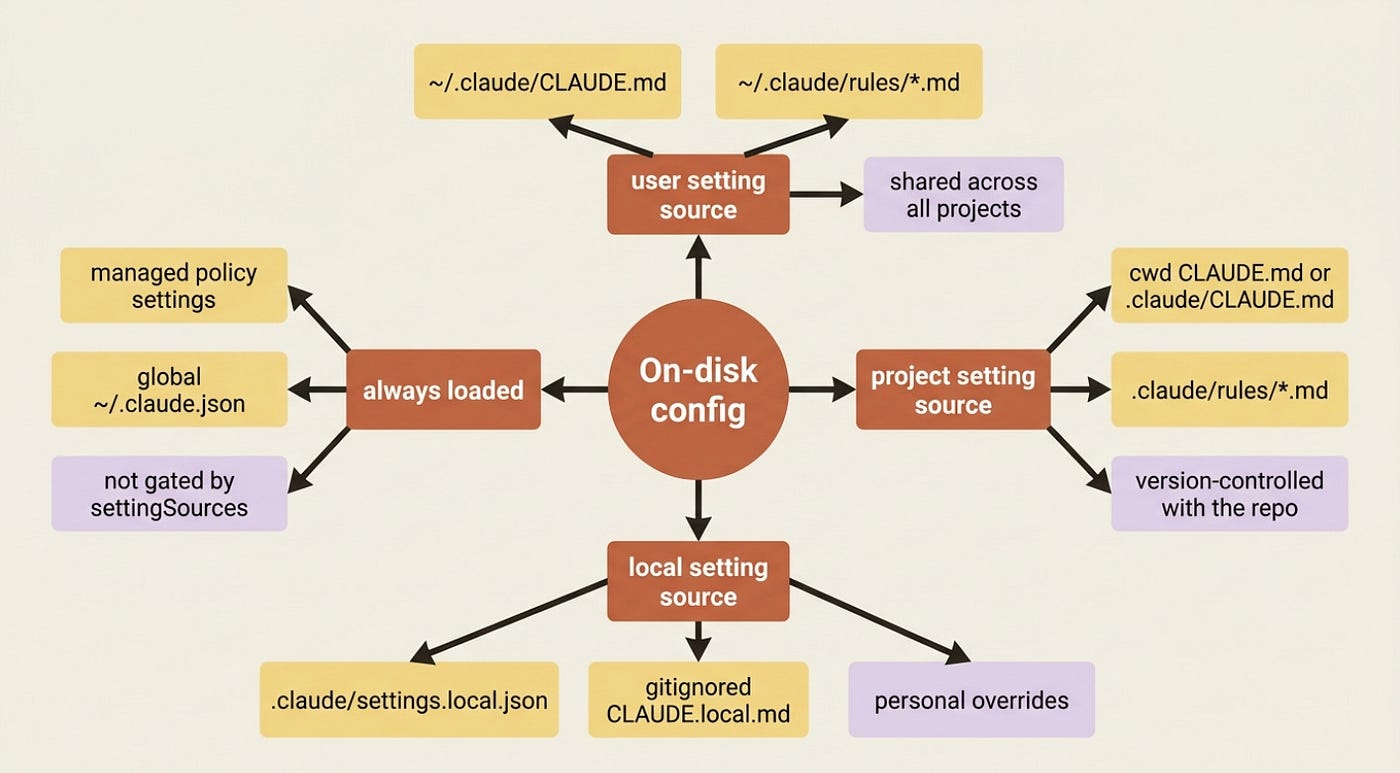
"user": your global settings in~/.claude/, shared across all your projects"project": shared project settings in./.claude/, version-controlled with your repository"local": local project settings in.claude/settings.local.json, gitignored for personal overrides
Here is the behavior that trips people up. When you omit the option entirely, the SDK loads all three, exactly like the Claude Code CLI. When you pass an explicit list, you load only what you name. When you pass an empty list, you load nothing from disk, and the agent runs purely on what you configured in code.
So "I did not set it" and "I set it to []" are opposite extremes, not the same thing. That distinction is the single most common source of confusion with this option.
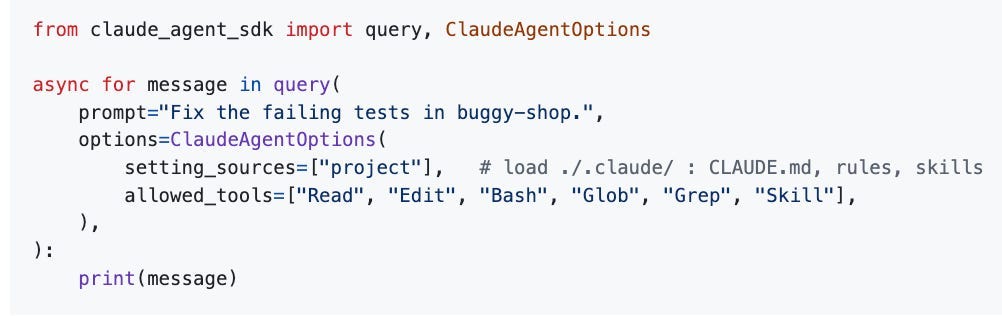
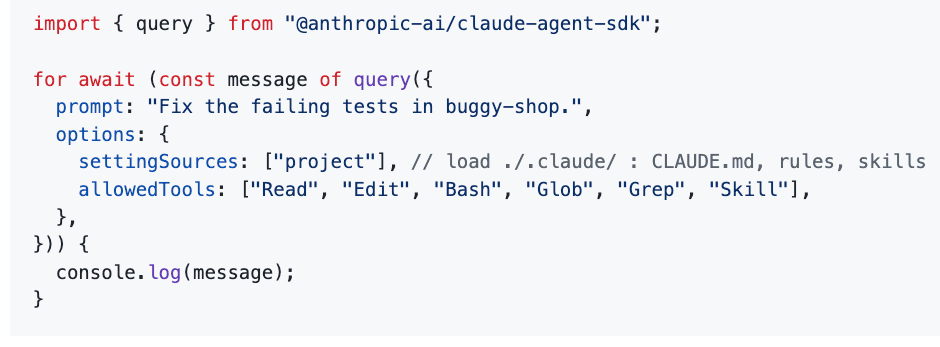
In practice you usually pass ["project"]. That loads everything version-controlled with the repository and nothing personal or machine-specific, which is exactly what you want for an agent that should behave the same in CI as it does on your laptop.
Python version:
Typescript version:
# Python
from claude_agent_sdk import query, ClaudeAgentOptions
async for message in query(
    prompt="Fix the failing tests in buggy-shop.",
    options=ClaudeAgentOptions(
        setting_sources=["project"],   # load ./.claude/ : CLAUDE.md, rules, skills
        allowed_tools=["Read", "Edit", "Bash", "Glob", "Grep", "Skill"],
    ),
):
    print(message)
// TypeScript
import { query } from "@anthropic-ai/claude-agent-sdk";
for await (const message of query({
  prompt: "Fix the failing tests in buggy-shop.",
  options: {
    settingSources: ["project"], // load ./.claude/ : CLAUDE.md, rules, skills
    allowedTools: ["Read", "Edit", "Bash", "Glob", "Grep", "Skill"],
  },
})) {
  console.log(message);
}
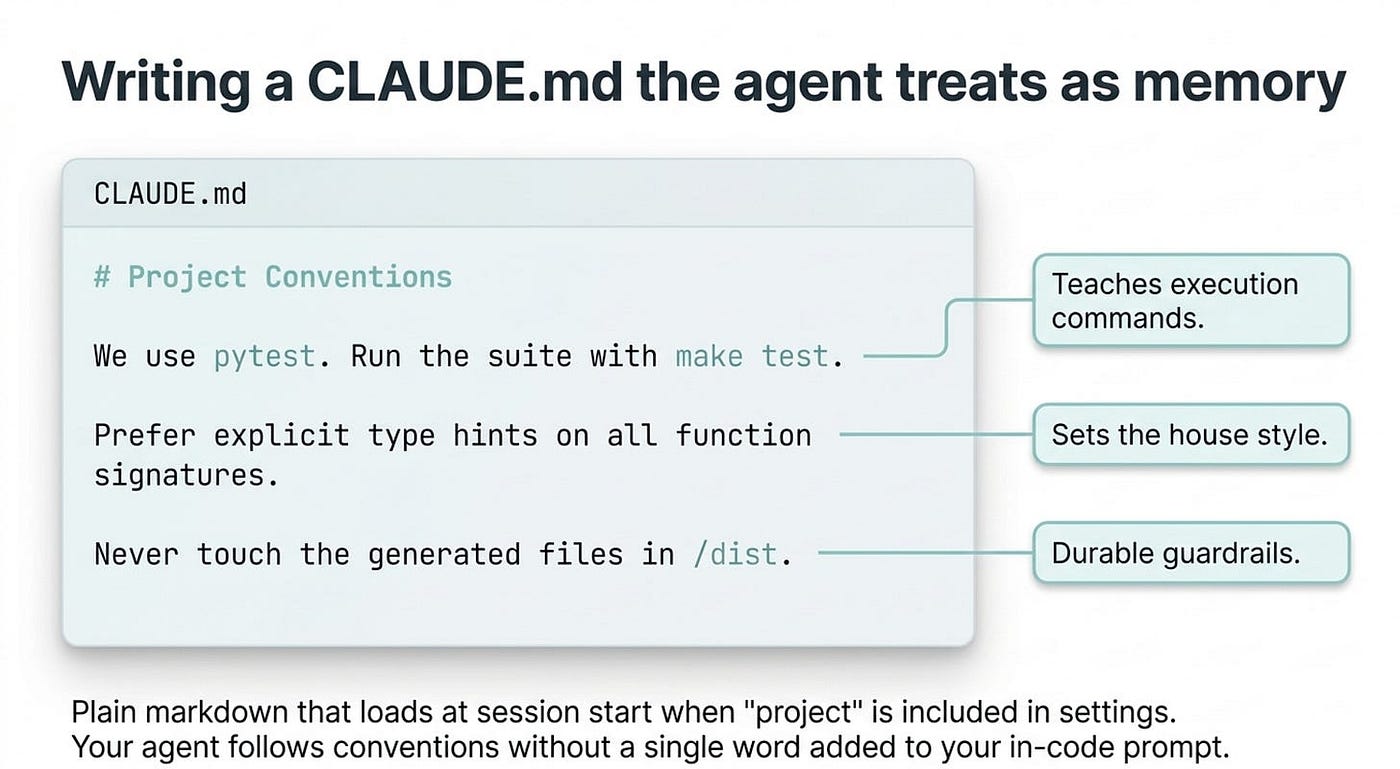
Writing a CLAUDE.md the agent treats as memory
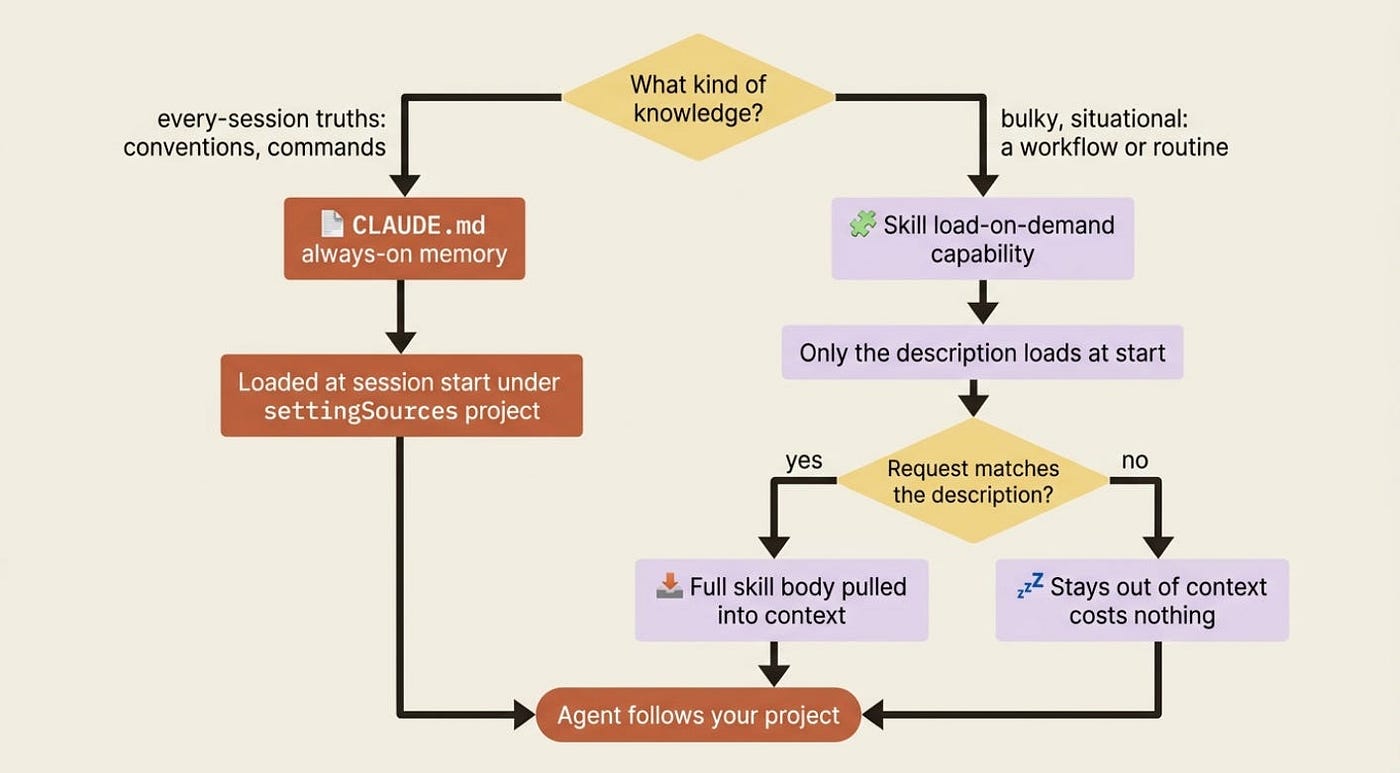
CLAUDE.md is the agent's persistent memory for a project: coding conventions, build and test commands, architecture notes, and anything you would otherwise re-explain every session. It is plain markdown. When settingSources includes "project", the SDK loads it at session start, so the agent follows your conventions without being told.
For a small Python project, a first CLAUDE.md at the repository root might look like this:
# buggy-shop

A small Python shop backend with deliberately failing tests, used to practice
agent-driven bug fixing.

## Commands

- Run the tests: `pytest -q`
- Run one test file: `pytest tests/test_pricing.py -q`
- Type check: `mypy src`

## Conventions

- Python 3.11, type hints on every public function.
- Tests live in `tests/` and mirror the module layout under `src/`.
- Fix the source to make a test pass; never edit a test just to make it green
  unless the test itself is demonstrably wrong, and say so explicitly if you do.

## Out of bounds

- Do not modify files under `src/generated/`; they are produced by a codegen step.
Now the agent knows how to run the suite, what the house style is, and which files to leave alone. It knows this on every run, with nothing in your prompt or options. That last "out of bounds" line is the kind of durable guardrail that belongs on disk, rather than in a one-off prompt you will forget to include next time.
Where files load from, and the honest truth about precedence
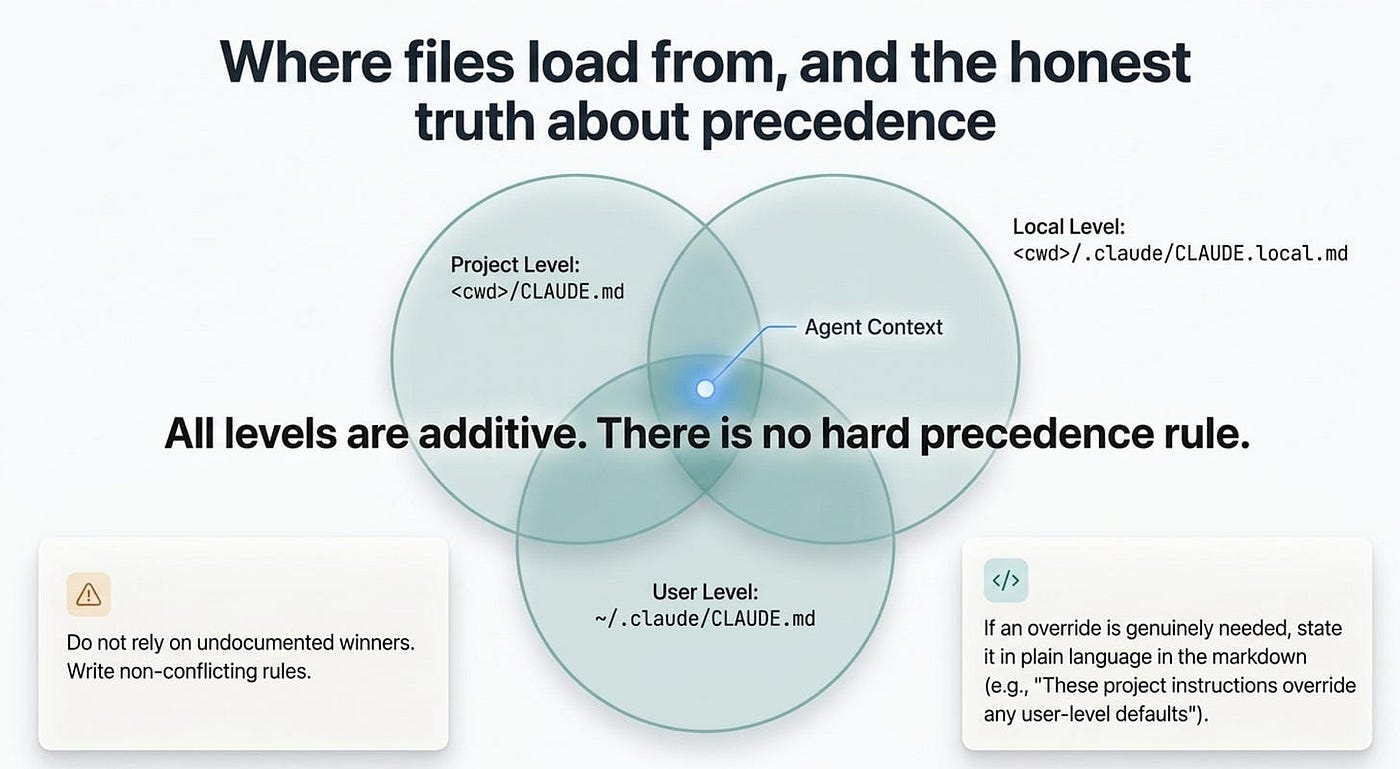
CLAUDE.md is not a single file. The SDK assembles project context from several locations, all gated on settingSources. The project root, <cwd>/CLAUDE.md or <cwd>/.claude/CLAUDE.md, and project rules, <cwd>/.claude/rules/*.md, load when "project" is included. CLAUDE.md files in parent directories load at session start; files in subdirectories load on demand when the agent reads a file in that subtree. A gitignored CLAUDE.local.md loads under "local", and ~/.claude/CLAUDE.md plus ~/.claude/rules/*.md load under "user".
Here is the part the docs are refreshingly honest about, so I will be too. All levels are additive, and there is no hard precedence rule between them. If your project CLAUDE.md and your user CLAUDE.md say conflicting things, the outcome depends on how Claude interprets the combination, not on a documented winner.
The practical advice follows directly: write non-conflicting rules. If you genuinely need one level to override another, state it in plain language in the more specific file, for example "These project instructions override any conflicting user-level defaults." Do not rely on a precedence mechanism that does not exist.
Skills: knowledge the agent loads only when it needs it
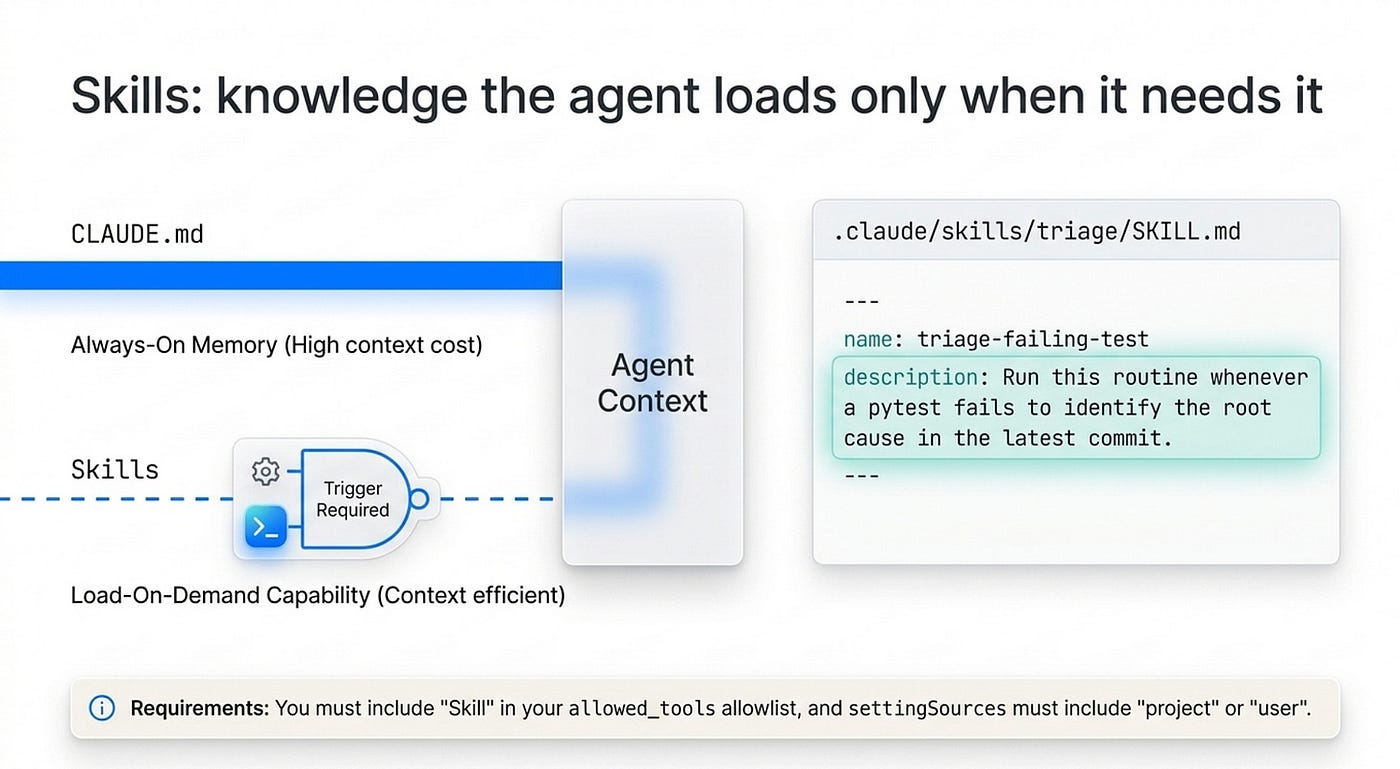
CLAUDE.md loads every session, which makes it the wrong home for bulky, situational knowledge. You would be paying context for a code-review checklist on a run that has nothing to do with reviews. Skills solve that.
A skill is a markdown file that gives the agent a specialized capability or workflow, and crucially it loads on demand. The agent sees only the skill's short description at startup and pulls in the full content when a request actually calls for it. CLAUDE.md is always-on memory; a skill is a load-on-demand capability. Match the knowledge to the right home.
A skill is a directory containing a SKILL.md file with YAML frontmatter and a markdown body. A skill that encodes a debugging routine might live at .claude/skills/triage-failing-test/SKILL.md:
---
name: triage-failing-test
description: Diagnose and fix a failing pytest test in buggy-shop. Use when a test
  is red and the cause is unknown. Runs the test, reads the traceback, locates the
  source bug, fixes it, and re-runs to confirm.
---
# Triaging a failing test

1. Run the specific failing test with `pytest <path> -q` to see the traceback.
2. Read the failing test to understand the expected behavior.
3. Open the source module under test and locate the defect.
4. Fix the source, not the test (see CLAUDE.md for the rule on editing tests).
5. Re-run the test to confirm it passes, then run the full suite with `pytest -q`
   to check you didn't break anything else.
That description field is the most important line in the file. It is what the agent reads at startup and what it matches against the user's request to decide whether to invoke the skill, so make it specific and say plainly when the skill applies. A vague description means the skill never fires. A sharp one means the agent reaches for it exactly when it should.
Two things make skills work through the SDK. First, include "Skill" in your allowed_tools. It is enabled by default only when you do not pass an allowlist, so once you have an allowlist you must add it explicitly. Second, make sure settingSources includes "project" or "user" so the skill is discovered. With both in place, the agent picks up the skill automatically and uses it the next time a request matches. You do not invoke it; the model does.
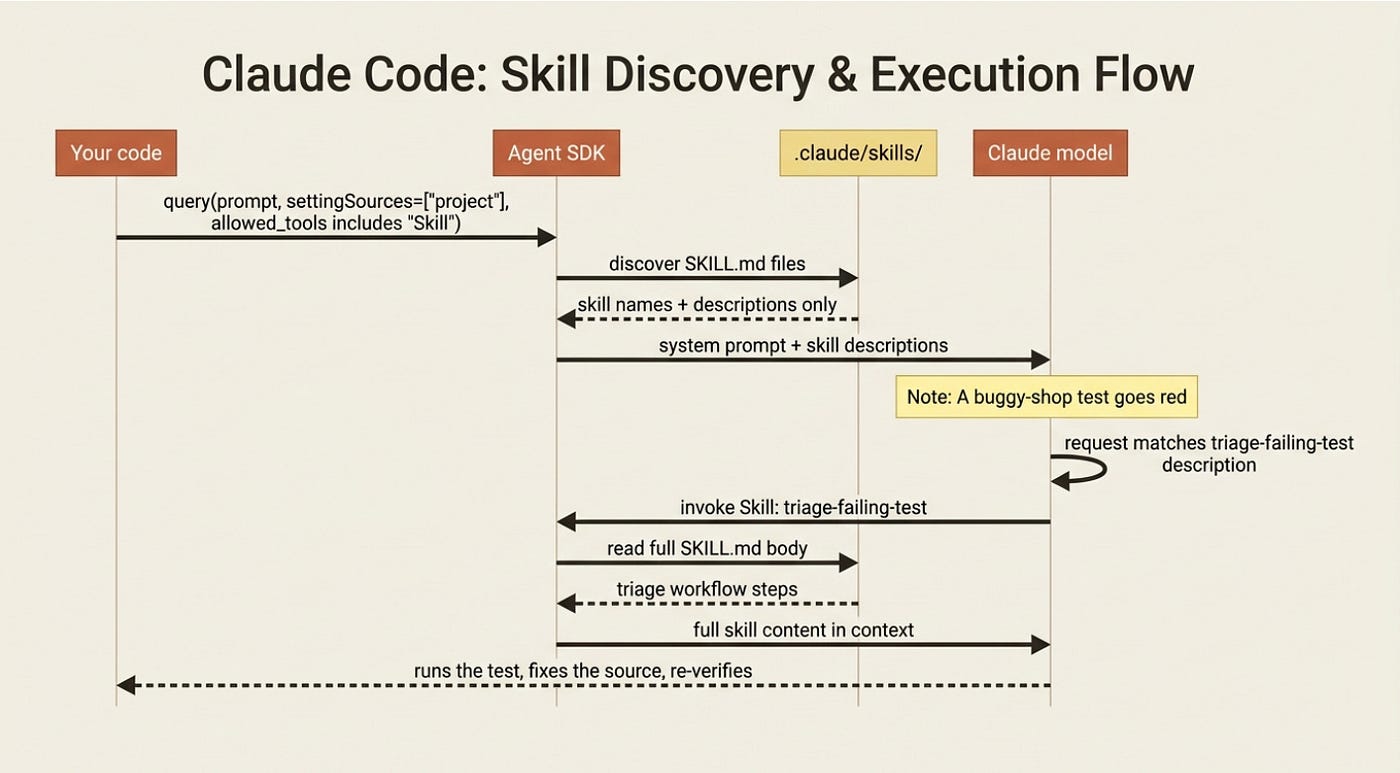
Gotcha: skills must exist as real files on disk, at .claude/skills/<name>/SKILL.md. There is no programmatic API to register a skill from code. The allowed-tools frontmatter field that works in the Claude Code CLI is ignored when you run skills through the SDK, so do not rely on it to constrain a skill's tool access in an SDK app.
Skills double as slash commands
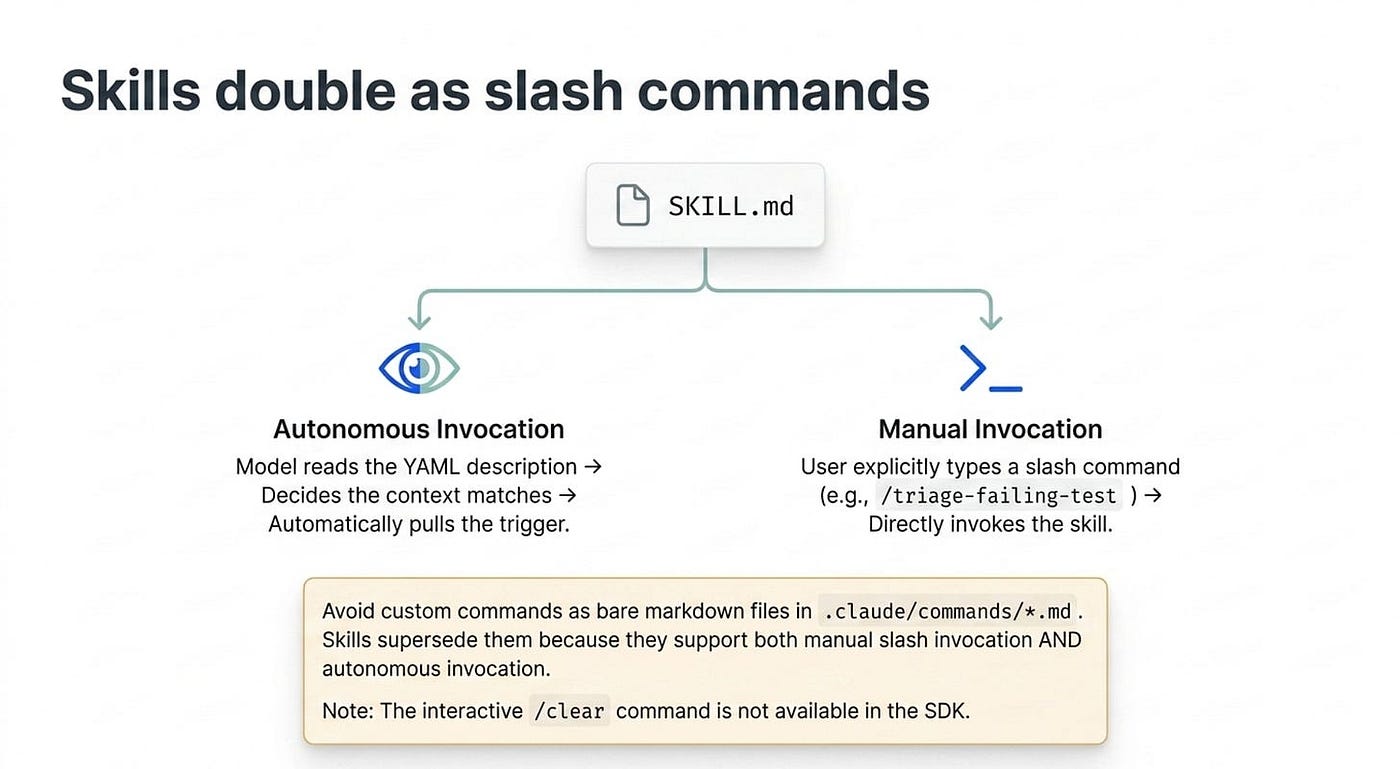
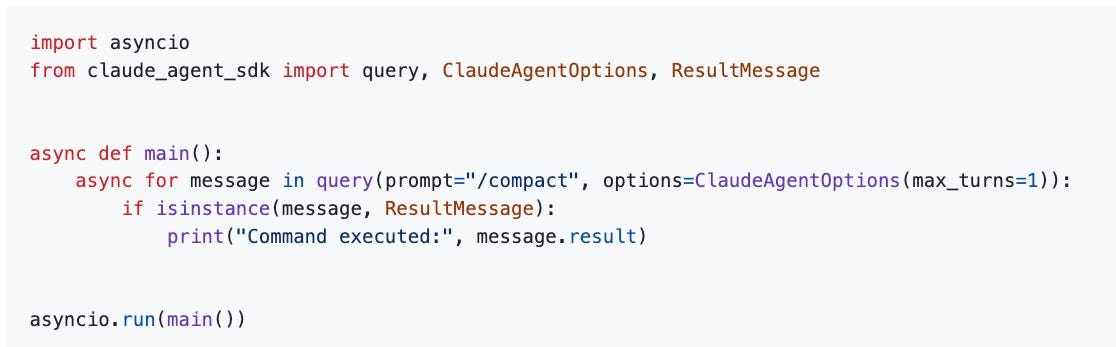
There is a second way to trigger a skill, and it is why skills supersede the older command format. Besides autonomous invocation by the model, a skill can be called explicitly as a slash command: /triage-failing-test. You send a slash command exactly like a normal prompt, just as the string.
import asyncio
from claude_agent_sdk import query, ClaudeAgentOptions, ResultMessage
async def main():
    async for message in query(prompt="/compact", options=ClaudeAgentOptions(max_turns=1)):
        if isinstance(message, ResultMessage):
            print("Command executed:", message.result)
asyncio.run(main())
The example uses the built-in /compact command, which summarizes older conversation history to reclaim context, but your own /triage-failing-test works exactly the same way.
Gotcha: you will see an older pattern in the wild, custom commands as bare markdown files in .claude/commands/*.md. That format still loads for backward compatibility, but it is legacy. Prefer .claude/skills/<name>/SKILL.md, because a skill supports both the /name slash invocation and autonomous invocation by the model, while a command supports only the slash form. New work goes in skills/. Note also that the interactive /clear command is not available in the SDK: each query() already starts fresh.
Do this today
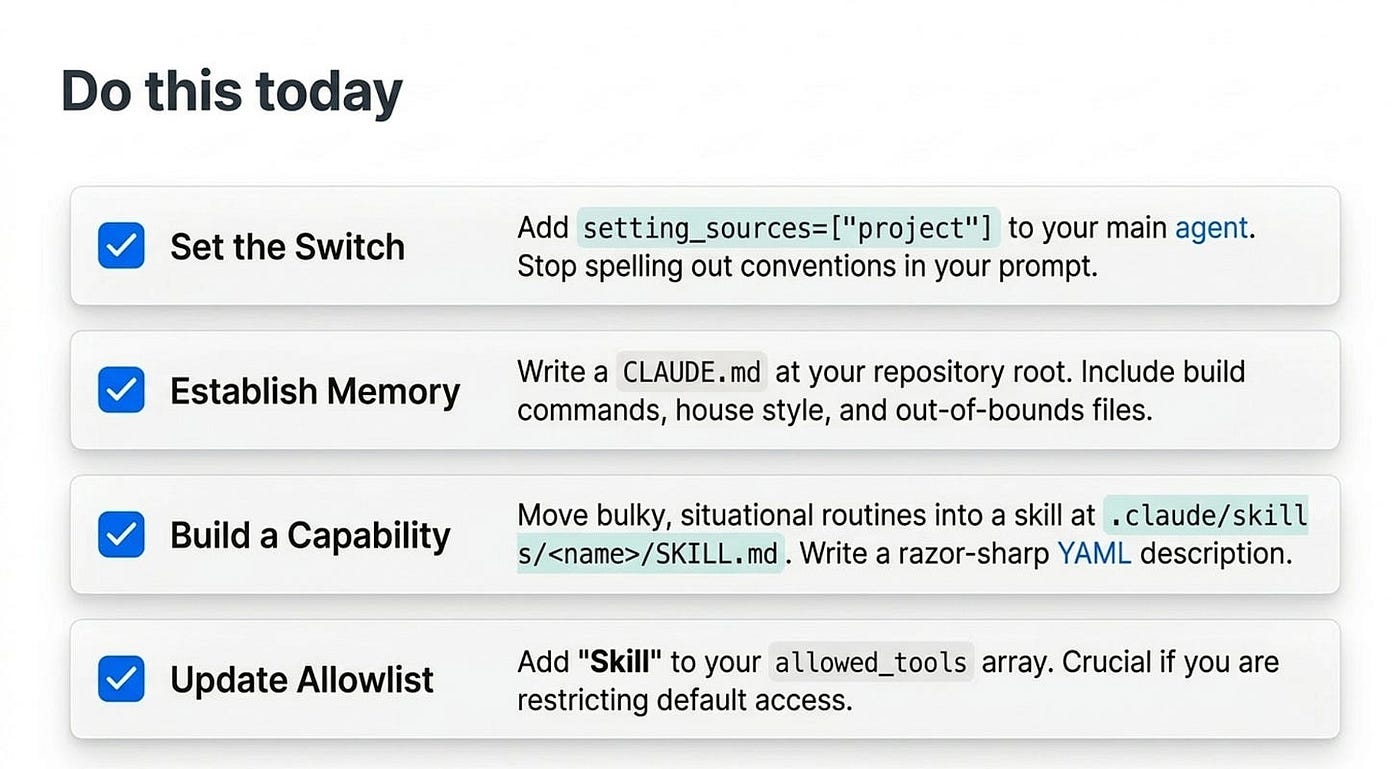
- Add
setting_sources=["project"]to one agent. Start with the agent you run most often. This single line loads itsCLAUDE.md, rules, and skills, so the agent stops needing the conventions spelled out in your prompt. - Write a
CLAUDE.mdat your repository root. Give it three sections: the commands to build and test, the conventions the agent should follow, and the files it must not touch. Commit it so your team and CI share the behavior. - Move bulky instructions out of the prompt and into a skill. Any multi-step routine you keep re-describing belongs in
.claude/skills/<name>/SKILL.md. Spend real effort on thedescriptionfield; it is what makes autonomous invocation fire. - Add
"Skill"to yourallowed_tools. The moment you pass a tool allowlist, theSkilltool stops being enabled by default. List it explicitly, or your skills will never run. - Audit for empty-list traps. If any code passes
setting_sources=[]expecting code-only config, confirm you are on an SDK newer than Python 0.1.59, where that finally behaves as documented.
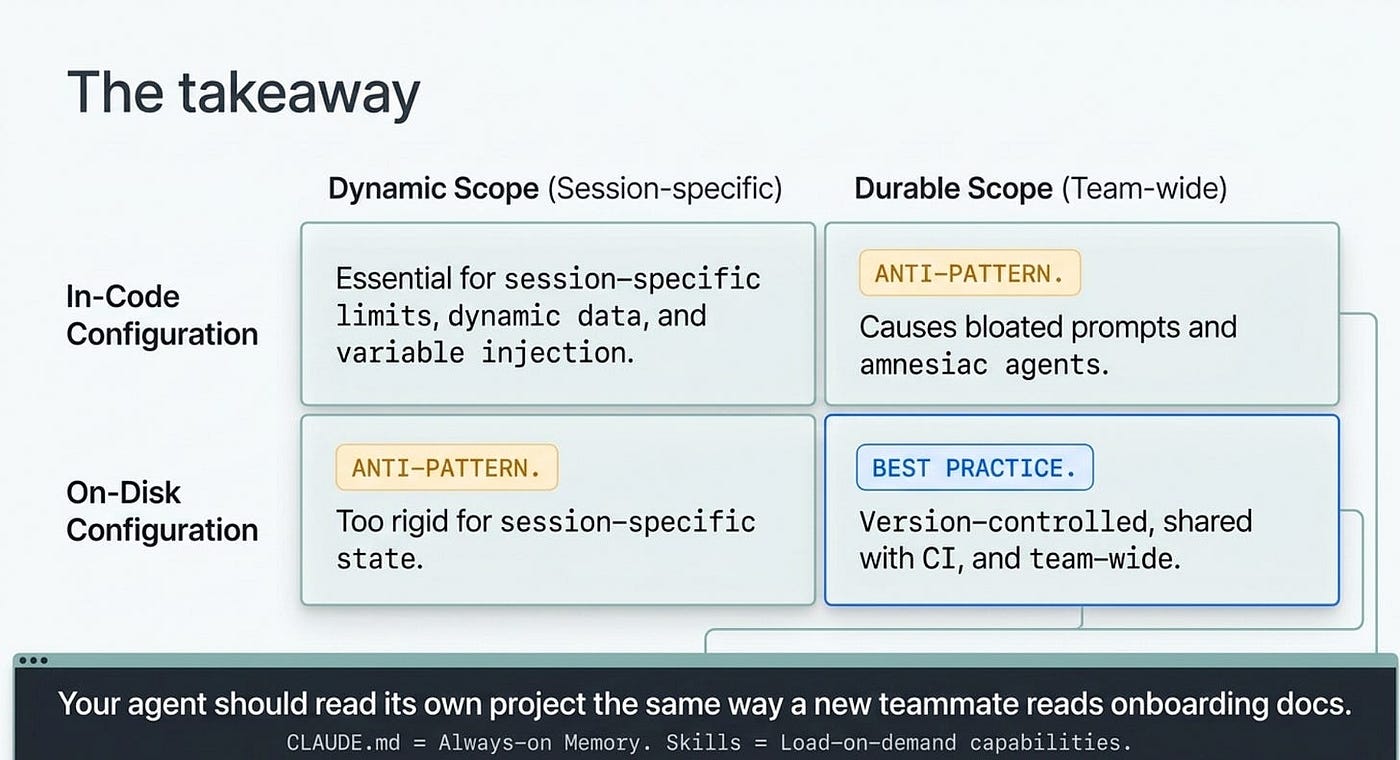
The takeaway
Configuring an agent in code is fine for one-off behavior, and essential for anything dynamic. But durable knowledge, meaning your conventions, your commands, and your workflows, belongs on disk. There it loads automatically, lives in version control, and stays identical between your interactive Claude Code sessions and your SDK agents.
CLAUDE.md is the always-on memory. Skills are the load-on-demand capabilities. And settingSources is the single switch that decides what the SDK reads. Remember three things: the SDK's default prompt is bare, setting sources are additive with no precedence, and the description on a skill is what makes autonomous invocation actually fire.
Get this right and your agent stops being a stranger you brief from scratch every morning. It reads its own project the way a new teammate would read the onboarding docs, and then it just gets to work.
This is Part 6 of "Building with the Claude Agent SDK," a 14-part guide to building production-ready AI agents.
About the Author — Claude Certified Architect
Rick Hightower is a former Senior Distinguished Engineer at a Fortune 100 company, focusing on delivering ML / AI insights to front-line applications, and a practitioner building multi-agent production systems. Follow him on SubStack and Medium for more hands-on agent engineering content. You can also book him to speak and train your team: Check out Rick Hightower's SpeakerHub.
Rick Hightower helps companies become AI-first through practical mentoring, executive and team training, and custom AI solution development. He is a former Senior Distinguished Engineer at a Fortune 100 company, where he focused on bringing ML and AI insights into real front-line business applications.
Subscribe to Rick's newsletter to see videos and guides.
Rick is a Claude Certified Architect, AI systems practitioner, and builder of production multi-agent systems. He is currently working on authoring a book on Harness Engineering with Manning publishing. He created Skilz, a universal agent skill installer supporting 30+ coding agents including Claude Code, Gemini, Copilot, and Cursor, and co-founded one of the largest agentic skill marketplaces.
Today, Rick and the Spillwave team works with leaders and teams who want to move beyond AI experiments and build real AI capability inside their companies. He helps organizations adopt AI safely, train their people, redesign workflows, and build practical AI systems that create measurable business value.
Ready to make your company AI-first? Connect with Rick on LinkedIn, Substack or Medium, book him to speak or train your team, or visit Spillwave to explore mentoring, training, and custom AI solutions for your organization.