Claude Agent SDK: You Already Wrote the Agent Loop. The Claude Agent SDK Deletes It.
Part 1: If you have ever hand-rolled a while response.stop_reason == 'tool_use' loop, this is the layer you wished existed.
Originally published on Medium.
Part 1: If you have ever hand-rolled a while response.stop_reason == "tool_use" loop, this is the layer you wished existed.
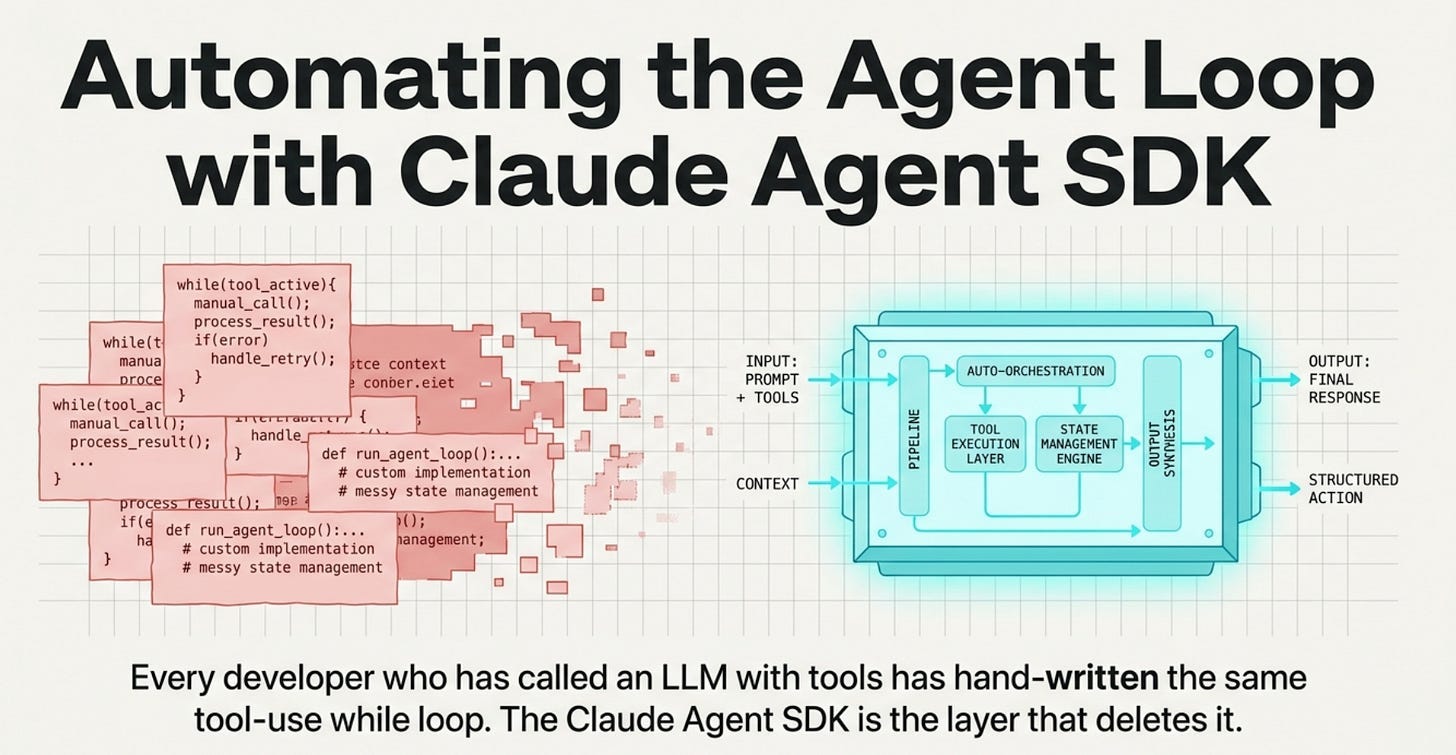
You have written the tool-use loop five times. It stopped feeling like a rite of passage and started feeling like plumbing you keep reinventing. Every developer who has called an LLM with tools has hand-written the same tool-use while loop. The Claude Agent SDK is the layer that deletes it, and naming the difference between the two SDKs is the whole point of getting started.
In this article: You will learn what the Claude Agent SDK is, and the one distinction that makes it click: the difference between an SDK that gives you the model and an SDK that gives you the model with the tool loop already built. We cover why the agent loop is plumbing you keep reinventing, when to reach for the SDK versus the Claude Code CLI, how to install it without losing ten minutes to a version error, and how to run a first agent that reads a real file and fixes a real bug.
Part 1 of "Building with the Claude Agent SDK," a 14-part guide to building production-ready AI agents.
You know the loop. You call the model, it asks to use a tool, you run the tool, you stuff the result back into the next request, and you do it again, and again, until the model finally stops asking. The first time you wrote it, the loop felt like a rite of passage. The fifth time, parsing tool calls, threading results, and guessing when to stop, it just felt like plumbing you keep reinventing.
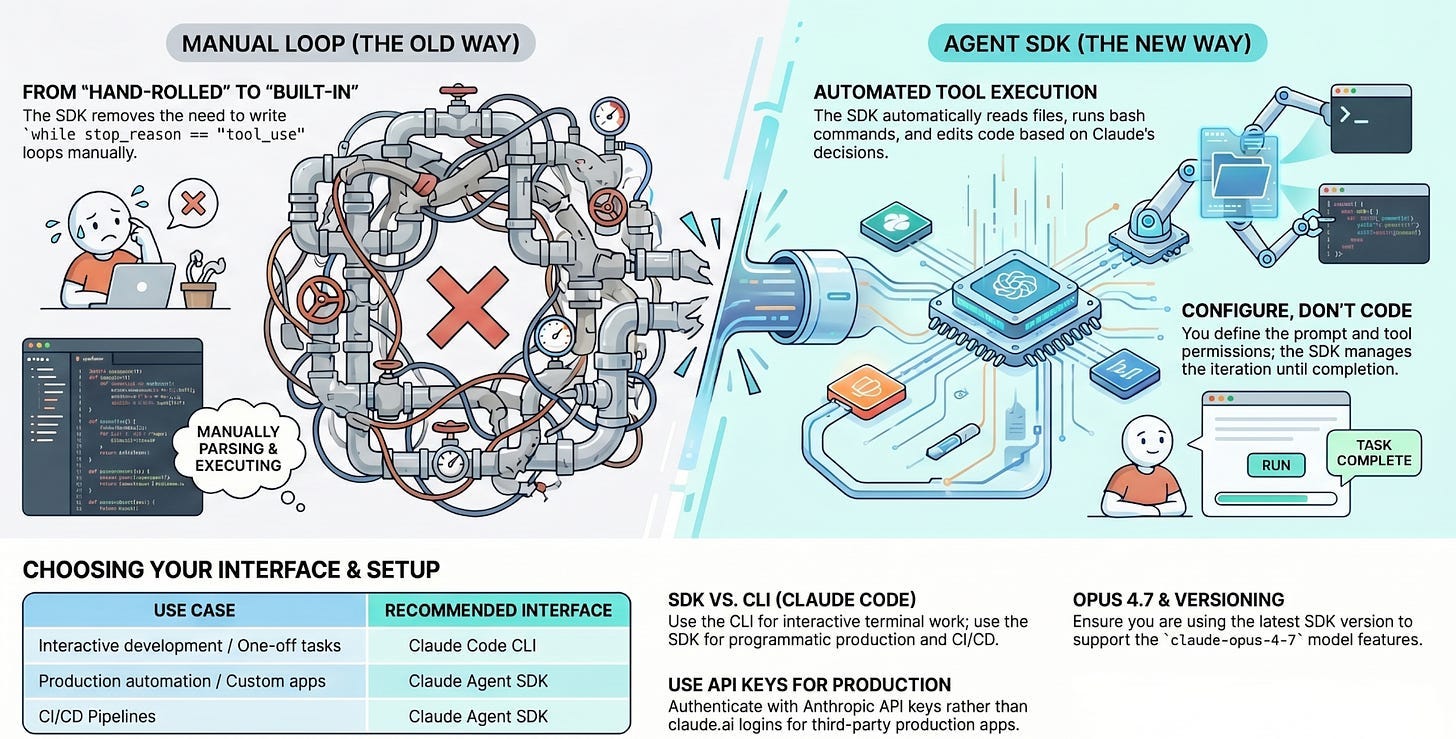
The Claude Agent SDK is the layer that makes that plumbing disappear. You hand Claude a prompt and a set of tools, and Claude runs the loop: it reads files, runs commands, edits code, and decides when it is done. You configure the agent. Claude executes it.
This article sets up that distinction, gets the SDK installed, and ends with a working agent that reads a real repository and fixes a real bug. That repository is the spine of a whole series. We build one agent, a code-maintenance agent that works on a small Python project called buggy-shop, and grow it part by part: streaming, permissions, sessions, custom tools, subagents, hooks, observability, and a hardened production deployment. Nothing gets thrown away. Each capability is one the previous step made you wish you had.
Two SDKs, and why the difference is the whole point
If you have called Claude before, you have probably used the Anthropic Client SDK. It gives you direct API access: you send a prompt, you get a response, and when the model wants a tool, you implement the execution yourself. That is the loop you have written.
The Agent SDK gives you the same model with the tool loop already built. The contrast is easiest to see side by side. Python then TypeScript versions.
# Client SDK: you implement the tool loop
response = client.messages.create(...)
while response.stop_reason == "tool_use":
    result = your_tool_executor(response.tool_use)
    response = client.messages.create(tool_result=result, **params)

# Agent SDK: Claude handles tools autonomously
async for message in query(prompt="Fix the bug in auth.py"):
    print(message)
// Client SDK: you implement the tool loop
let response = await client.messages.create({ ...params });
while (response.stop_reason === "tool_use") {
  const result = yourToolExecutor(response.tool_use);
  response = await client.messages.create({ tool_result: result, ...params });
}

// Agent SDK: Claude handles tools autonomously
for await (const message of query({ prompt: "Fix the bug in auth.ts" })) {
  console.log(message);
}
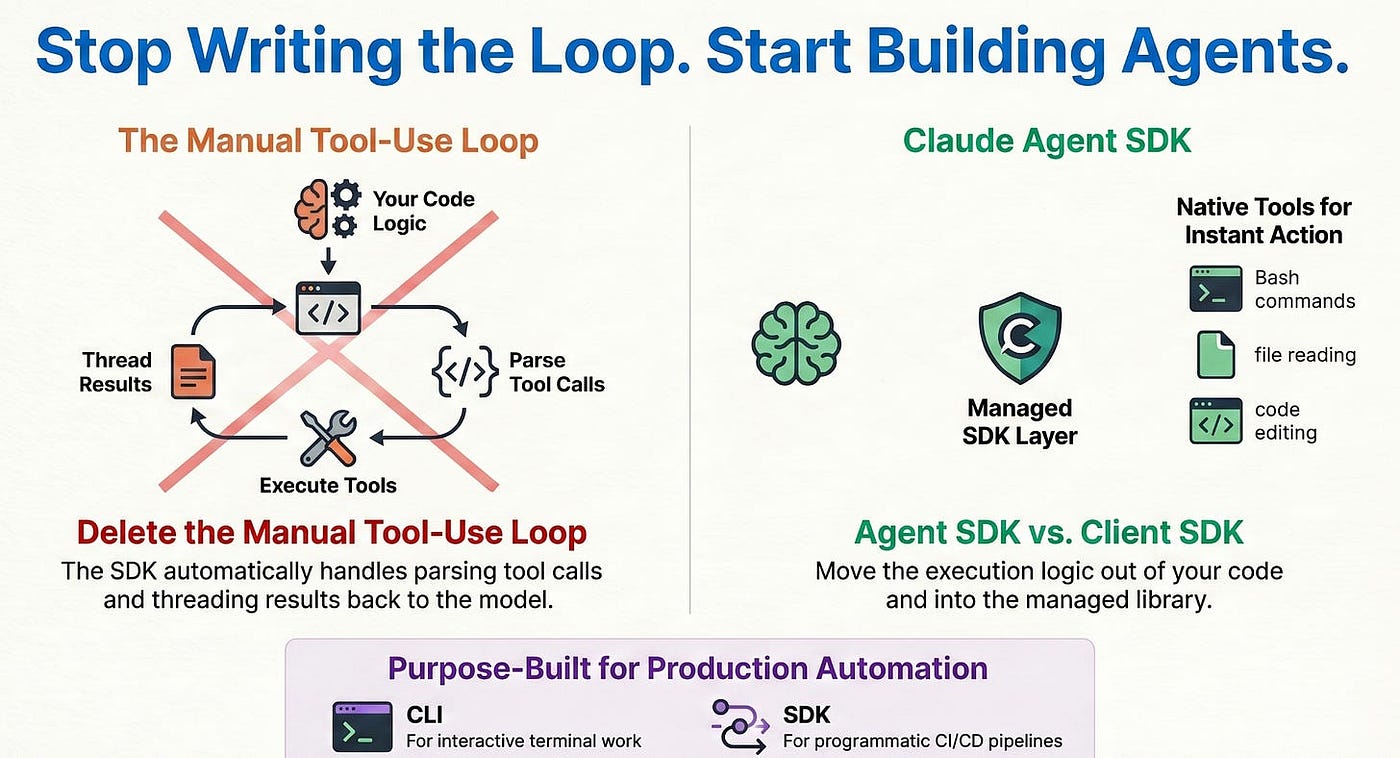
The bottom half of each snippet is the entire point. There is no executor to write, no stop_reason to check, and no result threading. You iterate over messages as Claude works, and the loop runs itself. The SDK ships with built-in tools for reading files, running shell commands, editing code, and searching, so your agent can start doing real work without you wiring up a single tool by hand.
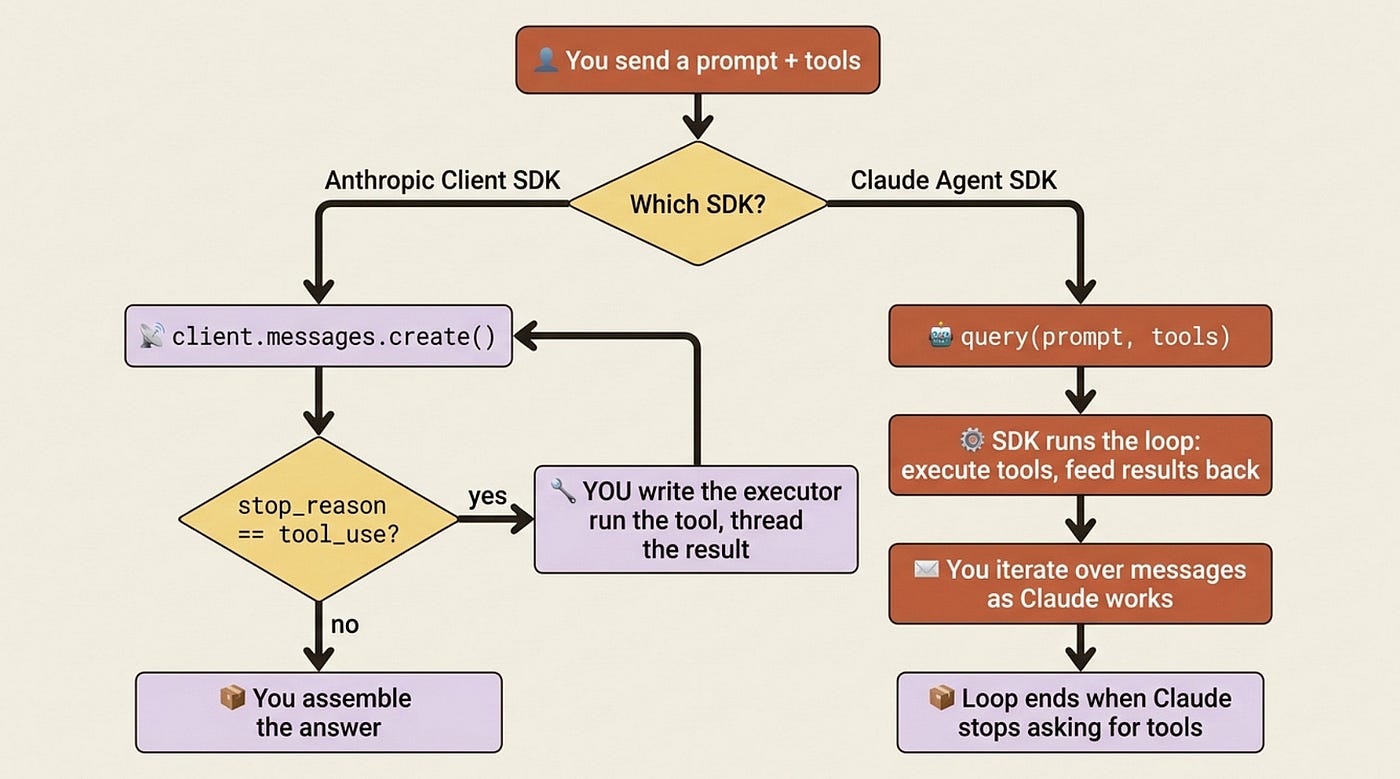
Look at the diagram and notice where the work lives. On the Client SDK path, the red box, the executor, is yours: you write the code that runs the tool and threads the result. On the Agent SDK path, that box is inside the library. You never see it. You configure the agent, and the loop runs itself.
Thanks for reading Hightower's AI Harness Engineering! This post is public so feel free to share it. It helps a lot. Share this story from Substack or from Medium.
SDK or CLI? You will probably use both
There is a second tool worth placing on the map: the Claude Code CLI. It runs the same engine as the Agent SDK, just behind a different interface. The CLI is for interactive work at your terminal. The SDK is for code: production applications, CI pipelines, and anything you want to run without a human typing.
A rough guide to which one to reach for follows. The CLI fits interactive and throwaway work. The SDK fits anything programmatic or automated.
- Interactive development: CLI
- One-off tasks: CLI
- Custom applications: SDK
- CI/CD pipelines: SDK
- Production automation: SDK
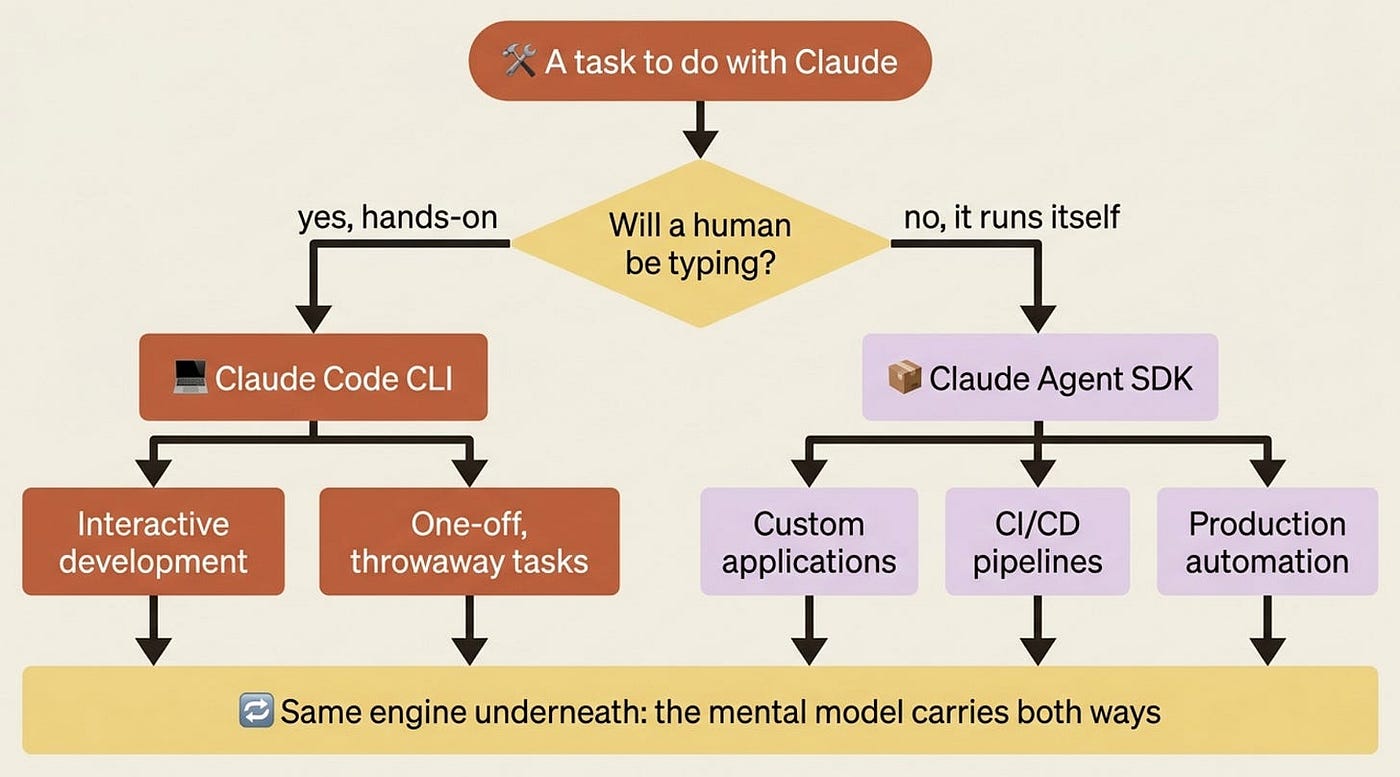
Most teams end up using both: the CLI for daily hands-on development, and the SDK for production. Because they share an engine, the mental model and the workflows carry directly from one to the other. What you learn building agents here applies the moment you drop into the CLI, and the reverse is also true. The decision is not "which tool do I commit to." It is "is a human typing right now."
Install Claude Agent SDK
Pick your language. Both packages install in one line.
pip install claude-agent-sdk
npm install @anthropic-ai/claude-agent-sdk
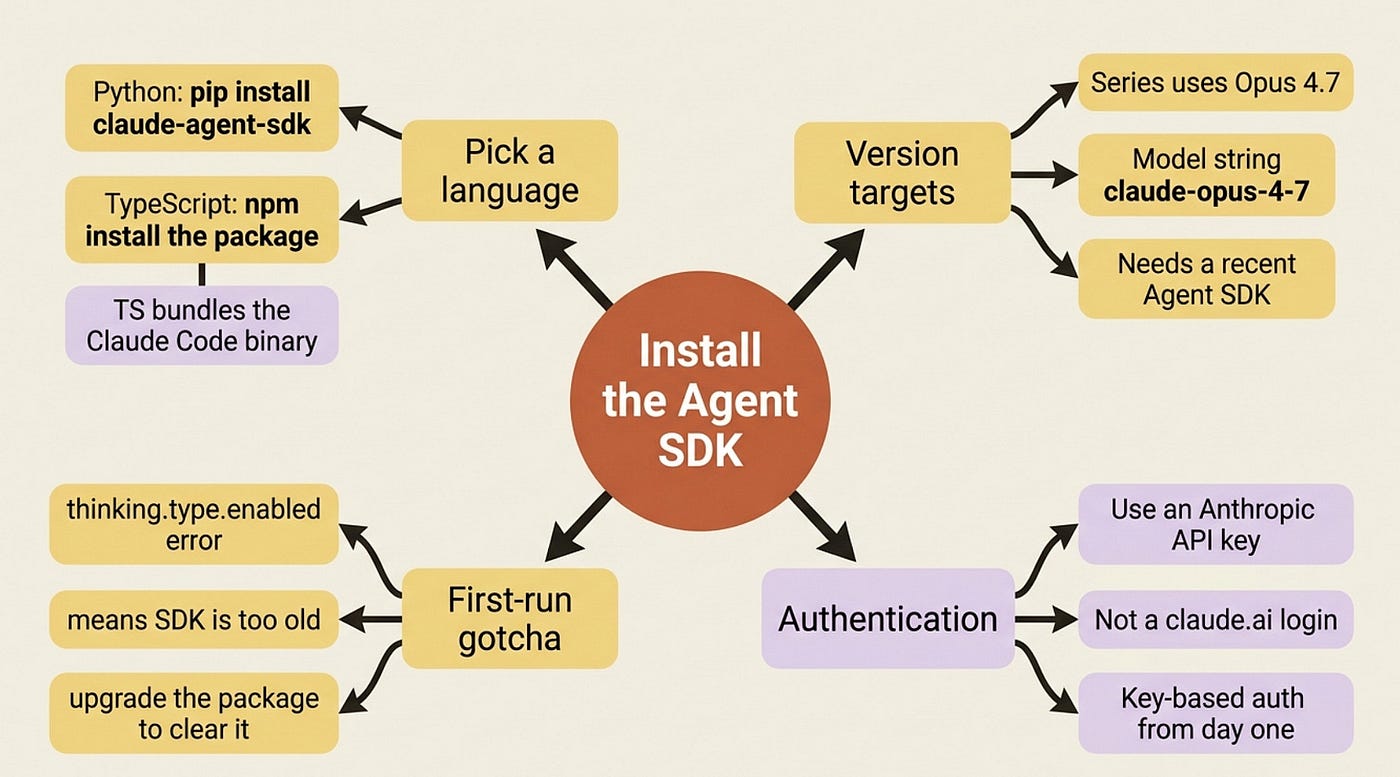
A couple of notes will save you a confusing first ten minutes. The TypeScript package bundles a native Claude Code binary as an optional dependency, so you do not install Claude Code separately. This series targets Opus 4.8, the model string claude-opus-4-8, which requires a recent version of the Agent SDK.
Gotcha: if your first run throws a thinking.type.enabled API error, you are on an SDK version older than 4.8 support. Upgrade the package and the error clears.
One more thing before code. For production agents, authenticate with an Anthropic API key, not a claude.ai login. Anthropic does not permit third-party products built on the Agent SDK to use claude.ai login or rate limits unless separately approved. Set up key-based authentication from the start and you will not have to rework it later.
Hello, agent
The smallest useful program is not "hello world." It is an agent that reads a file, finds a bug, and fixes it, because that is the shape of everything that follows.
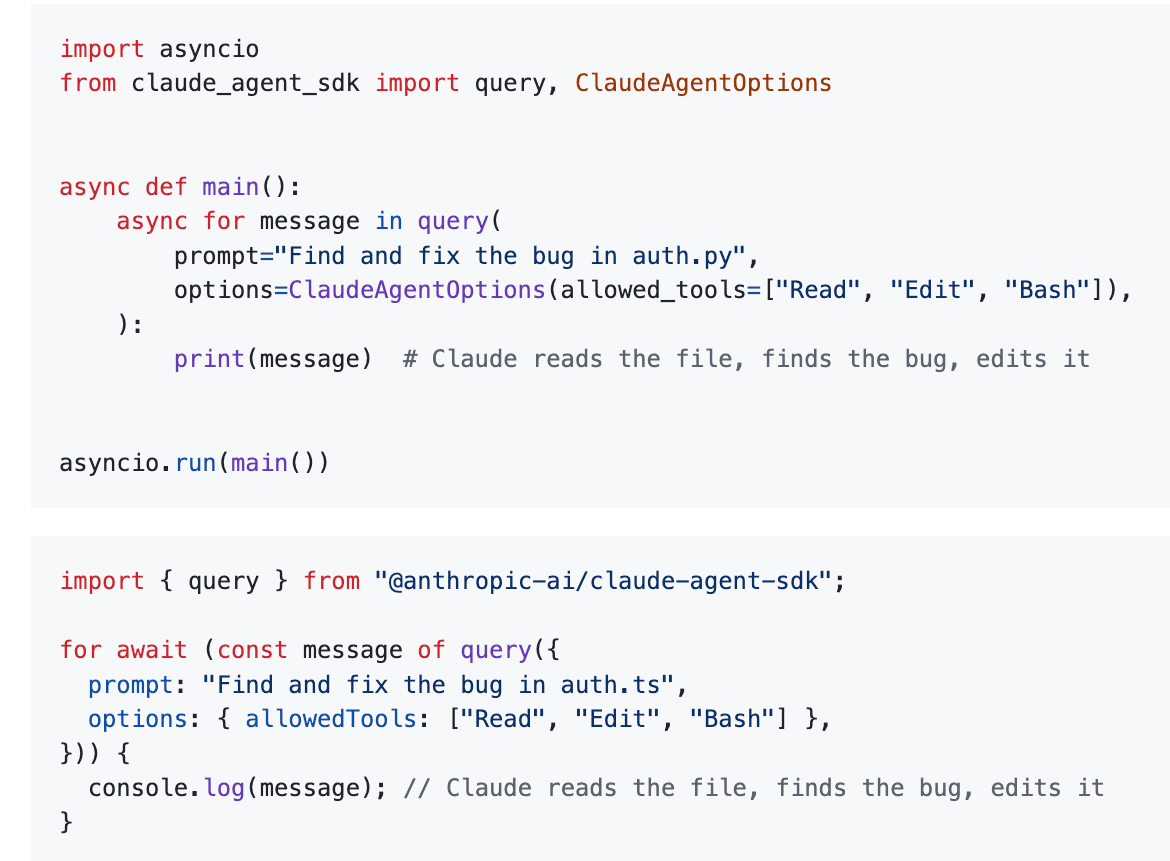
# Python
import asyncio
from claude_agent_sdk import query, ClaudeAgentOptions

async def main():
    async for message in query(
        prompt="Find and fix the bug in auth.py",
        options=ClaudeAgentOptions(allowed_tools=["Read", "Edit", "Bash"]),
    ):
        print(message)  # Claude reads the file, finds the bug, edits it

asyncio.run(main())
//TypeScript
import { query } from "@anthropic-ai/claude-agent-sdk";

for await (const message of query({
  prompt: "Find and fix the bug in auth.ts",
  options: { allowedTools: ["Read", "Edit", "Bash"] },
})) {
  console.log(message); // Claude reads the file, finds the bug, edits it
}
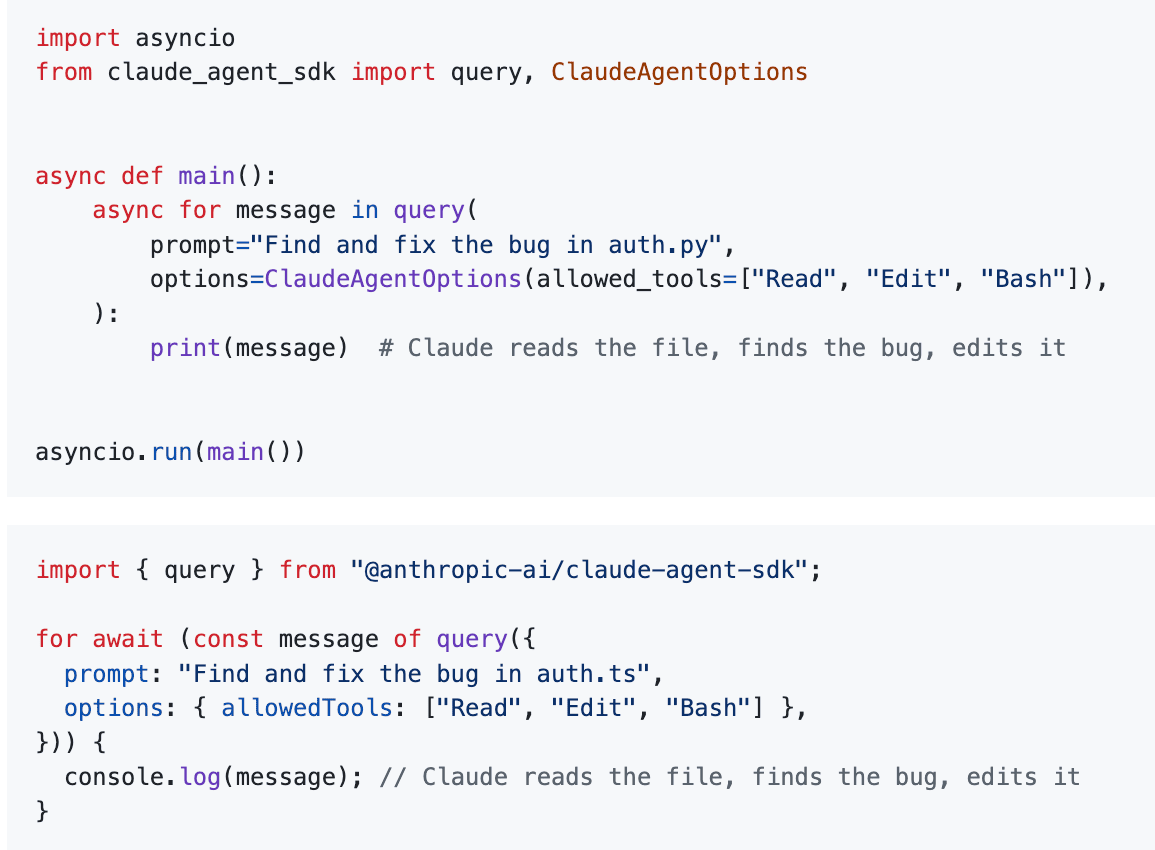
Read what is actually happening. You give query() a prompt and a list of allowed tools. Read lets Claude open files, Edit lets it change them, and Bash lets it run commands. Then you iterate. Each turn of the loop yields a message: Claude's reasoning, a tool it is calling, or a result coming back. You did not parse a tool call or decide when to stop. Claude did, and it stopped when the bug was fixed.
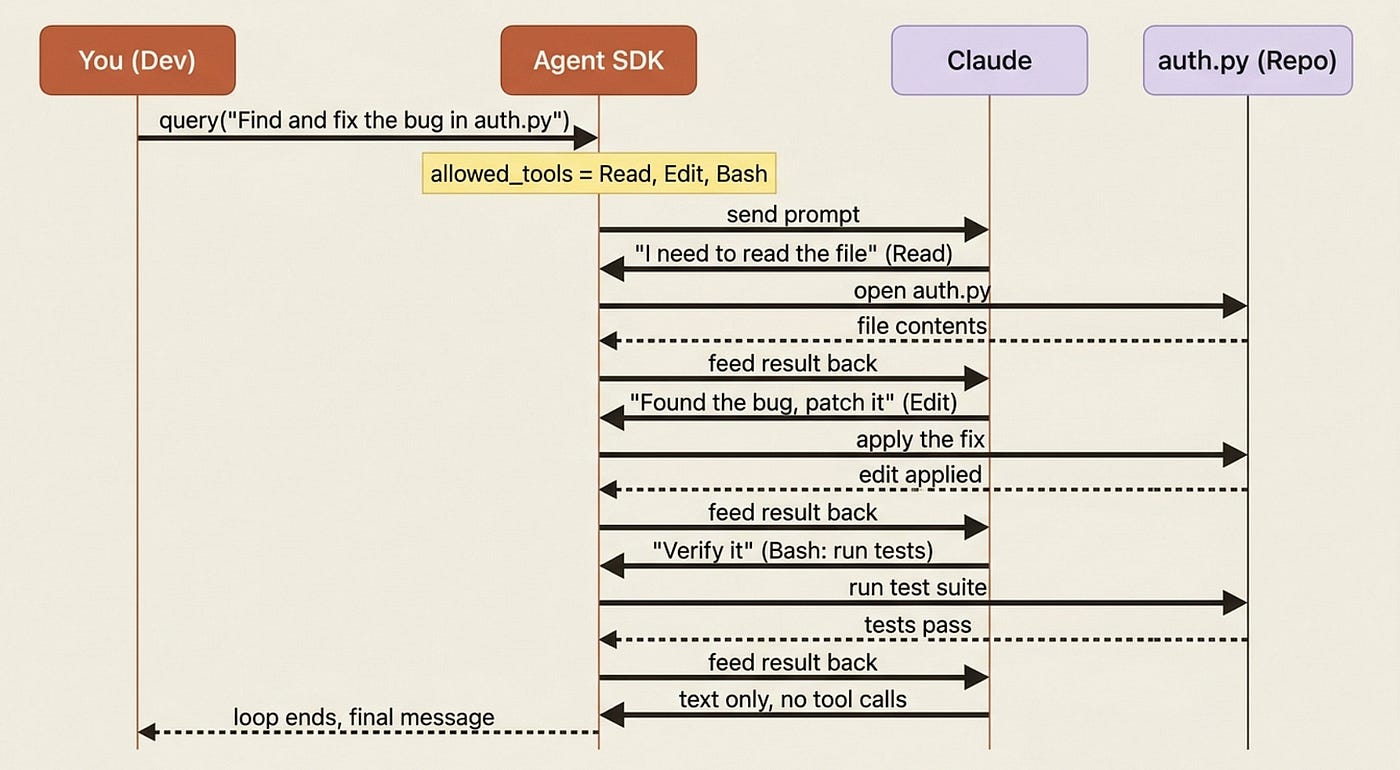
The sequence diagram shows the shape of every agent you will build. Each round trip is one turn. Claude asks for a tool, the SDK runs it, the result feeds back, and Claude decides what to do next. When Claude produces a message with no tool calls, the loop ends. You never scheduled any of it.
That print(message) is deliberately raw. It dumps every message object, which is exactly what you want the first time, because seeing the loop's actual output is how the loop stops being abstract. The next step is to pick those messages apart by type and turn the firehose into something a human would want to watch.
Where this goes from here
Here is the arc, so you can see why the order is what it is. The next step takes apart the agent loop itself: the turn-by-turn cycle, the built-in tools, and the day-one safety valves (maxTurns, maxBudgetUsd, and the effort control) that keep a runaway agent from becoming a runtime problem instead of just a billing one. From there the work climbs through streaming and live UX, permissions and approvals, sessions and rewinding, on-disk project context, custom tools and MCP and subagents, hooks, structured output with full observability, and finally a locked-down production deployment. The final step packages everything you have built into a reusable plugin.
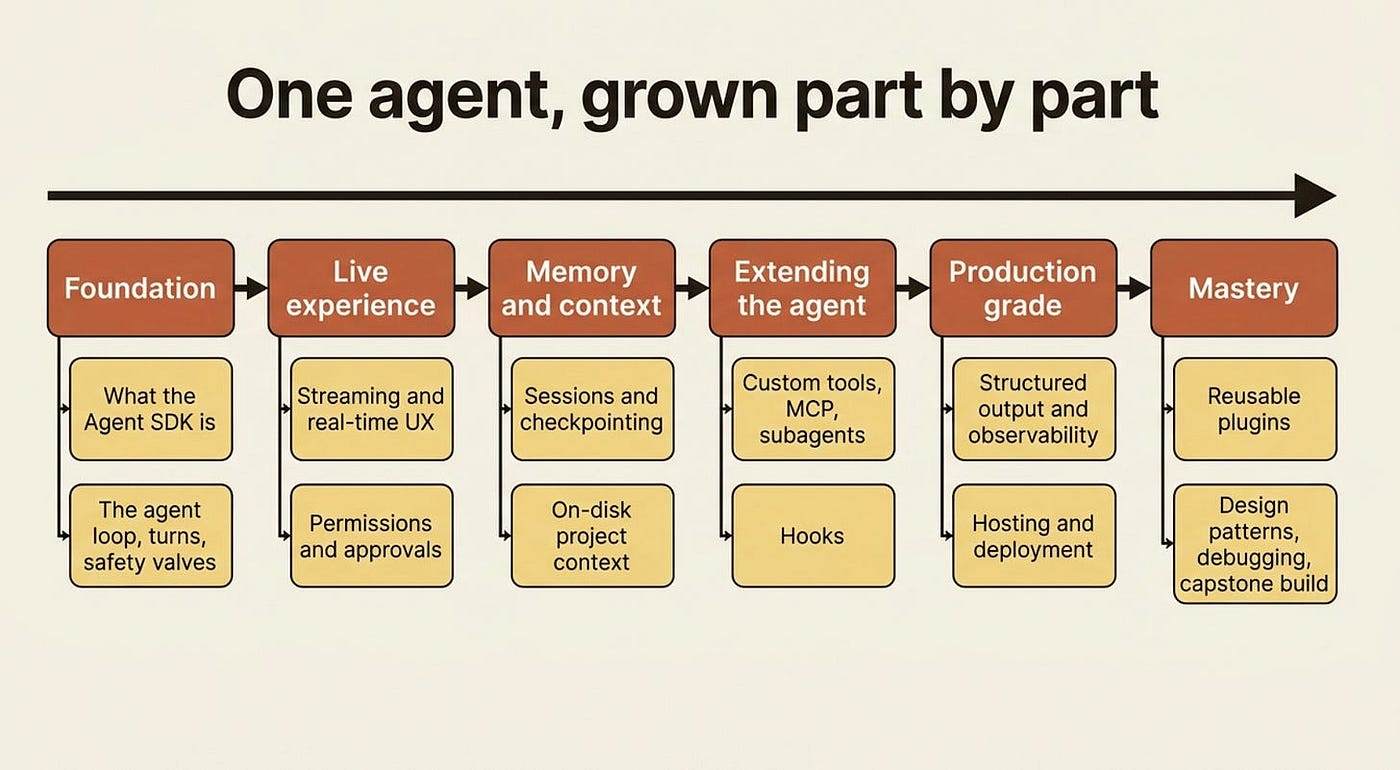
Every step adds one layer the previous step left you reaching for. That is the design.
Do this today
Five minutes turns this article from reading into muscle memory. Do these in order:
- Install the SDK in your language of choice:
pip install claude-agent-sdkornpm install @anthropic-ai/claude-agent-sdk. - Confirm your version supports Opus 4.7. You need a recent version of the Agent SDK. If a first run throws a
thinking.type.enablederror, upgrade the package. - Set up an Anthropic API key, not a claude.ai login, so production authentication is right from the start.
- Run the hello agent against a file with an obvious bug, and watch every raw message stream by.
- Read the loop. Notice that you never parsed a tool call or decided when to stop. Claude did both.
The takeaway
The agent loop was never the interesting part of your work. It was the tax you paid to get to the interesting part. The Claude Agent SDK collects that tax once, inside the library, and hands you back the thing you actually wanted: a model that can act, with you deciding what it is allowed to do.
So do the five-minute version of this whole article. Install the SDK, point the hello agent at a file with an obvious bug, and watch the messages stream by. Once you have seen the loop run itself, you will never want to write while stop_reason == "tool_use" again. Good. That is the loop you came here to delete.
Share Hightower's AI Harness Engineering or share my Medium blog.
Join Rick Hightower's subscriber chat
This is Part 1 of "Building with the Claude Agent SDK," a 14-part guide to building production-ready AI agents.
About the Author — Claude Certified Architect
Rick Hightower is a former Senior Distinguished Engineer at a Fortune 100 company, focusing on delivering ML / AI insights to front-line applications, and a practitioner building multi-agent production systems. Rick is a Claude Certified Architect. Follow him on Medium for more hands-on agent engineering content. You can also book him to speak and train your team: Check out Rick Hightower's SpeakerHub.

Rick created Skilz, the universal agent skill installer that supports 30+ coding agents, including Claude Code, Gemini, Copilot, and Cursor, and co-founded the world's largest agentic skill marketplace. Connect with Rick Hightower on LinkedIn or Medium. Check out SpillWave, your source for AI expertise.

Rick is a Claude Certified Architect and working on a book for Manning on Harness Engineering.

Rick has been actively developing generative AI systems, agents, and agentic workflows for years. He is the author of numerous agentic frameworks and developer tools and brings deep practical expertise to teams adopting AI. He enjoys writing about himself in the 3rd person.
Rick also wrote a Claude Certified Architect (CCA) series of articles that have a lot of useful information on writing agentic AI systems. Many ideas captured in the CCA and the exam prep Rick wrote echo what you see in this article. If you want to improve your ability to create well-behaved AI agents, studying for the CCA Exam is a good place to start.
CCA Exam Prep on Agentic Development
- Claude Certified Architect: The Complete Guide to Passing the CCA Foundations Exam
- CCA Exam Prep: Mastering the Code Generation with Claude Code Scenario
- CCA Exam Prep: Mastering the Multi-Agent Research System Scenario
- CCA Exam Prep: Structured Data Extraction
- CCA: Master the Developer Productivity Scenario
- Claude Certified Architect: Master the CI/CD Scenario
- CCA Exam Prep: Mastering the Customer Support Resolution Agent Scenario
- Get the complete reading list for CCA-F exam prep articles from this Claude Certified Architect Exam Prep list.
Rick also wrote a series on harness engineering and how to improve agentic systems using harness engineering for feedback loops and adversarial agents. These articles also go hand in hand with this article.
Harness Engineering Articles
- The $9 Disaster: What Anthropic's Harness Design Paper Teaches Us About Building Autonomous AI
- Harness Engineering vs Context Engineering: The Model is the CPU, the Harness is the OS
- LangChain Deep Agents: Harness and Context Engineering: Memory, Skills, and Security
- Beyond the AI Coding Hangover: How Harness Engineering Prevents the Next Outage
- LangChain's Harness Engineering: From Top 30 to Top 5 on Terminal Bench 2.0
- Anthropic's Harness Engineering: Two Agents, One Feature List, Zero Context Overflow
- OpenAI's Harness Engineering Experiment: Zero Manually-Written Code