Claude Certified Architect: Master the CI/CD scenario for the CCA Foundations Exam -- the flags, output formats, and pipeline patterns that separate passing
CCA Exam Prep: Claude Code for CI/CD -- Non-Interactive Pipelines, the -p Flag, and Machine-Parseable Output
Originally published on Medium.
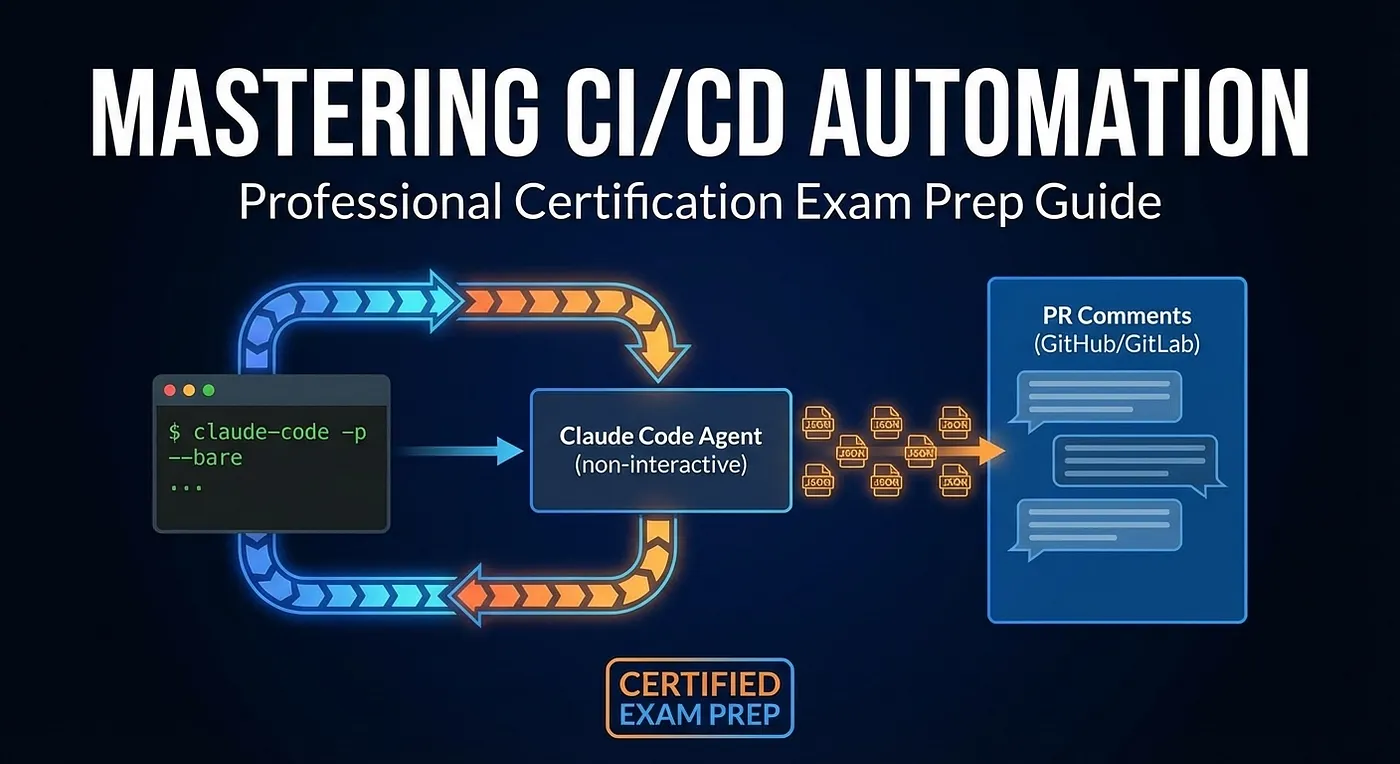
CCA Exam Prep: Claude Code for CI/CD -- Non-Interactive Pipelines, the -p Flag, and Machine-Parseable Output
Article 5 of the CCA Scenario Deep Dive Series
🚀 Ready to ace the Claude Certified Architect exam? Dive into our guide on mastering CI/CD pipelines with Claude Code! Learn the crucial flags, output formats, and patterns that set successful candidates apart. Don’t let your pipeline hang! Discover the secrets to non-interactive automation today! #CICD #ClaudeAI #CertificationPrep
Summary: For the CCA CI/CD scenario, know the required flags (-p, --bare, --output-format json), avoid common pitfalls (missing -p, misuse of Batch API, regex parsing), and apply reliable patterns (schema-validated output, retry loops, cost controls like prompt caching). Effective patterns for CI/CD pipelines include automated code reviews, test generation, and remediation, all emphasizing validation-retry loops and cost optimization strategies like prompt caching and appropriate API usage.
CI/CD Is Where Theory Meets Production
Of the six CCA exam scenarios, the CI/CD scenario is the most operationally concrete. There are no ambiguous architectural tradeoffs here. There is a correct flag to use, and if you forget it, your pipeline hangs. There is a correct output format, and if you skip it, your downstream parsing breaks randomly. There is a correct API tier for each workload, and if you pick the wrong one, you either waste money or make a developer wait 24 hours.
This scenario draws from Claude Code Workflows (20%), Prompt Engineering (20%), and Context Management (15%). It is also one of the scenarios where the wrong answer is genuinely dangerous in production -- not just suboptimal but pipeline-breaking. The Claude Certified Architect exam knows this, and it tests accordingly.
The single most common exam mistake in this scenario: forgetting that CI/CD pipelines cannot prompt a human for input. That sounds obvious when stated directly. But when the exam presents a GitHub Actions workflow that “sometimes works and sometimes hangs until timeout,” candidates who have not internalized the non-interactive requirement will not recognize the root cause.
Here is what we will cover: the -p flag and why it is non-negotiable for CI/CD pipelines, the --bare flag and why Anthropic now recommends it as the primary CI/CD mode, the --output-format json and --json-schema flags for machine-parseable output, pipeline architecture patterns, token economics (Prompt Caching versus Batch API), and the anti-patterns that cost candidates the most points.
The CI/CD Scenario: What the Exam Tests
The CCA exam presents you with CI/CD pipelines that integrate Claude Code for automated tasks: code review, test generation, security scanning, remediation, and deployment gates. The key constraint that defines every decision in this scenario is that no human is present to interact with Claude.
Here are the decision points the exam probes:
How do you run Claude Code without it waiting for user input? The -p (or --print) flag. Without it, Claude enters interactive mode and waits for a human who is not there. The pipeline hangs until it times out.
How do you ensure reproducible behavior across CI machines? The --bare flag. Without it, Claude loads whatever context it finds in the working directory, which may differ between developer machines and CI runners. Anthropic recommends --bare as the primary mode for all scripted and CI/CD usage.
How do you parse Claude Code’s output in a pipeline? The --output-format json flag returns structured JSON. The --json-schema flag enforces a specific JSON structure. Without these, you get natural language output that varies between runs, and your regex breaks.
How do you handle failures and retries? Validation-retry loops: validate Claude’s output against your schema, and if it fails, retry with the error as feedback. This is the same pattern used in the Data Extraction scenario.
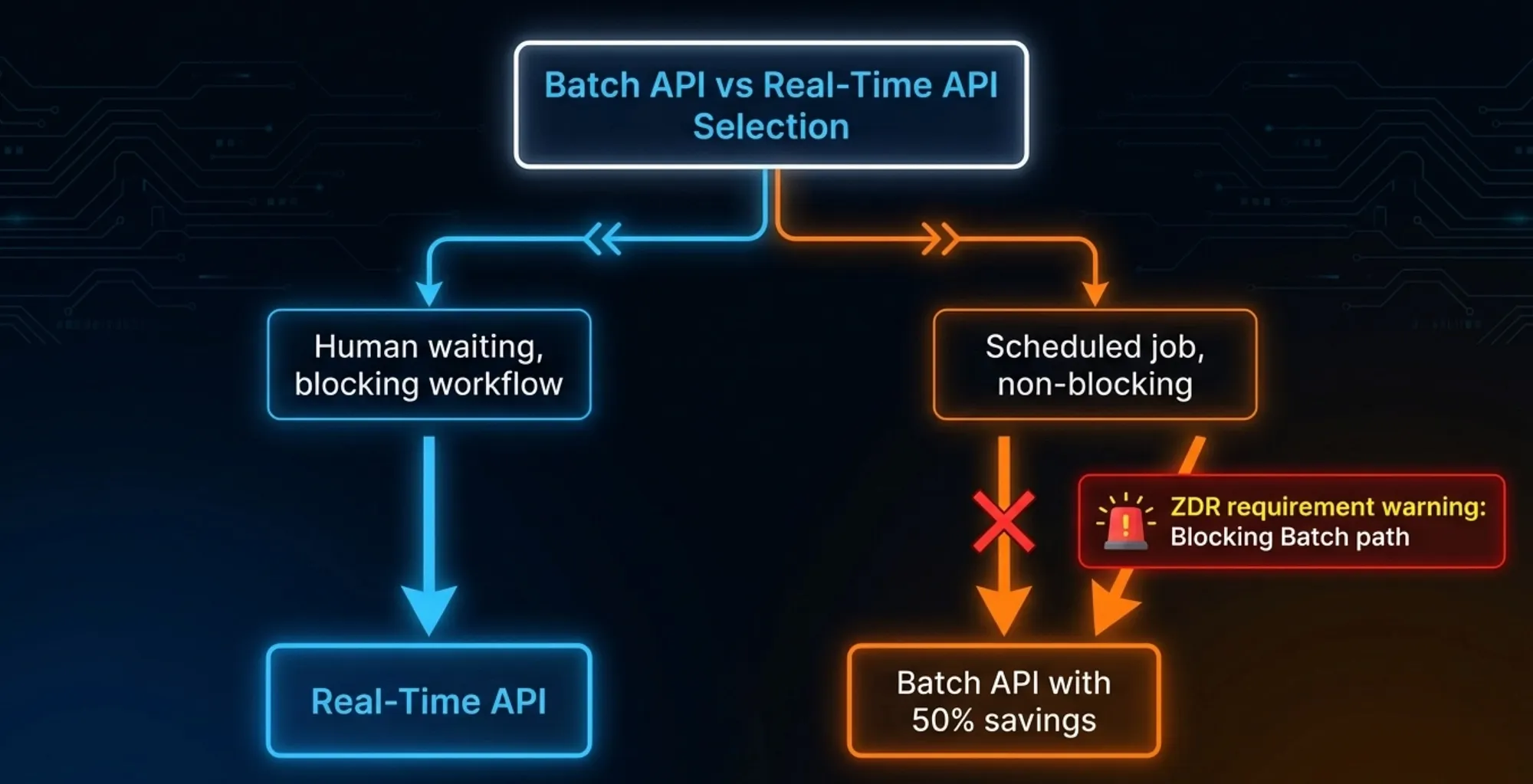
When should you use the Batch API versus the real-time API? Blocking pipelines (where a developer or deployment is waiting) use real-time. Non-blocking scheduled jobs (nightly audits, bulk scans) use the Batch API for 50% cost savings. There is one additional constraint the exam tests: the Batch API is NOT eligible for Zero Data Retention. If your organization requires ZDR, you cannot use the Batch API.
The CCA exam expects you to know specific flags, their exact syntax, and when each one applies. This is one of the most “memorize the details” scenarios on the exam.
The Non-Interactive Imperative: the -p Flag
This is the single most important concept in the CI/CD scenario. Get this wrong and you will miss multiple CCA exam questions.
The Fundamental Rule
Claude Code in CI/CD must use the -p flag (also called --print). Here is what happens with and without it:
**Without ****-p**: Claude Code launches in interactive mode. It presents a prompt, waits for the user to type a response, and processes the conversation turn by turn. In a CI/CD pipeline, there is no user. The pipeline sits there waiting for input that will never arrive. After 30 or 60 minutes (depending on your pipeline timeout), the job fails.
**With ****-p**: Claude Code accepts a prompt as a command-line argument, processes it non-interactively, writes the output to stdout, and exits with an appropriate exit code. No human interaction needed. The pipeline proceeds.
The syntax:
claude -p "Review this pull request for security vulnerabilities"
That is one flag making the difference between a working CI/CD pipeline and a broken one.
The -- bare Flag: Anthropic’s Primary CI/CD Recommendation
The -p flag handles the non-interactive requirement. The --bare flag handles the reproducibility requirement. Together, they form Anthropic's recommended pattern for all CI/CD usage.
Here is what --bare does: it skips auto-discovery of hooks, skills, plugins, MCP servers, auto memory, and CLAUDE.md. Without --bare, Claude Code loads whatever it finds in the working directory or in ~/.claude. On a developer's laptop, that might include personal CLAUDE.md files, custom MCP servers, and local hooks. On a CI runner, it finds nothing. The two environments behave differently for reasons that are hard to diagnose.
Important caveat: --bare skips auto-discovered context, but Claude still has access to its built-in tools (Bash, file read, file edit). The --bare flag is about reproducible context, not tool sandboxing. To restrict which tools Claude can use, see the --tools flag below.
Authentication note: --bare also skips OAuth and keychain-based authentication. On a fresh CI runner, you must explicitly set the ANTHROPIC_API_KEY environment variable or Claude will fail silently. Always export ANTHROPIC_API_KEY in your CI environment secrets.
With --bare, Claude Code only responds to flags you pass explicitly. Every machine running the same command gets the same behavior. This is exactly what CI/CD requires.
Official documentation states: “ -- bare is the recommended mode for scripted and SDK calls, and will become the default for **-p** in a future release."
The complete recommended pattern for CI/CD:
claude --bare -p "your prompt here" --output-format json
With tool restriction (sandboxing):
claude --bare -p "Run tests and report failures" \\
--tools "Bash,Read" \\
--output-format json
With JSON schema for structured output:
claude --bare -p "Extract function names from auth.py" \\
--output-format json \\
--json-schema '{"type":"object","properties":{"functions":{"type":"array","items":{"type":"string"}}},"required":["functions"]}' \\
| jq '.structured_output'
💡 CCA Exam Tip:
When the CCA exam asks “what is the recommended way to run Claude Code in a CI/CD pipeline,”
✅ The answer includes BOTH -p and --bare.
🚫 An answer that mentions only -p is incomplete.
🚫 An answer that mentions only --bare is incomplete.
The full recommended pattern is claude --bare -p "prompt". Anthropic's documentation explicitly states this will become the default for -p.
Anti-Pattern: The Hanging Pipeline
The mistake: Running claude without -p in a GitHub Actions workflow, Jenkins pipeline, or any CI system.
Symptom: The pipeline runs for a while, then times out after 30 or 60 minutes with no useful output. The logs show Claude Code started but produced nothing.
Why candidates miss this: In local development, you always use Claude Code interactively. It is natural to assume it works the same way everywhere. The exam presents this as a “your pipeline is timing out, what went wrong?” question, and the correct answer is always the missing -p flag.
The wrong fix the exam offers as a distractor: “Increase the pipeline timeout to 120 minutes.” This treats the symptom while ignoring the cause. Claude Code is not slow; it is waiting for input that will never arrive. No amount of timeout extension fixes that.
Anti-Pattern: Piping Input as a Workaround
The mistake: Using echo "y" | claude "Review this code" or yes | claude "Review this code" to bypass the interactive prompt.
Why it fails: This is fragile and breaks whenever the interactive prompts change. It is not the intended API for non-interactive usage. The -p flag exists specifically for this purpose and handles all the non-interactive behavior correctly, including exit codes.
Anti-Pattern: Skipping -- bare in CI/CD
The mistake: Using -p without --bare in CI/CD pipelines.
Why it fails: Without --bare, Claude Code loads context from the working directory. On developer machines, this includes personal CLAUDE.md files, local MCP servers, and hooks. On CI runners, this context is absent. The same command produces different behavior in different environments. This is particularly hard to debug because the pipeline works fine locally and fails mysteriously on the CI runner, or vice versa.
Correct approach: Always use --bare in scripted and CI/CD contexts. Pass everything the command needs as explicit flags. This is Anthropic's stated recommendation.
Exit Codes Matter
In a pipeline, the exit code determines whether the step succeeded or failed. When Claude Code runs with -p, it returns meaningful exit codes:
- 0: success, output produced
- Non-zero: error occurred
Your pipeline can use these exit codes as gates: proceed to the next step on success, fail the pipeline on error. This is how you integrate Claude Code into deployment gates and merge checks.
Machine-Parseable Output: -- output-format and -- json-schema
The -p and --bare flags get Claude Code running correctly in your CI/CD pipeline. The output format flags make its output useful to the rest of the pipeline.
The Problem with Natural Language Output
By default, Claude Code returns human-readable text. That is fine for a developer reading the terminal. It is not fine for a pipeline step that needs to extract a severity level, a file path, or a pass/fail decision.
Consider this natural language response:
I found 3 security issues in the codebase:
1. SQL injection vulnerability in src/db/queries.ts (line 45) - Critical
2. Hardcoded API key in src/config.ts (line 12) - High
3. Missing input validation in src/api/handler.ts (line 89) - Medium
To extract the severity levels and file paths programmatically, you would need regex. And that regex would break the moment Claude changes the phrasing (“I identified 3 security concerns” instead of “I found 3 security issues”), reorders the fields, or adds explanatory text.
Anti-Pattern: Regex Parsing of LLM Output
The mistake: Writing regex to parse Claude’s natural language output in a pipeline.
Why it fails: Natural language output varies between runs. The same prompt with the same code can produce differently formatted responses. Regex that works today breaks tomorrow. The exam presents this as “sometimes your pipeline works, sometimes it doesn’t” and asks what is wrong.
The exam trap: The question may offer “improve the prompt to produce more consistent output” as an answer. That is better than nothing but still wrong. Prompt-based formatting is best-effort, not guaranteed.
Anti-Pattern: Prompt-Only JSON
The mistake: Adding “Always return your response as JSON” to the system prompt and assuming that is sufficient.
Why it fails: Prompt instructions are best-effort. Claude may add explanation text before or after the JSON. It may wrap the JSON in a markdown code block. It may sometimes return valid JSON and sometimes not. The prompt is guidance, not enforcement.
The exam distinction: The CCA exam specifically tests whether you know the difference between asking for JSON in a prompt and enforcing JSON with a flag. They are not the same thing. One is a request; the other is a guarantee.
Correct Pattern: -- output-format json
The --output-format json flag tells Claude Code to return structured JSON output. This is not a prompt instruction; it is a CLI-level enforcement. The output is guaranteed to be valid JSON.
claude --bare -p "Review the diff for security issues" --output-format json
The JSON response includes a result field with Claude's output, plus metadata like session_id. Your pipeline parses the JSON reliably without regex.
Supported values for --output-format: text (default), json, stream-json.
Correct Pattern: -- json-schema for Validated Structure
To go further, the --json-schema flag enforces a specific JSON structure on the output:
claude --bare -p "Review the diff for security issues" \\
--output-format json \\
--json-schema '{"type":"object","properties":{"issues":{"type":"array","items":{"type":"object","properties":{"file":{"type":"string"},"line":{"type":"integer"},"severity":{"type":"string","enum":["critical","high","medium","low"]},"description":{"type":"string"}},"required":["file","line","severity","description"]}}},"required":["issues"]}'
The output appears in the structured_output field of the JSON response. Your pipeline gets exactly the structure it expects, every time.
💡 CCA Exam Tip:
Know where the output lives in the response structure.
Regular output is in the result field.
Schema-constrained output is in the structured_output field.
The CCA exam may ask about parsing the output of a --json-schema command and present result vs. structured_output as the answer choices.
The Validation-Retry Loop
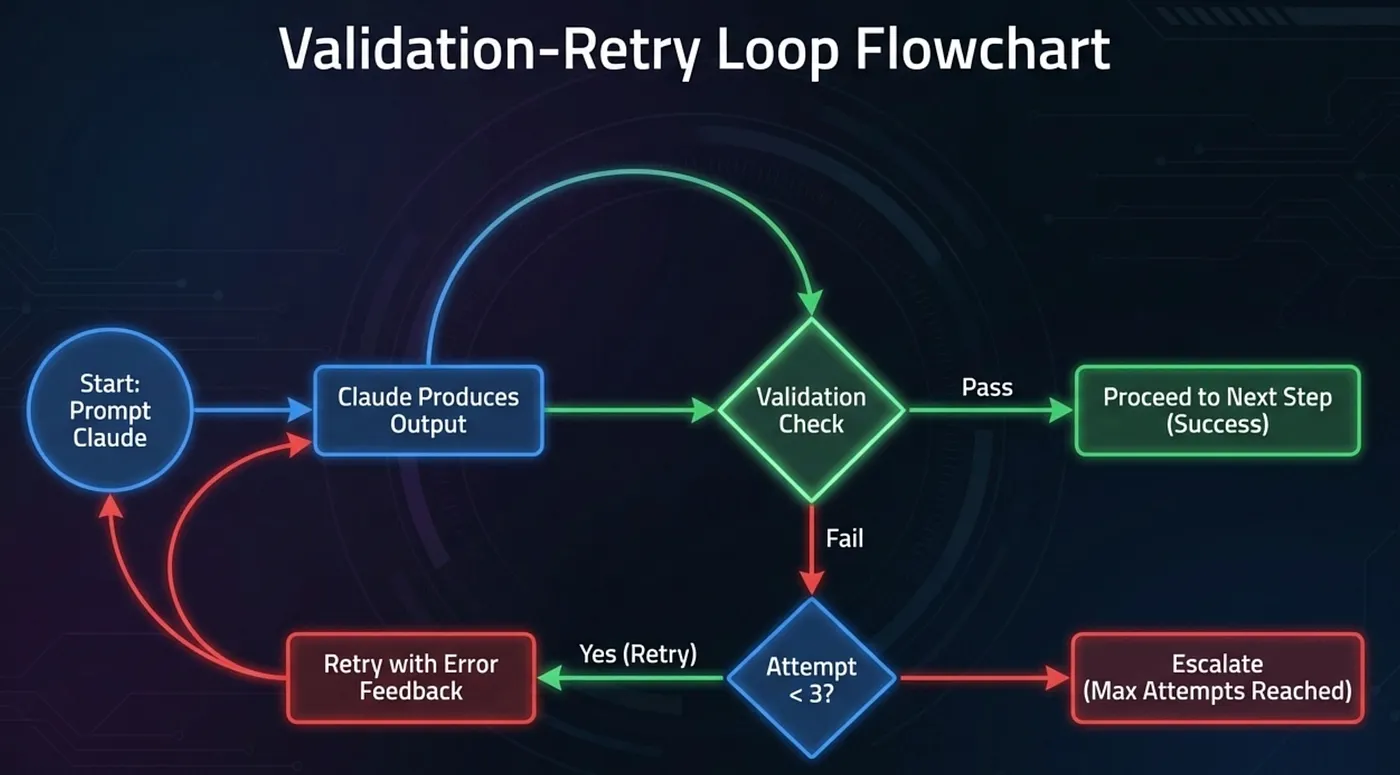
Even with --json-schema, production CI/CD pipelines should include a validation step:
- Claude produces output with --output-format json --json-schema schema.json
- Pipeline validates the output against the schema programmatically
- If validation passes, proceed to the next step
- If validation fails, retry with the error as feedback: “Previous output failed validation: {error details}. Please correct and try again.”
- Cap retries at 2–3 attempts before escalating to a human or failing the pipeline
This pattern appears in both the CI/CD and Data Extraction scenarios. The exam expects you to know it and to know the retry cap (2–3 attempts, not unlimited).
Pipeline Architecture Patterns
The CCA exam tests your ability to design complete CI/CD pipelines with Claude Code, not just isolated commands. Here are the three patterns that appear most frequently.
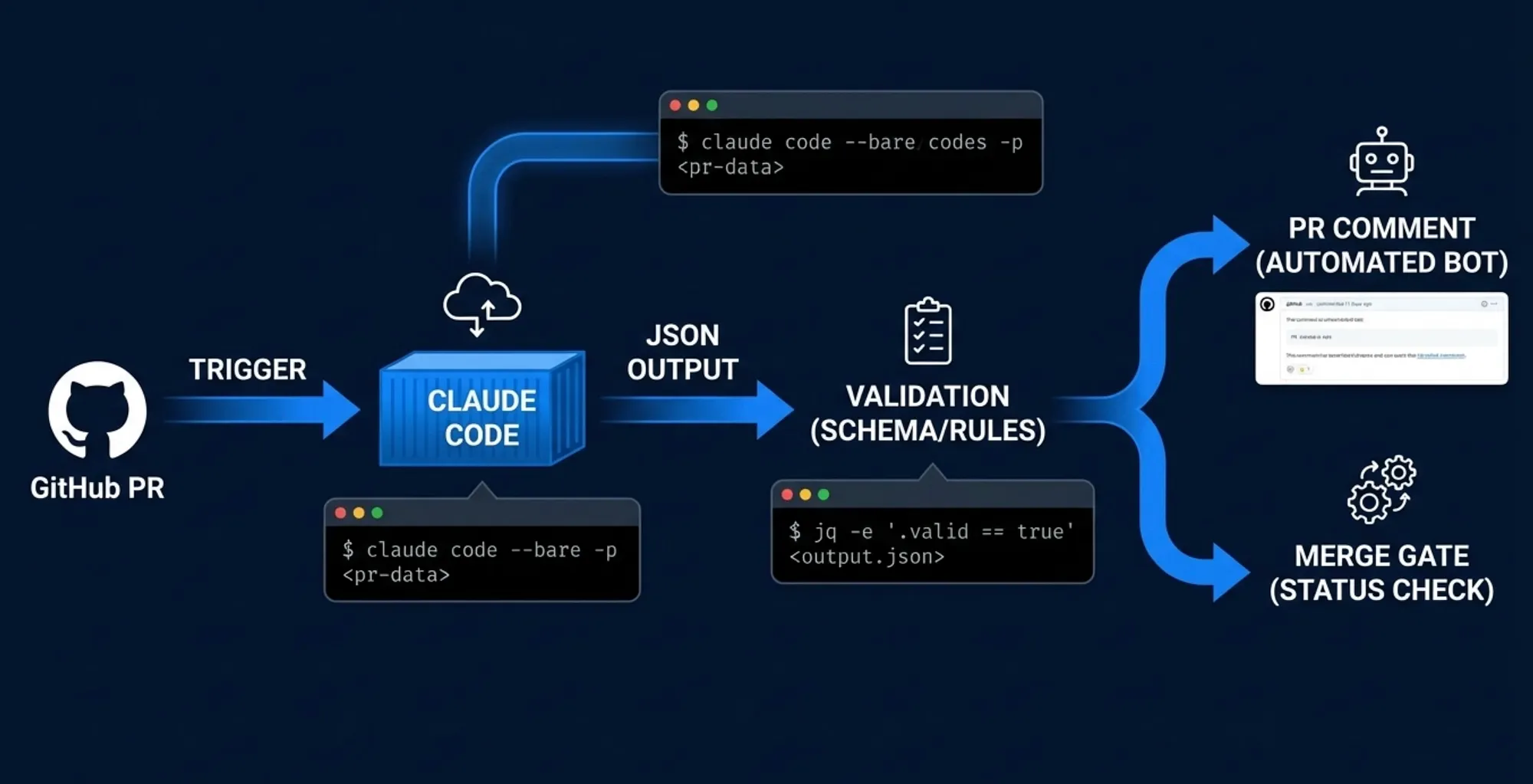
Pattern 1: Automated Code Review Pipeline
This is the most common CI/CD pattern on the exam. A pull request triggers an automated review.
# .github/workflows/claude-review.yml
name: Claude PR Review
on:
pull_request:
types: [opened, synchronize]
jobs:
review:
runs-on: ubuntu-latest
env:
ANTHROPIC_API_KEY: ${{ secrets.ANTHROPIC_API_KEY }}
steps:
- uses: actions/checkout@v4
with:
fetch-depth: 0
- name: Review PR
run: |
DIFF=$(gh pr diff ${{ github.event.pull_request.number }})
REVIEW=$(echo "$DIFF" | claude --bare -p "Review the following diff for security issues and code quality. Focus on: SQL injection, XSS, hardcoded credentials, and error handling." \\
--output-format json \\
--tools "Read,Bash" \\
--json-schema '{"type":"object","properties":{"issues":{"type":"array"},"summary":{"type":"string"},"approve":{"type":"boolean"}},"required":["issues","summary","approve"]}')
echo "$REVIEW" > review.json
env:
GH_TOKEN: ${{ secrets.GITHUB_TOKEN }}
- name: Check Results
run: |
APPROVE=$(jq -r '.structured_output.approve' review.json)
if [ "$APPROVE" = "false" ]; then
echo "Critical issues found. Blocking merge."
exit 1
fi
Key details to note for the exam: the --bare flag for reproducibility, the -p flag for non-interactive execution, --output-format json for parseable output, --json-schema for a predictable structure, jq for downstream parsing against the structured_output field, gh pr diff to actually pipe the diff into Claude, ANTHROPIC_API_KEY explicitly set in the environment (since --bare skips keychain auth), and --tools to restrict Claude to only the tools the task requires.
Pattern 2: Automated Test Generation
Triggered when test coverage drops below a threshold, Claude generates new tests:
claude --bare -p "Generate unit tests for the functions in src/auth.ts. Use Jest syntax. Each test should cover happy path and error cases." \\
--output-format json \\
--tools "Read"
After generation, the pipeline runs the tests to verify they pass. If they fail, the pipeline can retry with the error output as context.
Batch API candidate: If test generation is a nightly job (not blocking any developer), this is a good Batch API use case. You submit the requests in the evening and collect results the next morning. Note the ZDR constraint below before choosing this path for regulated industries.
Pattern 3: Remediation Pipeline
When a test failure or security scan produces findings, Claude can attempt automated fixes:
# Step 1: Attempt fix
claude --bare -p "The test in tests/auth.test.ts is failing with error: 'TypeError: Cannot read property email of undefined'. Fix the implementation in src/auth.ts." \
--output-format json \
--tools "Read,Edit"

# Step 2: Re-run tests to verify
npm test

# Step 3: If tests still fail, retry with new error
claude --bare -p "The previous fix did not resolve the issue. New error: '...'. Please try a different approach." \
--output-format json \
--tools "Read,Edit"
The key insight: remediation pipelines need retry loops. A single attempt may not produce a working fix. The pipeline should try, validate, and retry with error feedback -- typically up to 3 attempts before escalating to a human.
Understanding the -- bare Flag in Pipeline Patterns
Look at all three patterns above: they all use --bare. This is not accidental. The --bare flag is the bridge between how Claude Code works interactively (loading everything it can find) and how it must work in CI/CD (loading only what you explicitly provide). Without it, your pipeline is one repository clone away from inconsistent behavior.
When you see a pipeline pattern in the CCA exam that is missing --bare, that is often the bug the question is asking you to identify.
Sandboxing with -- tools vs. -- allowedTools
In CI/CD pipelines, you want to limit what Claude Code can do. Two flags control tool access, and they do different things:
- --tools "Read,Bash" restricts Claude's available toolset to only those listed. Claude cannot use any other tools. This is actual sandboxing.
- --allowedTools "Read,Bash" pre-approves those tools to run without a permission prompt, but Claude still has access to all other tools. This is convenience, not restriction.
For CI/CD sandboxing, use --tools:
# Correct: restricts available tools + pre-approves them
claude --bare -p "Review this code" \\
--output-format json \\
--tools "Read,search_code"
This is a security and safety pattern the CCA exam values: in non-interactive environments, scope down the available tools to only what the task requires.
💡 CCA Exam Tip:
--bare prevents unexpected context from loading.
--tools restricts which tools are available at all.
--allowedTools pre-approves specific tools to run without a permission prompt, which is useful for tools Claude will definitely need.
For defense-in-depth, use --tools to define the allowed set and --allowedTools to suppress prompts for those you expect Claude to use.
An exam question asking "how do you prevent Claude from taking unintended actions in CI" expects --tools, not --allowedTools.
Token Economics in CI/CD
CI/CD pipelines can run hundreds of times per day. Without cost optimization, the API bills add up fast. The CCA exam tests whether you know the two primary cost optimization mechanisms and when to use each -- plus an important constraint that eliminates one option for certain enterprise customers.
Prompt Caching: The Precise Picture
CI/CD pipelines are repetitive by nature. Every PR review sends the same project description, the same coding standards, the same review criteria. Only the diff changes. Prompt Caching stores the static prefix of your prompt so you pay for it once across multiple requests.
Here is the precise cost picture the CCA exam expects you to know:
- Cache reads: Cost 0.1x the base input price. That is a 90% reduction on the cached tokens. This is the savings people mean when they say “90% cost reduction.”
- Cache writes (5-minute TTL): Cost 1.25x the base input price -- 25% more than standard input tokens.
- Cache writes (1-hour TTL): Cost 2.0x the base input price -- 100% more than standard input tokens.
The net savings depend on your cache hit ratio. If you write the cache once and read it many times, the 90% read savings vastly outweigh the 25% write premium. If you write frequently and read rarely, caching costs more than it saves.
For CI/CD, the math typically works in your favor: the system prompt and project context are written once per cache refresh and read with every pipeline run. As long as the pipeline runs more than a few times per 5-minute window, caching pays off.
When Prompt Caching applies:
- Repeated static prefixes across multiple requests
- CI/CD pipelines where the system context is identical across runs
- Code review pipelines where only the diff changes between PRs
When it does NOT apply:
- Every request has completely different context
- One-off requests with no repetition
💡 CCA Exam Tip:
The “90% cost reduction” claim for prompt caching is accurate but specific. It applies to cache read tokens only. Cache write tokens cost more than standard input tokens (25% more for 5-minute TTL). The exam may present “90% cost reduction on all tokens with prompt caching” as a distractor. The correct statement is “cache reads cost 90% less than standard input tokens; cache writes cost 25% more (5-minute TTL).”
Message Batches API: The 50% Discount and the ZDR Constraint
The Batch API processes multiple independent requests at a 50% discount. The tradeoffs: there is no real-time SLA, and requests may take up to 24 hours to complete (though official documentation states “most batches completing within 1 hour”).
Batch API capacity: up to 100,000 requests or 256 MB per batch, whichever limit is reached first. Results are available for 29 days after creation.
The ZDR constraint -- a critical CCA exam fact: The Message Batches API is NOT eligible for Zero Data Retention. This is confirmed in the official documentation. For enterprise customers with ZDR requirements (typically in regulated industries like healthcare, finance, or government), the Batch API is off the table entirely. You cannot use it and maintain ZDR compliance.
Perfect Batch API use cases (where ZDR is not required):
- Nightly test generation: submit 20 test generation requests at midnight, collect results at 8 AM
- Bulk security audit: scan 50 files overnight, review findings in the morning
- Scheduled code scans: weekly architecture compliance checks across the whole codebase
💡 CCA Exam Tip:
“Which API should a healthcare company use for overnight batch code analysis if they have Zero Data Retention requirements?” The answer is the real-time API, not the Batch API. The Batch API’s 50% discount is attractive, but ZDR ineligibility disqualifies it for regulated industries.
Anti-Pattern: Batch API for Blocking Workflows
The mistake: A developer opens a PR and the pipeline sends the review to the Batch API to save 50% on costs. The developer waits. And waits. The Batch API has no real-time SLA. The review might come back in 10 minutes. It might take 6 hours.
Why it fails: The Batch API is designed for non-blocking workloads. Using it for a workflow where a human is waiting defeats its purpose and creates a terrible developer experience.
Correct pattern: Real-time API for blocking workflows (PR reviews, deploy gates, anything with a human waiting). Batch API for non-blocking scheduled jobs (nightly audits, bulk scans, maintenance tasks) -- provided ZDR is not a requirement.
The Cost Optimization Stack
For maximum savings on eligible workloads:
- Prompt Caching for the repeated static context in every request (cache reads cost 90% less; cache writes cost 25% more with 5-min TTL)
- Batch API for non-blocking workloads where ZDR is not required (50% discount on the entire request)
- Together, these can reduce CI/CD costs dramatically compared to naive real-time API calls with no caching
Decision Framework for the CCA Exam
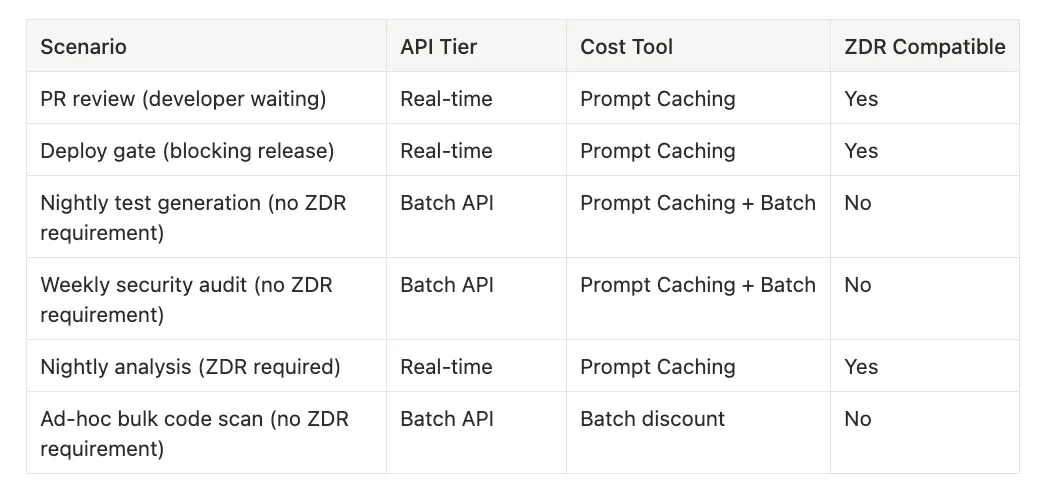
Scenarios to consider:
PR review (developer waiting)
- API Tier: Real-time
- Cost Tool: Prompt Caching
- ZDR Compatible: Yes
Deploy gate (blocking release)
- API Tier: Real-time
- Cost Tool: Prompt Caching
- ZDR Compatible: Yes
Nightly test generation (no ZDR requirement)
- API Tier: Batch API
- Cost Tool: Prompt Caching + Batch
- ZDR Compatible: No
Weekly security audit (no ZDR requirement)
- API Tier: Batch API
- Cost Tool: Prompt Caching + Batch
- ZDR Compatible: No
Nightly analysis (ZDR required)
- API Tier: Real-time
- Cost Tool: Prompt Caching
- ZDR Compatible: Yes
Ad-hoc bulk code scan (no ZDR requirement)
- API Tier: Batch API
- Cost Tool: Batch discount
- ZDR Compatible: No
Anti-Pattern Summary: The CI/CD Failure Modes
Here is the complete reference of CI/CD anti-patterns the CCA exam tests.
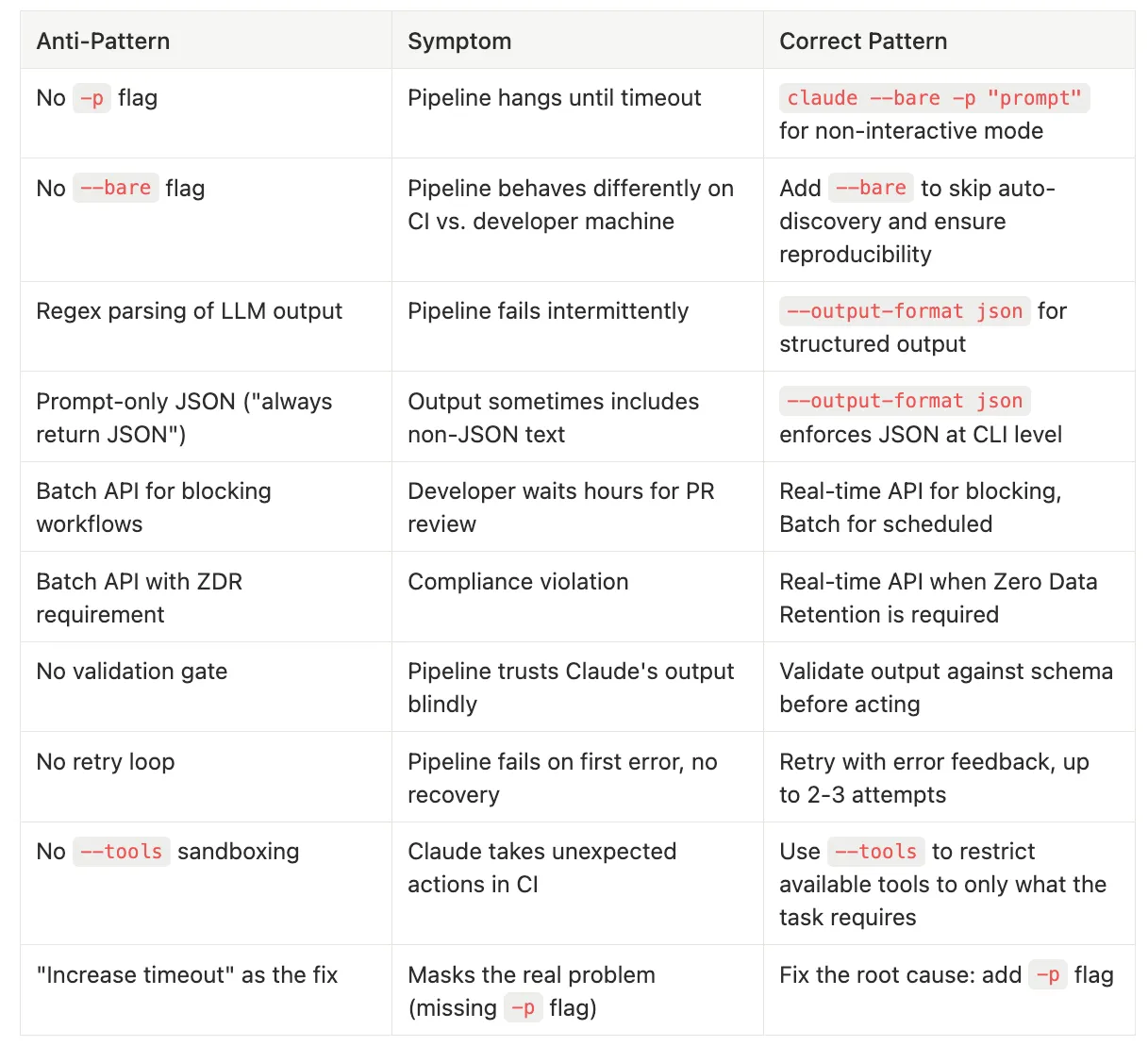
Common mistakes and how to fix them:
Missing **-p** flag
- Symptom: Pipeline hangs until timeout
- Correct Pattern: claude --bare -p "prompt" for non-interactive mode
Missing **--bare** flag
- Symptom: Pipeline behaves differently on CI vs. developer machine
- Correct Pattern: Add --bare to skip auto-discovery and ensure reproducibility
Regex parsing of LLM output
- Symptom: Pipeline fails intermittently
- Correct Pattern: --output-format json for structured output
Prompt-only JSON (“always return JSON”)
- Symptom: Output sometimes includes non-JSON text
- Correct Pattern: --output-format json enforces JSON at CLI level
Batch API for blocking workflows
- Symptom: Developer waits hours for PR review
- Correct Pattern: Real-time API for blocking, Batch for scheduled
Batch API with ZDR requirement
- Symptom: Compliance violation
- Correct Pattern: Real-time API when Zero Data Retention is required
No validation gate
- Symptom: Pipeline trusts Claude’s output blindly
- Correct Pattern: Validate output against schema before acting
No retry loop
- Symptom: Pipeline fails on first error, no recovery
- Correct Pattern: Retry with error feedback, up to 2–3 attempts
Missing **--tools** sandboxing
- Symptom: Claude takes unexpected actions in CI
- Correct Pattern: Use --tools to restrict available tools to only what the task requires
“Increase timeout” as the fix
- Symptom: Masks the real problem (missing -p flag)
- Correct Pattern: Fix the root cause: add -p flag
Exam Strategy: CI/CD Questions
When you see a CI/CD question on the CCA exam, run it through this decision framework:
“Pipeline is hanging”: Missing -p flag. Always. The exam may dress this up with details about timeout configurations, resource constraints, or network issues. Ignore the noise. If Claude Code is running in CI without -p, it is waiting for input.
“Pipeline behaves differently on CI than locally”: Missing --bare flag. The developer's local environment has CLAUDE.md files, MCP servers, and hooks that the CI runner does not. Adding --bare makes both environments behave identically.
“Output is unpredictable”: Need --output-format json or --json-schema. If the question describes a pipeline that "sometimes works and sometimes doesn't" when parsing Claude's output, the answer is structured output flags, not better prompts.
“Pipeline is too expensive”: Apply Prompt Caching for repeated context. For non-blocking workloads without ZDR requirements, add the Batch API for 50% savings. The exam may offer “use a smaller model” as a distractor; that addresses cost but sacrifices quality. Caching and batching reduce cost without sacrificing output quality.
“Pipeline is too slow”: Check if the Batch API is being used for a blocking workflow. If a developer is waiting and the pipeline uses the Batch API, the fix is to switch to the real-time API. Speed here is not about model performance; it is about using the right API tier.
“Regulated industry + cost savings + overnight jobs”: Real-time API with Prompt Caching. The Batch API’s ZDR ineligibility rules it out. Prompt Caching still provides meaningful savings on repeated context.
Common Distractor Answers to Eliminate
- “Increase the pipeline timeout”: Treats the symptom of a hanging pipeline, not the cause (missing -p flag)
- “Add more detailed instructions to the prompt”: Prompt improvement is good practice but does not solve structural problems like missing flags or wrong API tiers
- “Switch to a larger model”: Unrelated to pipeline mechanics; the problem is configuration, not model capability
- “Add retry logic for timeout errors”: Retrying a hanging pipeline just hangs again; the -p flag is the fix
- “Use the Batch API for cost savings” when the pipeline blocks a human: wrong tier for the workload
- “Use the Batch API” in a ZDR scenario: ZDR ineligibility disqualifies the Batch API regardless of cost benefits
Practice Question Walkthrough
❓ Question: A team has integrated Claude Code into their GitHub Actions workflow for automated PR reviews. The pipeline works correctly in most cases, but occasionally the JSON parsing step fails with “unexpected token” errors. The team has added “Please always return your response as valid JSON” to the prompt. What is the most reliable fix?
A.) Add more specific JSON formatting instructions to the prompt with few-shot examples
B.) Increase the retry count for the JSON parsing step
C.) Use the --output-format json flag to enforce structured JSON output at the CLI level
D.) Switch from JSON to YAML output, which is more forgiving of formatting issues
✅ Answer: C. The question describes prompt-based JSON enforcement that sometimes fails.
🚫 **Option A **doubles down on the prompt approach, which is still best-effort.
🚫 Option B retries without fixing the root cause.
🚫 **Option D **introduces a different format but the same fundamental problem (no enforcement).
✅ Option C uses CLI-level enforcement that guarantees valid JSON structure, making the prompt-based instruction unnecessary.
Key Takeaways for Exam Day
Here are the facts from the CI/CD scenario most likely to appear on your Claude Certified Architect exam, mapped to the domains they test:
- The -p flag is mandatory for CI/CD. Without it, Claude Code enters interactive mode and the pipeline hangs. The long form is --print. Domain: Claude Code Workflows (20%)
- --bare is Anthropic's primary CI/CD recommendation. It skips auto-discovery of hooks, skills, plugins, MCP servers, auto memory, and CLAUDE.md. Anthropic's documentation states it will become the default for -p in a future release. The complete recommended pattern is claude --bare -p "prompt". Domain: Claude Code Workflows (20%)
- --output-format json enforces structured output at the CLI level. This is not the same as asking for JSON in a prompt. The flag guarantees JSON; the prompt does not. Domain: Prompt Engineering (20%), Claude Code Workflows (20%)
- --json-schema validates output structure. Combined with --output-format json, it ensures Claude's output matches your expected schema. Results appear in the structured_output field (not the result field). Domain: Prompt Engineering (20%)
- Never parse LLM natural language output with regex. Use structured output flags. Regex is fragile against varying natural language. Domain: Prompt Engineering (20%)
- Real-time API for blocking workflows, Batch API for non-blocking (when ZDR is not required). If a human or deployment is waiting, use real-time. If it is a scheduled overnight job without ZDR requirements, use Batch for 50% savings. Domain: Context Management (15%)
- Message Batches API is NOT eligible for Zero Data Retention. This eliminates the Batch API for any customer or use case requiring ZDR compliance. Domain: Context Management (15%)
- Prompt Caching cost breakdown: cache reads cost 90% less; cache writes cost 25% more (5-minute TTL) or 100% more (1-hour TTL). The net savings depend on your cache hit ratio. “90% cost reduction” is accurate for reads only. Domain: Context Management (15%)
- Validation-retry loops are the standard pattern. Validate Claude’s output, and if it fails, retry with error feedback. Cap retries at 2–3 attempts before escalating or failing the pipeline. Domain: Prompt Engineering (20%), Claude Code Workflows (20%)
- --tools sandboxes Claude in CI; --allowedTools pre-approves tools for unattended runs. Use --tools to restrict which tools are available. Use --allowedTools to suppress permission prompts for expected tools. Combined with --bare, this is defense-in-depth for non-interactive environments. Domain: Claude Code Workflows (20%)
Discussion Questions
- Your GitHub Actions pipeline uses -p but not --bare. It works perfectly on developer machines but produces unpredictable results on CI runners. What is the root cause, and what exactly does adding --bare change about how Claude Code initializes?
- A financial services company wants to use the Batch API for overnight security audits to save 50% on costs. They have a Zero Data Retention agreement with Anthropic. What do you tell them, and what is the correct alternative that still optimizes cost?
- Your pipeline currently uses prompt instructions to request JSON output (“always respond with JSON”). It works 90% of the time. A teammate argues that 90% reliability is acceptable for a non-critical pipeline. What is the CCA exam position on this tradeoff, and what single flag change gets you from 90% to effectively 100%?
Series Navigation
Part of the CCA Scenario Deep Dive Series:
Series Navigation
- Article 1: Claude Certified Architect: The Complete Guide to Passing the CCA Foundations Exam written by Rick Hightower.
- Article 2: Customer Support Resolution Agent -- Agentic loops, escalation design, confidence calibration written by Rick Hightower
- Article 3: CCA Exam: Code Generation with Claude Code -- Context degradation, CLAUDE.md hierarchy, CI/CD integration
- Article 4: Multi-Agent Research System: Hub-and-spoke design, context isolation, tool scoping
- Article 5: Claude Code for CI/CD -- Using Claude Code headless in your CI/CD workflows (You are here)
- Article 6: CCA Exam -- Structured Data Extraction
- This series is a work in progress with 8 total articles.
ClaudeAI #CCAExam #CICD #GitHubActions #ClaudeCode #AIEngineering #CertificationPrep #DevOps #PipelineAutomation #PromptEngineering
About the Author
Rick Hightower is a technology executive and data engineer who led ML/AI development at a Fortune 100 financial services company. He created skilz, the universal agent skill installer, supporting 30+ coding agents including Claude Code, Gemini, Copilot, and Cursor, and co-founded the world’s largest agentic skill marketplace. Connect with Rick Hightower on LinkedIn or Medium. Check out SpillWave, your source for AI expertise.
Rick has been actively developing generative AI systems, agents, and agentic workflows for years. He is the author of numerous agentic frameworks and developer tools and brings deep practical expertise to teams looking to adopt AI.