Claude Code 2026: The Daily Operating System Top Developers Actually Use
The exact 5-part model, 10-minute routine, slash commands, context hygiene tricks, end-of-day rituals, and elite workflows
Originally published on Medium.
The exact 5-part model, 10-minute routine, slash commands, context hygiene tricks, end-of-day rituals, and elite workflows
 Claude Code Daily Guide
- Keep always-on context small.
- Turn repeated procedures into skills or commands.
- Protect active sessions from context pollution.
- Parallelize work only with clear supervision and isolation.
- Let guardrails remove noise without removing judgment.
- Your 10-Minute Daily Claude Code Routine
- Latest Features You Need Today (/powerup, /insights, /loop, Channels)
- Casual vs. Pro vs. Elite Workflows
- How Top Users Actually Work (Boris, Karpathy, Anthropic)
- The Big Four: Bundled Skill-Like Commands
- Context Hygiene Is the Hidden Multiplier
- Approval Fatigue and Auto Mode
- Common Pitfalls and How to Fix Them
- Reliability Is the Real Feature
- From Daily Use to Mastery
- References
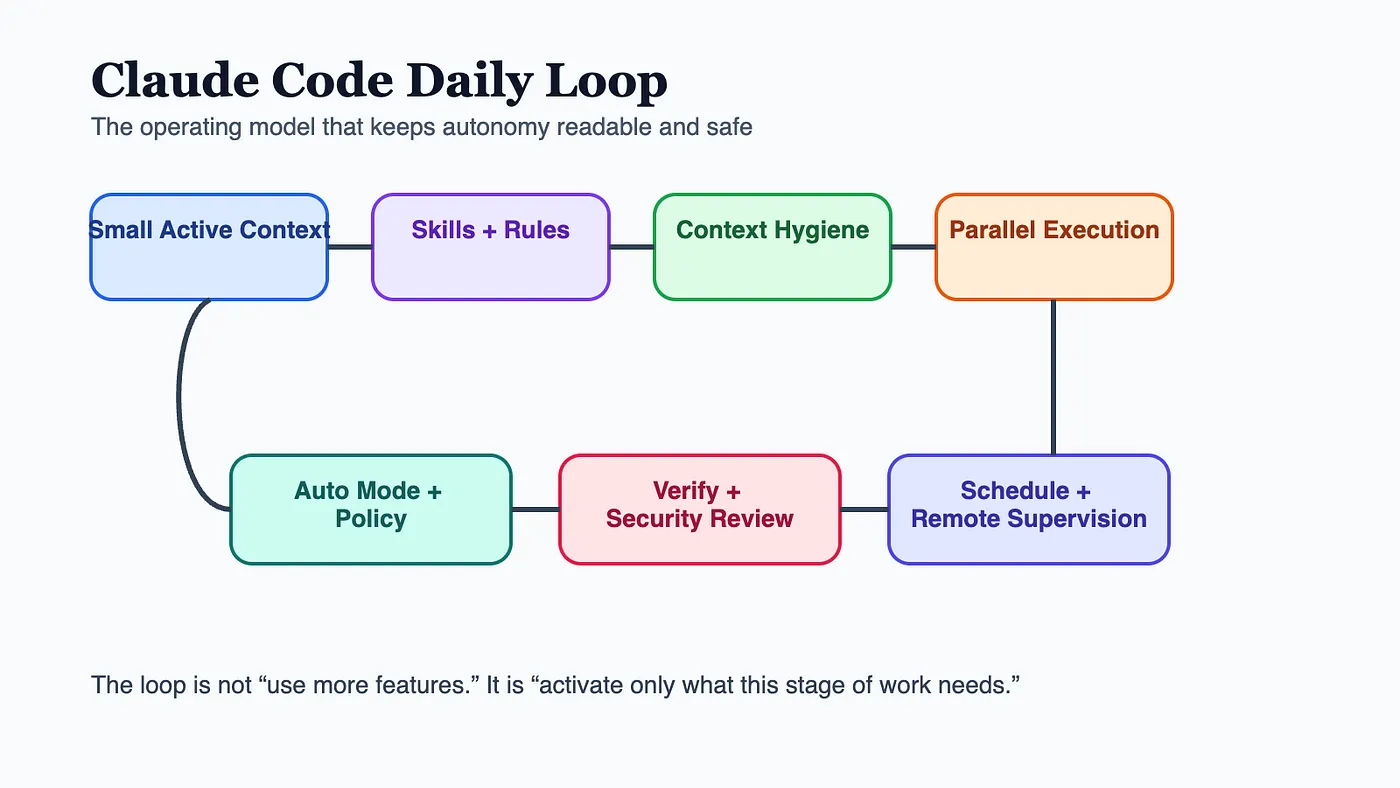 Claude Code Daily Guide: Daily workflow architecture
- Re-anchor the repo. Open the branch, scan
CLAUDE.md, and confirm the project's test and review commands before you ask Claude to edit anything. - Make Claude plan before it writes. Ask for the stages, the likely files, the risks, and the acceptance criteria.
- Decide whether this task deserves one session or several isolated worktrees before you start.
/memory
/loop
"run tests and summarize failures"
 every 30m
-
Keep the main thread clean. Use side channels, forks, or fresh sessions for detours instead of dumping everything into one transcript.
-
Turn anything you repeat twice into a skill, slash command, or reusable repo convention. Use subagents to keep your context tight and focused.
-
Verify as you go. Tests, browser checks, screenshots, and second-pass review are part of the work, not a cleanup step.
-
Run a cleanup pass for loose ends, duplicated code, and unfinished notes.
-
Update
CLAUDE.mdor memory with anything the next session should know by default. -
Kill stale loops, close noisy sessions, and leave one clear handoff for tomorrow.
-
Add one repo-specific rule to
CLAUDE.mdinstead of repeating it in chat. -
Start one recurring loop for a real nuisance task like tests, screenshots, or PR summaries.
-
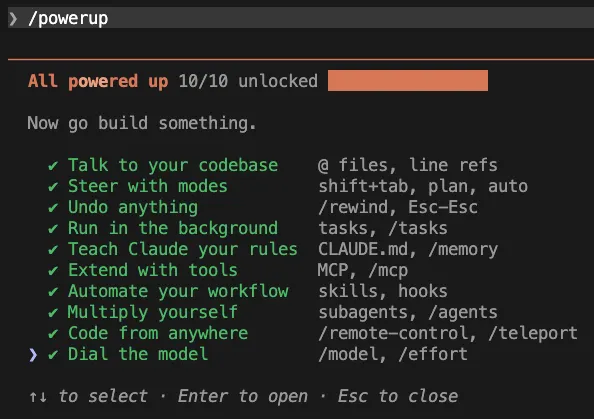
just updated Claude Code and want to see what’s new
-
sense you’re only using 20% of the product (hooks, subagents, rewind, worktrees, skills, MCP, etc.)
-
want a self-contained learning loop without leaving the terminal
- projects and sessions overview
- tool usage patterns and where time/tokens go
- recurring friction points (where you get stuck, restart, or abandon threads)
- personalized “what’s working / what’s hindering / quick wins / ambitious workflows” suggestions
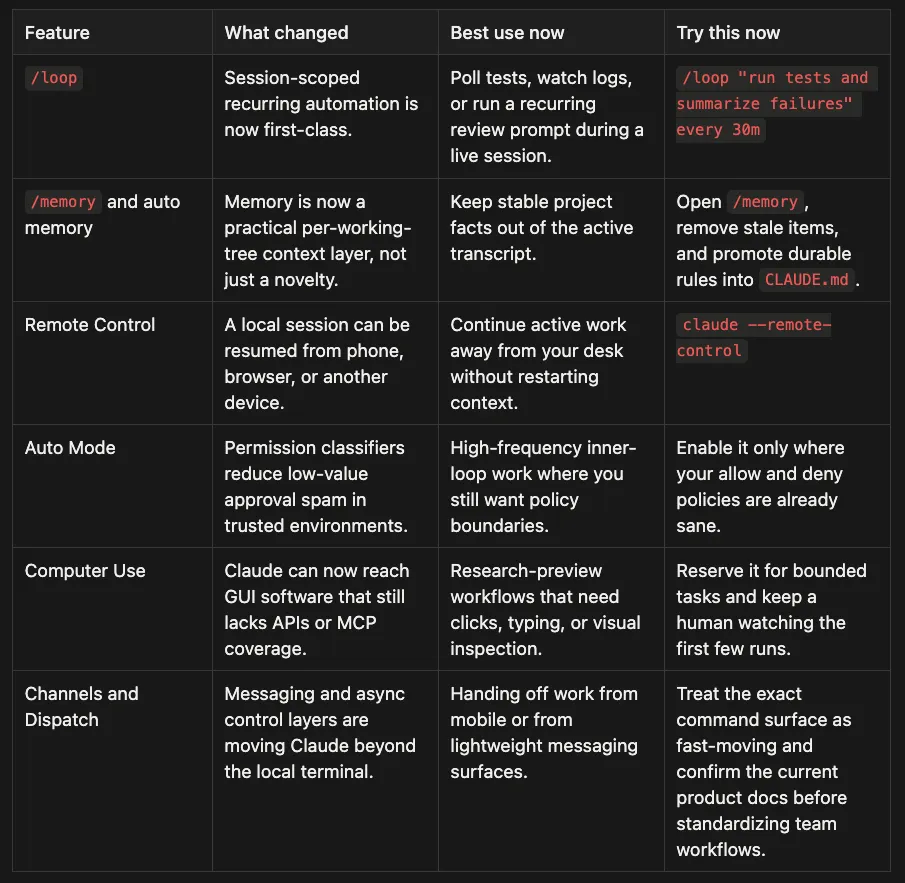 Claude Code Daily Guide: Q1 2026 surface map
-
Add one
/looptask that saves you a manual check every day. -
Test Remote Control on a safe repo before you need it during real work.
-
Setup Channels
-
Slack/Telegram/Discord are the practical options for team workflows: shared channels, cross-platform access, and a familiar chat surface for lightweight “dispatch” (e.g., “run the test suite”, “summarize failures”, “draft PR notes”).
-
iMessage is the fastest personal setup for Apple-heavy workflows: no bot token, no external webhook service, and a very low-friction way to ping your running session from iPhone/iPad/Mac.
- Prereqs: Claude Code v2.1.80+ and Bun installed.
- Grant Full Disk Access to your terminal app (required to read
~/Library/Messages/chat.db). I am not going to lie, this felt wrong. - Install the plugin inside a Claude Code session:
-
plugin install imessage@claude-plugins-official -
claude --channels plugin:imessage@claude-plugins-official -
Session must stay running (close the terminal and the channel goes offline; messages sent while it’s down are typically lost).
-
Permission prompts still block: if the session needs approval, it will pause until you confirm locally.
-
macOS-only for iMessage (Telegram/Discord-style channels are cross-platform).
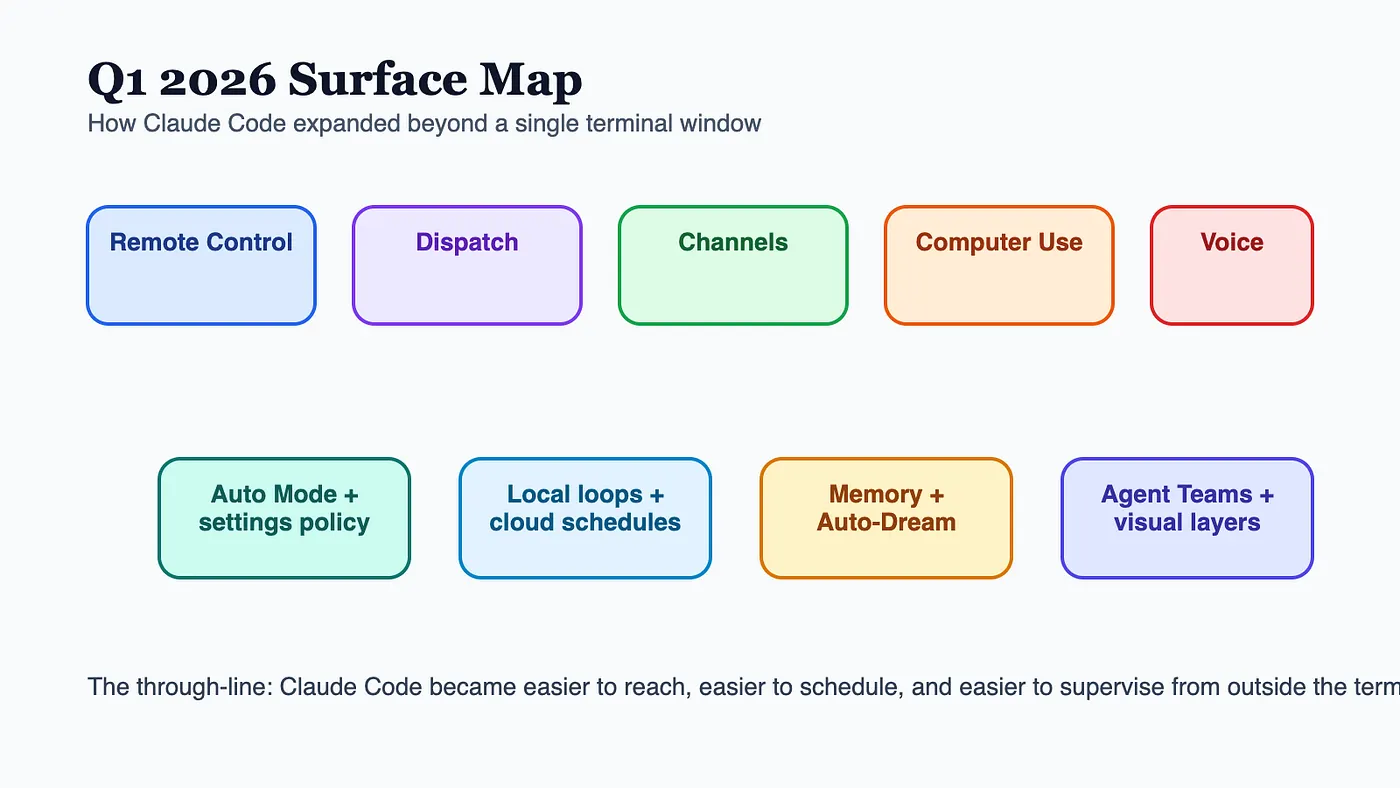 Claude Code Daily Developer’s Guide: Q1 2026 surface map
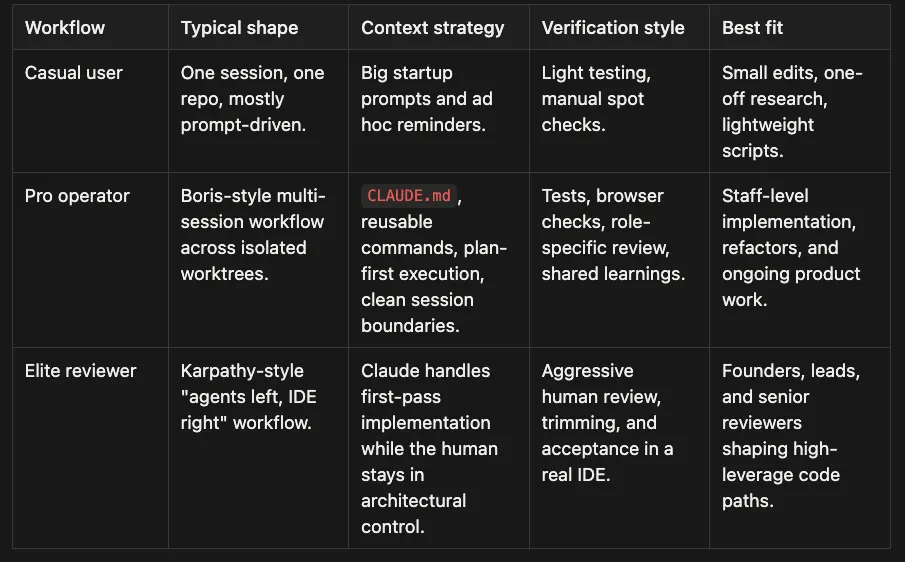 Claude Code Daily Guide: Workflows
-
Code reuse: reduces duplication
-
Code quality: finds bugs, unclear logic, maintainability issues
-
Efficiency: identifies performance improvements
-
researches the codebase to understand scope
-
decomposes work into 5–30 independent units
-
presents a plan for approval
-
spawns one agent per unit, each in an isolated git worktree
-
has each agent implement, test, and open a PR
-
Single-turn only (one question, one answer)
-
Read-only (no edits, no commands, no artifacts)
-
No new tool/file access (it can’t read anything the main session hasn’t already seen)
-
In-session:
/fork -
From the CLI (e.g., to open in another terminal):
-
claude -r "session-name" --fork-session -
Run it via
/rewind, or press Esc twice. -
/compact: compresses the current context window in place (keeps working, drops raw history) -
/rewind summarization: rolls back to a prior checkpoint (best when recent context is wrong/polluted) -
Quick question / non-disruptive check:
/btw -
Need file/tool access or a parallel alternative:
/fork -
Wrong direction / bad context:
/rewind(or Esc, Esc for the last change) -
Context too big (but not wrong):
/compact
claude --enable-
auto
-mode
claude -p
"refactor the auth module"
 --permission-mode
auto
{

"permissions"
:

{

"defaultMode"
:

"auto"

}
}
claude
auto
-mode defaults
- As a user: press
Shift+Tabto cycle back todefault,acceptEdits, orplan. - As an admin (disable for all users): add this to your managed settings:
{

"disableAutoMode"
:

"disable"
}
defaults
write
 com.anthropic.claudecode disableAutoMode -
string

"disable"
- parallel agent teams and fan-out/fan-in workflows
- scoped context hierarchies with skills and subagents
- auto-research loops with explicit success metrics
- browser and computer automation with clear isolation boundaries
- multi-model routing to avoid monoculture
- workspace design so projects, skills, and active artifacts stay legible
- security review, dependency sanity checking, and secret discipline
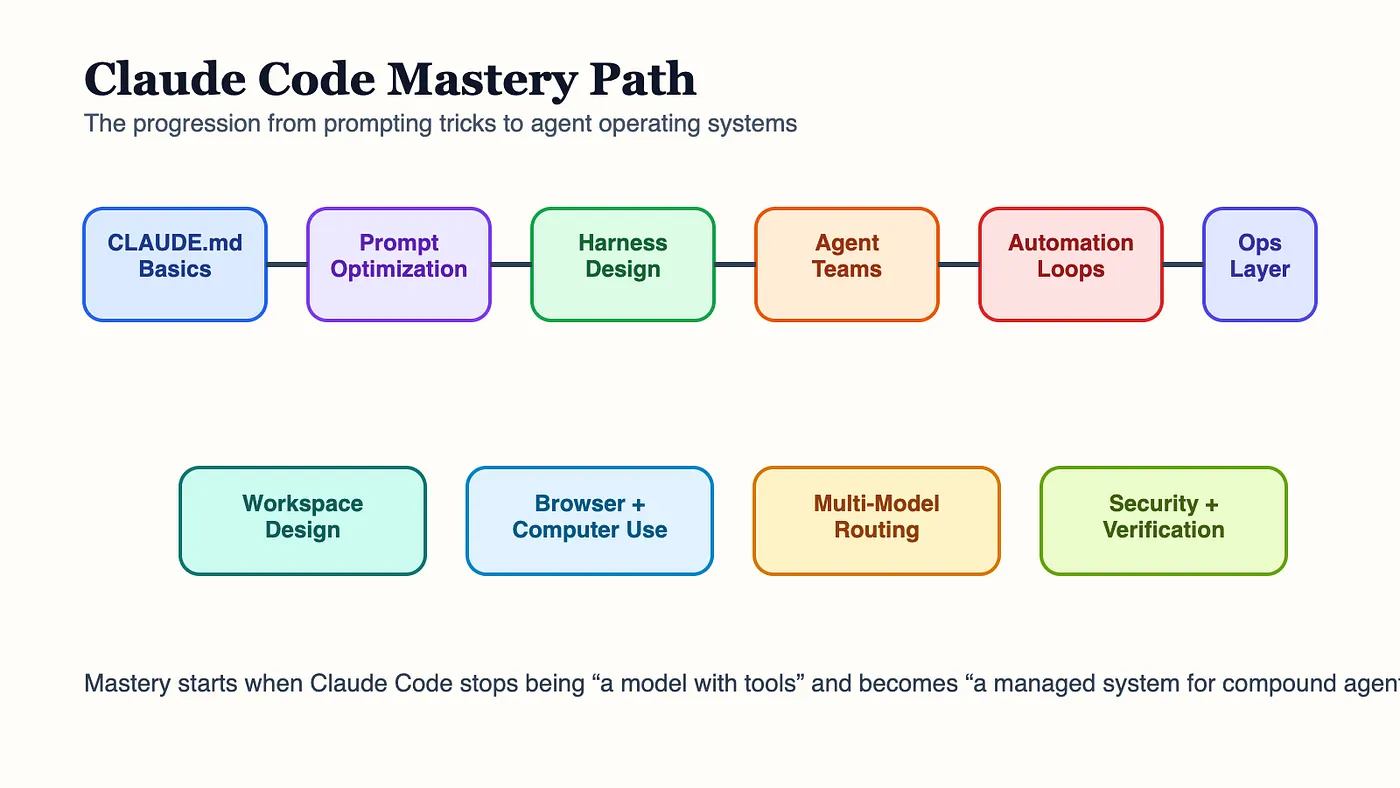 Claude Code Daily Guide: Claude Code mastery path
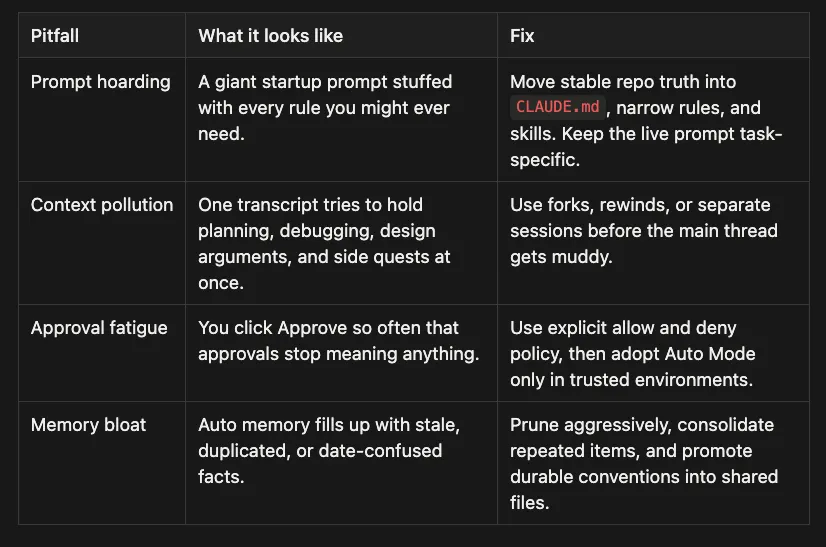 Claude Code Daily Guide: Common Pitfalls and how to fix them
-
Delete one stale instruction from your default prompt and move it into the right layer.
-
Close one noisy session instead of dragging its baggage into tomorrow.
-
Save Hours: Stop Repeating Yourself to Claude: Skills, Rules, Memory, and When to Use Each Mastering Claude Code: Streamline Your Developer Workflow and Boost Productivity with Skills and Customization Tools
-
Stop Clicking “Approve”: How I Killed Approval Fatigue with Claude Code 2.1
-
Put Claude on Autopilot: Scheduled Tasks with /loop and /schedule built-in Skills
-
The Claude Code Daily Handbook: Strategic AI Collaboration for Modern Developers
-
Claude Code Skills Deep Dive Part 1 : Basics of writing agent skills, and the agent skill architecture, which is important for encoding workflows
-
Claude Code Skills Deep Dive Part 2 : Continue writing skills
-
Claude Code Agent Skills 2.0: From Custom Instructions to Programmable Agents : Advances in skills and new built-in skills. How to combine skills with permissions and hooks.
-
Claude Code Agent Teams: Multiple Claudes Working Together : Introduction to Agent Teams
-
Claude Code Hooks: Making AI Gen Deterministic : Introductions to Hooks
-
Claude Code Hooks Implementation Guide: Audit System : An example of using Hooks
-
Claude Code Rules: Stop Stuffing Everything into One
CLAUDE.md: Organizing your rules and coding standards -
Claude Code Remote Control: Code From Your Phone : Using Remote feature with Claude Code
-
Claude Code Auto Mode: Escape Permission Fatigue — Guide to Automated Permissions : Introduction to Auto Mode to escape permission fatigue
-
Claude Code’s Automatic Memory: No More Re-Explaining Your Project : Introduction to Claude Code Automatic Memory and how to use it
-
Mastering Claude Code’s /btw, /fork, and /rewind: The Context Hygiene Toolkit : Tools to keep your Context clean and focused.
-
Put Claude on Autopilot: Scheduled Tasks with /loop and /schedule built-in Skills : Introduction to new cron features
-
Stop Clicking “Approve”: How I Killed Approval Fatigue with Claude Code 2.1 : How to avoid approval fatigue with Claude Code
-
The Claude Code Daily Handbook: Strategic AI Collaboration for Modern Developers : Original Claude Code Daily Handbook
-
Build Your First Claude Code Agent Skill: A Simple Project Memory System That Saves Hours : Basic getting started guide for writing your first agent skill.
-
Build Your First Agent Skill in 10 Minutes Using the Context7 Wizard, and Save Hours
-
Claude Code: How to Build, Evaluate, and Tune AI Agent Skills : Guide on how to use Claude Code to improve the skills that you write
-
Mastering Agentic Skills: The Complete Guide to Building Effective Agent Skills
-
Mastering Agent Development: The Architect Agent Workflow for Creating Robust AI Agent Skills
-
Save Hours: Stop Repeating Yourself to Claude: Skills, Rules, Memory, and When to Use Each
-
Claude Certified Architect: The Complete Guide to Passing the CCA Foundations Exam
-
CCA Exam Prep: Mastering the Code Generation with Claude Code Scenario
-
CCA Exam Prep: Mastering the Multi-Agent Research System Scenario
-
CCA Exam Prep: Mastering the Customer Support Resolution Agent Scenario
-
Anthropic, How Anthropic teams use Claude Code: https://claude.com/blog/how-anthropic-teams-use-claude-code
-
Anthropic PDF, How Anthropic teams use Claude Code: https://www-cdn.anthropic.com/58284b19e702b49db9302d5b6f135ad8871e7658.pdf
-
Anthropic, Claude Code auto mode: a safer way to skip permissions: https://www.anthropic.com/engineering/claude-code-auto-mode
-
Anthropic, Code execution with MCP: Building more efficient agents: https://www.anthropic.com/engineering/code-execution-with-mcp
-
Anthropic, Harness design for long-running application development: https://www.anthropic.com/engineering/harness-design-long-running-apps
-
Anthropic, Effective harnesses for long-running agents: https://www.anthropic.com/engineering/effective-harnesses-for-long-running-agents
-
Anthropic, Effective context engineering for AI agents: https://www.anthropic.com/engineering/effective-context-engineering-for-ai-agents
-
Anthropic, Equipping agents for the real world with Agent Skills: https://www.anthropic.com/engineering/equipping-agents-for-the-real-world-with-agent-skills
-
Anthropic, Building a C compiler with a team of parallel Claudes: https://www.anthropic.com/engineering/building-c-compiler
-
Claude Code docs, Changelog: https://code.claude.com/docs/en/changelog
-
Claude Code docs, Scheduled tasks: https://code.claude.com/docs/en/scheduled-tasks
-
Claude Code docs, Remote Control: https://code.claude.com/docs/en/remote-control
-
Anthropic docs, Claude Code memory: https://docs.anthropic.com/en/docs/claude-code/memory
-
Claude Code docs, Slash commands: https://code.claude.com/docs/en/slash-commands
-
Claude Code docs, Subagents: https://code.claude.com/docs/en/sub-agents
-
Anthropic support, Using voice mode: https://support.claude.com/en/articles/11101966-using-voice-mode
-
Anthropic support, Automated security reviews in Claude Code: https://support.anthropic.com/en/articles/11932705-automated-security-reviews-in-claude-code/
-
Anthropic docs, Prompt engineering overview: https://platform.claude.com/docs/en/build-with-claude/prompt-engineering/overview
-
Anthropic docs, Claude prompting best practices: https://platform.claude.com/docs/en/build-with-claude/prompt-engineering/claude-prompting-best-practices
-
Boris Cherny on X, How I use Claude Code: https://x.com/bcherny/status/2007179832300581177
-
How Boris Uses Claude Code: https://howborisusesclaudecode.com
-
Reddit mirror, bcherny, creator of Claude Code, shares how I use Claude Code: https://www.reddit.com/r/AI_Agents/comments/1q3xw15/bcherny_creator_of_claude_code_shares_how_i_use/
-
InfoQ, Claude Code creator workflow: https://www.infoq.com/news/2026/01/claude-code-creator-workflow/
-
Slashdot, Creator of Claude Code reveals his workflow: https://developers.slashdot.org/story/26/01/06/2239243/creator-of-claude-code-reveals-his-workflow
-
FreeCodeCamp, Claude Code Handbook: https://www.freecodecamp.org/news/claude-code-handbook/
-
Every, How to Use Claude Code Like the People Who Built It: https://every.to/podcast/how-to-use-claude-code-like-the-people-who-built-it
-
Paddo, 10 Tips from Inside the Claude Code Team: https://paddo.dev/blog/claude-code-team-tips/
-
Jitendra Zaa, 10 Claude Code Tips from the Creator Boris Cherny: https://www.jitendrazaa.com/blog/others/tips/10-claude-code-tips-from-the-creator-boris-cherny-february/
-
YouTube, Building Claude Code with Boris Cherny: https://www.youtube.com/watch?v=julbw1JuAz0
-
YouTube, His Claude Code Workflow Is Insane: https://www.youtube.com/watch?v=WpQZlKiy3zo
-
YouTube, How to Use Claude Code the Boris Way: https://www.youtube.com/watch?v=1aCp9OT8rvw
-
Get Push to Prod, How the creator of Claude Code actually uses Claude Code: https://getpushtoprod.substack.com/p/how-the-creator-of-claude-code-actually
-
Lenny’s Newsletter, Head of Claude Code: what happens: https://www.lennysnewsletter.com/p/head-of-claude-code-what-happens
-
Pragmatic Engineer, How Claude Code is built: https://newsletter.pragmaticengineer.com/p/how-claude-code-is-built
-
Andrej Karpathy on X, Claude agents on the left, IDE on the right: https://x.com/karpathy/status/2015883857489522876
-
Business Insider, Andrej Karpathy says Claude Code is shifting his workflow: https://www.businessinsider.com/andrej-karpathy-claude-code-manual-skills-atrophy-software-engineering-tesla-2026-1
-
Dev.to, Karpathy’s Claude Code field notes: https://dev.to/jasonguo/karpathys-claude-code-field-notes-real-experience-and-deep-reflections-on-the-ai-programming-era-4e2f
-
The AI Corner, Andrej Karpathy AI workflow shift: https://www.the-ai-corner.com/p/andrej-karpathy-ai-workflow-shift-agentic-era-2026
-
Fortune, Andrej Karpathy’s autoresearch: https://fortune.com/2026/03/17/andrej-karpathy-loop-autonomous-ai-agents-future/
-
Reddit, Andrej Karpathy’s autoresearch breakdown: https://www.reddit.com/r/singularity/comments/1roo6v0/andrew_karpathys_autoresearch_an_autonomous_loop/
-
YouTube, Autoresearch, Agent Loops and the Future of Work: https://www.youtube.com/watch?v=nt9j1k2IhUY
-
YouTube, Karpathy on code agents and AutoResearch: https://www.youtube.com/watch?v=kwSVtQ7dziU
-
YouTube, Copy These Claude Skills From The Claude Code’s Creators: https://www.youtube.com/watch?v=AhXfI1rSUPc
-
Reddit, Claude Code creator: introducing /simplify and /batch: https://www.reddit.com/r/ClaudeAI/comments/1rgthpn/claude_code_creator_in_the_next_version/
-
LinkedIn, Introducing /simplify and /batch Skills for Claude: https://www.linkedin.com/posts/douglasfinke_claude-code-is-prepping-to-introduce-two-activity-7433531966244958208-Vb8Q
-
MindStudio, What Is Claude Code /simplify and /batch?: https://www.mindstudio.ai/blog/claude-code-simplify-batch-commands/
-
Mejba, Inside the Claude Code Team’s Actual Workflow Tools: https://www.mejba.me/locale/en?next=%2Fblog%2Fclaude-code-team-workflow-tools
-
Dev.to, How the creator of Claude Code uses Claude Code: https://dev.to/sivarampg/how-the-creator-of-claude-code-uses-claude-code-a-complete-breakdown-4f07
-
CodingScape, How Anthropic engineering teams use Claude Code every day: https://codingscape.com/blog/how-anthropic-engineering-teams-use-claude-code-every-day
-
MindStudio, Claude Code Q1 2026 Update Roundup: https://www.mindstudio.ai/blog/claude-code-q1-2026-update-roundup/
-
MindStudio, Claude Code Q1 2026 Update Roundup 2: https://www.mindstudio.ai/blog/claude-code-q1-2026-update-roundup-2/
-
CNBC, Anthropic Claude AI agent can use your computer: https://www.cnbc.com/2026/03/24/anthropic-claude-ai-agent-use-computer-finish-tasks.html
-
9to5Google, Claude can now remotely control your computer: https://9to5google.com/2026/03/24/claude-can-now-remotely-control-your-computer-and-it-looks-absolutely-wild-video/
-
PCMag, Anthropic’s Claude can now use your computer: https://www.pcmag.com/news/anthropics-claude-can-now-use-your-computer-to-complete-tasks-for-you
-
Nicholas Rhodes, Claude Computer Use: Mac Setup Guide: https://nicholasrhodes.substack.com/p/claude-computer-use-mac-setup-guide
-
LinkedIn, Claude Computer Use Now Available: https://www.linkedin.com/posts/a-banks_this-is-wild-claude-can-now-use-your-entire-activity-7442178633621893121-DAuV
-
LinkedIn, Claude Code Introduces Auto Mode for Permission Handling: https://www.linkedin.com/posts/claude_new-in-claude-code-auto-mode-activity-7442269445970046976-GxwB
-
Reddit, Claude Code now has auto mode: https://www.reddit.com/r/ClaudeAI/comments/1s2ok85/claude_code_now_has_auto_mode/
-
LinkedIn, Nate Herkelman, Anthropic quietly dropped auto dream: https://www.linkedin.com/posts/nateherkelman_claude-code-just-dropped-memory-20-anthropic-activity-7442225812269068288-GWZ_
-
Facebook, Claude Code auto-dream for memory consolidation: https://www.facebook.com/groups/aimlmalaysia/posts/2637089366691281/
-
Zeabur, Paperclip: Run a Zero-Human Company with AI Agent Teams: https://zeabur.com/blogs/deploy-paperclip-ai-agent-orchestration
-
LinkedIn, Nate Herkelman, Mission Control style dashboard for Claude Code: https://www.linkedin.com/posts/nateherkelman_this-one-tool-turns-claude-code-into-an-entire-activity-7443717127821303808-eprC
-
Paddo, From Ralph Wiggum to /loop: The Absorption Continues: https://paddo.dev/blog/claude-code-loop-ralph-wiggum-evolution/
-
Reddit, Anthropic just made Claude Code run without you: https://www.reddit.com/r/ClaudeAI/comments/1rna5mb/anthropic_just_made_claude_code_run_without_you/
-
LinkedIn, Introducing /loop: https://www.linkedin.com/posts/julianalvarado_anthropic-quietly-released-an-openclaw-killer-activity-7436787507276656640-blm5
-
Reddit, Anthropic shipped Remote Control for Claude Code: https://www.reddit.com/r/ClaudeAI/comments/1rfvv06/anthropic_shipped_remote_control_for_claude_code/
-
YouTube, How to Use Claude Dispatch: https://www.youtube.com/watch?v=sP4GFZmR6wU
-
YouTube, Claude Code Memory 2.0 With Unlimited Memory: https://www.youtube.com/watch?v=6pjETAf2XhU
-
Deeper Insights, Anthropic Adds Voice Mode to Claude Code: https://deeperinsights.com/ai-blog/voice-mode-to-claude-code/
-
TechCrunch, Claude Code rolls out a voice mode capability: https://techcrunch.com/2026/03/03/claude-code-rolls-out-a-voice-mode-capability/
-
TechBuzz, Anthropic’s Claude Code adds voice mode to challenge Copilot: https://www.techbuzz.ai/articles/anthropic-s-claude-code-adds-voice-mode-to-challenge-copilot
-
YouTube, Voice + code workflow demo: https://www.youtube.com/watch?v=XvmEVMdFqOA
-
GitHub issue, disableSkillShellExecution docs gap: https://github.com/anthropics/claude-code/issues/42870
-
GitHub issue, MCP docs missing anthropic/maxResultSizeChars: https://github.com/anthropics/claude-code/issues/42869
-
GitHub issue, Exa MCP server result size discussion: https://github.com/exa-labs/exa-mcp-server/issues/133
-
X, ClaudeCodeLog, Claude Code 2.1.91 released: https://x.com/ClaudeCodeLog/status/2039856633119969769
-
X, Julian Goldie, Claude Code 2.1.91 update thread: https://x.com/JulianGoldieSEO/status/2040640574441553942
-
Reddit, Claude Code 2.1.91 Is INSANE!: https://www.reddit.com/r/AISEOInsider/comments/1sbkswv/claude_code_2191_is_insane/
-
Arize, CLAUDE.md best practices learned from prompt learning: https://arize.com/blog/claude-md-best-practices-learned-from-optimizing-claude-code-with-prompt-learning/
-
Walturn, Mastering prompt engineering for Claude: https://www.walturn.com/insights/mastering-prompt-engineering-for-claude
-
MintMCP, Claude Code security: https://www.mintmcp.com/blog/claude-code-security
-
Augment Code, Google Antigravity vs Claude Code: https://www.augmentcode.com/tools/google-antigravity-vs-claude-code
-
GitHub, Awesome Claude Code subagents: https://github.com/VoltAgent/awesome-claude-code-subagents/blob/main/categories/05-data-ai/prompt-engineer.md
-
MCP Market, Advanced Prompt Engineer: https://mcpmarket.com/tools/skills/advanced-prompt-engineer
-
GitHub, Claude Code playbook security best practices: https://github.com/RiyaParikh0112/claude-code-playbook/blob/main/docs/fundamentals/security-best-practices.md
-
Julian Goldie, Claude Skills: https://juliangoldie.com/claude-skills/