Claude Code Advanced: Six Frontiers of Advanced Claude Code; Where Daily Use Stops Being the Edge
Part 18: You have learned the routine. Now learn what happens when you stop using Claude Code and start deploying it.
Originally published on Medium.
Part 18: You have learned the routine. Now learn what happens when you stop using Claude Code and start deploying it.
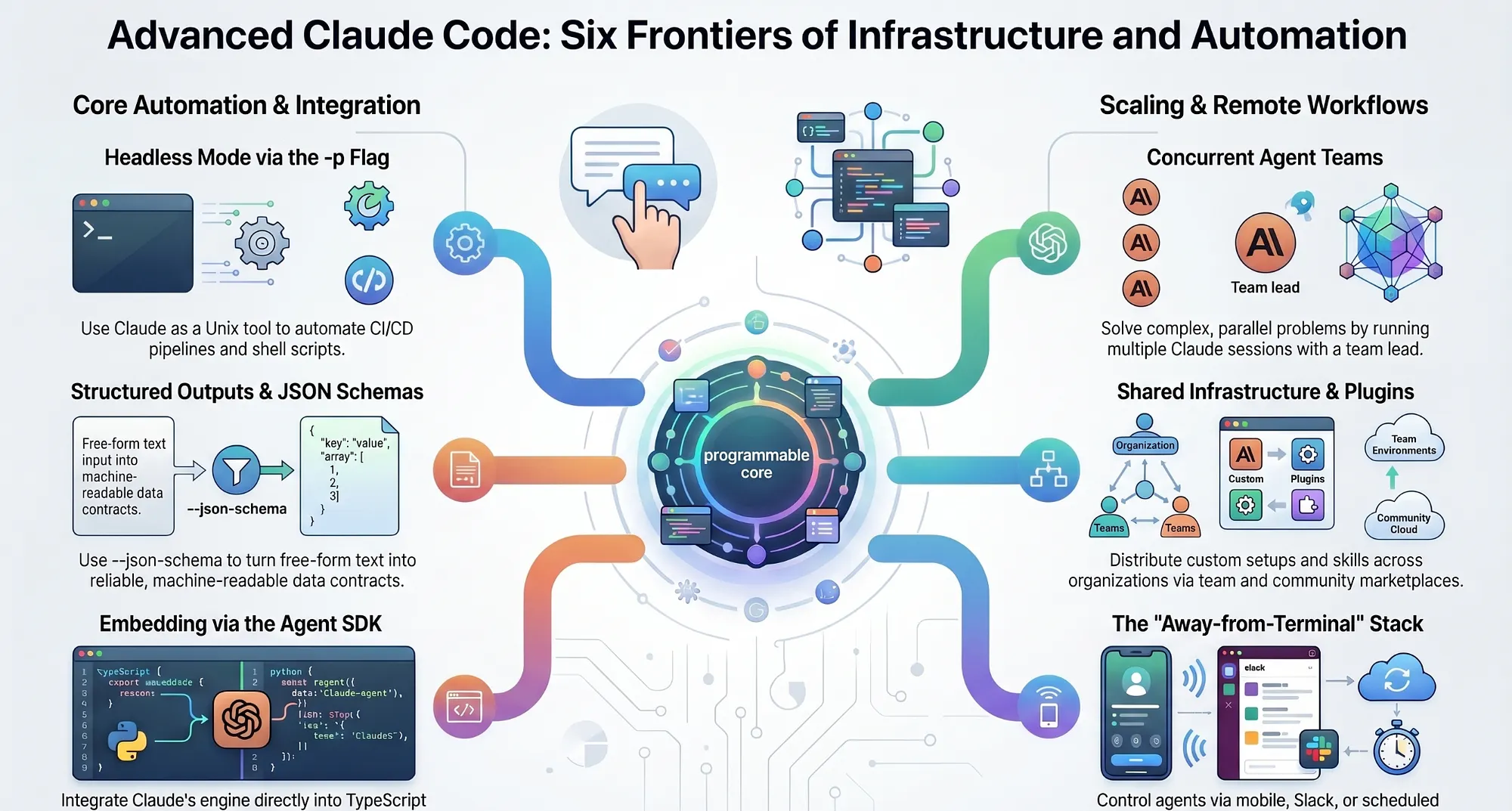
Beyond daily use: six frontiers that turn Claude Code from a tool you use into infrastructure you ship.
In this article: Most developers learn Claude Code as an interactive chat box and stop there. This article covers the six capabilities that live beyond daily use: headless mode, structured outputs, agent teams, the Agent SDK, team distribution, and the away-from-terminal stack. None requires deep expertise. All require knowing they exist.
There is a moment in learning any powerful tool when the tutorial runs out. You have internalized the commands, developed opinions about workflow, started correcting colleagues who describe it wrong. The tool has become familiar. And then someone shows you something the tool does that you did not know it did, and the familiar thing becomes new again.
That building is what advanced Claude Code looks like. It is not about working harder inside the interactive session. It is about what becomes possible when you stop treating Claude Code as a chat interface and start treating it as a deployment target.
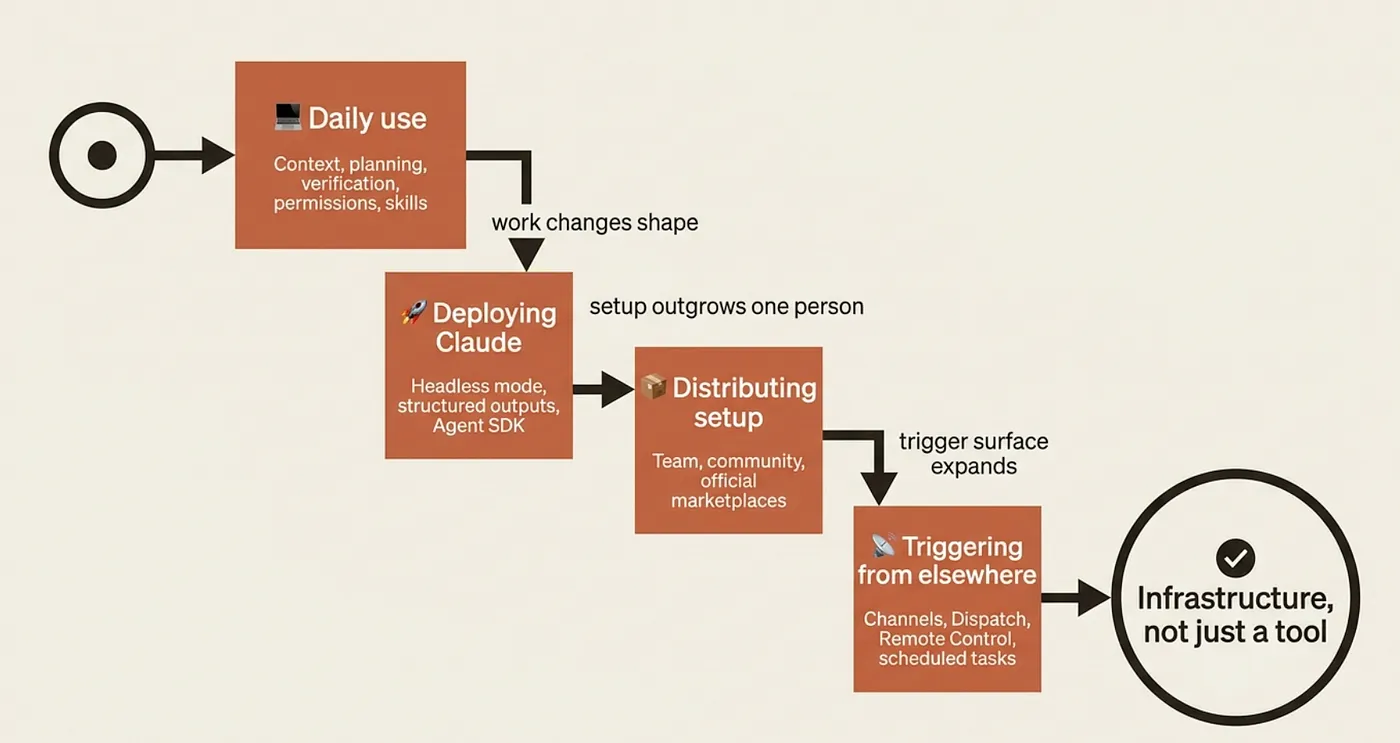
What "daily use" actually covers, and where it ends
Before the frontier, the baseline. Daily use of Claude Code rests on a stack of ideas the rest of this series covered: CLAUDE.md for persistent context, slash commands for repeatable operations, memory files for facts that outlive the session, hooks for enforcing standards automatically, MCP servers for tool extension, and a working model of what Claude does well versus what it fumbles.
That is the operating system for a developer who uses Claude Code. The six topics below are about something different: using Claude Code as a building block rather than a workbench.
Frontier 1: Headless mode turns Claude into a Unix tool
The single most important flag in advanced Claude Code is -p.
claude -p "summarize what changed in the last 10 commits"
The -p flag runs Claude non-interactively in what is called print mode: one prompt in, one response out, process exits. No REPL. No session. Fully scriptable.
Headless mode is how Claude becomes part of real automation. You can run it inside a GitHub Actions workflow, pipe the output of one command into it, pipe its output into another command, or call it from a Makefile without a human in the loop.
git diff | claude -p "explain this in plain English" | tee CHANGES.md
The documentation itself illustrates the idea with a "Claude as project linter" pattern. Drop this into package.json:
{
  "scripts": {
    "lint:claude": "git diff main | claude -p \"you are a typo linter. for each typo in this diff, report filename:line on one line and the issue on the next.\""
  }
}
Two facts matter once you put this in production. First, piped stdin has a 10MB cap as of v2.1.128. For large diffs or file reads, pass file paths as arguments instead. Second, headless mode does not preserve session state between invocations by default. Each call starts fresh unless you explicitly wire sessions together with --resume.
Headless mode is the lowest-friction on-ramp to everything else here. Most production uses of Claude Code start here.
Frontier 2: Structured outputs make Claude's answers trustworthy
Headless mode gets Claude into your pipeline. Structured outputs make what comes back something other code can consume without fragile text parsing.
By default, Claude returns free-form text. A human reads that fine. A program does not. Parsing free-form responses is a source of subtle bugs: the format changes when the context changes, edge cases appear in production but not in development, and the whole thing breaks when Claude decides to be more verbose one day.
--output-format json wraps Claude's response in structured JSON with the result, a session ID, token counts, and an optional schema-validated structured_output field. Add --json-schema with an inline schema and Claude will validate its own output before returning it.
claude -p "Extract the main function names from auth.py" \
  --output-format json \
  --json-schema '{
    "type":"object",
    "properties":{
      "functions":{"type":"array","items":{"type":"string"}}
    },
    "required":["functions"]
  }'
The validated data arrives in a structured_output field:
{
  "session_id": "...",
  "result": "Found 4 functions",
  "structured_output": {
    "functions": ["login", "logout", "refresh_token", "verify_session"]
  },
  "usage": { ... }
}
Now jq '.structured_output.functions[]' is reliable parsing. No string extraction, no edge cases, no surprises when Claude changes its prose style.
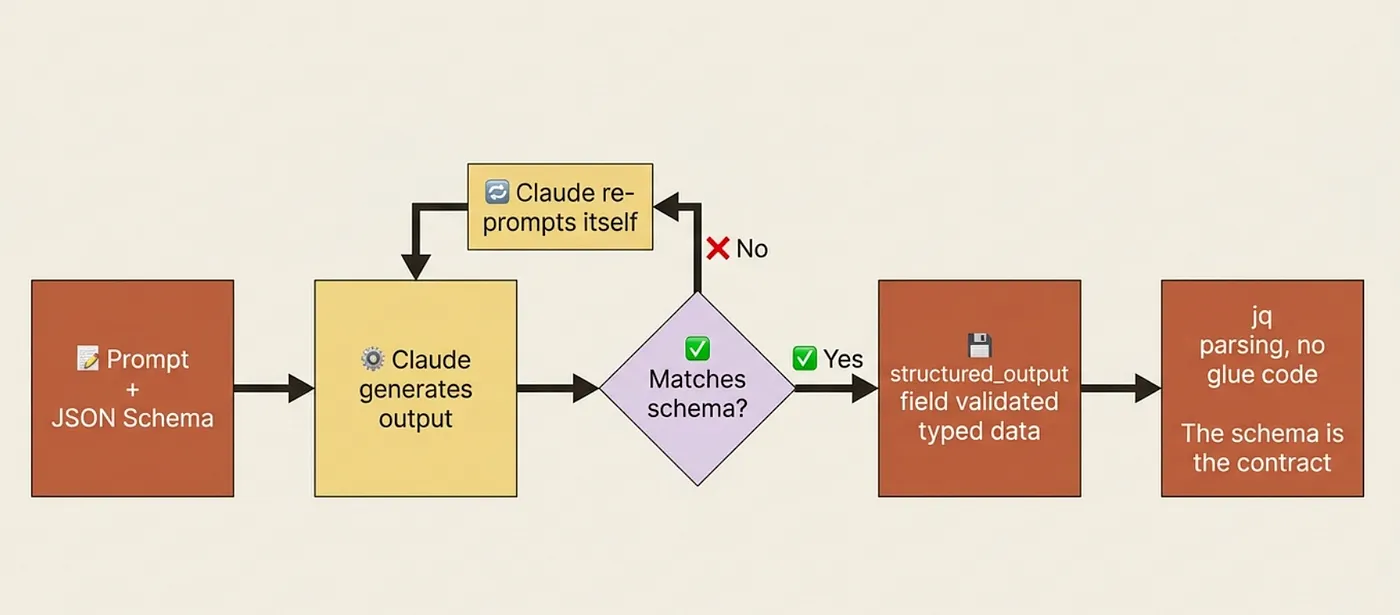
This is the feature that promotes Claude from a helper you talk to into a genuine part of your pipeline. The difference between "Claude sometimes gets this right" and "Claude consistently produces machine-readable output" is the difference between a demo and a product.
Frontier 3: Agent teams for genuinely concurrent work
Some problems are not one task with steps. They are several tasks that benefit from running at once: refactoring three microservices simultaneously, generating test coverage while updating documentation, running five exploratory analyses in parallel before deciding which direction to take.
Agent teams are the experimental feature for that. Multiple Claude sessions share a single task list. Each agent picks up independent work. The results aggregate.
The discipline here matters more than the mechanics. Agent teams are the right move when the problem is genuinely parallel: when the tasks do not depend on each other's output and the speedup from parallelism is worth the coordination overhead. They are the wrong move when you just want Claude to work faster on a sequential problem, because concurrency does not help there and adds complexity.
Frontier 4: The Agent SDK embeds the engine in your software
Headless mode and structured outputs let you call Claude Code as a CLI. The Agent SDK lets you embed the same engine in your own software.
The SDK is the exact same engine that powers Claude Code, packaged as a library for TypeScript and Python. You import it, pass a prompt, and iterate over a stream of messages that includes tool calls, tool results, and final text. Your code decides what to do with each message. You can implement your own tools alongside Claude's built-in ones, intercept and modify behavior mid-stream, and integrate Claude's reasoning directly into your application's control flow.
A working bug-fixing agent in TypeScript is about fifteen lines:
import { query } from "@anthropic-ai/claude-agent-sdk";

for await (const message of query({
  prompt: "Find and fix the bug in auth.ts",
  options: { allowedTools: ["Read", "Edit", "Bash"] }
})) {
  console.log(message);
}
The Python version is just as short:
import asyncio
from claude_agent_sdk import query, ClaudeAgentOptions

async def main():
    async for message in query(
        prompt="Find and fix the bug in auth.py",
        options=ClaudeAgentOptions(allowed_tools=["Read", "Edit", "Bash"]),
    ):
        print(message)
asyncio.run(main())
What the SDK adds over the CLI is programmatic control. You can implement your own tools alongside the built-ins. You can intercept messages mid-stream. You can wire Claude's reasoning directly into your application's control flow rather than treating it as a black box you call and wait for.
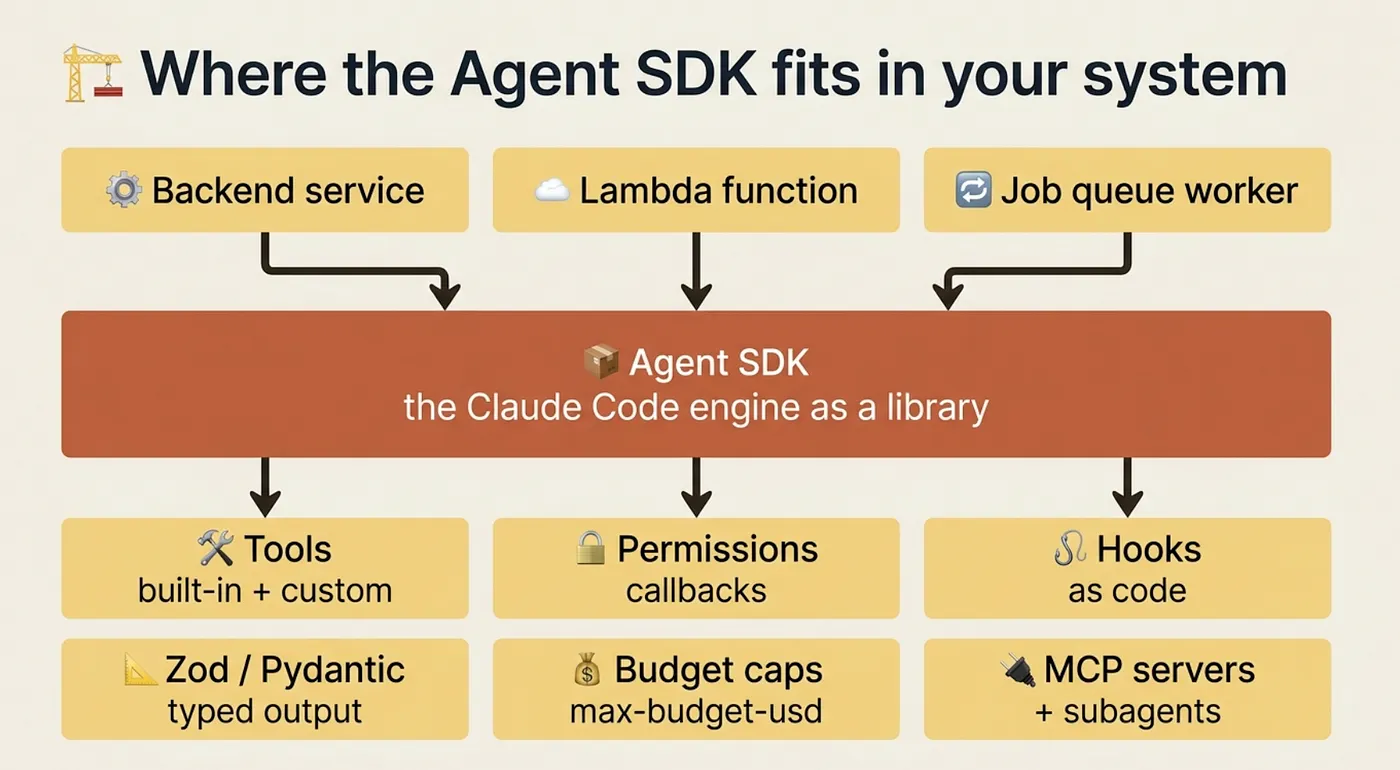
So when do you reach for the SDK instead of the CLI? Three signals. You are building a product that includes Claude as a component rather than a tool you use. You need fine-grained control over what tools Claude can use. You want to compose multiple agents into a workflow with shared state.
And when is the CLI enough? When you are a developer using Claude as a tool rather than building a product that ships Claude to others. The CLI is the right level of abstraction for most individual workflows.
One footnote worth knowing for production planning: starting June 15, 2026, SDK and claude -p usage will require an API key and will be billed against the Anthropic API. If you are building anything that uses either in production, account for that cost model now rather than after you have shipped.
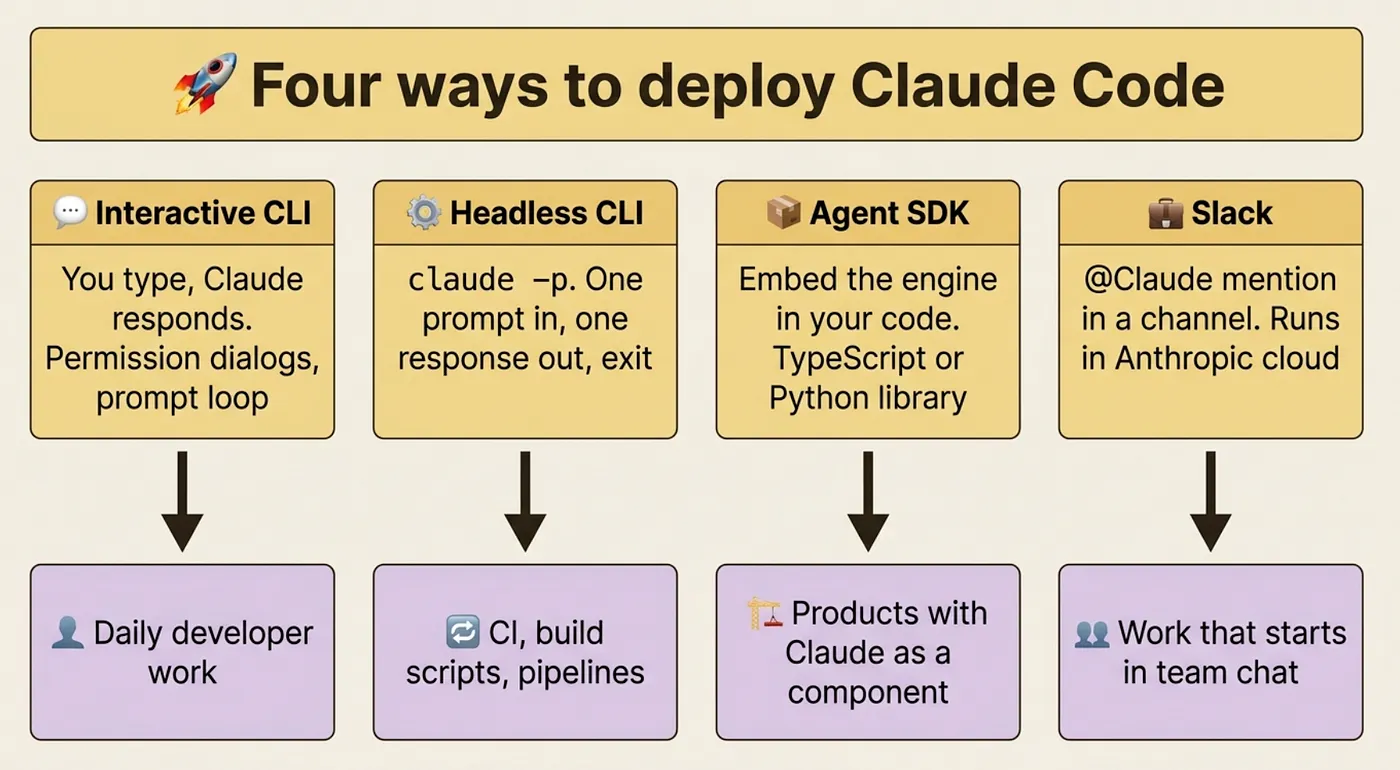
This is the right place to step back and compare the deployment modes side by side, because they are genuinely different decisions, not a progression where one is better than another.
Frontier 5: Distributing your setup across teams
There is a moment when a Claude Code setup stops being a personal configuration and becomes something a team depends on. Shared CLAUDE.md files, shared slash commands, shared MCP server configurations. The question shifts from "how do I configure this for myself" to "how do I ship this to ten engineers who should not have to reverse-engineer what I built."
There are three escalating options. A team marketplace hosts a marketplace.json in a separate repo; members install from it. An enterprise configuration applies organization-wide through a managed CLAUDE.md that Claude reads before any project-level file. A custom extension points at a private registry that the team controls entirely.
Most readers will not reach this frontier for a year of serious use, and some never will, because an individual developer setup that works well does not automatically become a team problem. But knowing the options exist changes how you build your personal setup: if you design your slash commands and hooks to be shareable from the start, distributing them later is straightforward rather than a rewrite.
Frontier 6: The away-from-terminal stack
The last frontier is the most underrated. Everything so far assumed you were sitting in front of a terminal. The away-from-terminal stack is how you keep Claude working when you are not.
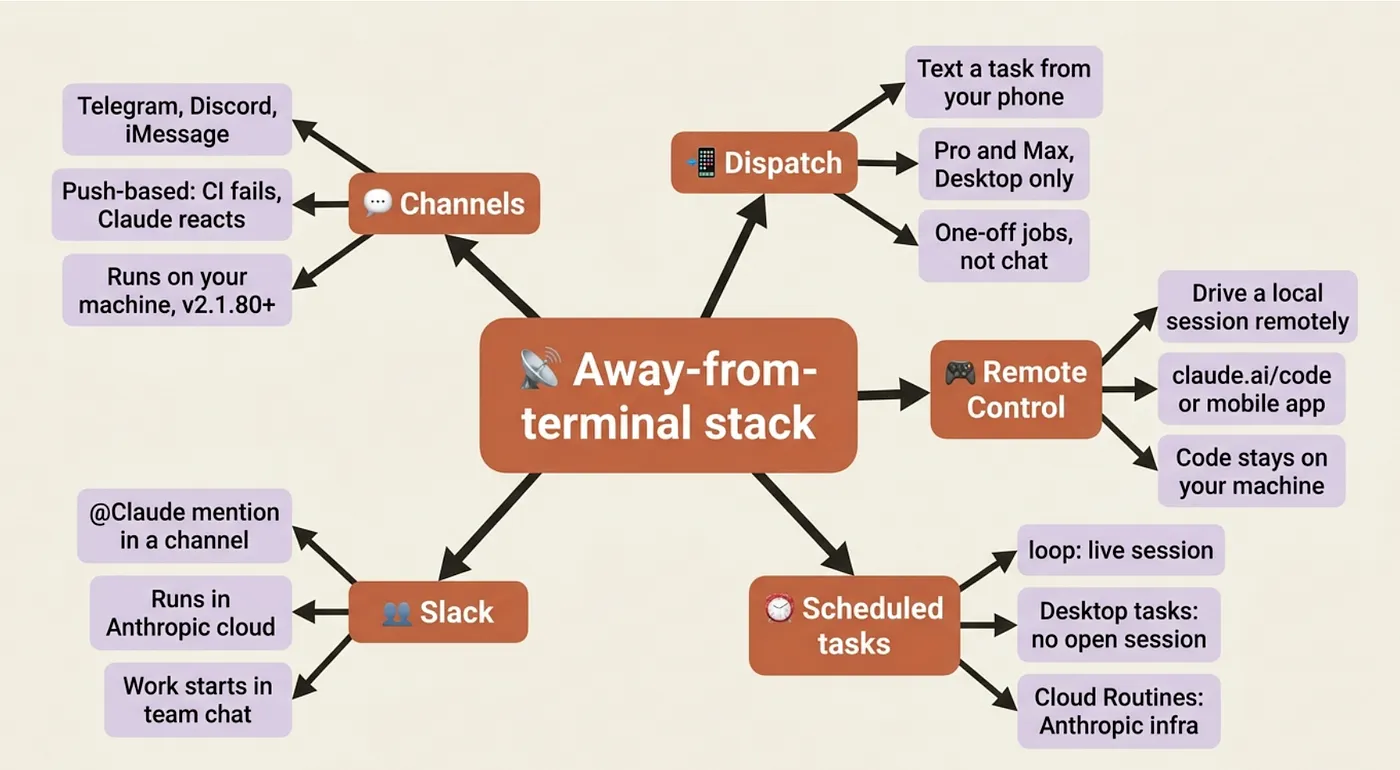
Channels push events from chat apps (Telegram, Discord, iMessage) or your own webhook servers into a Claude session. You set up the channel once; after that, a message in Telegram can trigger a Claude workflow without you touching a terminal.
Dispatch (Pro and Max plans, Desktop only) is the same idea, simpler. You text a task description from your phone to your desktop. Claude picks it up and works on it. You check back later.
Remote Control drives a local session from claude.ai/code or the Claude mobile app. The code never leaves your machine. You are the remote; Claude is the local process.
Scheduled tasks run Claude on a recurring schedule, with three levels of independence: /loop runs until it decides it is done, /schedule runs on a cron expression, and agent networks handle tasks with explicit handoffs between agents.
Slack lets your team mention @Claude in a channel; it spawns a web session in Anthropic's cloud and responds in the thread. No local setup required for teammates.
Most readers need exactly one of these. Pick by your real workflow. Want to steer ongoing work from your phone without leaving your current session? Remote Control. Want to fire tasks from wherever you are without caring what machine they run on? Dispatch. Want to give your team a shared AI presence in your communication tool? Slack integration.
Do this today
You do not need all six frontiers. You need to feel one of them and bookmark the rest.
First, run claude -p once inside a real shell pipeline. Pick something small: git log --oneline -10 | claude -p "what has this team been working on?" is enough to understand headless mode at a gut level. The whole pipeline takes two minutes to set up.
Second, bookmark the Agent SDK quickstart. Even if you never write a line against it, knowing it exists changes the ceiling on what you can build. The next time a colleague asks "can we automate this?", you will have an answer that is more interesting than "maybe with some string parsing."
Third, pick exactly one item from this article to investigate properly when the right problem appears. Not "I will learn all six." One. The one that matches something you have already been trying to do manually.
The map is the point
Advanced Claude Code is not a harder version of daily use. It is a different relationship with the same software. Daily use: Claude helps you work. Advanced use: Claude is part of the work your software does.
Each frontier is a new dimension of leverage, and none is mandatory. You can be a genuinely productive developer using only the interactive session for years. But knowing what the tool can do changes what problems you reach for it on.
This article gave you the names. Names are what let you search for the right docs, ask the right questions, and recognize when a problem in front of you has a solution you already know exists.
This is Part 18 of "Claude Code, Day-to-Day," a 19-part guide to mastering Claude Code for working developers. Each part stands alone.
About the Author — Claude Certified Architect
Rick Hightower is a former Senior Distinguished Engineer at a Fortune 100 company, focusing on delivering large-scale, business-critical systems. Now he focuses on AI systems and AI development.
Rick created Skilz, the universal agent skill installer that supports Claude Code, Cursor, Windsurf, and other AI IDEs. He is also the creator of the Agent Browser, a browser automation tool for Claude Code.

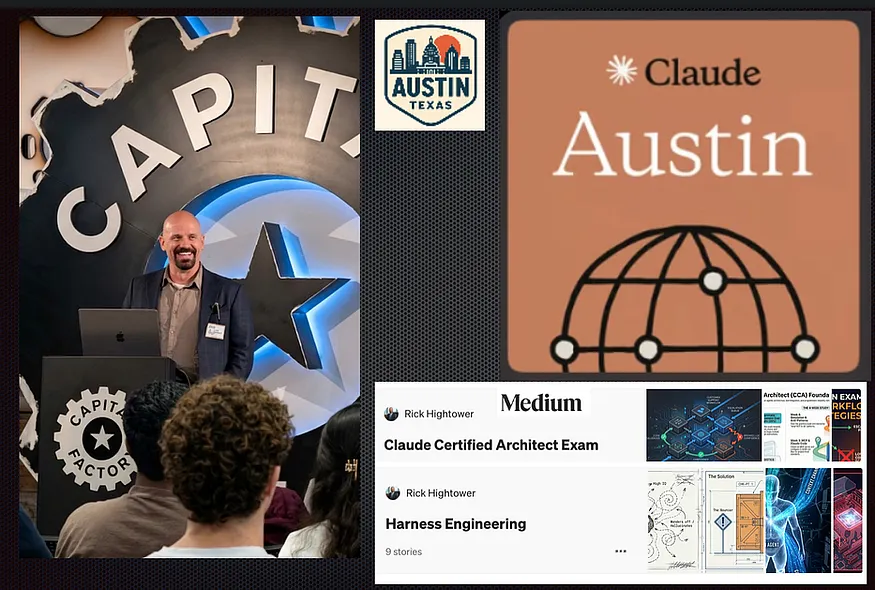
Rick has been actively developing generative AI systems, agents, and agentic workflows for years. He writes about the science and practice of building with Claude and other AI systems.
Rick also wrote a Claude Certified Architect series of articles for those getting CCA certified.
CCA Exam Prep on Agentic Development
- Claude Certified Architect: The Complete Guide to Passing the CCA Foundations Exam
- CCA Exam Prep: Mastering the Code Generation with Claude Code Scenario
- CCA Exam Prep: Mastering the Multi-Agent Research System Scenario
- CCA Exam Prep: Structured Data Extraction
- CCA: Master the Developer Productivity Scenario
- Claude Certified Architect: Master the CI/CD Scenario
- CCA Exam Prep: Mastering the Customer Support Resolution Agent Scenario
- Get the complete reading list for CCA-F exam prep articles from this Claude Certified Architect Exam Prep article.
Rick also wrote a series on harness engineering and how to improve agentic systems using harness engineering techniques.
Harness Engineering Articles
- The $9 Disaster: What Anthropic's Harness Design Paper Teaches Us About Building Autonomous AI
- Harness Engineering vs Context Engineering: The Model is the CPU, the Harness is the OS
- LangChain Deep Agents: Harness and Context Engineering: Memory, Skills, and Security
- Beyond the AI Coding Hangover: How Harness Engineering Prevents the Next Outage
- LangChain's Harness Engineering: From Top 30 to Top 5 on Terminal Bench 2.0
- Anthropic's Harness Engineering: Two Agents, One Feature List, Zero Context Overflow
- OpenAI's Harness Engineering Experiment: Zero Manually-Written Code