Claude Code Agent Teams and Worktrees: One Claude Is Not Enough: Running Parallel Sessions Without Collisions
Claude Code Agent Teams Part 15: How git worktrees and agent teams let you scale Claude Code beyond a single terminal, without overwrites, lost edits, or duplicated work
Originally published on Medium.
Claude Code Agent Teams Part 15: How git worktrees and agent teams let you scale Claude Code beyond a single terminal, without overwrites, lost edits, or duplicated work
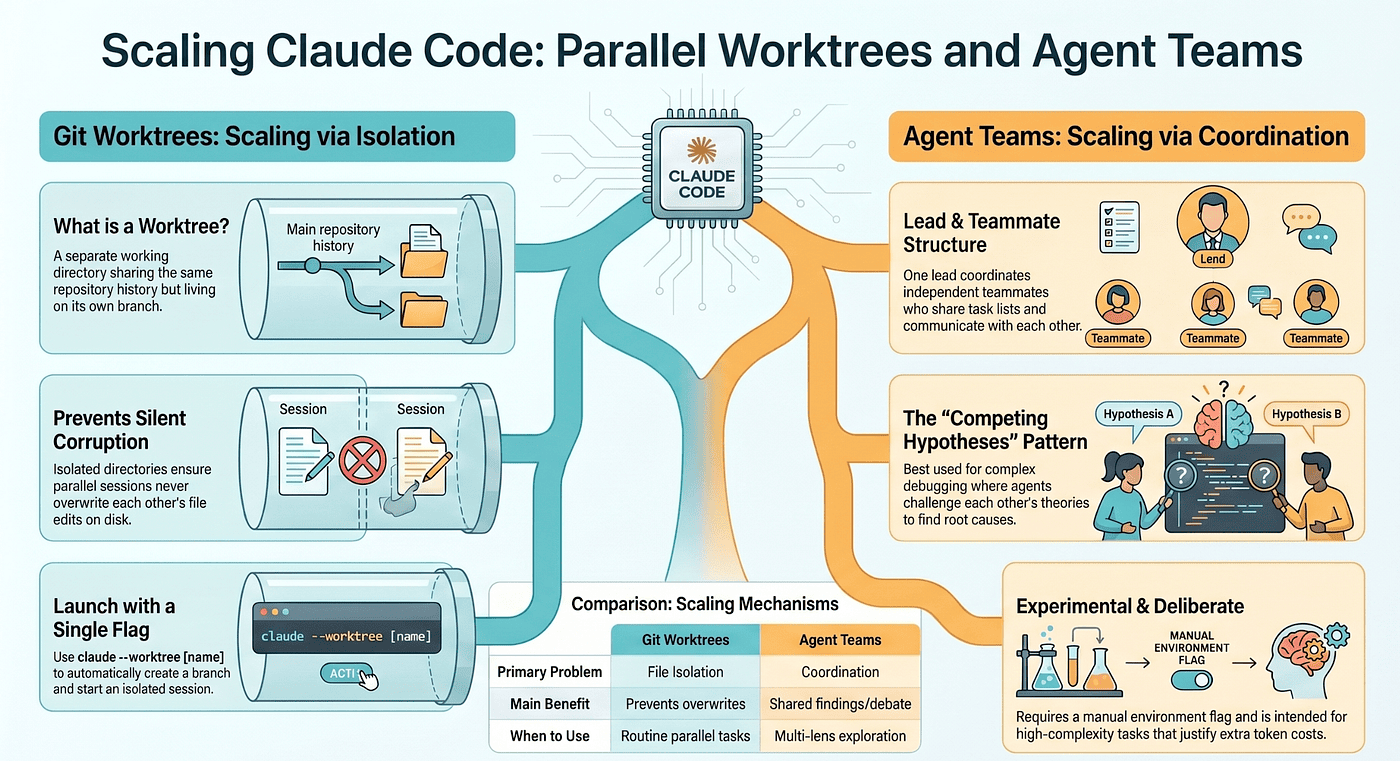
Parallel development without collisions: how git worktrees and agent teams let you run Claude Code many times at once without overwrites or duplicated effort. You hit a ceiling with one Claude session, and the fix is not working harder, it is running several Claudes that never step on each other.
In this article: A single Claude Code session has a hard ceiling: the context window and your own attention. The next leap is running several sessions at once. This piece explains the two mechanisms that make that safe. Claude Code worktrees solve the file-isolation problem so two sessions never overwrite each other, and agent teams solve the coordination problem so several sessions can actually work together. You will learn when to reach for each, and the one mistake that wastes the most tokens.
Part 15 of "Claude Code, Day-to-Day," a 19-part guide to mastering Claude Code for working engineers.
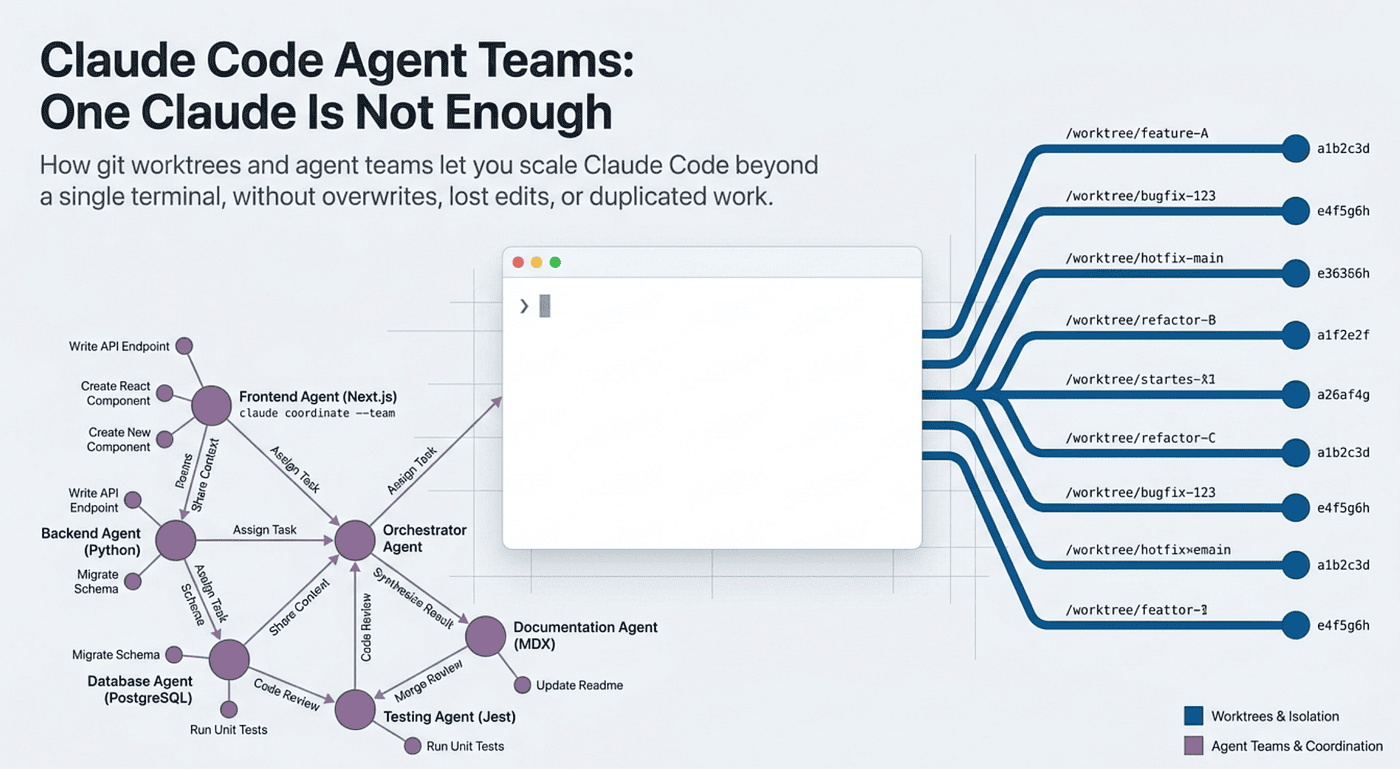
There is a ceiling to how much you can get done with one Claude session, and you hit it sooner than you expect. The work is bounded by what fits in the context window. Your attention is bounded by what fits in your head. Once you have verifiers wired up, skills written, hooks running, and MCP servers connected, the next leap is not doing one thing better. It is doing several things at once.
Most engineers plateau right here. Running several Claudes in parallel introduces failure modes that do not exist with one session. Two sessions editing the same file overwrite each other. Two sessions chasing the same bug duplicate effort. Two sessions running tests trip over each other's working directories. The naive answer, "just open more terminals," works fine for unrelated tasks and breaks the instant the work overlaps.
Claude Code worktrees and agent teams are the two answers. They solve two genuinely different problems, and knowing which one you actually have is the whole skill.
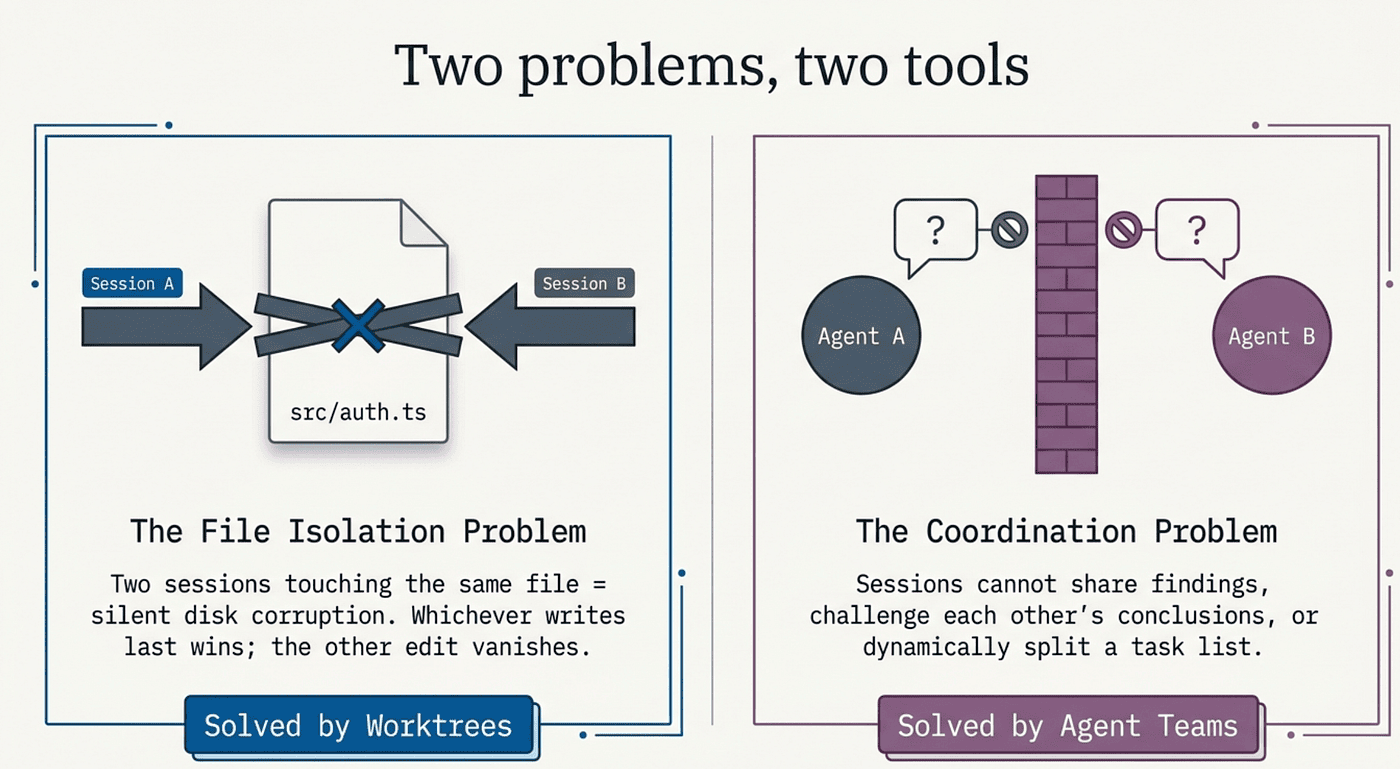
Two problems, two tools
"Doing several things at once" is really two problems wearing one coat. The first is file isolation: if two Claude sessions can touch the same file on disk, they will eventually corrupt each other's work, and worktrees fix this. The second is coordination: even when sessions cannot collide on disk, they cannot share findings, challenge each other's conclusions, or split a task list dynamically, and agent teams fix that.
Here is the honest sequencing. Worktrees pay off in week two of serious Claude Code use. Agent teams, most people will not need for months. They are paired here because they are paired in practice: once you use one, the other becomes the next natural question.
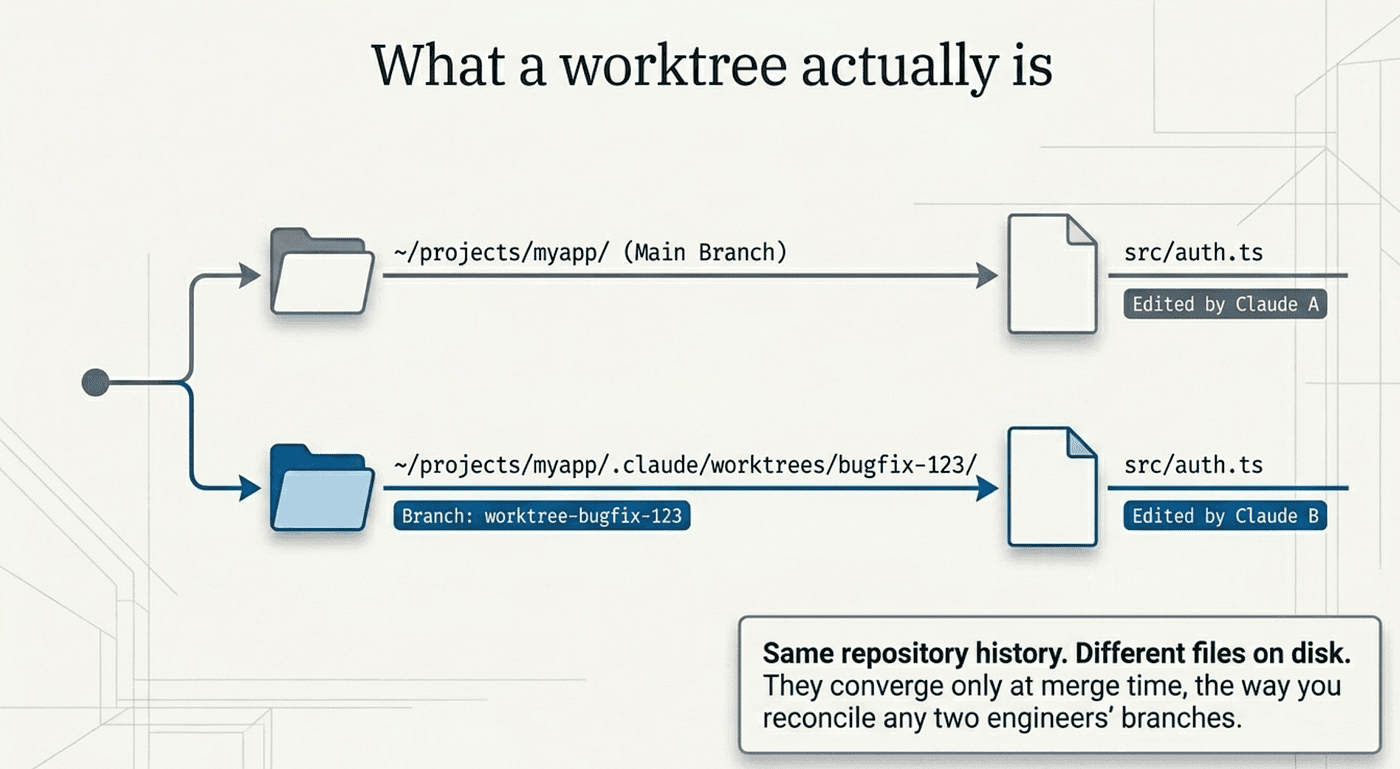
What a worktree actually is
A git worktree is a separate working directory that shares the same repository history and remote as your main checkout, but lives on its own branch. The git feature itself has existed since 2015. Claude Code did not invent it. It just makes the worktree the default move for parallel sessions.
The mechanical picture is simple. Your repository lives in ~/projects/myapp, and you normally work on the main branch there. When you create a worktree called feature-auth, git creates a separate directory, by default at ~/projects/myapp/.claude/worktrees/feature-auth/, holding a full checkout of the repository on a new branch named worktree-feature-auth. Both directories share the same underlying .git repository, but file edits in one never touch the other.
Why does this matter so much for Claude? Because two Claude sessions editing the same file produce silent corruption. Claude A reads the file and adds a function. Claude B reads the same file at the same moment and deletes a different one. Whichever writes last wins, the other edit vanishes, and neither session knows the other exists. Both believe their change landed. No error, no warning, just a quietly broken file.
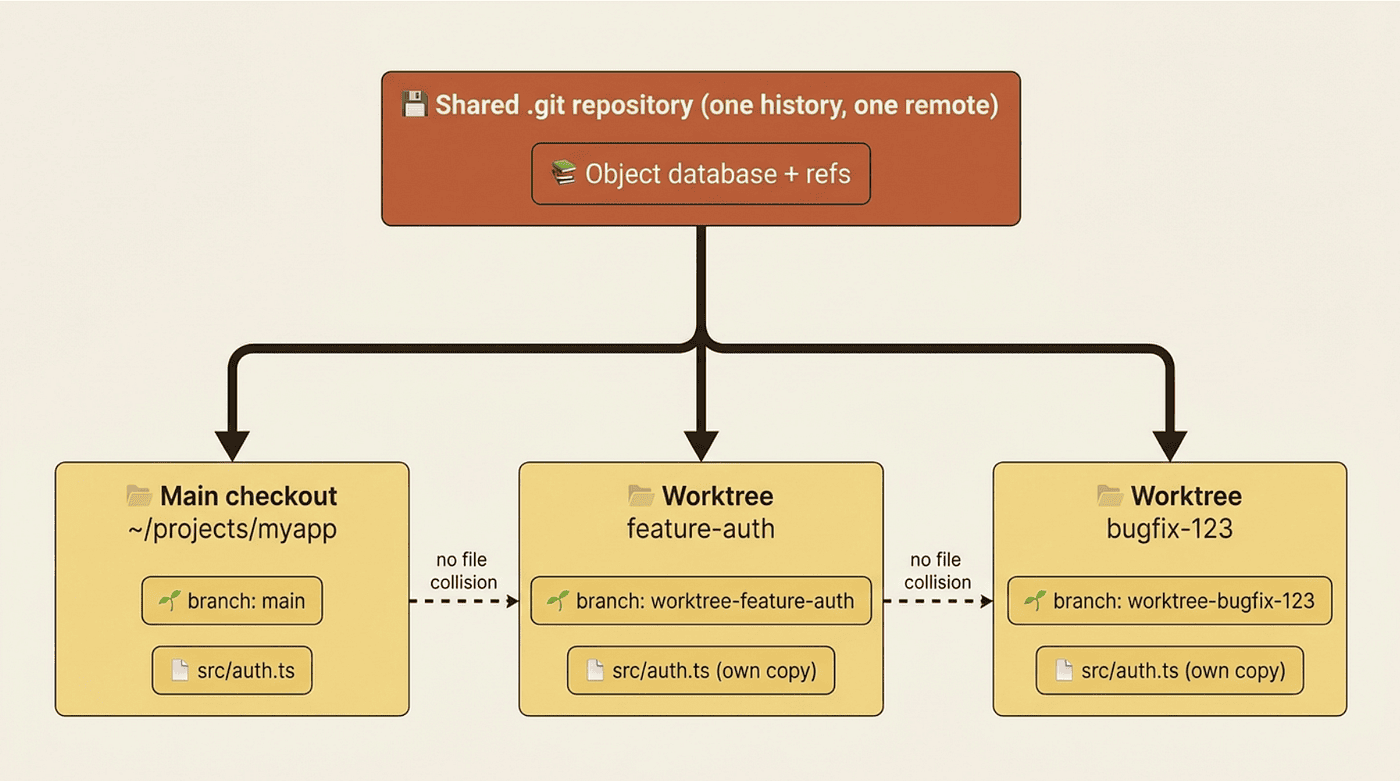
Worktrees prevent the collision by giving each session its own directory. Claude A edits ~/projects/myapp/src/auth.ts. Claude B edits ~/projects/myapp/.claude/worktrees/bugfix-123/src/auth.ts. Same file in the repository, different files on disk. The edits land on different branches, and you reconcile them at merge time, the way you reconcile any two engineers' branches.
Starting Claude in a worktree
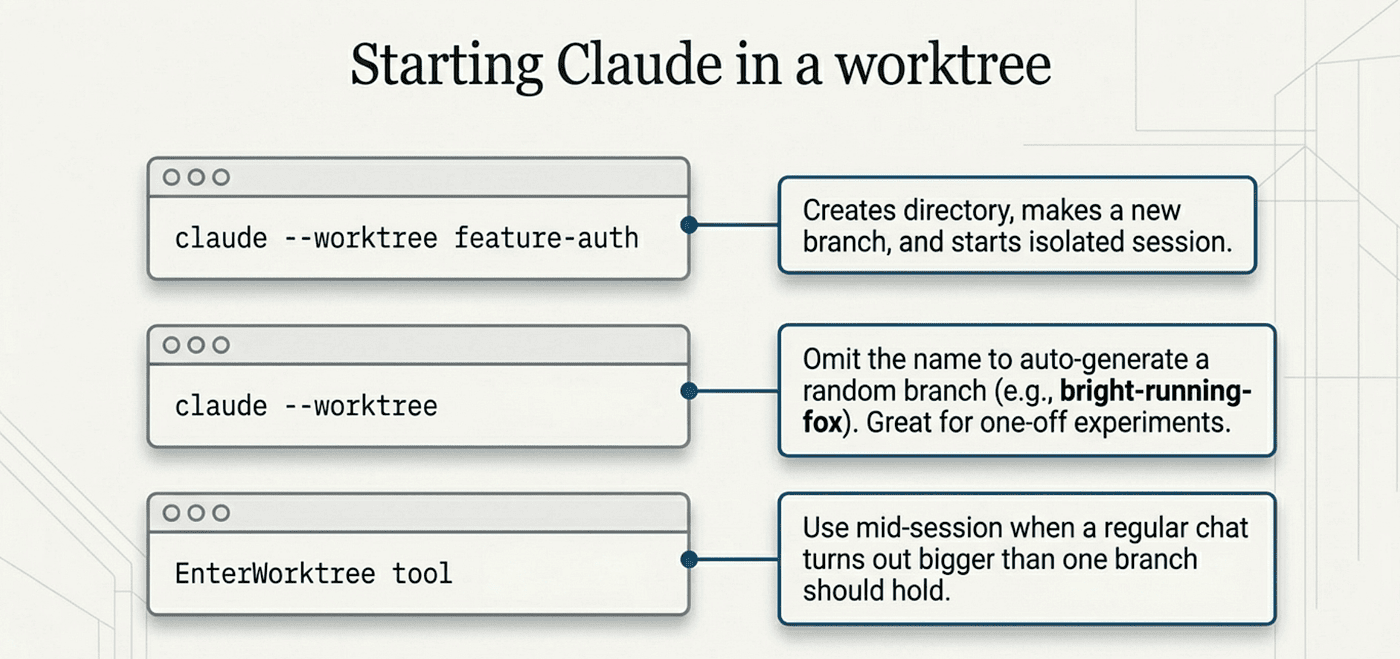
The fastest path is one flag:
claude --worktree feature-auth
Or the short form:
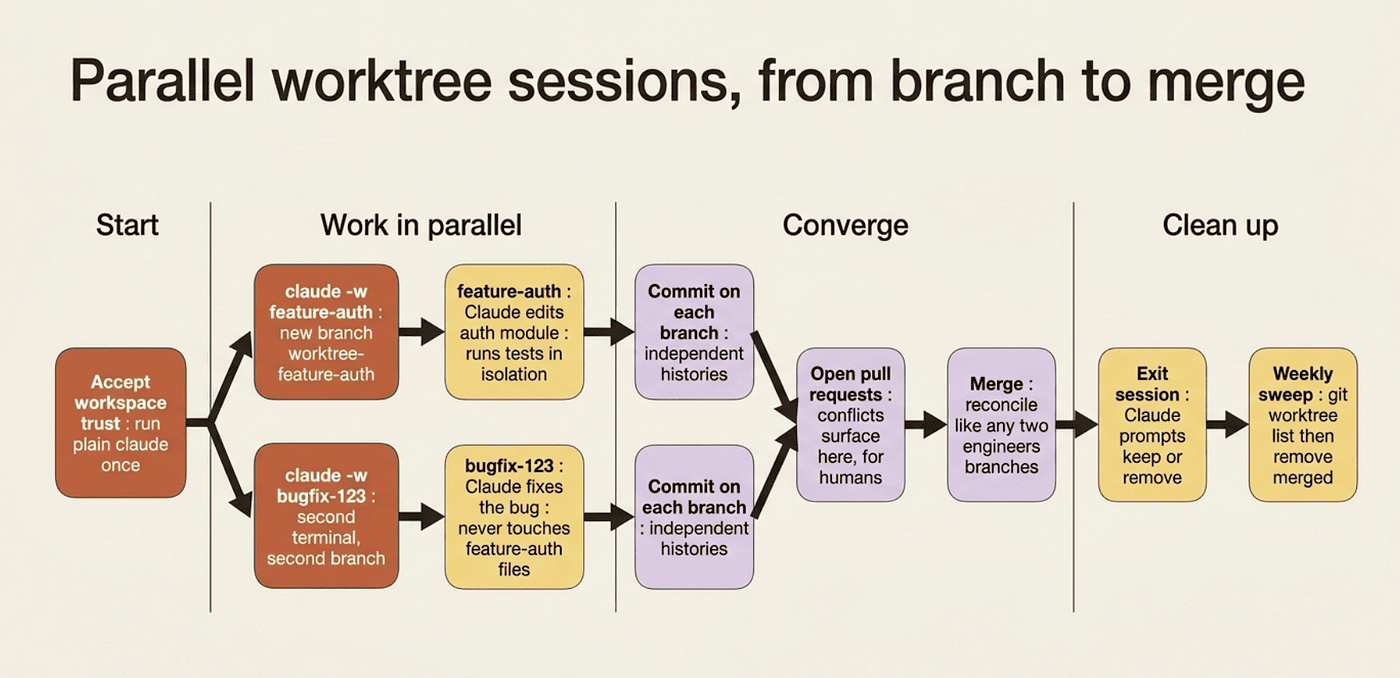
claude -w feature-auth
Either command creates a worktree at .claude/worktrees/feature-auth/, on a new branch named worktree-feature-auth, and starts Claude inside it. From that point on, Claude's working directory is the worktree. Every file it reads, edits, writes, or runs lives in this isolated checkout.
Open another terminal and start a second one:
claude --worktree bugfix-123
Now you have two Claude sessions running, each on its own branch, neither able to touch the other's files. They converge only at merge time, the same way any two parallel branches would.
Omit the name and Claude generates one (claude --worktree starts a session in something like bright-running-fox). That is the lowest-friction move when you do not care what the branch is called: handy for one-off experiments.
Two small things will save you grief. First, accept workspace trust by running plain claude once in the directory before using --worktree there. If trust has not been accepted, --worktree exits with an error telling you to do exactly that, and the check runs even with -p for headless runs. Second, add .claude/worktrees/ to your .gitignore, or the worktree contents show up as noisy untracked files in your main checkout.
You can also ask Claude to "work in a worktree" mid-session, and it will create one using the EnterWorktree tool: the move when a regular session turns out bigger than one branch should hold.
Choosing the base branch and copying secrets
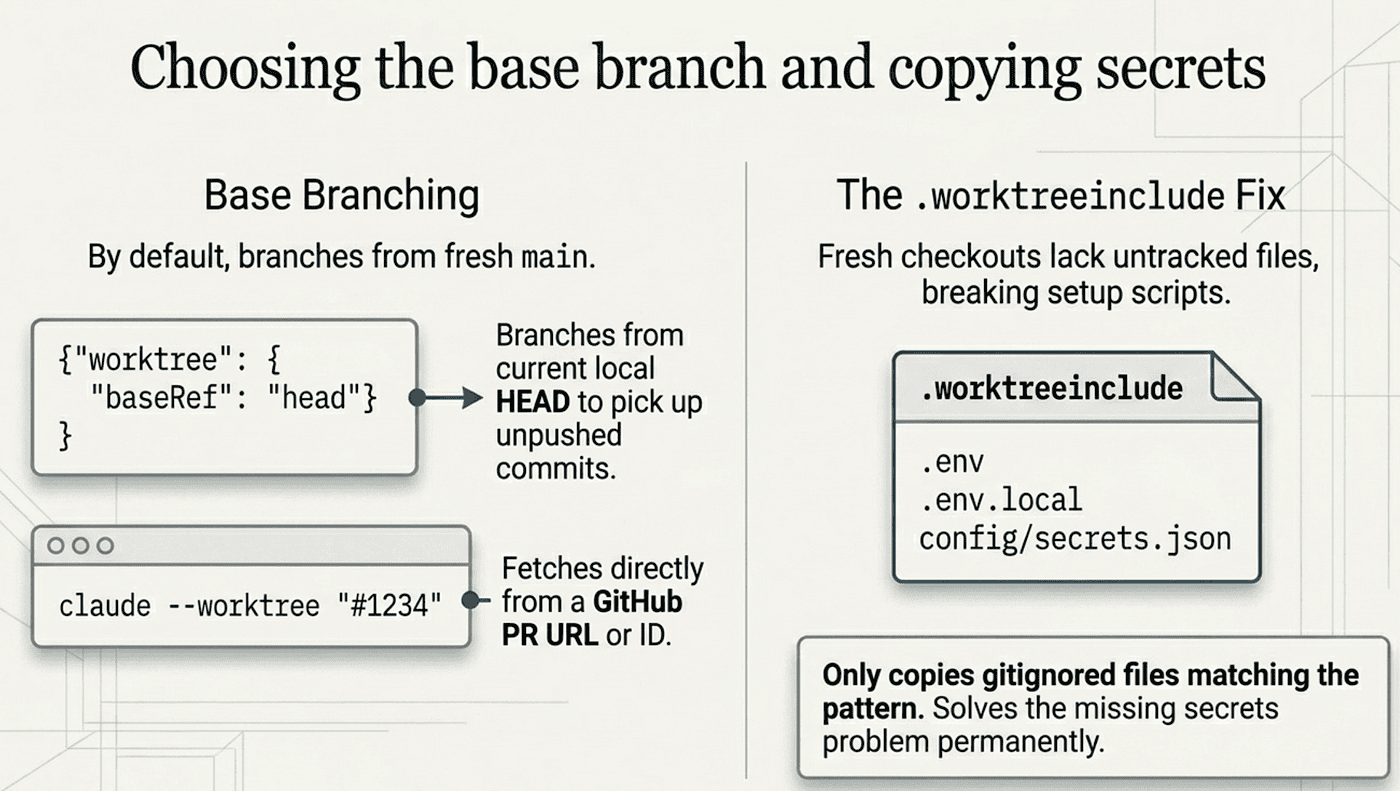
By default, worktrees branch from your repository's default branch, so each new session starts fresh from the latest main. That is right for most work. When you want the worktree to carry your unpushed commits instead, set worktree.baseRef to "head" in settings:
{
  "worktree": {
    "baseRef": "head"
  }
}
With baseRef: "head", new worktrees branch from your current local HEAD, picking up local commits you have not pushed. The setting accepts only "fresh" or "head", not arbitrary git refs.
For a more targeted start, you can branch directly from a pull request with claude --worktree "#1234". Claude Code fetches pull/1234/head from origin and creates the worktree at .claude/worktrees/pr-1234. Full GitHub PR URLs work too. This is how you review or build on someone else's PR without dragging it into your main directory.
Now the part that bites everyone exactly once. A worktree is a fresh checkout, so untracked files like .env or config/secrets.json are not present. Most projects break the moment you start them without those: Claude runs npm test, the setup loads from .env, the file is missing, and everything fails.
The fix is a .worktreeinclude file at your project root. It uses .gitignore syntax and lists patterns of files to copy from the main checkout into each new worktree:
.env
.env.local
config/secrets.json
Only files that match a pattern and are gitignored get copied; tracked files are never duplicated. The first time you use worktrees on a project, you discover what is missing within minutes, add it here, and the problem is solved permanently. The same .worktreeinclude applies to subagent worktrees and to parallel sessions in the Desktop app.
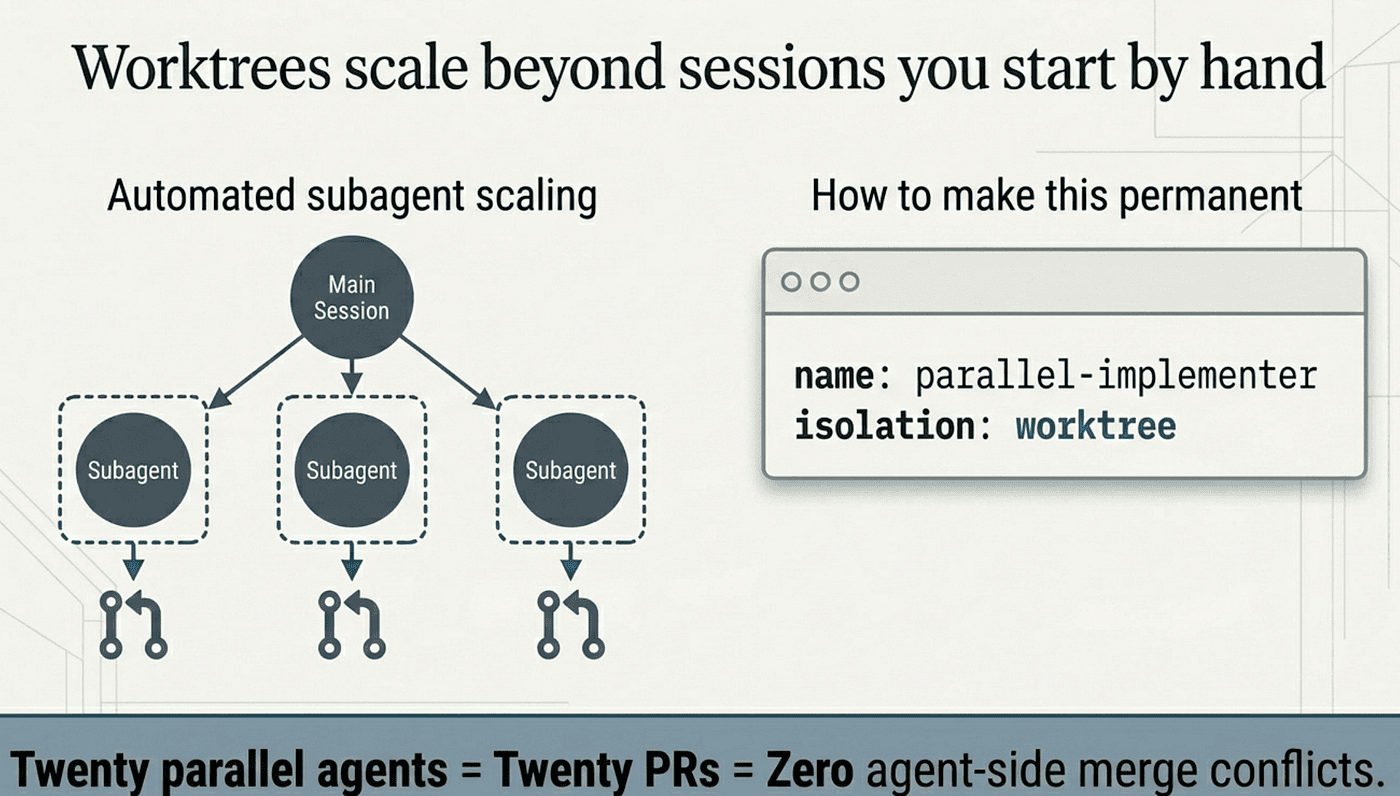
Worktrees scale beyond sessions you start by hand
Worktrees are not only for sessions you launch yourself. Subagents, separate Claude workers with their own context windows that do a side task and report a summary back, can run in their own worktrees too.
The quick move is to ask Claude mid-session to "use worktrees for your agents." Each subagent gets a temporary worktree, runs its work there, and the worktree is removed automatically when the subagent finishes without changes. The permanent move is to set isolation on a custom subagent's frontmatter:
---
name: parallel-implementer
description: Implements features in isolated worktrees so it can run in parallel safely
tools: Read, Write, Edit, Bash
isolation: worktree
---

You implement features assigned to you in your isolated worktree.
Run tests before reporting back.
With isolation: worktree, every invocation gets a fresh worktree automatically. That is what makes parallel subagent work genuinely safe: spawn five parallel-implementer agents on five different features and each works in its own checkout, never colliding.
This is also how /batch works under the hood. It decomposes a repo-wide change into units and spawns one subagent per unit with worktree isolation. Each subagent gets its own checkout, implements its piece, runs tests, and opens a pull request. Twenty parallel agents, twenty PRs, and zero merge conflicts on the agent side. Any conflicts that do exist surface at the PR level, where a human can deal with them.
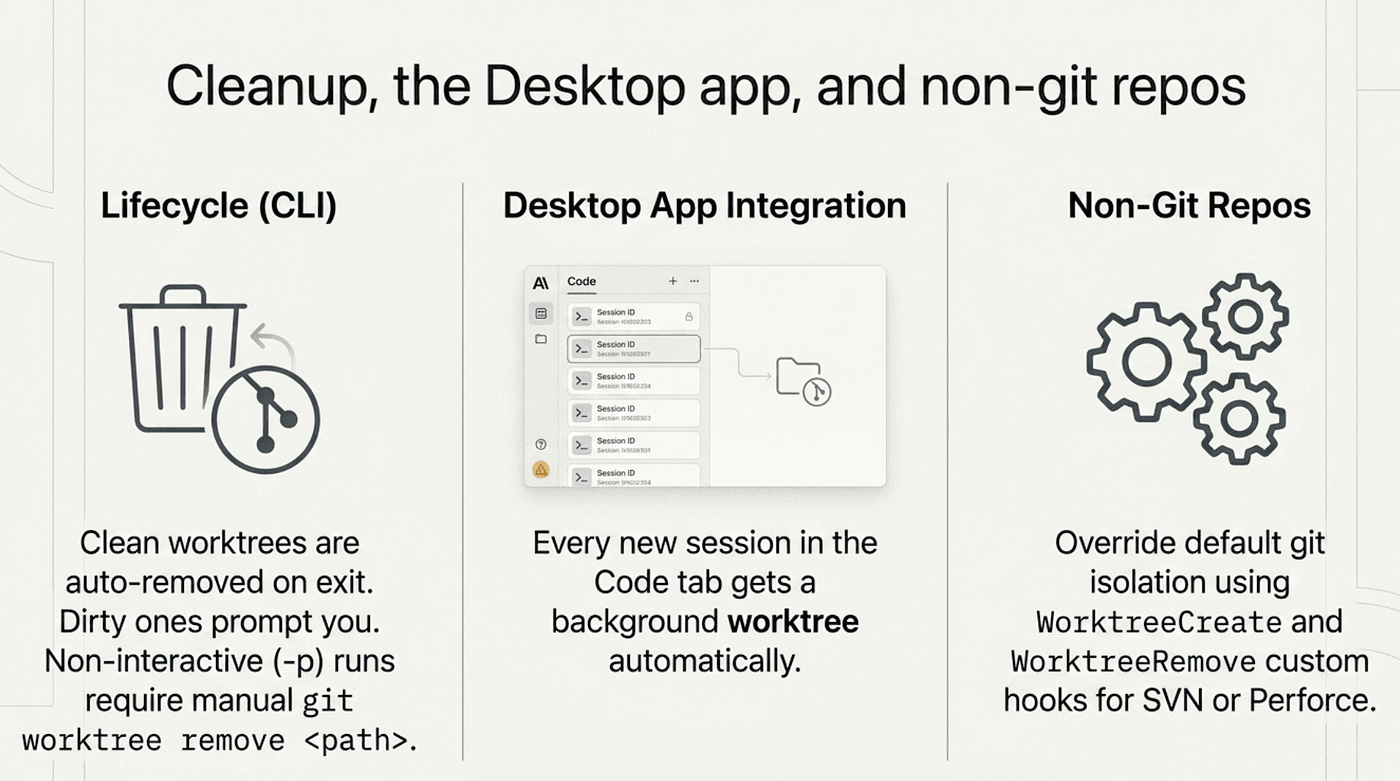
Cleanup, the Desktop app, and non-git repos
When you exit a worktree session, cleanup depends on whether you made changes. A clean worktree, with no uncommitted changes, untracked files, or new commits, is removed automatically along with its branch (Claude prompts first if it has a name). If changes exist, Claude prompts you to keep or remove, and removing deletes everything, commits included. Non-interactive runs with -p are not cleaned up automatically; remove those with git worktree remove <path>. A habit worth establishing: at the end of each week, run git worktree list and remove anything finished and merged.
If you use the Desktop app, you are already using worktrees whether you noticed or not. Every new session in the Code tab gets its own automatically named worktree, which is why you can run four parallel sessions there without them stomping on each other. Instead of a --worktree flag, you click + New session, and the settings even offer auto-archive after a PR merges.
Stuck on SVN, Perforce, or Mercurial? Worktree isolation defaults to git, but a WorktreeCreate hook can replace it with custom logic that produces an isolated directory however your version control system allows. Pair it with a WorktreeRemove hook to clean up. One caveat: a custom hook means .worktreeinclude is not processed, so copy local config files inside the hook script instead.
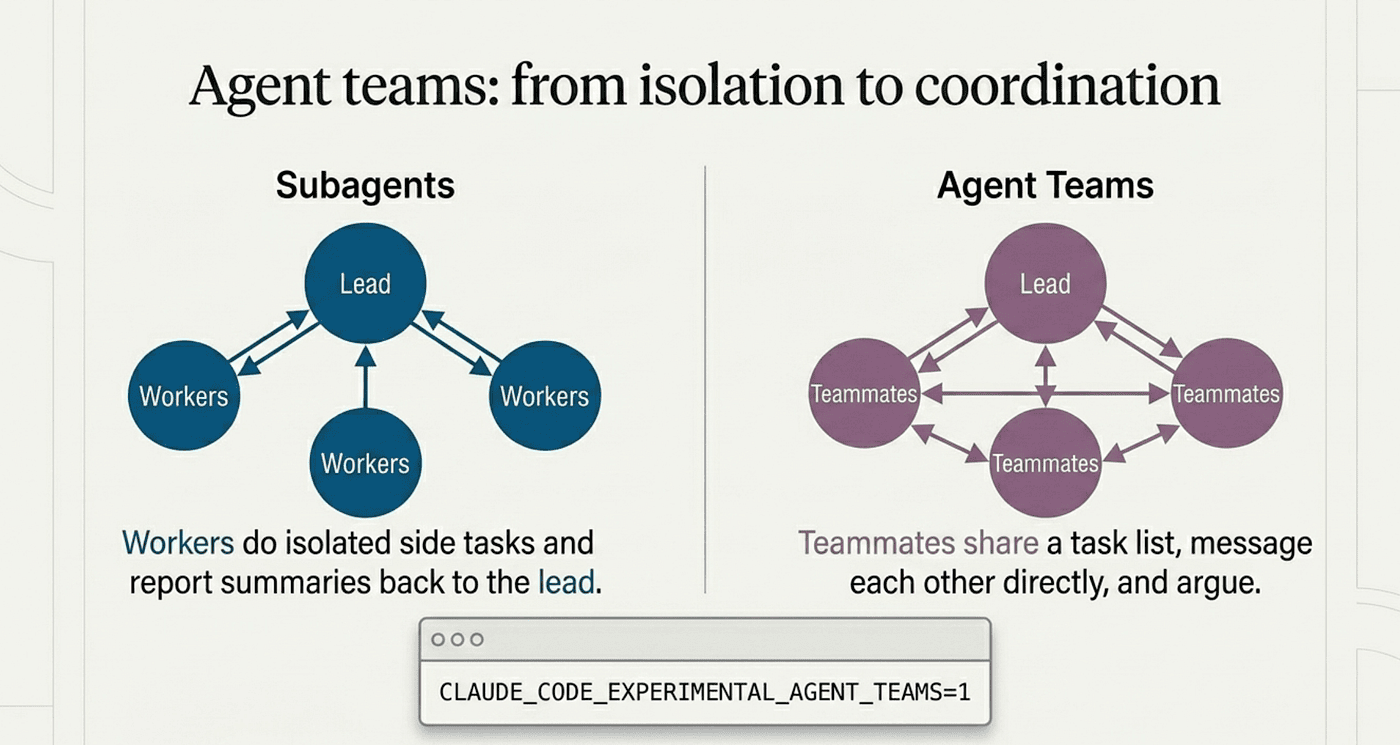
Agent teams: from isolation to coordination
Worktrees solve the file problem. They do not solve the coordination problem. Two Claudes in separate worktrees cannot trip over each other's files, but they also cannot share findings, challenge each other's conclusions, or split a task list dynamically.
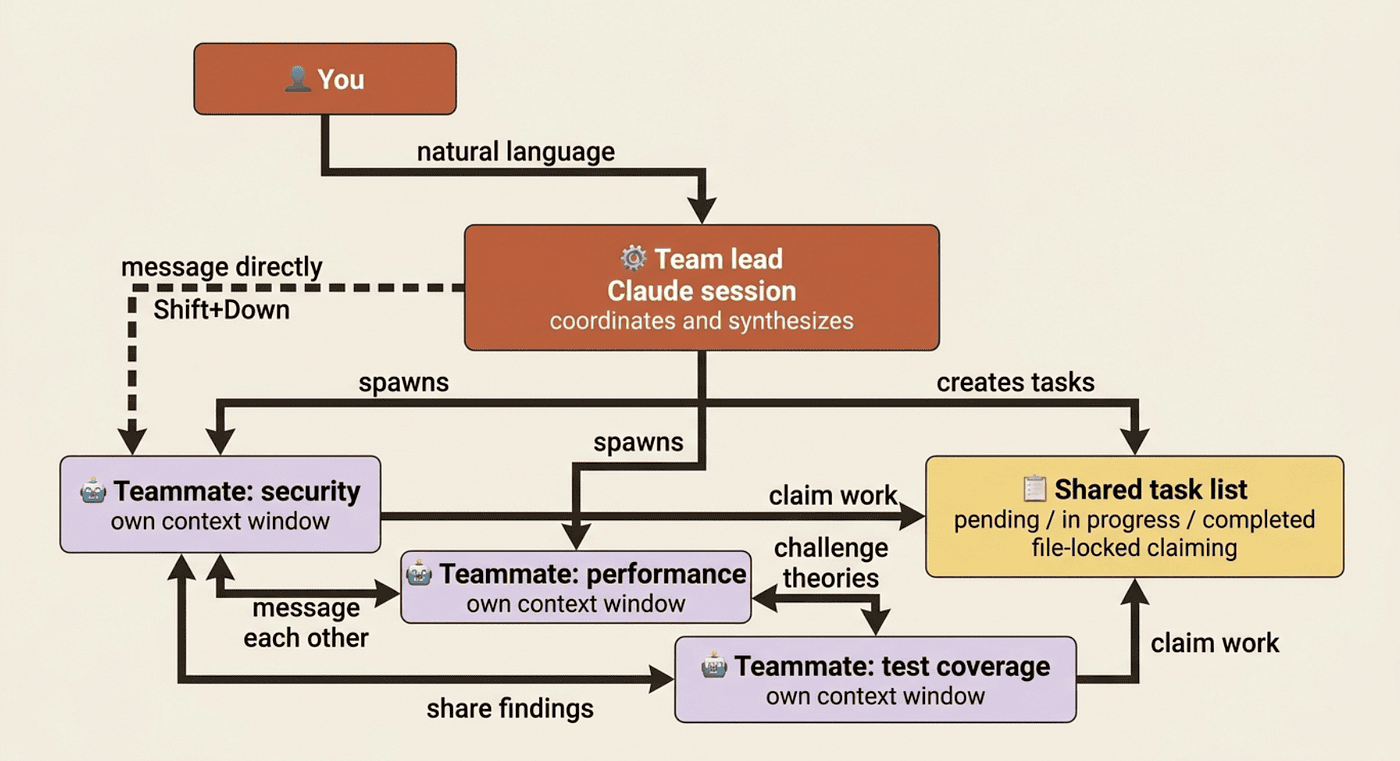
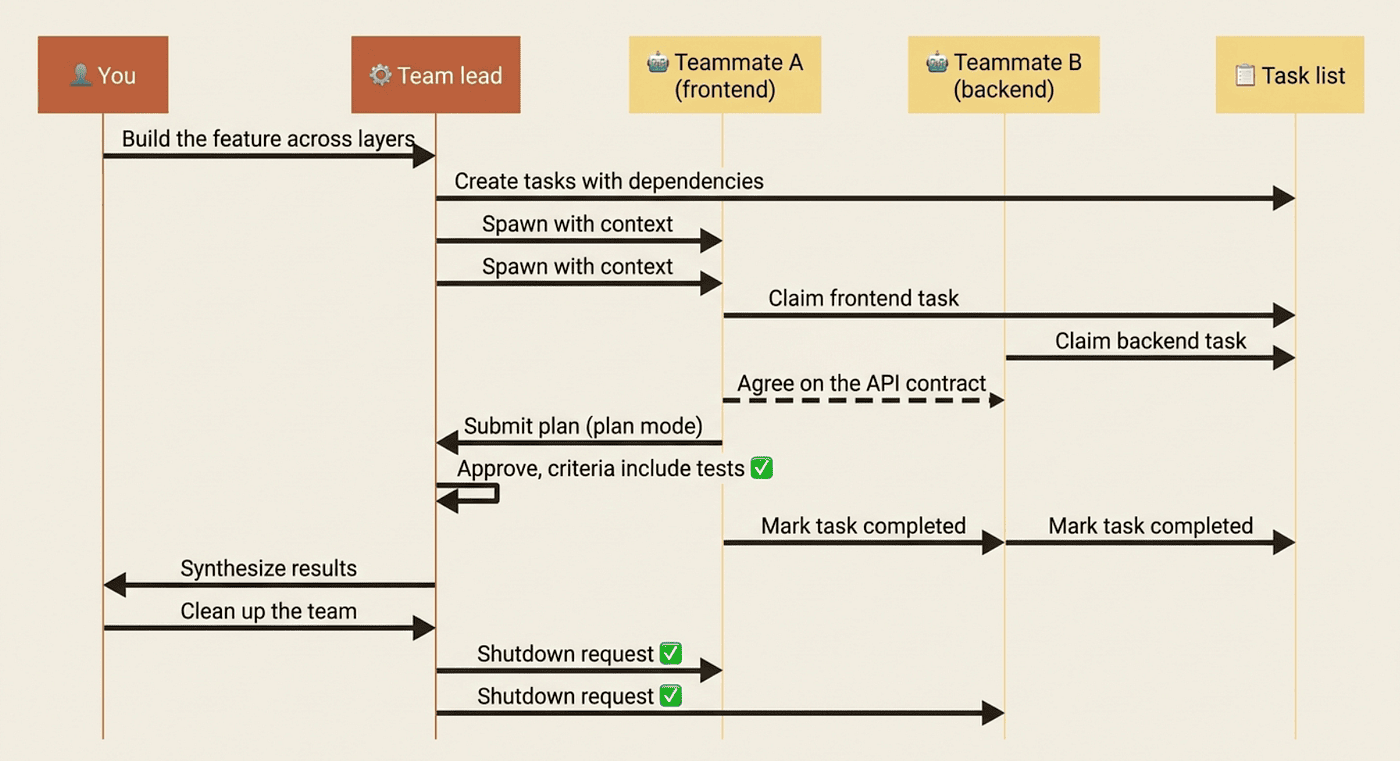
Agent teams are the next step up. One Claude session acts as the team lead, coordinating work and synthesizing results. The lead spawns teammates, each a full, independent Claude session, who share a task list, claim work, and message each other directly. That is the key difference from subagents: subagents report results back to the main agent only, while agent teammates talk to each other.
The mental shift is real. With subagents, you use Claude to do a single task with delegated helpers. With agent teams, you use Claude to run a team of Claudes that can argue, refine plans, and split work, each addressable without going through the lead. That power costs tokens: every teammate is a separate Claude with its own context window, so cost scales with team size.
Agent teams are experimental and disabled by default. Enable them with CLAUDE_CODE_EXPERIMENTAL_AGENT_TEAMS=1 in your shell or settings.json:
{
  "env": {
    "CLAUDE_CODE_EXPERIMENTAL_AGENT_TEAMS": "1"
  }
}

This requires Claude Code v2.1.32 or later. Treat agent teams as a sharp tool: excellent for the right problem, pure overkill for routine work.
When an agent team is actually worth it
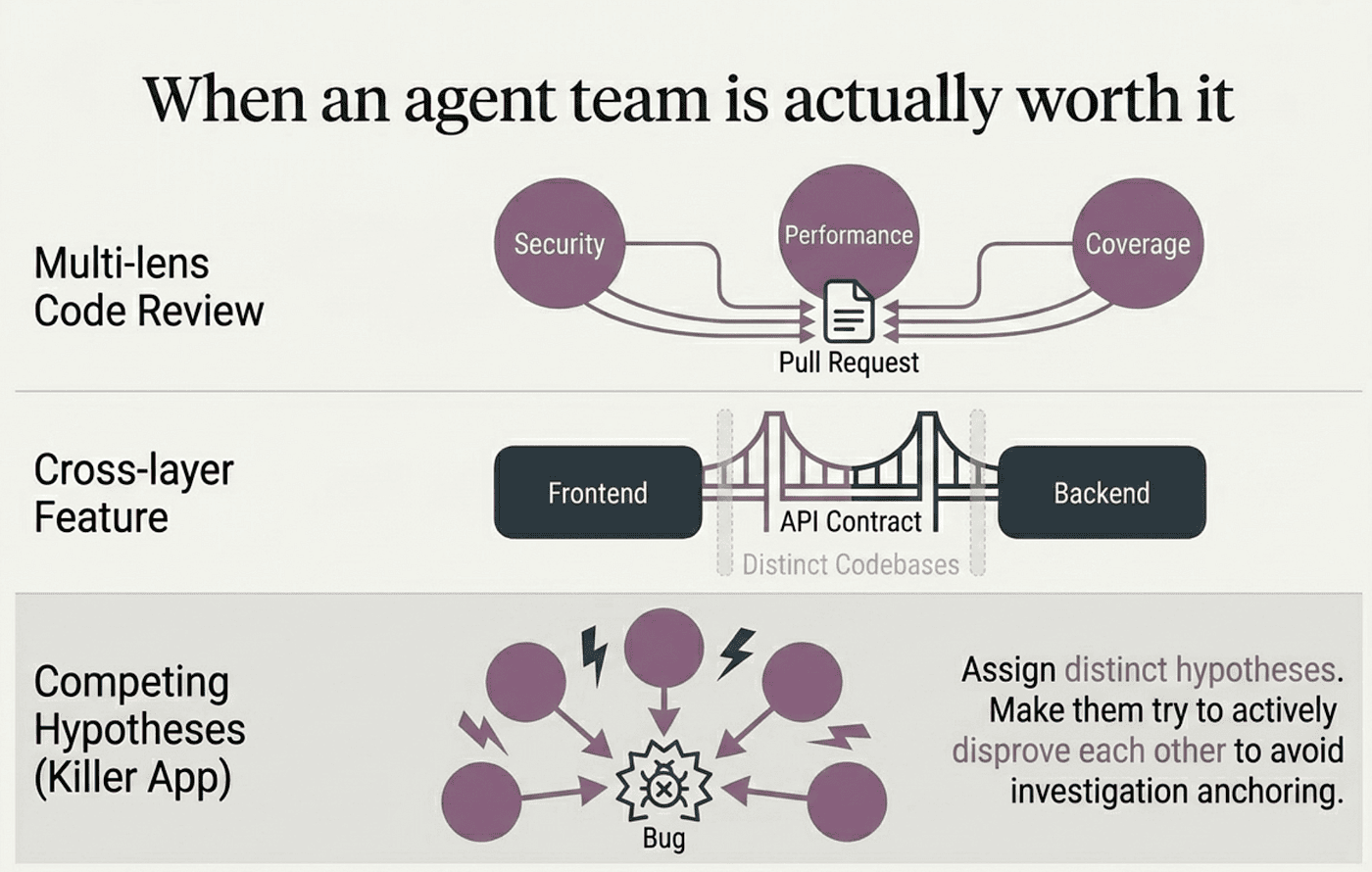
The strongest use cases are tasks where parallel exploration adds genuine value. Not tasks where you could just spawn three subagents and merge their outputs, but tasks where teammates need to talk to make progress.
Parallel code review across multiple lenses. A single reviewer drifts toward whatever issue type they noticed first. A team of three, one on security, one on performance, one on test coverage, each applies a different filter to the same PR and surfaces different findings. The lead synthesizes.
Cross-layer feature work. Changes spanning frontend, backend, and tests benefit from one teammate per layer. The frontend teammate need not understand backend internals, and the backend teammate need not follow CSS. They coordinate only on the contract between them.
Debugging with competing hypotheses. This is the killer use case. A single agent investigating a bug tends to find one plausible explanation and stop looking. Assign each teammate a different hypothesis, tell them explicitly to challenge each other, and the theory that survives is far more likely to be the real root cause:
Users report the app exits after one message instead of staying connected.
Spawn 5 agent teammates to investigate different hypotheses. Have them
talk to each other to try to disprove each other's theories, like a
scientific debate. Update the findings doc with whatever consensus emerges.
This is the "make subagents fight" pattern from Anthropic's own engineering practice, productized. The debate structure prevents anchoring: once one theory gets explored, sequential investigation drifts toward it, while independent investigators actively trying to disprove each other produce a better result.
What agent teams do not fit: sequential tasks, same-file edits, work with many dependencies between pieces, and routine maintenance. For those, a single session or plain subagents are more effective and dramatically cheaper. The extra cost only pays off when teammates can genuinely operate independently.
Running the team day to day
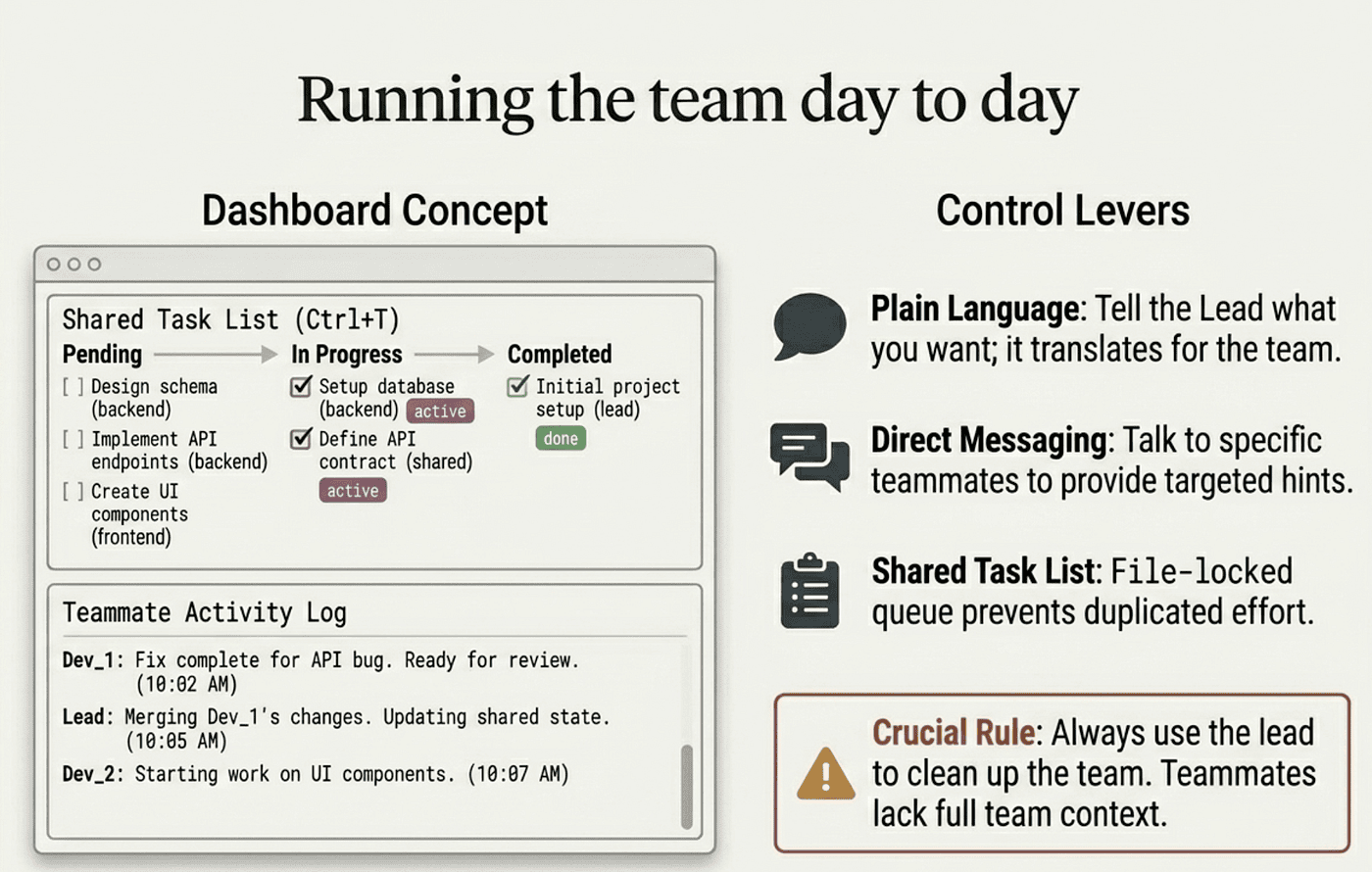
After enabling agent teams, the entry point is natural language. Tell Claude to create a team and describe the task and structure you want, such as one teammate on UX, one on architecture, one playing devil's advocate. Claude spawns the teammates, has them explore, synthesizes findings, and attempts to clean up when finished.
Two display modes exist. In-process is the default: all teammates run inside your main terminal, where Shift+Down cycles through them, Enter views a teammate's session, Escape interrupts, and Ctrl+T toggles the task list. Split panes gives each teammate its own pane via tmux or iTerm2. Start with in-process. Monitoring six panes at once sounds great and is usually a worse experience than cycling through one at a time.
Once a team is running, you steer in three ways: tell the lead what you want in plain language and it translates into per-teammate messages; talk to teammates directly to give one a hint without distracting the others; and use the shared task list, where tasks move through pending, in progress, and completed. Tasks can depend on other tasks, and a blocked task cannot be claimed until its dependencies finish. Task claiming uses file locking so two teammates never grab the same task.
The difference from subagents most worth feeling: after finishing a task, a teammate picks up the next unassigned, unblocked task on its own. Agent teammates keep working without the lead nudging them.
Each teammate uses plan mode by default for substantive work, and the lead approves plans autonomously against criteria you set in your initial prompt, such as "only approve plans that include test coverage." When you are done, tell the lead to "clean up the team." Always use the lead to clean up. Teammates should not run cleanup, because their team context may not resolve correctly.
Quality gates and the limitations you should respect
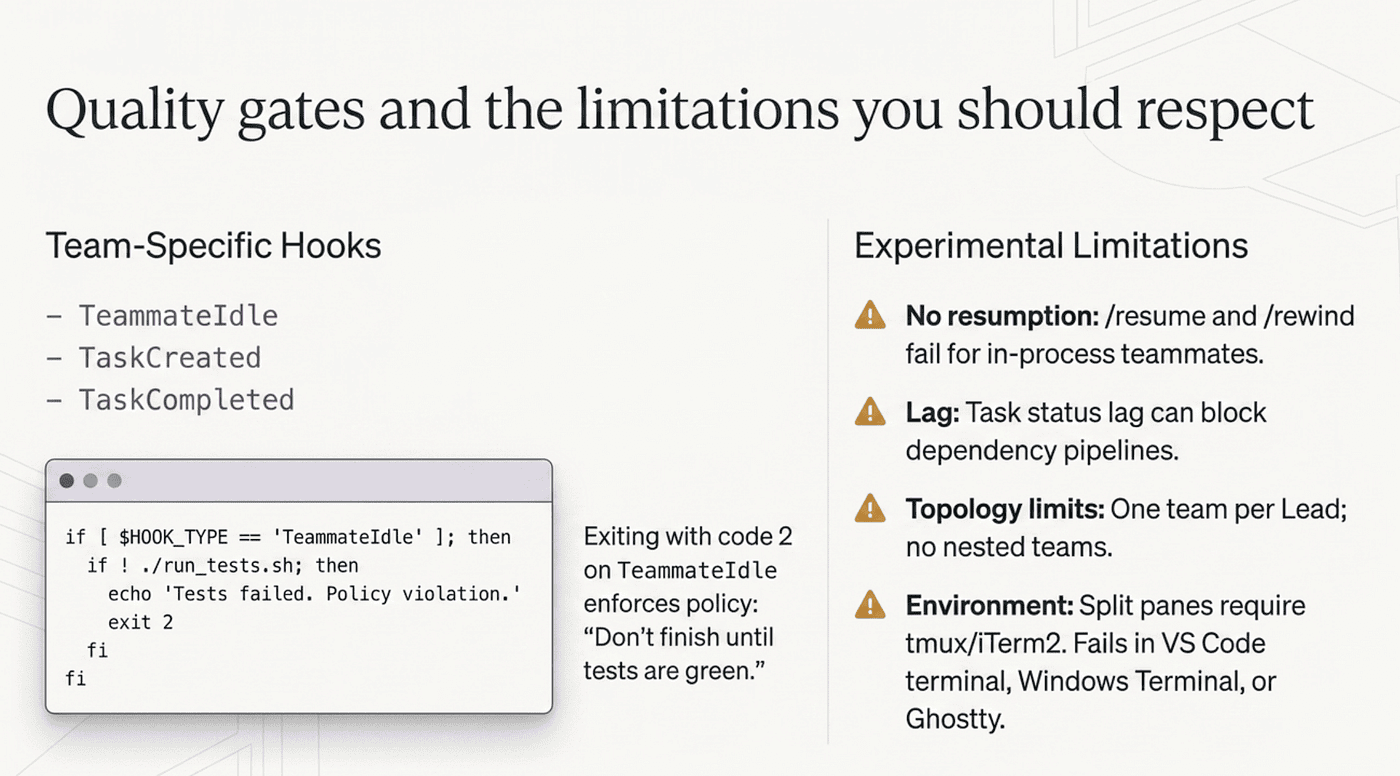
The hooks system extends to agent teams with three team-specific events. TeammateIdle runs when a teammate is about to go idle; exit with code 2 to send feedback and keep it working, which enforces a "don't finish until tests are green" policy. TaskCreated runs when a task is being added and TaskCompleted when one is being marked done; exiting either with code 2 blocks the action and sends feedback. These enforce policy deterministically instead of relying on verbal reminders.
A few habits consistently produce better outcomes. Start with research and review, not implementation, since clear-boundary tasks show the value of parallel exploration without the coordination challenges of parallel code. Give teammates enough context, because they load CLAUDE.md, MCPs, and skills automatically but do not inherit the lead's conversation history. Avoid same-file edits, which is why agent teams pair so well with worktrees: give each teammate its own worktree and the collision problem disappears. And monitor and steer, because a team left unattended for hours risks wasted effort.
The limitations are real, and they are why agent teams remain experimental. There is no session resumption for in-process teammates, so /resume and /rewind do not restore them. Task status can lag when a teammate forgets to mark a task complete, blocking dependents. A lead manages only one team at a time, teammates cannot spawn nested teams, and permissions are set at spawn from the lead's mode. Split panes need tmux or iTerm2 and will not work in VS Code's integrated terminal, Windows Terminal, or Ghostty. The right mental model is "a powerful but sharp tool, for the right problem."
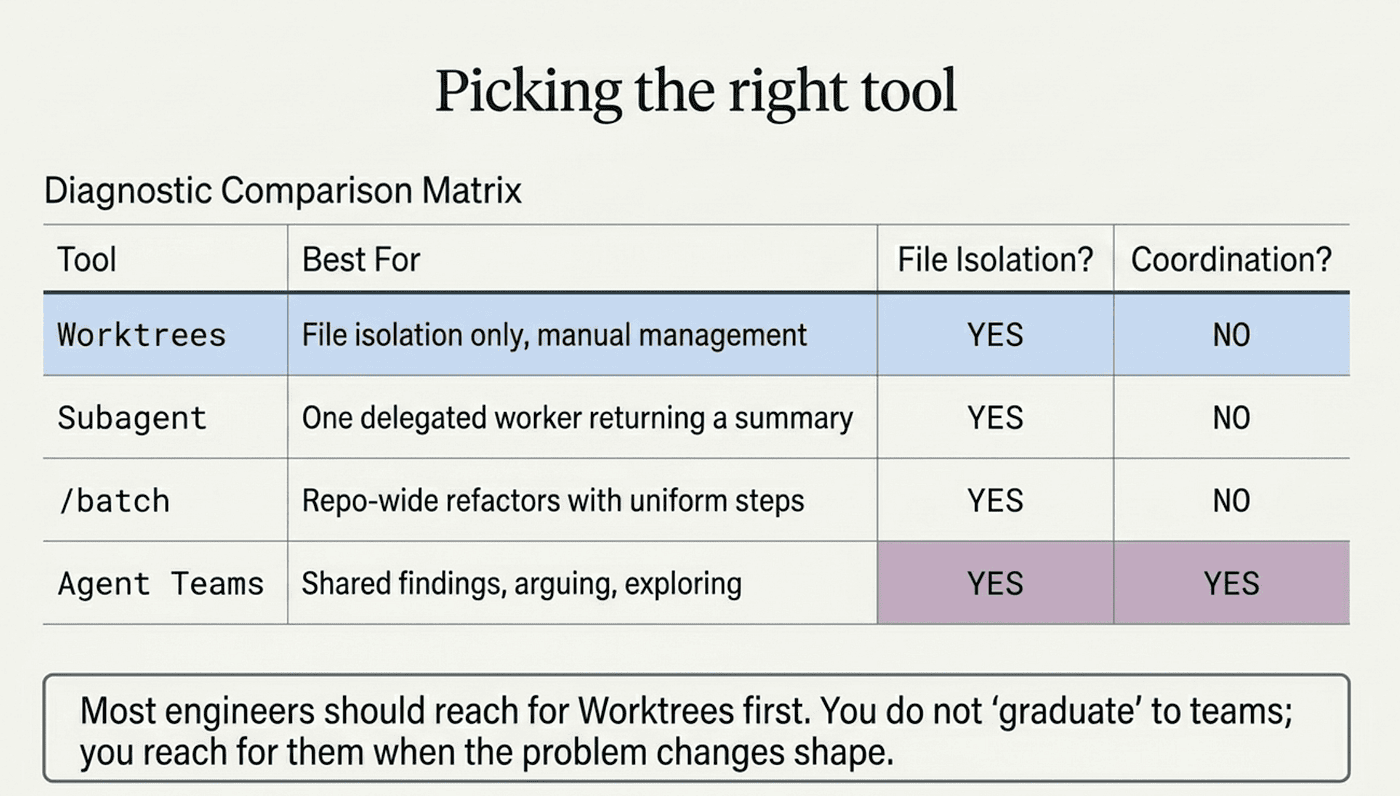
Picking the right tool
Pull worktrees, subagents, /batch, and agent teams together and a clean decision emerges. Want file isolation only, managing the work yourself? Worktrees. One delegated worker that does a side task and returns a summary? A subagent. Several independent workers with no need to coordinate? Several subagents. A repo-wide refactor with uniform steps? /batch. Several workers that must share findings and challenge each other? An agent team.
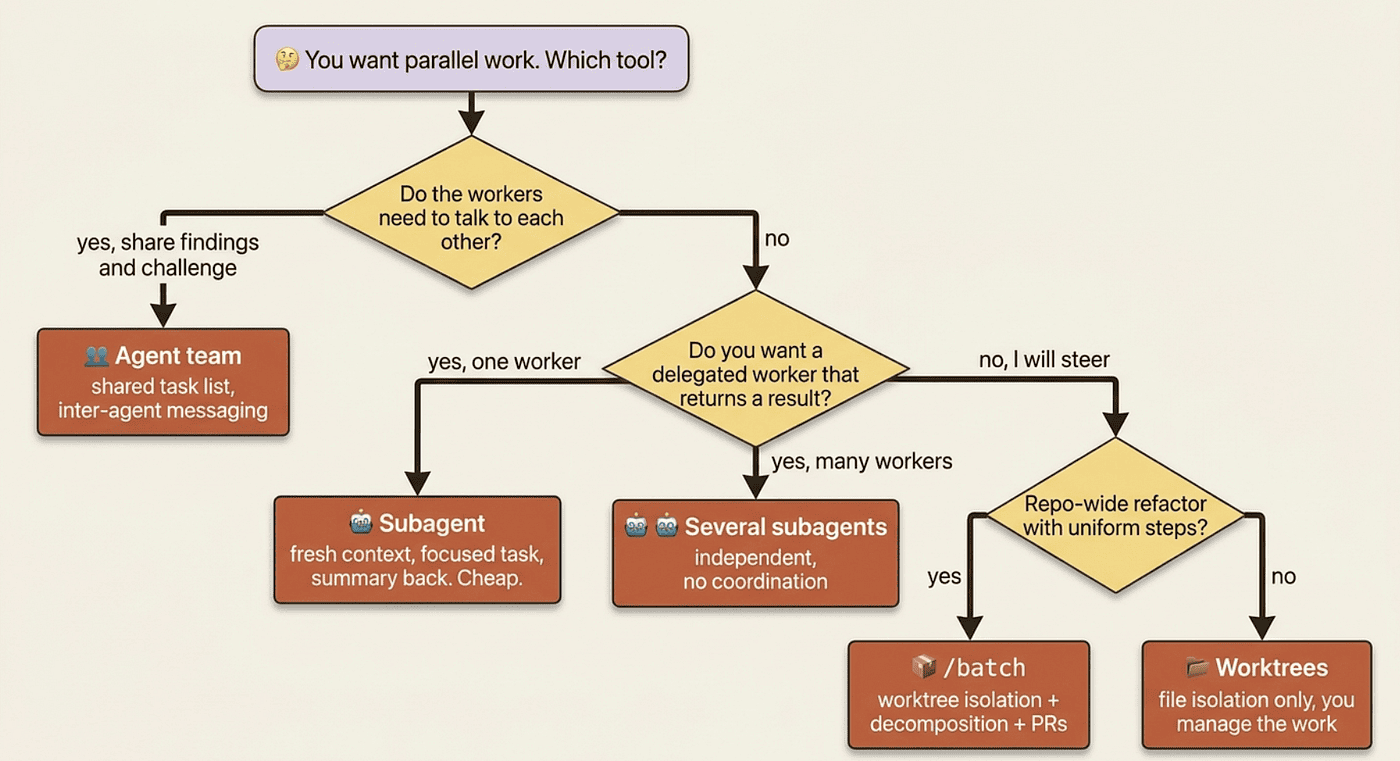
Most engineers reach for worktrees first, subagents second, /batch third, and agent teams only when nothing simpler fits. That is a healthy progression. You do not graduate to teams. You reach for them when the problem has a shape the simpler tools cannot hold.
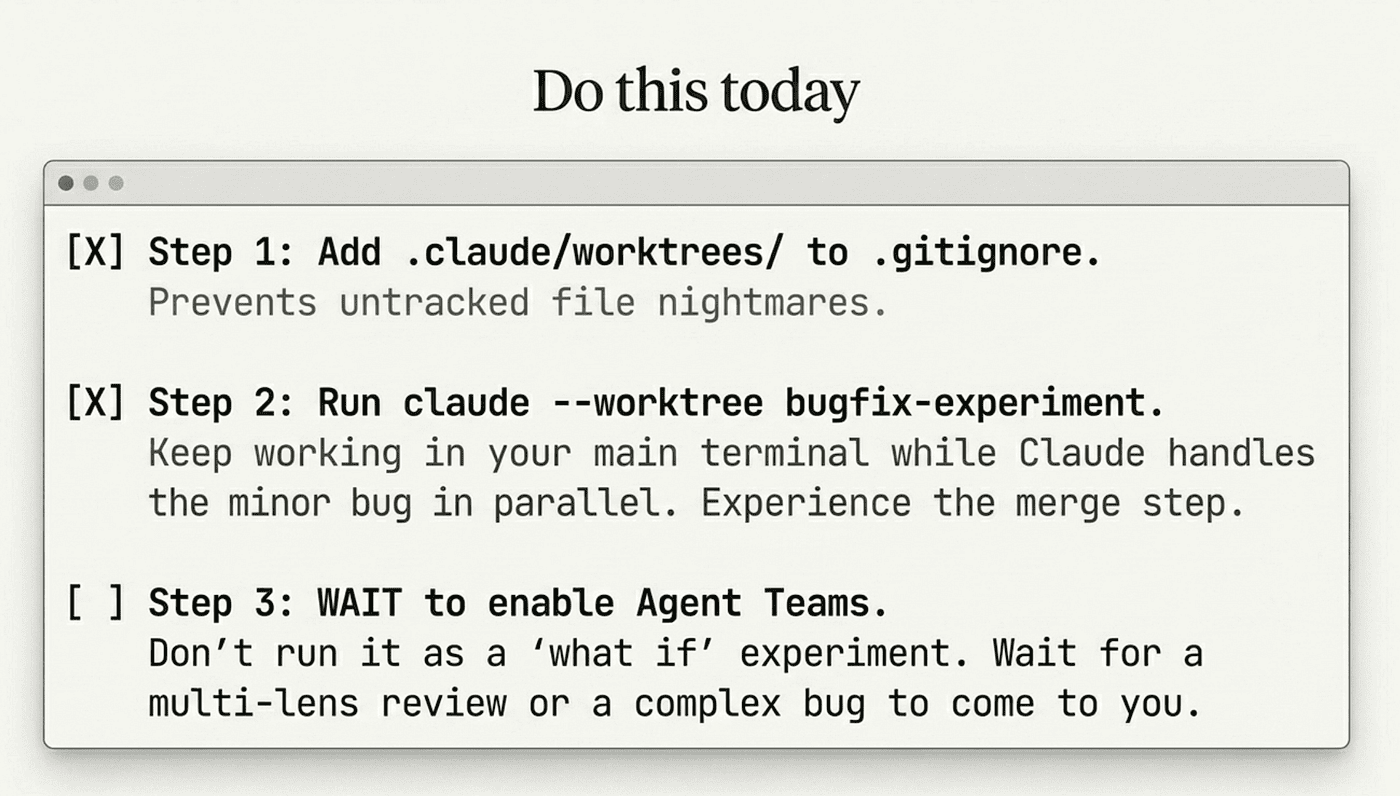
Do this today
Three concrete moves, in order.
-
Add
.claude/worktrees/to your.gitignorenow. It takes five seconds and prevents weeks of "what are all these untracked files" confusion the moment you start using worktrees. -
Run
claude --worktree bugfix-experimenton something small. Pick a task you would normally do in your main terminal: a typo fix, a doc update, a minor bug. Do it in a worktree instead. Notice that you can keep working in your main terminal while Claude works in the worktree. Notice the merge step at the end. Fifteen minutes of real use makes the mechanics click in a way no amount of reading will. -
Do not enable agent teams yet. Wait until you have a specific problem that fits: a multi-lens code review, a debug with competing hypotheses, or a cross-layer feature. That is the moment to set
CLAUDE_CODE_EXPERIMENTAL_AGENT_TEAMS=1and try it on a real task. Enabling teams as a "what if I tried this" experiment reliably produces a confused team and wasted tokens. Let the problem come to you.
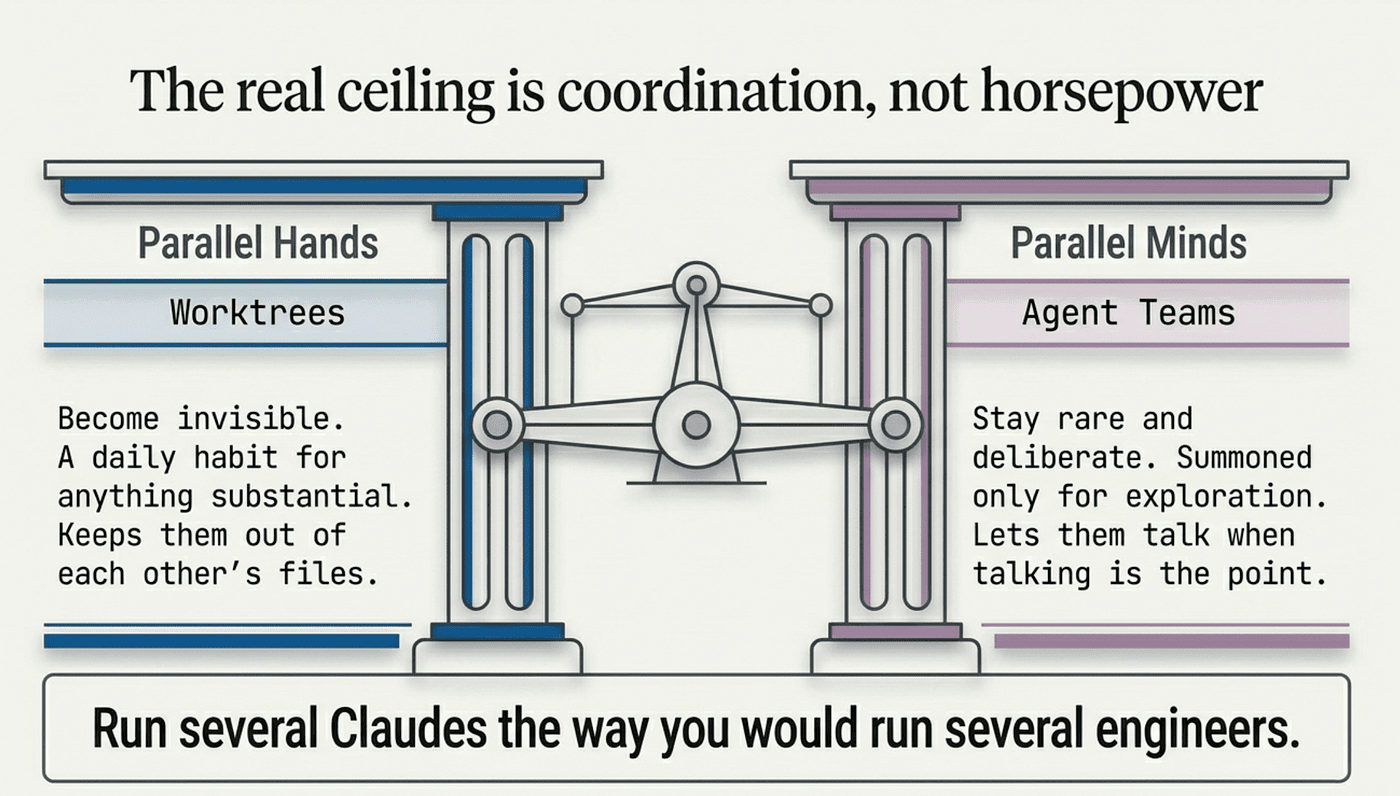
The real ceiling is coordination, not horsepower
The reason one Claude session feels limiting is not that the model is slow. It is that a single session can only hold one context and one plan. Worktrees and agent teams attack two different parts of that ceiling. Worktrees give you parallel hands that never grab the same thing. Agent teams give you parallel minds that can argue toward a better answer.
The mistake to avoid is treating them as the same tool, or reaching for the heavier one out of enthusiasm. Worktrees should become invisible: a habit, a reflex, --worktree feature-name for anything substantial. Agent teams should stay rare and deliberate, summoned only when you genuinely need parallel exploration.
Run several Claudes the way you would run several engineers. Keep them out of each other's files, and let them talk only when talking is the point. That is how serious users scale Claude Code past what one terminal can ever hold.
This is Part 15 of "Claude Code, Day-to-Day," a 19-part guide to mastering Claude Code for working engineers.