Claude Code Agent Teams: Multiple Claudes Working Together
Spin up independent Claude instances that coordinate through a shared task list and message each other directly
Originally published on Medium.
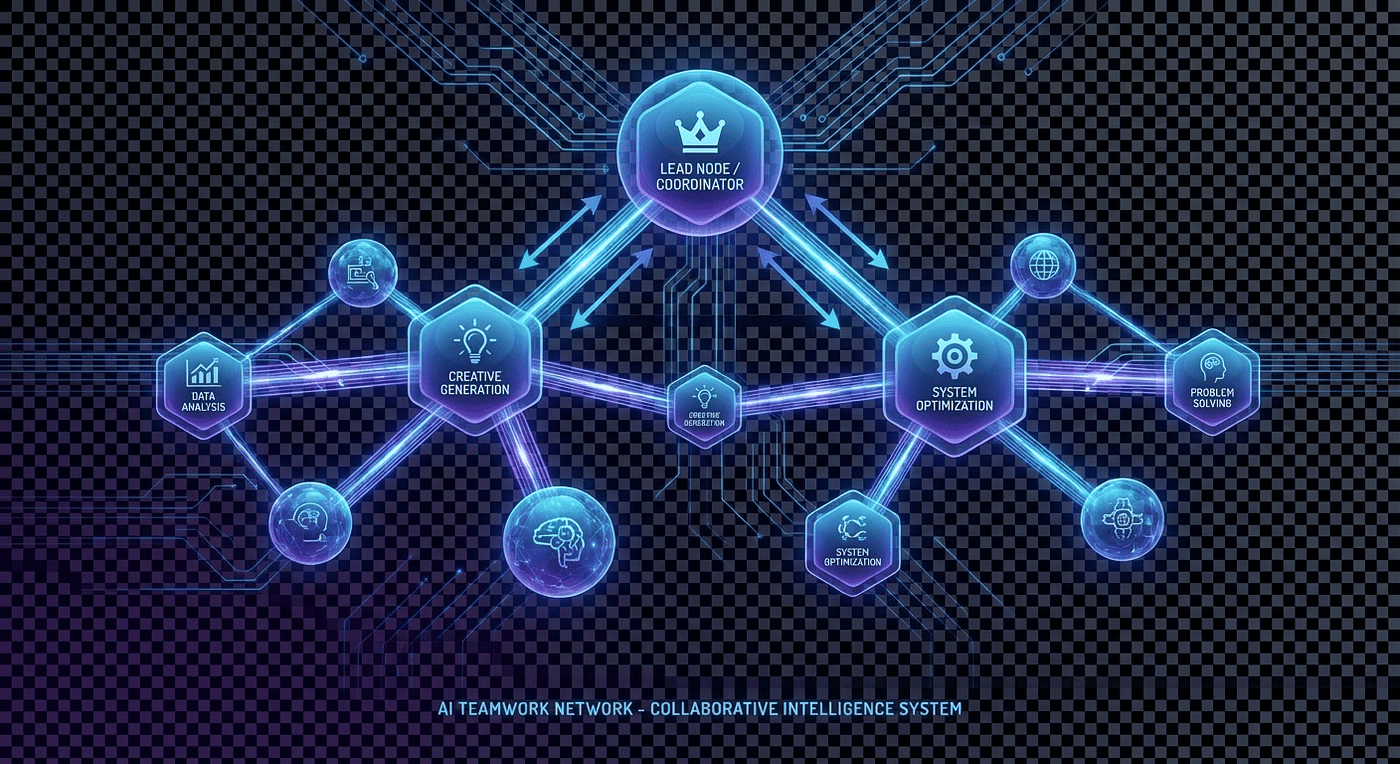
Spin up independent Claude instances that coordinate through a shared task list and message each other directly
Agent teams turn Claude Code from a single-threaded assistant into a multi-agent collaboration system. Spin up a team of independent Claude instances that coordinate through a shared task list, message each other, and work in parallel on code reviews, debugging, and cross-layer refactoring.
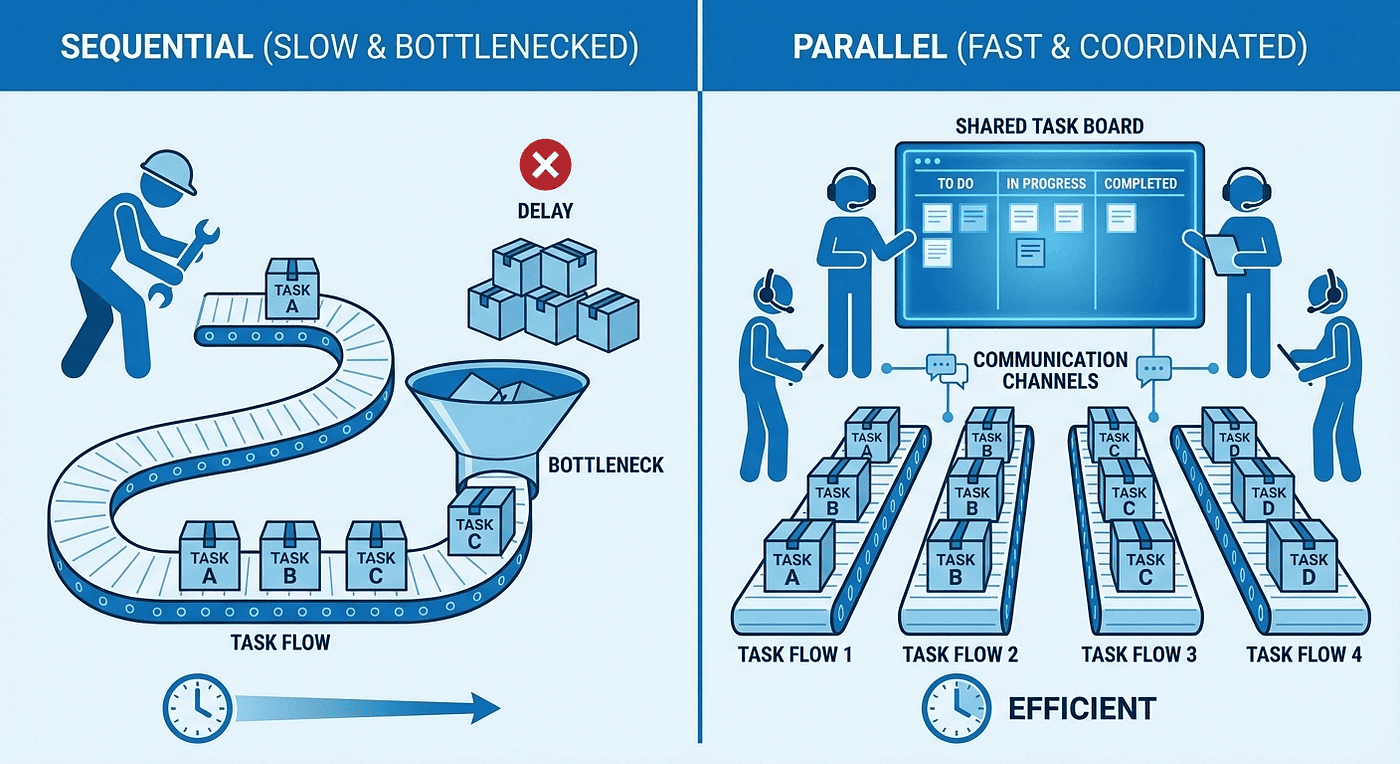
One Claude does everything in sequence. Agent teams remove the ceiling with parallel work, shared task lists, and direct agent-to-agent communication.
Agent teams remove the ceiling. Instead of one Claude doing everything sequentially, you spin up a team of independent Claude instances that coordinate through a shared task list and message each other directly. A backend agent rewrites the API while a frontend agent updates the UI. Three reviewers examine a PR from security, performance, and test coverage angles simultaneously. Five investigators each pursue a different hypothesis and debate their findings.
This is not a polished product feature yet; it is an experimental research preview that requires an environment variable to enable. But it works, and for the right workflows, it changes what is possible in a single coding session. It also burns through tokens like you are trillionaire with wild abandon.
Enabling Agent Teams
Agent teams are disabled by default. Enable them with an environment variable:
export CLAUDE_CODE_EXPERIMENTAL_AGENT_TEAMS=1
claude
Or add it to your settings.json for persistence:
{
  "env": {
    "CLAUDE_CODE_EXPERIMENTAL_AGENT_TEAMS": "1"
  }
}
Once enabled, you can ask Claude to create teams directly in conversation.
How Agent Teams Work
The Architecture
An agent team has four components:
Team lead: Your main Claude Code session. It creates the team, spawns teammates, assigns work, and coordinates results. The lead is the session you interact with directly.
Teammates: Separate Claude Code instances, each with their own 200k token context window. They work independently and can communicate with each other and the lead.
Shared task list: A list of work items with dependencies. Tasks move through three states: pending, in progress, and completed. Teammates claim tasks from the list and mark them done.
Mailbox: A messaging system for direct agent-to-agent communication. Teammates can send messages to specific teammates or broadcast to the entire team.
Starting a Team
You can request a team explicitly:
I need to refactor the authentication module. Create a team:
- A backend agent to rewrite the auth endpoints
- A frontend agent to update the login UI
- A test agent to write comprehensive tests
Or describe a complex task and let Claude propose a team structure:
Users report the app exits after one message instead of staying connected.
Spawn 5 agent teammates to investigate different hypotheses. Have them
debate each other's theories like a scientific discussion.
Claude creates the team, assigns roles, populates the task list, and spawns teammates. Each teammate gets the spawn prompt from the lead plus access to CLAUDE.md, MCP servers, and skills from the working directory.
Task Coordination
Tasks flow through three states: pending, in progress, and completed.
Tasks can have dependencies. A task blocked by an incomplete dependency stays pending until the dependency resolves. Task claiming uses file locking to prevent race conditions when multiple teammates try to claim the same task simultaneously.
Two assignment modes exist:
- Lead assigns: The lead explicitly assigns specific tasks to specific teammates.
- Self-claim: A teammate finishes one task and picks up the next unassigned, unblocked task on its own.
The recommended approach: give the lead a clear task breakdown with dependencies, let it assign initial tasks, and let teammates self-claim subsequent work as they finish.
Communication
Teammates communicate three ways:
- Message: Send to one specific teammate. Use this for targeted questions, handoffs, or feedback.
- Broadcast: Send to all teammates simultaneously. Use this sparingly because token costs scale with team size.
- Idle notifications: When a teammate finishes and stops, it automatically notifies the lead.
Messages are delivered automatically. The lead does not need to poll for updates.
Display Modes
You have two options for viewing teammate activity:
In-process (default): All teammates run inside the main terminal. Use Shift+Down to cycle through teammates. This works in any terminal with no extra setup.
Split panes: Each teammate gets its own terminal pane. Requires tmux or iTerm2 with the it2 CLI. Not supported in VS Code integrated terminal, Windows Terminal, or Ghostty.
Configure via settings:
{
  "teammateMode": "in-process"
}
The default "auto" mode uses split panes if you are already inside a tmux session; it falls back to in-process otherwise.
Quality Gates with Hooks
Two hook events give you control over when teammates stop and when tasks close.
TeammateIdle
This hook fires when a teammate is about to go idle after finishing its turn. Use it to enforce quality checks before a teammate stops working.
#!/bin/bash
# Require build artifact before teammate can go idle
if [ ! -f "./dist/output.js" ]; then
  echo "Build artifact missing. Run the build first." >&2
  exit 2  # Blocks idle; teammate keeps working
fi
exit 0
Exit code 2 prevents the teammate from going idle and feeds the stderr message back as feedback. The teammate sees your message and continues working to address the issue.
Configure it in settings.json:
{
  "hooks": {
    "TeammateIdle": [
      {
        "hooks": [
          {
            "type": "command",
            "command": ".claude/hooks/check-build.sh"
          }
        ]
      }
    ]
  }
}
The hook receives JSON input with teammate_name and team_name fields, so you can apply different checks to different teammates.
TaskCompleted
This hook fires when a task is being marked as completed. Use it to enforce completion criteria like passing tests or lint checks.
#!/bin/bash
# Block task completion if tests fail
if ! npm test 2>&1; then
  echo "Tests failed. Fix them before marking this task complete." >&2
  exit 2  # Blocks completion; task stays in progress
fi
exit 0
Exit code 2 prevents the task from being marked complete. The agent sees the feedback and continues working on the task.
TaskCompleted supports all four hook types (command, HTTP, prompt, and agent), unlike TeammateIdle which only supports command hooks. Neither hook supports matchers; they fire on every occurrence.
Plan Approval
For risky or complex tasks, you can require teammates to plan before implementing:
Spawn an architect teammate to refactor the auth module.
Require plan approval before they make any changes.
The teammate works in read-only plan mode. The lead reviews and approves or rejects the plan autonomously. Rejected plans go back to the teammate for revision.
Memory Scoping
Each teammate has its own independent context window. The lead's conversation history does not carry over to teammates. When spawned, a teammate loads CLAUDE.md files, MCP servers, skills, and the spawn prompt from the lead.
For subagents (single-session agents spawned via the Agent tool), persistent memory is available through the memory frontmatter field:
---
name: code-reviewer
description: Reviews code for quality
memory: user
---
Three scopes:
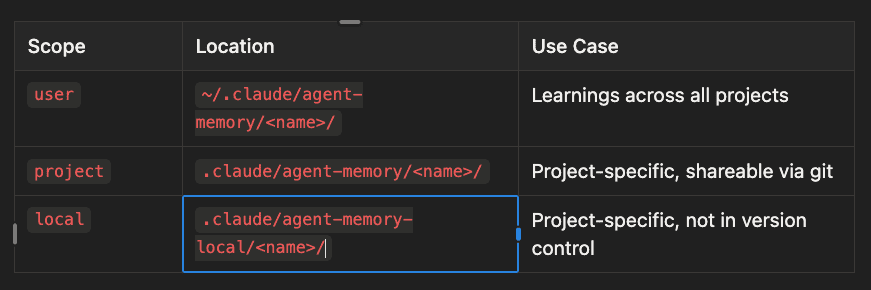
- user scope: Stored in ~/.claude/agent-memory/
/ - Use for learnings across all projects - project scope: Stored in .claude/agent-memory/
/ - Use for project-specific memory that's shareable via git - local scope: Stored in .claude/agent-memory-local/
/ - Use for project-specific memory that should not be in version control
When memory is enabled, the first 200 lines of MEMORY.md in the memory directory are injected into the subagent's context. The subagent can read and write to its memory directory during the session.
Restricting Sub-Agent Spawning
You can control which sub-agents an agent can spawn using an allowlist or denylist.
Allowlist (frontmatter)
---
name: coordinator
description: Coordinates specialized agents
tools: Agent(worker, researcher), Read, Bash
---
Only worker and researcher subagents can be spawned. Any other type fails.
Denylist (settings)
{
  "permissions": {
    "deny": ["Agent(Explore)", "Agent(my-risky-agent)"]
  }
}
Block specific subagents while allowing all others. This works for both built-in and custom subagents.
Subagents vs. Agent Teams
These are different tools for different problems:
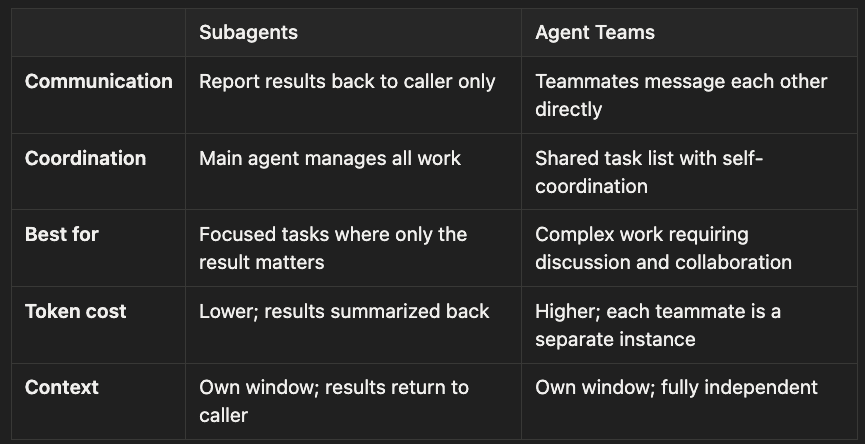
Subagents
- Communication: Report results back to caller only
- Coordination: Main agent manages all work
- Best for: Focused tasks where only the result matters
- Token cost: Lower; results summarized back
- Context: Own window; results return to caller
Agent Teams
- Communication: Teammates message each other directly
- Coordination: Shared task list with self-coordination
- Best for: Complex work requiring discussion and collaboration
- Token cost: Higher; each teammate is a separate instance
- Context: Own window; fully independent
Use subagents for well-defined tasks with clear inputs and outputs: "generate tests for this module," "explore the codebase for authentication patterns," "build this component." The main agent gets the result and moves on.
Also using /batch to spin up parallel agents that work in subtrees is another alternative to consider when you need less than an agentic team of agents and you want easy parallel execution but perhaps not the mental overhead of managing a team of agents.
Use agent teams when the work requires coordination, debate, or multiple perspectives: reviewing a PR from different angles, investigating a bug with competing hypotheses, refactoring across multiple layers simultaneously. And, you may want to wait until this matures more or you hit the lottery.
Practical Patterns
Parallel Code Review
Create a team to review PR #142:
- Security reviewer: check for vulnerabilities and auth issues
- Performance reviewer: identify bottlenecks and N+1 queries
- Test coverage reviewer: verify edge cases and missing tests
Have each reviewer report findings independently.
Competing Hypotheses Debugging
The WebSocket connection drops after one message. Spawn 5 teammates
to investigate different hypotheses. Have them debate each other's
findings and update a shared findings document with consensus.
Cross-Layer Refactoring
Break the work so each teammate owns different files to avoid edit conflicts:
- Frontend teammate: UI components and styles
- Backend teammate: API endpoints and middleware
- Database teammate: migrations and queries
- Test teammate: test suites for all layers
What to Watch Out For
This is new cutting edge tech. Expect to bleed a little.
File Conflicts
Two teammates editing the same file leads to overwrites. Structure your tasks so each teammate owns different files. This is the most common source of problems in agent teams.
Token Costs
Each teammate is a separate Claude instance with its own context window. A team of five teammates uses roughly five times the tokens of a single session. Start with small teams (three to five) and add teammates only when the parallelism genuinely saves time.
No Session Resume for Teammates
If you use /resume to restore a session, in-process teammates are not restored. The lead may try to message teammates that no longer exist. Tell the lead to spawn new teammates after resuming.
One Team Per Session
A lead can only manage one team at a time. Clean up the current team before starting a new one. Use "clean up the team" to remove shared resources.
Shutdown Can Be Slow
Teammates finish their current request or tool call before shutting down. If a teammate is mid-operation, shutdown may take a while.
No Nested Teams
Teammates cannot spawn their own teams or sub-teams. Only the lead can manage the team structure. If you need multi-level delegation, structure it so the lead orchestrates all teammates directly.
The Bottom Line
Agent teams turn Claude Code from a single-threaded assistant into a multi-agent collaboration system. Instead of one Claude doing everything in sequence, you get independent agents that coordinate through a shared task list, message each other, and work in parallel.
The feature is experimental. It requires an environment variable to enable, has rough edges around session resume, and costs more tokens than single-agent workflows. But for the right tasks, it delivers something genuinely new: multiple perspectives on a code review, parallel investigation of a bug, simultaneous work across multiple layers of a codebase.
Start with a simple team of three. Give each teammate a clear role and distinct files to work on. Use the TeammateIdle and TaskCompleted hooks to enforce quality gates. And keep an eye on your token usage.
The ceiling is higher now.
Claude Code agent teams documentation: code.claude.com/docs/en/sub-agents. Agent teams require CLAUDE_CODE_EXPERIMENTAL_AGENT_TEAMS=1 and are currently an experimental research preview.
About the Author
Rick Hightower is a technology executive and data engineer who led ML/AI development at a Fortune 100 financial services company. He created skilz, the universal agent skill installer, supporting 30+ coding agents including Claude Code, Gemini, Copilot, and Cursor, and co-founded the world's largest agentic skill marketplace. Connect with Rick Hightower on LinkedIn or Medium. Rick has been doing active agent development, GenAI, agents, and agentic workflows for quite a while. He is the author of many agentic frameworks and tools. He brings core deep knowledge to teams who want to adopt AI.