Claude Code Casual, Pro, Elite: The Three Working Personas of Claude Code Mastery
Claude Code Personas Part 16: A short, honest map of how much Claude Code setup your work actually needs, so you stop measuring yourself against a maximalist ideal you may never require.
Originally published on Medium.
Claude Code Personas Part 16: A short, honest map of how much Claude Code setup your work actually needs, so you stop measuring yourself against a maximalist ideal you may never require.
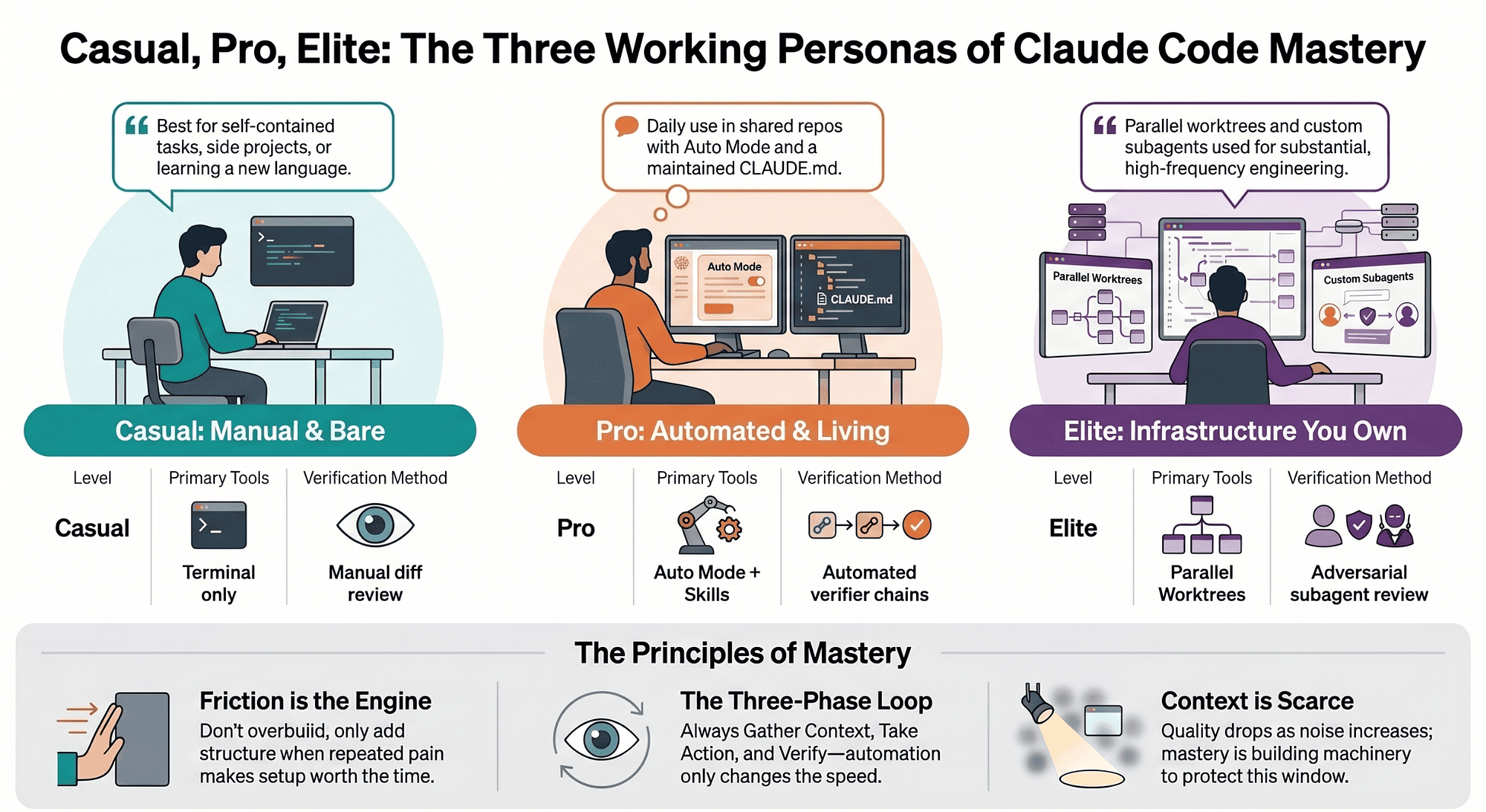
Casual, pro, elite: the three working personas of Claude Code mastery, and how to find which one your work actually needs today. You are not behind. You are just at a different level than your work demands, and that is fine.
In this article: Claude Code mastery is not a single finish line. It shows up at three levels of investment, casual, pro, and elite, and most developers do not need the top one. This article describes what the setup looks like at each level, the friction that pushes you up, the traps that make people jump too far, and the one move that actually works at each stage.
Part 16 of "Claude Code, Day-to-Day," a 19-part guide to mastering Claude Code for working engineers.
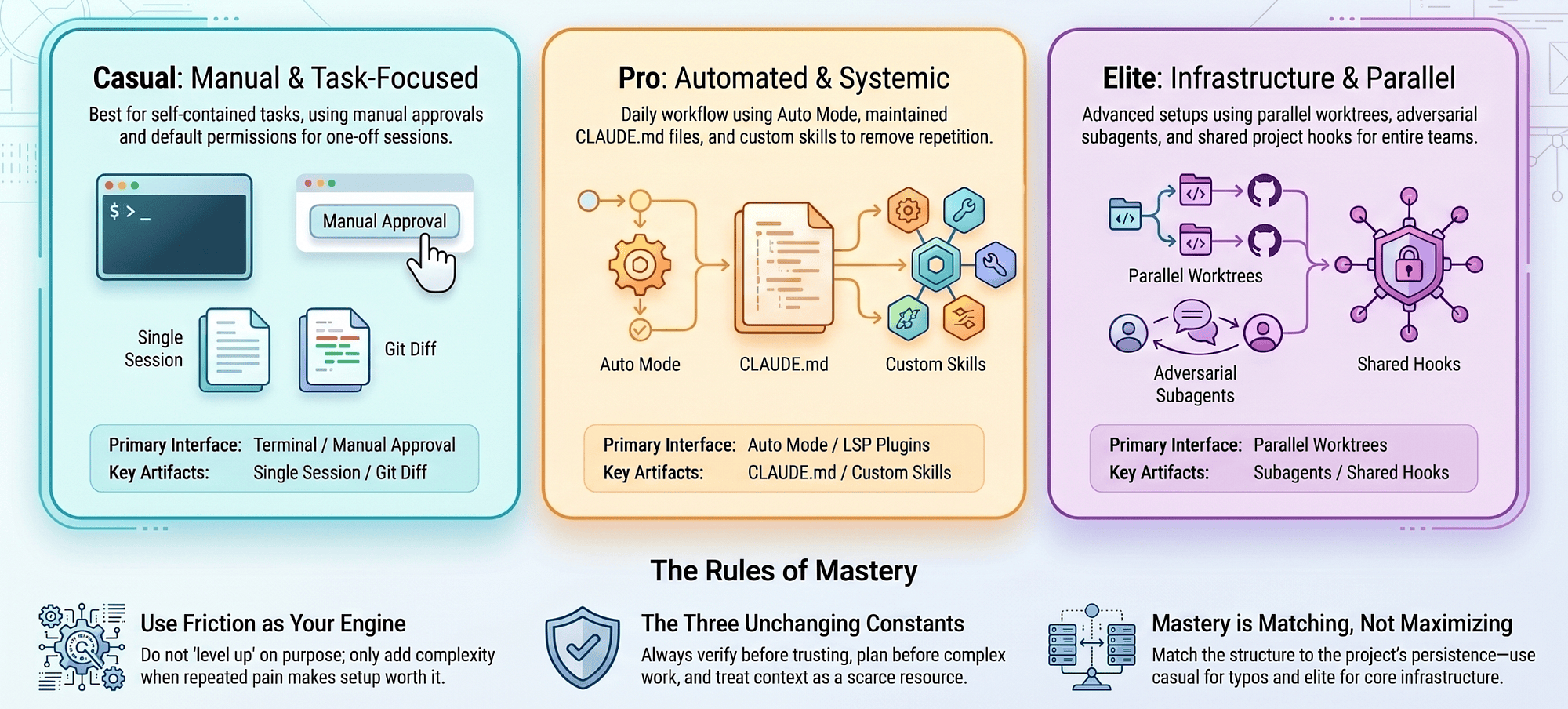
You have probably seen the maximalist version of Claude Code. The CLAUDE.md tuned to a paragraph. The directory of custom skills. Hooks that lint on every edit. Subagents that argue with each other. Parallel worktrees humming in three terminals. It looks like mastery, and it makes the rest of us feel behind.
Here is the reframe that changes everything: that maximalist setup is not a target. It is the ceiling, and most working developers should never sprint for it. Claude Code mastery is not about how much machinery you have installed. It is about matching the amount of structure to the depth of the work you are actually doing.
Three personas, casual, pro, and elite, describe the same tool at three levels of investment. Read them not as a leaderboard, but as a menu, and use them to locate yourself.
The personas are a menu, not a ladder
Drop the instinct to read these as ranks. Plenty of strong developers will live on the pro setup for years and never touch elite, because their work simply does not demand it. And plenty of elite users were casual six months ago. They did not get there by deciding one weekend to install everything. They got there one small, painful nudge at a time.
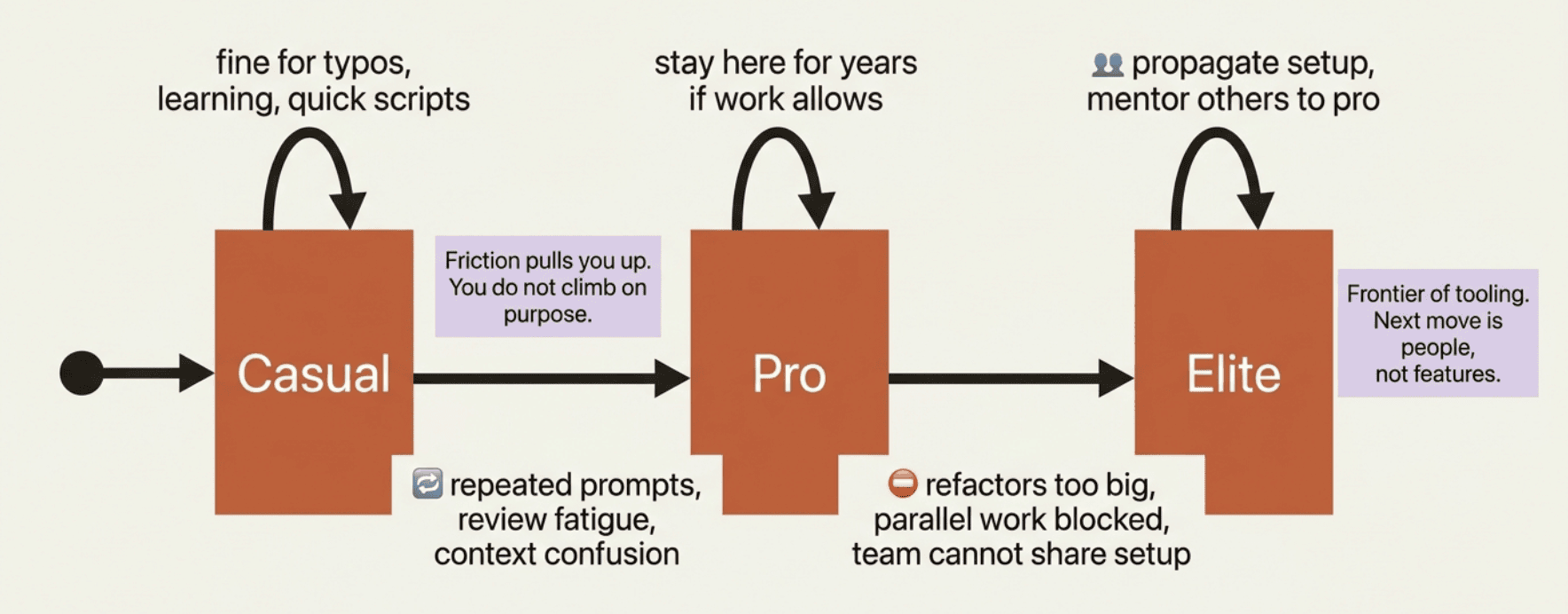
That changes what "leveling up" means. You do not climb on purpose. You climb because a specific, repeated pain makes the next layer worth fifteen minutes of setup. Friction is the engine. Ambition is not.
Before the personas split apart, notice what they share. A few principles are true at every single level, and they never disappear.
Verify before you trust. Whether your verifier is a git diff you read carefully or a Playwright screenshot Claude generates automatically, the principle is identical. Agentic coding works as a three-phase loop: gather context, take action, verify. That third phase does not get optional as you advance. It gets more automated.
Plan before complex work. Use plan mode for non-trivial tasks and a written spec for substantial ones. A casual user reaches for plan mode less often; an elite user does it on autopilot. Neither one skips it for work that matters.
Context is scarce. Context is the operating system of this tool: everything Claude knows about your task lives in a limited window, and when it fills with noise, quality drops. A casual user feels this when a session gets confused and forgetful. An elite user has built an entire setup around protecting that window from the start.
What changes between the levels is not which principles apply. It is how much machinery you have built to make those principles automatic.
Casual: one session, one task, manual review
Who this fits: developers using Claude Code a few times a week, mostly for self-contained tasks. New jobs where you do not have the codebase in your head yet. Side projects. Learning a new language. Fixing a bug in a repo you cloned an hour ago.
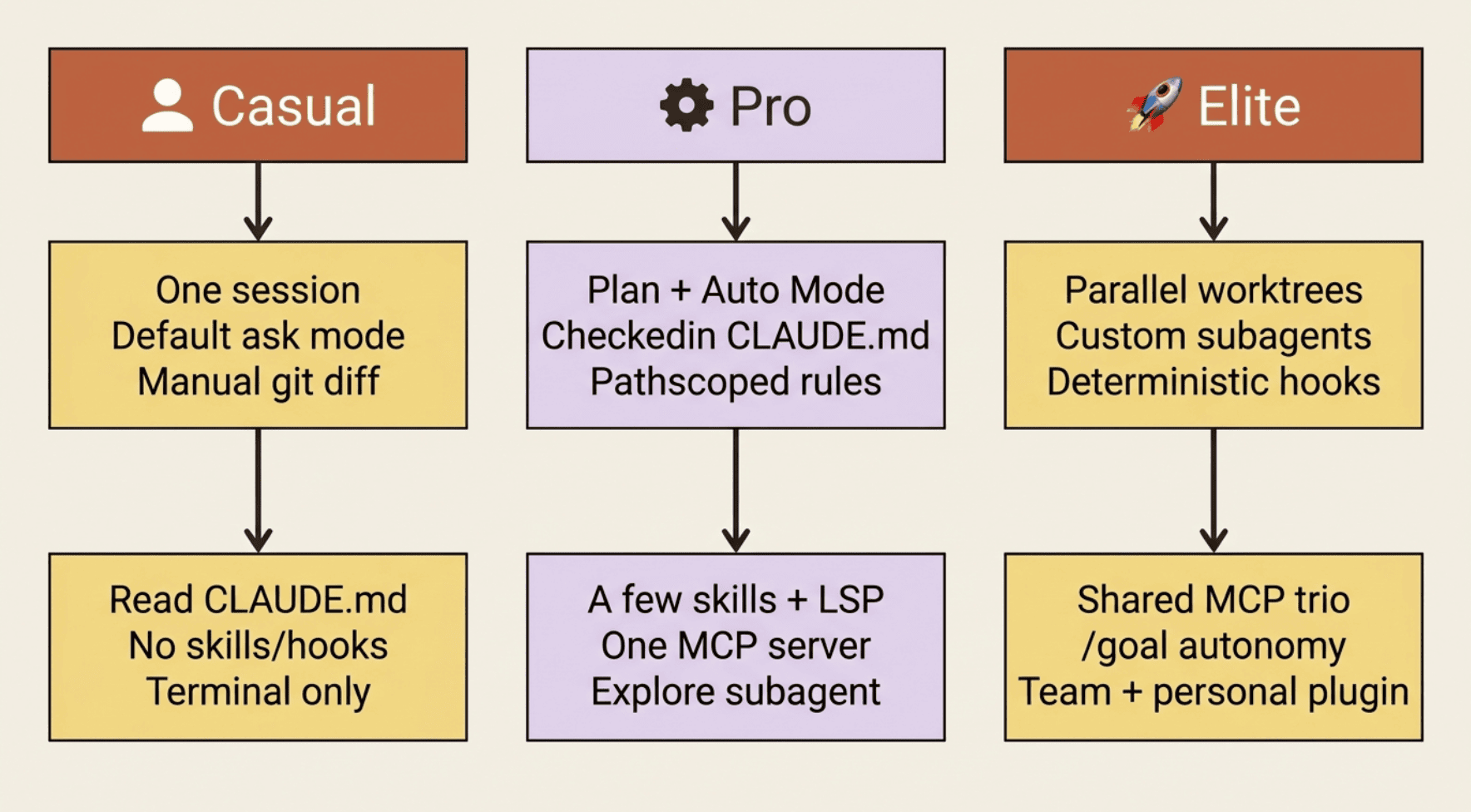
The casual setup is deliberately bare. One session at a time: open a terminal, run claude, work until the task is done, exit. You run in the default permission mode, where an ask prompt appears before every file edit and every shell command, and you review each change by hand. If the project ships a .claude/settings.json, you use it and do not touch it. No custom CLAUDE.md, no skills, no hooks. The friction of the default mode is the point: it keeps you in the loop.
The daily flow is simple. Run claude, describe the task, read what Claude proposes, and approve edits one at a time. Run the tests yourself; if they fail, paste the error and let Claude try again. Exit when done, and do not worry about leftover state.
And the casual user is doing a lot right. They treat Claude as a collaborator, not as fancy autocomplete. They read the diff before accepting it. They use plan mode for anything that touches more than one file, even if not every time. Those are real habits, and they are the foundation everything else is built on.
So where is the ceiling? It shows up as repetition. You catch yourself typing "run the tests then lint then build, stop on first failure" three times in a week. You ask Claude the same codebase question over and over because no CLAUDE.md absorbed the answer the first time. You let context grow without trimming it, and the session gets muddy. You approve the same shell command multiple times a day and wonder if there is a faster path.
That friction is not a failure. It is a signal, and it points at exactly one next move.
The first move into pro: name the pain, fix that one thing
Do not respond to casual-level friction by installing the elite setup. Respond by picking the single frustration that hurts most and fixing exactly that.
"I am tired of approving pnpm test every time" becomes one allow rule. "I keep re-explaining our auth flow" becomes one paragraph in CLAUDE.md. "I keep typing the same verifier chain" becomes a /ship skill. Each fix is about fifteen minutes of work, and each one pays back across the rest of the project.
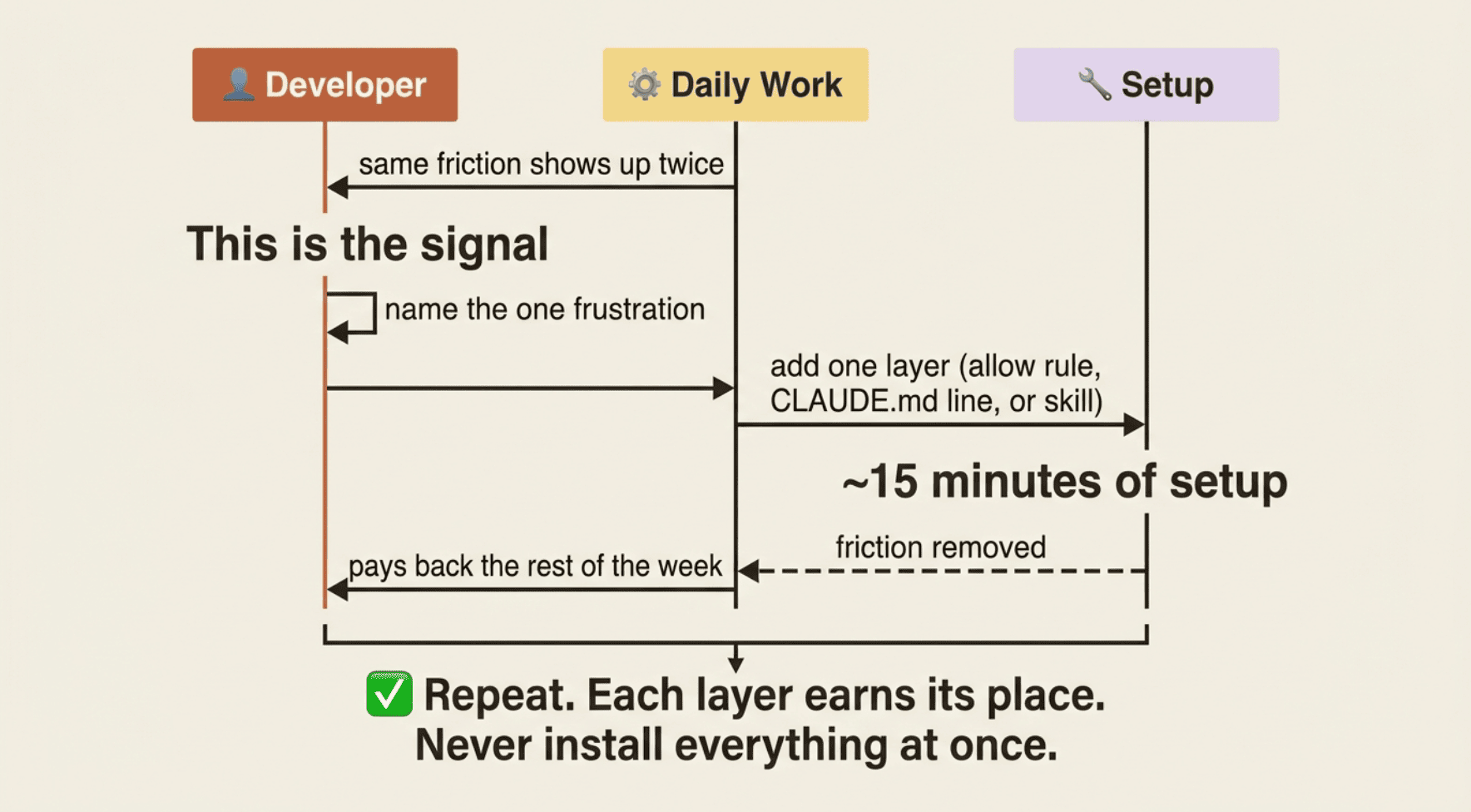
This is the whole growth loop in miniature. Friction shows up twice. You name it. You add one layer. The layer earns its place. Then you go back to work. You never install everything at once, because the investments only compound when each layer is paid for by real pain.
Pro: plan, automate, and treat CLAUDE.md as living
Who this fits: developers using Claude Code daily, on real work, in repos they own or share. This is the default home for most working engineers.
The pro setup adds structure where the casual user was repeating themselves. Plan mode becomes the first move for anything non-trivial: anything spanning multiple files or that could go wrong gets a reviewed plan before a line is implemented. For routine days, you switch into Auto Mode with Shift+Tab for tasks you trust enough to run with fewer interruptions, and back to plan mode when the task gets tricky again.
A checked-in CLAUDE.md carries what every session should know: stack, build commands, conventions, a never-do list, and the key files. The pro user maintains it: when you correct Claude on the same thing twice, the third move is to write it down here. A few path-scoped rules live in .claude/rules/ for parts of the repo that need their own constraints.
A handful of skills capture procedures you trigger by name: /ship for the verifier chain, /help-me status for "where am I?", and /security-review for an audit before pushing. One LSP plugin from the official marketplace gives real-time diagnostics and jump-to-definition. One MCP server, an external data source or the internal filesystem, is wired up when the work actually requires it.
The pro daily flow is a tight ten-minute routine. Morning, three minutes: run /help-me status to re-anchor on your branch, goal, last test, and dirty files. Plan first for anything substantial. Work in Auto Mode for routine tasks, intervening only when prompted for something sensitive. Run /ship before any commit. End of day, two minutes: update CLAUDE.md with anything Claude needed correcting on, and commit cleanly.
The pro user treats CLAUDE.md as a living document, not a one-time setup, and treats plan mode and Auto Mode as two halves of one idea: think before you act, then act without friction. They close the verification loop with real tools instead of trusting Claude's self-report. And they turn a repeated procedure into a skill the first time it hurts enough.
The pro ceiling is real, though. Big refactors blow past one session's context budget; you hit a wall on "migrate this whole module" tasks. You want to work on two things at once, but file conflicts make it impossible. You keep catching the same class of error in review after Claude makes it. And you notice that new teammates have no way to get your Claude setup without copying files by hand.
Elite: infrastructure you own
Who this fits: developers running Claude Code several times a day, often in parallel, on substantial work. Tech leads. Consultants moving across many codebases. Engineers at companies where Claude writes most of the code and the human role is architecting and reviewing.
The elite setup is additive on top of pro. Parallel worktrees become a daily habit: claude --worktree feature-x is reflexive for any task big enough to deserve its own branch, and multiple simultaneous sessions are the norm. Custom subagents handle adversarial review, a code-reviewer that catches what you tend to miss and a devil's-advocate that argues against the plan before implementation begins.
Hooks replace verbal reminders with deterministic rules. PostToolUse hooks format, lint, and type-check on every edit. PreToolUse hooks block edits to protected paths. Stop hooks run the verifier chain before Claude can claim "done." Project-shared MCP servers committed in .mcp.json wire the codebase to external systems so every session in the repo gets the same context automatically.
Autonomous patterns become normal: /goal against a written spec for substantial features, then walk away; /loop for status polling on long builds; /batch for repo-wide refactors that decompose into independent units. A project-setup plugin lives in the repo so new hires clone, run Claude Code, and get your entire workflow immediately.
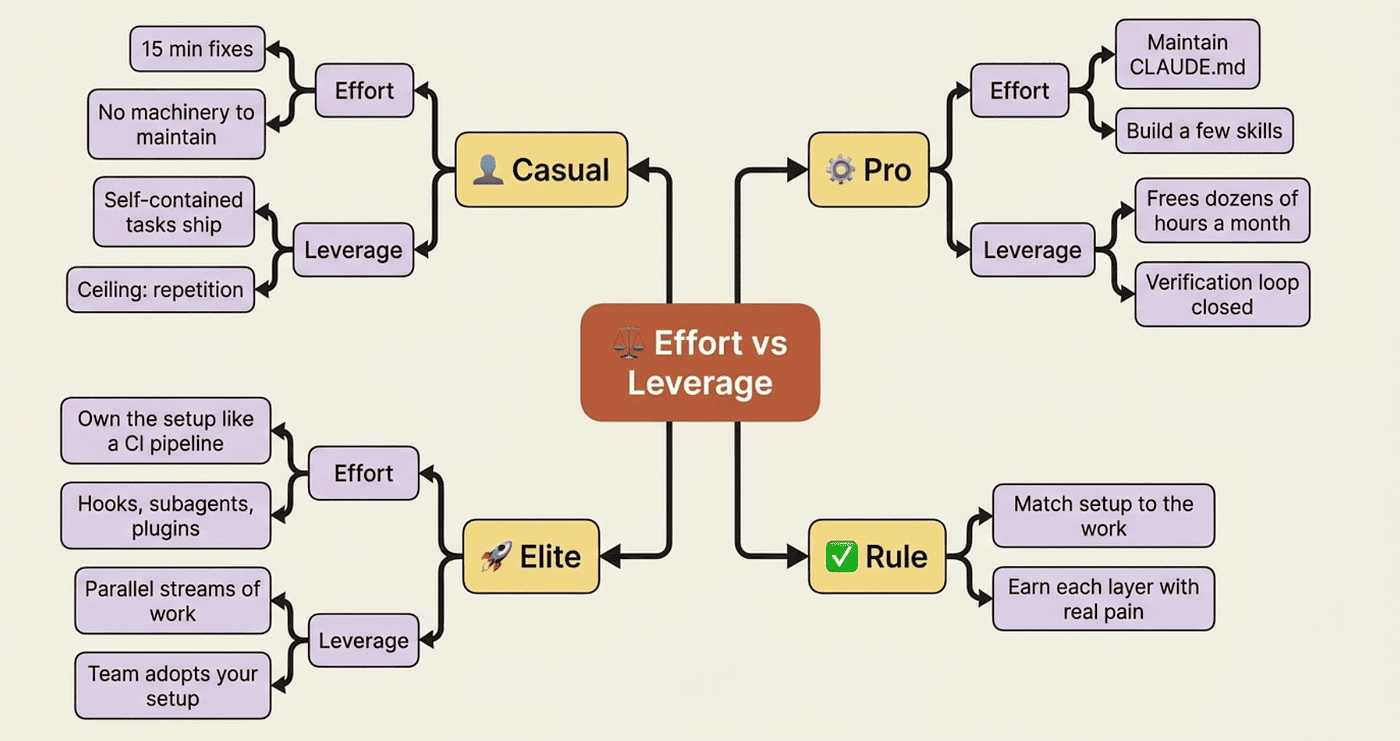
The deepest shift is this: the elite user treats their Claude Code setup as infrastructure they own, the way they would own a CI pipeline. It gets better over time; it does not decay. They push repeated procedures all the way to deterministic enforcement instead of stopping at convention. The principle "verify before trusting" becomes a Stop hook. The principle "plan before acting" becomes a structured /goal command. The principle "protect context" becomes scoped rules and session management tooling.
The elite ceiling is honest and a little surprising. You are at the frontier of what tooling supports. The next moves are not more features. They are people: mentor a teammate to pro level, submit a plugin to the community marketplace, write up the workflow patterns that work so the next person does not have to rediscover them. At the elite level, the leverage that compounds fastest is other people's leverage.
How to pick the level for a task
Here is the part that makes this practical. The personas are not fixed identities. Most working developers are pro on some projects and casual on others, all at once.
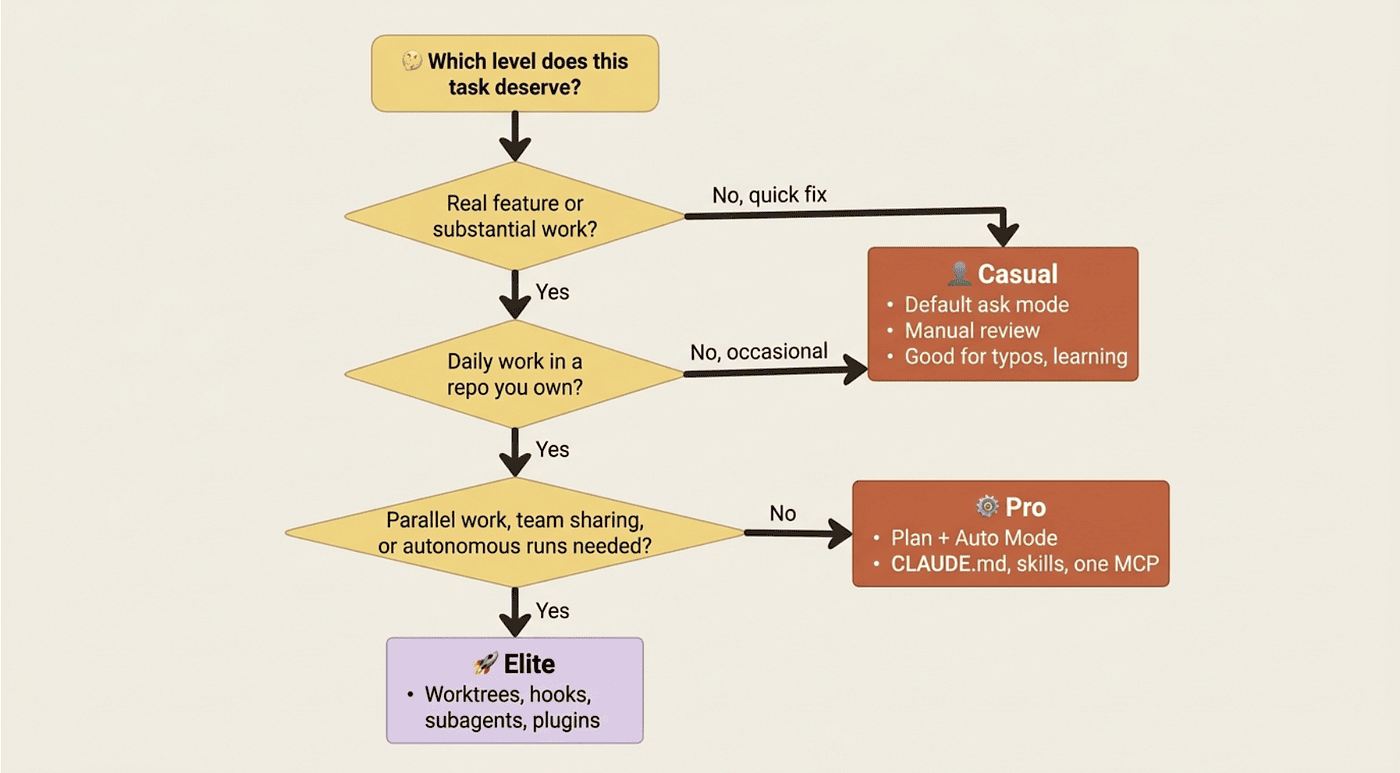
Your monorepo at work might justify the full elite setup. The open-source library you contribute to on weekends gets pro. The random repo you cloned to fix a typo gets casual. Match the structure to the project's depth and persistence, not to your self-image. "I am an elite user" is not a reason to install hooks in a repo you will touch once.
Every level trades effort against leverage, and the trade only works when the leverage is real.
The wrong way to use this chapter
Four traps are worth naming directly.
Do not try to jump levels. Going from casual to elite in a weekend is how you end up with a directory of skills you do not use, hooks you do not understand, and a CLAUDE.md so long Claude struggles to parse it. The layers compound only when each one earns its place.
Do not confuse "elite setup" with "elite work." The elite setup exists to let serious work happen faster and with fewer mistakes. If you do not have serious work, the setup is just overhead.
Do not assume the categories are static. You are not one persona. You are different personas on different repos, and that is correct.
Do not skip the principles to copy the artifacts. A CLAUDE.md, a skill, a hook, an MCP server: each works because it encodes a principle, verify before trusting, plan before acting, context is scarce. Copy someone else's CLAUDE.md without understanding why each line is there and you get brittleness.
Do this today
Pick the move that matches where you are right now, and do only that one.
If you are casual: Choose one frustration from the casual list, repeated prompts, repeated explanations, or approval fatigue. Fix exactly that. Write the one skill, add the one CLAUDE.md line, or add the one allow rule. Do not install everything. Earn the next layer by paying for it with real pain.
If you are pro: Identify the single ceiling-level frustration that hurt most this month. Try the matching elite-level investment for one week only. "I want two refactors in parallel" becomes claude --worktree. "I keep catching the same lint mistake in review" becomes a PostToolUse hook. "I keep re-explaining the same spec" becomes a /goal command against a written spec. One week. One investment. See if it pays.
If you are elite: Pick one teammate or external user and help them move up one level. Pair on their CLAUDE.md. Walk them through a worktree workflow. Package one of your skills as a plugin they can install. The infrastructure you built is more durable when other people understand and extend it.
And keep the one-paragraph rule in your pocket. For a real feature: interview the requirements into a spec at docs/specs/<feature>.md, start a fresh session, run /goal against the spec, use Auto Mode to execute and /ship to verify, and add a code-reviewer subagent for a second opinion. For everything else, match the depth of the tool to the depth of the work.
Mastery is matching, not maximizing
The maximalist setup at the top of this article is real, and for the right work it is genuinely powerful. But it is the wrong thing to aim at, because it answers a question most of your tasks never ask.
Real Claude Code mastery is the judgment to know which level a task deserves and to reach for exactly that much structure. Casual, pro, elite: these are not rungs you must climb. They are tools you choose between, sometimes several times a day, on different repos.
The compounding effect is worth holding onto. Every developer who moves from casual to pro frees up dozens of hours a month. Every developer who moves from pro to elite ships substantially more substantial work. And every developer who helps another move up a level turns individual leverage into team leverage, which is the only kind that scales.
So do not ask whether you are advanced enough. Ask what your work actually demands today, and meet it there. You are not behind. You are exactly where your work has pulled you, and your only job is to notice the next piece of friction and answer it with one small, earned layer.
This is Part 16 of "Claude Code, Day-to-Day," a 19-part guide to mastering Claude Code for working engineers.
About the Author — Claude Certified Architect
Rick Hightower is a former Senior Distinguished Engineer at a Fortune 100 company, focusing on delivering ML / AI insights to front-line applications, and a practitioner building multi-agent production systems. Rick is a Claude Certified Architect. Follow him on Medium for more hands-on agent engineering content.
Rick created Skilz, the universal agent skill installer that supports 30+ coding agents, including Claude Code, Gemini, Copilot, and Cursor, and co-founded the world's largest agentic skill marketplace. Connect with Rick Hightower on LinkedIn for collaboration or consulting.
Rick has been actively developing generative AI systems, agents, and agentic workflows for years. He is the author of numerous agentic frameworks and developer tools and brings deep practical expertise to teams adopting AI. He enjoys writing about himself in the 3rd person.
Rick also wrote a Claude Certified Architect (CCA) series of articles that have a lot of useful information on writing agentic AI systems. Many ideas captured in the CCA series directly relate to this series. The CCA series heavily discusses harness engineering, agentic workflows, and best practices for adopting agentic AI for dev teams.
CCA Exam Prep on Agentic Development
- Claude Certified Architect: The Complete Guide to Passing the CCA Foundations Exam
- CCA Exam Prep: Mastering the Code Generation with Claude Code Scenario
- CCA Exam Prep: Mastering the Multi-Agent Research System Scenario
- CCA Exam Prep: Structured Data Extraction
- CCA: Master the Developer Productivity Scenario
- Claude Certified Architect: Master the CI/CD Scenario
- CCA Exam Prep: Mastering the Customer Support Resolution Agent Scenario
- Get the complete reading list for CCA-F exam prep articles from this Claude Certified Architect Exam Prep list
Rick also wrote a series on harness engineering and how to improve agentic systems using harness engineering for feedback loops and adversarial agents. These articles also go hand in hand with this article.
Harness Engineering Articles
- The $9 Disaster: What Anthropic's Harness Design Paper Teaches Us About Building Autonomous AI
- Harness Engineering vs Context Engineering: The Model is the CPU, the Harness is the OS
- LangChain Deep Agents: Harness and Context Engineering: Memory, Skills, and Security
- Beyond the AI Coding Hangover: How Harness Engineering Prevents the Next Outage
- LangChain's Harness Engineering: From Top 30 to Top 5 on Terminal Bench 2.0
- Anthropic's Harness Engineering: Two Agents, One Feature List, Zero Context Overflow
- OpenAI's Harness Engineering Experiment: Zero Manually-Written Code