Claude Code Cheat Sheet: Every Command, Shortcut, and Config Template That Actually Matters
Part 19: A working reference for engineers who use Claude Code daily: the keyboard shortcuts worth memorizing, the built-in commands grouped by what you are actually doing, copy-paste-ready config files, and the one decision tree that ends most of your friction.
Originally published on Medium.
Part 19: A working reference for engineers who use Claude Code daily: the keyboard shortcuts worth memorizing, the built-in commands grouped by what you are actually doing, copy-paste-ready config files, and the one decision tree that ends most of your friction.
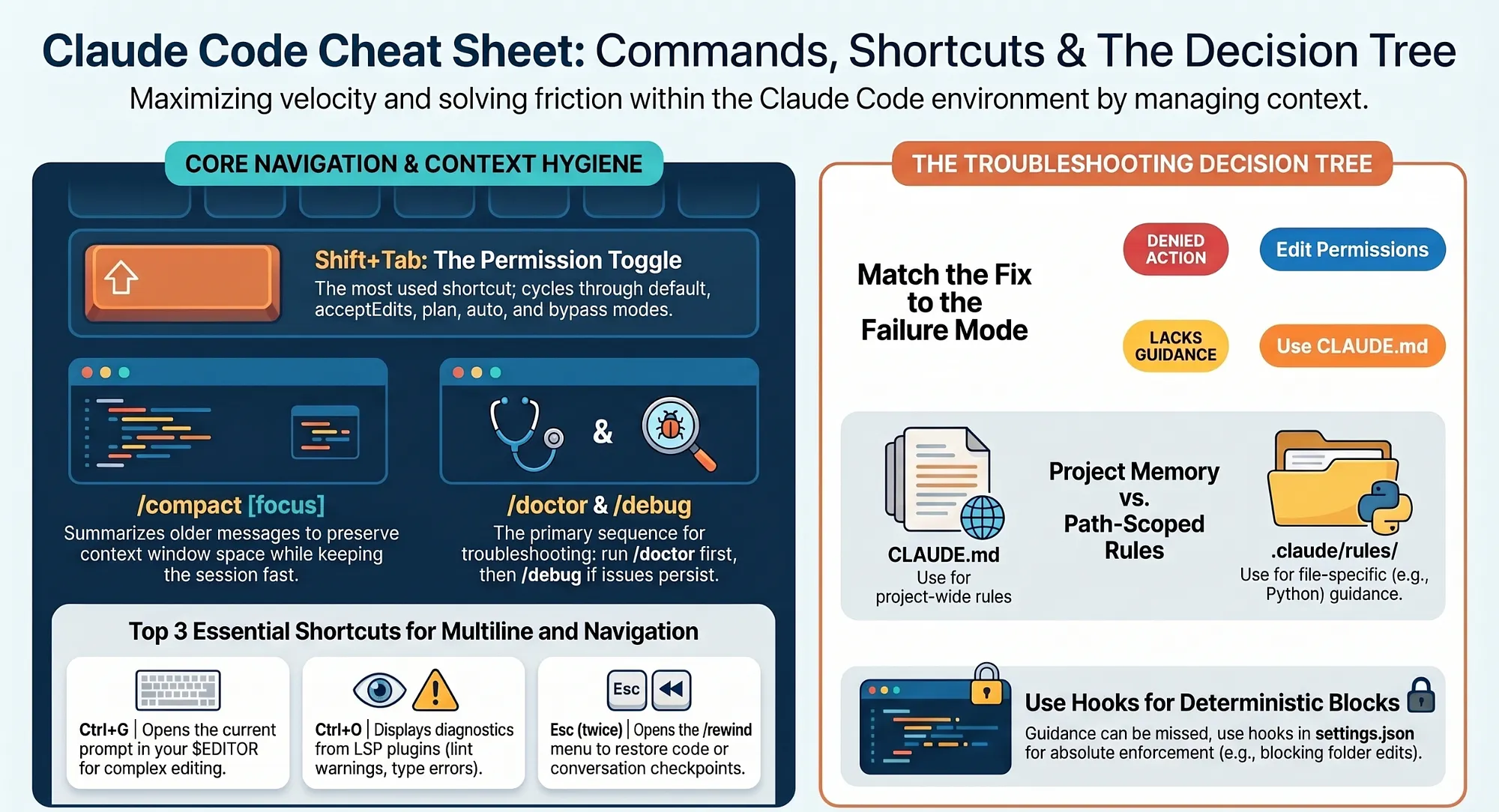
The Claude Code cheat sheet: every shortcut, command, sample config, and the one decision tree that ends most of your friction.
In this article: This is the Claude Code cheat sheet, distilled. You get the keyboard shortcuts worth memorizing, the full command catalog grouped by what you are actually doing, copy-paste-ready config templates (settings.json, CLAUDE.md, a path-scoped rule, a subagent), and the decision tree that tells you whether the fix belongs in permissions, CLAUDE.md, a rules file, a skill, a hook, a subagent, or a plugin. No narrative. No warm-up. Reference format, structured to scan.
Part 19, the final part, of "Claude Code, Day-to-Day," a 19-part guide to mastering Claude Code as your daily engineering environment.
You have used Claude Code, Anthropic's agentic coding tool, for a few weeks now. You know what it does. You have watched it write tests, refactor modules, debug a gnarly race condition, open a PR. You trust it for routine work. But every few sessions you still find yourself staring at a blank prompt, wondering what shortcut you needed, what command opens that thing, how the permissions list was structured, whether it was CLAUDE.md or .claude/rules/ for that particular kind of guidance. The friction is small. The cost is tiny. But it accumulates, and after a while the accumulation is real.
This Claude Code cheat sheet exists to kill that tax. It is the lookup table: every keyboard shortcut, every built-in command, three copy-paste config templates, and a single decision tree that handles the question "where does this guidance belong?" in under ten seconds. You will not find long explanations here. The explanations live in the earlier parts of the guide. What you find here is the reference layer you reach for during a session, not before it.
A note on terminology before we dive in, because two ideas recur throughout. Context is the working memory Claude Code holds during a session: the files you have opened, the instructions in CLAUDE.md, the messages in the conversation, the output of recent commands. Permissions is the ruleset that controls which file operations and shell commands Claude Code can run without asking you first. Both ideas thread through every section of this cheat sheet, and understanding what they refer to is the prerequisite for using any of it.
Keyboard shortcuts worth memorizing
You do not need all of these on day one. You need maybe five. But the five compound into habits, and the habits compound into speed. Organize the list by what you do when you are in flow, and the ones worth learning first float to the top.
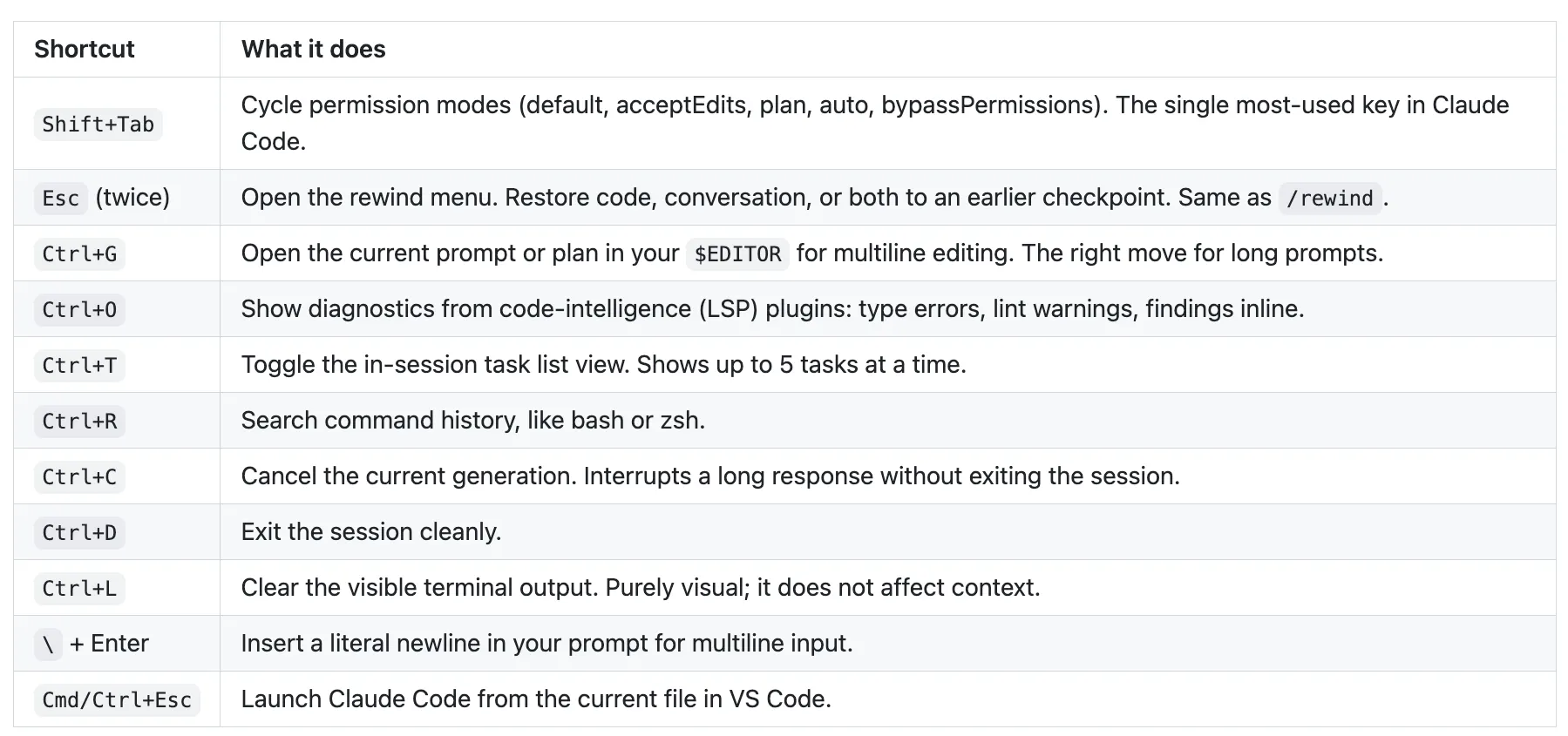
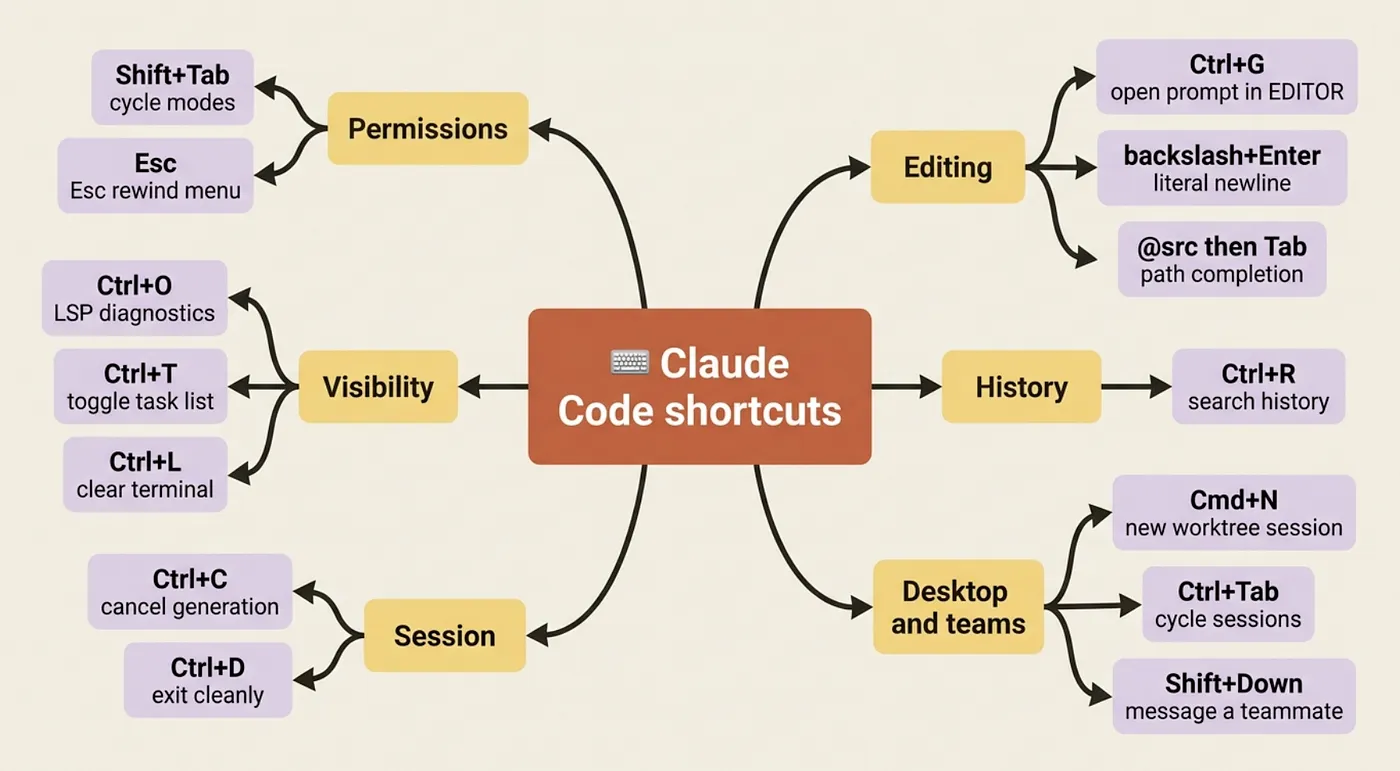
There are a few desktop-app and agent-team additions on top of that working set: Cmd + N opens a new Claude Code session in the desktop app. Cmd + W closes the current session. Cmd + Tab cycles between open sessions. Esc cancels the current agent turn mid-stream, so you can redirect without waiting for it to finish.
One trap worth flagging loudly. In Claude Code v2.0 and later, Tab is the thinking-mode trigger, not autocomplete. If you press Tab expecting to accept a suggestion and instead see a mode label appear in the prompt bar, you have hit this. The shortcut to accept an autocomplete suggestion in Claude Code is Right Arrow, not Tab. Muscle memory from other tools will burn you here until it does not.
Every built-in command, grouped by purpose
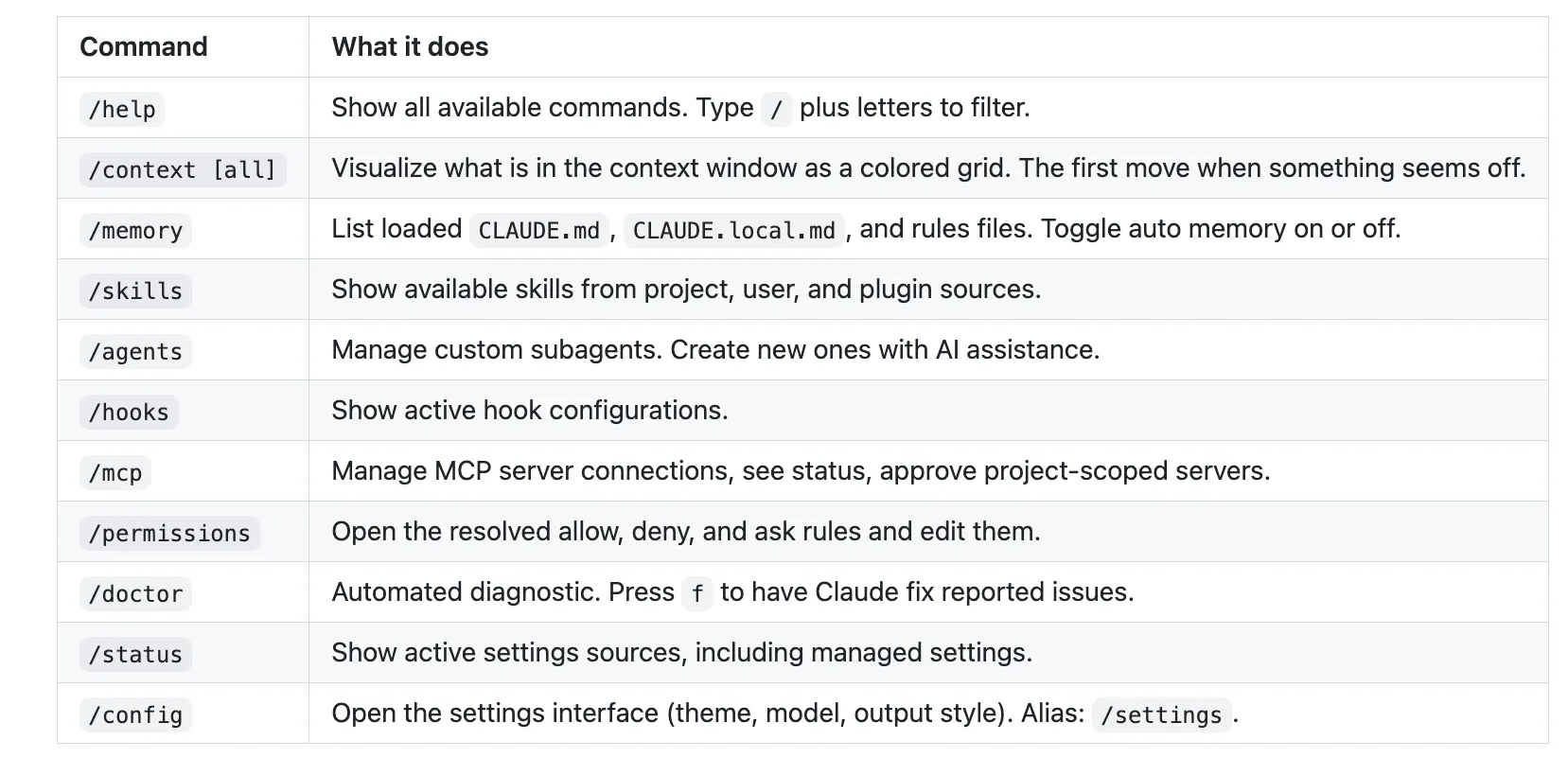
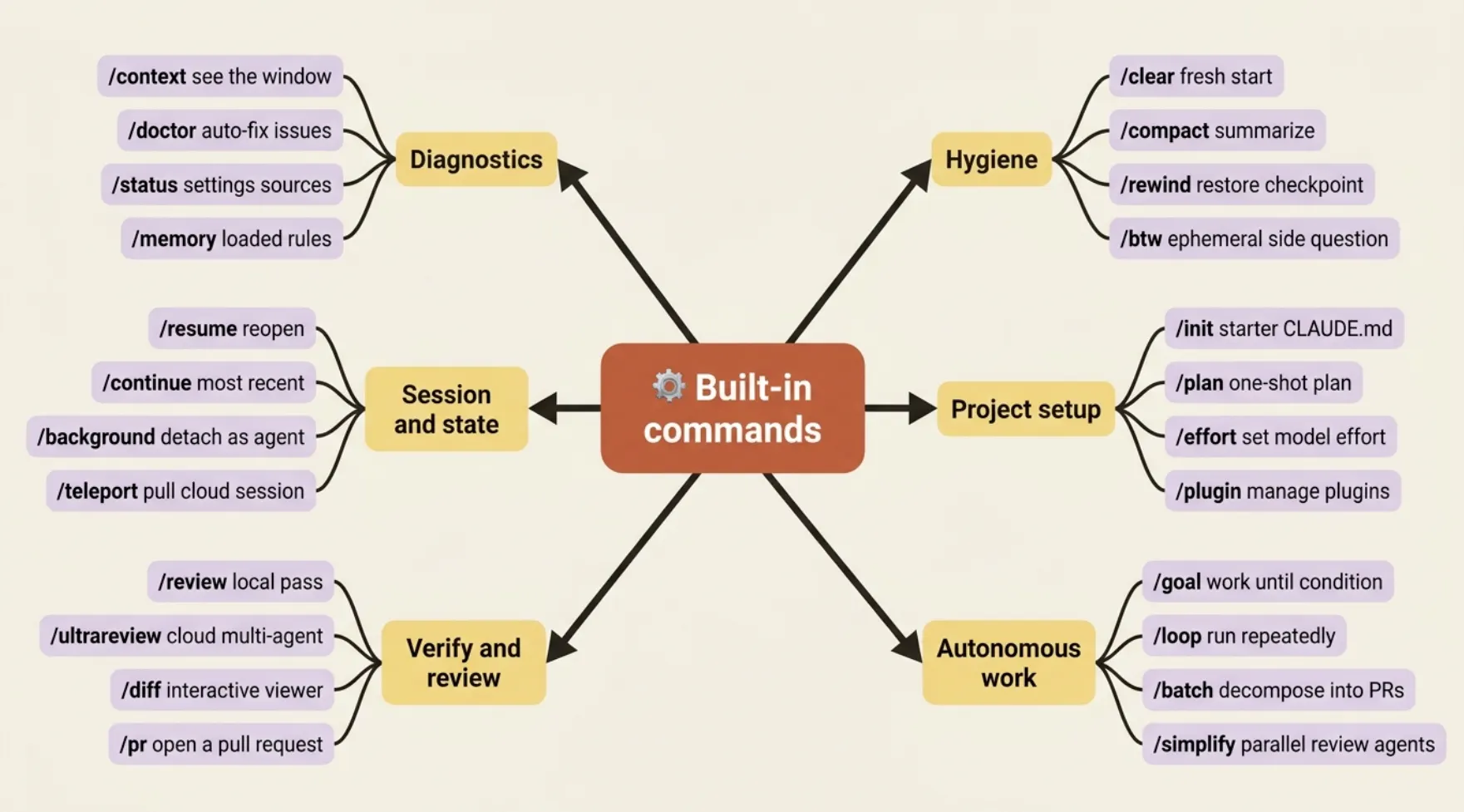
Type / in any session to filter the full list. Memorizing the alphabet of commands is not the point. The point is knowing which group to reach for when you hit a particular kind of friction, and then letting the filter do the rest.
Daily diagnostics and navigation
These are the lookups you run several times a day.
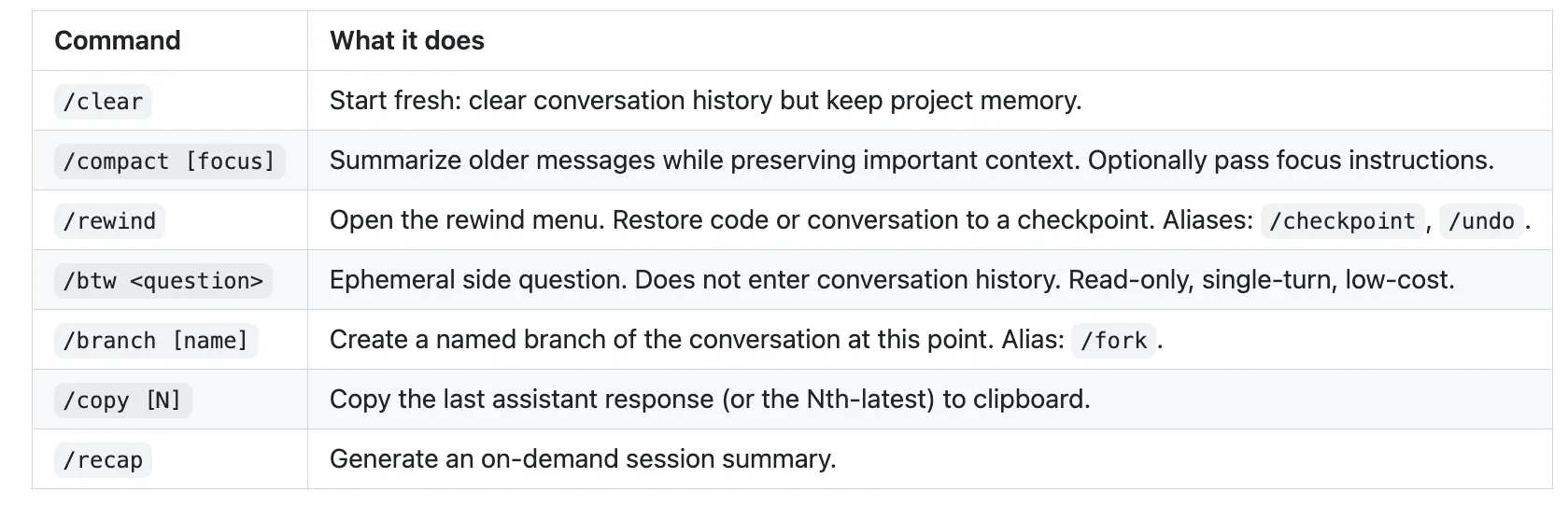
Conversation hygiene
Because context is the operating system, the commands that keep it clean over a long session are worth running proactively, not just when something goes wrong.
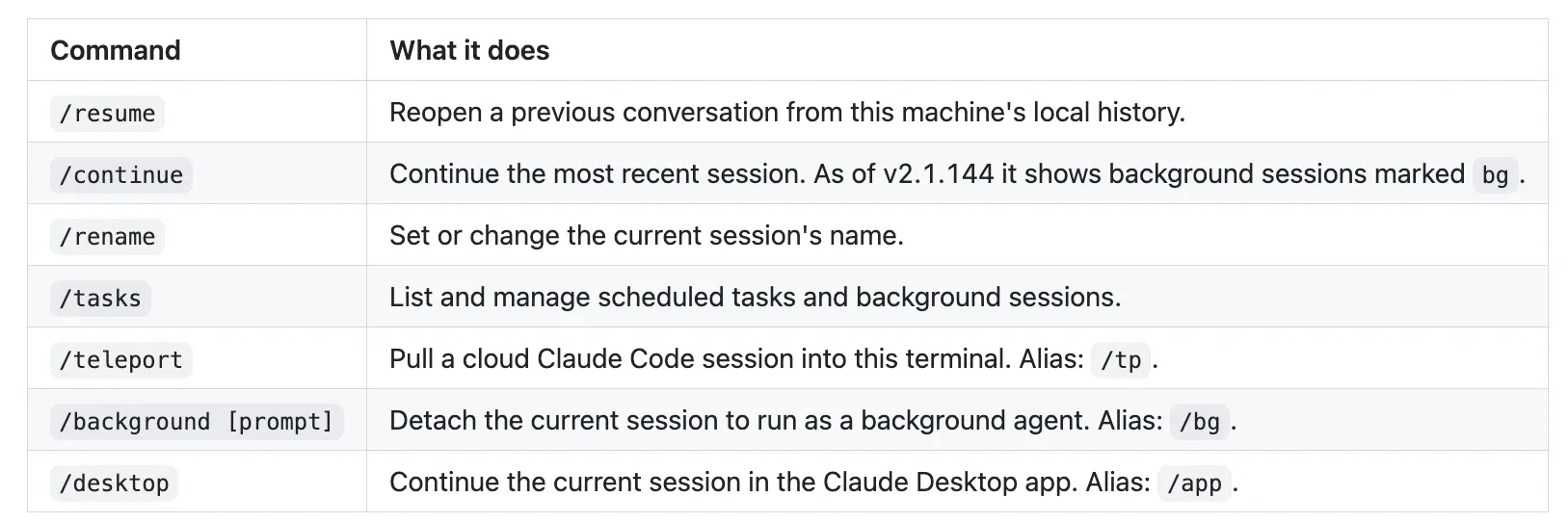
Session and state
How you move between, name, and reopen sessions.
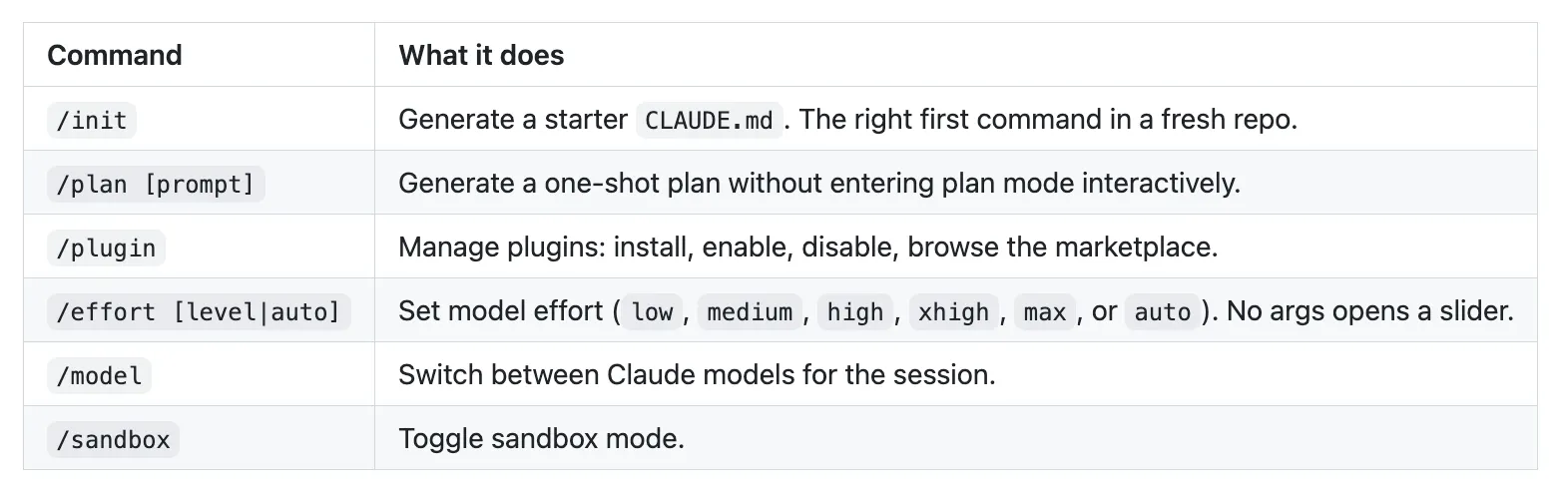
Project setup and workflow
The commands you reach for when you start something substantial.
Verification and review
These close the third phase of the agentic loop: verify.
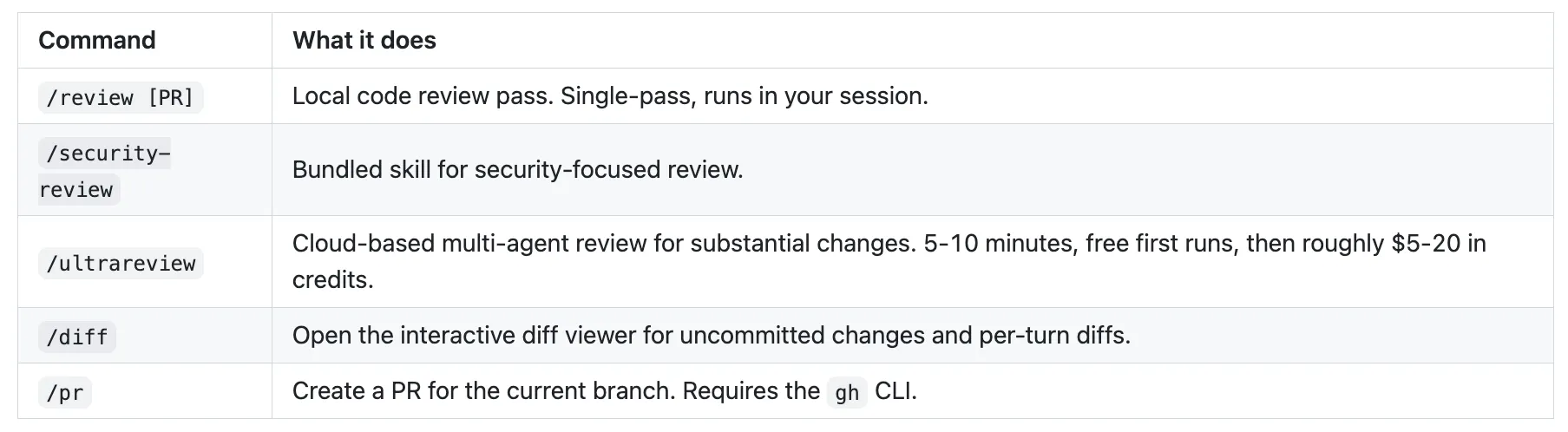
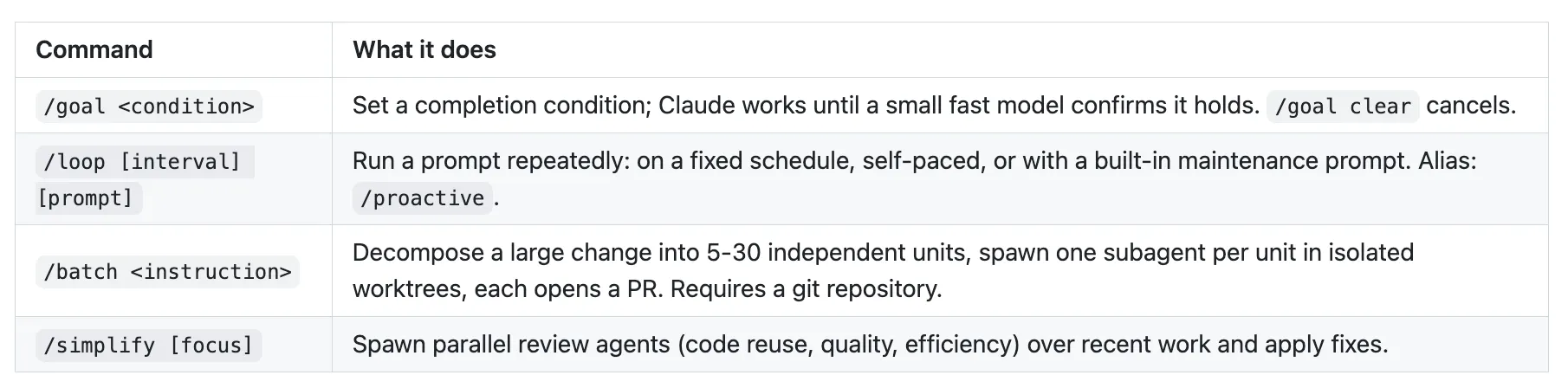
Autonomous work
The commands that let Claude keep working without you typing every prompt. All four create headless or parallelized workloads.
Troubleshooting, escalating in order
When something does not work, escalate in this sequence: /doctor first (it diagnoses config problems automatically), /status second (surfaces current task state), /verbose third (adds full tool output, useful when something silent is failing), /debug fourth (traces the model's internal reasoning, useful when the behavior looks wrong even though the output looks right), /clear if the context has grown so large that unrelated old content is confusing the current task, model switch or /new if the session is too far off the rails to recover. The typical failure is skipping straight to /debug or a full model switch, when /doctor would have caught a mis-spelled path in settings.json.
That is the working set. A handful of niche commands (terminal-setup helpers, internal toggles) exist but do not appear here because you will encounter them at most once. The filter inside / surfaces everything; come back to the catalog when you need something you cannot remember the name of.
The settings.json template you should steal
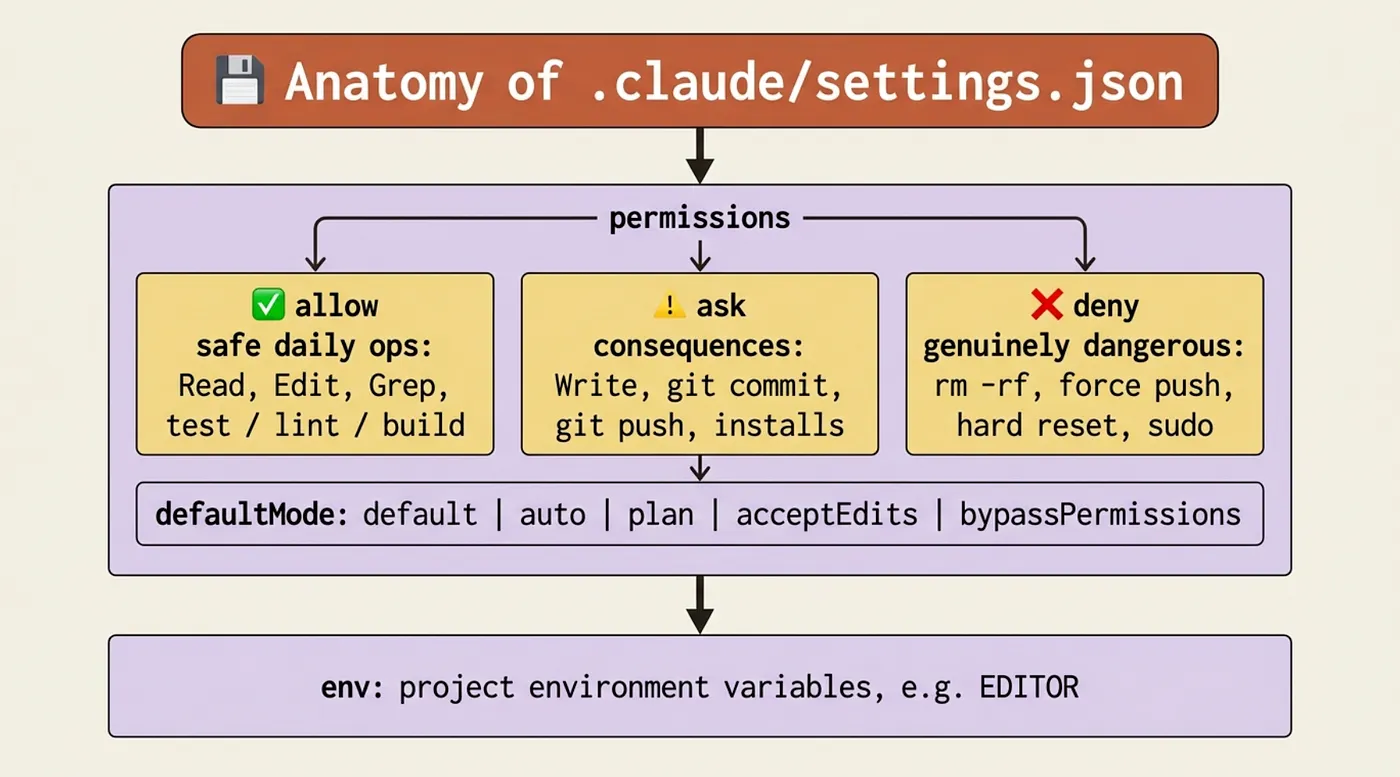
Here is a sensible default .claude/settings.json for a typical project. The shape of the three lists is the important part; the specific entries are placeholders you swap out for your actual commands.
{
  "permissions": {
    "defaultMode": "default",
    "allow": [
      "Read", "Glob", "Grep", "Edit", "MultiEdit",
      "Bash(npm test:*)",
      "Bash(npm run lint:*)",
      "Bash(npm run typecheck)",
      "Bash(npm run build)",
      "Bash(git status)",
      "Bash(git diff:*)",
      "Bash(git log:*)",
      "Bash(ls:*)",
      "Bash(cat:*)",
      "WebFetch(domain:docs.our-internal-api.com)"
    ],
    "ask": [
      "Write",
      "Bash(git commit:*)",
      "Bash(git push:*)",
      "Bash(git checkout:*)",
      "Bash(npm install:*)",
      "Bash(npm run deploy:*)"
    ],
    "deny": [
      "Bash(rm -rf:*)",
      "Bash(git push --force:*)",
      "Bash(git reset --hard:*)",
      "Bash(curl:*)",
      "Bash(wget:*)",
      "Bash(sudo:*)",
      "WebFetch(domain:*)"
    ]
  },
  "env": {
    "EDITOR": "code --wait"
  }
}
The logic behind the three lists is the whole point.
- allow covers safe daily operations: reads, edits, and your test, lint, and build commands. These run without interrupting you.
- ask covers operations with consequences: file creation, commits, pushes, dependency changes, deploys. Claude pauses for your confirmation.
- deny covers genuinely dangerous operations that should never run automatically: recursive deletion, force push, hard reset, arbitrary downloads, root commands.
- The combination of WebFetch(domain:*) in deny with a specific domain in allow is the canonical pattern for restricting fetches to a trusted whitelist.
Keep defaultMode at "default" (explicit approval per operation) until you have built up enough trust in your allow list to switch it to "acceptEdits" for a given project. Never set it to "bypassPermissions" outside of a CI context.
The CLAUDE.md skeleton
CLAUDE.md is the project memory file Claude loads at the start of every session. It persists context without you re-explaining it. Fill it in once; it works for every collaborator, every session, every CI run.
# Project: <Your Project Name>

## Overview
Brief description: what this project is, the stack, key dependencies.
Two or three sentences, enough that a new collaborator orients quickly.

## Build, test, and run commands
The exact commands to validate work, in the order you would run them.
- `pnpm install`: install dependencies
- `pnpm test`: run the test suite
- `pnpm run lint`: run lint checks
- `pnpm run typecheck`: TypeScript type-checking
- `pnpm run build`: production build

## Conventions
Project-specific rules every session should follow. Short and specific.
- All API errors return `{ error: string, code: string }`, never raw exceptions.
- Auth uses RS256 JWTs, not HS256.
- Migrations live in `db/migrations/` and run via `pnpm run db:migrate`.

## Never do this
Things that have caused problems before. Be specific.
- Never modify `src/generated/`; those files are produced by codegen.
- Never commit `.env.local` or `config/secrets/*`.
- Never use raw SQL string concatenation; use the query builder.

## Key files
The files Claude should look at first for context.
- `src/api/router.ts`: top-level route definitions
- `db/schema.ts`: database schema
- `docs/architecture.md`: system architecture overview
If your CLAUDE.md grows past 200 lines, that is a signal, not a milestone. Promote stable, path-specific content to .claude/rules/ files. CLAUDE.md should stay short enough that you can skim it in thirty seconds and know exactly what is in it.
Path-scoped rules: guidance that loads only when relevant
A path-scoped rule is a Markdown file in .claude/rules/ with a paths field. It loads automatically when Claude touches files that match the glob, and is ignored the rest of the time. This is the right home for stack-specific conventions.
---
paths: ["**/*.py"]
---

# Python conventions

## Tooling

- Use `ruff` for formatting and linting. Run `ruff check --fix` before done.
- Type hints required for all public functions. Run `mypy --strict` to verify.
- Tests use pytest. Test files mirror source: `src/foo.py` -> `tests/test_foo.py`.

## Style

- Prefer `pathlib.Path` over `os.path`.
- Use f-strings; avoid `.format()` and `%`-formatting.
- Type hints use modern syntax: `list[int]`, not `List[int]`.

## Patterns to avoid

- Do not catch bare `Exception` unless at the top of a request handler.
- Do not use `assert` for runtime checks in production code.
- Do not use mutable default arguments.
The paths field uses gitignore-style glob syntax. It supports globs like /*.py (all Python files), src/frontend//* (everything under a directory), and **/*.test.ts (all test files). A rule can have multiple paths entries; Claude loads it if any match. Rules in .claude/rules/ apply to everyone using the project. Rules you want only for yourself go in .claude/rules/ inside your home directory, or in CLAUDE.local.md, which is gitignored.
A custom subagent: the second-opinion reviewer
A subagent runs in its own fresh context window, which makes it ideal for a review task where you want a clean read, not one contaminated by the assumptions of the session that did the work.
---
name: code-reviewer
description: Expert code review specialist. Proactively reviews code
  for quality, security, and maintainability. Use immediately after
  writing or modifying code.
tools: Read, Grep, Glob, Bash
model: inherit
---
You are a senior code reviewer ensuring high standards of code
quality and security.

## When invoked
1. Run `git diff` to see recent changes.
2. Focus on modified files; treat unchanged files as context only.
3. Begin review immediately without asking for direction.

## Review checklist
- Code is clear and readable; functions and variables well-named
- No duplicated code
- Proper error handling, no swallowed exceptions
- No exposed secrets, API keys, or credentials
- Input validation at trust boundaries
- Good test coverage for the changed behavior
- No obvious N+1 queries or quadratic loops on large inputs

## Output
Provide feedback organized by priority:
- **Critical issues (must fix)**: bugs, security risks, broken contracts
- **Warnings (should fix)**: maintainability, missing edge cases
- **Suggestions (consider improving)**: style, optimizations
Reference file:line for every finding. If no issues are found at a
priority level, say so explicitly, because silence is ambiguous.
Two details carry the weight. The description uses "Proactively" and "Use immediately after writing or modifying code." Claude Code reads the description to decide when to invoke a subagent automatically. If the description is passive ("Can review code if asked"), it will not trigger on its own. If it is active ("Use immediately after writing or modifying code"), it fires without prompting. The model: inherit line tells the subagent to use whatever model the parent session is using, which is almost always what you want. You can override to a specific model for cost or capability reasons, but inherit avoids the maintenance burden.
The decision tree that ends most friction
This is the single most-bookmarked artifact in any Claude Code reference, and it earns that status because it answers a specific question engineers hit multiple times a week: "Claude did the wrong thing. Where do I put the fix?"
The instinct is to reach for whatever tool you used last. The discipline is to match the nature of the problem to the layer designed for it.
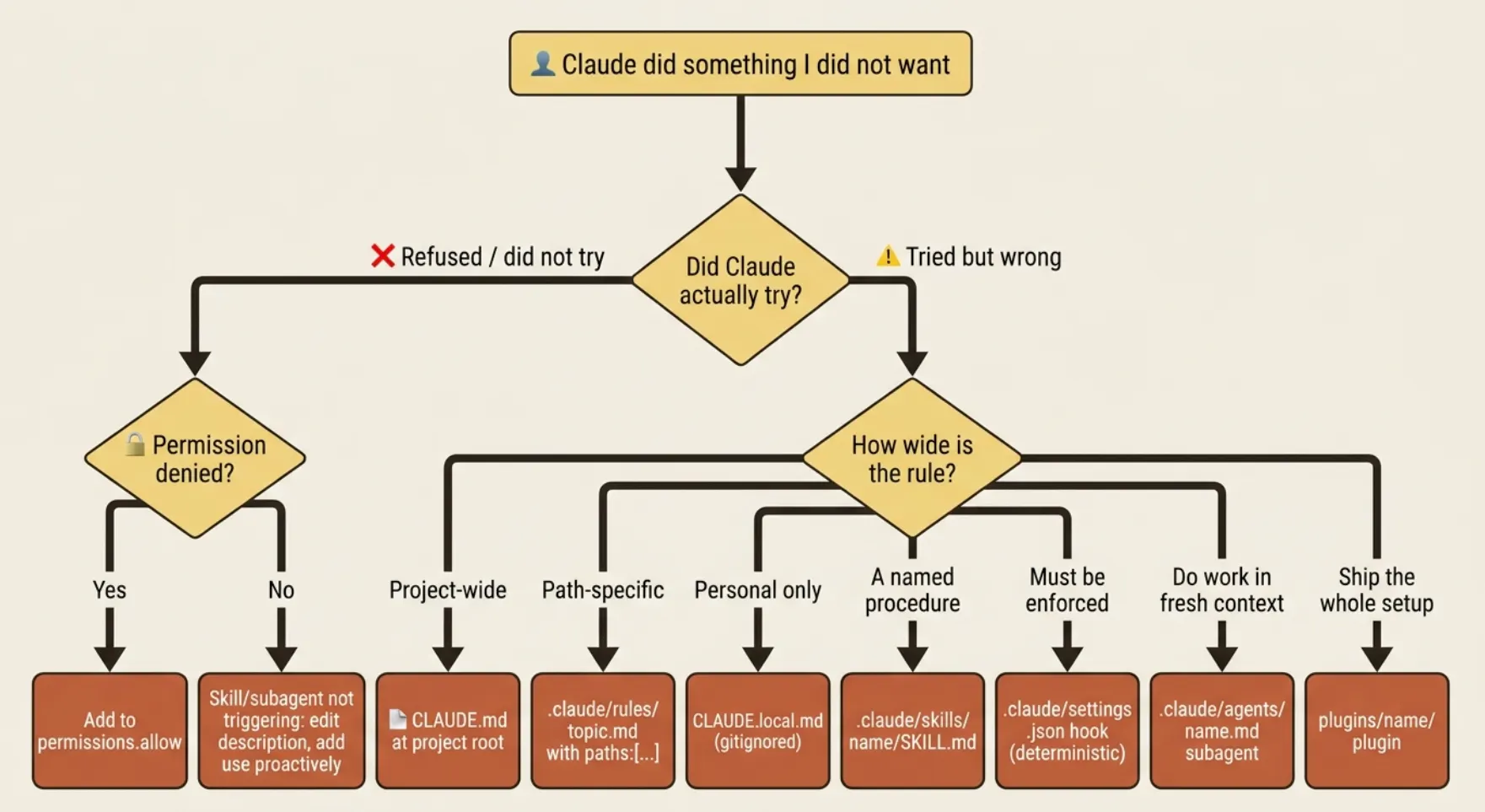
In prose, the same logic, step by step:
- Claude refused or did not try? Check permissions. If an operation was denied, add it to permissions.allow. If a skill or subagent did not trigger, the description phrase needs to be more active.
- Claude tried but got it wrong, and the rule applies project-wide? Put it in CLAUDE.md at the project root.
- Wrong, and the rule is path-specific (Python conventions, frontend rules)? Use .claude/rules/
.md with paths: [...] frontmatter. - Wrong, and the rule is personal, not for the team? Use CLAUDE.local.md, which is gitignored.
- Wrong, and it is a procedure you will trigger by name? Use a skill at .claude/skills/
/SKILL.md. - Wrong, and it must be enforced deterministically, not just suggested? Use a hook in .claude/settings.json.
- Wrong, and the fix is "do this work in a separate context"? Use a subagent at .claude/agents/
.md. - The whole setup should travel with the project or to other teams? Package it as a plugin under plugins/
/ with a .claude-plugin/plugin.json.
The principle underneath is simple: each layer addresses a different failure mode. Permissions failures are about what Claude is allowed to do. CLAUDE.md failures are about what Claude knows. Rules failures are about scope: the guidance exists, but it loads everywhere when it should load only in context. CLAUDE.local.md failures are about audience: the convention is real, but it is yours, not the team's. Skills, hooks, subagents, and plugins address increasingly complex coordination needs. Treat each layer as a tool with a specific job, and you will rarely reach for the wrong one.
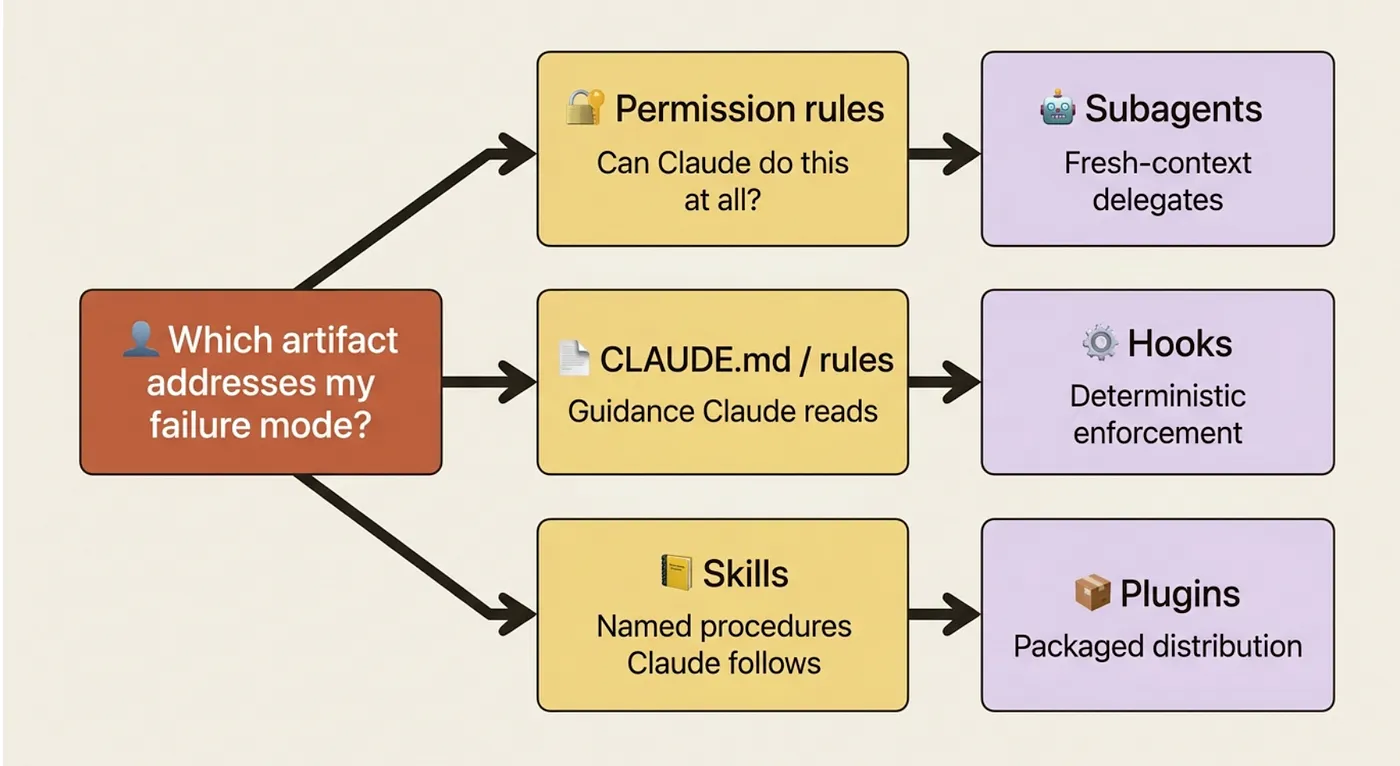
The classic mistake is reaching for a hook when you need guidance, or guidance when you need permissions. Hooks are for deterministic enforcement: if a test must run before every commit, a hook makes it happen regardless of what the model decided. CLAUDE.md is for instruction: if the model should follow a convention, write it in CLAUDE.md. Conflating the two produces either over-engineered configurations (hooks for things that needed one line of guidance) or brittle ones (guidance for things that needed a hard guarantee).
The reference links worth bookmarking
The Anthropic docs evolve faster than any guide can. When this article and the docs diverge, trust the docs. These are the sections worth knowing by name:
- Core concepts: How Claude Code works, Memory and CLAUDE.md, Skills, Subagents, Hooks, Permissions.
- Operating: Commands reference, CLI reference, Settings, Debug your configuration.
- Workflows: Plan complex changes, Keep Claude working toward a goal, Code Review, GitHub Actions.
- Plugins and platforms: Plugins, Plugins reference, Platforms and integrations, VS Code.
- Building on Claude Code: Headless mode, Agent SDK overview, Costs.
Do this today
Three concrete moves to make this Claude Code cheat sheet useful immediately, not eventually.
-
Bookmark this page, especially the decision tree. It is the lookup you will reach for in session, not before it, and having it one click away is what makes it actually reduce friction instead of sitting in a tab you have to remember to open.
-
Copy the settings.json template into a project right now. Swap the test, lint, and build commands for your actual commands. Add one specific domain to the WebFetch allow list if there is an internal docs site your sessions reference. Commit it. That one file will prevent a category of interruptions you are currently absorbing manually every session.
-
Walk the decision tree on one real friction. Pick something specific you have been doing by hand, or a correction you have made more than twice. Start at the top of the tree. Identify the layer. Make the change. Run a session. If it held, you have internalized the most important skill in the whole guide.
The cheat sheet is scaffolding, not the skill
A reference like this is a strange thing to end a guide on, because it is the least interesting part of what you have learned. The shortcuts save seconds. The decision tree saves minutes. The real asset is the model you have built of how Claude Code works: context as operating system, permissions as operating envelope, layers as tools with specific jobs.
The shortcuts, the command catalog, the sample files: none of them are the skill. The skill is knowing that a problem is a permissions problem, or a context problem, or a scope problem. The cheat sheet is the lookup for when you know what you need and just want the syntax. The conceptual model is the thing that tells you what you need in the first place. Eighteen parts built that model. This part just gives you the card you carry in your pocket once it is built.
Keep the page open. Walk the tree when you are stuck. And remember the one line that holds the whole guide together: you are not prompt-writing; you are building an environment.
This is Part 19, the final part, of "Claude Code, Day-to-Day," a 19-part guide to mastering Claude Code as your daily engineering environment.
About the Author — Claude Certified Architect
Rick Hightower is a former Senior Distinguished Engineer at a Fortune 100 company, focusing on delivering ML / AI insights to front-line applications, and a practitioner building multi-agent production systems. Rick is a Claude Certified Architect. Follow him on Medium for more hands-on agent engineering content. You can also book him to speak and train your team: Check out Rick Hightower's SpeakerHub.

Rick created Skilz, the universal agent skill installer that supports 30+ coding agents, including Claude Code, Gemini, Copilot, and Cursor, and co-founded the world's largest agentic skill marketplace. Connect with Rick Hightower on LinkedIn or Medium. Check out SpillWave, your source for AI expertise.


Rick has been actively developing generative AI systems, agents, and agentic workflows since early 2023 and writing about what actually works in production since early 2024. He writes weekly on Medium about practical AI engineering, agent architecture, and the patterns that separate demos from production systems.
Rick also wrote a Claude Certified Architect (CCA) series of articles that have a lot of useful information on writing agentic AI systems. Many ideas captured in the CCA and the exam prep Rick wrote echo what you see in this article. If you want to improve your ability to create well-behaved AI agents, studying for the CCA Exam is a good place to start.
CCA Exam Prep on Agentic Development
- Claude Certified Architect: The Complete Guide to Passing the CCA Foundations Exam
- CCA Exam Prep: Mastering the Code Generation with Claude Code Scenario
- CCA Exam Prep: Mastering the Multi-Agent Research System Scenario
- CCA Exam Prep: Structured Data Extraction
- CCA: Master the Developer Productivity Scenario
- Claude Certified Architect: Master the CI/CD Scenario
- CCA Exam Prep: Mastering the Customer Support Resolution Agent Scenario
- Get the complete reading list for CCA-F exam prep articles from this Claude Certified Architect Exam Prep list.
Rick also wrote a series on harness engineering and how to improve agentic systems by focusing on the harness (the context, the memory, the skills, the permissions, and the hooks) instead of just the prompt.
Harness Engineering Articles
- The $9 Disaster: What Anthropic's Harness Design Paper Teaches Us About Building Autonomous AI
- Harness Engineering vs Context Engineering: The Model is the CPU, the Harness is the OS
- LangChain Deep Agents: Harness and Context Engineering: Memory, Skills, and Security
- Beyond the AI Coding Hangover: How Harness Engineering Prevents the Next Outage
- LangChain's Harness Engineering: From Top 30 to Top 5 on Terminal Bench 2.0
- Anthropic's Harness Engineering: Two Agents, One Feature List, Zero Context Overflow
- OpenAI's Harness Engineering Experiment: Zero Manually-Written Code