Claude Code Pitfalls: Claude Code Won't Do What You Told It: A Troubleshooting Catalog
Part 17: Why your config looks right but Claude ignores it, and the exact commands that diagnose it in seconds
Originally published on Medium.
Part 17: Why your config looks right but Claude ignores it, and the exact commands that diagnose it in seconds
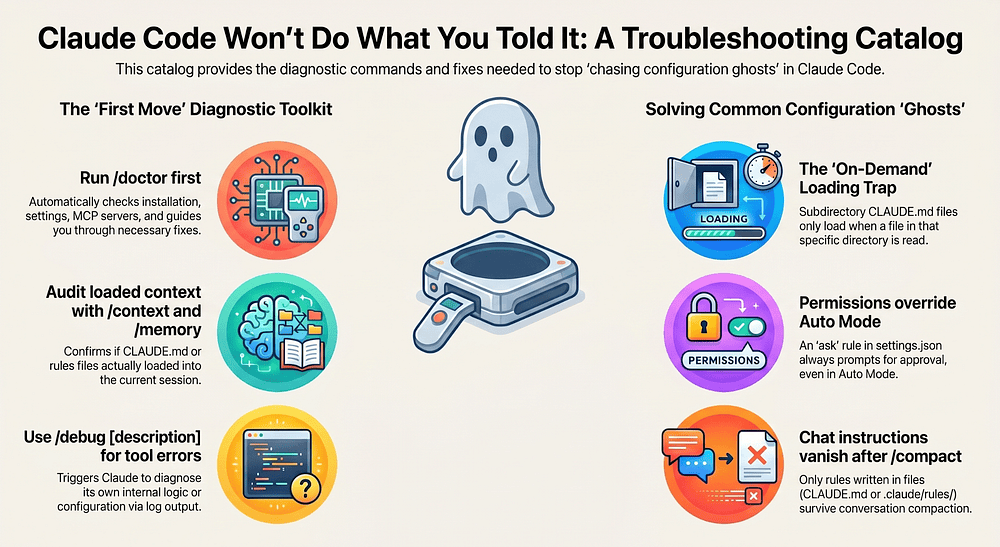
The Claude Code troubleshooting catalog: the recurring failures that bite engineers, grouped by category, with the exact one-command fixes. The relief of realizing your config was not broken, you just needed to know where to look.
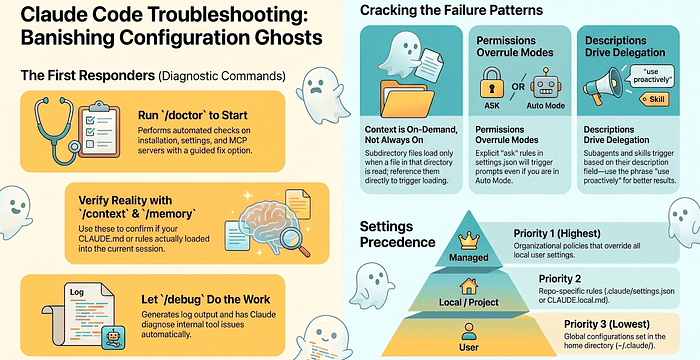
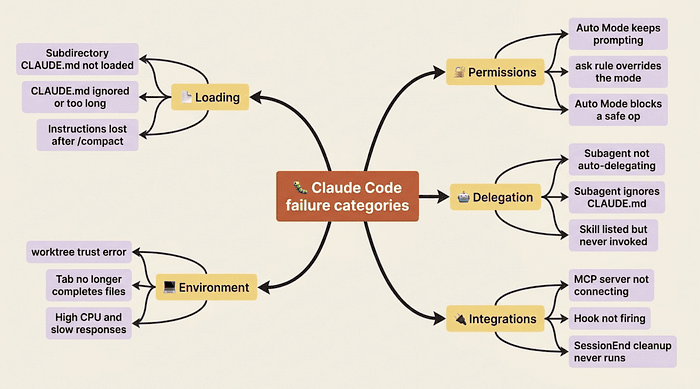
In this article: Most Claude Code failures are not mysteries. They are a small set of recurring patterns: files that load on demand instead of at startup, permission rules that quietly override your mode, descriptions that fail to trigger a subagent. This is a Claude Code troubleshooting catalog grouped into five categories, with the exact diagnostic commands for each. Read it once and you will spend dramatically less time chasing configuration ghosts.
You set a permission mode and the prompt still appeared. You added a line to CLAUDE.md and Claude acted like it never existed. You wrote an MCP server config and its tools never showed up. Every one of these feels like a bug in the tool. Almost none of them are.
Claude Code troubleshooting is mostly pattern recognition. The setup looked right but did not load. The instruction was clear but Claude did not follow it. The mode was set but the rule underneath it won. None of these are mysterious once you know what to look for. The hard part is knowing what to look for in the first place. That is what this catalog gives you.
The source material here is a chapter of seventeen distinct failure modes. Narrating all seventeen at equal depth would be a slog. So I have grouped them into five categories, led with the most common and instructive ones, and treated the rest briefly. Learn the categories and the diagnostic instinct, and the individual fixes become reflexive.
The four commands that solve most cases before you read further
Before any specific fix, four commands resolve more situations than any single entry below. Learn these as muscle memory.
/doctor runs an automated check of your installation, settings, MCP servers, and context usage. Press f and Claude walks you through fixes for whatever it found. This is the single most useful first move when something is broken.
/context shows everything currently occupying the context window: system prompt, memory files, skills, MCP tools, and the conversation itself. Use it to confirm whether your configuration actually loaded, rather than assuming it did.
/memory lists the CLAUDE.md, CLAUDE.local.md, and rules files loaded for the current session, plus any auto-memory entries. Run this before you assume a file is being read.
/debug [description] turns on debug logging and has Claude diagnose the problem from the log output. This is the right move when something is wrong with Claude Code itself rather than with your code.
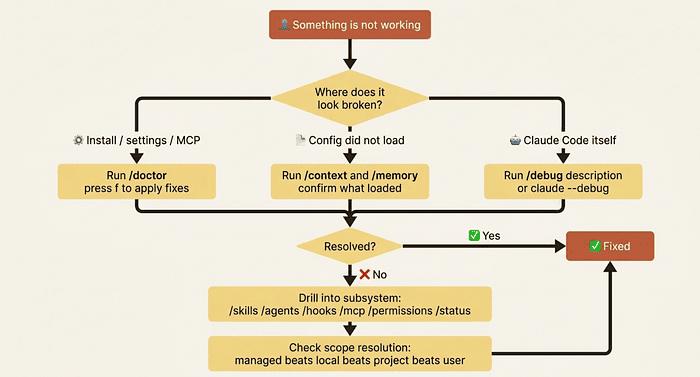
Keep this decision tree in mind. It routes almost every problem to the right command.
Category one: loading problems (the most common, and the most instructive)
If you take one idea from this article, take this: in Claude Code, context is the operating system, and a surprising amount of that context loads on demand rather than at startup. Most "Claude ignored my instructions" reports trace back to a file that simply was not in the context window when it mattered.
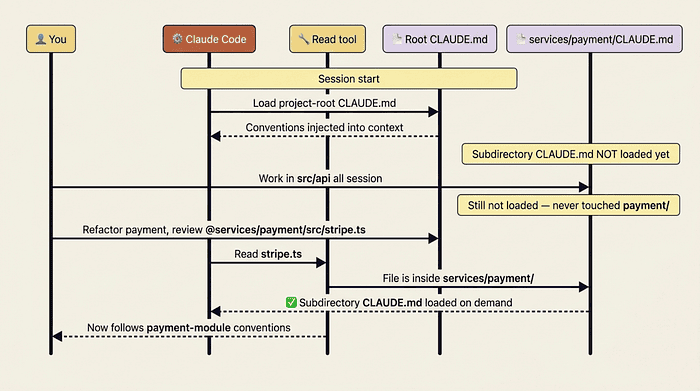
The subdirectory CLAUDE.md that isn't loading. You add a CLAUDE.md inside services/payment/ with conventions for that module, and Claude acts oblivious. The cause is by design: subdirectory CLAUDE.md files load on demand when Claude reads a file in that directory with the Read tool, not at session start. If you have spent the whole session in src/api/ and never touched services/payment/, that subdirectory's CLAUDE.md was never pulled in.
The fix has three flavors. Reference a file from the directory directly, for example "Refactor the payment service. Start by reviewing @services/payment/src/stripe.ts." Reading stripe.ts triggers the load. Or add a pointer in your project-root CLAUDE.md: "For any payment-related work, see @services/payment/CLAUDE.md first." Or, if the rule matters even for sessions that never touch that directory, promote it to the project-root file or a path-scoped rule.
This is worth dwelling on, because lazy-loading is a feature, not a bug. A large monorepo with thirty subdirectory CLAUDE.md files would wreck your startup context if all thirty loaded at once. On-demand loading keeps the cost proportional to what you are actually working on.
The CLAUDE.md that is being ignored. You added a line and Claude does not follow it. Run /memory first and confirm the file is even listed; if it is not, Claude cannot see it. Then check the file size. Files over 200 lines reduce adherence. Claude can still read them, but the rules get less attention. If your CLAUDE.md has ballooned to 400 lines, split it: path-scoped rules into .claude/rules/ for stack-specific guidance, and the project-root file for cross-cutting context only.
Two more checks. Look for conflicting instructions, because "use tabs" in CLAUDE.md and "use 2-space indentation" in CLAUDE.local.md makes Claude pick one arbitrarily. And make the instruction concrete: "format code nicely" tells Claude nothing, while "use 2-space indentation, single quotes, and trailing commas on multi-line literals" gives it actions it can execute.
There is a deeper principle here. CLAUDE.md tells Claude how to behave; hooks and permissions enforce limits regardless of what Claude decides. If an instruction must run at a specific point, like "run prettier after every edit," that is a PostToolUse hook, not a CLAUDE.md line. CLAUDE.md is guidance. Hooks are policy.
Instructions that vanish after /compact. Claude was following an instruction, you compacted the conversation, and the behavior stopped. What survives /compact is not what was in the session. Project-root CLAUDE.md survives, because Claude re-reads it from disk. Subdirectory CLAUDE.md files do not survive; they reload only the next time Claude reads a file from that directory. And conversation-only instructions, anything you said in chat that never made it into a file, are gone. The rule is blunt: if it is not in a file, it does not survive. So write it down, into CLAUDE.md, a .claude/rules/ file, or a skill.
Category two: permission surprises
The second cluster of failures is permission rules behaving in ways the mode settings seem to contradict.
Auto Mode (or acceptEdits) keeps prompting on every edit. You set the mode and Claude still asks for approval on every Edit. The cause is almost always a restrictive ask rule in .claude/settings.json, something like "ask": ["Edit", "Write"]. Permission rules apply regardless of mode. An ask rule on Edit means "prompt for every Edit," and that overrides Auto Mode's classifier deciding the edit is safe.
The fix is to move Edit to the allow list and reserve ask for the genuinely dangerous operations:
{
  "permissions": {
    "allow": ["Edit", "Read", "MultiEdit"],
    "ask": ["Write", "Bash(git commit:*)"]
  }
}
Now edits go through, file creation still prompts, and git commits still prompt. The same trap applies to Bash: "ask": ["Bash"] prompts on every command no matter the mode. Use "allow": ["Bash(npm test:*)"] for commands you would always approve.
Auto Mode keeps blocking something you want. Auto Mode runs a safety classifier that asks "is this safe to run automatically?" It defaults to caution for anything ambiguous: network calls, destructive operations, anything touching resources outside the current project. That conservatism is mostly a feature, but it occasionally catches something you would happily allow. Three layered responses, in order of permanence: read the classifier's stated reason and approve manually if it is reasonable; press Shift+Tab to switch modes for that one turn; or add an explicit allow rule. Allow rules take precedence over the classifier, so Auto Mode skips its check for anything explicitly allowed.
The principle that ties these together: Auto Mode is the default, and allow rules are how you teach it your tolerances. Do not build the allow list up front. Let it accumulate from the operations you actually find yourself approving. A few weeks of real work produces a thoughtful list.
Category three: delegation that does not trigger
Subagents and skills both rely on a description-driven classifier to know when to fire. When the description is vague, the classifier stays quiet.
A subagent that won't auto-delegate. You built a database-expert subagent and Claude never invokes it for database questions. Auto-delegation depends on the subagent's description field, not its body. If the description does not clearly signal when the agent should be used, Claude does not know to delegate. Edit the frontmatter so the description names trigger conditions and includes the phrase "use proactively":
---
name: database-expert
description: PostgreSQL expert for schema design, query
  optimization, and migration review. Use proactively for
  all database-related tasks including schema changes,
  slow queries, and SQL review.
tools: Read, Grep, Glob, Bash
---
"Use proactively" is a meaningful signal that tips the classifier. So is naming specific triggers: "for schema changes," "for slow queries." Three concrete triggers beat one vague sentence. If it still will not fire, fall back to explicit invocation ("use the database-expert agent to review this schema"). You should not need that often, but it works.
A skill that shows up in /skills but never runs. Two usual causes. The skill may have disable-model-invocation: true, which makes it user-only; Claude will not trigger it autonomously and you must call it explicitly with /skill-name. Check the badge in /skills for a "user-only" label. Or the description simply does not match how you phrase requests: a skill described as reviewing "security vulnerabilities" will not connect to "check this for problems." Broaden the description to cover more phrasings. The body is what the skill does after triggering; the description is what makes it trigger at all.
A built-in subagent that ignores CLAUDE.md. This one surprises people. The built-in Explore, Plan, and general-purpose subagents skip CLAUDE.md by design, because their job is focused work with minimal context overhead. Only custom subagents load CLAUDE.md the way the main conversation does. So for Explore or Plan, restate the critical instruction in your delegating prompt ("find authentication files; note the project uses RS256 JWTs, not HS256"). For custom subagents, put critical instructions in the agent file body, which becomes its persistent system prompt.
Category four: integrations that go quiet
An MCP server that will not connect. You added an MCP server and its tools never appear. Run /mcp first. It shows every configured server, its connection status, and whether you have approved it for the project. If the server shows as failed, it is not starting: check the command path (test npx -y @modelcontextprotocol/server-github outside Claude Code), the environment variables, and the file location. Project-scoped MCP config lives at .mcp.json in the repository root, not .claude/.mcp.json. The .claude/ directory is for skills, agents, hooks, and rules. Relative paths in command or args resolve against your launch directory, so prefer absolute paths or ${CLAUDE_PROJECT_DIR}. If the server shows as connected with zero tools, it started but is not returning a tool list, often an authentication failure; choose Reconnect from /mcp. If it shows pending approval, project-scoped servers need a one-time approval you may have dismissed. The escape valve is claude --debug, which prints MCP initialization errors straight to the console.
A hook that is not firing. Run /hooks to list active hook configurations. If yours is missing, the file did not load; check whether it is in .claude/settings.json for project scope or ~/.claude/settings.json for user scope. Then check the matcher, which is case-sensitive: "matcher": "edit" will not fire on Edit operations. Make sure any script the hook calls is executable (chmod +x) and has a valid shebang on line 1. Test the script from the command line; if it fails outside the hook, it fails inside it. Hook failures are almost always one of four things: the file did not load, the matcher is wrong, the script is not executable, or the script has a bug. /hooks plus claude --debug catches all four.
Cleanup that never runs at session end. You expected a cleanup step when the session ended and nothing happened. Claude does not run cleanup automatically. You have to register a SessionEnd hook in .claude/settings.json that points at a script. If the cleanup should run frequently rather than only at termination, use a Stop hook instead, which runs at the end of every turn.
Category five: environment quirks
These are quick. The Tab key no longer completes filenames because in Claude Code v2.0 and later, Tab is remapped to the thinking-mode toggle; file completion is now scoped to @ references, so lead with @ to get it back. Running claude --worktree feature-x can exit with a trust error because worktree creation requires a trusted workspace; run plain claude in the directory once, accept the trust dialog, then --worktree works. And high CPU, slow responses, or hangs usually trace to state, not hardware: run /doctor, run /context and /clear if the window is near full, audit slow hooks with /hooks, and disable MCP servers you are not using. The fix is almost always cleaner state.
When all else fails: the diagnostic order and the scope rule
When something is wrong and you genuinely do not know why, follow this order: /doctor for installation, settings, and MCP issues; /context to confirm what loaded; then drill into the specific subsystem with /memory, /skills, /agents, /hooks, /mcp, or /permissions; /status to see which settings sources are active; /debug for problems in Claude Code itself; and claude --debug as the lowest-level diagnostic.
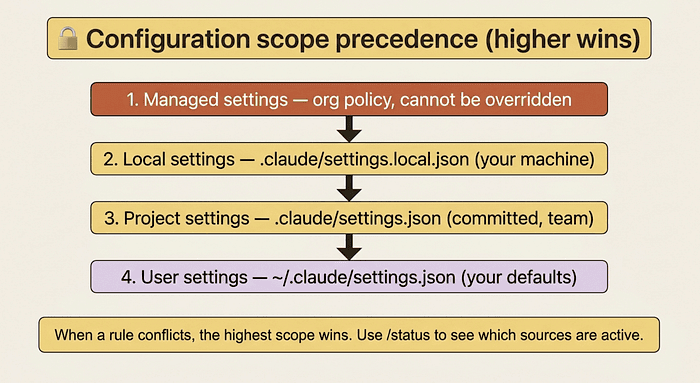
If none of that reveals the cause, the answer is usually that something loaded from a different location than you expected, or a higher scope is winning. Settings resolve in a strict precedence: managed beats local beats project beats user. A managed org policy will silently override a project rule you wrote yesterday, and /status is what shows you that.
Do this today
Three concrete moves to build the diagnostic instinct.
First, bookmark this catalog. You will not memorize seventeen failure modes. You will remember that a catalog exists and look up the one you hit. That is the correct way to use it.
Second, run /doctor proactively, not only when something breaks. Once a week is enough to catch configuration drift before it bites. It is a small habit with a disproportionate payoff.
Third, the next time something does not work, type /debug <description of the issue> first. Before reading logs yourself, before searching docs, before opening a new terminal. /debug is the fastest path to a diagnosis most of the time. Build that reflex and you stop losing afternoons to configuration ghosts.
The catalog is training wheels
Here is the thing about a troubleshooting catalog: its real value is not the seventeen fixes. It is the pattern underneath them. Almost every Claude Code failure is a context-loading question, a precedence question, or a description-matching question. Once you can name which of those three you are looking at, the specific fix is obvious.
Every failure mode you hit once becomes a failure mode you solve in seconds the next time. Six months in, almost nothing in this catalog requires a second look; the fixes are reflexive. The catalog exists for the first encounter. The diagnostic instinct that grows out of those encounters is the durable thing, and it is the thing worth building. Treat the catalog as training wheels, and aim to outgrow it.
This is Part 17 of "Claude Code, Day-to-Day," a 19-part guide to mastering Claude Code for working engineers.
About the Author — Claude Certified Architect
Rick Hightower is a former Senior Distinguished Engineer at a Fortune 100 company, focusing on delivering ML / AI insights to front-line applications, and a practitioner building multi-agent production systems. Rick is a Claude Certified Architect. Follow him on Medium for more hands-on agent engineering content. You can also book him to speak and train your team: Check out Rick Hightower's SpeakerHub.
Rick created Skilz, the universal agent skill installer that supports 30+ coding agents, including Claude Code, Gemini, Copilot, and Cursor, and co-founded the world's largest agentic skill marketplace. Connect with Rick Hightower on LinkedIn or Medium. Check out SpillWave, your source for AI expertise.
Rick has been actively developing generative AI systems, agents, and agentic workflows for years. He is the author of numerous agentic frameworks and developer tools and brings deep practical expertise to teams adopting AI. He enjoys writing about himself in the 3rd person.
Rick also wrote a Claude Certified Architect (CCA) series of articles that have a lot of useful information on writing agentic AI systems. Many ideas captured in the CCA and the exam prep Rick wrote echo what you see in this article. If you want to improve your ability to create well-behaved AI agents, studying for the CCA Exam is a good place to start.
CCA Exam Prep on Agentic Development
- Claude Certified Architect: The Complete Guide to Passing the CCA Foundations Exam
- CCA Exam Prep: Mastering the Code Generation with Claude Code Scenario
- CCA Exam Prep: Mastering the Multi-Agent Research System Scenario
- CCA Exam Prep: Structured Data Extraction
- CCA: Master the Developer Productivity Scenario
- Claude Certified Architect: Master the CI/CD Scenario
- CCA Exam Prep: Mastering the Customer Support Resolution Agent Scenario
- Get the complete reading list for CCA-F exam prep articles from this Claude Certified Architect Exam Prep list.
Rick also wrote a series on harness engineering and how to improve agentic systems using harness engineering for feedback loops and adversarial agents. These articles also go hand in hand with this article.
Harness Engineering Articles
- The $9 Disaster: What Anthropic's Harness Design Paper Teaches Us About Building Autonomous AI
- Harness Engineering vs Context Engineering: The Model is the CPU, the Harness is the OS
- LangChain Deep Agents: Harness and Context Engineering: Memory, Skills, and Security
- Beyond the AI Coding Hangover: How Harness Engineering Prevents the Next Outage
- LangChain's Harness Engineering: From Top 30 to Top 5 on Terminal Bench 2.0
- Anthropic's Harness Engineering: Two Agents, One Feature List, Zero Context Overflow
- OpenAI's Harness Engineering Experiment: Zero Manually-Written Code