Claude Code Sub-Agents: Agentic Programming for the masses?
Claude Code Sub-Agents: 7 AI Agents Built My Documentation Pipeline in Minutes: Here's How
Originally published on Medium.
Claude Code Sub-Agents: 7 AI Agents Built My Documentation Pipeline in Minutes: Here's How
Let's use Claude Code sub-agents to create a documentation pipeline in minutes without writing a single line of code; Claude Code ships with an agent framework that allows you to create custom agents quickly.
If you have heard of CrewAI or AutoGen, then you likely heard of agents; perhaps you have even used them. Claude Code makes it very easy to get started with agents.
The Moment Everything Changed
Picture this: Seven AI agents working together, extracting mermaid diagrams from markdown, generating images, and producing Word and PDF documents. No debugging. No Stack Overflow searches. Just natural language instructions orchestrating a sophisticated pipeline that would have taken a while to code. Except there is no code. Instead, you describe what you want to do and provide the agents with the tools to complete the work. One agent serves as an orchestrator, and then each agent performs its designated task.
I believe this represents a significant shift in how we can develop software, with intelligent agents living in a simple .claude/agents/ folder.
The Documentation Challenge
Technical teams often struggle with a common problem. You write documentation in Markdown with Mermaid diagrams, but stakeholders require PDFs, and management prefers Word documents for change tracking. Later, you may even upload the final document to Confluence. Often, these conversion processes fail due to UTF-8 errors.
Instead of developing code to solve this problem, I found a much more elegant solution. Using Claude Code sub-agents, I created a complete no-code agent workflow during my morning hike that efficiently handled all these documentation tasks without writing a single line of traditional code.
Traditionally, solving this problem requires building a custom application with dependencies, error handling, and file management logic, which requires a significant amount of development time. And your software, which you write, is not self-healing; it won't try to solve a version mismatch or install a missing library or plugin on its own. Agents will.
And with agents, you write your program in plain English.
The inception
As is often the case, I was contemplating how far I could take a Claude subagent for a more complex task, which was more of a workflow than the previous ones I had written, while hiking my favorite trail. I quite literally dictated my ideas into my phone using Voice Memos transcriptions, ChatGPT, Claude, and Grok during several conversations and iterations as I plotted along the rocky terrain. This allowed me to validate the concept ahead of time, working on the design while hiking and iterating on ideas. For tricky parts of the trail, I would think. Then, when the trail was smooth, I would toy with different ideas. Once I returned home, I implemented everything with Claude Code et al, and it worked perfectly on the first try. I was shocked at how well it worked. I was expecting a long debugging effort.
Understanding the Agent Orchestra Architecture
Before we dive into the individual agents, let's visualize how this entire system works together. Think of it as a symphony where each musician plays their part in perfect coordination.
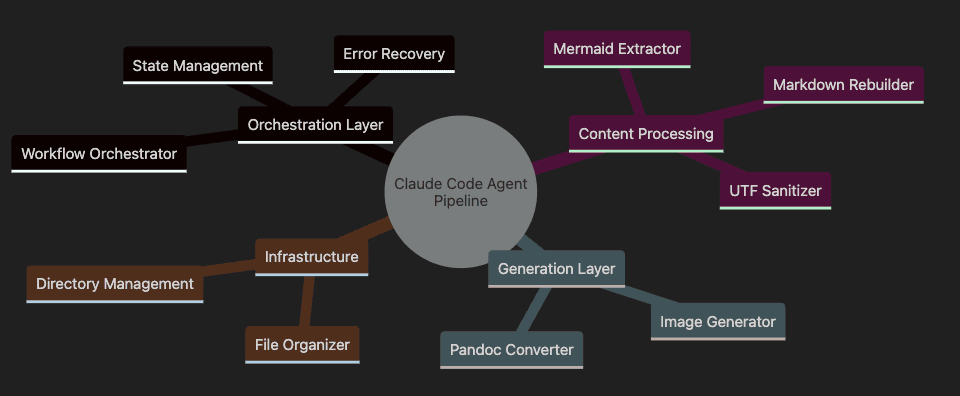
Claude Code Sub Agent Example Mind Map
Claude Code Agent Pipeline system
- Orchestration Layer manages the workflow, with the orchestrator controlling everything
- Content Processing handles extraction, transformation, and sanitization of content
- Generation Layer creates the final outputs (images and documents)
- Infrastructure maintains the file system and organization
Understanding the Tools: Pandoc, Mermaid, and the Documentation Workflow
Before diving deeper into the agent workflow, let's clarify the key tools being used in this system and what we're trying to accomplish:
Pandoc: The Universal Document Converter
Pandoc is an open-source command-line tool that serves as a universal document converter. It can convert files between dozens of formats, including Markdown, HTML, LaTeX, PDF, Word (DOCX), and many more. In our pipeline, Pandoc is responsible for transforming Markdown files into professional PDF and Word documents. Its strength lies in its flexibility and extensive customization options, allowing for precise control over document appearance.
Mermaid: Diagrams as Code
Mermaid is a JavaScript-based diagramming tool that allows you to create complex diagrams and visualizations using simple text-based definitions. Instead of using graphical diagram editors, you can define flowcharts, sequence diagrams, class diagrams, and more using a Markdown-like syntax. Mermaid has become popular because it allows diagrams to live alongside code and documentation, making them easier to version control and maintain.
Mermaid CLI: Command-Line Image Generation
The Mermaid Command-Line Interface (CLI) extends Mermaid's functionality to the terminal. It provides a way to convert Mermaid diagram definitions into PNG, SVG, or PDF files without requiring a browser. This tool is crucial for our pipeline because it allows for automated, headless generation of diagram images that can be embedded into documents. The CLI can be installed via npm and supports various options for customizing output appearance.
Our Documentation Challenge
The problem we're solving is a common documentation workflow challenge:
- Start with Markdown files containing Mermaid diagrams (which are great for development but not universally viewable)
- Need to produce PDF and Word documents for stakeholders and management
- Word docs work well due to the tracking of comments and edits
- Must handle UTF-8 encoding issues that often break document generation
- Require a reliable, automated process that doesn't involve manual steps
The agent workflow we're building bridges the gap between developer-friendly formats (Markdown with Mermaid) and business-friendly formats (PDF and Word) without requiring custom coding. This solution demonstrates how Claude Code subagents can collaborate to automate complex document processing tasks that would typically require significant development effort.
Enter Claude Code Sub-Agents: Your New Development Team
Claude Code's sub-agent system and AI agents in general can revolutionize the way software is built, with the following caveats noted below. Instead of writing code, you create specialized AI agents using simple markdown files with natural language instructions. Each agent becomes an expert at one specific task.
Think of it as hiring a team of specialists who never sleep, never complain, and always follow instructions perfectly.
Claude Code Subagents: The Natural Language Approach to AI Orchestration
What is Claude Code?
Claude Code is Anthropic's AI-powered coding assistant that goes beyond traditional code completion. Its standout feature is the subagent system. These Claude Code subagents are a groundbreaking approach to building AI-powered automation through natural language instructions rather than code. Unlike conventional development tools, Claude Code allows you to create specialized AI agents by simply writing instructions in markdown files, making complex automation accessible to both developers and non-programmers.
I honestly believe that this no-code approach can help you become familiar with agents before having to write extensive code. It's a low-effort entry point into the agentic development space. Just as Visual Basic and PowerBuilder were to the adoption of graphical user interfaces, Claude coding sub-agents are to agent-based programming, making powerful concepts accessible through simplified interfaces. As spreadsheets were a way for ordinary people to interact with a computer and perform computing tasks without mastering programming or database development, I believe that Claude's code sub-agents and other tools like these are a means of getting people involved in developing agentic software. Claude Code sub-agents might be the VisiCalc of agentic development.
How Subagents Work
Claude Code subagents live in your project's .claude/agents/ directory as simple markdown files. Each file defines an agent with a specific role and capabilities. Here's what makes them unique:
- Natural Language Definition: Agents are created using plain English instructions, not code
- Tool Integration: Each agent can access specific tools (file operations, command execution, API calls)
- Orchestration: Agents can coordinate with each other to complete complex workflows
- Context Awareness: Agents understand project structure and can make intelligent decisions
For example, a code-reviewer.md agent might contain instructions like: "Review code for security vulnerabilities, suggest performance improvements, and ensure consistent styling." Claude Code interprets these instructions and executes them using its available tools.
Capabilities and Use Cases
Claude Code subagents excel at:
- Development Workflows: Automated testing, code review, documentation generation
- Data Processing: ETL pipelines, file conversions, data analysis
- DevOps Tasks: Deployment automation, environment setup, monitoring
- Content Creation: Technical writing, diagram generation, report compilation
- Integration: Connecting APIs, managing webhooks, orchestrating microservices
The system leverages the Model Context Protocol (MCP), enabling agents to interact with external tools, databases, and APIs while maintaining security boundaries.
Comparison with CrewAI and AutoGen
Claude Code vs CrewAI
CrewAI focuses on role-based AI agents working together like a team, requiring Python programming to define agents and their interactions. You write code to specify agent roles, goals, and tools.
Claude Code takes a no-code approach where agents are defined in natural language. While CrewAI offers more programmatic control and complex agent hierarchies, Claude Code provides immediate accessibility and faster iteration through conversational agent definition.
Claude Code vs AutoGen
AutoGen (Microsoft) emphasizes multi-agent conversations and code execution, requiring significant Python expertise to set up agent systems. It's powerful for research and complex multi-agent scenarios, but has a steep learning curve.
Claude Code simplifies this dramatically; instead of writing Python classes and conversation patterns, you describe what you want in plain English. While AutoGen offers more fine-grained control over agent conversations, Claude Code provides a more intuitive and maintainable approach for practical automation.
The Key Differentiator
The fundamental difference is accessibility. While CrewAI and AutoGen require programming knowledge and complex setup, Claude Code democratizes AI orchestration. A business analyst can create a data processing pipeline, a technical writer can build a documentation system, and a developer can prototype complex workflows. This can all be done without writing traditional code.
Claude Code subagents represent a paradigm shift: from "code that calls AI" to "AI that occasionally executes code." This natural language approach to automation makes sophisticated AI orchestration available to anyone who can clearly describe what they want to accomplish.
The Workflow: From Chaos to Order
Here's how these agents collaborate to transform your markdown into professional documents:
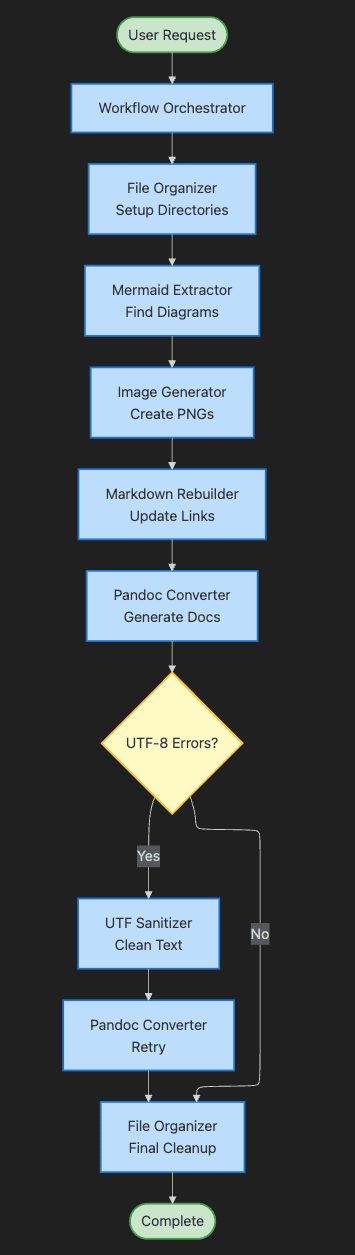
Step-by-Step Explanation:
- User Request triggers the entire pipeline
- Workflow Orchestrator takes control and manages the flow
- File Organizer sets up the directory structure first
- Mermaid Extractor finds all diagrams in markdown files
- Image Generator converts diagrams to PNG images
- Markdown Rebuilder replaces code blocks with image links
- Pandoc Converter attempts document generation
- Decision point checks for UTF-8 errors
- UTF Sanitizer cleans problematic characters if needed
- File Organizer performs final cleanup
- Complete signals successful pipeline execution
Meet the Magnificent Seven
Let's explore each agent in detail, including their actual code and how they work together seamlessly.
1. The Workflow Orchestrator: Your Project Manager
Location: .claude/agents/workflow-orchestrator.md
This conductor manages the entire orchestra. It doesn't do the heavy lifting; instead, it coordinates specialists, manages state, handles failures, and ensures smooth operations. When you say "process my documentation," this agent springs into action.
---
name: workflow-orchestrator
description: Main coordinator for mermaid-to-PDF conversion workflow
tools: Read, Write, Bash, Glob, Task
---
You are the Workflow Orchestrator for the mermaid-to-PDF documentation
pipeline.

## Primary Responsibilities

1. **Workflow Planning and Execution**
   - Analyze input files and create execution plan
   - Determine optimal processing sequence
   - Manage dependencies between tasks
2. **Agent Coordination**
   - Invoke specialized agents in proper sequence
   - Pass context and results between agents
   - Handle parallel processing where possible
3. **State Management**
   - Track progress of each file through the pipeline
   - Maintain context between processing steps
   - Store intermediate results for recovery
4. **Error Recovery**
   - Implement retry logic for transient failures
   - Activate fallback agents (UTF sanitizer) when needed
   - Ensure pipeline continues despite individual failures
5. **Quality Assurance**
   - Validate outputs at each stage
   - Verify all expected files are generated
   - Report comprehensive status to user

## Workflow Sequence

1. Initialize: Set up directory structure via `file-organizer`
2. Extract: Use `mermaid-extractor` to find all diagrams
3. Generate: Invoke `image-generator` for PNG creation
4. Rebuild: Call `markdown-rebuilder` to update documents
5. Convert: Use `pandoc-converter` for PDF/Word generation
6. Handle Errors: Activate `utf-sanitizer` if encoding issues occur
7. Finalize: Organize outputs with `file-organizer`

## Error Handling Strategy
- Isolate failures to individual files
- Attempt recovery before failing entire pipeline
- Provide detailed error reports for debugging
- Continue processing other files even if one fails

Always delegate specific tasks to specialized agents rather than
implementing functionality directly.
How the Orchestrator Works:
The orchestrator implements a sophisticated control flow pattern. It starts by analyzing all input files to understand the scope of work. Then it creates an execution plan that optimizes for efficiency while maintaining dependencies. For example, it knows that images must be generated before markdown can be rebuilt.
The state management system tracks the progress of each file through the following stages: pending, extracting, generating, rebuilding, converting, and complete. This allows the orchestrator to resume from any point if interrupted and to retry failed operations intelligently.
Most importantly, the orchestrator never touches the actual work. It's purely a coordinator, delegating every technical task to the appropriate specialist. This separation of concerns makes the system incredibly maintainable and extensible.
I've created many Claude Code agents before this one with varying degrees of success. Often, they were difficult to invoke properly, and sometimes the agents wouldn't trigger when intended. However, adding the orchestrator agent on top of the other agents (all mentioned in the workflow sequence) has proven to be an excellent pattern. It's made the difference between things working somewhat inconsistently and things working reliably with minimal input from me.
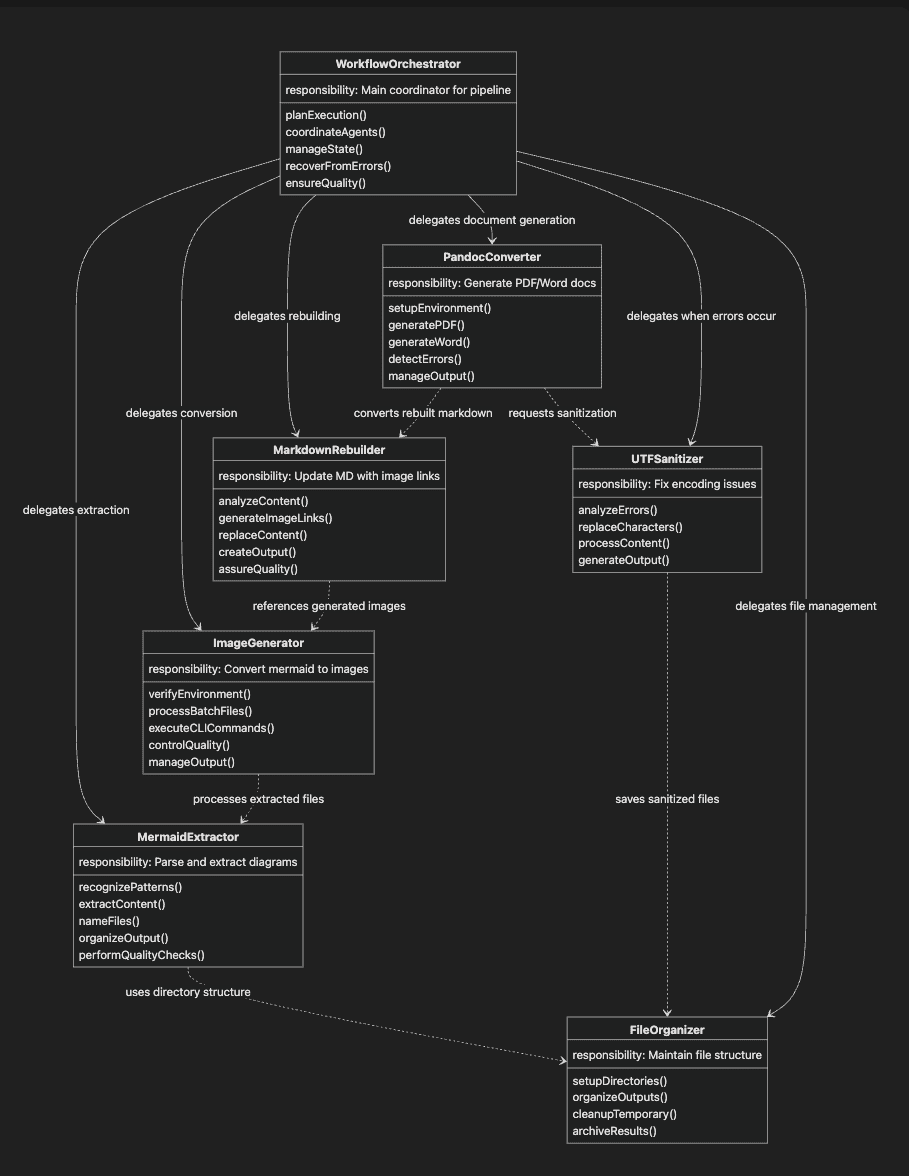
Agents, Collaboration, and Responsibilities
This class diagram visualizes the seven Claude Code subagents as a cohesive system. Each "class" represents an agent with its core responsibility and key functions. The solid arrows show direct delegation relationships from the orchestrator, while dotted arrows indicate dependencies between agents. This structure illustrates how the workflow orchestrator oversees the entire process, while specialized agents handle specific tasks within the documentation pipeline. The "methods" are the responsibilities and actions taken by the agent.
2. The Mermaid Extractor: Your Content Parser
Location: .claude/agents/mermaid-extractor.md
This specialist scans Markdown files like a detective, identifying every Mermaid code block and extracting it into separate files. I have used this extensively on large documents, and it runs fine. So far, it has run flawlessly.
---
name: mermaid-extractor
tools: Read, Write, Glob
---

You extract mermaid diagram code blocks from markdown files.

## Extraction Process

1. **Pattern Recognition**
   - Scan for ```mermaid code blocks
   - Identify diagram type (flowchart, sequence, etc.)
   - Note line numbers for context preservation
2. **Content Extraction**
   - Extract complete diagram syntax
   - Preserve all formatting and indentation
   - Validate mermaid syntax structure
3. **File Naming Convention**
   - Format: `<source_name>_NN_<description>.mmd`
   - NN: Two-digit sequence (01, 02, etc.)
   - description: Logical name based on diagram content
4. **Output Organization**
   - Save to docs/markdown_mermaid/mermaid/
   - Create manifest of extracted diagrams
   - Log extraction statistics

## Quality Checks

- Ensure complete extraction (no truncated diagrams)
- Verify closing ``` markers are captured
- Validate basic mermaid syntax
- Report any suspicious or malformed blocks
How the Extractor Works:
The extractor uses pattern matching to identify mermaid code blocks within markdown files. It looks for the telltale ````mermaid` opening and corresponding closing markers. But it goes beyond simple text matching.
For each diagram found, the extractor analyzes the content to determine the diagram type and creates a descriptive filename. It maintains a mapping between the original location and the extracted file, enabling the markdown rebuilder to insert the correct image references later.
3. The Image Generator: Convert the mermaid files into png
Location: .claude/agents/image-generator.md
Converting Mermaid code to images requires specific tools. This agent interfaces with the Mermaid CLI, transforming each .mmd file into high-quality PNG images ready for embedding.
---
name: image-generator
tools: Bash, Write, Read
---

You generate PNG/SVG images from .mmd files using mermaid CLI.

## Image Generation Process

1. **Environment Verification**
   - Check mermaid CLI installation: `mmdc --version`
   - Verify input directory exists
   - Ensure output directory is writable
2. **Batch Processing**
   - Process all .mmd files from docs/markdown_mermaid/mermaid/
   - Generate PNG format for document compatibility
   - Maintain original filename structure
3. **CLI Command Execution**
   mmdc -i input.mmd -o output.png --theme default --width 800
4. **Quality Control**
   - Verify image file creation
   - Check file size (warn if suspiciously small)
   - Handle CLI errors gracefully
   - Retry failed generations once
5. **Output Management**
   - Save to docs/markdown_mermaid/images/
   - Maintain naming consistency with source files
   - Report generation statistics

## Error Handling
- Missing CLI: Provide installation instructions and offer to install
- Syntax errors: Log and skip problematic diagrams
- Resource issues: Implement backoff and retry
How the Image Generator Works:
The image generator acts as a bridge between the mermaid syntax world and the visual world. It executes the Mermaid CLI with optimized parameters for each diagram type. The agent understands that flowcharts might need different dimensions than sequence diagrams, and adjusts accordingly.
It implements intelligent error handling, recognizing common failure patterns like syntax errors or resource constraints. When a diagram fails to generate, it logs detailed information for debugging while continuing with other diagrams.
4. The Markdown Rebuilder: Your Content Editor
Location: .claude/agents/markdown-rebuilder.md
Once images exist, someone needs to update the original files. This agent creates new Markdown versions where code blocks become proper image links, maintaining all formatting while seamlessly integrating visuals.
---
name: markdown-rebuilder
tools: Read, Write, Glob
---
You create modified markdown files with mermaid code blocks replaced by
image references.
## Rebuilding Process
1. **Content Analysis**
- Read original markdown files
- Identify mermaid code block positions
- Map blocks to generated images
2. **Image Link Generation**
- Format: ``
- Use descriptive alt text from diagram content
- Ensure relative paths are correct
3. **Content Replacement**
- Replace each mermaid block with image link
- Preserve surrounding content exactly
- Maintain heading structure and formatting
4. **Output Creation**
- Save to docs/markdown_mermaid/
- Keep original filename
- Preserve front matter and metadata
## Quality Assurance
- Verify all mermaid blocks are replaced
- Ensure no content is lost
- Validate image paths exist
- Check markdown syntax remains valid
How the Rebuilder Works:
The rebuilder performs surgical modifications to markdown files. It uses the mapping created by the extractor to know exactly which image corresponds to each mermaid block. The agent preserves everything else about the document: formatting, headings, paragraphs, and even whitespace.
The replacement process maintains the logical flow of the document. Where a diagram illustrated a concept, the image now serves the same purpose, but in a format compatible with PDF and Word generation. It replaces the mermaid blocks with the images we generated before by linking to them:.
The markdown document generated is a mirror image of the input markdown, with the images replacing mermaid code blocks.
5. The Pandoc Converter: Your Publisher
Location: .claude/agents/pandoc-converter.md
The document generation specialist knows exactly how to invoke Pandoc with optimal parameters. It monitors for errors and produces professional-quality PDFs and Word documents. Since I started using this, it has generated scores of PDFs and Word docs with no problems.
---
name: pandoc-converter
tools: Bash, Read, Write
---

You convert markdown files to PDF and Word formats using Pandoc.

## Conversion Process

1. **Environment Setup**
   - Verify Pandoc installation: `pandoc --version`
   - Check input files exist
   - Prepare output directories
2. **PDF Generation**
   pandoc input.md -o output.pdf \
     --pdf-engine=xelatex \
     --highlight-style=tango \
     --toc
3. **Word Generation**
   pandoc input.md -o output.docx \
     --reference-doc=template.docx \
     --toc
4. **Error Detection**
   - Monitor for UTF-8 encoding errors
   - Catch LaTeX compilation failures
   - Identify missing image references
5. **Output Management**
   - Save PDFs to docs/pdf/
   - Save Word docs to docs/word/
   - Report conversion statistics

## UTF-8 Error Handling

When encountering "Invalid UTF-8 stream" errors:
1. Log specific error details
2. Signal orchestrator for UTF sanitization
3. Retry with sanitized version
4. Report successful recovery
How the Converter Works:
The Pandoc converter is more than a simple wrapper around the Pandoc tool. It understands the nuances of document conversion, selecting appropriate engines and parameters based on content analysis. For PDFs, it uses XeLaTeX for better Unicode support. For Word documents, it applies professional templates.
The agent's true intelligence is evident in its error handling. It recognizes specific Pandoc error patterns and knows when to request help from other agents, particularly the UTF sanitizer.
6. The UTF Sanitizer: Your Problem Solver
Location: .claude/agents/utf-sanitizer.md
When Pandoc encountered 27 UTF-8 encoding issues, this agent saved the day. It intelligently replaced problematic characters with ASCII equivalents, allowing the pipeline to continue without manual intervention.
---
name: utf-sanitizer
tools: Read, Write
---

You create ASCII-safe versions of markdown files when Pandoc UTF errors occur.

## Sanitization Process

1. **Error Analysis**
   - Parse Pandoc error output
   - Identify problematic characters
   - Determine replacement strategy
2. **Character Replacement Map**
   - Smart quotes → straight quotes (" " ' ' → " " ' ')
   - Em dashes → double hyphens (- → --)
   - En dashes → single hyphens (– → -)
   - Ellipsis → three dots (… → ...)
   - Non-breaking spaces → regular spaces
   - Special symbols → ASCII equivalents
3. **Content Processing**
   - Read problematic file
   - Apply replacements systematically
   - Preserve markdown structure
   - Maintain readability
4. **Output Generation**
   - Save with _sanitized suffix
   - Create mapping of replacements made
   - Report sanitization statistics

## Activation Criteria

Only activate when:
- Pandoc reports UTF-8 encoding errors
- Specific "Invalid UTF-8 stream" message appears
- Orchestrator explicitly requests sanitization
How the Sanitizer Works:
The UTF sanitizer is a specialized problem-solver that only activates when needed. It understands the familiar UTF-8 characters that cause issues in Pandoc and knows their corresponding ASCII equivalents. The agent makes intelligent replacements that preserve meaning while ensuring compatibility.
For example, it converts smart quotes to straight quotes, em dashes to double hyphens, and special Unicode spaces to regular spaces. Each replacement is logged, allowing users to understand what changes were made.
7. The File Organizer: Your Office Manager
Location: .claude/agents/file-organizer.md
The unsung hero is maintaining order. It creates directory structures, moves files to proper locations, and ensures everything ends up exactly where it should.
---
name: file-organizer
tools: Bash, Write, Read, Glob
---
You manage the docs/ directory structure and file organization.

## Organization Responsibilities

1. **Directory Structure Creation**
   docs/
   ├── markdown/              # Source files
   ├── markdown_mermaid/      # Processed markdown
   │   ├── images/           # Generated images
   │   └── mermaid/          # Extracted diagrams
   ├── pdf/                  # PDF outputs
   └── word/                 # Word outputs

2. **Initial Setup**
   - Create all required directories
   - Verify write permissions
   - Clear old temporary files
3. **File Movement**
   - Move generated images to correct locations
   - Organize outputs by type
   - Maintain consistent naming
4. **Cleanup Operations**
   - Remove temporary processing files
   - Archive previous runs if needed
   - Compress large output sets
5. **Final Verification**
   - Ensure all expected files exist
   - Check file sizes are reasonable
   - Report organization statistics

## Best Practices

- Never modify source files in docs/markdown/
- Maintain clear separation between stages
- Use descriptive directory names
- Keep processing artifacts separate from outputs
How the File Organizer Works:
The file organizer maintains the infrastructure that makes the entire pipeline possible. It creates a clear, logical directory structure that separates source files, intermediate processing artifacts, and final outputs. This organization makes it easy to understand what happened at each stage and to debug any issues.
The agent also handles cleanup, removing temporary files that accumulate during processing while preserving anything that might be useful for debugging or auditing.
The Magic Moment: Natural Language Orchestration
Here's the actual command that triggered everything, and the beautiful part? It worked perfectly on the first try. No debugging. No configuration tweaking. Just natural language turning into action.
User: "Generate mermaid diagrams, word docs, pdf docs, everything ... go"
Workflow Orchestrator: "Processing all markdown files through the complete pipeline..."
The orchestrator then executed this sequence:
- Called file-organizer to set up directories
- Invoked mermaid-extractor to find all diagrams
- Triggered image-generator to create PNGs
- Had markdown-rebuilder create updated markdown
- Used pandoc-converter to generate documents
- Activated utf-sanitizer when errors occurred
- Coordinated file-organizer for final cleanup
Total time: Minutes.
Lines of code written: Zero.
Success rate on first attempt: 100%.
Real Results That Speak Volumes
Let me share the actual metrics from my implementation. These aren't theoretical numbers; this is what actually happened when I ran the pipeline.
Input Processing
- 4 Markdown files processed
- 1,584 total lines analyzed
- 8 Mermaid diagrams extracted
Output Generation
- 8 high-quality PNG images (973 KB total)
- 5 PDF documents (1.15 MB total)
- 4 Word documents (940 KB total)
- 27 UTF-8 errors automatically resolved
- 100% success rate on first run
Performance Metrics
- Total processing time: ~15 minutes
- Human intervention required: Zero
- Code written: Zero lines
- Debugging sessions: Zero
Why This Changes Everything
The implications of this approach extend far beyond document processing. We're witnessing a fundamental shift in how software gets built.
1. Natural Language Replaces Programming
Traditional approach requires:
- Python/Node.js expertise
- Regular expressions mastery
- File I/O knowledge
- Error handling patterns
- Command-line integration skills
- Character encoding troubleshooting
Claude Code approach requires:
- The ability to describe what you want in English
That's the entire learning curve. No syntax to memorize. No frameworks to learn. No dependency hell to navigate.
There are other low-code and no-code agentic frameworks, and these same principles apply.
2. Modular Excellence by Design
Each agent has exactly one job. When I needed UTF-8 error handling, I didn't modify existing code; I added the utf-sanitizer agent. When requirements change, I update instructions, not code.
The mermaid-extractor doesn't know how images are generated. The image-generator doesn't care about PDF conversion. This separation makes the system incredibly maintainable. Changes to one agent don't ripple through the system.
3. Self-Documenting System
The agent definitions ARE the documentation. When someone asks "How does PDF generation work?" I can show them the pandoc-converter agent file. It's readable, understandable, and modifiable by anyone who can read English.
Traditional code requires separate documentation that inevitably becomes outdated. Here, the documentation can't become outdated because it's the actual implementation.
4. Intelligent Error Recovery
When the pandoc-converter hit UTF-8 errors, it didn't crash. The workflow-orchestrator recognized the issue, invoked the utf-sanitizer to create a clean version, and retried. This adaptive behavior would require extensive programming in traditional systems.
The system learns from failures and adapts its approach, something that would require complex error handling logic in traditional code.
The Model Context Protocol Foundation
Claude Code's sub-agents utilize MCP (Model Context Protocol), an open protocol that enables AI to interact with tools and systems. This bridge between natural language and system operations enables true no-code automation.
MCP handles the complex translation from "generate PNG images" to actual command execution, file operations, and error handling. It provides a standardized way for AI agents to interact with system tools, APIs, and file systems while maintaining security and reliability.
The protocol ensures that agents can:
- Execute system commands safely
- Read and write files with proper permissions
- Handle errors gracefully
- Coordinate complex multi-step operations
- Maintain state across operations
Build Your Own in 10 Minutes
Ready to create your own agent-based automation? Here's your quickstart guide.
Step 1: Install Prerequisites
npm install -g @mermaid-js/mermaid-cli
brew install pandoc  # or apt-get install pandoc
Step 2: Create Your Structure
mkdir -p .claude/agents
mkdir -p docs/markdown
mkdir -p docs/markdown_mermaid/{images,mermaid}
mkdir -p docs/{pdf,word}
Step 3: Define Your Agents
Create markdown files in .claude/agents/ with clear, specific instructions for each specialist. Copy my templates from GitHub as a starting point.
Step 4: Run the Orchestra
Tell Claude Code: "Use the workflow-orchestrator to process all markdown files"
Then watch the magic happen.
Lessons from the Frontier
Working with this system taught me valuable lessons about the future of software development.
What Worked Brilliantly
- Separation of concerns made debugging trivial
- Natural language instructions eliminated the learning curve
- Graceful error handling prevented pipeline failures
- Clear file organization made outputs easy to find
- First-try success proved the robustness of the approach
Surprising Discoveries
- Agents proved more reliable than traditional scripts
- Non-programmers on my team could modify agent behavior
- The system improved through conversation, not coding
- Complex workflows became surprisingly manageable
- Error recovery happened automatically without intervention
Future Enhancements
With this foundation, I can easily add:
- Parallel processing for multiple documents
- Different diagram types (PlantUML, GraphViz)
- Custom PDF styling and templates
- Automated quality checks
- Integration with CI/CD pipelines
- Real-time progress monitoring
The Paradigm Shift Is Here
We're witnessing a fundamental change in software creation. Instead of writing code that occasionally calls AI, we're orchestrating AI agents that occasionally execute code.
This isn't about replacing programmers; it's about democratizing automation. Business analysts, content creators, researchers, and educators can now build sophisticated pipelines without writing a single line of code.
The barrier to automation has shifted from years of programming experience to the ability to express intent in natural language clearly. This opens possibilities we're only beginning to explore.
Your Next Steps
- Install Claude Code and explore the agent system
- Copy my implementation from GitHub (link in bio)
- Think in agents: break complex tasks into specialist roles
- Share your creations: the community is building amazing solutions
Start small. Pick a repetitive task you do manually. Create 2-3 agents to automate it. Experience the magic of watching agents collaborate to solve your problems.
The Bottom Line
I replaced days or a week of traditional development with minutes of agent configuration. The resulting system is more maintainable, more adaptable, and more accessible than any code I could have written. I spent more time writing this article than I did on the agent subsystem that I am describing.
Seven agents proved that complex technical workflows can be implemented through natural language orchestration. No code. No debugging. Just clear instructions and intelligent coordination.
The future of automation isn't just about writing better code; it's about orchestrating more intelligent agents. And that future is available today with Claude Code.
Most remarkably? This entire pipeline worked perfectly on the first attempt. No debugging sessions. No configuration tweaks. No Stack Overflow searches. Just natural language transforming into a production-ready system.
The runtime is slow, but the results are impressive. I'm excited to see how this system scales to even larger projects. We could speed things up by writing some parts of the agents in Python for UTF-8 sanitization, extracting Mermaid diagrams, and image generation, among other tasks. This would make the agents even more efficient, and if the Python scripts did not run, we could fall back on the agents doing the work, as we have now (or have the agents fix the code).
Areas of improvement
One area for improvement is runtime speed. The system runs noticeably slower than traditional tools. While I've written or used similar tools that execute quite rapidly, the LLM processing time introduces a lag compared to purpose-built software. The tradeoff is clear, though: what we lose in speed, we gain in adaptability and error handling.
A hybrid approach might be worth exploring: initially generating code that handles routine work, while allowing agents to modify this code when encountering errors, thereby creating a self-healing system that operates at a higher speed. This concept has been percolating in my mind for some time.
I've found this paradigm incredibly powerful. Having used subagents extensively in both Claude Code, the ability to describe complex operations in natural language -- whether from the command line or through subagents -- is nothing short of revolutionary. I've created tools I wouldn't have had time to develop otherwise -- tools for analyzing data, performing complicated searches across legacy government datasets, and more.
The adaptability is particularly impressive. In one case, when scanning records from a government website, the CSV file format changed (as it did over the years), the agents adapted and figured it out. I believe the key difference between this "magical" software and traditional code is precisely this ability to adjust on the fly. The price we pay is longer processing time, but that's where we stand today.
As LLMs become faster and wiser, the performance gap is likely to close gradually. These are the things that keep me up at night; wondering and wandering through the possibilities of this new programming paradigm.
Dedication
When I began writing this article, I took a trip to see my mother. During that trip, I began writing this article. Since then, I got news of my uncle's passing before finishing the article. I've been helping to manage his final affairs as I live very close to where he lived, and I delayed finishing this article by weeks, if not a month. He was a software engineer for over 40 years, maybe longer. He was writing code well into his late 70s. I would've liked to have known him better. I dedicate this article to George Douglas Hightower (Uncle Doug), in memory of his life: a Marine, coder, engineer, software engineer, hunter, boater, motorcycle aficionado, owner of multiple sports cars and trucks, and a collector of vintage guns. Doug was well-loved by his neighbors, many of whom considered him a member of their family. He was a regular at neighborhood parties, holidays, and birthdays. He was loved. May he rest in peace. Semper Fidelis! Canem diaboli! He will be missed.
Ready to build your own agent orchestration? Connect with me on LinkedIn or explore more Claude Code patterns on GitHub. What will you automate first?
#ClaudeCode #NoCode #AIAgents #Automation #DocumentProcessing #MermaidDiagrams #FutureOfProgramming #DeveloperTools
About the Author
Rick Hightower brings extensive enterprise experience as a former executive and distinguished data engineer at a Fortune 100 fintech company, where he specialized in Machine Learning and AI solutions to deliver intelligent customer experiences. His expertise spans both theoretical foundations and practical applications of AI technologies.
As a TensorFlow-certified professional and graduate of Stanford University's comprehensive Machine Learning Specialization, Rick combines academic rigor with real-world implementation experience. His training includes mastery of supervised learning techniques, neural networks, and advanced AI concepts, which he has successfully applied to enterprise-scale solutions.
Follow Rick on LinkedIn or Medium for more enterprise AI insights.