Claude Code Subagents and Main-Agent Coordination: A Complete Guide to AI Agent Delegation Patterns
Mastering AI Agent Coordination: Effective Delegation Patterns for Claude Code Subagents
Originally published on Medium.
Mastering AI Agent Coordination: Effective Delegation Patterns for Claude Code Subagents
 Cover: Claude Code subagent coordination hub-and-spoke delegation pattern with central AI orchestrator and specialized worker agents
🚀 Unlock the full potential of AI with Claude Code! Discover how to delegate tasks to specialized subagents for seamless coding assistance. Dive into the hub-and-spoke delegation patterns that keep your AI organized and effective. Ready to revolutionize your workflow? Read on! 🧠✨ #AI #Coding #Productivity
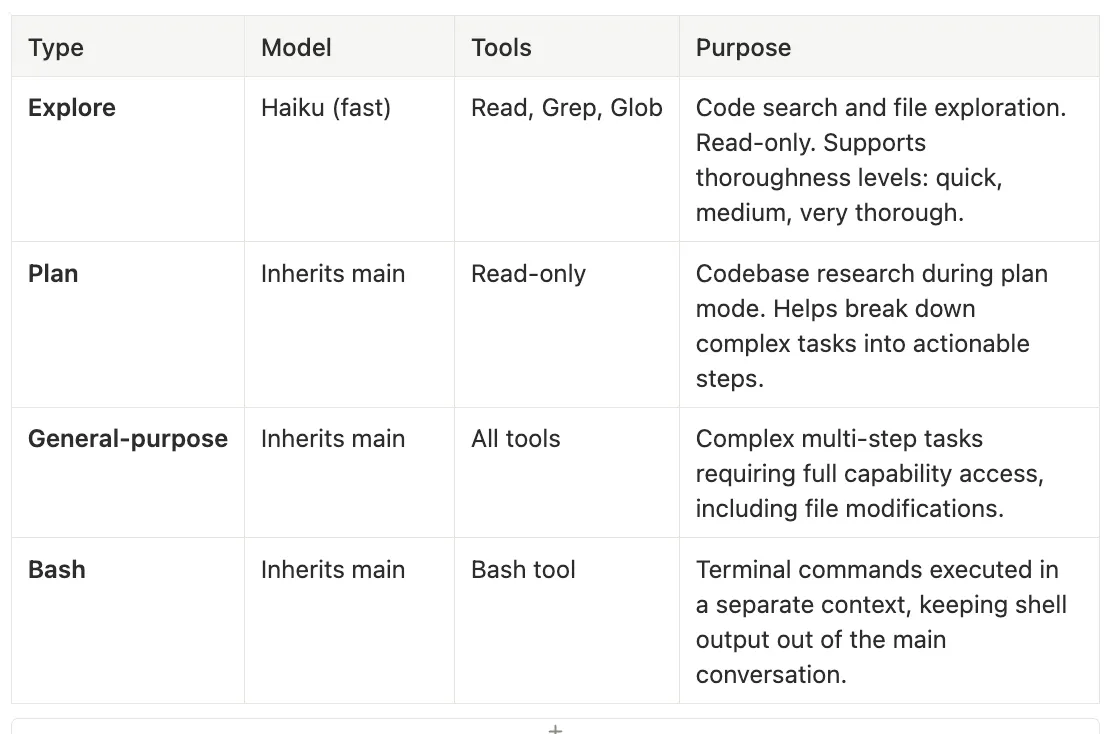 Built-in Subagent Types — Claude Code Subagents
-
Model: Haiku (fast)
-
Tools: Read, Grep, Glob
-
Purpose: Code search and file exploration. Read-only. Supports thoroughness levels: quick, medium, very thorough.
-
Model: Inherits main
-
Tools: Read-only
-
Purpose: Codebase research during plan mode. Helps break down complex tasks into actionable steps.
-
Model: Inherits main
-
Tools: All tools
-
Purpose: Complex multi-step tasks requiring full capability access, including file modifications.
-
Model: Inherits main
-
Tools: Bash tool
-
Purpose: Terminal commands executed in a separate context, keeping shell output out of the main conversation.
-
Use Explore when you need to understand what exists before making changes. Fast, cheap, safe.
-
Use Plan when you are in plan mode and need the subagent to research the codebase to inform a strategy.
-
Use General-purpose when the task requires file modifications, multi-step reasoning, or full tool access. This is the heavyweight option.
-
Use Bash when you need to run terminal commands without cluttering the main context with shell output.
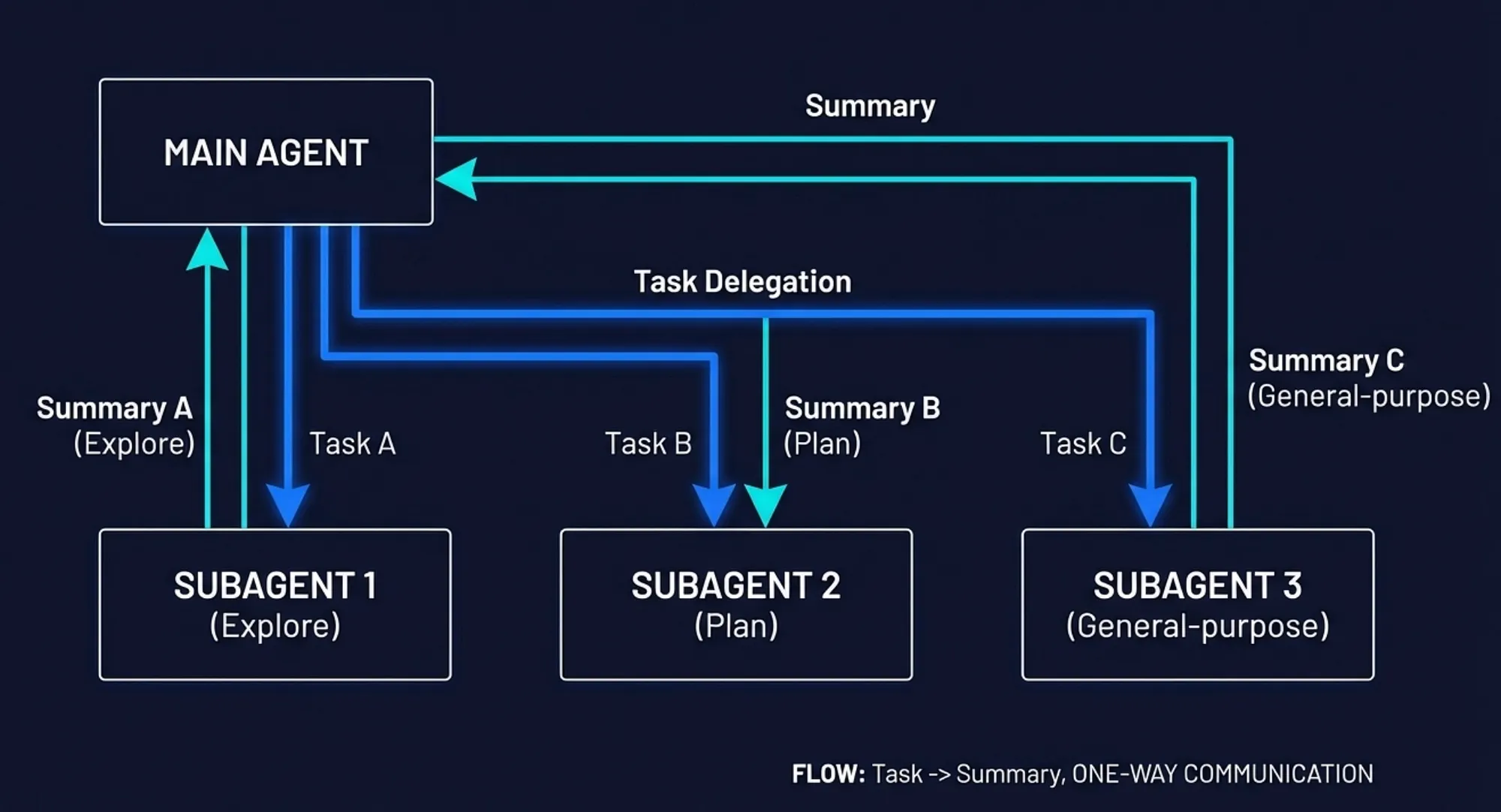 How the main agent delegates — Claude Code Subagents — Task delegation flow: User sends request to Main Agent, which delegates subtasks to Subagents via the Agent tool, receives summaries back, and synthesizes the final response
- Does the task require extensive file exploration that would clutter the main context?
- Would restricting tool access improve safety for this subtask?
- Can parts of the task run in parallel for faster completion?
- Does a custom agent’s description match the work being requested?
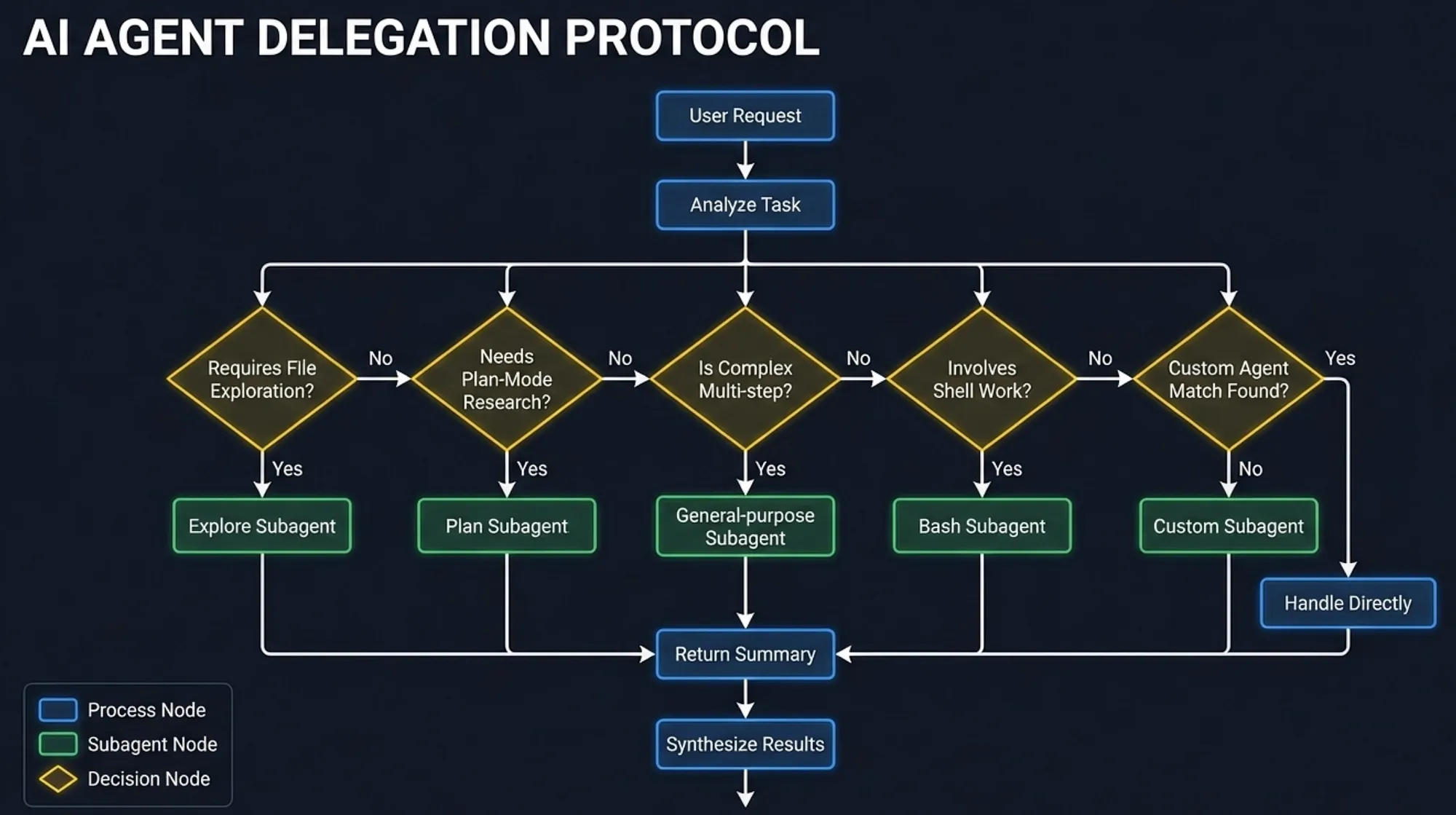 Delegation decision flowchart: Main Agent analyzes each task through decision points for file exploration, plan-mode research, complexity, shell work, and custom agent matching to choose the right subagent type — Claude Code Subagents — Task Identification
- The subtask description: what to accomplish
- The system prompt: behavior and constraints
- The allowed tools: what the subagent can do
- The model: the cost/capability trade-off
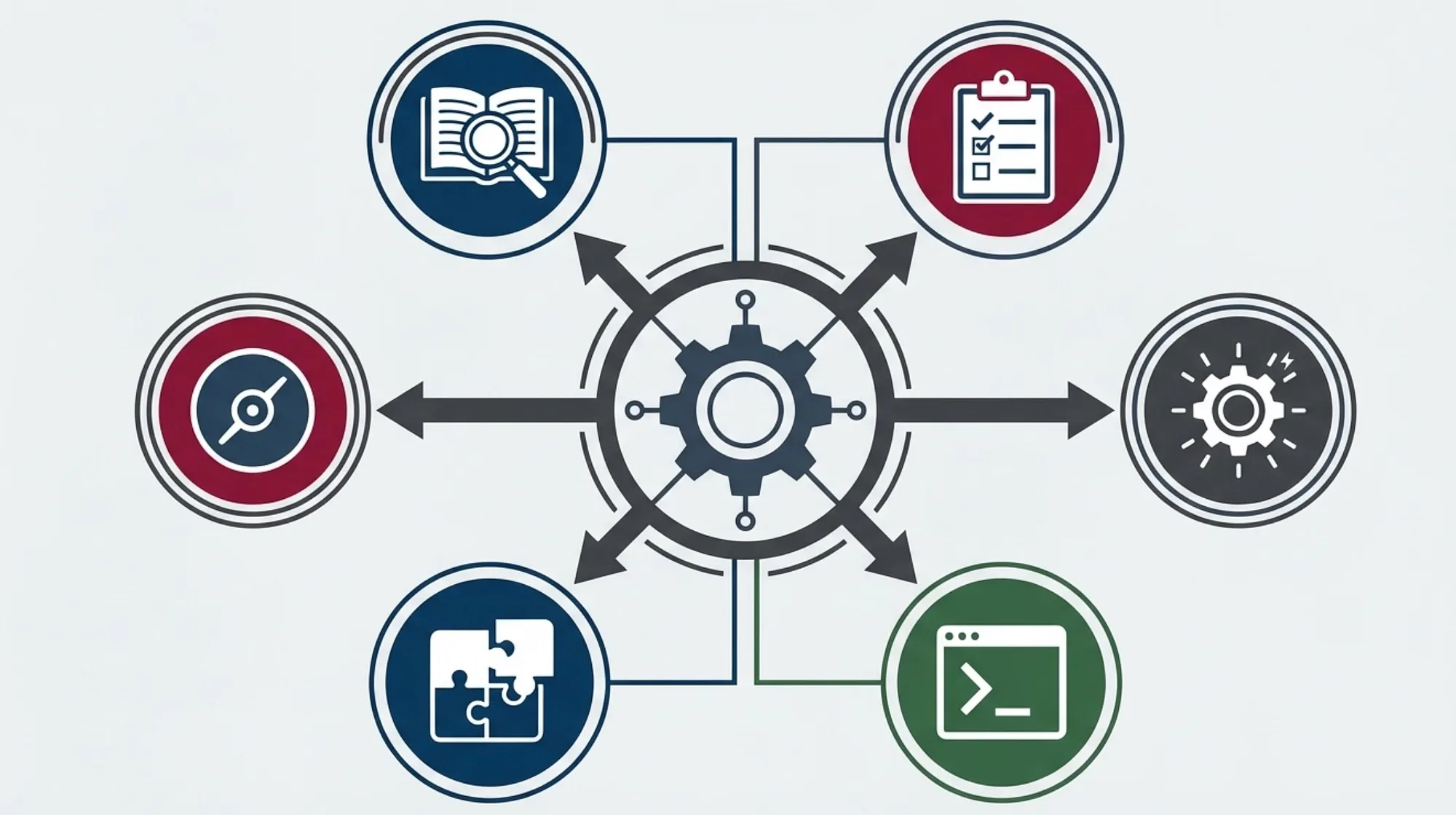 Diagram of Claude Code hub-and-spoke delegation pattern showing the main agent coordinating specialized subagents for parallel task execution — Claude Code Subagents — Communication Pattern
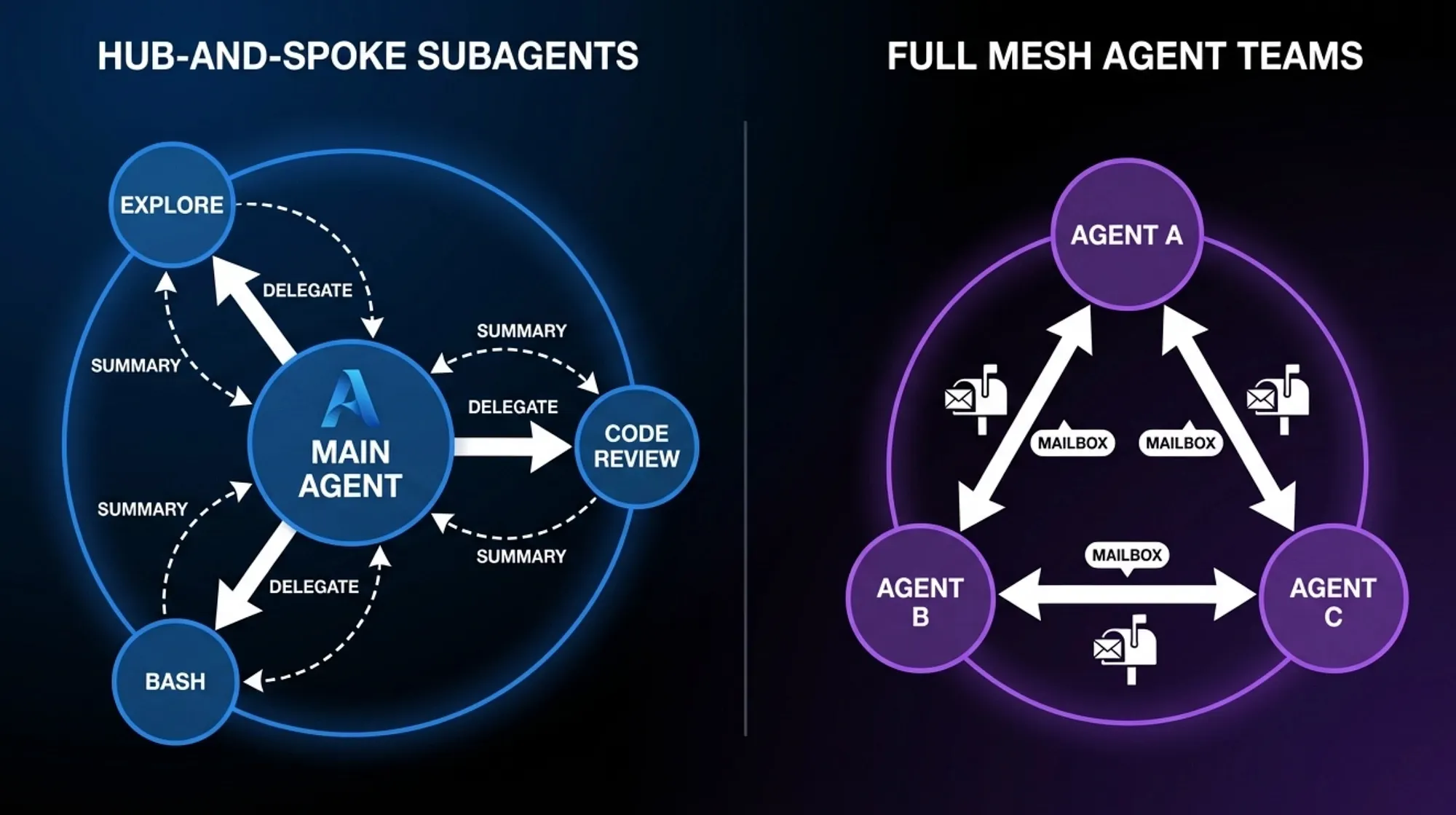 Comparison of hub-and-spoke subagent pattern with one-way delegation versus full mesh Agent Teams pattern with bidirectional mailbox communication — Claude Code Subagents — Hub and Spoke vs. Full Mesh Agent Teams
User: "Analyze the performance of our API endpoints and suggest optimizations"
Main Agent spawns in parallel:
  +-- Explore Agent A: "Find all API route handlers in src/routes/"
  +-- Explore Agent B: "Find all database queries in src/models/"
  +-- Bash Agent C: "Run the performance test suite and collect metrics"
All three run simultaneously. Each returns a focused summary.
Main Agent receives three summaries and synthesizes them
into a unified performance analysis with specific recommendations.
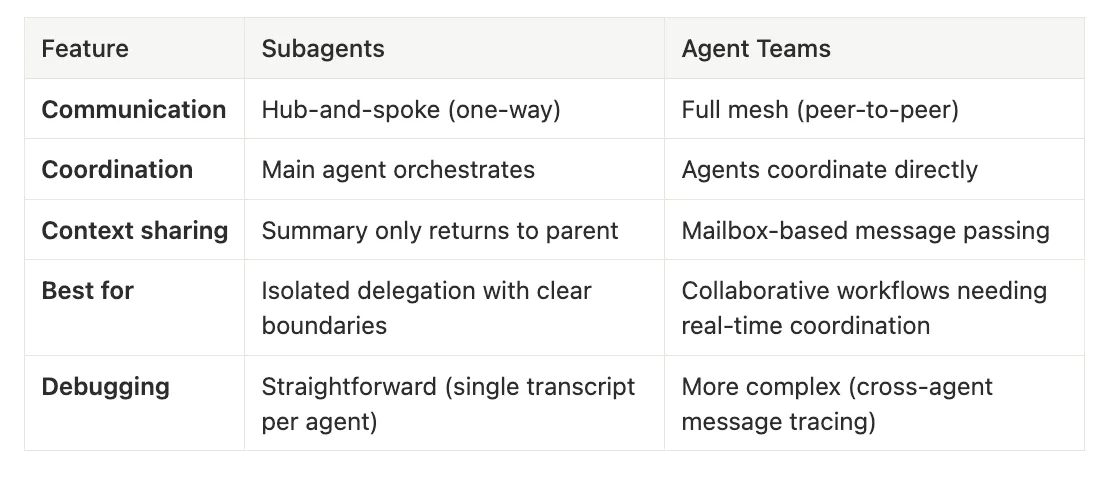 Subagents vs. Agent Teams — Claude Code Subagents
-
Subagents: Hub-and-spoke (one-way)
-
Agent Teams: Full mesh (peer-to-peer)
-
Subagents: Main agent orchestrates
-
Agent Teams: Agents coordinate directly
-
Subagents: Summary only returns to parent
-
Agent Teams: Mailbox-based message passing
-
Subagents: Isolated delegation with clear boundaries
-
Agent Teams: Collaborative workflows needing real-time coordination
-
Subagents: Straightforward (single transcript per agent)
-
Agent Teams: More complex (cross-agent message tracing)
~/.claude/projects/{project}/{sessionId}/subagents/agent-{agentId}.jsonl
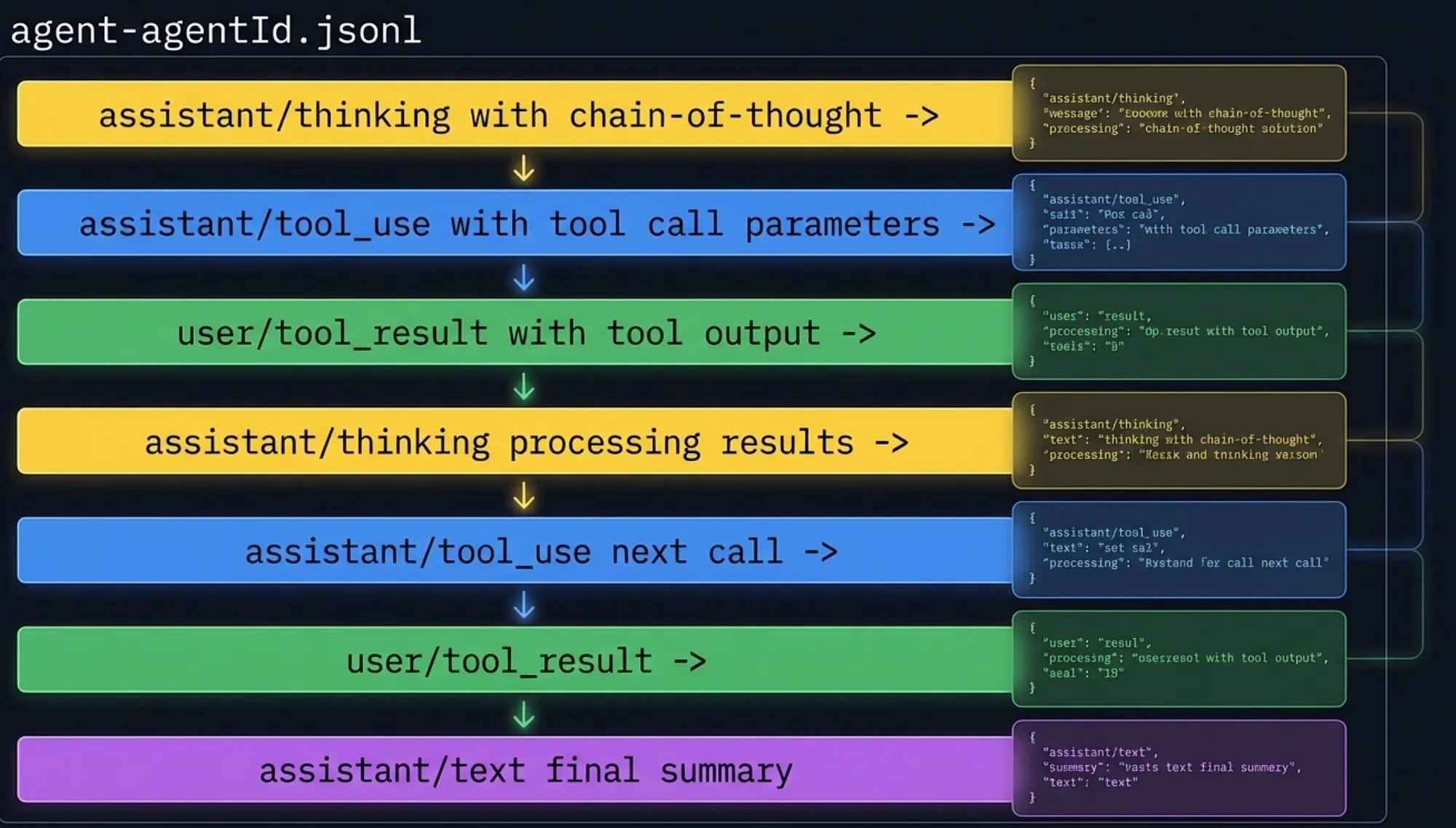 JSONL transcript structure showing sequential log entries: thinking, tool_use, tool_result, and final text summary stored in agent-agentId.jsonl — Claude Code Subagents
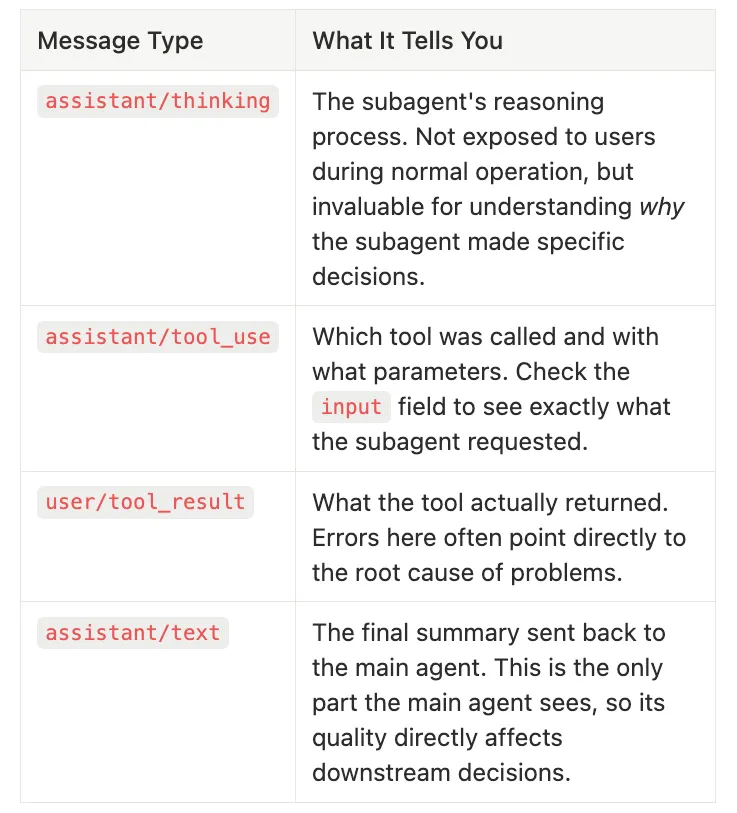 Agent Messages Tell you Something Important and Descriptive — Claude Code Subagents
-
What it tells you: The subagent’s reasoning process. Not exposed to users during normal operation, but invaluable for understanding why the subagent made specific decisions.
-
What it tells you: Which tool was called and with what parameters. Check the
inputfield to see exactly what the subagent requested. -
What it tells you: What the tool actually returned. Errors here often point directly to the root cause of problems.
-
What it tells you: The final summary sent back to the main agent. This is the only part the main agent sees, so its quality directly affects downstream decisions.
{
"role"
:
"assistant"
,
"type"
:
"thinking"
,
"content"
:
"I need to find all authentication-related files in the project..."
}
{
"role"
:
"assistant"
,
"type"
:
"tool_use"
,
"name"
:
"Grep"
,
"input"
: {
"pattern"
:
"authenticate"
,
"path"
:
"src/"
}}
{
"role"
:
"user"
,
"type"
:
"tool_result"
,
"content"
:
"src/auth/login.ts:15
\\
nsrc/auth/middleware.ts:8
\\
nsrc/utils/session.ts:42"
}
{
"role"
:
"assistant"
,
"type"
:
"thinking"
,
"content"
:
"Found 3 files with authentication logic. Let me read the middleware to understand the auth flow..."
}
{
"role"
:
"assistant"
,
"type"
:
"tool_use"
,
"name"
:
"Read"
,
"input"
: {
"file_path"
:
"src/auth/middleware.ts"
}}
{
"role"
:
"user"
,
"type"
:
"tool_result"
,
"content"
:
"// Authentication middleware
\\
nexport function authMiddleware(req, res, next) {
\\
n  const token = req.headers.authorization;
\\
n  if (!token) return res.status(401).json({ error: 'No token' });
\\
n  // ... validation logic
\\
n}"
}
{
"role"
:
"assistant"
,
"type"
:
"text"
,
"content"
:
"Found 3 authentication files. The main middleware is in src/auth/middleware.ts, which validates JWT tokens from the Authorization header. The login handler is in src/auth/login.ts, and session utilities are in src/utils/session.ts."
}
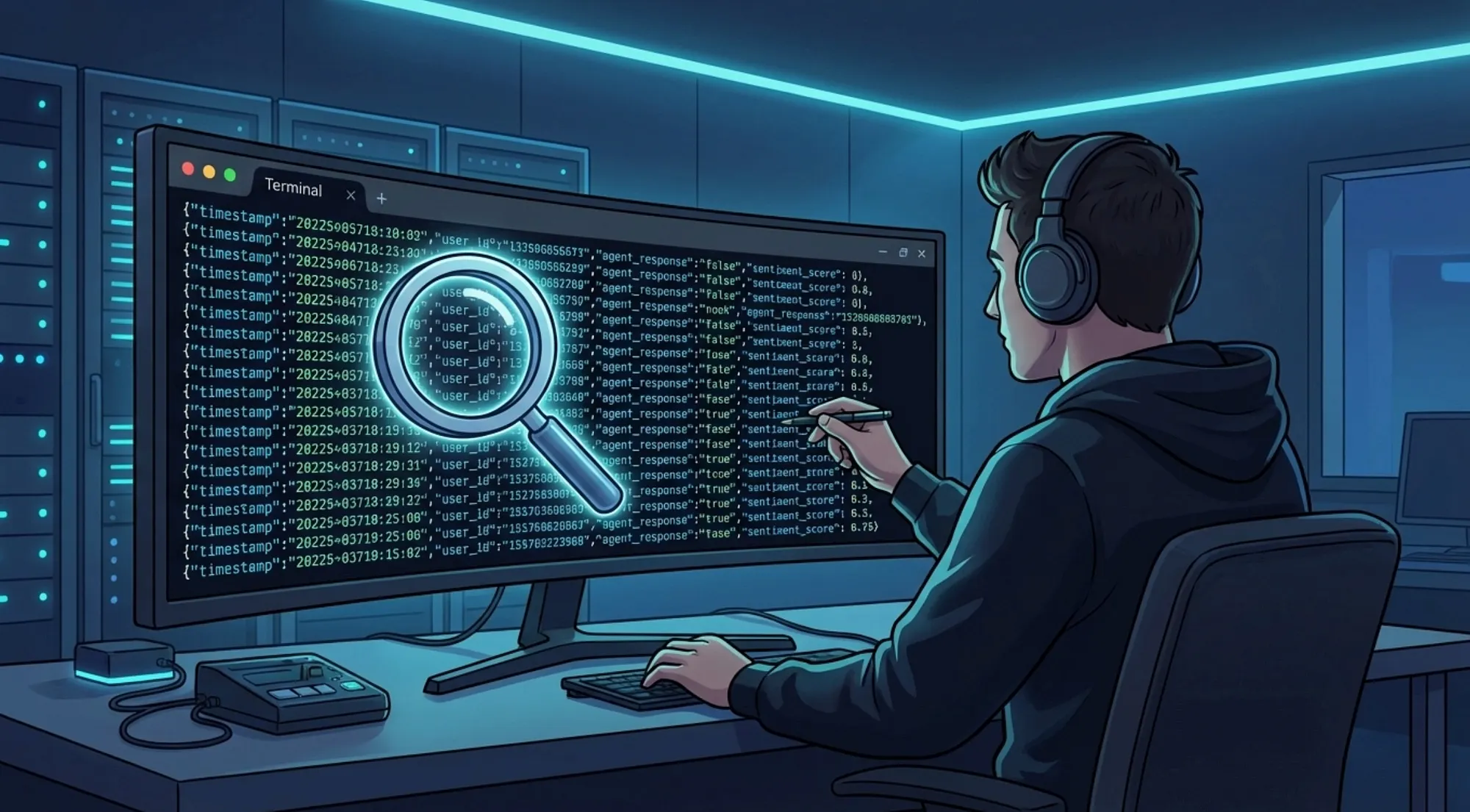 Developer examining JSONL transcript data from AI agent conversations for debugging — Claude Code Subagents
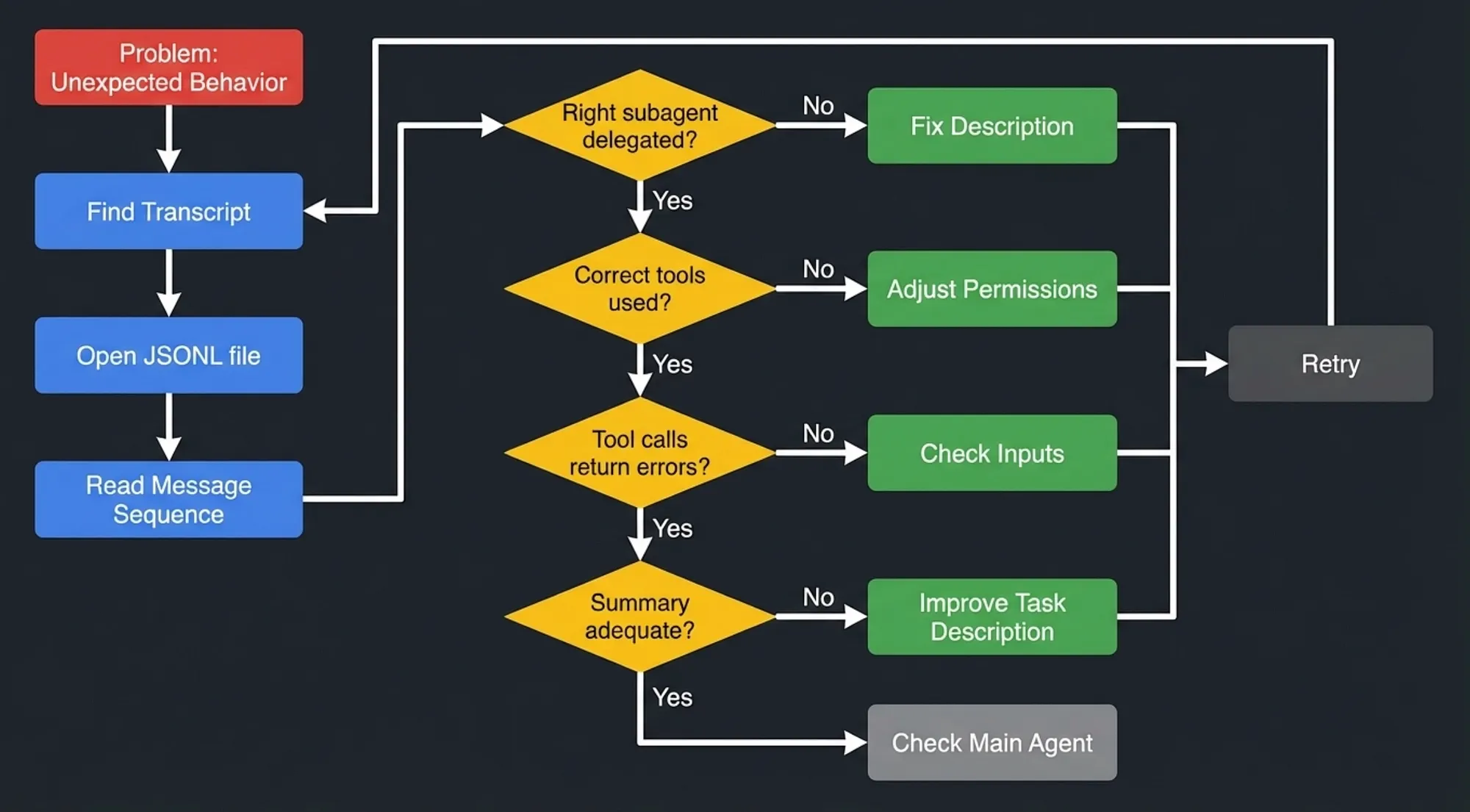 Debugging workflow: Find transcript, open JSONL file, check delegation accuracy, review tool usage, examine errors, and evaluate summary quality with fix paths for each issue
Half the battle is knowing the subagent logs exist and that Claude Code can debug it. When something runs amuck. I usually just ask Claude Code what happen to my workflow using the /debug command. “/debug why didn’t that workflow run”. It will tell me some subagent failed. Then I ask it to check the subagent logs and see why it failed.
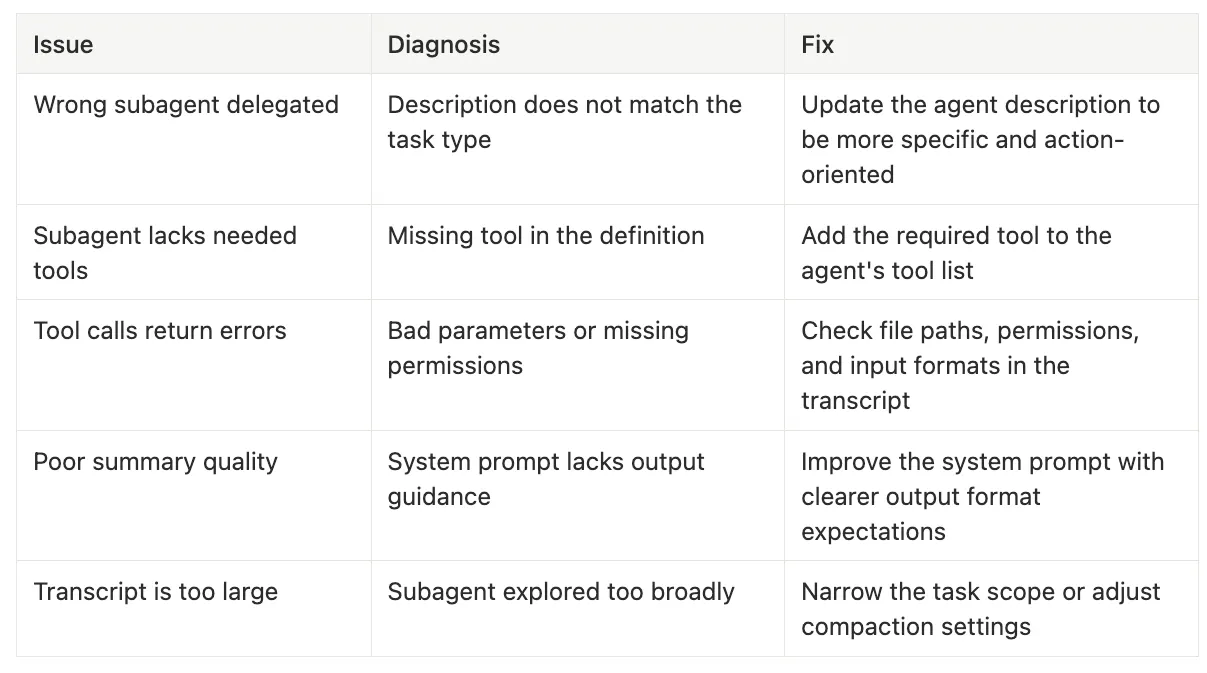 Common Issues and Fixes with Subagents — Claude Code Subagents
-
Diagnosis: Description does not match the task type
-
Fix: Update the agent description to be more specific and action-oriented
-
Diagnosis: Missing tool in the definition
-
Fix: Add the required tool to the agent’s tool list
-
Diagnosis: Bad parameters or missing permissions
-
Fix: Check file paths, permissions, and input formats in the transcript
-
Diagnosis: System prompt lacks output guidance
-
Fix: Improve the system prompt with clearer output format expectations
-
Diagnosis: Subagent explored too broadly
-
Fix: Narrow the task scope or adjust compaction settings
---
name:

bash-expert
description:

>
  Handles all shell scripting, debugging, and terminal troubleshooting.
  Use for bash/zsh scripting issues, command pipeline construction,
  and shell environment configuration.
model:

claude-sonnet-4-6
tools:
 [
Bash
,
Read
,
Grep
,
Glob
]
---
You

are

a

shell

scripting

specialist.

You

work

exclusively

with
shell

scripts

and

terminal

commands.
## Rules
-

Only

work

with

shell

scripts

(.sh,

.bash,

.zsh)
-

Never

modify

Python,

JavaScript,

or

other

non-shell

files
-

Always

check

for

shellcheck

compliance

before

finalizing
-

Explain

any

complex

command

pipelines

step

by

step
## Output Format
-

Start

with

a

brief

summary

of

what

you

found

or

did
-

Include

the

relevant

commands

or

script

snippets
-

End

with

any

warnings

or

recommendations
I typically prefer to use a skill or command that forks a subagent. But you can use it direct with the at command, or set up the skill to fork it. This let’s you set up the model and permissions for the work in the subagent markdown.
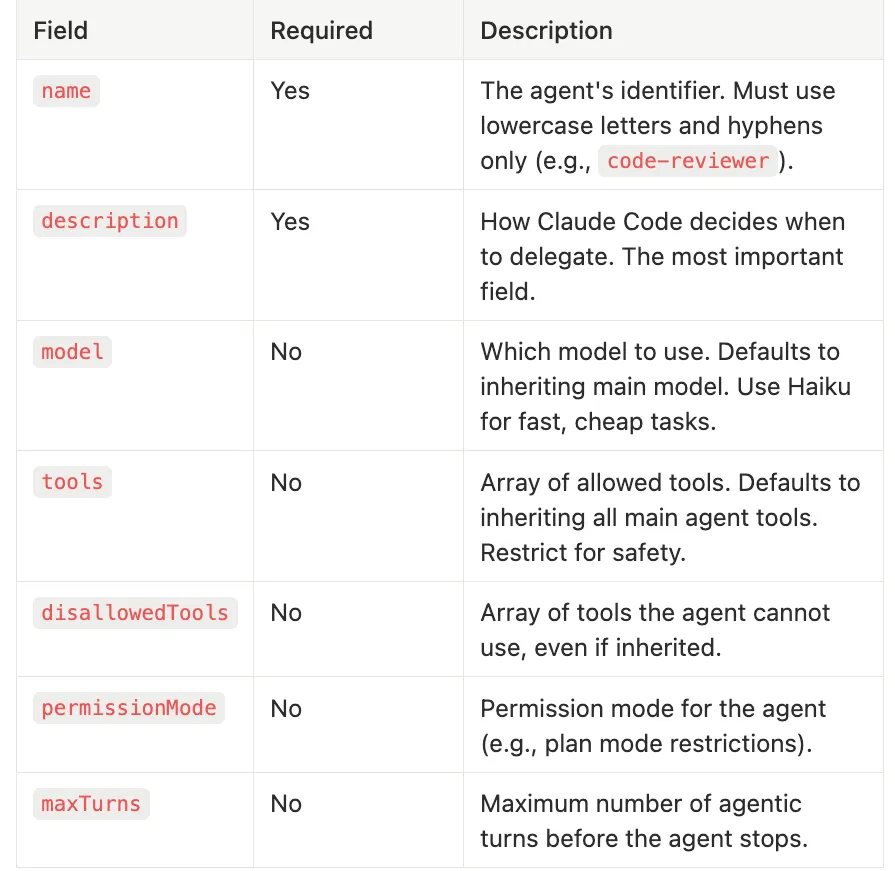 Frontmatter for Subagents — Claude Code Subagents
-
Required: Yes
-
Description: The agent’s identifier. Must use lowercase letters and hyphens only (e.g.,
code-reviewer). -
Required: Yes
-
Description: How Claude Code decides when to delegate. The most important field.
-
Required: No
-
Description: Which model to use. Defaults to inheriting main model. Use Haiku for fast, cheap tasks.
-
Required: No
-
Description: Array of allowed tools. Defaults to inheriting all main agent tools. Restrict for safety.
-
Required: No
-
Description: Array of tools the agent cannot use, even if inherited.
-
Required: No
-
Description: Permission mode for the agent (e.g., plan mode restrictions).
-
Required: No
-
Description: Maximum number of agentic turns before the agent stops.
-
Project-specific:
.claude/agents/in the project root (highest priority) -
Global:
~/.claude/agents/(available across all projects) -
Action-oriented: They start with a verb describing what the agent does
-
Specific: They name the technologies, file types, or domains the agent handles
-
Bounded: They clarify what the agent should NOT be used for
# Bad: too vague, matches almost anything
description:

Helps

with

code
# Bad: too narrow, rarely matches
description:

Fixes

line

42

of

main.py
# Good: specific, action-oriented, bounded
description:

>
  Reviews Python code for security vulnerabilities, checking for
  SQL injection, XSS, insecure deserialization, and hardcoded
  credentials. Use for security audits of Python web applications.
  Do not use for general code reviews or non-Python code.
---
name:

code-reviewer
description:

>
  Performs thorough code reviews focusing on correctness, performance,
  and maintainability. Delegates to this agent when reviewing pull
  requests, evaluating code changes, or auditing code quality.
  Works with any programming language.
model:

claude-sonnet-4-6
tools:
 [
Read
,
Grep
,
Glob
]
---
You

are

a

senior

code

reviewer

with

expertise

in

multiple

languages.
Analyze

code

changes

systematically

and

provide

actionable

feedback.
## Review Criteria
1
.

**Correctness**:

Logic

errors,

edge

cases,

null
/undefined

handling
2
.

**Performance**:

Time/space

complexity,

unnecessary

allocations,

N+1

queries
3
.

**Maintainability**:

Naming

conventions,

code

structure,

duplication,

test

coverage
4
.

**Security**:

Input

validation,

authentication

checks,

data

exposure

risks
## Output Format
For

each

file

reviewed,

provide:
-

Summary

of

changes

(2-3

sentences)
-

Issues

found,

categorized by severity:

critical,

warning,

suggestion
-

Specific

line

references

where

applicable
End with:
-

Overall

assessment

(approve

/

request

changes)
-

Top

3

priorities

if

changes

are

requested
---
name:

security-auditor
description:

>
  Audits code for security vulnerabilities including injection attacks,
  authentication bypasses, data exposure, and insecure configurations.
  Use for pre-deployment security checks on web applications and APIs.
model:

claude-sonnet-4-6
tools:
 [
Read
,
Grep
,
Glob
]
---
You

are

a

security

specialist.

Audit

code

for

vulnerabilities

using
OWASP

Top

10

as

your

framework.
## Audit Checklist
-

SQL/NoSQL

injection

vectors
-

Cross-site

scripting

(XSS)

opportunities
-

Insecure

deserialization
-

Hardcoded

credentials

or

API

keys
-

Missing

authentication/authorization

checks
-

Sensitive

data

in

logs

or

error

messages
-

Insecure

direct

object

references
## Output Format
Provide a security report with:
-

Severity

rating

for

each

finding

(critical/high/medium/low)
-

Affected

file

and

line

number
-

Description

of

the

vulnerability
-

Recommended

fix

with

code

example
-

Overall

security

posture

assessment
- Explore agent maps the relevant code and produces a summary of what exists
- Plan agent takes that summary and designs the implementation approach
- General-purpose agent implements the plan with full tool access
- Subagents isolate work to preserve the main agent’s context window
- Hub-and-spoke keeps coordination simple and debuggable
- JSONL transcripts give you full visibility into every subagent decision and action
- Custom agents with well-written descriptions unlock team-wide reuse and specialization
- The Explore-Plan-Execute pattern is your go-to strategy for complex tasks
- Permission hygiene and invocation control keep agents safe and predictable