Claude Code Todos to Tasks
From Todos to Tasks: How Claude Code's Task System Enables Tasks based collaboration
Originally published on Medium.
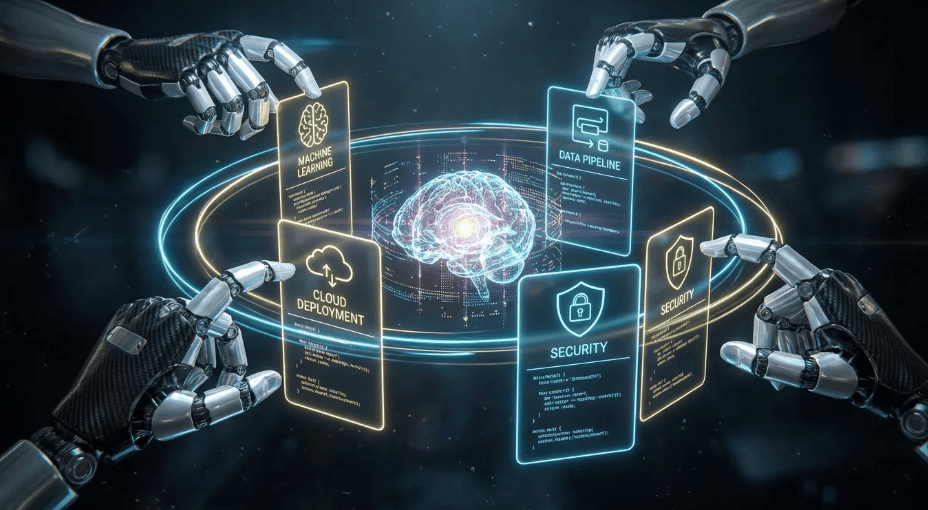
From Todos to Tasks: How Claude Code's Task System Enables Tasks based collaboration
Transform your development process with Claude Code's new Task system. Discover how to manage complex projects effortlessly while boosting productivity with session-scoped tasks. Then figure out how to persist tasks so they continue beyond the current session.
Claude Code's new Task system enhances AI agent workflows by transitioning from a "Todos" system to session-scoped tasks that manage complex dependencies and enable parallel execution. The hydration pattern allows tasks to be created from persistent specification files, bridging sessions and facilitating professional-grade development. Key features include task creation, updates, and retrieval, with a focus on managing dependencies and coordinating multiple agents effectively. This system is designed for multi-file projects, improving productivity through structured workflows. Then as a proof of concept we integrated Claude Tasks with an Agentic Spec-Driven Development framework to demonstrate Task persistent for project continuity beyond a single session.
Session-scoped orchestration meets persistent specifications for parallel AI agent workflows
With the release of Claude Code 2.1.19, a fundamental shift occurred in how AI agents handle work. Simple tasks no longer need checklists. The model handles them implicitly, maintaining context and executing straightforward requests without external tracking. But for long-running, multi-file engineering projects, this implicit handling falls short.
The transition from Claude Code's previous "Todos" system to the native Task architecture addresses this gap. Tasks transform Claude from a reactive assistant into a sophisticated project orchestrator capable of managing complex dependency trees and coordinating parallel sub-agents.
But here's what most developers miss: Tasks are session-scoped. They don't persist across sessions. This isn't a bug. It's a design choice that enables a powerful pattern when combined with Spec-Driven Development (SDD) frameworks, GSD (Get "Stuff" Done), or OpenSpec, etc.
This article shows you how to leverage Tasks effectively by combining them with persistent specification files, enabling professional-grade AI-assisted development workflows.
Understanding Claude Tasks: The Four Tools
Claude Code provides four tools for task management, each serving a specific purpose in the orchestration workflow.
TaskCreate
Creates a new task with structured metadata:
TaskCreate(
    subject: "Implement JWT authentication middleware"
    description: "Add JWT validation to the API routes. Verify tokens,
                  extract user claims, attach to request context."
    activeForm: "Implementing JWT authentication"
    metadata: {"feature": "auth", "phase": "2.1"}
)
The subject field uses imperative form ("Implement X", "Add Y", "Fix Z") because it describes what needs to be done. The activeForm uses present continuous ("Implementing X") because it appears in the spinner while work is in progress. This distinction matters for readability in the task list.
The metadata field accepts arbitrary key-value pairs. Use it to track feature associations, phase numbers, priority levels, or any project-specific categorization. This metadata survives task updates and helps with filtering and reporting.
Parameters:
- subject (required): Brief, imperative title
- description (required): Detailed requirements and acceptance criteria
- activeForm (optional): Present-tense form shown in spinner
- metadata (optional): Arbitrary key-value pairs for tracking
TaskUpdate
Manages task state and dependencies:
TaskUpdate(
    taskId: "task-123"
    status: "in_progress"
    addBlockedBy: ["task-122"]
)
The dependency system uses two complementary fields:
- addBlockedBy: "I cannot start until these tasks complete"
- addBlocks: "These tasks cannot start until I complete"
Both achieve the same relationship from different perspectives. Use whichever reads more naturally for your workflow. When task-122 completes, task-123 automatically becomes unblocked and available for work.
Key parameters:
- status: "pending" → "in_progress" → "completed"
- addBlocks: Tasks that cannot start until this one completes
- addBlockedBy: Tasks that must complete before this one starts
- owner: Assign to a specific agent
TaskGet and TaskList
TaskGet retrieves full details for a specific task, including its dependency relationships. Use it when you need the complete description and acceptance criteria before starting work.
TaskList shows all tasks with their current status, useful for finding available work:
TaskList()
// Returns for each task:
//   - id: unique identifier
//   - subject: task title
//   - status: pending | in_progress | completed
//   - owner: assigned agent (if any)
//   - blockedBy: list of blocking task IDs
A task is "available" when its status is "pending", it has no owner, and its blockedBy list is empty (all dependencies resolved).
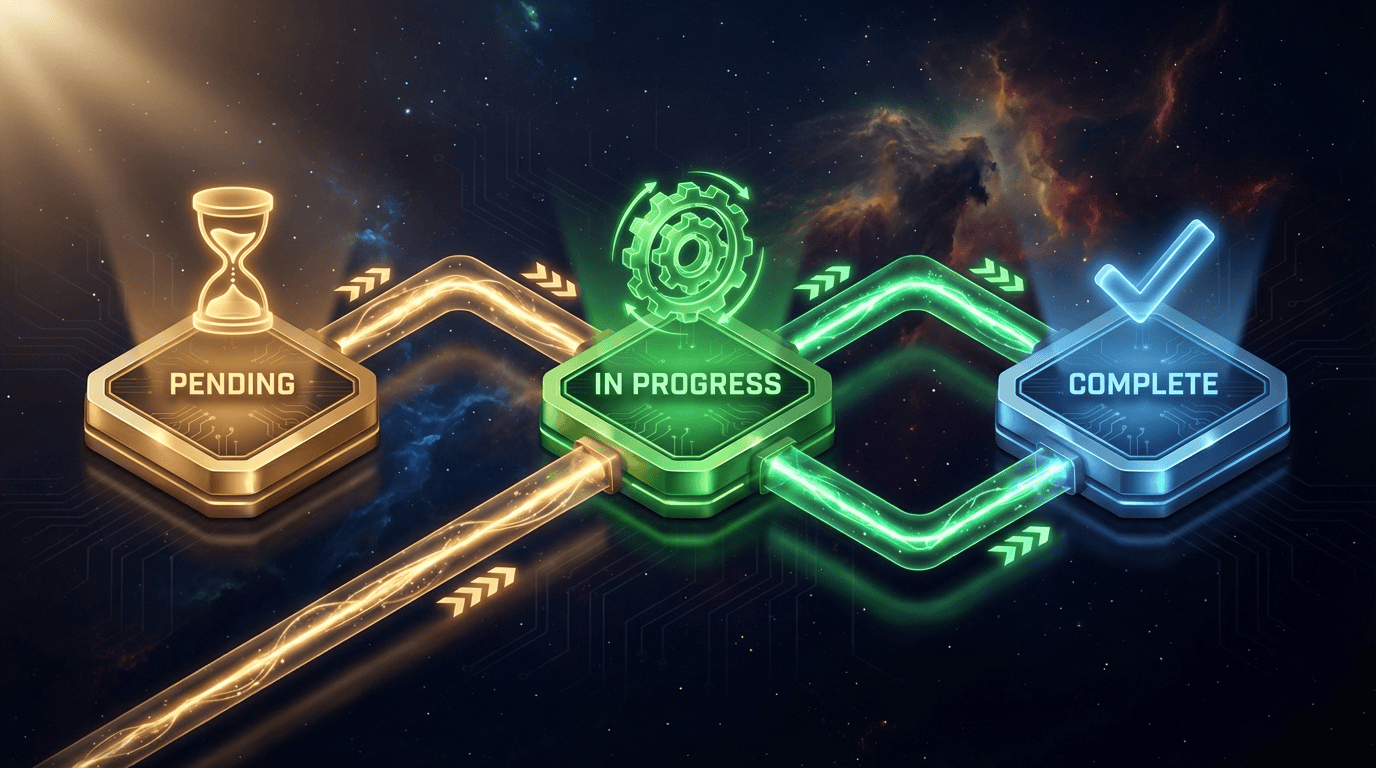 Task Lifecycle State Machine
The Session-Scoped Reality
Understanding what Tasks are and aren't is crucial for using them effectively.
What Tasks Are
- Session-scoped orchestration: Track complex multi-step work within a coding session
- Dependency management: Define relationships between tasks using blocks/blockedBy
- Progress visualization: See status in real-time, find available work
- Agent coordination: Assign tasks to sub-agents, track completion across parallel workers
What Tasks Are NOT
- Persistent storage: Tasks disappear when the session ends
- Cross-session coordination: Independent sessions don't share task state
- Project management replacement: No Gantt charts, no time tracking, no notifications
When you close your terminal or your session times out, your tasks are gone. The ~/.claude/tasks/ directory exists, but it only contains lock files for coordination, not task data. I verified this directly:
~/.claude/tasks/
├── 45c81a7b-1e91-48a6-a989-44628ccf711a/
│   └── .lock (empty lock file only)
└── c605e487-7a48-4d29-9b4a-d3ba6fa2f8f2/
    └── .lock (empty lock file only)
This isn't a limitation. It's a feature.
Session-scoped tasks are lightweight, fast, and don't accumulate cruft over time. They don't require database setup or cleanup. The question becomes: how do you bridge sessions for multi-day projects?
The Hydration Pattern: Bridging Sessions
The hydration pattern solves the persistence problem by using external files as the source of truth and "hydrating" Claude Tasks from them at session start.
The Pattern
┌─────────────────────┐  Session Start  ┌──────────────────┐
│ .speckit/tasks.md   │ ────────────────────► │ Claude Tasks     │
│ (persistent)        │    "Hydrate"    │ (session-scoped) │
└─────────────────────┘                 └──────────────────┘
                                                │
                                                │ Work
                                                ▼
┌─────────────────────┐  Session End    ┌──────────────────┐
│ .speckit/tasks.md   │ ◄──────────────────── │ Task Updates     │
│ (updated)           │    "Sync back"  │ (completed)      │
└─────────────────────┘                 └──────────────────┘
The term "hydration" comes from frontend frameworks where server-rendered HTML is "hydrated" with JavaScript interactivity. Here, static markdown task lists are hydrated into live, trackable Claude Tasks.
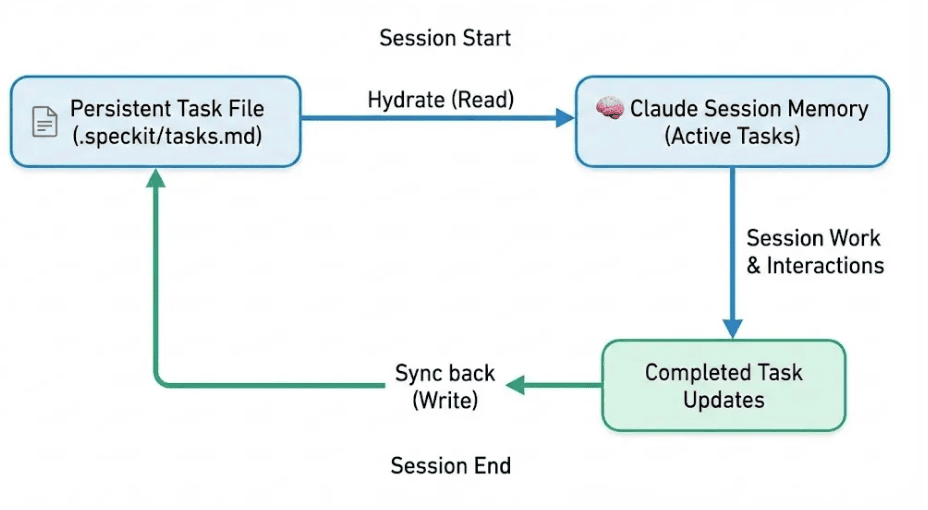
How It Works
Session Start:
- Read your spec files (features.md, tasks.md, plans.md)
- Create Claude Tasks for each unchecked item
- Set up dependencies using addBlockedBy
During Work:
- Tasks track progress in real-time
- Status updates: pending → in_progress → completed
- Parallel agents coordinate through shared task list
Session End:
- Update features.md with completed features
- Update tasks.md: change [ ] to [x]
- Update plans.md to reflect progress
- Commit changes to git for audit trail
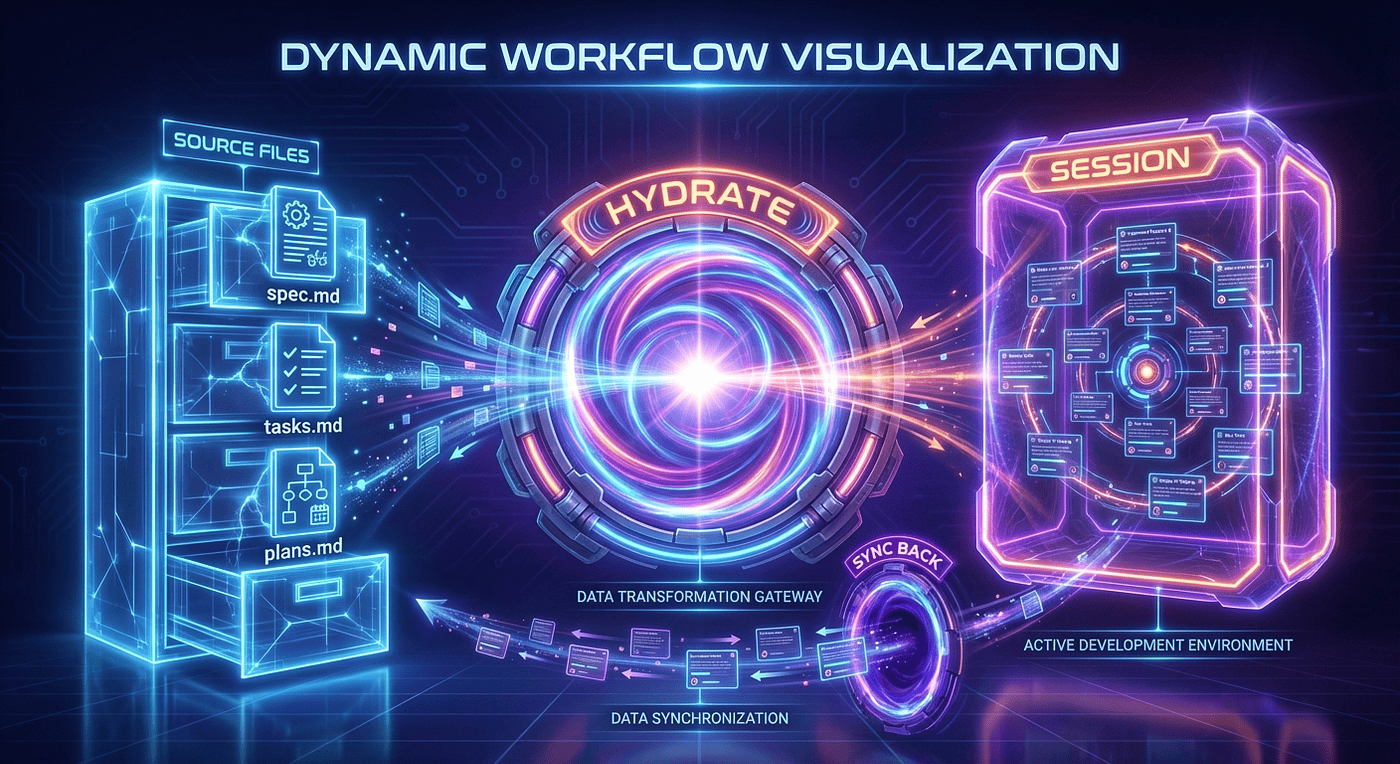 Hydration Flow Diagram
Phase-by-Phase Breakdown
1. Session Start: "Hydration"
Source: .speckit/tasks.md (persistent)
- This is a permanent Markdown file on your local system containing the master list of tasks. It exists before the session starts. It is a similar structure with tasks and dependencies.
Action: "Hydrate" ──►
- "Hydration" here means reading the data from the persistent spec driven dev files and loading it into the AI's active context window.
Destination: Claude Tasks (session-scoped)
- Claude now has a temporary copy of the task list in its immediate working memory for the duration of this current interaction (session).
2. The Work Phase
Action: Work ▼
This vertical arrow represents the main interaction where you prompt Claude to perform the tasks loaded during the hydration phase (e.g., writing code, analyzing text, etc.).
3. Session End: "Sync back"
Source: Task Updates (completed)
As a result of the "Work" phase, Claude has generated new outputs, marked items as finished, or modified existing tasks. These are the "deltas" or changes.
Action: "Sync back" ◄──
The changes made during the session are written from Claude's memory back to the permanent storage.
Destination: .speckit/tasks.md (updated)
The original Markdown file is overwritten or appended with the new state of the tasks, ensuring the progress is saved for the next session.
Key Concepts
- Persistence vs. Session Scope: The crucial distinction in the diagram is that the .md file lasts forever (persistent), while Claude's knowledge of those tasks only lasts for the current interaction (session-scoped).
- .speckit convention: This is just the folder where the spec driven development files get stored, feature folders, spec.md, plans.md, tasks.md and checklists.
This example uses SDD (GitHub Spec-Driven Development), but it could have used GSD (Get "Stuff" Done) instead, which has been recommended as something that I should try.
Talk is cheap. Let's show a real example of this in action.
Real Example: Hydrating 28 Tasks from Speckit
From the code_agent_context_hooks project, here's what the hydration process actually looks like. The speckit file contains:
# .speckit/features/rulez-ui/tasks.md

## M2: Monaco Editor
- [ ] M2-T01: Integrate Monaco Editor in RuleZ UI
- [ ] M2-T02: Add Monaco editor features (save, undo/redo, folding)
- [ ] M2-T03: Create EditorToolbar component

## M3: Schema Validation
- [ ] M3-T01: Create JSON Schema for hooks.yaml validation
- [ ] M3-T02: Integrate monaco-yaml for schema validation
- [ ] M3-T03: Implement JSON Schema autocomplete
- [ ] M3-T04: Create ValidationPanel component

## M4: File Operations
- [ ] M4-T01: Implement Tauri file commands (list, read, write)
...
When I asked Claude Code to hydrate these into native Tasks, here's what happened:
✔ Task #2 created: M2-T01: Integrate Monaco Editor in RuleZ UI
✔ Task #1 created: M2-T02: Add Monaco editor features (save, undo/redo, folding)
✔ Task #3 created: M2-T03: Create EditorToolbar component
✔ Task #4 created: M3-T01: Create JSON Schema for hooks.yaml validation
✔ Task #6 created: M3-T02: Integrate monaco-yaml for schema validation
...
✔ Task #27 created: M8-T05: Configure Playwright CI integration

⏺ Now let me set up the dependencies between tasks...

✔ Task #4 updated: blockedBy
✔ Task #6 updated: blockedBy
✔ Task #1 updated: blockedBy
...

28 tasks (0 done, 28 open)
Claude Code automatically set up the dependency chain. The resulting task list shows blocked and ready tasks:
◼ #2 M2-T01: Integrate Monaco Editor in RuleZ UI          ← Ready to start
◼ #20 M7-T02: Create ThemeToggle component                ← Ready (independent)
◼ #21 M7-T01: Implement theme system with uiStore         ← Ready (independent)
◼ #1 M2-T02: Add Monaco editor features ⚠ blocked by #2
◼ #4 M3-T01: Create JSON Schema ⚠ blocked by #2
◼ #9 M4-T01: Implement Tauri file commands ⚠ blocked by #2
◼ #13 M5-T01: Create RuleTreeView ⚠ blocked by #11
...
The dependency graph is now live. Task #2 (Monaco integration) blocks multiple downstream tasks. M7 (Theming) tasks have no dependencies and can run in parallel with M2.
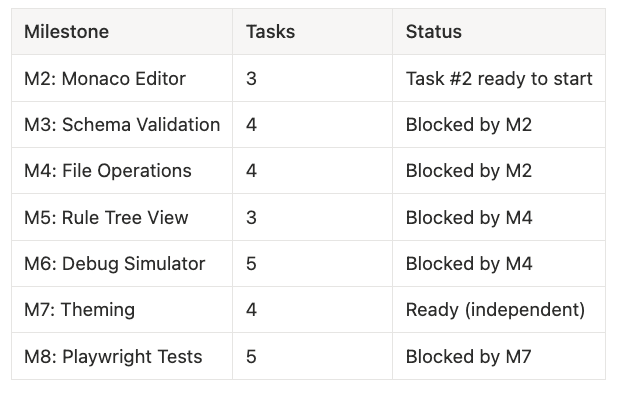
- M2: Monaco Editor -- 3 tasks -- Task #2 ready to start
- M3: Schema Validation -- 4 tasks -- Blocked by M2
- M4: File Operations -- 4 tasks -- Blocked by M2
- M5: Rule Tree View -- 3 tasks -- Blocked by M4
- M6: Debug Simulator -- 5 tasks -- Blocked by M4
- M7: Theming -- 4 tasks -- Ready (independent)
- M8: Playwright Tests -- 5 tasks -- Blocked by M7
This is the hydration pattern in action: 28 tasks from a markdown checklist, with automatic dependency resolution, ready for parallel agent execution.
Ok, it is time for a vibe check, because I want to make sure you are getting what I am laying down.
The "Aha!" Moment: Task Blueprints That Survive Sessions
Let's pause and recognize what's really happening here. This is bigger than it first appears.
You started with your task management system of choice; maybe it was SDD's speckit structure, maybe it was linear or JIRA tickets with dependency chains that you can read with a skill or MCP, or perhaps it was GSD's task tracking. The specifics don't matter. What matters is that you'd already done the hard thinking: you'd mapped out the work, identified dependencies, and created a blueprint for execution.
Here's the insight: You're not asking Claude Code to figure out what to do. You're giving Claude Code a pre-computed execution plan. It can improve or augment it, but the plan is there already.
The hydration pattern takes your persistent task structure. The plan and task hierarchy exists as markdown files, JIRA tickets, or database entries, and is loaded directly into Claude Code's session-scoped Task system. Claude now has:
- The full task list you already defined
- The dependencies you already mapped out
- The execution order you already determined
- A live, trackable system to orchestrate the work
And here's where it gets powerful: sessions are interruptible and resumable.
You start work. Claude Code completes 12 of 28 tasks. You need to step away for lunch, or a meeting, or because it's 2 AM and you should sleep. No problem. The sync-back writes the current state to your persistent storage. When you return, hours or days later, you hydrate again, and Claude Code picks up exactly where you left off. The blueprint persists. Progress accumulates.
This is fundamentally different from traditional Claude interactions, where context evaporates between sessions. Your task structure survives. Your progress is durable. Your orchestration plan is reusable.
But wait... there's more.
If this were a 1990s infomercial, this is where the announcer would lean in with that conspiratorial grin. Because we haven't even talked about the multiplier effect yet.
The real power isn't just session persistence. It's what happens when you combine persistent task blueprints, parallel agent execution, and automatic dependency resolution. That's when things get wild.
Keep reading. There is more.
Parallel Agent Coordination
The killer feature of Claude Tasks is parallel execution. You can spawn multiple sub-agents, each with scoped access to specific directories, working on independent features simultaneously.
Real Case Study
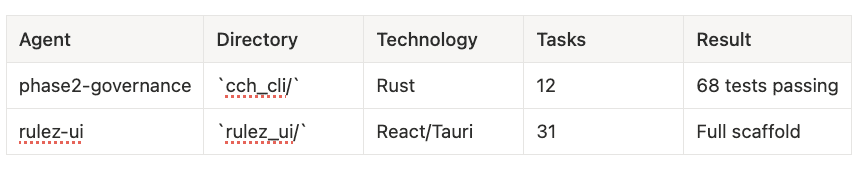
From the code_agent_context_hooks migration, I ran two agents in parallel:
Key Success Factors
1. Scoped Access Rights
Each agent is limited to its directory. This prevents conflicts and ensures focused work:
Task(
    subagent_type: "general-purpose"
    prompt: "Implement phase2-governance features from
             .speckit/features/phase2-governance/tasks.md.
             Work only in cch_cli/ directory."
    allowed_tools: ["Read", "Write", "Edit", "Bash(cargo *)"]
)
The allowed_tools parameter restricts what the agent can do. Bash(cargo *) means the agent can run cargo commands but not arbitrary shell commands. This sandboxing prevents accidental cross-feature interference.
2. Independent Branches
Features with no shared dependencies can progress simultaneously. The Rust governance work in cch_cli/ and React UI scaffold in rulez_ui/ have zero file overlap. Neither agent needs to wait for the other.
When features do share dependencies, use addBlockedBy to sequence them correctly. The blocked agent simply works on other available tasks until its dependencies resolve.
3. Central Coordination
The orchestrator (main Claude session) maintains the shared task list. When Agent A completes a task:
- Agent A calls
TaskUpdate(taskId: "P2.2-T01", status: "completed") - The shared task list reflects the completion
- Tasks blocked by P2.2-T01 become available
- Subagent B (or A) can claim the newly unblocked work
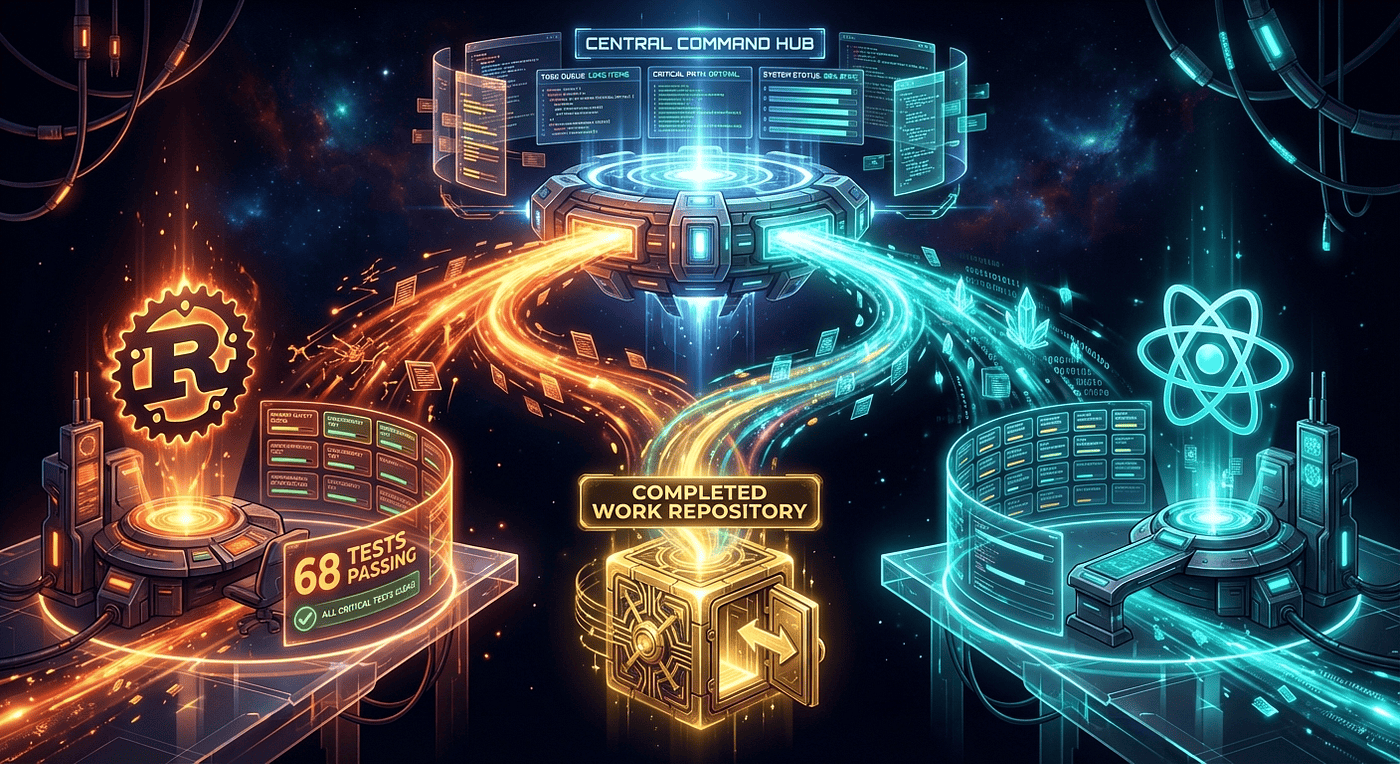 Parallel Agent Architecture
Results
Running two agents in parallel on the code_agent_context_hooks project delivered:
- Governance agent: All 12 tasks completed, 68 Rust tests passing, clean clippy output
- RuleZ UI agent: Milestone 1 complete with full Tauri + React scaffold, component structure, Zustand stores
- Time savings: Both features progressed simultaneously rather than sequentially
The orchestrator session tracked overall progress and triggered the sync-back to spec files when both agents completed their work.
Again, let's make sure we are jamming to the same drum beat here.
Another "Aha!" Moment: The Compound Interest Effect
Here's something that might not be obvious at first, but becomes crystal clear once you experience it: Every hydration cycle makes your project specification smarter.
Think about what's happening under the hood. Each time you:
- Hydrate tasks from your spec
- Let Claude Code work through them
- Sync the results back
You're not just completing work. You're teaching your specification what "done" looks like.
Your tasks.md files become a living record of successful execution. Future Claude Code sessions don't just see what needs to be done. They see what was already accomplished and how it was accomplished. The git history shows the progression. The completed checkboxes show the path that worked.
This creates a compound interest effect for AI-assisted development:
- Session 1: Claude Code learns your project structure by executing the first 10 tasks
- Session 2: Claude Code sees Session 1's completed work, understands the patterns established, builds on them
- Session 3: Claude Code has the full context of Sessions 1 and 2, works faster and with fewer clarifications
Each session compounds on the previous ones. The specification becomes progressively more valuable. This is fundamentally different from traditional development where tribal knowledge lives in people's heads or scattered across Slack threads.
Your project gains institutional memory that survives context windows, session timeouts, and even switching between different Claude Code instances. The spec files are the shared memory. Tasks are the execution engine. Together, they create a development system that gets smarter over time.
How cool is that?
The Parallel Advantage: Why Two Agents Beat One Every Time
Here's the simplest way to think about parallel execution: independent work should happen independently.
When your Rust backend and React frontend have zero file overlap, there's no reason to build them sequentially. Spawn two agents. Give each one its sandbox. Let them work simultaneously. And if there is overlap, this would be a good time to introduce git work-trees which Claude Code is a master of and you can even improve it with a little work-tree skills magic.
The math is obvious but worth stating: two agents on independent features deliver both features in roughly the time one agent would take for just one feature. That's not a 2x speedup; it's closer to a 2x capacity increase.
The beauty is in the coordination. Claude Code's Task system handles dependency resolution automatically. When Agent A completes a blocking task, Agent B sees it immediately and can proceed. No manual coordination required. No risk of conflicts when agents stay in their designated directories.
This isn't theoretical. The code_agent_context_hooks project ran two agents in parallel, one on Rust governance, one on React UI, and both finished their milestones in a single session. Sequential execution would have taken twice as long. It is early in the game, but I wrote this article because I can clearly see the potential of it.
The key insight: parallelism isn't just about speed. It's about maintaining momentum. While one agent waits for you to review its work, another agent keeps building. Your project progresses continuously instead of in stop-start cycles.
Also, there seems to be some DNA of Ralph Wiggum in these here Tasks, because I was noticing that with the plan in place, the acceptance fatigue was gone, and Claude Code without running in YOLA mode cranked for about as long as you can believe with no so much as a peep for access to nothing. Of course, I set up permissions fairly nicely and started with a good prompt to kick it off, which I will share at the end of the article, but that bad boy ran a long time with no intervention, with Tasks, a good starting prompt, and a well-spelled-out plan. This is compelling stuff. This is a change for the better. Embrace Tasks.
SDD Integration: The Complete Workflow
The hydration pattern reaches its full potential when integrated with Spec-Driven Development frameworks or something like it (GSD, Linear, JIRA with dependencies), OpenSpec, etc. SDD provides the persistent structure; Tasks provide the session execution engine.
The Speckit Structure
.speckit/
├── constitution.md          # Project rules and principles
├── features.md              # Feature definitions and status
└── features/
    ├── phase2-governance/
    │   ├── spec.md          # Detailed specification
    │   ├── plans.md         # Implementation approach
    │   └── tasks.md         # Granular task checklist
    └── rulez-ui/
        ├── spec.md
        ├── plans.md
        └── tasks.md
Each feature gets its own directory with three files:
- spec.md: What the feature does (requirements, acceptance criteria)
- plans.md: How to build it (architecture decisions, implementation order)
- tasks.md: Granular checklist that hydrates into Claude Tasks
A Note on My SDD Journey
I'm not claiming to be the ultimate practitioner of GitHub Spec-Driven Development, far from it. I wrote my own SDD agent skill primarily because I wanted the flexibility to switch between structured SDD workflows and more ad hoc development while still being able to sync back to something more deliberate when needed.
This might be a lack of knowledge or lack of being a true believer, but here's what I do believe: having a plan spelled out helps coding agents tremendously. SDD has worked quite well on several projects I've tackled, and I certainly know a lot more about it now than when I started. But to me, SDD is mostly important for one thing: having a plan spelled out so you have some continuity.
I've always used SDD as more of a hybrid approach. I'm not rigid about it. And I'm completely open to simpler alternatives like Get Stuff Done (GSD), which I plan on trying at some point. The goal isn't religious adherence to a framework -- it's finding what works for maintaining momentum and clarity when working with AI agents.
The key insight remains: whether you use GitHub's Spec-Kit, GSD, or roll your own like I did, the plan is what matters. The framework is just scaffolding to keep that plan visible and actionable across sessions.
I don't view myself as the ultimate expert. Just a fellow traveler, so please share how you manage tasks and tasks dependencies, and how you keep large projects on track.
The Complete Workflow
 SDD + Tasks Integration
Session N:
- Read spec files → Hydrate Tasks
- Parallel agents work on features
- Tasks complete → Update spec files
- Commit updated specs to git
Session N+1:
- Read updated spec files → See completed work
- Hydrate remaining Tasks
- Continue where you left off
This makes Tasks effectively persistent through git-versioned specification files. You get the audit trail of git history plus the lightweight orchestration of session-scoped Tasks.
Real Example: Sync-Back After Completion
After the parallel agents completed their work on the code_agent_context_hooks project, I had Claude update the spec files. Here's what the sync-back looks like:
Before (tasks.md):
## Phase 2.2: Enhanced Logging
- [ ] P2.2-T01: Add Decision enum to models
- [ ] P2.2-T02: Extend LogEntry struct with governance fields
- [ ] P2.2-T03: Update log writer for governance fields
- [ ] P2.2-T04: Update log querying with mode/decision filters
After sync-back (tasks.md):
## Phase 2.2: Enhanced Logging
- [x] P2.2-T01: Add Decision enum to models
- [x] P2.2-T02: Extend LogEntry struct with governance fields
- [x] P2.2-T03: Update log writer for governance fields
- [x] P2.2-T04: Update log querying with mode/decision filters
features.md updated:
| Feature           | Status      |
|-------------------|-------------|
| phase2-governance | Complete    |
| rulez-ui M1       | Complete    |
| rulez-ui M2-M8    | In Progress |
The git commit captures the state transition:
git commit -m "Complete phase2-governance (P2.2-P2.4)

- Decision enum: Allowed, Blocked, Warned, Audited
- TrustLevel enum: Local, Verified, Untrusted
- Extended LogEntry with governance fields
- 68 tests passing, clippy clean"
Next session, Claude reads these updated files and knows exactly where to resume.
Related Frameworks
- Spec-Driven Development: The methodology behind speckit, explaining the philosophy of AI-native development
- GitHub Spec-Kit: GitHub's implementation of SDD with tooling for spec management
- Get Stuff Done: Alternative framework focused on task persistence and completion tracking
Again, there is no reason why you could not use this with JIRA, GitHub tasks, or Linear. You could even combine a tool like GSD and SDD with JIRA, Github tasks, or Linear. This technique should work fine if you are using OpenSpec, GSD, Github SDD, Tessl, Kiro, etc.
All should work with the hydration pattern. Choose based on your project's complexity and team preferences.
When to Use Tasks: Decision Matrix
Tasks add overhead. Use them strategically.
Use Tasks When
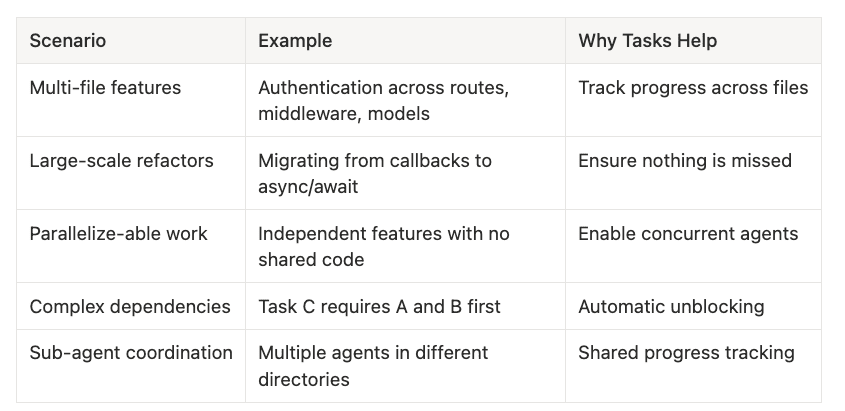
- Multi-file features: Authentication across routes, middleware, models -- Track progress across files
- Large-scale refactors: Migrating from callbacks to async/await -- Ensure nothing is missed
- Parallelizable work: Independent features with no shared code -- Enable concurrent agents
- Complex dependencies: Task C requires A and B first -- Automatic unblocking
- Sub-agent coordination: Multiple agents in different directories -- Shared progress tracking
Skip Tasks When
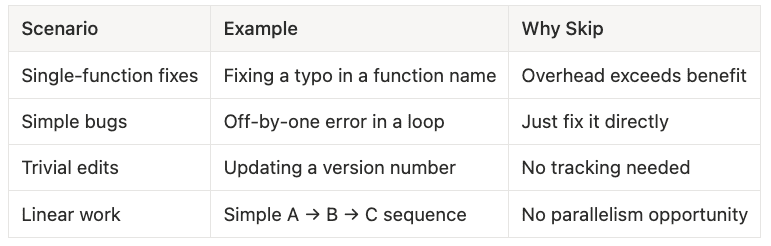
- Single-function fixes: Fixing a typo in a function name -- Overhead exceeds benefit
- Simple bugs: Off-by-one error in a loop -- Just fix it directly
- Trivial edits: Updating a version number -- No tracking needed
- Linear work: Simple A → B → C sequence -- No parallelism opportunity
The 3-Task Rule: If you have fewer than 3 related steps, just do them directly. The overhead of creating, tracking, and completing tasks isn't worth it for trivial work.
From Ralph Wiggum to Native Tasks
The Task system didn't emerge from nowhere. It formalized patterns the community had already developed through plugins and workarounds.
The Evolution
- Ralph Wiggum Loop: A community plugin using stop hooks to trap Claude in a loop until work completed. Named after the Simpsons character who famously said "I'm helping!" The plugin kept Claude focused but was fragile and single-minded.
- Ralphie Tool: Built on Ralph Wiggum, adding parallel execution and task dependencies. Demonstrated that developers needed native support for multi-task orchestration.
- Native Tasks (~January, 22 2026): Built into Claude Code 2.1+. First-class support for everything Ralphie pioneered, plus integration with the sub-agent spawning system.
What's Still Relevant
Ralphie remains useful for specific features Tasks don't cover:
- Git worktree isolation: Each agent works in its own worktree, enabling true parallel git operations
- Automatic PR creation: When work completes, automatically open a pull request
- Cross-session persistence: Ralphie manages its own state file, surviving session restarts
For most orchestration needs, native Tasks are the right choice. They're faster, more reliable, and don't require plugin setup. Use Ralphie when you need its specific git workflow features. I think I can improve on the SDD Skill, and the parallel work-trees skill to incorporate persistent tasks and a decent PR workflow.
Try It Yourself: A Minimal Example
Here's a quick way to experience the hydration pattern:
1. Create a Simple Spec File
# tasks.md

## Feature: Add User Greeting
- [ ] T1: Create greeting function
- [ ] T2: Add unit tests for greeting
- [ ] T3: Integrate greeting into main app
2. Ask Claude to Hydrate Tasks
Read tasks.md and create Claude Tasks for each unchecked item.
T2 and T3 should be blocked by T1.
3. Work Through the Tasks
Claude will create the tasks, work through them in order, and update status as it goes.
4. Sync Back
Update tasks.md to mark completed items with [x].
That's the pattern. Scale it up as your project grows, adding more features, parallel agents, and SDD frameworks.
Conclusion: The Professional Workflow
Claude Tasks aren't a todo list replacement. They're a session-scoped orchestration system that enables professional AI-assisted development when combined with persistent specification files.
The key insights:
- Tasks are session-scoped by design. Don't fight it. Embrace it.
- The hydration pattern bridges sessions. External files provide persistence; Tasks provide execution.
- Parallel agents multiply productivity. Scoped access, independent features, coordinated completion.
- SDD frameworks provide structure. Spec-Kit, Get Stuff Done, or your own speckit directory.
This is professional-grade workflow. Not a hack, but a pattern that scales to multi-day, multi-developer projects.
Getting Started
- Create a
.speckit/directory (or use Spec-Kit) - Define your features with granular tasks in markdown
- At session start, ask Claude to hydrate Tasks from your specs
- Work with parallel agents on independent features
- Sync completed status back to spec files before session ends
- Commit to git and repeat next session
The combination of ephemeral Tasks and persistent specifications gives you the best of both worlds: lightweight session orchestration with durable project state.
Try this workflow on your next multi-file feature. The productivity gains compound quickly.
This article is part of my series on AI-assisted development workflows. For the foundational concepts behind this approach, see Spec-Driven Development for Dummies. Don't be offended by the title, I was referring to myself because I am not an SDD expert at all. I just like the planning and tasks to keep a project on track.
Resources:
- Spec-Driven Development for Dummies
- GitHub Spec-Kit
- Get Stuff Done Framework
- Example Project: code_agent_context_hooks
The Prompt to Turn Spec Driven Development into Claude Tasks
Start Prompt
Convert SDD opencode project to Claude Tasks

I am currently using the /sdd skill with github speckit files stored under
.speckit/. I want to convert these into Claude's new tasks feature, which
has a similar structure and stores tasks on the filesystem as a DAG.

Please migrate this project to use Claude Code tasks by:

Reviewing the plans, tasks, features, and constitution under ./speckit
Implementing them using Claude Code tasks
Updating the ./speckit files accordingly
Using the /sdd skill as needed to understand the current implementation

Then I want you to spin up subagents using skills you find under
.claude/skills that make sense to use for their tasks. I want to finish
the implementation of .speckit/features/phase2-governance and also work
on the implementation of .speckit/features/rulez-ui at the same time.
You can spin up as many agents as needed. Be sure to assign them access
rights only needed for the current feature which are in different
directories. ~/spillwave/src/using_hooks_plugin/rulez-u
End Prompt
I was in planning mode, then it wrote out a large plan. Then it ran for a good while. Then when it was done. I prompted this in planning mode.
update ./speckit work, for example update plans.md, tasks.md, etc. to
reflect status of project...
About the Author
Rick Hightower is a technology executive and data engineer who led ML/AI development at a Fortune 100 financial services company. He created skilz, the universal agent skill installer, supporting 30+ coding agents including Claude Code, Gemini, Copilot, and Cursor, and co-founded the world's largest agentic skill marketplace.