Claude Cowork Plugins: How Anthropic Quietly Turned Its AI Into a Specialist for Every Department
A practical look at the Claude Cowork plugin system that bundles skills, MCP connectors, and sub-agents into one-click installs for sales, legal, HR, engineering, finance, and more.
Originally published on Medium.
A practical look at the Claude Cowork plugin system that bundles skills, MCP connectors, and sub-agents into one-click installs for sales, legal, HR, engineering, finance, and more.
Unlock the secret to turning Claude into a department‑specific coworker. Discover how plug‑and‑play AI plugins can instantly supercharge sales, legal, HR, engineering, and more. This is a real force multiplier for your teams.
Summary: Discover how Anthropic's Claude Cowork plugins transform a generic AI assistant into a specialized coworker for any department: sales, legal, HR, engineering, finance, and more. This is a force multiplier for your team. This article explains what plugins are, how they differ from Claude Code plugins, and highlights the most valuable role‑based plugins, showing you how a simple install can instantly connect Claude to your tools, inject domain expertise, and automate complex workflows, making it a must‑read for anyone looking to boost productivity with AI‑driven, context‑aware assistance.
Most AI assistants suffer from the same quiet problem. They know everything in general, and almost nothing about you.
Ask a generic chatbot to run a pipeline review, and it will give you a textbook definition. Ask it to draft an offer letter, and you will spend twenty minutes feeding it your comp bands, your benefits, and your equity vesting schedule before it produces anything usable. The intelligence is real, but the context is missing. That gap is exactly what Anthropic is trying to close with Claude Cowork plugins.
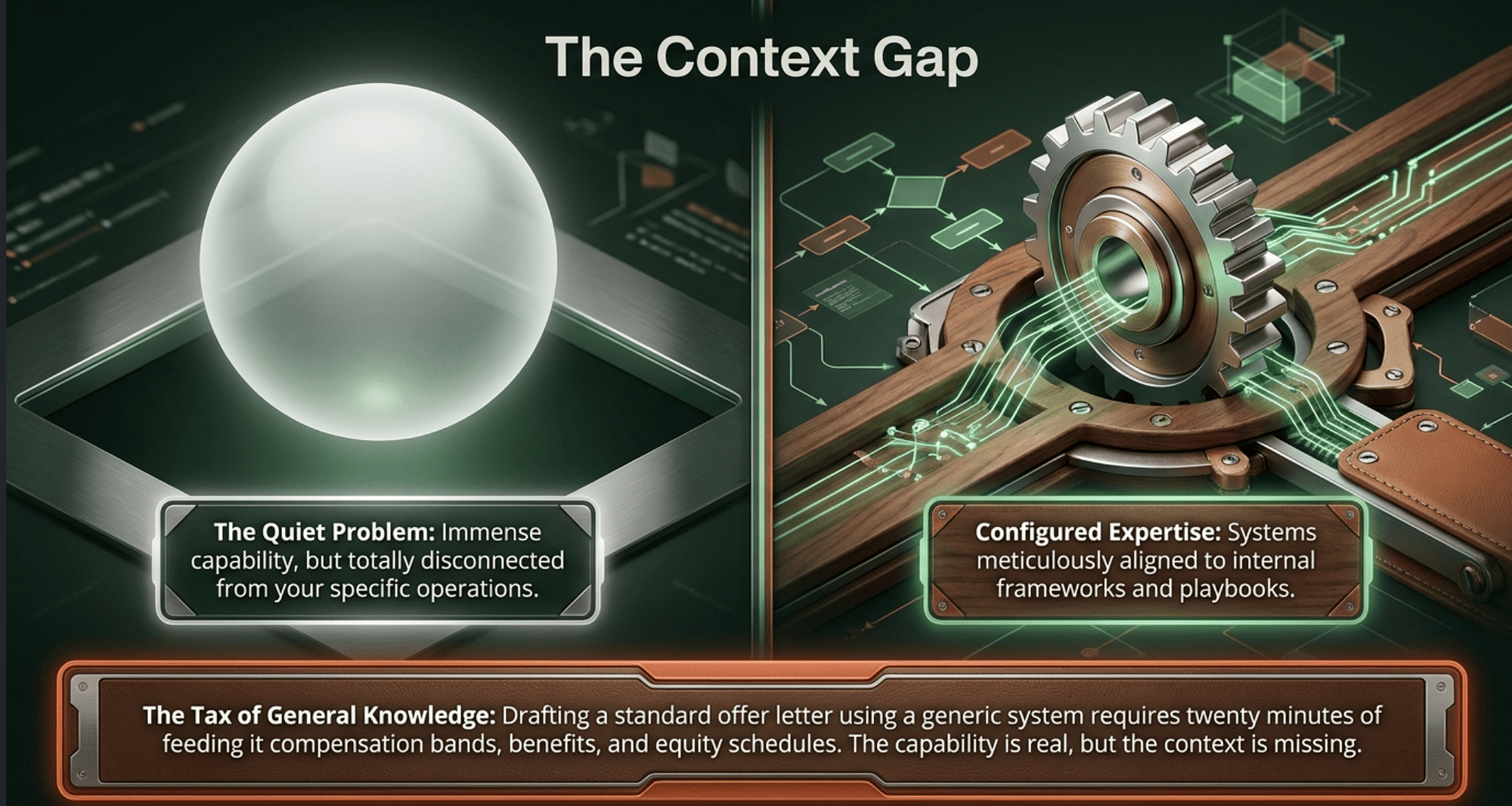
Cowork is Anthropic's agentic desktop application, the version of Claude that runs as a proper coworker on your machine rather than a tab in your browser. Plugins are the mechanism that turns that coworker into a specialist. Each plugin bundles three things into a single install: skills, which are the domain knowledge Claude pulls in automatically; MCP connectors, which wire Claude into your actual tools; and sub-agents, which handle specific workflows. Instead of configuring each piece separately, you get a ready-to-go setup from your very first conversation.
This article walks through what plugins really are, how they differ from Claude Code plugins, and which ones are worth knowing about if you work in sales, legal, HR, engineering, finance, marketing, or customer support.
What a plugin actually is
The marketing pitch is easy: plugins make Claude smarter for your job. The mechanical reality is more interesting.
A plugin is a self-contained directory of Markdown and JSON files. There is no code to compile and no infrastructure to deploy. Inside, you find a small set of well-defined components:
Skills are pieces of domain knowledge written as Markdown files. Claude pulls them in automatically when relevant, similar to how a senior coworker quietly applies their experience without announcing it. A sales skill called account-research knows how to investigate a company before a call. A legal skill knows how to triage an NDA against your playbook.
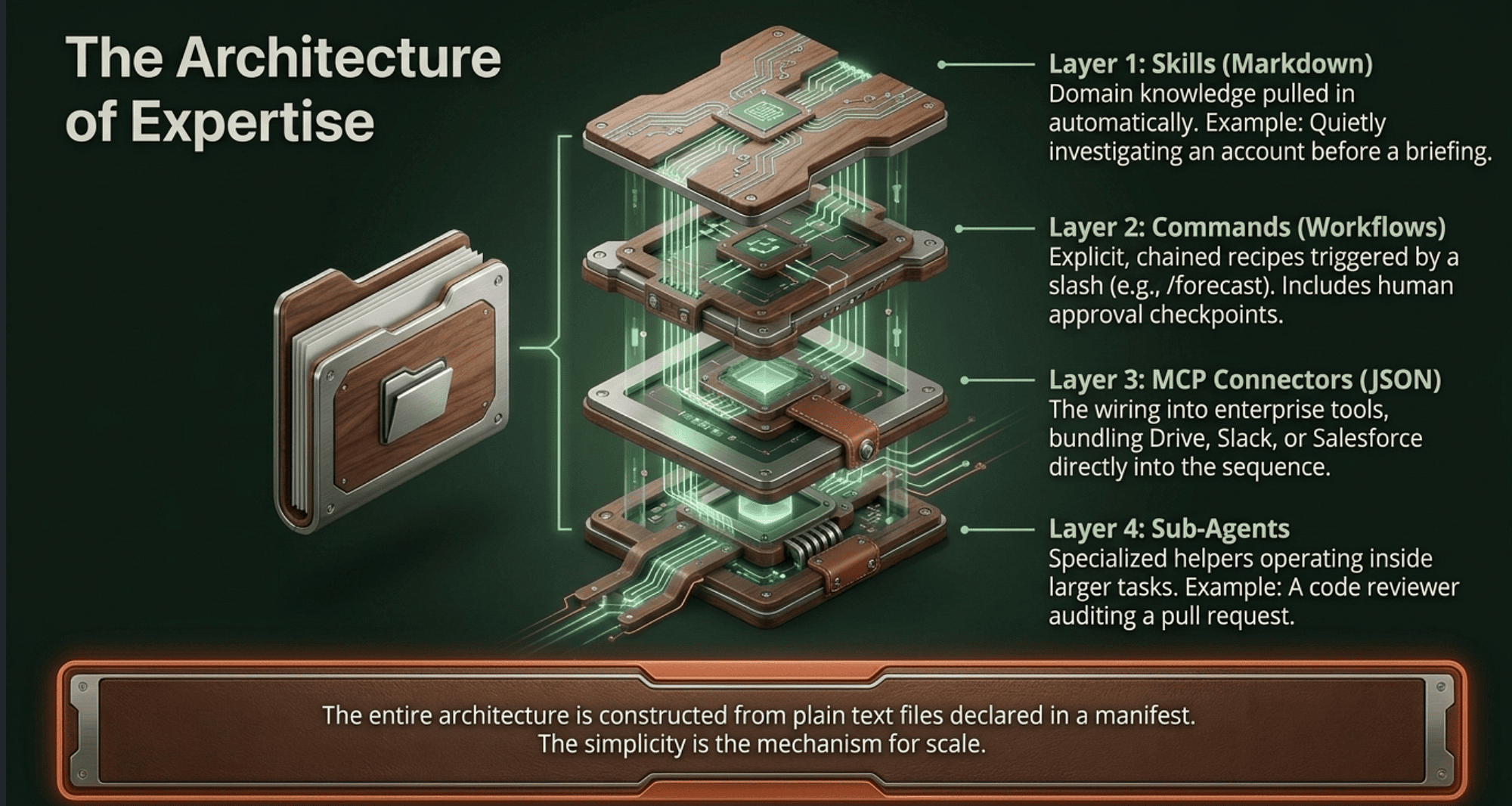
Commands are explicit workflows you trigger with a slash. Typing /forecast in the Sales plugin kicks off a weighted pipeline forecast. Typing /onboarding in the HR plugin produces a complete first-week plan. Commands chain skills together into multi-step recipes, often with checkpoints where you approve before anything actually happens.
MCP connectors link Claude to the tools where your real work lives, including Google Drive, Gmail, Slack, DocuSign, Salesforce, HubSpot, Workday, and dozens of others. Plugins bundle the right connectors for a given workflow so you do not have to set them up one by one.
Sub-agents are specialized helpers that run inside a larger workflow, for example a code reviewer that audits a pull request inside the Engineering plugin, or a quality assurance agent that audits brand voice compliance.
That is the entire architecture. Plain text files, declared in a manifest, surfaced through a clean UI. The simplicity is the point.
How plugins differ from Claude Code plugins
If you have used Claude Code, you may already be familiar with its plugin system, and you may be wondering whether the two share an install. They do not, but they share more than you might expect.
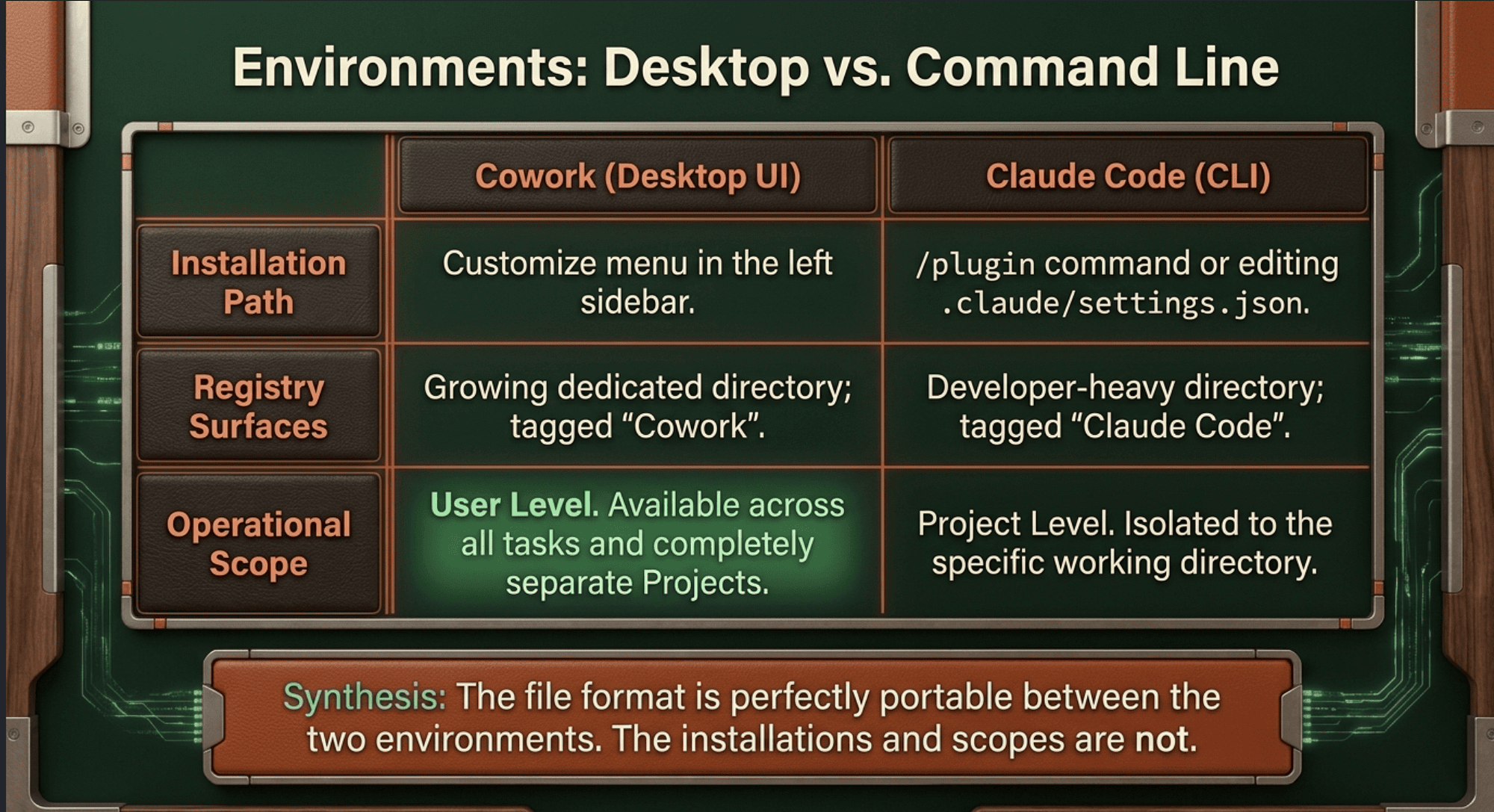
The plugin file format is the same. Anthropic's own documentation points Cowork users to the Claude Code plugins reference for structure and formatting, which tells you everything you need to know about the underlying design. The financial services plugins are explicitly noted to work across both Cowork and Claude Code.
What differs is the environment and the install pipeline. Cowork plugins are installed through the desktop app, specifically the Customize menu in the left sidebar, which brings plugins, skills, and connectors into one place. Claude Code plugins are installed through the CLI, either with the /plugin command or by editing .claude/settings.json in your project. Each product manages its own install registry.
If you browse the official plugin directory at claude.com/plugins, every plugin is tagged with the surfaces it supports. Most are tagged "Claude Code" only, since the directory leans developer-heavy. A growing number are tagged "Cowork" only. A handful, including Slack, are tagged for both.
The practical implication is straightforward. If you want a plugin available in both Cowork and Claude Code, you install it in each environment separately. The files are portable. The installations are not.
One more important detail: plugins are installed at the user level, not the project level. Cowork has a separate concept called Projects, which are dedicated workspaces with their own files, links, instructions, and memory. Projects do not control plugin scope. Once you install a plugin in Cowork, it is available across all your tasks and projects.
The role-based plugins worth knowing about
Anthropic maintains an open-source repository called knowledge-work-plugins, which contains the official role-based plugins. They share a common design philosophy, which is worth naming explicitly before diving in.
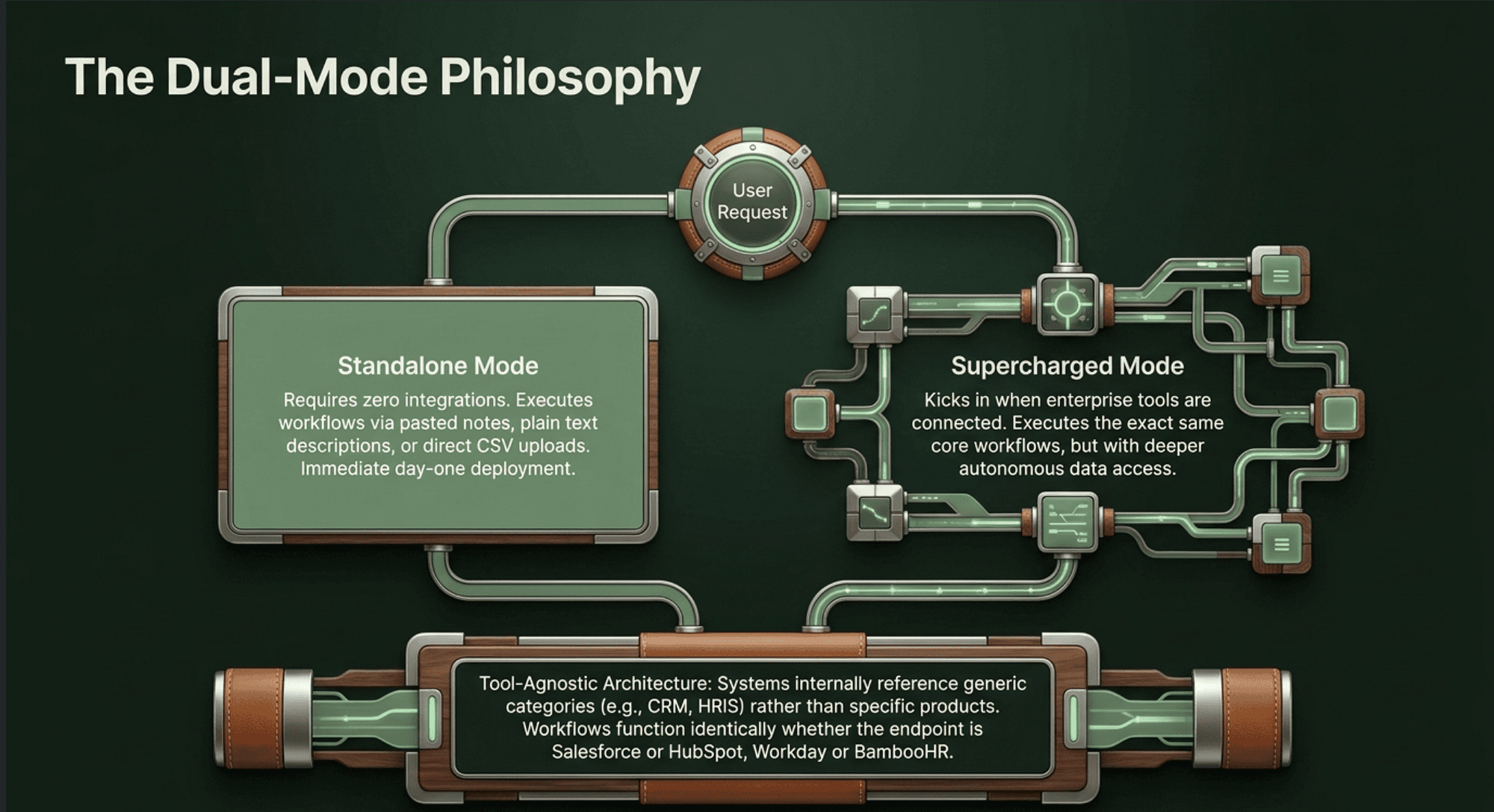
Every plugin is built to work in two modes. The standalone mode requires no integrations. You paste notes, upload a CSV, or describe your situation. The supercharged mode kicks in when you connect tools. Same workflows, deeper data. This matters because it means you can adopt a plugin on day one without waiting for IT to approve every connector.
Plugins are also tool-agnostic. Internally, they reference categories rather than specific products, using placeholders like ~~CRM and ~~HRIS so the workflow does not care whether you use Salesforce or HubSpot, Workday or BambooHR. The .mcp.json file pre-configures specific servers, but any MCP server in the right category works.
Here is a tour of the ones most likely to matter to you.
Sales
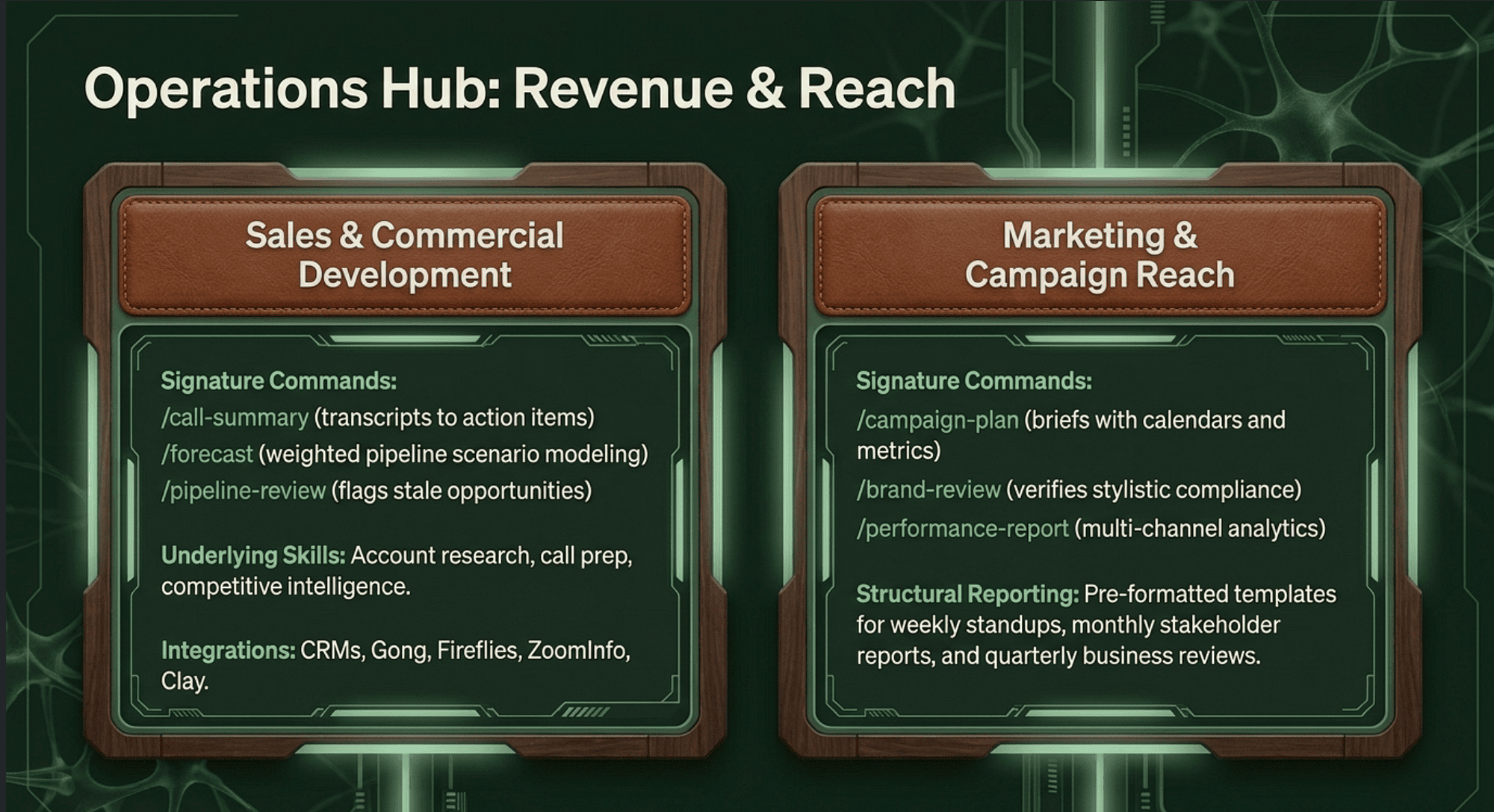
Built for account executives and revenue teams. The signature commands are /call-summary, which turns a transcript into action items and a follow-up draft; /forecast, which generates a weighted pipeline forecast with best, likely, and worst-case scenarios from a CSV; and /pipeline-review, which prioritizes deals, flags risks like stale opportunities or single-threaded contacts, and produces a weekly action plan.
The skills underneath include account research, call prep, daily briefings, draft outreach, and competitive intelligence. The plugin connects to CRMs like HubSpot and Salesforce, to conversation intelligence platforms like Gong and Fireflies, to enrichment tools like Clay and ZoomInfo, and to your calendar and email.
Marketing
A content and campaign workhorse. Commands include /draft-content for blog posts, social media, newsletters, and press releases; /campaign-plan for full campaign briefs with content calendars and success metrics; /brand-review for checking content against your style guide; /competitive-brief, /performance-report, /seo-audit, and /email-sequence.
The underlying skills cover content creation, campaign planning, brand voice enforcement, competitive analysis, and performance analytics. The reporting templates are especially well thought out, with separate formats for weekly standups, monthly stakeholder reports, and quarterly business reviews.
Legal
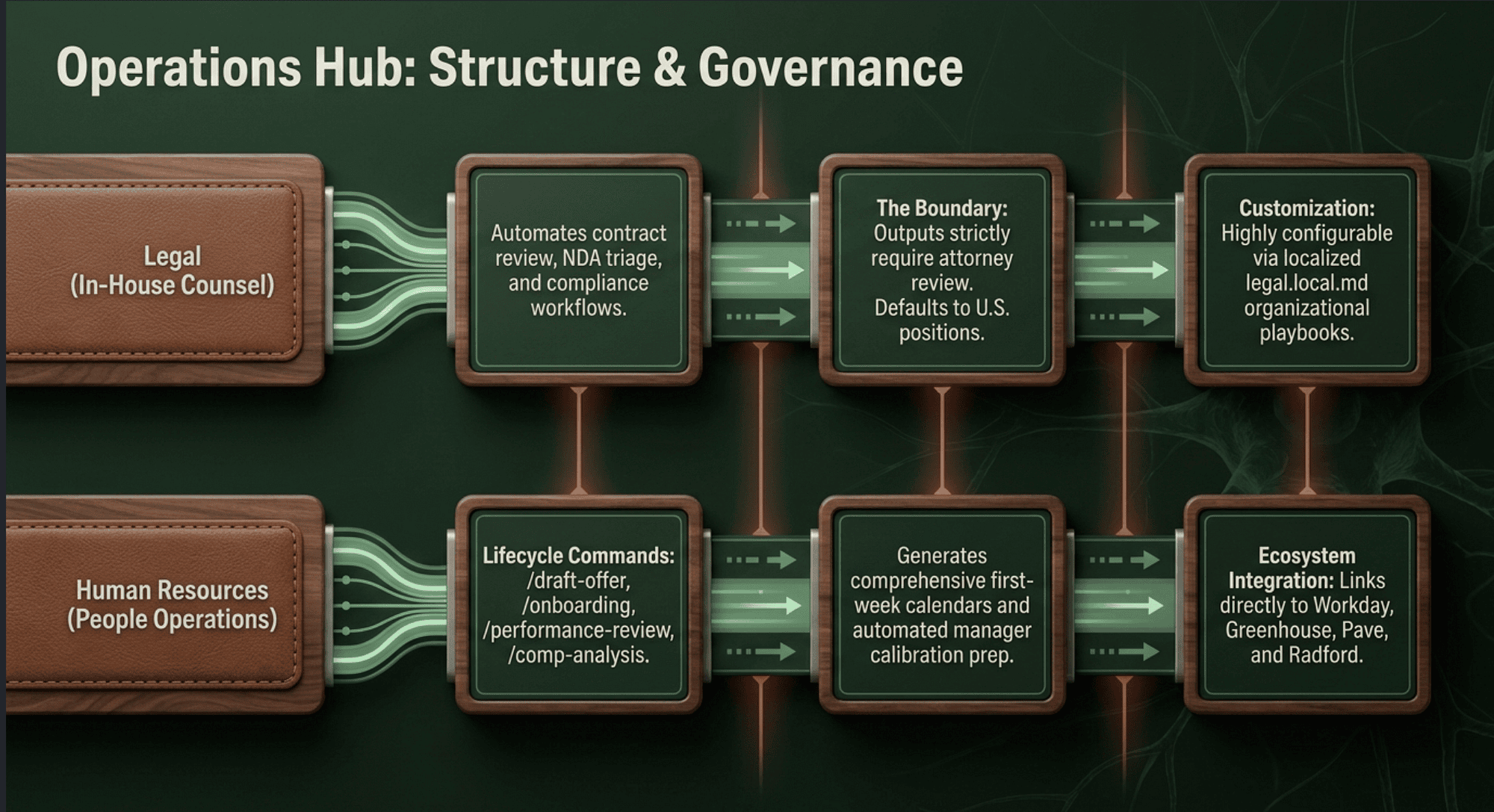
This one is purpose-built for in-house counsel. The plugin targets commercial counsel, product counsel, privacy and compliance, and litigation support. It automates contract review, NDA triage, compliance workflows, and templated responses, all configurable to your organization's specific playbook through a legal.local.md file you save in a shared folder.
A note worth highlighting: the plugin explicitly disclaims that it does not provide legal advice. Outputs need attorney review, and the default playbook reflects U.S. legal positions. Teams outside the U.S. must customize the playbook before relying on the analysis.
Human Resources
A people operations toolkit covering the full employee lifecycle. Commands include /draft-offer, /onboarding, which produces a complete checklist plus a first-week calendar plus a buddy assignment template; /performance-review, with self-assessment prompts, manager templates, and calibration prep; /policy-lookup; /comp-analysis for benchmarking and equity modeling; and /people-report for headcount, attrition, diversity, and org health reports.
The plugin connects to HRIS platforms like Workday, BambooHR, and Rippling; to ATS platforms like Greenhouse, Lever, and Ashby; and to compensation data providers like Pave and Radford.
Engineering
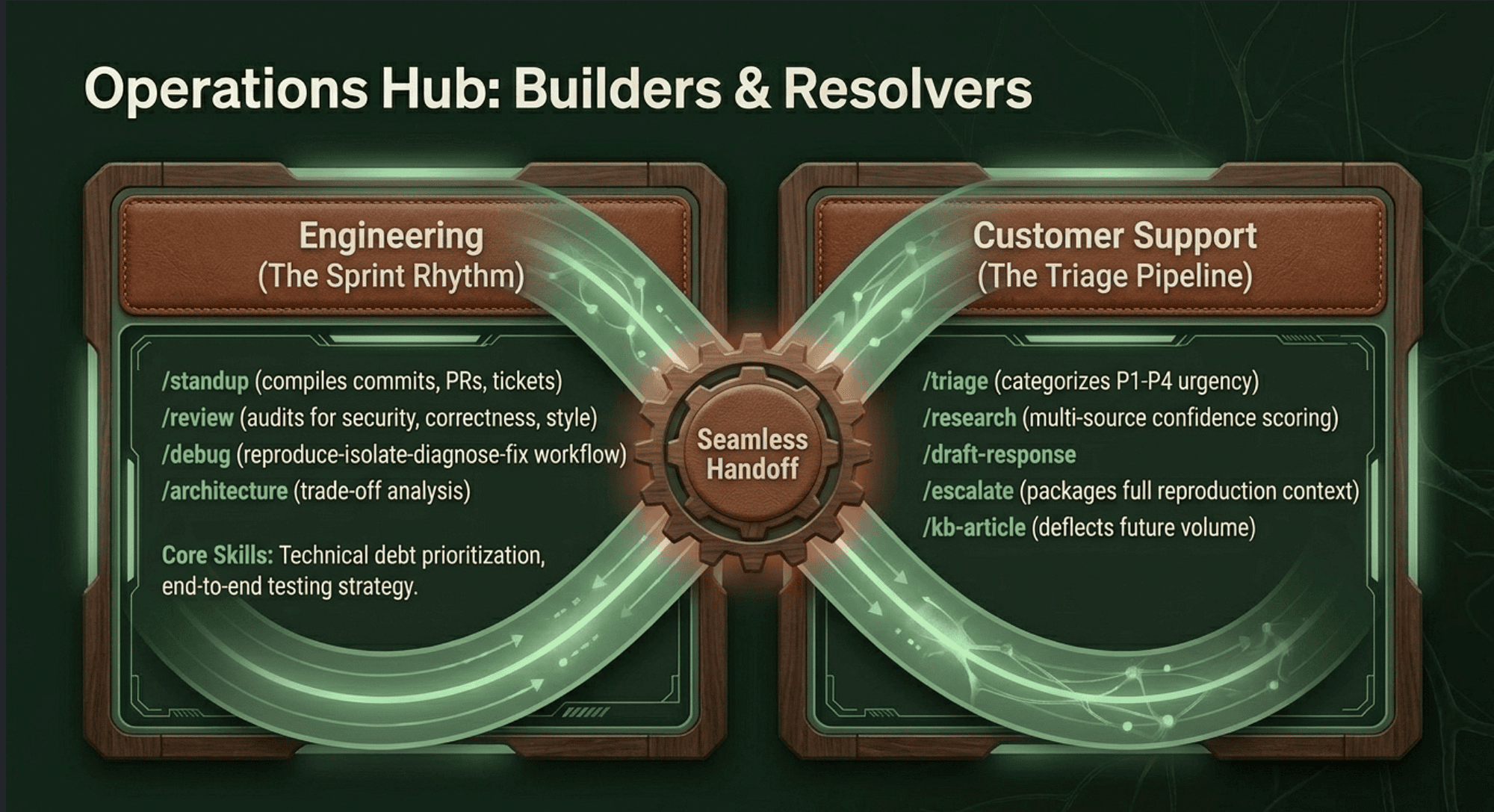
A plugin for software teams that mirrors the rhythm of a sprint. The /standup command pulls your recent commits, PRs, and tickets to assemble an update. The /review command audits code changes for security, performance, correctness, and style. Other commands include /debug for a structured reproduce-isolate-diagnose-fix workflow, /architecture for ADR-format trade-off analysis, /incident for triage through postmortem, and /deploy-checklist.
Underlying skills cover tech debt prioritization, testing strategy, and technical documentation.
Customer Support
Designed for support teams drowning in tickets. The /triage command categorizes and prioritizes incoming tickets using a P1 through P4 framework. The /research command does multi-source research on customer questions with confidence scoring. The /draft-response command tailors a customer-facing reply to the situation, urgency, and channel. The /escalate command packages a full context bundle, including reproduction steps and business impact, for engineering or product. The /kb-article command turns a resolved ticket into a knowledge base article, which reduces future ticket volume.
Small Business
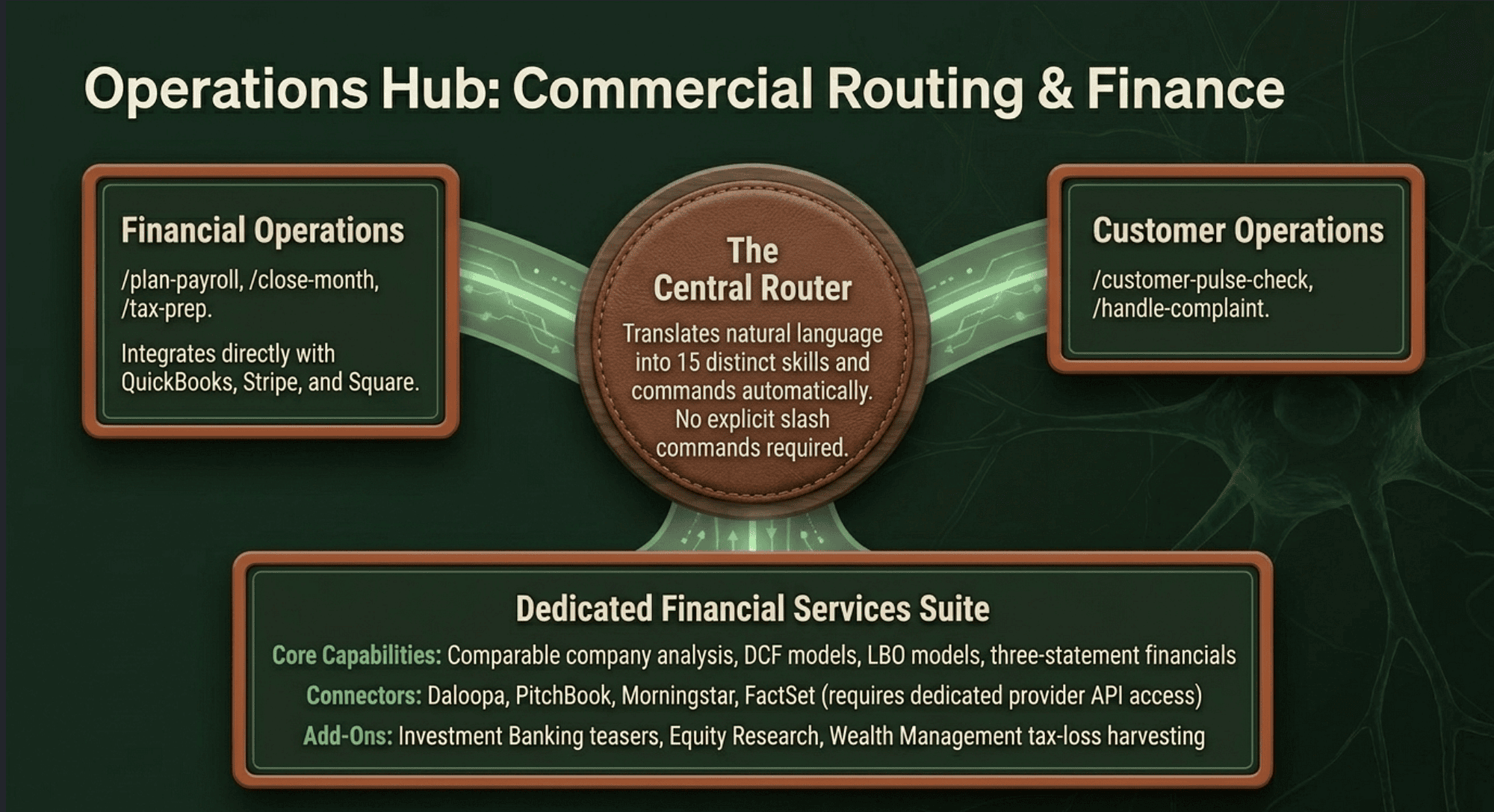
This is the most integrated of the bunch. It includes 15 skills, 15 commands, and a router that takes plain English requests and figures out the right workflow, which means you never need to memorize a command name. Commands span finance, including /plan-payroll, /month-heads-up, /close-month, /price-check, and /tax-prep; sales, including /call-list and /run-campaign; customer operations, including /customer-pulse-check, /handle-complaint, and /review-contract; and business intelligence, including /monday-brief, /friday-brief, and /quarterly-review.
The plugin connects to QuickBooks, PayPal, Stripe, Square, HubSpot, Canva, and others.
The financial services suite
Anthropic also publishes a separate open-source repository for financial services, which you can add as a marketplace in Cowork. The suite includes a Financial Analysis core plugin, which is the required foundation, plus several add-ons.
The core plugin handles comparable company analysis, DCF models, LBO models, and three-statement financials. It also ships with MCP connectors for major financial data providers, including Daloopa, Morningstar, S&P Global, FactSet, Moody's, MT Newswires, Aiera, LSEG, PitchBook, Chronograph, and Egnyte. Access to these connectors typically requires a separate subscription or API key from the provider.
The add-ons cover Investment Banking, including CIMs, teasers, process letters, buyer lists, and merger models; Equity Research, including earnings updates and initiating coverage reports; Private Equity, including deal sourcing, due diligence checklists, IC memos, and portfolio KPI tracking; and Wealth Management, including client meeting prep, financial plans, portfolio rebalancing, and tax-loss harvesting opportunities.
The repository also includes partner-built plugins from LSEG and S&P Global, which bring their data and analytics directly into Cowork.
Partner-built plugins
Beyond Anthropic's own work, third parties have started building plugins that bring their tools into Cowork natively.
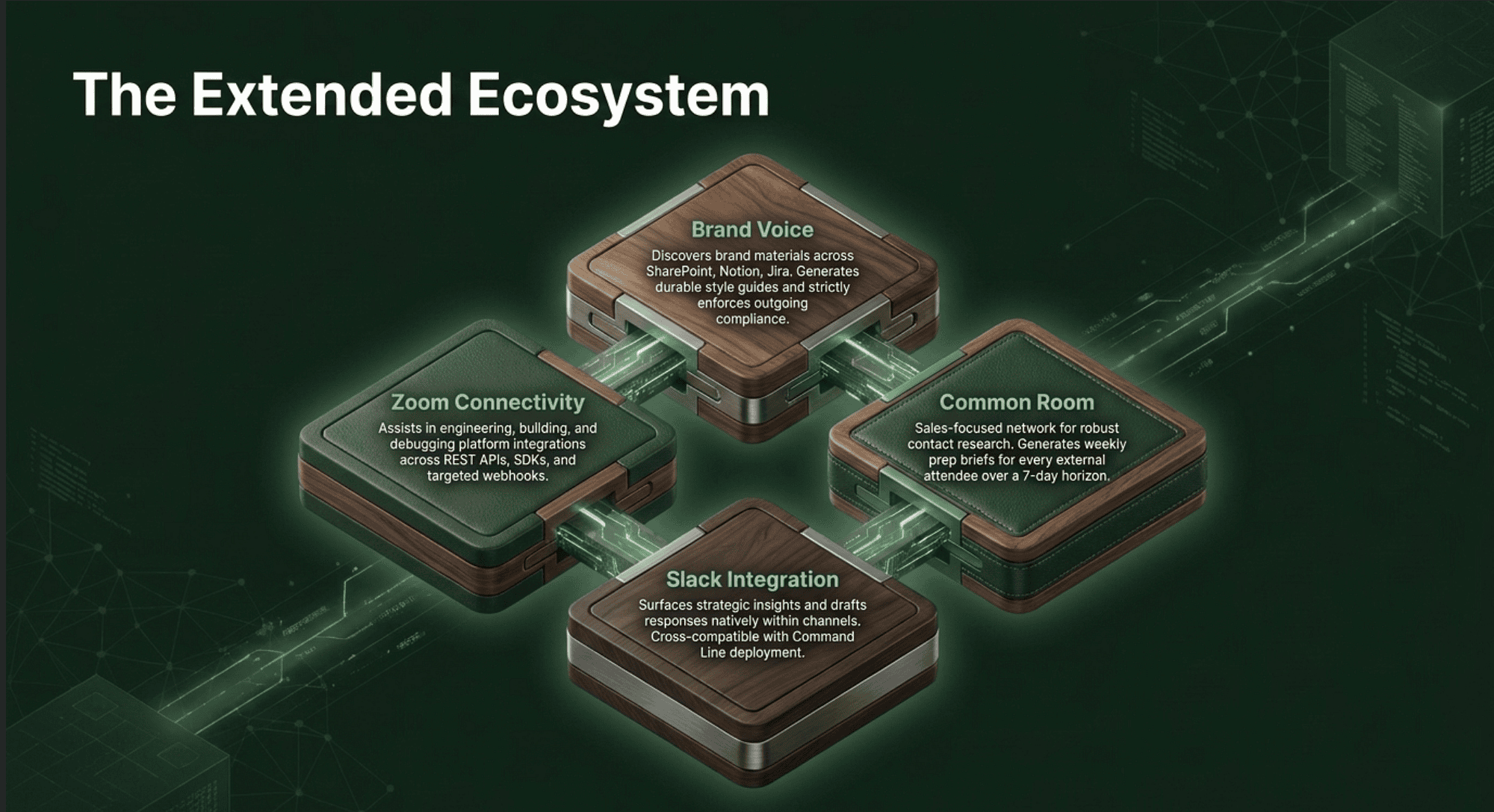
Brand Voice discovers brand materials across your connected platforms, including Notion, Google Drive, SharePoint, Slack, and Jira; generates a durable set of brand guidelines; and then enforces voice on customer-facing content with /brand-voice:enforce-voice.
Common Room is a sales-focused plugin that covers contact research, call prep with per-attendee profiles, three-format outreach drafting, including email, call script, and LinkedIn message; prospecting; and a weekly prep brief covering every external call in the next 7 days.
The Slack plugin surfaces insights, drafts messages, and engages teams directly within Slack from Cowork, and it is one of the few plugins available in both Cowork and Claude Code.
The Zoom plugin assists with planning, building, and debugging Zoom integrations across REST APIs, SDKs, webhooks, and bots.
Build your own
If none of the existing plugins fit your workflow, Cowork ships with a built-in plugin called Plugin Create, which walks you through building one from scratch. It uses a five-phase guided conversation: discovery, component planning, design, implementation, and finally packaging into a .plugin file you can install or share with colleagues.
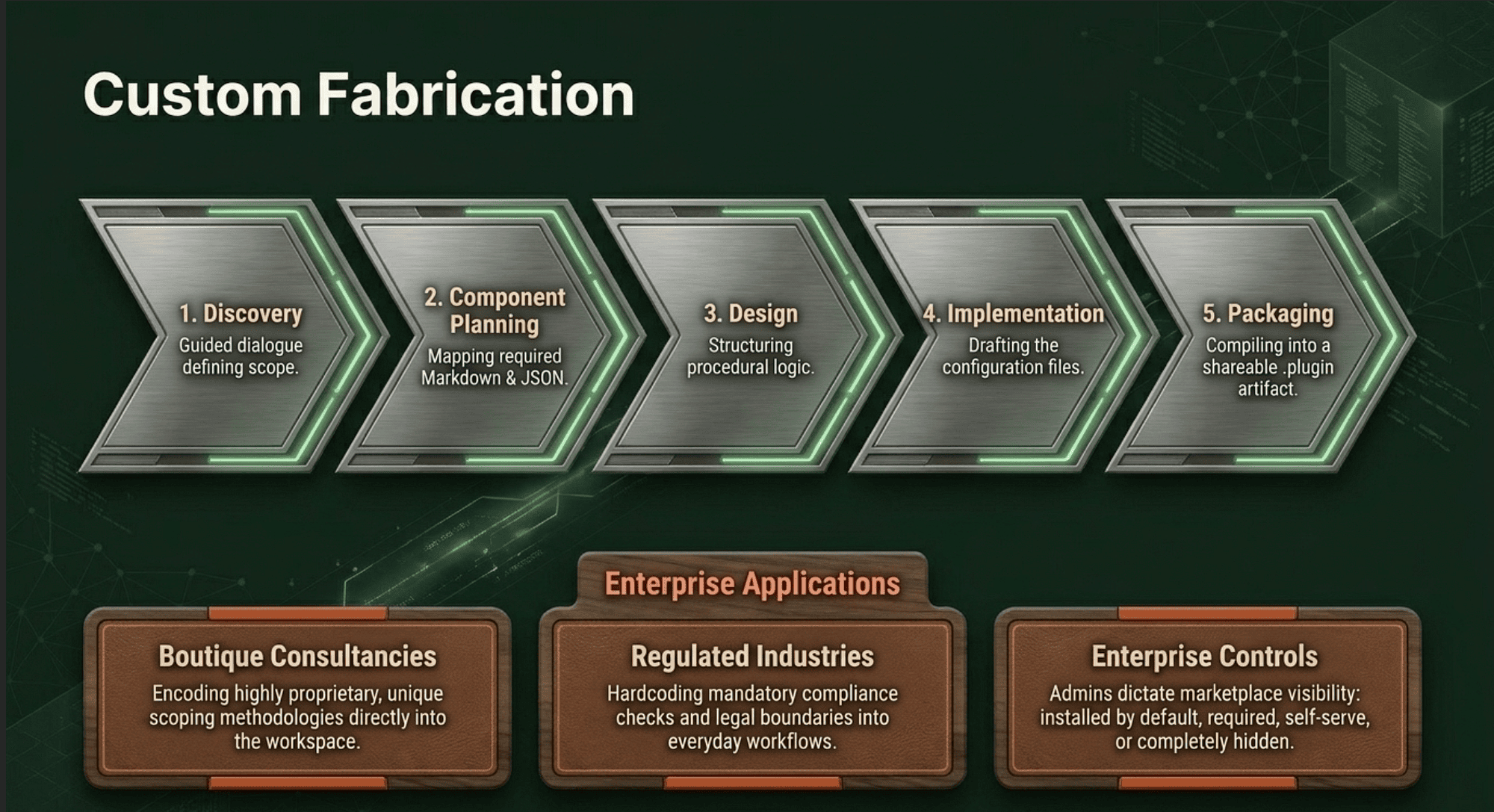
This matters for teams whose workflows are too specific or proprietary for an off-the-shelf solution. A boutique consultancy can encode its scoping methodology. A regulated industry can encode its compliance checks. A research lab can encode its experimental protocols. The barrier to creating something useful is genuinely low because the format is just Markdown and JSON.
For organizations on Team or Enterprise plans, owners can distribute curated plugins through plugin marketplaces. Admins can set per-plugin preferences, including installed by default, available for self-service, required, or hidden from the catalog. On Enterprise plans, these preferences can be customized per group.
A note on security and trust
Plugins are powerful, which means they deserve scrutiny.
Plugins can include local MCP servers, which run on your computer with the same permissions as any other program you run. Anthropic is direct about this in its documentation, and the guidance is sound: only install plugins from sources you trust. Anthropic-verified plugins in the directory have undergone additional review, but the community plugins have only basic automated checks.
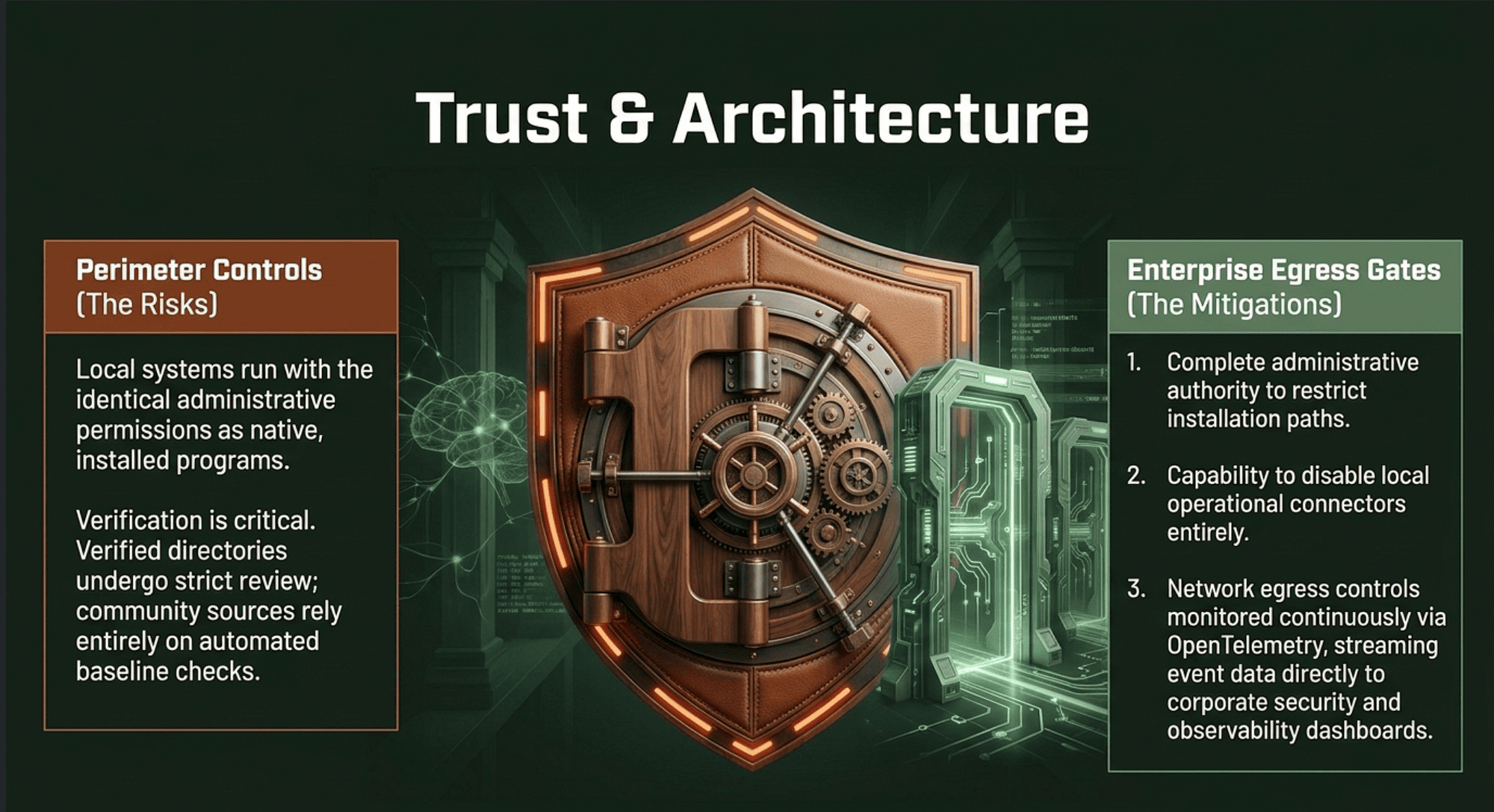
Enterprise admins have additional levers. They can restrict which plugins users can install, disable local MCP servers entirely, and apply network egress controls. They can also monitor activity through OpenTelemetry, which streams Cowork events to security and observability tools.
For everyday users, the practical advice mirrors how you would think about any desktop software. Review what a plugin includes before installing it. Be careful which folders you grant access to. Monitor Claude for suspicious behavior, especially when it is interacting with the web.
Why this matters
It is tempting to read a plugin directory and see just a feature list. Step back, though, and a different picture emerges.
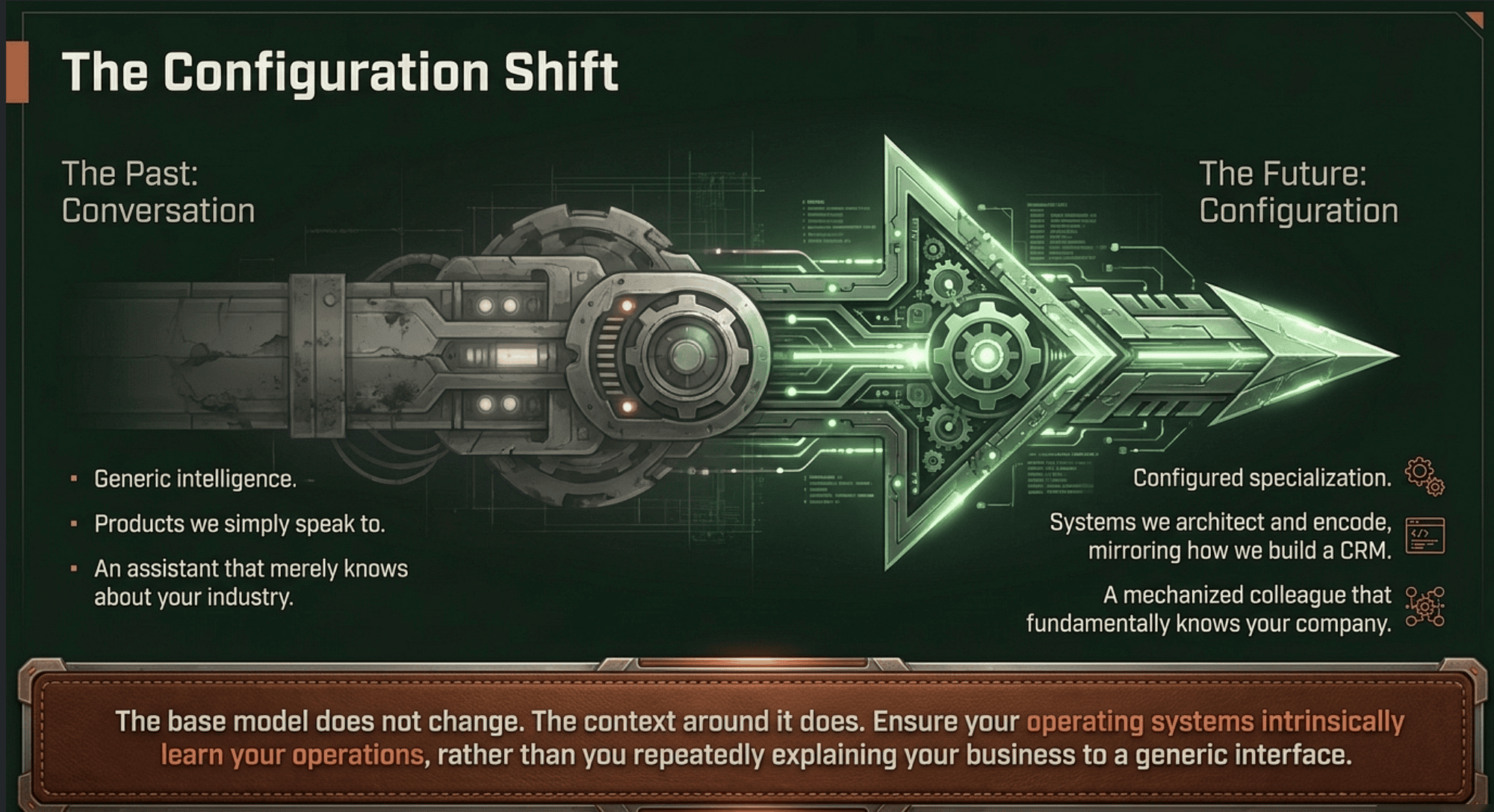
For most of the past decade, AI assistants have been products you talk to. Plugins are starting to make them products you configure, the same way you configure a CRM, a project tracker, or a code editor. A salesperson installs the Sales plugin, connects their CRM, and the assistant becomes a sales specialist. A legal team installs the Legal plugin, configures the playbook, and the assistant becomes a legal specialist. The base model does not change. The context around it does.
That shift, from generic intelligence to configured specialization, is what makes plugins more important than they look. It is the difference between an assistant that knows about your industry and an assistant that knows about your company. The first is a curiosity. The second is a coworker.
Cowork plugins are not perfect. The catalog still skews heavily toward Claude Code, which means many roles outside of engineering have fewer options than they will a year from now. Partner plugins are still relatively few. Customization, while genuinely accessible, still rewards people who can read a Markdown file.
But the architecture is right. The format is open, the install path is clean, the standalone-and-supercharged design respects the reality that most teams cannot connect every tool on day one, and the build-your-own path is genuinely usable. If you have been waiting for AI to feel less like a clever toy and more like a tool that knows your work, Cowork plugins are worth a real look.
The next time you find yourself explaining your business to a chatbot for the fifth time this week, ask yourself whether your assistant should be learning your context or whether you should be choosing one that already speaks your language.
About the Author — Claude Certified Architect
Rick Hightower is a former Senior Distinguished Engineer at a Fortune 100 company, focusing on delivering ML / AI insights to front-line applications, and a practitioner building multi-agent production systems. Rick is a Claude Certified Architect. Follow him on Medium for more hands-on agent engineering content. You can also book him to speak and train your team: Check out Rick Hightower's SpeakerHub.
Rick created Skilz, the universal agent skill installer that supports 30+ coding agents, including Claude Code, Gemini, Copilot, and Cursor, and co-founded the world's largest agentic skill marketplace. Connect with Rick Hightower on LinkedIn or Medium. Check out SpillWave, your source for AI expertise.
Anthropic Harness Engineering: Author Rick Hightower, AI systems practitioner and agentic frameworks developer
Rick has been actively developing generative AI systems, agents, and agentic workflows for years. He is the author of numerous agentic frameworks and developer tools and brings deep practical expertise to teams adopting AI. He enjoys writing about himself in the 3rd person.
Rick also wrote a Claude Certified Architect (CCA) series of articles that have a lot of useful information on writing agentic AI systems. Many ideas captured in the CCA and the exam prep Rick wrote echo what you see in this article. If you want to improve your ability to create well-behaved AI agents, studying for the CCA Exam is a good place to start.
CCA Exam Prep on Agentic Development
- Claude Certified Architect: The Complete Guide to Passing the CCA Foundations Exam
- CCA Exam Prep: Mastering the Code Generation with Claude Code Scenario
- CCA Exam Prep: Mastering the Multi-Agent Research System Scenario
- CCA Exam Prep: Structured Data Extraction
- CCA: Master the Developer Productivity Scenario
- Claude Certified Architect: Master the CI/CD Scenario
- CCA Exam Prep: Mastering the Customer Support Resolution Agent Scenario
- Get the complete reading list for CCA-F exam prep articles from this Claude Certified Architect Exam Prep list.
Rick also wrote a series on harness engineering and how to improve agentic systems using harness engineering for feedback loops and adversarial agents. These articles also go hand in hand with this article.
Harness Engineering Articles
- The $9 Disaster: What Anthropic's Harness Design Paper Teaches Us About Building Autonomous AI
- Harness Engineering vs Context Engineering: The Model is the CPU, the Harness is the OS
- LangChain Deep Agents: Harness and Context Engineering: Memory, Skills, and Security
- Beyond the AI Coding Hangover: How Harness Engineering Prevents the Next Outage
- LangChain's Harness Engineering: From Top 30 to Top 5 on Terminal Bench 2.0
- Anthropic's Harness Engineering: Two Agents, One Feature List, Zero Context Overflow
- OpenAI's Harness Engineering Experiment: Zero Manually-Written Code