Claude Cowork: What Claude Is Actually Doing While You Wait
Part 2: The agent loop is just a plan, a tool call, and a check — repeated. Once you understand it, you will never stare at the spinner the same way again.
Originally published on Medium.
Part 2: The agent loop is just a plan, a tool call, and a check — repeated. Once you understand it, you will never stare at the spinner the same way again.
You have been staring at the spinner wondering if it is stuck. Once you understand the loop, you will know the difference. Demystifying what Claude Cowork actually does during a task, the plan, the tool selection, the sandbox, and the adaptive decision making at every step.
In this article: You will learn exactly what happens between your prompt and your finished file: the plan Claude creates before acting, how it chooses between connectors, browser, and screen interaction, what it means for code to run in a sandbox, and how to tell whether a long-running task is healthy or stuck. Understanding this loop is what turns Cowork from something that sometimes does what you meant into a tool you can aim with confidence.
In the first article, you handed Cowork a task and it went to work. Somewhere in there, a document appeared in your Documents folder. The part in the middle — the stretch where Claude was "working" — probably felt like a black box with a progress spinner on the front.
That box is the most important thing to understand about Cowork, and it is far less mysterious than it looks. There is no magic in the middle. There is a loop: Claude makes a plan, takes one action, looks at the result, decides what to do next, and repeats until the work is done. Once you can see that loop running, two things change. You stop wondering whether Claude is stuck. And you start writing better tasks, because you understand what the loop rewards.
The loop, in one breath
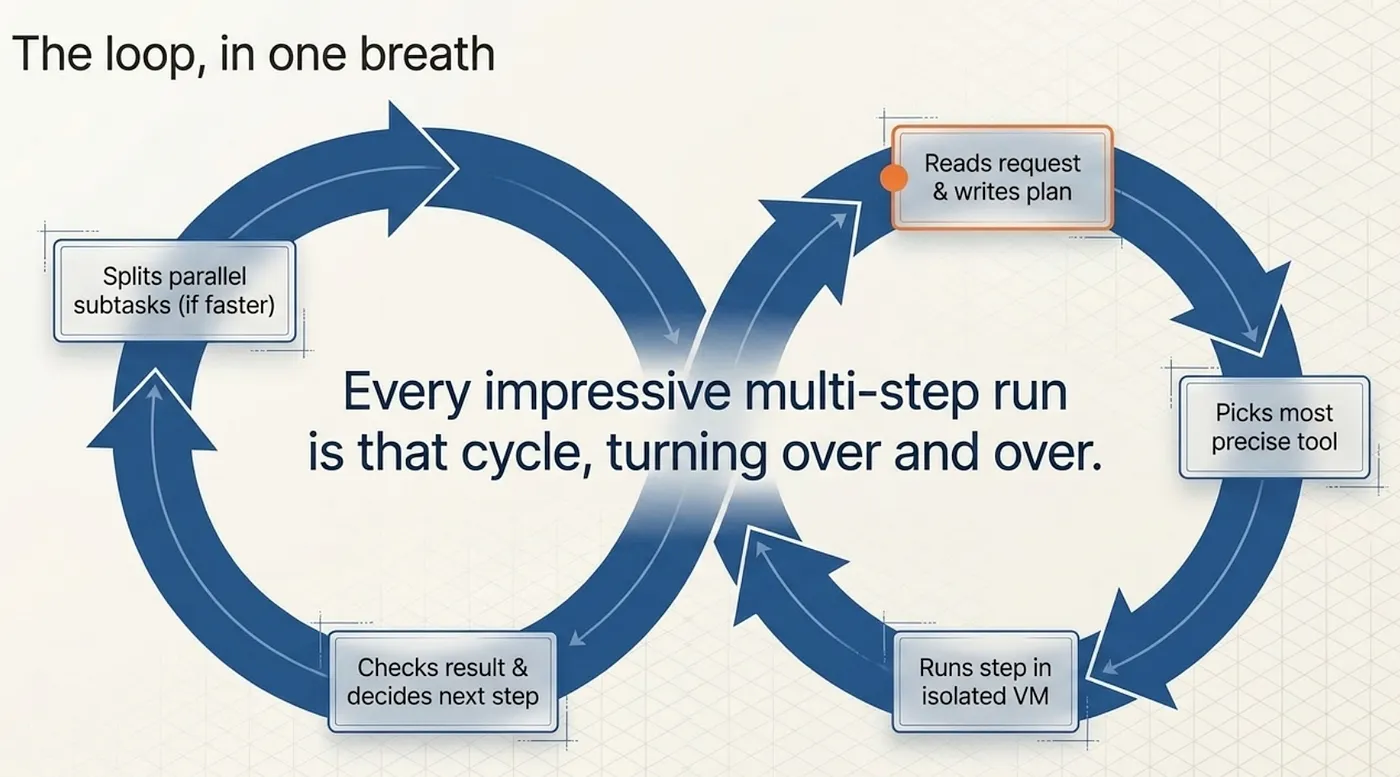
When you give Cowork a task, Claude reads your request and writes a plan, picks the single most precise tool for the next step, runs that step inside an isolated virtual machine on your computer, looks at what came back and decides the next step, splits work into parallel subtasks when that is faster, and repeats until the goal is met.
That is it. Every impressive multi-step run is that cycle, turning over and over.
Step one: the plan you get to see first
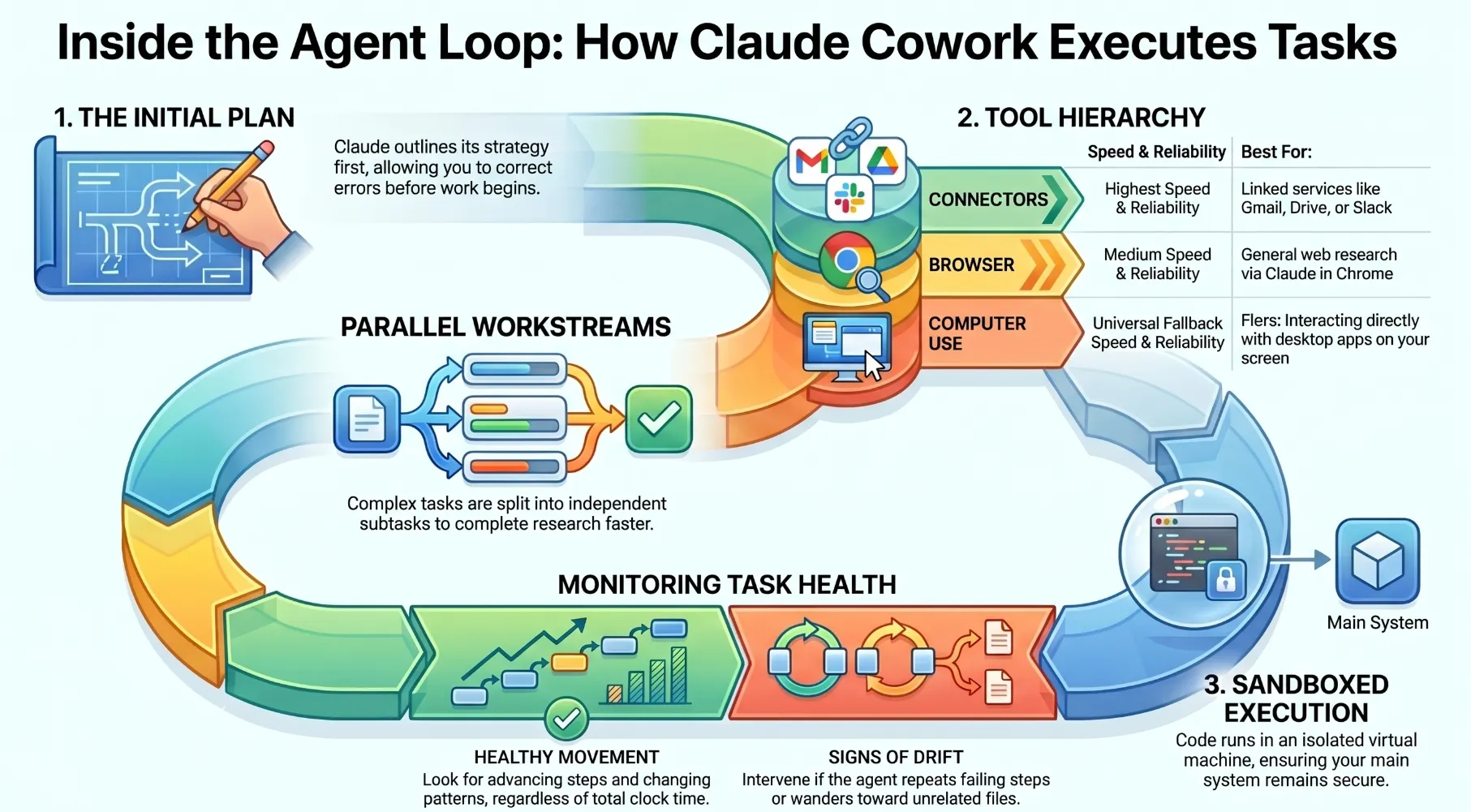
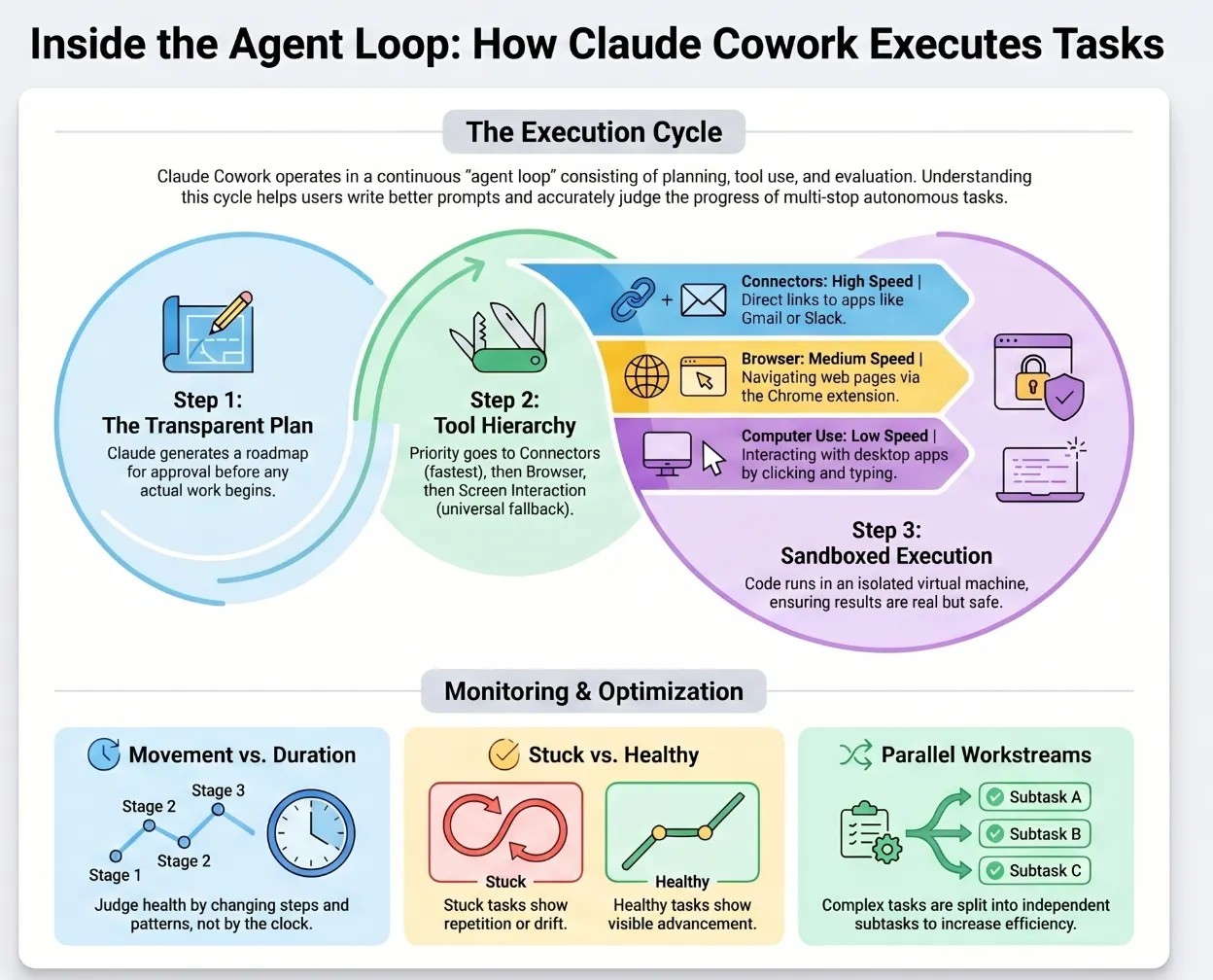
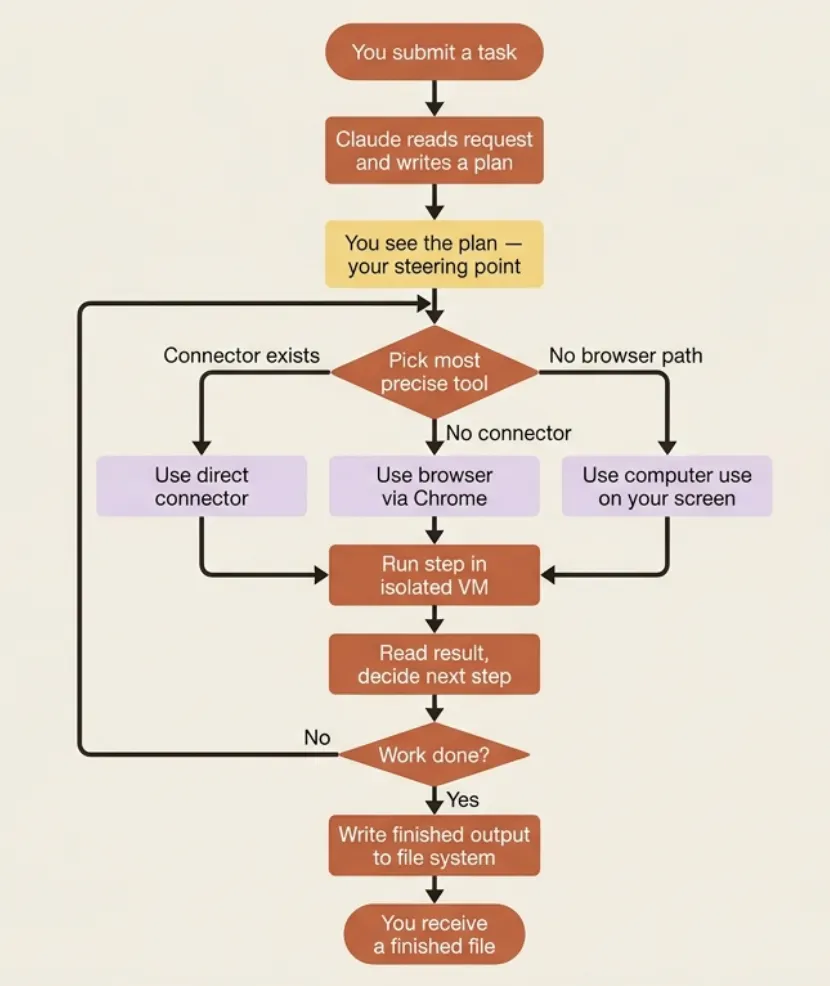
When your task arrives, Claude does not start flailing at files. It first works out what the task actually requires and lays out an approach. You see this plan before the work runs, and that is your first and best steering point. If the plan misreads what you wanted, this is the cheapest moment to correct it. A plan is a paragraph; a finished-but-wrong document is twenty minutes you will not get back.
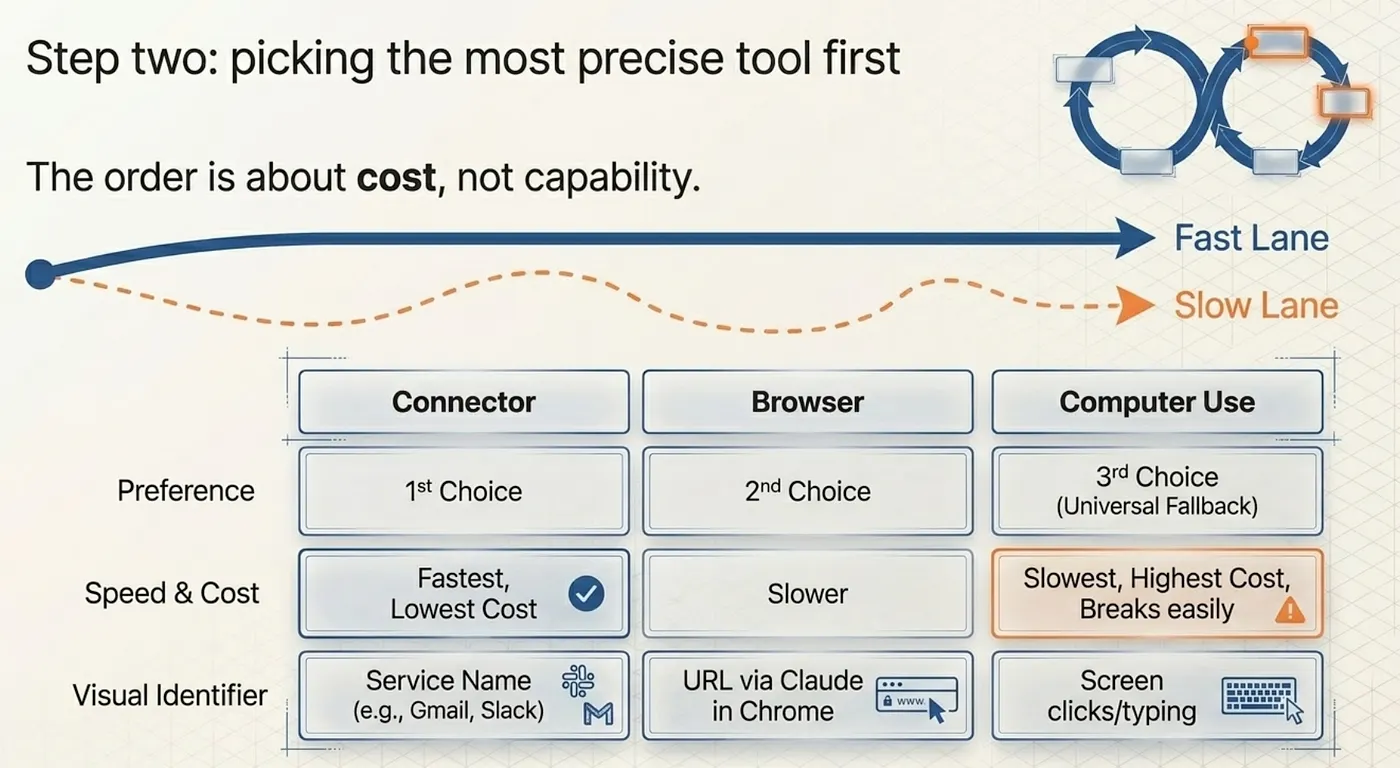
Step two: picking the most precise tool first
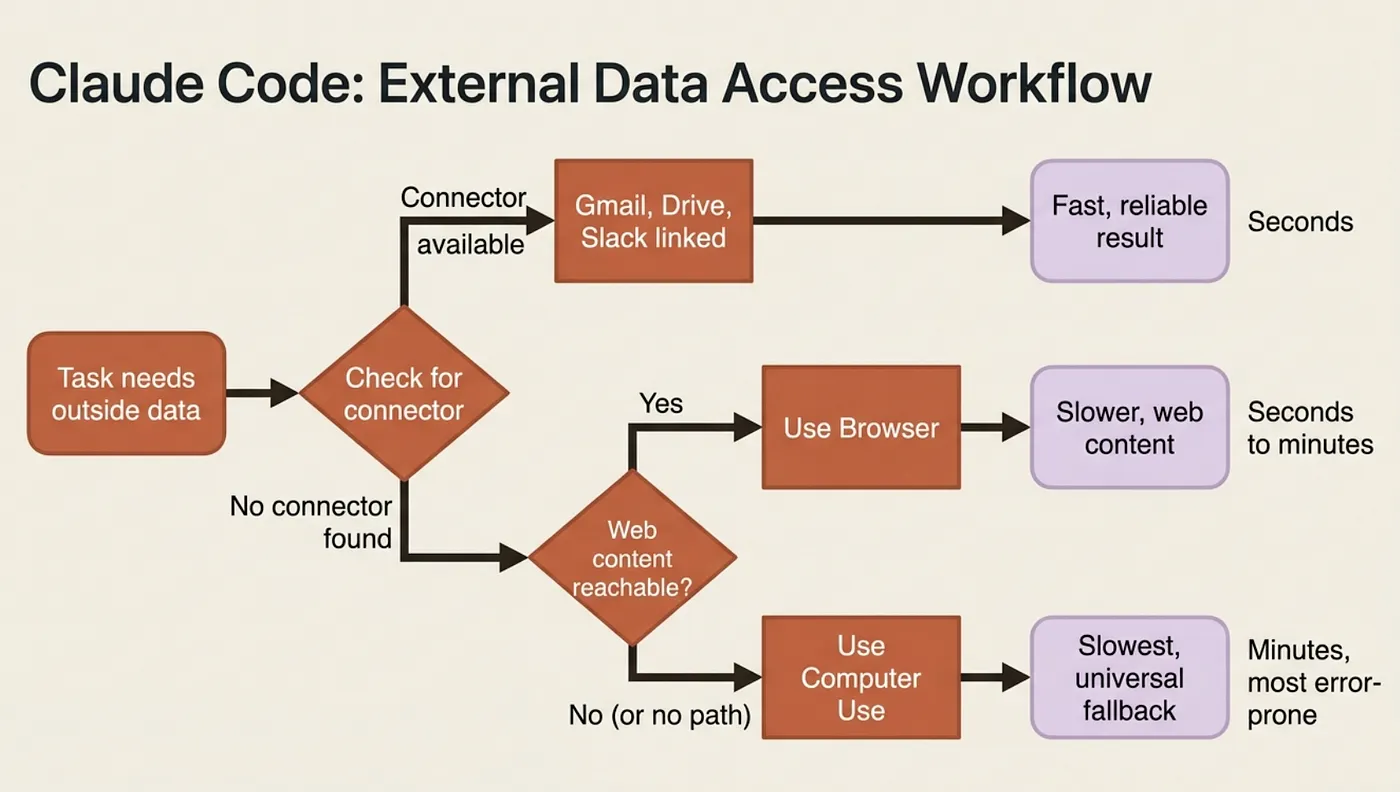
This is the single most useful thing to understand about how Cowork behaves, because it explains both its speed and its occasional slowness. When Claude needs to touch the outside world: an app, a service, or a website. Claude Cowork chooses among three paths in a strict order of preference.
First, a connector. If you have linked a service like Gmail, Google Drive, or Slack, Claude uses that direct connection. Fastest and most reliable by a wide margin.
Second, the browser. When no connector exists, Claude can drive Chrome through the Claude in Chrome extension to get the job done on the web.
Third, computer use: Claude interacts with your screen directly, clicking and typing through your desktop apps. This is the universal fallback that works on anything.
The order is about cost, not capability. Pulling your messages through a Slack connector takes seconds. Having Claude navigate Slack by reading your screen and clicking around takes far longer and breaks more easily.
Step three: running the step in a sandbox
A lot of Cowork's work happens through code and shell commands: parsing a messy spreadsheet, converting files, crunching numbers, generating a chart. All of that runs inside an isolated virtual machine on your computer: a sandboxed space kept separate from your main operating system.
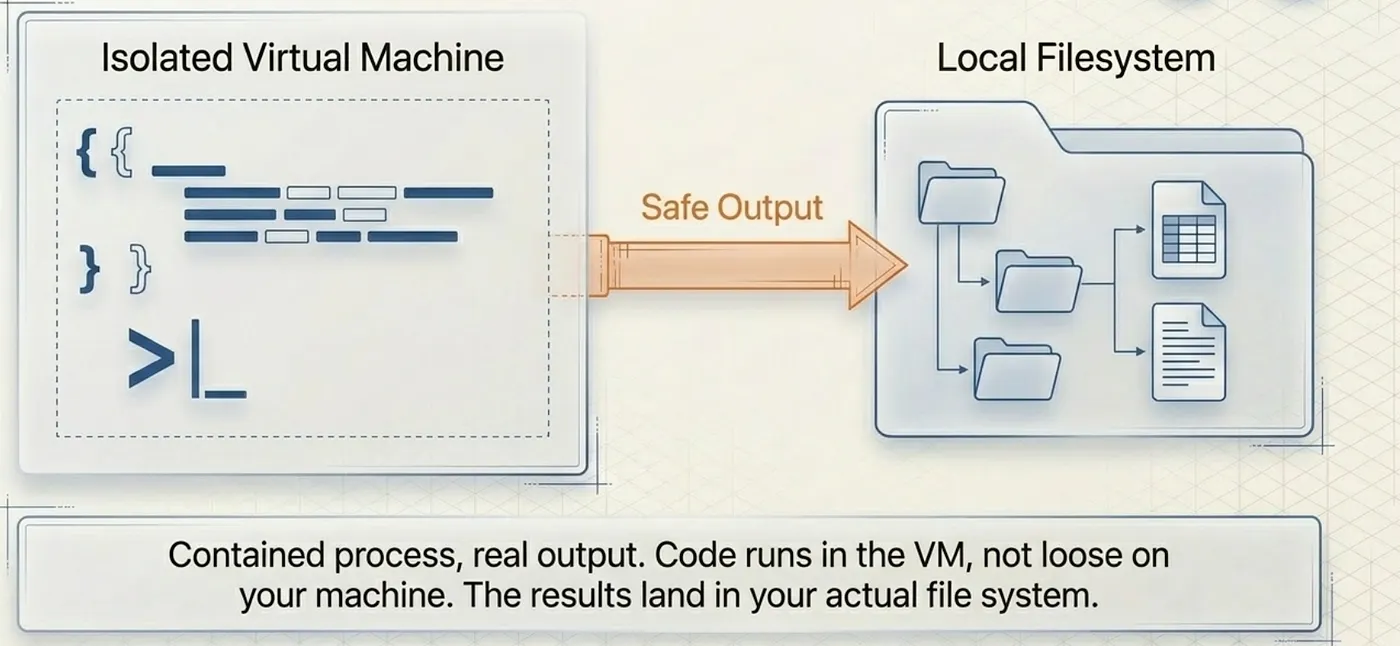
Hold both halves at once. The execution is contained: code Claude writes runs in the VM, not loose on your machine. But the results are real: the finished spreadsheet, the formatted document, and the organized folder land in your actual file system. Contained process, real output.
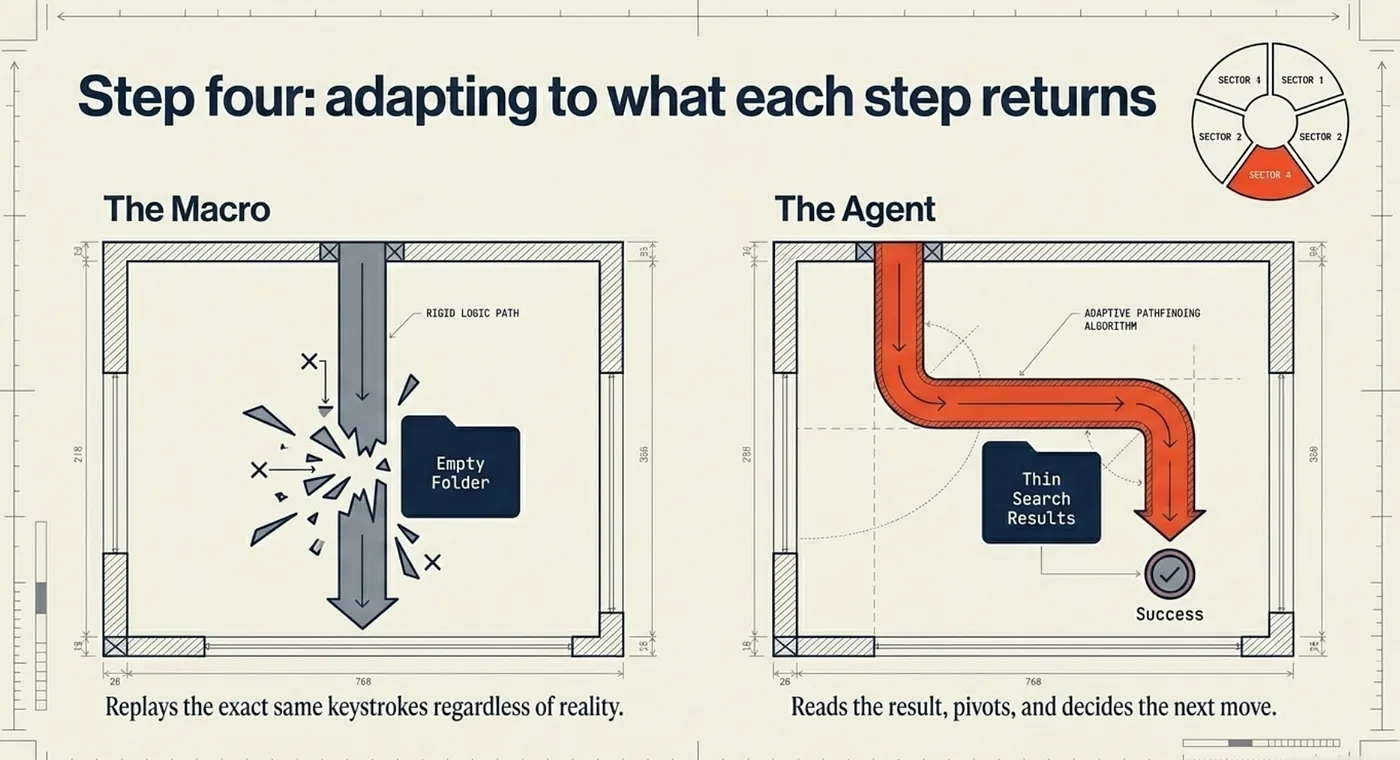
Step four: adapting to what each step returns
After each action, Claude reads the result and decides the next move based on what actually came back — not on a rigid plan written in advance. A search returns thin results, so it searches differently. A file is not where expected, so it looks elsewhere. This adaptiveness is the difference between an agent and a macro. A macro replays the same keystrokes regardless of what it finds. Cowork responds to reality.
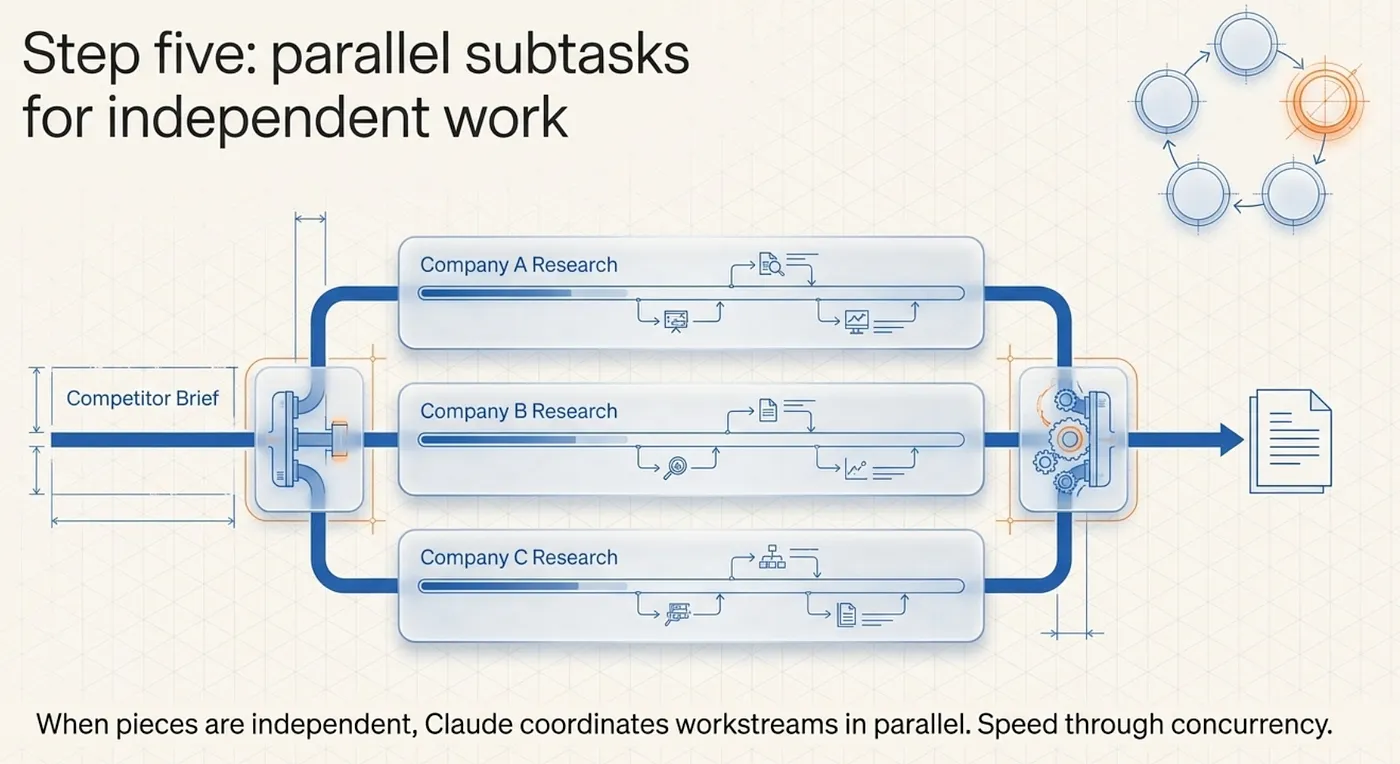
Step five: parallel subtasks for independent work
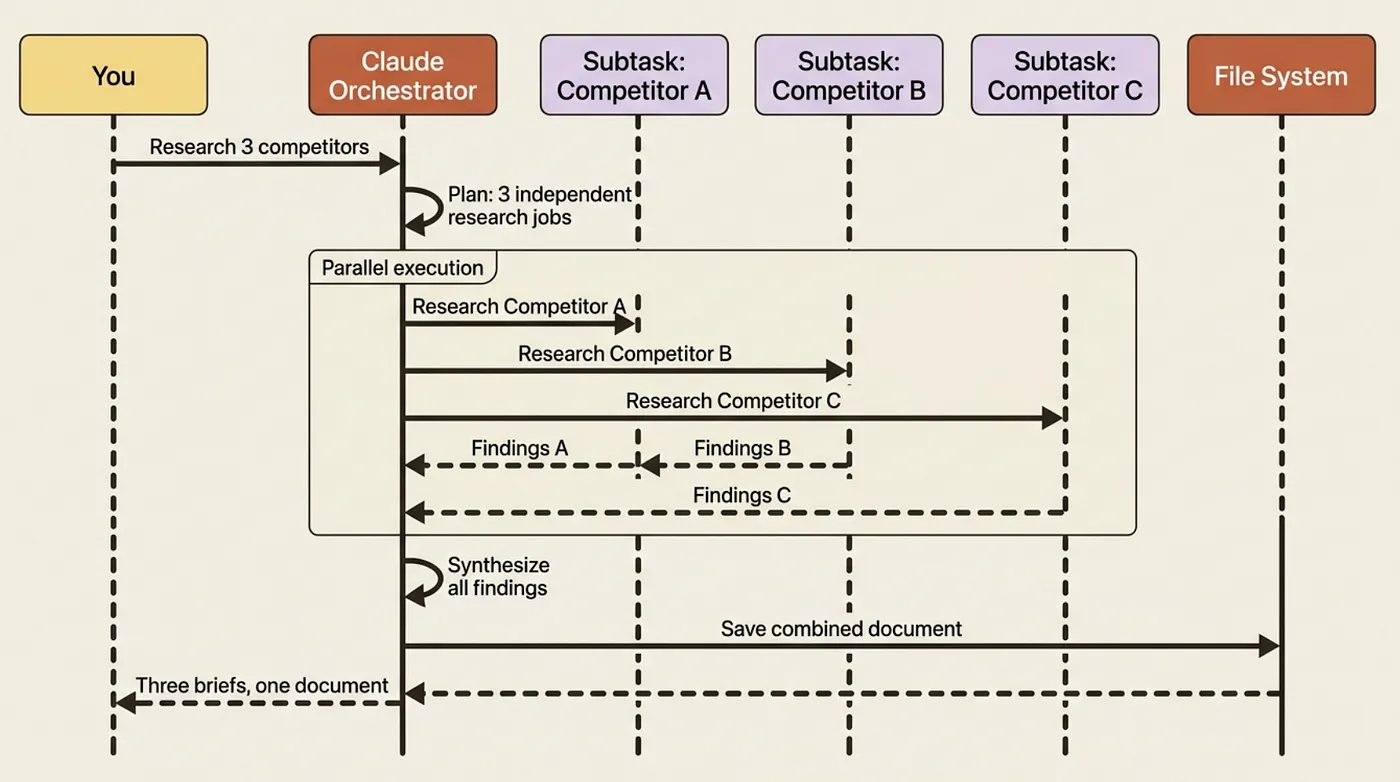
For complex tasks, Claude breaks work into smaller subtasks and, when those pieces are independent, coordinates several workstreams in parallel. The competitor brief is a clean example: three companies represent three independent research jobs, so Claude can pursue them simultaneously.
Telling healthy from stuck
This is the trap almost everyone hits.
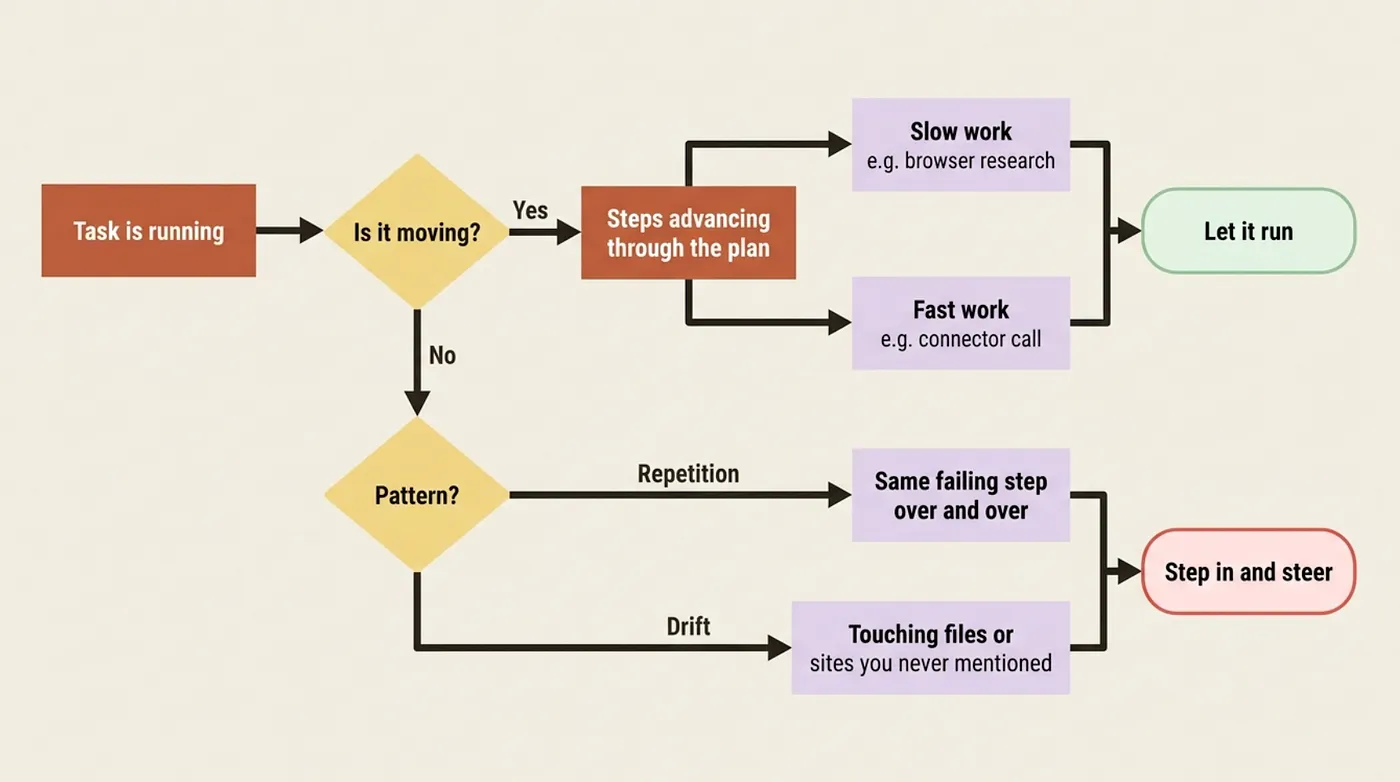
A healthy long task shows movement. The steps change. It finishes researching one company and moves to the next. The plan is visibly advancing, even if slowly when doing slow work through the browser or computer use rather than a fast connector. Let it run.
A genuinely stuck task shows repetition or drift. It tries the same failing step over and over, or it wanders toward files or sites you never mentioned. That is your signal to step in.
Watch the pattern, not the duration.
Why Cowork costs more than chat
Knowing the loop makes the usage math obvious. A chat message is roughly one turn: you ask, Claude answers. A Cowork task is that loop turning many times, each turn reading results, running code, calling tools, and deciding the next move. More turns means more of your usage allowance.
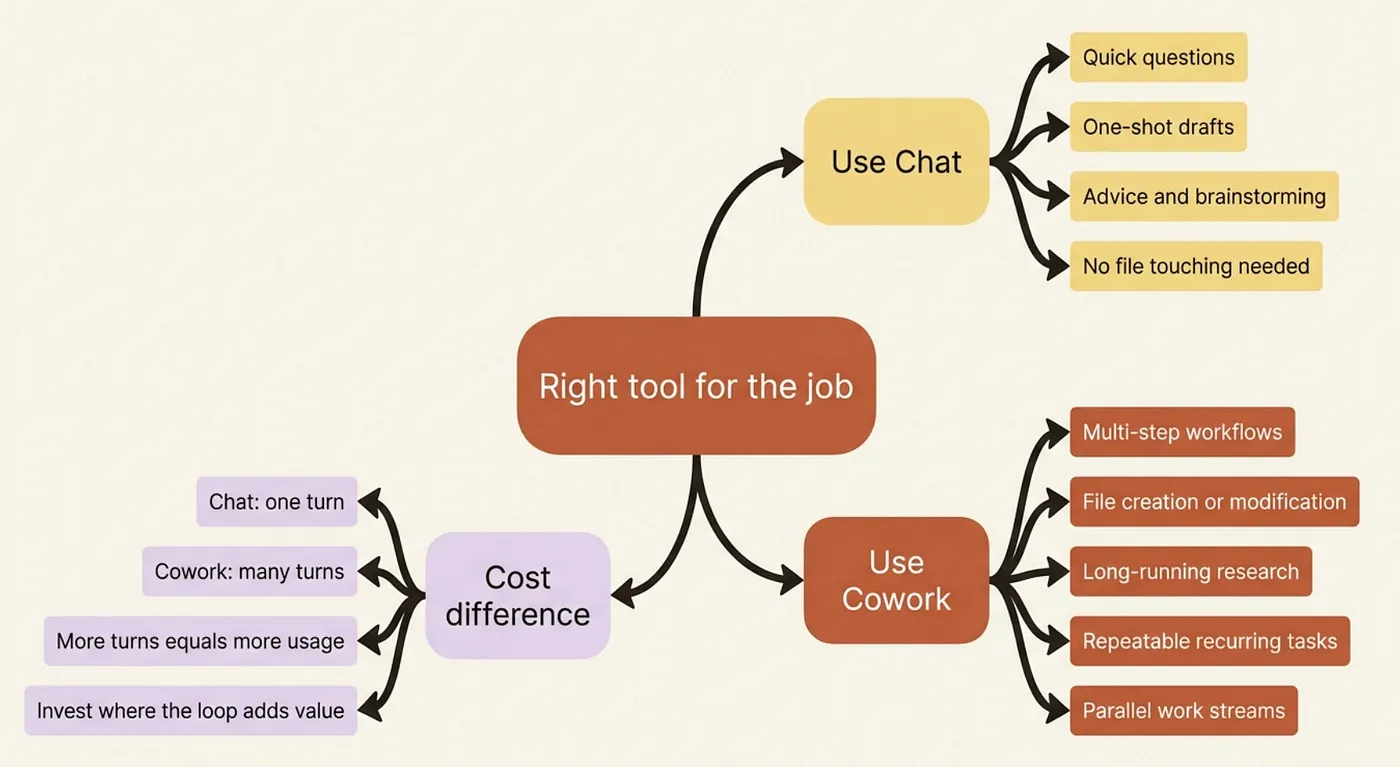
This points at a simple rule: use the right tool for the job. A quick question belongs in chat, where one turn answers it. The multi-step, file-touching, runs-for-twenty-minutes work belongs in Cowork, where the loop is the entire value.
Do this today
- Watch the next task you run with the loop in mind. See if you can spot the plan step, the tool-selection, and the adaptation between steps.
- Notice which tool Claude reaches for: look for connector calls (fast, labeled by service name) versus browser use (you will see Chrome open) versus computer use (you will see your screen being navigated).
- Practice the stuck-or-working judgment: when the next task takes longer than expected, ask yourself whether the steps are changing or repeating. That is the only question that matters.
- Connect at least one service (Gmail, Google Drive, or Slack) to Cowork before your next task. Every task that touches that service will run noticeably faster.
The loop is the whole product
The middle of a Cowork run is not a mystery. It is a plan you approved, a tool chosen for precision, a step run in a sandbox, a result read, a decision made, and repeated until your file exists. When you watch the next task, you will see the loop, and you will know whether it is healthy by whether it is moving.
That changes how you write tasks, too. You will start naming outcomes clearly so the plan comes out right the first time, leaning on connectors so the loop runs in the fast lane, and judging progress by pattern rather than by the clock.
Please subscribe to my newsletter.
This is Part 2 of "Getting Real Work Done with Claude Cowork," a 12-part guide to using Claude Cowork for real knowledge work.
About the Author: Rick Hightower, Claude Certified Architect

Rick Hightower helps companies become AI-first through practical mentoring, executive and team training, and custom AI solution development. He is a former Senior Distinguished Engineer at a Fortune 100 company, where he focused on bringing ML and AI insights into real front-line business applications.
Subscribe to Rick's newsletter to see videos and guides.
Rick is a Claude Certified Architect, AI systems practitioner, and builder of production multi-agent systems. He is currently working on authoring a book on Harness Engineering with Manning publishing. He created Skilz, a universal agent skill installer supporting 30+ coding agents including Claude Code, Gemini, Copilot, and Cursor, and co-founded one of the largest agentic skill marketplaces.
Today, Rick and the Spillwave team works with leaders and teams who want to move beyond AI experiments and build real AI capability inside their companies. He helps organizations adopt AI safely, train their people, redesign workflows, and build practical AI systems that create measurable business value.
Ready to make your company AI-first? Connect with Rick on LinkedIn, Substack or Medium, book him to speak or train your team, or visit Spillwave to explore mentoring, training, and custom AI solutions for your organization.