Claude Managed Agents: Stop Building Your Own Agent Loop. Anthropic Already Built It.
Claude Managed Agents quietly solves the hardest part of shipping AI agents, and most developers have not noticed yet.
Originally published on Medium.
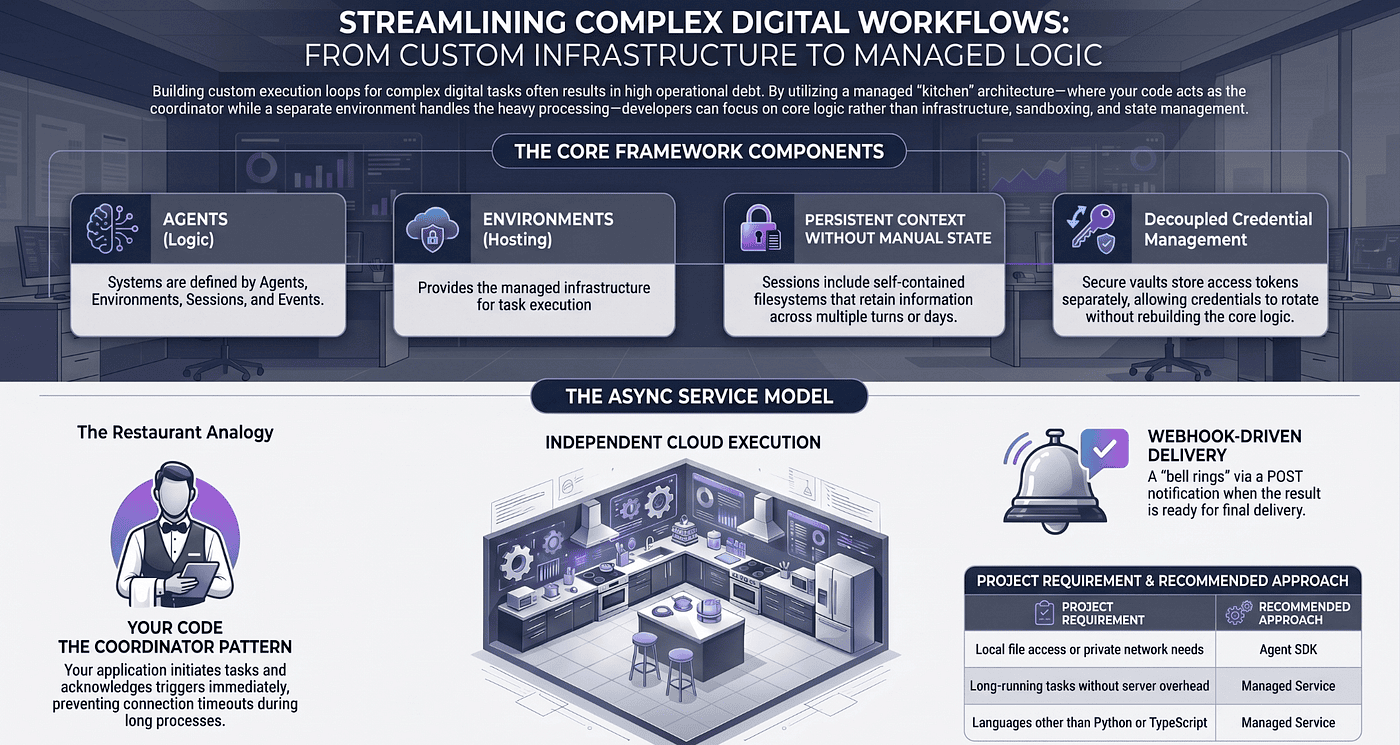
Claude Managed Agents quietly solves the hardest part of shipping AI agents, and most developers have not noticed yet.
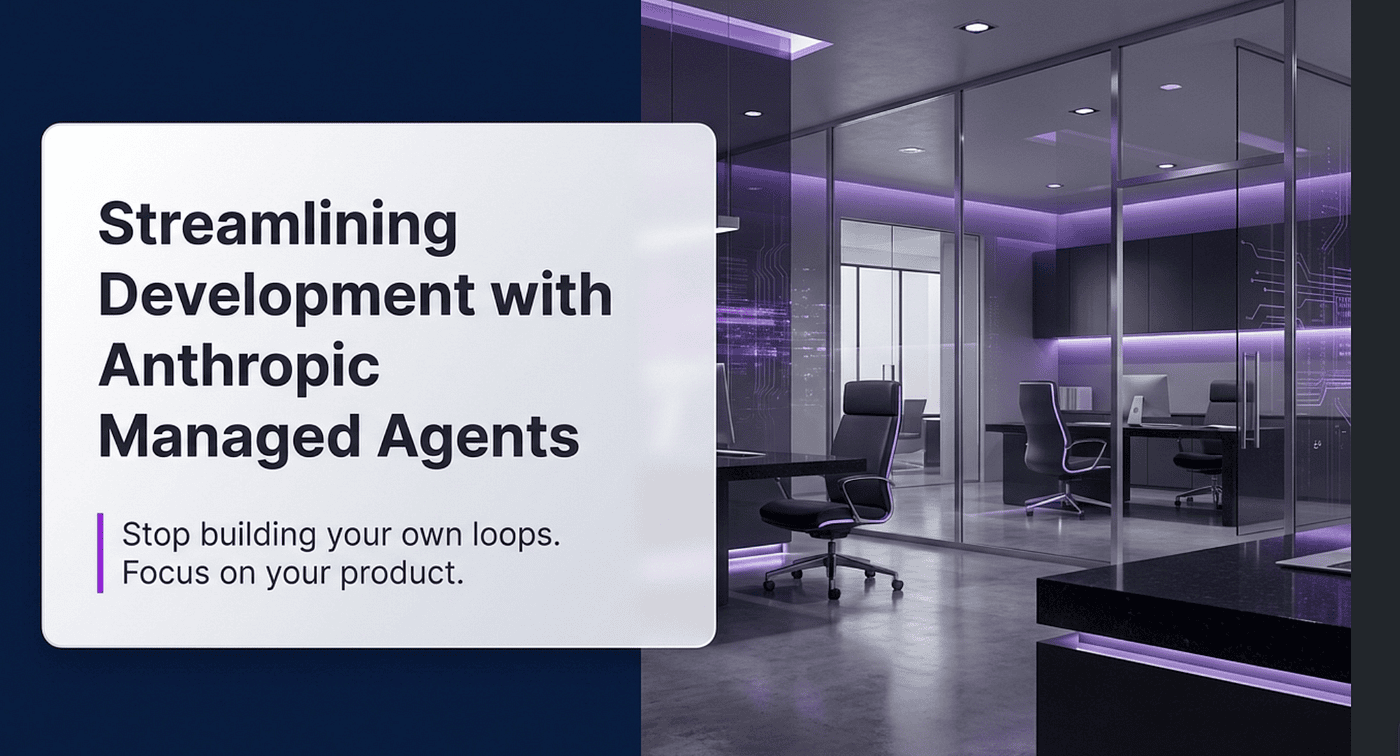
Stop wrestling with endless loops. Let Claude Managed Agents handle the heavy lifting so you can ship AI-powered tools instantly.
Summary: Claude Managed Agents eliminates the need to build and maintain complex agent loops by providing a fully managed, pre-built harness that handles tool integration, state persistence, and infrastructure. This article explains how the service works — using a restaurant analogy to illustrate the roles of agents, environments, sessions, and events — and walks through practical examples like a Slack bot and a GitHub PR reviewer. By showing step-by-step code for one-time setup and async webhook workflows, it demonstrates how developers can quickly ship reliable AI-powered tools without worrying about loops, sandboxing, or scaling, making it a compelling read for anyone looking to streamline AI agent development.
If you have tried to ship an AI agent into production, you know the story. The model is the easy part. Everything around the model is where months disappear. You write a loop. You sandbox the tools. You persist conversation state. You handle retries, compaction, and tool confirmations. You build a queue so long-running tasks do not block your API. You write a worker that streams tokens back to the browser. By the time the agent is doing anything interesting, you have built a small distributed system, and the model is a tiny piece of it.
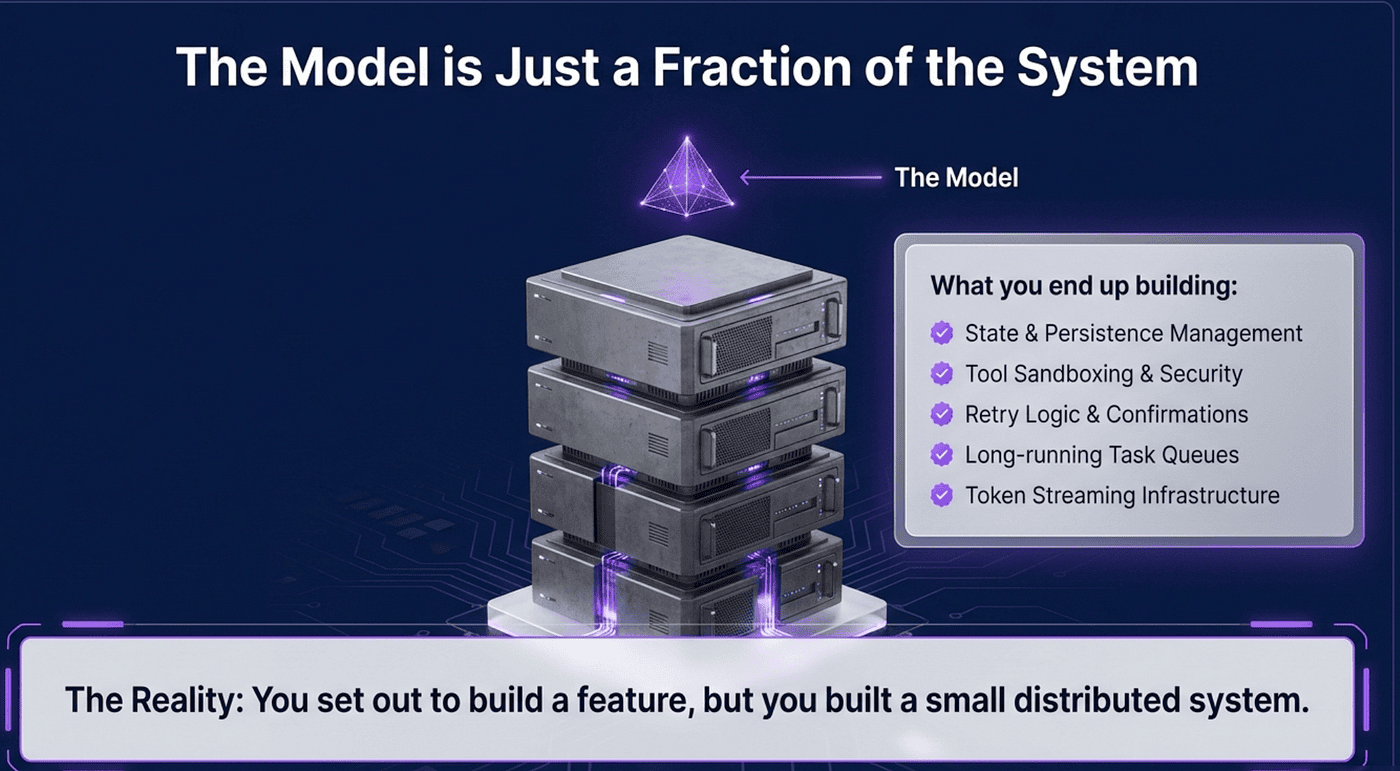
Anthropic released Claude Managed Agents to make that work disappear. It is a pre-built agent harness that runs on Anthropic's infrastructure, and it changes the calculation for anyone building serious agentic software on top of the Claude API.
The restaurant analogy that makes the whole thing click
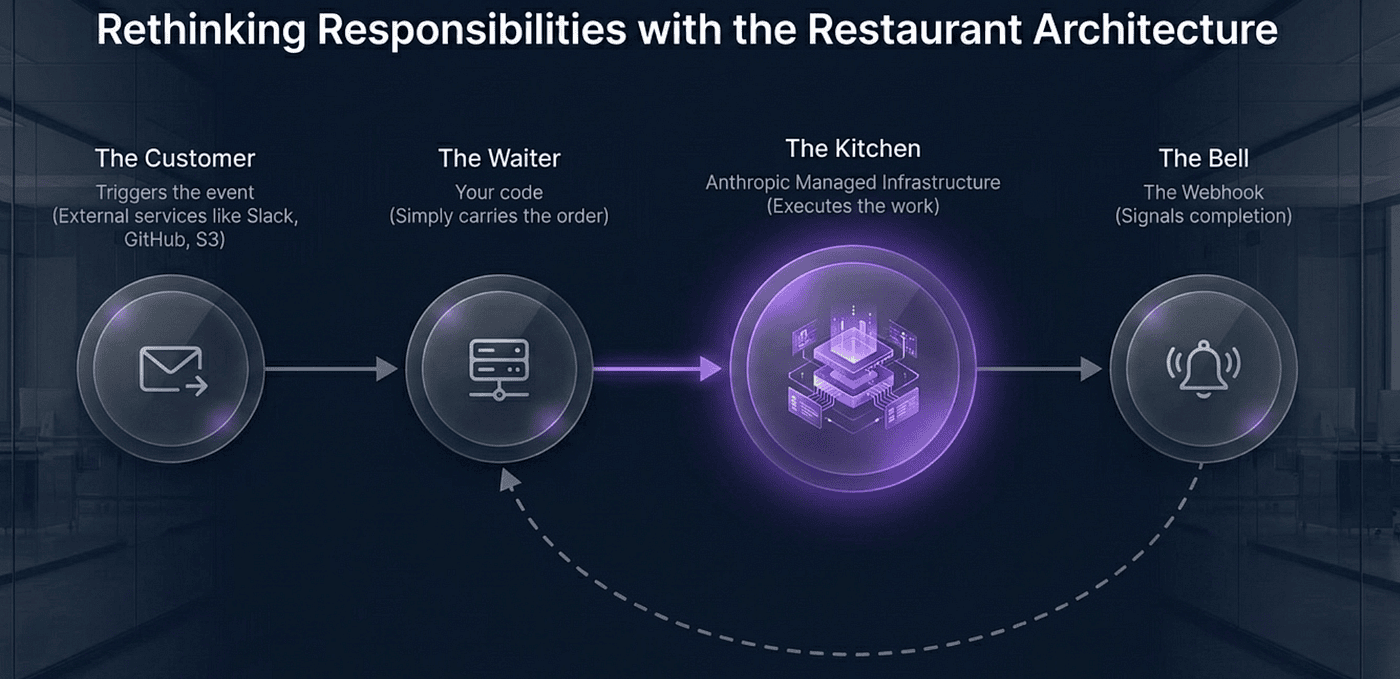
Before the API, the architecture. Picture a restaurant.
-
Slack, Gmail, S3, GitHub, anything that fires an event is the customer placing an order.
-
Your tiny web server is the waiter who carries the order to the kitchen.
-
Managed Agents is the kitchen where Claude cooks.
-
Anthropic's webhook back to you is the bell that rings when the food is ready.
-
Your code is the waiter who brings the plate back to the customer.
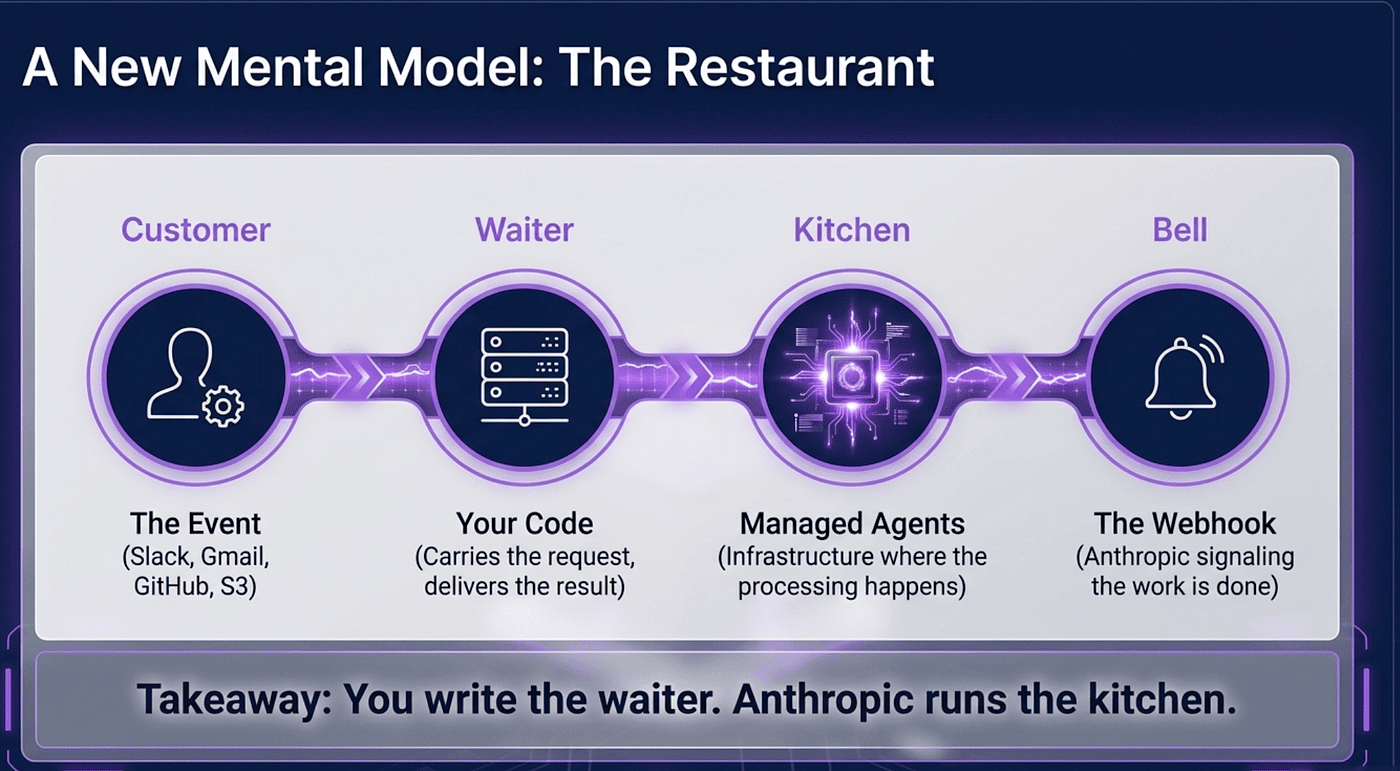
You write the waiter. Anthropic runs the kitchen. The customer never knows or cares that Claude exists.
That mental model carries through everything else in this article. Hold onto it.
The four nouns
Under the hood, Managed Agents is built around four concepts: agents, environments, sessions, and events.
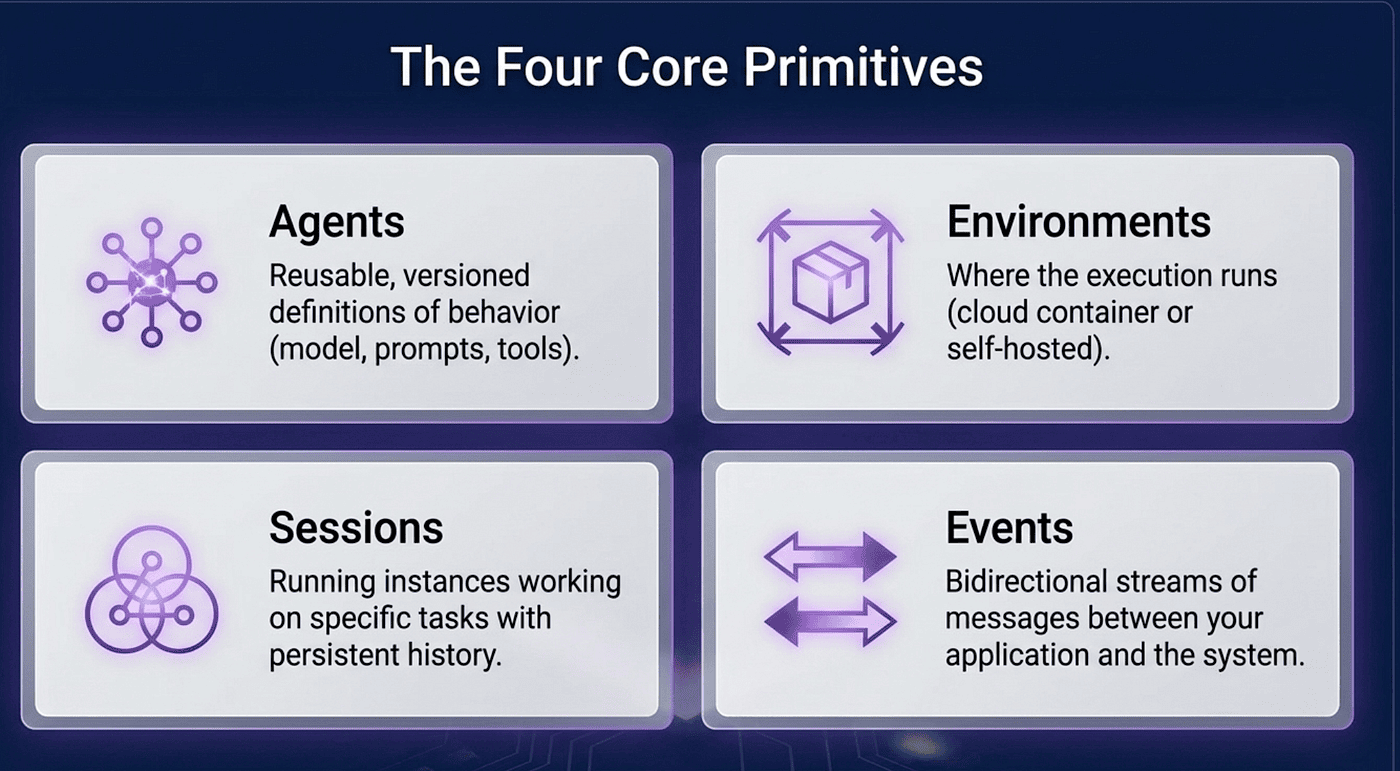
An agent is the reusable, versioned definition of how Claude should behave: model, system prompt, tools, MCP servers, and skills. An environment is the execution context: the sandboxed machine where Claude's tools actually run, with its own filesystem and optionally pre-installed packages. A session is one run of work inside that environment: a conversation thread with state that persists across turns. Events are how you talk to the session — you send a user message in, Claude processes it and fires events back out.
Four nouns. Once you internalize them, the API stops feeling like a product and starts feeling like infrastructure.
The shape of a real integration
The easiest way to understand the harness is to walk through what shipping with it looks like. You create the agent and environment once, then create sessions per task.
import anthropic
client = anthropic.Anthropic()

agent = client.beta.agents.create(
    name="Coding Assistant",
    model="claude-opus-4-7",
    system="You are a careful coding agent.",
    tools=[{"type": "agent_toolset_20260401"}],
)
environment = client.beta.environments.create(
    name="coding-env",
    config={"type": "cloud", "networking": {"type": "unrestricted"}},
)
That agent_toolset_20260401 line unlocks the full pre-built toolset: bash, file read and write and edit, glob, grep, web search, and web fetch. You do not implement any of it. You do not sandbox any of it. It is there.
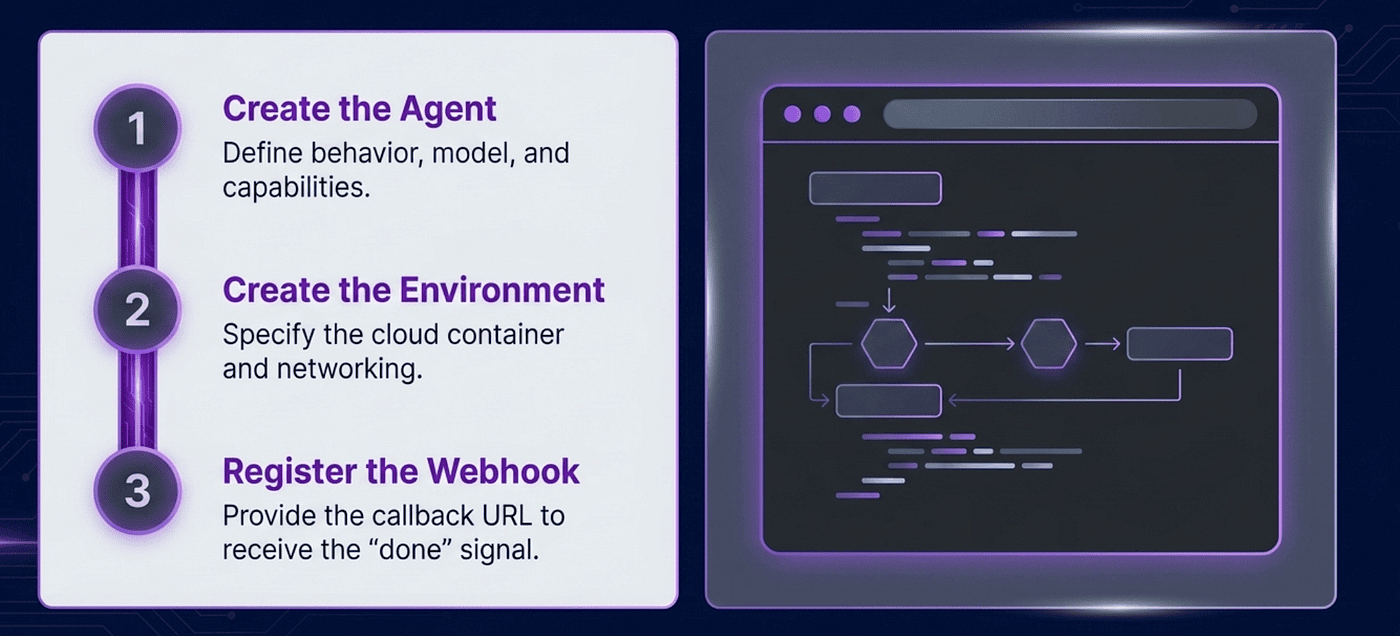
To actually run a task, you reference both IDs, open the event stream, and send a user message.
session = client.beta.sessions.create(
    agent=agent.id,
    environment_id=environment.id,
    title="My task",
)

with client.beta.sessions.events.stream(session.id) as stream:
    client.beta.sessions.events.send(session.id, events=[{
        "type": "user.message",
        "content": [{"type": "text", "text": "Write fibonacci.py and save the first 20 numbers."}],
    }])
    for event in stream:
        if event.type == "session.status_idle":
            break
That is a complete agent. No loop to write. No sandbox to provision. The session has its own filesystem that persists across turns, so when the user comes back tomorrow with a follow-up, you reuse the same session ID and yesterday's work is still there.
Where it gets interesting: nobody has to be watching
The sample above is synchronous and user-facing. The more interesting use cases are the ones where no human is watching.
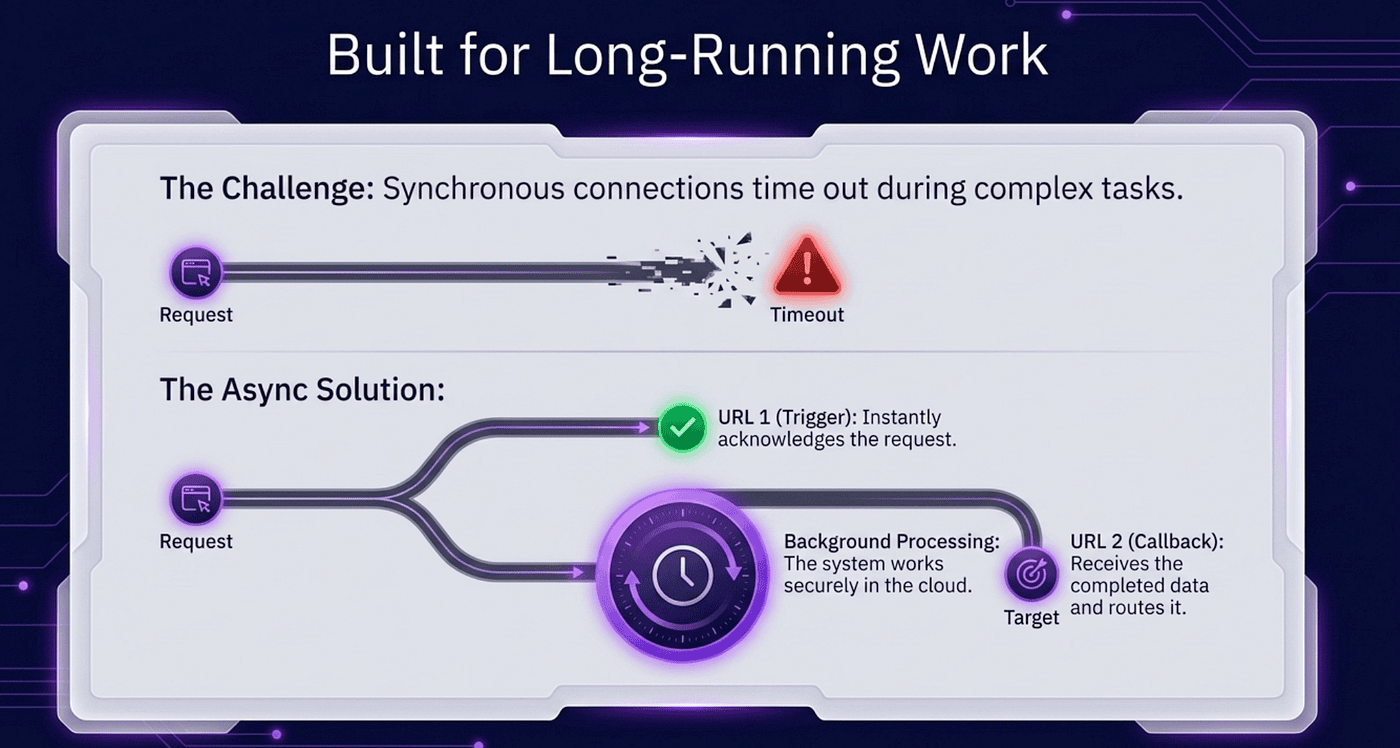
This is where the restaurant analogy earns its keep. The kitchen does not need a waiter standing at the pass for forty minutes. It rings the bell when the food is ready. The waiter comes back, picks it up, and delivers it. Managed Agents works the same way, and that pattern unlocks a category of automation that used to be operationally annoying.
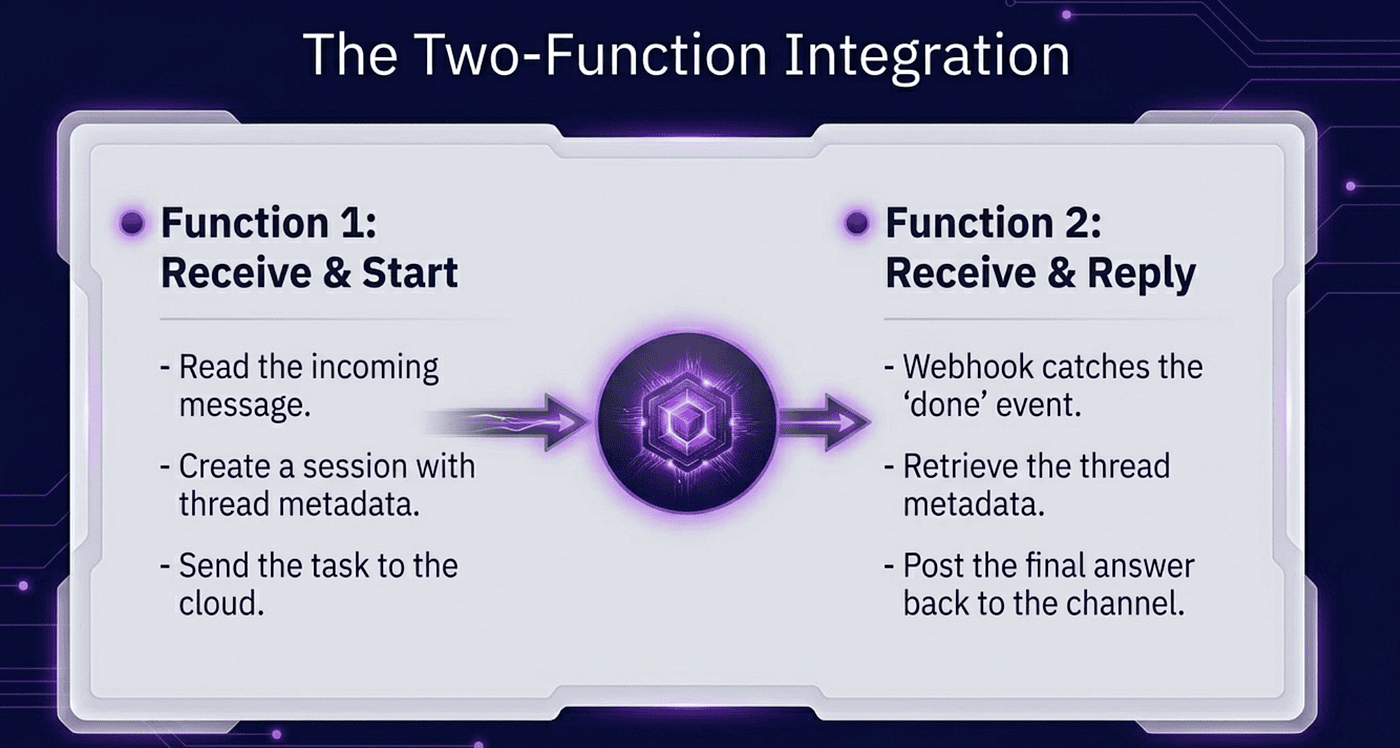
Here is the flow, step by step, when someone @-mentions your bot in Slack:
-
Someone types
@mybot summarize this threadin Slack. -
Slack sends an HTTP POST to a URL you gave them.
-
Your code reads the message.
-
Your code calls
sessions.create()to start a Claude session. -
Your code calls
events.send()to give Claude the task. -
Your code responds to Slack with "got it."
-
Claude does its thing in Anthropic's cloud. Seconds or minutes.
-
When Claude finishes, Anthropic POSTs to a different URL you gave them.
-
Your code fetches Claude's final answer and posts it back to Slack.
You wrote steps 3 through 6, and step 9. That is the whole job.
The one-time setup
Three things, each done once:
Create the agent in code. Tell Anthropic what kind of assistant you want.
agent = client.beta.agents.create(
    name="Slack Helper",
    model="claude-opus-4-7",
    system="You help answer questions in Slack threads.",
    tools=[{"type": "agent_toolset_20260401"}],
)
# Save agent.id. You will reuse it forever.
Create the environment in code. Tell Anthropic where Claude should run. For most people, the answer is cloud with unrestricted networking.
environment = client.beta.environments.create(
    name="my-env",
    config={"type": "cloud", "networking": {"type": "unrestricted"}},
)
# Save environment.id too.
Register a webhook in Console. At platform.claude.com, tell Anthropic where to ring the bell: "POST to https://myapp.com/claude-done when a session finishes."
That is the entire one-time setup. Now you write the waiter.
Example one: a Slack bot in two functions
Receive the Slack message, start the session
@app.route("/slack/events", methods=["POST"])
def slack_received():
    slack_payload = request.json
    user_message = slack_payload["event"]["text"]
    channel = slack_payload["event"]["channel"]
    thread = slack_payload["event"]["ts"]

session = client.beta.sessions.create(
        agent="agent_xxx",
        environment_id="env_xxx",
        metadata={"channel": channel, "thread": thread},
    )
    client.beta.sessions.events.send(session.id, events=[{
        "type": "user.message",
        "content": [{"type": "text", "text": user_message}],
    }])
    return "", 200
The metadata field is the small detail that makes the whole thing work. It is how you remember which Slack channel and thread to reply to when Claude finishes, minutes later, in a completely separate HTTP request.
Receive the "done" notification, post to Slack
@app.route("/claude-done", methods=["POST"])
def claude_finished():
    event = client.beta.webhooks.unwrap(
        request.get_data(as_text=True),
        headers=dict(request.headers),
    )

if event.data.type == "session.status_idled":
        session = client.beta.sessions.retrieve(event.data.id)
        channel = session.metadata["channel"]
        thread = session.metadata["thread"]
        events = client.beta.sessions.events.list(session.id)
        final_message = next(
            e for e in reversed(list(events)) if e.type == "agent.message"
        )
        answer = final_message.content[0].text
        slack_client.chat_postMessage(
            channel=channel, thread_ts=thread, text=answer,
        )
    return "", 200
That is the whole Slack integration. Maybe forty lines of real code.
Example two: a GitHub PR reviewer
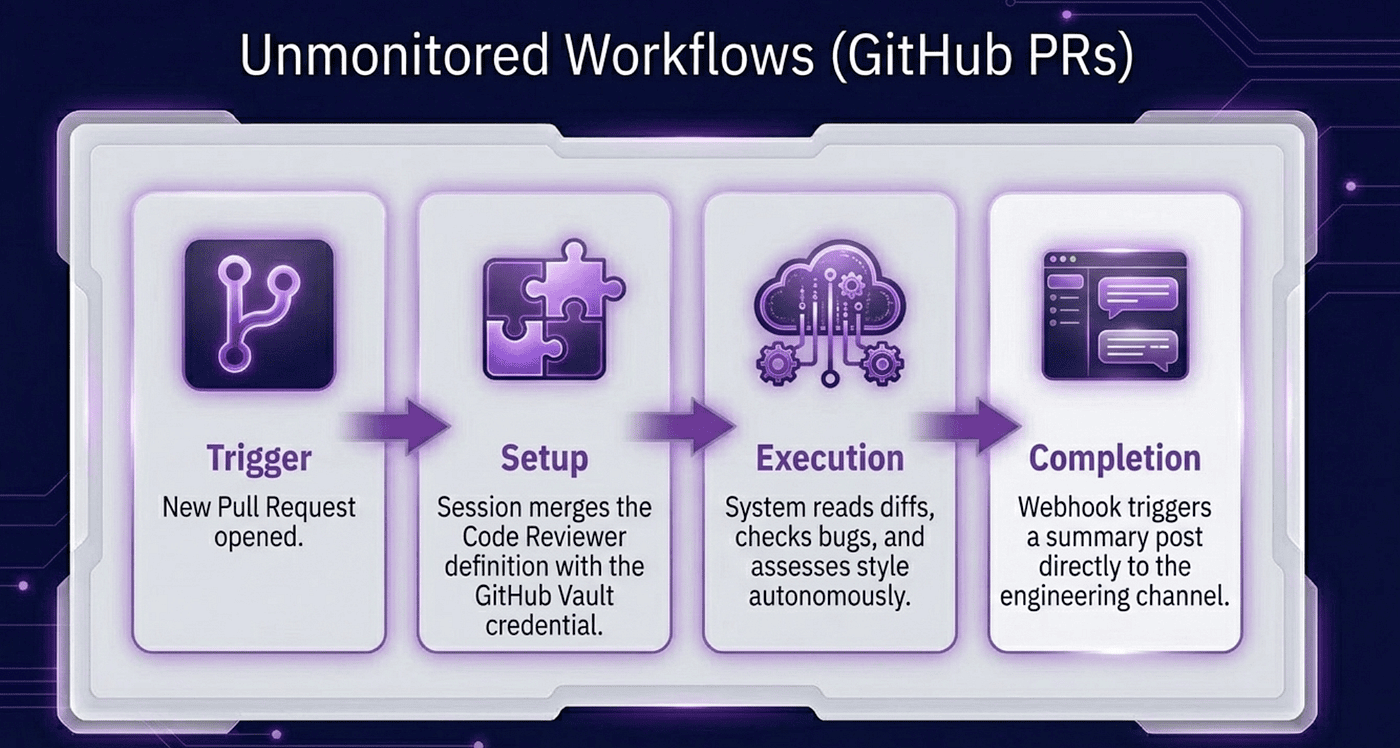
The Slack bot is a low-stakes way to see the shape. The GitHub example is where the architectural leverage becomes obvious.
The agent needs to log in somewhere
A reviewer agent has to read the PR, read the diff, and post a comment back. That means it needs a GitHub token. Passing credentials in the user message is not something you want to do.
Managed Agents handles this with vaults. You register the credential once. You reference the vault when you start the session. The agent never sees the raw token, and you never pass secrets through the event stream.
# One-time setup: store the GitHub token
vault = client.beta.vaults.create(name="github-creds")
client.beta.vaults.credentials.create(
    vault_id=vault.id,
    type="static_bearer",
    mcp_server_name="github",
    token="ghp_xxxxxxxxxxxxx",
)

# Create the reviewer agent
reviewer = client.beta.agents.create(
    name="PR Reviewer",
    model="claude-opus-4-7",
    system=(
        "You review pull requests. Read the diff, check for bugs, "
        "style issues, and missing tests. Post a single summary "
        "comment on the PR with your findings."
    ),
    mcp_servers=[{
        "type": "url",
        "name": "github",
        "url": "https://api.githubcopilot.com/mcp/",
    }],
    tools=[
        {"type": "agent_toolset_20260401"},
        {"type": "mcp_toolset", "mcp_server_name": "github"},
    ],
)
The agent declares the GitHub MCP server. The vault holds the credential. The two are linked by mcp_server_name. Claude gets the GitHub tools it needs, and your code never sees the token again after the one-time setup.
Receive the GitHub webhook, start the session
@app.route("/github/pr-opened", methods=["POST"])
def on_pr_opened():
    pr = request.json
    repo = pr["repository"]["full_name"]
    number = pr["pull_request"]["number"]

session = client.beta.sessions.create(
        agent="agent_REVIEWER_ID",
        environment_id="env_REVIEW_ENV_ID",
        vault_ids=[vault.id],
        metadata={"repo": repo, "pr": str(number)},
    )
    client.beta.sessions.events.send(session.id, events=[{
        "type": "user.message",
        "content": [{
            "type": "text",
            "text": (
                f"Review pull request #{number} on {repo}. "
                f"Post a summary comment when done."
            ),
        }],
    }])
    return "", 202  # acknowledge GitHub; Claude works in the background
GitHub gets a 202 immediately. Claude takes as long as it needs.
Receive the "done" notification, ping the team in Slack
@app.route("/claude-done", methods=["POST"])
def review_finished():
    event = client.beta.webhooks.unwrap(
        request.get_data(as_text=True),
        headers=dict(request.headers),
    )

if event.data.type == "session.status_idled":
        session = client.beta.sessions.retrieve(event.data.id)
        repo = session.metadata["repo"]
        pr = session.metadata["pr"]
        events = client.beta.sessions.events.list(session.id)
        final = next(
            (e for e in reversed(list(events)) if e.type == "agent.message"),
            None,
        )
        summary = final.content[0].text if final else "(no output)"
        slack_client.chat_postMessage(
            channel="#code-review",
            text=f"Claude reviewed {repo}#{pr}:\n{summary}",
        )
    return "", 200
Same two-function shape as the Slack bot. The Slack version had a human waiting. The GitHub version has no human in the loop at all. The shape is identical.
The same shape works for everything
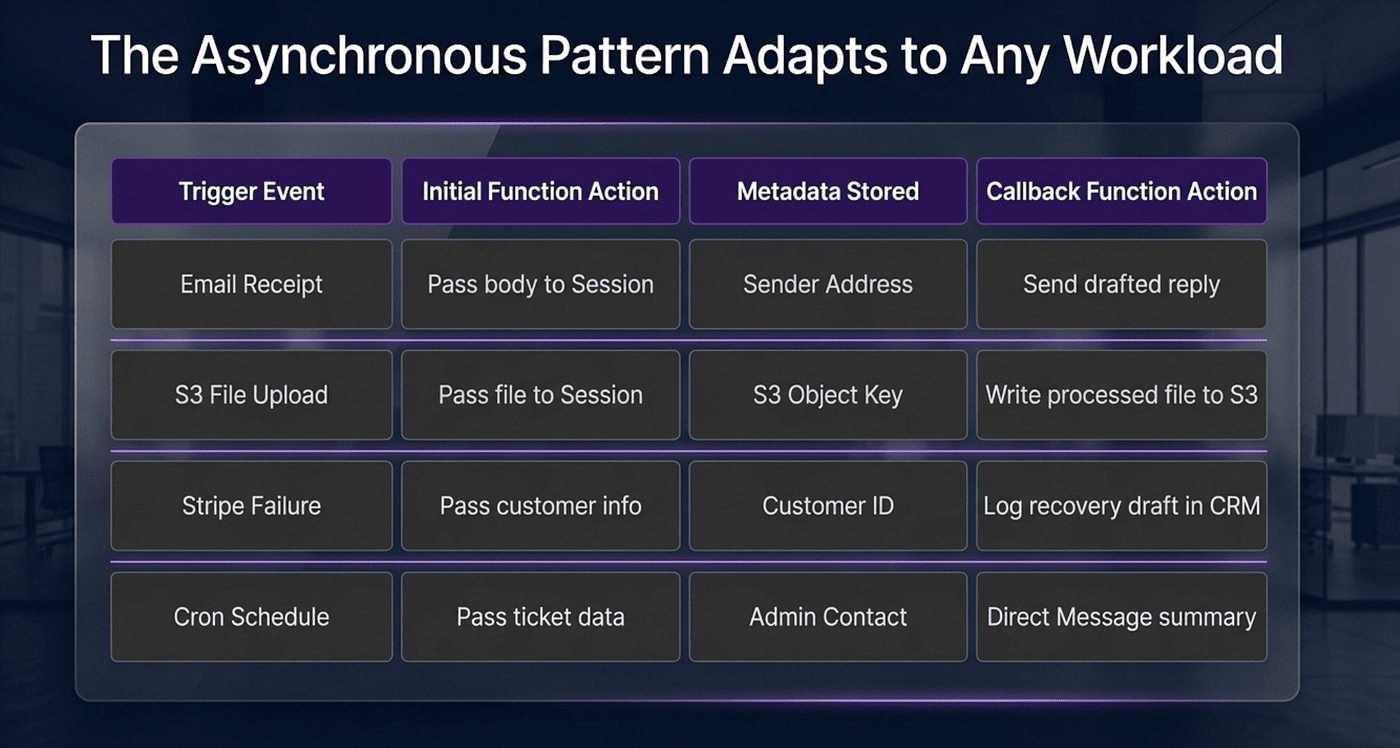
Two examples is enough to see it. Swap in any other service and the pattern is identical: one function to receive the trigger and start a session, one function to receive the completion and dispatch the result.
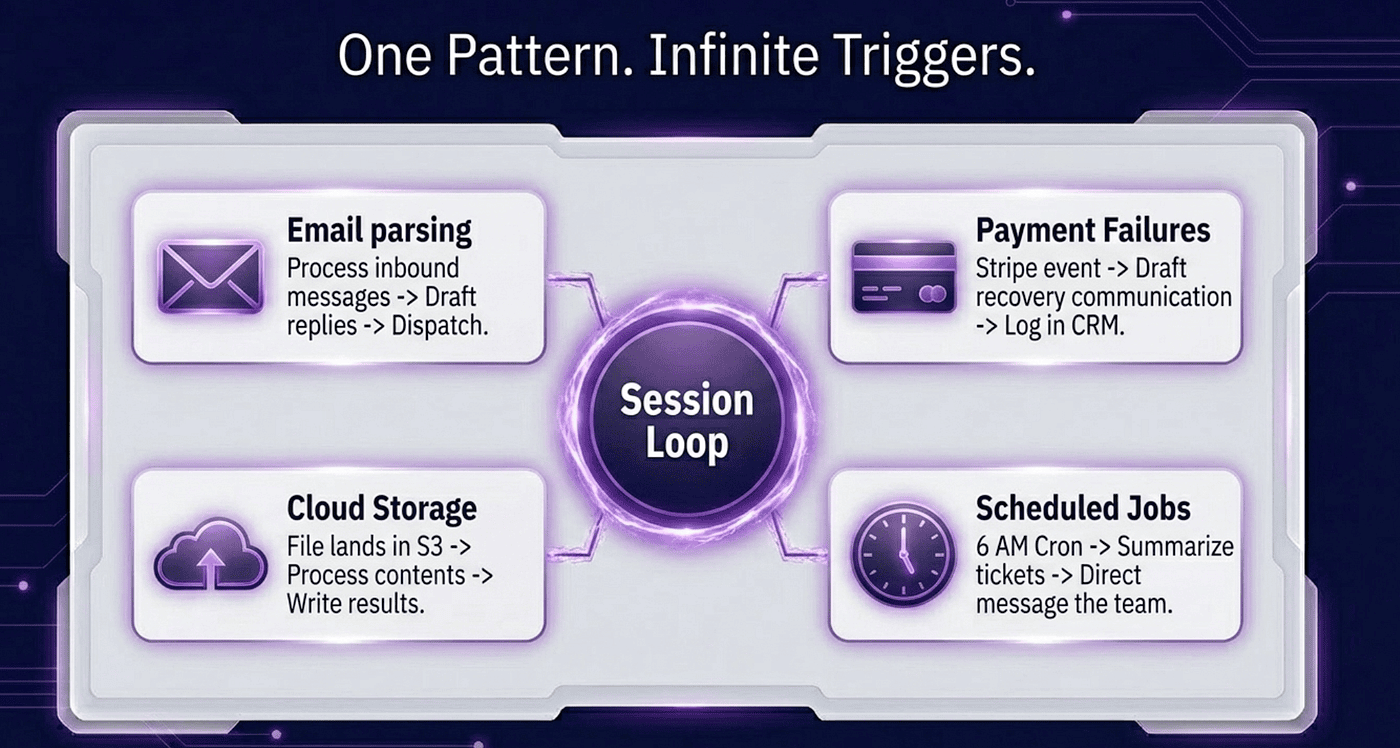
An email arrives through SendGrid's inbound parse. POST hits /email-received, you start a session with the email content, the reply lands in a different webhook call.
A file lands in S3. The bucket POSTs to /file-uploaded, you start a session with the S3 key in metadata, the processed output lands in a different webhook call.
A Stripe payment fails. Stripe POSTs to /payment-failed, you start a session with the customer info, the resolution attempt result lands in a different webhook call.
A cron job at 6am fires a session that summarizes yesterday's support tickets and DMs you the results. There is no trigger endpoint at all — your cron calls sessions.create() directly.
Two functions. One that receives the trigger and starts a session. One that receives the completion and dispatches the result. That is the whole integration surface.
Why the split exists
The two-URL design feels like more moving parts than it needs to be. It is not.
Claude might take a long time. If Slack waited for Claude to finish before getting an acknowledgment, Slack would time out the request and retry. You would get duplicate sessions, duplicate replies, and a confused user. The same applies to GitHub, Stripe, SendGrid, and anything else that sends webhooks. The services that fire webhooks almost universally expect a fast acknowledgment — typically under a second — and assume work happens asynchronously.
That is the only way to handle work taking longer than a few seconds without holding a connection open: accept the trigger, acknowledge it immediately, do the work elsewhere, and deliver the result when it is ready.
The boring parts that actually matter
The thing that usually kills integrations like this in production is not the model. It is the credentials. Tokens expire. OAuth flows break. The vault pattern handles this.
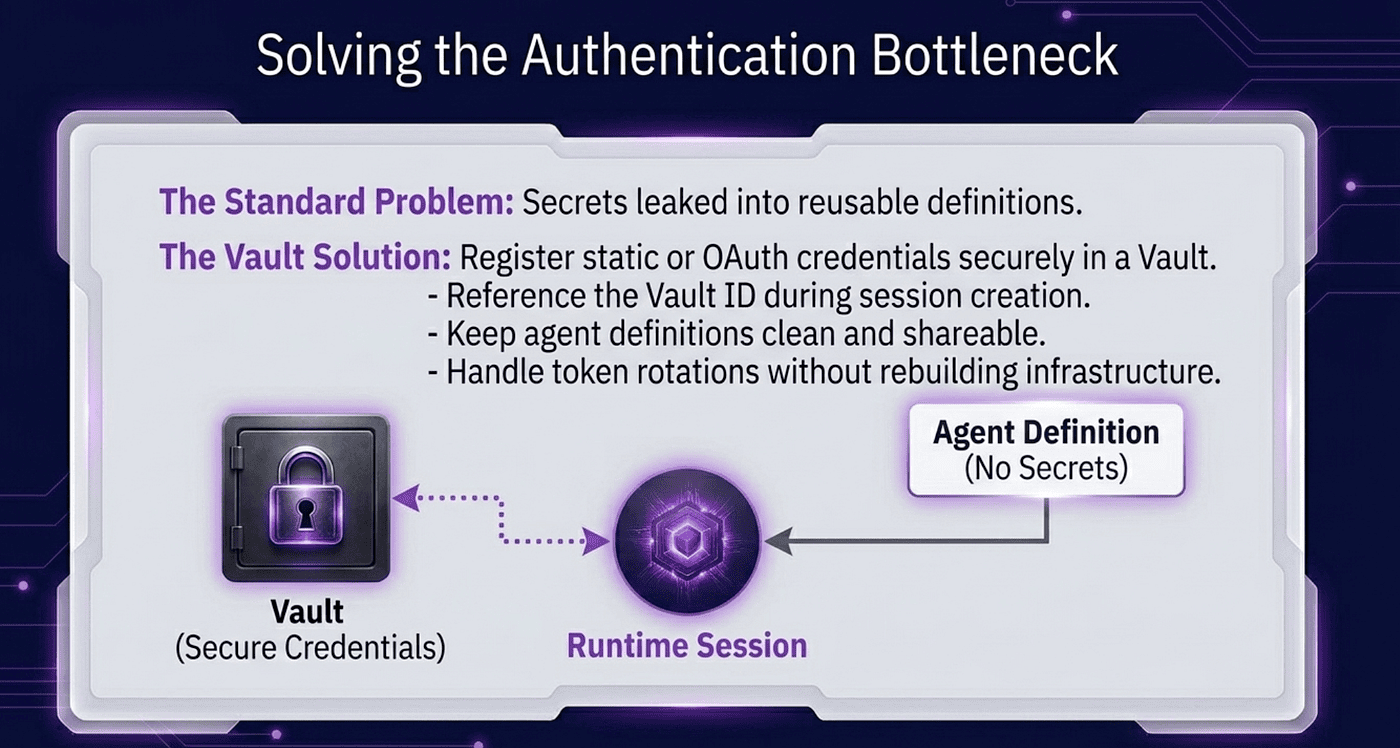
You saw a glimpse of vaults in the GitHub example. The pattern generalizes. You store any credential — API key, static bearer token, or OAuth token — in a vault once. You pass the vault ID when you create the session. Claude's tools can use the credential without your code handling it directly.
OAuth refresh is handled for you. If a credential goes bad, you get a vault_credential.refresh_failed event rather than a silent failure.
When you should reach for something else
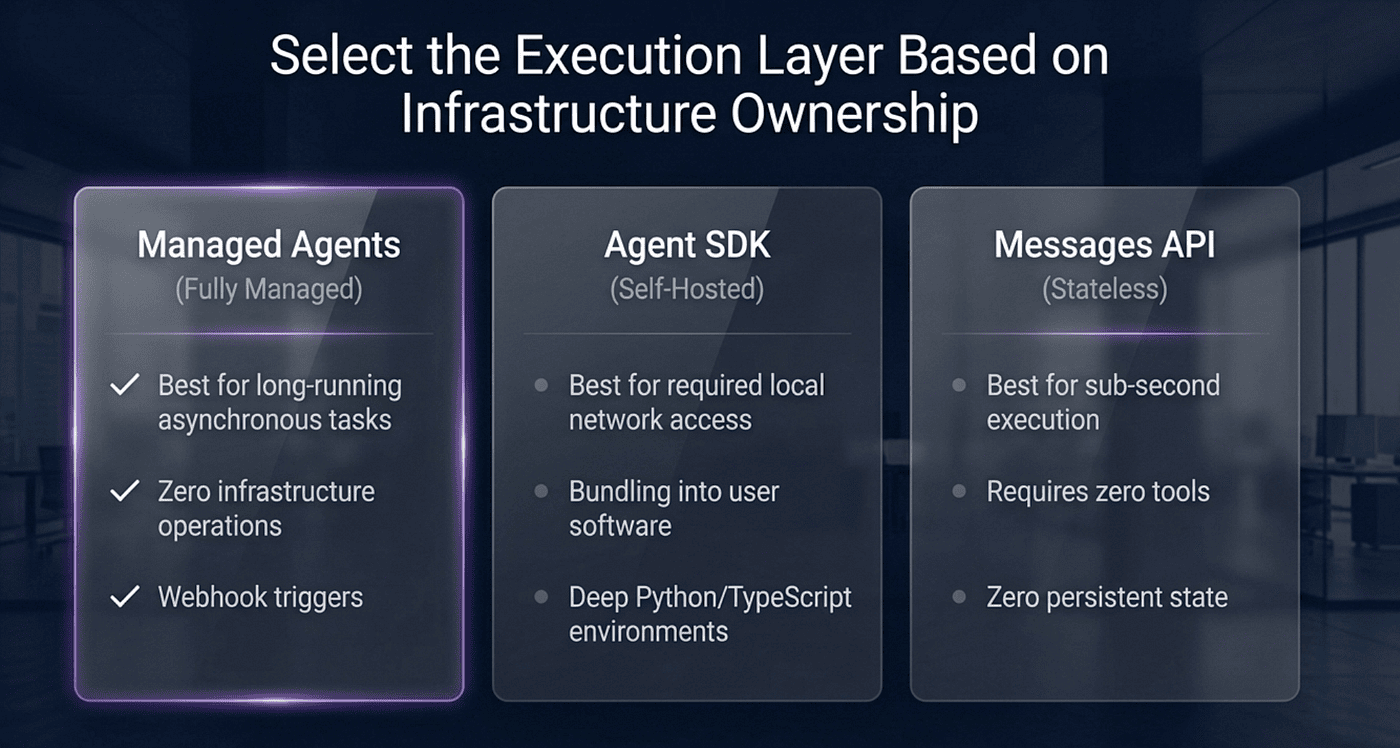
Managed Agents is not the right tool for every job. The honest decision matrix here comes down to where you want execution to live and how much infrastructure you are willing to run.
The Agent SDK is a Python or TypeScript library that gives you the same agent loop, the same built-in tools, and the same MCP support — but it runs on your machine, in your process, in your cloud.
Reach for the Agent SDK when you need to run the agent on a machine you control, access a local filesystem, integrate with internal systems that are not reachable from Anthropic's cloud, or when your organization's security policy requires on-premises execution.
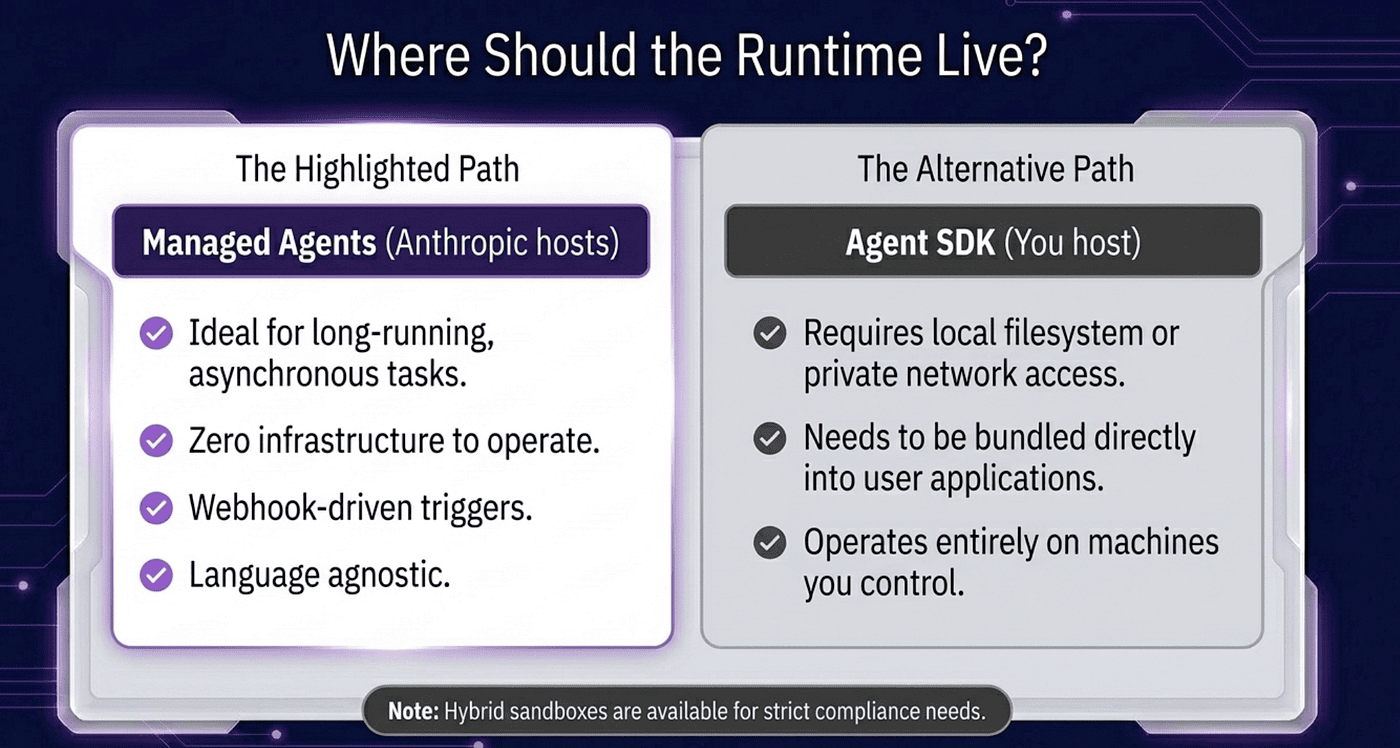
Reach for Managed Agents when you want to fire long-running async tasks without operating infrastructure yourself, when your workload benefits from Anthropic's sandboxing and scaling, or when you are building event-driven integrations where async completion is a feature, not a workaround.
The two are not competitors. They are endpoints on a spectrum of "how much of the harness do you want Anthropic to run for you."
One caveat. Code written against the SDK does not deploy directly to Managed Agents and vice versa. The two share concepts and the same underlying model, but the deployment target is different. If you start with one and want to move to the other, expect a rewrite of the harness layer — the logic stays, the plumbing changes.
And of course, if your task runs for a second and a half and needs zero tools, just use the Messages API directly. Managed Agents is infrastructure. Infrastructure is overhead. Match the tool to the job.
Tool, Skill, MCP, and Subagent support in Claude Managed Agents
A Managed Agent's capabilities are declared on the agent configuration through four composable areas: tools, skills, mcp_servers, and multiagent.
Built-in and custom tools
The pre-built agent toolset (agent_toolset_20260401) ships with bash, file read/write/edit, glob, grep, web search, and web fetch. You can also declare individual built-in tools — computer use, text editor, bash — or custom tools that call your own endpoints via configs.
Skills
Managed Agents fully support Agent Skills — the same filesystem-based, progressively-disclosed SKILL.md pattern available in Claude Code and Claude Cowork. Two skill types work with Managed Agents through the skills field:
-
Anthropic pre-built skills (e.g.
xlsx,docx,pptx,pdf) — reference by short name with{"type": "anthropic", "skill_id": "xlsx"}. -
Custom skills you upload to your workspace — reference by ID and version with
{"type": "custom", "skill_id": "skill_abc123", "version": "latest"}.
A session supports up to 20 skills total, counted across every agent in a multi-agent roster. Skills load on demand: the skill file only lands in context when the agent actually invokes it, keeping the context window clean for non-skill turns.
MCP servers
Managed Agents connect to Model Context Protocol servers through the mcp_servers field, giving the agent access to any tool that exposes an MCP interface. Two connectivity modes are supported:
-
Remote MCP servers that expose an HTTP endpoint over the streamable HTTP transport.
-
Private MCP servers inside your network, reached through MCP tunnels — independent of where tool execution runs, so a cloud-container session can still reach a tunneled internal server.
Credentials are supplied from credential vaults using types such as static_bearer and mcp_oauth, keeping secrets out of the session payload. If an MCP connection fails, the session fires a session.error event with a typed code (mcp_connection_failed_error or mcp_authentication_failed_error) so your webhook handler can distinguish MCP problems from model errors. The mcp_server_name field links an MCP server declaration on the agent config to its matching vault credential.
This gives the agent arms and tools so it can perform actions on your behalf or read information and synthesize it. The result is more capable and useful agents.
A note on plugins
Managed Agents do not consume Claude Code Plugins or Cowork Plugins as a unit. Plugins are a client-side packaging format for tools, skills, and prompts intended for interactive coding environments. The underlying capabilities, however, travel: skills declared in a plugin can be extracted and referenced in Managed Agents through skills, and MCP servers bundled in a plugin can be declared directly under mcp_servers.
Subagents and multi-agent orchestration
However, like Claude Cowork and Claude Code, Claude Managed Agents support subagents through multiagent sessions, including a full coordinator pattern where one agent delegates work to a roster of specialized subagents.
Configuring a coordinator
Designate a coordinator by setting the multiagent field on its config to {"type": "coordinator", "agents": [...]}. The agents array accepts three reference formats:
-
{"type": "agent", "id": agent.id}— references an agent, defaulting to its latest version. -
{"type": "agent", "id": agent.id, "version": agent.version}— pins a specific version. -
{"type": "self"}— lets the coordinator spawn copies of itself.
You then start a session against the coordinator, and it delegates at runtime as needed. There is no special "start a multi-agent session" endpoint — the coordinator pattern is entirely declared in the agent config, and the session API is unchanged.
How it works
Each delegated agent runs in its own session thread: a context-isolated event stream with its own conversation history, tool state, and filesystem access. The coordinator sends work to a subagent via thread messages. The subagent does its work and returns a result. The coordinator synthesizes the results and continues.
Differences from the Agent SDK
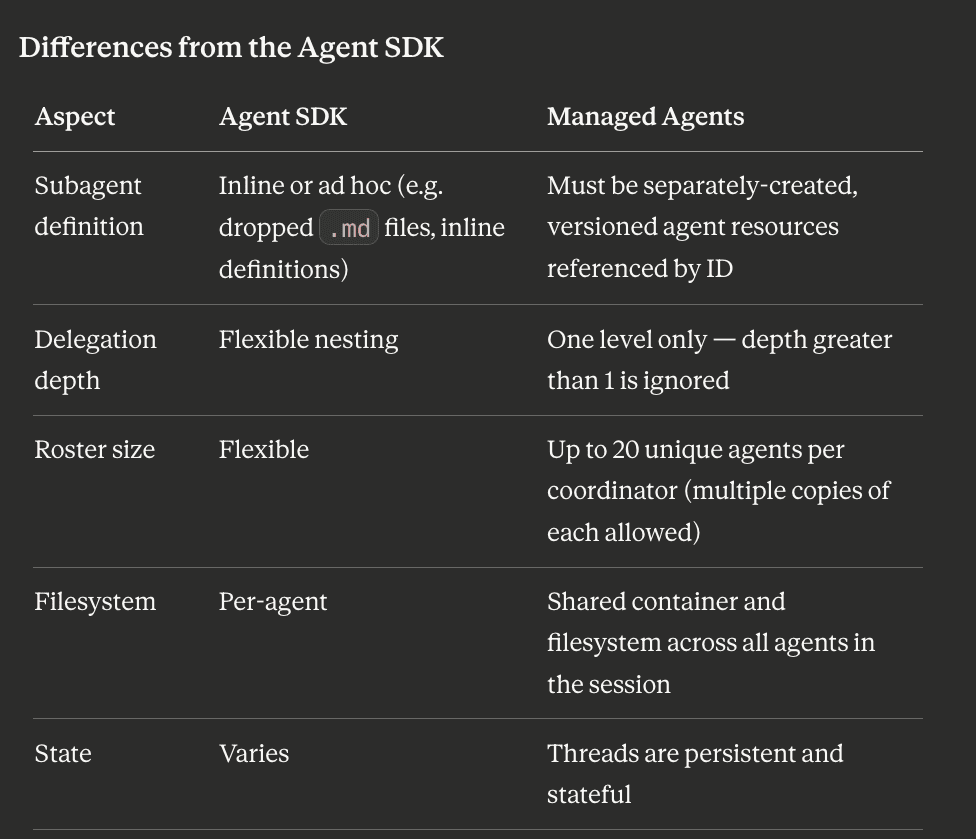
The two approaches differ in a few key ways. Subagent definition: in the Agent SDK, subagents can be defined inline as part of the orchestration code. In Managed Agents, subagents must be pre-created, versioned agents; they are referenced by ID in the coordinator's multiagent.agents roster and cannot be declared as .md files at runtime. Delegation depth: Managed Agents currently supports one level of delegation, coordinator to leaf subagents. Multi-hop chains are not yet supported. Roster size: the coordinator's subagent roster is capped at five agents per session. Filesystem: each subagent thread has its own isolated filesystem; subagents do not share the coordinator's filesystem unless you explicitly pass artifacts through messages. State: each thread is context-isolated; the coordinator must explicitly summarize and pass context rather than relying on shared memory.
In short: delegates must be pre-created, versioned agents rather than inline definitions, and the roster is bounded. This is a deliberate tradeoff — pre-created, versioned agents are reproducible and auditable in ways that inline definitions are not.
Observability
Delegation surfaces on the primary thread through events such as session.thread_created, agent.thread_message_sent, and agent.thread_message_received. Each subagent thread also fires its own full event stream, accessible by filtering on session_thread_id. You can stream both the coordinator's thread and any subagent thread in parallel for full visibility into what each agent is doing.
Example using Subagents and Skills from a Managed Agent
Here it is — it creates two specialized subagents (each with their own skills), wires them to a coordinator, and streams delegation events from a single session:
from anthropic import Anthropic

client = Anthropic()

# 1. Create a specialized "report" subagent with the xlsx + docx skills.
#    Skills load on demand and only impact the context window when relevant.
report_agent = client.beta.agents.create(
    name="Report Writer",
    model="claude-opus-4-7",
    system="You produce financial reports. Use the spreadsheet and "
           "document skills to generate polished .xlsx and .docx files.",
    tools=[{"type": "agent_toolset_20260401"}],
    skills=[
        {"type": "anthropic", "skill_id": "xlsx"},
        {"type": "anthropic", "skill_id": "docx"},
    ],
)

# 2. Create a "research" subagent with a custom workspace skill.
research_agent = client.beta.agents.create(
    name="Researcher",
    model="claude-opus-4-7",
    system="You gather and synthesize source material for analysts.",
    tools=[{"type": "agent_toolset_20260401"}],
    skills=[
        {"type": "custom", "skill_id": "skill_abc123", "version": "latest"},
    ],
)

# 3. Create the coordinator. Its multiagent roster references the two
#    subagents by ID; it delegates to them at runtime.
coordinator = client.beta.agents.create(
    name="Analysis Lead",
    model="claude-opus-4-7",
    system="You coordinate financial analysis. Delegate source gathering "
           "to the researcher, then hand findings to the report writer "
           "to produce the final deliverables.",
    tools=[{"type": "agent_toolset_20260401"}],
    multiagent={
        "type": "coordinator",
        "agents": [
            {"type": "agent", "id": research_agent.id},
            {"type": "agent", "id": report_agent.id},
        ],
    },
)

# 4. Start a session against the coordinator.
session = client.beta.sessions.create(
    agent=coordinator.id,
    environment_id=environment.id,  # created separately
)

# 5. Open the stream first, then send the task. The API buffers events
#    until the stream attaches, so opening first avoids missing any.
with client.beta.sessions.events.stream(session.id) as stream:
    client.beta.sessions.events.send(
        session.id,
        events=[{
            "type": "user.message",
            "content": [{
                "type": "text",
                "text": "Research Q3 SaaS market trends, then produce an "
                        "Excel model and a Word summary.",
            }],
        }],
    )

    # Stream the primary thread to watch delegation as it happens.
    for event in stream:
        match event.type:
            case "session.thread_created":
                print(f"Spawned subagent thread: {event.agent_name}")
            case "agent.thread_message_sent":
                print(f"Coordinator -> {event.to_agent_name}: delegated work")
            case "agent.thread_message_received":
                print(f"{event.from_agent_name} -> Coordinator: returned result")
            case "agent.message":
                for block in event.content:
                    if block.type == "text":
                        print(block.text, end="")
            case "session.status_idle":
                print("\nDone.")
                break
            case "session.error":
                msg = event.error.message if event.error else "unknown"
                print(f"\n[Error: {msg}]")
                break
The two subagents are created first as standalone, versioned agents, each carrying its own skills (the id and multiagent.agents roster link them to the coordinator). The coordinator references them by id in its config and delegates at runtime. The stream shows delegation events (session.thread_created, agent.thread_message_sent, agent.thread_message_received) alongside the coordinator's own output, giving you full visibility into what each agent is doing without separate polling.
Deploying agents and subagents
In Managed Agents there is no separate deploy or publish step — agents and environments are the deployment artifacts. Calling agents.create or environments.create provisions the resource immediately; the returned ID is what your runtime code references.
A clean pattern is to split provisioning from execution. The deploy script stands up the environment and the full agent roster once (or on config changes). The run script loads the manifest and starts sessions.
Deploy script
#!/usr/bin/env python3
"""Deploy script: provision the environment + agent roster for the
analysis pipeline. Idempotent on environment name; agents are versioned,
so re-running creates new agent versions rather than duplicates.

Run once (or on each config change). Outputs IDs to deploy.json, which
your runtime loads to start sessions.
"""
import json
from pathlib import Path
from anthropic import Anthropic

client = Anthropic()
OUT = Path("deploy.json")


def get_or_create_environment(name: str) -> str:
    # Environments are NOT versioned, so reuse by name rather than
    # recreating. list() returns all environments; filter out archived
    # ones yourself (there is no documented include_archived filter here).
    for env in client.beta.environments.list():
        if env.name == name and env.archived_at is None:
            print(f"Reusing environment {name}: {env.id}")
            return env.id

    env = client.beta.environments.create(
        name=name,
        config={
            "type": "cloud",
            # Pre-install runtimes the report skills rely on.
            "packages": {"pip": ["pandas", "numpy", "openpyxl"]},
            "networking": {"type": "unrestricted"},
        },
    )
    print(f"Created environment {name}: {env.id}")
    return env.id


def deploy() -> dict:
    environment_id = get_or_create_environment("analysis-env")

    # --- Subagent 1: report writer (Anthropic xlsx + docx skills) ---
    report_agent = client.beta.agents.create(
        name="Report Writer",
        model="claude-opus-4-7",
        system="You produce financial reports. Use the spreadsheet and "
               "document skills to generate polished .xlsx and .docx files.",
        tools=[{"type": "agent_toolset_20260401"}],
        skills=[
            {"type": "anthropic", "skill_id": "xlsx"},
            {"type": "anthropic", "skill_id": "docx"},
        ],
        metadata={"role": "report-writer", "pipeline": "analysis"},
    )
    print(f"Deployed Report Writer: {report_agent.id} v{report_agent.version}")

    # --- Subagent 2: researcher (custom workspace skill) ---
    research_agent = client.beta.agents.create(
        name="Researcher",
        model="claude-opus-4-7",
        system="You gather and synthesize source material for analysts.",
        tools=[{"type": "agent_toolset_20260401"}],
        skills=[
            {"type": "custom", "skill_id": "skill_abc123", "version": "latest"},
        ],
        metadata={"role": "researcher", "pipeline": "analysis"},
    )
    print(f"Deployed Researcher: {research_agent.id} v{research_agent.version}")

    # --- Coordinator: delegates to the two subagents above ---
    # Pin subagent versions so the deployed coordinator is reproducible.
    coordinator = client.beta.agents.create(
        name="Analysis Lead",
        model="claude-opus-4-7",
        system="You coordinate financial analysis. Delegate source gathering "
               "to the researcher, then hand findings to the report writer "
               "to produce the final deliverables.",
        tools=[{"type": "agent_toolset_20260401"}],
        multiagent={
            "type": "coordinator",
            "agents": [
                {"type": "agent", "id": research_agent.id,
                 "version": research_agent.version},
                {"type": "agent", "id": report_agent.id,
                 "version": report_agent.version},
            ],
        },
        metadata={"role": "coordinator", "pipeline": "analysis"},
    )
    print(f"Deployed Analysis Lead: {coordinator.id} v{coordinator.version}")

    return {
        "environment_id": environment_id,
        "coordinator_id": coordinator.id,
        "coordinator_version": coordinator.version,
        "subagents": {
            "researcher": {"id": research_agent.id,
                           "version": research_agent.version},
            "report_writer": {"id": report_agent.id,
                              "version": report_agent.version},
        },
    }


if __name__ == "__main__":
    manifest = deploy()
    OUT.write_text(json.dumps(manifest, indent=2))
    print(f"\nDeploy manifest written to {OUT}")
Run script
The runtime stays separate and simply loads the manifest to start a session against the already-provisioned coordinator.
#!/usr/bin/env python3
"""Run script: load the deploy manifest and start a session against the
already-deployed coordinator."""
import json
from pathlib import Path
from anthropic import Anthropic

client = Anthropic()
manifest = json.loads(Path("deploy.json").read_text())

session = client.beta.sessions.create(
    agent=manifest["coordinator_id"],
    environment_id=manifest["environment_id"],
)

with client.beta.sessions.events.stream(session.id) as stream:
    client.beta.sessions.events.send(
        session.id,
        events=[{
            "type": "user.message",
            "content": [{
                "type": "text",
                "text": "Research Q3 SaaS market trends, then produce an "
                        "Excel model and a Word summary.",
            }],
        }],
    )
    for event in stream:
        match event.type:
            case "session.thread_created":
                print(f"Spawned subagent thread: {event.agent_name}")
            case "agent.message":
                for block in event.content:
                    if block.type == "text":
                        print(block.text, end="")
            case "session.status_idle":
                break
Notes on the pattern
The split between deploy.py (provision agents and environment, run on config changes) and run.py (start sessions, run per task) reflects the lifecycle of the underlying resources. The two resource types behave differently and the script accounts for both: agents are versioned, so each create produces a new version — which is what you want for config changes; if you re-run unchanged, compare against agents.list first to skip. Environments are not versioned, so a config change cannot be rolled back, which is exactly why reusing an environment by name (rather than recreating it) is the right call, and why you may want to log environment updates on your own side to map environment state to sessions. Pinning subagent versions in the coordinator's roster (rather than defaulting to latest) makes the deployed coordinator fully reproducible. The metadata field is useful for tagging every agent in a pipeline so you can find and manage the roster later.
Getting started and billing
This section covers how to get access to Claude Managed Agents and how the service is billed.
Getting access
Claude Managed Agents is currently in public beta, and the on-ramp is deliberately short. To start, you need three things:
-
A Claude API key, created in the API console under settings → keys.
-
The
managed-agents-2026-04-01beta header on every request. The official SDKs (Python, TypeScript, and the others) set this automatically, so you rarely add it by hand. -
Access to Managed Agents, which is enabled by default for all API accounts.
For the core feature set, long-running sessions, sandboxing, tools, skills, and MCP, there is no waitlist or separate signup. If you have an API account and a key, you can call the agents, environments, and sessions endpoints immediately.
Two capabilities are gated behind a narrower research-preview beta and require a separate access request: multiagent (the coordinator and subagent orchestration) and outcomes (automatic self-evaluation). If your design depends on the coordinator/subagent pattern, request access through the form at claude.com/form/claude-managed-agents; everything else is available without it.
The practical first run is: get an API key, install the SDK, then create an agent, create an environment, and start a session; the same sequence the quickstart walks through.
How billing works
There is no flat monthly fee, no per-agent license, and no separate Managed Agents subscription. It is pay-as-you-go on your existing API account, governed by the same usage tier and spend limits as any other API usage. Costs accrue on up to three dimensions, depending on what the agent does.
1. Token costs (the main driver)
Every token the agent consumes, input, output, cache write, and cache read, bills at standard Claude API model rates, identical to what you would pay through the Messages API. As of May 2026:
Model Input ($/M tokens) Output ($/M tokens) Claude Opus 4.7 $5.00 $25.00 Claude Sonnet 4.6 $3.00 $15.00 Claude Haiku 4.5 $1.00 $5.00
Output tokens cost 5x input across all current models. In a multiagent setup, each agent in the roster bills at its own model's rate, so assigning cheaper models (Sonnet or Haiku) to high-volume subagents, a search worker, for example, is a meaningful cost lever, while reserving Opus for the coordinator or quality-critical steps.
One Opus 4.7 caveat: the per-token rate is unchanged from Opus 4.6, but Opus 4.7 ships with a new tokenizer that can produce up to roughly 35% more tokens for the same input text. The rate card is identical, but your effective cost per request can rise. Benchmark token-heavy workloads before standardizing on it.
Two discounts matter especially for agents: prompt caching can cut input costs by up to 90% on cache hits, and batch processing offers up to 50% savings. Caching is particularly relevant here because the harness uses built-in prompt caching, and an agent's system prompt, tool definitions, and skill content repeat across turns; exactly the kind of stable context that caches well.
2. Session runtime
Managed Agents adds a runtime charge of $0.08 per session-hour, billed to the millisecond. Crucially, runtime accrues only while the session's status is running, idle time, such as waiting for user input, tool confirmations, or queuing, is free. A session that sits waiting for a human to respond does not accumulate runtime charges during the gap.
This runtime charge covers the managed infrastructure: the sandboxed execution environment, state management, checkpointing, tool orchestration, and error recovery. Notably, it replaces the standalone Code Execution container-hour billing model, you are not separately billed for container hours on top of session runtime. For comparison, an agent running around the clock costs roughly $58 per month in runtime alone, before any token costs. Self-hosted sandboxes, where the compute runs on your own infrastructure, change this calculus since the heavy execution lives in your environment rather than Anthropic's.
3. Tool-triggered costs
Some built-in tools carry their own charges on top of tokens and runtime. The notable one is web search inside a session, at $10 per 1,000 searches. If your agent searches heavily, model this as its own line item.
A worked example
Anthropic's published example: a one-hour coding session on an Opus model consuming 50,000 input tokens and 15,000 output tokens costs about $0.705 total, of which the session runtime accounts for $0.08, and the remainder is tokens (before any prompt-caching savings). It illustrates that for short, token-light tasks, runtime is a small fraction of the bill; for long-running, lightly-thinking agents, runtime becomes more visible, while token-heavy reasoning agents are dominated by token cost.
Rate limits
Managed Agents endpoints are rate-limited per organization: 300 requests per minute on create-type endpoints (agents, sessions, environments) and 600 requests per minute on read endpoints (retrieve, list, stream). Organization-level spend limits and tier-based rate limits also apply. New API accounts on the free tier receive a small credit for initial testing; there is no permanent free tier for API usage.
Where to confirm current numbers
Pricing and beta scope can change while the product is in beta. The authoritative sources are Anthropic's official pricing page and the Managed Agents documentation; the figures above reflect published rates as of May 2026 and should be re-checked there before committing to cost projections.
The bigger shift
The pattern here mirrors what happened with databases. There was a time when running a database meant running a server. You bought the hardware, installed the software, wrote the backup jobs, handled the failover. Then managed databases showed up. RDS, Cloud SQL, Atlas. The query interface stayed the same. The operational surface shrank to near zero.
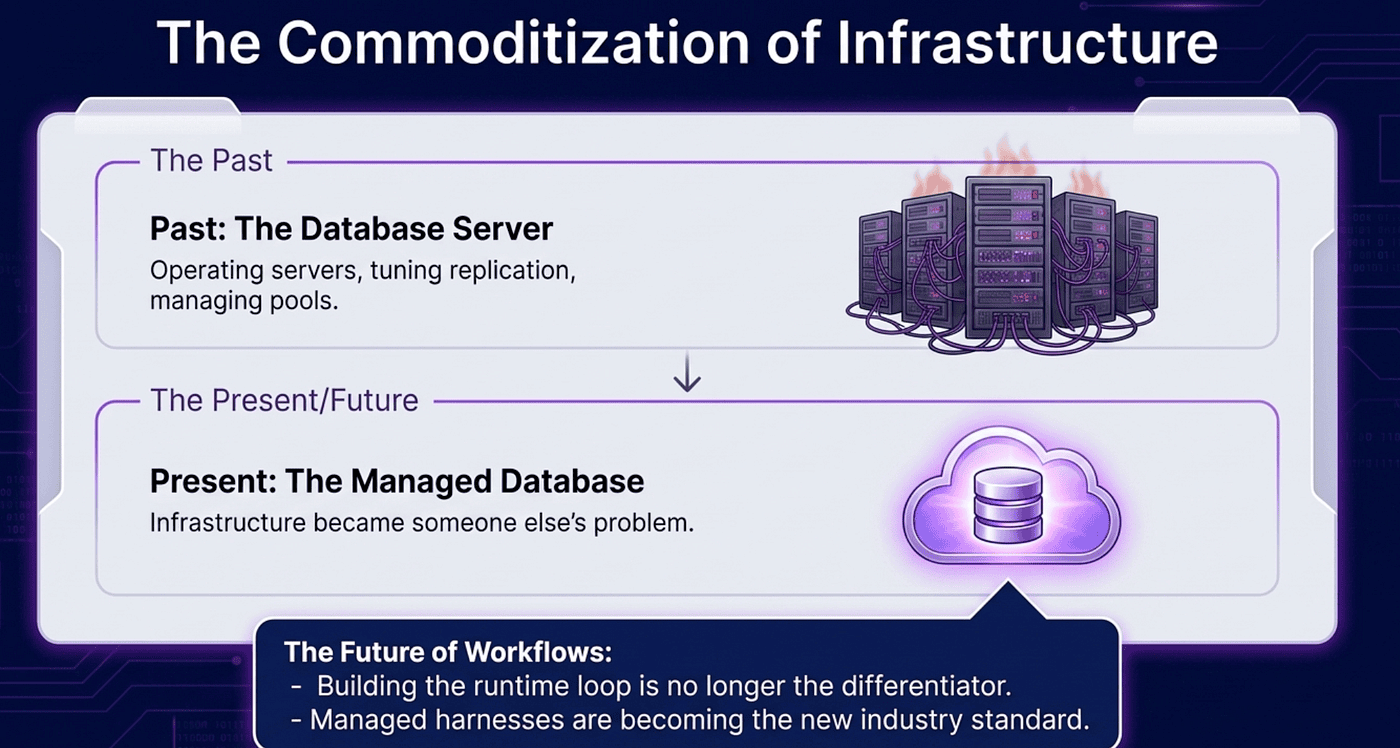
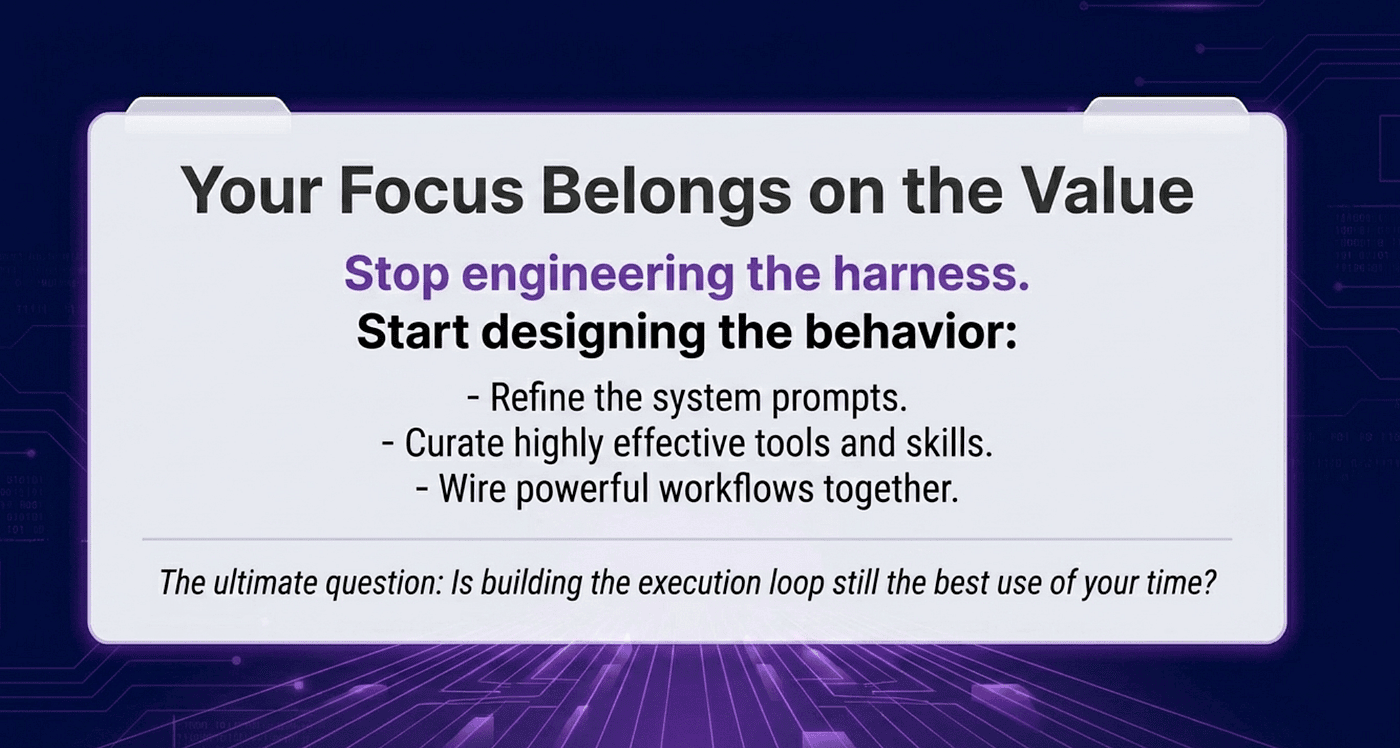
Agents are heading the same way. Building a reliable agent loop is not the differentiating work. It is the table stakes. Managed Agents lets you skip straight to the part that matters: what the agent actually does, and what it does it for.
If you are still writing your own agent loop, it is worth asking whether that is time spent on differentiation or time spent re-inventing managed infrastructure. For most teams, the answer is obvious once you see the alternative.
About the Author — Claude Certified Architect
Rick Hightower is a former Senior Distinguished Engineer at a Fortune 100 company, focusing on delivering ML / AI insights to front-line applications, and a practitioner building multi-agent production systems. Rick is a Claude Certified Architect. Follow him on Medium for more hands-on agent engineering content. You can also book him to speak and train your team: Check out Rick Hightower's SpeakerHub.
Rick created Skilz, the universal agent skill installer that supports 30+ coding agents, including Claude Code, Gemini, Copilot, and Cursor, and co-founded the world's largest agentic skill marketplace. Connect with Rick Hightower on LinkedIn or Medium. Check out SpillWave, your source for AI expertise.
Anthropic Harness Engineering: Author Rick Hightower, AI systems practitioner and agentic frameworks developer
Rick has been actively developing generative AI systems, agents, and agentic workflows for years. He is the author of numerous agentic frameworks and developer tools and brings deep practical expertise to teams adopting AI. He enjoys writing about himself in the 3rd person.
Rick also wrote a Claude Certified Architect (CCA) series of articles that have a lot of useful information on writing agentic AI systems. Many ideas captured in the CCA and the exam prep Rick wrote echo what you see in this article. If you want to improve your ability to create well-behaved AI agents, studying for the CCA Exam is a good place to start.
CCA Exam Prep on Agentic Development
-
Claude Certified Architect: The Complete Guide to Passing the CCA Foundations Exam
-
CCA Exam Prep: Mastering the Code Generation with Claude Code Scenario
-
CCA Exam Prep: Mastering the Multi-Agent Research System Scenario
-
CCA Exam Prep: Mastering the Customer Support Resolution Agent Scenario
-
Get the complete reading list for CCA-F exam prep articles from this Claude Certified Architect Exam Prep list.
Rick also wrote a series on harness engineering and how to improve agentic systems using harness engineering for feedback loops and adversarial agents. These articles also go hand in hand with this article.
Harness Engineering Articles
-
The $9 Disaster: What Anthropic's Harness Design Paper Teaches Us About Building Autonomous AI
-
Harness Engineering vs Context Engineering: The Model is the CPU, the Harness is the OS
-
LangChain Deep Agents: Harness and Context Engineering: Memory, Skills, and Security
-
Beyond the AI Coding Hangover: How Harness Engineering Prevents the Next Outage
-
LangChain's Harness Engineering: From Top 30 to Top 5 on Terminal Bench 2.0
-
Anthropic's Harness Engineering: Two Agents, One Feature List, Zero Context Overflow
-
OpenAI's Harness Engineering Experiment: Zero Manually-Written Code