Harness and Context Engineering: Agents - Injecting the Right Rules at the Right Moment
Static Rules Files Are the New TODO Comments
Originally published on Medium.
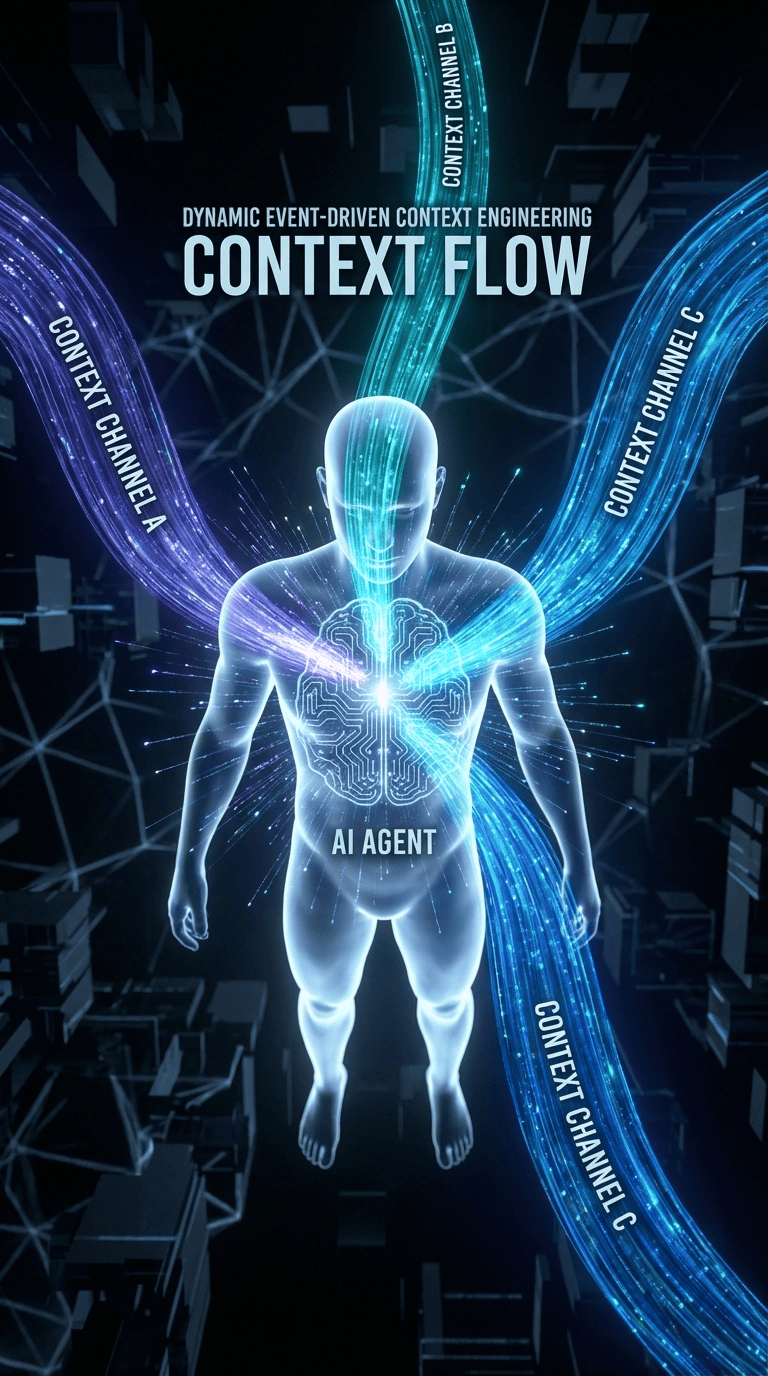 Harness and Context Engineering Cover for Claude Code, Gemini CLI, OpenCode and CoPilot CLI
Why static guidance fails when it matters most, and how event-driven rules dynamically inject architectural guidelines exactly when an Agent needs them.
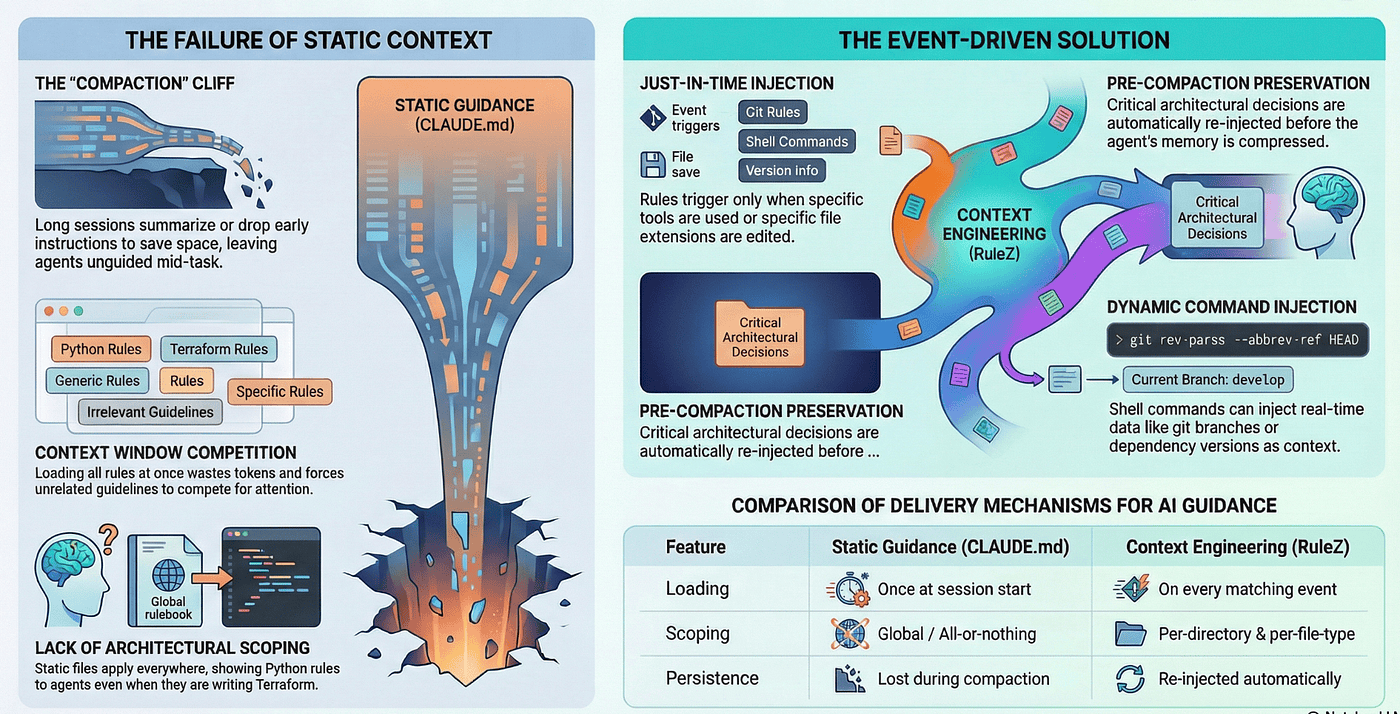 Harness and Context Engineering is not about the right content, it is about injecting the right context at the right time so Agent’s can do a great job. This system will show how to make harness and context engineering an event driven solution.
Static rules files are the new TODO comments: well-intentioned, mostly ignored.
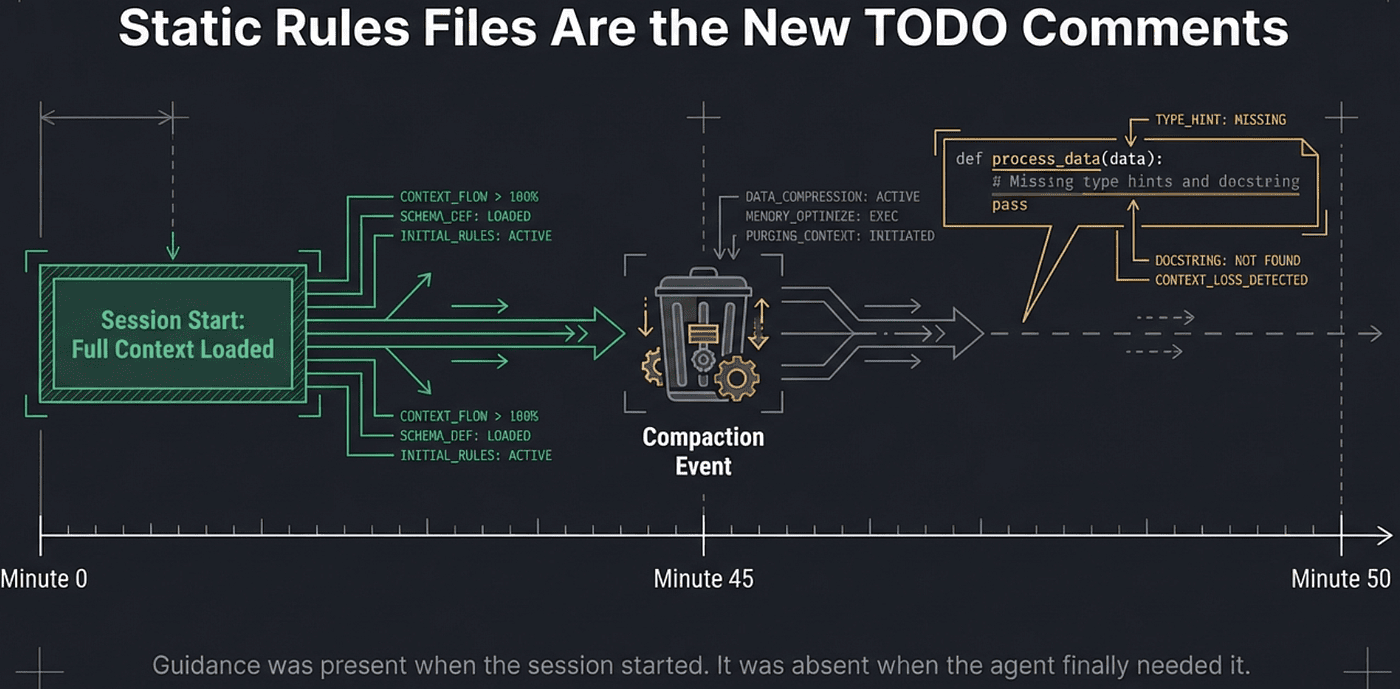 Agents need harness and context engineering which is more than static rule files
You write a CLAUDE.md, AGENTS.md or GEMINI.md file with your Python coding standards, your API design principles, your Terraform naming conventions. You test it once. It works. The agent reads your guidelines and writes clean code. You commit the file and move on, satisfied that your AI coding agent now “knows” your team’s standards.
Then reality intrudes. Forty-five minutes into a complex refactoring session, the agent starts writing Python without type hints. Your carefully authored coding standards are gone. Not deleted; compacted. Claude Code summarized your 2,000-token standards document down to “follow project conventions” to make room for the ongoing conversation. The guidance was present when the session started. It was absent when the agent finally needed it.
This is the fundamental problem with static context: it treats guidance as a document to be loaded, not as a signal to be delivered. And it fails in exactly the ways that matter most.
Instead with Agent RuleZ you can do harness and context engineering and inject the right context at the right time.
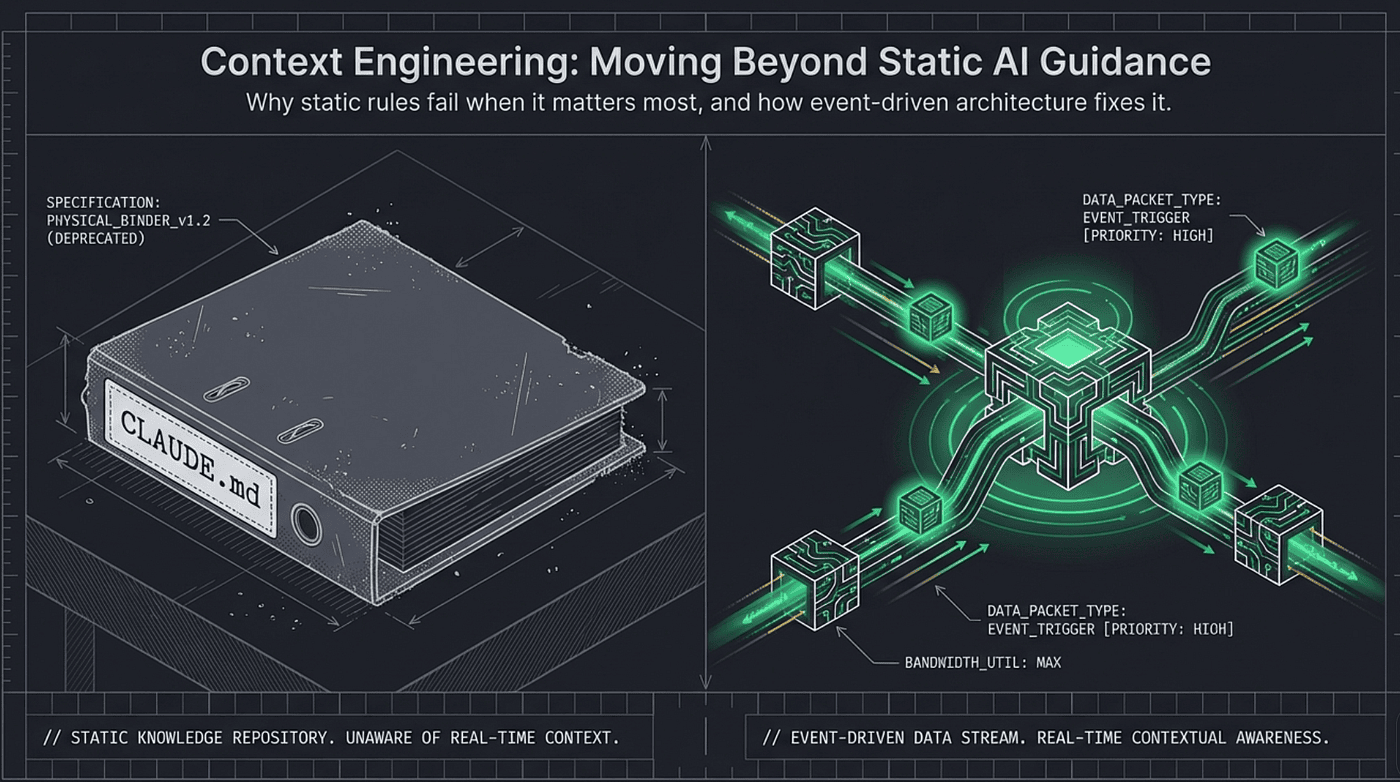 Agents need to move beyond static guidance
How Event-Driven Injection Forces Context at the Right Moment
Here is an example of injecting the right context at the right time:
- name: python-coding-standards
  description: "Inject Python coding standards when editing Python files"
  matchers:
    tools: ["Edit", "Write"]
    extensions: [".py", ".pyi"]
  actions:
    inject: ".claude/context/python-standards.md"

- name: api-design-guidelines
  description: "Inject REST API design guidelines for API routes"
  matchers:
    tools: ["Edit", "Write"]
    directories: ["src/api/**", "routes/**"]
  actions:
    inject: ".claude/context/api-design-guidelines.md"

- name: project-onboarding
  description: "Inject project context at session start"
  matchers:
    operations: ["SessionStart"]
  actions:
    inject: ".claude/context/project-overview.md"
The rule configuration above demonstrates how event-driven context injection solves the timing problem that breaks static guidance files. Each rule fires only when its matchers align with what the agent is actively doing. This is not context loaded once and hoped to survive; this is context delivered precisely when needed and re-delivered if needed again.
Consider the python-coding-standards rule. It does not inject when the session starts. It does not inject when the agent reads Python files. It injects when the agent opens a Python file for editing. The tools: ["Edit", "Write"] matcher ensures that the context arrives at the moment the agent is about to modify code, not before, not after. If the agent edits three Python files in a session, the standards are injected three times. If context compaction erases the first injection, the second edit re-injects them. The guidance is always present when it matters.
The api-design-guidelines rule demonstrates architectural scoping. It fires only for edits inside src/api/** or routes/** directories. An agent editing src/utils/helper.py sees Python coding standards but not API guidelines. An agent editing src/api/users.py sees both. The context matches the architectural layer the agent is working in. No competition between unrelated guidance. No API rules cluttering context while editing utility code.
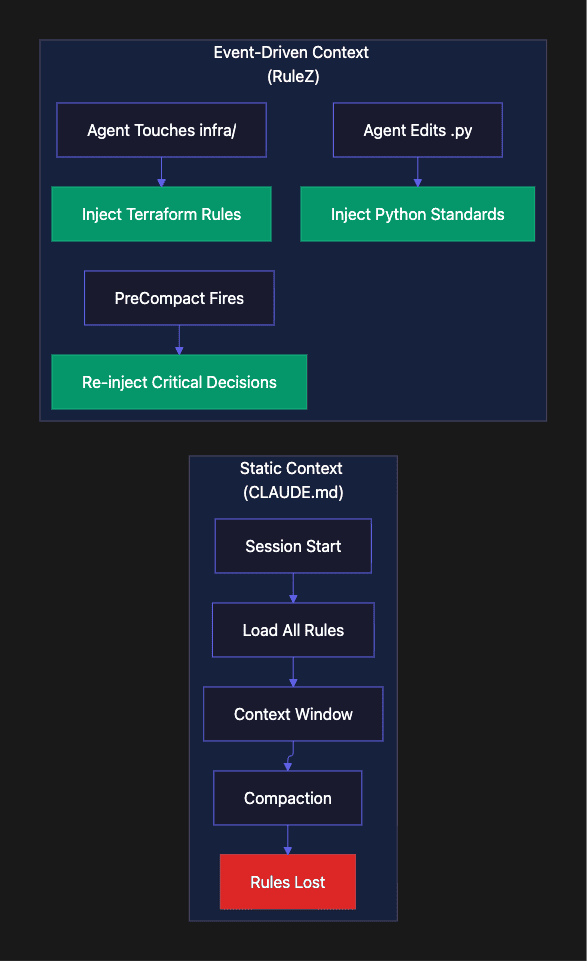
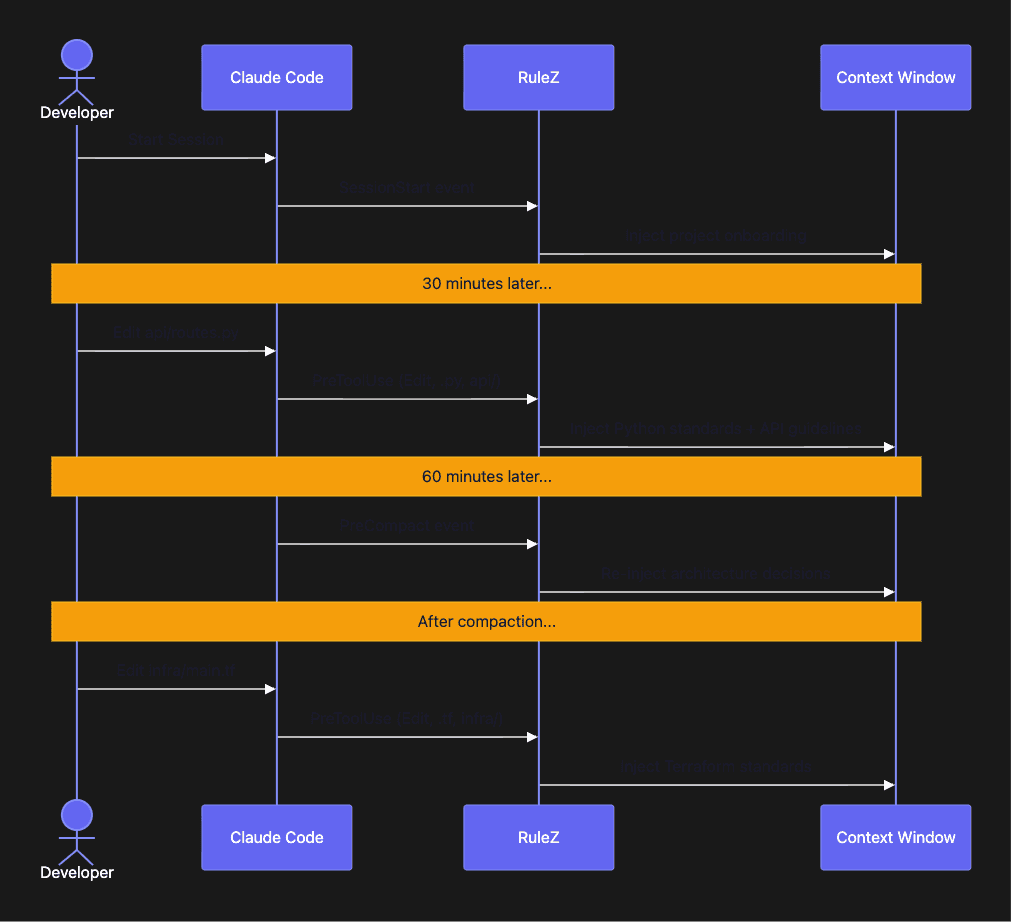
The project-onboarding rule injects at SessionStart, which triggers both when a new session begins and after context compaction. This is a critical design detail. When Claude Code compacts context to free up token space, it fires SessionStart again to give rules a chance to restore critical context. The project overview, key architectural decisions, recent changes, team conventions, gets re-injected automatically. What the compaction erased, the Agent RuleZ system restores. The agent does not lose its bearings mid-session.
This is the fundamental shift from static to event-driven context: the guidance is no longer a document the agent reads once and hopes to remember. It is a signal the system delivers every time the agent performs an action that benefits from that guidance. The context follows the work. When the agent edits Python, Python standards appear. When the agent touches API routes, API guidelines appear. When compaction clears memory, the project overview reappears. The system enforces relevance and timing automatically.
Static context asks:
“What should the agent know?”
Event-driven context asks:
“What does the agent need to know right now?”
The second question produces better code because it produces better-timed context. The standards are perfect; they just arrive when the agent can actually use them. This is context engineering and harness engineering.
This not only works for Claude Code but also for the Agent SDK.
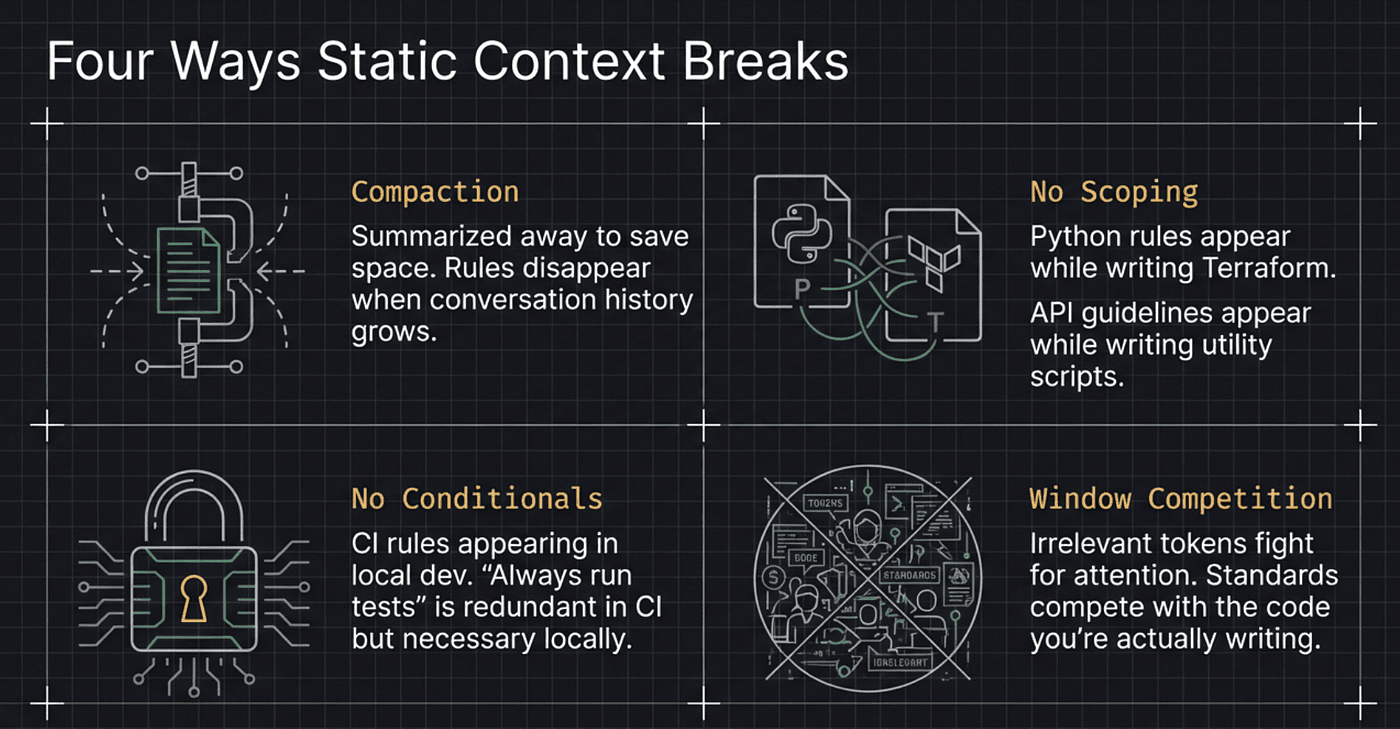
Four Ways Static Context Breaks
Loaded once, compacted away. AGENTS.md and similar guidance files are loaded at session start. In long coding sessions, the kind where agents do the most consequential work, context compaction aggressively summarizes or drops earlier context to make room for the ongoing conversation. Your Python coding standards get reduced to a vague summary or disappear entirely. The guidance existed at minute one but vanished by minute forty-five.
No directory scoping. A static rules file applies everywhere or nowhere. If your project has both a Python backend in src/api/ and a Terraform infrastructure layer in infra/, the static file must contain both sets of rules. The agent sees Terraform rules while editing Python code. Python linting guidance is present while writing HCL. Neither set of rules is wrong, but both compete for attention in the context window. You can liter your code base with AGENTS.md files but there is no guarantee that these will be read.
No conditional activation. Static files cannot distinguish between CI and local development, between a feature branch and production, between a new session and a compaction event. A rule like “always run tests before committing” makes sense locally but is redundant in CI where tests run automatically. A rule like “preserve these architectural decisions” makes no sense at session start but is critical before compaction erases them.
Context window competition. Every token in the context window competes with tokens the agent needs for actual work. Static rules files insert guidance tokens regardless of relevance. A 2,000-token coding standards document is always present, even when the agent is reading a README, running tests, or doing something that requires zero coding standards awareness. In a 200K context window, 2,000 tokens seems trivial. Multiply that by five static files, three tool definitions, conversation history, and file contents all competing for the same space, and the overhead stops being trivial.
The pattern is consistent across Claude Code, Gemini CLI, OpenCode, and every other agent that reads a static guidance file at session start. The content is right. The delivery mechanism is wrong.
Correct guidance at the wrong time is still wrong.
Agent Context Engineering: A System, Not a Document
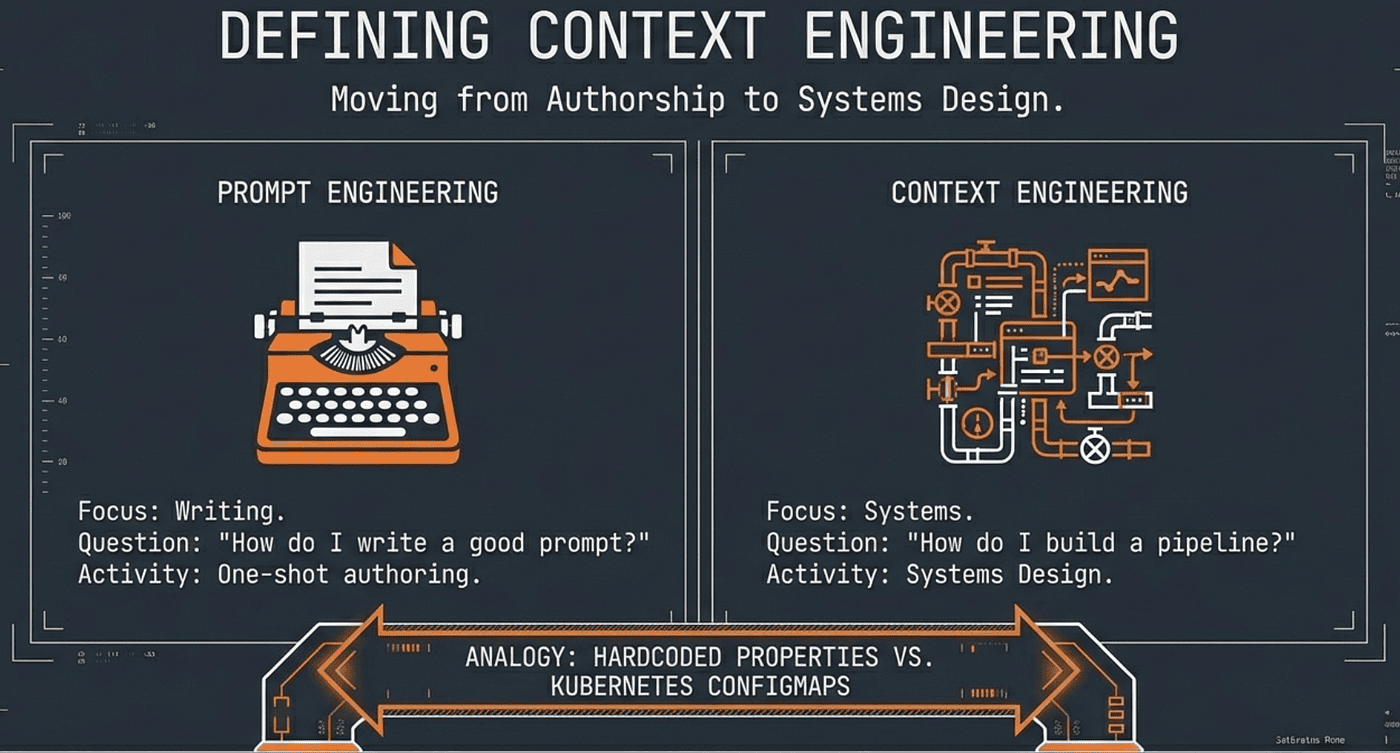
Prompt engineering asks:
“How do I write a good prompt?”
Context engineering asks a different question:
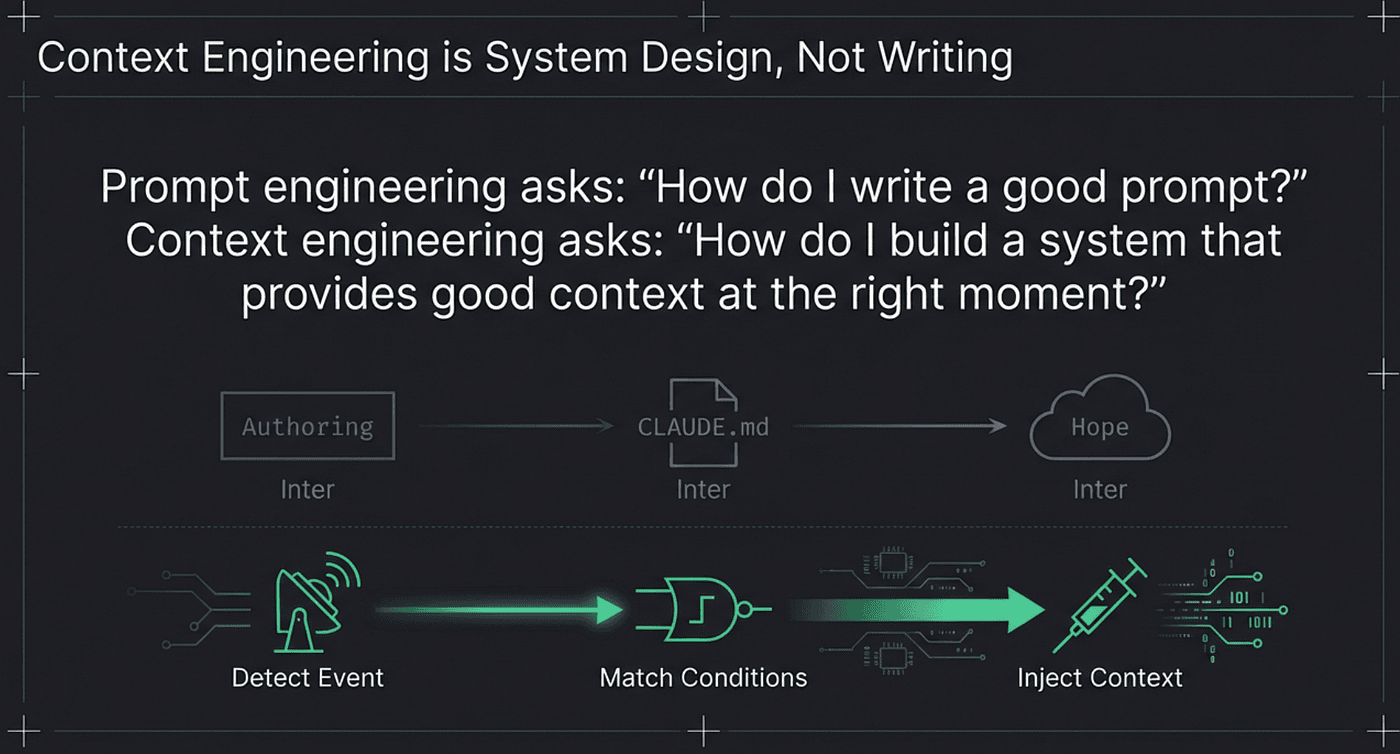
“How do I build a system that provides good context at the right moment?”
The distinction matters because prompt engineering is a one-shot authoring exercise. You write a prompt, test it, iterate on phrasing. Context engineering is systems design. You build pipelines that detect what the agent is about to do and inject relevant guidance before it does it.
 Agents are long running ReAct loops that deal with tooling and events, you need event driven harness engineering and context engineering to feed the agents with the right context at the right time
This is the same shift that happened in configuration management. Teams moved from static config files to environment-aware, service-mesh-driven configuration injection. The config values did not change. The delivery mechanism changed. A database connection string is the same whether it lives in a hardcoded properties file or arrives through a Kubernetes ConfigMap with environment-specific overlays. What changed is that the right connection string now reaches the right service in the right environment, automatically.
 Agents need Context Engineering as an Event System injecting context into the context window when needed
Context engineering applies the same principle to AI agent guidance. The coding standards are the same. The delivery mechanism is what matters.
Three Properties of Good Context
Relevance. The guidance must match the current task. Python coding standards during Python editing. Not before. Not after. Not while the agent is writing Terraform.
Timing. The guidance must arrive before the agent commits to a path. Injecting API standards after the agent writes the endpoint is too late. The agent has already made structural decisions about error handling, response format, and authentication. Post-hoc guidance creates rework, not quality.
Scarcity. Less is more. Injecting three focused paragraphs about error handling patterns beats injecting a 50-page coding standards document. A concise, targeted injection occupies fewer tokens and receives more attention from the agent. The context window is a shared resource; treat it like one.
Why Timing Beats Content Quality
Consider two scenarios.
Scenario A: A perfect coding standards document, 5,000 tokens, loaded at session start. The agent compacts it away after 30 minutes. The agent then writes 500 lines of Python without guidance.
Scenario B: An adequate coding standards summary, 500 tokens, injected every time the agent opens a Python file for editing. The agent always has guidance when writing Python.
Scenario B produces better code. Not because the content is better, but because the timing is better. The adequate-but-present guide outperforms the perfect-but-absent guide every time. This insight, that delivery matters more than authoring, is what separates harness and context engineering from prompt engineering.
Three Ways to Inject Context
RuleZ, the deterministic policy engine for AI coding agents covered in the companion article on RuleZ, implements three distinct injection mechanisms.
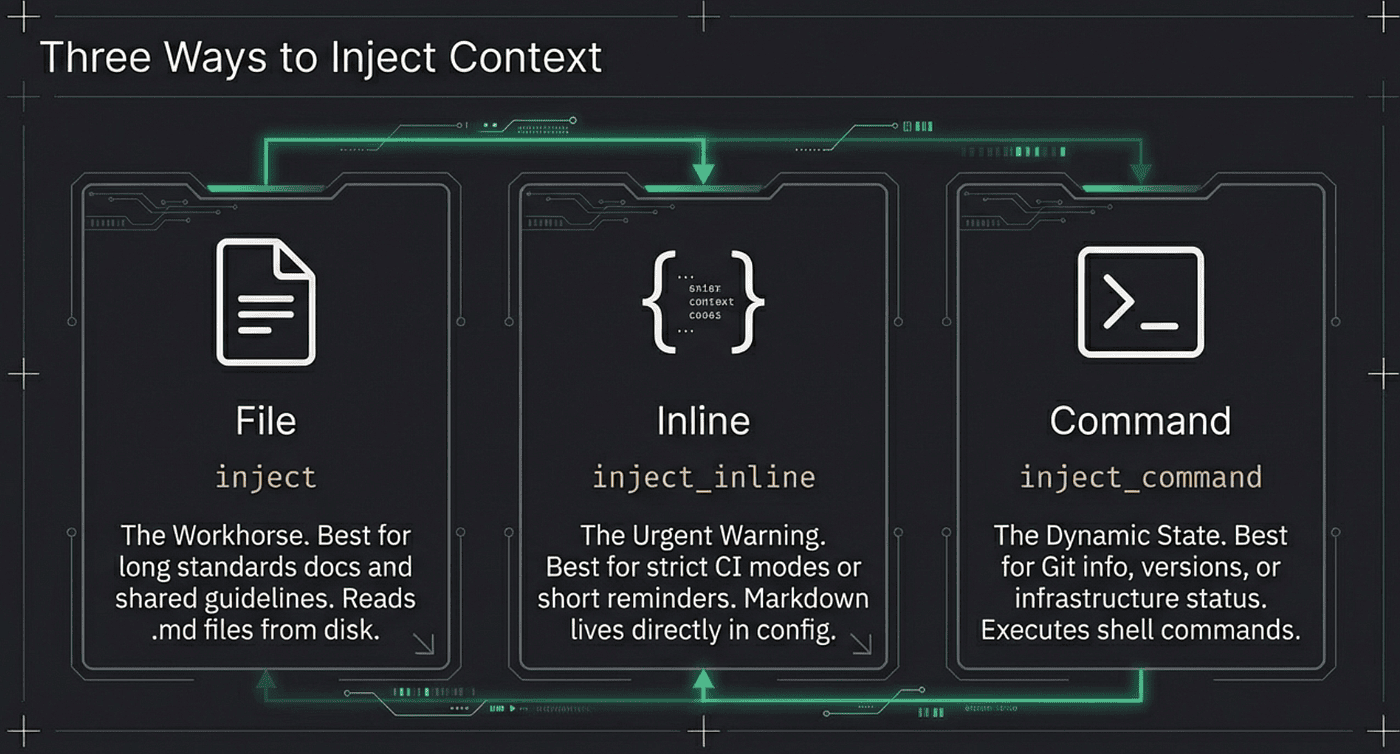 There are three ways to inject context into the Agent’s working memory
Each injection serves a different context engineering pattern. All three share one critical property: they are fail-open by design. A missing file, a failed command, or an empty output logs a warning and lets the agent continue working. Context injection should enhance the agent’s work, never prevent it.
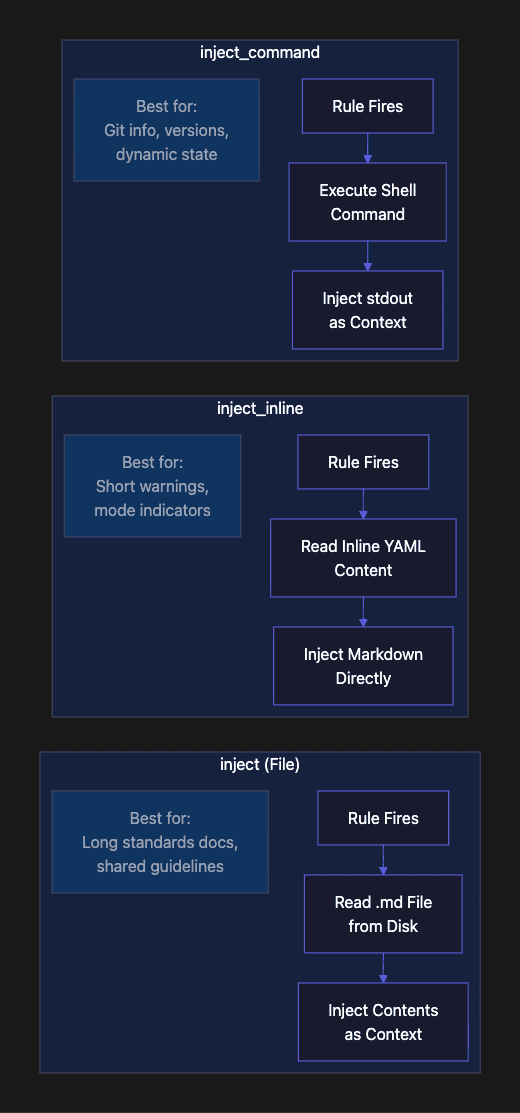
File-Based Injection: inject
The inject action reads the contents of a file and delivers them as context. The file is read at rule evaluation time, not at configuration load time. This means you can update the file between sessions without touching the rules configuration.
actions:
  inject: ".claude/context/python-standards.md"
The implementation is straightforward: when the rule fires, RuleZ reads the file, returns its contents as context, and moves on. If the file is missing or unreadable, RuleZ logs a warning and continues without injection. No crash. No blocked operation. Just a logged note that the file was not available.
This is the workhorse injection type. Use it for anything longer than a few lines: coding standards documents, API design guidelines, architecture decision records, technology-specific skill files. The file can live in .claude/context/ and be maintained by the team that owns those standards. Your Python guild owns python-standards.md. Your API team owns api-guidelines.md. The hooks configuration references them; it does not contain them.
When to use it: Long-form guidance that multiple rules might reference. Standards documents that evolve independently of the rules configuration. Content that non-engineers might need to edit.
The separation of the context file from the rules configuration is a design choice worth emphasizing. In most projects, the people who know the coding standards best are not the same people who configure the hooks. Your senior Python developer writes and maintains python-standards.md. Your platform engineer configures the hooks that deliver it. Neither needs to understand the other's domain. The hooks configuration is plumbing; the context file is content. Keeping them separate mirrors how web applications separate templates from routing logic.
Inline Context Injection: inject_inline
The inject_inline action delivers markdown content directly from the YAML rule definition. No file I/O. No external dependency. The content lives in the configuration.
actions:
  inject_inline: |
    ## CI Environment - Strict Mode
    - All functions MUST have type annotations
    - All public functions MUST have docstrings
    - No TODO comments allowed in committed code
Inline injection takes the highest precedence among the three injection types. If a rule specifies both inject_inline and inject (file), the inline content wins. This precedence chain is deliberate: inline content is the most explicit, most intentional form of injection.
When to use it: Short warnings or reminders that fit naturally in YAML. CI mode indicators. Quick policy reminders that do not warrant separate files. Anything under 10–20 lines where the content is tightly coupled to the rule itself.
Command-Based Context Injection: inject_command
This is the most powerful.
The inject_command action executes a shell command and injects its stdout as context. This enables truly dynamic context: the injected content changes based on the current state of the repository, the environment, or external systems.
actions:
  inject_command: |
    echo '## Current Branch Context'
    git branch --show-current
    echo '## Recent Commits'
    git log --oneline -5
The implementation is platform-aware (sh -c on Unix, cmd /C on Windows), timeout-protected (default 5 seconds, configurable per-rule), and fail-open (command failures log a warning and return nothing). Because it runs via shell, pipes and redirects work: cat package.json | jq .name is a valid inject command.
When to use it: Any context that should reflect the current state of the repository. Branch names before commits. Dependency versions from package.json or Cargo.toml. Recent git history for commit message context. Terraform plan summaries before infrastructure changes.
One subtle but important detail: inject commands do not receive the hook event on stdin. This is a deliberate safety decision. If the command received event data on stdin, a poorly written command could hang waiting for input. By keeping stdin closed, RuleZ ensures that inject commands either produce output or fail cleanly within the timeout window. The command talks to the filesystem and the environment, not to the hook event itself.
The Precedence Chain for Context Injection
When multiple injection types are specified on the same rule, the precedence is:
- inject_inline (highest; inline content, no I/O)
- inject_command (middle; dynamic shell output)
- inject file (lowest; static file read)
When multiple rules match the same event, their injections accumulate. RuleZ concatenates the output from each matching rule with double newlines. A Python file edit in the api/ directory could trigger both a Python standards injection and an API guidelines injection, and the agent receives both.
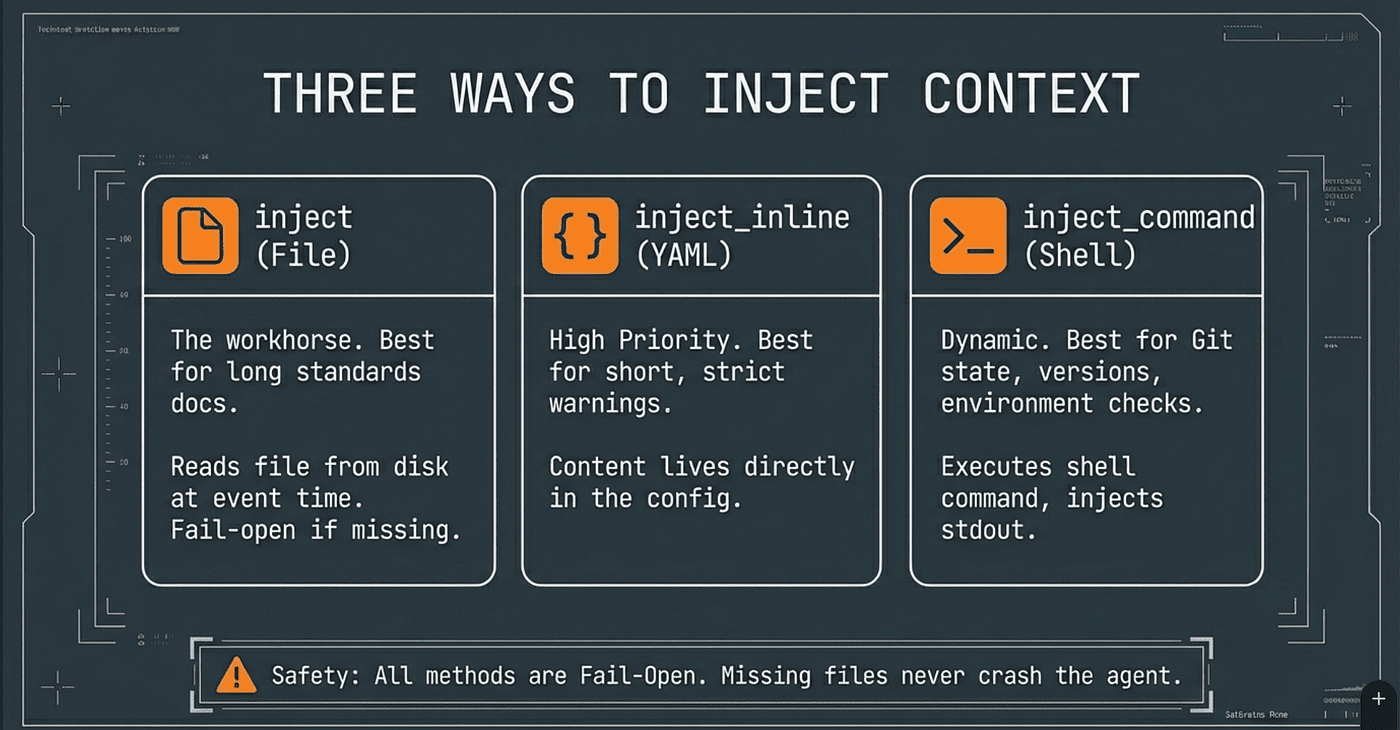 Inject context into the agents from the file system, inline text or using dynamic shell scripts
When to Inject: Matchers as Trigger Conditions
Context injection is only useful if it fires at the right moment. RuleZ matchers determine when a rule activates. Matcher must target the right signal by filtering.
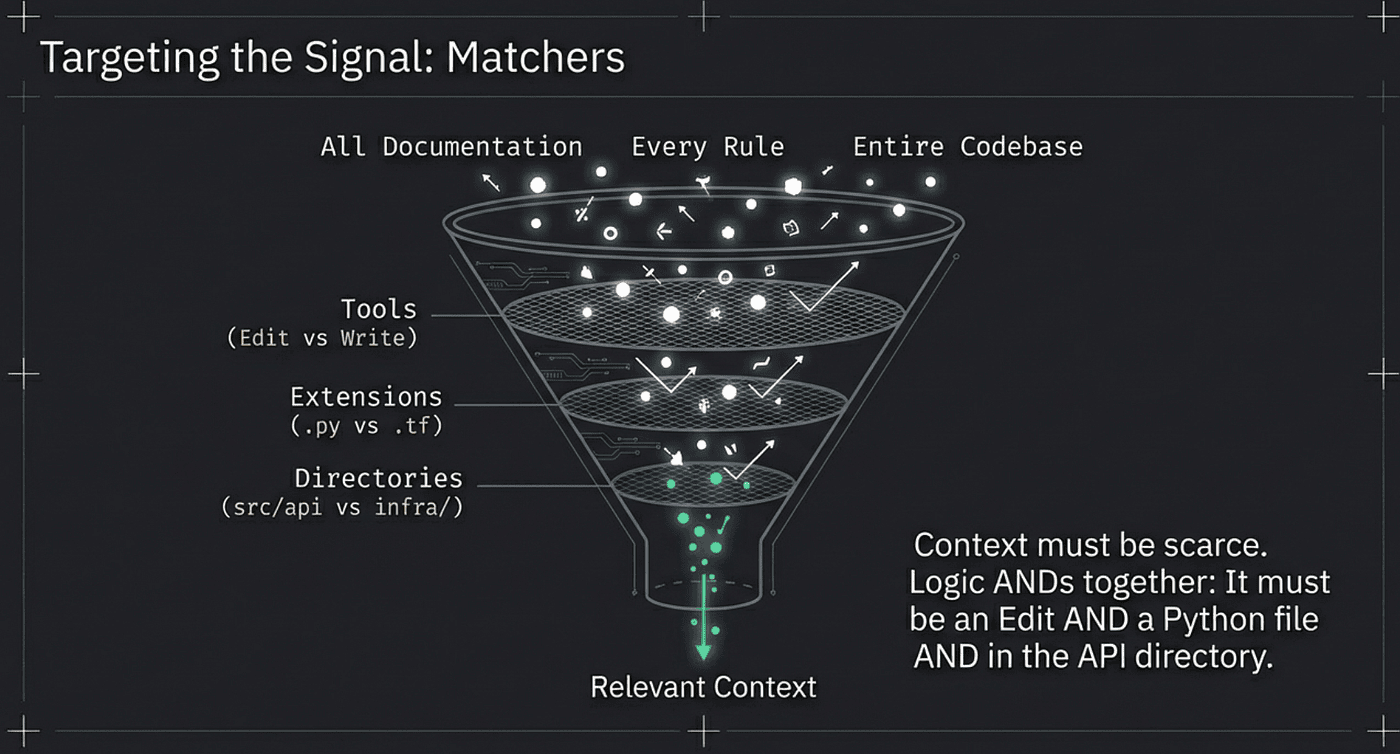 Targeting the signal with matchers to refine exactly what is needed at the exact time for context injection into the Agent’s Working Memory.
All matchers on a single rule use AND logic: every specified matcher must pass for the rule to fire. This AND composition is what makes matchers precise rather than noisy.
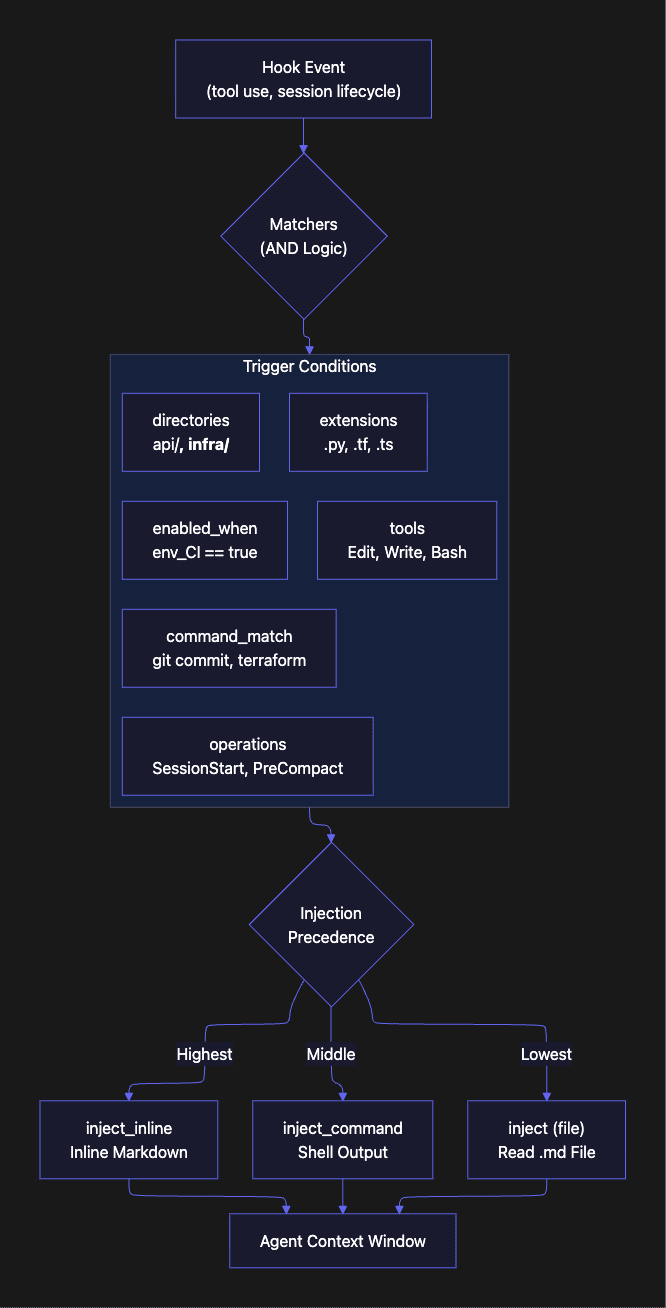
Tool Matchers
matchers:
  tools: ["Edit", "Write"]
The tools matcher scopes a rule to specific agent operations. An injection rule with tools: ["Edit", "Write"] fires only when the agent is modifying files, not when it is reading them, running commands, or browsing directories. This is the primary mechanism for separating edit-time context (coding standards, design guidelines) from execution-time context (commit conventions, deployment rules).
Why does this matter? Because an agent editing a Python file needs coding standards. An agent reading a Python file needs nothing injected. An agent running pytest needs nothing injected. The tools matcher ensures that context injection is tied to the action that benefits from guidance, not to every interaction with the codebase. The same file can be read without injection and edited with injection, depending on what the agent is doing.
Extension Matchers
matchers:
  extensions: [".py", ".pyi"]
The extensions matcher triggers based on the file extension in the tool input. This enables language-specific injection: Python standards for .py files, TypeScript conventions for .ts files, Terraform guidelines for .tf files. The agent sees only the standards relevant to the language it is currently writing.
Directory Matchers
matchers:
  directories: ["src/api/**", "routes/**"]
The directories matcher uses glob-style patterns against the file path. This enables architecture-level scoping. Different context for api/, infra/, tests/, docs/. Combined with extension matchers, you get precise targeting: Terraform standards only for .tf files inside infra/ directories.
Operation Matchers
matchers:
  operations: ["SessionStart", "PreCompact"]
The operations matcher triggers on session lifecycle events rather than tool use. Two events matter most for harness and context engineering:
SessionStart fires once at the beginning of a session. This is ideal for project onboarding context: a focused overview of the project, key conventions, and team-specific patterns. This replaces the monolithic CLAUDE.md with a targeted onboarding injection.
PreCompact fires before context compaction. This is the critical moment for re-injecting architectural decisions that must survive compaction. Without PreCompact injection, a two-hour session loses its architectural awareness after the first compaction event.
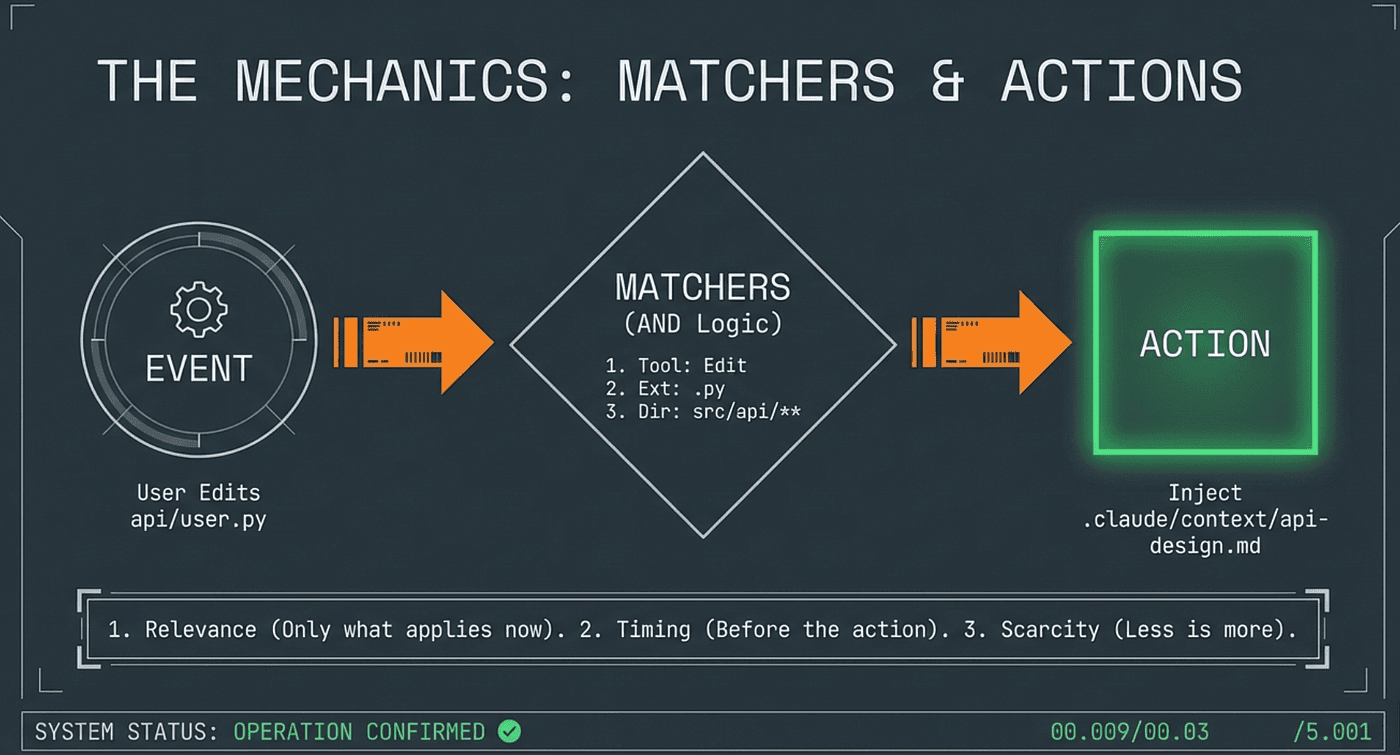 Tool Event or System Event, matcher ar the guard condition and the actions can inject context at the right exact moment so the Agent has this context when it is performing operations with tools
Conditional Activation
enabled_when: 'env_CI == "true"'
The enabled_when expression evaluates against environment variables and event context. This enables environment-conditional rules: CI-only strict mode, branch-specific guidelines, tool-specific conditional activation. The evaluation context includes env_* variables for all environment variables, tool_name, event_type, and prompt.
A rule with enabled_when: 'env_CI == "true"' is invisible in local development and active in CI pipelines. Same config file, different behavior based on environment.
Command Matchers
matchers:
  command_match: "terraform|kubectl|helm"
The command_match matcher applies a regex against the command string in Bash tool inputs. This enables infrastructure-tool-specific injection. When the agent is about to run terraform plan, you can inject your team's Terraform conventions. When the agent is about to run kubectl apply, you can inject your deployment checklist. The regex supports full pattern syntax, so terraform|kubectl|helm matches any of those three commands in a single rule.
Prompt Matchers
matchers:
  prompt_match: ["deploy", "release", "production"]
The prompt_match matcher operates on the user's prompt text for UserPromptSubmit events. When a developer types a prompt containing "deploy" or "production," the matcher fires and the rule can inject deployment safety guidelines before the agent even begins planning. This is context engineering applied to intent: the rule responds to what the user wants to do, not just what the agent is doing.
Five Patterns for Event-Driven Context
The matchers and injection types combine into patterns. Each pattern below solves a specific context engineering problem.
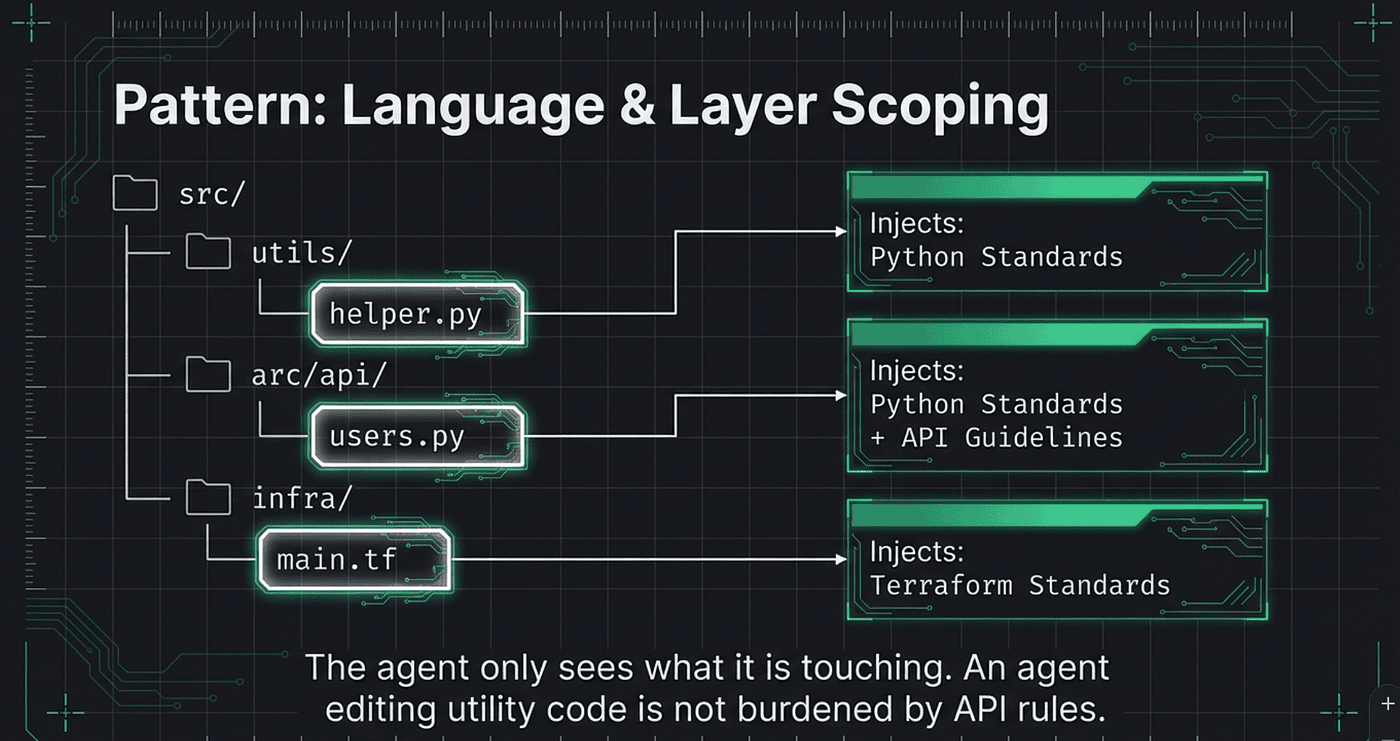 Agents get the right context based on what they are doing
The YAML is included to show the structure, but the pattern matters more than the syntax.
Pattern 1: Language-Specific Standards on File Edits
- name: python-coding-standards
  description: "Inject Python coding standards when editing Python files"
  matchers:
    tools: ["Edit", "Write"]
    extensions: [".py", ".pyi"]
  actions:
    inject: ".claude/context/python-standards.md"
The agent only sees Python standards when it is actively editing Python. During test runs, README edits, or git operations, the standards are absent, freeing context window space for relevant work. This is the simplest and most immediately valuable pattern. If you implement nothing else from this article, implement this.
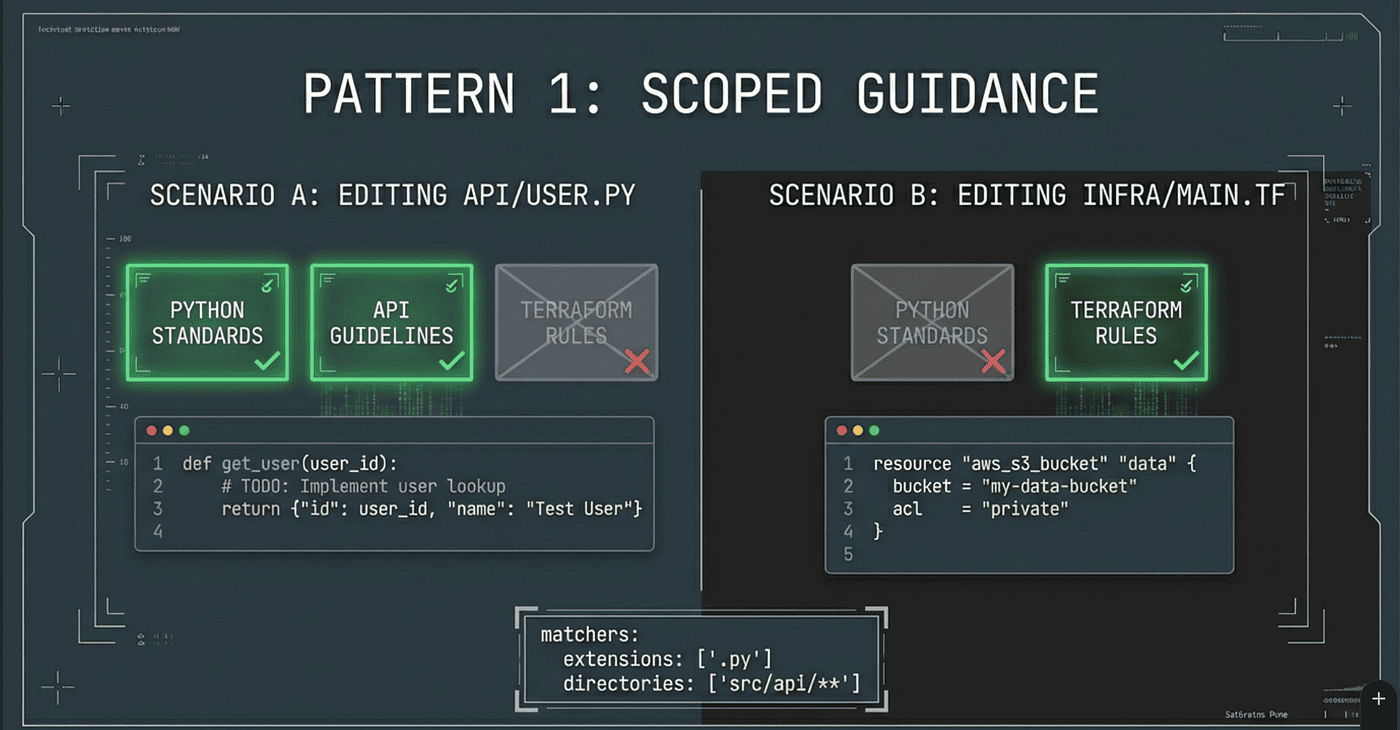 Pattern 1 for injecting context into the Agent
The file-based injection means your Python guild can update python-standards.md without touching the hooks configuration. Ownership stays with the domain experts.
Pattern 2: Directory-Scoped Architectural Guidelines
- name: api-design-guidelines
  description: "Inject REST API design guidelines for API routes"
  matchers:
    tools: ["Edit", "Write"]
    directories: ["src/api/**", "routes/**"]
  actions:
    inject: ".claude/context/api-design-guidelines.md"
  metadata:
    priority: 75
The agent gets API design guidance only when editing files in API directories. The same project might have CLI code, background workers, and API handlers. Only the API handler edits trigger the guidelines. Zero noise outside the targeted directory tree.
This pattern scales across your codebase. Add a rule for infra/** with Terraform standards. Add another for tests/** with testing conventions. Each subsystem gets its own injected context, and the agent only sees what is relevant to the files it is currently touching.
Pattern 3: Pre-Compaction Context Preservation
- name: preserve-architecture-decisions
  description: "Re-inject critical architecture decisions before compaction"
  matchers:
    operations: ["PreCompact"]
  actions:
    inject: ".claude/context/architecture-decisions.md"
  metadata:
    priority: 100
The PreCompact event fires before the context window is compressed. This rule ensures that architectural decisions, the kind that guide every subsequent agent action, survive compaction. Without this, a two-hour session might lose its architectural awareness after the first compaction event.
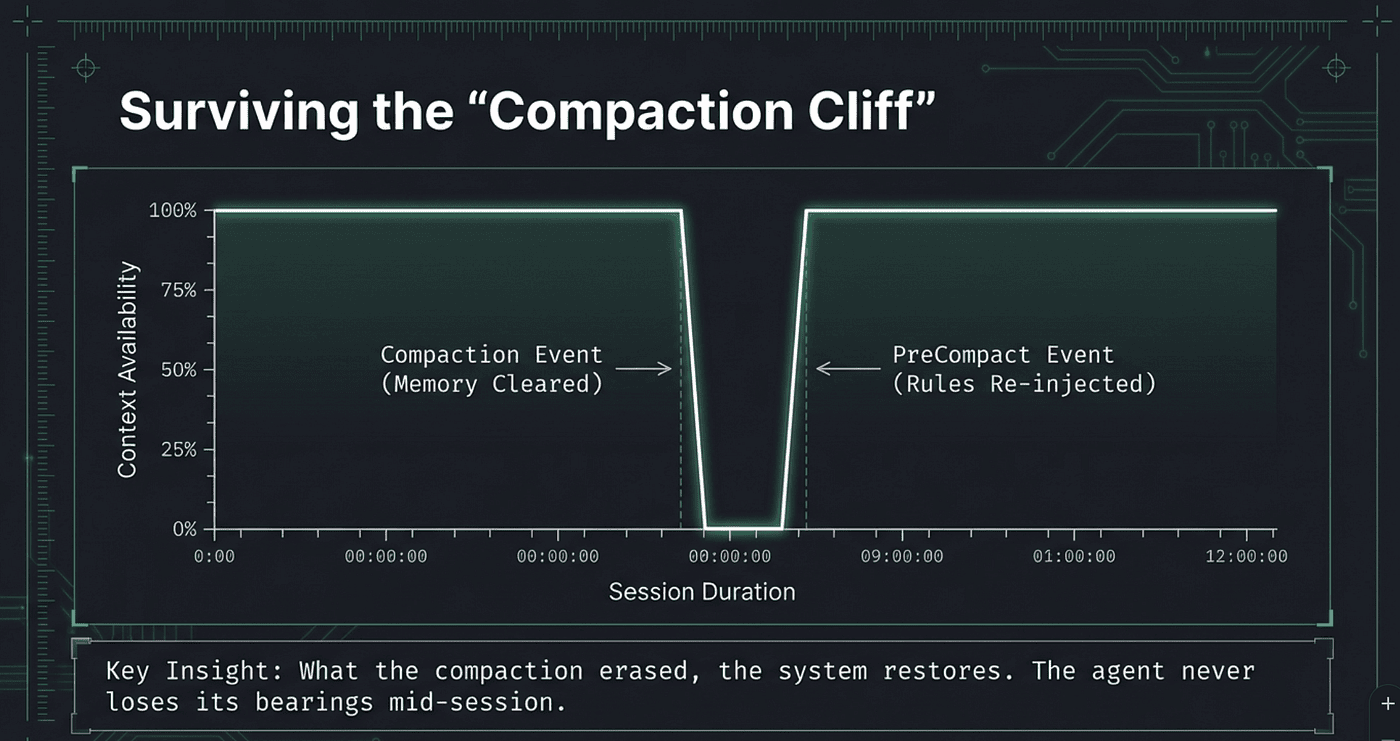 Re-inject important context after compaction event to stop Agent from forgetting key context
This is the pattern that addresses the most dangerous failure mode of static context. Compaction is invisible to the user and devastating to guidance. The agent does not announce that it forgot your architecture principles; it simply starts making decisions without them. PreCompact injection acts as a safety net, re-injecting the decisions that matter most at the exact moment they are most at risk.
A more dynamic version uses inject_command to capture actual state at compaction time:
actions:
  inject_command: |
    echo "## State Snapshot Before Compaction"
    echo "Branch: $(git branch --show-current)"
    echo "Modified files: $(git status --short | head -10)"
    echo "Recent activity: $(git log --oneline -3)"
    cat .claude/context/architecture-decisions.md
This variant combines dynamic state with static guidance. The agent gets both the current repository state and the enduring architectural principles in a single injection.
Pattern 4: Session Start Onboarding
- name: project-onboarding
  description: "Inject project context at session start"
  matchers:
    operations: ["SessionStart"]
  actions:
    inject: ".claude/context/project-overview.md"
  metadata:
    priority: 90
SessionStart fires once. The agent gets a project overview, key conventions, and team-specific patterns. This replaces the monolithic CLAUDE.md with a focused onboarding document that does not need to contain every rule for every situation.
The key insight here is separation. Your session start injection should cover project-level context: what this project does, how the codebase is organized, who owns what. It should not contain Python coding standards or Terraform naming conventions. Those belong in their own injection rules, triggered by their own matchers. Session start is for orientation; tool-time injection is for guidance.
Pattern 5: Dynamic Context via Command Injection
- name: branch-context
  description: "Inject current branch and recent commits for commit context"
  matchers:
    tools: ["Bash"]
    command_match: "git commit"
  actions:
    inject_command: |
      echo '## Current Branch Context'
      git branch --show-current
      echo '## Recent Commits'
      git log --oneline -5
  metadata:
    timeout: 3
When the agent is about to commit, it gets the current branch name and recent commit history injected dynamically. The content is always current. No stale file to maintain. No manual updates when the branch changes.
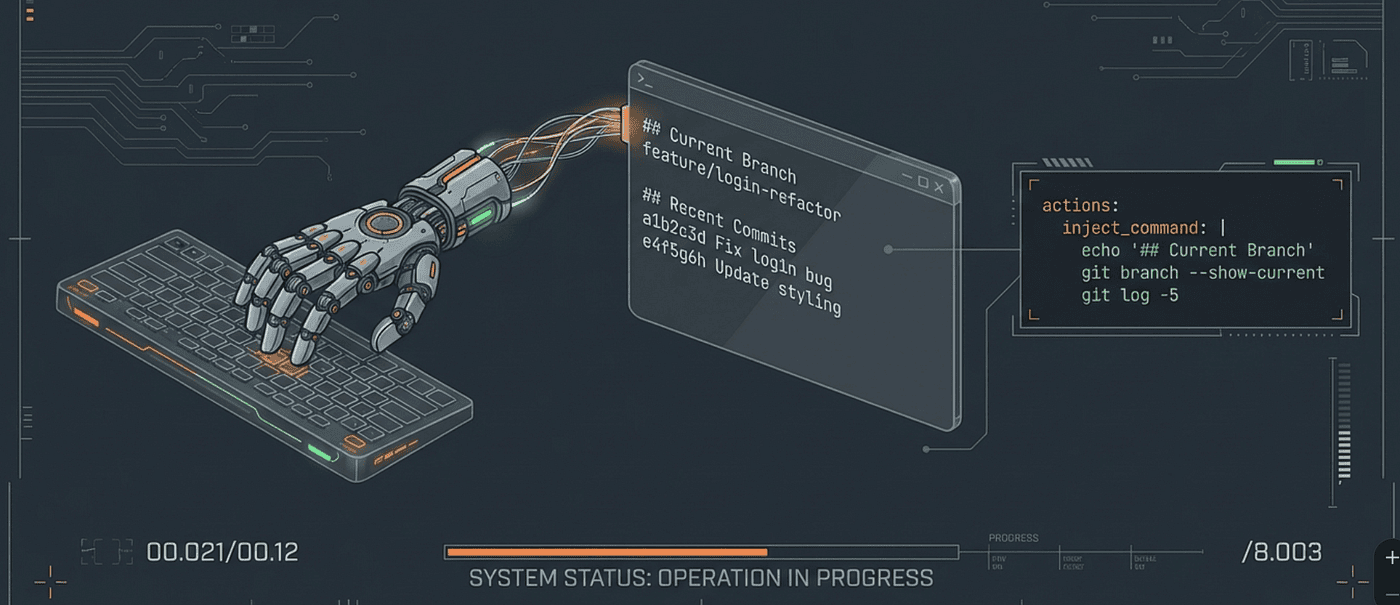 Command Injection
Command injection is where harness and context engineering becomes truly reactive. The injected content is not a document someone wrote; it is a snapshot of reality at the moment the agent needs it. Consider the possibilities: dependency versions from package.json before the agent updates a library, Terraform plan output before the agent modifies infrastructure, test coverage metrics before the agent writes new code. Each of these is a shell command whose output becomes context at exactly the right moment.
Pattern 6: CI-Only Strict Mode
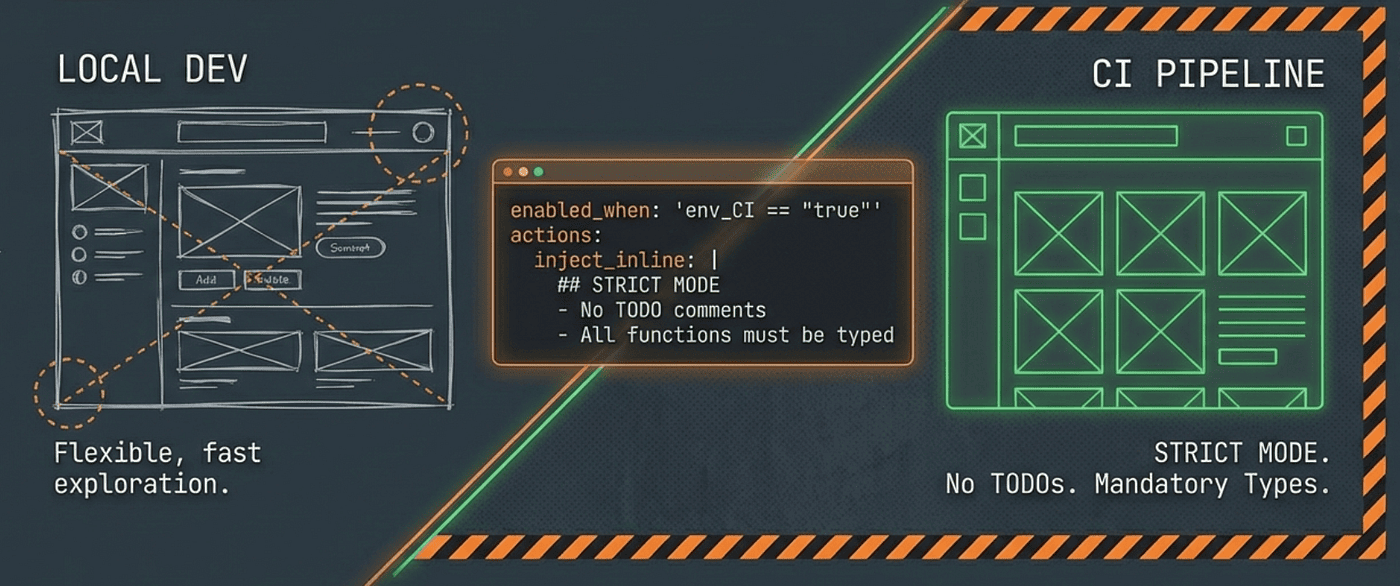 Agent Environment Awareness with
- name: ci-strict-mode
  description: "Enforce strict coding standards in CI environment"
  enabled_when: 'env_CI == "true"'
  matchers:
    tools: ["Edit", "Write"]
    extensions: [".py", ".ts", ".js"]
  actions:
    inject_inline: |
      ## CI Environment - Strict Mode
      - All functions MUST have type annotations
      - All public functions MUST have docstrings
      - No TODO comments allowed in committed code
      - All imports must be absolute, not relative
The enabled_when expression checks the CI environment variable. In local development, this rule is invisible. In CI pipelines, it activates and injects strict requirements. Same config file, different behavior based on environment.
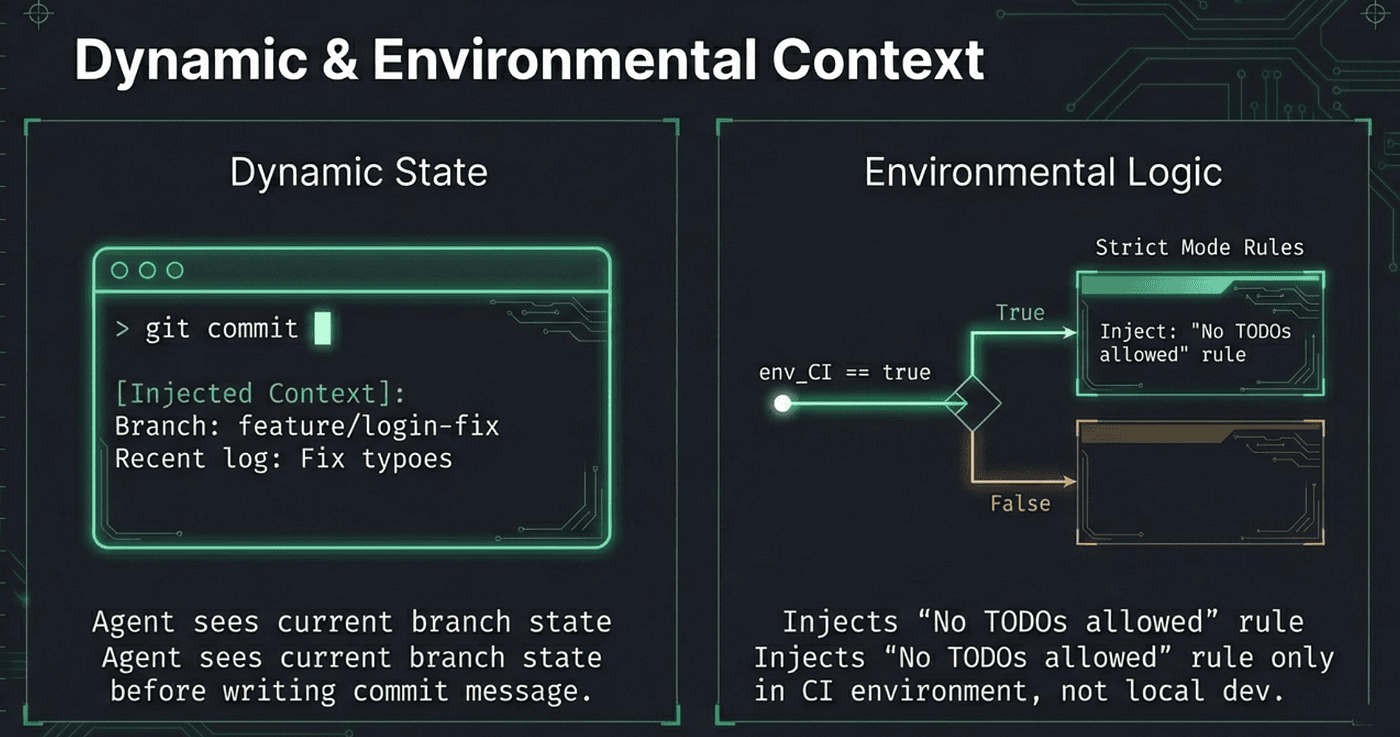 Using the right rules at the right time improves the agents ability to know when and how to use those rules
This pattern acknowledges that local development and CI have different needs. Locally, you want flexibility; strictness slows down exploration. In CI, you want rigor; the code is heading toward production. Conditional activation lets a single hooks configuration serve both contexts without compromise.
Safety and Size Controls
Injection without guardrails would be as dangerous as the static context it replaces. A misconfigured rule could inject an entire codebase into the context window, or a hung shell command could block the agent indefinitely. Agent RuleZ addresses both concerns with deliberate safety mechanisms.
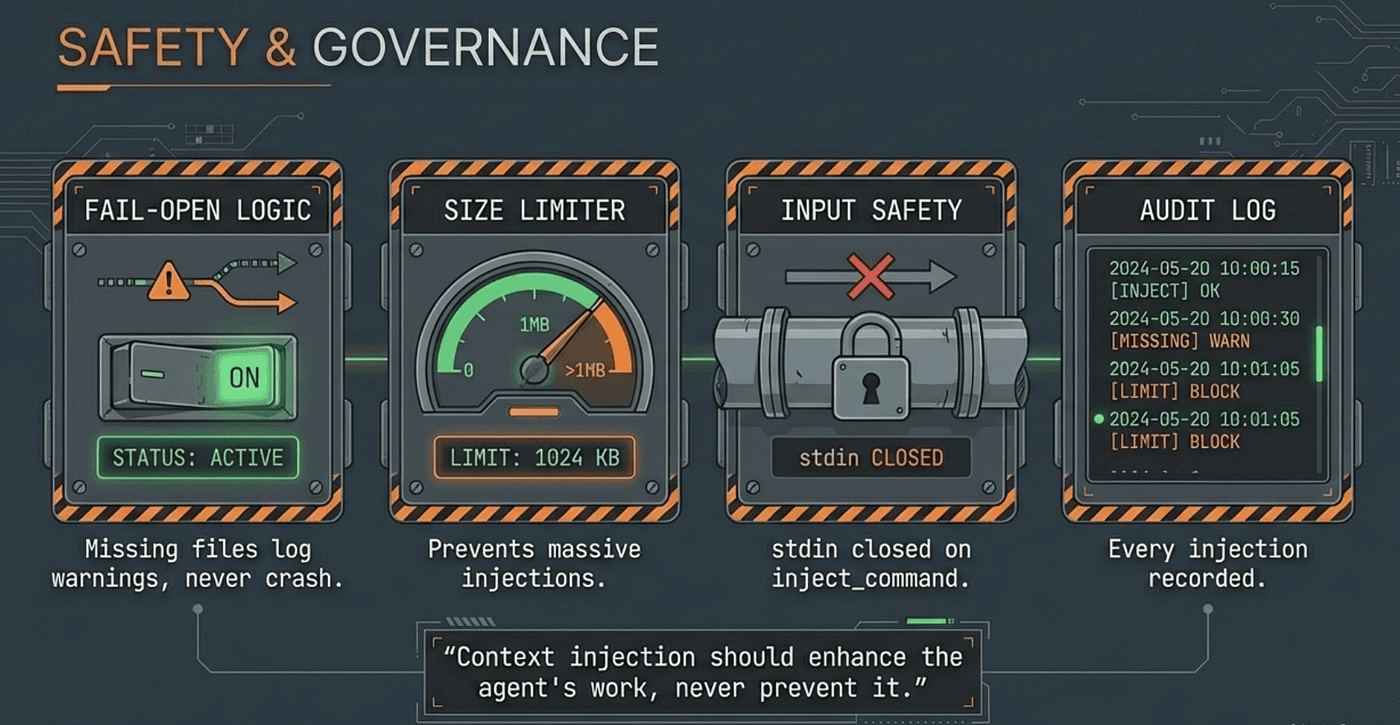 Context Injection should enhance the Agent not prevent it from working
Maximum Context Size
The max_context_size setting controls the upper bound of injected context:
settings:
  max_context_size: 1048576  # 1MB default
The default is 1MB, which is generous for text-based context but prevents a misconfigured rule from injecting, say, a binary file or an enormous log dump. This is configurable per project; teams with larger context needs can raise it, while teams that want tighter control can lower it. You could easily make this smaller: 50K.
Fail-Open Semantics
The entire injection pipeline is fail-open by default:
- Missing context files: log warning, continue without injection
- Failed inject commands: log warning, continue without injection
- Command timeouts (default 5 seconds): log warning, continue without injection
- Empty command output: skip injection silently
This design is deliberate. Context injection should enhance the agent’s work, never prevent it. A missing .md file should not block the agent from editing code. A slow shell command should not freeze the agent for 30 seconds. The fail_open: true default means that injection failures are operational events to investigate, not blocking errors that halt work.
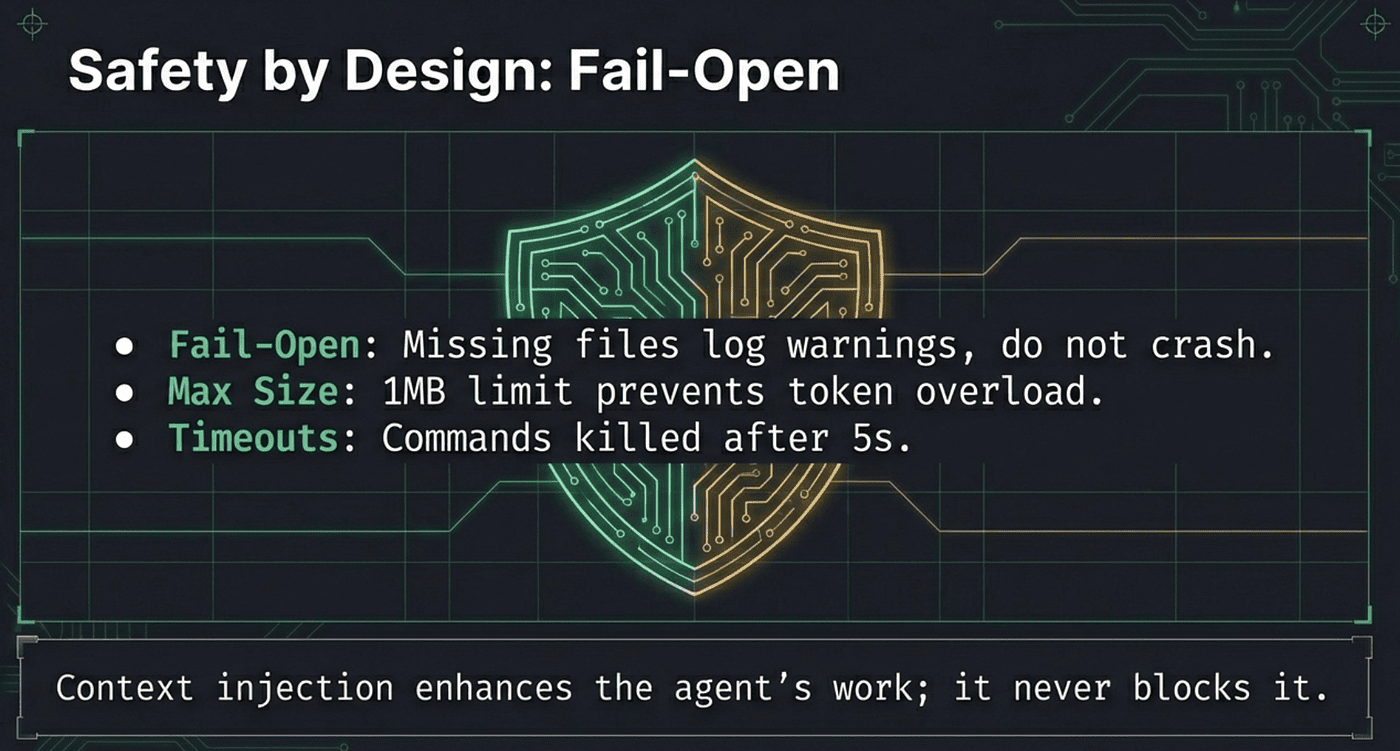 Enhance the Agent’s work. Don’t block it.
Injection Accumulation
When multiple rules match the same event, their injections accumulate. A Python file edit in src/api/ could match three rules:
- A Python coding standards rule (triggered by .py extension)
- An API guidelines rule (triggered by api/ directory)
- A project-wide reminder (triggered by PreToolUse for any edit)
All three injections reach the agent, concatenated with double newlines. Block actions take precedence over injection; if any matching rule blocks the operation, the injections do not matter because the operation does not proceed.
Policy Modes for Gradual Rollout
Three modes affect how injection behaves:
- Enforce (default): Normal injection behavior. Blocks block. Injections inject.
- Warn: Never blocks. Converts block actions to injected warnings. Useful for rolling out new rules without disrupting workflows.
- Audit: Logs only. No injection or blocking. Useful for measuring rule match rates before activation.
The safe rollout path: start every new rule in audit mode, graduate to warn, then enforce. This mirrors how infrastructure teams test changes in staging before production. A rule that fires incorrectly in audit mode is a log entry. A rule that fires incorrectly in enforce mode is a blocked developer.
Performance Characteristics
Context injection adds overhead to every tool call. How much? In practice, under 10 milliseconds per evaluation. RuleZ compiles regex patterns once and caches them in an LRU cache (100 entries, thread-safe). Rule evaluation is fail-fast: the first failing matcher short-circuits the evaluation, so a rule with five matchers that fails on the first one does not evaluate the remaining four. Configuration is loaded per event to avoid stale config, but YAML parsing of a typical hooks file is sub-millisecond.
For most teams, the injection overhead is undetectable. The agent spends seconds thinking about its next action; the policy evaluation takes single-digit milliseconds. The latency budget is consumed by the agent’s own reasoning, not by the policy layer.
Before and After: A Two-Hour Session
The difference between static and event-driven context becomes stark over the course of a real coding session.
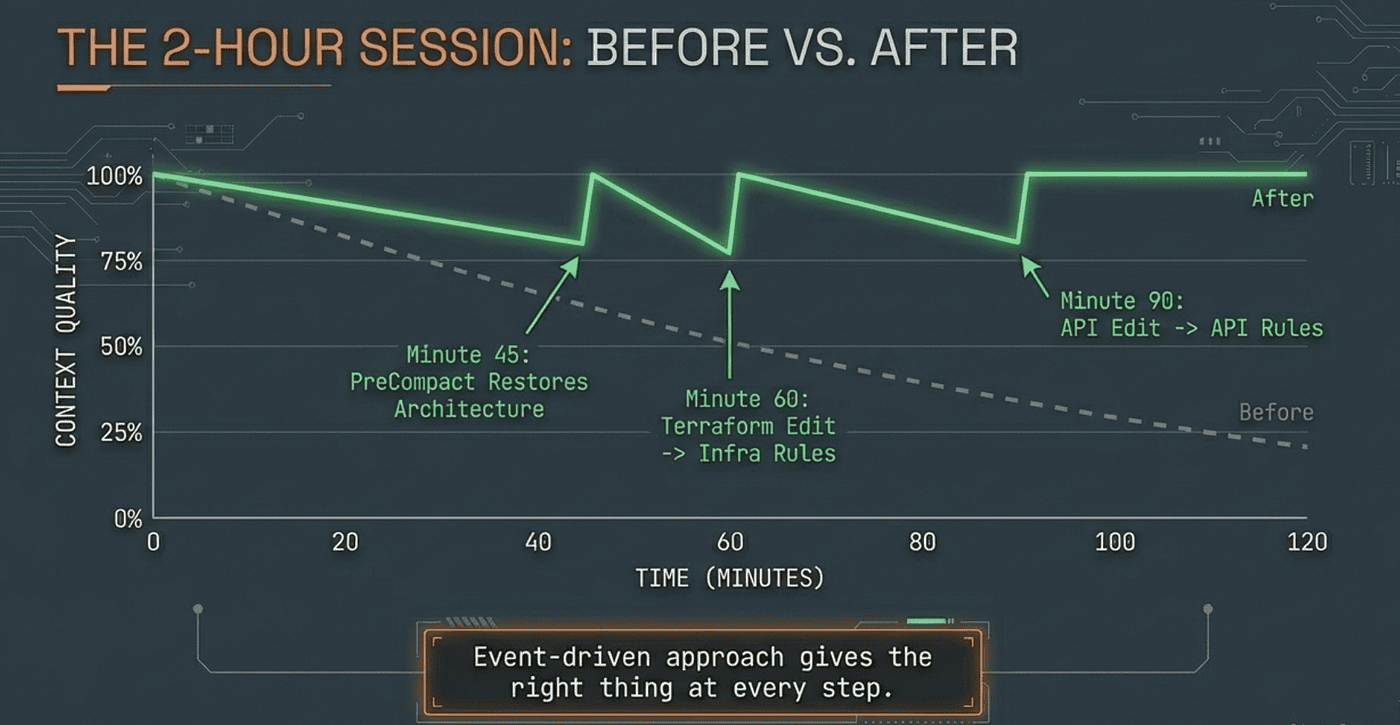 Important Context kept in working memory for the Agent through injection
Here is what the agent sees at key moments.
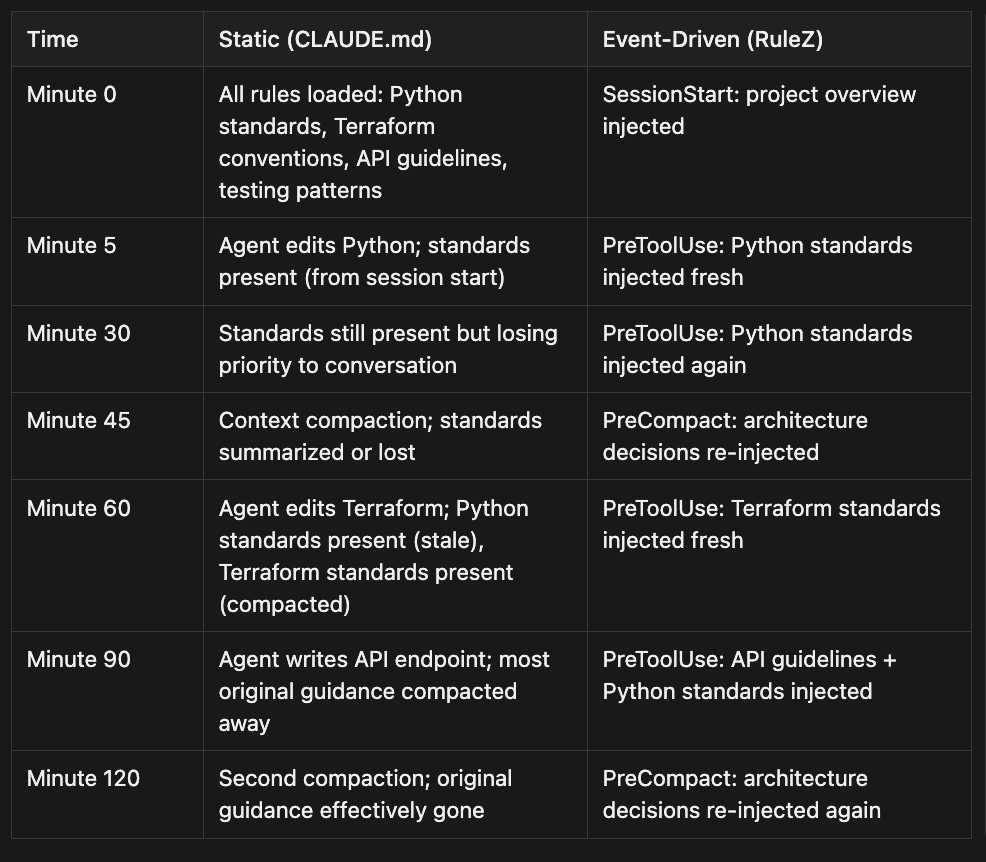
The static approach gives the agent everything at the start and nothing at the end. The event-driven approach gives the agent the right thing at every step.
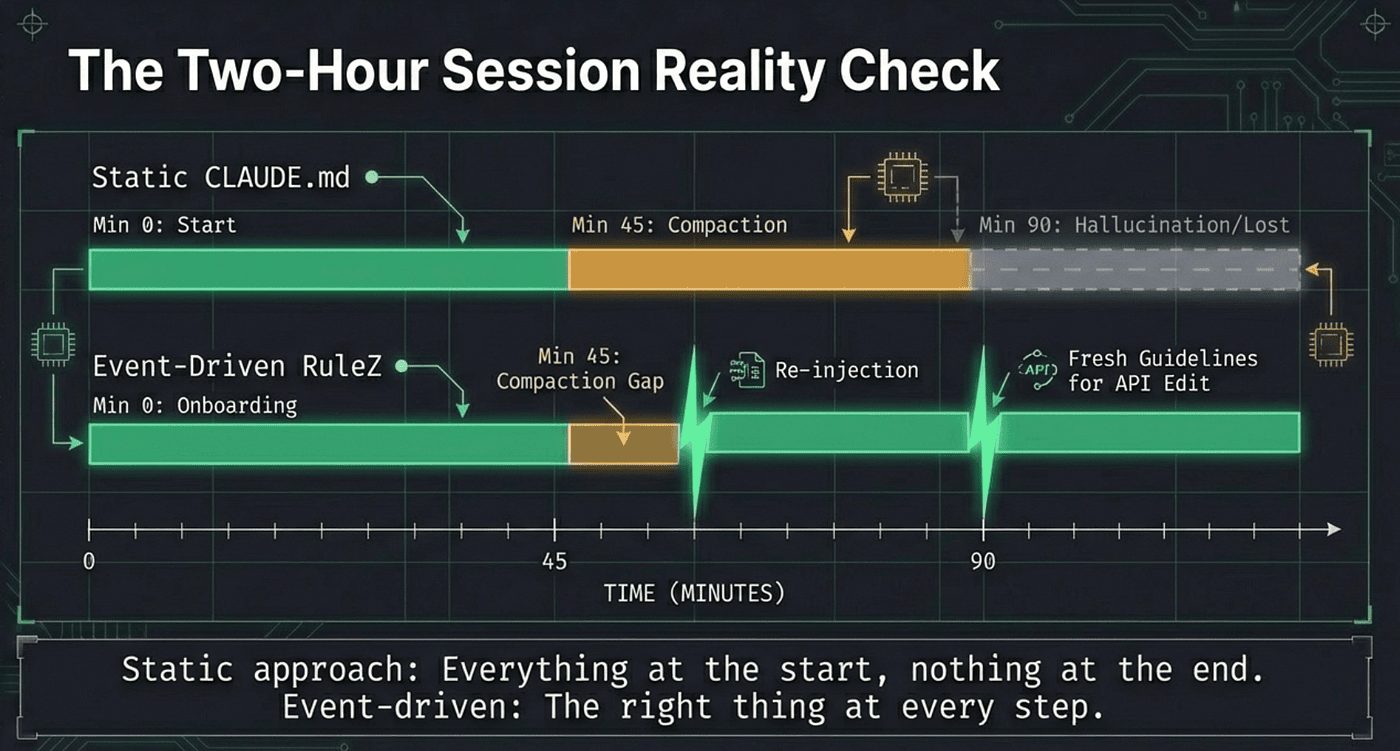 Two hour Agent session. Stays green. Important Context stays in working memory of the Agent.
The Compaction Cliff
Compaction is the moment that breaks static context. It is also invisible. Claude Code does not announce “I am about to forget your coding standards.” It simply compresses the conversation to make room, and the oldest, least-referenced content goes first. Your meticulously authored guidance, loaded at session start and never re-referenced in conversation, is exactly the kind of content that compaction targets.
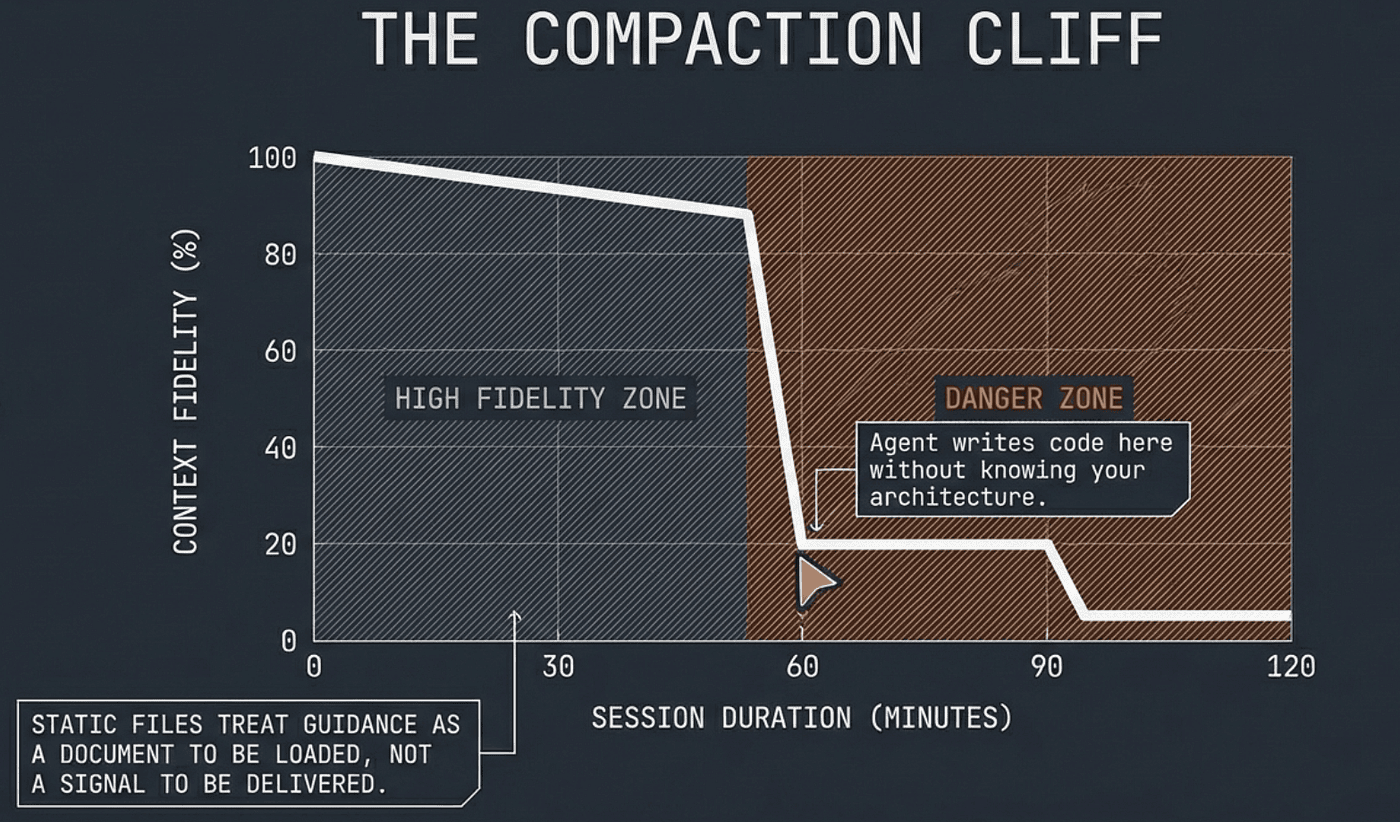 What is the use of having a bunch of rules and specs for an Agent if when it needs them, they are not available. The Compaction Cliff is real and what gets saved or not seems to depend on which release of the tool you are using, and is somewhat random. Agent RuleZ let’s you take control.
PreCompact injection solves this by treating compaction as an event, not a failure. When compaction fires, the PreCompact hook re-injects the content that matters most. The agent enters the compacted context with fresh guidance rather than stale summaries. This is not a workaround; it is the correct engineering response to the compaction lifecycle. Compaction is a known event with a known hook. Using that hook for context preservation is the obvious design.
The Mental Upgrade
The shift from static context to event-driven context changes how you think about documentation itself.
A CLAUDE.md file is written once and updated infrequently. It contains everything the team thinks the agent might need. Over time, it grows. New team members add sections. Old sections become stale but nobody removes them because “it might still be relevant.” The file becomes a knowledge dump, not a context delivery system.
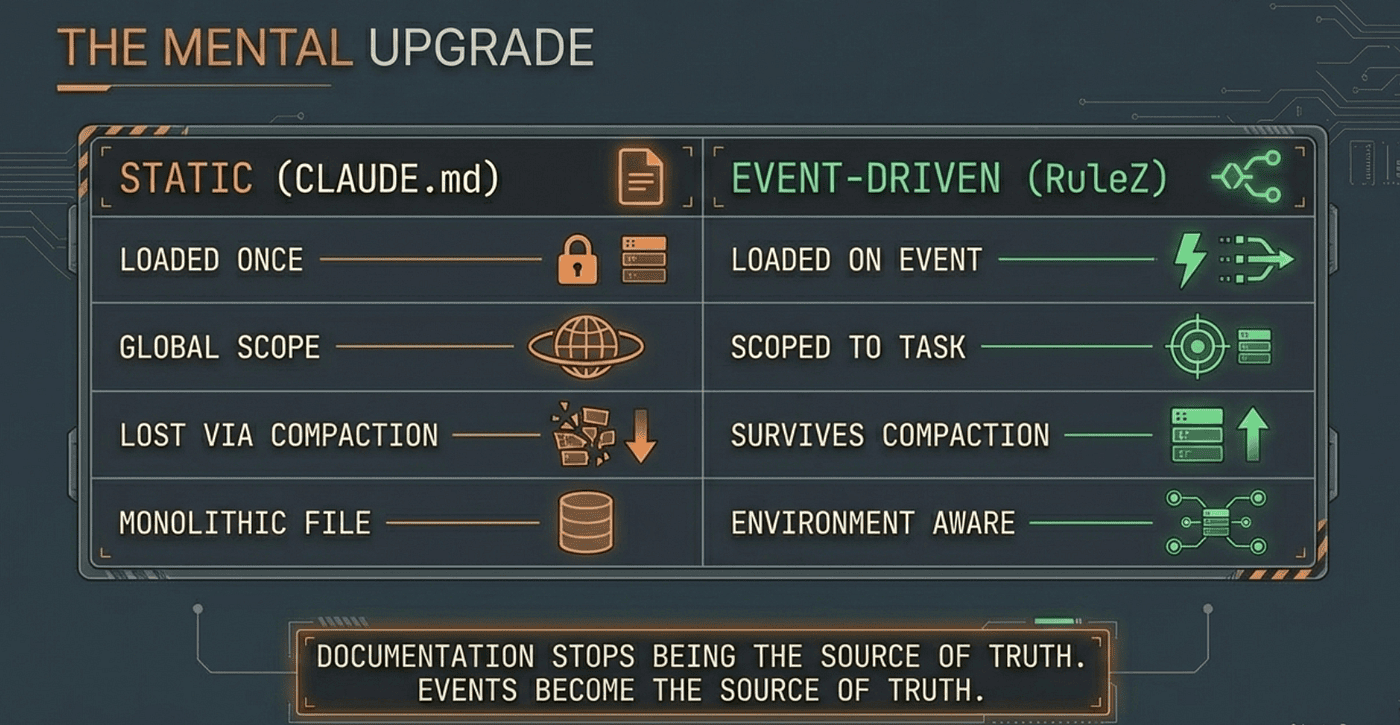 Event Driven Harness and Context Engineering will yield better results for your Agent, make the mental upgrade.
Event-driven rules force you to think about when guidance is needed, not just what guidance exists. Each rule answers three questions:
- What event triggers this? A tool use, a file edit, a session lifecycle event.
- What conditions must be true? The file type, the directory, the environment.
- What context should be injected? A file, an inline snippet, or a dynamic command.
This three-question framing transforms documentation from a monolithic file into a delivery system. The documentation still exists as .md files in .claude/context/. But it reaches the agent only when relevant, only in the right amount, and with the guarantee that compaction will not erase it permanently.
The comparison to configuration management holds. Static CLAUDE.md is like hardcoding config values in source code. It works for small projects. It breaks at scale. Event-driven context injection is like Kubernetes ConfigMaps with volume mounts and environment-specific overlays. The values are the same. The delivery mechanism is what changed.
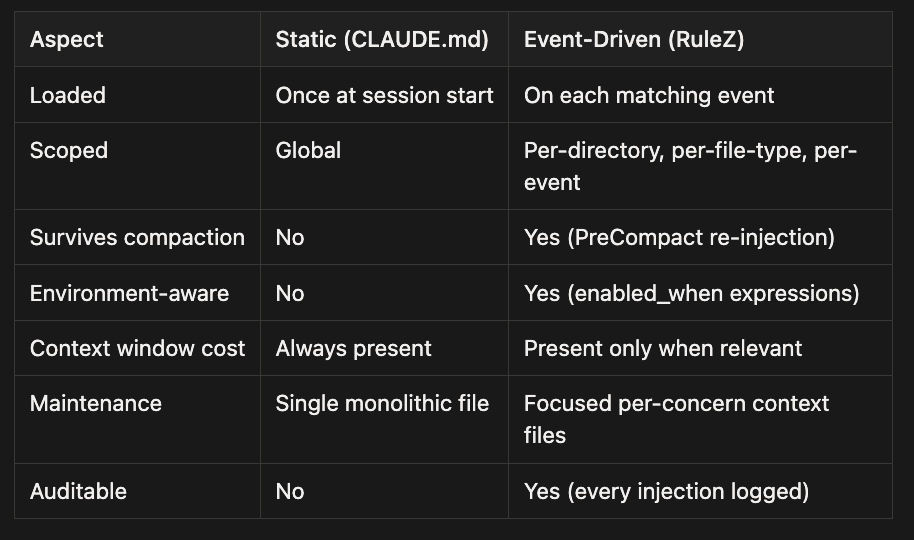
The last row matters more than it appears. Every RuleZ injection is logged with timestamps, matched rules, governance metadata, and timing data. You can answer “what guidance did the agent have when it wrote this code?” from the audit trail. With static context, you can only answer “what guidance was available at session start?” and hope it survived compaction.
Context engineering is not about writing better documentation. It is about building systems that deliver the right documentation at the right time. The documentation stops being the source of truth. Events become the source of truth: the event that the agent is editing Python, the event that compaction is imminent, the event that the agent is about to deploy to production. Each event carries context. Each context arrives precisely when needed.
Context engineering is systems design for AI agents. It requires the same thinking you apply to configuration management, service mesh routing, and event-driven architecture. The tools are different; the principles are the same. Detect the event. Match the conditions. Deliver the context. Log the decision. Move on.
The companion article on RuleZ as a deterministic policy engine covers the full architecture: blocking rules, validation scripts, audit logging, governance metadata, and multi-platform support. This article has focused on one capability within that engine: context injection, and the broader practice of context engineering that it enables.
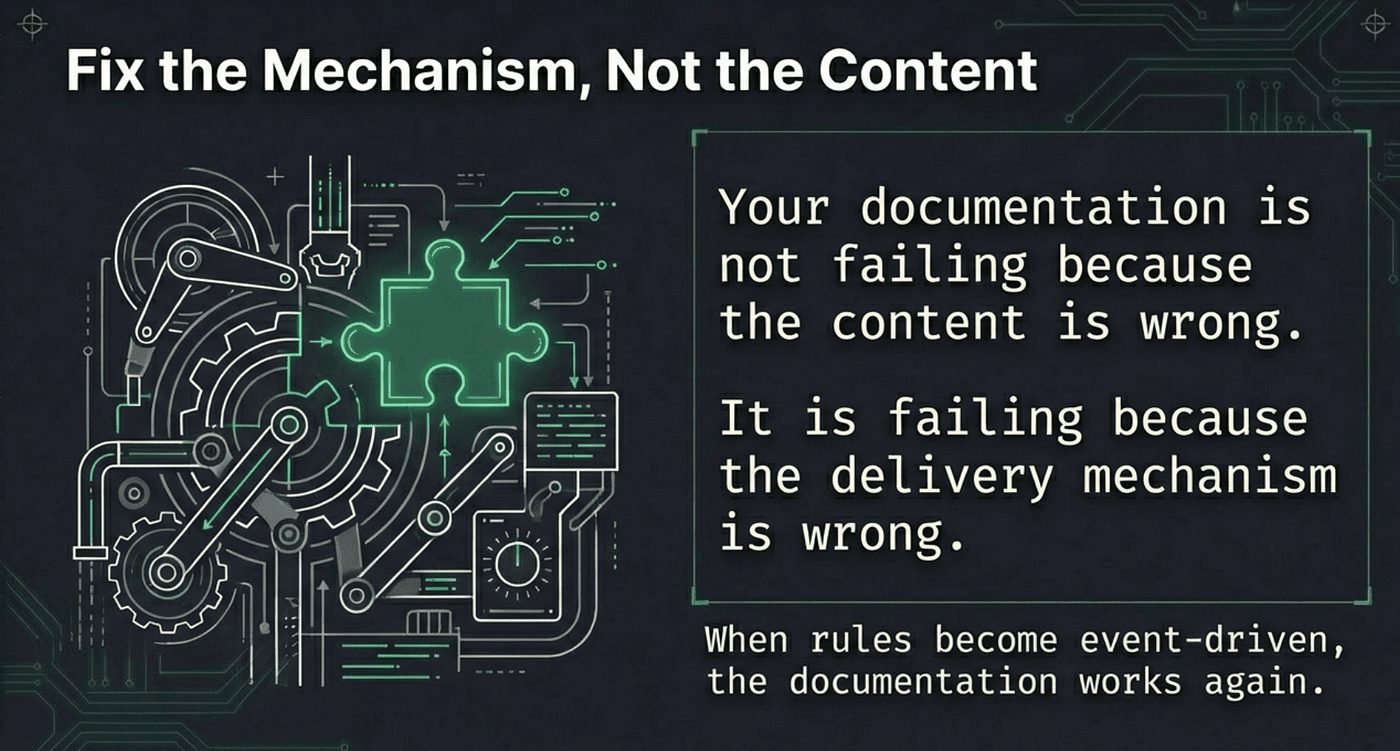
If you take one thing from this article, let it be this: your documentation is not failing because the content is wrong. It is failing because the delivery mechanism is wrong. Fix the mechanism, and the content works again.
Once rules become event-driven, documentation stops being the source of truth. Events do. You move from prompt engineering to context engineering.
 Take control, deliver context easily when needed to your agents. Use Agent RuleZ today!
 Adopt Harness and Context Engineering with Agent RuleZ and improve your Agent’s performance
For more details see:
- Agent Rulez GitHub Repo
- Agent RuleZ: A Deterministic Policy Engine for AI Coding Agents
- Activating Agent Skills at the Right Time with Agent RuleZ
- The End of Manual Agent Skill Invocation: Event-Driven AI Agents
About the Author
Rick Hightower is a technology executive and data engineer who led ML/AI development at a Fortune 100 financial services company. He created skilz, the universal agent skill installer, supporting 30+ coding agents including Claude Code, Gemini, Copilot, and Cursor, and co-founded the world’s largest agentic skill marketplace. Connect with Rick Hightower on LinkedIn or Medium. Rick has been doing active agent development, GenAI, agents, and agentic workflows for quite a while. He is the author of many agentic frameworks and tools. He brings core deep knowledge to teams who want to adopt AI.