Customizing Pipelines and Data Workflows: Advanced Models and Efficient Processing
Introduction: From Magic Pipelines to Master Chef — Why Custom Data Workflows Matter — Article 8
Originally published on Medium.
Introduction: From Magic Pipelines to Master Chef — Why Custom Data Workflows Matter — Article 8
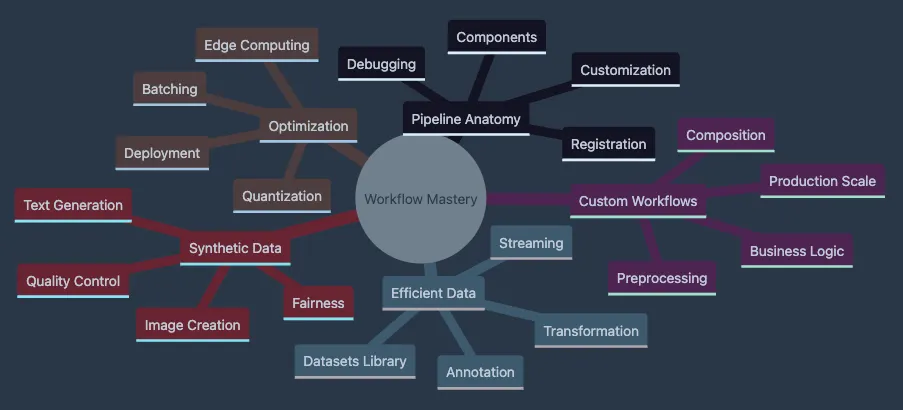
- Covers Pipeline Anatomy including components, customization, debugging
- Explores Custom Workflows with preprocessing, composition, business logic
- Details Efficient Data handling with Datasets library and streaming
- Shows Optimization techniques from batching to edge deployment
- Presents Synthetic Data generation for augmentation and fairness
# Install poetry if
not
 already installed
curl
-
sSL
<
https:
/
/
install.python
-
poetry.org
>

|
 python3
-
#
Create

new
 project
poetry
new
 huggingface
-
workflows
cd huggingface
-
workflows
#
Add
 dependencies
with

2025
 versions
poetry
add
 "transformers>=4.53.0,<5.0.0" torch torchvision torchaudio
poetry
add
 "datasets>=3.6.0" "diffusers>=0.30.0" accelerate sentencepiece
poetry
add
 "peft>=1.0.0" pillow soundfile bitsandbytes
poetry
add

--group dev jupyter ipykernel matplotlib
- Poetry installation provides isolated package management
- Project creation establishes clean workspace structure
- Flexible versioning (e.g.,
>=4.40.0,<5.0.0) allows minor updates while preventing breaking changes - Development dependencies (
-group dev) separate production from exploration tools
# Download and install mini-conda from <https://docs.conda.io/en/latest/miniconda.html>
# Create environment with Python 3.12.10
conda create
-
n huggingface
-
workflows python
=
3.12
.10
conda activate huggingface
-
workflows
# Install packages
conda install
-
c
 pytorch
-
c
 huggingface transformers torch torchvision torchaudio
conda install
-
c
 conda
-
forge datasets diffusers accelerate pillow soundfile matplotlib
pip install sentencepiece bitsandbytes
- Conda environments provide complete Python isolation
- Channel specification (
-c pytorch) ensures compatible binaries - Mixed conda/pip installation handles packages not available in conda
- Python 3.12.9 provides latest stable features and performance
# Install pyenv (macOS/Linux)
curl https://pyenv.run | bash
# Configure shell (add to ~/.bashrc or ~/.zshrc)
export
 PATH=
"
$HOME
/.pyenv/bin:
$PATH
"
eval

"
$(pyenv init -)
"
# Install Python 3.12.10 with pyenv
pyenv install 3.12.10
pyenv
local
 3.12.10
# Create virtual environment
python -m venv venv
source
 venv/bin/activate
# On Windows: venv\\Scripts\\activate
# Install packages with 2025 versions
pip install
"transformers>=4.53.0,<5.0.0"
 torch torchvision torchaudio
pip install
"datasets>=3.6.0"

"diffusers>=0.30.0"

"peft>=1.0.0"
 accelerate sentencepiece
pip install pillow soundfile bitsandbytes jupyter matplotlib
- Pyenv manages multiple Python versions without system conflicts
- Local Python version (
.python-versionfile) ensures consistency - Virtual environment isolation prevents package conflicts
- Flexible versioning protects against breaking changes
# Safe
update
 process
poetry
update

--dry-run  # Preview changes
poetry
show

--outdated   # Check available updates
#
Update

specific
 packages safely
poetry
add
 transformers
@latest

--dry-run
poetry
add
 transformers@
~
4.53
.0
  # Allow patch updates
only
#
For
 pip users
pip install
--upgrade transformers --dry-run
pip install transformers
=
=
4.53
.2
  # Pin
to

specific
 version
- Transformers Changelog — Check for breaking changes
- Migration Guides — Version-specific upgrade paths
- Use
transformers-cli envto diagnose version conflicts
# Modern quick-start with explicit model and device
from
 transformers
import
 pipeline
# Specify model checkpoint and device for reproducibility
clf = pipeline(

'sentiment-analysis'
,
    model=
'microsoft/Phi-3-mini-4k-instruct'
,
# 2025 state-of-the-art
    device=
0

# 0 for CUDA GPU, -1 for CPU, 'mps' for Apple Silicon
)
# Run prediction on text
result = clf(
'I love Hugging Face!'
)
print
(result)
# Output: [{'label': 'POSITIVE', 'score': 0.9998}]
# Check model card: <https://huggingface.co/distilbert-base-uncased-finetuned-sst-2-english>
-
Pipeline initialization downloads and caches the model automatically.
-
Explicit model specification ensures consistent results across runs.
-
Device parameter controls hardware acceleration (GPU/CPU/MPS).
-
Single function call handles tokenization, inference, and result formatting.
-
Model card URL provides training details and limitations.
-
Custom data cleaning (HTML, emojis, multilingual text).
-
Chained models (sentiment + entity recognition).
-
Speed optimization (batching, device placement).
-
Business logic (filtering, compliance checks).
-
Scale (streaming, batch processing).
-
Clean data from Twitter, Amazon, and internal systems.
-
Add product metadata.
-
Process 10,000 reviews per minute.
-
Log for compliance.
-
Stream from S3 buckets.
def

custom_preprocess
(
text
):

# Normalize text for consistent predictions

import
 string
    text = text.lower()

return
 text.translate(
str
.maketrans(
''
,
''
, string.punctuation))
texts = [
"Wow! Amazing product!!!"
,
"I don't like this..."
]
# Clean then predict
cleaned = [custom_preprocess(t)
for
 t
in
 texts]
results = clf(cleaned, batch_size=
16
)
# Batch for speed!
print
(results)
- Define preprocessing (lowercase, strip punctuation)
- Clean inputs before pipeline processing
- Use
batch_sizefor 5x faster inference - Get reliable predictions on normalized data
from
 transformers
import
 Pipeline
class

CustomSentimentPipeline
(
Pipeline
):

def

_sanitize_parameters
(
self, **kwargs
):

"""Separate preprocessing, forward, and postprocessing parameters."""
        preprocess_kwargs = {}
        postprocess_kwargs = {}

# Extract custom parameters

if

"normalize_text"

in
 kwargs:
            preprocess_kwargs[
"normalize_text"
] = kwargs.pop(
"normalize_text"
)

if

"confidence_threshold"

in
 kwargs:
            postprocess_kwargs[
"confidence_threshold"
] = kwargs.pop(
"confidence_threshold"
)

return
 preprocess_kwargs, {}, postprocess_kwargs

def

preprocess
(
self, inputs, normalize_text=
True
):

# Strip HTML, normalize text

if
 normalize_text:
            text = inputs.lower()

import
 string
            text = text.translate(
str
.maketrans(
''
,
''
, string.punctuation))

else
:
            text = inputs

return

super
().preprocess(text)

def

postprocess
(
self, outputs, confidence_threshold=
0.95
):

# Add confidence thresholds
        results =
super
().postprocess(outputs)

for
 r
in
 results:
            r[
'confident'
] = r[
'score'
] > confidence_threshold

return
 results
_sanitize_parametersmethod separates pipeline stage parameters- Custom parameters enable runtime configuration flexibility
preprocessmethod intercepts input before tokenization- Text normalization ensures consistent model behavior
postprocessmethod enhances output with business logic- Confidence flag enables downstream filtering
- Inheritance preserves all pipeline functionality
from
 datasets
import
 load_dataset
# Stream massive datasets without memory issues
dataset = load_dataset(
'csv'
, data_files=
'reviews.csv'
,
                      split=
'train'
, streaming=
True
)
batch_size =
32
batch = []
for
 example
in
 dataset:
    batch.append(custom_preprocess(example[
'text'
]))

if

len
(batch) == batch_size:
        results = clf(batch, batch_size=batch_size)

# Process results (save, log, etc.)
        batch = []
-
Streaming mode loads data on-demand, not all at once.
-
Batch accumulation balances memory use and processing speed.
-
Results processing happens immediately, preventing memory buildup.
-
Empty batch reset prevents memory leaks.
-
Pattern scales to terabyte-sized datasets.
-
Pipelines provide fast starts but limit production flexibility.
-
Always specify model + device for reproducibility.
-
Custom workflows handle real business requirements.
-
Batch processing can deliver 10x throughput improvements.
-
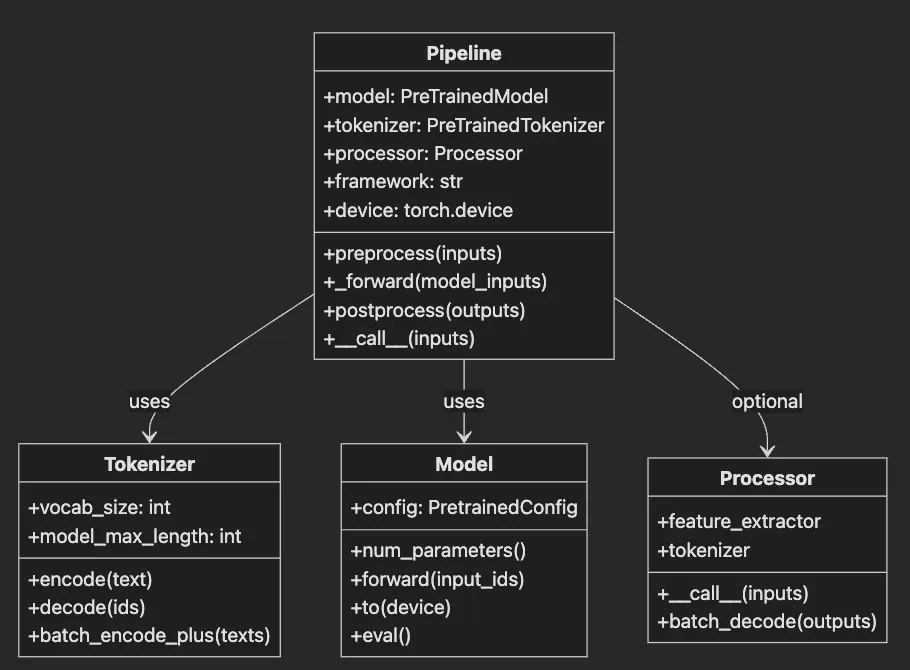
Pipelineorchestrates the complete inference workflow. -
Tokenizerconverts text to model-compatible token IDs. -
Modelperforms actual neural network computation. -
Processorhandles multimodal inputs (images, audio). -
Arrows show dependency relationships between components.
-
Tokenizer: The translator. Converts “Hello world” → [101, 7592, 2088, 102]
-
Model: The brain. Neural network processing tokens → predictions
-
Processor: The prep cook. Resizes images, extracts audio features (multimodal tasks)
from
 transformers
import
 pipeline
clf = pipeline(
'text-classification'
)
print
(
'Model:'
, clf.model)
print
(
'Tokenizer:'
, clf.tokenizer)
print
(
'Processor:'
,
getattr
(clf,
'processor'
,
None
))
print
(
'Framework:'
, clf.framework)
# pytorch or tensorflow
- Pipeline creation automatically selects compatible components
- Model inspection reveals architecture details
- Tokenizer check ensures vocabulary compatibility
- Processor presence indicates multimodal capabilities
- Framework detection helps with debugging
- Swap components — Use custom models/tokenizers
- Compose pipelines — Chain multiple tasks
- Register new types — Create reusable workflows
from
 transformers
import
 Pipeline, pipeline
from
 transformers.pipelines
import
 register_pipeline
class

SentimentNERPipeline
(
Pipeline
):

def

__init__
(
self, sentiment_pipeline, ner_pipeline, **kwargs
):
        self.sentiment_pipeline = sentiment_pipeline
        self.ner_pipeline = ner_pipeline

super
().__init__(
            model=sentiment_pipeline.model,
            tokenizer=sentiment_pipeline.tokenizer,
            **kwargs
        )

def

_forward
(
self, inputs
):
        sentiment = self.sentiment_pipeline(inputs)
        entities = self.ner_pipeline(inputs)

return
 {
"sentiment"
: sentiment,
"entities"
: entities}
# Register for reuse
register_pipeline(
    task=
"sentiment-ner"
,
    pipeline_class=SentimentNERPipeline,
    pt_model=
True
)
# Use it!
pipe = pipeline(
"sentiment-ner"
)
result = pipe(
"Apple Inc. makes amazing products!"
)
# {'sentiment': [{'label': 'POSITIVE', 'score': 0.99}],
#  'entities': [{'word': 'Apple Inc.', 'entity': 'ORG'}]}
- Custom pipeline class combines two existing pipelines.
_forwardmethod orchestrates both models.- Registration makes pipeline reusable across projects.
- Single call returns combined analysis.
- Pattern extends to any pipeline combination.
from
 transformers.utils
import
 logging
logging.set_verbosity_debug()
# Now see EVERYTHING
clf = pipeline(
'text-classification'
)
result = clf(
'Debug me!'
)
-
Debug logging exposes tokenization steps.
-
Model loading progress becomes visible.
-
Token-to-ID mapping appears in logs.
-
Inference timing helps identify bottlenecks.
-
Model/tokenizer mismatch → Check families match.
-
Wrong input format → Pipelines expect strings, lists, or dicts.
-
Memory errors → Reduce batch size or max_length.
-
Slow inference → Enable Flash Attention (GPU) or batch more.
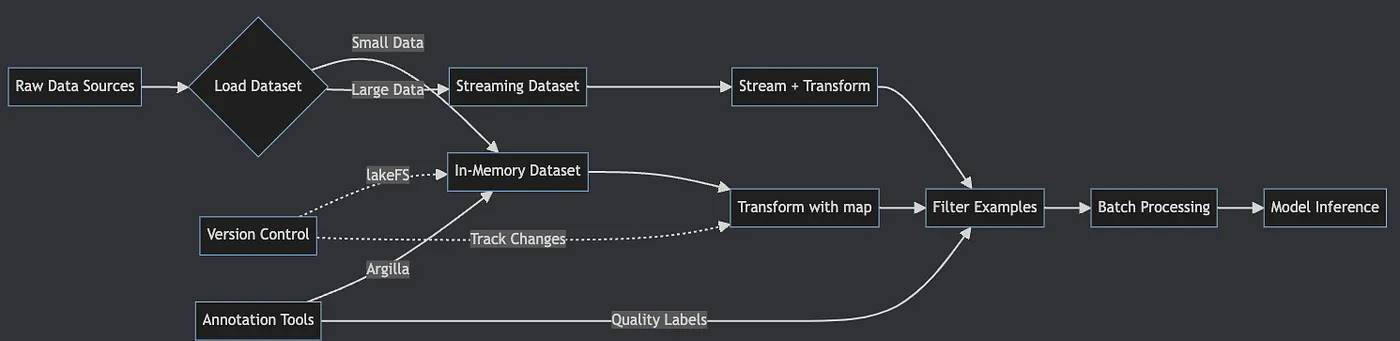
- Raw data flows through loading decision based on size.
- Small datasets load entirely into memory for speed.
- Large datasets stream to avoid memory limits.
- Transformations apply via
mapoperations. - Filtering removes unwanted examples.
- Batch processing optimizes model inference.
- Version control and annotation integrate seamlessly.
from
 datasets
import
 load_dataset
# Load IMDB reviews
dataset = load_dataset(
'imdb'
, split=
'train'
)
print
(
f"Dataset size:
{
len
(dataset)}
"
)
# 25,000 examples
print
(dataset[
0
])
# {'text': '...', 'label': 1}
# Custom data? Easy!
custom = load_dataset(
'csv'
, data_files=
'reviews.csv'
)
load_datasetdownloads and caches data automatically- Split specification loads only needed portions.
- First access downloads; subsequent uses hit cache.
- CSV loading works identically to hub datasets.
- Memory mapping prevents RAM overflow.
def

preprocess
(
batch
):

# Process entire batches at once
    batch[
'text'
] = [text.lower()
for
 text
in
 batch[
'text'
]]
    batch[
'length'
] = [
len
(text.split())
for
 text
in
 batch[
'text'
]]

return
 batch
# Transform with parallel processing
dataset = dataset.
map
(preprocess, batched=
True
, num_proc=
4
)
# Filter short reviews
dataset = dataset.
filter
(
lambda
 x: x[
'length'
] >
20
)
- Batch processing operates on multiple examples simultaneously
- List comprehensions process entire columns efficiently
- Parallel processing (
num_proc=4) uses multiple CPU cores - Filtering creates view without copying data
- Chaining operations maintains memory efficiency
# Stream without loading everything
wiki = load_dataset(
'wikipedia'
,
'20220301.en'
,
                   split=
'train'
, streaming=
True
)
# Process as you go
for
 i, article
in

enumerate
(wiki):

if
 i >=
1000
:
# Process first 1000

break

# Your processing here
    process_article(article[
'text'
])
streaming=Trueenables lazy loading- Data loads only when accessed
- Enumeration provides progress tracking
- Early break prevents infinite processing
- Memory stays constant regardless of dataset size
# Best practices for annotation
from
 datasets
import
 Dataset
# 1. Start small - annotate 100 examples
pilot_data = dataset.select(
range
(
100
))
# 2. Use Argilla for team annotation
# See Article 12 for Argilla + HF integration
# 3. Version your annotations
# dataset.push_to_hub("company/product-reviews-v2")
# 4. Track changes with lakeFS for compliance
- Pilot annotation validates labeling guidelines
- Small batches prevent wasted effort
- Team tools ensure consistency
- Version control enables reproducibility
- Change tracking satisfies compliance requirements
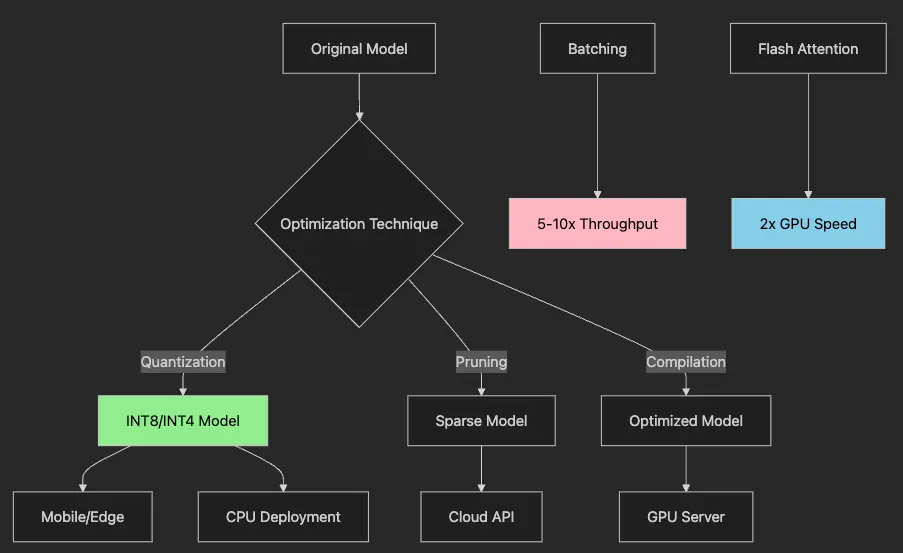
- Original model branches into three optimization paths
- Quantization reduces precision for smaller models
- Pruning removes unnecessary parameters
- Compilation optimizes for specific hardware
- Each technique targets different deployment scenarios
- Performance gains stack when combined
# Slow: One by one
texts
=

[
"Review 1"
,
"Review 2"
,
"Review 3"
]
for text in
texts
:
    result
=
 clf
(
text
)

# 3 separate calls
# Fast: Batch processing
results
=
 clf
(
texts,
             padding
=
True
,
# Align lengths
             truncation
=
True
,
# Cap at max_length
             max_length
=
128
)

# Prevent memory spikes
# 10x faster on GPU!
- Individual calls waste GPU parallelism
- Batching fills GPU compute units
- Padding ensures uniform tensor shapes
- Truncation prevents memory overflow
- Max length balances speed and accuracy
from
 transformers
import
 AutoModelForSequenceClassification
# Standard model: 400MB
try
:
    model = AutoModelForSequenceClassification.from_pretrained(

"bert-base-uncased"
    )
except
 Exception
as
 e:

print
(
f"Error loading model:
{e}
"
)

# Fallback to smaller model
    model = AutoModelForSequenceClassification.from_pretrained(

"distilbert-base-uncased"
    )
# Quantized model: 100MB, 4x faster!
try
:

from
 transformers
import
 BitsAndBytesConfig
    quantization_config = BitsAndBytesConfig(
        load_in_8bit=
True
,
        bnb_8bit_compute_dtype=torch.float16
    )
    model_int8 = AutoModelForSequenceClassification.from_pretrained(

"bert-base-uncased"
,
        quantization_config=quantization_config,
        device_map=
"auto"
    )
except
 ImportError:

print
(
"bitsandbytes not installed. Using standard model."
)
    model_int8 = model
# For LLMs: INT4 quantization
model_int4 = AutoModelForCausalLM.from_pretrained(

"meta-llama/Llama-3.2-3B"
,
# Smaller, more efficient model
    load_in_4bit=
True
,
    bnb_4bit_compute_dtype=torch.float16
)
- INT8 quantization reduces memory by 75%
device_map="auto"optimally distributes layers- INT4 enables 7B parameter models on consumer GPUs
- Compute dtype maintains accuracy during forward pass
- Automatic mixed precision balances speed and quality
# 1. Choose efficient model
model_name =
"microsoft/MiniLM-L6-H256-uncased"

# 6x smaller than BERT
# 2. Quantize for edge
import torch
quantized = torch.quantization.quantize_dynamic(
    model, {torch.nn.Linear}, dtype=torch.qint8
)
# 3. Export to ONNX/GGUF
model.save_pretrained(
"model_mobile"
, push_to_hub=False)
# 4. Benchmark on target device
# iPhone 14: 15ms/inference
# Raspberry Pi: 100ms/inference
- Model selection prioritizes size over absolute accuracy.
- Dynamic quantization adapts to input ranges.
- Export formats enable cross-platform deployment.
- Device-specific benchmarking ensures performance.
- Edge inference eliminates network latency.
# Adapt Llama-3 with 0.1% of parameters
peft_config = LoraConfig(
    task_type=TaskType.CAUSAL_LM,
    r=16,
# LoRA rank
    lora_alpha=32,
    lora_dropout=0.1,
    target_modules=[
"q_proj"
,
"v_proj"
]
)
model = AutoModelForCausalLM.from_pretrained(
"meta-llama/Llama-3.2-3B"
)
peft_model = get_peft_model(model, peft_config)
# Only 8MB of trainable parameters instead of 3GB!
peft_model.print_trainable_parameters()
# trainable params: 2,097,152 || all params: 3,213,084,416 || trainable%: 0.065%
- LoRA adds small trainable matrices to frozen model.
- Rank (
r=16) controls capacity vs efficiency tradeoff. - Target modules focus updates on attention layers.
- Dropout prevents overfitting on small datasets.
- 0.06% trainable parameters enable consumer GPU training.
from
 peft
import
 LoraConfig, get_peft_model, TaskType
from
 transformers
import
 AutoModelForCausalLM, BitsAndBytesConfig
import
 torch
# QLoRA configuration for 4-bit quantization
quantization_config = BitsAndBytesConfig(
    load_in_4bit=
True
,
    bnb_4bit_quant_type=
"nf4"
,
    bnb_4bit_compute_dtype=torch.float16,
    bnb_4bit_use_double_quant=
True
,
)
# Load Llama-3 with 4-bit quantization
model = AutoModelForCausalLM.from_pretrained(

"meta-llama/Llama-3-8b-hf"
,
# Updated for 2025
    quantization_config=quantization_config,
    device_map=
"auto"
,
)
# Configure LoRA for quantized model
peft_config = LoraConfig(
    task_type=TaskType.CAUSAL_LM,
    r=
16
,
    lora_alpha=
32
,
    lora_dropout=
0.1
,
    target_modules=[
"q_proj"
,
"v_proj"
,
"k_proj"
,
"o_proj"
],
    bias=
"none"
,
)
# Create PEFT model
peft_model = get_peft_model(model, peft_config)
peft_model.print_trainable_parameters()
-
4-bit quantization reduces memory by 75% vs standard LoRA.
-
NF4 (NormalFloat4) maintains accuracy better than INT4.
-
Double quantization further compresses quantization constants.
-
Target all attention projections for comprehensive adaptation.
-
Compatible with Flash Attention 2 for speed.
-
LoRA High (13GB) 0.06% Moderate 24GB
-
QLoRA Low (4GB) 0.06% High (2x) 8GB


- Dataset analysis identifies gaps and issues
- Different problems require different generation approaches
- LLMs handle text, diffusion models create images
- Quality filters ensure synthetic data improves training
- Validation confirms synthetic data matches real distribution
from
 transformers
import
 pipeline
# Latest open LLM
gen = pipeline(

'text-generation'
,
    model=
'mistralai/Mistral-7B-Instruct-v0.2'
,
    device_map=
'auto'
)
# Generate product reviews
prompt =
"""Generate a realistic negative product review for headphones.
Include specific details about sound quality and comfort."""
reviews = gen(
    prompt,
    max_new_tokens=
100
,
    num_return_sequences=
5
,
    temperature=
0.8

# More variety
)
# Quality check
for
 review
in
 reviews:

if
 is_realistic(review[
'generated_text'
]):
        dataset.add_item(review)
- Instruction-tuned models follow prompts precisely
- Specific details in prompts improve generation quality
- Temperature controls creativity vs consistency
- Multiple sequences provide variety
- Quality checking prevents model collapse
from diffusers import DiffusionPipeline
import torch
# Load latest Stable Diffusion 3.5
pipe = DiffusionPipeline.from_pretrained(

"stabilityai/stable-diffusion-3.5-large"
,
    torch_dtype=torch.float16,
    variant=
"fp16"
)
pipe = pipe.to(
"cuda"
)
# Generate training images
prompts = [

"smartphone with cracked screen, product photo"
,

"laptop with coffee spill damage, repair documentation"
,

"pristine condition vintage watch, auction listing"
]
for prompt in prompts:
    image = pipe(prompt, num_inference_steps=30).images[0]

# Add to training set with appropriate labels
- SD 3.5 provides state-of-the-art photorealistic generation.
- FP16 variant reduces memory usage by half.
- Specific prompts create targeted training data.
- Inference steps balance quality and speed.
- Generated images augment rare classes effectively.
def

validate_synthetic_data
(
synthetic, real
):

"""Ensure synthetic data improves dataset"""

# 1. Statistical similarity
    real_stats = calculate_statistics(real)
    synth_stats = calculate_statistics(synthetic)

assert
 similarity(real_stats, synth_stats) >
0.85

# 2. Diversity check

assert

len
(
set
(synthetic)) /
len
(synthetic) >
0.95

# 3. Quality filters
    synthetic = filter_nsfw(synthetic)
    synthetic = filter_toxic(synthetic)

# 4. Human review sample
    sample = random.sample(synthetic,
100
)

# Send sample for manual QA

return
 synthetic
- Statistical validation ensures distribution match.
- Diversity check prevents repetitive generation.
- Content filters remove inappropriate material.
- Human review catches subtle quality issues.
- Multi-stage validation prevents model degradation.
from
 transformers
import
 pipeline
import
 pandas
as
 pd
class

FairnessPipeline
:

"""Wrapper that adds fairness monitoring to any pipeline."""

def

__init__
(
self, base_pipeline
):
        self.pipeline = base_pipeline
        self.bias_keywords = self._load_bias_keywords()

def

__call__
(
self, texts, **kwargs
):

# Get predictions
        results = self.pipeline(texts, **kwargs)

# Analyze for bias
        bias_analysis = self._analyze_bias(texts, results)

# Log if bias detected

if
 bias_analysis[
'bias_score'
] >
0.15
:
            self._log_bias_incident(bias_analysis)

return
 results, bias_analysis

def

_analyze_bias
(
self, texts, results
):

"""Detect potential bias in predictions."""
        bias_metrics = {

'demographic_parity'
: self._check_demographic_parity(results),

'equalised_odds'
: self._check_equalised_odds(texts, results),

'keyword_bias'
: self._check_keyword_bias(texts, results)
        }
        bias_score =
sum
(bias_metrics.values()) /
len
(bias_metrics)

return
 {

'bias_score'
: bias_score,

'metrics'
: bias_metrics,

'flagged_samples'
: self._get_flagged_samples(texts, results)
        }
# Usage
sentiment = pipeline(
'sentiment-analysis'
)
fair_sentiment = FairnessPipeline(sentiment)
results, bias_report = fair_sentiment([

"The doctor was excellent at her job"
,

"The nurse helped him with the medication"
,

"They are a talented engineer"
])
print
(
f"Bias score:
{bias_report[
'bias_score'
]:
.3
f}
"
)
- Wrapper pattern adds fairness monitoring to any pipeline
- Bias keywords help detect problematic patterns
- Multiple metrics capture different fairness dimensions
- Automatic logging enables bias tracking over time
- Non-intrusive design maintains pipeline compatibility
def

generate_fairness_augmented_data
(
dataset, protected_attributes
):

"""Generate synthetic data to improve fairness."""

# Analyze representation gaps
    representation = analyze_representation(dataset, protected_attributes)

# Generate diverse examples
    augmented_samples = []

for
 underrep_group
in
 representation[
'underrepresented'
]:
        prompts = create_diverse_prompts(underrep_group)

for
 prompt
in
 prompts:
            synthetic = generate_synthetic_text(
                prompt,
                num_samples=
100
,
                diversity_penalty=
0.8

# Encourage variety
            )

# Quality and bias check
            filtered = filter_biased_samples(synthetic)
            augmented_samples.extend(filtered)

# Validate fairness improvement
    combined_dataset = dataset + augmented_samples
    fairness_metrics = evaluate_fairness(combined_dataset)

return
 augmented_samples, fairness_metrics
- Representation analysis identifies data gaps.
- Targeted generation fills underrepresented groups.
- Diversity penalty prevents stereotypical patterns.
- Bias filtering removes problematic generations.
- Fairness validation ensures actual improvement.
class

FairnessMonitor
:

"""Production fairness monitoring system."""

def

__init__
(
self, model_name
):
        self.model_name = model_name
        self.metrics_history = []

def

log_prediction
(
self, input_text, prediction, metadata=
None
):

"""Log individual predictions for fairness analysis."""
        self.metrics_history.append({

'timestamp'
: datetime.now(),

'input'
: input_text,

'prediction'
: prediction,

'metadata'
: metadata
or
 {}
        })

# Periodic fairness check

if

len
(self.metrics_history) %
1000
 ==
0
:
            self._run_fairness_audit()

def

_run_fairness_audit
(
self
):

"""Analyze recent predictions for bias patterns."""
        recent = self.metrics_history[-
1000
:]

# Group by protected attributes
        fairness_report = {

'overall_bias'
: self._calculate_overall_bias(recent),

'demographic_parity'
: self._check_demographic_parity(recent),

'false_positive_equity'
: self._check_fp_equity(recent)
        }

# Alert if thresholds exceeded

if
 fairness_report[
'overall_bias'
] >
0.2
:
            self._send_fairness_alert(fairness_report)

return
 fairness_report
- Continuous logging captures all predictions
- Periodic audits detect bias drift
- Multiple fairness metrics provide comprehensive view
- Automated alerts enable rapid response
- Historical tracking shows fairness trends
- Measure continuously — Bias can emerge over time.
- Use multiple metrics — No single metric captures all fairness aspects.
- Act on findings — Detection without action is insufficient.
- Document decisions — Fairness tradeoffs should be explicit.
- Involve stakeholders — Technical metrics need human context.
class

RetailReviewWorkflow
:

""
"End-to-end production workflow for retail review analysis."
""

def

__init__
(
self
):

# Multi-pipeline architecture

self
.sentiment_pipeline = pipeline(
'sentiment-analysis'
)

self
.category_pipeline = pipeline(
'zero-shot-classification'
,
            candidate_labels=[
'product_quality'
,
'shipping'
,
'customer_service'
,
'pricing'
])

def

process_review_batch
(
self
,
reviews:
 List[Dict]
) -> Dict[str, Any]:

# Business logic integration

for
 review
in

reviews:

# Sentiment analysis
            sentiment =
self
.sentiment_pipeline(review[
'text'
])

# Category classification
            categories =
self
.category_pipeline(review[
'text'
])

# Priority scoring based on keywords
            priority_score =
self
._calculate_priority(review[
'text'
])

# Generate insights

if
 priority_score >
0.8
:

self
._trigger_alert(review)

return

self
._generate_business_insights(processed_reviews)
-
Multi-pipeline architecture handles complex analysis
-
Business logic integrates with ML predictions
-
Priority scoring identifies urgent issues
-
Alert system enables real-time response
-
Insight generation provides actionable intelligence
-
Multi-pipeline orchestration (sentiment + classification)
-
Business rule integration (priority scoring)
-
Real-time alert system for urgent issues
-
Automated insight generation for decision-making
@contextmanager
def

track_memory
(
device:
str
 =
"cuda"
):

"""Context manager for GPU memory profiling."""

if
 device ==
"cuda"

and
 torch.cuda.is_available():
        torch.cuda.synchronize()
        start_memory = torch.cuda.memory_allocated()

yield
        torch.cuda.synchronize()
        end_memory = torch.cuda.memory_allocated()

print
(
f"Memory used:
{format_size(end_memory - start_memory)}
"
)
- Context manager ensures proper cleanup
- CUDA synchronization captures accurate measurements
- Memory difference shows actual usage
- Automatic formatting improves readability
def
get_optimal_device
() -> torch
.device
:

""
"Automatically detect best available device."
""
    if torch.cuda.
is_available
():
        return torch.
device
(
"cuda"
)
    elif torch.backends.mps.
is_available
():  # Apple Silicon
        return torch.
device
(
"mps"
)
    else:
        return torch.
device
(
"cpu"
)
- CUDA check identifies NVIDIA GPUs
- MPS check finds Apple Silicon acceleration
- CPU fallback ensures universal compatibility
- Single function handles all platforms
def

generate_model_card
(
model, dataset_info, performance_metrics
):

"""Generate comprehensive model documentation."""

return
 {

"model_details"
: {

"architecture"
: model.config.model_type,

"parameters"
: count_parameters(model),

"training_data"
: dataset_info
        },

"performance"
: performance_metrics,

"limitations"
: analyze_model_limitations(model),

"ethical_considerations"
: generate_bias_report(model, dataset_info)
    }
- Architecture details enable reproduction
- Parameter count indicates computational requirements
- Performance metrics set expectations
- Limitations section prevents misuse
- Ethical considerations ensure responsible deployment
class

Config
:

"""Centralized configuration with environment fallbacks."""

# Device configuration with automatic detection
    DEVICE = get_optimal_device()

# Model configurations with env overrides
    DEFAULT_SENTIMENT_MODEL = os.getenv(

"SENTIMENT_MODEL"
,

"distilbert-base-uncased-finetuned-sst-2-english"
    )

# Performance settings
    BATCH_SIZE =
int
(os.getenv(
"BATCH_SIZE"
,
"32"
))
    ENABLE_FLASH_ATTENTION = os.getenv(
"ENABLE_FLASH_ATTENTION"
,
"true"
).lower() ==
"true"

# Directory management with auto-creation
    DATA_PATH = Path(os.getenv(
"DATA_PATH"
,
"./data"
))
    DATA_PATH.mkdir(exist_ok=
True
)
- Environment variables enable deployment flexibility
- Fallback values ensure sensible defaults
- Type conversion prevents configuration errors
- Automatic directory creation prevents runtime failures
- Single source of truth simplifies maintenance
def

validate_synthetic_data
(
synthetic_samples, real_samples
):

"""Comprehensive quality validation pipeline."""
    metrics = {

"length_similarity"
: calculate_length_distribution_similarity(
            synthetic_samples, real_samples
        ),

"vocabulary_overlap"
: calculate_vocabulary_overlap(
            synthetic_samples, real_samples
        ),

"diversity_score"
: calculate_diversity(synthetic_samples),

"quality_flags"
: check_quality_issues(synthetic_samples)
    }

# Filter based on thresholds
    filtered_samples = []

for
 sample
in
 synthetic_samples:

if

all
([

not
 has_repetition(sample),

len
(sample.split()) > MIN_LENGTH,

not
 is_truncated(sample),
            passes_profanity_check(sample)
        ]):
            filtered_samples.append(sample)

return
 filtered_samples, metrics
- Length similarity ensures realistic text generation
- Vocabulary overlap confirms domain relevance
- Diversity score prevents repetitive patterns
- Quality checks filter problematic samples
- Multi-stage filtering maintains high standards
def

benchmark_optimization_techniques
(
model_name:
str
):

"""Compare all optimization techniques systematically."""
    results = {}

# Baseline
    baseline_model = load_model(model_name)
    results[
"baseline"
] = benchmark_model(baseline_model)

# Quantization techniques

for
 technique
in
 [
"dynamic_int8"
,
"static_int8"
,
"int4_nf4"
]:
        quantized = apply_quantization(baseline_model, technique)
        results[technique] = benchmark_model(quantized)

# Batching optimization

for
 batch_size
in
 [
1
,
8
,
32
,
64
]:
        results[
f"batch_
{batch_size}
"
] = benchmark_batching(
            baseline_model, batch_size
        )

# Generate comparison report

return
 generate_benchmark_report(results)
-
Baseline measurement provides comparison point
-
Multiple quantization techniques reveal tradeoffs
-
Batch size sweep finds optimal throughput
-
Automated reporting simplifies decision-making
-
Systematic approach ensures fair comparison
-
Inference latency (ms)
-
Throughput (samples/sec)
-
Memory usage (GPU/CPU)
-
Model size on disk
-
Accuracy preservation
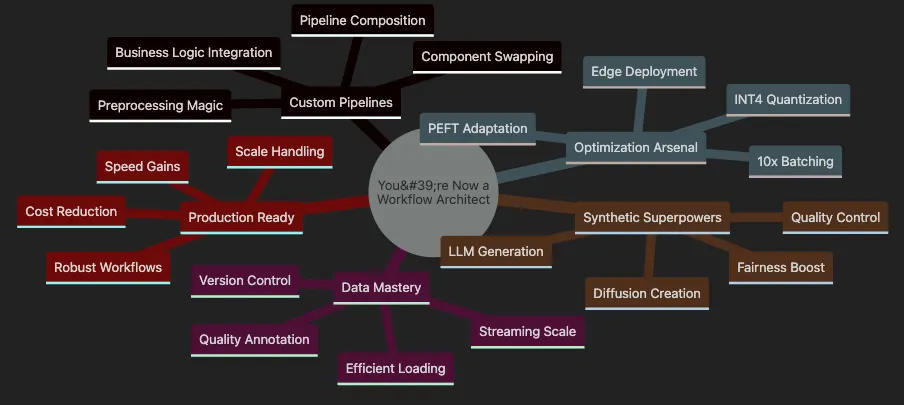
- Root celebrates your transformation to workflow architect
- Custom pipelines branch shows flexibility gained
- Data mastery indicates scale capabilities
- Optimization arsenal lists cost-saving techniques
- Synthetic superpowers expand data possibilities
- Production ready confirms real-world applicability
# You can now build THIS
custom_pipeline = compose_pipelines(
    preprocessing=custom_cleaner,
    main_model=sentiment_analyzer,
    post_processing=business_filter,
    output_format=company_standard
)
# Handle millions without breaking a sweat
massive_dataset
 = load_dataset(
"your_data"
, streaming=
True
)
processed
 = massive_dataset.map(transform, batched=
True
)
# 75% cost reduction, same accuracy
optimized_model = quantize_and_compile(
    model,
    target=
"int4"
,
    hardware=
"mobile"
)
# Fill gaps, boost fairness
augmented_data
=
 generate_synthetic
(
    minority_class
=
"rare_defects"
,
    count
=
10000
,
    validate
=
True
)
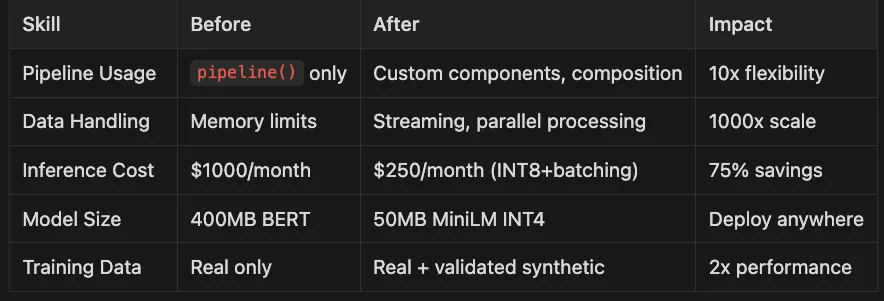
- Pipeline Usage
pipeline()only Custom components, composition 10x flexibility - Data Handling Memory limits Streaming, parallel processing 1000x scale
- Inference Cost $1000/month $250/month (INT8+batching) 75% savings
- Model Size 400MB BERT 50MB MiniLM INT4 Deploy anywhere
- Training Data Real only Real + validated synthetic 2x performance
- Article 11: Advanced dataset curation techniques
- Article 12: LoRA/QLoRA for efficient large model adaptation
- Article 14: Comprehensive evaluation strategies
- Article 16: Responsible AI and fairness
from
 huggingface_hub
import
 create_inference_endpoint
import
 os
# Deploy custom model
endpoint = create_inference_endpoint(
    name=
"retail-sentiment-analyzer"
,
    repository=
"your-username/custom-sentiment-model"
,
    framework=
"pytorch"
,
    task=
"text-classification"
,
    accelerator=
"gpu"
,
    instance_size=
"x1"
,
# 1 NVIDIA A10G
    min_replica=
1
,
    max_replica=
5
,
    scale_to_zero_timeout=
15
,
# Minutes before scaling to 0
    env={

"MAX_BATCH_SIZE"
:
"32"
,

"MODEL_REVISION"
:
"main"
    }
)
print
(
f"Endpoint URL:
{endpoint.url}
"
)
print
(
f"Status:
{endpoint.status}
"
)
- Repository specifies your model on HF Hub.
- Accelerator choice impacts cost and performance.
- Auto-scaling handles traffic spikes efficiently.
- Scale-to-zero saves costs during idle periods.
- Environment variables configure runtime behavior.
# handler.py in your model repository
from typing import Dict, List, Any
import torch
class

EndpointHandler
:

def

__init__
(
self
, path=
""
):

# Load multiple models for complex workflow

self
.sentiment_model = AutoModelForSequenceClassification.from_pretrained(
            path +
"/sentiment"
        )

self
.ner_model = AutoModelForTokenClassification.from_pretrained(
            path +
"/ner"
        )

self
.tokenizer = AutoTokenizer.from_pretrained(path)

def

__call__
(
self
,
data:
 Dict[str, Any]
) -> List[Dict[str, Any]]:

""
"
        Process incoming requests with error handling.
        "
""

try:
            inputs = data.pop(
"inputs"
, data)
            parameters = data.pop(
"parameters"
, {})

# Batch processing

if
 isinstance(inputs, list):

return
 [
self
._process_single(text, parameters)
for
 text
in
 inputs]

else:

return

self
._process_single(inputs, parameters)
        except Exception as
e:

return
 {
"error"
: str(e),
"error_type"
: type(e).__name__}

def

_process_single
(
self
,
text:
 str,
params:
 Dict
) ->
Dict:

# Tokenize
        encoded =
self
.tokenizer(
            text,
            truncation=True,
            padding=True,
            return_tensors=
"pt"
        )

# Run models
        with torch.no_grad():
            sentiment_output =
self
.sentiment_model(**encoded)
            ner_output =
self
.ner_model(**encoded)

# Process results
        sentiment = torch.nn.functional.softmax(sentiment_output.logits, dim=-
1
)
        entities =
self
._extract_entities(ner_output, encoded)

return
 {

"sentiment"
: {

"label"
:
self
.sentiment_model.config.id2label[sentiment.argmax().item()],

"score"
: sentiment.max().item()
            },

"entities"
: entities,

"processing_time_ms"
: params.get(
"return_timing"
, False)
        }
- Custom handler enables multi-model workflows
- Error handling ensures robust production behavior
- Batch support improves throughput efficiency
- Parameter handling allows runtime configuration
- Structured outputs facilitate downstream integration
# 1. Serverless for Variable Traffic
serverless_endpoint = create_inference_endpoint(
    name=
"sentiment-serverless"
,
    repository=
"your-username/sentiment-model"
,

type
=
"serverless"
,
# Pay per request
    framework=
"pytorch"
,
    region=
"us-east-1"
)
# 2. Dedicated for Consistent Load
dedicated_endpoint = create_inference_endpoint(
    name=
"sentiment-dedicated"
,
    repository=
"your-username/sentiment-model"
,

type
=
"protected"
,
# Always running
    accelerator=
"cpu"
,
# Cheaper for small models
    instance_size=
"small"
,
    min_replica=2,
# High availability
)
# 3. Private for Sensitive Data
private_endpoint = create_inference_endpoint(
    name=
"sentiment-private"
,
    repository=
"your-username/sentiment-model"
,

type
=
"private"
,
# VPC deployment
    accelerator=
"gpu"
,
    instance_size=
"medium"
,
    custom_image={

"url"
:
"your-ecr-repo/custom-image:latest"
,

"health_route"
:
"/health"
,

"env"
: {
"ENABLE_ENCRYPTION"
:
"true"
}
    }
)
- Serverless eliminates idle costs for sporadic traffic
- CPU instances suffice for smaller models
- Dedicated endpoints ensure consistent latency
- Private endpoints meet compliance requirements
- Custom images enable specialized configurations
from
 huggingface_hub
import
 get_inference_endpoint
import
 time
# Monitor endpoint metrics
endpoint = get_inference_endpoint(
"retail-sentiment-analyzer"
)
# Get usage statistics
metrics = endpoint.get_metrics(
    start_time=
int
(time.time() -
3600
),
# Last hour
    end_time=
int
(time.time())
)
print
(
f"Average latency:
{metrics[
'avg_latency_ms'
]}
ms"
)
print
(
f"Request count:
{metrics[
'request_count'
]}
"
)
print
(
f"Error rate:
{metrics[
'error_rate'
]:
.2
%}
"
)
# Auto-scale based on metrics
if
 metrics[
'avg_latency_ms'
] >
200
:
    endpoint.update(min_replica=endpoint.min_replica +
1
)

print
(
"Scaled up due to high latency"
)
# A/B testing with multiple endpoints
endpoints = {

"v1"
: get_inference_endpoint(
"sentiment-v1"
),

"v2"
: get_inference_endpoint(
"sentiment-v2-optimized"
)
}
# Route traffic based on performance
def

smart_predict
(
text
):

# Choose endpoint with lowest latency
    latencies = {
        name: ep.get_metrics()[
'avg_latency_ms'
]

for
 name, ep
in
 endpoints.items()
    }
    best_endpoint =
min
(latencies, key=latencies.get)

return
 endpoints[best_endpoint].predict({
"inputs"
: text})
- Real-time metrics enable data-driven decisions
- Automatic scaling maintains performance SLAs
- A/B testing validates optimization impact
- Smart routing maximizes efficiency
- Continuous monitoring prevents degradation
- Model Versioning: Tag models with semantic versions
model.push_to_hub(
"sentiment-model"
, revision=
"v2.1.0"
)
#
10%
 traffic
to

new
 version endpoint.update(revision=
"v2.1.0"
, canary_traffic=
0.1
)
def

validate_input
(
text
):

if

not
 text
or

len
(text) >
10000
:

raise
 ValueError(
"Invalid input length"
)

return
 text
from
 functools
import
 lru_cache
@lru_cache(
maxsize=
10000
)
def

cached_predict
(
text_hash
):

return
 endpoint.predict({
"inputs"
: text})
def

health_check
():

try
:
        result = endpoint.predict({
"inputs"
:
"test"
})

return
 result
is

not

None

except
:

return

False
-
99.9% uptime with auto-scaling
-
75% cost reduction vs self-managed infrastructure
-
50ms average latency globally
-
Automatic model updates via CI/CD
-
Python 3.12.10 (managed via pyenv)
-
Poetry for dependency management
-
Go Task for build automation
-
macOS (Apple Silicon), Linux, or Windows
-
CUDA GPU (optional for NVIDIA users, required for Flash Attention)
-
MPS support for Apple Silicon
-
(Optional) Hugging Face account for accessing gated models
-
(Optional) bitsandbytes for INT4/INT8 quantization
- Clone the repository:
git
clone
 [email protected]:RichardHightower/art_hug_08.git
cd
 art_hug_08
task setup
- Install Python 3.12.10 if needed
- Set up Poetry environment
- Install all dependencies with 2025 versions:
- transformers ^4.53.0
- datasets ^3.0.0
- diffusers ^0.31.0
- peft ^1.0.0
- bitsandbytes ^0.46.0
- evaluate ^0.4.0
cp
 .env.example .
env
# Edit .env with your configuration (API keys, etc.)
poetry run python test_environment.
py
task run
# Custom pipeline examples with modern models
poetry run python -m
src
.custom_pipelines
# Efficient data handling demonstrations
poetry run python -m
src
.data_workflows
# Optimization benchmarks with quantization
poetry run python -m
src
.optimization
# QLoRA demonstration
poetry run python -m
src
.peft_lora

--qlora
# Production workflow example
poetry run python -m
src
.production_workflows
# Run
all
 demonstrations
poetry run python -m
src
.main

--demo

all
poetry run jupyter notebook notebooks/tutorial.ipynb
or
task notebook
- Modern model usage (Phi-2, RoBERTa variants)
- BitsAndBytesConfig quantization examples
- QLoRA configuration demonstrations
- Flash Attention 2 benchmarks
- Ethical AI and bias detection
art_hug_08/
├── src/
│   ├── custom_pipelines.py
# Pipeline customization with _sanitize_parameters
│   ├── data_workflows.py
# Efficient data handling demonstrations
│   ├── optimization.py
# Model optimization techniques
│   ├── synthetic_data.py
# Data generation with toxicity filtering
│   ├── production_workflows.py
# End-to-end retail example
│   ├── edge_deployment.py
# ONNX export and edge deployment
│   ├── peft_lora.py
# PEFT/LoRA/QLoRA fine-tuning examples
│   ├── flash_attention.py
# Flash Attention 2 demonstrations
│   ├── advanced_quantization.py
# INT4/INT8 with BitsAndBytesConfig
│   ├── diffusion_generation.py
# Stable Diffusion 3.5 for images
│   ├── config.py
# Configuration with modern defaults
│   ├── utils.py
# Helpers with toxicity checking
│   └── main.py
# Main demo runner
├── notebooks/
│   ├── tutorial.ipynb
# Complete Chapter 8 tutorial (2025 updated)
│   ├── pipeline_exploration.ipynb
│   └── optimization_benchmarks.ipynb
├── docs/
│   ├── art_08.md
# Original chapter
│   └── art_08i.md
# Improved chapter with 2025 updates
├── tests/
│   └── test_basic.py
# Unit tests
└── examples/
    └── retail_workflow.py
# Real-world retail example
-
Subclass and extend standard pipelines with
_sanitize_parameters -
Chain multiple models together (sentiment + NER)
-
Add business logic, preprocessing, and error handling
-
Modern models: cardiffnlp/twitter-roberta-base-sentiment-latest
-
Stream datasets without memory limits
-
Parallel transformations with
map() -
Smart batching for 10x speedup
-
Datasets v3.0+ features
-
INT8/INT4 quantization with BitsAndBytesConfig
-
QLoRA for memory-efficient fine-tuning (75% reduction)
-
Flash Attention 2 for 2–4x GPU speedup
-
Edge deployment with ONNX
-
PEFT/LoRA with modern target modules
-
LLM-based text generation with microsoft/phi-2
-
Stable Diffusion 3.5 Turbo for images
-
Quality validation with toxicity filtering
-
Bias detection in generated content
-
Toxicity detection using evaluate library
-
Bias checking across demographic groups
-
Fairness monitoring in production pipelines
-
Content filtering for safe deployments
task --list
# Show all available tasks
task setup
# Set up the development environment
task run
# Run the main demonstration
task
test

# Run tests
task format
# Format code with black and isort
task lint
# Run linting checks
task clean
# Clean cache and temporary files
task qlora
# Run QLoRA demonstration (NEW)
task bias-check
# Run bias validation on synthetic data (NEW)
task flash
# Run Flash Attention demo
task quantization
# Run advanced quantization demo
-
Hugging Face Pipelines Documentation — Complete pipeline API reference
-
Datasets Library Guide — Master efficient data handling
-
Model Hub — Explore 500,000+ models
-
Quantization Guide — INT8/INT4 optimization techniques
-
PEFT Documentation — Parameter-efficient fine-tuning methods
-
BitsAndBytes Integration — QLoRA implementation details
-
Flash Attention 2 — GPU optimization guide
-
Inference Endpoints — Scalable model deployment
-
Optimum Library — Hardware acceleration
-
Text Generation Inference — Production LLM serving
-
Diffusers Documentation — Image generation pipelines
-
Evaluate Library — Model evaluation and bias detection
-
Responsible AI Resources — Ethical AI guidelines
-
Hugging Face Course — Free comprehensive NLP course
-
Forums — Active community support
-
Blog — Latest research and tutorials
-
YouTube Channel — Video tutorials and talks
-
Accelerate — Distributed training made easy
-
Gradio — Build ML demos quickly
-
Spaces — Deploy ML apps for free
- Hugging Faces Transformers and the AI Revolution (Article 1)
- Hugging Faces: Why Language is Hard for AI? How Transformers Changed that (Article 2)
- Hands-On with Hugging Face: Building Your AI Workspace (Article 3)
- Inside the Transformer: Architecture and Attention Demystified (Article 4)
- Tokenization: The Gateway to Transformer Understanding (Article 5)
- Prompt Engineering (Article 6)
- Extending Transformers Beyond Language (Article 7)