Empowering AI Coding Agents with Private Knowledge: The Doc-Serve Agent Skill
Give your Claude Code, OpenCode, Codex, and Gemini full RAG over docs and code repos
Originally published on Medium.
Give your Claude Code, OpenCode, Codex, and Gemini full RAG over docs and code repos

Ready to level up your AI coding agents? Discover how the Doc-Serve Agent Skill transforms your coding assistants into domain experts by granting them access to your private knowledge! Say goodbye to hallucinations and hello to reliable, context-rich answers. Dive into the future of AI with us!
Doc-Serve is an agent skill that enhances AI coding agents by providing private Retrieval-Augmented Generation (RAG) through intelligent document indexing and semantic search. It addresses issues of hallucinations and memory lapses in AI by enabling seamless access to private codebases and documentation. Key features include code-aware ingestion, LLM-enhanced summaries, and hybrid search capabilities, allowing agents to deliver reliable, context-rich answers. The tool aims to improve AI understanding of specific domains and reduce reliance on public knowledge, ultimately fostering trust in AI-generated solutions.
The Problem: AI Agents That Hallucinate and Forget
In the age of AI coding agents, one persistent challenge stands out: hallucinations and memory lapses. Even the most advanced tools like Claude Code can confidently generate plausible but incorrect answers when querying complex, domain-specific information. This becomes especially problematic when they lack access to private documentation and proprietary codebases.
Public knowledge bases help, but they fall short for internal projects, enterprise systems, or specialized software where the real "source of truth" lives behind closed doors.
You ask your coding agent: "How is authentication implemented in our user service?"
Without access to your private codebase, it has to guess. It hallucinates patterns from public repos. It forgets what you told it three prompts ago.
That's where Doc-Serve changes the game with agentic search and RAG.
What is Doc-Serve?
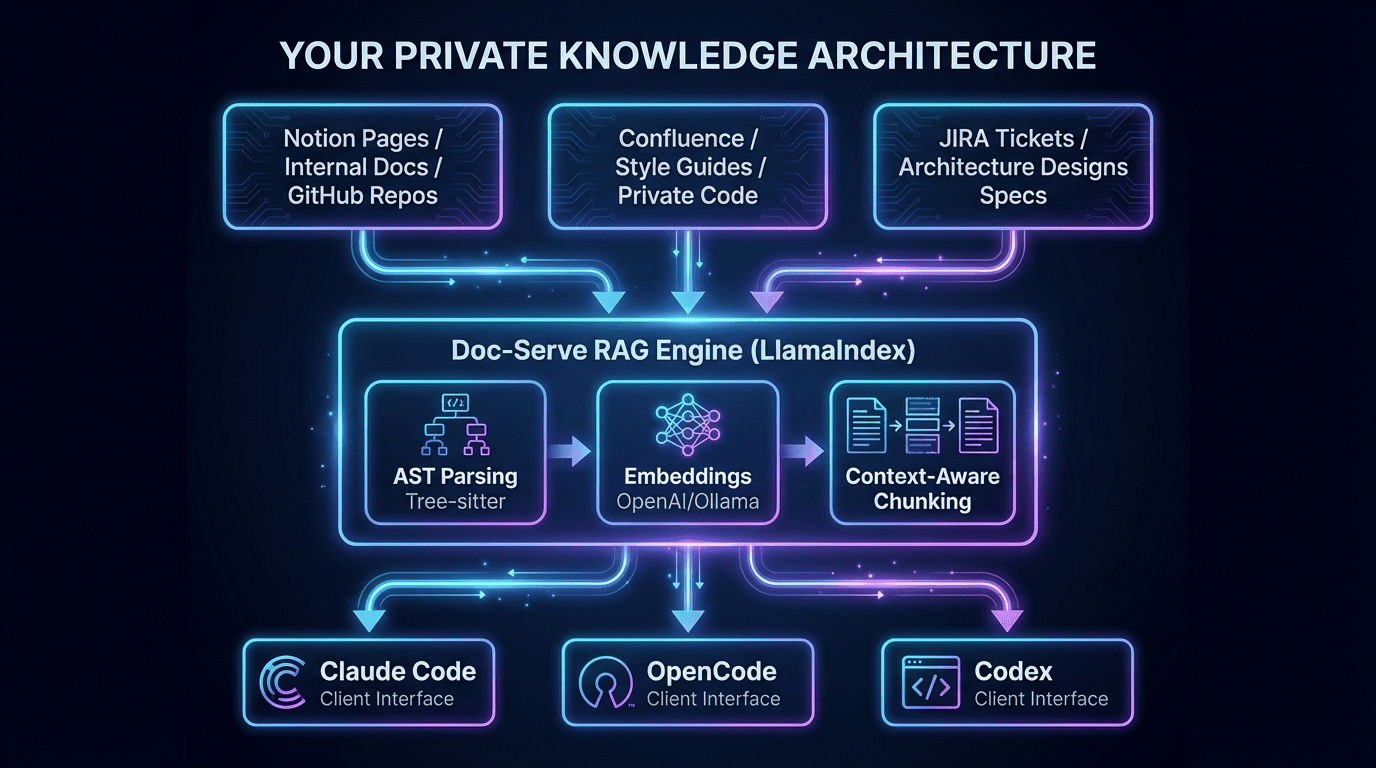
Doc-Serve is an agent skill that provides private Retrieval-Augmented Generation (RAG) by combining intelligent document indexing, semantic search, and deep code understanding. At its heart is the Doc-Serve Agent Skill, a native integration that works with:
- Claude Code
- OpenCode
- Codex (Cursor, etc.)
- Gemini CLI
- GitHub Copilot
- And 14+ other coding agents
This turns AI assistants into powerful domain experts by giving them seamless access to your private knowledge base. Think of it as extra memory for your coding agents; a core concept in modern agent development.
Why This Matters: Context Engineering for Grounded AI
I wanted a way to pull down code and documents and make them searchable from my coding agent. That's how the Doc-Serve Agent Skill was born — a key tool for agent development workflows.
I wrote agent skills and tools to:
- Recursively pull down Notion pages
- Fetch JIRA tickets
- Download Confluence documents
- Clone GitHub repositories
- Process Word docs, PDFs, PowerPoint slides
Then I indexed them all with a personal context-aware semantic RAG using LlamaIndex. Your coding assistants now have access to your entire corpus of private knowledge through agentic search with RAG.
This also works with:
- SDD Agent Skill (Spec-Driven Development): your specs become searchable
- Architect Agent: saved plans, designs, and instructions become searchable
- Project Memory Agent Skill: your project context persists across sessions (decisions, key facts, common errors)
The result: grounded truth that improves design and coding efforts.
What Makes Doc-Serve Different?
Most RAG systems treat documents as plain text. Doc-Serve goes deeper, especially with source code.
Code-Aware Ingestion
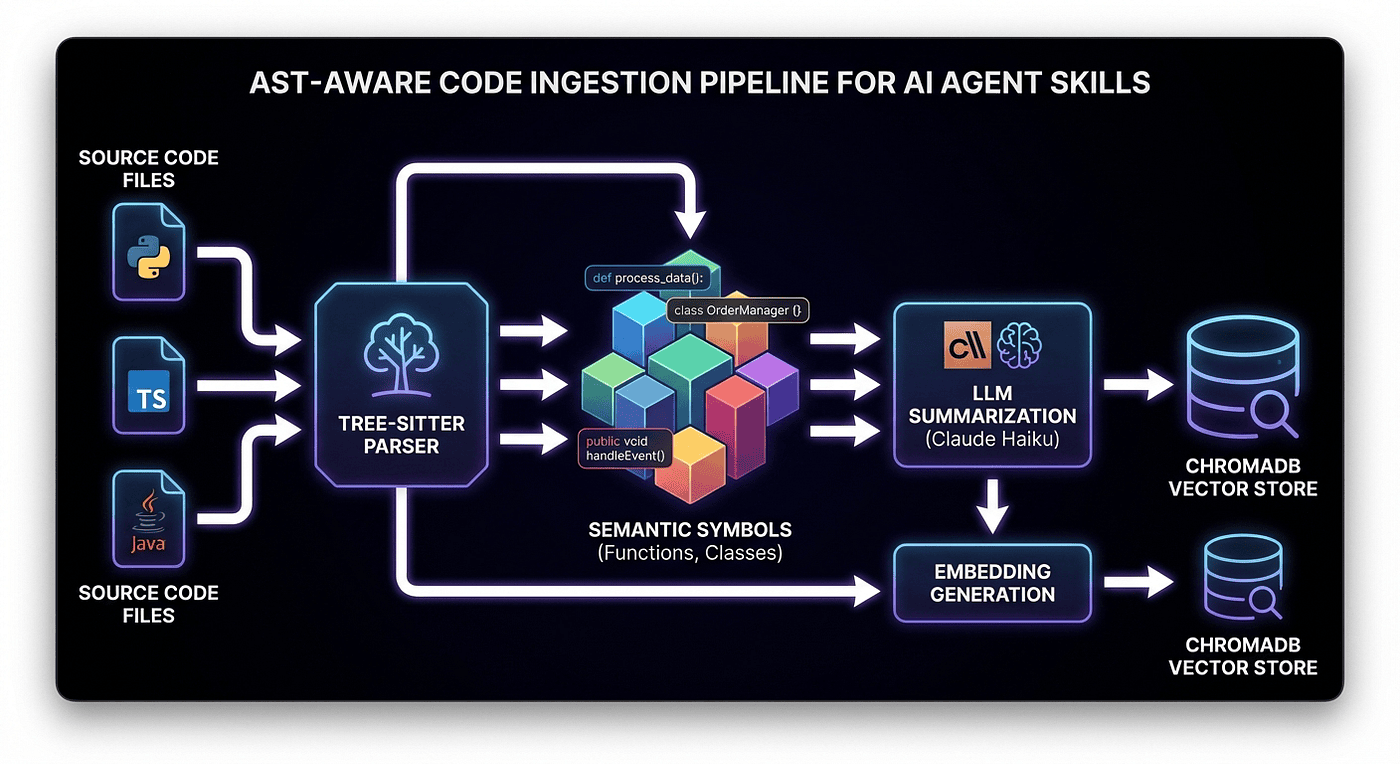
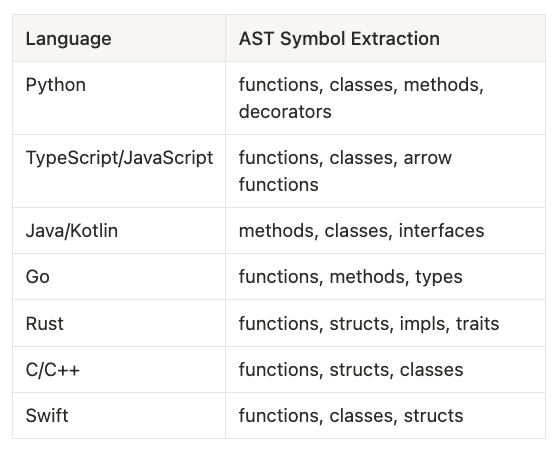
Supports 10 major programming languages using Tree-sitter for AST-aware chunking:
- Python: functions, classes, methods, decorators
- TypeScript/JavaScript: functions, classes, arrow functions
- Java/Kotlin: methods, classes, interfaces
- Go: functions, methods, types
- Rust: functions, structs, impls, traits
- C/C++: functions, structs, classes
- Swift: functions, classes, structs
This means intelligent splitting along functions, classes, and logical boundaries, not arbitrary line counts. A function stays together. A class definition doesn't get split in half. This code-aware approach is essential for effective agent skills.
LLM-Enhanced Summaries
Every code chunk gets an AI-generated summary powered by Claude Haiku. This dramatically improves semantic search relevance. We use the headers and sections of the document as semantic context.
When you search for "authentication flow," you find the authenticate_user function even if the code itself never uses the word "authentication."
Hybrid Search Power
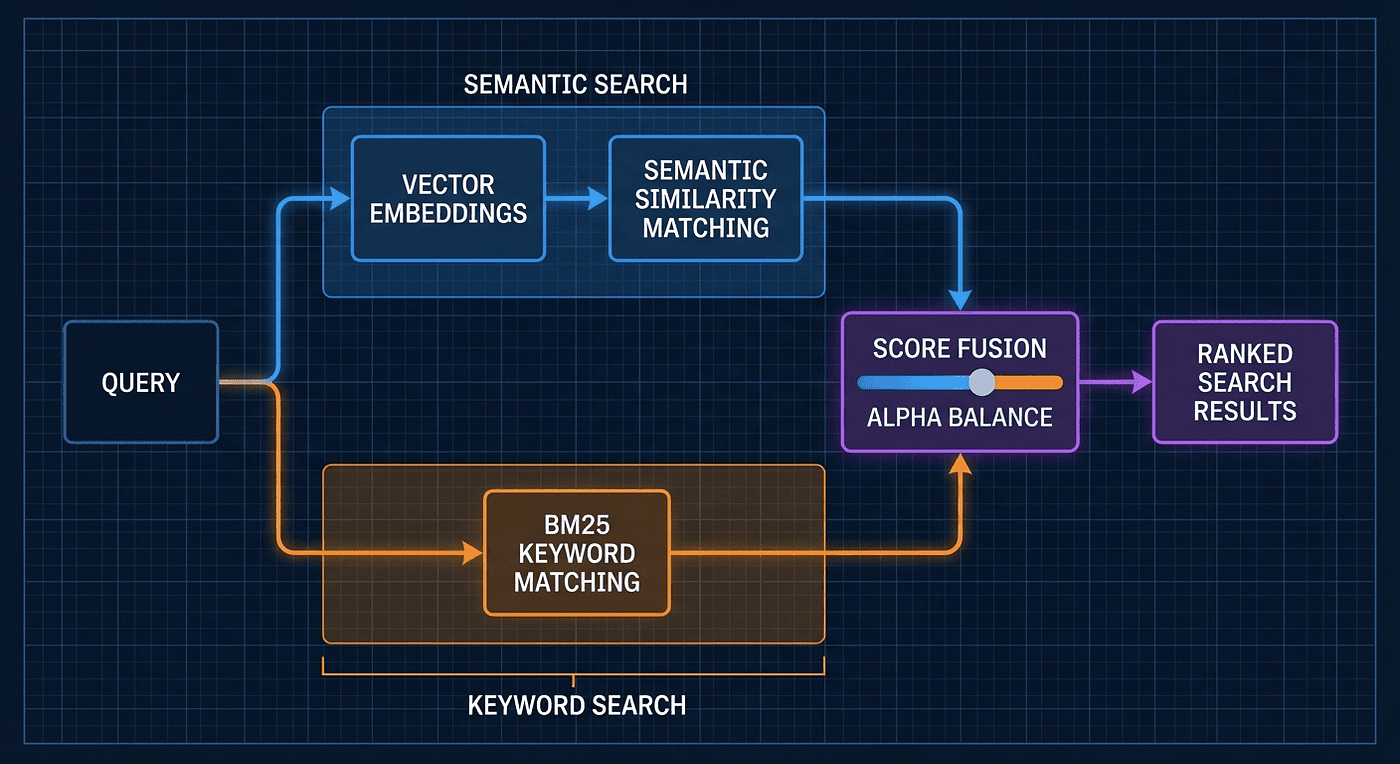
Combines two search strategies for powerful agentic search with RAG:
- Vector embeddings (OpenAI's text-embedding-3-large) for semantic understanding
- BM25 for exact keyword matching
Search for "how does login work" and get semantic matches. Search for "NullPointerException" and get exact keyword matches. Hybrid mode gives you both.
Unified Search Across Docs and Code
Query everything at once, or filter precisely:
# Search everything
doc-svr-ctl query "authentication flow"

# Search only Python code
doc-svr-ctl query "authentication flow" --source-types code \
  --languages python

# Search only documentation
doc-svr-ctl query "authentication flow" --source-types doc
Testing Doc-Serve from the Command Line
While the real power of Doc-Serve Agent Skill comes from letting your coding agent (Claude Code, Codex, OpenCode, Gemini, etc.) interact with it naturally, you can also test it directly from the command line.
This is useful for:
- Debugging: Verify that indexing worked correctly
- Testing: Experiment with different queries and filters
- Validation: Ensure your documents and code are searchable before relying on agent queries
Natural Language Agent Interaction
In practice, you don't need to remember command syntax. Just talk to your coding agent naturally:
"Find the authentication spec we discussed last week"
"Show me examples of the UserService class"
"How do we handle API rate limiting in this codebase?"
"Where is the logging configuration documented?"
Your coding agent translates these natural language requests into the appropriate doc-svr-ctl commands behind the scenes, using:
- The
querycommand with appropriate filters - Language-specific searches (
--languages python typescript) - Source type filters (
--source-types codeor--source-types doc) - Hybrid search modes for best results
The agent handles all the complexity. You just ask questions in plain English.
Command Line Examples for Testing
If you want to verify things are working, here are some useful commands:
# Check what's been indexed
doc-svr-ctl status

# Search everything
doc-svr-ctl query "authentication implementation"

# Search only Python code
doc-svr-ctl query "login function" --source-types code --languages python

# Search only documentation
doc-svr-ctl query "API authentication" --source-types doc

# Re-index a directory
doc-svr-ctl index ./src --include-code --languages python typescript

# Check server health
curl http://localhost:8000/health
But remember: these are debugging tools. In your day-to-day workflow, your coding agent does this automatically when you ask natural questions about your code and documentation.
The Doc-Serve Agent Skill: Your Coding Agent's Superpower
The standout feature is the doc-serve-skill package. This is a dedicated Agent Skill that integrates directly into AI workflows — a cornerstone of modern agent development.
Agent skills are now a standard that works with GitHub Copilot, OpenCode, Gemini, Codex, Forge, Cursor, and more.
You can use the command line for doc-serve if you want to, but essential the agentic skill knows when to call it
Defined in the skill's SKILL.md, it exposes simple yet powerful commands:
Command Description query Search documentation and code with natural language index Add or update documents and code status Monitor indexing health and progress
Once configured, Claude Code (or Codex or OpenCode) can autonomously query your private RAG system. No more guessing. No more outdated public info.
Real-World Impact
Imagine this scenario:
You're working on a large monolith with scattered documentation and thousands of lines of Python and TypeScript code. You ask Claude:
💡 "Show me how API endpoints are protected in the user service."
With the Doc-Serve Agent Skill enabled:
- Claude uses the
querycommand filtered to Python code - It retrieves relevant functions with their AI-generated summaries
- It cross-references related documentation
- You get exact snippets, file paths, and explanations from your actual codebase
The result: No hallucinations. No forgetting. No digging through files. Just reliable, context-rich answers powered by agentic search with RAG.
Installation Guide
Step 1: Install skilz
Skilz is the universal package manager for agent skills:
pip install skilz
skilz --version
Step 2: Install doc-serve-skill
Option A: Global/user install
Installs into your default agent skills directory (e.g., ~/.claude/skills for Claude):
skilz install https://github.com/SpillwaveSolutions/doc-serve-skill
Option B: Project-level install
Use this if you want the skill tied to a specific project:
skilz install https://github.com/SpillwaveSolutions/doc-serve-skill \
  --project
This installs locally into ./.claude/skills/ (or equivalent for your agent).
Step 3: Target a specific AI agent (optional)
Install for different coding assistants using --agent:
# Install for Codex (Cursor, etc.)
skilz install https://github.com/SpillwaveSolutions/doc-serve-skill \
  --agent codex

# Install for Gemini
skilz install https://github.com/SpillwaveSolutions/doc-serve-skill \
  --agent gemini

# Install for OpenCode
skilz install https://github.com/SpillwaveSolutions/doc-serve-skill \
  --agent opencode
Supported agents include claude, codex, gemini, copilot, opencode, and 14+ more - making this essential for any agent development workflow.
Step 4: Using Doc-Serve Agent Skill
Once installed, enter Planning Mode (or your agent's equivalent) and tell your coding assistant:
💡 "Use the doc-serve skill to make the following locations searchable…"
Then let it loose.
Because Doc-Serve Agent Skill has indexed your specs, designs, code, and internal docs, your agent will now ground its answers in your real, private context rather than generic knowledge.
Search is also natural language based too.
💡 "Search the Python code for examples of working with the internal auth lib"
Power User Example
If you have Notion, Confluence, or JIRA skills, you could say:
💡 "Save the context of the following epics in JIRA and look up related documents in Confluence and style guides. Pull down these GitHub repos too. Store Confluence pages under ./confluence, store epics and tickets under ./tickets, and put repos under ./related-repos. Then index everything with doc-serve."
I've done something like this recently, and it worked very well. It's amazing when you come up with a plan and it works.
Under the Hood: How It Works
Context-Aware Chunking with LlamaIndex
Doc-Serve uses LlamaIndex's powerful document processing pipeline:
class CodeChunker:
    """AST-aware code chunking using Tree-sitter.
    This chunker understands code structure.
    Functions stay together. Classes don't get split.
    Docstrings stay with their methods.
    """
    def __init__(self, language: str, generate_summaries: bool = True):
        # LlamaIndex CodeSplitter for intelligent splitting
        self.code_splitter = CodeSplitter(
            language=language,
            chunk_lines=40,        # Target chunk size
            chunk_lines_overlap=15, # Context overlap
            max_chars=1500,        # Hard limit
        )
        # Tree-sitter for AST parsing
        self.ts_language = tslp.get_language(language)
        self.parser = tree_sitter.Parser(self.ts_language)

    def _get_symbols(self, text: str) -> list[dict]:
        """Extract semantic symbols from code.
        Uses Tree-sitter queries to find functions, classes, and methods.
        This tells us where each code block begins and ends.
        """
        tree = self.parser.parse(text.encode("utf-8"))
        # Language-specific query for Python
        query_str = """
        (function_definition name: (identifier) @name) @symbol
        (class_definition name: (identifier) @name) @symbol
        """
        query = tree_sitter.Query(self.ts_language, query_str)
        matches = query.matches(tree.root_node)
        return [
            {
                "name": match.captures["name"].text.decode(),
                "kind": match.captures["symbol"].type,
                "start_line": match.captures["symbol"].start_point[0] + 1,
                "end_line": match.captures["symbol"].end_point[0] + 1,
            }
            for match in matches
        ]
Hybrid Search Fusion
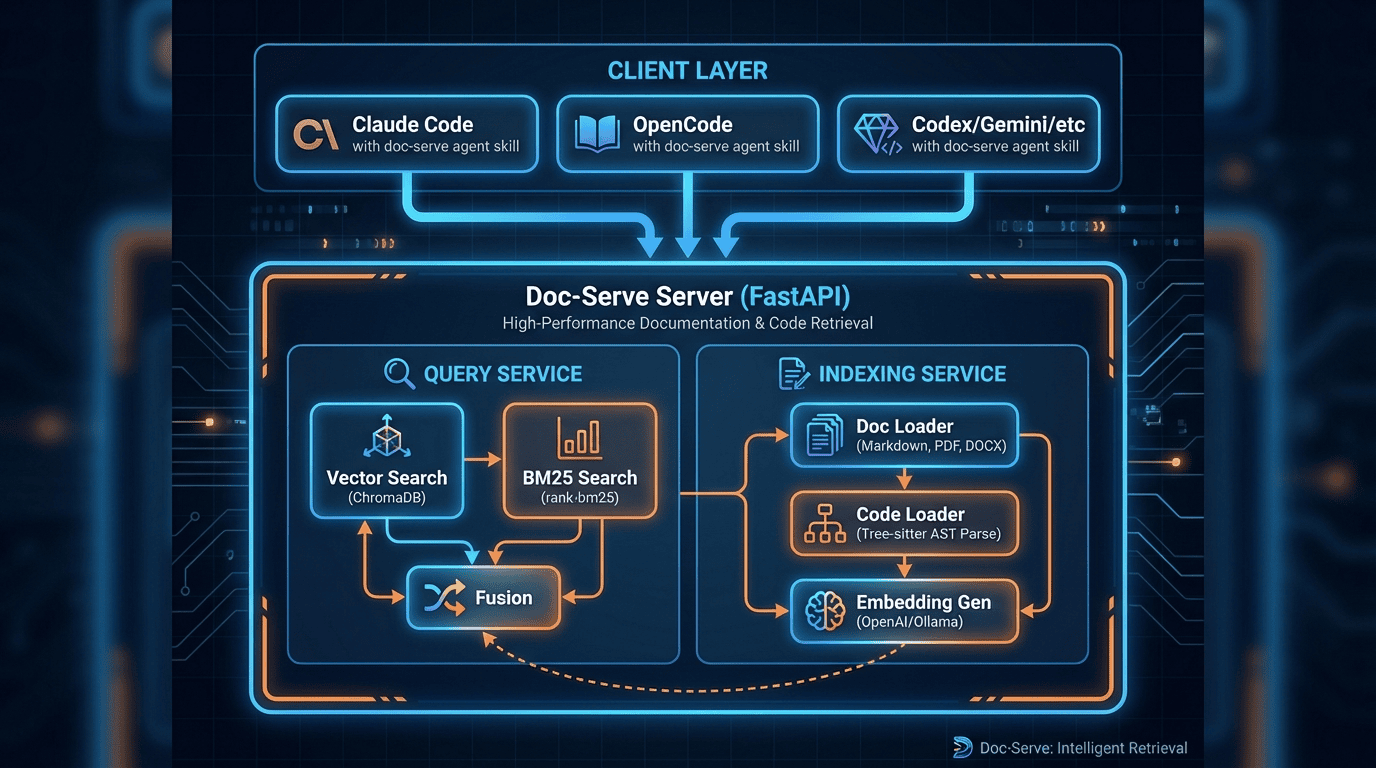
The query service combines vector and BM25 search for comprehensive agentic search with RAG:
async def _execute_hybrid_query(self, request: QueryRequest) -> list[QueryResult]:
    """Execute hybrid search with normalized score fusion.
    Runs both searches in parallel, normalizes scores to 0-1,
    then combines using alpha weighting.
    """
    # Vector search: semantic understanding
    query_embedding = await self.embedding_generator.embed_query(request.query)
    vector_results = await self.vector_store.similarity_search(
        query_embedding=query_embedding,
        top_k=request.top_k,
    )

    # BM25 search: exact keyword matching
    bm25_results = await self.bm25_manager.search_with_filters(
        query=request.query,
        top_k=request.top_k,
    )

    # Normalize and combine
    # alpha=1.0 is pure vector, alpha=0.0 is pure BM25
    # alpha=0.5 gives equal weight to both (recommended default)
    combined = self._fuse_results(
        vector_results,
        bm25_results,
        alpha=request.alpha  # Default: 0.5
    )
    return combined
What is Hybrid Fusion?
Hybrid fusion is a search technique that combines multiple search methods to deliver more accurate and comprehensive results. In Doc-Serve's case, it merges two complementary approaches:
- Vector Search (Semantic): Uses embeddings to understand the meaning of your query. Great for conceptual questions like "How does authentication work?" even if those exact words aren't in the code.
- BM25 Search (Keyword): A probabilistic ranking function that excels at exact keyword matching. Perfect for finding specific function names, variable names, or technical terms.
The fusion process works in three steps:
- Parallel Execution: Both searches run simultaneously against the same corpus
- Score Normalization: Results from each method are normalized to a 0-1 scale so they can be fairly compared
- Weighted Combination: Scores are combined using an alpha parameter (default 0.5), which balances semantic understanding with exact matching
The alpha parameter controls the weight:
alpha = 1.0: Pure vector search (all semantic, no keywords)alpha = 0.5: Equal weight to both (recommended default)alpha = 0.0: Pure BM25 search (all keywords, no semantic)
This hybrid approach ensures you get the best of both worlds: the intelligence of semantic search and the precision of keyword matching. It's especially powerful for code search, where you might want to find both conceptually similar code and exact function names.
The doc-serve agent skills and infrastructure allows for similarity search query, bm25 only query or a fusion query.
Architecture of Doc Serve Agent Skill System
The Future: Local-First and Fully Private
The current version works great, but here's where it's heading.
Ollama Integration (Coming Soon)
I want to add Ollama-based text embeddings so everything can stay in your local environment. No API calls. No data leaving your machine.
- Local embeddings: Ollama-based models for vector search
- Local summarization: Ollama LLMs for code summaries
- Fully private: Nothing leaves your machine
PostgreSQL Backend (Planned)
For enterprise deployments, a PostgreSQL backend with:
- pgvector for vector embeddings
- pg_search for BM25
- ACID guarantees for reliable operations
- Familiar tooling for DBAs
Multi-Agent Support
I regularly switch between OpenCode, Claude Code, Gemini CLI, and Codex, sometimes on the same project. The networked service layer means multiple agents can query the same corpus simultaneously — a key feature for collaborative agent development. This is why I didn't use ducksb or SQLite. I considered it.
The Bigger Picture: Context Engineering
Doc-Serve is part of a larger vision: context engineering for AI coding agents.
By combining:
- Private documentation (Confluence, Notion, internal wikis, tickets)
- Private code (your actual repositories)
- Structured knowledge (JIRA tickets, architecture docs, specs)
- Context-aware chunking (AST parsing, semantic boundaries)
- Hybrid search (vector + BM25)
You create a grounded knowledge layer that dramatically reduces hallucinations and improves the quality of AI-generated code and explanations. This is the essence of effective agent skills — giving your AI the context it needs.
This isn't just about search. It's about giving your AI coding agent a real understanding of your domain, your codebase, and your way of doing things through agentic search with RAG.
Get Started
If you wanted to debug / test you could use the command line.
Doc-Serve is open source (MIT licensed):
# Clone the repo
git clone https://github.com/SpillwaveSolutions/doc-serve-skill.git
cd doc-serve-skill

# Install dependencies
task install

# Configure API keys
cp doc-serve-server/.env.example doc-serve-server/.env
# Add your OpenAI and Anthropic keys

# Start the server
task dev

# Index your project
doc-svr-ctl index ./my-project --include-code

# Query
doc-svr-ctl query "authentication flow" --languages python typescript
Or just install the skill and tell your agent to set it up:
skilz install https://github.com/SpillwaveSolutions/doc-serve-skill
Then tell your coding agent which directories to index and what to search. It handles the rest.
This was the vision, and it is early days, but it works.
Conclusion
The Doc-Serve Agent Skill isn't just another RAG tool. It's a blueprint for the next generation of AI agents that operate with enterprise-grade reliability.
By combining private knowledge, code intelligence, and native coding agent integration, it eliminates one of the biggest barriers to real-world AI adoption: trust.
You can ground your AI in your private corporate knowledge. No more hallucinations. No more forgetting. Just reliable, context-rich answers from your actual codebase and documentation powered by agentic search with RAG.
Whether you're a solo developer maintaining a complex project or a team building proprietary systems, Doc-Serve empowers your AI assistants to truly understand your domain. This is the future of agent development and agent skills.
The era of hallucination-free technical assistance is here.
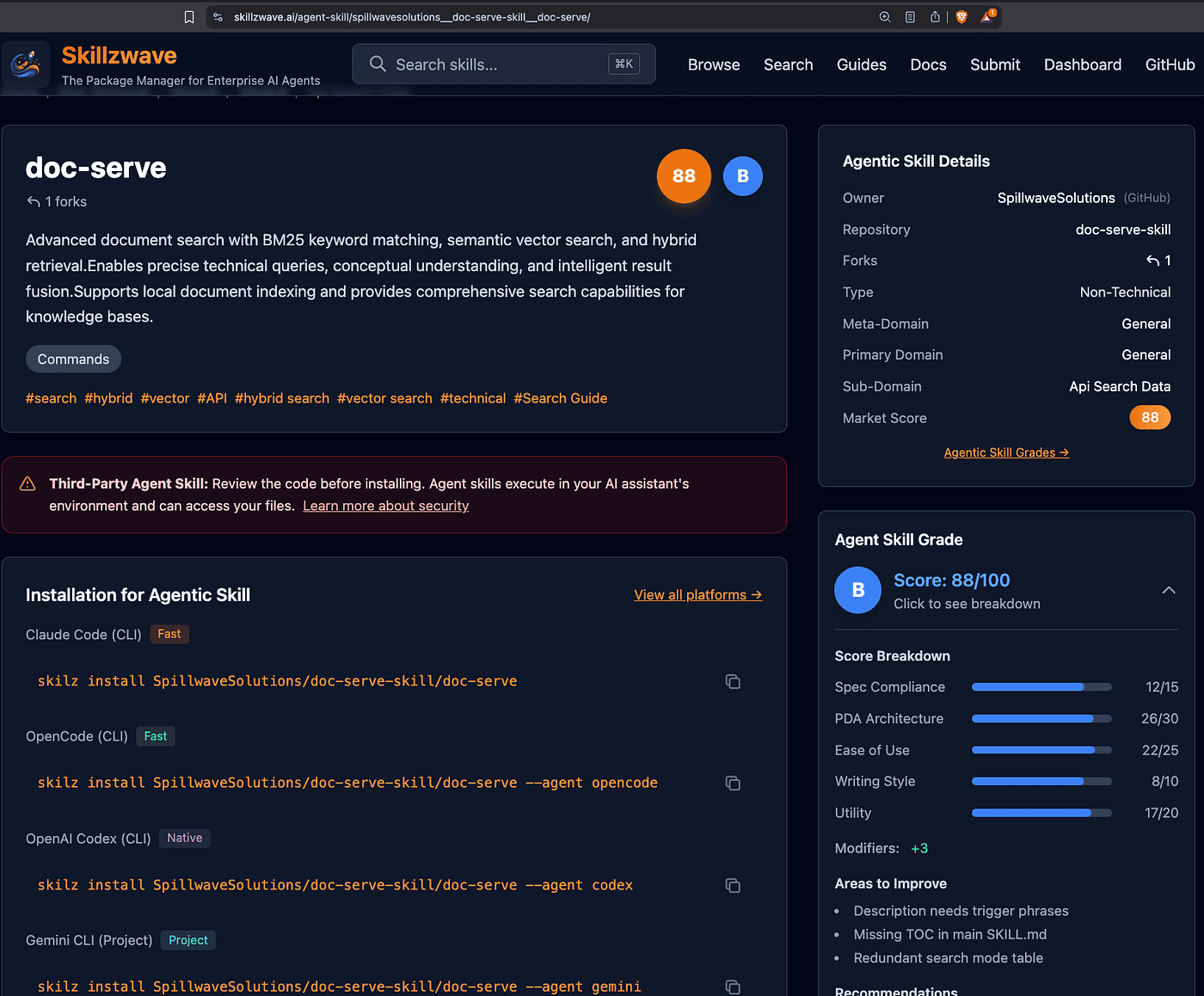
You can find doc-serve agent skill on the Agent Marketplace
Resources
- Doc-Serve GitHub Repository
- Skilz Package Manager
- LlamaIndex Documentation
- Tree-sitter Documentation
Related Spillwave Agent Skills
- Notion Uploader/Downloader: Upload and download Markdown to Notion
- Confluence Agent Skill: Enterprise documentation integration JIRA Integration: Create and read JIRA tickets
Doc-Serve is open source under the MIT License. Star it, try it, and join the movement toward more reliable, grounded AI through better agent skills and agentic search with RAG.
About the Author
Rick Hightower is a technology executive and data engineer who led ML/AI development at a Fortune 100 financial services company. He created skilz, the universal agent skill installer, supporting 14+ coding agents including Claude Code, Gemini, Copilot, and Cursor, and co-founded the world's largest agentic skill marketplace. CConnect with Rick Hightower on LinkedIn or Medium.
The Claude Code community has developed powerful extensions that enhance its capabilities. Here are some valuable resources from Spillwave Solutions (Spillwave Solutions Home Page):
Integration Skills
- Notion Uploader/Downloader Agent Skill: Seamlessly upload and download Markdown content and images to Notion for documentation workflows
- Confluence Agent Skill: Upload and download Markdown content and images to Confluence for enterprise documentation
- JIRA Integration Agent Skill: Create and read JIRA tickets, including handling special required fields