Engineering Dynamic Context: The Claude Code Architecture That Survives Production
CCA-F Domain 3: From Token Exhaustion to Production-Grade Workflows
Originally published on Medium.
CCA-F Domain 3: From Token Exhaustion to Production-Grade Workflows
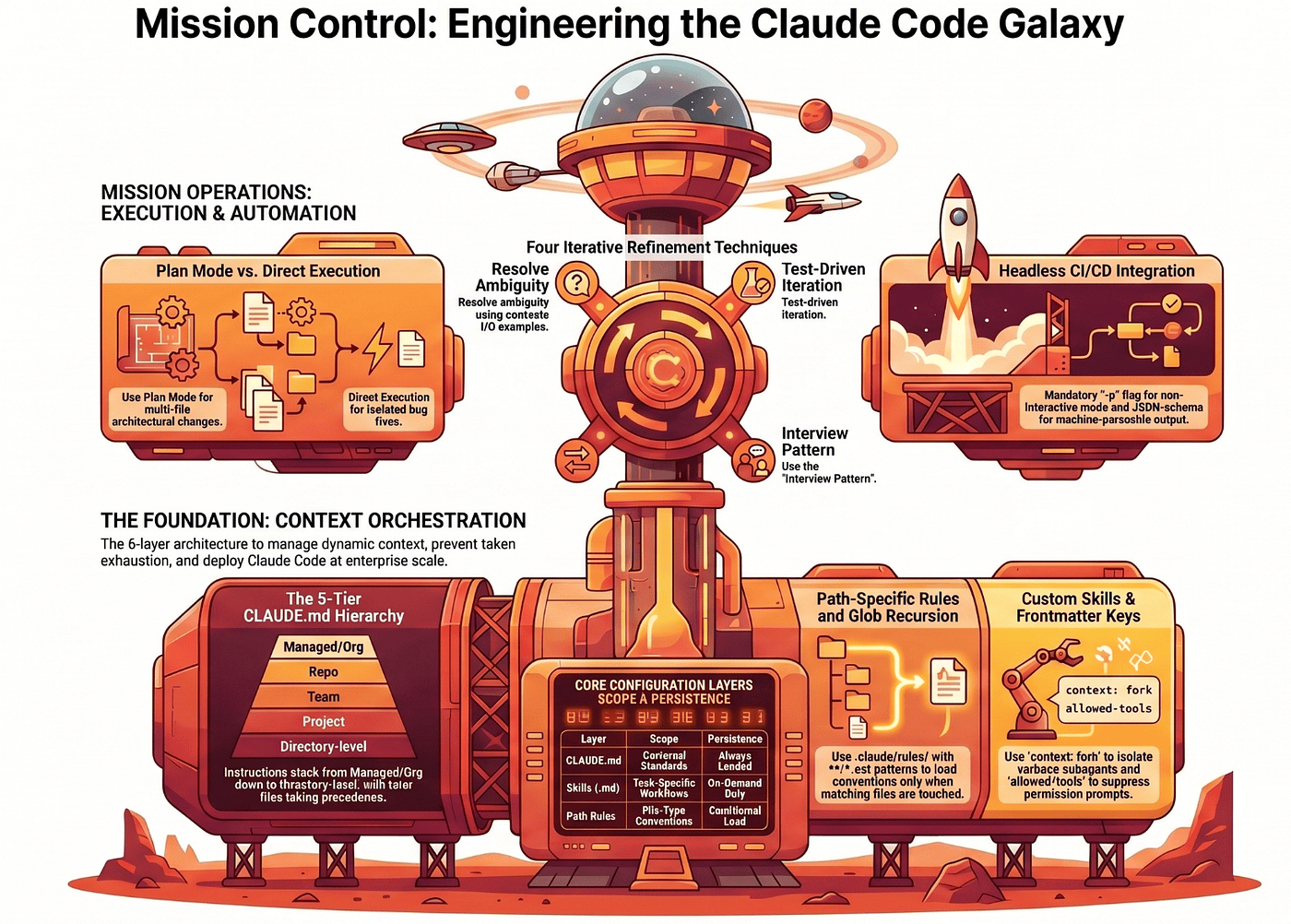
Dump your enterprise codebase into a single Claude Code prompt and the system collapses; the discipline that prevents that collapse is exactly what Domain 3 of the CCA Foundations exam tests.
Summary: Claude Code only works at scale if you stop treating it like a developer chat and start engineering its context environment. This article walks the six-layer architecture that Domain 3 of the CCA Foundations exam tests: the five-tier CLAUDE.md hierarchy with its on-demand subdirectory loading, custom slash commands and skills with the three frontmatter keys (context: fork, allowed-tools, argument-hint), glob-scoped path rules, plan mode versus direct execution, four iterative refinement techniques, and headless CI/CD integration with -p, --output-format json, and --json-schema.
The Token Exhaustion Collapse
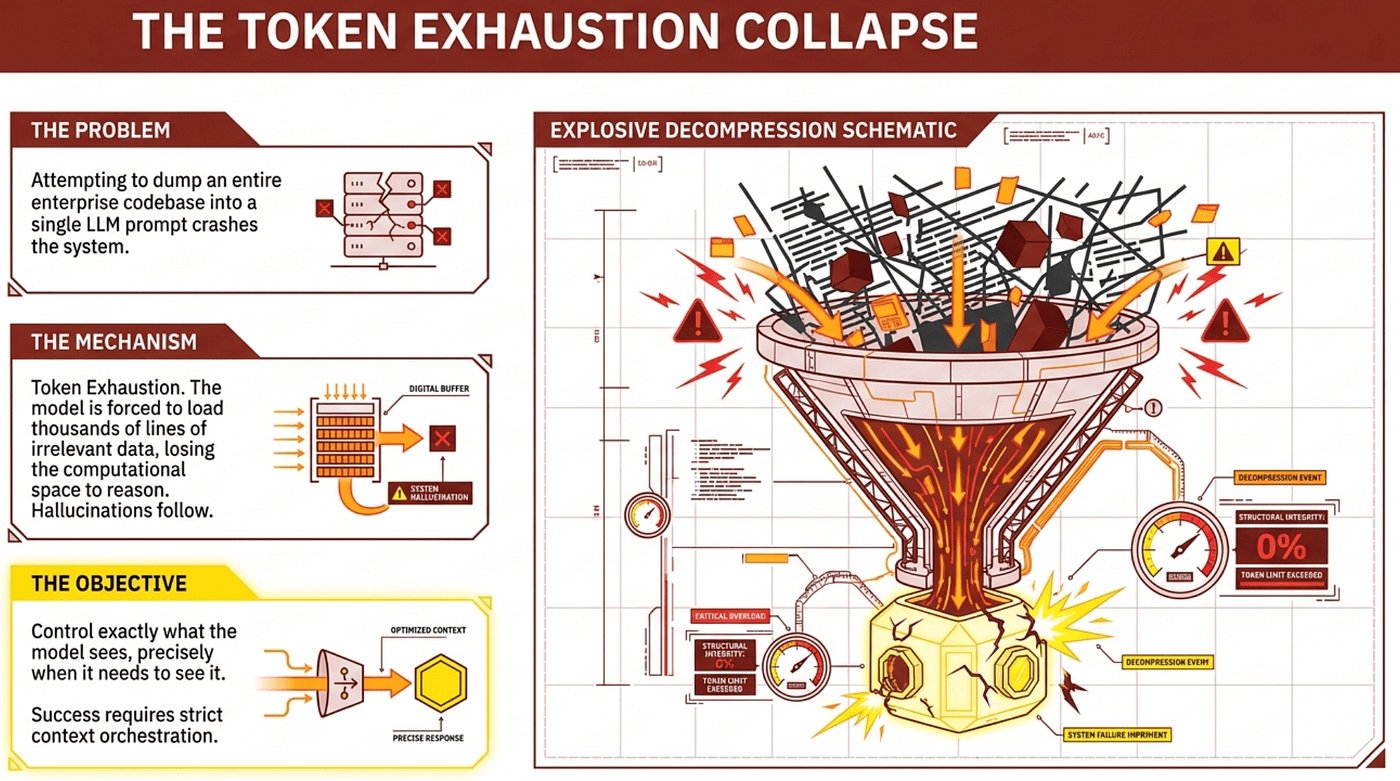
If you attempt to dump an entire enterprise codebase into a single LLM prompt, the system will collapse. The mechanism is token exhaustion. When a model is forced to load thousands of lines of irrelevant data, it loses the computational space it needs to actually reason about the code, and hallucinations follow inevitably.
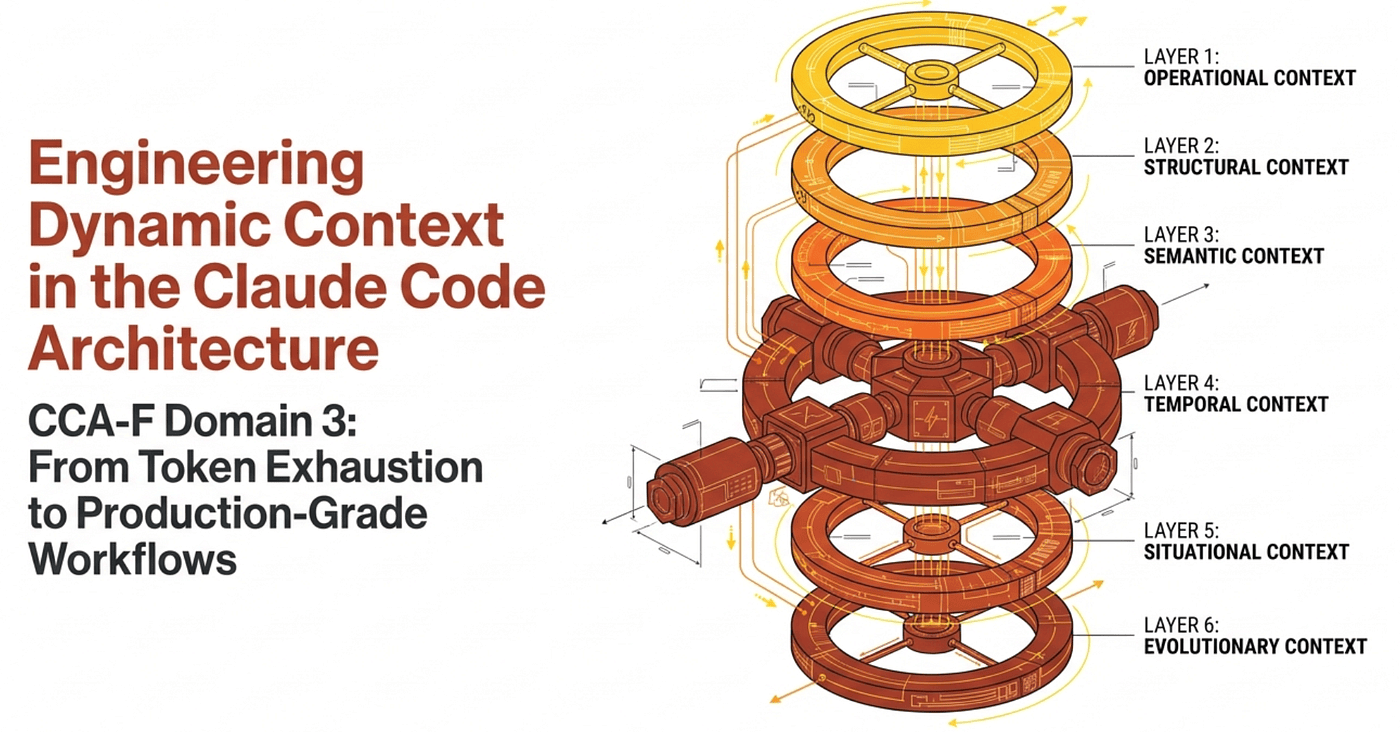
To deploy Claude Code in a production environment, you have to discard the idea of an interactive developer chat. Success requires strict context orchestration, architected from first principles. The objective is simple to state and ruthless to enforce: control exactly what the model sees, precisely when it needs to see it.
We build that discipline across six layers, mapping directly to the six task statements that govern Domain 3 of the CCA Foundations exam: the CLAUDE.md configuration hierarchy, custom slash commands and skills, path-specific conditional rules, plan mode versus direct execution, iterative refinement techniques, and headless CI/CD integration. Each layer has the same job, just at a different level of the stack.
Claude Code's reliability at scale depends entirely on how strictly you enforce its context boundaries. Let's walk the layers.
Layer 1. The CLAUDE.md Configuration Hierarchy
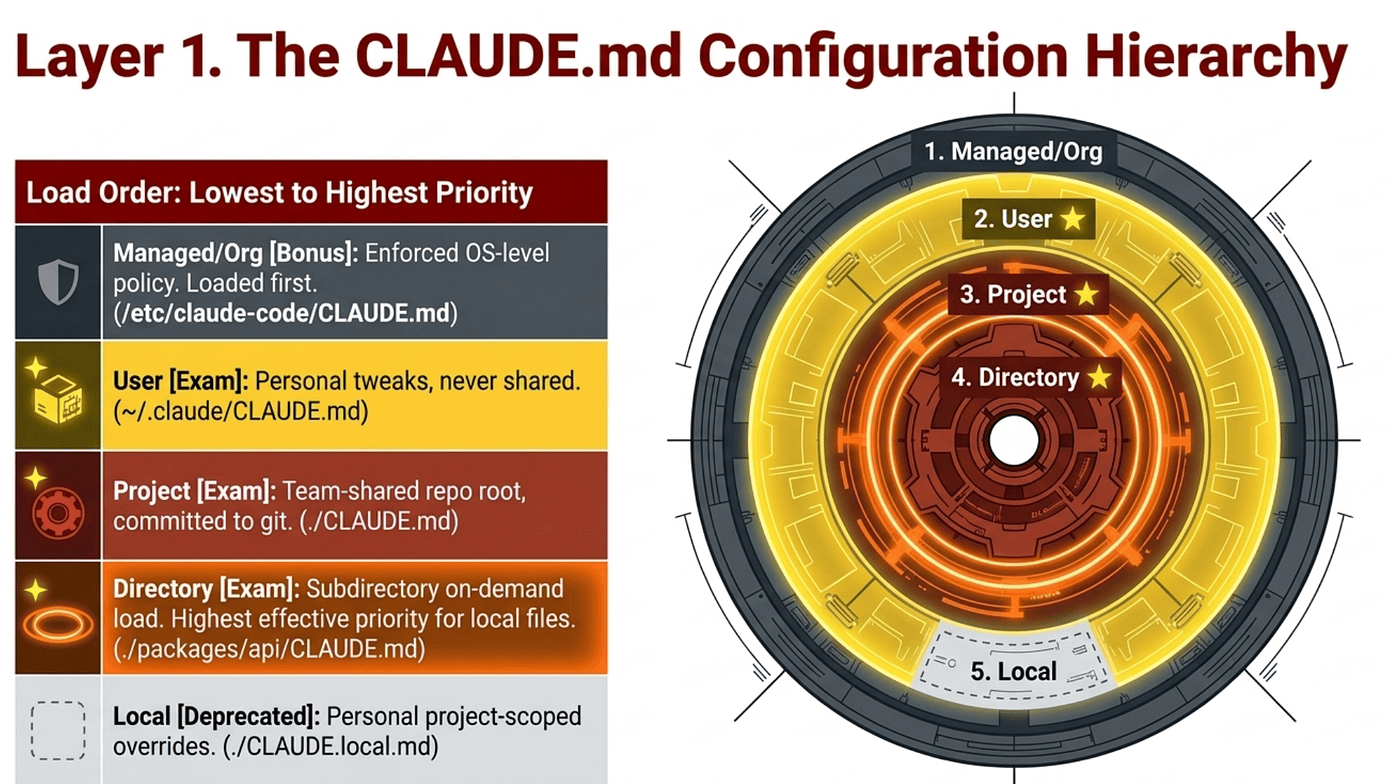
The exam tests three CLAUDE.md scopes by name in Domain 3.1: user, project, and directory. Anthropic's documentation describes two more locations (managed/org and CLAUDE.local.md) that are not enumerated in the objectives but matter for real production work. We will cover all five, with a clear marker for which are on-exam and which are bonus.
Anthropic's documented load order is lowest to highest priority, where files loaded later in the context window take precedence because the model attends more strongly to later instructions. The list below is presented in load order; precedence increases as you go down.
1. Managed/Org (loaded first, enforced as policy, beyond the listed exam objectives). Anthropic's documentation describes an OS-level enterprise configuration path used by IT to deploy organization-wide compliance rules. This tier is not in the Domain 3.1 objectives but matters for enterprise deployments. When enforced via policy settings, it cannot be overridden by user or project files.
macOS: /Library/Application Support/ClaudeCode/CLAUDE.mdLinux/WSL: /etc/claude-code/CLAUDE.mdWindows: C:\Program Files\ClaudeCode\CLAUDE.md
2. User (personal, never shared). Lives at ~/.claude/CLAUDE.md. Use this level for personal verbosity preferences, editor quirks, and individual workflow tweaks. Loaded for every project. Crucially, user-level instructions are not shared with teammates via version control.
3. Project (team-shared, version-controlled). Lives at ./CLAUDE.md (the repo root) or ./.claude/CLAUDE.md. Use this level for coding standards, test commands, architecture decisions, and project terminology. Committed to git, so every teammate gets the same rules automatically on clone. This is the primary level the exam asks about for team-wide standards.
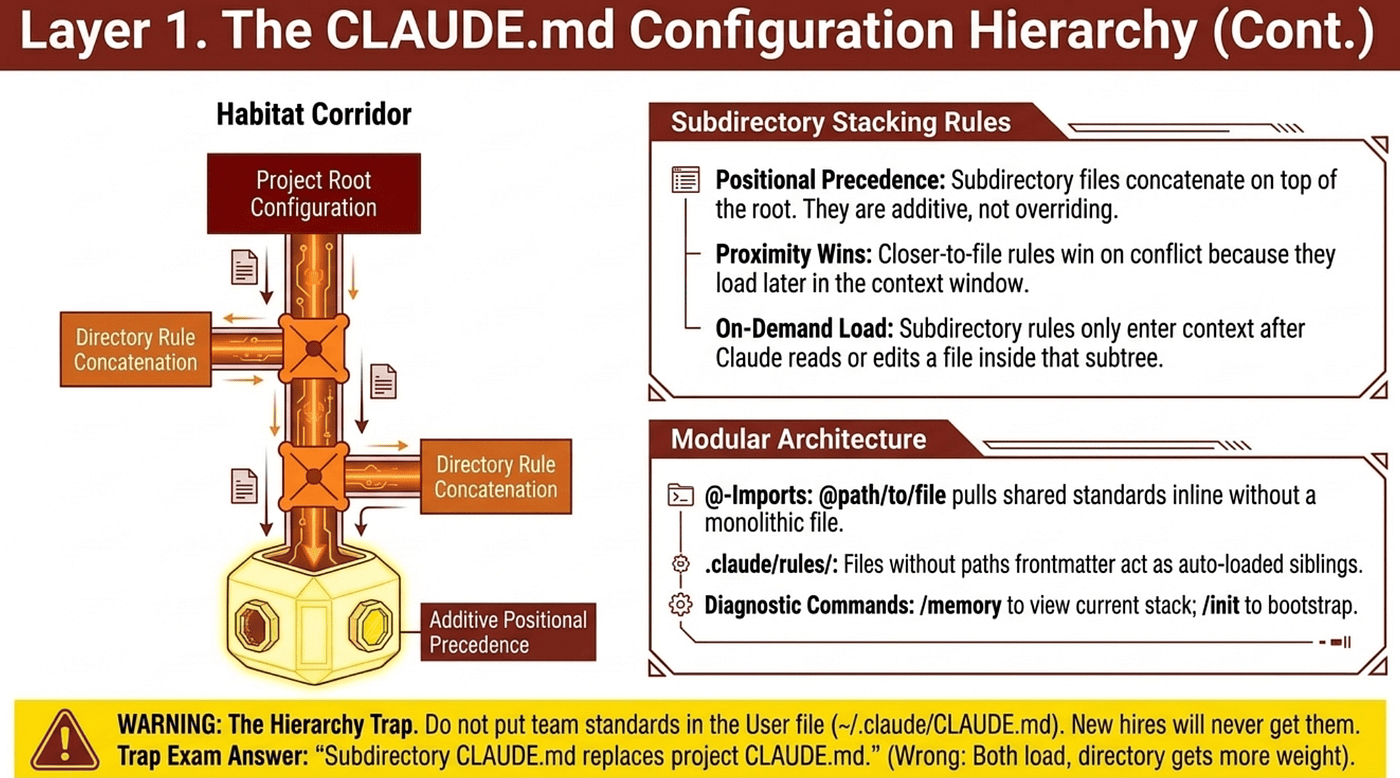
4. Directory-level (subdirectory CLAUDE.md). Lives inside a subdirectory of the project, such as ./packages/api/CLAUDE.md or ./services/billing/CLAUDE.md. Loads on demand, not at session start: it only enters context after Claude reads or edits a file in that subdirectory. Use this level when conventions cluster by location: all API code in one package, all frontend code in another. Each maintainer keeps standards local to their own package without forcing the whole project to import them globally. Because it loads later (after the root CLAUDE.md is already in context), it carries higher effective priority for files inside its scope.
5. Local (personal project-scoped overrides, deprecated but still functional, beyond the listed exam objectives). Lives at ./CLAUDE.local.md in the repo root, gitignored. Originally intended for personal project-specific preferences that should not be committed. Anthropic has deprecated this file in favor of @-path imports, which work better across multiple git worktrees. The file still loads if present, but new projects should use imports of user-level files instead. Worth knowing it exists so you recognize it in legacy repos, but not the answer to give on a current best-practices question.
How Subdirectory CLAUDE.md Files Stack with the Project Root
This is the precedence behavior the exam expects you to know, and it differs from how most config systems work.
Subdirectory CLAUDE.md files do not replace the project root CLAUDE.md. They layer on top of it through concatenation. When Claude Code reads or edits a file inside ./packages/api/, the loader walks from the root down to that file's directory and concatenates every CLAUDE.md it finds along the way. The root ./CLAUDE.md loads first, then ./packages/CLAUDE.md if it exists, then ./packages/api/CLAUDE.md. All three are now in context simultaneously.
The precedence mechanism is positional, not algorithmic. Anthropic's documentation states that files loaded later in the context window take precedence because the model attends more strongly to later instructions. There is no formal override engine; the layering is a function of where each rule sits in the prompt.
Three consequences fall out of this:
Subdirectory files are additive, not overriding. If the root CLAUDE.md says "use Vitest for tests" and a subdirectory CLAUDE.md says nothing about test frameworks, the Vitest rule still applies in that subdirectory. The child does not have to repeat the parent's rules. The child only needs to state what is different or additional for its scope.
Closer-to-file rules win on conflict. When rules contradict, the file loaded later (the more specific one closer to the current working file) is more likely to be honored. The root says "all functions need JSDoc"; ./packages/legacy/CLAUDE.md says "JSDoc is not required in this package." For files in that package, the legacy rule sits later in context and tends to win. This is convention rather than a guaranteed override; for predictable behavior, write subdirectory rules as explicit exceptions ("In this package, override the root rule and do X") rather than relying on the model to infer the conflict.
Subdirectory CLAUDE.md loads on demand. It does not appear at session start. If you run /memory immediately after launching Claude Code, you will only see the root, user, and managed files. Subdirectory CLAUDE.md only enters context after Claude reads or edits a file inside that subtree. This is intentional: it preserves tokens for files Claude is not touching. The debugging implication: if a subdirectory rule "is not loading," check whether Claude has actually read a file in that subtree yet.
The trap answer the exam offers: "subdirectory CLAUDE.md replaces project CLAUDE.md for files in that subdirectory." That is wrong. Both load, both stay in context, and the subdirectory file gets more weight because it loads later.
Across all five tiers, the same layering logic applies. Managed/org loads first and (when enforced via policy settings) cannot be overridden by anything below it. User loads next. Project loads after that. Directory-level layers on top within its scope. CLAUDE.local.md is deprecated but still loads if present. The hierarchy is cumulative, not exclusive, with managed/org as the only true hard ceiling.
The Hierarchy Trap
User-level configuration at ~/.claude/CLAUDE.md is strictly personal and never commits to version control. If you put team-wide standards there, your new hires will never see them. They will report that Claude Code suggests different patterns than what experienced engineers get, and the cause will be exactly this: senior engineers customized their user-level files for months while team standards never made it into the repo. When a question asks where team-wide standards should live, the answer is always project-level.
Modular Imports with the @ Syntax
A monolithic CLAUDE.md becomes a token liability. CLAUDE.md files can pull in external files using @path/to/file syntax: an @ symbol immediately followed by a path, written inline inside the markdown text.
# Additional Instructions
- git workflow @docs/git-instructions.md
- testing standards @./standards/testing.md
- api conventions @./standards/api-conventions.md
Note the syntax: an @ followed by a path, sitting inside surrounding prose. It is not a directive name like @import and not a fenced block. Imported files are expanded and loaded into context at launch alongside the CLAUDE.md that references them. Both relative and absolute paths work, with relative paths resolved against the file containing the import (not the working directory). Recursive imports are permitted up to five hops deep. Imports inside markdown code spans or code blocks are not evaluated, which is how Anthropic prevents collisions with strings like `@anthropic-ai/claude-code` in documentation prose.
Use @-path imports when each package or directory needs only a curated subset of the available standards. A maintainer in packages/api/ imports api-conventions.md and testing.md; the maintainer in packages/frontend/ imports react-patterns.md and testing.md. Each package's CLAUDE.md stays focused on its own domain, and shared standards live in one place.
The .claude/rules/ Directory: Auto-Loaded, No Import Required
This is the detail most candidates miss. Files in .claude/rules/ are discovered automatically by Claude Code. You do not need to reference them with @-path syntax. The loading behavior splits on whether the file has paths frontmatter:
- No paths frontmatter: the rule loads at launch with the same priority as
.claude/CLAUDE.md. Treat it as a sibling of your project CLAUDE.md, just split into a separate file. - With paths frontmatter: the rule loads conditionally when Claude reads or edits a file matching the glob (covered in Layer 3).
The canonical project structure:
your-project/
├── .claude/
│   ├── CLAUDE.md           # Main project instructions, always loaded
│   └── rules/
│       ├── code-style.md   # No paths frontmatter, loads at launch
│       ├── testing.md      # paths: ["**/*.test.*"], loads conditionally
│       └── security.md     # No paths frontmatter, loads at launch
This pattern beats a single monolithic CLAUDE.md two ways: each file stays focused on one concern, and the path-scoped subset only injects context when relevant.
Choosing the Right Mechanism
The decision rule the exam rewards:
- Project CLAUDE.md is for the orchestrating instructions, the table of contents of your project memory.
- Directory-level CLAUDE.md is for conventions that cluster by location (a package, a service, a domain folder).
.claude/rules/without paths is for always-loaded topic files you want kept separate from CLAUDE.md for readability..claude/rules/with paths is for conditional topic files that should only load for matching files.@-path imports are for pulling in shared standards files that live outside.claude/rules/, especially when different packages need different subsets.
Diagnosing Hierarchy Issues: /memory
If you suspect state drift or inconsistent behavior, your first command is /memory. It is the official diagnostic tool. It lists every memory file currently loaded in the session, in priority order. When a teammate reports "Claude is ignoring our standards," run /memory together and the cause is usually visible in seconds: the project CLAUDE.md is missing, or a user-level file is overriding it, or a subdirectory file is being excluded.
Two more commands worth knowing. /init generates an initial project CLAUDE.md by analyzing your repository structure, build commands, and test framework. Use it as a starting point, then customize and commit the final version. Auto-accumulated memories live at ~/.claude/projects/<project>/memory/MEMORY.md. If "accumulated memories" are affecting behavior unexpectedly, that is where to look, not in the project repo.
Layer 2. Slash Commands and Skills
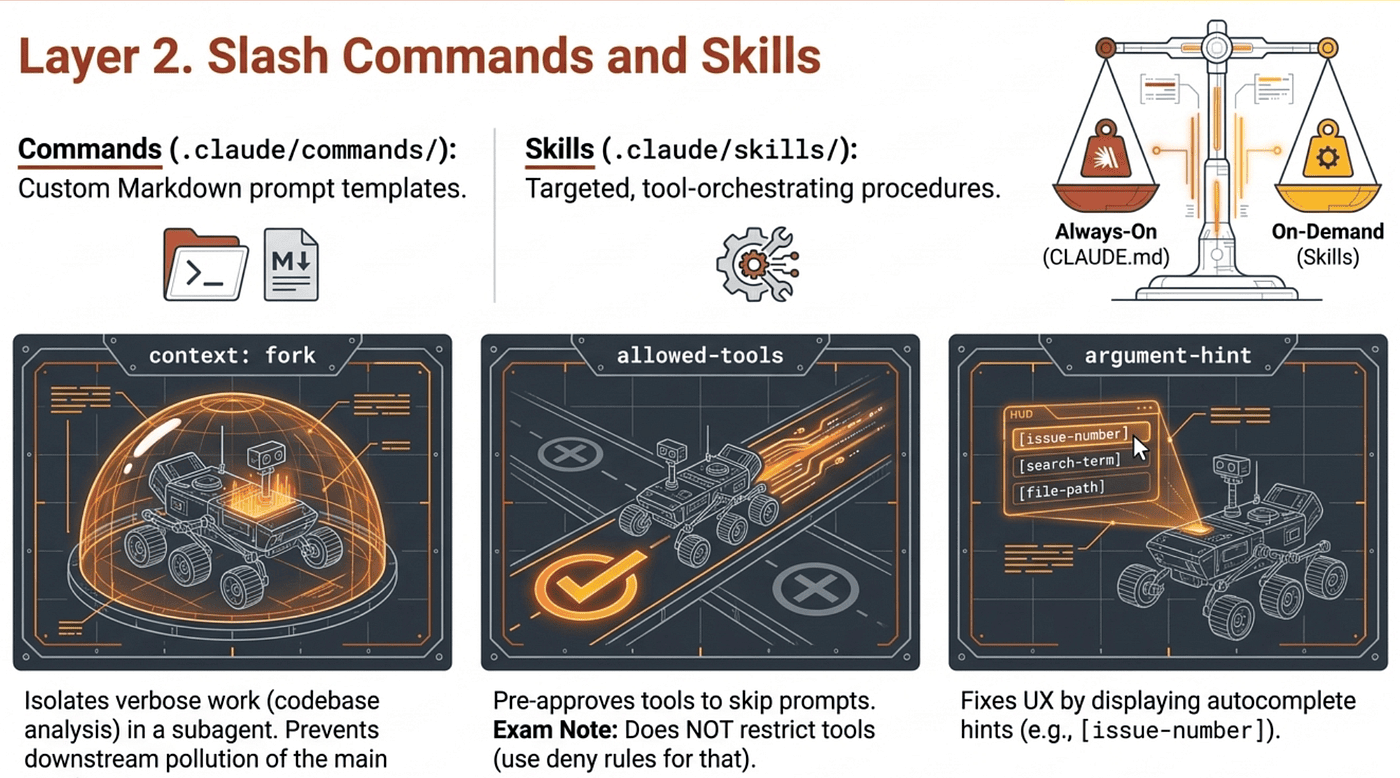
Beyond passive configuration, you encode reusable workflows two ways: slash commands for prompt templates, and skills for tool-orchestrating procedures. Both follow the same scoping discipline as CLAUDE.md.
Slash Commands: Two Scopes
- Project-scoped:
.claude/commands/, committed to version control, available to everyone on the team. - User-scoped:
~/.claude/commands/, personal, not shared.
Custom slash commands are Markdown prompt templates. The filename becomes the command name: .claude/commands/generate-tests.md becomes /generate-tests. When /deploy should be shared with the team and /personal-test should stay private, the scoping decision writes itself.
Skills: SKILL.md and the Three Frontmatter Keys the Exam Tests
Skills live in .claude/skills/<skill-name>/SKILL.md. They are targeted workflows that give the model strict instructions on how to execute a specific task. Three frontmatter keys appear by name in exam answer choices.
context: fork runs the skill in an isolated subagent context. The skill content becomes the prompt that drives the subagent. The subagent does not have access to your conversation history. Results are summarized and returned to the main session. Use this when the skill produces verbose output (codebase analysis, dependency graphs, brainstorming alternatives) that the main session does not need to retain in full. Without context: fork, the verbose output pollutes downstream edits.
allowed-tools pre-approves which tools the skill can invoke during execution, skipping permission prompts for those tools. The exam loves to trap candidates on the official nuance: allowed-tools does not restrict; it only suppresses prompts. Every tool remains callable, and your permission settings still govern tools that are not listed. To actually block a tool, use deny rules in permission settings, not allowed-tools. The field accepts a space-separated list and supports Bash subcommand patterns like Bash(git add *) for fine-grained shell scoping.
argument-hint displays a hint in the autocomplete UI when a developer types /skill-name. It is a UX affordance, not a runtime error. When new joiners keep invoking a skill without required arguments and getting cryptic failures, argument-hint is the frontmatter key that fixes the UX. Example values: [issue-number] or [filename] [format].
Argument Substitution
$ARGUMENTSreceives the full argument string passed to the skill or command.$1,$2, ... receive individual positional arguments.
A skill invoked as /migrate users_table can reference $1 (just users_table) or $ARGUMENTS (the whole string).
Personal Variants Without Touching the Team Skill
To customize a team skill for yourself without affecting teammates, create a personal variant in ~/.claude/skills/ with a different name. Your version lives at the user level. The team version stays untouched. You will need to give yours a different name because the project skill takes precednce over your personal skill.
Skill Frontmatter
Here's a complete SKILL.md frontmatter example showing argument-hint alongside the other keys you'd realistically pair it with:
---
name: add-customer-test
description: Generate a regression test for a specific customer ID, scaffolding the fixture file and asserting against the customer's known order history.
argument-hint: [customer-id] [test-name]
allowed-tools: Read, Write, Bash(pytest *)
context: fork
disable-model-invocation: true
user-invocable: true
---
# Add Customer Test
Generate a regression test for customer `$1` named `$2`.

## Steps
1. Read the customer fixture at `tests/fixtures/customers/$1.json`. If it does not exist, scaffold one from the template at `tests/fixtures/_template.json`.
2. Create a new test file at `tests/regression/test_$2.py` that loads the fixture and asserts against the customer's recorded order history.
3. Run the new test in isolation with `pytest tests/regression/test_$2.py -v` and report pass/fail.
Full arguments received: `$ARGUMENTS`
A few things worth noticing about this example, since each one is exam-relevant:
The argument-hint value uses bracket notation ([customer-id] [test-name]) which is the convention the docs use. When a developer types /add-customer-test in Claude Code, the autocomplete UI surfaces that hint so they know what to pass. It does not enforce anything at runtime; if they hit enter with no arguments, the skill still runs (and $1, $2, $ARGUMENTS will simply be empty).
The body references $1 and $2 for positional access and $ARGUMENTS for the full string. A developer invoking /add-customer-test cust_4471 missing_discount would get $1 = cust_4471, $2 = missing_discount, and $ARGUMENTS = cust_4471 missing_discount.
The allowed-tools line shows the Bash subcommand pattern (Bash(pytest *)) which pre-approves only pytest invocations rather than blanket Bash access. Remember the gotcha: this pre-approves the listed tools but does not block others. Real blocking happens via deny rules in permission settings.
The disable-model-invocation: true + user-invocable: true pair is the canonical "manual only" pattern. The model will not auto-trigger this skill, but a human can still invoke it with the slash command. That combination shows up in exam answers as the safe pattern for destructive or sensitive skills.
context: fork isolates execution so the test scaffolding output does not pollute the main session, and only a summary returns. This shows up in the test as well as a way to isolate context from noisy skills into the main Claude Code agent.
The Skill vs. CLAUDE.md Decision Rule
This boundary appears repeatedly in exam questions:
- CLAUDE.md is for always-loaded universal standards (every session, every interaction).
- Skills are for on-demand task-specific workflows (only when invoked).
Loading a multi-step migration procedure into CLAUDE.md burns tokens on every conversation. Encoding team-wide test conventions as a skill means developers have to remember to invoke it. Match the cadence: always-on standards go in CLAUDE.md; on-demand procedures go in skills.
Layer 3. Path-Specific Rules for Conditional Loading
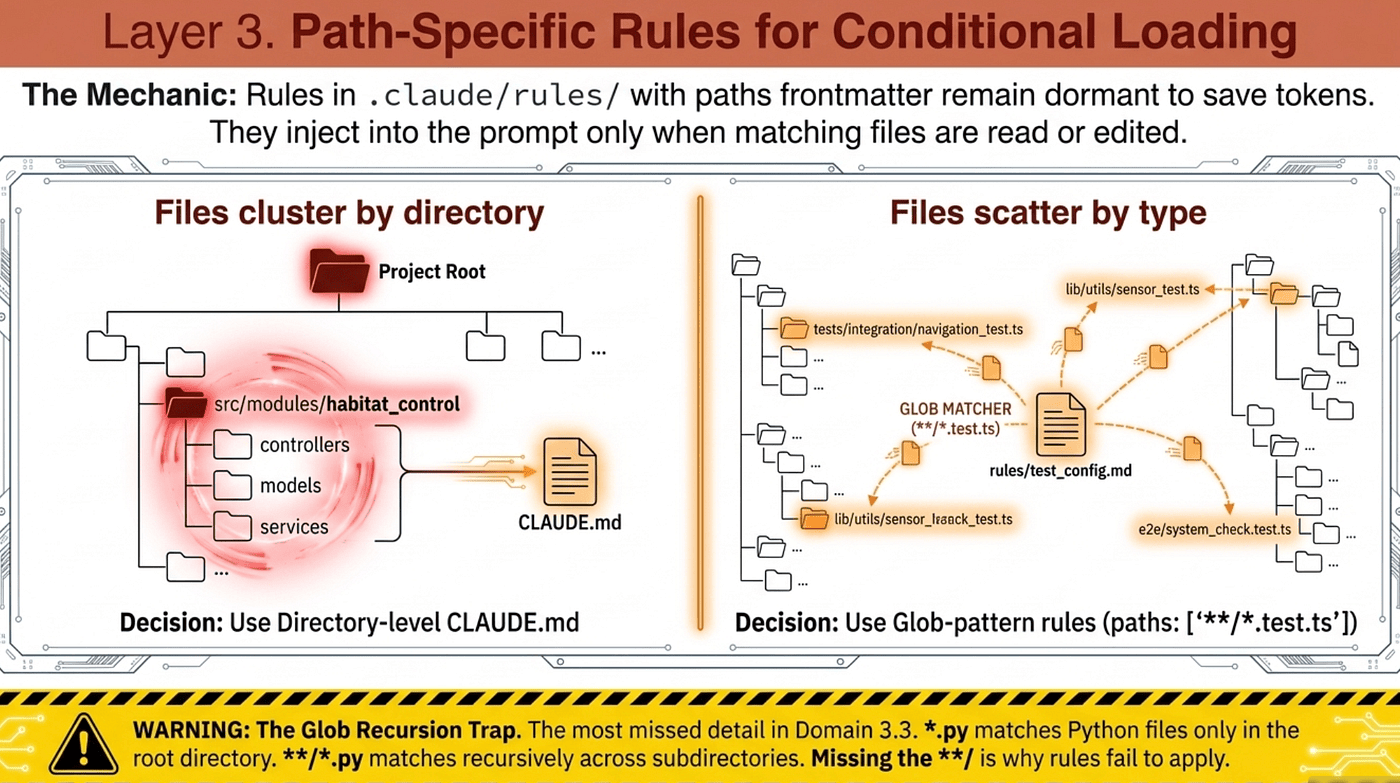
Layer 1 introduced the .claude/rules/ directory and noted that rules without paths frontmatter auto-load at launch. The interesting half of the mechanic is the other case: rules with paths frontmatter that only load when matching files are touched. This is what keeps a large rule set from saturating the context window before you write a line of logic.
---
paths:
  - "**/*.test.tsx"
  - "**/*.test.ts"
---

# Testing Conventions
All tests must use Vitest, not Jest.
The rule stays dormant, saving tokens, until Claude reads or edits a matching file. Only then does the standard inject into the active prompt.
Why Glob-Pattern Rules Beat Subdirectory CLAUDE.md
Directory-level CLAUDE.md (Layer 1, Tier 2) works when files cluster by location: all API code in src/api/, all frontend code in packages/frontend/. Glob-pattern rules win when files spread by type across the tree. Test files sit next to source files in almost every modern codebase. GraphQL resolvers, REST handlers, and migrations rarely live in one folder. A subdirectory CLAUDE.md cannot cover them all without duplication. A glob pattern can.
The exam asks this directly: a codebase where React components, API handlers, database models, and test files scatter across the tree. The trap answer is "put a CLAUDE.md in each subdirectory." The correct answer is .claude/rules/ with glob patterns, because the files do not sit in one directory.
The decision rule:
- Files cluster by directory (one package, one folder, one service): use a directory-level CLAUDE.md.
- Files scatter by type across directories (tests, migrations, configs everywhere): use
.claude/rules/with globpaths.
The Glob Recursion Trap
This is the single most missed detail in Domain 3.3:
*.pymatches Python files only in the root directory.**/*.pymatches Python files recursively through all subdirectories.
When a path-scoped rule fails to apply to test files in tests/, the cause is almost always *.py where **/*.py was needed. The exam presents this as "Python files clearly exist there; what is wrong?" The answer is always the missing recursion.
Layer 4. Plan Mode vs. Direct Execution
With configuration set, you need clear rules on how the system executes commands.
Direct Execution: The Narrow Default
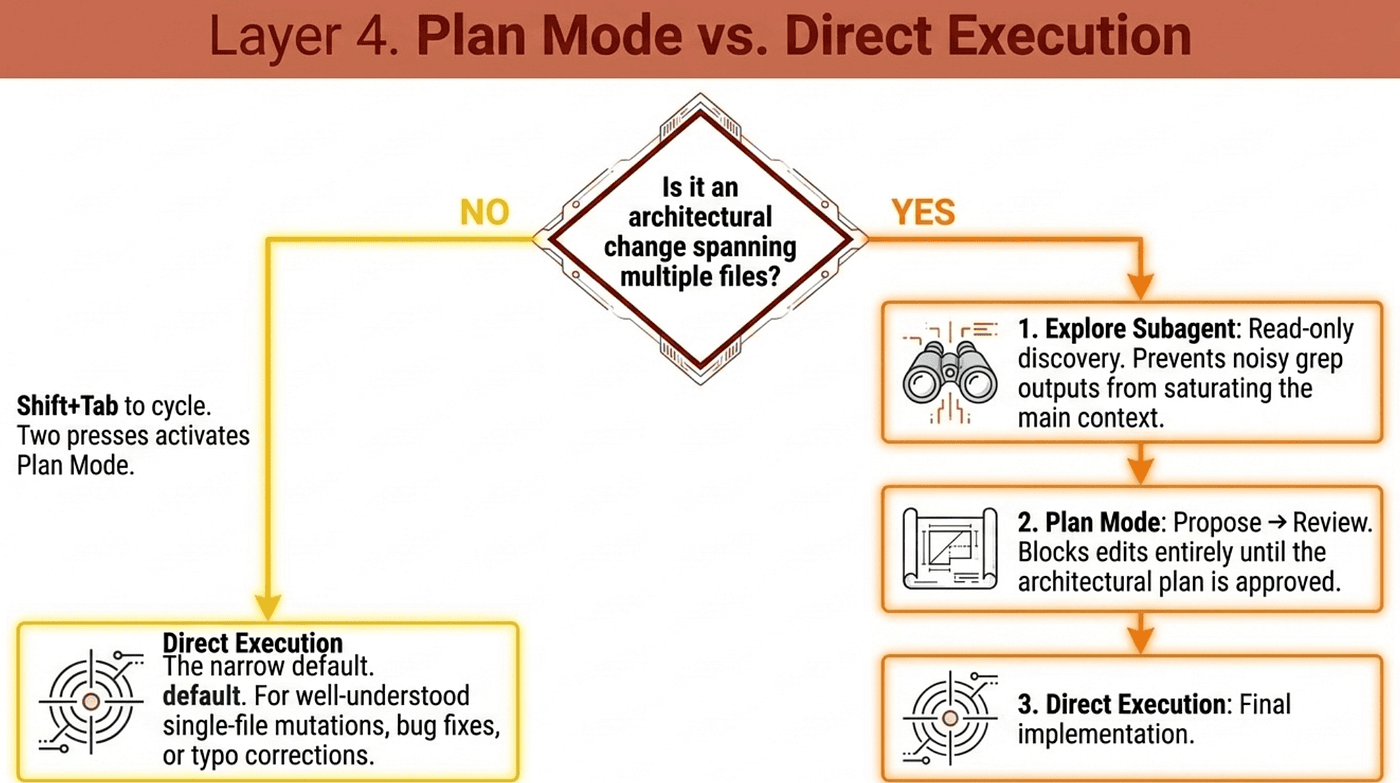
Direct execution is reserved exclusively for well-understood single-file mutations: an isolated bug fix with a clear stack trace, a date validation conditional added to one function, a typo correction in a doc string. Trigger direct execution for a multi-file architectural change and the model starts writing code without mapping the system, leading directly to blind dependency errors and costly rework.
Plan Mode: For Architectural Decisions
Plan mode forces the system to explore and strategize before writing any code. It is the right choice for tasks with architectural implications:
- Microservice restructuring
- Library migrations affecting 45+ files
- Choosing between integration approaches with different infrastructure requirements
- Any change spanning multiple files where the dependencies are not yet mapped
In plan mode, edits are blocked. The model proposes a plan; you review and refine it; only after the plan is acceptable do you switch to execution mode. If Claude proposes a risky database migration in plan mode and you want it changed, give feedback in plan mode until the plan is acceptable, then execute. That is the entire workflow.
Activation: Shift+Tab cycles through permission modes. Default → acceptEdits → plan. Two presses from default reaches plan mode.
The Explore Subagent: Discovery Without Pollution
When an architect needs to explore a large codebase, the verbose output from tools like grep and glob quickly saturates the main context window. The Explore subagent is the same isolation pattern as context: fork, applied to investigation. It runs read-only discovery in a separate context, returns a compressed structured summary to the main session, and the main context stays clean for design work.
The Combined Pattern for Architectural Work
For a large unfamiliar codebase, the workflow stacks all three:
- Explore subagent for noisy discovery (which files, what patterns, what dependencies).
- Plan mode for architectural decisions on the summary.
- Direct execution for the implementation once the plan is settled.
This sequence preserves context, separates concerns, and keeps each phase doing what it does best.
Layer 5. Iterative Refinement Techniques
Even with a perfectly mapped architecture, prose descriptions introduce ambiguity. The exam tests four refinement techniques by name, and each has a specific trigger condition.
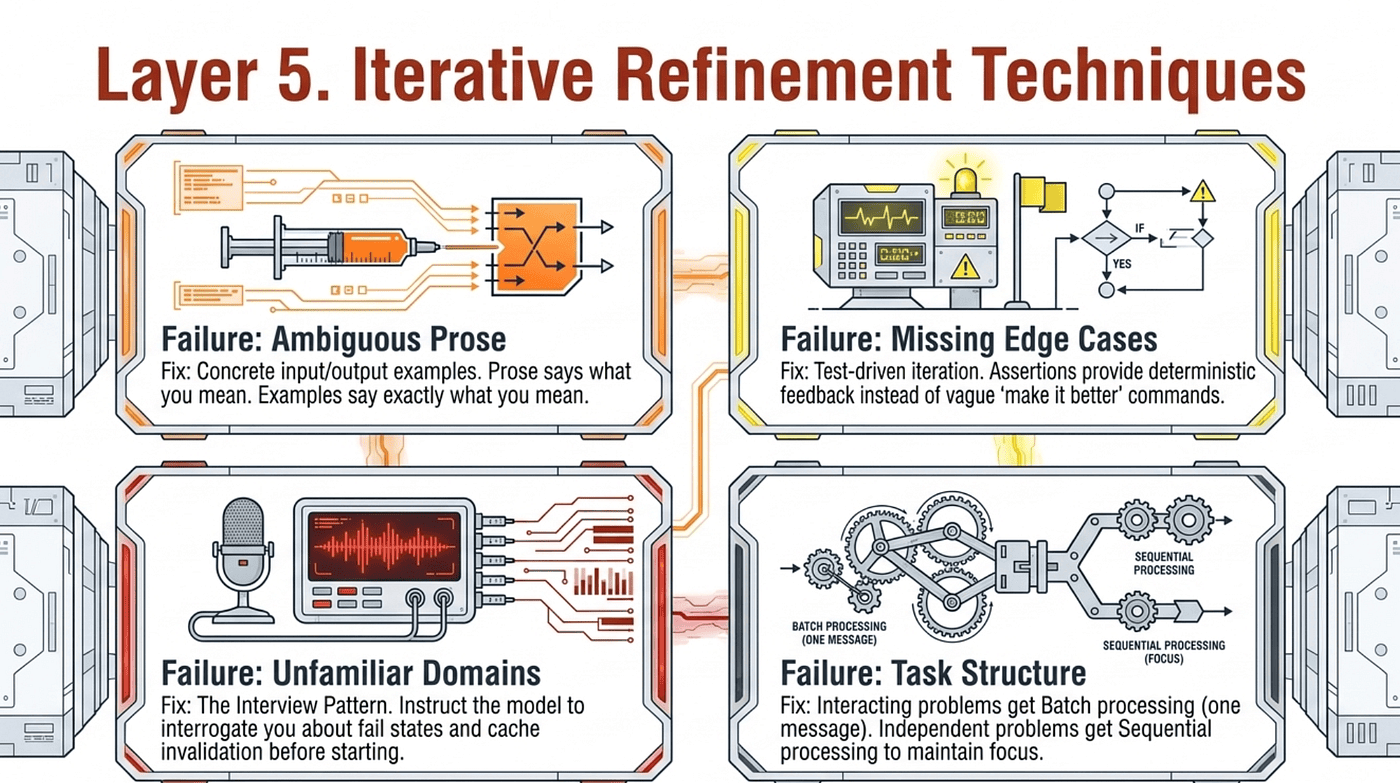
Concrete input/output examples. If prose is being interpreted inconsistently, provide 2 to 3 examples of input and expected output. Prose says what you mean. Examples say exactly what you mean. When natural language descriptions produce inconsistent transformations, this is the first fix to reach for.
Test-driven iteration. Write a test suite covering expected behavior, edge cases, and performance requirements before implementation. Then iterate by sharing test failures with Claude. Assertions are deterministic feedback. "Make it better" is not. When edge case handling is wrong (null values in migration scripts, off-by-one errors), the fix is specific test cases with example input and expected output.
The interview pattern. For unfamiliar domains, instruct Claude to interrogate you about potential fail states, cache invalidation strategies, concurrency issues, and failure modes before implementation. The model probes for the failure modes you forgot to specify. Use this whenever you are working outside your home domain.
Batch vs. sequential. This is the decision rule the exam tests directly:
- Interacting problems (fixes that affect each other): address them in a single detailed message so the model sees the dependency.
- Independent problems (fixes that do not interact): address them sequentially to maintain focus.
The trap is treating every list of issues as a batch. If issue A's fix changes the surface that issue B's fix depends on, batching is correct. If the issues sit in different files with no overlap, sequential is correct.
The principle: refinement is mechanical, not intuitive. Match the technique to the failure mode (ambiguous prose, missing edge cases, unfamiliar domain, interacting fixes) and the right fix presents itself.
Layer 6. Headless CI/CD Integration
The final structural challenge is migrating Claude Code out of the local IDE and into automated, headless pipelines.
-p: The Required Flag for Non-Interactive Mode
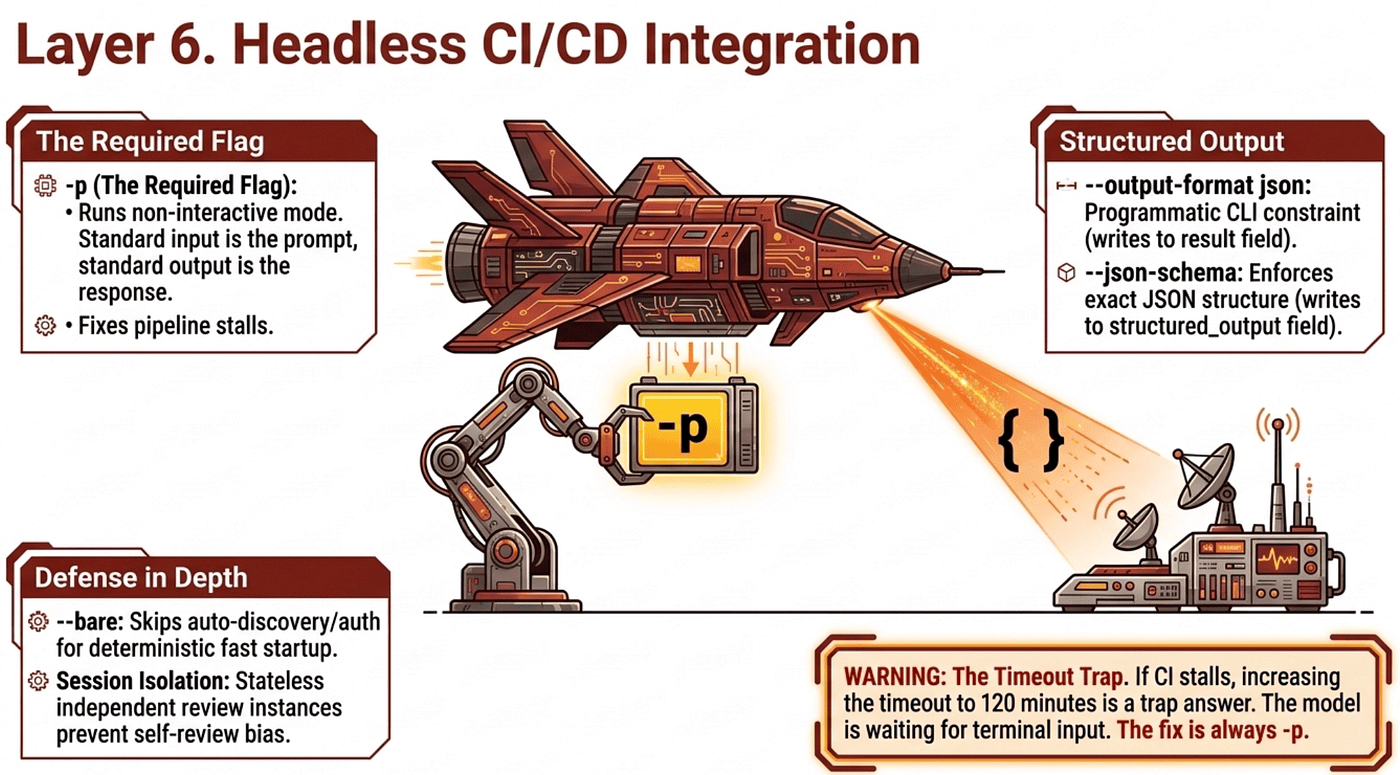
By default, Claude Code launches its interactive terminal UI and waits for user input. In CI there is no user. Without -p, the pipeline sits there waiting until the job timeout (30 or 60 minutes) and then fails with no useful output. It does not fail. It stalls.
-p (long form --print) runs Claude Code in non-interactive mode. Standard input serves as the prompt, standard output captures the response, no terminal UI, no interactive prompts. The pipeline runs to completion and returns a meaningful exit code.
The trap answer the exam offers: "increase the pipeline timeout to 120 minutes." This treats the symptom while ignoring the cause. Claude Code is not slow; it is waiting for input that will never arrive. No timeout extension fixes that. The answer is always the missing -p flag.
-p is the flag Domain 3.6 enumerates by name. It is the load-bearing answer for CI/CD non-interactive execution.
Structured Output: -- output-format json and -- json-schema
Conversational text responses cannot be parsed reliably by downstream automation, and regex against natural language is fragile by design.
--output-format json returns structured JSON with result, session_id, and metadata fields. This is not the same as asking for JSON in a prompt. The flag is a programmatic constraint at the CLI level. A prompt instruction is probabilistic and may include markdown fences or extra text.
--json-schema combined with --output-format json enforces a specific JSON structure. Schema-constrained results appear in the structured_output field, not the result field. The exam asks about this exact distinction: regular output in result, schema-constrained output in structured_output. Know which field to parse.
claude -p "Extract function names from auth.py" \
  --output-format json \
  --json-schema '{"type":"object","properties":{"functions":{"type":"array","items":{"type":"string"}}},"required":["functions"]}' \
  | jq '.structured_output'
Beyond the Listed Objectives: -- bare and Tool Sandboxing
The Domain 3.6 objectives enumerate -p, --output-format json, and --json-schema by name. Other flags exist in Anthropic's documentation and may appear in real production work. These are useful to know, but they are not the load-bearing exam answers.
--bare enables minimal headless mode, skipping hooks, LSP startup, plugin walks, auto-memory read and write, and auto-discovery of CLAUDE.md, MCP servers, and configuration. The practical effect is faster startup, deterministic behavior, and no environment-specific side effects. Anthropic's documentation positions it as the recommended mode for scripted and SDK calls. Note the friction: --bare skips auto-discovery, so CI runs that need project context from CLAUDE.md must either drop --bare or pass the content explicitly. --bare also skips OAuth and keychain authentication, so a fresh CI runner must export ANTHROPIC_API_KEY as an environment variable.
--tools restricts which tools Claude can use at all; pass a comma-separated list, and anything not listed is unavailable. --allowedTools pre-approves tools so Claude does not prompt for permission, but does not restrict. For defense-in-depth in unattended CI, restrict with --tools first and pre-approve with --allowedTools second.
--append-system-prompt appends additional system-level instructions on top of whatever else is loaded. When a CI run drifts off-task (a security-only reviewer also flagging style issues), the fix is --append-system-prompt with explicit scope reinforcement.
For exam questions: when a question asks how to run Claude Code in CI in non-interactive mode, -p is the answer. When it asks how to enforce machine-parseable output, --output-format json and --json-schema are the answers. The other flags above are production-grade knowledge, not the headline exam answers.
CLAUDE.md Provides Project Context to CI
CLAUDE.md is the mechanism for providing project context to CI-invoked Claude Code: testing standards, fixture conventions, review criteria, terminology. When CI generates duplicate tests or low-value scenarios, the fix is documenting testing standards, valuable test criteria, and available fixtures in CLAUDE.md.
Session Context Isolation for Reviews
The specific Claude session that originally wrote the code is inherently biased. It will miss its own errors during self-review the same way a developer skims past their own typo five times in a row. Proper automation demands a completely independent review instance.
When re-running reviews after new commits, include prior review findings in context and instruct Claude to report only new or still-unaddressed issues. This gives the stateless CI reviewer memory across runs and prevents duplicate PR noise. The same logic applies to test generation: provide existing test files in context so test generation avoids suggesting duplicate scenarios already covered.
Putting It Together: The Six-Layer Architecture
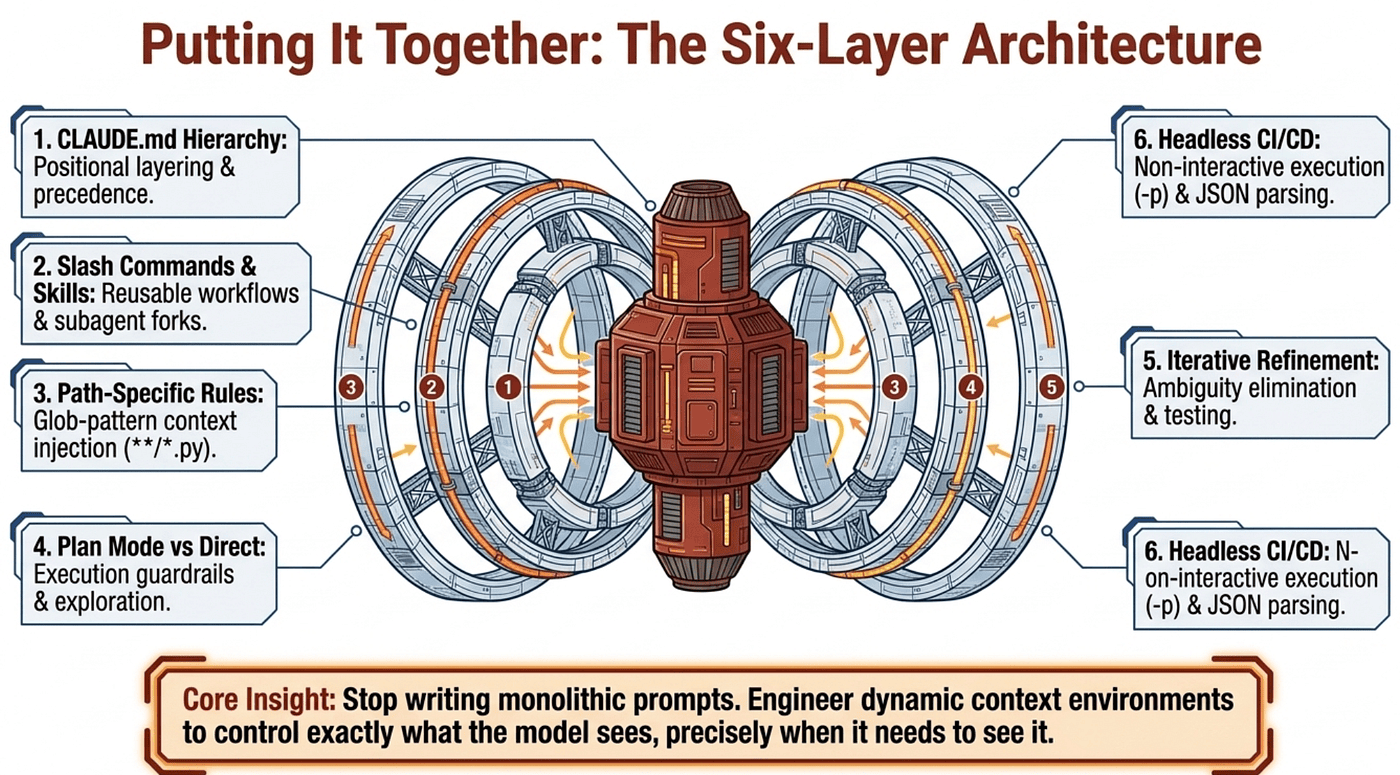
A mature Claude Code workflow stacks six layers, each answering the same question (what does the model see right now?) at a different level of granularity:
- Layer 1. The CLAUDE.md hierarchy enforces scope through positional layering: managed/org (enforced), user (personal global), project (team-shared), directory (on-demand scoped), and
CLAUDE.local.md(deprecated). - Layer 2. Slash commands and skills encode reusable workflows, with
context: forkisolating verbose work,allowed-toolsscoping permissions, andargument-hintimproving autocomplete UX. - Layer 3. Glob-pattern path rules in
.claude/rules/preserve tokens by loading conventions only when relevant files are touched, with**/*.pyfor recursion. - Layer 4. Plan mode plus the Explore subagent keeps the model from writing code before it understands the system; direct execution stays reserved for well-scoped single-file mutations.
- Layer 5. Iterative refinement (concrete examples, test-driven iteration, the interview pattern, batch vs. sequential) eliminates the ambiguity that prose descriptions introduce.
- Layer 6. Headless pipelines need
-pfor non-interactive mode,--output-format jsonwith--json-schemafor machine-parseable output, and independent review sessions for unbiased code review.
To build reliable production-grade applications with Claude Code, you must stop writing monolithic prompts and start engineering dynamic context environments. Each layer of this architecture exists for the same reason: control exactly what the model sees, precisely when it needs to see it. That discipline is what separates fragile demos from systems you can actually deploy, and it is what Domain 3 tests on exam day.
About the Author
Rick Hightower is a former Senior Distinguished Engineer at a Fortune 100 company, focusing on delivering ML / AI insights to front-line applications, and a practitioner building multi-agent production systems. Follow him on Medium for more hands-on agent engineering content. You can also book him to speak and train your team: Check out Rick Hightower's SpeakerHub.
Rick created Skilz, the universal agent skill installer that supports 30+ coding agents, including Claude Code, Gemini, Copilot, and Cursor, and co-founded the world's largest agentic skill marketplace. Connect with Rick Hightower on LinkedIn or Medium. Check out SpillWave, your source for AI expertise.
Rick has been actively developing generative AI systems, agents, and agentic workflows for years. He is the author of numerous agentic frameworks and developer tools and brings deep practical expertise to teams adopting AI. He enjoys writing about himself in the 3rd person.
Rick also wrote a Claude Certified Architect (CCA) series of articles that have a lot of useful information on writing agentic AI systems. Many ideas captured in the CCA and the exam prep Rick wrote echo what you see in this article. If you want to improve your ability to create well-behaved AI agents, studying for the CCA Exam is a good place to start.
CCA Exam Prep on Agentic Development
- Claude Certified Architect: The Complete Guide to Passing the CCA Foundations Exam
- CCA Exam Prep: Mastering the Code Generation with Claude Code Scenario
- CCA Exam Prep: Mastering the Multi-Agent Research System Scenario
- CCA Exam Prep: Structured Data Extraction
- CCA: Master the Developer Productivity Scenario
- Claude Certified Architect: Master the CI/CD Scenario
- CCA Exam Prep: Mastering the Customer Support Resolution Agent Scenario
- Get the complete reading list for CCA-F exam prep articles from this Claude Certified Architect Exam Prep list.
Rick also wrote a series on harness engineering and how to improve agentic systems using harness engineering for feedback loops and adversarial agents. These articles also go hand in hand with this article.
Harness Engineering Articles
- The $9 Disaster: What Anthropic's Harness Design Paper Teaches Us About Building Autonomous AI
- Harness Engineering vs Context Engineering: The Model is the CPU, the Harness is the OS
- LangChain Deep Agents: Harness and Context Engineering: Memory, Skills, and Security
- Beyond the AI Coding Hangover: How Harness Engineering Prevents the Next Outage
- LangChain's Harness Engineering: From Top 30 to Top 5 on Terminal Bench 2.0
- Anthropic's Harness Engineering: Two Agents, One Feature List, Zero Context Overflow
- OpenAI's Harness Engineering Experiment: Zero Manually-Written Code