ForgeCode: The Multi-Agent Coding Harness Dominating Terminal-Bench 2.0 — A Deep Dive Into Harness-First AI Development
Harnessing AI for Superior Coding: Exploring ForgeCode's Groundbreaking Multi-Agent Architecture
Originally published on Medium.
Harnessing AI for Superior Coding: Exploring ForgeCode’s Groundbreaking Multi-Agent Architecture
Dive into the future of AI development with ForgeCode! Discover how this groundbreaking harness-first architecture is reshaping coding efficiency and outperforming traditional tools. Are you ready to elevate your coding game? Check out the deep dive! #AIDevelopment #ForgeCode
Summary: ForgeCode’s harness-first architecture significantly outperforms model-centric tools on the Terminal-Bench 2.0 benchmark, achieving 81.8% with GPT-5.4 and Claude Opus 4.6. The system utilizes three specialized AI agents — Muse for planning, Forge for execution, and Sage for research — allowing for efficient task management and context handling across large codebases. This architecture emphasizes orchestration quality over raw model capabilities, making it ideal for complex, multi-step engineering tasks while highlighting limitations in reasoning quality and community extensibility compared to competitors like Claude Code and OpenCode.
Two Camps, One Outcome: Harness-First vs. Model-Centric AI Coding Tools
The same model. A 16-point gap in benchmark scores. That gap is not a mystery. It is the harness.
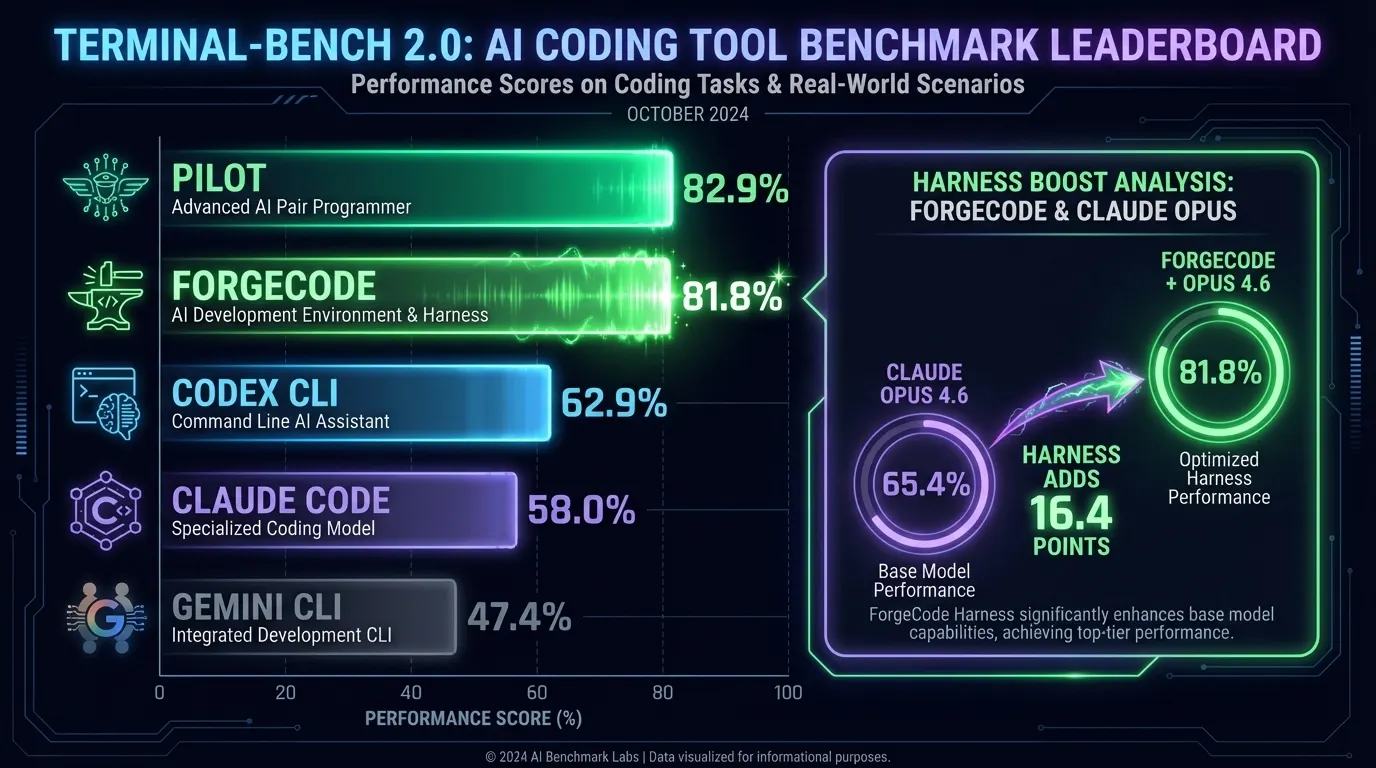
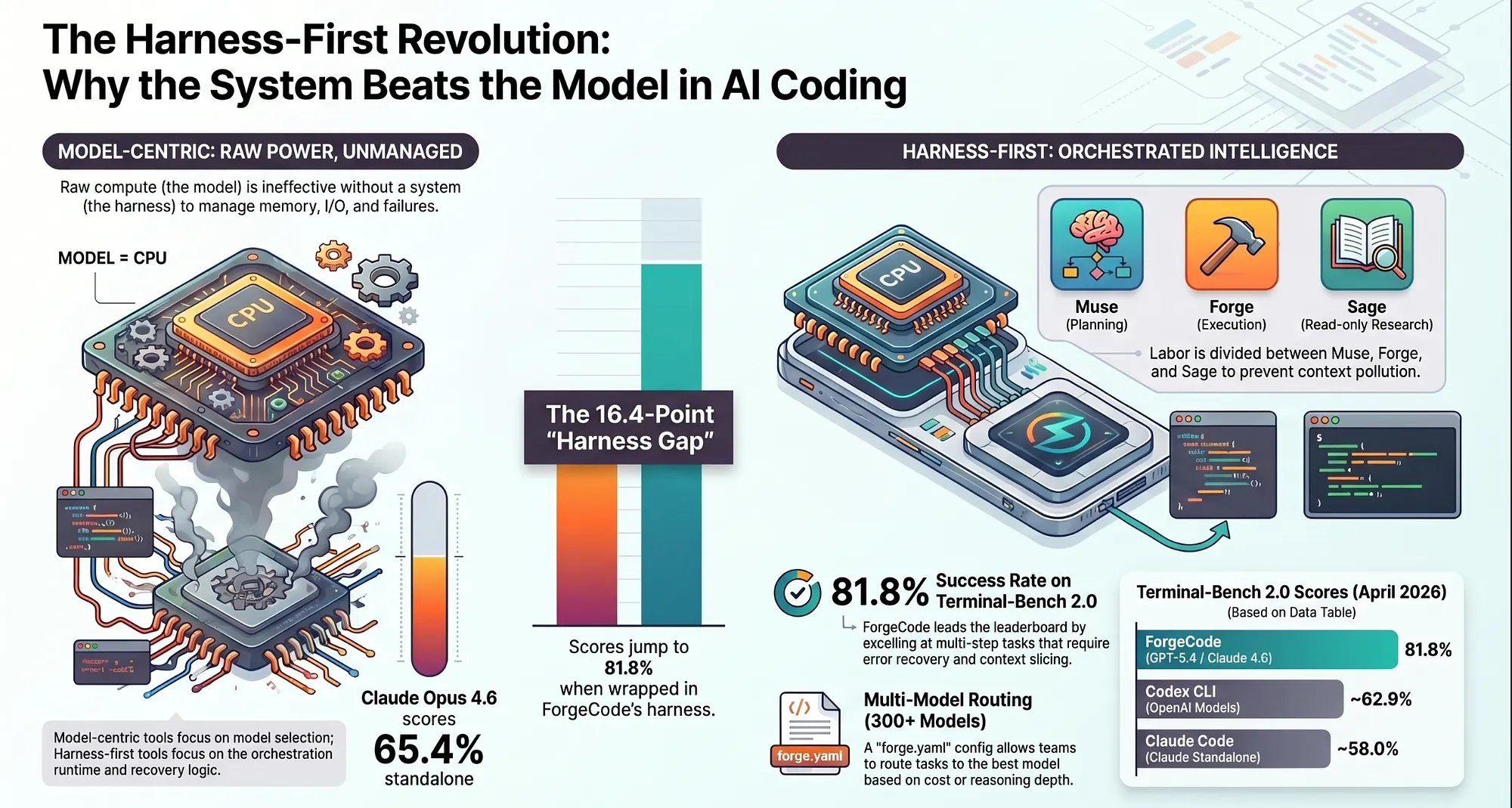
Claude Opus 4.6 running standalone scores 65.4% on Terminal-Bench 2.0. The same model, running inside ForgeCode’s multi-agent harness, scores 81.8%. No model upgrade. No fine-tuning. Just a better system around the same AI engine. That single fact is the central claim of this article, and everything that follows is an explanation of how it happens.
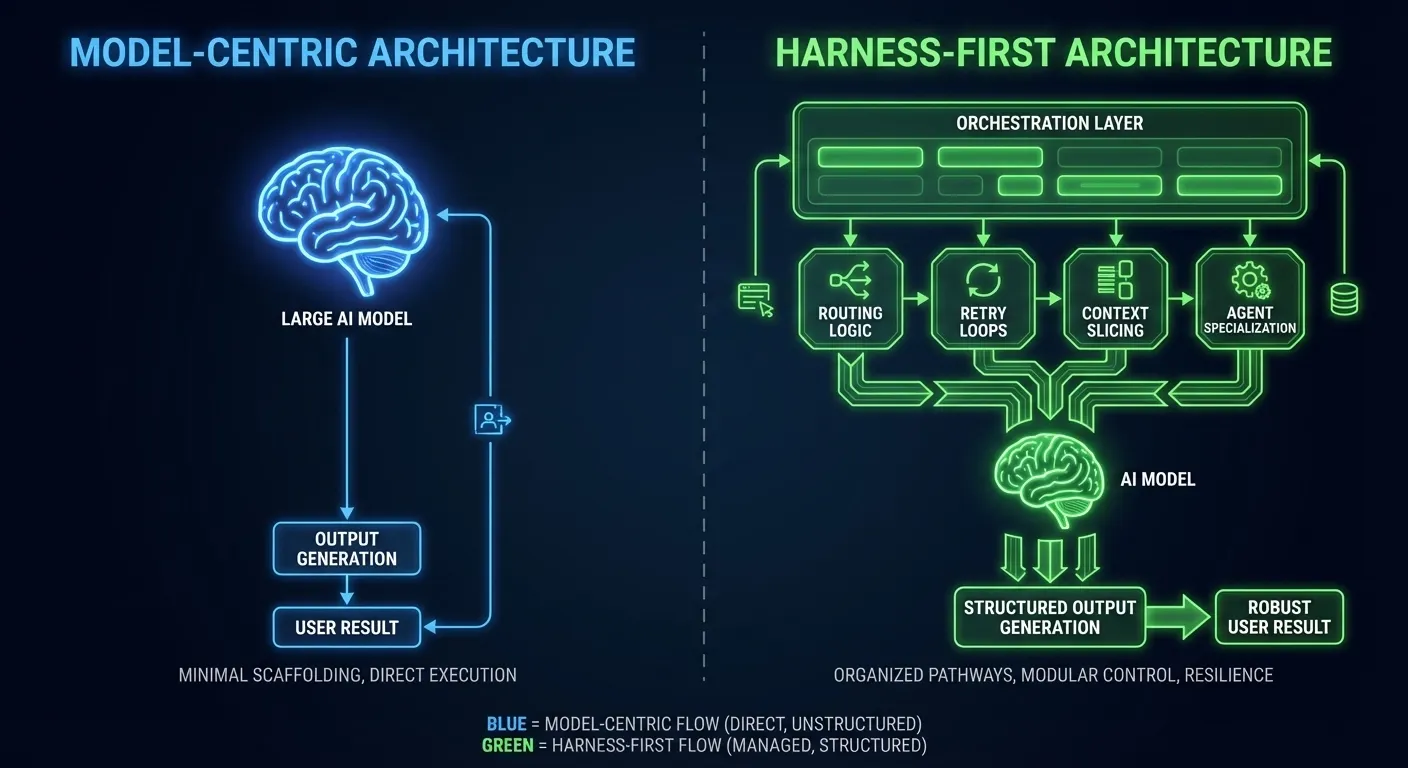
The AI coding tool field in 2026 has split into two camps. One camp believes the model is the system. Claude Code, Codex, Gemini CLI: these tools are built on the assumption that the model’s capabilities define the ceiling. The orchestration layer is thin by design, because the model is supposed to carry the weight. This is the model-centric approach.
The other camp believes the model is a component inside the system. The ceiling is set by the harness that wraps the model: the orchestration logic, the context pipeline, the agent specialization, the execution loop, the routing decisions. This is the harness-first approach, and ForgeCode is its most fully realized terminal implementation today.
These are not minor implementation differences. They are philosophical commitments with measurable consequences.
By the time you reach Terminal-Bench 2.0’s leaderboard at the end of this piece, you will have the numbers.
Table of Contents
- Two Camps, One Outcome: Harness-First vs. Model-Centric AI Coding Tools
- Defining the Terms: Harness-First and Model-Centric
- The Mental Model: “Model = CPU, Harness = OS”
- What an AI Agent Harness Actually Does
- Terminal-Bench 2.0: The Benchmark in Numbers
- The Three AI Agents in ForgeCode’s Multi-Agent Architecture
- Role-Based Agent Separation: What the Architecture Actually Provides
- The Context Engine: AI Orchestration for Large Codebases
- Multi-Model Routing: 300+ Models, One Harness
- How ForgeCode Compares: AI Agent Specialization Side by Side
- Why AI Coding Benchmarks Usually Lie, and Why Terminal-Bench 2.0 Doesn’t
- ForgeCode’s Structural Fit with Terminal-Bench 2.0 and the Leader Board
- ForgeCode vs Claude Code, Codex, Gemini CLI, and Cursor
- ForgeCode MCP and Skills Support: Extensibility Compared
- ForgeCode Limitations: Weaknesses Every Team Should Weigh
- ForgeCode’s Harness-First Thesis, Restated
- AI Model Commoditization and Why It Favors ForgeCode
- What Comes Next for ForgeCode and Agentic AI Development
- Caveat on Terminal-Bench 2.0 Scores
- Quick Reference: ForgeCode in One List
Defining the Terms: Harness-First and Model-Centric AI Coding Tools
Two terms. Here is what they mean in practice.
Model-centric tool: An AI coding assistant where the primary design decision is model selection. The interface, context pipeline, and execution logic are all built to serve that model as efficiently as possible. Swapping the model is either unsupported or a configuration afterthought. Examples: Claude Code (Anthropic’s Claude as the fixed reasoning engine), Codex (OpenAI’s models), Gemini CLI (Google’s Gemini).
Harness-first tool: An AI coding system where the primary design decision is the orchestration runtime. The model is a pluggable component selected per task, per agent, or per cost target. The harness defines how agents communicate, how context is sliced and routed, how execution loops recover from errors, and how work is divided. The model you load into the harness is a configuration choice, not an architectural constraint. Examples: ForgeCode [GitHub: antinomyhq/forgecode], and to a lesser extent OpenCode [GitHub: anomalyco/opencode; InfoQ, Feb 2026].
The word “harness” here is borrowed from hardware engineering: a wiring harness bundles and routes many signals through a structured path, preventing chaos without constraining what those signals can carry. In AI coding, the harness bundles model calls, tool executions, context slices, and agent handoffs into coherent, recoverable workflows.
The Mental Model: “Model = CPU, Harness = OS”
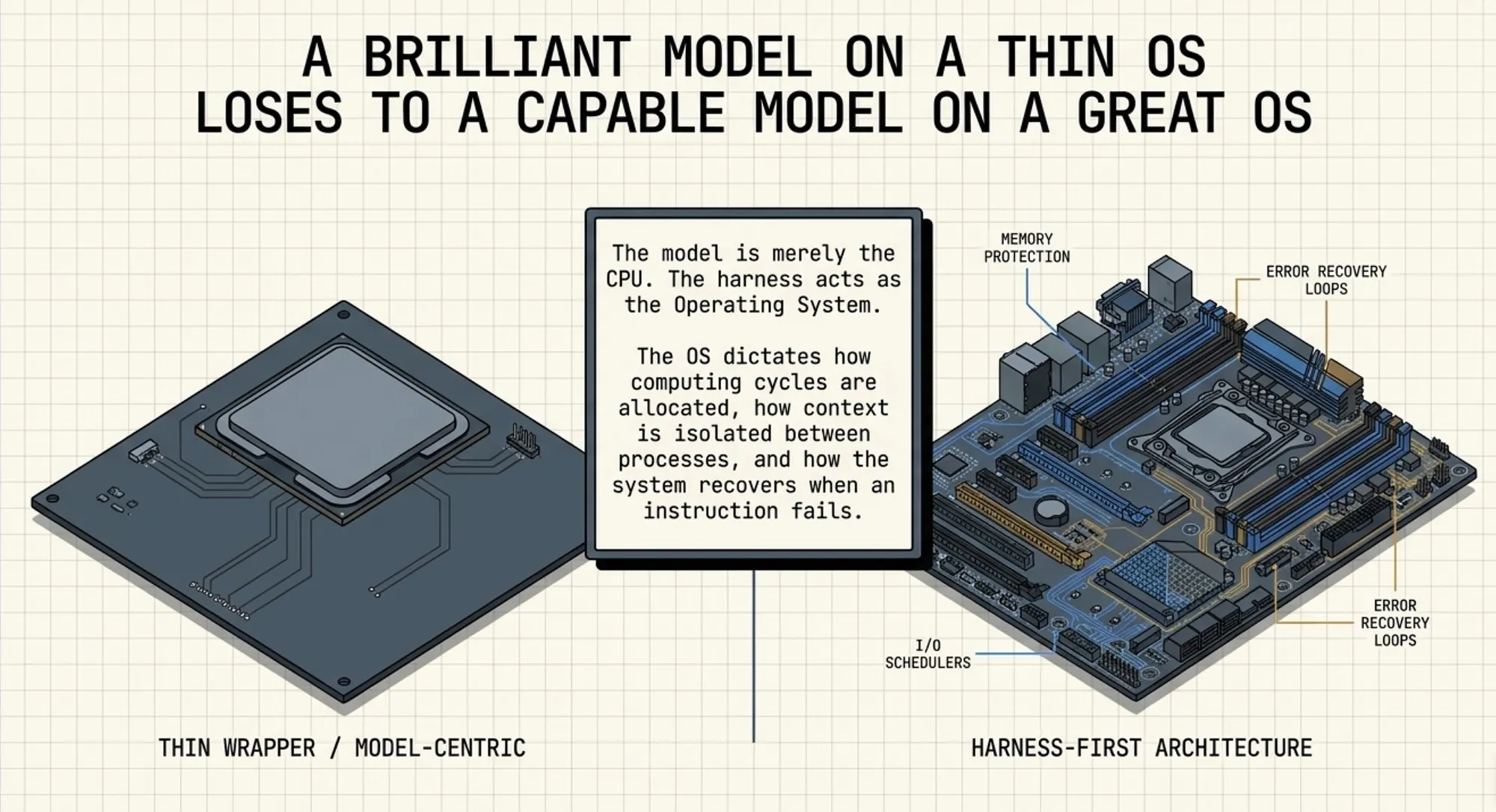
The model is the CPU. The harness is the operating system.
In computing, a faster CPU is valuable. But the operating system decides how that CPU’s cycles get allocated, how memory is protected between processes, how I/O is scheduled, and how failures are isolated and recovered. A 1990s DOS machine with a blazing-fast processor will still lose to a modest 2005 Linux box running a proper scheduler, because raw compute means nothing without the system managing it.
The same logic applies to AI coding.
A model-centric tool with GPT-5.4 as its engine is a fast CPU on a thin OS. It performs brilliantly when tasks fit within a single context window, when the problem does not require coordination between specialists, and when the error rate is low enough that recovery loops are rarely needed.
A harness-first tool with a more moderate model, but with bounded context isolation between agents, deliberate task decomposition, aggressive retry loops, and per-task model routing, is a well-managed operating system running on capable hardware. It performs better on complex, multi-step, multi-file tasks that require coordination, recovery, and context discipline.
Terminal-Bench 2.0 tasks fall almost exclusively into that second category. That is why the leaderboard looks the way it does.
What an AI Agent Harness Actually Does
If you have only used model-centric tools, “orchestration harness” can sound like marketing. Here is a concrete accounting of what ForgeCode’s harness actually handles that a thin-wrapper tool does not.
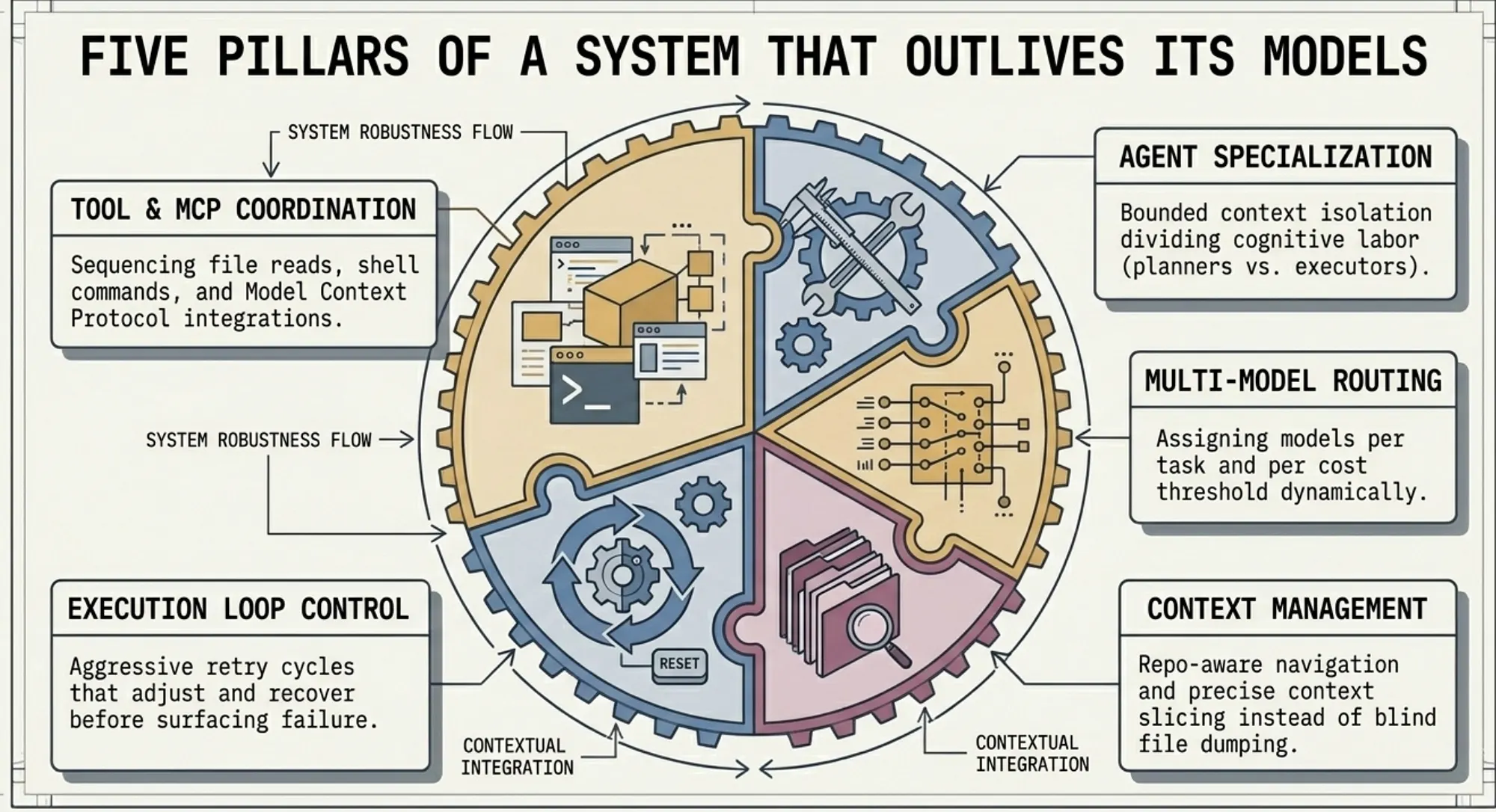
1. Agent Specialization
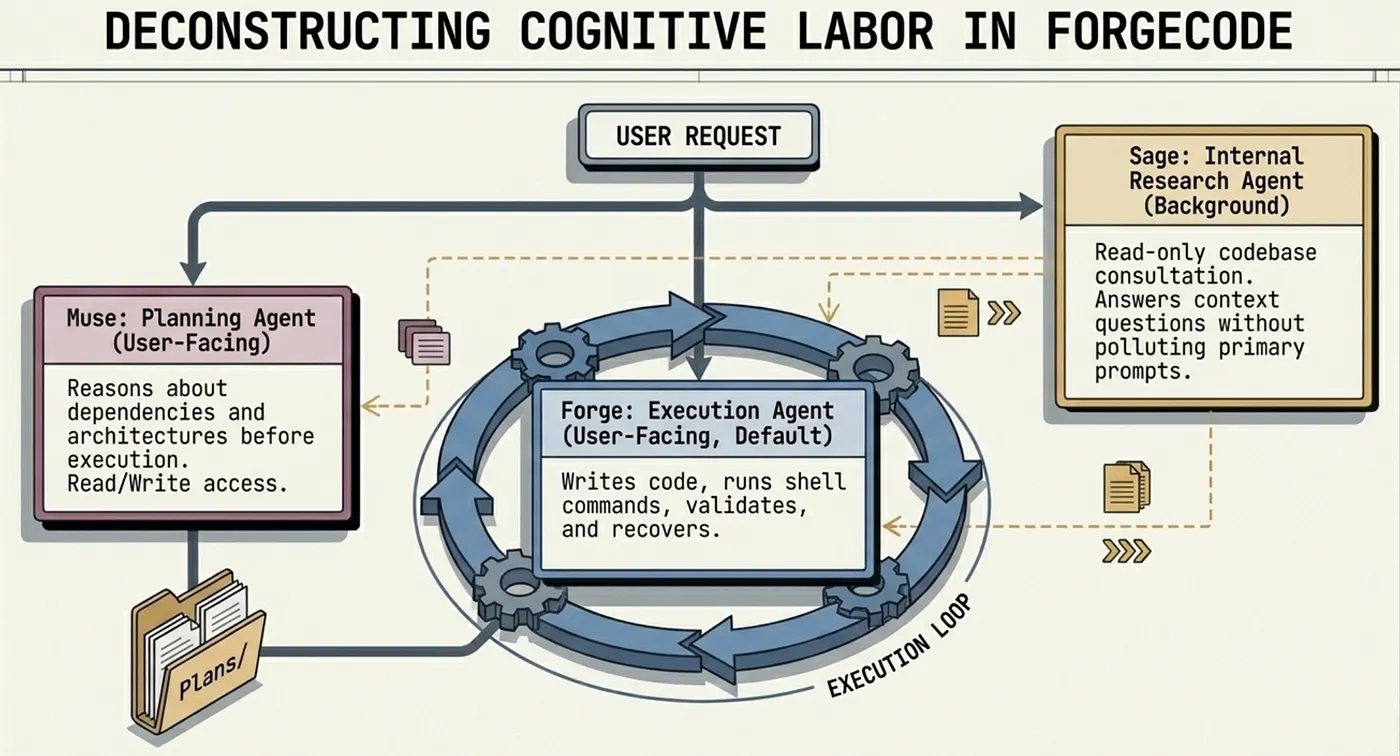
Rather than a single generalist AI agent trying to plan, implement, research, and verify simultaneously, ForgeCode divides cognitive labor. A planning agent reasons about the problem. An execution agent writes and runs code. An internal research agent consults the codebase without polluting the main context. Each agent has bounded context: it knows what it needs to know and no more. ForgeCode ships three named agents: Forge (implementation), Muse (planning without execution), and Sage (read-only research called by both Forge and Muse).
2. Multi-Model Routing
Different tasks benefit from different model strengths. Planning and architectural reasoning may call for a model strong in long-chain inference. Code generation at scale may call for a faster, cheaper model. ForgeCode routes model selection per task, per agent, and per cost threshold, and persists those preferences in a configuration file the entire team shares. ForgeCode supports Anthropic, OpenAI, Google, DeepSeek, Mistral, Meta, and 300+ additional models.
3. Context Management at Scale
Large codebases routinely exceed what any model can process in a single context window. The harness decides what to include, what to slice away, and how to re-inject relevant fragments as the task progresses. Get this wrong and the model hallucinates, contradicts itself, or loses track of established constraints. Get it right and the model performs as if it read the whole codebase, because the harness has been feeding it the right pieces.
4. Execution Loop Control
Real-world coding tasks fail. Tests break. Lint errors surface. Compilation fails on the first attempt. A harness controls how many retry cycles run, when to escalate from a fix attempt to a full re-plan, and when to surface the failure to the user rather than spin indefinitely. A model-centric tool relies on the model’s own output to decide when to stop; a harness enforces those decisions structurally.
5. Tool and MCP Coordination
File reads, shell execution, web search, and Model Context Protocol (MCP) integrations all require sequencing and error handling. MCP is an open standard introduced by Anthropic in November 2024, now governed by the Agentic AI Foundation under the Linux Foundation, with 97M+ monthly SDK downloads and adoption by OpenAI, Google, and Microsoft as of 2026. The harness ensures these calls happen in the right order, that outputs are formatted before being fed back to models, and that failures in one tool call do not cascade into context corruption.
Terminal-Bench 2.0: The AI Coding Harness Benchmark in Numbers
Terminal-Bench 2.0 is an independent benchmark from the Laude Institute published as a conference paper at ICLR 2026. It consists of 89 tasks executed inside containerized terminal environments, each with a human-written reference solution and automated verification. Tasks span software engineering, security, biology, and gaming, all requiring multi-step terminal execution.
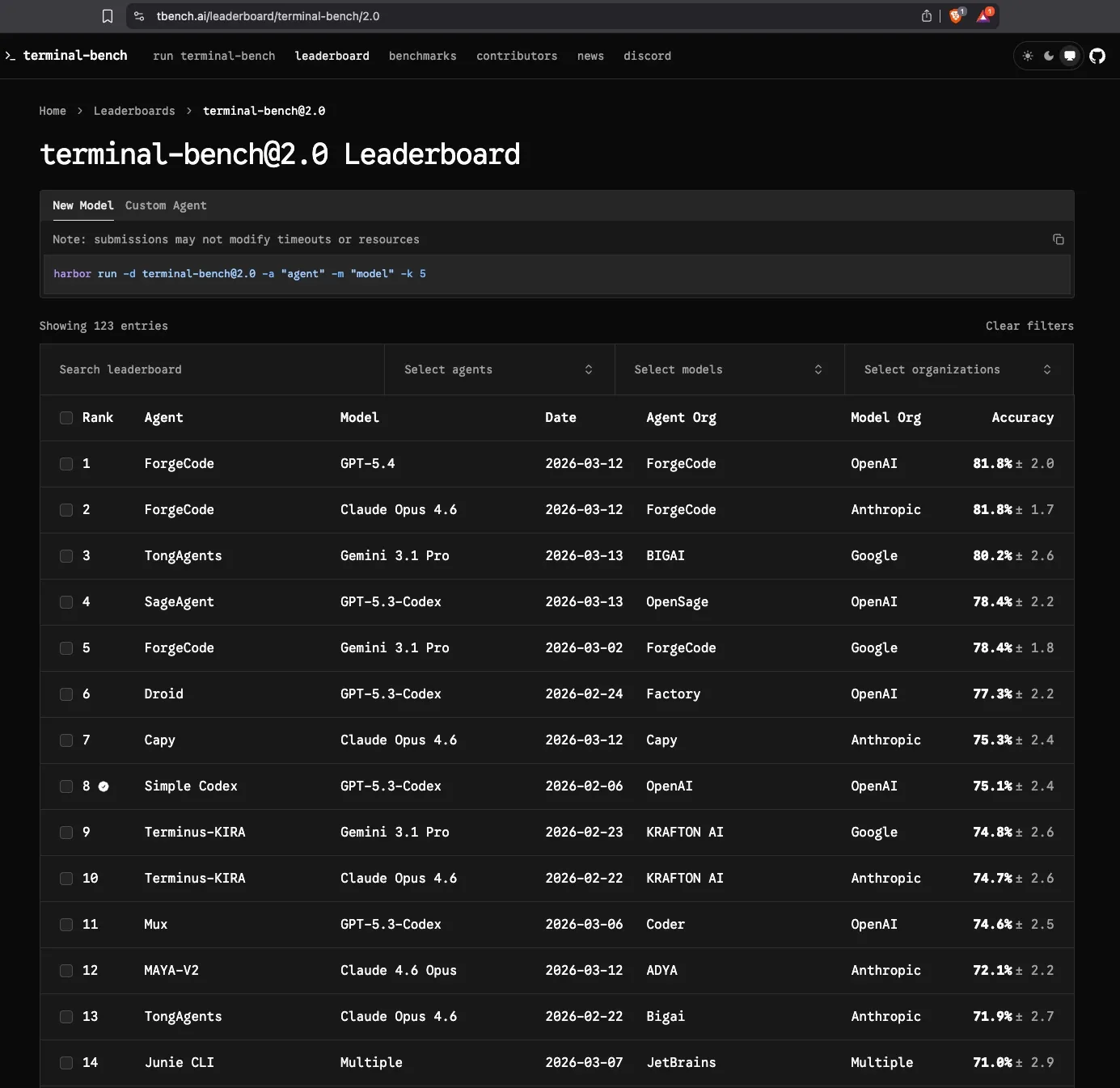
As of April 2026, ForgeCode holds positions 1 and 2 on the Terminal-Bench 2.0 leaderboard at 81.8%, running with GPT-5.4 and Claude Opus 4.6 respectively (read the important caveat at the end of the article, ForgeCode still beats Claude Code, Gemini and Codex but by less). Claude Code trails at approximately 58.0%, Codex CLI at approximately 62.9%, and Gemini CLI at approximately 47.4%.
Here is the number that matters: ForgeCode at 81.8% is not using a uniquely powerful model. GPT-5.4 and Claude Opus 4.6 are the same models available to other tools. Claude Opus 4.6 running standalone achieves 65.4% on Terminal-Bench 2.0. ForgeCode running Opus 4.6 reaches 81.8%. That 16.4-point gap is attributable entirely to the harness. The score difference between ForgeCode and tools running those same models comes from bounded context isolation, specialized AI agents, aggressive execution loops, and deliberate context slicing.
The model did not win those tasks. The system did.
That is the argument this article makes. The rest shows you exactly how the system is built, how it compares to the field, and when it is the right choice for your team.
With the architecture’s performance advantage established, the question becomes: how is that architecture actually built? The three-agent design inside ForgeCode is the engine of that advantage, and understanding each agent’s role is where the real insight lives.
The Three AI Agents in ForgeCode’s Multi-Agent Architecture
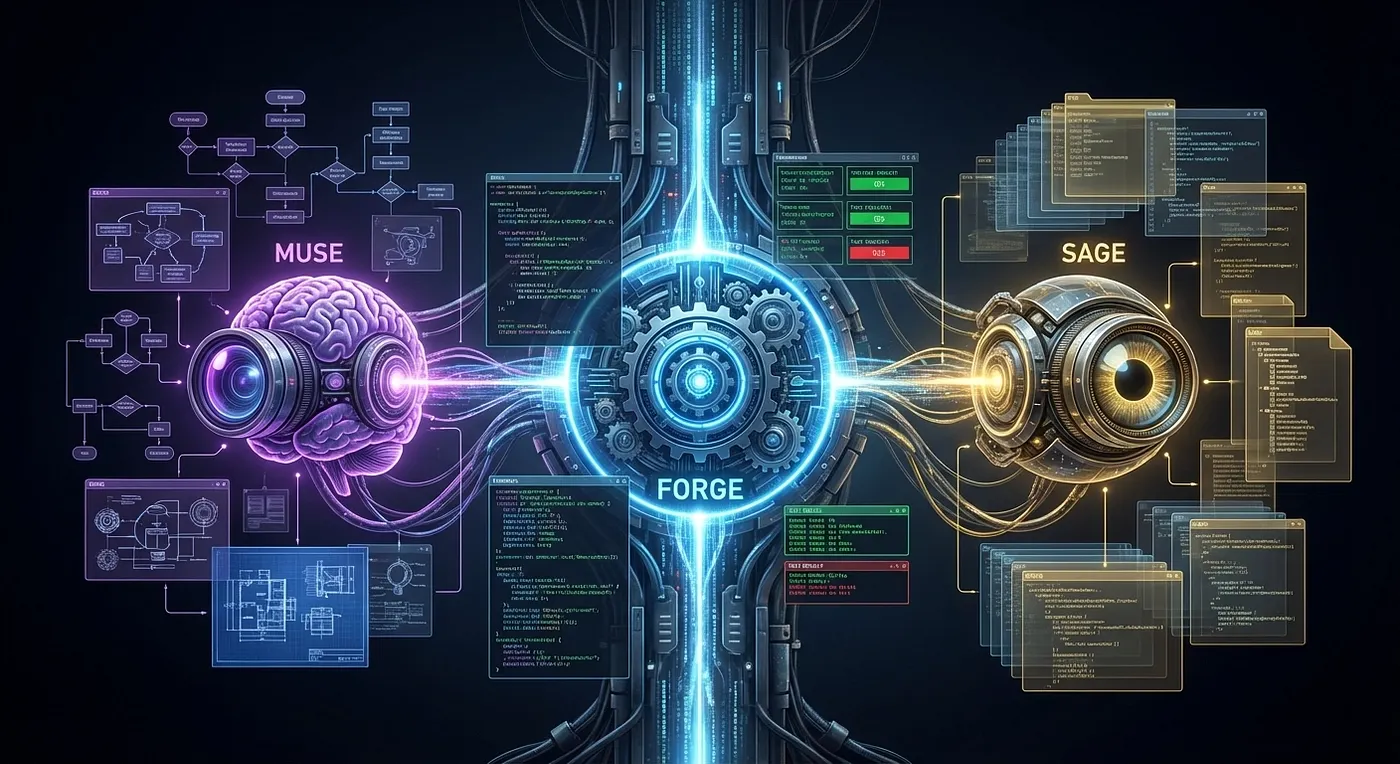
ForgeCode ships with three built-in AI agents. Understanding what each one does, and which ones you interact with directly, is the key to understanding why the harness behaves differently from a single-agent tool.
Muse: Planning Agent for Analysis (User-Facing)
Muse is ForgeCode’s planning agent. When you hand ForgeCode a complex task, such as refactoring a module, implementing a feature from a spec, or migrating a codebase to a new dependency, Muse decomposes the problem. It reasons about what needs to happen before anything happens, identifies dependencies between subtasks, determines which parts of the codebase are relevant, and produces a structured plan that the execution layer can follow.
Muse is user-facing. You can invoke it directly. You can inspect its reasoning, challenge its plan, and iterate on it before committing to execution. This is intentional: planning is where human judgment has the highest leverage. If the plan is wrong, execution will be efficiently wrong. Muse gives you a checkpoint before that happens.
Per the official documentation, Muse holds “read + write” access and is described as best for “complex refactoring, critical systems, and pre-implementation review” [ForgeCode Docs — Operating Agents, 2026].
Forge: Execution Agent for Implementation (User-Facing, Default)
Forge is the default execution agent. Launch ForgeCode without specifying an agent and you get Forge. It is the implementation and execution workhorse: writing code, running shell commands, reading files, executing tests, handling compilation, and iterating on failures. Forge operates in an aggressive execution loop. It will retry, adjust, and retry again before surfacing a failure to the user, rather than stopping at the first error.
Forge is what most users interact with most of the time. It is also the agent whose behavior most distinguishes ForgeCode from a thin-wrapper tool: Forge does not just generate code. It executes, validates, and recovers in a loop.
Sage: Internal Research Agent, Read-Only (NOT User-Facing)
Sage is the most misunderstood of the three agents, and the distinction matters.
Sage is an internal read-only research agent. Muse and Forge invoke it automatically when they need to consult the codebase, to look up an existing implementation, trace a call chain, or understand how a module works, without polluting their active context. Sage reads; it does not write, execute, or modify. It exists to answer context questions so that Muse and Forge can stay focused on their respective jobs.
Sage is not user-facing. You do not invoke Sage directly. It operates behind the scenes, called by the other agents as an internal research primitive. Treating Sage as a peer user-facing agent alongside Muse and Forge is a common mischaracterization. In reality, Sage is closer to a managed read-only file system interface than to a conversational agent.
Role-Based Agent Separation: What the Architecture Actually Provides
The three-agent design delivers value through role separation. That separation is worth being precise about, because the official documentation clarifies something that common descriptions often get wrong.
The ForgeCode documentation states that “Your conversation and project context are preserved when switching agents” [ForgeCode Docs — Operating Agents, 2026]. Context is not technically sealed into separate per-agent windows. When you switch from Muse to Forge, your shared conversation and project context carry forward. Transitions preserve rather than partition.
What the architecture isolates is responsibility. Each agent is scoped to a specific class of task, and that scoping shapes how it uses the shared context:
- Muse reasons analytically about plans. It does not write code or run commands. Its job is to think before acting.
- Forge executes. It does not deliberate about architecture. Its job is to implement, validate, and recover.
- Sage reads the codebase without writing or executing. Its job is to answer context questions for the other two.
The value here is not that each agent sees a different slice of your conversation. It is that each agent is optimized for, and constrained to, a specific class of action. That role clarity reduces the risk of conflating analytical reasoning with premature implementation, which is the core problem the three-agent split exists to solve.
Compare this to a single-agent tool where planning, execution, and research share the same agent with no role enforcement. As tasks grow in complexity, the model must manage its own role discipline on top of the actual task. Models are not consistent at that.
The Context Engine: AI Orchestration for Large Codebases
Repository-scale context management is one of the hardest problems in AI coding. ForgeCode has invested in it seriously.
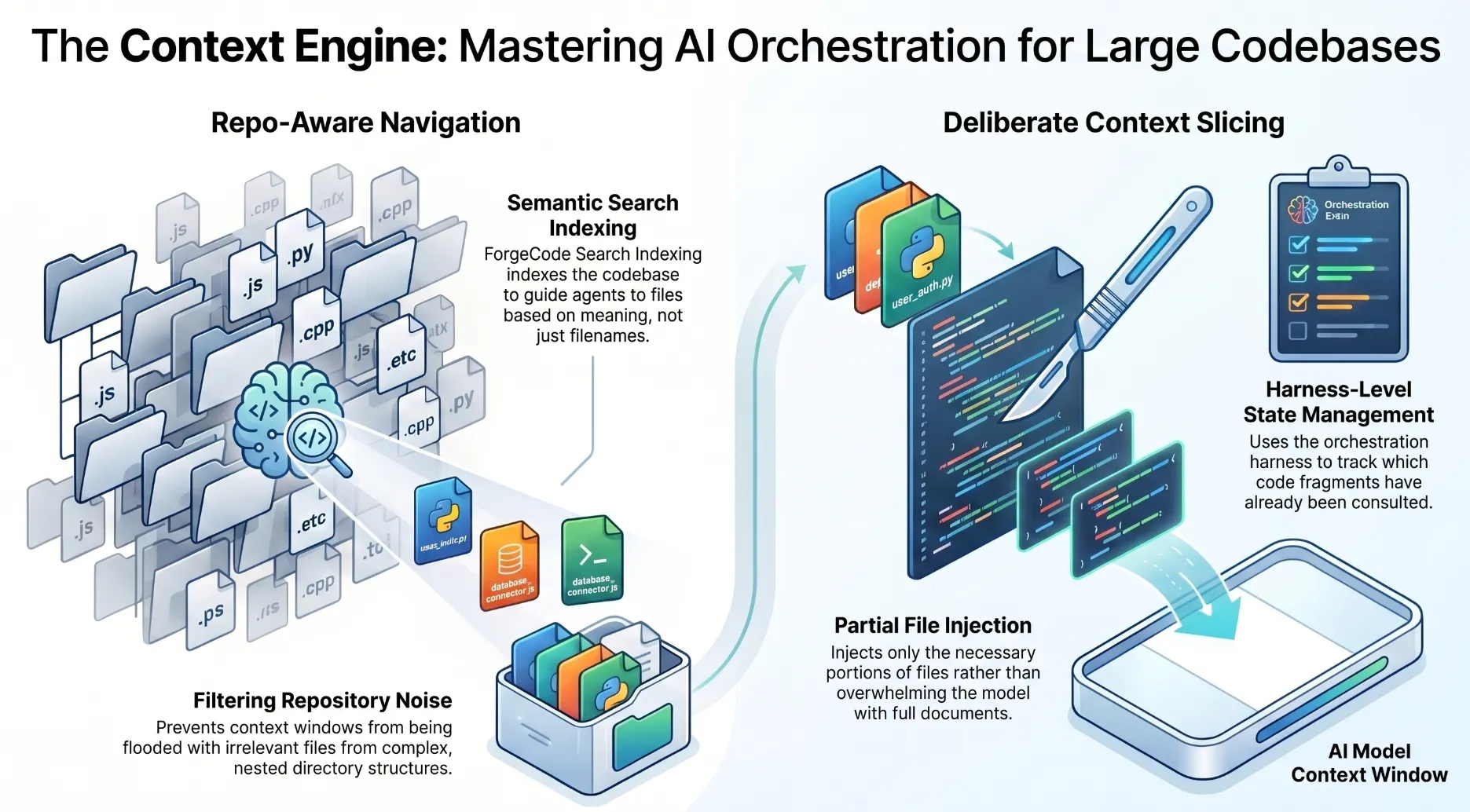
The ForgeCode context engine does two things that most thin-wrapper tools do not: repo-aware navigation and deliberate context slicing.
Repo-Aware Navigation
Rather than naively reading files from the current directory, ForgeCode’s context engine uses semantic search to index the codebase and start agents at the most relevant files and functions. After running the :sync command, agents can search the codebase by meaning rather than exact text matches.
This matters because large codebases are not flat. A repository with 500,000 lines of code has nested modules, cross-cutting concerns, and dependency trees that span dozens of directories. A tool that cannot navigate that structure will either flood the context window with irrelevant files or miss the ones that matter.
Context Slicing
Even with repo-aware navigation, you cannot fit an entire large codebase into a model context window. Context slicing is ForgeCode’s mechanism for including the right portions of files rather than the full files. When a function definition spans 50 lines but only the signature and the return type are relevant to the current task, the context engine injects just those lines rather than the entire function body.
Context slicing requires the harness to maintain a representation of which parts of the codebase have already been consulted and what was determined to be relevant, so subsequent slices can be selected coherently. This is state management that lives in the harness, not in the model.
Multi-Model Routing: 300+ Models, One Harness
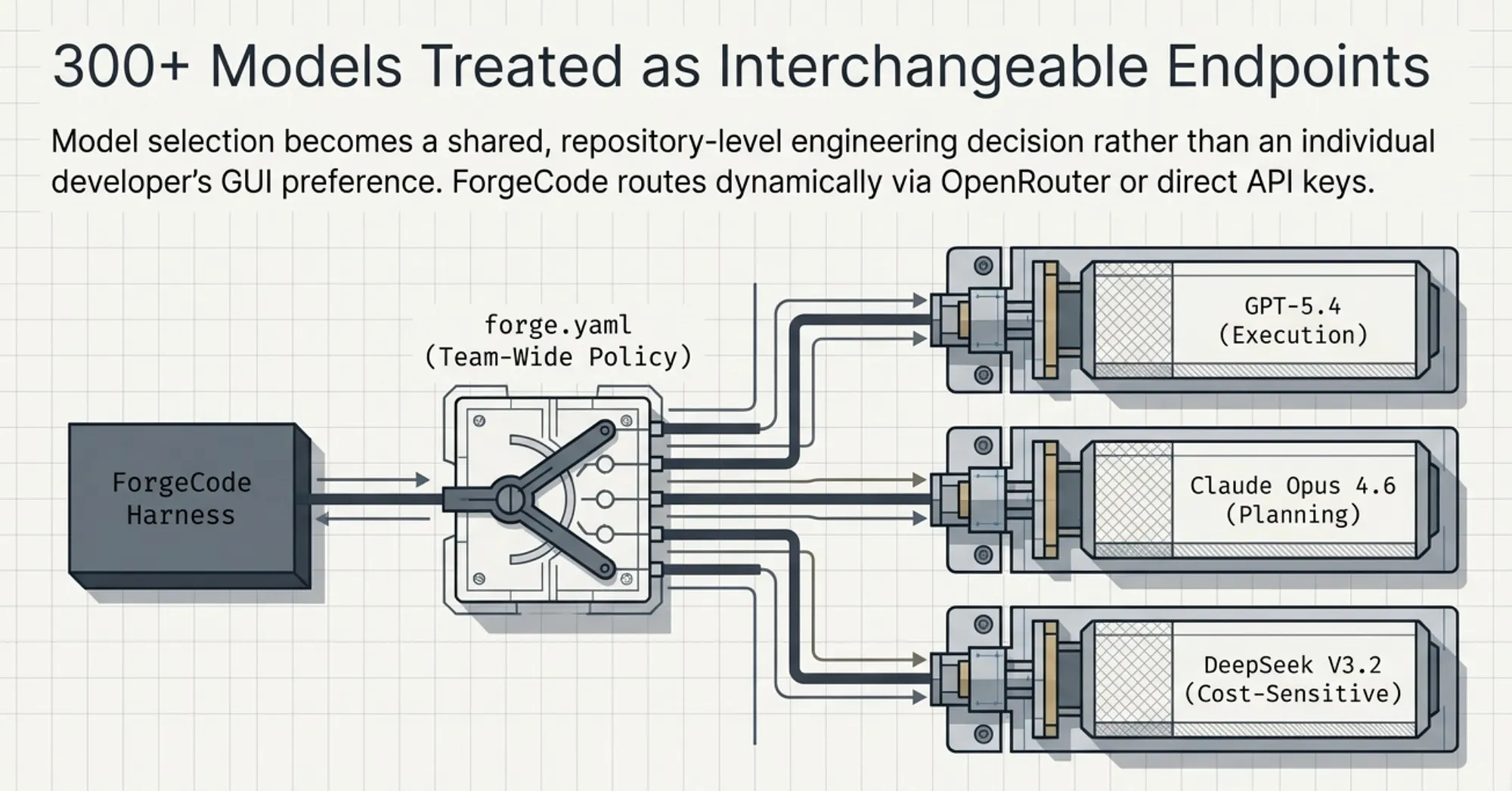
ForgeCode supports more than 300 models through OpenRouter integration and direct API keys. The supported roster includes Claude (all tiers), GPT (all tiers), Gemini, DeepSeek, Grok, and any OpenAI-compatible endpoint, covering effectively every major model provider available as of 2026.
But raw model count is not the differentiator. What matters is how ForgeCode routes between them.
forge.yaml: Team-Wide Model Configuration
Model preferences are persisted in a forge.yaml configuration file. This file specifies the model ForgeCode uses, with project-level settings overriding user-level defaults. Because forge.yaml lives in the repository, the entire team shares the same preferences. Model selection becomes a team-level engineering decision, not an individual user preference set in a GUI.
Example models a team might configure:
- Planning tasks: Claude Opus 4.7 [Anthropic, April 16, 2026] — strong long-chain reasoning for architectural decisions
- Execution tasks: GPT-5.4 [OpenAI, March 5, 2026] — fast code generation with strong instruction following
- Cost-sensitive tasks: DeepSeek-V3.2 [DeepSeek, December 1, 2025] — for bulk refactoring tasks where budget matters
This kind of model configurability is only practical inside a harness-first system. A model-centric tool is designed around one model; asking it to support multiple is retrofitting an architectural assumption that was baked in from the start.
OpenRouter vs Direct API Keys
ForgeCode supports both paths. OpenRouter provides a single unified API that aggregates access to hundreds of models from multiple providers, think of it as a package manager for LLMs, simplifying key management and enabling easy model swapping. As of 2026, OpenRouter aggregates 300+ active models from over 60 providers including Anthropic, OpenAI, Google, DeepSeek, Meta, Mistral, and xAI [OpenRouter Docs — Models, 2026]. Direct API keys bypass the aggregation layer for teams that have existing provider relationships or need lower-latency access to specific models.
The choice between them is a configuration decision in forge.yaml, not a code change.
How ForgeCode Compares: AI Agent Specialization Side by Side
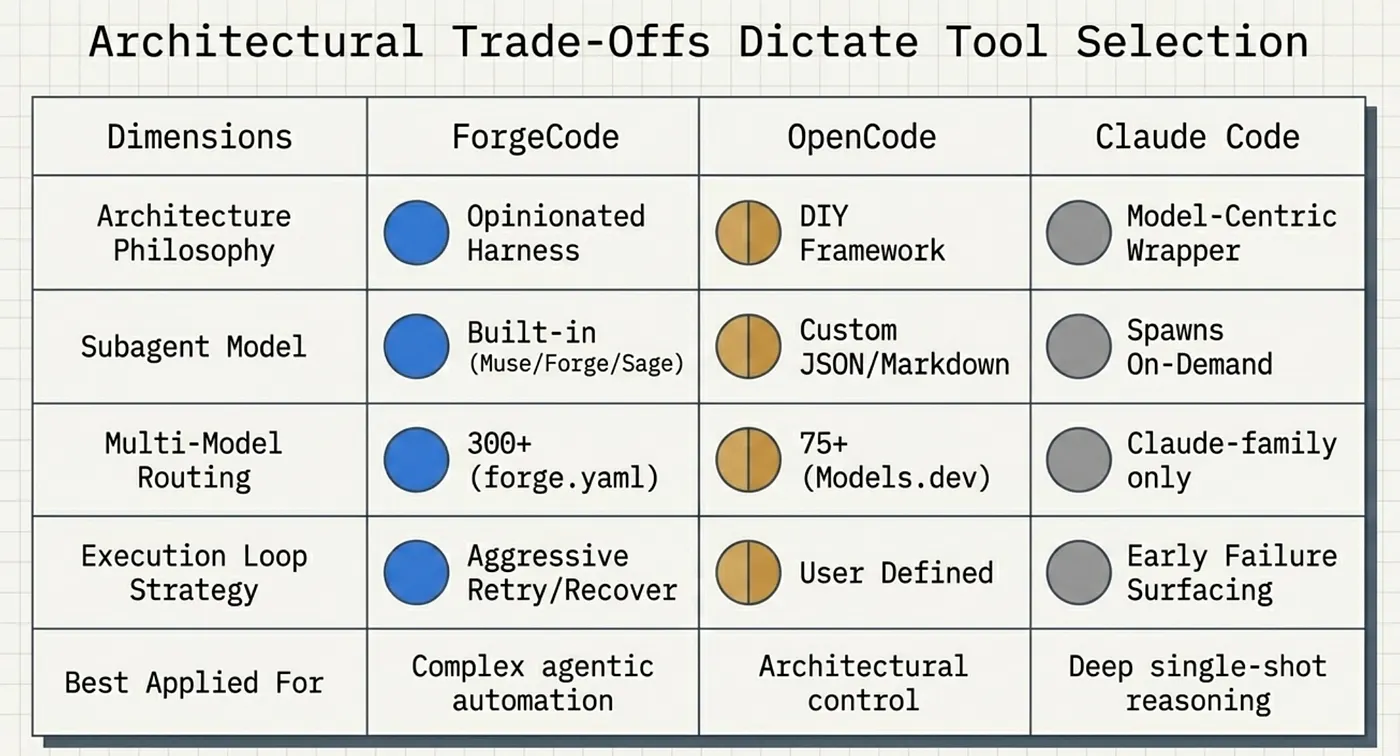
ForgeCode’s multi-agent architecture is not the only approach to subagents in the field. Claude Code and OpenCode both support subagent patterns, but in fundamentally different ways.
The essential contrast: ForgeCode ships the architecture. Claude Code spawns on demand. OpenCode hands you the raw materials.
Subagent model: ForgeCode ships a built-in opinionated harness. Claude Code spawns subagents on demand. OpenCode uses a DIY declarative JSON and Markdown-based framework.
Agent roles: ForgeCode’s roles are Muse for planning, Forge for execution, and Sage for internal research. Claude Code’s general subagents are spawned by the orchestrator. OpenCode’s agents are user-defined via JSON and Markdown configuration.
Context handling: ForgeCode provides role-based separation with shared context preserved across transitions [ForgeCode Docs, 2026]. Claude Code context can bleed across subagent invocations. OpenCode’s context behavior depends on the user’s agent definitions.
Model routing: ForgeCode routes via forge.yaml with per-agent routing unverified. Claude Code: Claude-family models only; per-subagent model tier routing supported [Claude Code Docs -- Model Config, 2026]. OpenCode has built-in routing via 75+ providers through Models.dev.
Specialization: ForgeCode provides a pre-built planner, executor, and researcher split. Claude Code ships three built-in subagents (Explore, Plan, General-purpose), auto-invoked by the orchestrator [Claude Code Docs — Sub-agents, 2026]. OpenCode includes four built-in agents (Build, Plan, General, Explore), with additional user-defined specialization.
Configuration complexity: ForgeCode is low (use built-in agents as-is). Claude Code is low (no configuration needed). OpenCode is high (build your own agent definitions).
Flexibility: ForgeCode is medium (opinionated structure). Claude Code is low (Claude-only models; limited to built-in subagent patterns). OpenCode is high (fully customizable).
The contrast between ForgeCode and OpenCode is worth dwelling on. OpenCode is a framework: it gives you the building blocks to construct a multi-agent system using JSON configuration files and Markdown. You define the agents, their context boundaries, their model assignments, and their interaction patterns. This is powerful if you want complete control over your agent architecture, but it means you are also responsible for getting that architecture right. OpenCode uses the AI SDK and Models.dev to support 75+ LLM providers [OpenCode Docs — Models, 2026].
ForgeCode makes the opposite bet: opinionated defaults that work well out of the box, with less surface area for configuration errors. The Muse/Forge/Sage split is an engineering decision ForgeCode has already made for you [ForgeCode Docs — Operating Agents, 2026]. Whether that decision fits your use case is the question this article addresses directly.
With the architecture mapped out, the natural next question is: how does an independent benchmark actually verify that these architectural investments produce results? Terminal-Bench 2.0 is that test, and understanding what it actually measures is what makes ForgeCode’s score meaningful.
Why AI Coding Benchmarks Usually Lie, and Why Terminal-Bench 2.0 Doesn’t
Most AI coding benchmarks measure a narrow proxy. HumanEval measures whether a model can complete a Python function given its docstring (a dataset of 164 hand-written Python problems introduced by OpenAI alongside Codex in 2021, evaluated using a pass@k functional-correctness metric [OpenAI / Codex Paper, 2021; arxiv.org/abs/2107.03374]). SWE-bench measures whether a model can apply a GitHub patch to fix a reported bug. Accepted as an oral presentation at ICLR 2024, it was later expanded into SWE-bench Verified (500 human-validated tasks) and SWE-bench Lite (300 tasks) [SWE-bench ICLR 2024; OpenAI SWE-bench Verified, August 2024]. Both tell you something real about model quality, but neither tells you how a tool performs when you give it a complex, open-ended engineering task in a messy, real-world terminal environment.
Terminal-Bench 2.0 is different. It was designed specifically to resist narrow benchmarking by placing AI agents inside fully isolated, containerized terminal environments and asking them to complete tasks the way a human engineer would: by running commands, reading outputs, writing code, executing it, recovering from errors, and iterating until the goal is achieved. No hand-holding. The environment is the interface. The task is the instruction. The automated test suite decides if you are done.
This is exactly the environment where harness quality, not model quality, is the controlling variable.
Terminal-Bench 2.0 Methodology and Structure
Terminal-Bench 2.0 was developed by the Laude Institute and published as an ICLR 2026 conference paper [Terminal-Bench, arxiv.org/abs/2601.11868, January 2026; OpenReview ICLR 2026]. The paper’s abstract frames the core problem directly: current benchmarks either do not measure real-world tasks, or are not sufficiently difficult to meaningfully differentiate frontier models. The design choices directly explain why the benchmark favors harness-first architectures.
89 Tasks, Containerized Environments
The benchmark consists of 89 distinct tasks, selected from 229 initial candidates and assessed by three experienced human reviewers for specificity, solvability, and integrity [Terminal-Bench paper, 2601.11868v1; vals.ai/benchmarks/terminal-bench-2]. Each task runs inside a containerized environment: a fresh, isolated system state with specific tooling, dependencies, and a defined starting condition. The container isolation serves two purposes: it ensures reproducibility across evaluations, and it prevents agents from contaminating each other’s environments.
Each task comes with three components:
- A unique environment: the containerized system state the agent starts in
- A human-written reference solution: the ground truth for what a correct completion looks like
- An automated test suite: the objective verification mechanism that scores the agent’s output
Tasks are not “generate this code” prompts. They are more like: “This containerized environment has a broken build. Fix it, run the tests, and make them pass.” Or: “This environment has a partially implemented service. Complete the implementation so that the integration tests pass.” The agent must navigate the environment, understand the current state, form a plan, execute steps, observe outcomes, and adapt.
Task Categories
The 89 tasks span four domains [Terminal-Bench paper, 2601.11868v1; vals.ai/benchmarks/terminal-bench-2].
Software Engineering: The largest category. Tasks include implementing features in existing codebases, debugging runtime failures, resolving dependency conflicts, migrating between frameworks, and writing tests that achieve coverage targets. Specific examples in the benchmark include build systems, compilation, dependency resolution, git operations with merge conflicts, COBOL-to-Python rewrites, and code coverage analysis. These tasks directly mirror real software engineering work.
Security: Tasks involving identifying and patching vulnerabilities, configuring secure defaults, validating input sanitization, and understanding attack surface in deployed configurations. Specific examples include differential cryptanalysis on cipher systems, password recovery, vulnerability identification, and API key removal from codebases. These require both technical knowledge and multi-step reasoning about system state.
Biology: Bioinformatics pipeline tasks: processing genomic data files, running analysis tools, interpreting output formats, and generating reports. These tasks are included specifically to test generalization beyond software engineering, ensuring tools are not just pattern-matching to common coding tasks.
Gaming: Implementing game logic, scripting agents for simple game environments, and modifying existing game state. Specific examples include chess engine move optimization and physics-based rendering implementations. These tasks introduce non-standard problem domains and test whether agents can reason about rule systems that differ from typical software engineering constraints.
The cross-domain breadth is intentional. A tool that succeeds only on software engineering tasks has not proven general terminal competence; it has proven domain-specific pattern matching. Terminal-Bench 2.0 requires genuine generalization.
What Makes a Task Harness-Sensitive: Evaluating AI Coding Agents by Architecture
Not all AI coding tasks are equally sensitive to harness quality. Understanding the distinction helps explain both why Terminal-Bench 2.0 scores correlate with harness architecture and where model-centric tools remain competitive.
Model-Sensitive Tasks
A model-sensitive task is one where the quality of the answer depends primarily on the model’s knowledge, reasoning depth, or code generation fluency. Single-shot function completion is model-sensitive. Translating a natural-language specification into a well-structured class is model-sensitive. Writing a SQL query from a schema description is model-sensitive.
For these tasks, a model-centric tool with a strong model is hard to beat. The harness does not add much because the task fits comfortably inside a single context window, requires no agent coordination, and does not benefit from execution loop recovery.
Harness-Sensitive Tasks
A harness-sensitive task is one where the outcome depends on one or more of the following factors.
Multi-step execution with error recovery: The task cannot be completed in one shot. The agent must run a command, observe the output, adjust, run again, and iterate. Tools with aggressive, well-structured execution loops outperform tools that stop at the first unexpected output.
Context management across many files: The task requires reasoning about a large or complex codebase that does not fit in a single context window. Tools with deliberate context slicing and repo-aware navigation maintain coherence; tools that naively dump files into context degrade as complexity grows.
Subtask parallelism or handoff: Some tasks are most efficiently solved by decomposing into specialized subtasks: a planning phase that identifies dependencies, followed by an execution phase that implements them, followed by a verification phase that confirms correctness. Single-agent tools must do all of this in one stream; multi-agent harnesses can pipeline it.
Domain-generalized knowledge lookup: When a task requires consulting unfamiliar APIs, reading environment configuration files, or tracing unfamiliar codebases, a tool with an internal research primitive (like Sage) can consult that material without polluting the active planning or execution context.
Nearly every Terminal-Bench 2.0 task hits at least two of these four harness-sensitivity factors. The benchmark was designed for end-to-end terminal task completion: the kind of work that exposes harness weaknesses immediately and punishes them with test failures.
ForgeCode’s Structural Fit with Terminal-Bench 2.0
ForgeCode’s architecture aligns with what Terminal-Bench 2.0 rewards at each of the harness-sensitivity factors. ForgeCode is an open-source, model-agnostic agent harness written in Rust that wraps any LLM through OpenRouter or direct API keys, supporting over 300 models. Its multi-agent architecture consists of three specialized subagents: Muse, Forge, and Sage.
Multi-step execution with error recovery: Forge operates in an aggressive execution loop. It does not surface failure to the user on the first error; it retries, adjusts, and retries again. In containerized test environments where build failures and test failures are common on the first attempt, this loop behavior directly translates to higher task completion rates.
Context management across many files: ForgeCode’s context engine performs repo-aware navigation and context slicing. In tasks that require understanding a complex codebase before implementing a fix, this engine feeds the model the right fragments rather than overwhelming it with irrelevant files.
Subtask decomposition: Muse handles planning: it analyzes the codebase and creates detailed implementation plans, proposing solutions and explaining the impact of changes without executing them. Forge handles execution: writing new code, refactoring existing files, and running shell commands. The Muse-to-Forge handoff is a structured artifact pass, not a shared context dump. The model executing code operates with a clean, focused plan rather than a long conversation history full of planning tangents.
Domain-generalized knowledge lookup: Sage is an internal tool, not a user-facing agent, that both Muse and Forge invoke automatically to research and understand the codebase. In biology and gaming tasks where ForgeCode cannot rely on training-data pattern matching, Sage’s targeted lookup capability sustains performance where single-agent tools degrade.
Terminal-Bench 2.0 Leaderboard: AI Coding Agent Rankings in Context
As of April 2026, the Terminal-Bench 2.0 leaderboard tells the following story.
Current leaderboard standings (April 2026):
- ForgeCode (GPT-5.4): 81.8% [tbench.ai Leaderboard, April 2026]
- ForgeCode (Claude Opus 4.6): 81.8% [tbench.ai Leaderboard, April 2026]
- Codex CLI: Approximately 62.9% [tbench.ai leaderboard, April 2026]
- Claude Code: Approximately 58.0% [tbench.ai leaderboard, April 2026]
- LangChain Deep Agents CLI: 66.5% [LangChain Blog, 2026]
- Gemini CLI: Approximately 47.4% [tbench.ai leaderboard, April 2026]
Note there is a caveat at the end of the article that lowers ForgeCode’s score but still it is higher than Codex CLI, Claude Code, and Gemini CLI.
A few observations worth making explicit.
ForgeCode holds two confirmed positions near the top of the leaderboard. That is a harness result, full stop. The same underlying models (GPT-5.4 and Claude Opus 4.6) score differently when run inside ForgeCode versus inside model-centric tools. The delta is the harness. Independent leaderboard trackers confirm ForgeCode’s placement at the top of Terminal-Bench 2.0 with scores of 81.8% [tbench.ai/leaderboard/terminal-bench/2.0; morphllm.com/terminal-bench-2; benchlm.ai/benchmarks/terminalBench2]. ForgeCode’s own blog also claims the #1 and #2 leaderboard positions for these two configurations [ForgeCode Blog, forgecode.dev/blog/gpt-5–4-agent-improvements/].
ForgeCode’s top placement is a harness result, full stop: the same underlying frontier models score differently when run inside a harness-first system versus inside model-centric tools.
LangChain Deep Agents CLI at ~42.65% is an instructive data point. Deep Agents is an open-source, MIT-licensed terminal coding agent built on LangGraph, equipped with a planning tool, a filesystem backend, and the ability to spawn subagents. It achieved scores of 44.9% and 40.4% on two Terminal-Bench 2.0 runs using Claude Sonnet 4.5 (released September 29, 2025; superseded by Claude Sonnet 4.6, released February 17, 2026. LangChain subsequently improved the tool to 66.5% through documented harness engineering changes, without changing the underlying model (GPT-5.2-Codex) [LangChain Blog, blog.langchain.com/improving-deep-agents-with-harness-engineering/]. That jump from 42.65% to 66.5% with the same model is exactly the harness argument made concrete: agent composition alone is not sufficient. The quality of the execution loop, the context engine, and the agent specialization logic all matter independently.
The cluster of model-centric tools at lower scores validates the core thesis. Claude Code, with some of the strongest per-token reasoning of any tool in the field, scores below ForgeCode on Terminal-Bench 2.0 tasks. The benchmark is specifically calibrated to reward what harnesses do well and to expose what model-centric tools struggle with.
What This AI Coding Benchmark Does Not Tell You
Fair warning: Terminal-Bench 2.0 does not measure everything.
It does not measure IDE integration quality. It does not measure latency per token, suggestion quality for inline completions, or how well the tool integrates with VS Code or JetBrains. It does not measure the quality of explanations generated for code review, or the accuracy of documentation generation. It does not measure how pleasant the tool is to use for a junior engineer who needs guardrails.
Terminal-Bench 2.0 measures one specific thing: the ability to complete complex, multi-step, agentic tasks in a terminal environment. ForgeCode is exceptionally well-optimized for exactly that use case. The following tool comparisons will show you where that optimization pays dividends, and where other tools remain the better choice.
The benchmark tells us what wins. A head-to-head tool comparison tells us who wins in each specific situation, and where ForgeCode loses. The following comparisons are designed to give you that honest view.
How to Read These AI Coding Tool Comparisons
This section puts ForgeCode head-to-head against Claude Code, Codex, OpenCode, Gemini CLI, and Cursor/GitHub Copilot CLI, comparing harness-first and model-centric approaches across multi-agent support, benchmark results, and real-world trade-offs. Each subsection presents a structured comparison followed by a verdict. The goal is not to declare a universal winner. The goal is to give you enough detail to make an honest evaluation for your specific context.
A tool that wins on Terminal-Bench 2.0 is not automatically the right tool for every team. A tool with a weaker benchmark score might be the right choice for a team that prioritizes IDE integration, explanation quality, or ease of onboarding. The comparisons below make those trade-offs explicit.
ForgeCode vs Claude Code: Harness-First AI Agents vs Deep Reasoning
The comparison that matters most for most teams. Here is how the two tools stack up across the dimensions that count.
- Subagents: ForgeCode ships three explicit built-in AI agents (Muse, Forge, Sage). Claude Code spawns subagents on demand.
- Multi-model routing: ForgeCode supports 300+ models via
forge.yaml. Claude Code is limited to Claude-family models. - Context isolation: ForgeCode provides strong bounded isolation per agent. Claude Code’s formal architectural behavior is not documented.
- Execution loop: ForgeCode runs aggressive retry-and-adjust cycles. Claude Code surfaces failures earlier.
- Reasoning quality: ForgeCode depends on the model loaded. Claude Code delivers consistently strong native Claude reasoning.
- MCP support: Both tools support MCP.
- Benchmark (Terminal-Bench 2.0): ForgeCode at ~81.8%. Claude Code approximately 58.0%.
- Best for: ForgeCode for large-scale agentic automation and multi-model teams. Claude Code for deep reasoning and single-model simplicity.
ForgeCode ships three built-in agents with distinct roles: Forge writes and edits code, executing commands to complete tasks immediately; Muse analyzes the codebase and creates implementation plans in a plans/ directory without modifying files; Sage is an internal read-only research tool that both Muse and Forge invoke automatically to understand the codebase. The tool supports over 300 AI models including OpenAI, Anthropic, Google, DeepSeek, and self-hosted providers.
On Terminal-Bench 2.0, ForgeCode holds positions 1 and 2 at 81.8% (GPT-5.4 and Claude Opus 4.6).
ForgeCode consistently outperforms Claude Code, Codex CLI, and Gemini CLI on Terminal-Bench 2.0 and is frequently at the top of the leaderboard.It also surpasses other well-known coding agents such as LangChain Deep Agents (66.5%), Pilot, Goose, and Aider in harness-driven terminal performance.
Verdict: Claude Code has the strongest per-token reasoning quality in the field. Anthropic built it around Claude’s strengths, and those strengths are genuine. Where Claude Code underperforms ForgeCode is in complex multi-step task completion where context discipline and execution loop control matter more than raw reasoning depth. If your primary use case is code review, explanation generation, or thoughtful single-session refactoring, Claude Code’s reasoning quality is a real advantage. If your primary use case is automating large, complex, multi-file engineering tasks end to end, ForgeCode’s harness wins.
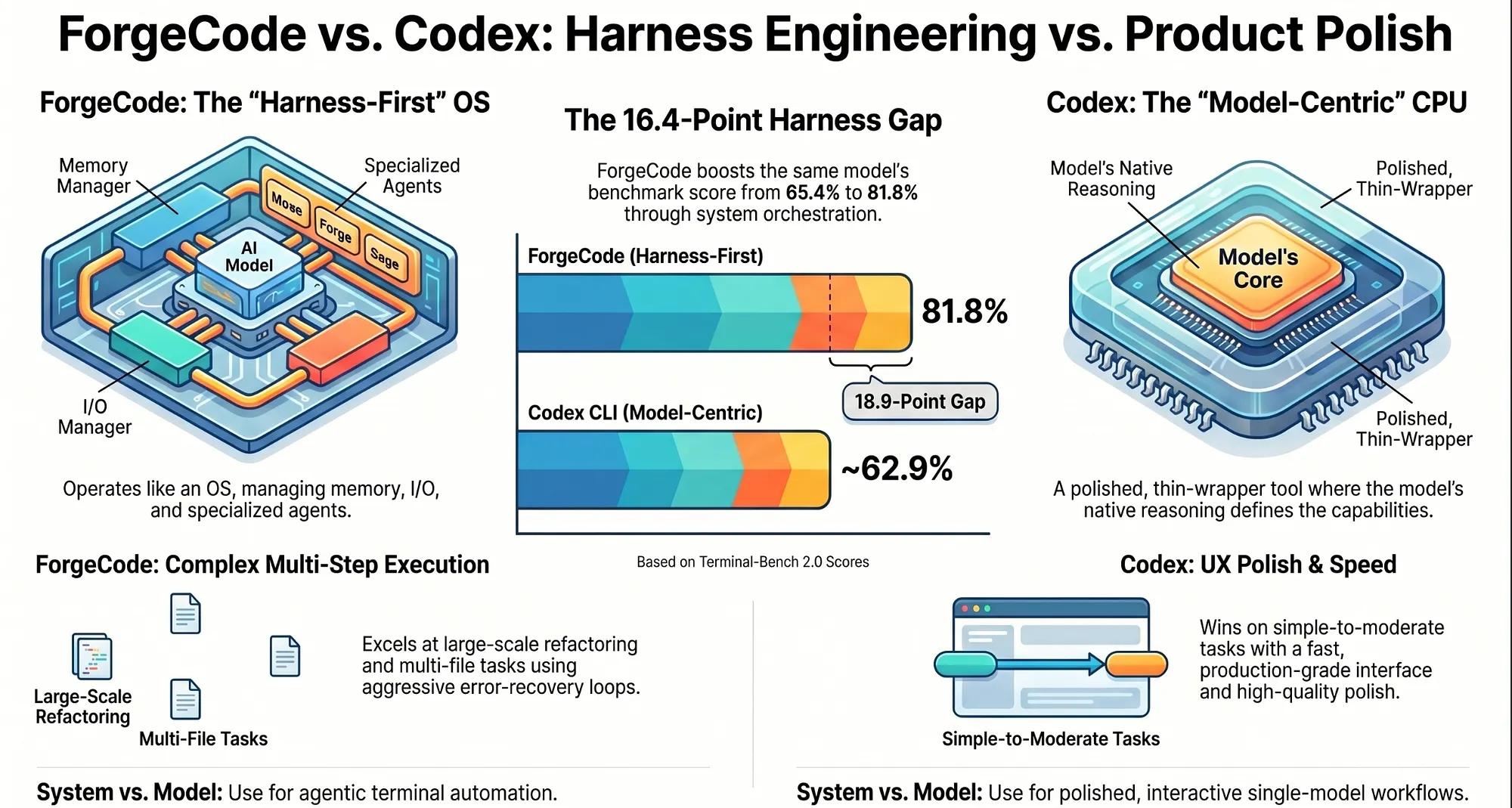
ForgeCode vs Codex: Harness Engineering vs Product Polish
What do you get when you strip away multi-agent orchestration and focus entirely on model quality and UX polish? That is roughly Codex. Here is where the two approaches genuinely diverge.
- Harness sophistication: ForgeCode is very high. Codex is moderate.
- Multi-agent support: ForgeCode has built-in AI agents. Codex has limited multi-agent capability.
- Multi-model routing: ForgeCode supports 300+ models. Codex does not support multi-model routing.
- Reliability: ForgeCode achieves reliability through harness error recovery. Codex achieves reliability through product polish.
- Speed: ForgeCode speed depends on the model loaded. Codex is fast.
- Benchmark (Terminal-Bench 2.0): ForgeCode at ~81.8%. Codex lower.
- Best for: ForgeCode for multi-agent agentic workflows. Codex for well-polished single-model execution.
Verdict: Codex is a polished, production-grade tool. ForgeCode achieves reliability through harness engineering: structured error recovery, bounded context, and aggressive retry loops. On simple to moderately complex tasks, both tools are reliable. The experience difference is mainly in UX polish, where Codex has the edge. On complex multi-step tasks, ForgeCode’s harness-based reliability sustains performance where Codex’s product-polish-based reliability degrades. Multi-model support is a clear ForgeCode advantage for any team running mixed-provider setups.
ForgeCode vs OpenCode: Opinionated Harness vs Open Framework
Verdict up front: OpenCode and ForgeCode are philosophically complementary but architecturally opposite. OpenCode is a framework: give it JSON and Markdown-defined agents and it will orchestrate them. ForgeCode is an opinionated harness: it has already made the agent design decisions for you. OpenCode’s declarative approach wins when you need full control over your agent architecture and are willing to invest the time to design and validate it. ForgeCode’s opinionated approach wins when you want strong performance out of the box without building the architecture yourself. The honest caveat: OpenCode’s skill ecosystem is more mature than ForgeCode’s. If your workflows depend heavily on community-contributed tools and skills, OpenCode is ahead today.
The philosophical split in the agentic AI coding space runs cleanest between these two tools.
- Philosophy: ForgeCode is an opinionated harness with built-in defaults. OpenCode is a framework: bring your own agents.
- Subagents: ForgeCode ships built-in Muse, Forge, and Sage. OpenCode uses DIY configuration via JSON and Markdown.
- Model routing: ForgeCode uses
forge.yamlwith OpenRouter. OpenCode uses Models.dev with 75+ providers. - MCP support: Both tools support MCP.
- Skill system: ForgeCode is partial and weak. OpenCode is stronger.
- Configuration burden: ForgeCode is low. OpenCode is high.
- Flexibility: ForgeCode is medium. OpenCode is high.
- Best for: ForgeCode for teams wanting opinionated defaults. OpenCode for teams wanting full architectural control.
OpenCode integrates with Models.dev and supports 75+ LLM providers out of the box, including Anthropic, OpenAI, Google, xAI, DeepSeek, Mistral, and local Ollama models via an OpenAI-compatible API [OpenCode Docs, Providers, 2026]. The project had accumulated over 95,000 GitHub stars by March 2026, growing to approximately 141,000 by April 2026 [GitHub, sst/opencode repository, April 2026], indicating significant community adoption.
On model routing: OpenCode integrates with Models.dev, giving it access to 75+ LLM providers [OpenCode Docs, Models, 2026], and OpenRouter as well as other sources like Github Copilot Models. ForgeCode integrates with OpenRouter, giving it access to 300+ models [OpenRouter Docs, Models Overview, 2026]. Both are sufficient for any realistic multi-provider setup.
ForgeCode vs Gemini CLI: Harness Depth vs Speed
Picture this: a quick shell command, ten lines of Bash, no iteration needed. Gemini CLI handles it faster and gets out of your way. That is genuinely its best case, and ForgeCode was not built for it. The moment the task grows multi-step, that calculus flips.
- Speed: ForgeCode speed depends on the model. Gemini CLI is very fast.
- Reasoning quality: ForgeCode depends on the model loaded. Gemini CLI is weaker on complex tasks.
- Multi-agent AI support: ForgeCode ships built-in multi-agent architecture. Gemini CLI has no multi-agent support.
- Multi-model routing: ForgeCode supports 300+ models. Gemini CLI is limited to Gemini models.
- Stability: ForgeCode is higher. Gemini CLI is inconsistent on complex tasks.
- Best for: ForgeCode for complex agentic workflows. Gemini CLI for speed-first, simple tasks.
Gemini CLI is Google’s open-source terminal AI agent, announced in 2025, that brings Gemini models directly into the shell. Its most recent model addition, Gemini 3 Flash, achieves a SWE-bench Verified score of 78% for agentic coding and was built to optimize the quality-vs-speed Pareto frontier at less than a quarter the cost of Gemini 3 Pro. The tool uses a ReAct (reason-and-act) loop with built-in tools and local or remote MCP servers.
Note: As of 2026, Gemini CLI is gaining Agent Skills support in preview builds [Gemini CLI Release Notes, 2026]. The “No” entry for multi-agent above reflects the stable release at the time of this writing; verify current feature status before making final decisions. As of April 15th they added support of Subagent development rivaling and perhaps surpassing Claude Code. The market is always moving.
Verdict: Gemini CLI’s primary advantage is speed. Gemini models are fast, and the CLI is optimized for low-latency responses. For quick code lookups, inline suggestions, and simple single-step tasks, Gemini CLI’s speed is noticeable. Where it falls short is task complexity and consistency. Gemini CLI lacks multi-agent support (at least it did until April 2026 so newer benchmarks will be interesting) and multi-model routing, and its stability on complex multi-step tasks is lower than ForgeCode’s. For teams that prioritize responsiveness on simple tasks over depth on complex ones, Gemini CLI is worth evaluating. It is not in the same competitive tier as ForgeCode for agentic workflows.
ForgeCode vs Cursor and GitHub Copilot CLI: Terminal vs IDE
These tools were built for different environments. The comparison reflects that honestly.
- Agentic workflows: ForgeCode supports full agentic automation. GitHub Copilot CLI and Cursor support partial agentic workflows.
- Multi-step execution: ForgeCode fully supports multi-step terminal execution. GitHub Copilot CLI and Cursor have limited support.
- Subagents: ForgeCode ships built-in AI agents. GitHub Copilot CLI and Cursor have no subagent architecture.
- Model flexibility: ForgeCode is high. GitHub Copilot CLI and Cursor are low.
- UX: ForgeCode is terminal-heavy. GitHub Copilot CLI and Cursor are polished GUI and IDE-integrated tools.
- Best for: ForgeCode for agentic terminal automation. GitHub Copilot CLI and Cursor for IDE integration and developer UX.
Verdict: Cursor and GitHub Copilot CLI occupy a different product category than ForgeCode. They are optimized for IDE-integrated developer experience: inline completions, chat panels in VS Code, UI-first workflows. They were not designed for terminal-first agentic execution. Comparing ForgeCode to Cursor on agentic task completion is almost unfair; Cursor was not built for that use case. Comparing Cursor to ForgeCode on IDE integration and developer UX is equally unfair in the other direction. These tools serve different primary use cases, and the most honest answer is often: use both. Use ForgeCode for complex automated engineering tasks in the terminal; use Cursor or Copilot for interactive development inside the IDE.
In April 2026, Cursor released an upgraded CLI harness and seems to be doubling down on this space, and perhaps moving away from IDE only support.
ForgeCode MCP and Skills Support: Agentic AI Extensibility Compared
Model Context Protocol (MCP) is an open standard introduced by Anthropic on November 25, 2024 to standardize the way AI systems integrate with external tools, systems, and data sources [Anthropic, “Introducing the Model Context Protocol,” November 2024; Wikipedia, Model Context Protocol, 2026]. In March 2025, OpenAI announced MCP adoption, with support landing immediately in the Agents SD. In December 2025, Anthropic donated MCP to the Agentic AI Foundation (AAIF), a directed fund under the Linux Foundation co-founded by Anthropic, Block, and OpenAI [Linux Foundation Press Release, December 9, 2025; Wikipedia, Model Context Protocol, 2026]. MCP is now an established cross-industry standard, not merely an emerging one.
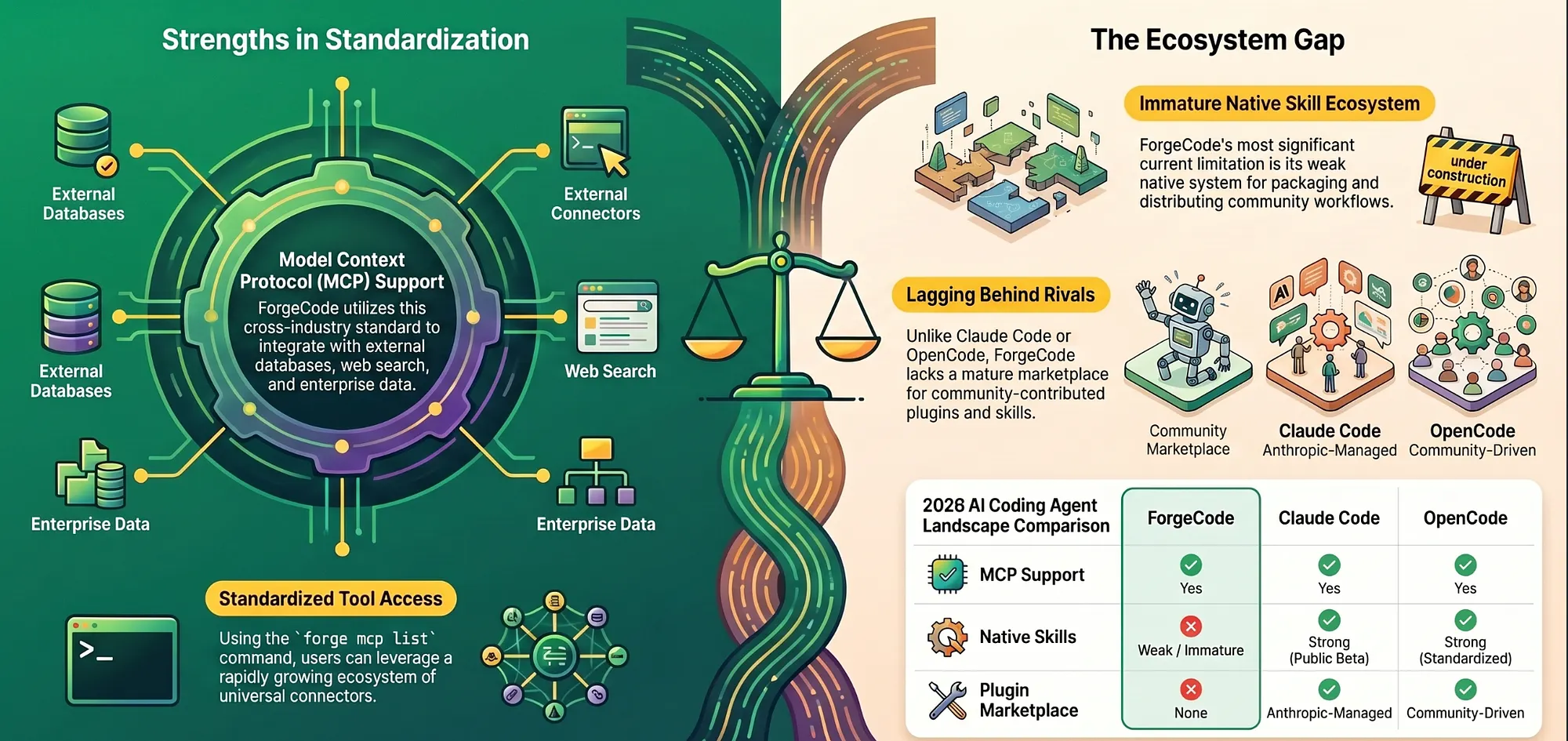
ForgeCode supports MCP, with the forge mcp list command exposing configured MCP servers. This gives ForgeCode access to the growing MCP server ecosystem: database connectors, web search tools, file system integrations, and custom enterprise data sources.
ForgeCode extensibility at a glance:
- Built-in agents: Strong
- Subagents: Strong
- Skills (standardized plugins): Weak / not native
- Workflow files: Yes
- MCP: Yes (
forge mcp list)
The weakness in the “Skills” row is worth being direct about. ForgeCode’s native skill system, the mechanism by which community-contributed workflows and tool integrations are packaged and distributed, is immature compared to what Claude Code or OpenCode offer today. Claude Code’s plugin ecosystem launched in public beta on October 9, 2025, and the official Anthropic-managed marketplace had expanded to cover code intelligence plugins, external service integrations (GitHub, GitLab, Jira, Slack, and others), and development workflow tools by March 2026; community-driven registries aggregate additional skills across the broader ecosystem. OpenCode’s standardized agent and skill definitions are more thoroughly documented and more widely adopted by the community.
For teams whose workflows require pulling in community-contributed skills, such as database migration tools, CI/CD integrations, and specialized code transformation scripts, ForgeCode’s current skill ecosystem is a real limitation. MCP fills some of this gap, but MCP connectivity is not a substitute for a native, well-documented skill packaging system.
This is ForgeCode’s most significant weakness today. Weigh it heavily if community extensibility is a priority for your team.
ForgeCode Limitations: Weaknesses Every Team Should Weigh
No honest AI coding tool comparison is complete without a direct accounting of ForgeCode’s limitations.
Reasoning quality is model-dependent. ForgeCode’s harness is strong; its reasoning quality depends entirely on the model you load into it. A well-configured Claude Opus 4.6 inside ForgeCode will reason well. A poorly selected cheap model inside ForgeCode will reason poorly. Claude Code’s reasoning quality is reliably high because it always runs on Claude. ForgeCode’s reasoning quality is variable, and getting it right requires understanding both the task and the model.
Skill ecosystem is immature. As discussed above, the standardized plugin and skill distribution system lags behind the field. Teams that rely on community-contributed tools will find less available in ForgeCode’s ecosystem than in Claude Code’s or OpenCode’s.
Terminal-heavy UX is not for everyone. ForgeCode is a terminal tool designed for engineers who live in the terminal. Its interface is not polished the way Cursor or Codex are. For engineering teams that prefer GUI-first or IDE-integrated workflows, ForgeCode’s UX friction is real.
Setup complexity for multi-model routing. Getting forge.yaml configured correctly for multi-model routing requires understanding model capabilities, API key management, and routing logic. This is a reasonable investment for a team that will use the feature heavily, but it is a non-trivial onboarding cost for teams that just want something that works out of the box.
With the competitive landscape mapped honestly, the final question is the most practical one: when does all of this add up to “choose ForgeCode,” and when does it not? The answer starts with what is happening to models in 2026.
ForgeCode’s Harness-First Thesis, Restated
Four sections in, the evidence is clear: ForgeCode’s harness-first architecture produces an 81.8% Terminal-Bench 2.0 score, and that score is not a model achievement. The same models (GPT-5.4, Claude Opus 4.6) score lower when run inside model-centric tools, as ForgeCode’s own benchmark analysis demonstrates [ForgeCode, ‘Benchmarks Don’t Matter — Until They Do’, forgecode.dev/blog/benchmarks-dont-matter/, March 2026]. The harness is the variable. The system beats the model.
But understanding why ForgeCode wins on a benchmark is not the same as understanding when it is the right tool for your team. This final section translates the architecture and the evidence into practical decision guidance, and situates ForgeCode within the broader industry shift that its success foreshadows.
Decision Matrix: When to Choose ForgeCode for Agentic AI Workflows
Here is a decision framework for evaluating ForgeCode for your specific situation.
Scenarios where ForgeCode wins:
- Large codebase refactoring (100K+ lines): Context engine and Forge’s execution loop maintain coherence where model-centric tools degrade
- Multi-step automated engineering tasks: Muse and Forge agent coordination outperforms single-agent tools on complex workflows
- Multi-model routing (cost or capability optimization):
forge.yamlper-task routing makes model selection explicit and shareable - Team-wide model policy enforcement:
forge.yamlshared config turns model selection into a team-level engineering decision
Scenarios where an alternative wins:
- Deep single-question code reasoning: Claude Code (stronger per-token reasoning)
- IDE-integrated inline completions: Cursor or GitHub Copilot CLI
- Well-polished onboarding for less experienced engineers: Codex or Claude Code
- Community skills and plugin ecosystem: OpenCode or Claude Code
- Speed-first, simple task completion: Gemini CLI
- Full architectural control over agent design: OpenCode
- GUI-first workflows: Cursor
ForgeCode Wins: Large Codebase Refactoring and Complex Multi-Step Automation
Large codebases with complex multi-file tasks. When the task requires reasoning about more code than fits in a context window, understanding how a refactor ripples across modules, tracing a bug through a call chain that spans 30 files, or implementing a feature that touches six subsystems, ForgeCode’s context engine and bounded agent isolation maintain coherence where model-centric tools degrade. This is the clearest ForgeCode use case.
Multi-step automated engineering workflows. If you are using AI coding tools to automate workflows that involve executing code, observing output, adjusting, and iterating (CI/CD automation, automated code migration pipelines, environment setup scripts), ForgeCode’s aggressive execution loop and error recovery logic directly translate to higher task completion rates. Single-shot tools stop at the first obstacle; ForgeCode is built to push through.
Multi-model teams with cost and capability optimization. If your team runs different models for different task types, such as a premium model for architectural reasoning, a cheaper model for bulk transformations, and a fast model for interactive lookups, ForgeCode’s forge.yaml routing makes that configuration explicit, shareable, and persistent. The alternative is every engineer making ad-hoc model selection decisions, which produces inconsistent results and inconsistent costs.
Teams treating AI automation as a first-class engineering discipline. ForgeCode’s closest conceptual ancestor is “LangChain Deep Agents for your terminal”: a systems-engineering approach to AI coding [LangChain Deep Agents, langchain.com/deep-agents, March 2026]. Teams that want to build sophisticated AI-powered engineering workflows, rather than just add an AI assistant to individual developer workflows, will find ForgeCode’s architecture a better foundation.
When ForgeCode Loses: Claude Code, Cursor, and Gemini CLI Use Cases
When reasoning quality per token is the priority. If your team’s highest-value use of AI is code review, explanation generation, architectural consultation, and deep analysis of specific code sections, tasks where the quality of insight per model call matters most, Claude Code’s native Claude reasoning is the better choice. ForgeCode’s reasoning quality depends on the model loaded; Claude Code’s is reliably high.
When developer experience and onboarding friction matter most. ForgeCode is a terminal tool designed by systems engineers for systems engineers. Its setup requires understanding multi-model routing, forge.yaml configuration, and agent selection. For teams that want to get junior engineers productive with AI tools quickly, Codex or Claude Code offer lower-friction onboarding.
When IDE integration is the primary workflow. If your team lives in VS Code, JetBrains, or another IDE and wants AI assistance integrated into that environment, Cursor and GitHub Copilot CLI are purpose-built for that context. ForgeCode is a terminal-first tool; forcing it into an IDE-first workflow is fighting the grain.
AI Model Commoditization and Why It Favors ForgeCode’s Harness-First Bet
Something important is happening to AI models in 2026: they are commoditizing.
GPT-5.4, Claude Opus 4.6, Gemini 3.1 Pro: all are capable of strong code generation. The gap between the best open-weight model and the best frontier model is narrower than it was two years ago. According to one industry analysis, the “frontier gap shrunk from years to months, fundamentally reshaping the competitive landscape of AI” [FourWeekMBA, 2026], a direction consistent with Epoch AI data showing open-weight models lagging frontier models by roughly three months on average [Epoch AI, “Open vs. Closed Weights”, 2025]. DeepSeek V3.2 and similar models are approaching frontier capability at a fraction of the cost: DeepSeek V3.2 costs approximately 94–97% less per input token than Claude Opus 4.5 (standard API rates: $0.14-$0.28/M vs. $5/M) while delivering near-frontier coding benchmark performance. The performance advantage of any specific model is eroding as the field advances.
In a world of commoditized models, the AI coding tool’s differentiator shifts from “which model do you use” to “how well does your system use any model.” This is the harness shift.
When models are fungible, when you can swap GPT-5.4 for Claude Opus 4.6 for DeepSeek V3.2 without dramatically changing the performance profile of your tool, what remains as the competitive differentiator? The harness. The orchestration runtime. The context management logic. The agent specialization. The execution loop quality.
ForgeCode was built on this thesis before the commoditization trend was obvious. Its architecture treats models as pluggable components precisely because it was designed for a world where the model is not the scarce resource; the orchestration intelligence is. That thesis is looking increasingly prescient as model capability curves flatten [llm-stats.com AI Trends 2026; Epoch AI, “Open Models Threshold”, 2025].
The broader implication: tools built on model-centric assumptions will face increasing architectural pressure as their core differentiator becomes less differentiated. Tools built on harness-first assumptions will age better as models commoditize.
What Comes Next for ForgeCode and Agentic AI Development
Based on its current trajectory and the roadmap signals visible in the product, several developments seem likely for ForgeCode.
Skill ecosystem investment. ForgeCode’s most significant weakness today is its immature standardized skill system. As MCP adoption grows (MCP server downloads surged from roughly 100,000 in November 2024 to over eight million by April 2025, an 8,000% increase [MCP Adoption Statistics, mcpmanager.ai, 2025], with 2026 now described as “the year for enterprise-ready MCP adoption” [CData, 2026]) and community contributors build more integrations, ForgeCode will either invest in a native skill packaging system or lean more heavily into MCP as the extensibility layer. Either path improves the current limitation.
Harness-first tools converging on harness quality as the primary competition axis. As the harness-first category grows (OpenCode, ForgeCode, Pilot, and future entrants), the next competitive battleground will be harness quality itself: which orchestration runtime has better context isolation, better error recovery, better AI agent specialization. The model differentiation race is running in parallel, but the harness differentiation race is accelerating.
Richer forge.yaml expressivity. The current routing configuration is powerful but relatively flat: assign models to agents, set fallbacks, configure provider keys. Future versions will likely support more complex routing logic: cost-based automatic fallback, latency-based model selection, and task-category-based routing rules that apply automatically without explicit per-task configuration.
Broader integration with CI/CD and engineering infrastructure. ForgeCode’s aggressive execution loop and multi-agent architecture are naturally suited for CI/CD automation use cases. As more engineering teams look to embed AI agents into their pipeline infrastructure, rather than just their individual developer workflows, ForgeCode’s architecture positions it well for that transition.
Benchmark the System, Not the Model: ForgeCode’s Lesson for AI Coding Tool Evaluation
Stop asking which model a tool uses. Start asking how the tool uses any model.
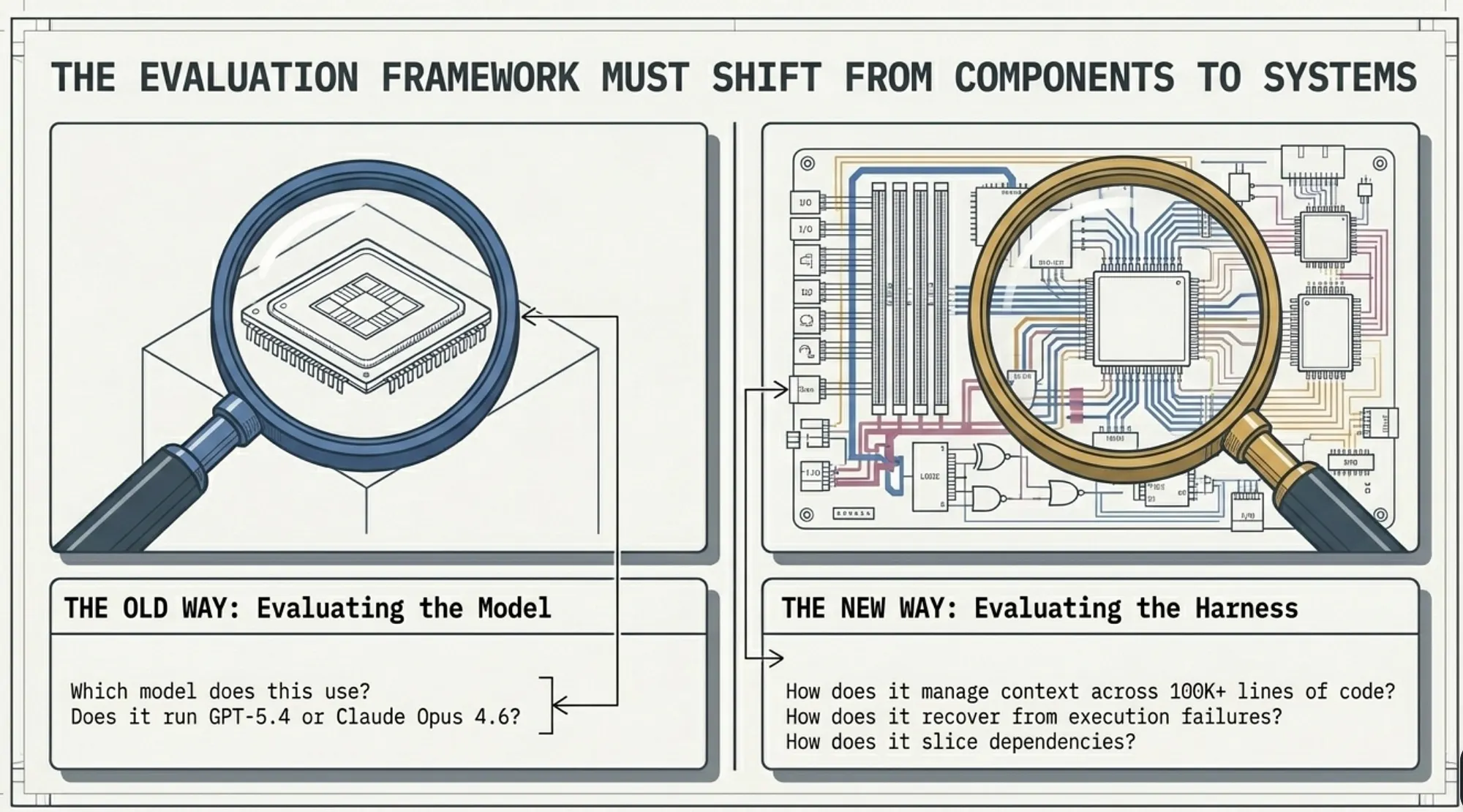
Most evaluation frameworks start from the model: “Which model is best for coding?” or “Does this tool use GPT-5.4 or Claude Opus 4.6?” These are the wrong first questions, not because models do not matter, but because, at the current level of model capability, the system surrounding the model is the more important variable for complex engineering tasks.
The better evaluation framework starts from the harness: “How does this tool manage context across a large codebase?” “How does this tool recover when an execution step fails?” “How does this tool decompose complex tasks across specialized AI agents?” “How does this tool route between models to optimize for cost and capability?”
These are systems engineering questions. Answering them requires looking under the hood: at the architecture, at the agent design, at the execution loop, at the context pipeline. Terminal-Bench 2.0 is a proxy for these questions because its tasks specifically reward tools that have good answers to them [Merrill et al., arXiv:2601.11868, ICLR 2026: “89 tasks in computer terminal environments spanning software engineering, security, machine learning, biology, gaming, system administration, and other domains”]
ForgeCode’s 81.8% on Terminal-Bench 2.0, holding positions 1 and 2 on the leaderboard, is evidence that the harness engineering investment pays off [tbench.ai Leaderboard, April 2026].
The strong performance of harness-first tools as a category is not a coincidence. It is the thesis proving itself.
Evaluate the system. The model is a component.
Quick Reference: ForgeCode in One List
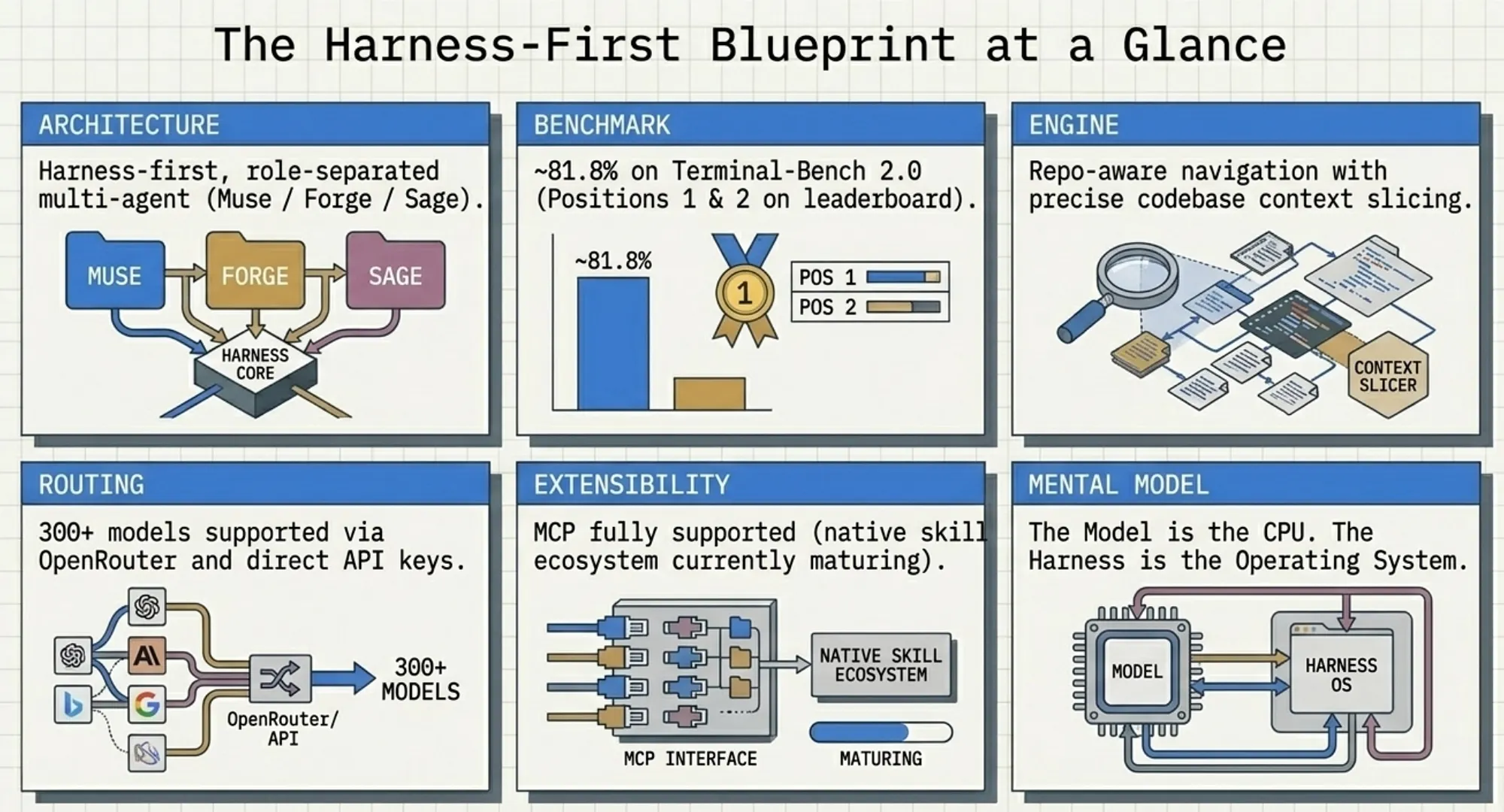
- Architecture: Harness-first, multi-agent (Muse / Forge / Sage)
- Benchmark (Terminal-Bench 2.0): ~81.8% (positions 1 and 2 [tbench.ai, April 2026])
- Multi-model support: 300+ models via OpenRouter + direct API keys [OpenRouter Docs, 2026]
- Context engine: Repo-aware navigation, context slicing
- MCP support: Yes (
forge mcp list) - Skill ecosystem: Partial / immature (primary current weakness)
- Best use case: Large-scale agentic automation, multi-model routing, complex multi-step tasks
- Not best for: IDE integration, reasoning-per-token quality, GUI-first workflows
- Mental model: “Model = CPU, Harness = OS”
- Closest analog: LangChain Deep Agents for your terminal, a systems-engineering approach to AI coding [LangChain, March 2026]
Caveat on Terminal-Bench 2.0 ScoresForgeCode currently holds positions 1 and 2 on the Terminal-Bench 2.0 leaderboard at 81.8%. Some independent analyses have noted that certain included files in the harness contained task-specific information that affected results on a subset of tasks. Even after accounting for those files, ForgeCode still ranks 14th overall — higher than Claude Code (~58%), Codex CLI (~62.9%), Gemini CLI (~47.4%), LangChain Deep Agents (66.5%), and most other model-centric tools.
References
[1] ForgeCode Official Documentation and GitHub. https://forgecode.dev/ and https://github.com/antinomyhq/forgecode (2026).
[2] Terminal-Bench 2.0 Leaderboard. https://www.tbench.ai/leaderboard/terminal-bench/2.0 (April 2026).
[3] Terminal-Bench 2.0 Paper. Laude Institute / Stanford, arXiv:2601.11868 (ICLR 2026).
[4] Claude Opus 4.6 Release. Anthropic (February 5, 2026).
[5] GPT-5.4 Release. OpenAI (March 5, 2026).
[6] MCP Governance and Adoption. Model Context Protocol specification and Linux Foundation AAIF press release (2025–2026).
[7] ForgeCode Operating Agents Documentation. https://forgecode.dev/docs/operating-agents/ (2026).
[8] OpenCode GitHub and Documentation. https://github.com/anomalyco/opencode (April 2026).
[9] LangChain Deep Agents Evaluation on Terminal-Bench 2.0. LangChain Blog (2026).
[10] Gemini CLI Documentation and Release Notes. Google Developers Blog (2025–2026).
[11] Codex CLI and OpenAI Model Benchmarks. OpenAI documentation (2026).
[12] ForgeCode Blog: GPT-5.4 Agent Improvements. https://forgecode.dev/blog/gpt-5-4-agent-improvements/ (2026).
[13] ForgeCode Blog: Benchmarks Don’t Matter. https://forgecode.dev/blog/benchmarks-dont-matter/ (2026).
[14] OpenRouter Models Overview (2026).
[15] Anthropic Claude Code Documentation (2026).