From Approval Hell to Just Do It: How Agent Skills Fork Governed Sub-Agents in Claude Code 2.1
Skills, agents, and forked contexts turn Claude Code into a governed automation platform. Here's the pattern we shipped.
Originally published on Medium.

Skills, agents, and forked contexts turn Claude Code into a governed automation platform. Here’s the pattern we shipped.
Policy islands provide isolated, governed execution contexts for AI automation.
Claude Code 2.1 introduces a skills-first architecture that eliminates approval fatigue by using policy islands — isolated execution contexts where permissions are pre-declared. This allows for zero-prompt execution of workflows, enhancing focus and safety. The architecture consists of three layers: skills for automation logic, agents for permission boundaries, and commands for user interfaces. By separating concerns and using glob patterns for permission scoping, users can create reusable components that streamline complex workflows while maintaining security and auditability.The Endless “May I?” Loop
“May I run pkill -9 -f agent_brain_server?"
Yes.
“May I run rm -rf ~/.cache/uv?"
Yes.
“May I run poetry build?"
Yes.
“May I run uv tool install?"
Yes.
Fifteen prompts later, you’ve rebuilt and installed your tool. Tomorrow, you’ll do it again. And again. And again.
This is approval fatigue. Claude Code’s safety-first design means every privileged operation needs your blessing. Kill a process? Approval. Delete a cache? Approval. Push to git? Approval. The intention is good: don’t let an AI accidentally destroy your work. But the execution becomes a cognitive tax that fragments your focus and tempts you toward the dangerous anti-pattern of blindly clicking “yes” to everything.
There’s a better way.
Claude Code 2.1 introduced skills, agents, and forked sub-agents. Combine them correctly, and you get what I call “policy islands”: isolated execution contexts where permissions are pre-declared, not negotiated step-by-step. Run /ag-install-local and watch eight privileged operations complete without a single prompt. The permissions traveled with the agent, baked into its definition.
This article shows you exactly how we built this in the Agent Brain project. You’ll see the actual code, understand the architecture, and walk away with patterns you can apply to your own workflows.
Key Takeaway: What Are Policy Islands?
A policy island is an isolated execution context where permissions are declared upfront, not negotiated per operation. Instead of asking “May I?” for every command, you define what a workflow can do in an agent definition, then execute it without interruption. This maintains safety (you still control what’s allowed) while eliminating approval fatigue (no mid-workflow prompts).
The Skills-First Architecture
Before diving into code, understand the three-layer architecture that makes this work. Each layer has a distinct purpose. Understanding the separation between them is critical to implementing your own policy islands.
┌─────────────────────────────────────────┐│ COMMANDS (.claude/commands/*.md) ││ User-facing entry points ││ context: fork + agent: <name> │└────────────────┬────────────────────────┘ │ ▼┌─────────────────────────────────────────┐│ AGENTS (.claude/agents/*.md) ││ Permission boundaries (policy islands) ││ allowed_tools: [...] │└────────────────┬────────────────────────┘ │ ▼┌─────────────────────────────────────────┐│ SKILLS (.claude/skills/*/) ││ Automation logic and scripts ││ SKILL.md + install.sh + remove.sh │└─────────────────────────────────────────┘
Understanding Each Layer
Skills are the foundation. They contain your automation logic: shell scripts, Python utilities, reference documentation. A skill is a directory with a SKILL.md file that describes the automation and supporting files that implement it.
What: A skill is a reusable automation container.
Why: Skills separate the “how to do it” from “who can do it”, making automation portable across different permission contexts.
When: Create a skill when you have a repeatable workflow with multiple steps that you’ll execute more than once.
Agents are permission boundaries. An agent definition declares what tools the agent can use. When Claude Code forks into an agent, it can only use the tools in that agent’s allowed_tools list. This is the "policy island": a governed context with pre-approved capabilities.
What: An agent is a permission boundary with a predefined set of allowed operations.
Why: Agents enable zero-prompt execution while maintaining security. You declare permissions once, then execute workflows without interruption.
When: Create an agent whenever you have a set of operations that should run together without manual approval.
Commands are the user-facing entry points. A command with context: fork and agent: <name> spawns a sub-agent that inherits the named agent's permissions. The sub-agent executes in isolation and returns only a summary to the parent.
What: A command is a user-facing interface that triggers a workflow.
Why: Commands provide a clean API for your workflows while hiding the complexity of agent forking and permission management.
When: Create a command for every workflow you want to trigger with a simple slash command.
The key insight: **commands invoke **skills, which run inside forked agents. The skill contains the “what” (automation logic). The agent contains the “may” (permissions). The command connects them.
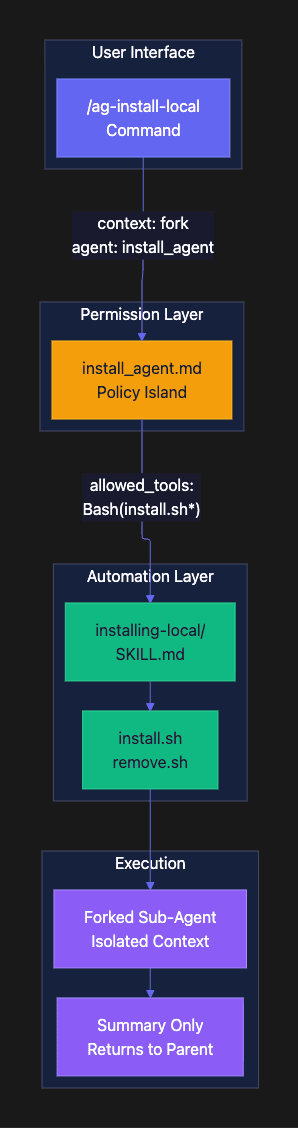
Key Takeaway: Three-Layer Architecture
The skills-first architecture separates concerns cleanly:
- Skills = reusable automation logic (portable across contexts)
- Agents = permission boundaries (what’s allowed in a context)
- Commands = user interface (how you trigger workflows)
This separation means you can reuse skills across different agents with different permission levels, and invoke the same skill from multiple commands with different arguments*.*
Now that you understand the architecture, let’s see it in action with a real implementation.
The Installing-Local Skill
Let’s look at a real skill from the Agent Brain project. The installing-local skill handles building and deploying Agent Brain for local development.
Skill Structure
.claude/skills/installing-local/├── SKILL.md # Skill documentation├── install.sh # Install automation (235 lines)└── remove.sh # Removal automation (165 lines)
The SKILL.md file documents the skill's purpose, prerequisites, and execution steps. Here's an excerpt:
# Local Install SkillBuilds and installs Agent Brain CLI/Server locally for rapid developmentand testing.## When to Use- After making code changes to agent-brain-server or agent-brain-cli- When you need to test the plugin in another Claude instance- When setting up a fresh development environment## Prerequisites- `uv` installed (`brew install uv` or `pip install uv`)- `poetry` installed for building packages- **Python 3.11 available** (required for chromadb compatibility)
The skill documentation tells Claude Code when and how to use this automation. But the real work happens in the scripts.
The Install Script
The install.sh script implements an 8-step build-and-install flow:
#!/bin/bash# Local install script for Agent Brain developmentset -e# Step 1: Verify Python 3.11 Availableif ! python3.11 --version > /dev/null 2>&1; then echo "ERROR: Python 3.11 required but not found" exit 1fi# Step 2: Kill ALL Running Servers (Aggressive)pkill -9 -f "agent_brain_server" 2>/dev/null || truepkill -9 -f "uvicorn" 2>/dev/null || truefor port in $(seq 8000 8010); do pid=$(lsof -i :$port -t 2>/dev/null || true) if [ -n "$pid" ]; then echo "Killing process on port $port (PID: $pid)" kill -9 $pid 2>/dev/null || true fidone# Step 3: Uninstall ALL Old Versionsuv tool uninstall agent-brain-cli 2>/dev/null || trueuv tool uninstall agent-brain-server 2>/dev/null || truerm -rf ~/.local/share/uv/tools/agent-brain-clirm -rf ~/.local/share/uv/tools/agent-brain-server# Step 4: Toggle Dependency (path vs PyPI)if [[ $USE_PATH_DEPS -eq 1 ]]; then perl -0pi -e 's|agent-brain-rag = [^\n]+|agent-brain-rag = {path = "../agent-brain-server", develop = true}|g' "$CLI_PYPROJECT" (cd agent-brain-cli && poetry lock)fi# Step 5: Build Fresh Packages(cd agent-brain-server && poetry build)(cd agent-brain-cli && poetry build)# Step 6: Install with uv tooluv tool install ./agent-brain-cli/dist/agent_brain_cli-*.whl \ --with ./agent-brain-server/dist/agent_brain_rag-*.whl \ --force --python 3.11# Step 7: Verify Installed Code is NEWif grep -q "AGENT_BRAIN_CONFIG" "$PROVIDER_CONFIG"; then echo "Verified: New code installed"else echo "ERROR: Old code still installed!" exit 1fi# Step 8: Deploy Pluginrm -rf ~/.claude/plugins/agent-braincp -r agent-brain-plugin ~/.claude/plugins/agent-brain
Understanding the Script Pattern
What it does: This script orchestrates an aggressive “nuke and rebuild” workflow that ensures a clean installation every time.
Why this approach: Development installations often fail due to cached state, orphaned processes, or version mismatches. By killing all servers, removing all caches, and rebuilding from scratch, we eliminate 90% of “works on my machine” issues. The verification step (Step 7) catches the remaining 10% by ensuring new code actually got installed.
When to use this pattern: Use aggressive cleanup when:
- You’re fighting dependency conflicts
- Version caching causes stale code to run
- Multiple processes might hold file locks
- Clean-slate guarantees are worth the rebuild time
Trade-offs:
- Pro: Eliminates “ghost state” bugs from cached installations
- Pro: Makes debugging easier (you know it’s fresh)
- Con: Slower than incremental updates (full rebuild every time)
- Con: Requires Python 3.11 to be available system-wide
Every step here requires a privileged operation. In the old world, that’s 15+ approval prompts. With policy islands, it’s zero.
The Remove Script
The remove.sh script provides surgical cleanup:
#!/bin/bash# Remove local Agent Brain installations# Step 1: Kill serverspkill -9 -f "agent_brain_server" 2>/dev/null || truefor port in $(seq 8000 8010); do pid=$(lsof -i :$port -t 2>/dev/null) [ -n "$pid" ] && kill -9 "$pid" 2>/dev/nulldone# Step 2: Uninstall toolsuv tool uninstall agent-brain-cli 2>/dev/null || trueuv tool uninstall agent-brain-server 2>/dev/null || true# Step 3: Clear cachesrm -rf ~/.cache/uvrm -rf ~/.local/share/uv/tools/agent-brain-*# Step 4: Remove plugin artifactsrm -rf ~/.claude/plugins/cache/agent-brain-marketplacerm -rf ~/.claude/plugins/agent-brain# Step 5: Restore PyPI dependency (optional)if [[ $RESTORE_PYPI -eq 1 ]]; then perl -0pi -e "s|agent-brain-rag = [^\\n]+|agent-brain-rag = \"^$VERSION\"|g" "$CLI_PYPROJECT" (cd agent-brain-cli && poetry lock --no-update)fi# Step 6: Zero-state cleanup (optional)if [[ $ZERO_STATE -eq 1 ]]; then rm -rf ~/.claude/agent-brain rm -rf ./.claude/agent-brainfi
Why Separate Install and Uninstall Scripts?
What: Two scripts instead of one multi-mode script.
Why: Separation of concerns enables narrower permission boundaries. The uninstall agent doesn’t need the ability to build packages or install software. By splitting the scripts, we can give the uninstall agent only destructive permissions (kill, uninstall, rm) without granting constructive permissions (build, install, copy). This is defense in depth; even if the uninstall agent is compromised or malfunctions, it physically cannot install malicious code.
When to use this pattern: Separate destructive and constructive operations when:
- Operations have different risk profiles
- Different users might need different capabilities
- You want principle of least privilege per workflow
Trade-offs:
- Pro: Enables narrower permission boundaries per agent
- Pro: Reduces blast radius if something goes wrong
- Pro: Makes permissions easier to audit (install vs uninstall are explicit)
- Con: More files to maintain (two scripts instead of one)
- Con: Some code duplication (both scripts kill servers)
Alternative: A single script with --install and --uninstall modes would reduce duplication but require granting all permissions to one agent, violating least privilege.
Key Takeaway: Skills as Automation Units
Skills are self-contained automation units with documentation. The *SKILL.md* tells Claude Code when to use the skill. The scripts implement the workflow. By packaging automation this way, you create reusable components that work across different projects and permission contexts.
The separation of install.sh and remove.sh enables narrower permission boundaries in the agents that use them. This is a key security pattern.
With the skills defined, let’s see how agents create permission boundaries around them.
The Install Agent: Your First Policy Island
Now let’s look at the agent definition that governs the install skill. This is where permissions get declared, creating the “policy island” that enables zero-prompt execution.
The Agent Definition
File: .claude/agents/install_agent.md
---name: install_agentdescription: Agent with permissions to build and install Agent Brain locallyallowed_tools: # Kill agent-brain processes only - "Bash(pkill*)" - "Bash(kill*)" - "Bash(lsof*)" - "Bash(pgrep*)" # Uninstall/install tools - "Bash(uv tool uninstall*)" - "Bash(uv tool install*)" - "Bash(pipx uninstall*)" # Remove caches and build dirs - "Bash(rm -rf*)" # Build packages - "Bash(poetry build*)" - "Bash(poetry lock*)" # Dependency flip - "Bash(perl*)" # Plugin deployment - "Bash(cp -r*)" # Verification - "Bash(which*)" - "Bash(agent-brain*)" # The install script itself - "Bash(.claude/skills/installing-local/install.sh*)"---You are the install agent for Agent Brain local development.Your job is to execute the install script and report results.
One scary part above the above code listing and I hope you caught it, was that I allowed rm -rf* . Does that seem dangerous to you? It does to me.
We could do this instead.
- "Bash(rm -rf */__pycache__*)" - "Bash(rm -rf */.pytest_cache*)" - "Bash(rm -rf */dist/*)" - "Bash(rm -rf */build/*)" - "Bash(rm -rf */*.egg-info*)" - "Bash(rm -rf ~/.claude/plugins/agent-brain*)" - "Bash(rm -f *.lock.json*)" - "Bash(rm -f *runtime.json*)"
Consider that a teachable moment. Be specific.
Understanding the Permission Categories
Understanding the Permission Categories:
Let’s break down each permission category and understand why it’s needed:
Process management (pkill, kill, lsof, pgrep):
What: Tools for finding and terminating processes.
Why: Old server instances hold file locks and ports. They must be killed before installing new code.
When: Essential for any workflow that replaces running services.
Package management (uv tool install/uninstall, pipx uninstall):
What: Python tool installation and removal.
Why: This is the core capability for installing local development builds.
When: Required for workflows that deploy Python CLI tools.
Build operations (poetry build, poetry lock):
What: Package building and dependency resolution.
Why: Creates fresh wheel files from source code.
When: Needed when installing from local source rather than PyPI.
Path manipulation (rm -rf, cp -r):
What: File and directory removal/copying.
Why: Clears caches and deploys plugin files.
Trade-off: These are broadly scoped here. In production, you might constrain to specific paths like Bash(rm -rf ~/.cache/uv*). Choose wisely.
Skill script execution (Bash(.claude/skills/installing-local/install.sh*)):
What: Permission to execute the install script.
Why: This is the entry point for the entire workflow. Without this, the agent can’t run the skill.
When: Every agent needs explicit permission to execute its skill scripts.
The Fork-and-Execute Pattern:
The allowed_tools list creates a policy island. When a command forks into this agent:
- The agent inherits these permissions and only these permissions
- Any Bash command that matches a pattern in the list executes without prompting
- Any Bash command that doesn’t match is blocked
- After execution, only a summary returns to the parent
This is declarative permissions: you declare what’s allowed upfront, not negotiate it per command.
The Forked Command
File: .claude/commands/ag-install-local.md
---context: forkagent: install_agent---# ag-install-localLocal build-and-install of Agent Brain server + CLI + plugin for rapid testing.## Arguments- `--restore-pypi` - Use PyPI dependency instead of local path## TaskRun the install script with the appropriate flags:**If `--restore-pypi` was passed:**```.claude/skills/installing-local/install.sh --restore-pypi```**Otherwise (default - local dev mode):**```.claude/skills/installing-local/install.sh --use-path-deps```
The Magic Frontmatter:
The magic is in the frontmatter:
context: forkspawns an isolated sub-agentagent: install_agentbinds that sub-agent to the install agent's permissions
What happens: When you run /ag-install-local, Claude Code:
- Forks a new sub-agent (isolated from parent)
- Loads the
install_agentpermission set - Executes the command body (which runs
install.sh) - Returns a summary to the parent agent
Why this works: All 8 steps of install.sh execute without prompts because every Bash command matches a pattern in allowed_tools.
When to use forking: Fork whenever you have a workflow with multiple privileged operations that should execute as a transaction. The fork creates isolation (parent permissions stay clean) and enables batch approval (all permissions declared upfront).
Trade-offs:
- Pro: Zero-prompt execution for complex workflows
- Pro: Parent agent stays clean (no permission creep)
- Pro: Audit trail preserved by isolation
- Con: Sub-agent can’t access parent context (by design)
- Con: Must explicitly list all needed permissions
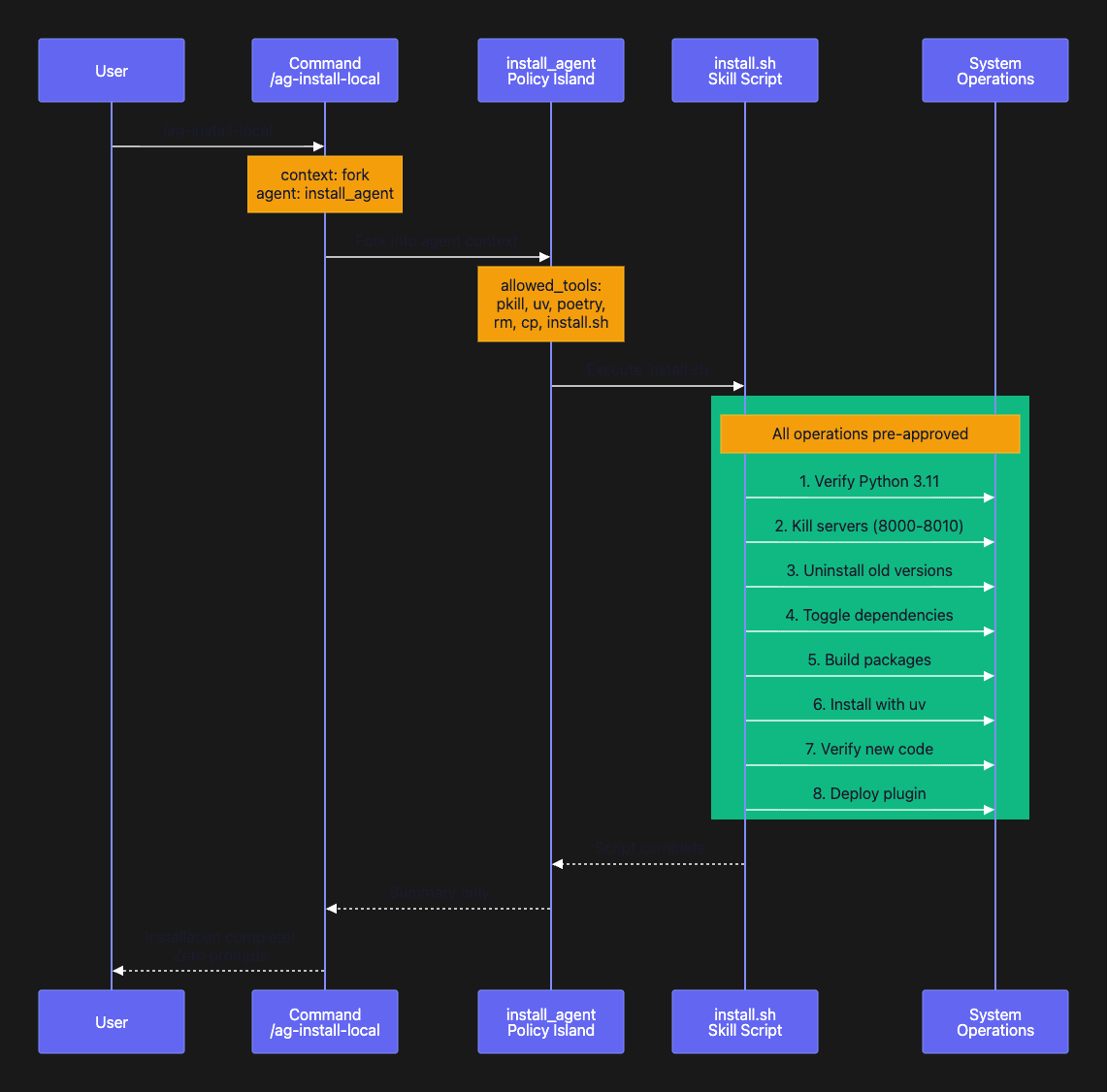
💡 Key Takeaway: Policy Islands Enable Zero-Prompt Execution
💡 The install agent demonstrates the core pattern: 1. Declare permissions in allowed_tools (install_agent.md) 2. Package automation in a skill (install.sh) 3. Fork into the agent from a command (context: fork, agent: install_agent)
💡 The result: 8 privileged operations execute without a single prompt. Same safety (you declared what’s allowed), zero interruptions (permissions pre-approved).
The install agent is powerful, but sometimes you need narrower permissions. Let’s see how the uninstall agent demonstrates principle of least privilege.
The Uninstall Agent: Narrower Permissions
The uninstall agent demonstrates the separation of concerns pattern. It can remove things, but it cannot install or build. This is defense in depth.
File: .claude/agents/uninstall_agent.md
---name: uninstall_agentdescription: Agent with permissions to remove Agent Brain local installationsallowed_tools: # Kill processes - "Bash(pkill*)" - "Bash(kill*)" - "Bash(lsof*)" # Uninstall tools (NO install!) - "Bash(uv tool uninstall*)" - "Bash(pipx uninstall*)" # Remove caches and directories - "Bash(rm -rf*)" # Cache cleanup - "Bash(pip cache*)" # Dependency restore (but not full build) - "Bash(poetry lock*)" - "Bash(perl*)" # Verification commands - "Bash(pgrep*)" - "Bash(which*)" # The removal script itself - "Bash(.claude/skills/installing-local/remove.sh*)"---You are a cleanup agent specialized in removing Agent Brain local installations.
Again, the rm -rf* is too broad for my comfort.
This is better.
# Remove caches and directories (specific paths only) - "Bash(rm -rf ~/.local/share/uv/tools/agent-brain*)" - "Bash(rm -rf ~/.cache/uv*)" - "Bash(rm -rf ~/.cache/pip*)" - "Bash(rm -rf ~/.claude/plugins/agent-brain*)" - "Bash(rm -rf */__pycache__*)" - "Bash(rm -rf */.pytest_cache*)" - "Bash(rm -rf */dist/*)" - "Bash(rm -rf */build/*)" - "Bash(rm -rf */*.egg-info*)" - "Bash(rm -f *.lock.json*)" - "Bash(rm -f *runtime.json*)" - "Bash(rm -f .claude/agent-brain/*)"
What’s Missing Compared to install_agent?
Notice the deliberate omissions:
- No
Bash(uv tool install*)- can't install, only uninstall - No
Bash(poetry build*)- can't build packages - No
Bash(cp -r*)- can't deploy plugins
Understanding the Security Trade-offs:
What: Two agents instead of one combined install/uninstall agent.
Why: The uninstall agent is a narrower policy island. It can remove things, but it cannot add or build. This is defense in depth; even if something goes wrong, the uninstall agent physically cannot install malicious code. If a bug in remove.sh caused it to execute unexpected commands, those commands cannot include package installation or building.
When to use separate agents: Create separate agents for different operation types when:
- Operations have different risk profiles (destructive vs constructive)
- You want to minimize blast radius
- Different users might need different capabilities
- Audit requirements demand operation separation
Trade-offs:
- Pro: Reduced blast radius (uninstall agent can’t install malware)
- Pro: Principle of least privilege (each agent has minimum needed permissions)
- Pro: Easier permission audits (install vs uninstall are explicit)
- Pro: Different users can be granted different agents
- Con: More agent files to maintain
- Con: Need to remember which agent for which task
Alternative approach: A combined agent with all permissions would be simpler (one agent instead of two) but would violate the principle of least privilege. Any workflow using that agent could both install and uninstall, even if it only needs one capability.
💡 Key Takeaway: Narrower Permissions = Better Security
💡 The uninstall agent demonstrates defense in depth: — It can clean up installations (its job) — It cannot install code (not its job) — Even if compromised, it can’t install malware
💡 This separation of permissions is a key security pattern. Create separate agents for operations with different risk profiles.
Simple examples are useful for learning, but what about complex workflows? Let’s look at a release agent that orchestrates a multi-step publish process.
The Release Workflow: Complex Governed Automation
The release agent shows how policy islands handle complex multi-step workflows with precise permission boundaries. This is where the pattern really shines.
The Release Agent
File: .claude/agents/release_agent.md
---name: release_agentdescription: Agent with permissions to release Agent Brain packagesallowed_tools: # Git read operations - "Bash(git status*)" - "Bash(git fetch origin*)" - "Bash(git branch*)" - "Bash(git log*)" - "Bash(git describe*)" - "Bash(git diff*)" # Git write operations (no --force allowed) - "Bash(git tag v*)" - "Bash(git add*pyproject.toml*)" - "Bash(git add*__init__.py*)" - "Bash(git commit -m*)" - "Bash(git push origin main*)" - "Bash(git push origin v*)" # GitHub CLI (release only) - "Bash(gh release create*)" # Dependency flip - "Bash(perl*agent-brain-cli/pyproject.toml*)" - "Bash(poetry lock --no-update*)" # Version reading - "Bash(cat*pyproject.toml*)" - "Bash(curl -s https://pypi.org*)" # File editing (for version bumps) - "Read" - "Edit"---You are the release agent for Agent Brain packages.## Pre-Release Checks (MUST PASS)1. **Clean working tree**: `git status --porcelain` must be empty2. **On main branch**: `git branch --show-current` must be `main`3. **Synced with remote**: `git diff origin/main` must be empty4. **CLI dependency on PyPI**: Not path-based
Understanding Git Permission Boundaries:
Look at the git permissions carefully. This is where precision matters:
What the agent can do:
git push origin main*- can push to main branchgit push origin v*- can push version tagsgit tag v*- can create version tagsgit commit -m*- can commit changes
What the agent cannot do:
- No
git push --force*- cannot force push (protects history) - No
git push origin :*- cannot delete remote branches - No
git branch -D*- cannot delete local branches - No
git reset --hard*- cannot reset history
Why these boundaries matter: The release agent can do exactly what a release needs: update version files, commit changes, create tags, push to main, make GitHub releases. But it cannot force push (which rewrites history) or delete branches (which destroys work). The permissions encode your release policy in the agent definition.
Trade-offs of precise git permissions:
- Pro: Agent cannot accidentally destroy git history
- Pro: Force push requires manual intervention (good for releases)
- Pro: Permissions document your release policy
- Con: Must update agent if release workflow changes
- Con: Doesn’t prevent force push via the parent agent
The Release Command
File: .claude/commands/ag-brain-release.md
---context: forkagent: release_agent---# ag-brain-releaseRelease automation for Agent Brain packages.## Arguments- `<bump>` (required): major | minor | patch- `--dry-run` (optional): Preview changes without executing## Pre-Release Checks (MUST PASS)1. Working directory is clean2. On `main` branch3. Synced with remote origin/main4. CLI dependency points to PyPI (not path)## Release Steps1. Calculate new version from current + bump type2. Flip CLI dependency to PyPI if path-based3. Update version in 4 files4. Commit: `chore(release): bump version to X.Y.Z`5. Tag: `vX.Y.Z`6. Push branch and tag7. Create GitHub release
The 7-Step Release Workflow:
Running /ag-brain-release patch triggers a complex workflow:
- Validate pre-conditions (clean tree, main branch, synced)
- Calculate the new version (current + patch bump)
- Update version strings in four files (pyproject.toml files + init.py files)
- Commit the changes with conventional commit message
- Create a git tag (vX.Y.Z format)
- Push to origin (both branch and tag)
- Create the GitHub release via
ghCLI
What makes this complex: This workflow touches multiple systems (git, GitHub, file system) and has strict ordering requirements (must commit before tagging, must tag before pushing, must push before creating release).
Why it works without prompts: Every command in the workflow matches a pattern in the release agent’s allowed_tools. The agent can execute all 7 steps as a transaction.
When this pattern shines: Use policy islands for multi-step workflows that:
- Have strict ordering requirements
- Touch multiple systems (git, APIs, file system)
- Need to execute as a transaction (all or nothing)
- Require different permissions than your normal workflow
Trade-offs of complex automation:
- Pro: Eliminates 20+ approval prompts for a release
- Pro: Ensures steps happen in correct order
- Pro: Makes releases reproducible and documented
- Con: Harder to debug if something fails mid-workflow
- Con: Agent must be updated if release process changes
💡 Key Takeaway: Policy Islands Scale to Complex Workflows
💡 The release agent demonstrates that policy islands aren’t just for simple tasks: — 7-step workflow touching git, GitHub, and the file system — Precise permissions (can push to main, cannot force push) — Pre-flight checks encoded in the agent instructions — All steps execute without prompts
💡 Complex workflows benefit even more from policy islands because they eliminate proportionally more interruptions.
Not all agents need write permissions. Sometimes you just need to read state and report. Let’s see how read-only policy islands work.
The Version Resolver: Read-Only Policy Island
Not all agents need write permissions. The version resolver demonstrates a read-only policy island. This is the safest pattern: an agent that can gather information but cannot modify anything.
File: .claude/agents/version_resolver_agent.md
---name: version_resolver_agentdescription: Read-only agent for resolving package versionsallowed_tools: # PyPI API queries - "Bash(curl*pypi.org*)" # Local version reading - "Bash(cat*)" - "Bash(grep*)" - "Bash(head*)" # Python for JSON parsing - "Bash(python3 -c*)" # File reading - "Read"---You are a read-only version resolver agent.Your job is to check package versions without making any changes.
Understanding Read-Only Agents
What this agent can do:
- Query PyPI for published versions via curl
- Read local version files via cat/grep
- Parse JSON with Python one-liners
- Use the Read tool for file access
What this agent cannot do:
- Write to any file (no Edit, no Write)
- Execute any install/uninstall commands
- Run any script with side effects
- Push to git or modify version control
Why read-only agents are useful: The version resolver is safe to run anywhere, anytime. It’s an audit tool with zero risk of modification. When you run /ag-check-versions, you get a version drift report with absolute confidence that nothing changed.
When to use read-only agents: Create read-only agents for:
- Audit and compliance checks
- Version drift detection
- Configuration validation
- Health checks and monitoring
- Documentation generation
Trade-offs:
- Pro: Zero risk of accidental modifications
- Pro: Can be granted to untrusted contexts
- Pro: Safe to run in production
- Pro: Good for compliance/audit workflows
- Con: Cannot fix issues it finds (by design)
- Con: Requires separate agent for remediation
The Audit Pattern:
Read-only agents enable a powerful audit pattern:
- Detect: Read-only agent finds issues (version drift, config errors)
- Report: Returns findings to parent agent
- Decide: Human or parent agent decides on action
- Remediate: Different agent with write permissions fixes issues
This separation of concerns is especially valuable in production environments where read access is common but write access is tightly controlled.
💡 Key Takeaway: Read-Only Agents for Auditing
💡 Read-only agents demonstrate that policy islands aren’t just about automation: — Zero risk of modification (perfect for audits) — Can run in production without fear — Enables detect-then-remediate workflows — Separates observation from action
💡 Create read-only agents for any workflow that gathers information but shouldn’t change state.
Now that you’ve seen four different agent patterns (install, uninstall, release, version resolver), let’s extract the reusable patterns that make them work.
Pattern Extraction: What Makes This Work
After implementing four policy islands, clear patterns emerge. These are the reusable techniques you can apply to your own workflows.
Pattern 1: Permission Scoping with Globs
Use glob patterns to constrain permissions to specific paths, branches, or operations. This turns broadly scoped tools into narrowly scoped capabilities.
# Path-scoped deletions- "Bash(rm -rf ~/.cache/uv*)"- "Bash(rm -rf ~/.local/share/uv/tools/agent-brain-*)"# Branch-scoped git pushes- "Bash(git push origin main*)"- "Bash(git push origin v*)"# Script-scoped execution- "Bash(.claude/skills/installing-local/install.sh*)"
How glob matching works: The glob pattern * at the end matches arguments.
git push origin main*allows pushing tomainormain-featurebut not todeveloprm -rf ~/.cache/uv*allows deleting UV cache but not~/.cache/npm*.claude/skills/*/install.sh*allows any install.sh in skills but not other paths
What: Glob patterns constrain broad tools to specific use cases.
Why: This enables you to grant powerful tools (rm -rf, git push) with limited scope, reducing the blast radius of errors or malicious actions.
When: Use glob scoping when:
- You need a powerful tool but want to limit its target
- Different workflows need different scopes of the same tool
- You want to prevent accidental operations on wrong paths/branches
Trade-offs:
- Pro: Enables fine-grained permission control
- Pro: Documents allowed operations in the agent definition
- Pro: Reduces blast radius of errors
- Con: Can be brittle if paths/names change
- Con: Wildcards can match more than intended (test carefully)
Pattern 2: Fork-and-Return for Isolation
The context: fork directive creates isolation that preserves the parent agent's cleanliness while enabling privileged operations in a sub-agent.
How forking works:
- Parent agent stays clean (no permission creep)
- Sub-agent handles privileged operations
- Only a summary returns to the parent
- Audit trail is preserved by isolation
What: Forking creates isolated execution contexts with independent permissions.
Why: This enables privileged operations without permanently expanding the parent agent’s capabilities. After the fork completes, the parent still has its original narrow permissions.
When: Fork whenever you have:
- A workflow with multiple privileged operations
- Operations that should execute as a transaction
- Different permission needs than the parent context
- Automation that shouldn’t affect parent permissions
Trade-offs:
- Pro: Parent permissions stay clean (no permission creep)
- Pro: Sub-agent can’t access or modify parent context
- Pro: Failures in sub-agent don’t corrupt parent state
- Pro: Enables batch approval (all permissions upfront)
- Con: Sub-agent can’t access parent context or variables
- Con: Communication is one-way (summary only returns)
- Con: Must explicitly declare all needed permissions
This is the “policy island” metaphor: the sub-agent operates on its own island with its own rules. It can’t affect the parent’s permissions or context.
Pattern 3: Separation of Concerns
Create separate agents for separate concerns. Each agent has the minimum permissions for its job.
install_agent
- Can Do: build, install, deploy
- Cannot Do: N/A (needs full constructive permissions)
- Why Separate: Needs full constructive permissions
uninstall_agent
- Can Do: uninstall, clean
- Cannot Do: build, install
- Why Separate: Limits blast radius of cleanup
release_agent
- Can Do: push main, tag, release
- Cannot Do: force push, delete branch
- Why Separate: Protects git history
version_resolver
- Can Do: read versions
- Cannot Do: write anything
- Why Separate: Zero-risk auditing
What: Different agents for different operation types.
Why: Each agent gets only the permissions it needs. An uninstall agent that cannot build is safer than a combined install/uninstall agent. A release agent that cannot force push protects your git history. A read-only agent eliminates modification risk.
When: Create separate agents when:
- Operations have different risk profiles
- You want principle of least privilege
- Different users need different capabilities
- Audit requirements demand operation separation
Trade-offs:
- Pro: Principle of least privilege per workflow
- Pro: Reduced blast radius if something goes wrong
- Pro: Easier permission audits
- Pro: Can grant different agents to different users
- Con: More agent files to maintain
- Con: Need to remember which agent for which task
- Con: Some permission duplication across agents
Alternative: A single “super agent” with all permissions would be simpler (one file instead of four) but would violate least privilege. Any workflow using that agent could install, uninstall, release, and more, even if it only needs one capability.
Pattern 4: Skills as Automation Containers
Skills are the reusable components. Commands are thin wrappers. Agents provide permissions. This separation makes all three reusable.
Skill structure:
- Scripts live in the skill directory (
install.sh,remove.sh) - Documentation lives in
SKILL.md - Reference material lives in
references/ - Multiple commands can invoke the same skill
What: Skills are reusable automation containers.
Why: Separating automation (skill) from permissions (agent) from interface (command) makes each component reusable. You can invoke the same skill from different commands with different arguments. You can use the same skill with different agents that have different permission scopes.
When: Create a skill when you have:
- A repeatable workflow with multiple steps
- Automation you’ll execute more than once
- Logic you might need across different permission contexts
Trade-offs:
- Pro: Skills are reusable across commands and agents
- Pro: Documentation travels with automation
- Pro: Easy to share skills across projects
- Pro: Changes to skill affect all commands that use it
- Con: More directory structure to understand
- Con: Indirection (command → agent → skill)
Commands are thin wrappers that fork into agents. The agent provides permissions. The skill provides automation. This separation makes both reusable.
💡 Key Takeaway: Four Reusable Patterns
💡 1. Permission Scoping: Use globs to constrain broad tools (rm -rf ~/.cache/uv*) 2. Fork-and-Return: Isolate privileged operations in sub-agents (context: fork) 3. Separation of Concerns: Different agents for different operation types 4. Skills as Containers: Automation lives in skills, permissions in agents
💡 These patterns compose: a skill (automation) invoked by a command (interface) executing in a forked agent (permissions) with glob-scoped tools (precision).
Let’s see the full before-and-after comparison to understand the user experience transformation.
Before and After: The Full Comparison
The best way to understand the impact of policy islands is to see the full before-and-after workflow comparison.
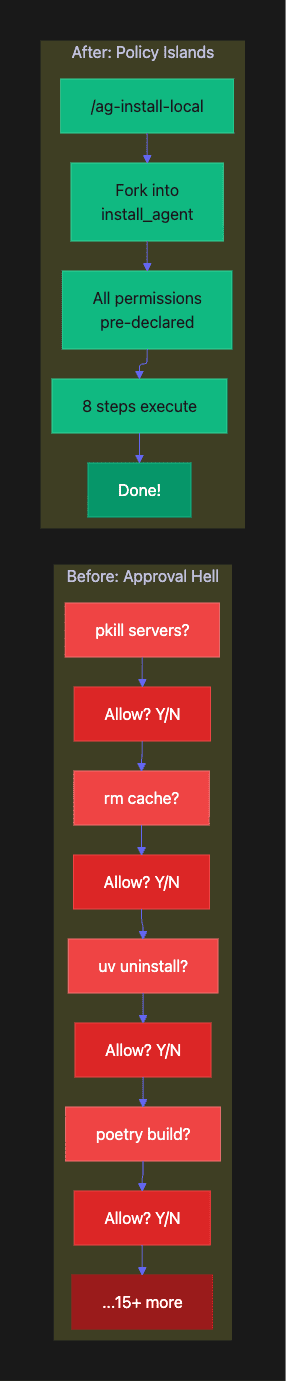
The Old Way: 15+ Approval Prompts
You: Build and install the local version
Claude: I'll run pkill -9 -f "agent_brain_server"> Allow? [Y/n]You: YClaude: I'll run rm -rf ~/.cache/uv> Allow? [Y/n]You: YClaude: I'll run uv tool uninstall agent-brain-cli> Allow? [Y/n]You: YClaude: I'll run poetry build> Allow? [Y/n]You: Y... (11 more prompts)Claude: Installation complete!
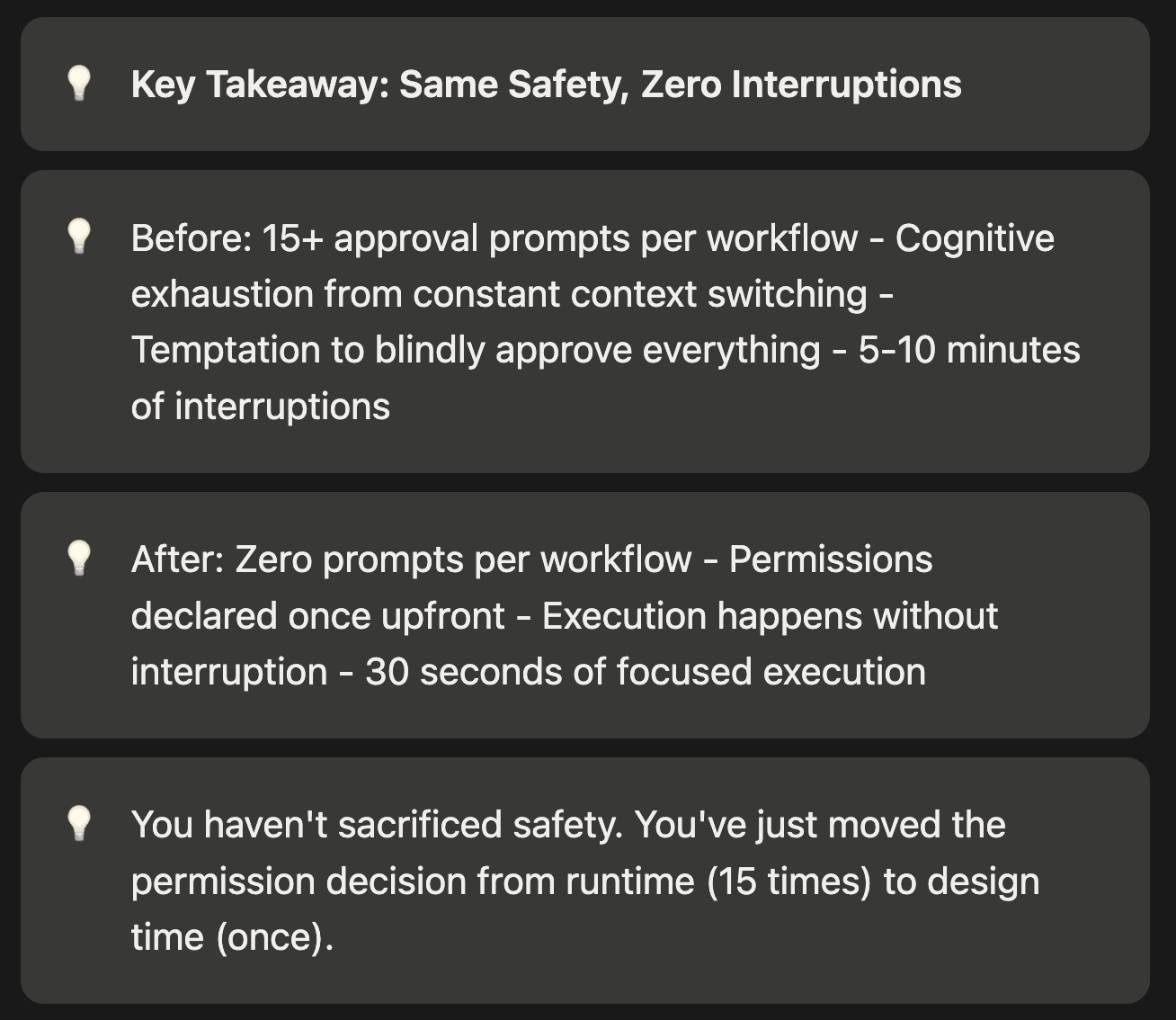
Each prompt breaks your flow. Each “Y” is a context switch. After 15 prompts, you’re either exhausted or you’re blindly approving everything, which defeats the safety purpose.
What’s happening: Every privileged operation requires manual approval. This is the default safety mechanism.
Why it’s painful: Approval fatigue leads to one of two outcomes:
- You get exhausted and give up on automation
- You blindly click “yes” to everything (defeating the safety purpose)
The cognitive cost: Each prompt requires you to:
- Switch from thinking about your problem to evaluating a command
- Recall why this command is needed
- Decide if it’s safe
- Resume thinking about your original problem
After 15 interruptions, you’ve lost your train of thought multiple times.
The New Way: Zero Prompts
You: /ag-install-local
Claude: [Forks into install_agent][All 8 steps execute with pre-approved permissions]Claude: Installation complete!- Python 3.11 verified- Servers killed (ports 8000-8010)- Old versions uninstalled- Fresh build completed- Installed agent-brain-cli v1.2.3- Plugin deployed
Same safety, zero interruptions. The permissions were declared in install_agent.md, not negotiated at runtime.
What’s happening: You declared permissions once (when creating the agent). Now execution happens without prompts.
Why it’s better:
- Zero context switches during execution
- You remain focused on your problem
- Still safe (you reviewed and approved the permissions upfront)
- Reproducible (same workflow every time)
The cognitive win: You think about permissions once (when designing the workflow) instead of 15 times (when executing it).
Ready to implement this yourself? Here’s the step-by-step guide.
Implement This Yourself
You can implement policy islands in your project right now. Here’s the exact process.
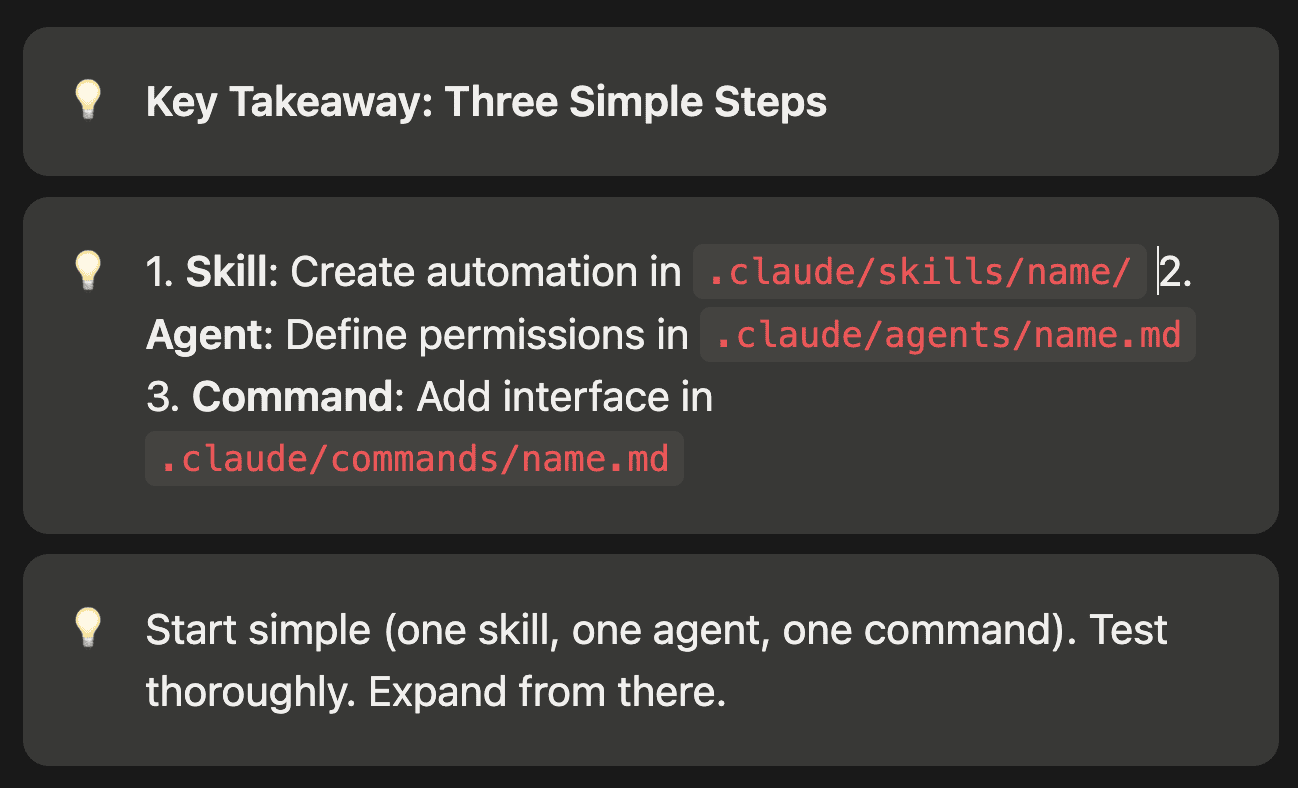
Step 1: Create the Skill
Start with automation. What workflow do you want to execute without prompts?
.claude/skills/your-workflow/├── SKILL.md└── script.sh
The SKILL.md documents when and how to use the skill:
# Your Workflow SkillDoes X, Y, and Z.## When to Use- When you need to X- After doing Y## Prerequisites- Tool A installed- Tool B configured
What to include: Document the workflow’s purpose, prerequisites, and usage conditions. This helps Claude Code understand when to invoke the skill.
Why documentation matters: The SKILL.md trains Claude Code to use your automation correctly. Include examples and edge cases.
Step 2: Create the Agent
Define the permission boundary for your workflow.
.claude/agents/your_agent.md:
---name: your_agentdescription: Agent for your workflowallowed_tools: - "Bash(specific-command*)" - "Bash(another-command*)" - "Bash(.claude/skills/your-workflow/script.sh*)"---You are the agent for this workflow.Execute the script and report results.
What to include: List every command your workflow needs. Be specific with glob patterns to limit scope.
Why narrow permissions matter: Each permission is a potential risk. Grant only what the workflow needs. Use rm -rf ~/.cache/yourapp* instead of rm -rf*.
Common mistake: Forgetting to include the skill script itself in allowed_tools. The pattern Bash(.claude/skills/your-workflow/script.sh*) is required.
Step 3: Create the Command
Provide a user-facing interface to your workflow.
.claude/commands/your-command.md:
---context: forkagent: your_agent---# your-commandShort description.## TaskRun the workflow script:```bash.claude/skills/your-workflow/script.sh```
What to include: Clear task description and the exact command to execute. Include argument handling if needed.
Why simple commands work best: Commands should be thin wrappers. The skill contains the logic. The agent contains the permissions. The command just connects them.
Common Permission Patterns
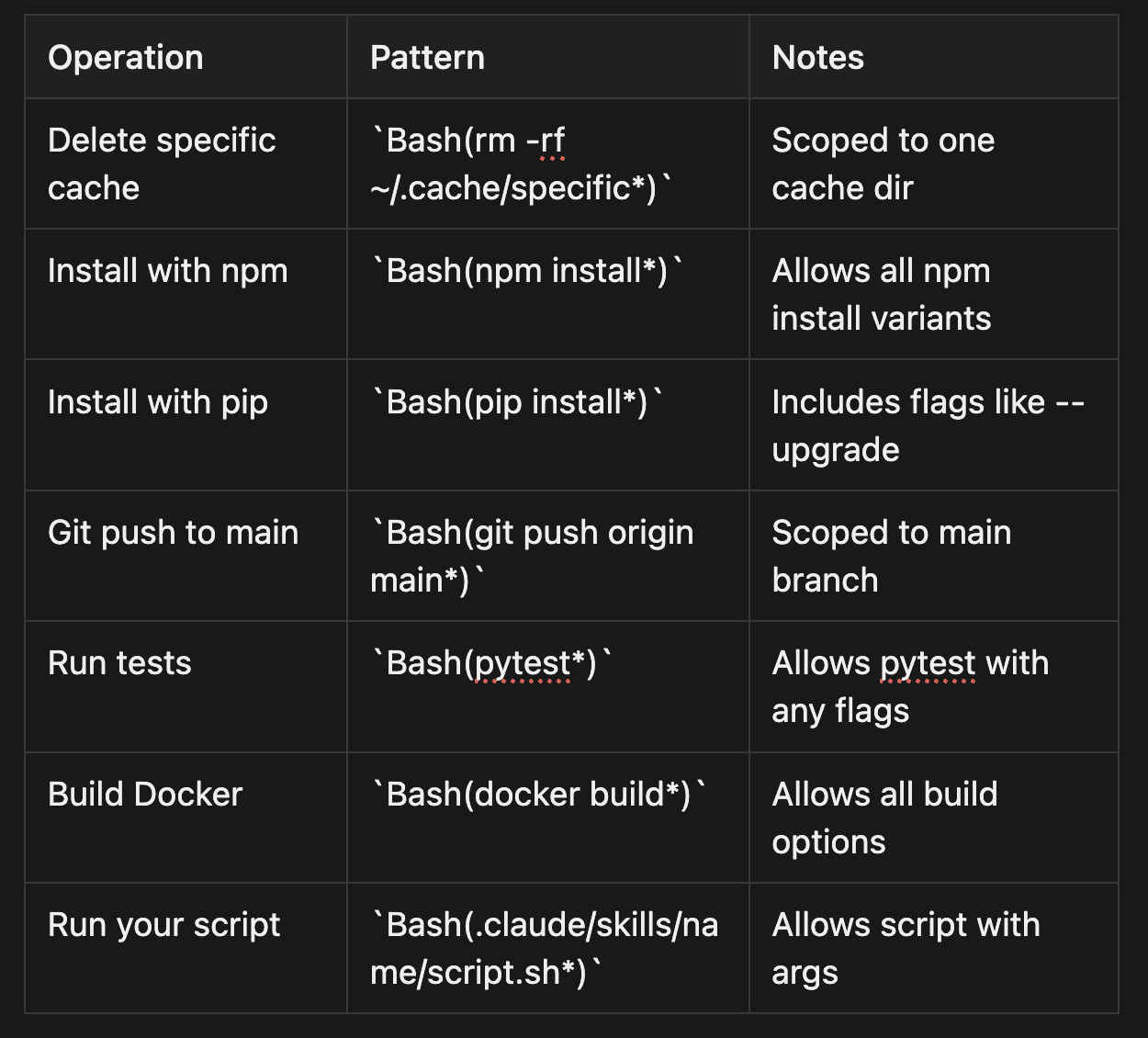
Common Permission Patterns (Bullet Format)
- Delete specific cache:
Bash(rm -rf ~/.cache/specific*)- Scoped to one cache dir - Install with npm:
Bash(npm install*)- Allows all npm install variants - Install with pip:
Bash(pip install*)- Includes flags like --upgrade - Git push to main:
Bash(git push origin main*)- Scoped to main branch - Run tests:
Bash(pytest*)- Allows pytest with any flags - Build Docker:
Bash(docker build*)- Allows all build options - Run your script:
Bash(.claude/skills/name/script.sh*)- Allows script with args
Pattern tip: The trailing * matches arguments. This allows pytest --verbose if you've granted Bash(pytest*), but blocks pytest if you've granted Bash(pytest --verbose*) only.
Testing Your Implementation
- Test the skill manually first:
bash .claude/skills/your-workflow/script.sh
Make sure it works outside of Claude Code.
2. Test the command:
\your-command
First run will fork into the agent and execute.
3. Verify zero prompts: If you get approval prompts, check:
- Is the command missing from
allowed_tools? - Does the glob pattern match the actual command?
- Are there typos in the agent frontmatter?
4. Check the summary: After execution, you should get a summary, not full output. This confirms forking worked.
Now let’s wrap up with the bigger picture of what policy islands enable.
Conclusion: The Agent OS Mindset
Claude Code 2.1 isn’t just a coding assistant. With skills, agents, and forked sub-agents, it’s an agent operating system. Policy islands are the primitive that makes governed automation possible.
Skills are your automation containers. They hold the scripts, the documentation, the reference material. Change a skill, and every command that uses it gets the update. Skills are the “what to do” layer.
Agents are your permission boundaries. They define what operations are pre-approved. The permissions travel with the agent, not negotiated per step. Agents are the “what’s allowed” layer.
Commands are your user interfaces. They fork into agents, invoking skills within governed contexts. One command, zero prompts, full audit trail. Commands are the “how to invoke” layer.
Together, they eliminate approval fatigue while maintaining safety. You’re not blindly clicking “yes” to everything. You’re declaring upfront what each workflow can do, then letting it run without interruption.
The Shift in Mindset
Traditional approach:
- Write ad-hoc commands
- Approve each operation manually
- Repeat approvals every time
- Accumulate permissions in parent agent (permission creep)
Policy islands approach:
- Design workflows as skills
- Declare permissions in agents
- Execute without prompts
- Isolate permissions in forked sub-agents (no creep)
The difference is thinking declaratively (declare what’s allowed) instead of imperatively (approve each operation). It’s the same shift that made Infrastructure as Code successful: declare desired state once, execute repeatedly.
What We Shipped
The pattern we shipped in Agent Brain works. Four policy islands, four forked commands, zero mid-flight approvals. The complex release workflow executes with the same ergonomics as the simple version check.
- install_agent: Builds and deploys local development versions
- uninstall_agent: Cleans up installations with narrower permissions
- release_agent: Publishes new versions with git protections
- version_resolver_agent: Audits version drift with zero risk
Each agent has exactly the permissions it needs. Each skill is reusable across contexts. Each command is a single-word invocation.
Your Turn
Try it in your project. Start with one skill, one agent, one command. Pick a workflow that currently requires 5+ approval prompts. Implement it as a policy island.
Feel the difference between “May I?” repeated 15 times and “Just do it” once.
The permissions live in the agents. The automation lives in the skills. The prompts? They’re gone.
Just do it.
About the Author
Rick Hightower is a technology executive and data engineer who led ML/AI development at a Fortune 100 financial services company. He created skilz, the universal agent skill installer, supporting 30+ coding agents including Claude Code, Gemini, Copilot, and Cursor, and co-founded the world’s largest agentic skill marketplace. Connect with Rick Hightower on LinkedIn or Medium.
The Claude Code community has developed powerful extensions that enhance its capabilities. Here are some valuable resources from Spillwave Solutions (Spillwave Solutions Home Page):
If you like this article, check out these other articles by this author (me):
- **Agent Brain: Giving AI Coding Agents a Full Understanding of Your Entire Enterprise — **Feb 5th 2026
- **Build Agent Skills Faster with Claude Code 2.1 Release — Feb 4th **2026
- **Build Your First Agent Skill in 10 Minutes Using the Context7 Wizard (and Save Hours) — **Feb 1st 2026
- **Supercharge Your React Performance with Vercel’s Best Practices Agent Skill — **Jan 29th
- Agent Skills: The Universal Standard Transforming How AI Agents Work — Jan 28
- Agent-Browser: AI-First Browser Automation That Saves 93% of Your Context Window — Jan 27
- Claude Code: Todos to Tasks — Jan 26
- LangExtract: Multi-Provider NLP Extraction with Gemini, OpenAI, Claude, and Local Models — Jan 20
- Empowering AI Coding Agents with Private Knowledge: The Doc-Serve Agent Skill — Jan 20
- Give Your Claude Code, OpenCode, and Codex Full RAG Over Docs and Code Repos — Jan 18