From Chatbots to AI Agents: Building Real-Time, Tool-Using Systems with LangChain
A Step-by-Step Guide to Building Intelligent, Streaming AI Agents and understanding ReAct
Originally published on Medium.
A Step-by-Step Guide to Building Intelligent, Streaming AI Agents and understanding ReAct

AI agent brain connected to tools through the ReAct reasoning loop, with glowing neural pathways and data streams on a dark blue background
Picture this: a customer service agent that looks up live order data while talking to you. A coding assistant that checks the actual documentation before answering. A data analyst that queries your database, notices an anomaly, runs a follow-up query, and explains what it found; all in a single fluid response that streams word by word as it works.
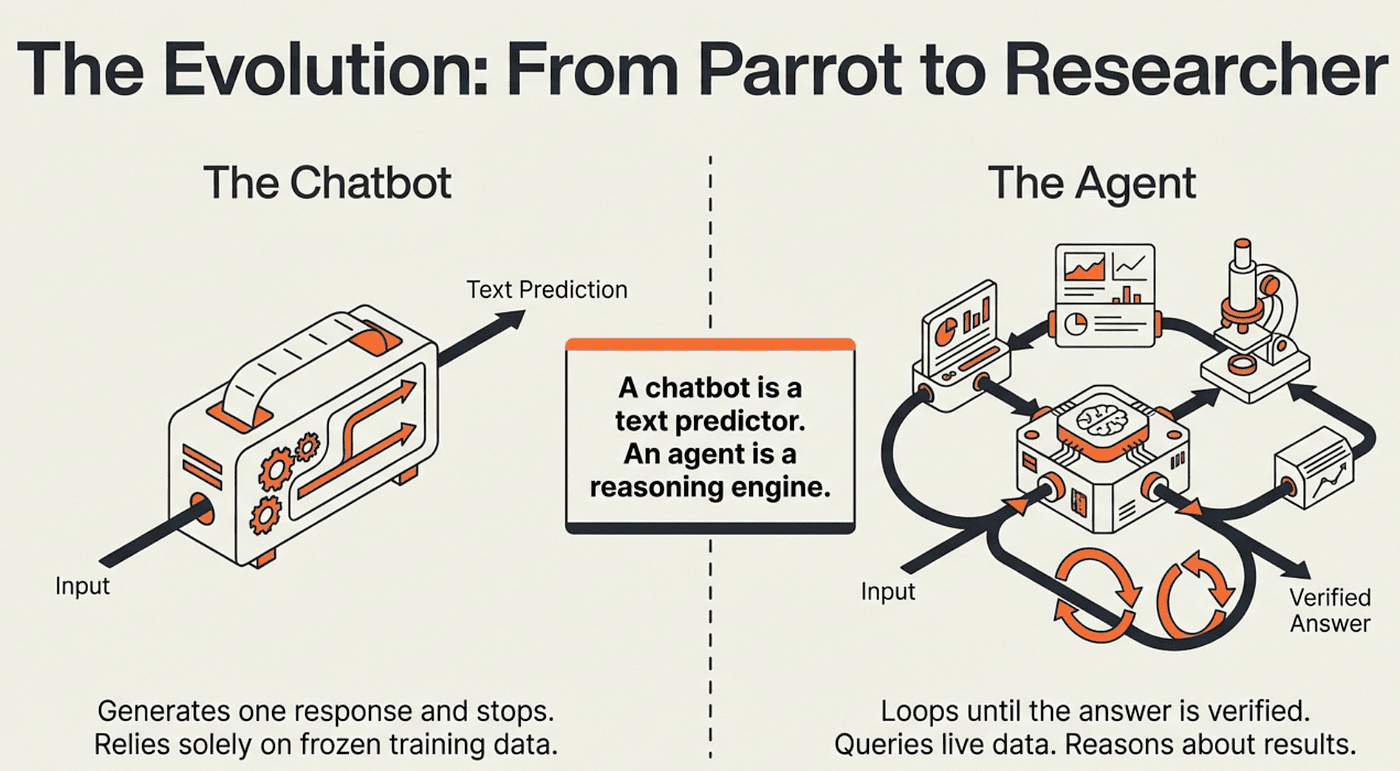
That is not a chatbot. That is a LangChain ReAct agent: a system that reasons about problems, acts through tools, and delivers results in real time. The gap between a chatbot and an agent is the difference between a parrot and a researcher. This article shows you how to build the researcher.
We will go from zero to a production-ready agent with memory, streaming output, role-based access control, and human approval workflows. Every concept builds on the last, and the central thread throughout is the ReAct pattern: the simple three-step loop that makes all of it possible.
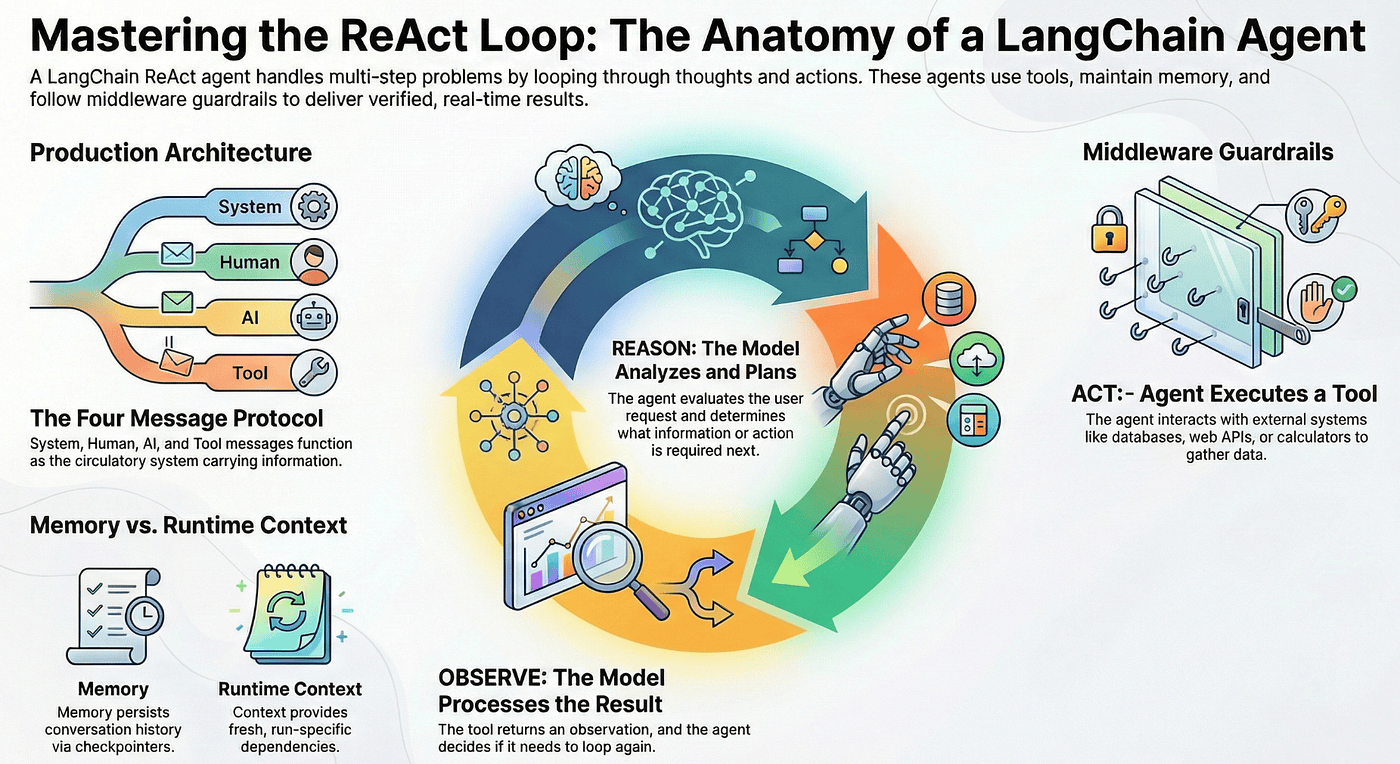
Mastering the ReAct Loop
Meet the ReAct Agent
A LangChain agent is not a text predictor. It is a reasoning engine built on the ReAct pattern: Reason, Act, Observe.
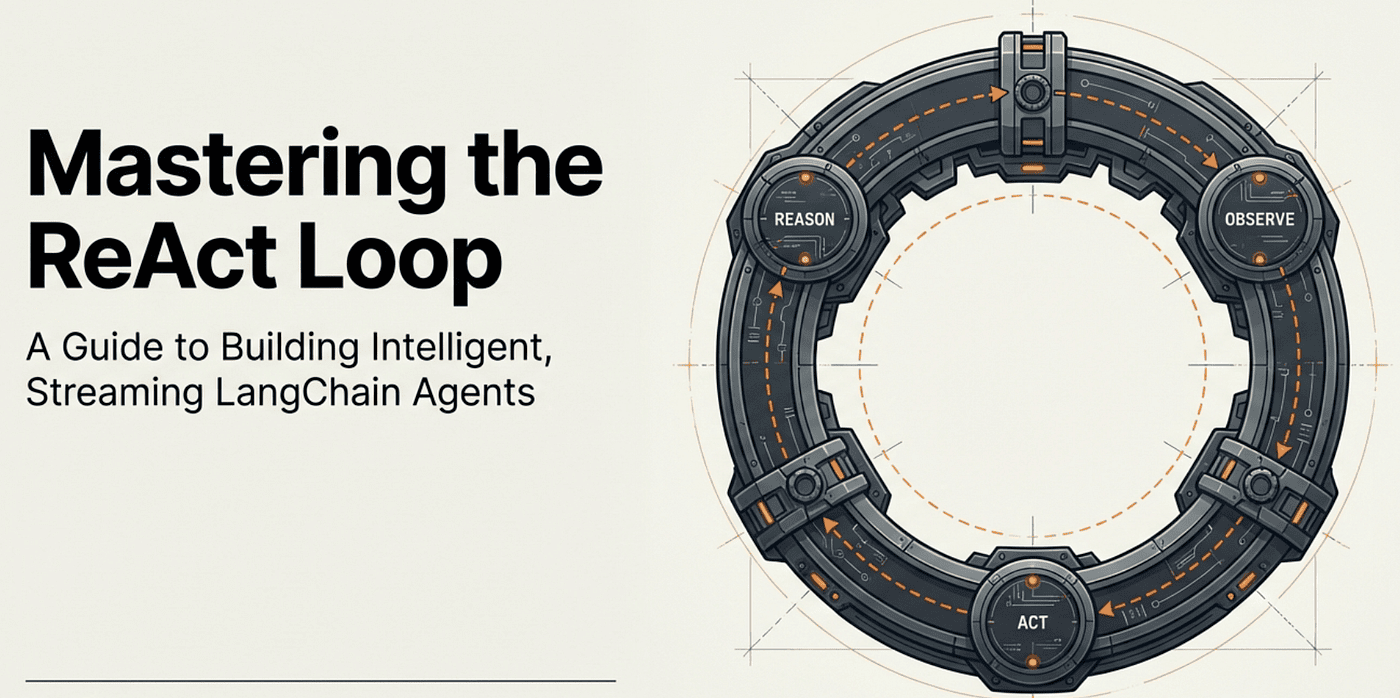
Here is how it works. The agent receives your request and starts thinking. It reasons about what information it needs. Then it acts by calling a tool: maybe a database query, a web API, or a calculator. The tool returns an observation, and the agent analyzes that result. If it needs more information, it loops back and reasons again. When it has enough, it produces a final answer.
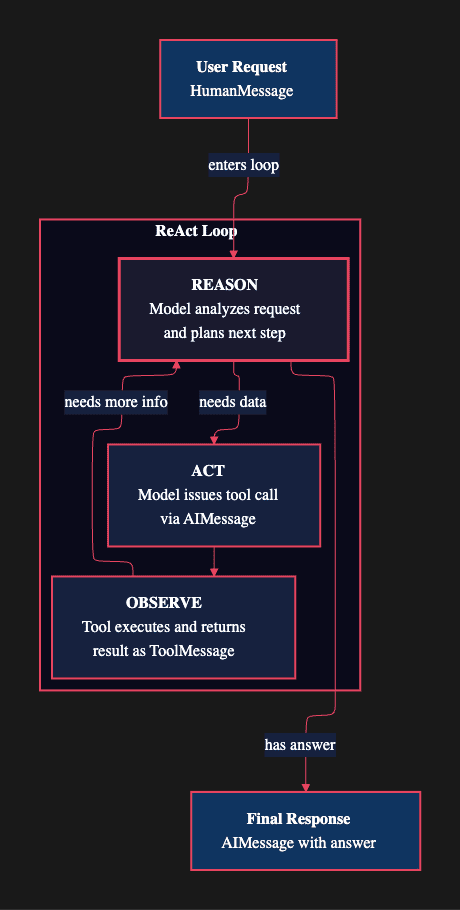
The loop is the key insight. A chatbot generates one response and stops. An agent keeps going until it has a complete, verified answer. That persistent loop is what enables the agent to handle multi-step problems that require real data.
Under the hood, LangChain agents run on LangGraph: a framework for durable, stateful execution. LangGraph manages the loop, the state between steps, and recovery from errors. You get that infrastructure for free.
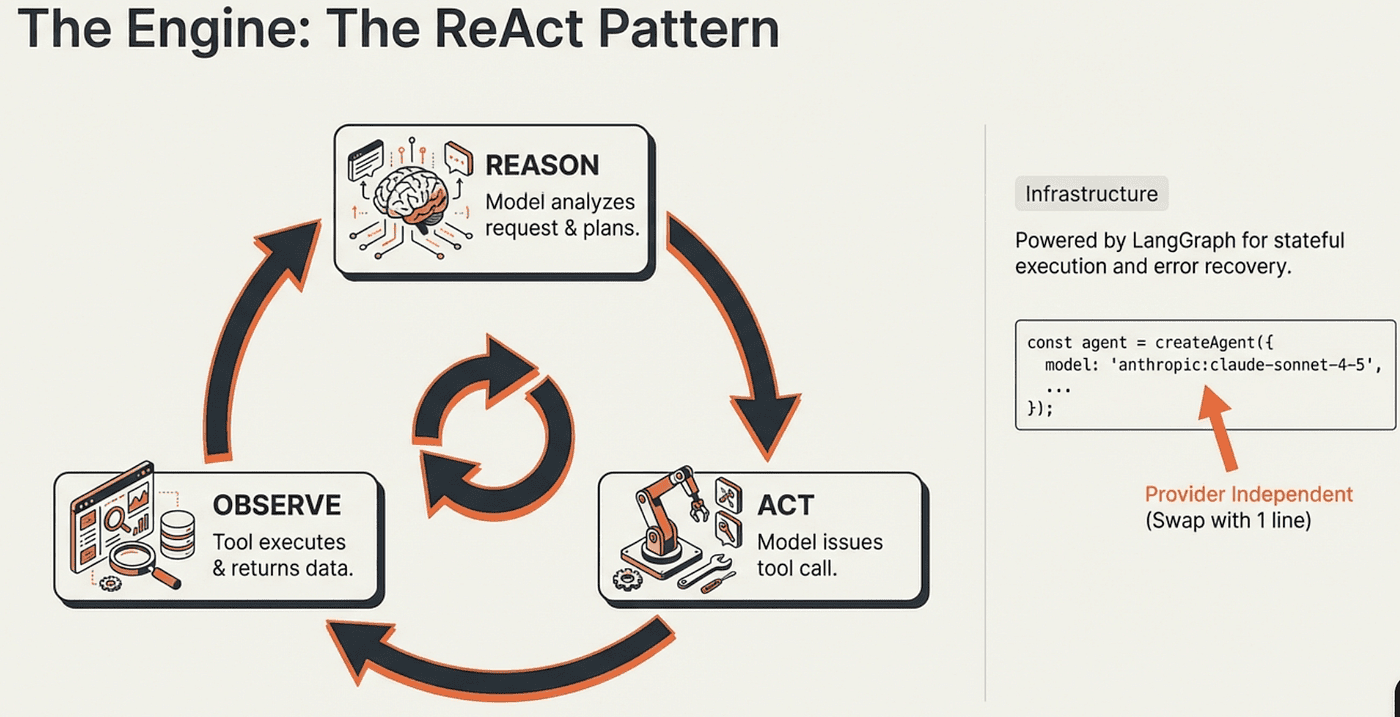
Agent Model Independence: Swap Providers with One String
One of the strongest architectural advantages is model independence. The ReAct loop is decoupled from the underlying model. Swap providers by changing a single string:
// Use Anthropic
model: "anthropic:claude-sonnet-4-6"

// Or switch to OpenAI
model: "openai:gpt-5-mini"
No code changes. No API rewiring. The agent's tools, memory, middleware, and streaming behavior remain identical across providers.
Creating Your First Agent
What it does: createAgent wires together a model, a set of tools, and a system prompt into a full ReAct loop powered by LangGraph. One call gives you an agent that can reason, call tools, and stream results.
Why this approach: Instead of manually wiring model calls, tool dispatchers, and state management, createAgent handles the boilerplate. You focus on what the agent does, not how the loop runs.
When to use it: Any time you need an AI system that must take actions, retrieve external data, or handle multi-step reasoning rather than producing a single static response.
import { createAgent } from "langchain";

const agent = createAgent({
    model: "anthropic:claude-sonnet-4-5-20250929",
    tools: [executeSQL],
    systemPrompt,
    contextSchema,
});
You give it a model, some tools, and a system prompt. LangGraph handles the rest: the Agent ReAct loop, state management, and tool dispatch.
The Agent Building Blocks
Messages: The Agent's Circulatory System
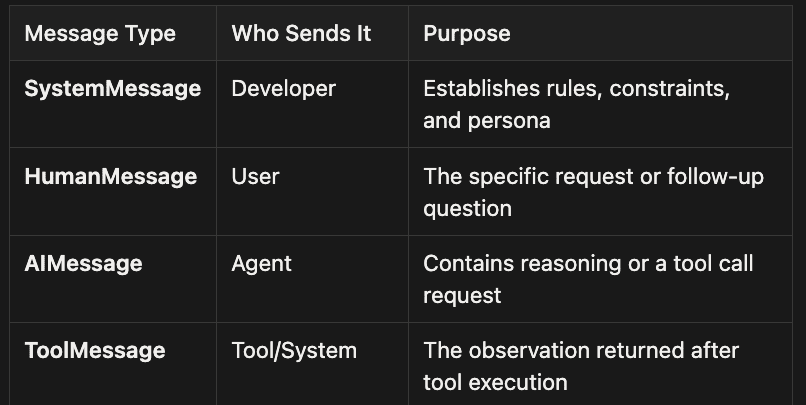
Every interaction in a LangChain agent flows through four message types. Think of them as the circulatory system carrying information between the brain (model) and the hands (tools).
Agent Message Types
SystemMessage
- Who Sends It: Developer
- Purpose: Establishes rules, constraints, and persona
HumanMessage
- Who Sends It: User
- Purpose: The specific request or follow-up question
AIMessage
- Who Sends It: Agent
- Purpose: Contains reasoning or a tool call request
ToolMessage
- Who Sends It: Tool/System
- Purpose: The observation returned after tool execution
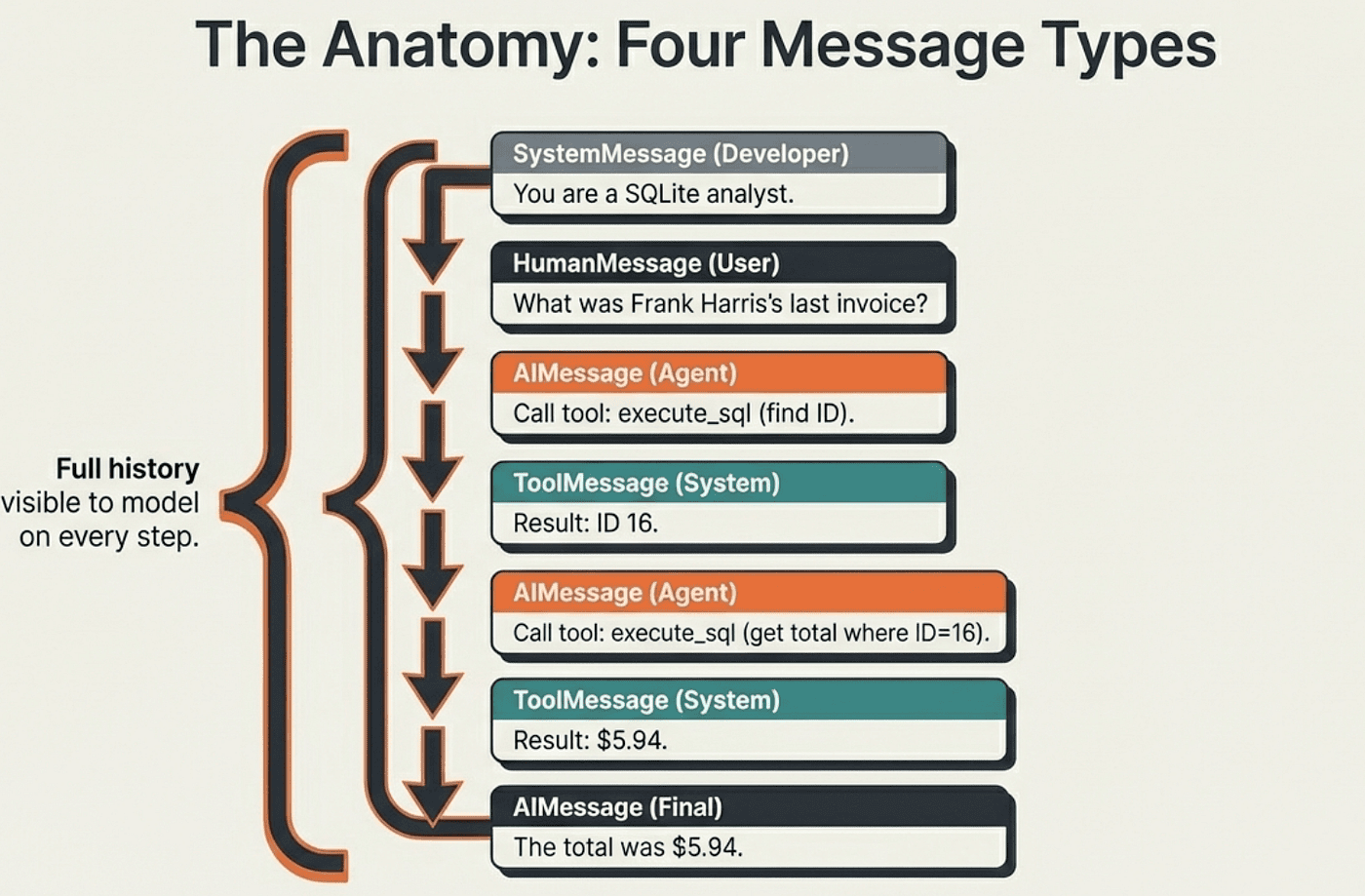
This four-message protocol implements the ReAct pattern in practice. Each loop iteration produces a new AIMessage (the reasoning step), dispatches a tool call (the action), and receives a ToolMessage (the observation). The model sees the full message history on every iteration, which is how it knows what it has already tried.
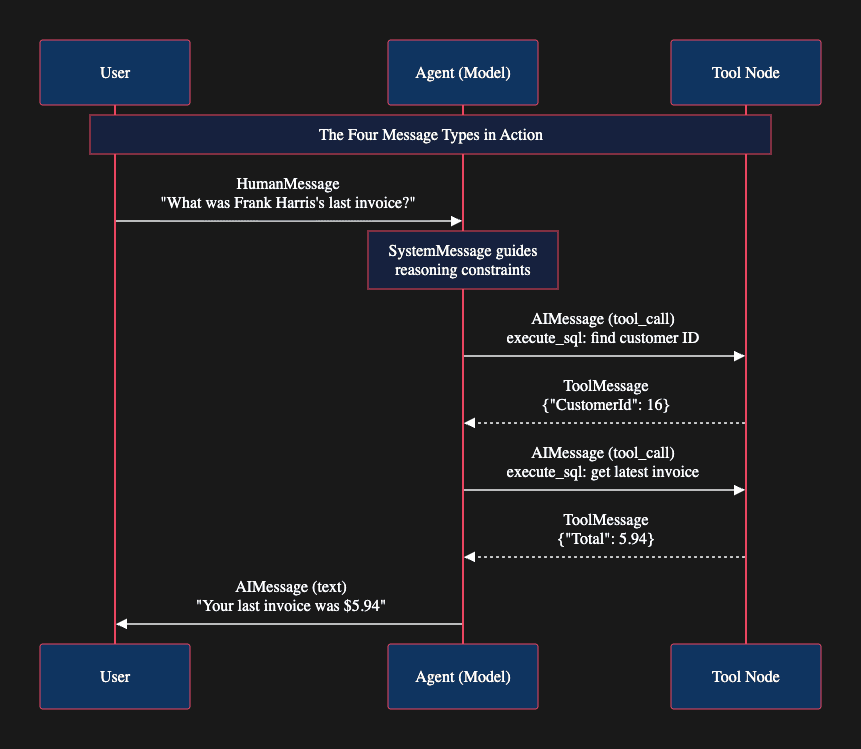
Notice that the agent makes two separate tool calls. First it finds the customer ID, then it uses that ID to find the invoice. This is the ReAct loop running twice before settling on an answer. The model reasons after each observation to decide whether it has enough information to respond.
The System Prompt: Setting the Agent's Guardrails
What it does: The system prompt establishes the agent's persona, capabilities, and hard constraints. It runs before every model call in the loop, keeping the agent on task across multiple reasoning steps.
Why this approach: Unlike a one-shot prompt, the system prompt persists throughout every iteration of the ReAct cycle. This means your safety rules and behavioral constraints apply not just to the first response, but to every reasoning step and error recovery attempt.
When to use it: Always. A system prompt is mandatory for production agents. Without it, the agent has no guardrails and will attempt anything the model thinks might help.
const systemPrompt = `You are a careful SQLite analyst.

Rules:
- Think step-by-step.
- When you need data, call the tool \`execute_sql\` with ONE SELECT query.
- Read-only only; no INSERT/UPDATE/DELETE/ALTER/DROP/CREATE/REPLACE/TRUNCATE.
- Limit to 5 rows unless the user explicitly asks otherwise.
- If the tool returns 'Error:', revise the SQL and try again.
- Prefer explicit column lists; avoid SELECT *.`;
Notice the last rule: "revise the SQL and try again." This is the ReAct loop's error recovery in action. The agent does not just fail on a bad query; it treats the error as an observation, reasons about what went wrong, and takes corrective action. The system prompt explicitly enables this behavior.
Tools: The Agent's Hands
If the model is the brain, tools are the hands. They provide the "Act" in ReAct, letting the agent interact with real data sources, APIs, and services.
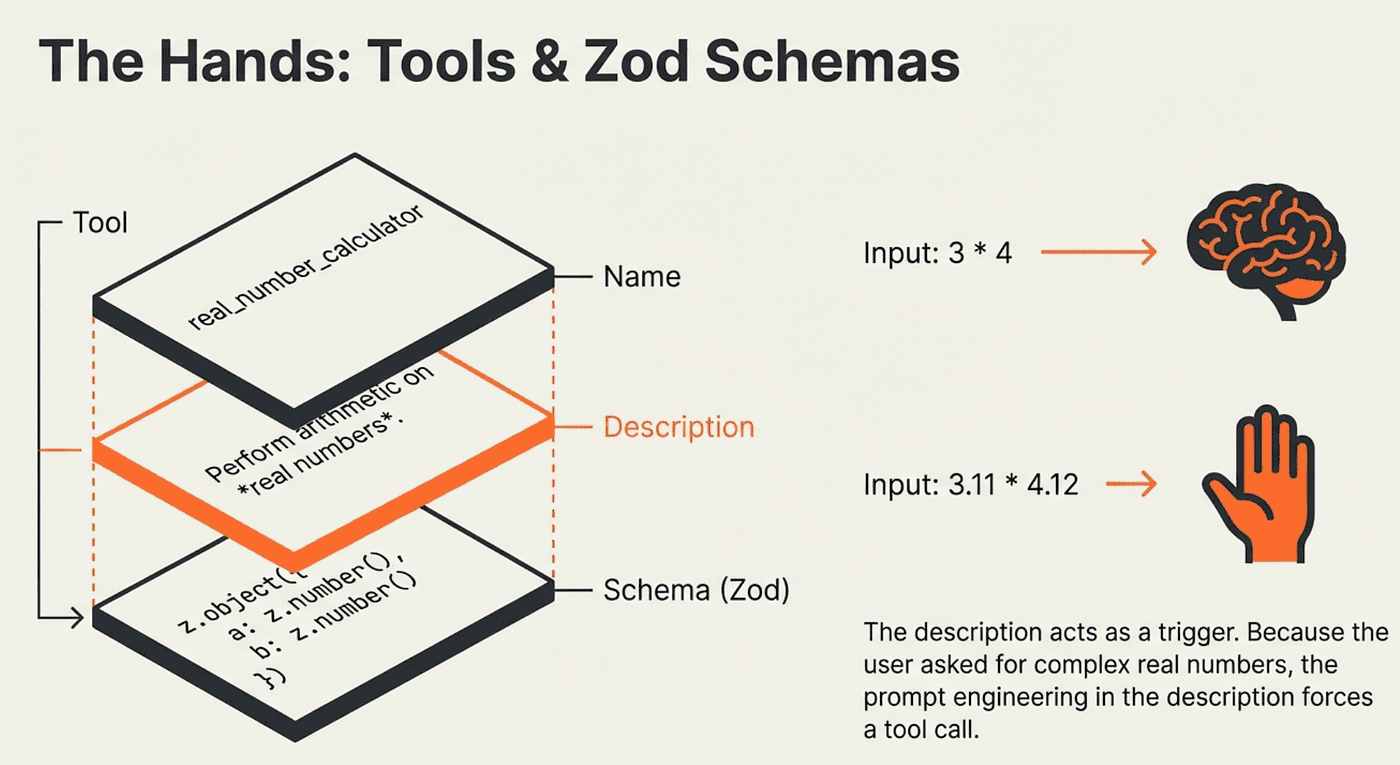
What a tool needs: Every tool requires a name, a description, and a schema. The description is the most important element because the model uses it to decide when to call the tool and how to construct its arguments.
Why Zod schemas: Zod validates that the model passes correctly typed arguments before the tool executes. This prevents a category of runtime errors where the model generates plausible but malformed input.
When to expose a tool: When the agent needs data or capability that the model cannot produce from its training alone: live database queries, real-time APIs, external calculations, or file operations.
import { tool } from "langchain";
import { z } from "zod";

const executeSQL = tool(({ query }, runtime) => {
    return runtime.context.db.run(query);
}, {
    name: "execute_sql",
    description: "Execute a SQLite command and return results.",
    schema: z.object({ query: z.string() })
});
The runtime parameter gives the tool access to context like database connections. The tool function itself is pure: it takes validated input and returns a result. The ReAct loop handles when to call it.
Tool Descriptions Are Prompt Engineering:
Tool descriptions directly influence the model's reasoning. Here is a concrete example:
const calculator = tool(({ a, b, operation }) => {
    if (operation === "add") return a + b;
    if (operation === "subtract") return a - b;
    if (operation === "multiply") return a * b;
    if (operation === "divide") {
        if (b === 0) throw new Error("Division by zero");
        return a / b;
    }
}, {
    name: "real_number_calculator",
    description: "Perform basic arithmetic operations on two real numbers.",
    schema: z.object({
        a: z.number(),
        b: z.number(),
        operation: z.enum(["add", "subtract", "multiply", "divide"])
    })
});
The description says "real numbers." When the agent reasons about "What is 3 4?", it may compute the answer directly because 3 and 4 are integers. Ask "What is 3.1125 4.1234?" and the agent reaches for the calculator because the description explicitly mentions real numbers. Every word in a tool description shapes the agent's ACT decisions.
MCP: Plugging Into the World -- Give Agents Hands and Tools
For tools that live on external servers, LangChain supports the Model Context Protocol (MCP) through @langchain/mcp-adapters.
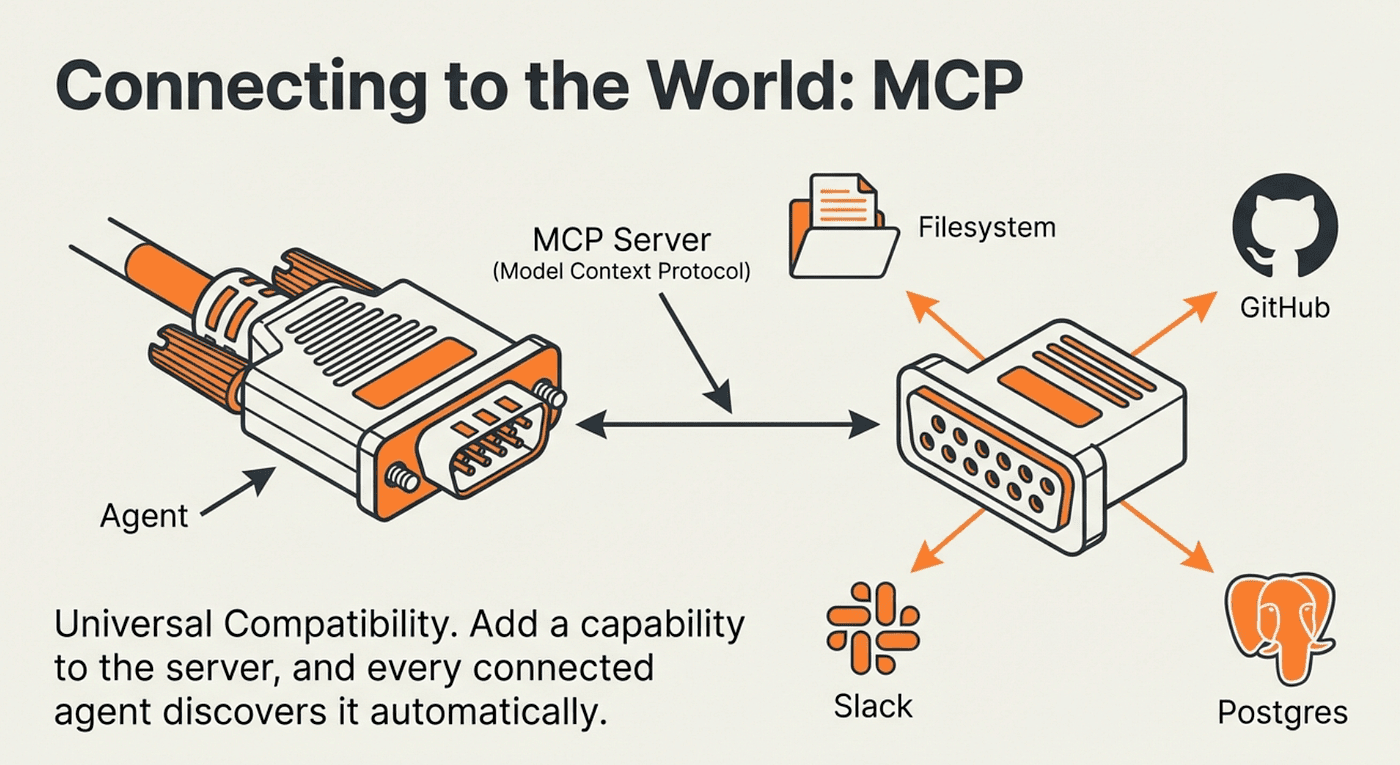
MCP provides a standardized interface for connecting agents to remote tool servers without writing manual tool definitions:
import { MultiServerMCPClient } from "@langchain/mcp-adapters";

const mcpClient = new MultiServerMCPClient({
    mcpServers: {
        time: {
            transport: "stdio",
            command: "npx",
            args: ["-y", "@theo.foobar/mcp-time"],
        }
    },
    useStandardContentBlocks: true,
});

const mcpTools = await mcpClient.getTools();
// Loaded 5 MCP tools: ["add_time", "compare_time", ...]

const agent = createAgent({
    model: "anthropic:claude-sonnet-4-5-20250929",
    tools: mcpTools,
    systemPrompt: "You are a helpful assistant"
});
The agent discovers available tools from the MCP server automatically. The server advertises what it can do, and the agent learns to use it. This is particularly powerful for tools that change over time: add a new capability to the MCP server and every agent that connects to it gains that capability automatically.
Making Agents Remember
Without memory, agents suffer from amnesia. Every invocation starts fresh. Ask "What was Frank Harris's last invoice?" and get a perfect answer. Follow up with "What were the titles?" and the agent has no idea what you are referring to. The ReAct loop ran correctly, but the results vanished.
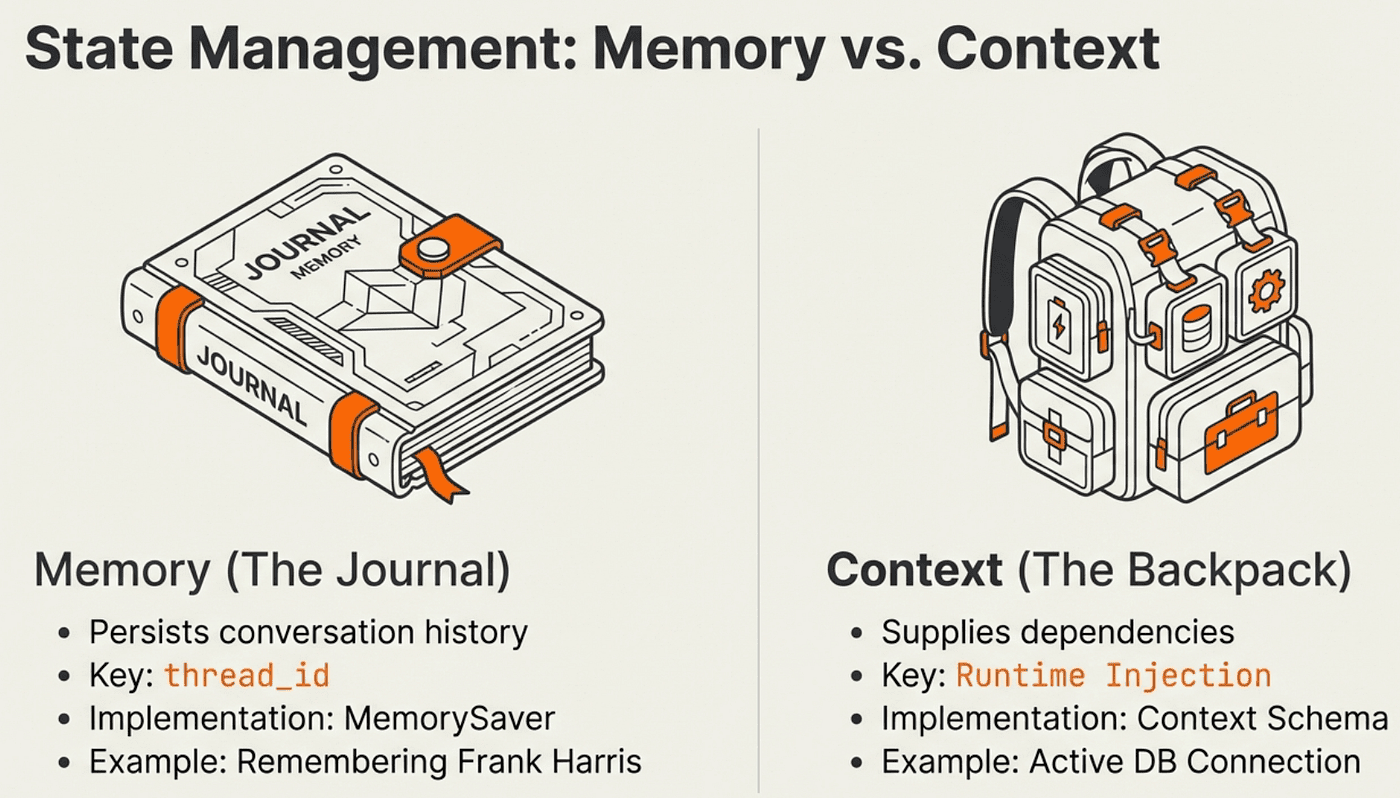
The fix is a checkpointer. Add a MemorySaver and a thread_id, and the agent stores its entire message history between turns. The next invocation picks up exactly where the last one left off.
What it does: MemorySaver persists the full message list (including all ToolMessages from prior loops) to an in-memory store, keyed by thread_id. On the next invocation with the same thread_id, the agent resumes with its full history.
Why this approach: Storing the full message history gives the agent complete context for follow-up reasoning. It can refer back to tool results from three turns ago just as easily as results from the current turn.
Trade-offs:
- Pro: Seamless multi-turn conversations with full context
- Pro: Zero changes to tool definitions or agent logic
- Con: Memory grows with each turn, increasing token costs over time
- Con: MemorySaver is in-process only; production systems need a persistent store like Redis or PostgreSQL
import { createAgent } from "langchain";
import { MemorySaver } from "@langchain/langgraph";

const checkpointer = new MemorySaver();
const agent = createAgent({
    model: "anthropic:claude-sonnet-4-5-20250929",
    tools: [executeSQL],
    systemPrompt,
    contextSchema,
    checkpointer
});
Now when you invoke the agent, pass a thread_id to identify the conversation:
The agent retrieves the answer: $5.94. Now the follow-up works because the same thread_id restores the full conversation history:
const stream = await agent.stream({
    messages: "What were the titles?",
}, {
    streamMode: "values",
    configurable: { thread_id: "1" },  // Same thread restores full history
    context: { db }
});
The agent remembers Frank Harris, the invoice, and everything from the previous turn. It issues a targeted SQL query for the track titles on that specific invoice without you needing to repeat any context.
Agent: Runtime Context vs. Memory: Two Different Jobs
Memory and runtime context are easy to confuse, but they serve opposite purposes.
Agent Memory persists conversation history across turns. It answers the question: "What has been said in this conversation?"
Agent Runtime context provides static, run-specific dependencies like database connections or user session data. It answers the question: "What does this agent need to do its job right now?"
const contextSchema = z.object({
    db: z.instanceof(SqlDatabase)
});

// Pass context at invocation time
const stream = await agent.stream({
    messages: "Which table has the most entries?",
}, {
    streamMode: "values",
    context: { db }  // Provided fresh each invocation, never persisted
});
Context is available inside tools through the runtime parameter. It is injected fresh at each invocation. You would not want a database connection serialized to disk as part of conversation history. The separation keeps the architecture clean: memory stores what was said, context provides the infrastructure to get things done.
The Streaming Revolution for Agents
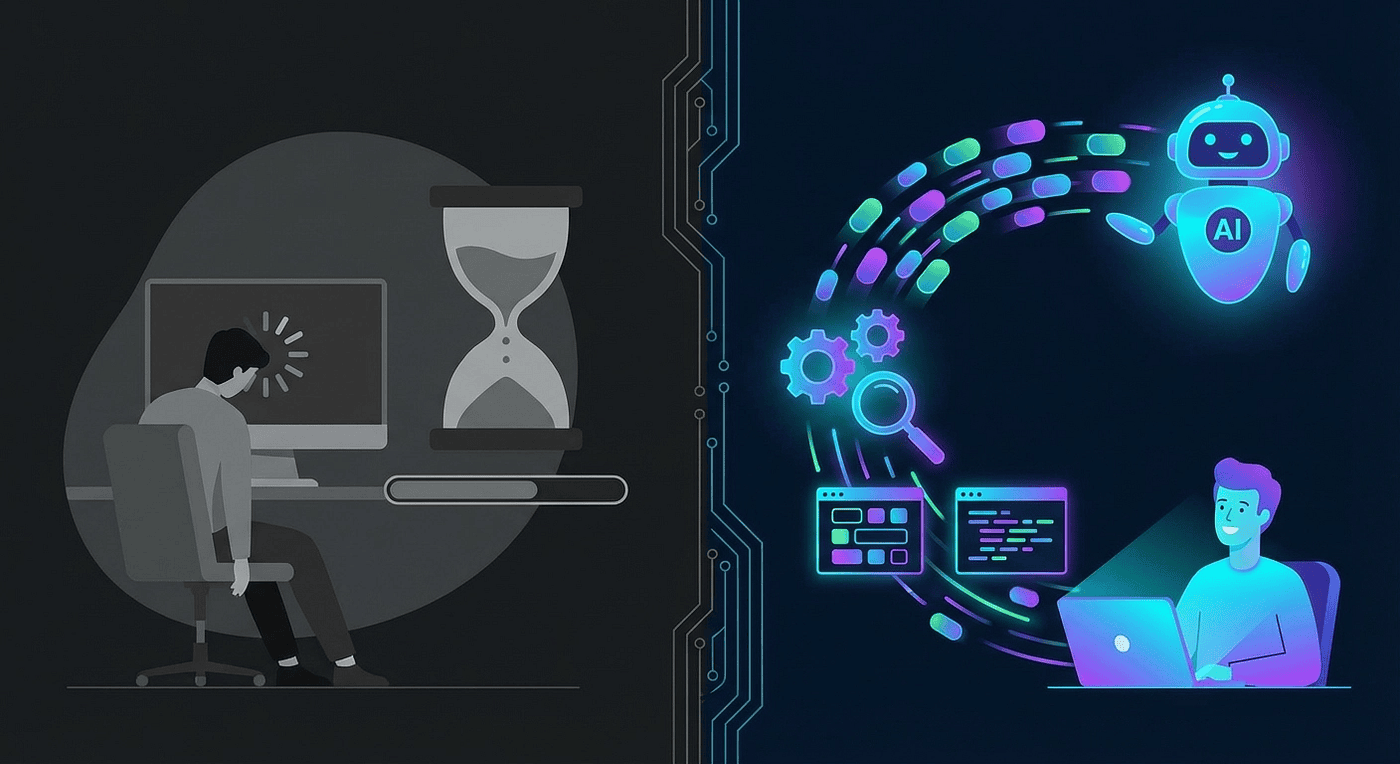
Comparison of traditional AI response waiting versus real-time streaming with colorful token flow
Without streaming, the ReAct loop creates an especially painful wait. The agent might run three tool calls before generating its final response. From the user's perspective, that is a blank screen for several seconds. Streaming solves this at both levels: you see token-by-token output as the final response generates, and you can observe tool calls as they happen.
The old way uses invoke. You send a request and wait in silence until the complete response arrives:
const result = await agent.invoke({
    messages: [new HumanMessage("Tell me a joke")]
});
// ... wait ... wait ... wait ...
console.log(result.messages.at(-1).content);
// "Why don't scientists trust atoms? Because they make up everything!"
The new way uses stream. You get immediate feedback as each token is generated:
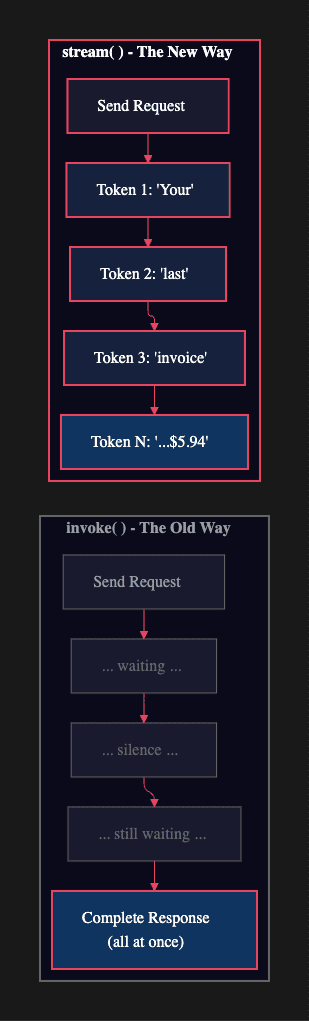
Streaming vs. All at once replies
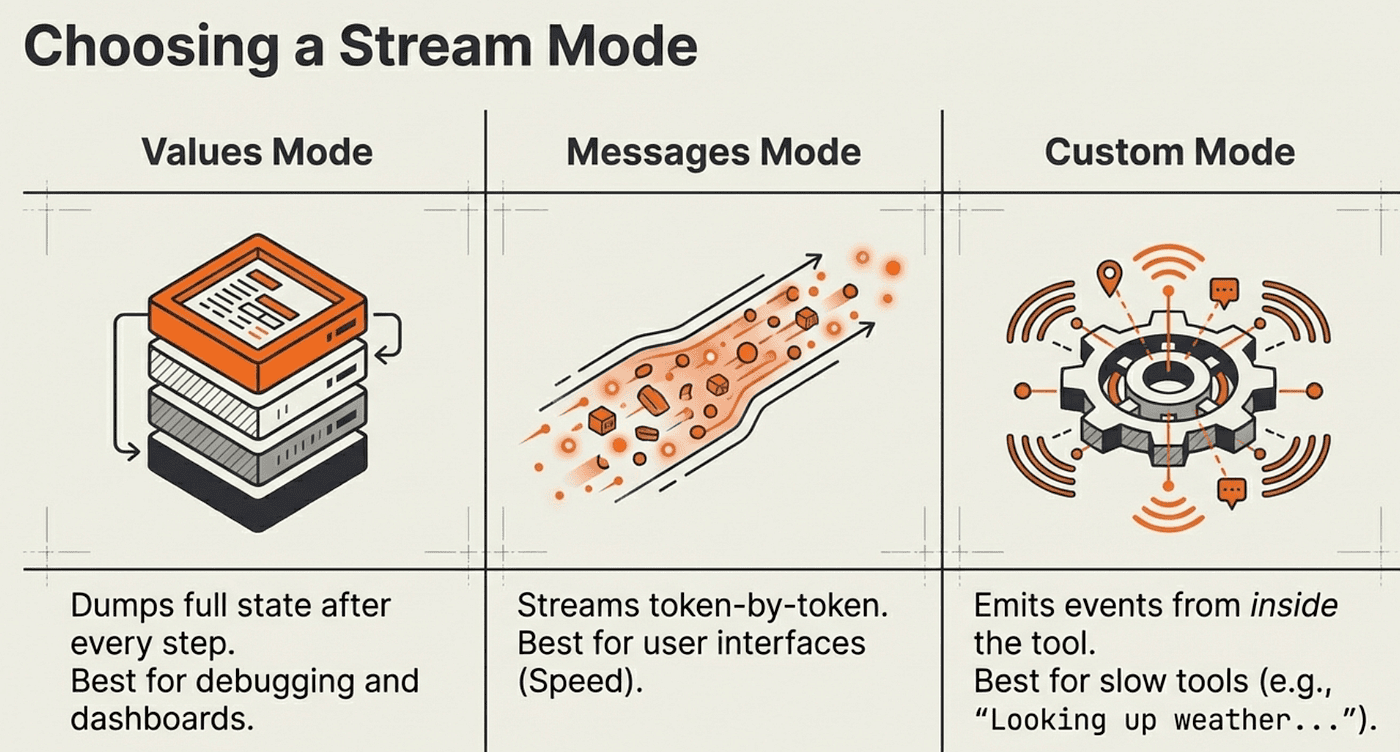
LangChain provides three streaming modes, each suited to a different use case. Choosing the right mode depends on what your application needs to display to the user.
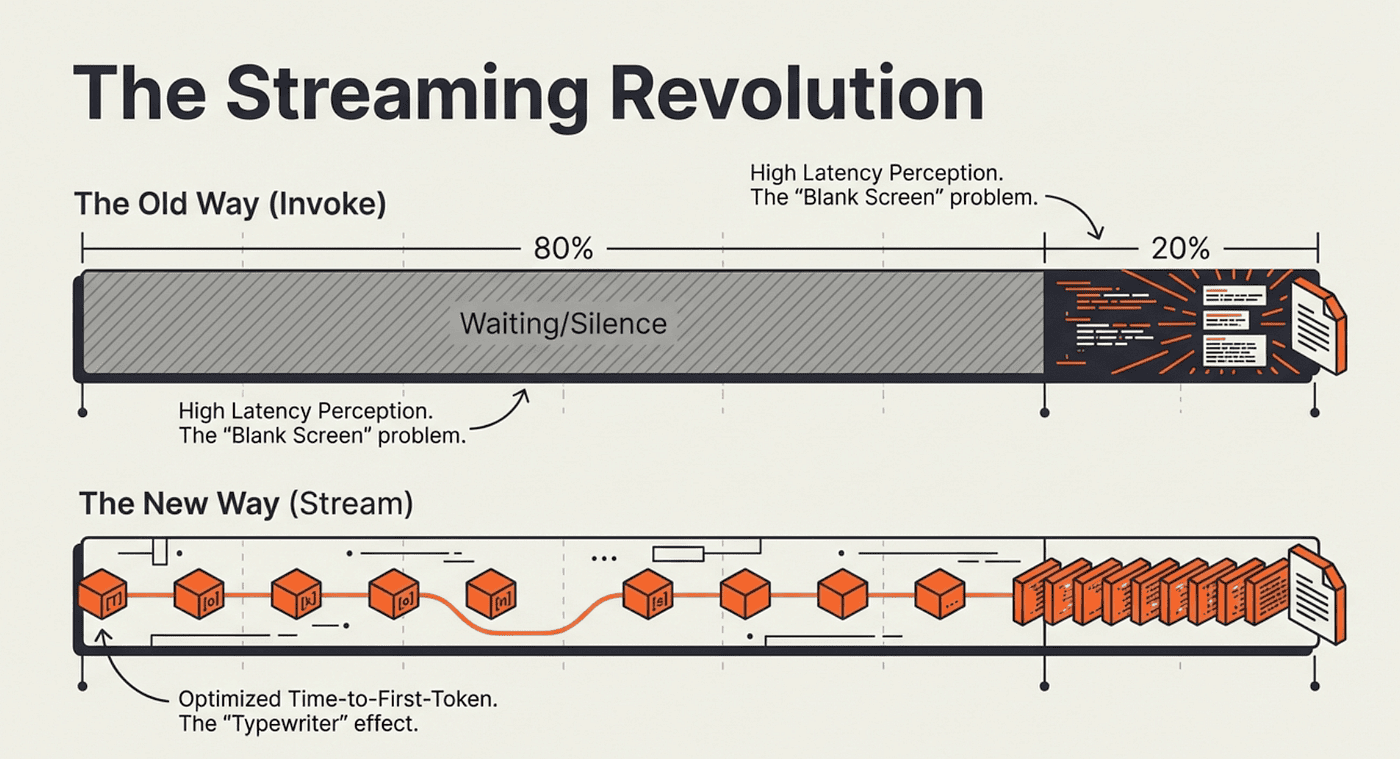
User Perception is reality when it comes to speed
Values Mode: Full State After Each Step
What it does: Streams the entire agent state after each completed ReAct step. You receive the growing message list after each reasoning/action/observation cycle.
Why this approach: Values mode gives you the most transparent view of the ReAct loop. You can see every tool call and result as they accumulate, making it ideal for debugging, monitoring dashboards, or UIs that display the agent's reasoning process.
When to use it: When you need to show the agent's reasoning steps, not just the final answer. Also the simplest mode to get started with.
const stream = await agent.stream({
    messages: [new HumanMessage("Tell me a joke")],
}, {
    streamMode: "values",
});

for await (const step of stream) {
    console.log(step.messages.at(-1).content);
}
You will see each message as it is appended: the HumanMessage, the AIMessage with a tool call (if any), the ToolMessage result, then the final AIMessage.
Messages Mode: Token-by-Token Typewriter Effect
What it does: Streams individual tokens as they are generated, rather than waiting for a complete message.
Why this approach: Messages mode optimizes Time to First Token (TTFT): the metric that most directly affects perceived responsiveness. Users see output within milliseconds of the model starting to generate, rather than waiting for the entire response.
Trade-offs:
- Pro: Best perceived performance; eliminates blank-screen waiting
- Pro: Each chunk includes metadata.langgraph_node so you know which part of the loop is generating
- Con: More complex to process; you receive many small chunks instead of complete messages
- Con: Tool call arguments arrive as partial JSON strings, which require buffering before parsing
const stream = await agent.stream({
    messages: [new HumanMessage("Write me a poem.")],
}, {
    streamMode: "messages",
});

for await (const [message, metadata] of stream) {
    console.log(`[${metadata.langgraph_node}]: ${message.content}`);
}
For most user-facing applications, messages mode is the right choice. The typewriter effect signals to users that something is happening, which dramatically improves perceived performance even when total latency is identical.
Custom Mode: Stream Progress from Inside Tools
Sometimes the wait is not the model generating text. It is a tool doing slow work: a database query on a large table, a web scrape, or a file processing job. Custom streaming lets tools emit intermediate progress updates before returning their final result.
What it does: The runtime.writer() function emits custom events from inside a tool during the "ACT" phase of the ReAct loop. These events arrive in the stream before the tool's ToolMessage is added to state.
Why this approach: It closes the feedback gap during slow tool execution. Without it, users see nothing while the tool runs, which can take seconds for expensive operations.
When to use it: For any tool that takes more than a second or two to complete. Pair it with values mode or messages mode to handle both tool progress and model output.
import { tool, type Runtime } from "langchain";

const getWeather = tool(({ city }, runtime: Runtime) => {
    runtime.writer(`Looking up data for city: ${city}`);
    runtime.writer(`Acquired data for city: ${city}`);
    return `It's always sunny in ${city}`;
}, {
    name: "get_weather",
    description: "Get weather for a given city.",
    schema: z.object({ city: z.string() })
});

const stream = await agent.stream({
    messages: "What's the weather in SF?",
}, {
    streamMode: ["values", "custom"],  // Receive both state and tool progress
});

for await (const [type, data] of stream) {
    if (type === "custom") {
        console.log(data);  // "Looking up data for city: SF"
    }
    // type === "values" events contain agent state updates
}
Combining ["values", "custom"] gives you a complete picture of the ReAct loop: state updates from each reasoning step, plus real-time progress from inside tool execution.
Production Safety with Agent Middleware
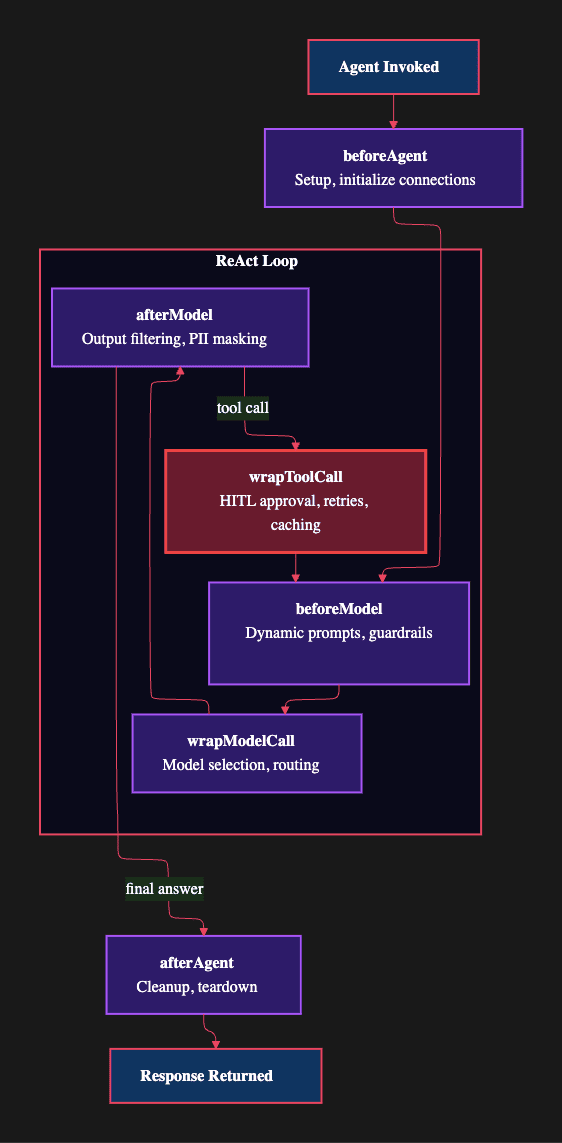
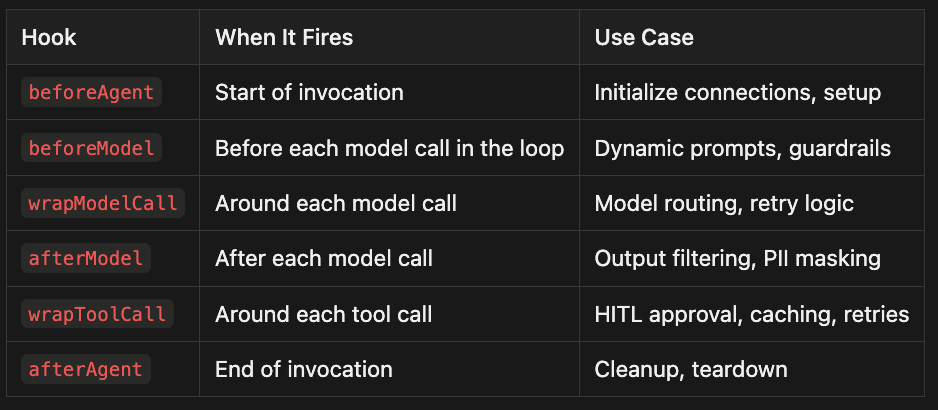
Agents that can reason and act are powerful, but that power creates risk. An unconstrained agent might query tables it should not access, execute operations it was not intended to perform, or process data in ways that violate business rules. LangChain middleware lets you intercept the ReAct loop at six key points to enforce safety, customize behavior, and control access.
beforeAgent -- Start of invocation
- Initialize connections, setup
beforeModel -- Before each model call in the loop
- Dynamic prompts, guardrails
wrapModelCall -- Around each model call
- Model routing, retry logic
afterModel -- After each model call
- Output filtering, PII masking
wrapToolCall -- Around each tool call
- HITL approval, caching, retries
afterAgent -- End of invocation
- Cleanup, teardown
Notice that beforeModel fires on every iteration of the ReAct loop, not just the first model call. This is intentional: it means dynamic modifications to the system prompt or guardrails apply consistently across every reasoning step, including error recovery attempts.
Dynamic Prompting: Role-Based Access Control
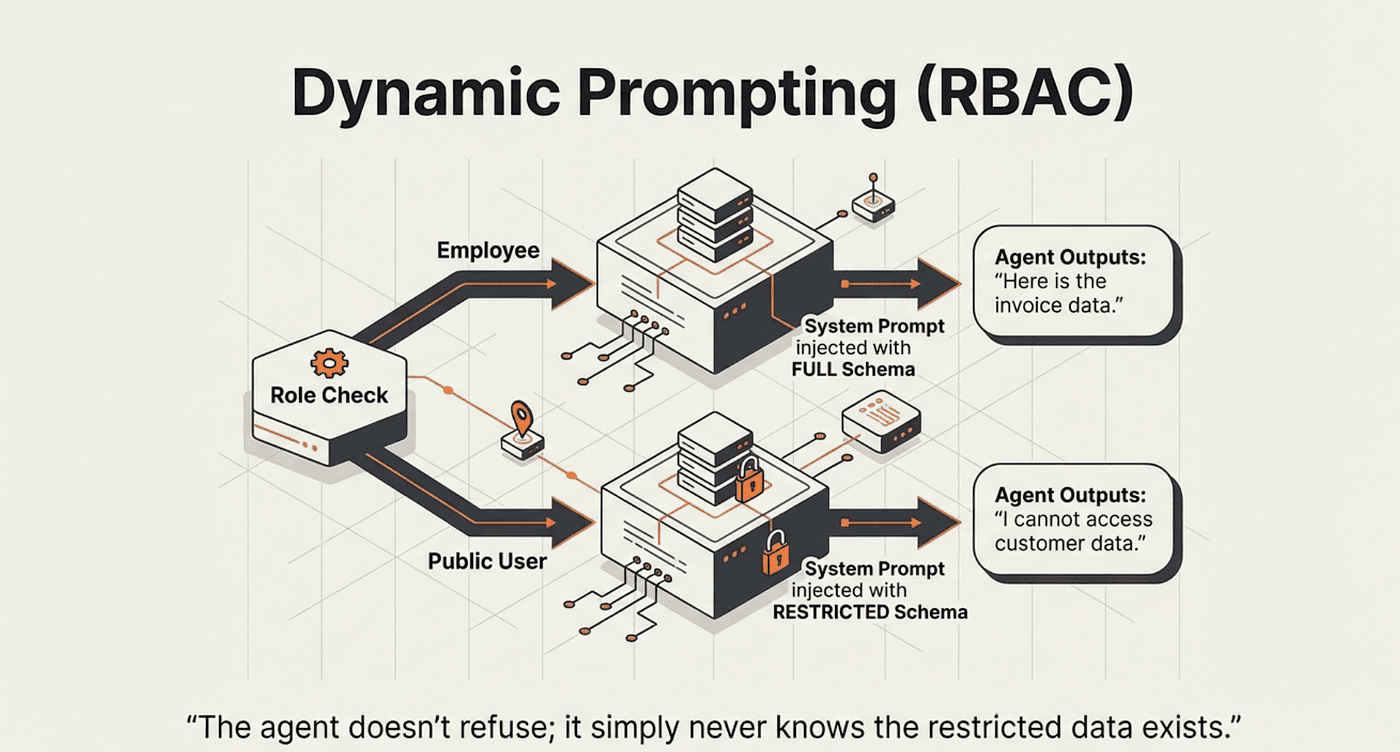
One of the most practical middleware patterns is dynamic prompting. The system prompt changes based on who is making the request, before the model ever sees it.
What it does: dynamicSystemPromptMiddleware runs a function before each model call in the ReAct loop. The function receives the current agent state and runtime context, and returns a modified system prompt. The original system prompt is replaced entirely.
Why this approach: Role-based access control belongs in the prompt, not in the tools. If an employee-only table never appears in the system prompt for a non-employee session, the model cannot reason about querying it. The access restriction is enforced at the reasoning level, not just at the execution level.
Trade-offs:
- Pro: Access control is invisible to the user; the restricted agent simply does not know certain tables exist
- Pro: One agent definition handles all roles; branching logic lives in the middleware function
- Con: Requires runtime context to carry role information; this must be trusted data from an authenticated session
import { format } from "node:util";
import { dynamicSystemPromptMiddleware } from "langchain";
import type { AgentState, Runtime } from "langchain";

const RuntimeContext = z.object({
    isEmployee: z.boolean()
});

const SYSTEM = `You are a careful SQLite analyst.

Rules:
- Think step-by-step.
- When you need data, call the tool \`execute_sql\` with ONE SELECT query.
- Read-only only; no INSERT/UPDATE/DELETE/ALTER/DROP/CREATE/REPLACE/TRUNCATE.
- Limit to 5 rows unless the user explicitly asks otherwise.
%s
- If the tool returns 'Error:', revise the SQL and try again.
- Prefer explicit column lists; avoid SELECT *.`;

const dynamicPrompt = dynamicSystemPromptMiddleware(
    (state: AgentState, runtime: Runtime<typeof RuntimeContext>) => {
        return !runtime.context.isEmployee
            ? format(SYSTEM, "- Limit access to these tables: Album, Artist, Genre, Playlist, PlaylistTrack, Track.")
            : format(SYSTEM, "");
    }
);

const agent = createAgent({
    model: "openai:gpt-5-mini",
    tools: [executeSQL],
    contextSchema: RuntimeContext,
    middleware: [dynamicPrompt]
});
Now the system prompt adapts based on the caller's role at runtime. Notice that staticSystemPrompt is omitted entirely; the dynamic middleware generates the full prompt each time.
// Non-employee: restricted to music tables only
await agent.stream({
    messages: "What is the most costly purchase by Frank Harris?",
}, { streamMode: "values", context: { isEmployee: false } });
// Agent responds: "I can only access music-related tables"

// Employee: full database access
await agent.stream({
    messages: "What is the most costly purchase by Frank Harris?",
}, { streamMode: "values", context: { isEmployee: true } });
// Agent queries Customer + Invoice tables and returns the answer
The non-employee agent does not refuse based on a policy it is aware of. It simply never learns that the Customer or Invoice tables exist. This is a stronger form of access control.
Human-in-the-Loop: Approval Before Action
For sensitive operations, you want a human to approve before the agent acts. The humanInTheLoopMiddleware intercepts the wrapToolCall hook, pauses execution, and waits for explicit approval. This is the ReAct loop paused mid-cycle.
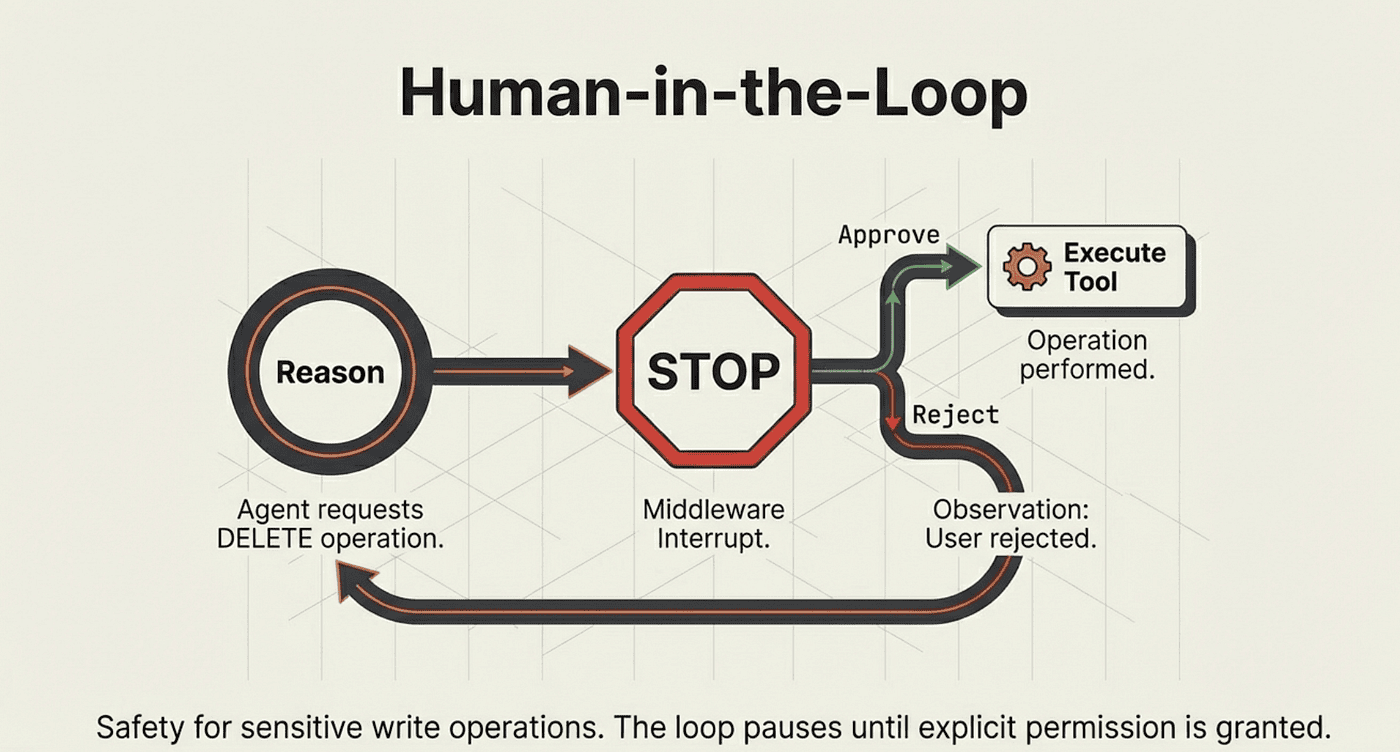
What it does: When the agent issues a tool call during the ACT phase, the middleware intercepts it and returns an interrupt to the caller instead of executing the tool. The caller must explicitly approve or reject each action before the loop resumes.
Why this approach: This is the safest possible architecture for agents with write access or access to sensitive data. The agent still performs all its reasoning autonomously; humans only review the specific actions it wants to take.
Trade-offs:
- Pro: Complete auditability; every tool call requires explicit human sign-off
- Pro: Rejection messages feed back into the ReAct loop, allowing the agent to adjust its approach
- Con: Breaks the real-time flow; requires an interactive approval UI or a human operator in the loop
- Con: Requires a persistent checkpointer; the agent state must survive between the interrupt and the resume
import { createAgent, humanInTheLoopMiddleware } from "langchain";
import { MemorySaver } from "@langchain/langgraph";

const checkpointer = new MemorySaver();
const agent = createAgent({
    model: "anthropic:claude-sonnet-4-5-20250929",
    tools: [executeSQL],
    systemPrompt: SYSTEM,
    checkpointer,
    middleware: [humanInTheLoopMiddleware({
        interruptOn: {
            execute_sql: {
                allowedDecisions: ["approve", "reject"]
            }
        }
    })]
});
When the agent wants to execute SQL, it pauses and returns an interrupt to the caller:
import { Command } from "@langchain/langgraph";
import type { HITLRequest, HITLResponse } from "langchain";

const config = { configurable: { thread_id: "1" } };
let result = await agent.invoke({
    messages: "What are the names of all the employees?"
}, config);

// Loop until the agent reaches a final answer without interrupts
while ('__interrupt__' in result) {
    const hitlRequest = result.__interrupt__[0].value as HITLRequest;

    // Show the human what the agent wants to do
    hitlRequest.actionRequests.forEach((req) => {
        console.log(req.description);
        // "Execute SQL: SELECT FirstName, LastName FROM Employee"
    });

    // Approve or reject
    const resume: HITLResponse = {
        decisions: hitlRequest.actionRequests.map(() => ({
            type: "approve"  // or "reject" with an explanatory message
        }))
    };

    // Resume the ReAct loop with the human's decision
    result = await agent.invoke(new Command({ resume }), config);
}
console.log(result.messages.at(-1).content);
Rejecting with a message feeds the reason back into the ReAct loop:
decisions: hitlRequest.actionRequests.map(() => ({
    type: "reject",
    message: "the database is offline."
}))
The agent receives the rejection as an observation in its ReAct cycle, then reasons about it and responds: "I'm sorry, the database is currently offline. Please try again later." The loop handles rejection gracefully because rejection is just another observation to reason about.
Putting It All Together
A LangChain ReAct agent is built from a small number of composable components. Each one maps to a role in the Reason-Act-Observe cycle:
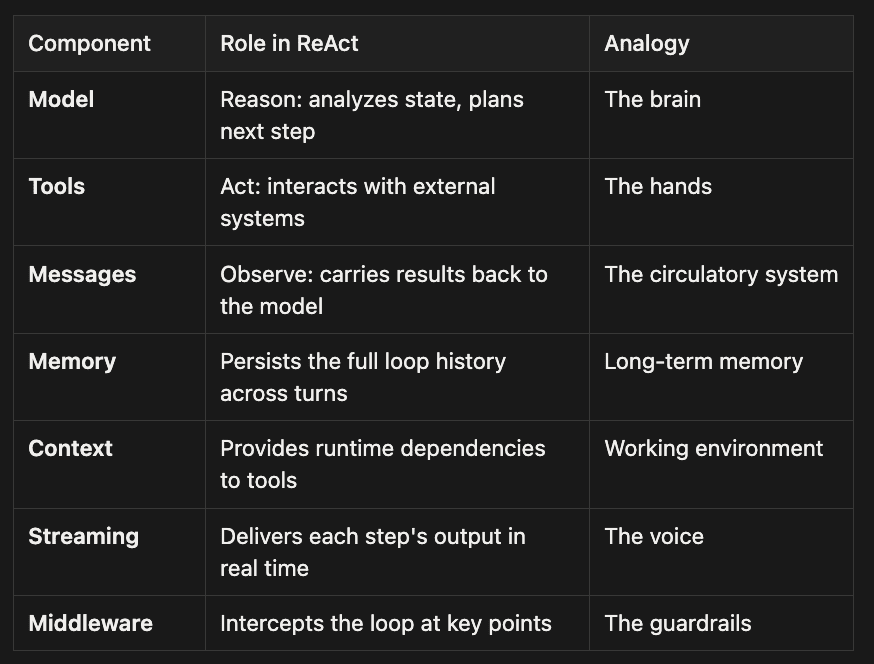
- Model -- Reason: analyzes state, plans next step -- The brain
- Tools -- Act: interacts with external systems -- The hands
- Messages -- Observe: carries results back to the model -- The circulatory system
- Memory -- Persists the full loop history across turns -- Long-term memory
- Context -- Provides runtime dependencies to tools -- Working environment
- Streaming -- Delivers each step's output in real time -- The voice
- Middleware -- Intercepts the loop at key points -- The guardrails
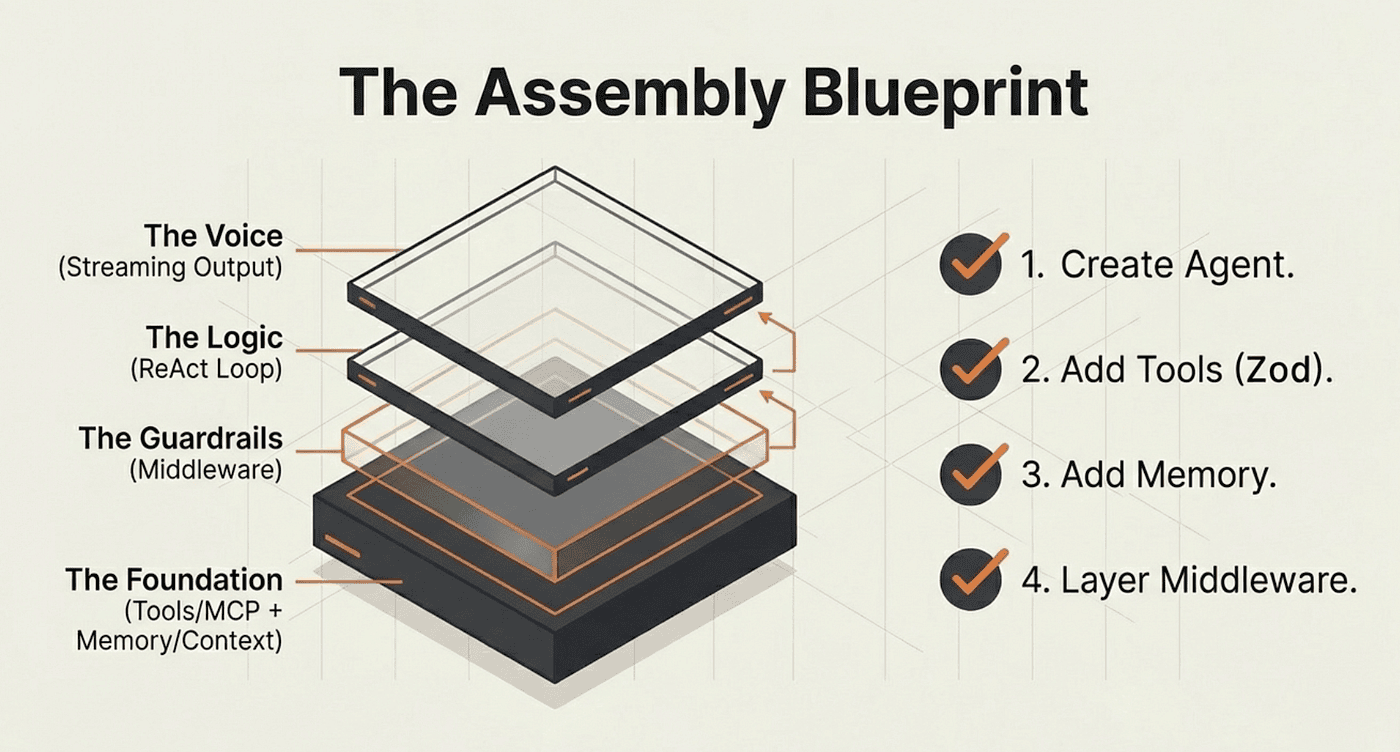
The pattern is consistent across every example in this article. Create an agent with createAgent. Give it tools with Zod schemas. Add a checkpointer for memory. Stream responses for real-time feedback. Layer on middleware for production safety.
The ReAct loop handles the complexity: reasoning about what to do, acting through tools, observing results, and iterating until it has the answer. You define the boundaries; the agent figures out the path.
Building Incrementally
The architecture is designed to grow with your requirements. Start with the simplest version that works, then add capabilities as you need them:
- Start here: createAgent with one tool and a system prompt. Verify the ReAct loop works with invoke.
- Add streaming: Switch from invoke to stream with streamMode: "values". Watch the loop steps as they happen.
- Add memory: Drop in MemorySaver and a thread_id. Test multi-turn conversations.
- Add access control: Wrap the system prompt with dynamicSystemPromptMiddleware. Test role-based behavior.
- Add human oversight: Add humanInTheLoopMiddleware on sensitive tools. Build the approval flow.
Each layer builds naturally on the last. You do not need to redesign the agent when you add streaming or memory; you add one parameter and the existing logic carries forward unchanged.
The result is an AI system that does not just predict text. It thinks, acts on real data, and responds to you in real time; all within a loop you can monitor, customize, and control.
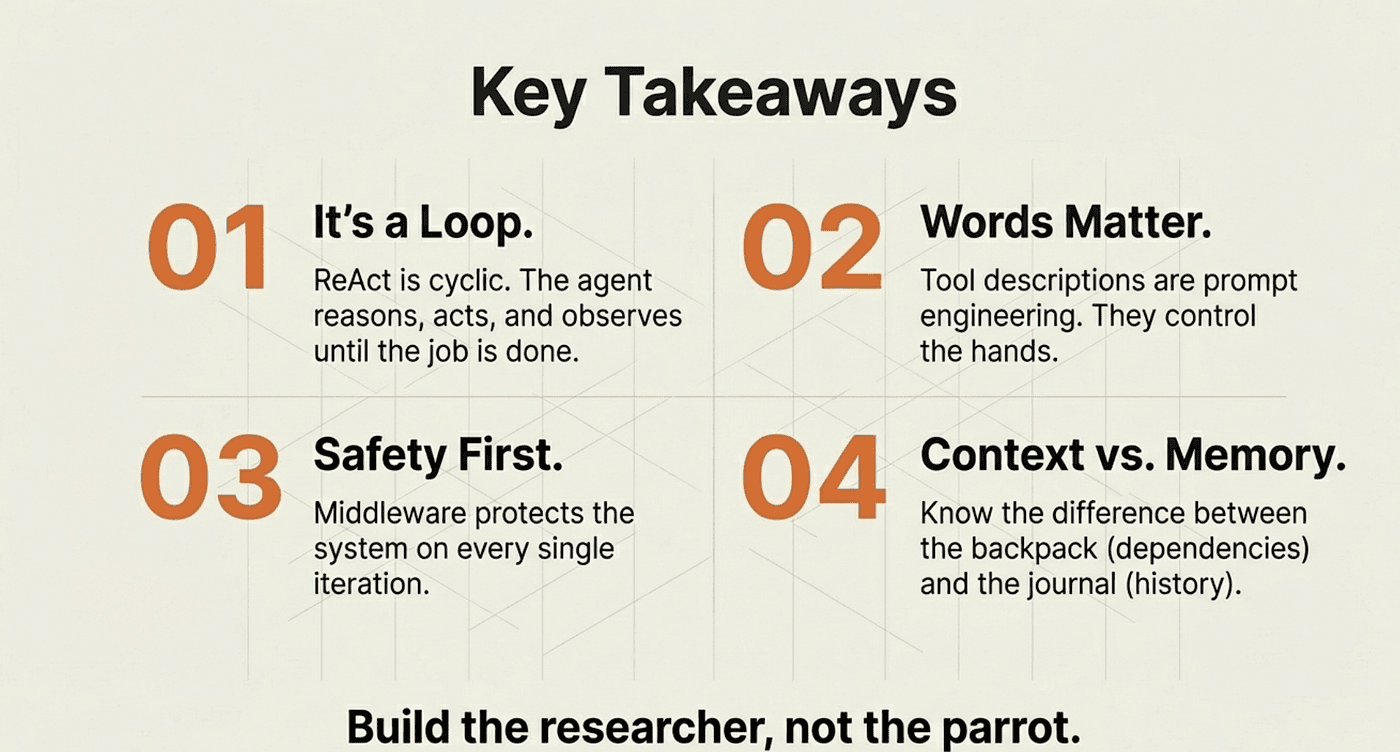
Key Takeaways
- The ReAct pattern (Reason, Act, Observe) is the central concept. Every other feature in LangChain agents serves that loop.
- Tools provide the "Act" step. Their descriptions are prompt engineering: word choice directly shapes when and how the model uses them.
- Streaming is not optional for production. Use messages mode for user-facing apps and values mode for monitoring and debugging.
- Memory (MemorySaver + thread_id) persists the full message history. Context provides fresh runtime dependencies. They solve different problems.
- Middleware intercepts the ReAct loop at six points. beforeModel enables dynamic prompting; wrapToolCall enables human-in-the-loop approval.
- The architecture is incremental. Each component is independent and composable.
About the Author
Rick Hightower is a technology executive and data engineer who led ML/AI development at a Fortune 100 financial services company. He created skilz, the universal agent skill installer, supporting 30+ coding agents including Claude Code, Gemini, Copilot, and Cursor, and co-founded the world's largest agentic skill marketplace. Connect with Rick Hightower on LinkedIn or Medium. Rick has been doing active agent development, GenAI, agents, and agentic workflows for quite a while. He is the author of many agentic frameworks and tools. He brings core deep knowledge to teams who want to adopt AI.