From Notebook Demo Agent to Real World Production Agent: Shipping Enterprise Agents with Google's Agents-CLI
Bridging the gap from prototype to production for enterprise AI agents with Google Agents-CLI — Enterprise Agents Without the Pain: ADK + Agents-CLI + A2A, Observability, Explained
Originally published on Medium.
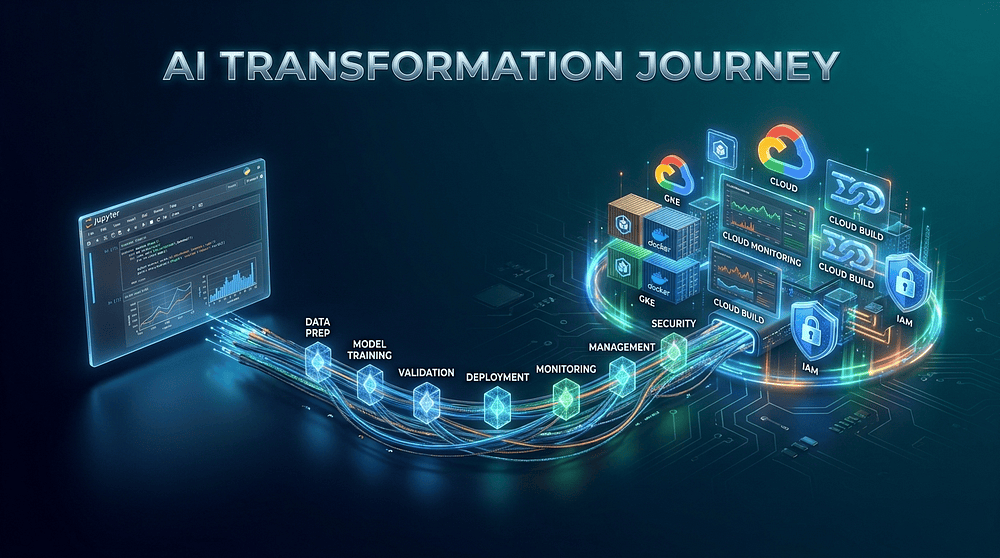
Bridging the gap from prototype to production for enterprise AI agents with Google Agents‑CLI — Enterprise Agents Without the Pain: ADK + Agents‑CLI + A2A, Observability, Explained
Discover why notebook AI agents fail in production — and how Google’s new Agents‑CLI, ADK, and A2A protocol give you a seven‑step roadmap to turn prototypes into secure, observable, enterprise‑ready agents.
Summary: The article explains how Google’s Agents‑CLI bridges the gap between prototype AI agents built in notebooks and production‑ready enterprise deployments by providing a seven‑skill, AI‑native CLI that orchestrates the full Agent Development Lifecycle (scaffold, ADK code generation, evaluation, deployment, publishing, and observability), integrates with the Agent Development Kit and Agent Studio, supports the open A2A protocol for multi‑agent communication. Offers detailed guidance on using the toolset — including setup, project scaffolding, local testing, evaluation gates, infrastructure provisioning, Cloud Run deployment, and registration in the Gemini Enterprise Agent Registry.
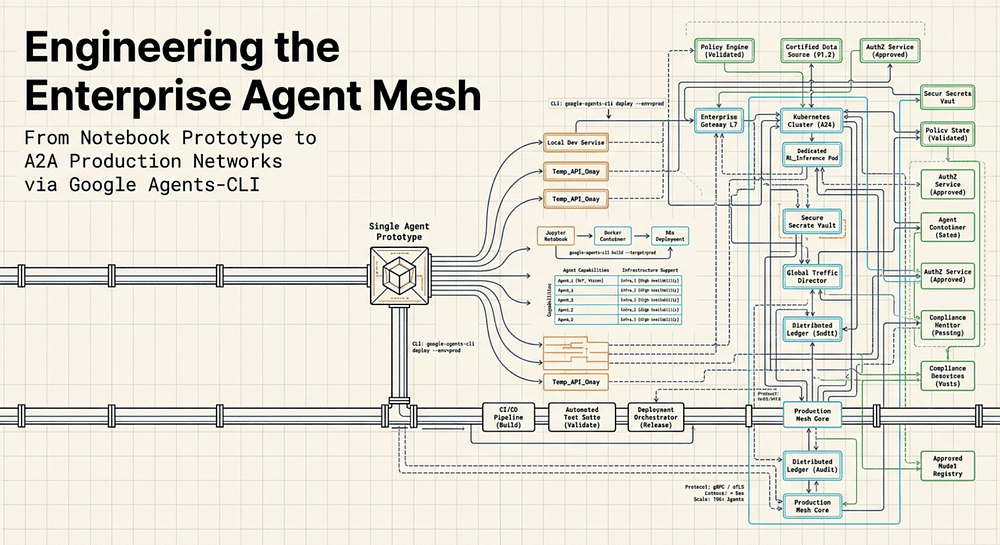
You can get a notebook agent to demo in a day. Getting it past compliance, security, DevOps, and on-call is what takes months. Not anymore.
In this guide, we walk through the exact moment most enterprise agents fail, then map Google’s new Agents-CLI, ADK, and the A2A protocol to a practical, step-by-step path from prototype to a deployed, observable service. You will see the lifecycle end to end, the commands and artifacts that matter, and the trade-offs that decide whether this stack is worth adopting right now.
What we will cover (by part)
- Part 1: The Production Gap: Why notebook agents stall in real enterprises, and the concrete barriers (compliance, security, DevOps, on-call) that kill most pilots.
- Part 2: Anatomy of an AI-Native CLI: How Agents-CLI “skills” inject machine-readable, environment-specific context to reduce hallucinated configurations.
- Part 3: From Zero to Deployed: A command-by-command walkthrough of scaffolding, local testing, evaluation gates, observability, deployment, and registry publication.
- Part 4: Agent Studio vs ADK: A practical decision framework for when low-code is enough, when pro-code is required, and how teams migrate between them.
- Part 5: A2A in Practice + Verdict: Multi-agent topologies, operational failure modes, platform comparisons (Google vs AWS vs Azure), and an adoption recommendation.
Part 1: The Production Gap
Why Notebook AI Agents Don’t Survive Contact with the Enterprise
Google Agents-CLI bridges the gap between notebook AI agent prototypes and enterprise production deployment on Google Cloud.
Moving an AI agent from a Jupyter notebook into production exposes a structural gap that prompt engineering cannot close. The tools, the discipline, the security requirements; none of that lives in the notebook. Agents-CLI exists to close that gap.
Picture this: a data-science team at a regional bank spends three weeks building a Finance Agent in a Jupyter notebook. They connect it to their internal data APIs, wire up a Gemini model, write a system prompt that explains the bank’s loan approval logic, and demo it to stakeholders on a Friday afternoon. It works. It answers questions about mortgage rates, pulls account history, and explains credit decisions in plain language. The executives love it. The product owner schedules a sprint-2 delivery.
Sprint 2 is where the agent dies.
Not because the model got worse. Not because the system prompt was wrong. It dies because the gap between “notebook prototype” and “enterprise service” turns out to be five problems wide, and none of them appear in the demo:
- Compliance wants an audit log of every prompt and response, formatted to their data-retention spec. The notebook has none.
- Security asks which IAM role the agent uses to call the data APIs. The developer says “my personal credentials.” Security says no.
- DevOps asks for a Dockerfile and a deployment manifest. The notebook cannot be containerized without rewriting.
- Oncall asks what happens when the model returns a confidence score below a threshold. Nobody knows. There are no unit tests.
- Platform asks which environment variables the agent needs and how secrets are managed. The answer is “it’s in the notebook.”
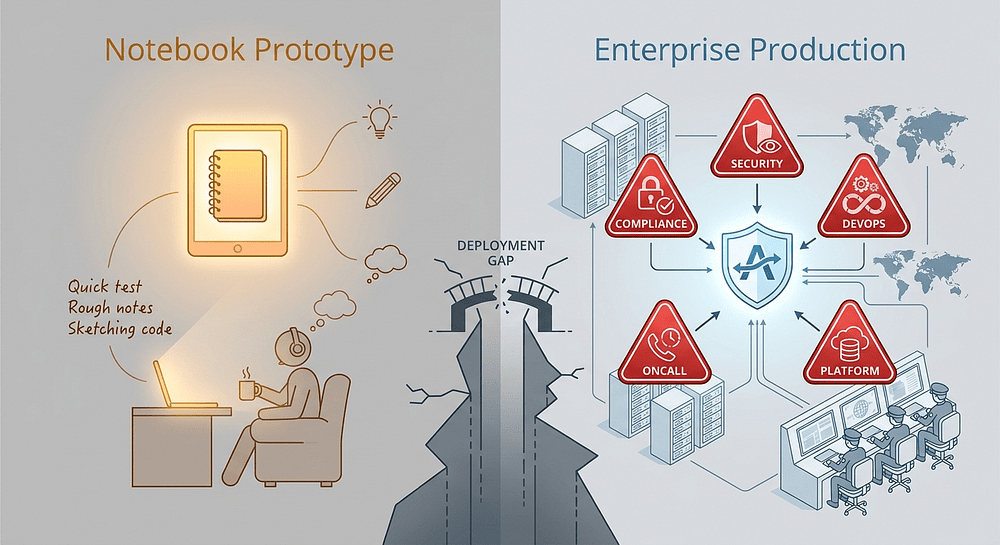
Every one of these gaps is structural, not incidental. This is the core challenge of Agentic AI in the enterprise: the notebook was never wrong for prototyping; it was wrong for production. The mistake was treating the prototype as a draft of the finished product rather than recognizing that production-ready deployment is a completely different engineering problem.
The Agent Development Lifecycle (ADLC): A Production Readiness Framework
Google calls this the Agent Development Lifecycle (ADLC) [1],[3]:
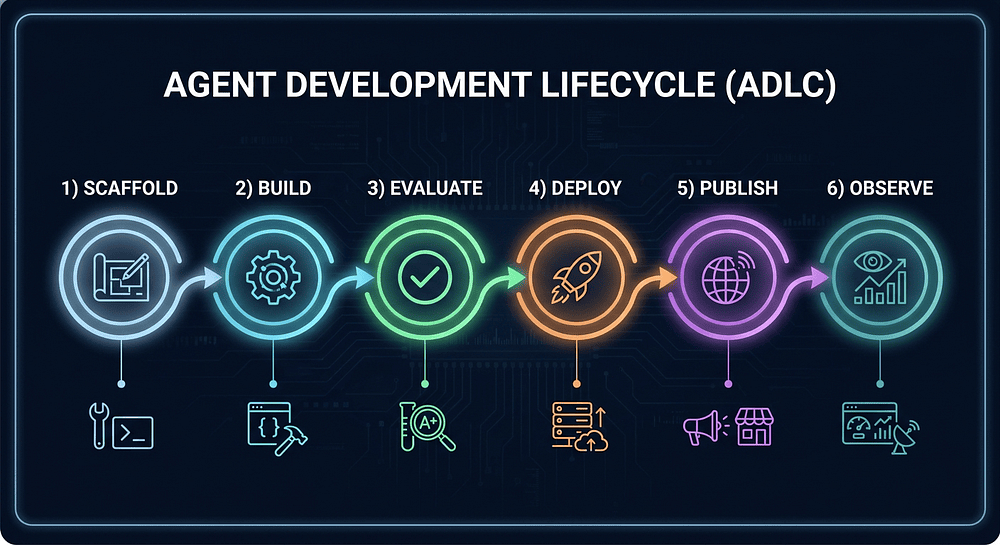
The six ADLC stages, and who owns each:
- Scaffold: Define the agent’s goals, tools, system prompt, and constraints; generate project structure. Owned by Product + Architecture + Engineering.
- Build: Write the agent code, wire up tools, iterate locally. Owned by Engineering.
- Evaluate: Run the agent against ground-truth datasets; measure quality. Owned by Engineering + QA.
- Deploy: Containerize, provision infrastructure, push to a runtime. Owned by Platform + DevOps.
- Publish: Register the agent to the Gemini Enterprise Agent Platform (ADK or A2A mode). Owned by Platform + DevOps.
- Observe: Monitor, trace, alert, roll back. Owned by SRE + Oncall.
None of these stages is optional for a production agent. Enterprises have compliance requirements that make the Evaluate stage non-negotiable: you cannot deploy an agent that makes financial decisions without demonstrating it behaves correctly across a representative test set. DevOps maturity makes the Deploy stage equally non-negotiable: agents must live in the same CI/CD pipeline as everything else.
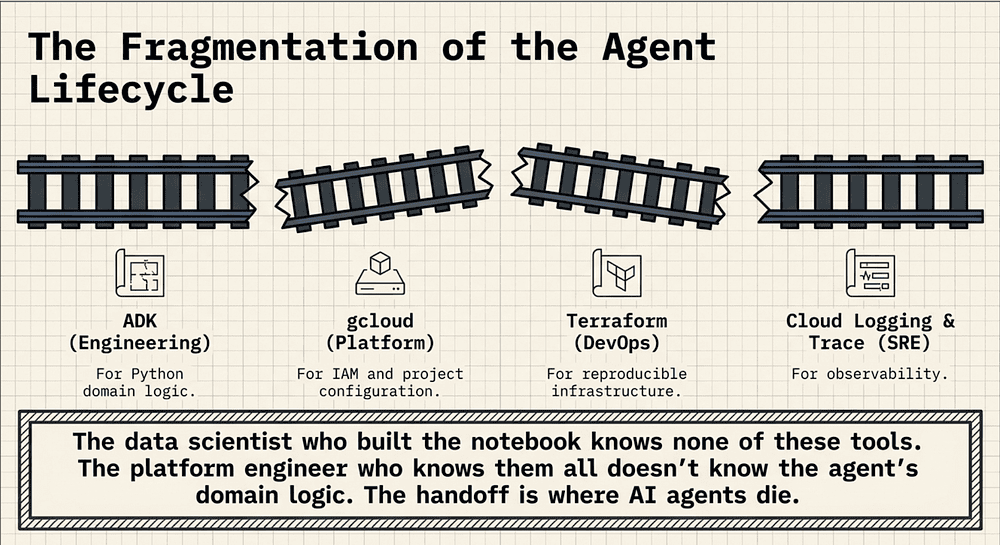
Each stage has historically required a different tool:
- ADK for building the Python agent (see getting started) [15] (see getting started) [15]
- gcloud CLI for IAM, project configuration, and service deployment
- Terraform for reproducible infrastructure provisioning (optional, required only for certain deployment targets) (see hands-on tutorial) [4]
- Cloud Logging + Cloud Trace for observability wiring
Each tool has its own mental model, its own authentication flow, and its own configuration vocabulary. The data scientist who built the notebook knows none of them. The platform engineer who knows them all doesn’t know the agent’s domain logic. The handoff between the two is where AI agents die.
Where Google Agents-CLI Fits into Enterprise AI Agent Deployment
Google announced Agents-CLI at **Google Cloud Next **’26 on April 22, 2026 (see announcement) [1]. It is described as “the unified programmatic backbone for the Agent Development Lifecycle (ADLC) on Google Cloud” (see announcement); designed specifically to close this lifecycle gap.
Before getting into what Agents-CLI does, know what it is not.
It is not another SDK. The Agent Development Kit (ADK) is an open-source, code-first framework for building, evaluating, and deploying AI agents (see ADK on GitHub) [6]. It is available in Python, TypeScript, Go, and Java (see ADK docs) [15]. You use ADK to define tools, wire up subagents, implement custom evaluation logic, and write unit tests. ADK is where the code lives.
It is not another visual tool. Agent Studio is the low-code visual canvas within the Gemini Enterprise Agent Platform for designing, prototyping, and managing agent reasoning loops and workflows (see Agent Studio overview) [7]. Non-engineers can author agent intent, natural-language instructions, goals, and few-shot examples, through an interactive dual-pane workspace. Agent Studio is where intent lives.
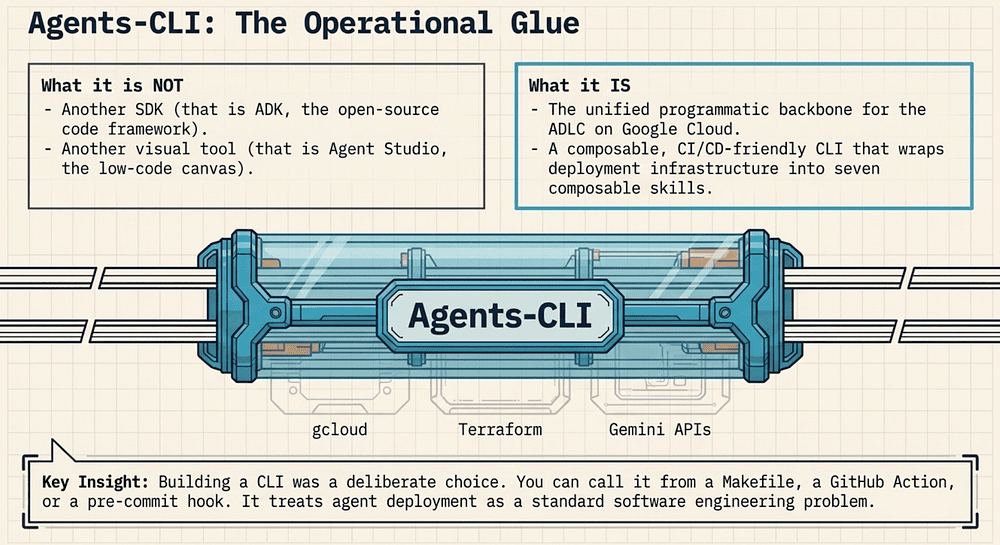
Agents-CLI is the operational glue between them. It takes ADK code through every stage of the ADLC by wrapping the underlying tools (gcloud, Terraform, and the Gemini Enterprise API) in seven composable skills that an AI coding assistant can invoke directly [3]:
Agent Studio (intent) → ADK (code) → Agents-CLI (lifecycle) → Cloud Run / Agent Runtime (production)
The seven skills [3]:
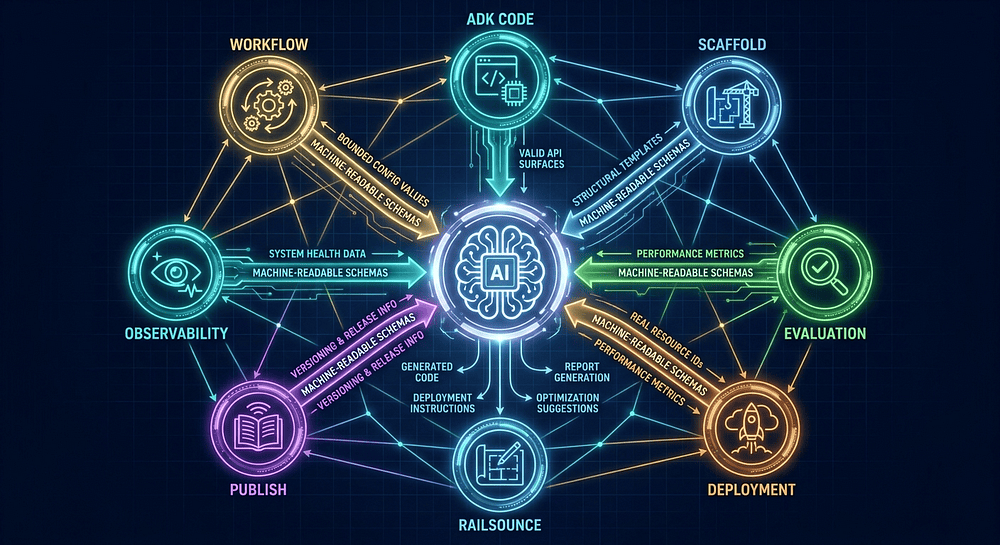
- google-agents-cli-workflow: Always active; provides the full lifecycle workflow (scaffold → build → evaluate → deploy → publish → observe).
- google-agents-cli-scaffold: Scaffold creation, enhancement, and upgrade commands; template options and deployment targets.
- *google-agents-cli-adk-code: Agent types, tool definitions, orchestration patterns, callbacks, and state management.
- google-agents-cli-eval: Evaluation metrics, evalset schema, LLM-as-judge approaches, tool trajectory scoring, failure analysis.
- google-agents-cli-deploy: Deployment workflows, service accounts, rollback, and production infrastructure.
- google-agents-cli-publish: ADK vs A2A registration modes, programmatic and interactive usage, flag reference.
- google-agents-cli-observability: Cloud Trace, prompt-response logging, BigQuery Agent Analytics, third-party integrations.
Building a CLI rather than another SDK or visual tool was a deliberate choice. A CLI is composable, scriptable, and CI/CD-friendly. You can call it from a Makefile, from a GitHub Actions workflow, or from a pre-commit hook. You cannot do any of that with a visual canvas, and a Python SDK alone does not get you infrastructure provisioning or agent registration.
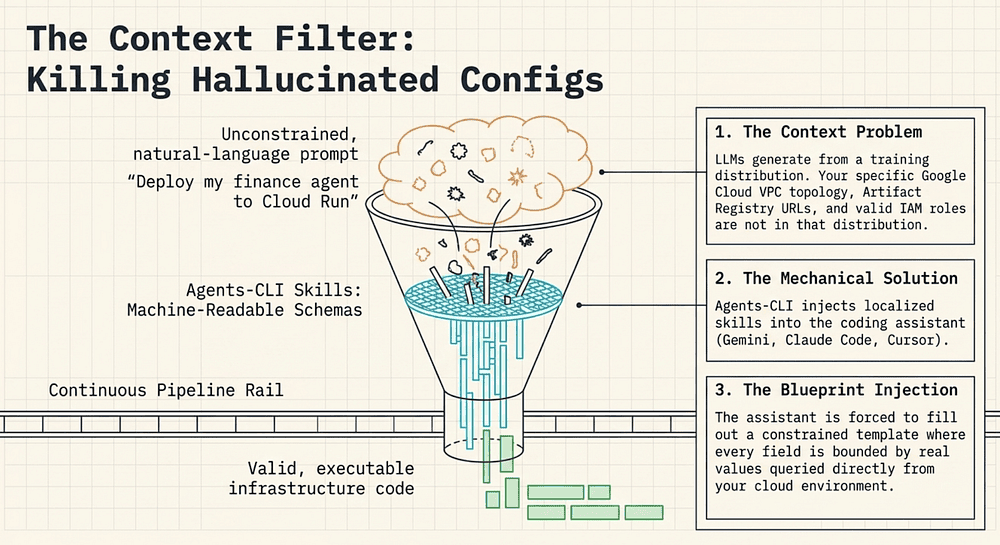
The other deliberate choice — the one that makes Agents-CLI genuinely novel — is the “AI-native” design. The seven skills are not just shell scripts; they are structured, context-aware schemas that inject knowledge directly into coding assistants. The tool is designed for AI coding agents, including Gemini CLI, Claude Code, Cursor, Codex, and other compatible assistants (see https://github.com/google/agents-cli) [2]; the announcement blog also names Cursor as a supported assistant (see announcement) [1]. Google’s Antigravity platform may also be supported; confirm against the current GitHub README. That design choice is explored in depth in the next part.
The Question This Article Answers
Given the ADLC and the production gap, the question is not “should we use Agents-CLI?” The question is: what does it actually do at each stage of enterprise AI agent deployment, and is the abstraction worth the lock-in?
That is what the rest of this article examines: command by command, stage by stage, with honest attention to where the seams show.
With the platform’s components and terminology now precisely mapped, the next question is not what Agents-CLI is but how it actually works at the level of bits and context windows. Every tool in the Gemini Enterprise stack carries marketing language, and “AI-native” is perhaps the most overloaded term of all. Part 2 breaks that phrase down mechanically, tracing exactly how Agents-CLI’s seven skills inject bounded, environment-specific context into an AI coding assistant and why that injection is the architectural move that eliminates an entire class of hallucinated configurations.
Part 2: Anatomy of an AI-Native CLI for Enterprise Agent Engineering
Seven Skills, Machine-Readable Context, and Why That Kills Hallucinated Configs
“AI-native” is a marketing term until you explain what it means mechanically. In enterprise AI agent engineering, mechanical precision matters more than marketing claims. Here is the mechanical explanation.
When a developer asks Gemini Code Assist to “deploy my finance agent to Cloud Run,” the assistant must make dozens of decisions: Which project? Which region? Which service account? Which image tag format? Which Cloud Run CPU/memory configuration is appropriate? Without grounding, the assistant generates plausible-sounding values that may not be valid in your environment: the wrong project ID, a region that doesn’t support your selected runtime, an IAM role that doesn’t exist. This is not a model quality problem. It is a context problem.
AI coding assistants generate text from the training distribution. Your Google Cloud project configuration, your project ID, your service accounts, your enabled APIs, your VPC topology, is not in that distribution. The assistant is being asked to make concrete decisions about resources it has never seen.
Agents-CLI solves this by injecting skills into the assistant’s context window. [1] A skill is a structured schema — a machine-readable document that carries:
- The allowed values for every configuration field (e.g., valid regions for Agent Runtime)
- The names of resources that already exist in your project (service accounts, buckets, registries)
- The API surfaces and CLI flags that are valid for the current Agents-CLI version
- Environmental context: current project, current auth state, current deployment target
Think of it as handing the assistant a blueprint of your actual cloud environment rather than asking it to guess. When the assistant invokes an Agents-CLI skill, it is not generating free-text configuration. It is filling in a constrained template where every field is bounded by real values from your real environment. The result is fewer hallucinated resource names, fewer invalid flag combinations, and fewer authentication errors on the first run.
The Seven Skills of Google Agents-CLI for Enterprise Agent Development
What does “AI-native” actually buy you? Seven skills that compose sequentially through the ADLC. They are not independent utilities — each one corresponds to one or more lifecycle stages.
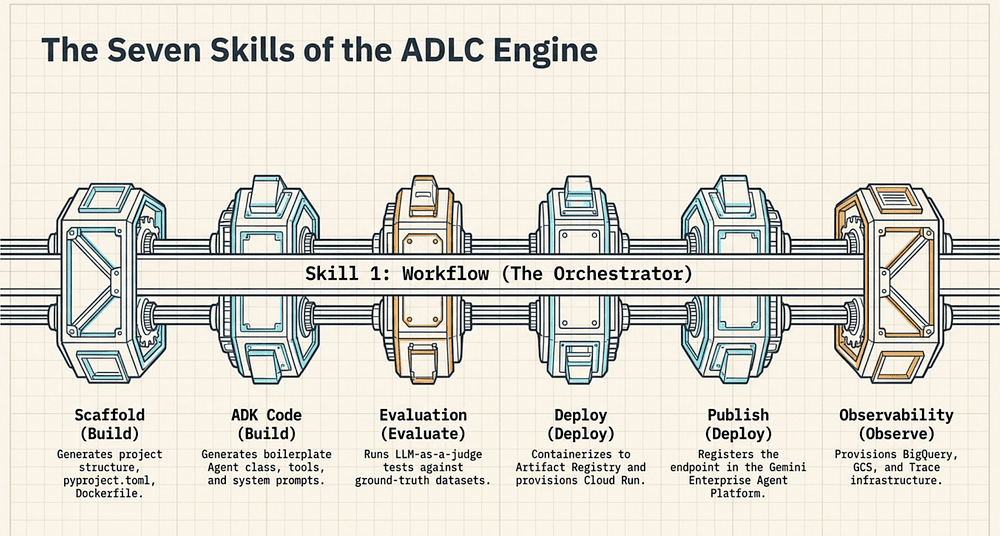
Agents-CLI exposes seven skills [2], each mapped to a CLI subcommand and lifecycle stage:
- Workflow (agents-cli workflow): Spans Design → Deploy. Orchestrates the end-to-end lifecycle; the entry point for AI-assisted automation.
- ADK Code (invoked by assistant): Build stage. Generates ADK boilerplate: agent class, tool definitions, system prompt scaffolding.
- Scaffold (agents-cli create / agents-cli scaffold enhance): Build stage. Sets up project directory structure, pyproject.toml, Dockerfile, Terraform configs.
- Evaluation (agents-cli eval run / agents-cli eval compare): Evaluate stage. Runs LLM-as-a-judge tests against ground-truth datasets; diffs evaluation runs.
- Deployment (agents-cli deploy): Deploy stage. Containerizes the agent and pushes to Cloud Run or Agent Runtime.
- Publish (agents-cli publish gemini-enterprise): Deploy stage. Registers the deployed agent in the Agent Registry.
- Observability (agents-cli infra single-project): Operate stage. Provisions service account, GCS bucket, and BigQuery dataset for content logging and tracing.
Skill 1: Workflow Orchestration Across the Agent Development Lifecycle
The Workflow skill is the orchestrator. When you ask your coding assistant to “build and deploy a finance agent,” the assistant uses the Workflow skill to determine which sub-skills to invoke and in what order. It carries the machine-readable description of the entire ADLC so the assistant can reason about the full pipeline, not just the next command. [2]
Think of Workflow as the index. It tells the assistant what the other six skills are, what order they belong in, and what dependencies exist between them. You can skip stages, skipping Evaluation is possible, but the skip is explicit and visible rather than accidental.
Skill 2: ADK Code Generation
The ADK Code skill generates boilerplate using the Agent Development Kit. When you create a new agent, this skill produces the initial Python file with the agent class, the tool function stubs, the system prompt constant, and the ADK runner initialization. It is not scaffolding; that is Scaffold’s job. ADK Code is specifically about the agent’s logical code layer.
The machine-readable component here is the ADK API surface: the skill carries current ADK class names, decorator signatures, and import paths, so the assistant generates valid ADK code rather than inventing patterns from its training data. [2]
Skill 3: Project Scaffold and Deployment Structure
Scaffold handles project structure. agents-cli create generates the directory hierarchy (app/, evals/, terraform/, tests/) along with pyproject.toml, Dockerfile, .gitignore, and a requirements.txt pinned to the ADK version Agents-CLI was tested against. [2]
agents-cli scaffold enhance adds deployment infrastructure. When you specify --deployment-target cloud_run, it generates Cloud Run-specific Terraform modules and a cloudbuild.yaml. The --deployment-target flag belongs to scaffold enhance, not to create. (see hands-on tutorial) This distinction matters: create gives you a prototype-ready structure; scaffold enhance makes it deployment-ready.
Skill 4: Evaluation Gates for Enterprise Agent Development
The Evaluation skill is where Agents-CLI diverges most sharply from ad-hoc deployment scripts. agents-cli eval run takes a structured .evalset.json file of test cases (each test case is a prompt/response pair with expected outputs) and runs the agent against every case. [2] The judge is an LLM configured for automated evaluation (LLM-as-a-judge). [2]
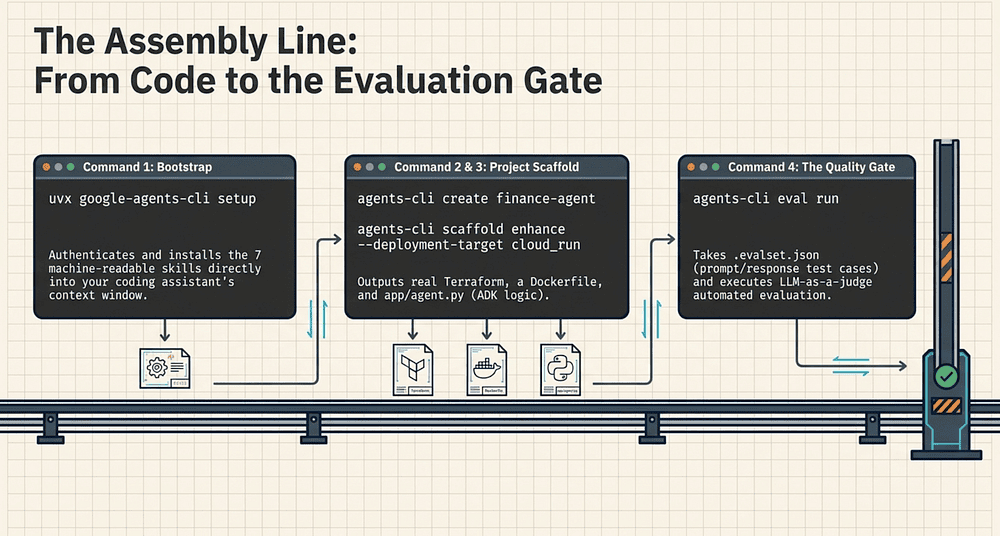
agents-cli eval compare diffs two evaluation runs: before and after a code change. It surfaces regressions, test cases that the previous version passed and the current version fails, and improvements. This is the gate before deployment.
The machine-readable component of the Evaluation skill is the test case schema and the judge configuration. The assistant can generate valid evaluation datasets, understand what a passing or failing score means, and interpret the comparison output.
Skill 5: Deployment to Cloud Run and Agent Runtime
agents-cli deploy containerizes the agent using the Dockerfile generated by Scaffold, builds the container image, pushes it to Artifact Registry, and deploys it to the selected runtime: Cloud Run, Agent Runtime, or GKE [1].
The machine-readable component here is significant: the skill knows your Artifact Registry URL, your Cloud Run service name, your Agent Runtime endpoint, and the valid configuration options for each. The assistant cannot invent a registry URL that doesn’t exist in your project.
Skill 6: Agent Registry Publication in Gemini Enterprise
agents-cli publish gemini-enterprise registers the deployed agent with the Agent Registry within the Gemini Enterprise Agent Platform [13]. This step is separate from deployment by design; deploying a service and registering it as a discoverable enterprise agent are different operations with different stakeholders.
After publish, the agent appears in the Agent Registry and can be discovered by other agents using the Agent-to-Agent (A2A) protocol (see agent registry) [1]. Without this step, the agent runs as a Cloud Run service but remains invisible to the enterprise agent mesh.
Skill 7: Production Observability Infrastructure
agents-cli infra single-project provisions the Google Cloud infrastructure needed for production observability: a dedicated service account, a GCS bucket for content logs, and a BigQuery dataset for querying those logs (see hands-on tutorial) [2]. It also updates the deployed service to use these resources.
This is infrastructure-as-code via Terraform, generated and applied by Agents-CLI. The generated Terraform is checked into your project repository; it is not an opaque operation.
Important correction from the original documentation: This command does not provision Cloud Run or Agent Runtime resources. Those are deployed by agents-cli deploy. The Observability skill provisions the storage and logging infrastructure that runs alongside the agent in production.
What AI Coding Assistants Can and Cannot Modify in Agent Engineering
When an AI coding assistant invokes an Agents-CLI skill, the skill constrains what the assistant can change. That constraint is the whole point — the assistant operates within a well-defined configuration space rather than generating arbitrary cloud configuration.
Per skill, here is what the assistant controls and what is fixed:
- Scaffold: Assistant chooses: agent name, deployment target, runtime version. Fixed: directory structure layout, required files.
- Evaluation: Assistant chooses: test case content, judge configuration. Fixed: evaluation dataset schema.
- Deployment: Assistant chooses: region, CPU/memory, concurrency settings. Fixed: container build process, Artifact Registry path.
- Publish: Assistant chooses: agent display name, description. Fixed: registry endpoint, Agent Card schema.
- Observability: Assistant chooses: dataset location, retention policy. Fixed: resource types provisioned.
Convergent Evolution in AI Agent Tooling: Claude Code, Cursor, and Agents-CLI
Agents-CLI is not the only system that injects structured context into AI coding assistants. This pattern has emerged independently across multiple ecosystems:
- Claude Code’s skill system uses Markdown-based instruction files installed under .claude/skills/: each skill carries task-specific instructions, templates, and constraints that the coding agent follows for targeted workflows. Skills are project-scoped and invocable by name.
- Cursor’s rules: .cursorrules files (now evolving to .cursor/rules/*.mdc) that define project-specific conventions, forbidden patterns, and code style (see Cursor rules) [16]. Rules are injected into every code generation request.
- Aider’s repo map: A ranked symbol graph of the repository built using tree-sitter, injected into context to prevent the model from inventing function names that don’t exist (see repo map) [17].
The convergence is not a coincidence. All of these systems are solving the same grounding problem: LLMs generate from a training distribution, but software engineering requires operating in a specific, concrete codebase or cloud environment. The solution in every case is to inject structured, machine-readable context that constrains the generation space.
Agents-CLI’s approach is cloud-deployment-specific: its skills carry Google Cloud resource identifiers and API surfaces rather than codebase symbol graphs. Claude Code’s skills are general-purpose workflow tools. Cursor’s rules are style and convention guards. They are parallel evolutions solving the same problem in different domains, not competing alternatives.
What makes Agents-CLI notable is the scope of the constraint space it covers. Preventing hallucinated IAM roles, invalid Artifact Registry paths, and unsupported runtime configurations is a more immediately costly class of error than wrong function names: a bad Cloud Run configuration wastes time, money, and potentially locks out production traffic.
Agent Development Lifecycle (ADLC) Diagram: How the Seven Skills Map to Stages
The seven skills map to the ADLC stages as follows:
Design → Build → Evaluate → Deploy → Operate │ │ │ │ │Workflow ADK Code Evaluation Deployment Observability Scaffold Publish
The Workflow skill spans all stages because it orchestrates the others. ADK Code and Scaffold both live in Build because they address different concerns: logic vs. structure. Deployment and Publish both live in Deploy because the agent is not fully deployed until it is registered in the Registry.
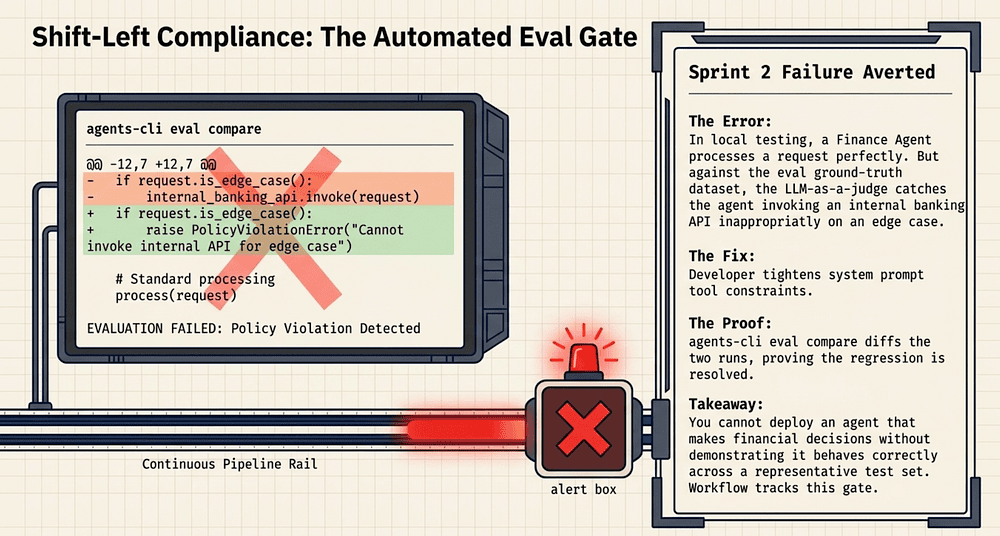
The evaluation gate between Build and Deploy is intentional architecture. Agents-CLI makes it easy to run agents-cli deploy without running agents-cli eval run first, but it does not hide the gap. The evaluation result is a required artifact in the full workflow, and the Workflow skill tracks whether it has been produced.
Let’s shifts from what the tools claim to what they actually do. The Finance Agent introduced earlier now becomes a concrete test subject: the next part follows it through the complete deployment lifecycle, one command at a time. Each step maps directly to the capabilities confirmed above, so the commands and artifacts you see are grounded in the same sources that resolved the fact flags.
Part 3: From Zero to Deployed: Step-by-Step AI Agent Deployment with Agents-CLI
Real Commands, Real Artifacts: A Production AI Agent Deployment Guide
The Finance Agent from Part 1 is about to get a second chance. Nine commands. Nine artifacts. One deployed agent with every structural gap from the sprint-2 failure closed.
Prerequisites
You need:
- Python 3.11+ with uv installed
- gcloud CLI authenticated to a Google Cloud project with billing enabled
- Agent Runtime or Cloud Run APIs enabled in your project
- A coding assistant (Gemini Code Assist, Claude Code, or Cursor) for AI-assisted steps
The walkthrough uses plain CLI invocations. The coding-assistant integration layer operates transparently on top of the same commands.
Command 1: Bootstrap
uvx google-agents-cli setup
uvx is the tool-runner from the uv package manager: it executes a Python tool without requiring a prior pip install (see uv tools concept) [19]. Specifically, uvx is an alias for uv tool run: it creates a temporary, isolated environment, installs the tool into it, and runs the executable, all in a single invocation (see uv tools concept) [19]. This is the installation model Agents-CLI uses: no global install required, no virtualenv to activate, no path configuration.
What happens during setup:
- Authenticates against your Google Cloud project (calls gcloud auth application-default login if credentials are missing)
- Reads your current gcloud project configuration
- Writes an agents-cli.toml configuration file to a platform-appropriate config directory (typically ~/.config/agents-cli/ on Linux/macOS).
- Installs the seven skills into your active coding assistant (Gemini Code Assist, Claude Code, or Cursor) [2]
What it produces:
- ~/.config/agents-cli/agents-cli.toml: your project ID, default region, and assistant integration config
- Skills installed in the coding assistant’s context: google-agents-cli-workflow, google-agents-cli-adk-code, google-agents-cli-scaffold, google-agents-cli-eval, google-agents-cli-deploy, google-agents-cli-publish, and google-agents-cli-observability (see https://google.github.io/agents-cli/reference/skills/) [21]
After setup, your coding assistant knows about all seven skills and has machine-readable access to your project’s resource names. The hallucination surface for subsequent commands is now bounded.
Command 2a: Scaffold the Agent Project
agents-cli create finance-agent --prototype --yes
--prototype tells Scaffold to generate a lightweight structure suitable for local development: no Terraform, no CI/CD config, no Dockerfile yet. --yes skips the interactive prompts and accepts defaults [2].
What the generated directory looks like:
finance-agent/├── app/│ ├── agent.py # Agent class, tools, system prompt│ ├── tools/│ │ └── account.py # Tool stub: get_account_balance, get_loan_status│ └── __init__.py├── evals/│ └── test_cases.jsonl # Ground-truth evaluation dataset (empty)├── tests/│ └── test_agent.py # Unit test stubs├── pyproject.toml # Pinned to current ADK version├── .gitignore└── README.md
After running create, run agents-cli install to install Python dependencies via uv sync before proceeding [22]. This step is required for the playground to start. It is grouped with Command 2a here because it is a mechanical follow-on with no decisions required.
The generated agent.py is a valid ADK agent: not pseudocode, not a placeholder. It imports from google.adk (see https://google.github.io/adk-docs/get-started/python/) [15], defines a FinanceAgent class, declares its tools, and includes a system prompt constant. The ADK Code skill is responsible for this content; the Scaffold skill is responsible for the directory structure.
**Key file: ****app/agent.py**
from google.adk.agents import Agent# No import needed: ADK wraps plain Python functions automatically# If explicit wrapping is required: from google.adk.tools import FunctionToolfrom app.tools.account import get_account_balance, get_loan_statusSYSTEM_PROMPT = """You are a financial assistant for our bank's customers.You help customers understand their account balances, loan status, and credit decisions. Always be accurate, cite the data source, and never speculate about values you haven't retrieved from tools."""finance_agent = Agent( name="finance_agent", model="gemini-2.5-flash", (see https://google.github.io/adk-docs/get-started/python/) description="Customer-facing financial assistant", instruction=SYSTEM_PROMPT, tools=[get_account_balance, get_loan_status],)
This is the same artifact that will survive all seven stages; prototype through evaluation to production. Nothing gets rewritten.
Command 2b: Enhance for Cloud Run Deployment
agents-cli scaffold enhance --deployment-target cloud_run
This is a separate command from create. The original brief conflated these into a single agents-cli create invocation with a --deployment-target flag; that flag does not exist on create. The --deployment-target flag belongs to scaffold enhance [2].
What **scaffold enhance** adds to the project:
finance-agent/├── terraform/│ ├── main.tf # Cloud Run service definition│ ├── variables.tf # Project ID, region, image URL│ ├── outputs.tf # Service URL, service account email│ └── backend.tf # GCS backend for state├── Dockerfile # Multi-stage build: builder + runtime├── cloudbuild.yaml # Cloud Build pipeline definition└── .dockerignore
The Terraform is real Terraform, not a template with blank fields. It is pre-populated with your project ID and region from agents-cli.toml. You own this Terraform; it is checked into your repository, modifiable, and applies through your own pipeline.
Command 3: Local Simulation with the ADK Playground
agents-cli playground
This starts the ADK Web UI at http://localhost:8080 with hot-reload [2]. The Web UI is a full interactive chat interface connected to your local agent; you can send messages, inspect tool calls, view the raw prompt/response pairs, and watch the agent's reasoning chain.
Terminal output:
$ agents-cli playgroundINFO Starting ADK Web UI...INFO Loading agent from app/agent.py...INFO Agent: finance_agent (gemini-2.5-flash)INFO Tools registered: get_account_balance, get_loan_statusINFO Hot-reload enabled. Edit app/ and save to reload.ADK Web UI running at <http://localhost:8080>Press Ctrl+C to stop.
What local simulation covers:
- Interactive testing of the system prompt against realistic inputs
- Verifying tool calls fire correctly with expected parameters
- Checking that the agent handles edge cases (missing account, invalid loan ID) gracefully
- Iterating on the system prompt before it is tested against a ground-truth dataset
What local simulation cannot catch:
- Behavior under load (concurrency, rate limiting)
- IAM permission errors that only surface in production (the playground runs with your personal credentials)
- Container startup issues or dependency conflicts
- Integration failures with production APIs that differ from local stubs
The playground is where you iterate fast. Evaluation is where you gate quality.
Commands 4a & 4b: AI Agent Evaluation Gate
The evaluation gate is the most important step most teams skip. Here is what it looks like in practice.
First, populate your evaluation dataset:
# evals/test_cases.jsonl: ground-truth test cases{"input": "What is my current balance for account ACC-1234?", "expected_tool_calls": [{"name": "get_account_balance", "args": {"account_id": "ACC-1234"}}], "expected_output_contains": ["balance", "ACC-1234"]}{"input": "Is my mortgage loan LN-5678 approved?", "expected_tool_calls": [{"name": "get_loan_status", "args": {"loan_id": "LN-5678"}}], "expected_output_contains": ["approved", "denied", "pending"]}{"input": "What is the interest rate on my savings account?", "expected_output_contains": ["interest rate", "%"], "expected_no_tool_calls": true}
Then run evaluation:
agents-cli eval run --dataset evals/test_cases.jsonl --output evals/results_v1.json
Terminal output:
$ agents-cli eval run --dataset evals/test_cases.jsonl --output evals/results_v1.jsonINFO Loading 3 test cases from evals/test_cases.jsonlINFO Running evaluation with judge: gemini-2.5-pro(Note: the judge model shown in evaluation output may vary based on agents-cli version and configuration.)INFO Test case 1/3: account balance query... PASS (score: 0.94)INFO Test case 2/3: loan status query... PASS (score: 0.91)INFO Test case 3/3: interest rate query... FAIL (score: 0.43) Reason: Agent invoked get_account_balance unexpectedly. Expected no tool calls.Results written to evals/results_v1.jsonSummary: 2/3 passed (66.7%)
The agent invoked a tool when it should not have. This is exactly the class of error that production incidents are made of: an agent that calls an API it should not call against real customer data. The evaluation gate caught it before deployment.
Fix the system prompt to be more explicit about when tools should not be invoked, then compare:
agents-cli eval compare evals/results_v1.json evals/results_v2.json
Comparison output:
$ agents-cli eval compare evals/results_v1.json evals/results_v2.jsonIMPROVEMENTS (1): ✓ Test case 3: interest rate query (0.43 → 0.96) Before: Agent invoked get_account_balance unexpectedly After: Agent responded from knowledge without tool callREGRESSIONS (0): nonev2 recommended for deployment (3/3 passed, avg score: 0.94)
This is the evaluation gate. You can skip it, but the Workflow skill knows you skipped it, and it surfaces that gap in the deployment summary.
Command 5: Provision Observability Infrastructure
agents-cli infra single-project
This command provisions observability infrastructure for the production agent. It runs Terraform under the hood [2]. The official tutorial presents this step after deploy and treats it as an optional enhancement [22]. For a finance agent handling customer account data, it is effectively required from a compliance standpoint -- provisioning it before the first deployment ensures every interaction is captured from day one.
What it provisions:
- A dedicated service account with least-privilege IAM roles for the agent
- A GCS bucket for content logging: every prompt/response pair is stored here for audit and compliance
- A BigQuery dataset for querying the content logs (see hands-on tutorial) [22]
It also updates the agent’s deployed service configuration to use these resources. After this command runs, every interaction with the production agent is logged to GCS and queryable from BigQuery, satisfying the compliance requirement from Part 1.
What it does not provision: Cloud Run service, Agent Runtime endpoint, VPC, or any agent-execution infrastructure. Those are created by agents-cli deploy. This command is exclusively about the logging and observability layer.
Command 6: Deploy to Cloud Run
agents-cli deploy
This is the AI agent deployment command. It:
- Builds the container image using the Dockerfile generated by scaffold enhance
- Pushes the image to Artifact Registry (the URL is pre-populated from agents-cli.toml)
- Deploys the image to the configured runtime (Cloud Run or Agent Runtime)
What “deploy” does not do: It does not register the agent in the Agent Registry. That is the next command.
Terminal output (abbreviated):
$ agents-cli deployINFO Building container image: gcr.io/my-bank-project/finance-agent:v1.0.0INFO Pushing image to Artifact Registry...INFO Deploying to Cloud Run (us-central1)...INFO Service URL: <https://finance-agent-abc123-uc.a.run.app>INFO Health check: OKDeployment complete. Service is running but not yet registered in Agent Registry.Run `agents-cli publish gemini-enterprise` to register.
The output explicitly tells you the agent is not yet registered. Deployment and registration are separate concerns by design.
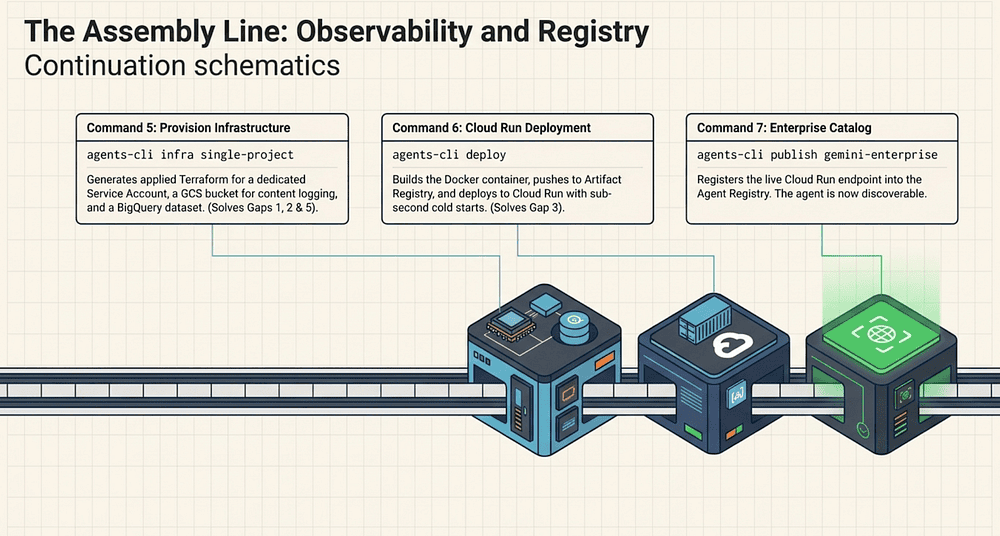
Command 7: Register in the Agent Registry
agents-cli publish gemini-enterprise
This registers the deployed agent with the Agent Registry within the Gemini Enterprise Agent Platform [1]. After registration:
- The agent appears in the enterprise agent catalog [28]
- Other agents can discover and call it using the A2A protocol [14]
- Administrators can manage access, quotas, and lifecycle from the Registry UI [28]
What gets registered:
- The agent’s service endpoint (the Cloud Run URL)
- The agent’s A2A Agent Card: name, description, skills, authentication requirements [14]
- The agent’s version and deployment metadata
The A2A protocol, an open standard contributed by Google and now under the Linux Foundation, uses an Agent Card published at /.well-known/agent-card.json to describe each agent's capabilities and connection details (see A2A specification) [26]. As of April 2026, A2A v1.0 has over 150 participating organizations and more than 22,000 GitHub stars [27].
This step was missing from the original brief, which attributed registry wiring to agents-cli deploy. It is a distinct, required command for the "Seven Commands" lifecycle to be complete. An agent that is deployed but not published runs in isolation; it cannot participate in the enterprise agent mesh.
What You Have After Seven Agents-CLI Commands
Seven commands. Seven artifacts. Here is the complete picture:
- uvx google-agents-cli setup → Auth config, 7 skills injected into assistant
- agents-cli create finance-agent --prototype --yes (+ agents-cli install) → ADK project with agent code and Python deps
- agents-cli scaffold enhance --deployment-target cloud_run → Terraform, Dockerfile, cloudbuild.yaml
- agents-cli playground → Interactive local simulation
- agents-cli eval run → Evaluation results JSON
- agents-cli eval compare → Regression/improvement diff
- agents-cli infra single-project → Service account, GCS bucket, BigQuery dataset
- agents-cli deploy → Running Cloud Run service
- agents-cli publish gemini-enterprise → Registered enterprise agent
The Finance Agent that died in sprint 2 now has audit logs (GCS content logging), deterministic IAM roles (service account), containerization (Dockerfile + Artifact Registry), evaluation gates (eval run + compare), and enterprise discoverability (Agent Registry). Every structural gap from the original sprint-2 failure is closed.
Production AI Agent Deployment: What Can Still Go Wrong
No tool eliminates all production failures. Watch for these gaps:
- Tool authentication in production: The agent runs with the provisioned service account, but if your internal banking APIs use a different auth mechanism (e.g., mTLS, internal OAuth), that wiring is your responsibility. Agents-CLI provisions Google Cloud IAM; it cannot provision auth for external systems.
- Evaluation dataset quality: The evaluation gate is only as good as your test cases. Three test cases caught one bug in the example above. A production agent needs hundreds of representative test cases, including adversarial and edge cases. The scaffolded test_cases.jsonl is a starting point, not a safety net.
- Cloud Run cold starts: Cloud Run scales to zero by default [13]: no traffic means no running instances and no cost. Cold-start latency for lightweight services is often in the 300ms — 1s range; Python AI services with heavy imports and database connections commonly take 3–10 seconds in practice [13]. Agent Runtime documentation records cold-start latency at approximately 4.7 seconds (with min_instances=1) and warm-start latency at approximately 0.4 seconds; setting min_instances=10 reduces average latency to approximately 1.4 seconds [25]. This makes Agent Runtime worth evaluating for latency-sensitive agents that can be kept warm.
- Model version pinning: agent.py specifies model="gemini-2.5-flash". If Google rolls a breaking model update, your evaluation dataset will catch it; but only if you run evals as part of your CI/CD pipeline, not just before the initial deployment.
The notes above close out Part 3’s production-readiness audit, where the focus stayed squarely on what happens after you run agents-cli deploy: cold starts, model pinning, eval cadence, and the A2A protocol wiring that lets AI agents find one another at scale. Part 4 opens a level earlier in the decision cycle, before you write a single line of Python or click a single UI button. Knowing the deployment landscape is only useful once you have chosen the right authoring path, and that choice — between Agent Studio’s low-code canvas and ADK’s pro-code Python — is where most teams lose two weeks they never get back.
Part 4: Google Agent Studio vs ADK: Choosing Your Authoring Mode
When to Use the Low-Code Platform and When Pro-Code ADK Is Mandatory
Which authoring path should your team take: Agent Studio’s low-code visual canvas or ADK’s pro-code Python? Most articles about Agents-CLI ignore one of the two options, which means most engineers walk down the wrong path first and spend two weeks reversing course. This decision framework helps you choose correctly from day one.
Agent Studio vs ADK: The Two Authoring Paths
Path 1: Agent Studio (Low-Code Visual Builder)
[9]. The current platform name is Gemini Enterprise Agent Platform; the visual builder component is Agent Studio (see platform overview) [30].
In Agent Studio, you define agent behavior through:
- Natural-language instructions: a system prompt written in plain English in a web form
- Goals: explicit success criteria stated as natural-language objectives
- Few-shot examples: demonstration conversations that show the agent how to behave
- Tool connections: point-and-click integration with Google services (BigQuery, Cloud Functions, API connectors)
You do not write Python. You do not manage a virtualenv. You do not write a Dockerfile. A product manager or a business analyst with no coding background can author a working agent in Agent Studio in a few hours.
The output is an agent configuration stored in Gemini Enterprise Agent Platform, versioned through the UI, and deployable without any CLI interaction [31].
Path 2: Agents-CLI + ADK (Pro-Code Python Framework)
The Agent Development Kit (ADK) is an open-source, code-first Python toolkit for building, evaluating, and deploying sophisticated AI agents (see ADK on GitHub) [6]. You write agent logic as Python code, define tools as plain Python functions that ADK automatically wraps as FunctionTool objects when passed to the agent's tools list [32], write unit tests with pytest, and manage everything through standard software engineering practices: version control, CI/CD, code review, and dependency pinning.
Agents-CLI wraps ADK with seven lifecycle skills — scaffold, ADK code reference, evaluation, deploy, publish, workflow, and observability — giving you the full ADLC as code [3, 1].
Agent Studio vs ADK Decision Framework
There is no universal right answer here. The correct choice depends on who is building the agent, what the agent needs to do, and what the organizational constraints are.
When to Use the Low-Code Agent Studio Platform
The author is not an engineer. Product managers, domain experts, and business analysts can author intent in Agent Studio without learning Python, ADK, or Google Cloud. This is genuinely valuable; the people who know the most about what an agent should do are often not the people who know how to write software.
Speed to first demo matters most. Agent Studio gets you a working agent in hours, not days. If the goal is to demonstrate feasibility to stakeholders before committing engineering resources, Agent Studio is the right tool.
The agent’s logic is conversational, not algorithmic. If the agent mostly needs to answer questions, summarize documents, and route requests, without complex branching logic, state management, or custom tool implementations, Agent Studio’s natural-language configuration is sufficient.
You need non-engineer collaboration. Agent Studio’s version history is visible in the UI. A compliance officer can review system prompt changes without reading a git diff.
When Pro-Code ADK Is Mandatory
The agent needs custom tools. If your Finance Agent needs to call an internal loan origination API that is not available as a pre-built connector in Agent Studio, you write a Python tool function [32]. You cannot write arbitrary Python tools in Agent Studio.
Deterministic behavior is required. Natural-language instructions are probabilistic by nature; the same instruction can produce different behaviors across model versions. Python code is deterministic. If compliance requires the agent to behave identically across every invocation (given the same inputs), pro-code is the path.
You need unit tests. There are no unit tests in Agent Studio. You can run evaluation runs, but you cannot write a pytest test that mocks a tool call and asserts the agent’s response. Unit tests are a pro-code concept.
CI/CD integration is mandatory. Agents-CLI integrates naturally with GitHub Actions, Cloud Build, or any CI/CD system that can run shell commands [2]. Agent Studio does not have a CLI-accessible pipeline; changes go through the UI.
Compliance requires auditability. git log is your audit trail in pro-code. Every change to the system prompt, every tool modification, and every configuration update is a commit with an author, a timestamp, and a diff. Agent Studio's version history is a UI feature, not a compliance-grade audit log.
Secrets management is non-negotiable. ADK agents use environment variables and Secret Manager references. Agent Studio’s secrets management capabilities are not fully documented in current official sources; teams handling financial data, PII, or credentials should verify Agent Studio’s secret-handling support against the Gemini Enterprise Agent Platform documentation before relying on it. [31]
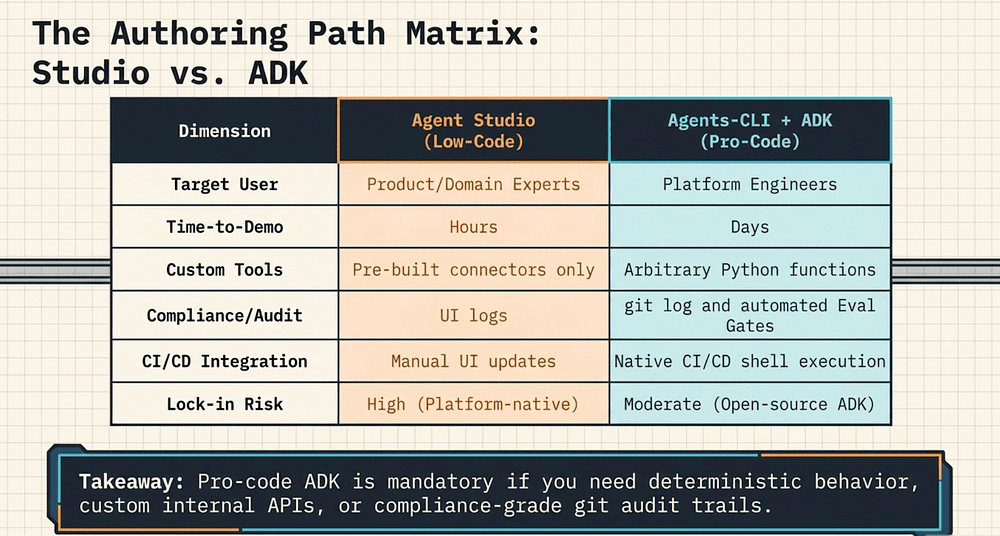
Agent Studio vs ADK: Side-by-Side Comparison
The choice comes down to who builds it, how fast you need a demo, and whether your production requirements are negotiable. Here are the dimensions that matter most for enterprise teams:
Target user and time-to-demo:
- Agent Studio targets product managers and domain experts; a working agent in hours.
- Agents-CLI + ADK targets platform engineers; a production-ready agent in days.
Testability and CI/CD:
- Agent Studio: no unit tests, no CLI pipeline — UI-only workflow.
- Agents-CLI + ADK: full pytest support, agents-cli eval run, native CI/CD integration [2].
Custom tools:
- Agent Studio: pre-built connectors only.
- ADK: arbitrary Python functions [32].
Compliance and auditability:
- Agent Studio: UI audit log, limited secrets management.
- ADK: git history, IAM audit logs, Secret Manager [2].
Infrastructure as code:
- Agent Studio: not applicable.
- ADK + Agents-CLI: Terraform via scaffold enhance [2].
Lock-in risk:
- Agent Studio: High (platform-native configuration).
- Agents-CLI + ADK: Moderate (ADK is open-source; standard containers).
Oncall debugging:
- Agent Studio: UI conversation logs.
- ADK: Cloud Logging, Cloud Trace, BigQuery [2].
Model version pinning:
- Agent Studio: managed by Google.
- ADK: explicit in agent.py.
Migrating from Agent Studio to ADK: How to Cross the Line
Here is the critical feature that makes the two-path model work: Agent Studio may support exporting agent logic to an ADK-compatible Python project: check the current Agent Studio documentation for the latest export options.
When you have iterated your agent configuration in Agent Studio to the point where it works, stakeholders are satisfied, the demo is done, you export it, and Agent Studio emits an ADK-compatible Python scaffold [9]. The platform explicitly supports moving “seamlessly from building simple prompts to deploying complex agents in Agent Studio,” and once ready for “deep customization, you can export your logic directly into ADK to continue development in a full-code environment” [30]. The generated code typically includes the key components of an ADK Python project (agent class, system prompt, tool definitions, and project configuration), though the exact structure of the export scaffold should be verified against current Agent Studio documentation or by testing the export feature directly. [31]
This scaffold is the starting point for the pro-code path. You take it, check it into git, run agents-cli scaffold enhance --deployment-target cloud_run [1], and continue from Command 2b of the walkthrough in Part 3.
What you lose in the transition:
- Visual editing of the agent configuration
- Non-engineer editability of the system prompt through the UI
- The ability to show compliance officers a change history in Agent Studio’s UI
What you gain:
- Unit testability
- CI/CD integration
- Secrets management through Secret Manager
- Compliance-grade git audit history
- Full custom tool development
- Evaluation gates before every deployment
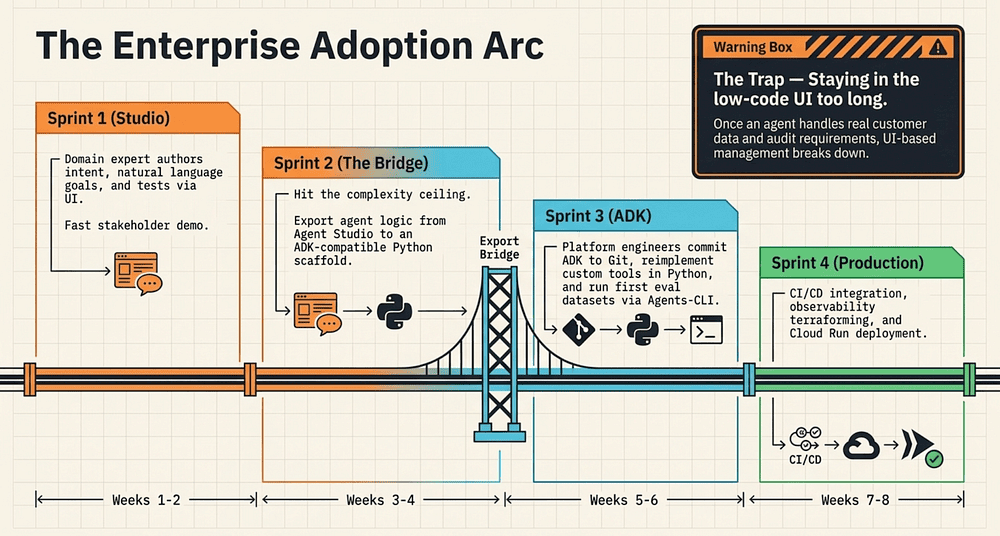
Enterprise Adoption Arc: From Low-Code to Pro-Code AI Agents
The realistic adoption pattern for most enterprise teams is not “choose one path and stay on it.” It looks like this:
Sprint 1: Build an agent in Agent Studio. A domain expert (loan officer, financial analyst) authors the agent’s instructions and goals. Engineers set up the Google Cloud project and connect the relevant data APIs as Agent Studio connectors.
Sprint 2: Demo to stakeholders. Iterate on the system prompt based on feedback. Identify the custom tool requirements that Agent Studio cannot satisfy.
Sprint 3: Export the agent to ADK. Check the scaffold into git. Set up the ADK project with Agents-CLI. Reimplement the custom tools as Python functions [32]. Run the first evaluation dataset.
Sprint 4: CI/CD pipeline. Evaluation gates on every PR. Observability infrastructure via agents-cli infra single-project [2]. Production deployment.
This arc runs roughly eight weeks from “we want to build an agent” to “the agent is in production with evaluation gates and observability.” That assumes a team that executes well, not a roadmap guarantee.
The arc works because Agent Studio de-risks the product direction before engineering commits to ADK. The export-to-ADK capability is the bridge. Without it, teams would either commit to pro-code before they know if the agent concept works, or stay in Agent Studio and never achieve production-grade quality.
The Trap: Staying on the Low-Code AI Platform Too Long
The trap is staying in Agent Studio too long.
Agent Studio is optimized for authoring intent. It is not optimized for operating software. That distinction matters a lot once you have real production traffic. Once an agent handles real customer data, real financial decisions, and real audit requirements, the UI-based management model breaks down:
- Debugging a production incident requires tracing through Cloud Logging [2], not clicking through Agent Studio’s conversation history
- Rolling back a bad system prompt update requires navigating UI version history, not git revert
- Adding a new tool requires engineering involvement regardless; there is no self-service path for custom API integrations
Most enterprise teams discover this in week six rather than week two. The decision framework above is designed to help teams discover it in week one.
Gemini Enterprise Agent Platform, ADK, and Agents-CLI form a coherent stack from no-code authoring down to production deployment. What they do not yet address is how AI agents built on that stack talk to one another once they are running, or how Google’s approach compares to the competing platforms enterprises are already evaluating. The Agent-to-Agent protocol is where those questions converge, and it is where the honest production verdict begins.
Part 5: A2A in Practice, Platform Comparisons, and the Honest Verdict
Multi-Agent Enterprise Topologies, AWS and Azure Alternatives, and Who Should Adopt Today
Section A: Agent-to-Agent (A2A) Communication in Practice
What the Agent-to-Agent (A2A) Protocol Is
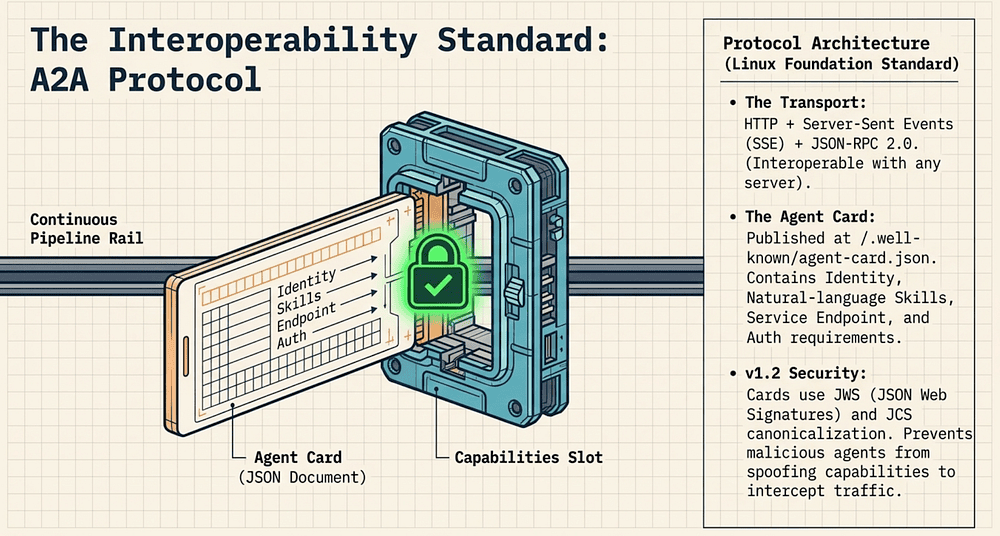
The Agent-to-Agent (A2A) protocol is an open standard for inter-agent communication. It is not a proprietary Google bus. The transport stack is:
- HTTP for the communication layer
- Server-Sent Events (SSE) for streaming responses
- JSON-RPC 2.0 for message framing
This means A2A is interoperable with any HTTP server; you do not need to be running on Google Cloud to participate in an A2A conversation. The protocol was announced in April 2025 [1], donated to the Linux Foundation in June 2025 [27], and reached v1.2 in March 2026 [14].
Agent Cards: How AI Agents Discover Each Other
The capability discovery mechanism is called an Agent Card (think of it as a standardized resume that tells other agents exactly what this one can do and how to reach it). Every A2A-capable agent publishes an Agent Card at a well-known URL — typically /.well-known/agent-card.json [14]. The Agent Card is a JSON document that describes:
- Identity: Agent name, description, version, provider
- Skills: What the agent can do (natural-language descriptions of capabilities)
- Service endpoint: The URL where the agent accepts A2A requests
- Authentication requirements: How to authenticate to this agent
An agent looking to call another agent fetches the target’s Agent Card first, verifies it, and then constructs an A2A request that matches the described skills and authentication requirements [14].
Signed Agent Cards (A2A v1.2)
A2A v1.0 (March 12, 2026) introduced Signed Agent Cards with cryptographic verification [14, 38]. v1.2 (late March 2026), the current stable release, continues this feature. The signing mechanism uses:
- JWS (JSON Web Signatures, RFC 7515): the cryptographic signature format
- JCS (JSON Canonicalization Scheme, RFC 8785): canonicalization of the JSON before signing, ensuring consistent serialization across implementations
A receiving agent verifies the signature against the domain owner’s public key before trusting the card’s contents. This closes a significant attack surface: without signed cards, a malicious agent could present a spoofed Agent Card to intercept or manipulate inter-agent traffic [14].
A Multi-Agent Enterprise Architecture: Travel Booking Topology
The canonical A2A enterprise pattern is a service-of-services: purpose-built AI agents that collaborate to handle complex, cross-functional requests. The Finance context from earlier parts fits this pattern naturally; and it illustrates exactly what Agentic AI architecture looks like at the topology level.
Scenario: A corporate travel booking request flows through three agents:
Customer Request │ ▼┌─────────────────┐│ Travel Agent │ ← books flights and hotels│ (Booking APIs) │└────────┬────────┘ │ A2A call: "request expense report for booking #B-4421" ▼┌─────────────────┐│ Expense Agent │ ← creates expense report, validates against policy│ (Finance APIs) │└────────┬────────┘ │ A2A call: "route for approval, amount $2,840" ▼┌──────────────────────┐│ Approvals Agent │ ← routes to manager, tracks approval chain│ (Workflow + HR APIs)│└──────────────────────┘
Without A2A, each of these inter-agent calls is hand-rolled HTTP: Travel Agent knows the Expense Agent’s specific endpoint, format, and authentication scheme. That gets old fast. When the Expense Agent changes its API, Travel Agent breaks. When the Approvals Agent moves to a new URL, everything upstream breaks.
With A2A, each agent publishes an Agent Card. Travel Agent fetches Expense Agent’s card to discover its current endpoint and skills. If Expense Agent moves or changes its interface, it updates its Agent Card. The protocol handles discovery; the agents do not hard-code each other’s locations [14].
What A2A gives you at the topology level:
- Loose coupling: AI Agents discover each other dynamically; no bespoke HTTP glue per integration
- Protocol-enforced contracts: Every inter-agent call conforms to the A2A message schema
- Observable boundaries: A2A calls are traceable at the protocol layer — you can see every agent-to-agent invocation in Cloud Trace
- Agent Registry integration: Agents-CLI-deployed agents are registered in the Agent Registry on agents-cli publish, making them discoverable by other agents in the enterprise mesh without manual configuration
Failure Modes in Multi-Agent Systems That Operators Must Plan For
A2A composability creates new failure patterns that do not exist in monolithic agents. Plan for all of these before production launch.
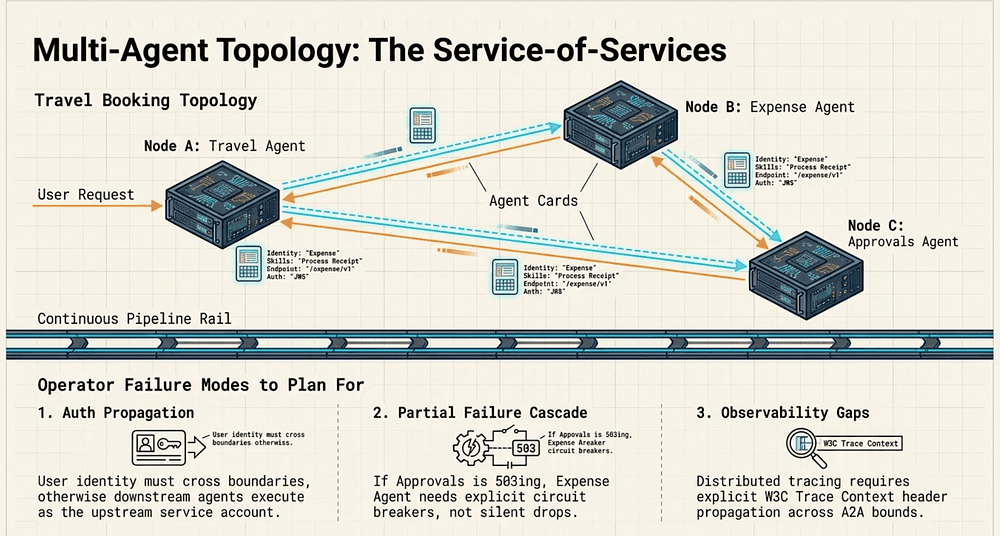
1. Auth propagation across agent boundaries
When a user authenticates to the Travel Agent, that identity needs to propagate to the Expense Agent and Approvals Agent. Without explicit auth propagation, downstream agents receive requests from the Travel Agent’s service account, not the user’s identity. This breaks least-privilege IAM and makes audit logs useless (all expense reports were created by “travel-agent-sa@…”).
A2A v1.2 defines mechanisms for propagating user context across agent boundaries [14]. Verify your implementation handles this before processing real user data.
2. Partial-failure handling
If the Approvals Agent is degraded (returning 503s), the Expense Agent’s A2A call will fail. What does the Expense Agent do? Retry? Surface an error to Travel Agent? Silently drop the approval request?
Without explicit failure handling at each agent boundary, partial failures cascade silently. Design for each A2A call failing independently, with explicit retry policies, circuit breakers, and fallback behaviors.
3. Observability gaps at agent boundaries
Cloud Trace correlates requests within a single service. Across A2A boundaries, trace context must be explicitly propagated via W3C Trace Context headers [50]. If any agent in the chain drops the trace context header, the distributed trace breaks; you see three isolated traces instead of one end-to-end trace.
Agents-CLI’s Observability skill provisions the BigQuery logging infrastructure for individual agents. Cross-agent trace correlation requires additional configuration: every agent must pass traceparent headers, and every Cloud Run service must be configured to emit trace spans to Cloud Trace [50].
4. Version skew between agents
In a three-agent topology, Travel Agent, Expense Agent, and Approvals Agent are deployed independently. If Expense Agent upgrades to a new A2A skill schema but Travel Agent has not updated its Agent Card cache, the call format mismatch will produce errors. Design for rolling deployments that maintain backward compatibility at every A2A interface.
Section B: Platform Comparison and the Honest Verdict
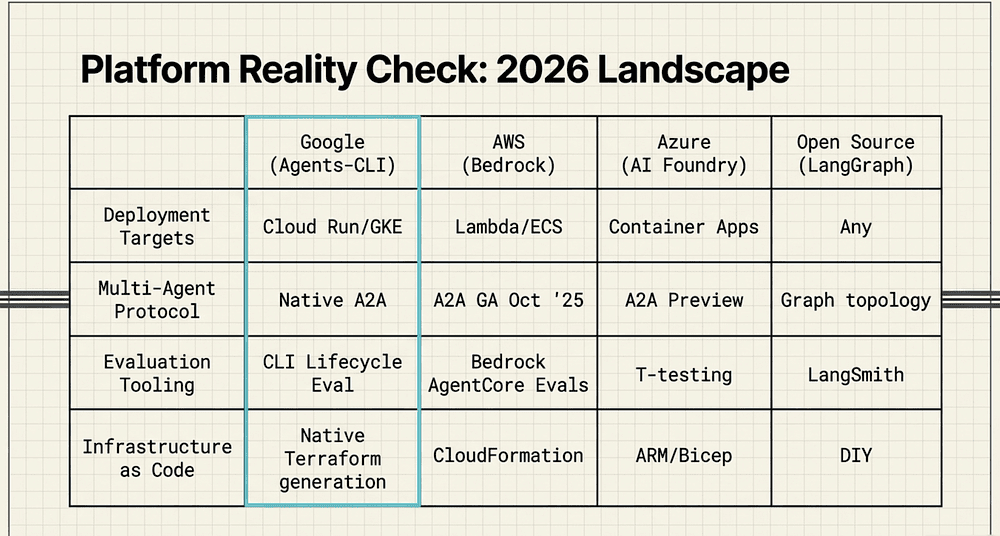
Google Agents-CLI vs AWS Bedrock vs Azure AI Foundry: Enterprise Agent Platform Comparison
Here is the honest breakdown across the dimensions that matter for enterprise AI agent adoption in 2026:
Deployment targets:
- Google Agents-CLI + ADK: Cloud Run, Agent Runtime, GKE
- AWS Bedrock Agents: Lambda, ECS, SageMaker
- Azure AI Foundry: Azure Container Apps, AKS
- Open Source (LangGraph / CrewAI / Microsoft Agent Framework): Self-hosted, any cloud
Infrastructure as code:
- Google: Terraform via scaffold enhance
- AWS: CloudFormation / CDK
- Azure: ARM templates / Bicep / Terraform
- Open Source: Roll your own
Multi-agent protocol:
- Google: A2A (open standard, Linux Foundation)
- AWS: A2A via Bedrock AgentCore Runtime (GA October 2025); legacy Inline Agents also supported
- Azure: A2A via Foundry Agent Service (preview, 2025–2026)
- Open Source: No standard; LangGraph has graph topology
Evaluation tooling:
- Google: agents-cli eval run (LLM-as-a-judge, lifecycle-integrated)
- AWS: Bedrock AgentCore Evaluations (GA March 2026; comparison runs, CI/CD regression)
- Azure: Azure AI evaluations with side-by-side comparison and statistical t-testing
- LangSmith (feature-richest of all options)
- Open Source: RAGAS, DeepEval, LangFuse (fairly close to LangSmith in feature set and works with OTel).
Visual authoring:
- Google: Agent Studio
- AWS: Bedrock console
- Azure: Azure AI Studio
- LangSmith has some managed Agent capability similar to Agent Studio
Vendor lock-in risk:
- Google: High (Gemini model, Agent Registry)
- AWS: High (Bedrock APIs, Lambda)
- Azure: Moderate (OAI-compatible APIs)
- Open Source: Low
Observability:
- Google: Cloud Logging, Cloud Trace, BigQuery
- AWS: CloudWatch, X-Ray
- Azure: Azure Monitor, App Insights
- Open Source: Bring your own
v1 maturity risk:
- Google: High (launched April 2026)
- AWS: Low (GA since September 2023)
- Azure: Moderate (rapid iteration)
- Open Source: Variable
Open source posture:
- Google: Partial (ADK is open source; Agents-CLI is Google-maintained)
- AWS: Closed
- Azure: Closed
- Open Source: Fully open
Google’s A2A Protocol Bet and Where It Pays Off
Google’s stack is differentiated by three things:
1. The A2A protocol. AWS implemented A2A in Amazon Bedrock AgentCore Runtime (GA October 2025), and Azure AI Foundry added A2A support in its Foundry Agent Service. Google’s differentiation is no longer exclusive ownership of the standard; A2A is now multi-cloud. Google’s advantage has shifted to deeper tooling integration on top of A2A: the evaluation pipeline, Agent Registry, and skill-injection CLI layer that AWS and Azure do not yet match in depth. A2A being an open standard (Linux Foundation, not Google-proprietary) [27] means that an enterprise building a multi-vendor agent mesh (Google agents calling Anthropic agents calling internal agents) has a standard protocol to build on. Whether the ecosystem adopts it broadly is the open question.
2. The evaluation tooling. agents-cli eval run with LLM-as-a-judge is more opinionated and more integrated than what AWS and Azure provide out of the box. AWS Bedrock AgentCore Evaluations (GA March 2026) supports comparison runs and CI/CD regression testing [44]. Azure AI Foundry supports side-by-side comparison runs with statistical t-testing for regression detection [47]. The differentiator for Agents-CLI's eval compare is lifecycle integration; the comparison step is a first-class gate in the scaffold-eval-deploy CLI workflow rather than a separate evaluation console. LangSmith also offers pairwise evaluation (evaluate_comparative) and offline regression datasets with a richer overall feature set than any of the platform-native tools [48].
3. The AI-native CLI design. Neither AWS nor Azure has an equivalent of the skill-injection model that Agents-CLI provides. The closest thing is AWS Toolkit for VS Code, which is a general-purpose IDE integration rather than a domain-specific, machine-readable constraint system for cloud deployment.
Where Google’s Stack Does Not Pay Off
If you are not already on Google Cloud, the migration cost is substantial. Agents-CLI provisions Google Cloud infrastructure, targets Google Cloud runtimes, and registers agents in a Google-specific Agent Registry. An enterprise on AWS with existing Bedrock investment already has the equivalent primitives, evaluation, deployment, observability, without the migration cost.
If you need cross-cloud agent topologies, A2A is promising but the implementation tooling is Google-first. A2A calls between a Google-hosted agent and an AWS-hosted agent require both sides to implement the A2A spec independently. The gap between “the protocol exists” and “the enterprise can operate it” is real.
If open-source optionality matters, ADK is open source but Agents-CLI is Google-maintained infrastructure. LangGraph and CrewAI give you full control over the evaluation framework, the deployment target, and the agent registry. The tradeoff is engineering effort; you build the lifecycle tooling yourself.
The Tiered Verdict
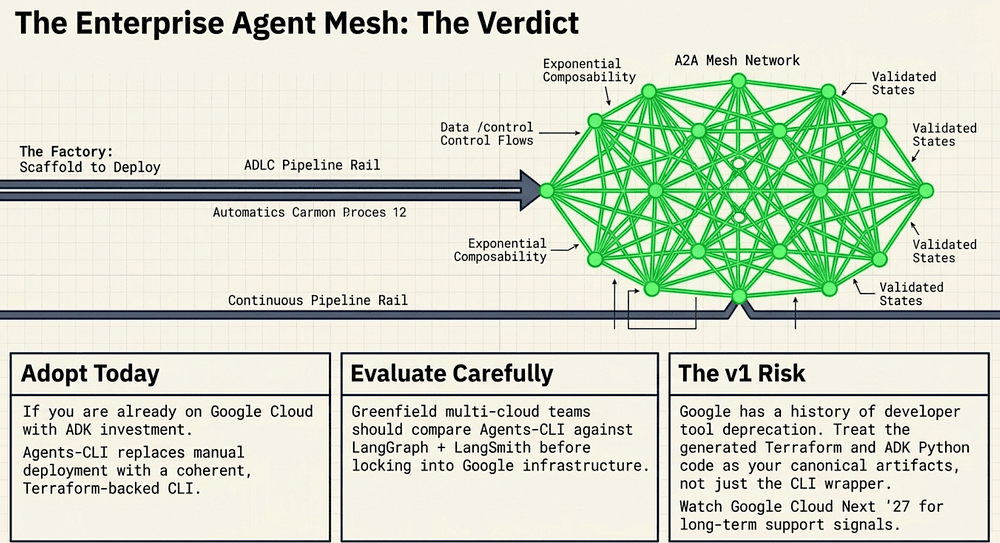
Adopt today:
Organizations already running on Google Cloud with ADK investment are the clear early adopters. The Agents-CLI lifecycle tooling addresses a real gap, prototype-to-production agent delivery, and it does so with genuine engineering thought (evaluation gates, IaC, agent registry). If your team has already written ADK agents and is managing the deployment lifecycle manually, Agents-CLI replaces that manual process with a coherent CLI.
Also consider adoption if you are building multi-agent enterprise architectures on Google Cloud. A2A native support and Agent Registry integration make the Agentic AI mesh tractable in a way that bespoke HTTP integration does not.
Evaluate carefully:
Greenfield teams that could go cloud-agnostic should compare Agents-CLI + ADK against LangGraph + LangSmith + your own deployment pipeline. LangGraph is mature, open-source, and cloud-independent [53]. The evaluation tooling (LangSmith) is more feature-rich than agents-cli eval [48] -- LangSmith supports LLM-as-judge, pairwise comparison, offline regression testing, online evaluation of production traffic, and CI/CD pipeline integration out of the box. You trade the seven-skill integration convenience for full infrastructure control.
Teams on multi-cloud architectures should evaluate A2A adoption independently of Agents-CLI. The protocol is cloud-independent; the CLI tooling is not.
Wait:
Organizations burned by Google product deprecations without clear migration path guarantees should treat Agents-CLI v1 as a preview, not a production commitment. Google has a documented history of sunsetting developer tools: Wave (sunset August 2010) [51], App Maker (disabled April 2020, discontinued January 2021) [56], Cloud Endpoints Portal (deprecated March 2022) [52], and others. Agents-CLI launched at Google Cloud Next ’26 in April 2026. Its long-term support posture will be visible at Google Cloud Next ‘27.
The signal to watch: if Agents-CLI v2 lands in the six months before Next ’27 with breaking changes and no migration path, that is a deprecation warning. If it earns a Generally Available (GA) designation with an SLA, the risk profile changes materially.
The v1 Risk Statement
This bears stating plainly: Agents-CLI is a v1 from a vendor with a deprecation history. That is not a reason to avoid it; it is a reason to plan for it.
The mitigation strategy:
- Keep ADK code clean and isolated from Agents-CLI-specific conventions where possible. ADK itself is open source; Agents-CLI is the deployment wrapper.
- Treat the generated Terraform as owned infrastructure. If Agents-CLI changes its IaC output in v2, you have a working Terraform baseline to migrate from.
- The A2A protocol is vendor-independent [27]. Agent-to-agent integration built on A2A is not locked to Agents-CLI even if it is deployed through it.
- Set a review trigger: if Agents-CLI does not have a publicly committed support timeline by Google Cloud Next ’27, reassess the investment.
The Summary
Google Agents-CLI closes a real gap. The ADLC tooling, scaffold, evaluate, provision, deploy, register, observe, is coherent and well-designed. The AI-native skill injection is a genuine innovation in reducing configuration hallucination. A2A native support positions agentic AI architectures for a multi-agent future that is not hypothetical; it is happening now, with 150+ organizations in production on the protocol [40].
The risk is equally real. This is v1 software from a vendor that has deprecated v1 software before. The honest answer to “should we adopt Agents-CLI?” is: if you are on Google Cloud and building agents today, yes, with your eyes open and your ADK code as the canonical artifact, not the CLI that deploys it.
Watch the Next ’27 keynote.
References
- Google Developers Blog — Agents CLI Announcement
- Agents-CLI Official Docs
- Agents-CLI Skills Reference
- Agents-CLI Getting Started
- ADK Official Docs
- ADK GitHub
- Agent Studio Docs
- Gemini Enterprise Agent Platform Docs
- Google Cloud Blog — Gemini Enterprise Agent Platform
- Medium — Complete Guide to Agents-CLI
- agents-cli Official Docs: Skills Reference
- GitHub: google/agents-cli
- Google Cloud Docs: Register and manage A2A agents
- A2A Protocol Specification
- ADK Docs: Deploy
- Cursor Docs: Rules for AI
- Aider: Repository Map
- Mervin Praison: “Agents CLI: scaffolding, evals, and deploy for ADK on Google Cloud”
- uv Official Docs (Astral)
- uv Tools Guide (Astral)
- agents-cli Getting Started
- agents-cli Hands-On Tutorial
- ADK PyPI
- Google Cloud Run Autoscaling Docs
- Vertex AI Agent Runtime Docs
- A2A Protocol GitHub (Linux Foundation)
- Linux Foundation Press Release: A2A 1-Year
- Agent Registry Overview
- Agent Registry: Register Agents
- Google Cloud Products — Gemini Enterprise Agent Platform
- Google Cloud — Agent Studio Overview
- Context7 — google/adk-python
- Agents-CLI — Skills Reference
- HPCwire/AIwire — Google Unveils Gemini Enterprise Agent Platform
- InfoWorld — Hands-on with the Google Agent Development Kit
- Mervin Praison Blog — agents-cli scaffolding, evals, and deploy
- A2A Protocol — Official Specification
- Google Open Source Blog — A2A Anniversary
- agent2agent.info — Agent Card Concepts
- A2A Protocol Press Release (150 orgs)
- SiliconANGLE — Google donates A2A
- AWS News Blog — Bedrock GA
- InfoQ — AWS Bedrock AgentCore A2A
- AWS — Bedrock AgentCore GA
- AWS Docs — A2A Protocol Contract
- AWS Blog — A2A in AgentCore Runtime
- Microsoft Foundry — Evaluate Results
- LangSmith — evaluate_comparative API
- Visual Studio Magazine — Agent Framework 1.0
- W3C Trace Context Specification
- Wikipedia — Google Wave
- Google Cloud Endpoints — Deprecations
- LangChain — LangGraph
- Stellagent — A2A Protocol Overview
- VentureBeat — Microsoft Retires AutoGen
- Wikipedia: List of Google Products
About the Author

Rick Hightower is a former Senior Distinguished Engineer at a fortune 100
He created skilz, the universal agent skill installer, supporting 30+ coding agents including Claude Code, Gemini, Copilot, and Cursor, and co-founded the world’s largest agentic skill marketplace. Connect with Rick Hightower on LinkedIn or Medium. Check out SpillWave, your source for AI expertise.
Rick has been actively developing generative AI systems, agents, and agentic workflows for years. He is the author of numerous agentic frameworks and developer tools and brings deep practical expertise to teams looking to adopt AI. He enjoys writing about himself in the 3rd person.
Rick also wrote a Claude Certified Architect (CCA) series of articles that have a lot of useful information on writing agentic AI systems. A lot of ideas captured in the CCA and the exam prep that Rick wrote echoes what you see in this article. If you want to improve your ability to create well-behaved AI agents, studying for the CCA Exam is a good place to start.
CCA Exam Prep on Agentic Development
- Claude Certified Architect: The Complete Guide to Passing the CCA Foundations Exam
- CCA Exam Prep: Mastering the Code Generation with Claude Code Scenario
- CCA Exam Prep: Mastering the Multi-Agent Research System Scenario
- CCA Exam Prep: Structured Data Extraction
- CCA: Master the Developer Productivity Scenario
- Claude Certified Architect: Master the CI/CD Scenario
- CCA Exam Prep: Mastering the Customer Support Resolution Agent Scenario
Rick also wrote a series on harness engineering and how to improve agentic systems using harness engineering for feedback loops and adversarial agents. These articles also go hand in hand with this article.
Harness Engineering Articles
- The $9 Disaster: What Anthropic’s Harness Design Paper Teaches Us About Building Autonomous AI
- Harness Engineering vs Context Engineering: The Model is the CPU, the Harness is the OS
- LangChain Deep Agents: Harness and Context Engineering: Memory, Skills, and Security
- Beyond the AI Coding Hangover: How Harness Engineering Prevents the Next Outage
- LangChain’s Harness Engineering: From Top 30 to Top 5 on Terminal Bench 2.0
- Anthropic’s Harness Engineering: Two Agents, One Feature List, Zero Context Overflow
- OpenAI’s Harness Engineering Experiment: Zero Manually-Written Code