Google ADK for the Battle-Tested Agent Developer
A Comprehensive Evaluation of Google's Agent Development Kit for Experienced Developers
Originally published on Medium.
A Comprehensive Evaluation of Google's Agent Development Kit for Experienced Developers
 Cover image: A battle-tested developer evaluating Google ADK alongside LangGraph and Claude Code agent frameworks
- Part 1 (this article): Hands-on evaluation of ADK’s core abstractions, DX, and model flexibility
- Part 2: Multi-agent patterns with SequentialAgent, ParallelAgent, and LoopAgent
- Part 3: Production deployment, scaling, and real-world architecture
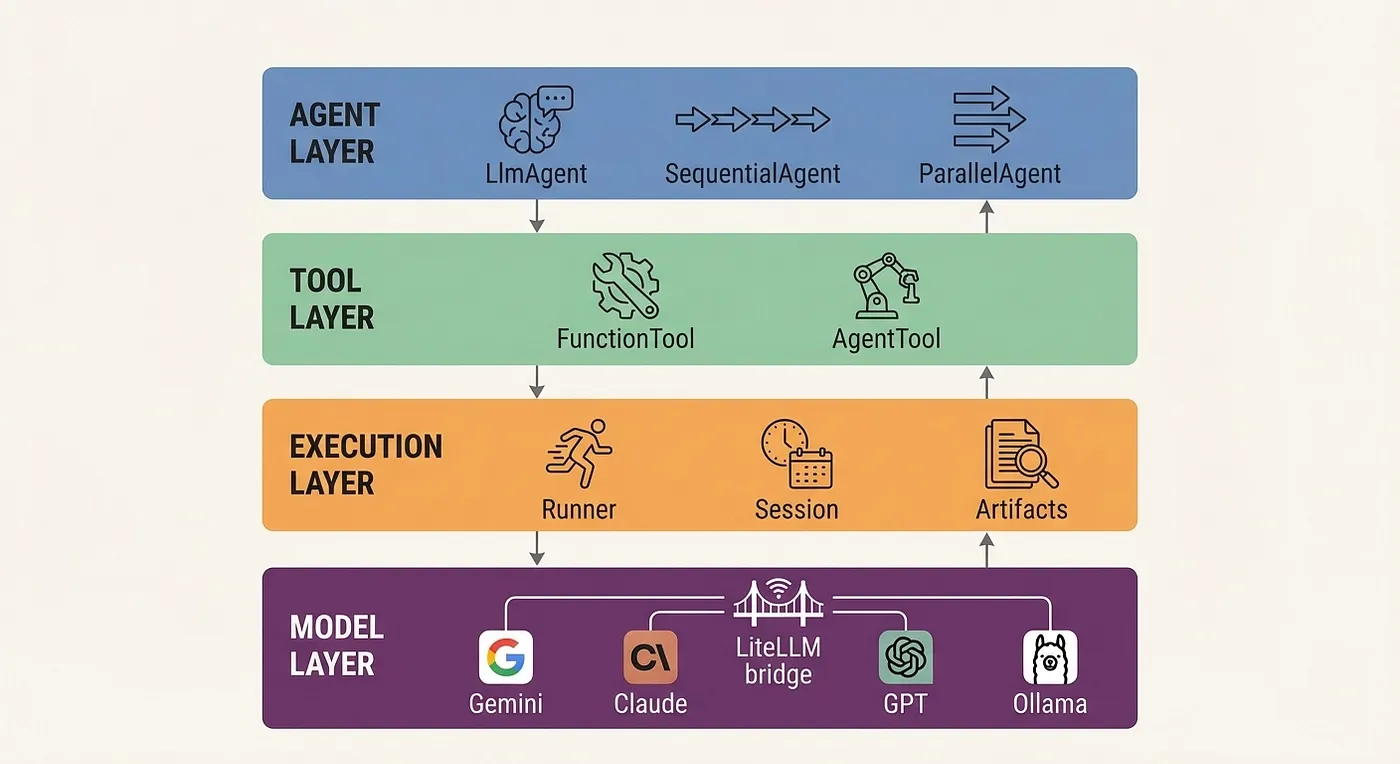 ADK’s four-layer architecture: Agent Layer (LlmAgent, SequentialAgent, ParallelAgent, LoopAgent), Tool Layer (FunctionTool, AgentTool, custom tools), Execution Layer (Runner, SessionService, ArtifactService), and Model Layer (Gemini native, LiteLLM bridge to Claude/GPT/Ollama).
pip install google-adk
my_agent/
    __init__.py
# Marks this as a Python package
    agent.py
# Your agent definition (ADK looks for root_agent here)
    .
env

# API keys (GOOGLE_API_KEY, etc.)
from
 google.adk.agents
import
 LlmAgent
# This is the entry point ADK looks for when you run `adk web`
root_agent = LlmAgent(
    name=
"my_first_agent"
,
    model=
"gemini-3.1-flash"
,
# Default model - fast and capable
    instruction=
"You are a helpful assistant that answers questions clearly."
,
    tools=[]
# We'll add tools shortly
)
<
dependency
>

<
groupId
>
com.google.adk
</
groupId
>

<
artifactId
>
google-adk
</
artifactId
>

<
version
>
0.9.0
</
version
>
</
dependency
>
<!-- Optional: adds the browser-based dev UI -->
<
dependency
>

<
groupId
>
com.google.adk
</
groupId
>

<
artifactId
>
google-adk-dev
</
artifactId
>

<
version
>
0.9.0
</
version
>
</
dependency
>
import
 com.google.adk.agents.LlmAgent;
// Builder pattern - standard Java idiom, nothing surprising here
LlmAgent

agent

=
 LlmAgent.builder()
    .name(
"my_first_agent"
)
    .description(
"A helpful assistant"
)
    .model(
"gemini-3.1-flash"
)
    .instruction(
"You are a helpful assistant that answers questions clearly."
)
    .build();
import
 com.
google
.
adk
.
tools
.
Annotations
.
Schema
;
public

class

WeatherTools
 {

// @Schema tells ADK how to describe this tool to the LLM

@Schema
(description =
"Get weather information for a city"
)

public

static

Map
<
String
,
String
>
getWeather
(

@Schema
(description =
"City name"
)
String
 city

) {

return

Map
.
of
(
"city"
, city,
"temperature"
,
"72F"
,
"condition"
,
"Sunny"
);
    }
}
// Wire the annotated method into the agent as a callable tool
LlmAgent
 agent =
LlmAgent
.
builder
()
    .
name
(
"weather_bot"
)
    .
tools
(
List
.
of
(
FunctionTool
.
create
(
WeatherTools
.
class
,
"getWeather"
)))
    .
build
();
from
 google.adk.agents
import
 LlmAgent
weather_agent = LlmAgent(
    name=
"weather_bot"
,
# Unique name for this agent
    model=
"gemini-2.5-flash"
,
# Which LLM to use
    instruction=
"Help users check the weather. Use the get_weather tool "

"when asked about weather."
,
    tools=[get_weather],
# List of callable tools
    output_key=
"last_weather_response"

# Store output in session state
)
def
get_weather
(
city
: str) -> dict:

""
"Get weather information for a city.
Args:
        city: The name of the city to get weather for.
    Returns:
        Weather information dictionary.
    "
""

# In production, this would call a real weather API

return
 {
"city"
: city,
"temperature"
:
"72F"
,
"condition"
:
"Sunny"
}
def
calculate_price
(

base_price
:
float
,

quantity
:
int
,

discount_percent
:
float
 =
0
) -> dict:

""
"Calculate total price with optional discount.
    Args:
        base_price: The base price per unit.
        quantity: Number of units to purchase.
        discount_percent: Optional discount percentage (0-100).
    Returns:
        Dictionary with calculation breakdown and total.
    "
""
    subtotal = base_price * quantity
    discount = subtotal * (discount_percent /
100
)
    total = subtotal - discount

return
 {
"subtotal"
: subtotal,
"discount"
: discount,
"total"
: total}
- Type hints are required. Skip them and the LLM won’t know what types to pass. ADK won’t crash; it just generates a weaker tool schema.
- Docstrings drive the tool description. Write a bad docstring, get a bad tool. The
Args:section is what the LLM reads to understand each parameter. - Default values become optional parameters.
discount_percent: float = 0tells the LLM this parameter is optional.
# LangGraph approach - requires the
@tool
 decorator
from langchain_core.tools import tool
@tool
def

get_weather
(
city:
 str
) ->
dict:

""
"Get weather information for a city."
""

return
 {
"city"
: city,
"temperature"
:
"72F"
,
"condition"
:
"Sunny"
}
from
 google.adk.tools import ToolContext
def
save_preference
(
preference
: str,
tool_context
: ToolContext) -> dict:

""
"Save a user preference to session state.
    Args:
        preference: The preference to save.
        tool_context: Injected automatically by ADK - do not pass manually.
    Returns:
        Confirmation of saved preference.
    "
""

# ToolContext gives you access to session state, artifacts, and more
    tool_context.state[
"user_preference"
] = preference

return
 {
"status"
:
"saved"
,
"preference"
: preference}
from
 google.adk.agents
import
 LlmAgent
from
 google.adk.sessions
import
 InMemorySessionService
from
 google.adk.runners
import
 Runner
from
 google.genai
import
 types
# Step 1: Define the agent (you already know this part)
agent = LlmAgent(
    name=
"weather_bot"
,
    model=
"gemini-2.5-flash"
,
    instruction=
"Help users check the weather."
,
    tools=[get_weather]
)
# Step 2: Create the execution infrastructure
session_service = InMemorySessionService()
# Stores session state in memory
runner = Runner(
    agent=agent,
# Which agent to run
    app_name=
"weather_app"
,
# Namespace for sessions
    session_service=session_service
# Where to store state
)
# Step 3: Create a session (represents one conversation)
session =
await
 session_service.create_session(
    app_name=
"weather_app"
,
    user_id=
"user_123"
)
# Step 4: Send a message and process the response stream
content = types.Content(
    role=
"user"
,
    parts=[types.Part.from_text(
"What's the weather in Austin?"
)]
)
async

for
 event
in
 runner.run_async(
    user_id=
"user_123"
,
    session_id=session.
id
,
    new_message=content
):

if
 event.content
and
 event.content.parts:

print
(event.content.parts[
0
].text)
# The development shortcut - one line instead of twenty
await
 agent.run_debug(message=
"What's the weather in Austin?"
)
from
 google.adk.agents
import
 LlmAgent
from
 google.adk.sessions
import
 InMemorySessionService
from
 google.adk.runners
import
 Runner
from
 google.genai
import
 types
import
 asyncio
# --- Tool Definitions ---
# Each tool is a plain Python function. ADK extracts the signature
# and docstring to generate the tool schema for the LLM.
def

get_weather
(
city:
str
) ->
dict
:

"""Get current weather for a city.
    Args:
        city: City name to check weather for.
    Returns:
        Weather data including temperature and conditions.
    """
    weather_data = {

"Austin"
: {
"temp"
:
"85F"
,
"condition"
:
"Sunny"
,
"humidity"
:
"45%"
},

"Seattle"
: {
"temp"
:
"58F"
,
"condition"
:
"Cloudy"
,
"humidity"
:
"72%"
},

"New York"
: {
"temp"
:
"68F"
,
"condition"
:
"Partly Cloudy"
,
"humidity"
:
"55%"
},
    }

return
 weather_data.get(city, {
"temp"
:
"N/A"
,
"condition"
:
"Unknown city"
})
def

calculate_price
(
    base_price:
float
,
    quantity:
int
,
    discount_percent:
float
 =
0
) ->
dict
:

"""Calculate total price with optional discount.
    Args:
        base_price: Price per unit in dollars.
        quantity: Number of units.
        discount_percent: Discount percentage (0-100). Defaults to 0.
    Returns:
        Price breakdown with subtotal, discount amount, and total.
    """
    subtotal = base_price * quantity
    discount = subtotal * (discount_percent /
100
)
    total = subtotal - discount

return
 {

"subtotal"
:
f"$
{subtotal:
.2
f}
"
,

"discount"
:
f"$
{discount:
.2
f}
"
,

"total"
:
f"$
{total:
.2
f}
"
    }
def

check_inventory
(
product:
str
) ->
dict
:

"""Check inventory status for a product.
    Args:
        product: Product name to check.
    Returns:
        Inventory status including quantity available and restock date.
    """
    inventory = {

"widget_a"
: {
"available"
:
150
,
"restock"
:
"N/A"
},

"widget_b"
: {
"available"
:
0
,
"restock"
:
"2026-04-15"
},

"gadget_x"
: {
"available"
:
42
,
"restock"
:
"N/A"
},
    }
    ret
- Three tools, one agent. The LLM decides which tool to call based on the user’s query. You don’t write routing logic.
- Session persistence. The session carries forward across all three queries, so the agent remembers context. In a raw LLM integration, you’d manage message history yourself.
- Plain Python functions. No decorators, no base classes, no registration calls. Write a function, add it to the tools list, done.
- Type hints matter. ADK uses them to generate the tool schema. Skip type hints and the LLM won’t know what types to pass.
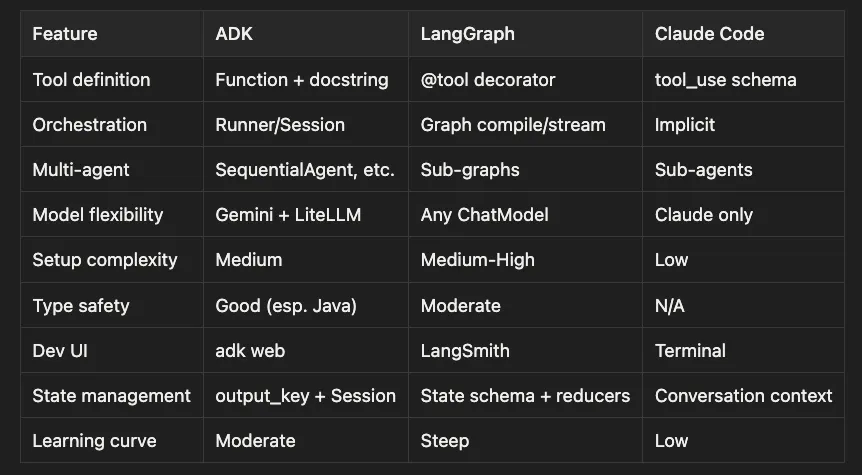
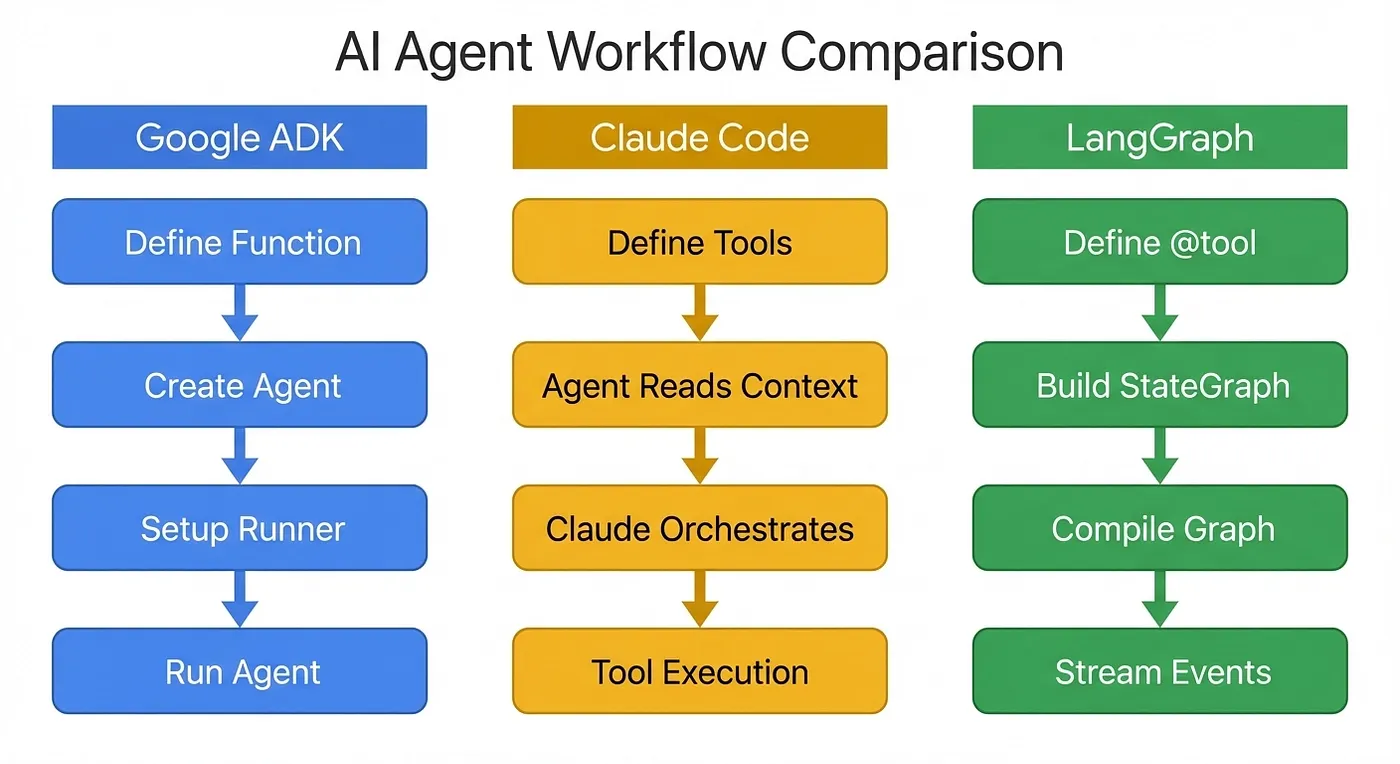 DX Comparison showing the workflow differences between ADK, Claude Code, and LangGraph
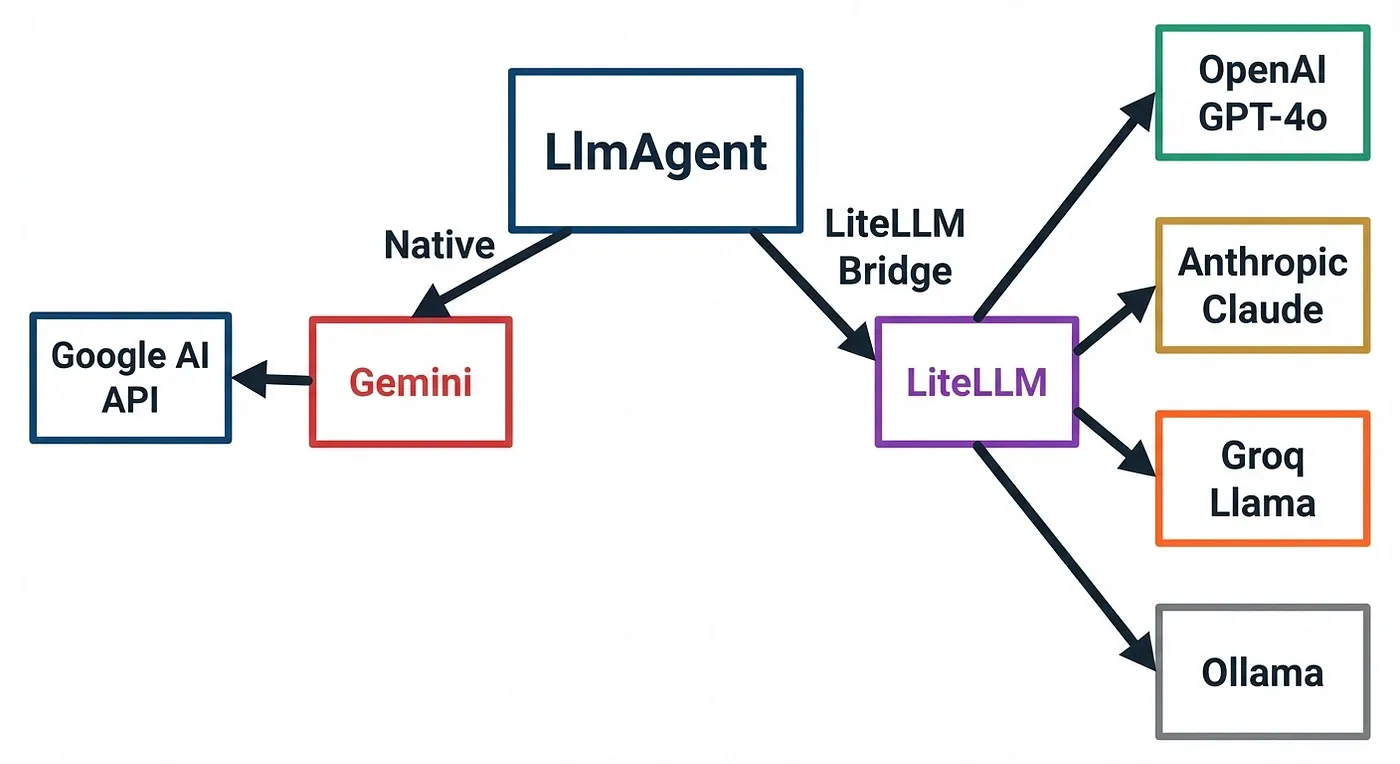 Model-Agnostic Flow showing native Gemini path and LiteLLM bridge to other providers
from
 google.adk.agents import Agent
from
 google.adk.models.lite_llm import LiteLlm
import os
# -------------------------------------------------------------------
# Environment variables
# -------------------------------------------------------------------
os.environ.
setdefault
(
"OPENAI_API_KEY"
,
"sk-..."
)
os.environ.
setdefault
(
"ANTHROPIC_API_KEY"
,
"sk-ant-..."
)
os.environ.
setdefault
(
"GOOGLE_API_KEY"
,
"..."
)
os.environ.
setdefault
(
"GROQ_API_KEY"
,
"..."
)
os.environ.
setdefault
(
"OLLAMA_BASE_URL"
,
"http://localhost:11434"
)
# -------------------------------------------------------------------
# Example tools
# -------------------------------------------------------------------
def
get_weather
(
location
: str) -> str:

return
 f
"Weather in {location} is sunny."
def
calculate_price
(
x
:
int
,
y
:
int
) ->
int
:

return
 x * y
# -------------------------------------------------------------------
# Factory
# -------------------------------------------------------------------
def
create_agent
(model_config,
agent_name
: str) -> Agent:

return

Agent
(
        model=model_config,
        name=agent_name,
        instruction=
"You are a helpful assistant. Use tools when appropriate."
,
        tools=[get_weather, calculate_price],
    )
# -------------------------------------------------------------------
# Recommended 2026 model setup
# -------------------------------------------------------------------
# Gemini via native ADK model string
# Conservative / stable choice for ADK-native usage
gemini_agent =
create_agent
(

"gemini-2.5-flash"
,

"gemini_agent"
,
)
# If you explicitly want Gemini 3.x preview behavior instead:
# gemini_agent = create_agent("gemini-3.1-flash-lite-preview", "gemini_agent")
# OpenAI via LiteLLM
# Likely current "small fast" choice; verify exact mapping in your LiteLLM version if needed
gpt_agent =
create_agent
(

LiteLlm
(model=
"openai/gpt-5.4-mini"
),

"gpt_agent"
,
)
# Higher-cost / stronger option:
# gpt_agent = create_agent(LiteLlm(model="openai/gpt-5.4"), "gpt_agent")
# Anthropic via LiteLLM
claude_agent =
create_agent
(

LiteLlm
(model=
"anthropic/claude-sonnet-4.6"
),

"claude_agent"
,
)
# Stronger option:
# claude_agent = create_agent(LiteLlm(model="anthropic/claude-opus-4.6"), "claude_agent")
# Groq via LiteLLM
groq_agent =
create_agent
(

LiteLlm
(model=
"groq/llama-3.3-70b"
),

"groq_agent"
,
)
# Ollama via LiteLLM
ollama_agent =
create_agent
(

LiteLlm
(model=
"ollama_chat/llama3.3"
),

"ollama_agent"
,
)
# Other local options:
# LiteLlm(model="ollama_chat/qwen3")
# LiteLlm(model="ollama_chat/mistral")
adk web
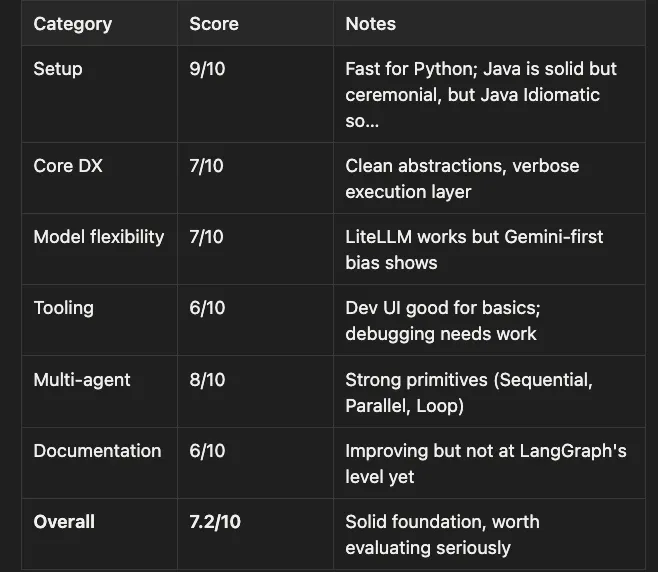
-
You’re a Java shop and need first-class agent infrastructure
-
You want built-in multi-agent primitives without building your own orchestration
-
You’re already in the Google ecosystem (Vertex AI, GCP, Gemini)
-
You value explicit, code-first agent definitions over graph-based or conversational approaches
-
You need to mix models across agents in a multi-agent system
-
You need deep model flexibility as a core requirement (LangGraph wins here)
-
You prefer implicit orchestration with minimal boilerplate (Claude Agent SDK wins here or LangChain Deep Agent if you want model agnostic with observability and maturity)
-
You need production observability out of the box (LangSmith + LangGraph wins here)
-
You’re building a single-model application with Claude (just use Claude Agent SDK directly)
-
What is Google ADK? A code-first agent framework from Google supporting Python and Java, with built-in multi-agent orchestration patterns.
-
What are the core abstractions? LlmAgent (the agent), FunctionTool (plain functions as tools), Runner/Session (execution and state management).
-
How does model flexibility work? Native Gemini support plus LiteLLM bridge for Claude, GPT, Groq, and Ollama models.
-
Is the Java SDK production-ready? At version 0.9.0 with builder patterns, RxJava3, and
@Schemaannotations, it's the most serious Java agent SDK available. -
How does ADK compare to LangGraph? Less graph magic, more declarative agents. Simpler state management, less flexible routing.
-
How does ADK compare to Claude Code? More boilerplate, more control. Explicit tools vs. implicit orchestration.
-
What’s the biggest gotcha? The Runner/Session boilerplate for simple cases, and the
ollama_chat/prefix for Ollama models.