Grok Build vs Claude Code: The Compatibility Bet, the Buzz, and What You Can Actually Bring Over
xAI's new agentic CLI reads your ~/.claude/ folder on purpose. Here's what works, what doesn't, and whether the early-beta SuperGrok Heavy tier (~$299/mo per secondary reporting) is worth it.
Originally published on Medium.

xAI's new agentic CLI reads your ~/.claude/ folder on purpose. Here's what works, what doesn't, and whether the early-beta SuperGrok Heavy tier (~$299/mo per secondary reporting) is worth it.
When I opened Grok Build for the first time, the welcome screen was a single line of dim text: Loaded 47 skills (12 from ~/.claude/skills/). Twelve Claude Code skills, read on first launch, with zero migration steps.
Summary: A hands-on comparison of xAI's Grok Build (launched May 14, 2026) and Anthropic's Claude Code. Compatibility scorecard across skills, hooks, MCP, plugins, agents, and slash commands. Deep dive on Grok-native primitives: hook lifecycle, plugin marketplace, /loop scheduler, /btw aside. Verdict and migration guidance for Claude Code users.
Update: Grok Build is currently available in early beta to subscribers of SuperGrok and X Premium Plus plans.
- Initial Access: The tool was originally launched exclusively for SuperGrok Heavy subscribers, who pay $300 per month.
- Expanded Access: xAI has since opened access to SuperGrok subscribers at $30 a month and X Premium+ users at $40 a month.
- Integration Access: Users with existing SuperGrok or X Premium subscriptions can also use Grok Build inside the open-source coding agent OpenCode without needing a separate API key or additional subscription.
When I opened Grok Build for the first time, the welcome screen was a single line of dim text:
Loaded 47 skills (12 from ~/.claude/skills/).
Twelve. That's the number of Claude Code skills I had installed locally that morning, sitting in ~/.claude/skills/ from months of building muscle around Claude Code's plugin system. Grok Build read them on first launch. Not after I exported anything. Not after I ran a migration script. It just read them, mapped the SKILL.md format to its own loader, and listed them in the same numbered roster as the Grok-native ones it ships with. The skill I'd written last quarter for policy enforcement was invokable in Grok Build with zero changes. So was the project-memory skill.
That's not a marketing trick. The xAI docs at docs.x.ai/build/features/skills-plugins-marketplaces say it explicitly: "Grok automatically reads Claude Code marketplaces, plugins, skills, MCPs, agents, hooks, and instruction files." It's a stated design goal, not an accidental overlap of conventions. xAI shipped Grok Build on May 14, 2026 with a thick compatibility layer pointed directly at the Claude Code ecosystem, and the moment you realize how thick it actually is, the strategic story behind this release starts looking different from the one the press releases told. The press releases said "we built a better coding agent." The compatibility layer says something more interesting: "we built an ecosystem inheritor."
This article does three things. It walks through the post-launch reception twelve days in: SWE-bench numbers, Plan Mode reactions, the $300 price-gate. It dissects the compatibility scorecard surface by surface, so you know which Claude Code artifacts carry over for free and which need re-authoring. And it covers the Grok-native primitives that extend the surface beyond Claude Code: the fail-open hook lifecycle, the marketplace-backed plugin system, the /loop scheduler, the /btw aside, and the ACP bridge. The closer is a verdict, a gotchas sidebar, and a tease for the migration playbook.
Separately, every behavioral claim about Grok Build (file paths, hook events, plan mode mechanics, slash commands) is cross-checked against the canonical docs in ~/.grok/docs/user-guide/. Where I cite external numbers (SWE-bench, pricing, release-notes commitments), I name the secondary source because xAI's own news page and developer release notes are sparse on those specifics. Treat the secondary numbers as "as reported at time of writing," not "as confirmed by xAI."
Why xAI bet on Claude Code compatibility
Is Grok Build a Claude Code rival, a Claude Code complement, or a Claude Code parasite? Yes. All three. And the bet only makes sense once you stop reading it as feature convenience and start reading it as ecosystem inheritance.
xAI announced Grok Build in early beta on May 14, 2026, confirmed in both the official news page at x.ai/news/grok-build-cli and the developer release notes at docs.x.ai/developers/release-notes. The release notes describe the underlying model in a separate May 19 entry called grok-build-0.1, characterized as "xAI's fast coding model trained specifically for agentic coding, currently in early access." That model slug is what the docs ship with. Mapping grok-build-0.1 to a position in the Grok 4.x family ("Grok 4.3 beta," "Grok 4 Heavy," and so on) is inferred from secondary coverage, not from xAI's own materials, so I'll use the model's actual slug throughout.
Pricing and access tiers are murkier. Secondary aggregators including Releasebot and several launch-week reviews state Grok Build was initially gated to the SuperGrok Heavy tier (commonly cited as $299/month list price, with a $99/month introductory rate for the first six months) before widening to all SuperGrok and X Premium Plus subscribers. xAI's own news page and release notes don't currently include those numbers or that timeline. So when I cite the $299 figure later, treat it as "as reported in secondary coverage as of late May 2026," not as an xAI-confirmed price. Context window size for grok-build-0.1 is similarly unspecified in xAI's primary materials, so I won't quote a number. Several launch-week reviews described Grok Build as having a "vendor-reported 2M-token context window," which appears to conflate it with Grok 4 Fast and Grok 4.20 (where the 2M number does come from xAI primary sources). Verify before you cite.
What's strange about the launch, if you're paying attention, is that xAI is simultaneously running model partnerships with Cursor and Anthropic. Grok models are now first-class options inside Cursor's editor. Grok-on-Anthropic infrastructure is being discussed in passing in xAI's release notes. And OpenCode, the open-source coding agent, now accepts SuperGrok and X Premium subscriptions natively. Add Grok Build to that lineup and a pattern emerges: xAI wants Grok the model embedded everywhere developers already work, with Grok Build as the flagship first-party harness that showcases what Grok-as-coding-agent looks like at full power.
This is why the Claude Code compatibility layer matters strategically. xAI isn't trying to convince you to migrate from ~/.claude/skills/ to ~/.grok/skills/. They're trying to convince you to run both. The skills live in one place, the harnesses fight on plan-mode quality and parallel-orchestration polish, and xAI wins as long as a Grok coding model sits in your toolbox. Every Claude Code user who tries Grok Build and stays is a user xAI didn't have to acquire from a cold start. Every Claude Code user who tries Grok Build and bounces still could be running Grok models inside Cursor, OpenCode, or Anthropic-side integrations. The compatibility layer is a low-friction "yes" funnel.
There's a second signal worth reading. Per secondary coverage including Basenor and Releasebot's aggregated tracker, xAI committed to publishing daily release notes for Grok Build, a notable break from their previous two-meaningful-updates-per-week rhythm. The release-notes page at docs.x.ai/developers/release-notes does show Grok Build entries appearing on multiple days, which is consistent with that commitment. The cadence is a public signal of "we're iterating fast," and it's the kind of message you send when you're starting behind on benchmarks but believe you can iterate your way into competitive position before customers commit to long-term tooling decisions. We'll come back to those benchmarks in a moment.
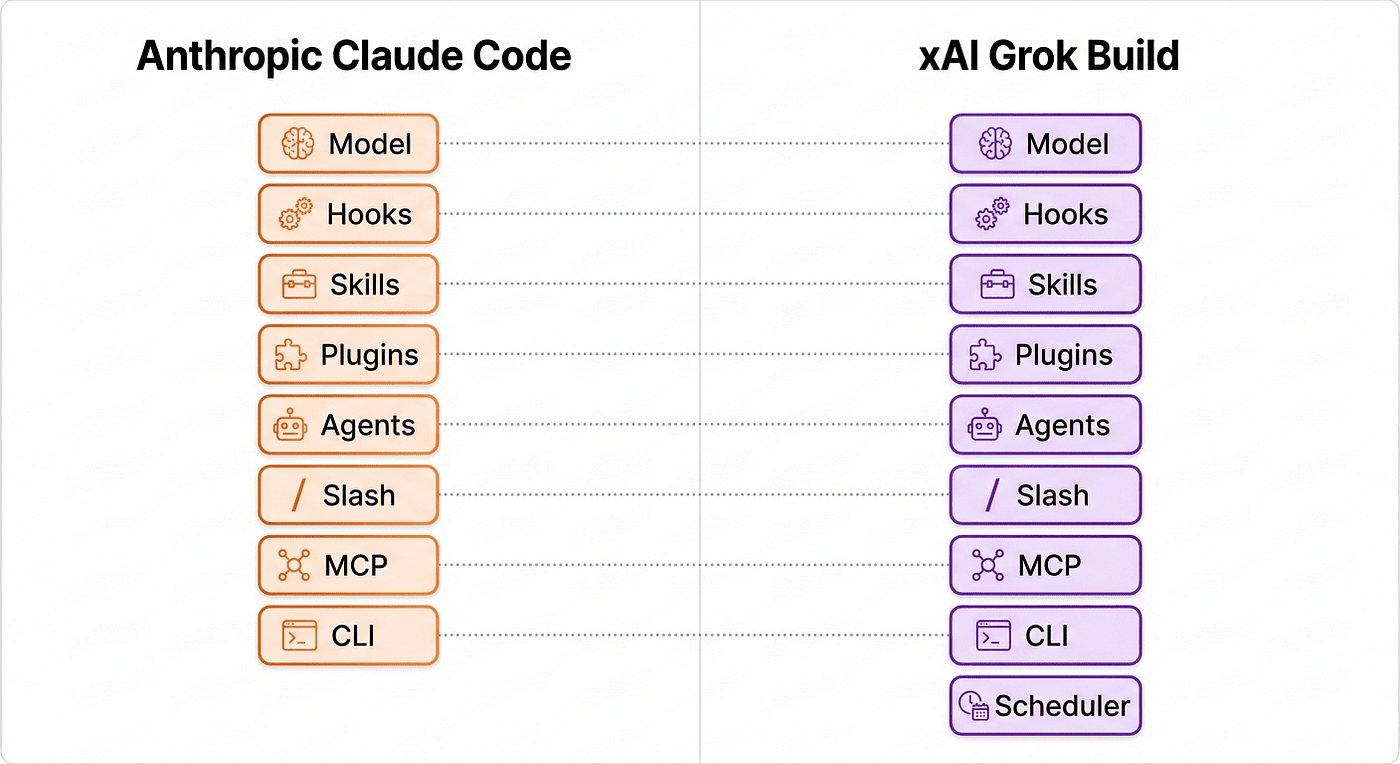
The compatibility bet is the loudest version yet of a thesis that's been quietly developing across the agentic CLI space for eighteen months: harnesses are converging on a shared file-format substrate. Claude Code, Codex CLI, OpenCode, Cline, Aider, and now Grok Build all read SKILL.md files (Support the Agent Skill Specification). Most of them recognize CLAUDE.md or AGENTS.md as project instructions. MCP has become the cross-vendor protocol for tool servers. Hooks are starting to standardize. Grok Build is the most aggressive version of this convergence yet, because xAI didn't just write their own format and let third parties add adapters. They reached directly into ~/.claude/ and started reading.
The buzz: twelve days in
By the time I'm writing this, Grok Build has been in the wild for twelve days. Sentiment in the developer community is mixed-to-positive, with two strong themes pulling in opposite directions.
The positive theme centers on Grok Build's proactive Plan Mode entry, which several launch-week reviewers initially described as "Plan Mode on by default." That framing overstates what the docs actually say. Per the canonical guide at ~/.grok/docs/user-guide/19-plan-mode.md, the normal operating state is Inactive, and Plan Mode is entered in one of two ways: either the agent calls the enter_plan_mode tool automatically when it detects genuine ambiguity in a task (architectural questions, multi-approach decisions, redesigns), with user approval required to activate; or the user toggles Plan Mode on manually via the /plan command, after which the next user prompt transitions the state to Active. In either path, the agent decides whether the planning behavior actually engages. So the more accurate phrasing is: Plan Mode in Grok Build is opportunistic and proactive where Claude Code's equivalent is manual and on-demand. The Vasundhara review's wording ("Grok Build leads with Plan Mode on by default, native parallel subagents, full Agent Coordination Protocol (ACP) support, and a vendor-reported 2M-token context window") gets the proactivity right but oversells the default-on framing. The 2M-token-window claim in that same line conflates Grok Build's model with Grok 4 Fast's, which is a separate model with a separate context window. So treat the buzz around Plan Mode as "the agent volunteers planning more aggressively than Claude Code does," not "planning happens whether you want it or not."
In Claude Code world, when you touch multiple files or are going to do a tricky refactor or migration, you are told to use Plan mode. Grok build instead looks at your intention and if you are doing a substantive change, it puts in you in plan mode. Plan mode is always recommended if you are not doing a simple change. In Grok Build, this is one thing less you have to remember to do.
When Plan Mode is Active, the agent's behavior changes meaningfully: write tools are blocked except for the plan file at ~/.grok/sessions/<cwd>/<session-id>/plan.md, the agent explores the codebase using read and search tools, designs an implementation approach in the plan file, and presents the plan for user approval via an exit_plan_mode dialog. The approval dialog offers two choices: a to start building, or x to revise with feedback. This dialog is very similar to what Claude Code provides.
The other positive theme is the daily-release-notes cadence, which is being read as a credible commitment to closing whatever gaps exist. Rejoicehub: "Grok Build wins on autonomy and multi-file orchestration. Claude Code excels at conversational reasoning and explaining code." That framing keeps showing up across reviews and feels honest to me, and I am fairly new to Grok Build and have not found out the boundaries yet. I have seen reports that: Grok Build is genuinely better at "go orchestrate seven things in parallel." Claude Code is genuinely better at "explain why this codepath is wrong and what to do about it." If your workload skews orchestration-heavy, Grok Build's autonomy is a real lift. If your workload skews "I need to understand this codebase," Claude Code's deliberation still wins. I am not sure about these early reports, and am still forming my own opinion.
Now the negative theme. The dominant complaint by a wide margin is the $300-a-month price gate. The intro rate of $99 for six months blunts the immediate sticker shock, but the full list price of $299 effectively rules out the individual developer and targets the funded team. That cost is also weirdly coupled to broader xAI ecosystem pressure, because in the weeks leading up to and following Grok Build's launch, SuperGrok ($30/month) subscribers reported sudden throttling on voice, image, and video features. Heavy-tier subscribers also saw quiet reductions in their daily limits, with xAI's own marketing language changing from "near-unlimited usage" to "highest usage limits." The Piunikaweb investigation summarized the sentiment: subscribers feel they're being squeezed off their base plans and pushed onto the $300 monthly Heavy tier, with Grok Build as the upsell. That dynamic colors the value proposition. You're not just buying a coding agent. You're buying into an ecosystem that's actively recalibrating where the line between paid tiers sits.
The second-loudest complaint is that Grok Build isn't production-hardened yet. The Codersera comparison: "Grok Build launched in early beta on May 14, 2026 and is not production-hardened; reviewers consistently flag it as a tool to trial alongside, not replace, a production agent." The Verdent guide, written just before the May launch, noted that the public artifacts up to that point were "code traces, teaser screenshots, and a signup form," and warned that the actual rollout has been "limited or staggered rather than fully open." Beta means beta. The release notes have been daily, the bugs have been many, and several features the launch announcement described are clearly still under active iteration.
And then there are the SWE-bench numbers. Here is the leaderboard snapshot from the day I'm writing this:
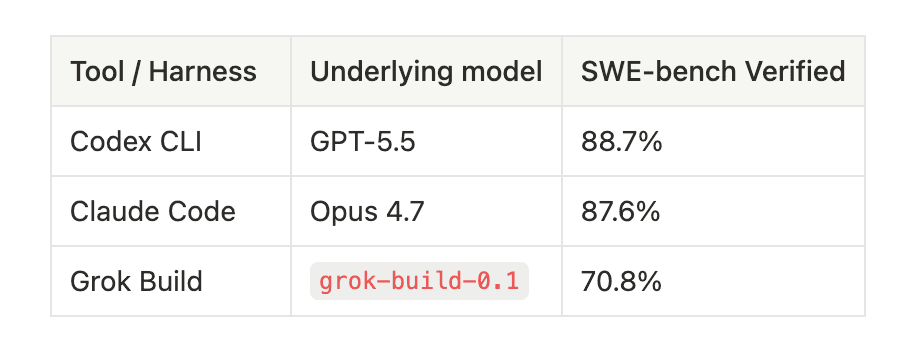
These numbers are pulled from secondary leaderboard trackers (notably the May 2026 snapshot at marc0.dev/en/leaderboard) and individual review comparisons including Codersera's and Rejoicehub's published reviews. xAI's own news page doesn't currently include a SWE-bench Verified number for Grok Build, so treat these as "as reported by third parties," not "as confirmed by xAI."
Codex CLI on GPT-5.5: This is the current SWE-bench Verified leader at 88.7%. Codex CLI is OpenAI's terminal harness, and GPT-5.5 is the model behind it. If raw benchmark headline is what you care about most, this is the number to beat. The gap between Codex CLI and Claude Code is inside the confidence interval for most practical purposes, so don't read 88.7 vs 87.6 as a meaningful capability gap.
Claude Code on Opus 4.7: Anthropic's flagship harness on their best model lands at 87.6%, basically tied with Codex CLI within noise. Claude Code is the maturity pick: mature IDE extensions, manual Plan Mode invocation backed by a deep history of refinement, the deepest skills ecosystem in the agentic CLI space, and the strongest "explain this codepath" experience. This is what most reviewers compare Grok Build against when they say "trial alongside, don't replace."
Grok Build on grok-build-0.1: At 70.8% Grok Build trails by a real margin, about 17 percentage points behind the leaders. Before reading that as a damning verdict, two caveats. First, harness variance: independent benchmarking work in 2026 has documented variance of 10 to 20 percentage points on identical model weights when you swap harnesses. That means the Grok Build number is a coupled measurement of the harness AND the model, and isolating which factor is dragging it down is hard. Second, vendor self-report vs independent test: xAI self-reports 72 to 75% for Grok 4 on SWE-bench Verified, while independent testing by vals.ai with the SWE-agent scaffold shows 58.6%. That's a 16-point spread on the same model weights depending on scaffold quality. The Grok Build 70.8 sits at the higher end of that spread, which suggests the Grok Build harness is roughly on par with industry-standard scaffolds. What's pulling the absolute number down is grok-build-0.1 vs Opus 4.7 / GPT-5.5 at the model layer, not Grok Build the harness.
That distinction matters for the rest of this article. If you're considering whether to add Grok Build to your toolbox, you're not buying "a worse harness." You're buying access to grok-build-0.1 wrapped in a harness that has real ergonomic wins (proactive Plan Mode entry, parallel sub-agents, fail-open hooks, scheduler, ACP) and real ecosystem inheritance (your existing Claude artifacts work). That value calculation reads very differently than "70.8 < 87.6 so worse."
The conversation in the community has shifted, per multiple secondary reports, from "is this useful?" to "how do I integrate it into my daily workflow?" That's a meaningful tonal shift twelve days post-launch.
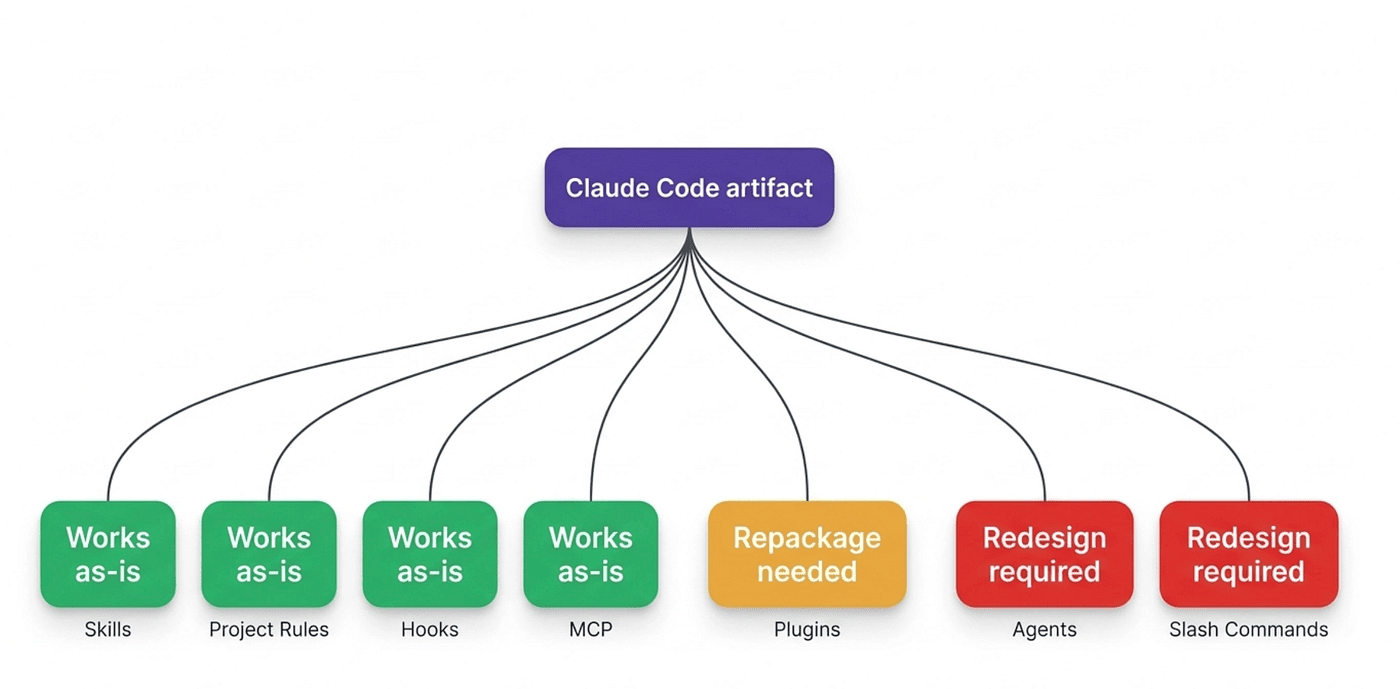
The compatibility scorecard
This is the part of the article I expect people to bookmark. The table below summarizes how each Claude Code surface maps to Grok Build. The drill-downs after the table walk every row with the detail that didn't fit in a cell.
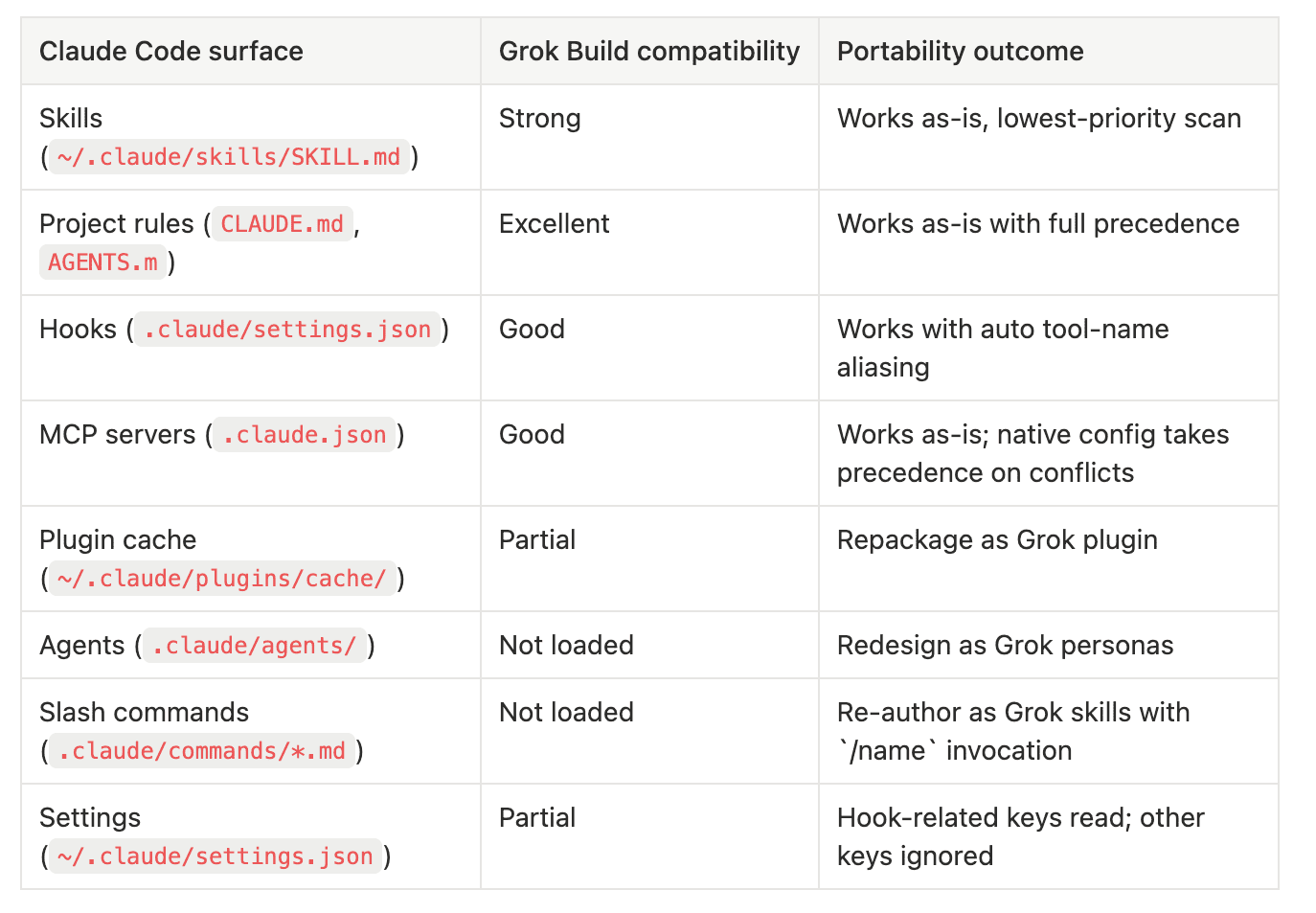
Skills work as-is. Grok Build scans ~/.claude/skills/ at the lowest priority slot in its discovery order, after .grok/skills/ (walked up to repo root), ~/.grok/skills/, enabled plugin skill directories, and any extra paths configured in ~/.grok/config.toml. Because skills are just directories containing a SKILL.md with YAML frontmatter and Markdown instructions, and because Grok Build uses the same SKILL.md format natively, your existing Claude skills load with zero changes. Invocation works through the same /skill-name syntax. If a Grok-native skill has the same name as a Claude skill, the Grok-native version wins because it sits higher in the discovery order. This is the surface with the cleanest portability story in the entire scorecard, and it's the surface where you'll see the biggest immediate win when you first launch Grok Build.
Project rules work as-is. Grok Build reads instruction files in this precedence order: Agents.md, Claude.md, AGENT.md, AGENTS.md. Both Claude.md and the uppercase CLAUDE.md are explicitly supported "for compatibility with Claude Code workflows," per the xAI docs. Deeper directory files still take precedence over root-level files, matching Claude Code's directory-walking behavior. If you have a CLAUDE.md at your repo root tuning Claude Code's behavior for a specific project, Grok Build picks it up on first launch in that directory. No changes needed. This is one of the easiest wins in the compatibility story and also one of the easiest to overlook, because nothing visible changes until you notice that the agent is honoring instructions you wrote for a different harness.
Grok Build does not support rule files like Claude Code does, so as of May 26, you can write a rule that matches all of your python files */.py or all of your typescript test files **/.ts.
Hooks work with one subtle gotcha. Grok Build loads hooks from ~/.claude/settings.json globally and <project>/.claude/settings.json per-project (the project version requires explicit trust via /hooks-trust). The hook JSON format is the same as Claude Code's. The subtle gotcha is tool-name aliasing: Grok Build internally uses tool names like run_terminal_cmd, read_file, and search_replace, while Claude Code uses Bash, Read, and Edit. Grok Build auto-aliases the Claude names to its own, so existing hook matchers like "matcher": "Bash" continue to work. If your hook uses custom or less-common tool names, verify those map correctly before trusting the hook in production. The fail-open default also matters: if a hook crashes, the action isn't blocked, except when you explicitly return {"decision": "deny"}. Claude Code's behavior is similar but not identical here, so test the deny path explicitly when porting.
MCP servers work as-is. Grok Build reads .claude.json for MCP configuration, the standard Claude Code path. If you also have a .mcp.json (the cross-vendor standard format) or native config under ~/.grok/config.toml, the native config takes precedence on conflicts. The practical implication: if you've been running an MCP server like the Notion API integration or a custom file-search tool through .claude.json, Grok Build picks it up automatically. The only adjustment is that some MCP servers expect environment variables that may not be set in Grok Build's shell environment. Run /mcps in Grok Build to confirm each server connected successfully.
Plugin cache requires repackaging. Grok Build does NOT load the Claude plugin cache at ~/.claude/plugins/cache/. Plugins in Claude Code are installable bundles that contain skills, agents, hooks, and MCP configs, all in one package. Grok Build has its own plugin system that's conceptually similar (plugin.json manifest, skills/, agents/, hooks/hooks.json, .mcp.json, optional .lsp.json for language servers), but it expects the plugin to live at .grok/plugins/ or ~/.grok/plugins/ or to be installed from a marketplace source declared in ~/.grok/config.toml. To bring a Claude plugin over, you copy the skill directories into the new structure, recreate the manifest, and either install locally or publish to a git marketplace source. We'll walk through one of these ports in the side-by-side workflows section.
Agents are not portable. This is the biggest gap in the compatibility story. Claude Code's .claude/agents/ directory contains markdown definitions of named subagents, with frontmatter declaring the model, tools, and prompt. Grok Build does NOT scan that directory. Grok Build's subagent system is different: it's built around the task tool plus configurable personas like implementer, reviewer, researcher, and a capability-mode system that controls what subagents can do. You can define custom roles or personas in config.toml or .grok/ files, but the markdown-with-frontmatter format from Claude doesn't translate. If you've invested in a library of named Claude Code agents, plan to redesign them as Grok personas. This is the surface I expect to bite the most users first when they migrate workflows.
Slash commands are not portable. Claude Code's .claude/commands/*.md files, with frontmatter declaring command name and behavior, are not loaded by Grok Build. Grok Build has its own slash command system, and the primary user-facing extension mechanism for custom commands is the skills system. The workaround is straightforward: re-author each command as a skill, and Grok Build will expose it as /skill-name automatically. If your command was already a thin wrapper around invoking a specific skill or workflow, the port is mostly a rename. If your command had complex behavior baked into its markdown body, you'll need to convert it to skill instructions, which is a slightly different mental model. The friction here is real but small.
Settings.json is partially read. Grok Build reads ~/.claude/settings.json for the hooks key specifically. Other keys (theme, model preferences, output style, default permissions) are not honored. The practical implication: don't expect your Claude Code preferences to transfer. Configure Grok Build through ~/.grok/config.toml for theme, model, and approval-mode settings, while letting ~/.claude/settings.json continue to drive Claude Code in parallel.
That's the scorecard. Three surfaces with strong-to-excellent portability (skills, rules, MCP), two with manageable porting work (hooks, settings), and three with material rework needed (plugin cache, agents, slash commands). The Claude Code user who comes in expecting "everything just works" will be surprised when slash commands silently don't fire and .claude/agents/ is silently empty in the agent picker. The Claude Code user who comes in expecting "I have to rebuild from scratch" will be surprised when their entire skills library and project rules load automatically.
Grok-native primitives
The compatibility layer is the door. The native primitives are what's inside the room. Four of them are worth understanding in depth: the hook lifecycle, the plugin architecture, and the persistent/loop scheduler.
The hook lifecycle
Grok Build's hook system is heavily inspired by Claude Code's, with extensions. The official documentation lists nine lifecycle events that hook scripts can attach to. The diagram below shows the order in which events fire during a typical session.
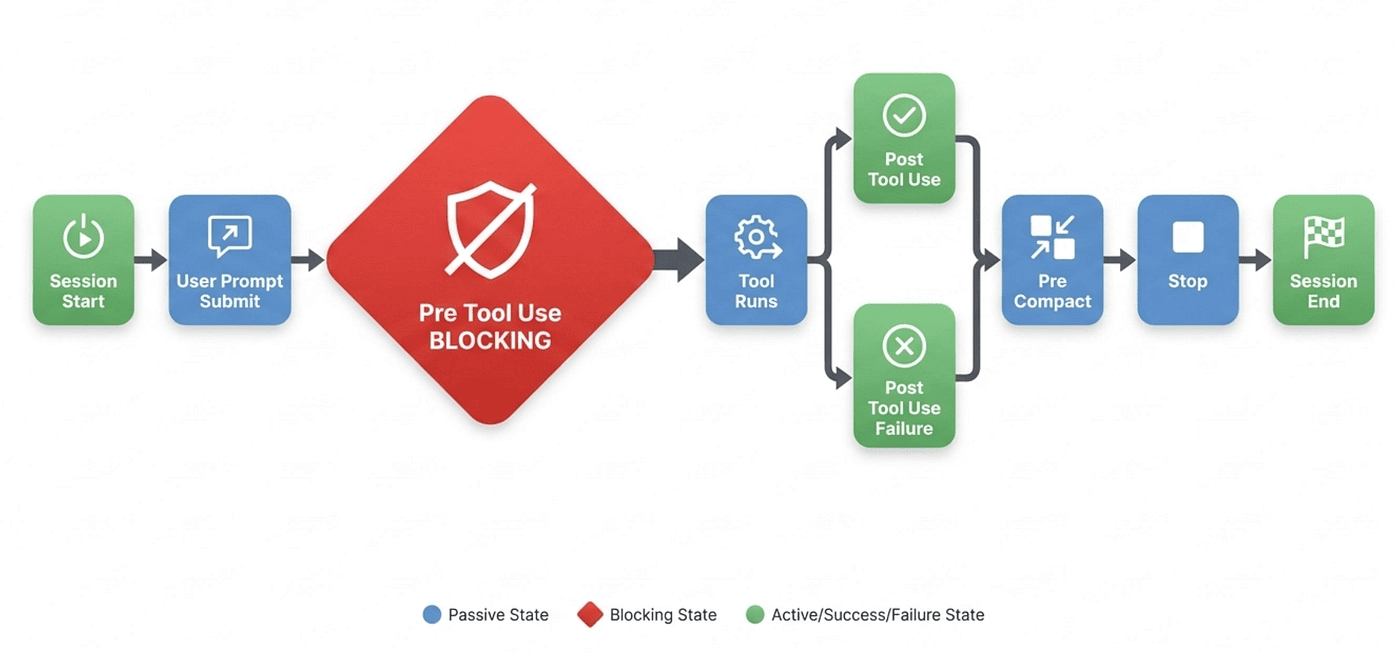
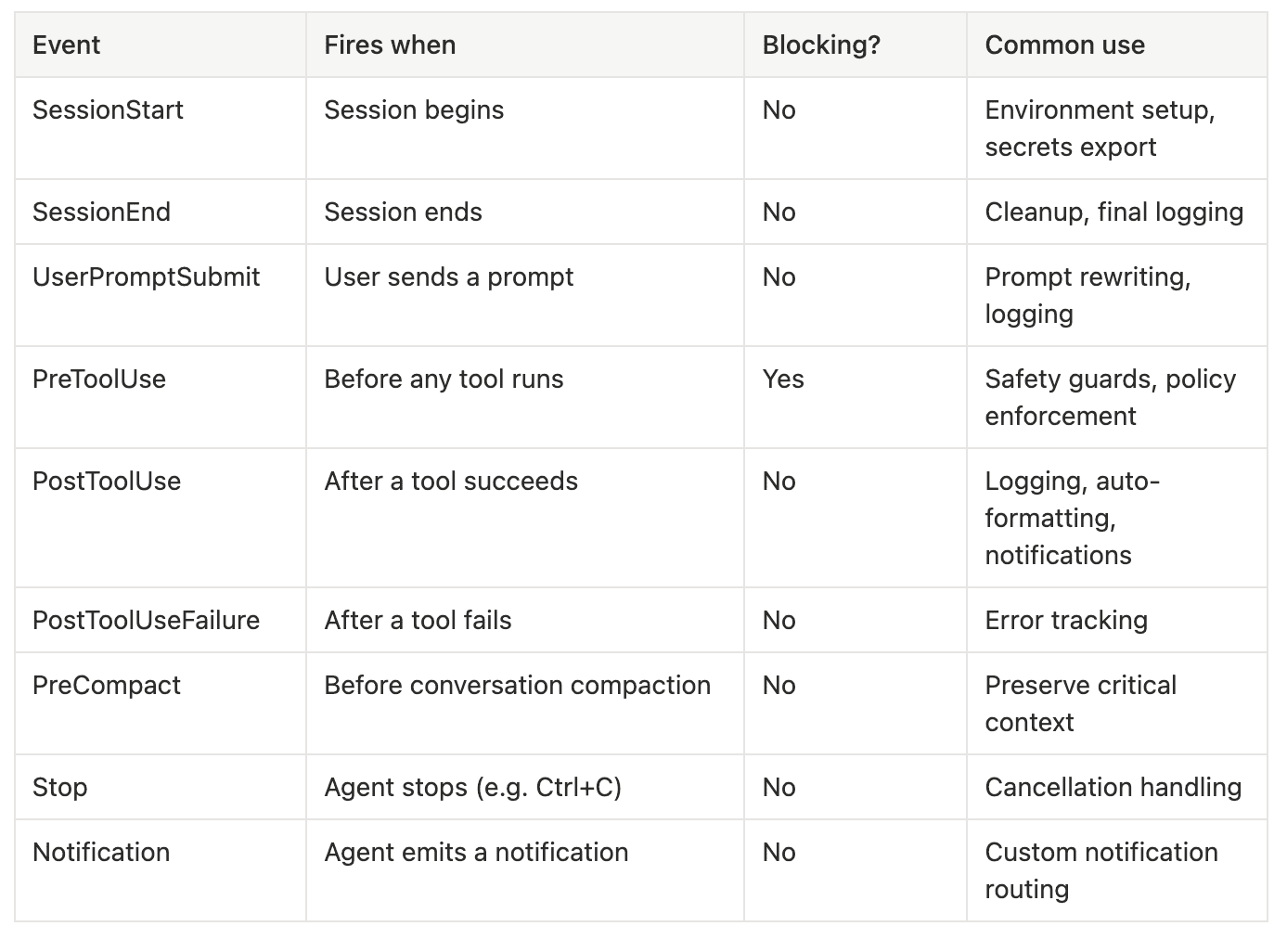
SessionStart and SessionEnd are the bookends. SessionStart runs once when you launch Grok Build, before the agent processes anything. Use it to export secrets into environment variables, set workspace-specific paths, or log the session ID to a tracking system. SessionEnd runs at session shutdown, useful for final logging or cleanup tasks. Neither is blocking, so they can't refuse to start a session, but they can fail without disrupting the agent.
UserPromptSubmit fires every time you send a prompt to the agent. The hook receives the full prompt as JSON on stdin and can log it, rewrite it, or pass through. This is the natural hook for audit logging and for prompt-injection-detection rules that you want applied to every user input. It's passive, so it can't reject the prompt outright, but it can transform what the agent sees.
PreToolUse is the most powerful event in the system. It fires before every tool invocation, with the tool name and tool input passed via stdin. Crucially, PreToolUse is the only blocking hook: by returning {"decision": "deny", "reason": "..."} on stdout (or by exiting with code 2), the hook can prevent the tool from running. This is where safety guards live. The canonical example is a safe-shell guard that blocks destructive Bash commands. Grok Build's default behavior on a hook crash is fail-open, meaning if your guard script segfaults, the tool runs. You have to return an explicit deny to actually block. Test the deny path explicitly because the failure mode is unsafe-by-default if your script has a bug.
PostToolUse and PostToolUseFailure fire after the tool runs, depending on whether the tool succeeded or failed. Both are passive. PostToolUse is the natural place to run formatters on files the agent just edited, send Slack notifications about completed actions, or stream events to a log aggregator. PostToolUseFailure is the natural place to send error events to your observability stack so you can track which agent actions are failing most often in production.
PreCompact fires before Grok Build automatically compacts the conversation history to fit within the context window. Compaction summarizes earlier turns to save tokens, but it can discard information you wanted preserved. PreCompact lets you write critical context to a side file before compaction runs, or inject summary notes that the compactor must preserve verbatim.
Stop fires when the agent stops mid-task, typically because the user hit Ctrl+C. Use it to log cancellations, capture partial state, or send "agent was interrupted" notifications.
Notification fires when the agent emits a system notification. The hook receives the notification payload and can route it however you want, including Slack, Discord, a webhook, or a desktop notifier.
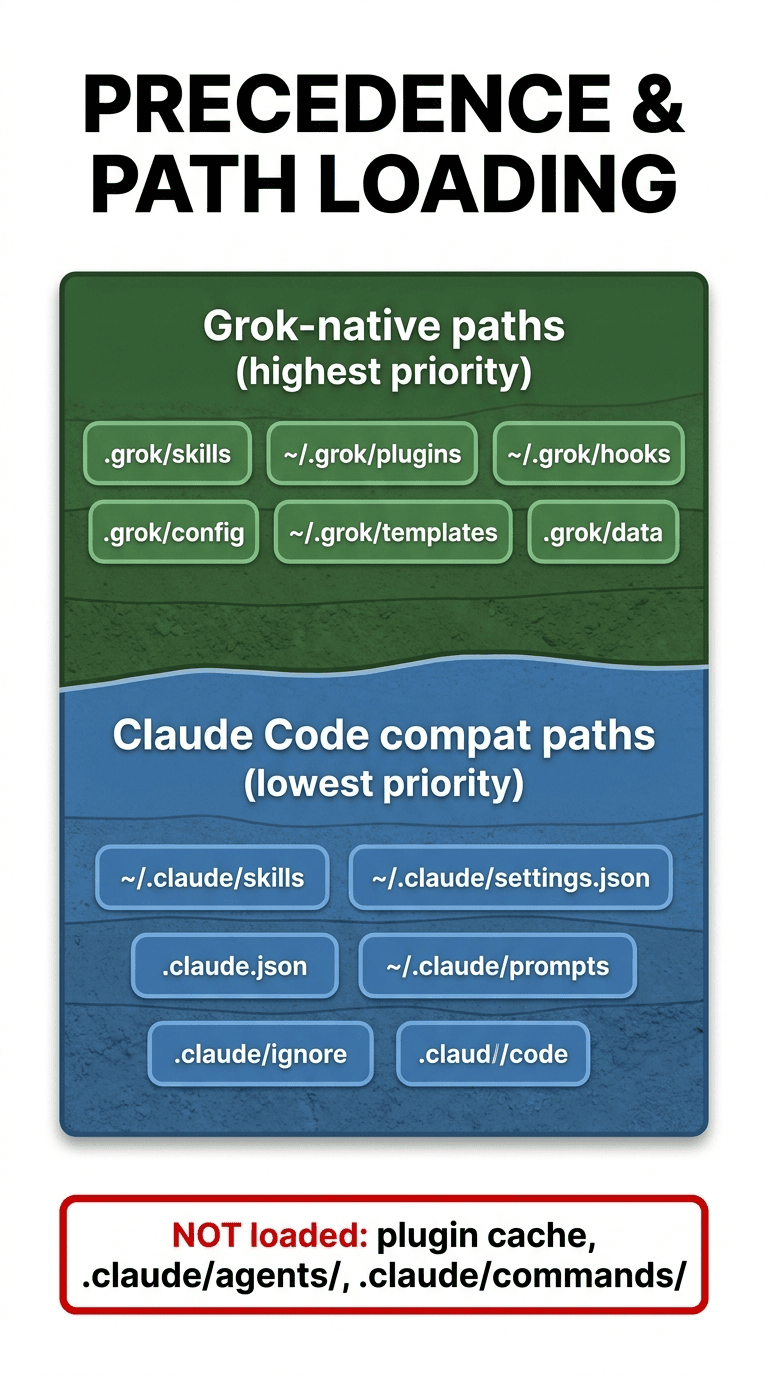
Hooks come from five possible sources, in precedence order:
~/.grok/hooks/*.json(global, always trusted)<project>/.grok/hooks/*.json(project, requires explicit trust)~/.claude/settings.json(global Claude compat, always trusted)<project>/.claude/settings.json(project Claude compat, requires trust)- Hooks inside enabled plugins (trust per-plugin)
The trust model is strict. Project-scoped hooks require explicit one-time trust via the Hooks tab (Ctrl+L → Hooks) or the /hooks-trust command. This is the same security model Claude Code uses, and it exists because a hook script can execute arbitrary code with your user permissions. A malicious repo with a .grok/hooks/ directory or a .claude/settings.json containing hook definitions cannot run code on your machine without your explicit one-time approval.
Hook scripts receive a rich environment via process variables: GROK_HOOK_EVENT, GROK_HOOK_NAME, GROK_SESSION_ID, and GROK_WORKSPACE_ROOT are always present. Plugin hooks additionally get GROK_PLUGIN_ROOT and GROK_PLUGIN_DATA. You can declare custom environment variables per hook via the env field in the JSON definition, and both the command and url fields support ${VAR} expansion. This is more expressive than Claude Code's current hook environment, where you have to read environment from the JSON payload rather than process env.
Beyond local-command hooks, Grok Build supports HTTP hooks. Instead of running a local script, you can POST the full event payload to a URL, with a configurable timeout. The format:
{ "type": "http", "url": "<https://hooks.example.com/grok-event>", "timeout": 15 }
This is the right pattern for centralized audit logging, fleet-wide policy enforcement, or notification routing through serverless functions. Claude Code also has an equivalent HTTP-hook primitive today, so this another clear extensions Grok Build adds on top of the shared substrate.
The plugin architecture
Grok Build's plugin system is a packaging and distribution mechanism. A plugin is a directory (or git repo) that bundles skills, agents, hooks, MCP configs, and optional LSP server configs into a single installable unit.
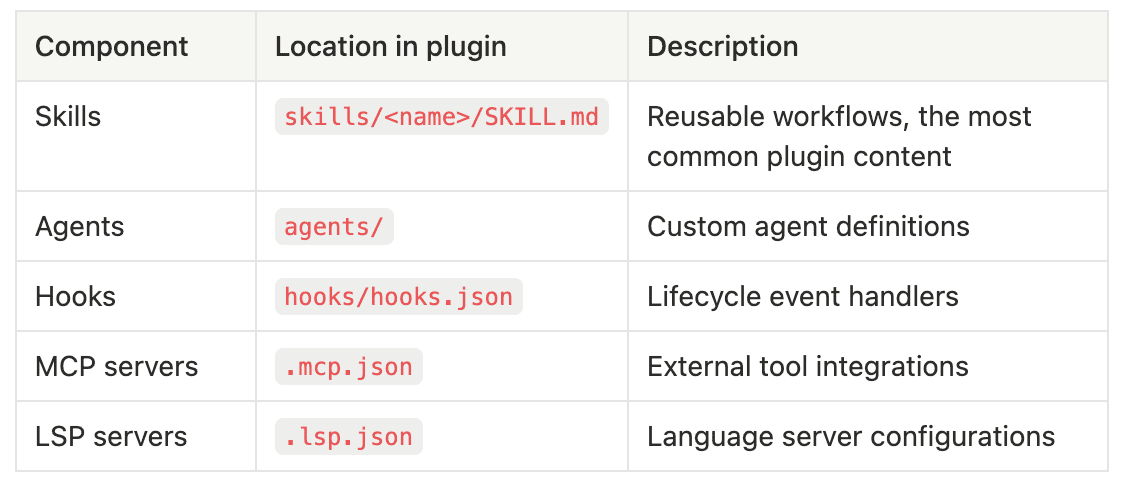
Skills are the most common plugin content. A plugin can ship one skill or twenty, and each one is invokable as /skill-name once the plugin is installed and enabled. Because skills load with zero ceremony, this is the path of least resistance for sharing reusable workflows across a team.
Agents are custom agent personas the plugin makes available. They differ from Claude Code agents in format and lifecycle: a Grok agent is a configured persona that fits into the task tool dispatch system, with role definitions like implementer, reviewer, or researcher, plus capability-mode settings that gate what the persona is allowed to do.
Hooks in hooks/hooks.json are exactly the lifecycle event handlers from the previous section, but packaged for distribution. Trust is required: even though installing the plugin doesn't auto-trust its hooks, you'll be prompted on first invocation. Plugin hooks get the additional environment variables GROK_PLUGIN_ROOT and GROK_PLUGIN_DATA, which lets scripts reliably locate their own resources regardless of where the user installed the plugin.
MCP servers in .mcp.json are picked up exactly like a project-level .mcp.json would be, except scoped to the plugin's enabled state. This is the cleanest way to ship an MCP server alongside the skills and hooks that use it.
LSP servers in .lsp.json are a Grok-Build extension. They configure language server protocol integrations, so plugins can ship language-specific tooling, like a TypeScript LSP plus a "type-aware refactor" skill, in one bundle.
Every plugin has a plugin.json manifest, validated with grok plugin validate, that declares name, version, description, and entry-point configuration. Plugins discover from three locations, in order: .grok/plugins/ (project-scoped, great for teams), ~/.grok/plugins/ (user-scoped), or a --plugin-dir CLI flag for temporary one-off mounts.
The marketplace is the distribution layer. Marketplace sources are declared in ~/.grok/config.toml as [[marketplace.sources]] entries or in ~/.grok/plugins/known_marketplaces.json. Plugins can be installed directly from git repos (including GitHub shorthand like user/repo), from team-curated private marketplaces, or from the public marketplace xAI is building. This is conceptually similar to Claude Code's plugin marketplace, but the on-disk format is different enough that direct cross-install doesn't work.
The trust model is layered: skills and agents are always available once a plugin is installed and enabled. Hooks and MCP servers require additional explicit trust, because they can execute code or make network calls. This is more granular than Claude Code's current trust model and gives you finer-grained safety for teams installing plugins from sources they don't fully control.
/loop and the scheduler
/loop [interval] <prompt> is the most unusual native primitive in Grok Build, and it's the one I think most Claude Code users will adopt fastest once they see it. At first glance, it is the same as Claude Code's /loop.
The command creates a recurring scheduled task that runs the given prompt at regular intervals. Examples from the docs:
/loop 5m Check the test suite and report any new failures
/loop 2h Summarize new commits since the last check
/loop 60s Check if the dev server on localhost:3000 is healthy
The behavior is straightforward. The loop fires immediately on creation, then repeats on the schedule. Loops auto-expire after 7 days. You can have up to 50 active scheduled tasks at once. Each fire creates a fresh agent execution, so context doesn't accumulate across runs unless you explicitly persist it (via a skill or a side file).
Under the hood, /loop is a thin wrapper around scheduler_create, a lower-level agent tool that exposes more control: fireImmediately (boolean), recurring (boolean), and durable (boolean) options. Related tools include scheduler_list and scheduler_delete. There's also a monitor tool that's the real-time streaming counterpart to /loop, useful for log tailing, file watching, or anything where you want continuous output rather than periodic firing. This goes beyond what the current Claude Code /loop provides.
The user-facing way to see active loops is the Queue pane, toggled with Ctrl+;. The Queue shows all scheduled and background work, with status, next-fire time, and a quick way to cancel.
This exact pattern doesn't exist in Claude Code natively today. Claude desktop does ahve /schedule. Claude Code does have /loop. But the exact semantics is different. Claude can more closely approximate this form the Claude desktop app, but Grok Build seems ahead of Claude Code. Claude Code does have a*** /loop ***command, but the architecture is tied to session state. Grok Build's /loop is a single-keystroke way to convert any prompt into a recurring agent run, and it changes the kinds of workflows you reach for. "Watch the build for the next two hours and ping me when it goes red" stops being a yak-shave and starts being a one-line command.
/btw
/btw <message> sends a "by the way" message to the agent without interrupting its current task. The agent receives the message as an aside that gets folded into its current context, rather than as a new primary instruction.
In the Claude Code world, this same command exists: /btw. But in Claude Code, the prompt and results stays our of your current session context. Grok Build docs were not clear if /btw gets added to the session's context window or not. For Claude Code, this is part of the context hygiene approach.
This is genuinely useful in the middle of a long agent run. Say Grok Build is in the middle of executing a 12-step plan and has just completed step 4. You realize step 7 should also handle a specific edge case. Without /btw, your options are to interrupt with Ctrl+C, re-explain context, and restart, or to wait for the plan to finish and then run a follow-up. With /btw also handle the empty-list case in step 7, the message arrives as a context update, and the agent threads it into its ongoing work.
This is the kind of command that sounds trivial in a feature list but quietly changes how you collaborate with the agent.
My favorite recent feature of Claude Code, and I think they copied it from Codex is the /goal command. With the /goal command you state what your goal is: all tests pass, the UI login screen works, the module has been fully integration tested and published to PyPi. Then Claude Code (assuming you have proper verification) will continue to iterate and loop until it reaches that goal, then stop. I have set goals that take hours and hours to run. This my most favorite features. I assume Grok Build will get it soon.
Gotchas you'll hit in the first hour
There's a category of things that won't break Grok Build but will surprise you on first use. Saving you the hour of figuring these out is one of the reasons to read this article all the way through.
Trust prompts on first project hook load. The first time you cd into a project that has .claude/settings.json with hooks defined, or .grok/hooks/ files, Grok Build will pause and ask you to explicitly trust them. This is a one-time prompt per project, but it's modal and easy to misread. The TUI will say something like "This project contains hooks. Trust them? (Yes / No)" and pressing Enter without reading will sometimes default to No. If your hook isn't firing later, this is the first thing to check via /hooks-list and /hooks-trust.
Plugin cache divergence. Your Claude Code plugins won't load. If you've been heavily invested in plugins installed via claude plugin add from the Claude marketplace, they're sitting in ~/.claude/plugins/cache/ and Grok Build is silently ignoring them. The skills inside those plugins, if any are also installed standalone in ~/.claude/skills/, will load. But the plugin-packaged versions stay invisible. If you can't find a Claude Code skill in Grok Build that you know is installed, check whether it was installed standalone or only through a plugin.
The .claude/agents/ silent miss. Same pattern as plugins, less obvious. If you've built a library of named Claude Code subagents in .claude/agents/, Grok Build won't list them in the persona picker. There's no error. The agent picker just shows Grok's native personas. The fix is to redesign them as Grok personas in config.toml or .grok/agents/, or to invoke specific subagent behavior through a skill instead.
ACP edge cases. Grok Build supports the Agent Coordination Protocol (ACP) for talking to external clients like OpenCode and certain IDE integrations. ACP mode is launched with a CLI flag rather than from inside the TUI. If you're trying to bridge Grok Build into a tool that expects ACP and the bridge isn't working, the most common cause is that you launched Grok Build in TUI mode and the external tool is trying to talk to an ACP listener that doesn't exist.
Daily release notes mean daily behavioral drift. xAI committed to daily release notes, which is great in principle and disorienting in practice. Behaviors that worked yesterday may have slightly different defaults today. The release notes pane (accessible from the TUI) is required reading if you depend on Grok Build for production-adjacent work. Pinning to a specific version is currently supported via grok --version <pin> but is undocumented, and pin syntax is subject to change. Be aware that the floor is moving daily.
Heavy-tier throttling reductions. Even at the Heavy tier, daily limits are being quietly recalibrated per the Piunikaweb tracking. If you hit a wall mid-session that wasn't there a week ago, check the latest release notes and the SuperGrok Heavy benefits page. The marketing language change from "near-unlimited usage" to "highest usage limits" is the polite version of what's happening. Plan capacity assuming the limits will tighten further over the next two quarters as xAI calibrates around real usage patterns.
Side-by-side workflows
Three workflows where you can see the surfaces overlap and diverge in concrete code.
Workflow A: A safe-shell guard hook
Both harnesses can run the same hook script. Here's the configuration in ~/.claude/settings.json:
{
  "hooks": {
    "PreToolUse": [
      {
        "matcher": "Bash",
        "hooks": [
          { "type": "command", "command": "bin/safe-shell.sh", "timeout": 5 }
        ]
      }
    ]
  }
}
And the script bin/safe-shell.sh:
#!/bin/sh
INPUT=$(cat)
CMD=$(echo "$INPUT" | jq -r '.toolInput.command // empty')

if echo "$CMD" | grep -qE '(rm -rf /|mkfs|dd if=|:\(\)\{ :|& \};:)'; then
  echo '{"decision": "deny", "reason": "Blocked potentially destructive command"}'
  exit 2
fi
echo '{"decision": "allow"}'
In Claude Code, the "matcher": "Bash" directly matches the tool name Bash. In Grok Build, the matcher still says Bash but is auto-aliased to Grok's native run_terminal_cmd tool (think of it as a thin translation layer pretending Claude's tool names are still in effect). Both harnesses fire the same script with the same stdin payload structure, and both honor the explicit deny decision. The script doesn't need to change. The hook config doesn't need to change. You trust the project once per harness. That's the entire port. I'll be honest, the first time I confirmed this end-to-end I went looking for the catch, because nothing in the agentic-CLI world has ported this cleanly in the last eighteen months. There wasn't one.
Workflow B: An MCP server config
Suppose you have a Notion API MCP server configured in .claude.json at your project root:
{
  "mcpServers": {
    "notion": {
      "command": "npx",
      "args": ["-y", "@notionhq/notion-mcp-server"],
      "env": {
        "NOTION_API_KEY": "secret_..."
      }
    }
  }
}
Claude Code reads this file by default. Grok Build also reads this file by default, because .claude.json is in its native MCP discovery list. If you also have a ~/.grok/config.toml declaring a Notion server with a different command or env, the Grok-native config wins on conflict. The practical advice: keep one source of truth (.claude.json works fine), don't duplicate. If you need different MCP configurations per harness for some reason, use the Grok-native config to override only what differs.
Workflow C: A slash command, ported to a skill
This is the workflow where you have to do real work, because slash commands don't carry over.
In Claude Code, a custom command lives at .claude/commands/check-tests.md:
---
name: check-tests
description: Run the project test suite and explain failures
---

Run `task test:unit` in the project root. If any tests fail, summarize the
failures and propose root causes. Otherwise report success in one line.
In Grok Build, you re-author this as a skill at .grok/skills/check-tests/SKILL.md:
---
name: check-tests
description: Run the project test suite and explain failures
---

Run `task test:unit` in the project root. If any tests fail, summarize the
failures and propose root causes. Otherwise report success in one line.
The content is identical. The location moves from .claude/commands/ to .grok/skills/<name>/. The invocation changes from /check-tests (Claude command) to /check-tests (Grok skill, same name because skills expose themselves as /skill-name). Functionally, your team's UX doesn't change. The maintenance overhead is that you now have two copies if you want to support both harnesses, or you pick one home and stop maintaining the other. My recommendation: pick .grok/skills/ as the primary, because skills load in both harnesses (Grok-native plus Claude Code via the SKILL.md format), while .claude/commands/ only loads in Claude Code.
What you can't bring over
Five categories don't port cleanly. None of them are deal-breakers, but you should know about them.
Plugin cache. As covered above, ~/.claude/plugins/cache/ is invisible to Grok Build. If your team installs plugins through the Claude Code marketplace, those plugins need to be repackaged as Grok plugins to work natively. The skills inside, if also installed standalone, do load. The workaround is to maintain a parallel ~/.grok/plugins/ collection or to install the same plugins from a git-based Grok marketplace source.
Agent definitions. Claude Code's .claude/agents/*.md files are not discovered. Grok's persona system is conceptually similar but uses a different on-disk format declared in config.toml or .grok/agents/. The port is rewrite, not copy. Budget meaningful time if you have a deep agent library.
Slash commands. .claude/commands/*.md files are not discovered. Re-author as skills in .grok/skills/<name>/SKILL.md. The content typically ports as-is. The friction is mental model: a Claude command is a thin wrapper, a Grok skill is a more general capability, so the framing of the markdown shifts slightly.
The subagent system overall. Grok Build's parallel sub-agents are coordinated through the task tool and ACP, not through markdown agent files plus a "spawn this agent" CLI invocation. If your Claude Code workflows lean on claude -p or similar headless subagent spawns, those patterns don't have direct translations. The closest Grok-native pattern is the scheduler_create agent tool plus persona dispatch through task.
Settings beyond hooks. Theme, model preferences, output style, default permissions, and similar ~/.claude/settings.json keys are not honored by Grok Build. Configure these through ~/.grok/config.toml separately. The two configs can coexist without conflict, but they don't share state.
Verdict: when to use which
Try working with both for twelve days side by side on real work, if you like Grok Build, here's how I'd advise the decision.
Stay on Claude Code if you're a solo developer or small team on the $20 Pro tier and you don't have $99-$299/month of budget room. The benchmark gap (87.6% vs 70.8%) and the maturity gap mean Claude Code remains the safer pick for production-adjacent work. Conversational reasoning, "explain this codepath" workflows, and deep multi-file refactoring are still Claude Code's strengths.
Add Grok Build if you're on a funded team that can absorb the Heavy-tier cost (as reported by secondary coverage), your work skews heavily toward parallel orchestration (the proactive Plan Mode entry plus the structured plan-file-then-approval dialog is genuinely useful here), and you want to be near the front of where the agentic CLI space is heading. The compatibility layer means you can experiment without losing what you've built in Claude Code, and the daily release cadence means the gaps you hit today may be closed within weeks.
Run both if your team has the budget and you have meaningful breadth of workloads. The compatibility layer specifically enables this: your skills, project rules, hooks, and MCP servers all work in both harnesses, so the switching cost is genuinely low. Pick whichever harness fits the immediate task better. Claude Code for the deep-dive code-review session. Try Grok Build for fast parallel multi-file orchestration. Compare and contrast, and please share your experiences.
The bigger picture is worth naming. Twelve days into Grok Build's beta, the agentic CLI space is visibly converging on a shared file-format substrate. Skills, project rules, hooks, and MCP are becoming portable across vendors. The competition is shifting up the stack: model quality, plan-mode polish, parallel-orchestration sophistication, scheduler primitives like /loop, and ergonomics like /btw are the norm. The harness that wins won't be the one with the most exclusive features. It will be the one with the best execution on the shared substrate plus the most useful native extensions on top. Grok Build is the loudest signal yet that vendors believe this thesis, and it's the reason the next 90 days of release notes will matter more than today's SWE-bench gap.
What's next
I'm planning a follow-up piece, "Porting Your Claude Code Setup to Grok Build: A Migration Playbook," that will walk through the rewrites in detail (agents, slash commands, plugins) with copy-paste code. This article was about the strategic picture and the surface area. The next one is about the hands-on work.
If you're already running both harnesses and have observations or porting war stories worth sharing, I'd love to hear them. The agentic CLI space is moving fast enough that lived experience is more useful than vendor documentation, and the compatibility-layer thesis only holds up if real users keep validating it.
The bet xAI is making is that you'll see your Claude Code skills already loaded when you open Grok Build for the first time, and that moment will tip you toward "I'll try this" instead of "I'll come back later." Twelve days in, that bet looks like it's working better than the skeptics expected and worse than the boosters claimed. Which is about where you'd expect a credible competitor to land in its first month, and it's the strongest hint that the next 90 days of release notes will matter more than today's SWE-bench number does.
If you take one thing away: the question is no longer "Claude Code or Grok Build." For most teams who can afford it, the question is "which of these is the right tool for the next 45 minutes of work." The compatibility layer is what makes that question askable in the first place. Use it.
About the Author — Claude Certified Architect
Rick Hightower is a former Senior Distinguished Engineer at a Fortune 100 company, focusing on delivering ML / AI insights to front-line applications, and a practitioner building multi-agent production systems. Rick is a Claude Certified Architect. Follow him on Medium for more hands-on agent engineering content. You can also book him to speak and train your team: Check out Rick Hightower's SpeakerHub.
Rick created Skilz, the universal agent skill installer that supports 30+ coding agents, including Claude Code, Gemini, Copilot, and Cursor, and co-founded the world's largest agentic skill marketplace. Connect with Rick Hightower on LinkedIn or Medium. Check out SpillWave, your source for AI expertise.
Rick has been actively developing generative AI systems, agents, and agentic workflows for years. He is the author of numerous agentic frameworks and developer tools and brings deep practical expertise to teams adopting AI. He enjoys writing about himself in the 3rd person.
Rick also wrote a Claude Certified Architect (CCA) series of articles that have a lot of useful information on writing agentic AI systems. Many ideas captured in the CCA and the exam prep Rick wrote echo what you see in this article. If you want to improve your ability to create well-behaved AI agents, studying for the CCA Exam is a good place to start.
CCA Exam Prep on Agentic Development
- Claude Certified Architect: The Complete Guide to Passing the CCA Foundations Exam
- CCA Exam Prep: Mastering the Code Generation with Claude Code Scenario
- CCA Exam Prep: Mastering the Multi-Agent Research System Scenario
- CCA Exam Prep: Structured Data Extraction
- CCA: Master the Developer Productivity Scenario
- Claude Certified Architect: Master the CI/CD Scenario
- CCA Exam Prep: Mastering the Customer Support Resolution Agent Scenario
- Get the complete reading list for CCA-F exam prep articles from this Claude Certified Architect Exam Prep list.
Rick also wrote a series on harness engineering and how to improve agentic systems using harness engineering for feedback loops and adversarial agents. These articles also go hand in hand with this article.
Harness Engineering Articles
- The $9 Disaster: What Anthropic's Harness Design Paper Teaches Us About Building Autonomous AI
- Harness Engineering vs Context Engineering: The Model is the CPU, the Harness is the OS
- LangChain Deep Agents: Harness and Context Engineering: Memory, Skills, and Security
- Beyond the AI Coding Hangover: How Harness Engineering Prevents the Next Outage
- LangChain's Harness Engineering: From Top 30 to Top 5 on Terminal Bench 2.0
- Anthropic's Harness Engineering: Two Agents, One Feature List, Zero Context Overflow
- OpenAI's Harness Engineering Experiment: Zero Manually-Written Code